

2026’s Top Worship Software Tools To Lead Music

10 Best Worship Software Shortlist


Worship software can make or break your Sunday morning worship service. I've played on countless worship team (I'm a bass player), and I know first hand, without the right tools:
- The A/V team's juggling Dropbox, YouTube, CCLI, and hope.
- Slides lag mid-worship and your musicians fumble the lyrics as a result.
- Song list changes bring immediate confusion.
Most often, breakdowns come from duct-taping tools together that were never made for a live, Spirit-led service.
That’s why I hope this list of tools is helpful for you.
As a pastor who’s tested, compared, and wrestled with the options firsthand, I’ve ranked the best worship software tools to help you find one that fits your church’s rhythm—without the headaches.
Why Trust Our Software Reviews
We’ve been testing and reviewing church management software since 2020. As church leaders ourselves, we know how critical and difficult it is to make the right decision when selecting software.
We invest in deep research to help our audience make better software purchasing decisions. We’ve tested many tools for different church management use cases and written over 1,000 comprehensive software reviews. Learn how we stay transparent & our software review methodology.
The 10 Best Church Worship Software Summary
| Tool | Best For | Trial Info | Price | ||
|---|---|---|---|---|---|
| 1 | Best for church-wide worship management | 30-day free trial + free plan available | From $72/month | Website | |
| 2 | Best for integrated church management | Not available | Pricing upon request | Website | |
| 3 | Best rehearsal tool | 30-day free trial available | From $15/20 members/month | Website | |
| 4 | Best for MacOS users | Not available | From $8.33/seat/month | Website | |
| 5 | Best online sheet music catalog | Not available | Website | ||
| 6 | Best for MainStage worship patches and templates | Not available | Website | ||
| 7 | Best for volunteer management | 30-day free trial | Website | ||
| 8 | Best song library | Not available | Website | ||
| 9 | Best with custom AI trained on your sermons | 14-day free trial | From $49/month | Website | |
| 10 | Best for chord sheets and lyrics | Not available | Website |
-

ChMeetings
Visit WebsiteThis is an aggregated rating for this tool including ratings from Crozdesk users and ratings from other sites.4.9 -
Gracely
Visit WebsiteThis is an aggregated rating for this tool including ratings from Crozdesk users and ratings from other sites.4.8 -
Text In Church
Visit WebsiteThis is an aggregated rating for this tool including ratings from Crozdesk users and ratings from other sites.4.6


The Best Church Worship Software Reviews
Here’s a brief description of each church worship software on my list, showing what it does best, plus screenshots to showcase some of the features.


Tithe.ly is a collection of digital tools designed to support churches in managing worship activities, member engagement, and church operations. It offers features like service planning tools to help organize worship services, custom church apps for keeping your congregation connected, and digital giving options to support the financial side of worship and ministry.
If you’re looking for worship software that helps you coordinate services, manage your congregation, and handle communications in one place, then Tithe.ly is a strong choice. Its service planning tools allow you to organize worship sets, manage volunteers, and schedule services efficiently. With Tithe.ly’s custom church app, you can share sermons, updates, and resources with your congregation throughout the week. Additionally, Tithe.ly provides tools for event management and volunteer scheduling, making it easy to keep all aspects of your worship services running smoothly.

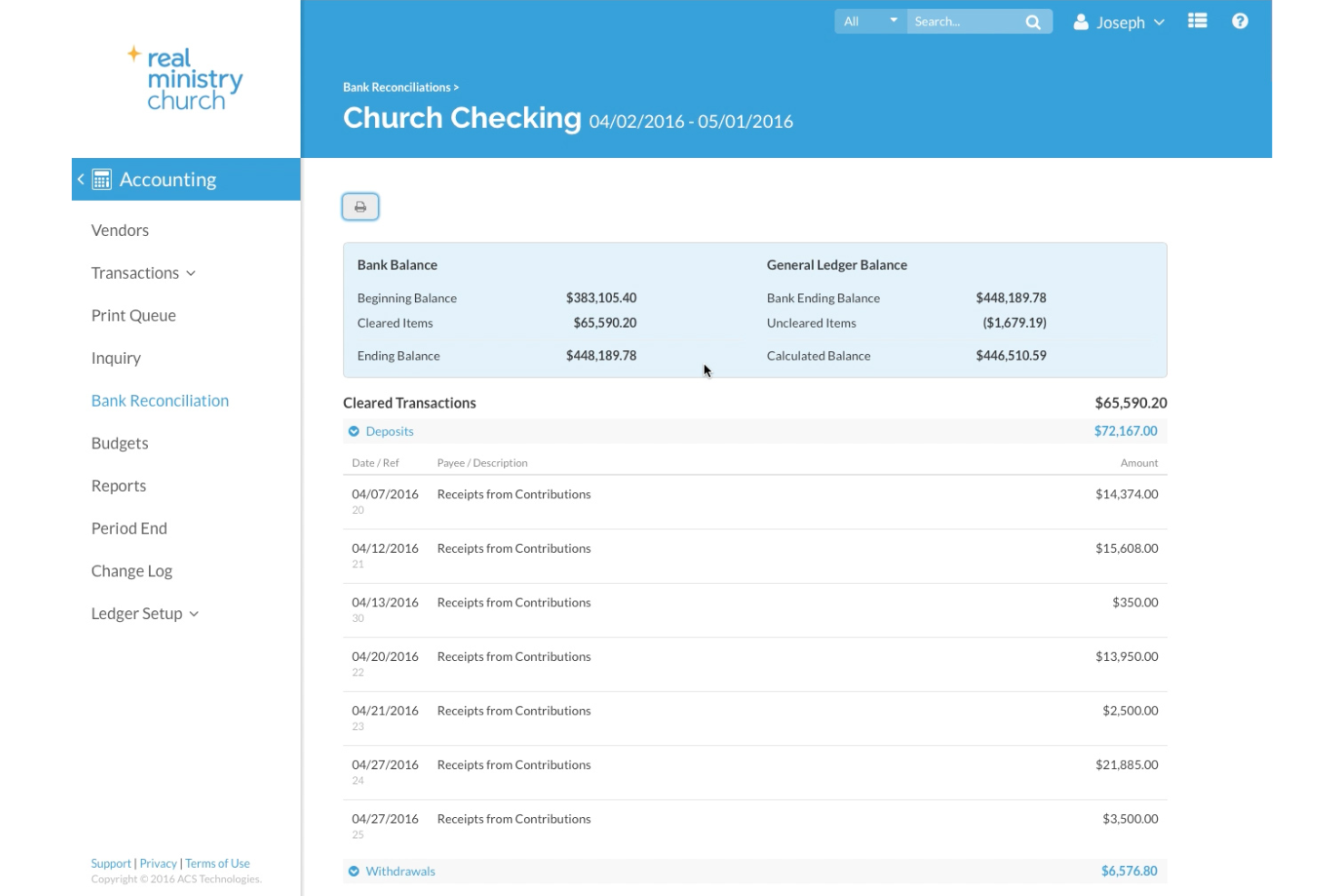
Realm by ACS Technologies is a cloud-based church management software platform that offers integrated tools and services for ministries, administration, and pastoral care. I chose Realm because it offers a wide range of integrated tools and services for all aspects of church ministry, making it the best choice for managing and growing a church community. The software stands out for its real-time dashboards and reports, as well as its user-friendly tools.
The platform provides a suite of tools for various aspects of church management, including pastoral care, administration, children's and youth ministry, education and discipleship, media and communications, events, worship planning, and stewardship. Realm also offers mobile applications, such as Realm Connect for congregation members and Realm Shepherd for pastoral care, which enable church staff and members to stay engaged with church activities and manage their contributions and personal information. The software supports church administration by offering features like automatic data backup, role-based permissions, and financial transaction security. Realm has been serving churches for over four decades and is recognized for its utility in everyday church operations, aiming to facilitate the management of events, congregation engagement, and access to real-time data and reports.

Planning Center is a full suite of worship tools you can use to plan, organize, and execute worship services to keep your congregation engaged. It has a volunteer scheduling feature so you can schedule people according to their abilities and preferences. You can also use Planning Center to communicate with worship team members when sending scheduling requests or sending updates through text messages, emails, or push notifications.
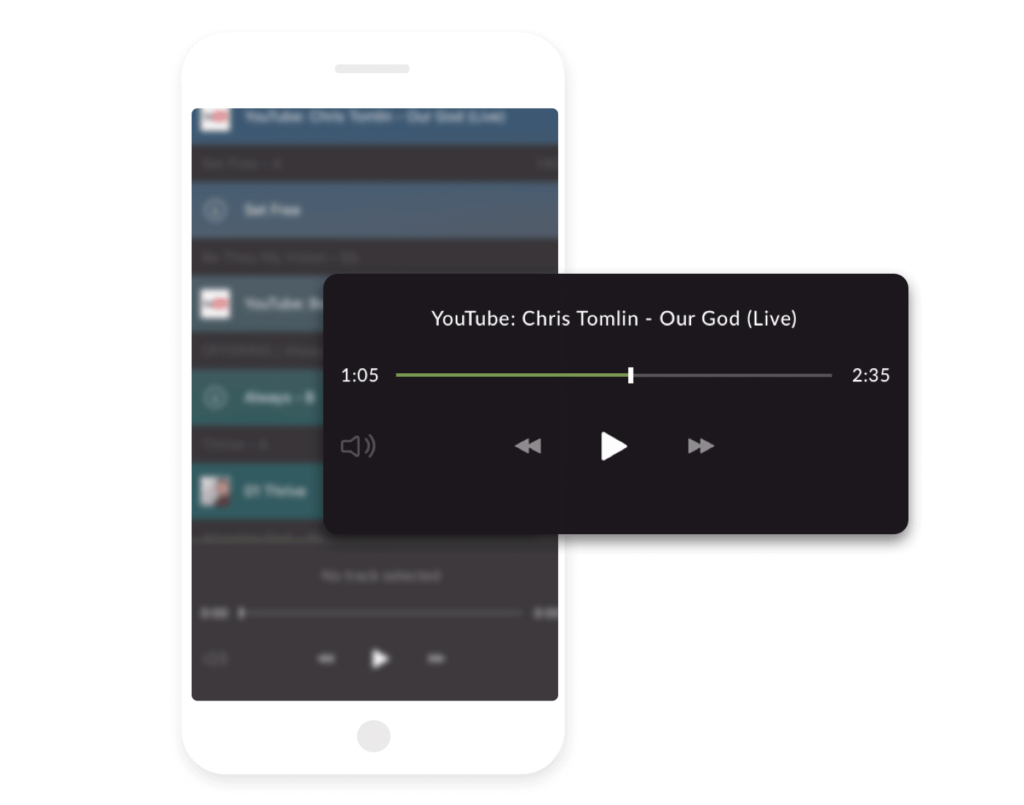
Rehearsals are important to ensuring that worship services proceed smoothly, and Planning Center is the best church presentation software for you if you need an excellent rehearsal tool. It has an extensive song library you can use to ensure lively worship services, and you can upload your songs if you want to. Planning Center’s mobile app has an integrated media player so worship team members can listen to audio or watch videos to aid their performance even if they don’t have VLC or other video players installed.

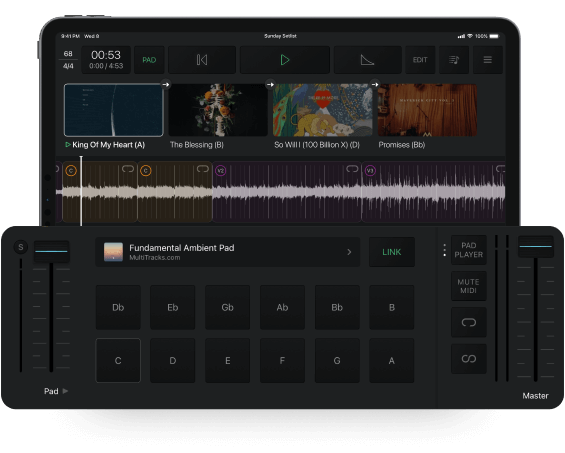
MultiTrack is a collection of digital tools giving you the ability to shape your church’s worship music. It has ProPresenter templates ensuring you have the right lyrics and chord charts for your setlist. Cloud Pro feature gives you a platform to store all your tools and resources for easy access, not just for you but for your entire team.
If you want worship software specifically designed for your iOS and MacOS devices, then MultiTrack is your best option. It allows you to edit, loop, or jump to any section of the track you’re playing so you can customize your music as needed. MultiTrack also enables you to create, edit, and save multiple setlists, so you have a ready-to-use setlist for a wide variety of events and activities.
Sunday Sounds works with Logic Remote Control letting you remotely control basic Mainstage functionalities like adding, selecting, or playing patches.

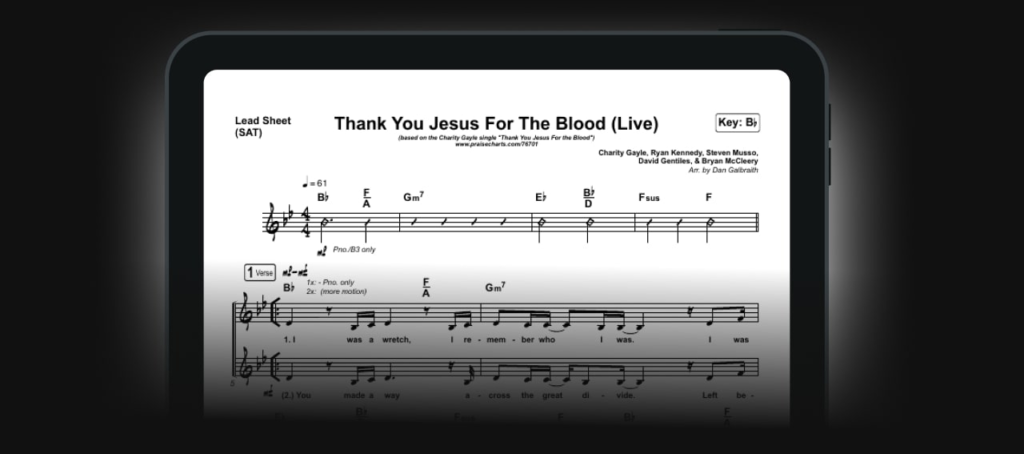
PraiseCharts is a worship tool where you can obtain audio backing tracks for your worship songs. You can use PraiseCharts to get song-specific guitar patches, so your songs sound exactly like professional recordings. PraiseCharts also lets you access worship readings you can use on your worship services or stream on your church website.
Sheet music is critical for musicians, and if you want to have access to an extensive catalog of sheet music, then PraiseCharts is the best worship software for your church. With PraiseCharts, you can access lyrics, chords, vocal chart arrangements, and orchestrations for praise and worship songs for your services. This is an excellent resource your worship band can use, especially when learning songs unfamiliar to them.

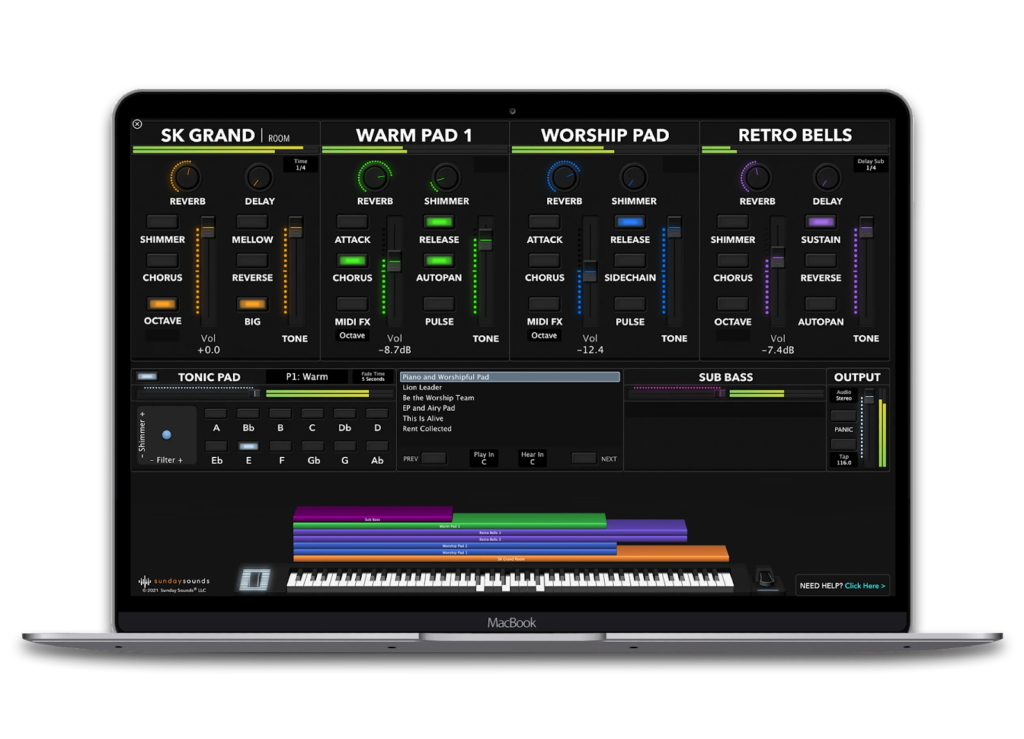
Sunday Sounds is music software with key templates and song-specific patches you can use to elevate your worship services. It has a massive sound library to create your songs and customize your worship music, including ambient sounds, bass, guitar, percussion, vocals, and synth. Sunday Sounds have pre-programmed templates and easy-to-use workflows so you can spend less time organizing music for worship services and more time ministering to your flock.
Musicians rely on Mainstage to turn their computers into powerful multi-instrument systems, and Sunday Sounds is the best worship software for you if you want to get the most out of your Mainstage. Sunday Sounds has more than 250 worship patches giving you the power to create songs and sounds to give your members a service to remember. It has a built-in Tonic Pad player allowing you to glue together the sound of your band and underscore the quieter moments in your performance.

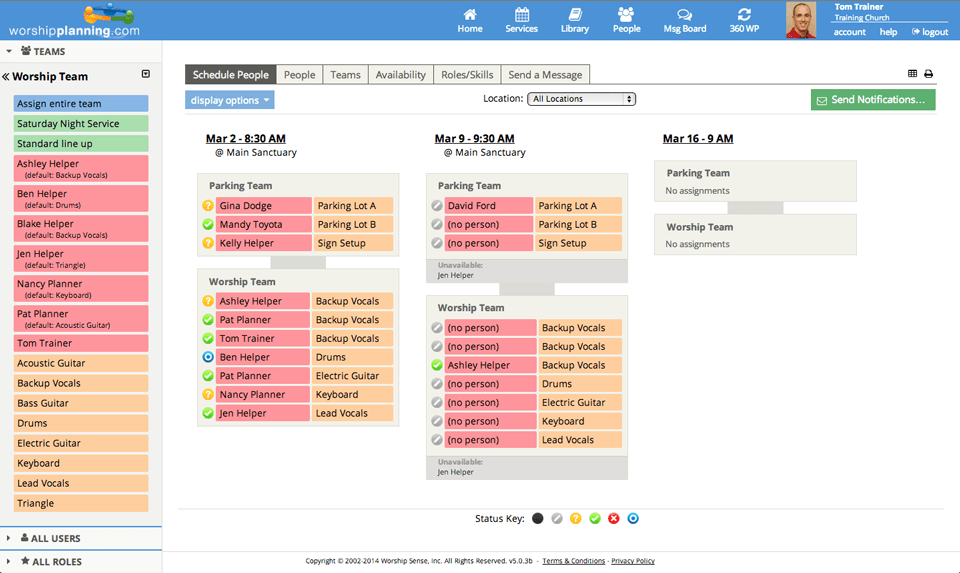
Worship Planning is a cloud-based software for planning and organizing worship services. It has a song organizer letting you organize, import, and export songs for use during worship services. Worship Planning comes with file storage, where you can store files and documents in a secure location. You can use Worship Planning to generate virtual music sheets for better organization and to help you save paper.
Volunteerism is at the heart of any congregation, and Worship Planning is the best worship software if you want one with an excellent scheduling feature. You can use Worship Planning to schedule people for multiple services simultaneously, helping you save time working on worship plans during busy seasons. Worship Planning allows the customization of roles if you need to assign human resources to a special role.
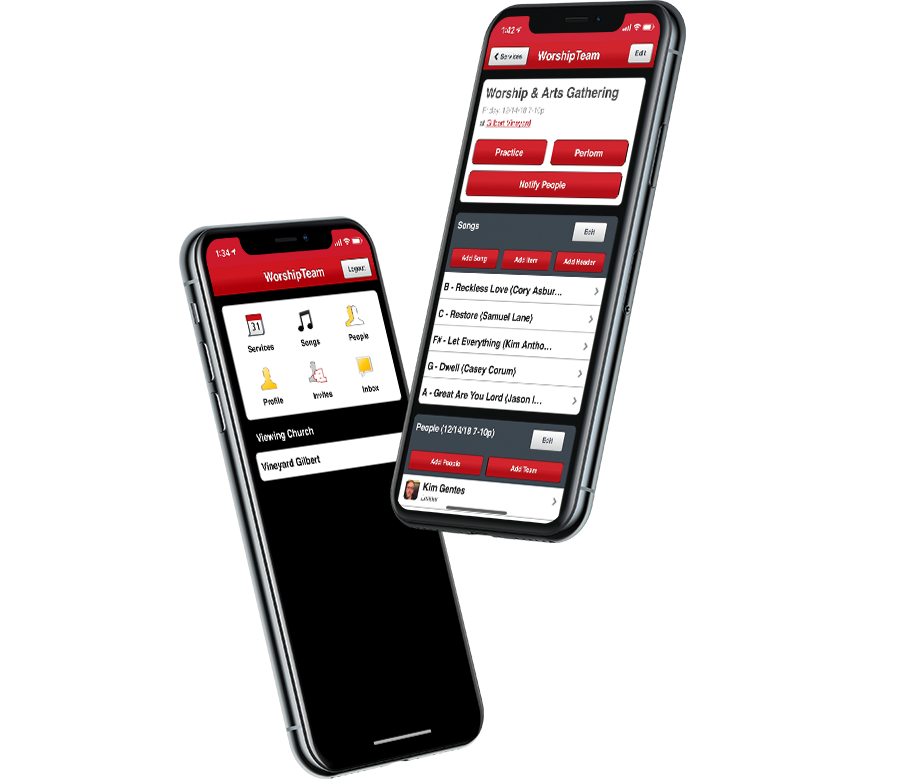
WorshipTeam is an online service you can use to run your worship ministry in a centralized location. You can use WorshipTeam to schedule and notify worship team members and musicians so they can accept or decline assignments and avoid conflicts. WorshipTeam is a cross-platform software accessible on your Windows or Mac PC and has a mobile app version that works on Android and iOS devices.
WorshipTeam has an extensive library with more than 14,000 songs you can use to keep your worship services lively and engaging. What makes this even better is that you can upload your songs to your WorshipTeam library, and your WorshipTeam account comes with unlimited storage to upload as many songs as you want. On top of the massive library of songs, WorshipTeam adds new songs regularly, giving you access to the latest worship songs.

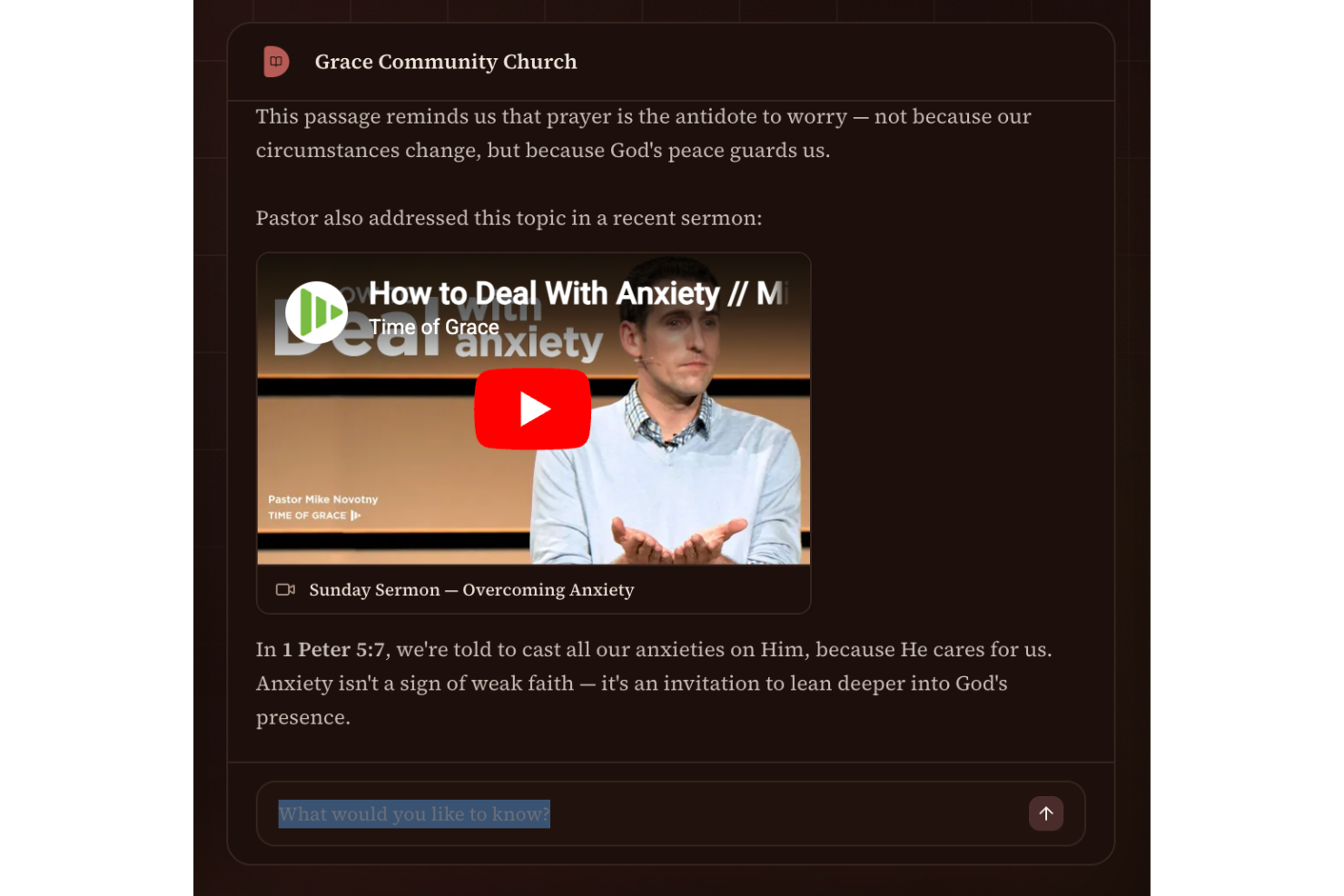
Doctrinally AI is a worship software platform that uses custom-trained AI to organize, search, and interact with your church’s sermons, documents, and media content.
Who Is Doctrinally AI Best For?
Pastors, church staff, and ministry teams who need a searchable, AI-powered archive of their sermons and teaching materials.
Why I Picked Doctrinally AI
I picked Doctrinally AI as one of the best because it lets me train the AI on my own sermons and church documents. I can upload years of teaching content, and the platform builds a custom knowledge base that reflects my church’s theology and language. My team is able to search and interact with this archive using natural language, making it easy to find relevant material for study or ministry needs.
Doctrinally AI Key Features
- Automated YouTube sermon syncing: Connects to your church’s YouTube channel to import new sermons automatically.
- Source citation in responses: Provides direct links to sermon transcripts or documents when answering questions.
- Document upload support: Lets you add PDFs, Word docs, and other files to expand your searchable archive.
- Team member access controls: Allows you to manage permissions for staff and volunteers within your church.
Doctrinally AI Integrations
Native integrations are not clearly documented. An API is available for custom integrations.
Pros and Cons
Pros:
- Allows team-based access and permission controls
- Supports document uploads for sermon archives
- Custom AI adapts to your church’s language
Cons:
- Lacks mobile app for on-the-go access
- No built-in worship planning or scheduling features

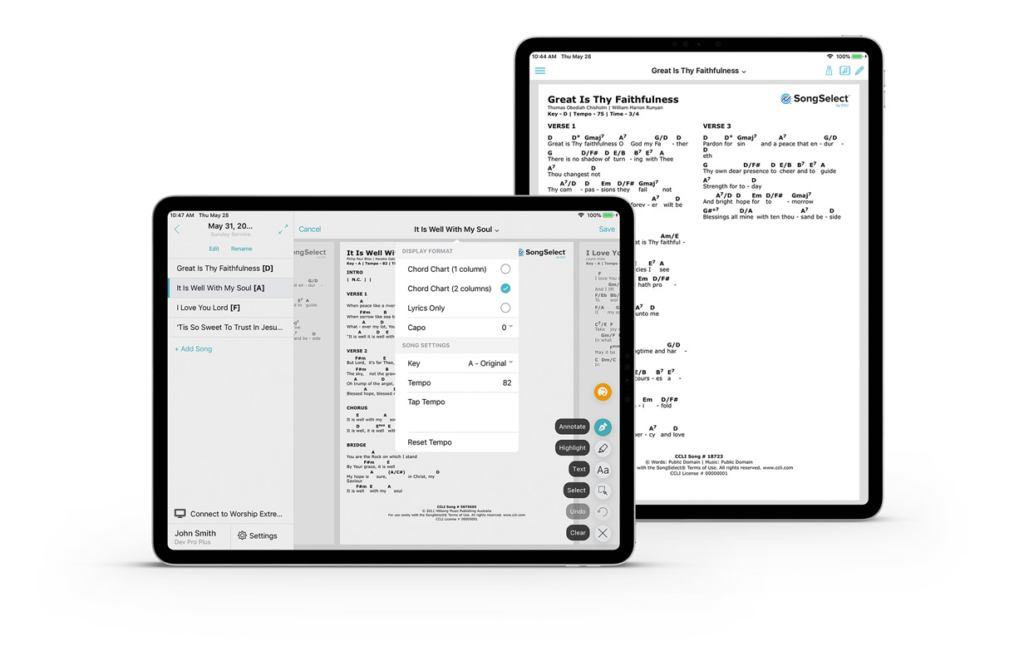
Worship Extreme Music Stand is a chord sheet and lyric app that works on Android and iOS mobile devices allowing users to study their setlist anywhere. This app will enable you to switch between lyrics only, one column chord charts, two-column chord charts, and Nashville number charts so you can use the chord charts your team is most comfortable with. Another great feature worth noting is that you get access to new songs and arrangements from worship leaders worldwide, allowing you to update your music repertoire during worship services.
Worship Extreme Music Stand is the best software solution if you want a reliable source of chord charts and lyrics sheets that your music team can use. Chord charts can help ensure that all members of your music team or worship band play in sync to deliver excellent performances. What’s even better is Music Stand allows users to put notations on digital chord charts so your musicians can customize arrangements to suit your ministry’s preferences.
Other Worship Software
- Transposr
Free worship software
- WorshipTrac
For sermon scheduling
- Proclaim
For worship presentations
- MinistryPlatform
For organizing worship schedules
- Fellowship One
Integrated ChMS functionality


How I Evaluate Worship Software
On Thursday night, a worship pastor builds Sunday's setlist, shares chord charts, and preps the slides a volunteer will advance live on stage. I think about this category in two layers: the baseline every tool has to clear, and the differentiators that actually separate one pick from another.
Core Functionality (Table Stakes for This List)
For worship software, the core functionality I test and evaluate is:
- Lyrics and scripture display: I check whether the tool can project worship song lyrics and Bible verses with real-time cueing during a live service. I also look for support across multiple Bible translations and CCLI SongSelect import so your team isn't manually retyping songs.
- Service flow builder: I test how each tool handles assembling a full order of service, from the opening song through announcements, sermon, and closing. Drag-and-drop ordering and reusable templates for recurring formats like a Sunday morning or midweek service are what I look for here.
- Multi-screen output: I evaluate whether the software supports at least a main audience display and a separate stage/confidence monitor. Worship leaders and musicians need to see upcoming lyrics or notes without the congregation seeing the same view.
- Multimedia playback: I run video bumpers, countdown timers, and motion backgrounds with text overlays to see how each tool handles mixed media within the service flow. A tool that stutters on a 1080p motion background during live worship isn't ready for Sunday.
- Song and media library: I look at how each platform stores and organizes your growing catalog of songs, backgrounds, and video clips. Searchable metadata like key, tempo, CCLI number, and last-used date saves real time when you're building next week's set.
- Team scheduling: I test how the tool assigns musicians, vocalists, and tech volunteers to specific service dates and sends confirmation requests. The difference between a smooth Wednesday rehearsal and a scramble is whether your drummer confirmed three days ago or never saw the request.
If a tool can't do these things reliably, it didn't make the cut regardless of what else it offers.
Standout Features (What Separates the Picks)
I also look for standout features like NDI livestream integration, built-in media libraries, syncing with church management softwares, cloud-based collaboration, or simplified “volunteer mode” operation. I test how these save your team real prep time, smooth handoffs, and handle high-pressure live production moments.
What I Weigh Beyond Features
I evaluate how each tool fits different church sizes, from a 50-person parish running one laptop to a multi-campus operation syncing content across locations. Pricing model matters too — a one-time license vs. monthly subscription hits a small church budget differently. I also weigh volunteer-friendliness, platform support, offline reliability, and whether onboarding a new operator takes one rehearsal or a month.
How To Choose Church Worship Software
You’re not buying software for fun. You’re solving problems. Here’s what to prioritize—and what happens when you don’t:
1. Ease of Use If your least tech-savvy volunteer can’t run it, it’s the wrong tool.
- Avoid: Tools that need hours of training or come with 100-page manuals.
- Look for: Drag-and-drop flows, clean design, and fast onboarding.
2. Built-In Scheduling + Team Comms... If you’re still texting practice times, your system is broken.
- Avoid: Software that ignores the human side of worship.
- Look for: Auto-reminders, availability tracking, and shared calendars.
3. Customization for Your Style... Your church isn’t generic—your services shouldn’t be either.
- Avoid: Tools that force rigid templates or linear flows.
- Look for: Editable service elements, flexible media placement, and saveable templates.
4. Rock-Solid Media and Lyric Handling... You’ve got one shot during service. Tech needs to work.
- Avoid: Tools that stutter, crash, or choke on basic slides.
- Look for: Seamless projection, bulk lyric import, and real-time control.
5. Honest Pricing... “Affordable” is meaningless if half the features are locked behind a paywall.
- Avoid: Tiered nonsense, per-user fees, and surprise upgrade charges.
- Look for: Transparent pricing and features that scale with your church—not against it.
Trends In Church Worship SoftwareTrends in Church Worship Software (What Actually Matters in 2026)
The best worship software isn’t just evolving—it’s adapting to real pressure from hybrid services, burnout, and rising tech expectations. Here’s what’s shifting:
1. Multimedia That Actually Works
No more spinning wheels or failed file types. Tools now support more formats, smoother playback, and better transitions—because glitchy worship kills the moment.
2. Cloud-First or Bust
If your team can’t plan from their phone or laptop, your system’s outdated. Cloud-based tools are now standard, making collaboration seamless—even midweek.
3. Hybrid Worship Is Permanent
The pandemic era may have faded, but hybrid worship hasn’t. Leading platforms now offer real-time lyric sync, dual-output support, and online engagement features baked in.
4. Security Isn’t Optional
Churches are finally waking up to data risks. Tools with encryption, access controls, and proper backups are rising—and expected.
5. Interfaces That Don’t Scare Volunteers
No more clunky dashboards or “you’ll get used to it” training. New tools are stripping back the bloat and designing for real-world use—fast, clean, intuitive.
What Is Church Worship Software?
It’s software that helps you plan and run worship services—songs, slides, volunteers, and all. The good ones handle scheduling, lyrics, and media in one place, so your team isn’t scrambling every Sunday.
Features Of Church Worship Software
Skip the flashy gimmicks. Here’s what real pastors of growing church need week after week:
- Drag-and-Drop Service Builder – Build your order of worship fast—no tech degree required.
- Team Scheduling – Assign roles, track availability, and avoid Sunday morning chaos.
- Auto Notifications – Let the system chase people, not you.
- Centralized Media Library – Lyrics, audio, videos—organized and ready when you need them.
- Presentation Sync – Push slides to ProPresenter (or whatever you use) without last-minute drama.
- Mobile Access – Plan services from your phone, your couch, or the parking lot.
- Reusable Templates – Don’t start from scratch every week—reuse what already works.
- Volunteer Management – Keep everyone aligned, informed, and ready to serve.
- Cloud Syncing – One change = everywhere updated. No outdated PDFs floating around.
- Analytics & Reporting – See what’s working: songs, teams, trends, all of it.
Benefits Of Church Worship Software
You’re already doing ministry. The right software just gets out of your way.
- Plan Faster – Stop burning hours on logistics.
- Coordinate Better – No more "Wait, what key are we in?"
- Run Services Smoothly – Media and slides work like they’re supposed to.
- Engage Your People – Better tech = fewer distractions = deeper worship.
- Automate the Tedious Stuff – Set it once, and it just happens.
Costs & Pricing For Church Worship Software
When choosing church worship software, it's important to understand the different plans and pricing options available. Here's a breakdown of common plan types, their average prices, features, and who they're best for:
| Plan Type | Average Price | Common Features | Best For... |
|---|---|---|---|
| Free Plan | $0/month | Basic presentation tools, limited media library, single user access | Small churches with minimal needs |
| Basic Plan | $15–$20/month | Expanded media library, multi-user access, basic scheduling and planning tools | Medium-sized churches needing more features |
| Standard Plan | $25–$30/month | Full media library, advanced scheduling, volunteer management, integration with other church tools | Larger churches with complex needs |
| Premium Plan | $40–$50/month | All features of Standard, plus priority support, custom branding, additional storage | Churches seeking comprehensive solutions |
Consider your church's specific needs and budget when selecting a plan. Starting with a free or basic plan can be a good way to test the software before committing to a higher-tier option.
Church Worship Software: Common Questions (Answered Straight)
1. Will the tool I'm considering work with our current church management software?
Only if you check. Don’t assume. Some tools integrate with ProPresenter, Planning Center, livestream platforms, etc.—some don’t. Confirm it upfront or risk rebuilding your whole workflow.
2. Can multiple team members use worship software at once?
If the tool you're looking at is any good, YES - but quality varies. Good tools support live collaboration and role-based access. Cheap ones let anyone edit anything, which turns planning into chaos.
3. Is worship software even worth it for a small church?
Short answer: Yes.
Long(er) answer: Only if you choose the appropriate pricing tier. There are lean, low-cost options that do what you need without the bloated features. Just skip the enterprise platforms pretending to “scale down.”
4. What kind of devices will our AV team need?
Typically, nothing too crazy: a modern browser, a laptop or desktop, and optionally a tablet. Some have mobile apps, but don’t rely on an app for full service planning. Devil's in the deets, so always check the specs!
5. What if my team won’t use it?
Well, honestly, not like they'll have much choice, right? Choose a clunky, annoying tool, and you might find your team struggles to pick it up... or worse, they'll quit on you.
Pro-Tip: Test whatever tool you're looking at with your most tech-averse volunteer. That’s your real benchmark.
What’s Next:
If you're in the process of researching church worship software, connect with a SoftwareSelect advisor for free recommendations.
You fill out a form and have a quick chat where they get into the specifics of your needs. Then you'll get a shortlist of software to review. They'll even support you through the entire buying process, including price negotiations.