
14 Best Online Giving Platforms for Churches for 2026

Online Giving Platforms for Churches Shortlist
Here’s my shortlist of online giving platforms for churches:


Online giving platforms for churches are digital giving solutions that let your congregation donate securely through your website, app, text, or even social media. These online giving tools help churches automate donation tracking, support fundraising efforts, and encourage consistent giving from church members and givers. If you’re looking for a user-friendly giving solution to simplify donations, reach more supporters, or manage contributions with less manual work, choosing the right platform matters—especially for a small church balancing ministry and administration. Many platforms also integrate with features like livestream services and provide flexible pricing models, including options with monthly fees.
This guide compares the leading options for 2026, so you can find a solution that fits your church’s size, needs, and ministry goals—whether you’re navigating growth, supporting remote members, or just starting with digital giving.
Why Trust Our Software Reviews
Best Online Giving Platforms for Churches Summary
This comparison chart summarizes pricing details for my top online giving platforms for church selections to help you find the best one for your budget and business needs.
| Tool | Best For | Trial Info | Price | ||
|---|---|---|---|---|---|
| 1 | Best for mobile app giving experiences | 30-day free trial + free plan + free demo available | From $72/month | Website | |
| 2 | Best for media-rich engagement | Free demo available | Pricing upon request | Website | |
| 3 | Best for quick donation setup | Free plan available | From 2.9%+0.30/transaction | Website | |
| 4 | Best for large congregation scalability | Free demo available | Pricing upon request | Website | |
| 5 | Best for recurring gift management | Not available | Pricing upon request | Website | |
| 6 | Best with ACH and text giving | Free plan + free demo available | From $54/month | Website | |
| 7 | Best with custom branding options | Free demo available | From $35/month | Website | |
| 8 | Best with advanced reporting tools | Free demo available | Pricing upon request | Website | |
| 9 | Best with integrated website tools | 7-day free trial + free demo available | From $71/month (billed annually) | Website | |
| 10 | Best for zero transaction fees | Not available | From $69/month | Website | |
| 11 | Best for all-in-one church management | 30-day free trial available | From $58/month | Website | |
| 12 | Best for multi-currency support | Free plan available | From $150/month | Website |
-

Gracely
Visit WebsiteThis is an aggregated rating for this tool including ratings from Crozdesk users and ratings from other sites.4.9 -
Text In Church
Visit WebsiteThis is an aggregated rating for this tool including ratings from Crozdesk users and ratings from other sites.4.8 -
One Church Software
Visit WebsiteThis is an aggregated rating for this tool including ratings from Crozdesk users and ratings from other sites.4.8


Online Giving Platforms for Churches Reviews
Below are my detailed summaries of online giving platforms for churches that made it onto my shortlist. My reviews offer a detailed look at the features, best use cases, and integrations of each platform to help you find the best one for your ministry.

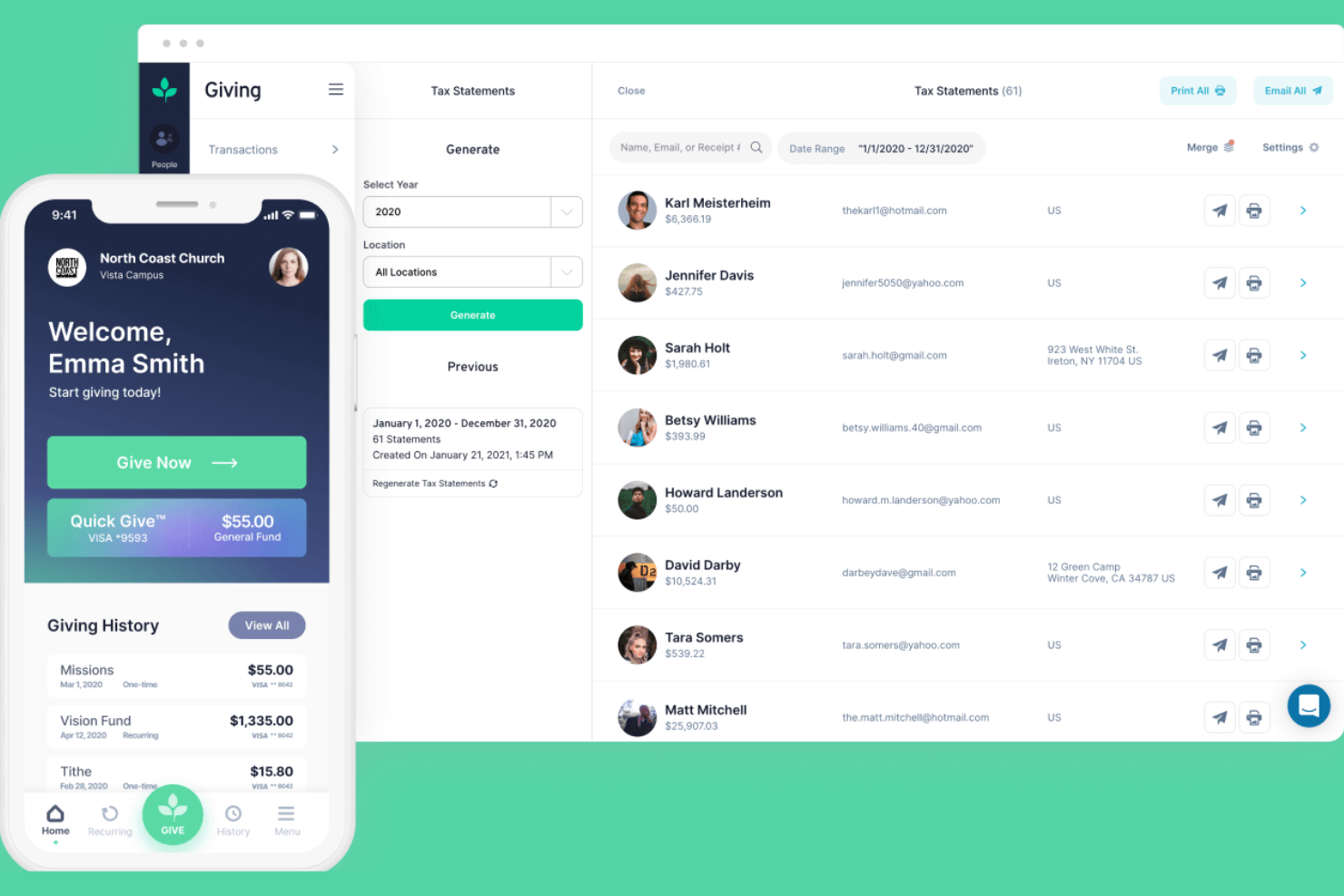
If your church wants to prioritize mobile giving, Tithely offers a platform designed for easy app-based donations. It’s a strong fit for congregations looking to engage members who prefer giving through their smartphones. Tithely helps you simplify digital giving and connect with donors wherever they are, while supporting payments through debit cards and offering transparent pricing that may include setup fees depending on the plan.
Why I Picked Tithely
I chose Tithely because its mobile app giving experience stands out for churches that want to meet donors where they are—on their phones. The platform offers a dedicated church app that lets members give, view giving history, and set up recurring donations directly from their mobile devices. I also like that Tithely supports text-to-give, making it easy for people to donate during services or on the go. These features help churches create a modern, accessible giving experience that fits today’s digital habits.
Tithely Key Features
Some other features in Tithely help churches manage giving and communication more efficiently:
- Event Registration: Collect payments and manage sign-ups for church events directly through the platform.
- Custom Giving Forms: Create branded donation forms that match your church’s website and style.
- Admin Dashboard: Track giving trends, donor information, and manage transactions from a centralized dashboard.
- Automated Receipts: Send donors instant email receipts for every contribution, helping with record-keeping and transparency.
Tithely Integrations
Integrations include QuickBooks Online, RockRMS, The StudioC, Engiven, Elvanto, Salesforce, MinistryPlatform, Shelby Systems, FellowshipOne, Planning Center Online, and more.
Pros and Cons
Pros:
- Event registration and payment collection tools
- Customizable giving forms for church branding
- Text-to-give feature included with all plans
Cons:
- No built-in volunteer management features
- ACH and card processing fees are not optional

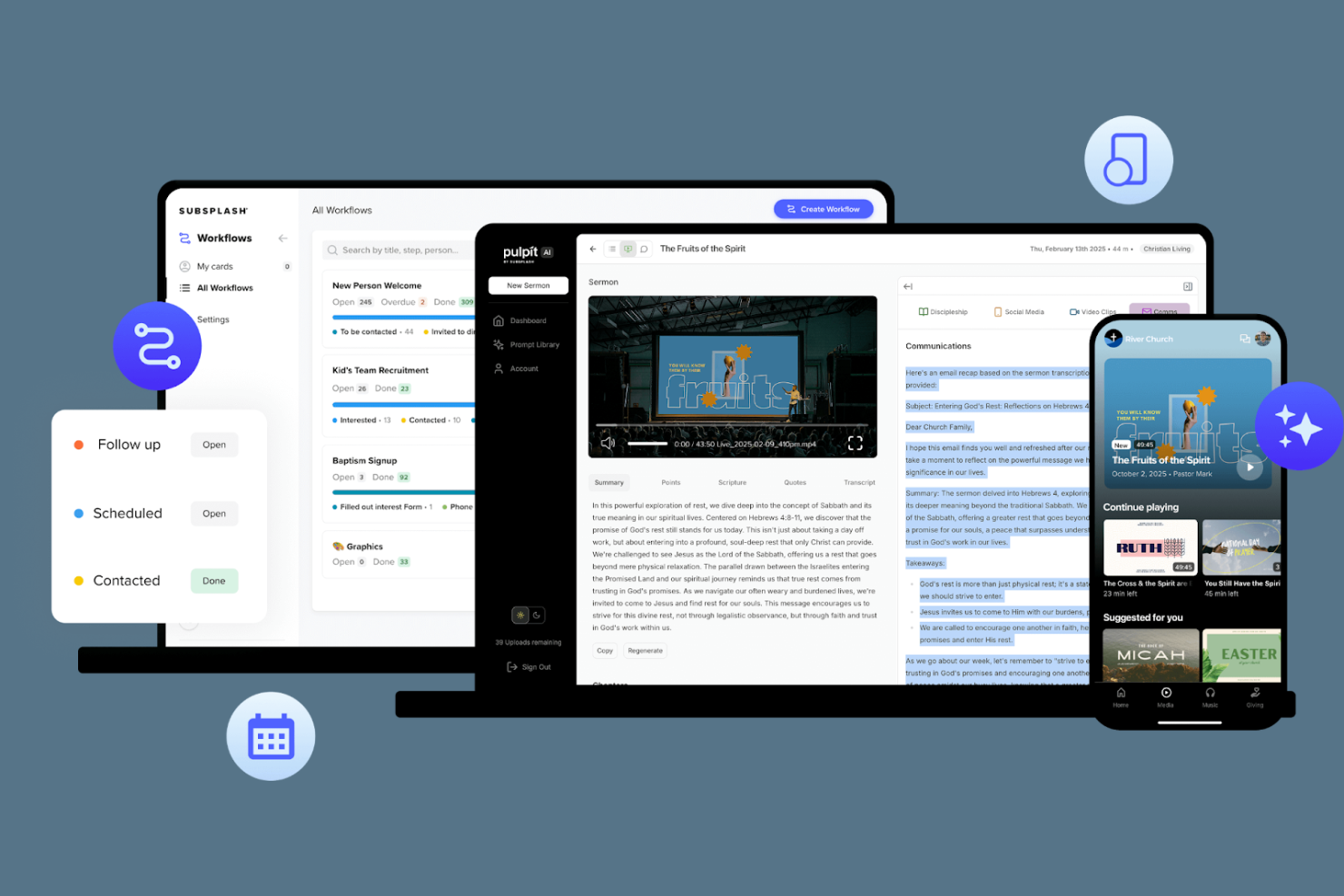
Subsplash is built for churches that want to combine digital giving with rich media engagement. It’s especially appealing to ministries looking to share sermons, podcasts, and video content alongside their donation tools. If your church wants to create a unified experience for giving, media, and communication in one platform, Subsplash brings these elements together.
Why I Picked Subsplash
What sets Subsplash apart is its focus on combining digital giving with media-rich engagement tools. Churches can host and share sermons, podcasts, and videos directly through their app or website, keeping members connected beyond just financial contributions. I appreciate how Subsplash lets you embed giving prompts within media content, encouraging generosity while people are already engaged. This approach makes Subsplash a strong fit for ministries that want to deepen connection and participation through both giving and digital content.
Subsplash Key Features
Some other features that make Subsplash useful for churches include:
- Custom Mobile App Builder: Design a branded mobile app for your church community.
- Push Notifications: Send real-time updates and announcements directly to members’ devices.
- Event Management Tools: Organize, promote, and manage church events within the platform.
- Group Messaging: Facilitate communication among ministry teams and small groups.
Subsplash Integrations
Native integrations are not currently listed.
Pros and Cons
Pros:
- Provides digital bulletin and event tools
- Supports push notifications for giving reminders
- Embeds giving directly into sermon videos
Cons:
- Recurring gift management lacks donor self-service
- Giving statements require manual export

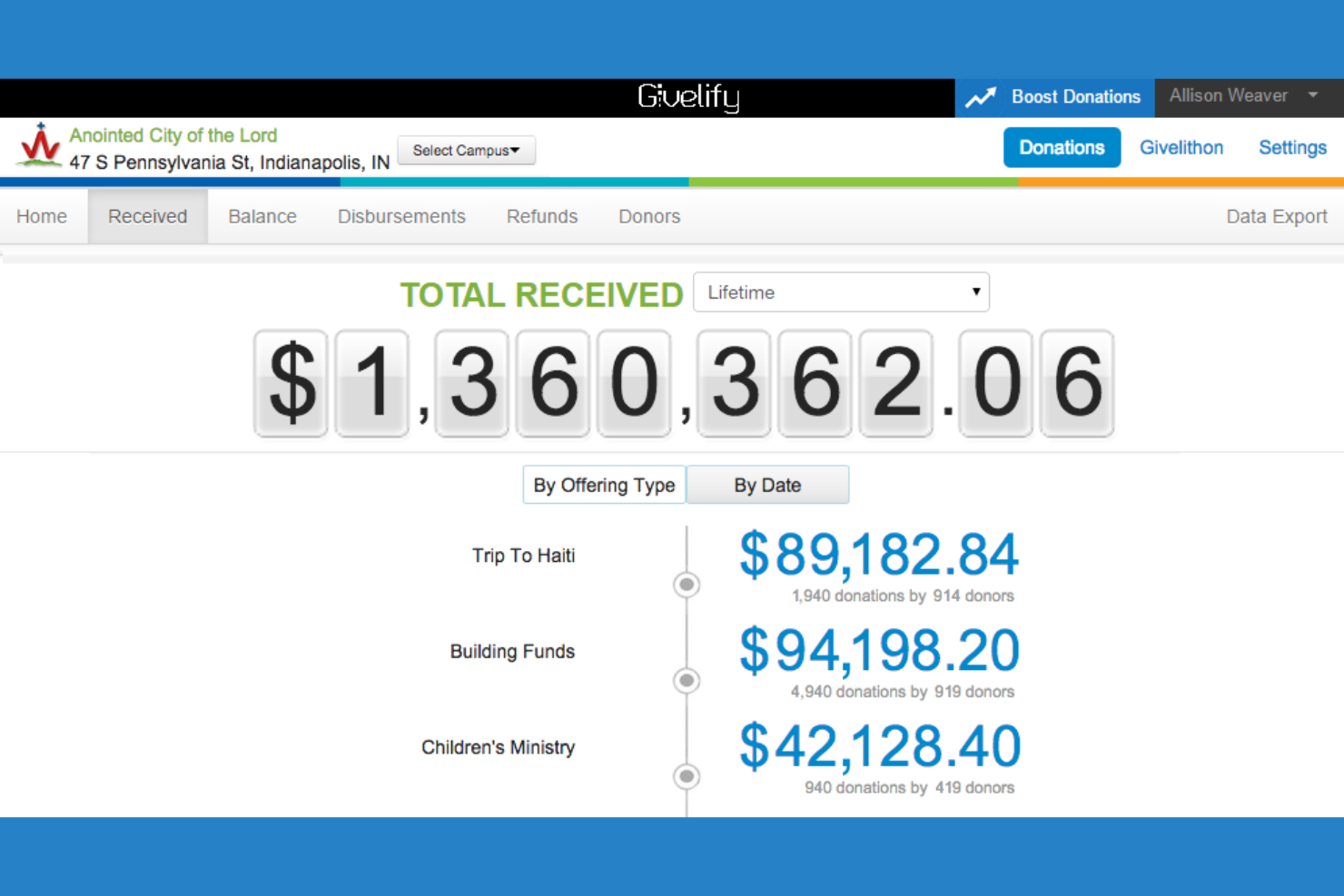
If your church needs a way to start accepting donations quickly, Givelify is designed for a fast, hassle-free setup. This platform is a strong fit for ministries that want to launch digital giving without technical barriers or lengthy onboarding. Givelify helps churches collect gifts through a simple app and web interface, making it easy for donors to give in just a few taps.
Why I Picked Givelify
Givelify stands out for churches that want to start accepting digital donations with minimal setup time. The platform lets you create a giving profile and begin receiving gifts almost immediately, without waiting for lengthy approvals or technical configuration. I appreciate that donors can give through a mobile app or web link, both of which require just a few taps to complete a donation. For ministries that need a fast, straightforward way to launch online giving, Givelify’s quick setup process is a clear advantage.
Givelify Key Features
Some other features that make Givelify useful for churches include:
- Donation Tracking Dashboard: View real-time giving data and trends in a centralized dashboard.
- Custom Campaigns: Set up special giving campaigns for events, missions, or projects.
- Donor Receipts: Automatically send tax-compliant receipts to donors after each gift.
- Mobile App for Donors: Allow donors to give and manage their giving history directly from their smartphones.
Givelify Integrations
Integrations include Shelby Next, Shelby Arena, Power Church, Servant Keeper, ACS Realm, and ACS People.
Pros and Cons
Pros:
- Automatic tax-compliant donor receipts
- Real-time donation tracking dashboard
- Quick setup process for new churches
Cons:
- No support for physical giving kiosks
- No built-in event registration tools

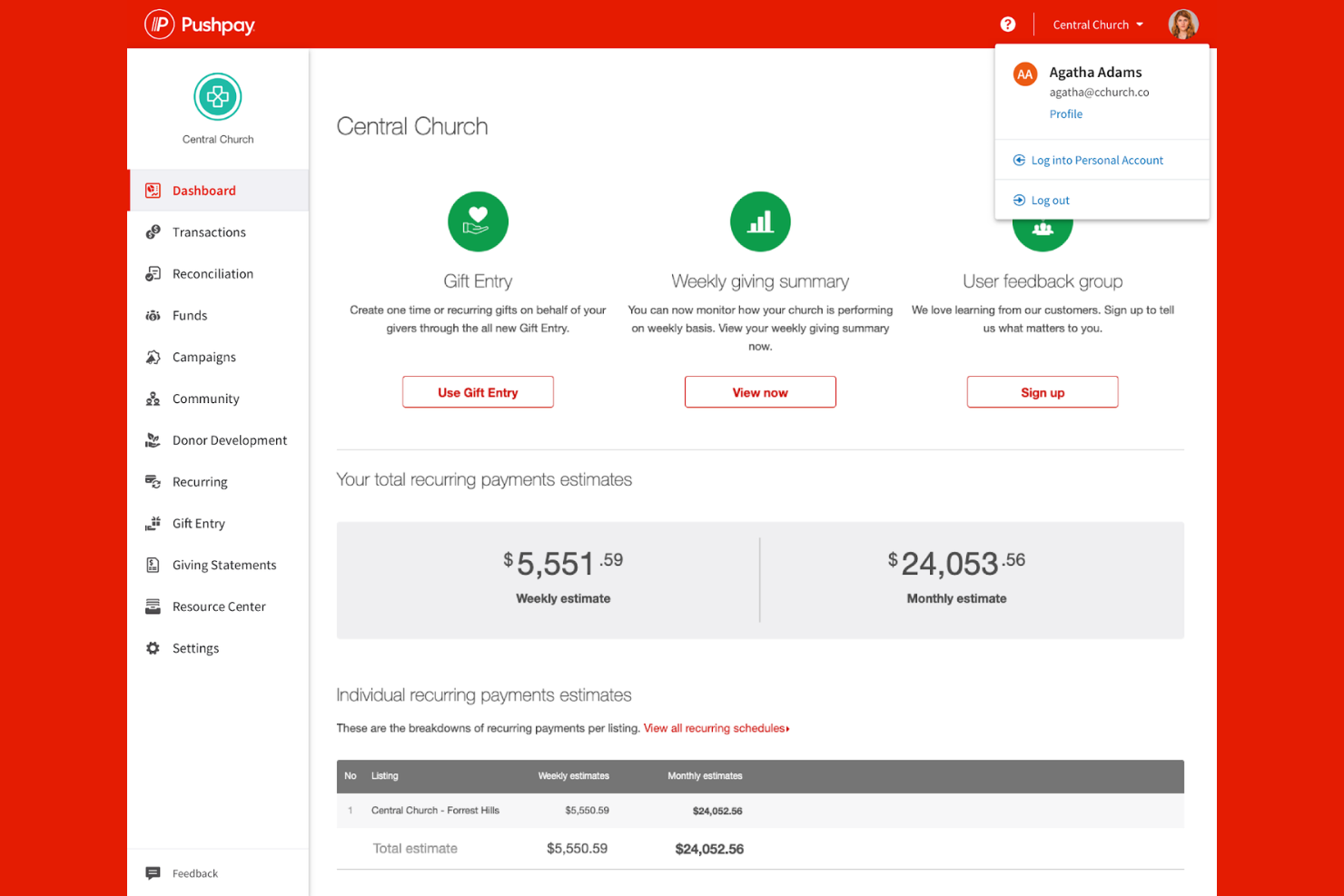
Pushpay is built for churches that need to manage high-volume giving and engagement across large congregations. Its platform supports complex donation workflows, multi-campus management, and advanced reporting for finance and leadership teams. If your church is growing or already operates at scale, Pushpay helps you handle online giving and communication without bottlenecks.
Why I Picked Pushpay
For churches managing large congregations, Pushpay stands out because it’s designed to handle high transaction volumes and complex giving needs. The platform supports multi-campus giving, allowing you to track donations and engagement across different locations from a single dashboard. I appreciate that Pushpay includes advanced donor segmentation and reporting tools, which help finance teams analyze giving trends at scale. These features make it a strong fit for churches that need a reliable, scalable online giving infrastructure.
Pushpay Key Features
Some other features that make Pushpay useful for churches include:
- Mobile Giving App: Members can give directly from their smartphones using a dedicated app.
- Event Registration: Manage sign-ups and payments for church events within the platform.
- Customizable Giving Pages: Create branded online giving forms tailored to your church’s needs.
- Automated Receipts: Donors receive instant email confirmations for every contribution.
Pushpay Integrations
Integrations include QuickBooks, Planning Center, Mailchimp, Gusto, Engiven, Resi, Protect My Ministry, Checkr, StudioC, MortarStone, and more.
Pros and Cons
Pros:
- Automated recurring giving reminders for donors
- Mobile app offers in-app giving and engagement
- Supports multi-campus and multi-fund management
Cons:
- No built-in support for cryptocurrency donations
- Limited customization for donor-facing giving pages

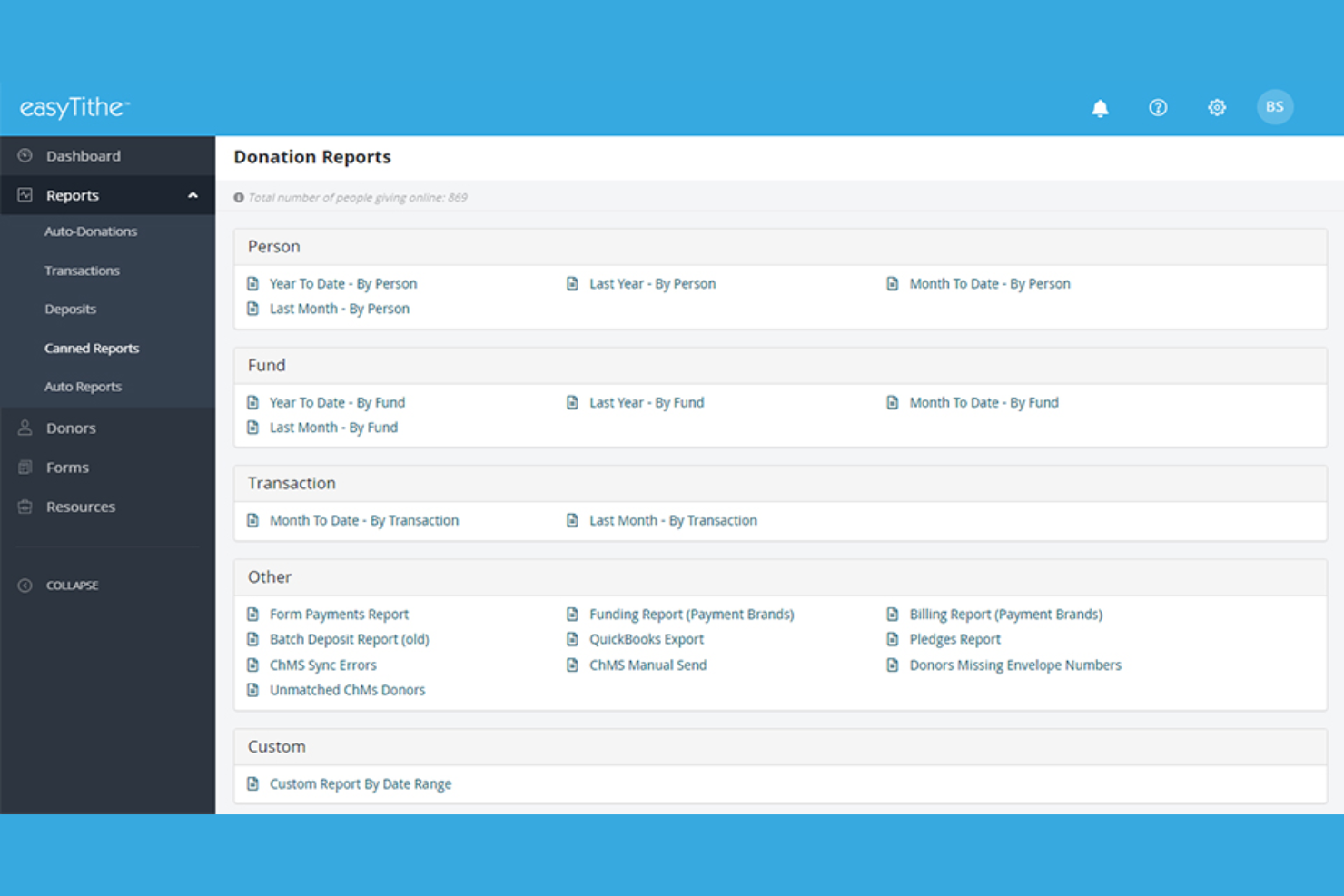
Churches looking to simplify and strengthen recurring giving often turn to easyTithe. This platform is designed for ministries that want to encourage consistent support through automated, flexible gift scheduling. easyTithe helps churches manage recurring donations, track giving patterns, and provide donors with self-service tools to update their commitments.
Why I Picked easyTithe
Recurring gift management is a core strength of easyTithe, making it a strong choice for churches focused on building steady, predictable support. The platform lets donors set up automated giving schedules, update payment methods, and manage recurring gifts directly from their own accounts. I like that administrators can view and track recurring donations in detail, which helps with forecasting and planning. For ministries that want to encourage ongoing generosity and reduce administrative follow-up, easyTithe’s recurring giving tools are especially valuable.
easyTithe Key Features
Some other features that make easyTithe useful for churches include:
- Text-to-Give: Donors can give by sending a text message with a custom keyword.
- Event Registration: Manage sign-ups and payments for church events directly within the platform.
- Custom Giving Forms: Create branded, mobile-friendly donation forms for your website.
- Reporting Tools: Access detailed reports on giving trends, donor activity, and campaign performance.
easyTithe Integrations
Integrations include SimpleChurch CRM, FellowshipOne, Shelby (Arena & Legacy), Church Office Online, ELEXIO, ACS Technologies, Breeze, Church Community Builder, HelpMate, and Planning Center.
Pros and Cons
Pros:
- Event registration and payment are integrated
- Text-to-give supports multiple campaign keywords
- Recurring giving schedules are highly flexible
Cons:
- Giving form branding options are limited
- No built-in support for international currencies

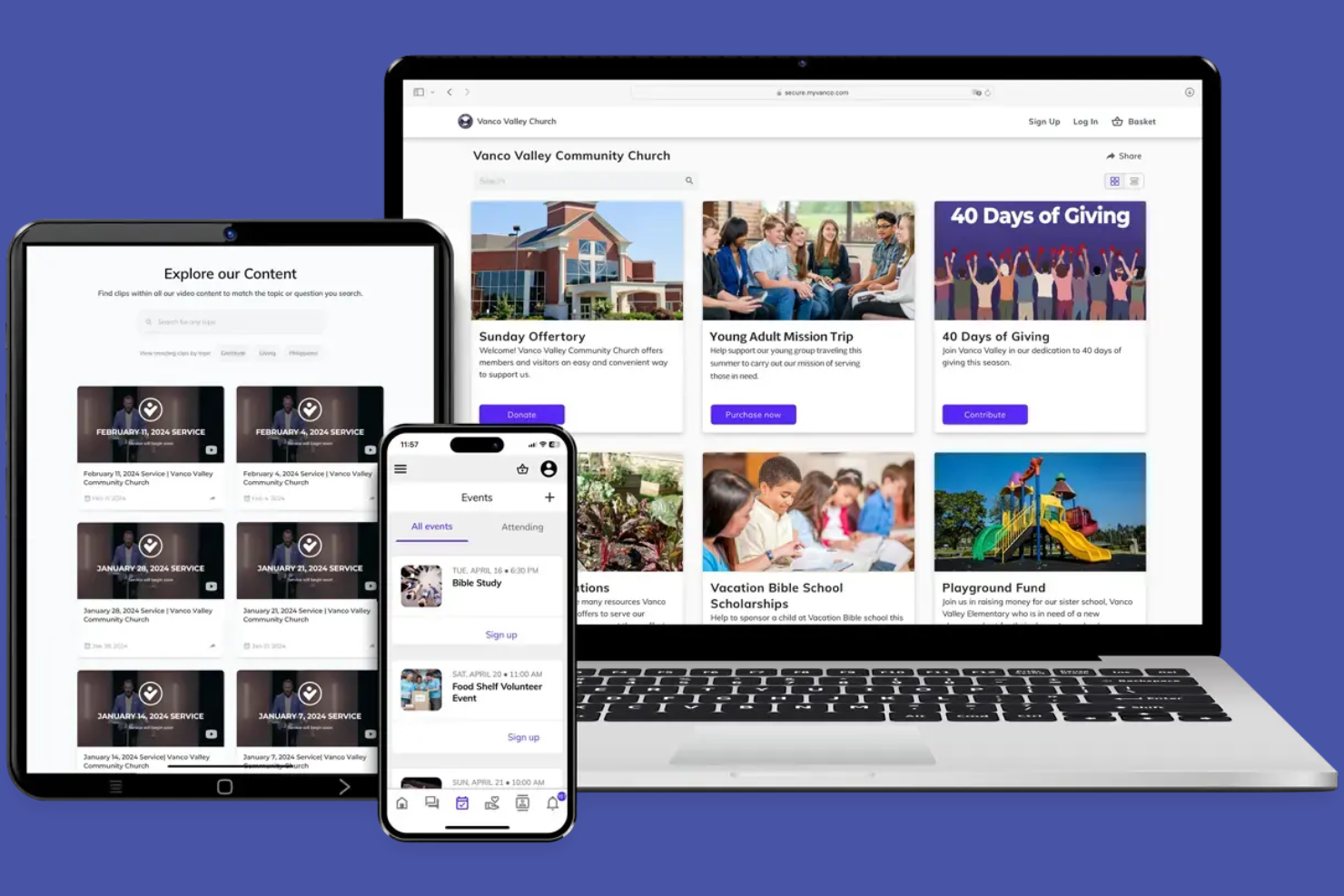
Vanco is designed for churches that want to prioritize ACH bank transfers and text-based giving. It’s a strong fit for congregations looking to reduce card processing fees and make giving as simple as sending a text. If your church values flexible donation options and wants to encourage recurring gifts through bank accounts, Vanco offers specialized tools to support those needs.
Why I Picked Vanco
For churches that want to prioritize ACH and text giving, Vanco stands out with its dedicated ACH processing and mobile giving tools. The platform lets donors give directly from their bank accounts, which can help churches lower transaction fees compared to credit card payments. I like that Vanco also offers a text-to-give feature, making it easy for members to contribute from their phones during services or throughout the week. These focused options make Vanco a strong choice for congregations that want to encourage recurring gifts and simplify the giving process.
Vanco Key Features
Some other features that make Vanco useful for churches include:
- Customizable Giving Pages: Create branded donation pages that match your church’s website and messaging.
- Event Registration Tools: Manage sign-ups and payments for church events and activities.
- Automated Giving Receipts: Send donors instant email receipts for every contribution.
- Reporting and Analytics Dashboard: Access real-time giving data and generate detailed financial reports.
Vanco Integrations
Integrations include ACS Technologies, Realm, Parish Data Systems, Ministry Platform, Church Windows, Icon Systems, PowerChurch, Servant Keeper, and more.
Pros and Cons
Pros:
- Includes automated recurring giving options
- Provides event registration and payment tools
- Offers text-to-give with unique shortcodes
Cons:
- No built-in crowdfunding campaign features
- Limited international donation support

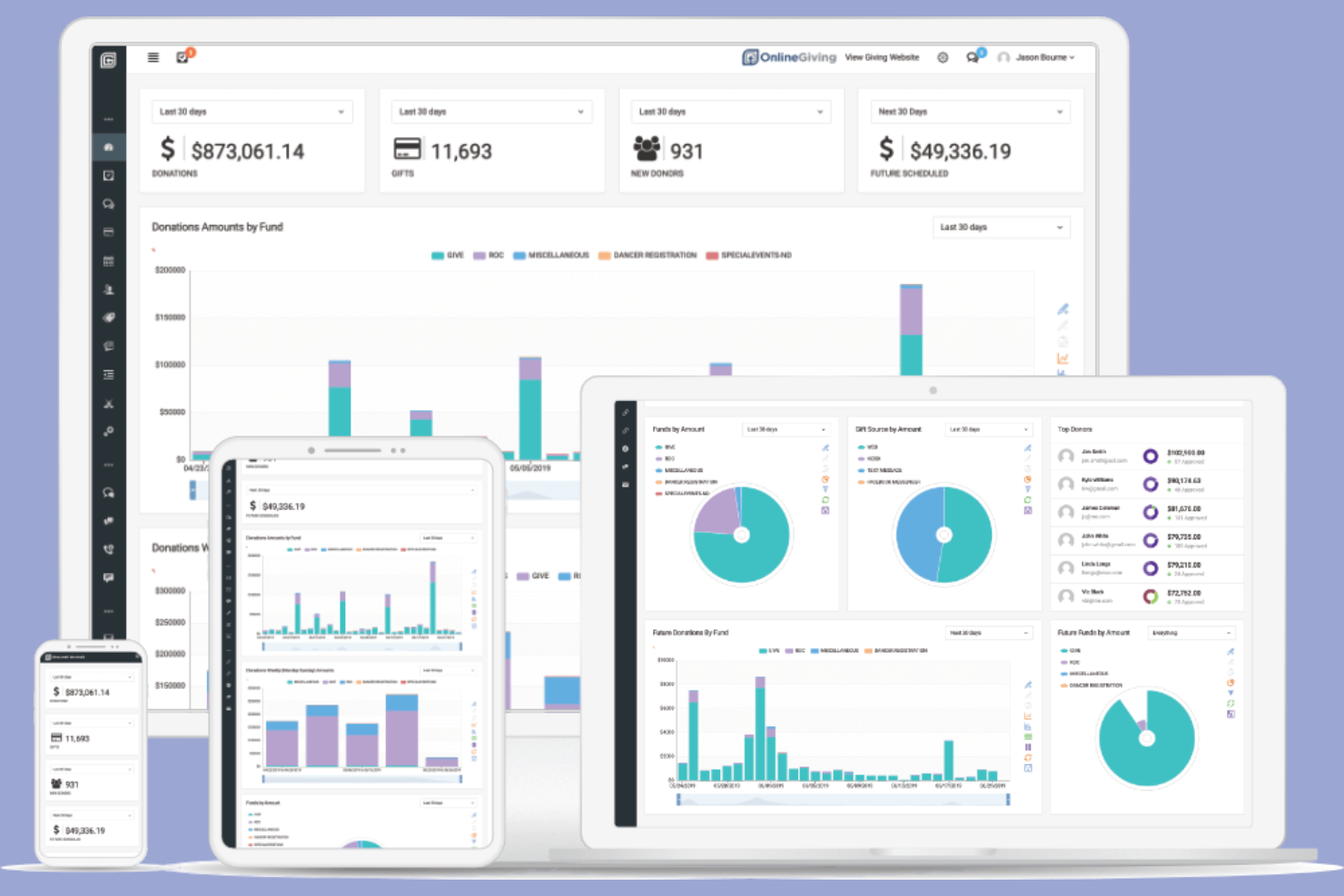
For churches that want to showcase their unique identity, Online Giving offers extensive custom branding options for digital giving. This platform is a strong fit for ministries that prioritize a consistent look and feel across all donor touchpoints. With Online Giving, you can tailor donation pages and communications to reflect your church’s brand at every step.
Why I Picked Online Giving
What drew me to Online Giving is its focus on letting churches fully customize their digital giving experience. The platform allows you to match donation forms, receipts, and donor communications to your church’s colors, logo, and messaging. I appreciate that you can even embed branded giving widgets directly on your website, so donors never have to leave your church’s online environment. For ministries that want every touchpoint to reflect their identity, these branding options set Online Giving apart.
Online Giving Key Features
In addition to its branding capabilities, Online Giving offers several other features designed for church giving management:
- Text-to-Give: Donors can give by sending a simple text message from their mobile phones.
- Kiosk Giving: Accept donations on-site using digital kiosks for in-person events or services.
- Automated Recurring Giving: Set up and manage scheduled donations for consistent support.
- Detailed Giving Reports: Access real-time analytics and exportable reports to track giving trends and donor activity.
Tithely Integrations
Integrations include QuickBooks, Planning Center, Church Community Builder, Breeze ChMS, Rock RMS, Elvanto, MinistryPlatform, FellowshipOne, ACS Technologies, Zapier, and more.
Pros and Cons
Pros:
- Recurring giving setup is donor-friendly
- Kiosk giving available for in-person events
- Text-to-give supports mobile donations
Cons:
- Donor management features are not highlighted
- No built-in event registration tools

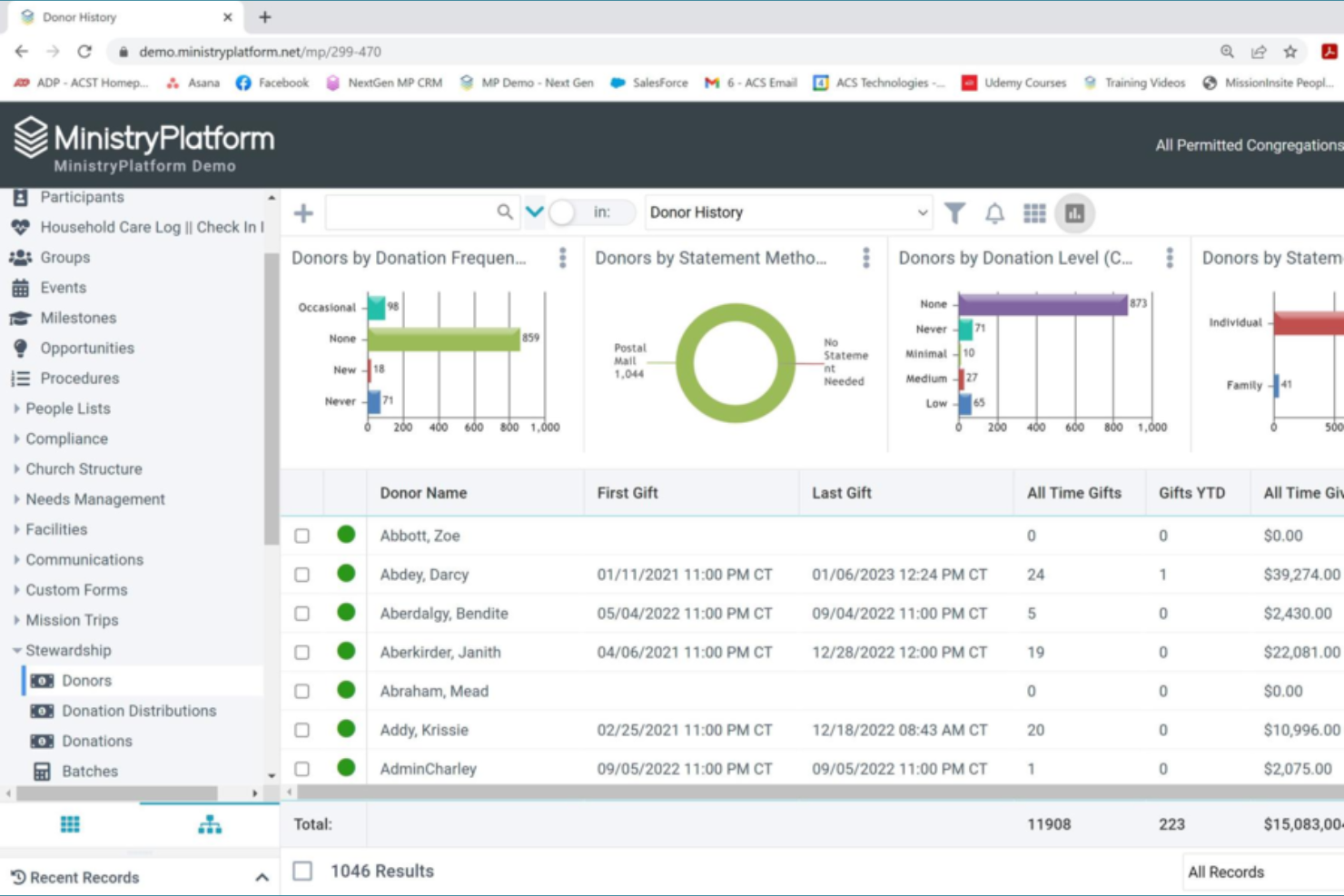
MinistryPlatform stands out for churches that need advanced reporting and data management alongside online giving. This platform is built for larger ministries or multi-campus churches that want to track giving trends, donor engagement, and ministry impact in detail. If your team relies on deep analytics to guide stewardship and outreach, MinistryPlatform offers tools to help you make data-driven decisions.
Why I Picked MinistryPlatform
For churches that want to dig deep into giving data, MinistryPlatform offers some of the most advanced reporting tools available. I picked this platform because it lets you build custom reports, visualize giving trends, and segment donors for targeted communication. MinistryPlatform’s dashboard tools help you monitor key metrics like recurring gifts, campaign performance, and donor retention. If your church values data-driven stewardship, these reporting features make MinistryPlatform a strong choice.
MinistryPlatform Key Features
In addition to its advanced reporting capabilities, MinistryPlatform offers several other features for churches to consider:
- Online Giving Portal: Members can give securely through a branded web portal.
- Event Registration Tools: Manage sign-ups and payments for church events and activities.
- Volunteer Management: Track volunteer roles, schedules, and participation.
- Family and Household Profiles: Organize giving and engagement data by family or household units.
MinistryPlatform Integrations
Integrations include Realm Accounting, Growth Method, Verified First, MinistrySafe, Intulse, Twilio, MortarStone, eSPACE, iDonate, and more.
Pros and Cons
Pros:
- Built-in event registration with payment collection
- Donor segmentation for targeted communication
- Custom report builder for detailed giving analysis
Cons:
- Requires training for advanced feature use
- Interface updates can disrupt existing workflows

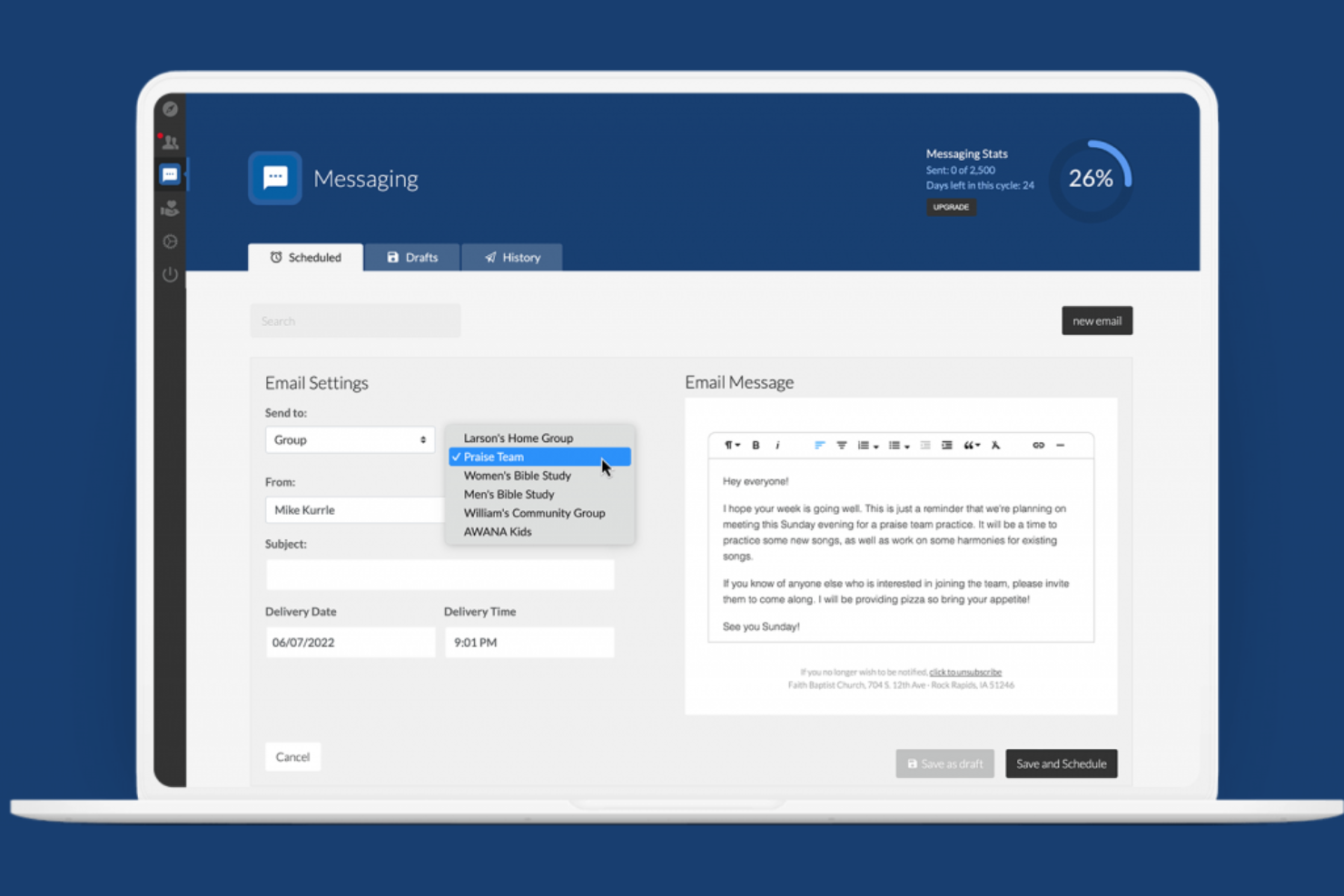
If your church wants to manage online giving and your website in one place, ChurchSpring offers a unified solution. This platform is designed for ministries that value integrated website tools alongside giving management. ChurchSpring helps churches connect with members, collect donations, and manage people—all from a single dashboard.
Why I Picked ChurchSpring
What sets ChurchSpring apart is its focus on combining online giving with integrated website management tools. For churches that want to handle donations, event promotion, and member communication from a single platform, this approach can simplify both administration and outreach. I appreciate that ChurchSpring lets you embed giving forms directly into your website and manage people and groups alongside your donation tools. This makes it a strong fit for ministries looking to keep their digital presence and giving processes tightly connected.
ChurchSpring Key Features
Some other features that make ChurchSpring useful for churches include:
- Automated Prayer Requests: Members can submit prayer requests online, and leaders can manage and respond to them from the dashboard.
- Mass Email and Text Messaging: Send announcements and updates to your congregation through built-in communication tools.
- Customizable Website Templates: Choose from a variety of church-focused website designs that can be tailored to your ministry’s branding.
- Event Calendar Management: Create, edit, and display upcoming church events directly on your website.
ChurchSpring Integrations
Native integrations are not currently listed.
Pros and Cons
Pros:
- Mass email and text messaging included
- Built-in prayer request management for members
- Website and giving tools are fully integrated
Cons:
- Recurring giving options are not highly customizable
- Giving analytics are limited in reporting depth

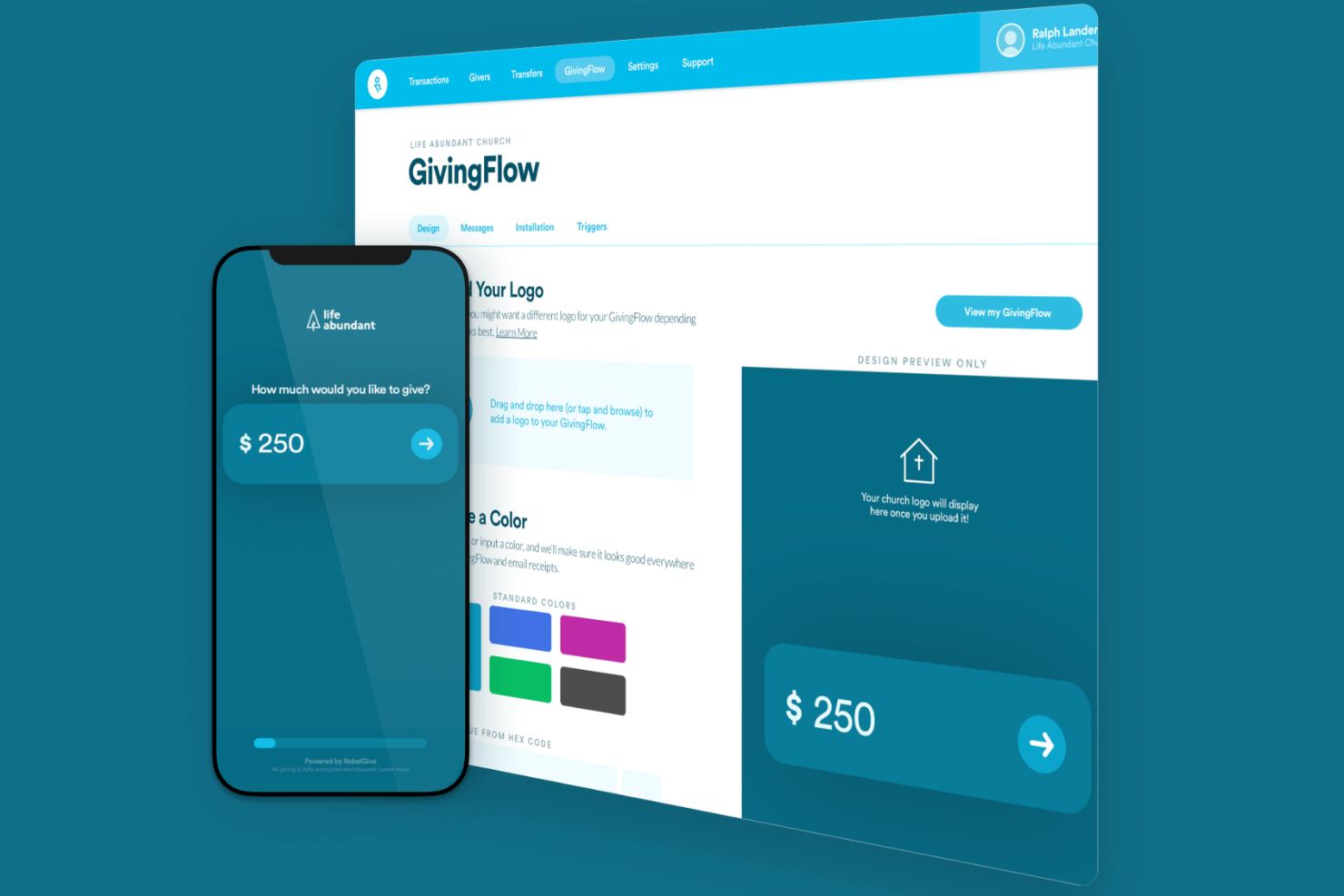
RebelGive is designed for churches that want to eliminate transaction fees from their online giving. This platform appeals to ministries focused on maximizing every donation without losing a percentage to processing costs. If your church is looking for a way to keep 100% of gifts and simplify digital giving, RebelGive offers a straightforward solution.
Why I Picked RebelGive
What drew me to RebelGive is its commitment to zero transaction fees for churches. This platform routes all processing costs to donors as an optional “tip,” so your church receives the full amount of every gift. I appreciate how RebelGive provides unlimited giving forms and customizable campaigns, making it easy to support multiple ministry needs. For churches that want to maximize every dollar given, RebelGive’s fee-free approach stands out in the online giving space.
RebelGive Key Features
Some other features that make RebelGive appealing for churches include:
- Mobile-Optimized Giving Flows: Donors can give quickly and easily from any device.
- Real-Time Gift Tracking: View incoming gifts and donor activity as they happen.
- Customizable Giving Widgets: Embed branded giving forms directly on your church website.
- Multi-Campus Support: Manage giving and reporting across multiple church locations.
RebelGive Integrations
Native integrations are not currently listed.
Pros and Cons
Pros:
- Supports multi-campus giving management
- Donors can cover processing costs voluntarily
- Zero transaction fees on all donations
Cons:
- Recurring gift edits require admin assistance
- Donor accounts cannot update payment methods

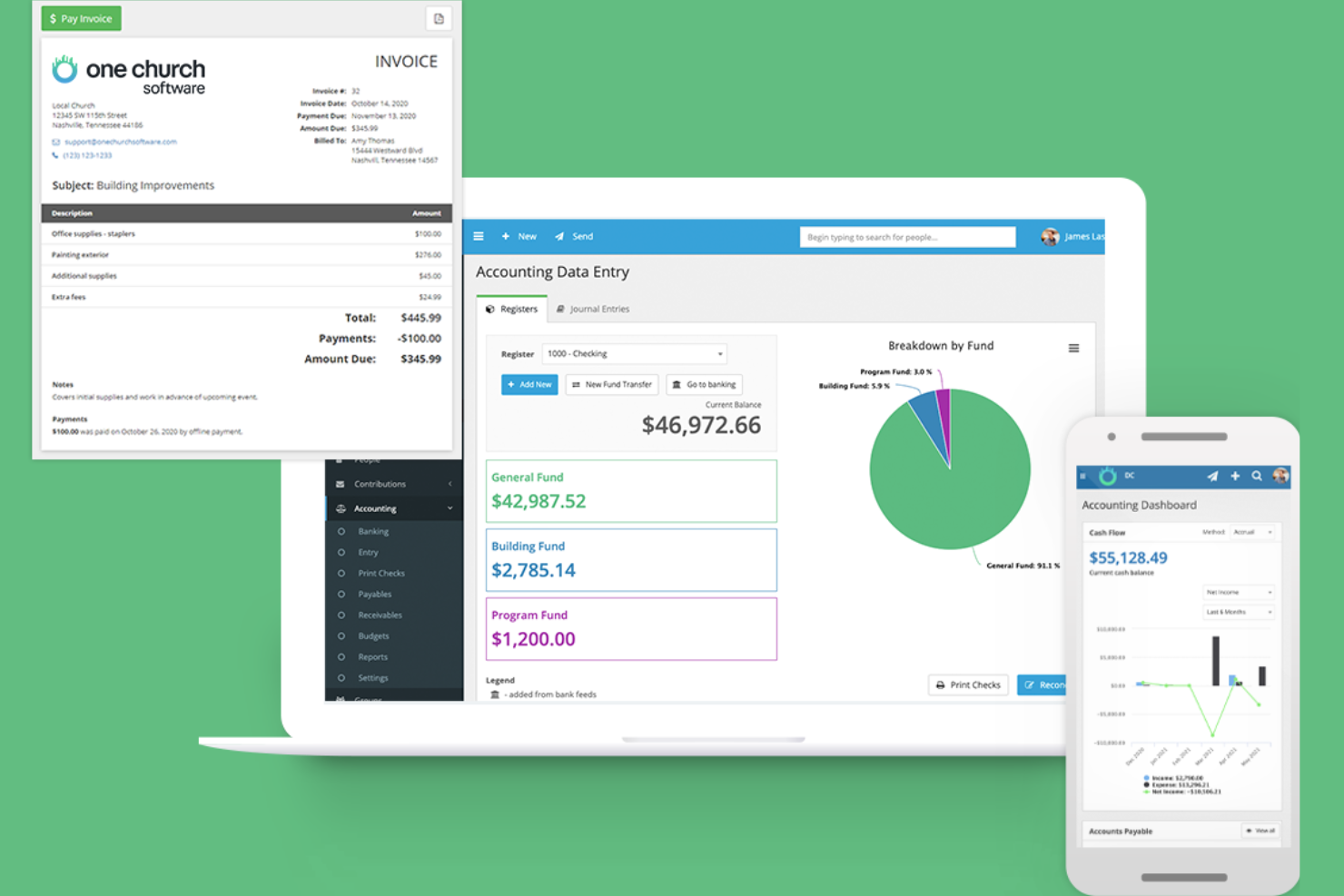
One Church Software brings together online giving, people management, and communication tools in a single platform. This solution is designed for churches that want to handle donations, events, and member engagement without juggling multiple systems. If you’re looking for an all-in-one approach to church management and giving, One Church Software offers a unified experience.
Why I Picked One Church Software
What drew me to One Church Software is its true all-in-one approach to church management and online giving. You can manage donations, track giving history, and set up recurring gifts right alongside tools for people management and event planning. I like that you can also handle volunteer scheduling and communication from the same dashboard, which keeps everything connected. This makes it a strong choice for churches that want to centralize their operations and giving processes in one place.
One Church Software Key Features
Some other features that make One Church Software stand out include:
- Child Check-In System: Track attendance and ensure safety for children’s ministry with secure check-in and check-out.
- Form Builder: Create custom forms for registrations, surveys, or volunteer sign-ups directly within the platform.
- Automated Workflows: Set up automated processes for follow-ups, reminders, and task assignments.
- Mobile App Access: Access to giving, events, and member information from a dedicated mobile app.
One Church Software Integrations
Integrations include Pushpay, eSPACE, and a native API for custom integrations.
Pros and Cons
Pros:
- Supports multiple funds and campaign tracking
- Built-in text-to-give feature for mobile donations
- Recurring giving setup is quick and flexible
Cons:
- ACH transfer setup requires manual approval
- Donor portal branding options are restricted

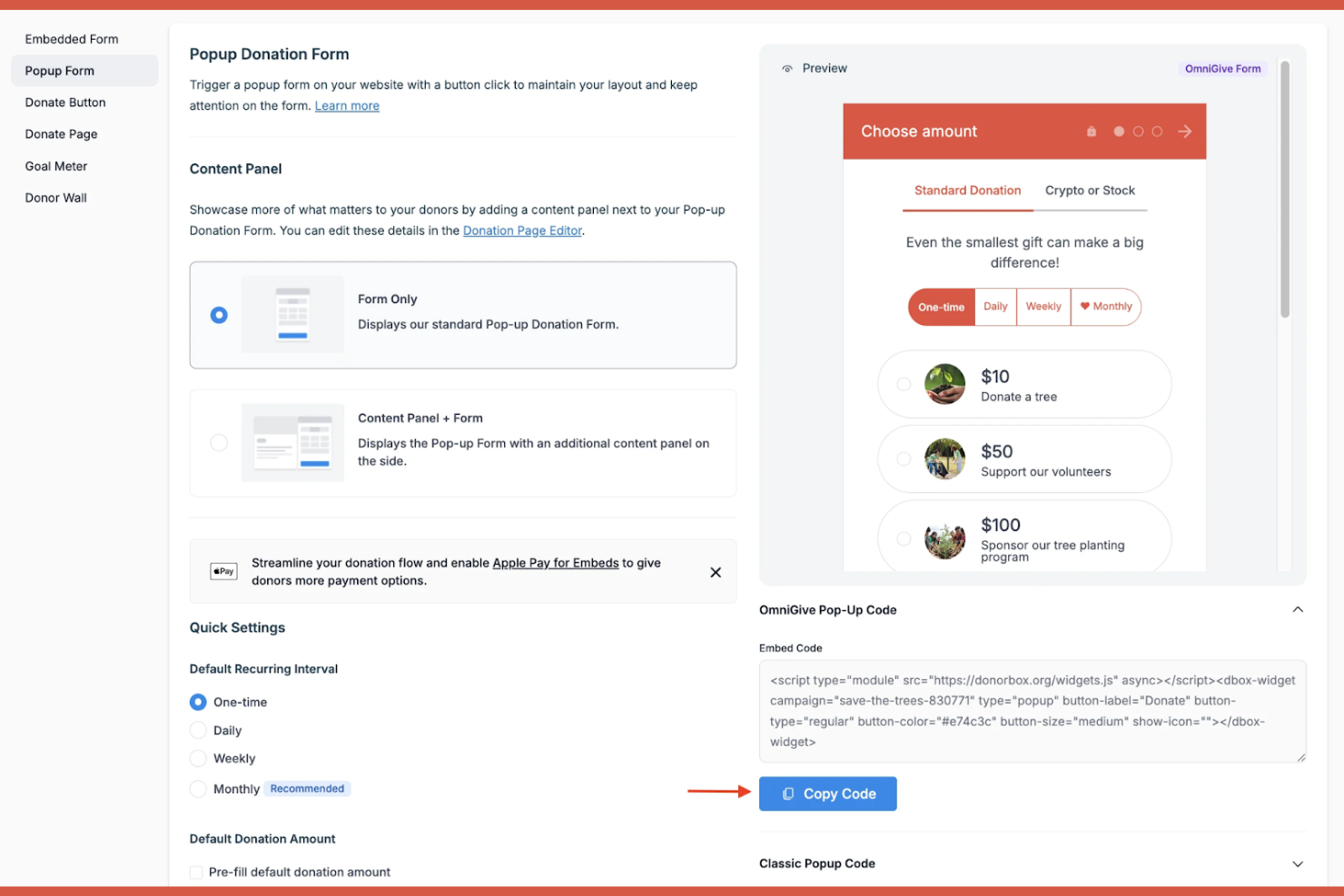
Donorbox is a donation platform designed for churches and ministries that need to accept gifts in multiple currencies. It’s especially useful for congregations with international members or supporters who give from abroad. If your church wants to make global giving simple and accessible, Donorbox helps you remove barriers for donors around the world.
Why I Picked Donorbox
When churches need to support donors from different countries, Donorbox offers multi-currency donation processing that removes barriers for international giving. The platform lets you accept donations in over 40 currencies, so supporters can give in their local currency without confusion or extra steps. I appreciate that Donorbox also provides automatic currency conversion and localized donation forms, which help churches reach a global audience. These features make it a strong choice for ministries with international members or mission partners.
Donorbox Key Features
Some other features that make Donorbox appealing for churches include:
- Recurring Donation Management: Set up and manage automatic recurring gifts from donors.
- Text-to-Give: Allow donors to give by sending a simple text message.
- Donor Management Dashboard: Track donor history, manage contacts, and view giving analytics in one place.
- Customizable Donation Forms: Design and embed branded donation forms directly on your church website.
Donorbox Integrations
Integrations include Squarespace, Wix, Webflow, Weebly, WordPress, Joomla, Zapier, and more.
Pros and Cons
Pros:
- Supports donor-covered transaction fees
- Offers text-to-give for mobile donors
- Accepts donations in over 40 currencies
Cons:
- No built-in event ticketing features
- Adds a platform fee on top of processing
Other Online Giving Platforms for Churches
Here are some additional online giving platforms for churches that didn’t make it onto my shortlist, but are still worth checking out:
- ChMeetings
For multilingual congregation support
- SecureGive
With customizable kiosk giving options


Online Giving Platforms for Churches Selection Criteria
When selecting the best online giving platforms for churches to include in this list, I considered common buyer needs and pain points like tracking recurring donations and managing donor communications. I also used the following framework to keep my evaluation structured and fair:
Core Functionality (25% of total score)
To be considered for inclusion in this list, each solution had to fulfill these common use cases:
- Accept online donations
- Track donor giving history
- Generate giving statements
- Support recurring giving
- Provide basic reporting
Additional Standout Features (25% of total score)
To help further narrow down the competition, I also looked for unique features, such as:
- Customizable giving forms
- Mobile app for donors
- Event registration with payment
- Donor segmentation tools
- Integration with church management systems
Usability (10% of total score)
To get a sense of the usability of each system, I considered the following:
- Simple and intuitive navigation
- Clean and modern interface design
- Quick access to key features
- Minimal steps to complete a donation
- Accessibility for all user types
Onboarding (10% of total score)
To evaluate the onboarding experience for each platform, I considered the following:
- Availability of training videos and guides
- Step-by-step product tours
- Access to onboarding webinars
- Pre-built templates for setup
- Responsive onboarding support team
Customer Support (10% of total score)
To assess each software provider’s customer support services, I considered the following:
- Multiple support channels available
- Fast response times
- Knowledgeable support staff
- Access to a help center or knowledge base
- Ongoing support after onboarding
Value For Money (10% of total score)
To evaluate the value for money of each platform, I considered the following:
- Transparent pricing structure
- Features included at each price tier
- No hidden fees or charges
- Flexibility in contract terms
- Discounts for nonprofits or churches
Customer Reviews (10% of total score)
To get a sense of overall customer satisfaction, I considered the following when reading customer reviews:
- Positive feedback on reliability
- Reports of helpful customer service
- Comments on ease of use
- Feedback on feature usefulness
- Reports of any recurring issues
How to Choose Online Giving Platforms for Churches
It’s easy to get bogged down in long feature lists and complex pricing structures. To help you stay focused as you work through your unique software selection process, here’s a checklist of factors to keep in mind:
| Factor | What to Consider |
|---|---|
| Scalability | Will the platform handle your current and future giving volume, including seasonal spikes or growth? |
| Integrations | Does it connect natively with your church management, accounting, or communication tools? |
| Customizability | Can you tailor giving forms, donor communications, and reporting to fit your church’s workflows? |
| Ease of use | Will staff, volunteers, and donors of all tech skill levels find the platform straightforward? |
| Implementation and onboarding | How long will setup take, and what support or training is available for a smooth transition? |
| Cost | Are all fees transparent, including transaction, monthly, and add-on costs? Is pricing sustainable? |
| Security safeguards | Does the platform meet PCI compliance and offer strong data protection for donor information? |
| Support availability | Can you reach support quickly when issues arise, and are there resources for troubleshooting? |
What Are Online Giving Platforms for Churches?
Online giving platforms for churches are digital tools that enable congregations to make financial contributions through web, mobile, or text-based channels. These platforms help churches collect, track, and manage donations securely while offering features like recurring giving, donor management, and reporting. By centralizing giving processes, they support both church staff and donors in maintaining accurate records and fostering consistent stewardship.
Features of Online Giving Platforms for Churches
When selecting online giving platforms for churches, keep an eye out for the following key features:
- Online donation forms: Customizable web forms that allow donors to give securely from any device, often embedded directly on your church’s website.
- Recurring giving options: Tools that let donors set up automatic, scheduled contributions, supporting consistent financial support for your ministry.
- Mobile giving: Mobile-optimized interfaces or dedicated apps that enable giving via smartphones or tablets, making it easy for donors on the go.
- Text-to-give functionality: A feature that allows donors to contribute by sending a text message, streamlining the giving process for those who prefer texting.
- Donor management: Centralized records of donor information, giving history, and communication preferences to help you build relationships and track engagement.
- Giving statements and receipts: Automated generation and delivery of tax-compliant receipts and annual giving statements for donors.
- Event payment integration: The ability to collect payments for events, registrations, or special campaigns alongside regular giving.
- Reporting and analytics: Built-in tools to track giving trends, donor retention, and campaign performance, supporting data-driven decision-making.
- Multi-campus support: Features that let you manage giving and reporting across multiple church locations or ministries within a single platform.
- Security and compliance: Safeguards such as PCI compliance, encryption, and fraud prevention to protect donor data and ensure secure transactions.
Online giving platforms for churches do not typically include AI as part of their feature offering. As a result, I will not proceed with this section.
Benefits of Online Giving Platforms for Churches
Implementing online giving platforms for churches provides several benefits for your team and your business. Here are a few you can look forward to:
- Increased giving flexibility: Donors can contribute anytime and from anywhere using web, mobile, or text-based channels.
- Simplified donation tracking: Built-in reporting and donor management tools make it easy to monitor giving trends and individual contributions.
- Consistent financial support: Recurring giving features help foster regular, predictable donations to support ongoing ministry needs.
- Improved donor engagement: Automated communications and personalized giving statements help nurture relationships and keep donors informed.
- Streamlined administrative tasks: Automated receipts, event payment integration, and centralized records reduce manual work for staff and volunteers.
- Enhanced security and compliance: PCI-compliant processing and data protection safeguards help ensure donor information stays secure.
- Multi-campus management: Centralized platforms allow you to oversee giving and reporting across multiple locations or ministries with ease.
Costs and Pricing of Online Giving Platforms for Churches
Selecting online giving platforms for churches requires an understanding of the various pricing models and plans available. Costs vary based on features, team size, add-ons, and more. The table below summarizes common plans, their average prices, and typical features included in online giving platforms for church solutions:
Plan Comparison Table for Online Giving Platforms for Churches
| Plan Type | Average Price | Common Features |
|---|---|---|
| Free Plan | $0 | Basic online donation forms, limited reporting, and basic donor management. |
| Personal Plan | $10-$30/month | Customizable giving forms, recurring giving, donor database, and email receipts. |
| Business Plan | $40-$100/month | Advanced reporting, event payment integration, multi-campus support, and priority support. |
| Enterprise Plan | $150-$400/month | Custom integrations, dedicated account management, advanced security features, and onboarding assistance. |
Online Giving Platforms for Churches FAQs
Here are some answers to common questions about online giving platforms for churches:
How do online giving platforms for churches handle recurring donations?
Most platforms let donors set up automatic, scheduled gifts on a weekly, monthly, or custom basis. This helps churches maintain steady financial support and reduces administrative work by automating donation processing and recordkeeping.
Can online giving platforms for churches integrate with existing church management software?
Yes, many platforms offer integrations with popular church management, accounting, and communication tools. This allows you to sync donor data, track giving history, and streamline administrative workflows without manual data entry.
What security measures do online giving platforms for churches use to protect donor information?
Platforms typically use PCI-compliant payment processing, encryption, and fraud detection tools. These safeguards help protect sensitive donor data and ensure that all transactions meet industry security standards.
Are there additional fees beyond the monthly subscription for online giving platforms for churches?
Yes, most platforms charge transaction fees on each donation, and some may have extra costs for premium features or add-ons. Always review the full fee schedule to understand your total cost.
How quickly can a church get started with an online giving platform?
Most platforms offer quick onboarding, with setup often completed in a few days. Many provide training resources, product tours, and support to help your team launch and start accepting donations smoothly.