
20 Best AI Tools for Church Management in 2026

AI Tools for Church Management Shortlist
Here’s my shortlist of the best AI tools for church management:


AI tools for church management are software solutions that use artificial intelligence to help churches organize operations, engage members, and support ministry goals. If you’re looking for ways to balance spiritual leadership with administrative demands, these tools can help you automate routine tasks, improve communication, and make data-driven decisions.
With limited resources and growing expectations, choosing the right AI tools can free up time for pastoral care and strengthen your church’s impact.
In this list, you’ll find trusted options to help you manage events, donations, communication, and more, so you can focus on leading your congregation well.
Why Trust Our Software Reviews
Best AI Tools for Church Management Summary
This comparison chart summarizes pricing details for my top AI tools for church management selections to help you find the best one for your budget and business needs.
| Tool | Best For | Trial Info | Price | ||
|---|---|---|---|---|---|
| 1 | Best for volunteer scheduling coordination | Free trial available | Custom plan available | Website | |
| 2 | Best for digital giving and donation management | 30-day free trial available | From $72/month | Website | |
| 3 | Best for website creation and management | 14-day free trial | From $29/month (billed annually) | Website | |
| 4 | Best with mobile-first engagement features | Free demo available | Pricing upon request | Website | |
| 5 | Best for customizable data management | Free demo available | Pricing upon request | Website | |
| 6 | Best for transforming sermons into shareable content | Free trial available | From $39/month | Website | |
| 7 | Best with community connection integrations | Free plan available | From $49/month | Website | |
| 8 | Best for automated event scheduling workflows | Free plan available | From $65/month | Website | |
| 9 | Best for AI-powered member engagement insights | Free trial available | Pricing upon request | Website | |
| 10 | Best for group communication automation | Free trial + free demo available | From $15/month | Website |
-

ChMeetings
Visit WebsiteThis is an aggregated rating for this tool including ratings from Crozdesk users and ratings from other sites.4.8 -
Gracely
Visit WebsiteThis is an aggregated rating for this tool including ratings from Crozdesk users and ratings from other sites.4.9 -
Text In Church
Visit WebsiteThis is an aggregated rating for this tool including ratings from Crozdesk users and ratings from other sites.4.8


AI Tools for Church Management Reviews
Below are my detailed summaries of the best AI tools for church management that made it onto my shortlist. My reviews offer a detailed look at the features, best use cases, and integrations of each platform to help you find the best one for your church.

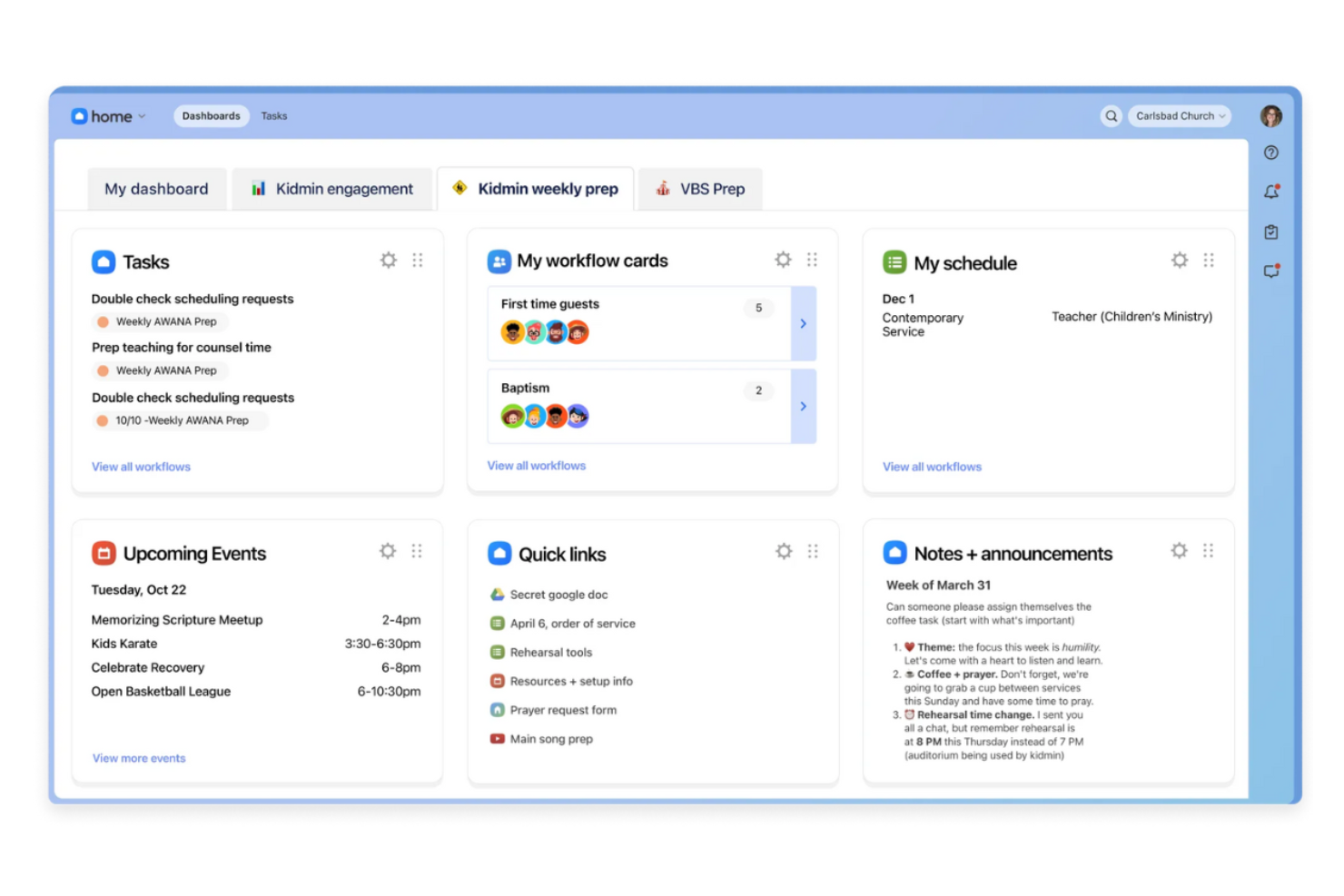
Planning Center offers a suite of cloud-based tools designed for churches that need to organize people, events, and resources. It’s especially useful for ministry leaders and administrators who want to coordinate teams, manage service planning, and centralize communication. If your church juggles multiple volunteers and complex schedules, Planning Center helps bring order and clarity to your operations.
Who Is Planning Center Best For?
Planning Center is a strong fit for churches of any size that need to coordinate volunteers, schedule services, and manage ministry teams.
Why I Picked Planning Center
What stands out to me about Planning Center is how purpose-built it is for coordinating volunteer schedules in a church context. The platform lets you create detailed service plans, assign roles, and send automated reminders to volunteers, which helps reduce confusion and last-minute changes. I also appreciate the way it tracks volunteer availability and preferences, making it easier to fill gaps and avoid scheduling conflicts.
For churches that rely on a large volunteer base, Planning Center brings structure and clarity to the entire coordination process.
Planning Center Key Features
Some other features that make Planning Center useful for church management include:
- People database: Store and organize member profiles, contact information, and family relationships in one place.
- Event registration: Set up custom registration forms for events, track attendance, and manage payments.
- Check-in system: Provide secure child check-in and check-out for children’s ministry and events.
- Resource management: Reserve rooms, equipment, and other resources for services and activities.
Planning Center Integrations
Integrations include Checkr, Mailchimp, PraiseCharts, RehearsalMix, SongSelect, Clearstream, MinistrySafe, Protect My Ministry, and more.
Pros and Cons
Pros:
- Secure check-in system for children’s ministry
- Service planning templates save setup time
- Automated volunteer reminders reduce no-shows
Cons:
- Requires separate modules for full functionality
- No built-in messaging chatbots

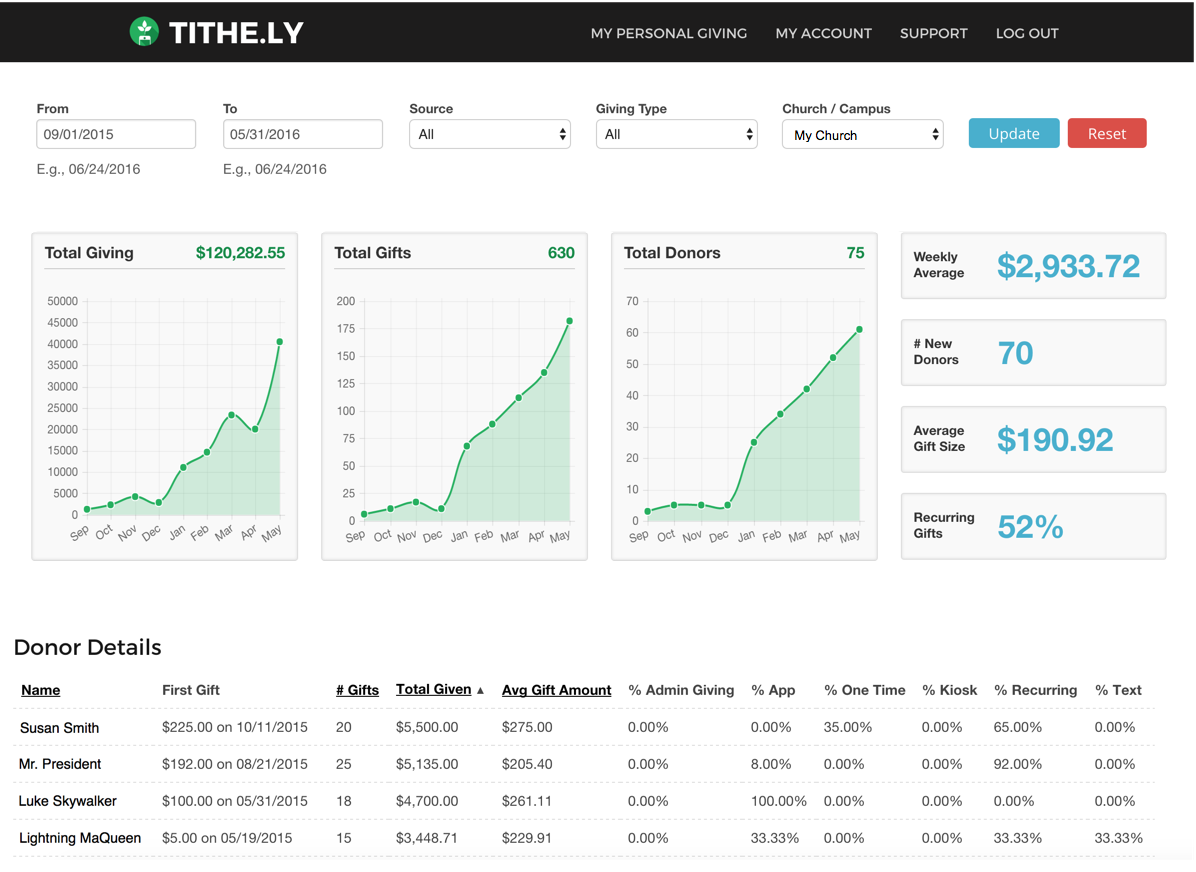
If you’re looking for a platform that helps churches manage digital giving and member engagement, Tithely is worth a look. It’s designed for church leaders and finance teams who want to simplify online donations and track contributions. Tithe.ly addresses the challenge of managing multiple giving channels while keeping donor data organized and accessible.
Who Is Tithely Best For?
Tithely is a good fit for churches and ministries of any size that want to centralize and modernize their digital giving processes.
Why I Picked Tithely
What drew me to Tithely is how it specializes in digital giving and donation management for churches. The platform offers a suite of giving options, including text-to-give, mobile app giving, and recurring donation setup, which makes it easy for congregants to contribute in the way that suits them best. Additionally, it also balances digital giving with ethical considerations.
I also appreciate the built-in reporting tools that help church leaders track giving trends and donor giving patterns in real time. For churches that want to modernize their stewardship and make giving accessible from anywhere, Tithely’s focused features make it a strong choice.
Tithely Key Features
Some other features that make Tithely useful for church management include:
- Event registration and ticketing: Manage sign-ups and payments for church events directly within the platform.
- Custom church app builder: Create a branded mobile app for your church to engage members and share content. A
- utomated email and SMS communication: Send scheduled or triggered messages to keep your congregation informed.
- Member management dashboard: Organize, track, and update member profiles and engagement history in one place.
Tithely Integrations
Integrations include QuickBooks Online, RockRMS, Engiven, Elvanto, Salesforce, MinistryPlatform, Planning Center, and more.
Pros and Cons
Pros:
- Provides detailed giving and donor reports
- Offers branded church app creation
- Supports multiple digital giving methods
Cons:
- Limited customization options for forms
- Event management features are basic

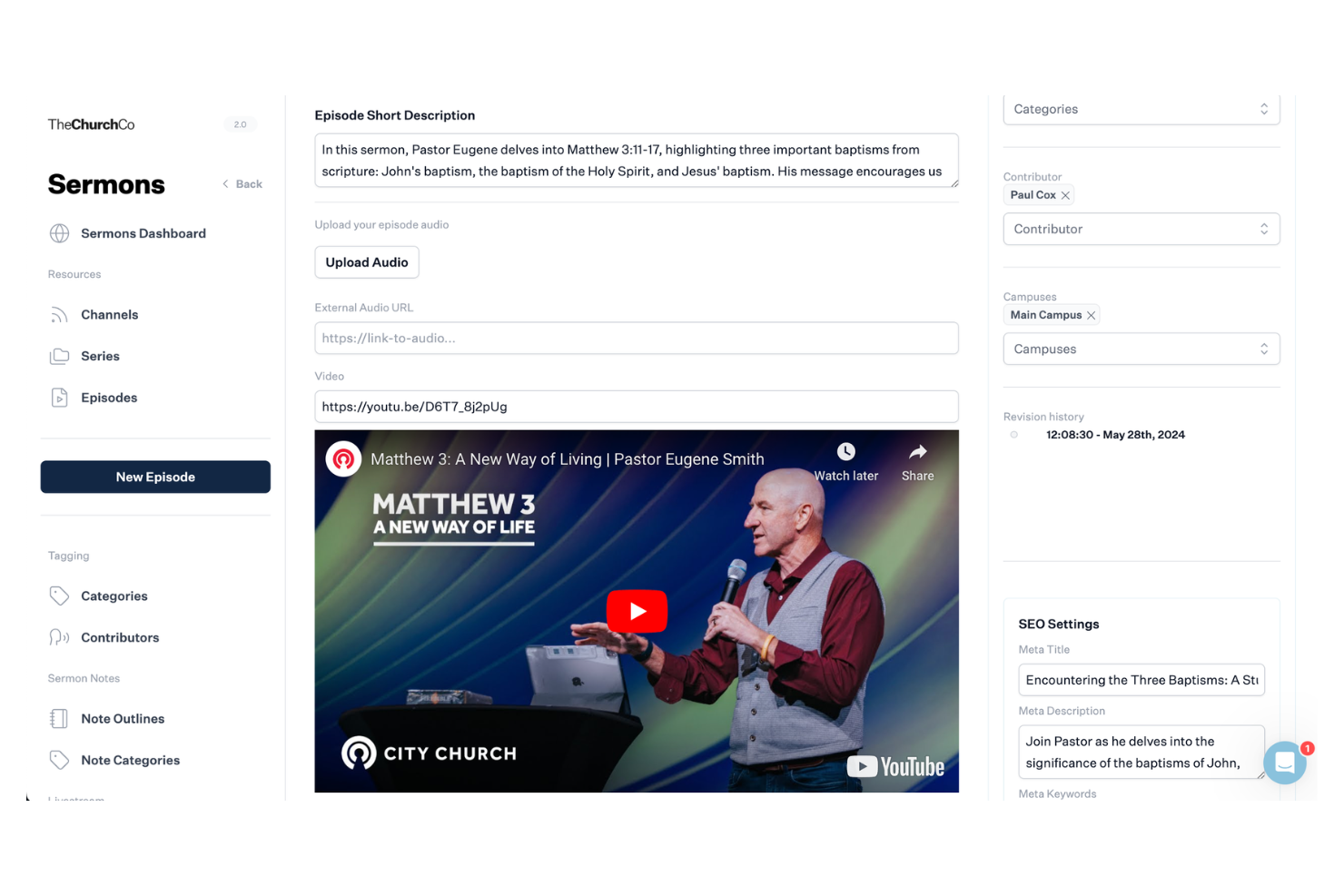
If your church wants a modern, easy-to-manage website, The Church Co is worth considering. This platform is designed for churches that need to keep their online presence current without relying on technical staff. It helps ministry teams quickly update content, share sermons, and connect with visitors online.
Who Is The Church Co Best For?
The Church Co is a good fit for small to mid-sized churches that want to manage and update their websites without technical expertise.
Why I Picked The Church Co
What drew me to The Church Co is how purpose-built it is for churches that want to create and manage their websites without technical barriers. The platform offers a drag-and-drop website builder, so ministry teams can quickly update pages, add sermons, and post events as needs change. I also appreciate the built-in sermon library and event calendar, which help churches keep their online presence fresh and relevant for members and visitors.
For leaders who want to focus on ministry rather than web development, The Church Co makes it simple to maintain a professional, engaging website.
The Church Co Key Features
Some other features that make The Church Co useful for church management include:
- Online giving integration: Connects with digital giving platforms so members can donate directly through your website.
- Prayer request system: Lets visitors and members submit prayer requests that can be managed and responded to by church staff.
- Volunteer sign-up forms: Provides customizable forms for recruiting and organizing volunteers for events and ministries.
- Blog and news posting: Allows churches to share updates, devotionals, and announcements with their congregation through a built-in blog.
The Church Co Integrations
Integrations include Planning Center, Tithely, Church Community Builder, Church Suite, Stripe, Google Analytics, and more.
Pros and Cons
Pros:
- Mobile-friendly templates for church websites
- Customizable prayer request and response tools
- Built-in sermon audio and video hosting
Cons:
- No built-in church management database (ChMS)
- No AI-powered content features

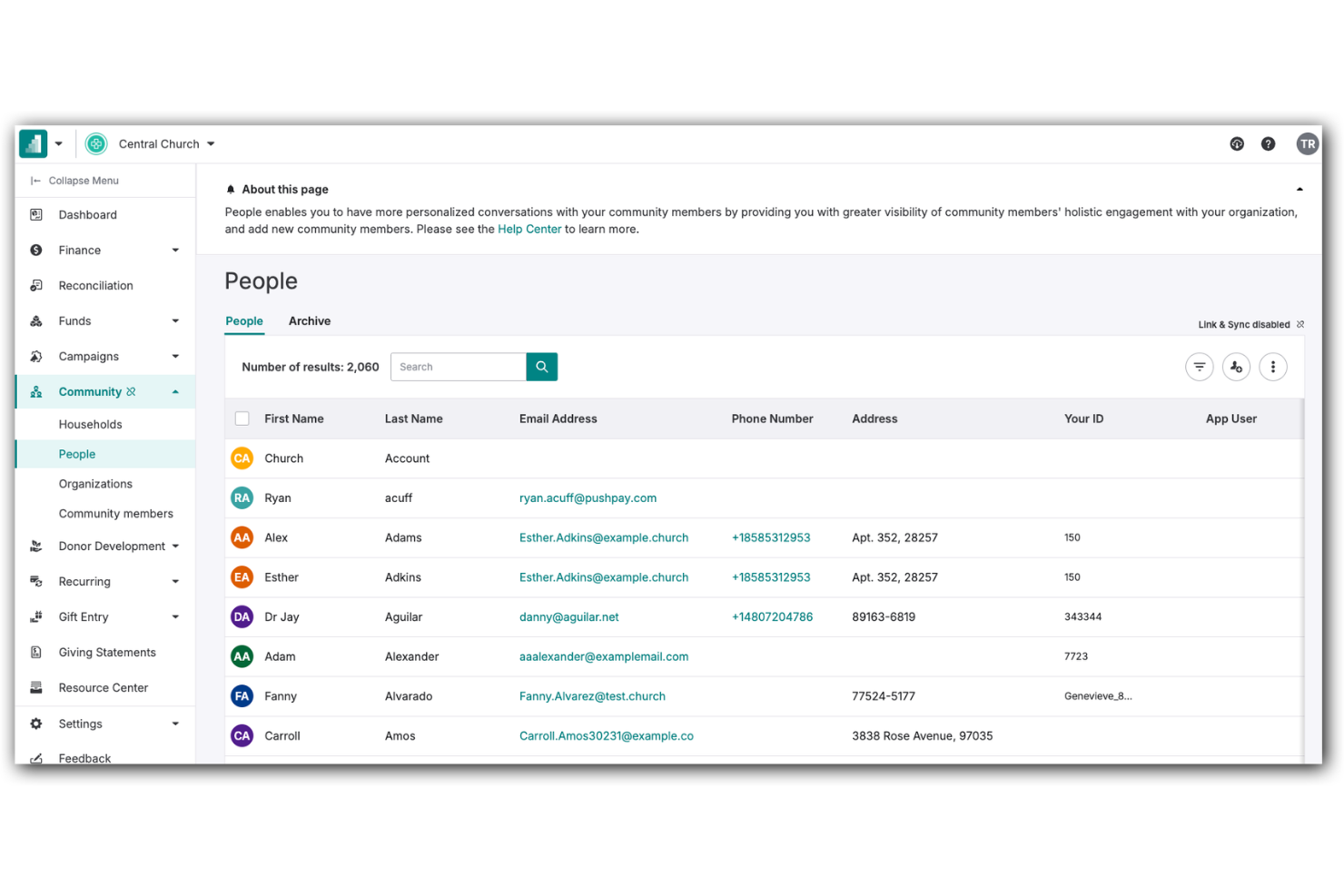
Pushpay offers a digital giving and engagement platform designed for churches and faith-based organizations. It’s a strong option for leaders who want to connect with their congregations through mobile technology and digital communication tools. If you’re looking to simplify giving, manage events, and foster ongoing engagement, Pushpay addresses these needs in one platform.
Who Is Pushpay Best For?
Pushpay is a good fit for churches and ministries that prioritize mobile engagement and digital giving solutions.
Why I Picked Pushpay
What stands out to me about Pushpay is its focus on mobile-first engagement, which is increasingly important for churches looking to connect with members wherever they are. The platform offers a dedicated mobile app that supports digital giving, event sign-ups, and personalized communication, all from a smartphone.
I also like that Pushpay includes features for sending targeted messages and push notifications, making it easier for leaders to keep their congregation informed and engaged. For churches that want to prioritize mobile interaction and real-time connection, Pushpay’s approach fits well with modern ministry needs.
Pushpay Key Features
Some other features that make Pushpay useful for church management include:
- Donor management dashboard: Track giving history, manage donor profiles, and generate contribution statements from a centralized dashboard.
- Recurring giving setup: Allow members to schedule and manage recurring donations directly through the platform.
- Event registration tools: Create, promote, and manage sign-ups for church events, classes, and volunteer opportunities.
- Customizable reporting: Generate detailed reports on giving trends, engagement metrics, and event participation to support data-driven decisions.
Pushpay Integrations
Integrations include Planning Center, QuickBooks, Gusto, Mailchimp, Rock RMS, and more.
Pros and Cons
Pros:
- Automated donor communication tools included
- Branded church app creation is available
- Mobile app supports giving and event sign-ups
Cons:
- Limited AI features in standalone versions
- Requires manual verification of AI outputs

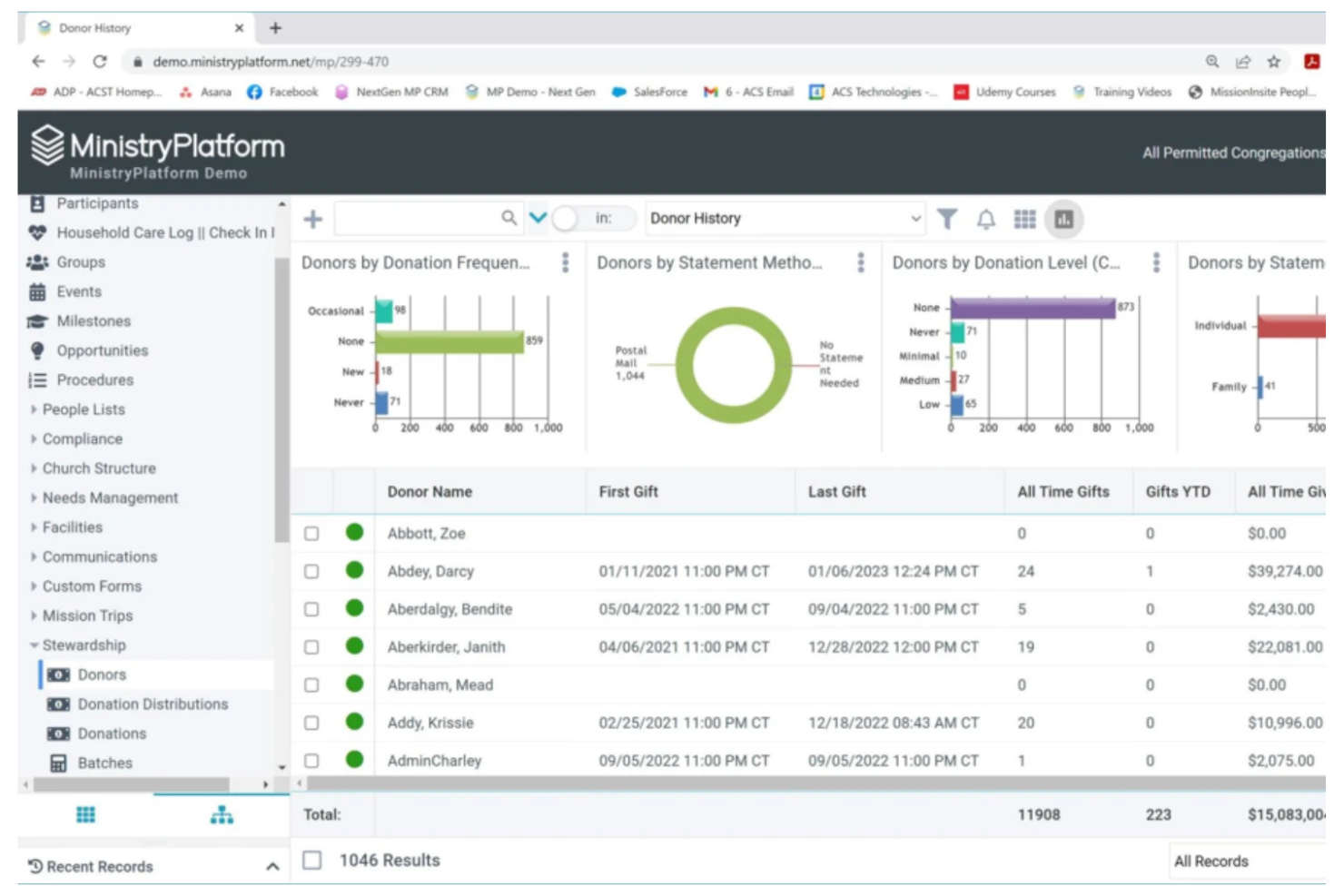
If your church needs a flexible platform to manage complex data and ministry operations, MinistryPlatform is worth a closer look. This solution is designed for churches and ministries that want to centralize member information, events, and engagement tracking. MinistryPlatform appeals to leaders who need to organize, analyze, and act on data to support ministry growth and decision-making.
Who Is MinistryPlatform Best For?
MinistryPlatform is a good fit for large churches and multi-site ministries that need advanced data management and reporting capabilities.
Why I Picked MinistryPlatform
What stands out to me about MinistryPlatform is how deeply you can customize data fields, workflows, and reports to fit your church’s unique structure. This level of flexibility is especially valuable for churches with complex ministries or multi-campus operations that need to track a wide range of member details, engagement metrics, and ministry activities.
I also appreciate that MinistryPlatform lets you design custom dashboards and automate data-driven processes, so you can adapt the platform as your ministry grows or changes. For leaders who want to shape their church management system around their specific needs, MinistryPlatform offers a level of control that’s hard to find elsewhere.
MinistryPlatform Key Features
Some other features that make MinistryPlatform useful for church management include:
- Group management tools: Organize, track, and communicate with small groups, classes, and ministry teams from a central dashboard.
- Event management module: Schedule events, manage registrations, and coordinate resources for church activities and programs.
- Online giving integration: Connect with digital giving platforms to track donations and generate contribution statements.
- Mobile-friendly member portal: Give members access to their profiles, event sign-ups, and communication tools from any device.
MinistryPlatform Integrations
Integrations include Realm, MinistrySafe, Twilio, SendGrid, and more.
Pros and Cons
Pros:
- Member portal with mobile access features
- Advanced reporting and analytics for ministries
- Highly customizable data fields and workflows
Cons:
- Requires training for advanced customization
- Interface can feel dated compared to peers

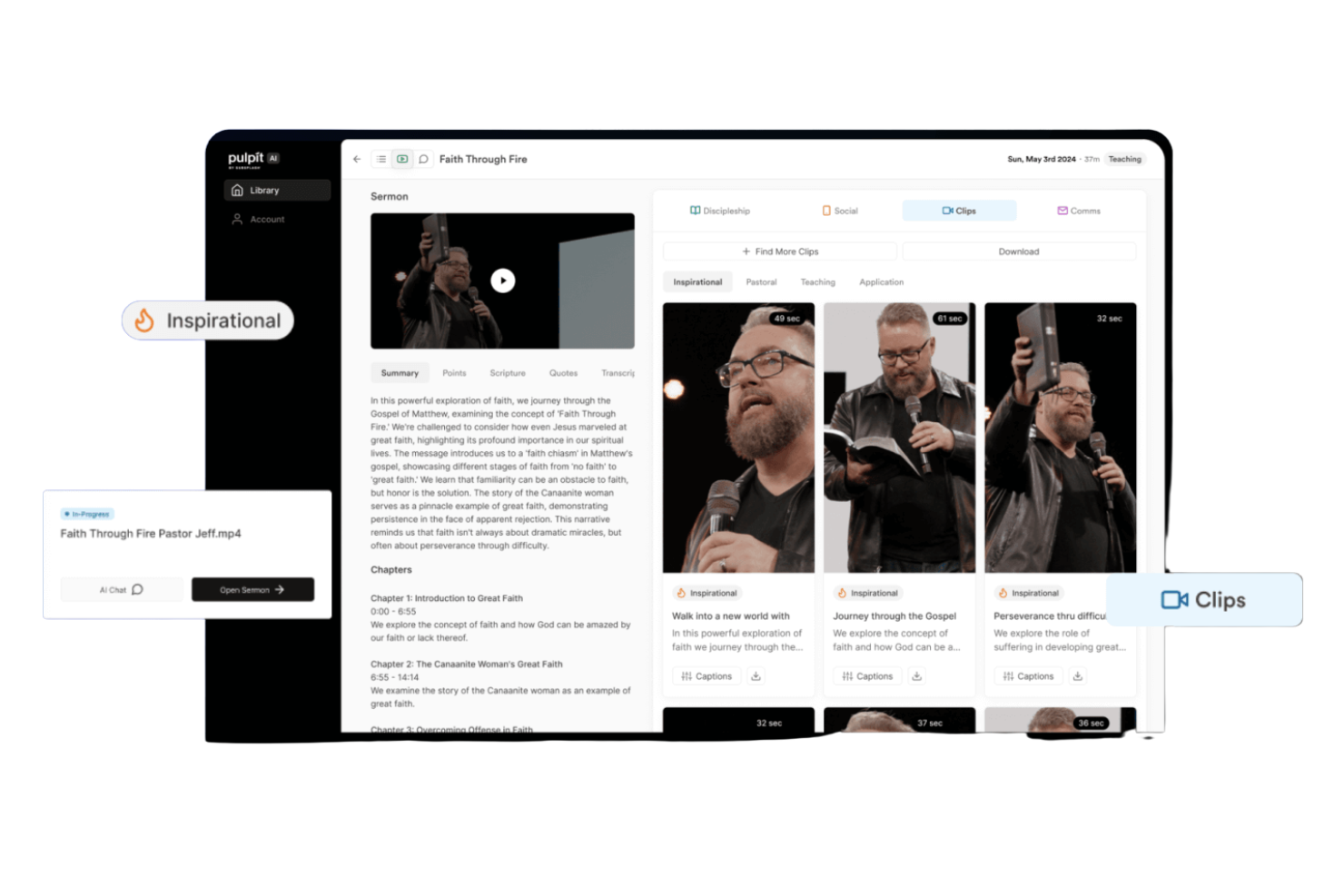
If you want to turn sermons into practical resources for your congregation, Pulpit AI offers a focused solution. This powerful tool is designed for pastors and church communicators who want to repurpose sermon content for broader engagement. It helps address the challenge of keeping your message accessible and relevant throughout the week.
Who Is Pulpit AI Best For?
Pulpit AI is a good fit for pastors and church communication teams who want to repurpose sermons into high-quality digital content for ongoing engagement.
Why I Picked Pulpit AI
What drew me to Pulpit AI is how it uses AI to turn sermons into a variety of shareable formats, like discussion guides, social media posts, and email summaries. This focus on content transformation helps churches keep their messages present in people’s lives beyond Sunday. I also appreciate that it automates the process, so you don’t have to manually rewrite or repackage your sermons each week.
For churches looking to extend the reach and impact of their teaching, these features make Pulpit AI a practical choice.
Pulpit AI Key Features
Some other features that make Pulpit AI useful for church management include:
- Bulk upload for sermon archives: Import multiple past sermons at once to generate content from your existing library.
- Multi-language support: Generate content in several languages to reach a broader audience.
- Content approval workflow: Review and approve generated materials before publishing or sharing.
- Team collaboration tools: Invite staff or volunteers to collaborate on editing and distributing sermon-based content.
Pulpit AI Integrations
Integration includes Subsplash.
Pros and Cons
Pros:
- Offers bulk upload for sermon archives
- Supports multi-language content generation
- Converts sermons into multiple content formats
Cons:
- Does not automate sermon transcription
- Lacks direct publishing to social media

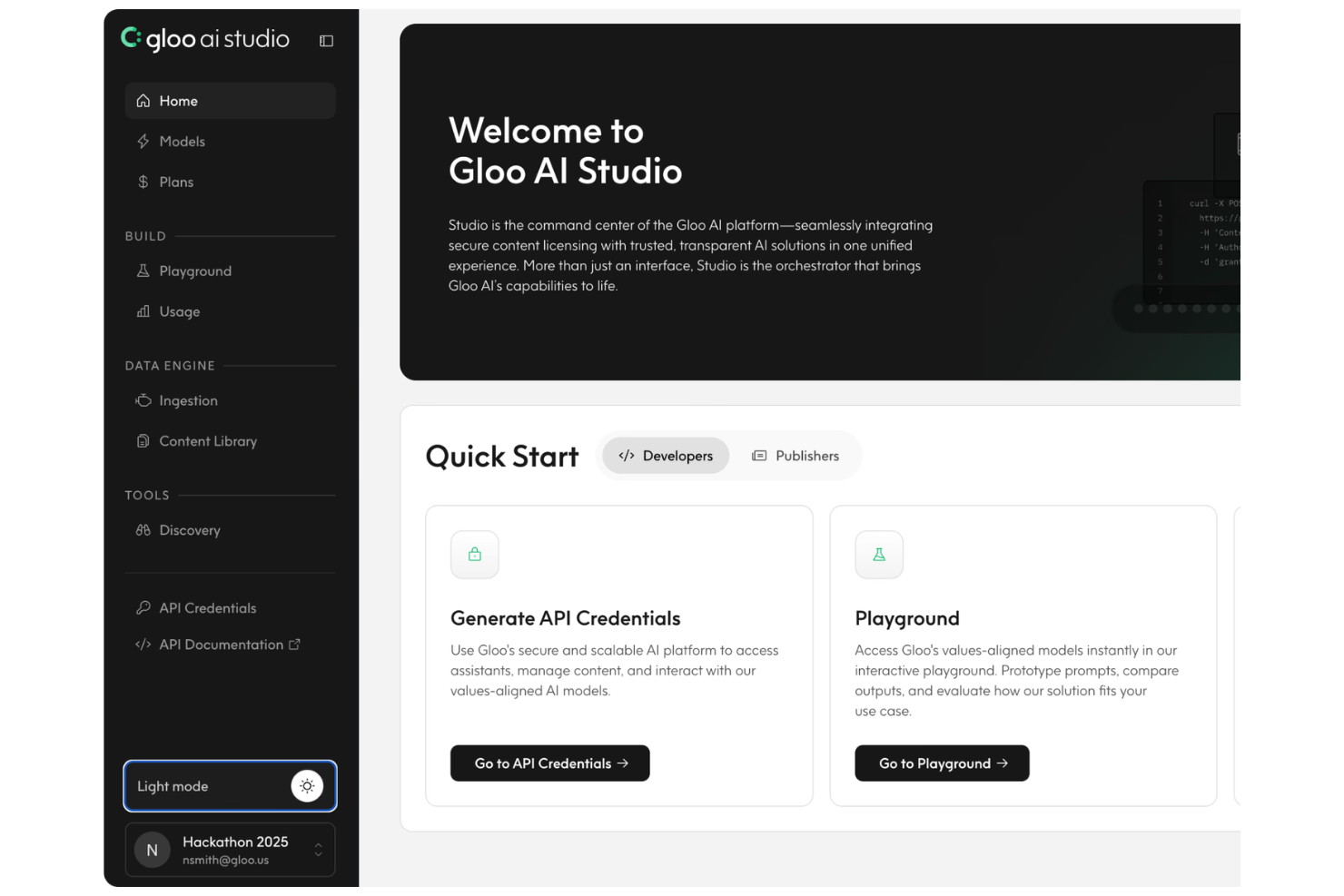
If you’re looking for a church management platform that emphasizes digital outreach and connection, Gloo is worth considering. It’s designed for churches and ministries that want to engage their communities and centralize communication with the use of AI. Gloo helps address the challenge of connecting with people both inside and outside your congregation using digital tools.
Who Is Gloo Best For?
Gloo is a good fit for church leaders and ministry teams focused on digital outreach and community engagement.
Why I Picked Gloo
What stands out about Gloo is how it connects churches with a wide network of community partners and digital outreach tools. I picked it because it offers integrations with platforms that help churches reach people beyond their regular attendees, such as prayer request networks and local service organizations.
Gloo’s focus on community connection means you can coordinate outreach, follow up with new contacts, and manage digital campaigns from one place. For churches that want to expand their impact and build stronger relationships in their communities, these features make Gloo a strong option.
Gloo Key Features
Some other features that make Gloo useful for church management include:
- Resource library: Access a curated collection of digital resources, training materials, and ministry tools.
- Messaging platform: Send targeted messages to individuals or groups within your congregation.
- Prayer request management: Collect, organize, and respond to prayer requests from your community.
- Volunteer coordination: Schedule, communicate with, and manage volunteers for church events and outreach.
Gloo Integrations
Integrations include HubSpot, Planning Center, Church Community Builder, Rock RMS, and MinistryPlatform.
Pros and Cons
Pros:
- Includes prayer request management tools
- Offers digital resource sharing for ministries
- Connects churches with local outreach partners
Cons:
- Lacks advanced automation for follow-up
- Limited reporting and analytics for engagement

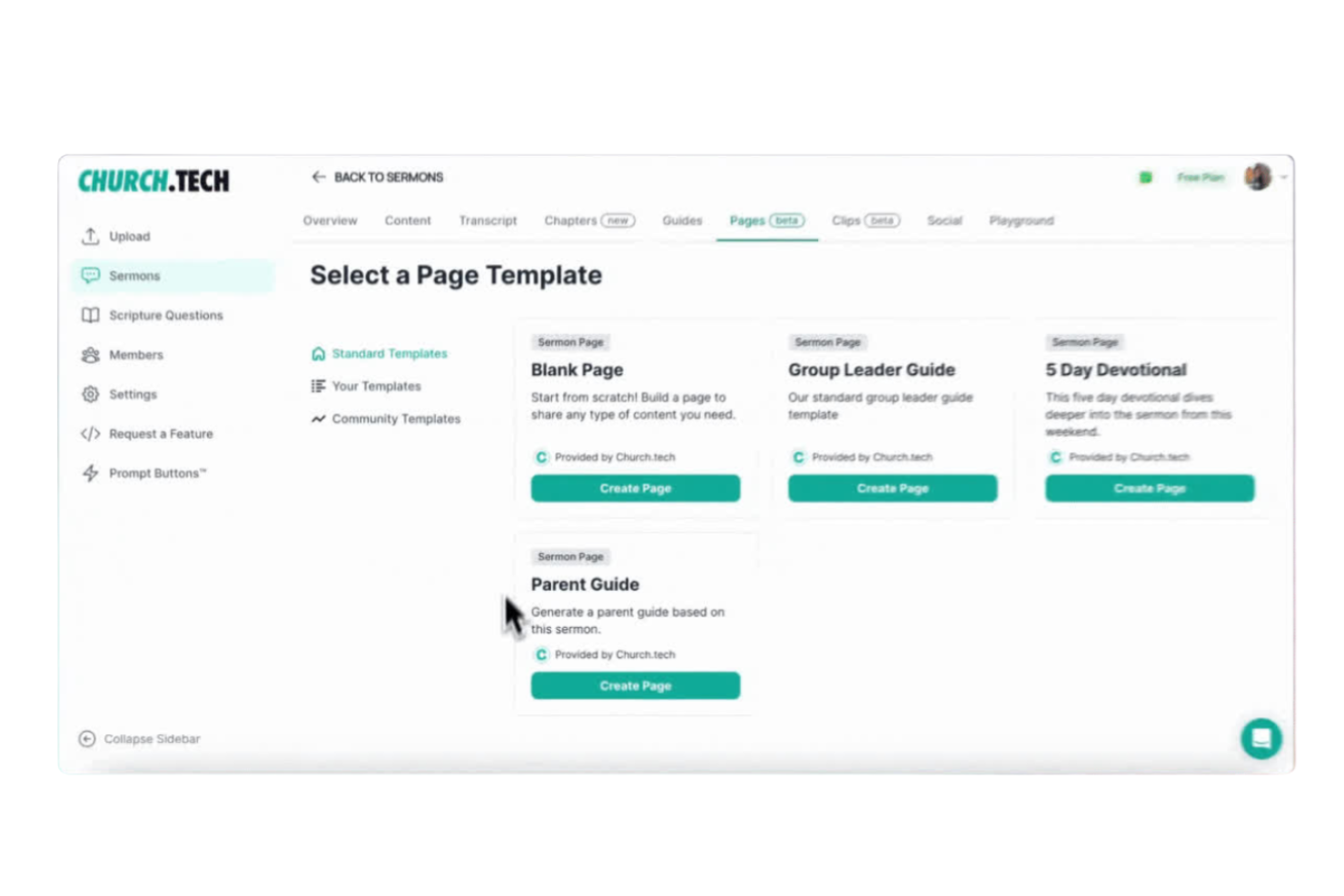
Church.tech offers AI-driven solutions for churches looking to simplify event planning and coordination. This platform is a good fit for ministry leaders and administrators who manage busy calendars, sermons, and multiple activities. It helps reduce manual scheduling work and keeps everyone on the same page.
Who Is Church.tech Best For?
Church.tech is a good fit for church administrators and ministry teams who need to coordinate events and schedules across multiple groups or locations.
Why I Picked Church.tech
I chose Church.tech because its automated event scheduling workflows address a common challenge for church leaders: managing overlapping activities and busy calendars. The platform uses AI to suggest optimal times for events, reducing conflicts in daily ministry work.
I also appreciate that it can automatically notify team members and volunteers about schedule changes, keeping everyone informed. These features make it especially useful for churches with multiple ministries or frequent events.
Church.tech Key Features
Some other features that make Church.tech useful for church management include:
- Volunteer management tools: Assign, track, and communicate with volunteers for specific events or ongoing ministry needs.
- Resource booking system: Reserve rooms, equipment, and other resources directly within the platform to avoid double-booking.
- Customizable event templates: Create and reuse templates for recurring events, saving setup time for regular church activities.
- Attendance tracking: Monitor event participation and generate reports to help with follow-up and engagement.
Church.tech Integrations
Native integrations are not currently listed.
Pros and Cons
Pros:
- Has customizable event templates
- Provides volunteer management tools
- Automated scheduling for coordination work
Cons:
- No built-in donation or giving management
- Limited reporting options for financial tracking

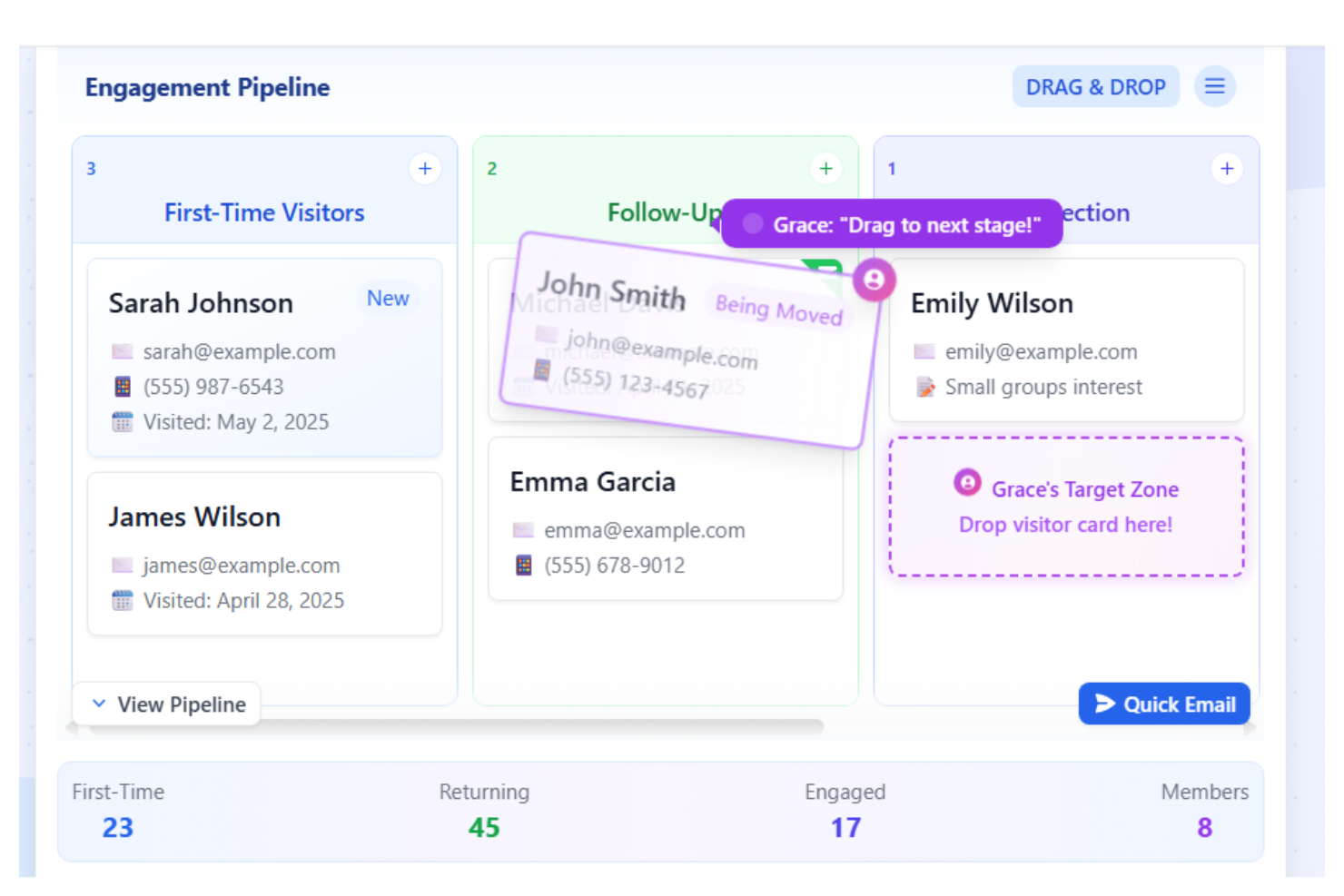
If you’re looking to use generative AI to connect with your congregation, Church Sync AI offers a solution. This platform is designed for church leaders who want to use data and AI to track member engagement and participation. It helps address the challenge of identifying trends and needs within your community so you can respond with timely care and outreach.
Who Is Church Sync AI Best For?
Church Sync AI is a good fit for pastors and ministry teams who want to monitor and improve member engagement using AI-driven analytics.
Why I Picked Church Sync AI
What stands out to me about Church Sync AI is its focus on using AI to surface actionable member engagement insights. The platform analyzes attendance, participation, and communication patterns to help you identify members who may need extra support or follow-up.
I also appreciate that it provides visual dashboards and reports, making it easier for ministry teams to spot trends and gaps in engagement. These features make it a strong choice for churches that want to be proactive in caring for their community.
Church Sync AI Key Features
Some other features that make Church Sync AI useful for church management include:
- Automated follow-up reminders: The system sends reminders to staff when members miss events or services.
- Customizable engagement surveys: Create and distribute surveys to gather feedback from your congregation.
- Role-based access controls: Assign different permission levels to staff, volunteers, and ministry leaders.
- Event participation tracking: Monitor attendance and involvement across various church activities and programs.
Church Sync AI Integrations
Native integrations are not currently listed.
Pros and Cons
Pros:
- Tracks participation across multiple ministries
- Customizable surveys collect feedback
- Identifies disengaged members for follow-up
Cons:
- Does not offer volunteer scheduling tools
- Lacks integration with giving platforms

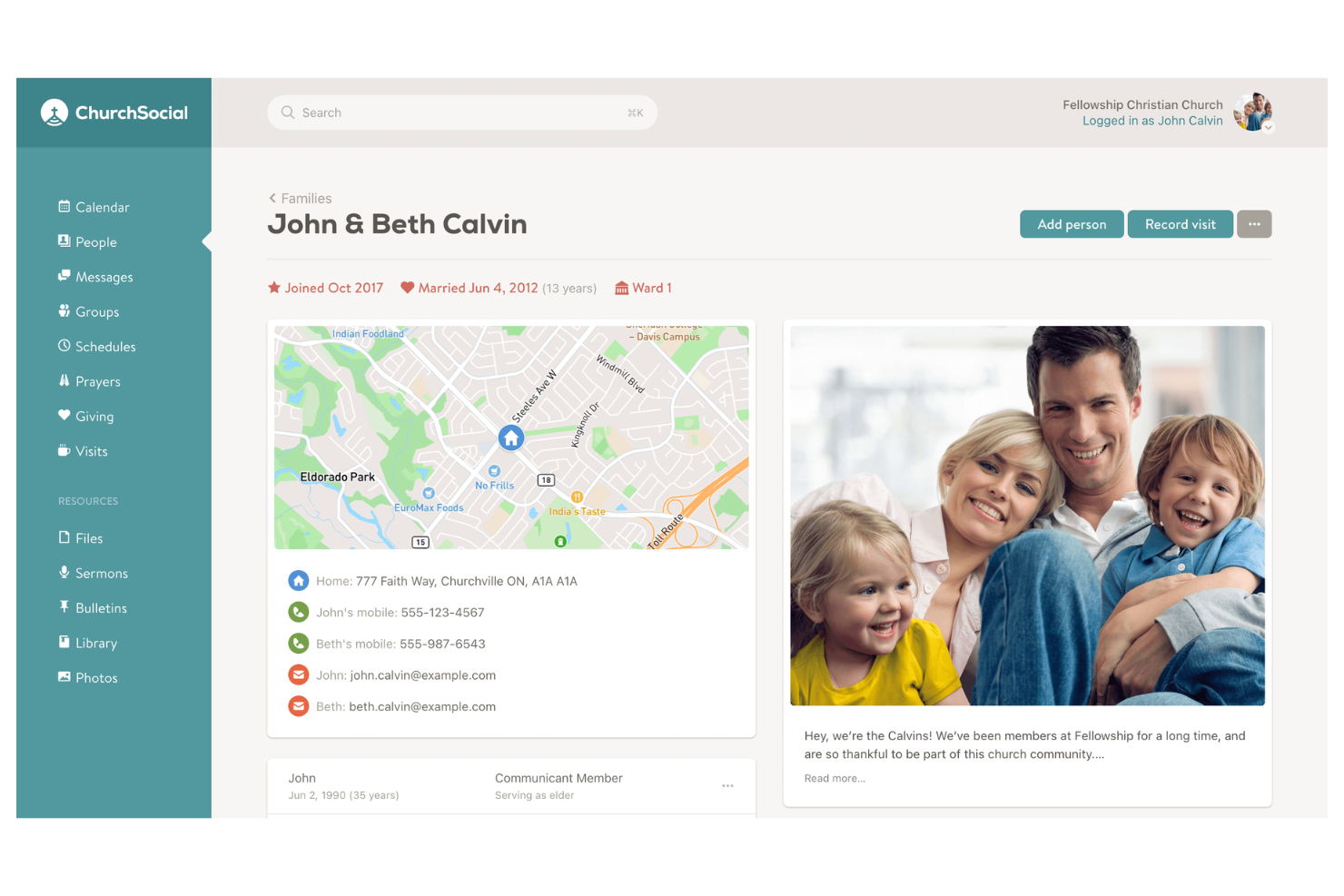
If you’re looking for a church management tool that emphasizes communication and group coordination, ChurchSocial is worth considering. It’s designed for churches and ministries that want to automate routine messaging and keep members connected. Church leaders who need to manage group updates, reminders, and internal communication will find features tailored to these needs.
Who Is ChurchSocial Best For?
ChurchSocial is a good fit for church leaders and administrators who need to automate group communication and manage member engagement.
Why I Picked ChurchSocial
What drew me to ChurchSocial is its focus on automating group communication, which is a real challenge for many churches managing multiple ministries and teams. The platform uses AI-driven tools to schedule and send group messages, reminders, and announcements, reducing the manual work for leaders.
I also appreciate that ChurchSocial allows you to segment groups and automate communication flows, so each ministry or volunteer team gets the right information at the right time. For churches that want to keep everyone in the loop without constant manual effort, these automation features make ChurchSocial a strong choice.
ChurchSocial Key Features
Some other features that make ChurchSocial useful for church management include:
- Member directory: Maintain an up-to-date, searchable list of all church members and their contact details.
- Attendance tracking: Record and monitor attendance for services, events, and group meetings.
- Document sharing: Upload and share files, newsletters, and resources securely within the platform.
- Volunteer scheduling: Assign, organize, and notify volunteers for upcoming events and ministry needs.
ChurchSocial Integrations
Integrations include Instagram, Facebook, X, TikTok, YouTube, Google Business, Planning Center, and Church Community Builder.
Pros and Cons
Pros:
- Social media posting from one dashboard
- Member directory with privacy controls
- Built-in attendance and volunteer tracking
Cons:
- Limited reporting and analytics features
- Lacks advanced event registration options
Other AI Tools for Church Management
Here are some additional AI tools for church management options that didn’t make it onto my shortlist, but are still worth checking out:
- Relius
With AI-driven administrative task support
- Canva
For church presentation design
- Otter
For automated meeting transcription
- ChatGPT
For conversational content support
- Online Giving
For digital donation processing
- SermonSpark
For sermon content generation
- Grok
For real-time information retrieval
- V7 Go
For visual data annotation tasks
- Magai
For multi-model AI chatbot integration
- Church C.R.E.W.
For volunteer scheduling workflows


AI Tools for Church Management Selection Criteria
When selecting the best AI tools for church management to include in this list, I considered common buyer needs and pain points like automating repetitive administrative tasks and improving communication with congregants. I also used the following framework to keep my evaluation structured and fair:
Core Functionality (25% of total score)
To be considered for inclusion in this list, each solution had to fulfill these common use cases:
- Manage member and volunteer data
- Automate scheduling and calendar events
- Track donations and financial records
- Facilitate communication with staff and congregants
- Store and organize church documents
Additional Standout Features (25% of total score)
To help further narrow down the competition, I also looked for unique features, such as:
- AI-driven task automation for administrative workflows
- Smart content generation for sermons or newsletters
- Predictive analytics for attendance and giving trends
- Automated follow-up reminders for pastoral care
- Integration with worship planning or presentation tools
Usability (10% of total score)
To get a sense of the usability of each system, I considered the following:
- Simple and intuitive dashboard navigation
- Clear labeling and logical menu structure
- Minimal clicks to complete common tasks
- Responsive design for desktop and mobile
- Accessibility features for diverse users
Onboarding (10% of total score)
To evaluate the onboarding experience for each platform, I considered the following:
- Step-by-step setup guides or product tours
- Availability of training videos and documentation
- Pre-built templates for common church workflows
- Access to live chat or onboarding webinars
- Support for data migration from previous systems
Customer Support (10% of total score)
To assess each software provider’s customer support services, I considered the following:
- Multiple support channels like chat, email, and phone
- Fast response times to support requests
- Knowledgeable and friendly support staff
- Access to a searchable help center or FAQ
- Community forums or user groups for peer support
Value For Money (10% of total score)
To evaluate the value for money of each platform, I considered the following:
- Transparent and predictable pricing structure
- Features included at each pricing tier
- Discounts for nonprofits or faith-based organizations
- Free trial or demo availability
- No hidden fees or surprise charges
Customer Reviews (10% of total score)
To get a sense of overall customer satisfaction, I considered the following when reading customer reviews:
- Positive feedback on AI features and automation
- Reports of reliable system uptime and performance
- Comments on ease of adoption by church staff
- Experiences with customer support quality
- Suggestions for improvement or missing features
How to Choose AI Tools for Church Management
It’s easy to get bogged down in long feature lists and complex pricing structures. To help you stay focused as you work through your unique software selection process, here’s a checklist of factors to keep in mind:
| Factor | What to Consider |
|---|---|
| Scalability | Will the tool support your church as it grows in members, ministries, or locations? Check for user limits, data caps, and upgrade paths. |
| Integrations | Does the tool connect with your existing systems, such as accounting, email, or presentation software? Confirm native integrations, not just API options. |
| Customizability | Can you tailor workflows, forms, or dashboards to fit your church’s unique processes? Avoid tools that force you into rigid templates. |
| Ease of use | Will staff and volunteers of varying tech skill levels be able to use the tool confidently? Look for clear navigation and minimal training requirements. |
| Implementation and onboarding | How long will it take to get up and running? Ask about migration support, training resources, and whether you’ll need outside IT help. |
| Cost | Are all costs transparent, including setup, monthly fees, and add-ons? Compare pricing tiers and watch for hidden charges or required upgrades. |
| Security safeguards | How does the tool protect sensitive member and donation data? Look for encryption, access controls, and compliance with privacy standards. |
| Support availability | When and how can you reach support if issues arise? Check for live chat, phone, or email options, and whether support is included or extra. |
What Are AI Tools for Church Management?
AI tools for church management are software platforms that use artificial intelligence to automate, organize, and enhance administrative and ministry tasks within a church. These tools help manage church ministry data, scheduling, communication, donations, and reporting.
By leveraging AI, churches can reduce manual work, improve accuracy, and free up staff and volunteers to focus more on ministry and community engagement.
Features
When selecting AI tools for church management, keep an eye out for the following key features:
- Automated scheduling: Uses AI to coordinate calendars, book rooms, and send reminders for services, meetings, and events, reducing manual coordination.
- Smart communication tools: Automates email, text, or app notifications to members and volunteers, ensuring timely updates and reducing missed messages.
- Donation tracking: Records, categorizes, and reports on giving, pledges, and recurring donations, making financial oversight and donor engagement easier.
- Volunteer management: Matches volunteers to roles based on availability and skills, tracks hours, and automates follow-up for future opportunities.
- Document management: Organizes, stores, and retrieves church documents, policies, and forms, using AI to surface relevant files when needed.
- Member database management: Maintains up-to-date records of members, families, and visitors, with AI-driven insights for engagement and outreach.
- Attendance analytics: Tracks attendance patterns for services and events, using AI to identify trends and flag changes that may need pastoral attention.
- Task automation: Handles repetitive administrative tasks like data entry, image generation, and workflow routing, freeing up staff time.
- Event planning support: Assists with logistics, registration, and communication for church events, using AI to anticipate needs and optimize resources.
- Security and privacy controls: Applies AI to monitor access, detect unusual activity, and ensure sensitive data is protected according to privacy standards.
Benefits
Implementing AI-powered tools for church management provides several benefits for your team and your business. Here are a few you can look forward to:
- Reduced administrative workload: Automating scheduling, communication, and data entry frees up staff and volunteers for more ministry-focused work.
- Improved accuracy: AI-driven data management and reporting minimize errors in member records, donations, and attendance tracking.
- Faster decision-making: Real-time analytics and predictive insights help leaders respond quickly to trends in attendance, giving, and engagement.
- Enhanced member engagement: Automated, personalized communication tools ensure members and volunteers receive timely updates and reminders.
- Better resource allocation: AI-powered scheduling and event planning optimize the use of facilities, volunteers, and budgets.
- Increased data security: Built-in privacy controls and monitoring features help protect sensitive member and financial information.
- Scalable operations: AI tools adapt as your church grows, supporting additional members, ministries, and locations without overwhelming your team.
Costs and Pricing
Selecting AI tools for church management requires an understanding of the various pricing models and plans available. Costs vary based on features, team size, add-ons, and more. The table below summarizes common plans, their average prices, and typical features included in AI tools for church management solutions:
Plan Comparison Table for AI Tools for Church Management
| Plan Type | Average Price | Common Features |
|---|---|---|
| Free Plan | $0 | Basic member management, limited scheduling, simple communication tools, and basic reporting. |
| Personal Plan | $5-$15/user/month | Member database, event scheduling, donation tracking, email notifications, and limited analytics. |
| Business Plan | $20-$40/user/month | Advanced automation, volunteer management, document storage, custom reporting, and integration options. |
| Enterprise Plan | $50-$100/user/month | Custom workflows, advanced security, priority support, multi-campus management, and API access. |
AI Tools for Church Management FAQs
Here are some answers to common questions about AI tools for church management:
How do AI tools help churches save time?
AI tools automate repetitive tasks like scheduling, data entry, and sending reminders. This reduces manual work for staff and volunteers, allowing them to focus more on ministry and less on administration.
Can AI tools for church management integrate with existing church software?
Yes, many AI tools offer integrations with accounting, email, presentation, and donor management systems. Always check compatibility with your current software before choosing a tool.
Are AI tools for church management secure?
Yes, most reputable AI tools use encryption, access controls, and regular security updates to protect sensitive member and financial data. Always review a vendor’s security policies and compliance standards before implementation.
What training is needed to use AI church management tools?
Most tools are designed for ease of use and offer onboarding resources like tutorials, webinars, and help centers. Some may require brief training sessions for staff or volunteers, especially for advanced features like using AI chatbots.
How do AI tools support member engagement?
AI tools can personalize communication, automate follow-ups, and track attendance trends. This helps church leadership connect with members more consistently and respond to needs in a timely way.
What should I consider when budgeting for AI church management tools?
Consider the number of users, required features, integration needs, and potential add-on costs. Look for transparent pricing and ask about nonprofit discounts or free trial options.