
14 Best Nonprofit Management Software for 2026

Nonprofit Management Software Shortlist
Here’s my shortlist of the best nonprofit management software:


The best nonprofit management software helps your organization coordinate fundraising, donor relationships, volunteer tracking, and essential operations in one place. If you’re searching for tools to simplify complex tasks, improve transparency, and support your mission, you know how much is at stake—every dollar and hour counts. This list will help you compare leading options for 2026, so you can find software that fits your team’s needs, aligns with your goals, and empowers your ministry to serve with clarity and confidence.
Why Trust Our Software Reviews
Best Nonprofit Management Software Summary
This comparison chart summarizes pricing details for my top nonprofit management software selections to help you find the best one for your budget and business needs.
| Tool | Best For | Trial Info | Price | ||
|---|---|---|---|---|---|
| 1 | Best for donor retention tracking | Free demo available | From $40/month (billed annually) | Website | |
| 2 | Best for integrated fund accounting | 15-day free trial | From $79/month | Website | |
| 3 | Best for intuitive donor profiles | Free demo available | From $33/month | Website | |
| 4 | Best for large-scale fundraising | Free demo available | Pricing upon request | Website | |
| 5 | Best for multi-channel fundraising | 30-day free trial + free plan + free demo available | From $29/month | Website | |
| 6 | Best for customizable reporting | Free demo available | Pricing upon request | Website | |
| 7 | Best for event management features | Free demo available | From $99/month | Website | |
| 8 | Best for personalized donor journeys | Free demo available | Pricing upon request | Website | |
| 9 | Best for advanced CRM integrations | Free plan + free demo available | From $25/user/month (billed annually) | Website | |
| 10 | Best for nonprofit tech discounts | Free demo available | From $99/organization/year | Website | |
| 11 | Best for peer-to-peer campaigns | Free demo available | Pricing upon request | Website | |
| 12 | Best for volunteer management tools | Free demo available | Pricing upon request | Website |
-

Gracely
Visit WebsiteThis is an aggregated rating for this tool including ratings from Crozdesk users and ratings from other sites.4.9 -
Text In Church
Visit WebsiteThis is an aggregated rating for this tool including ratings from Crozdesk users and ratings from other sites.4.8 -
One Church Software
Visit WebsiteThis is an aggregated rating for this tool including ratings from Crozdesk users and ratings from other sites.4.8


Nonprofit Management Software Reviews
Below are my detailed summaries of the best nonprofit management software that made it onto my shortlist. My reviews offer a detailed look at the features, best use cases, and integrations of each software to help you find the best one for you.

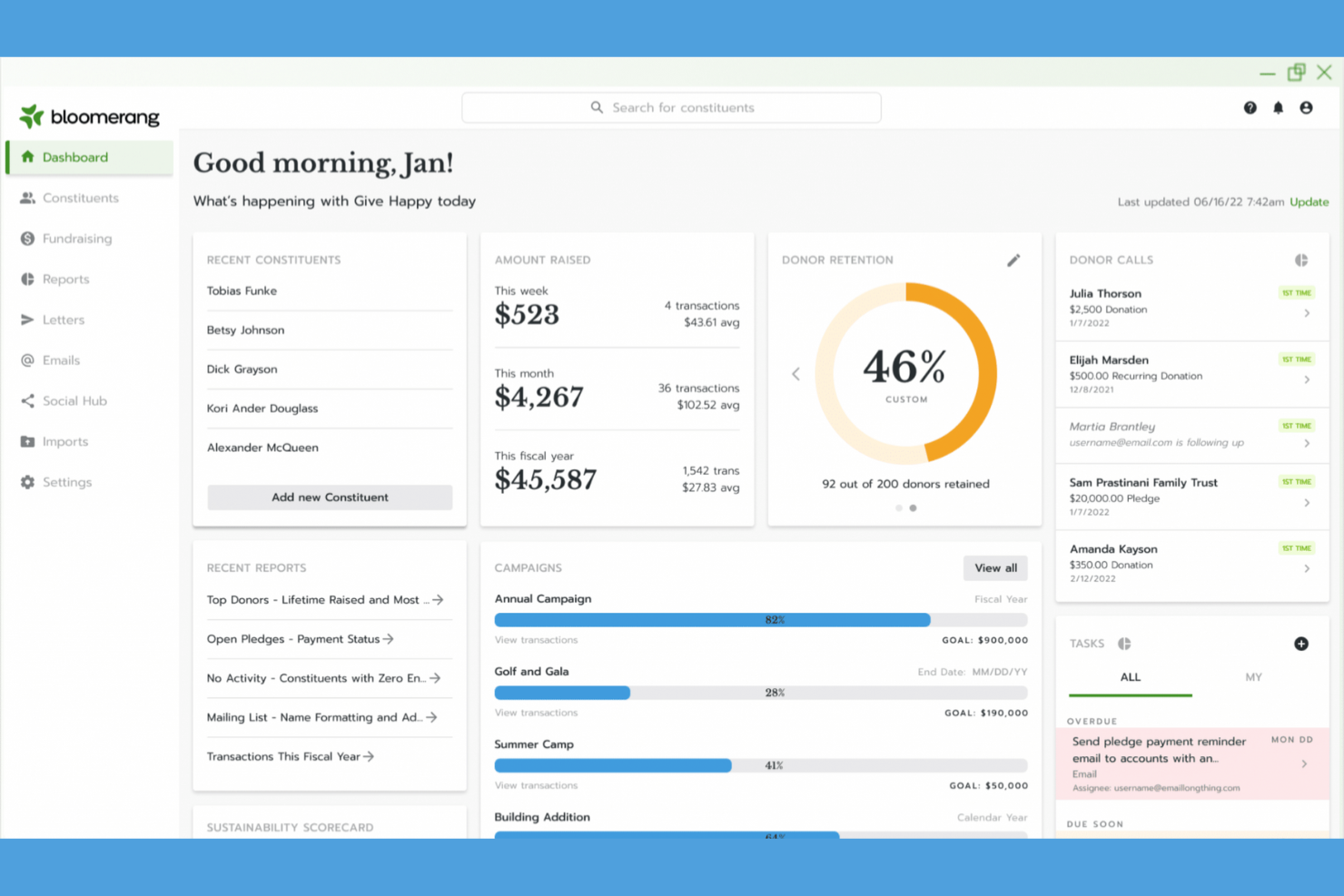
If you’re looking to strengthen donor relationships and improve retention, Bloomerang offers focused tools for tracking engagement and giving history. This user-friendly fundraising platform appeals especially to small nonprofits that want clear insights into donor loyalty and communication without overwhelming complexity. Its approach helps you identify trends and take action to keep supporters connected to your mission.
Why I Picked Bloomerang
For organizations focused on building long-term donor relationships, I picked Bloomerang because of its specialized donor retention tracking. The platform offers a donor engagement timeline that highlights every interaction, making it easy to spot patterns and lapses in communication. I also appreciate the built-in retention dashboard, which gives you real-time metrics on donor loyalty and helps you prioritize outreach. These features make Bloomerang a strong choice for nonprofits that want to turn one-time gifts into ongoing support.
Bloomerang Key Features
Some other features in Bloomerang help round out its capabilities for nonprofit management:
- Email Marketing Tools: Create, schedule, and track email campaigns directly within the platform.
- Online Giving Forms: Build custom donation forms that embed on your website and sync with donor records.
- Constituent Database: Store and organize detailed profiles for donors, volunteers, and other supporters.
- Task Management: Assign and track follow-up tasks for team members to ensure timely outreach and stewardship.
Bloomerang Integrations
Integrations include QuickBooks, DonorSearch, Mailchimp, Constant Contact, Amilia, and Verified First.
Pros and Cons
Pros:
- Provides customizable online donation forms
- Offers built-in email marketing tools
- Tracks donor retention rates over time
Cons:
- Reporting options can feel restrictive
- No built-in event ticketing features

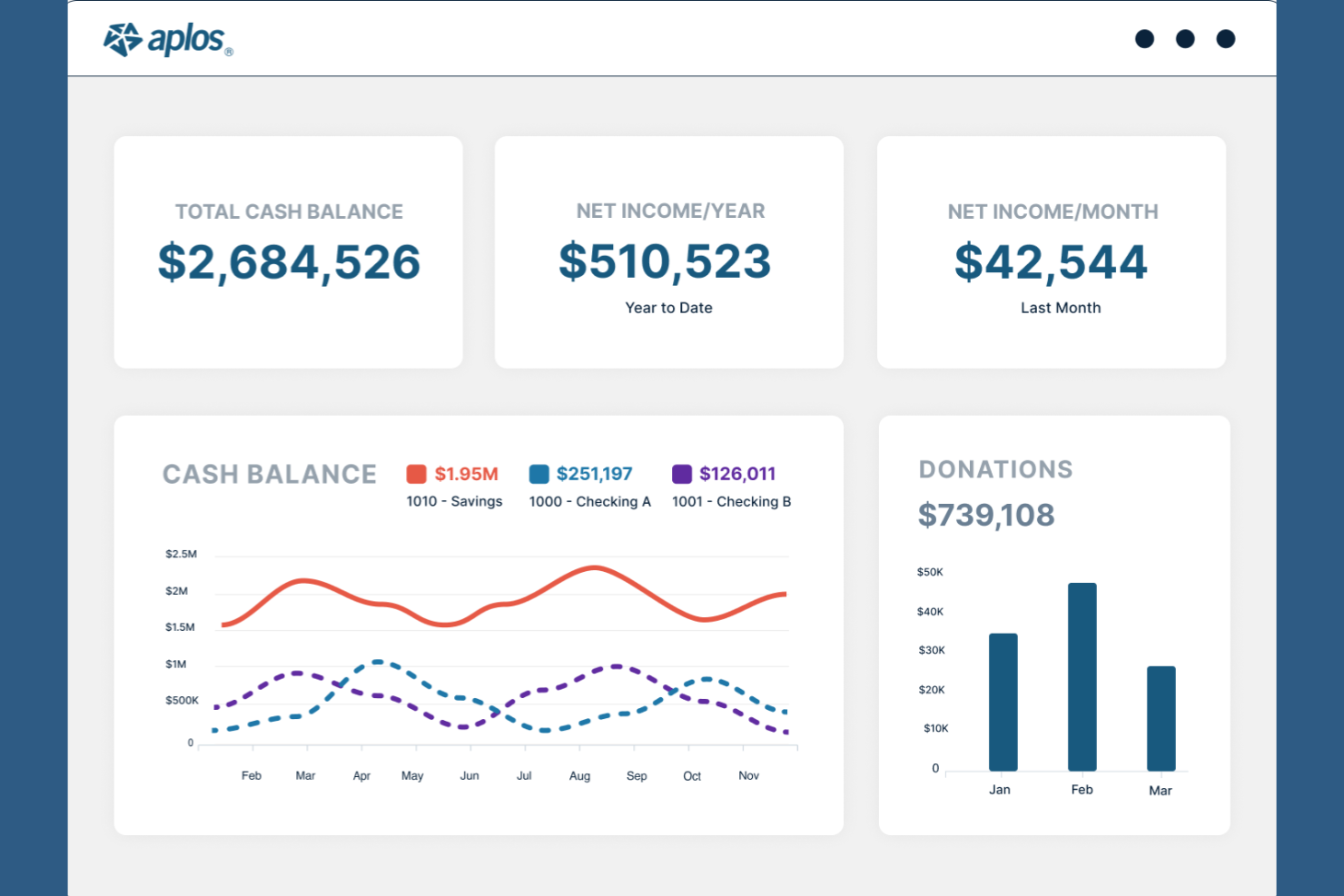
If you’re looking for nonprofit management software with true fund accounting at its core, Aplos is designed for you. This platform is a strong fit for churches, ministries, and nonprofits that need to track designated funds and manage restricted giving with accuracy. Aplos brings accounting, donation tracking, and reporting together so you can keep your finances organized and mission-focused.
Why I Picked Aplos
Aplos stands out for its integrated fund accounting, which is essential for organizations that need to track restricted and designated funds separately. I picked Aplos because it lets you create true fund-based financial reports, so you always know exactly how much is available for each purpose or project. The platform also includes built-in donation tracking that links directly to your accounting, reducing manual entry and errors. For nonprofits and churches that need to maintain transparency and accountability with their finances, Aplos offers the specialized tools to do just that.
Aplos Key Features
Some other features make Aplos a well-rounded choice for nonprofit management:
- Event Registration Tools: Set up online event registration and track attendance for fundraisers or community gatherings.
- Recurring Donation Management: Allow donors to set up and manage automated recurring gifts through the platform.
- Email Marketing Integration: Send newsletters and donation appeals directly from your Aplos account.
- Budgeting Module: Build and monitor budgets for different funds, programs, or fiscal years.
Aplos Integrations
Integrations include Gusto, Raisely, Pex, and an API is available for custom integrations.
Pros and Cons
Pros:
- Budgeting for multiple funds or programs
- Direct email marketing from the platform
- Event registration and ticketing included
Cons:
- Payroll integration options are minimal
- No built-in volunteer management features

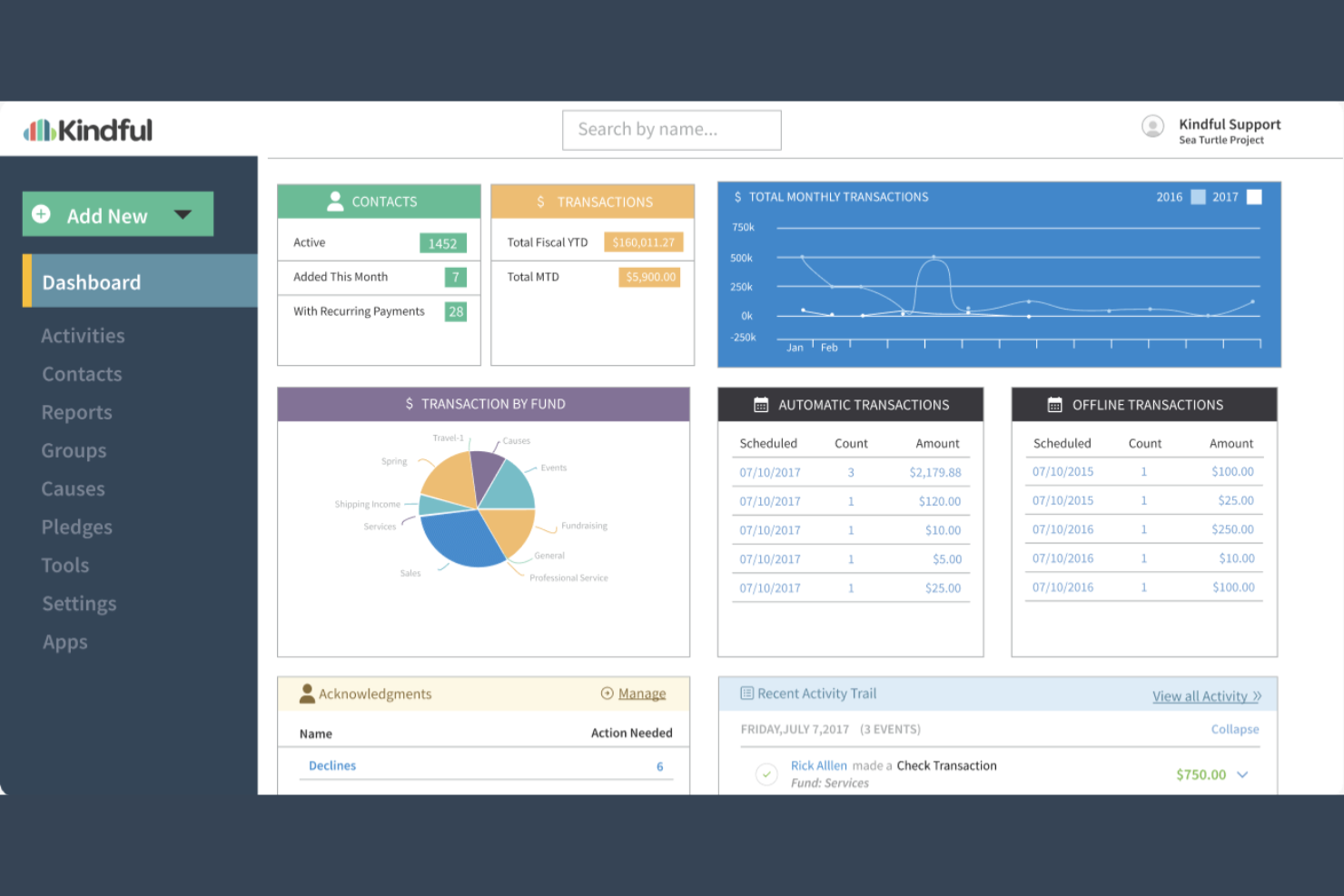
Kindful is designed for nonprofits that want a clear, organized view of their donor relationships. It’s especially helpful for development teams and fundraising professionals who need to track giving history, engagement, and communication in one place. With Kindful, you can quickly access intuitive donor profiles that help you personalize outreach and strengthen supporter connections.
Why I Picked Kindful
What sets Kindful apart is its focus on giving you a complete, easy-to-navigate donor profile. I picked Kindful because it lets you see donation history, communication records, and engagement activity all in one place, making it much easier to understand and connect with your supporters. The platform also allows you to segment donors based on giving patterns or campaign involvement, so you can tailor your outreach. For nonprofits that want to build lasting relationships and track every touchpoint, Kindful’s donor profiles offer the clarity and detail you need.
Kindful Key Features
Some other features that make Kindful a strong choice for nonprofit management are:
- Online Donation Forms: Create branded, mobile-friendly donation forms for your website or campaigns.
- Automated Acknowledgments: Set up automatic thank-you emails and receipts for donors.
- Pledge Tracking: Monitor outstanding pledges and manage recurring giving commitments.
- Fundraising Campaign Management: Organize and track multiple fundraising campaigns within the platform.
Kindful Integrations
Integrations include QuickBooks, Mailchimp, Constant Contact, DonorSearch, Eventbrite, Classy, Emma, Fundraise Up, Double the Donation, and Zapier.
Pros and Cons
Pros:
- Campaigns can be segmented by donor behavior
- Automated thank-you receipts for every donation
- Donor profiles display lifetime giving history
Cons:
- No built-in text-to-give functionality
- Reporting exports sometimes omit custom fields

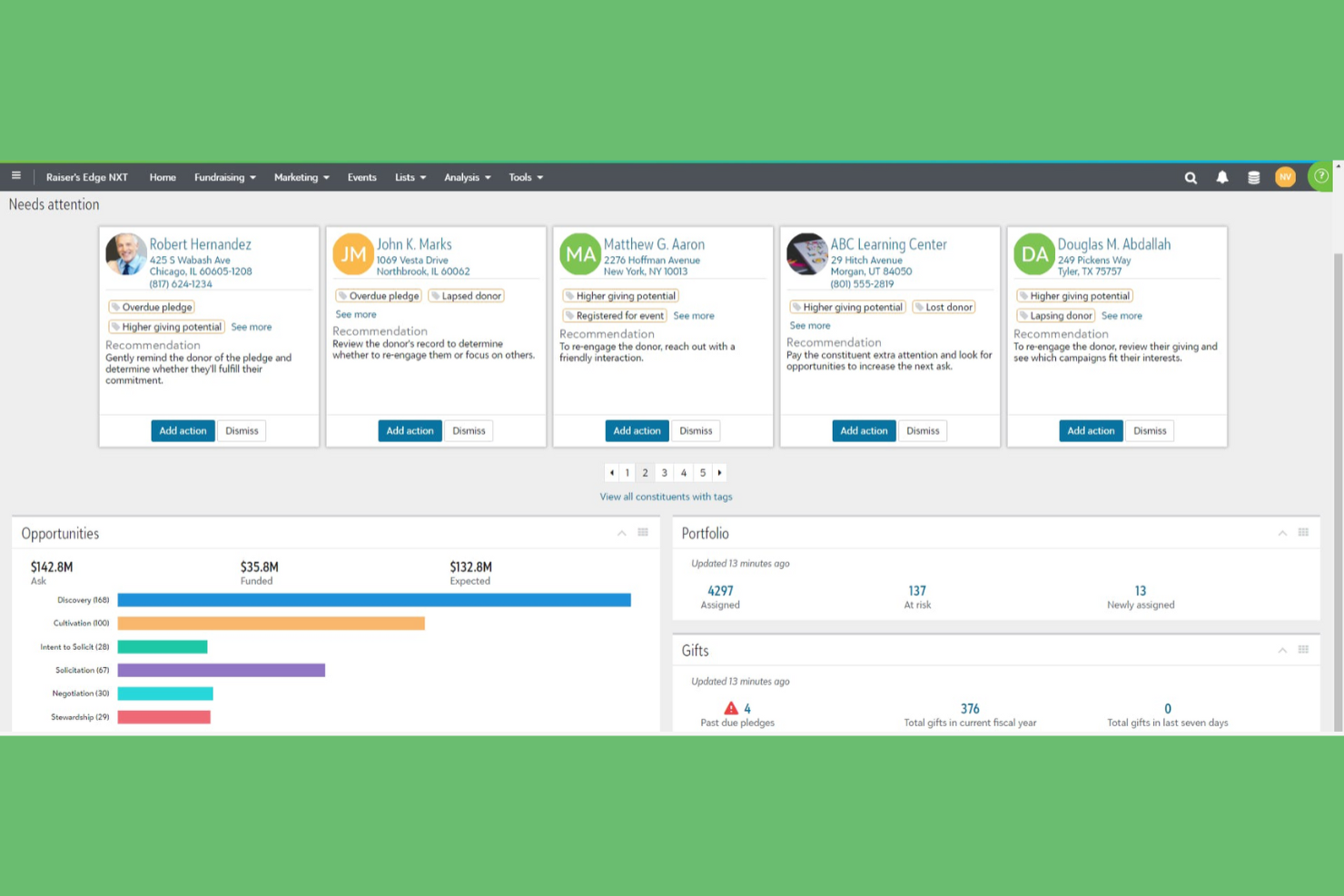
For organizations managing complex fundraising campaigns, Blackbaud offers a suite of tools built for large-scale donor engagement. This platform is especially suited for larger nonprofits, foundations, and institutions that need advanced fundraising, grant management, and analytics capabilities. Blackbaud helps you coordinate multi-channel campaigns and track major gifts, making it easier to manage high-volume fundraising efforts.
Why I Picked Blackbaud
When it comes to managing large-scale fundraising, Blackbaud stands out for its ability to handle complex donor relationships and high-volume campaigns. I picked Blackbaud because it offers advanced donor segmentation and major gift tracking, which are essential for organizations running multi-faceted fundraising efforts. The platform also includes tools for grant management and campaign analytics, helping you monitor progress and adjust strategies in real time. For nonprofits that need to coordinate across multiple teams and channels, Blackbaud’s fundraising suite brings the structure and depth required for ambitious goals.
Blackbaud Key Features
Some other features make Blackbaud a comprehensive option for nonprofit management:
- Volunteer Management Module: Track volunteer hours, assignments, and engagement history within the same platform.
- Online Giving Pages: Build branded donation pages that integrate with your fundraising campaigns.
- Membership Management: Manage member records, renewals, and communications for supporter programs.
- Integrated Email Marketing: Design and send targeted email campaigns directly from the platform.
Blackbaud Integrations
Integrations include Microsoft Outlook, Salesforce, QuickBooks, Mailchimp, Eventbrite, WealthEngine, Double the Donation, Omatic Software, Classy, and GiveGab.
Pros and Cons
Pros:
- Secure data controls for large organizations
- Customizable dashboards for real-time analytics
- Built-in grant management for complex funding
Cons:
- Training resources can be difficult to navigate
- Mobile access features are limited in scope

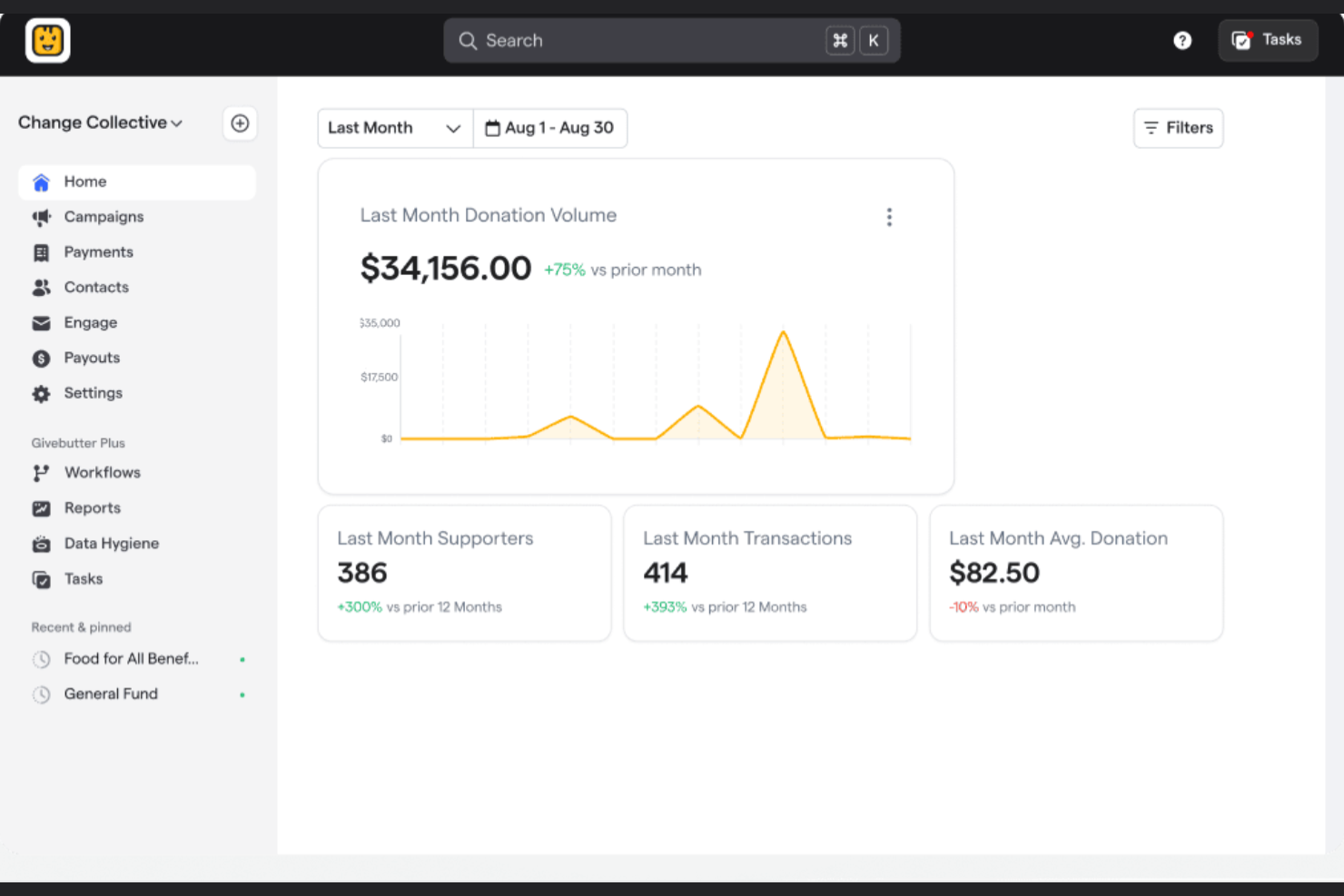
Givebutter is designed for nonprofits that want to reach supporters across multiple channels without juggling separate tools. It’s especially useful for organizations running campaigns that blend online giving, peer-to-peer fundraising, and in-person events. With Givebutter, you can manage donor data, launch campaigns, and communicate with supporters all in one place.
Why I Picked Givebutter
For organizations looking to unify their fundraising efforts across digital, social, and in-person channels, Givebutter offers a flexible solution. I picked Givebutter because it combines donation forms, peer-to-peer fundraising, and event ticketing in one platform, making it easy to coordinate campaigns that reach supporters wherever they are. The built-in supporter feed and text-to-donate features help you engage donors in real time and encourage sharing. If your nonprofit wants to run multi-channel campaigns without switching between different tools, Givebutter brings everything together in a single dashboard.
Givebutter Key Features
Some other features that make Givebutter useful for nonprofit management are:
- Donor Management CRM: Track donor history, segment contacts, and manage relationships in one place.
- Automated Receipts and Thank-Yous: Send personalized receipts and acknowledgments automatically after each donation.
- Recurring Giving Options: Allow supporters to set up and manage recurring donations directly from your campaign pages.
- Customizable Campaign Pages: Design branded fundraising pages with your organization’s colors, images, and messaging.
Givebutter Integrations
Integrations include PayPal, Meta, Venmo, DAF donations, QuickBooks Online, DonorSearch, Stripe, Cash App, Zapier, and Double the Donation.
Pros and Cons
Pros:
- Automated receipts and thank-yous save time
- Text-to-donate feature supports mobile giving
- Peer-to-peer fundraising tools are included
Cons:
- Limited grant management features available
- Reporting exports require manual formatting

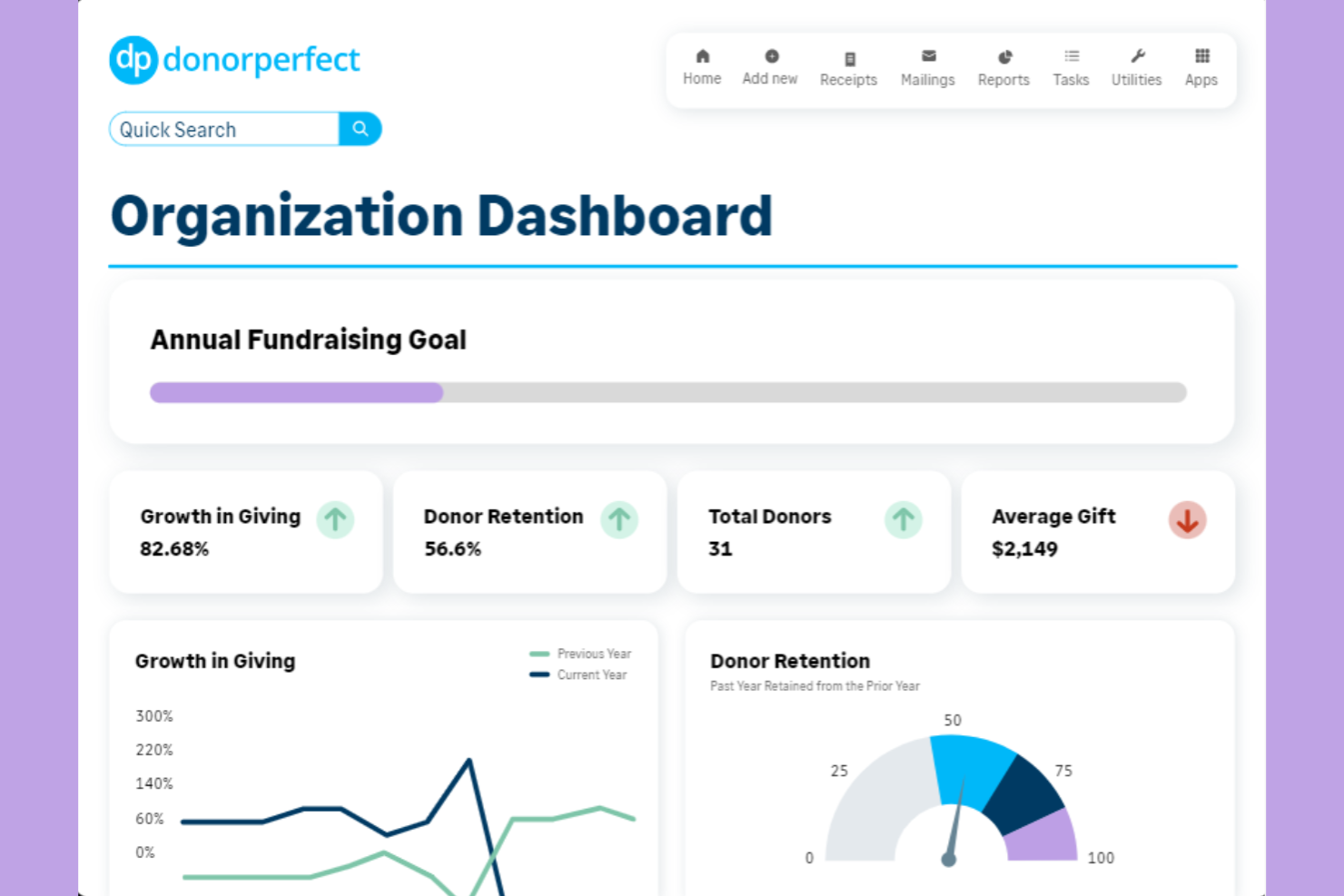
If your nonprofit needs flexible data analysis and tracking, DonorPerfect offers a reporting system designed for customization. This platform is a strong fit for organizations that want to tailor donor management, fundraising, and event tracking to their unique workflows. DonorPerfect helps you create detailed, custom reports so you can monitor giving trends and make informed decisions for your ministry or outreach.
Why I Picked DonorPerfect
Customizable reporting is a top priority for many nonprofits that need to track unique metrics and outcomes. I picked DonorPerfect because it lets you build custom reports using a drag-and-drop report builder and filter data by any field in your database. The platform also supports scheduled report delivery, so you can automatically share insights with your team or board. For organizations that want to dig deeper into donor trends or campaign performance, DonorPerfect’s reporting tools offer the flexibility to analyze what matters most to your mission.
DonorPerfect Key Features
Some other features make DonorPerfect a versatile choice for nonprofit management:
- Online Donation Forms: Create and customize donation forms that integrate directly with your donor database.
- Event Management Tools: Track event registrations, manage guest lists, and process payments for fundraising events.
- Automated Acknowledgments: Set up automatic thank-you emails and receipts for donations and event participation.
- Mobile App Access: View donor information, enter gifts, and manage contacts from your mobile device.
DonorPerfect Integrations
Integrations include Constant Contact, DonorSearch, PayPal, Givecloud, QuickBooks, Double the Donation, ReadySetAuction, BirdEase, Sage Intacct, and Google Analytics.
Pros and Cons
Pros:
- Mobile app enables donor updates
- Event tools include guest tracking
- Scheduled reports send automatically
Cons:
- Interface updates disrupt familiar workflows
- No built-in volunteer management module

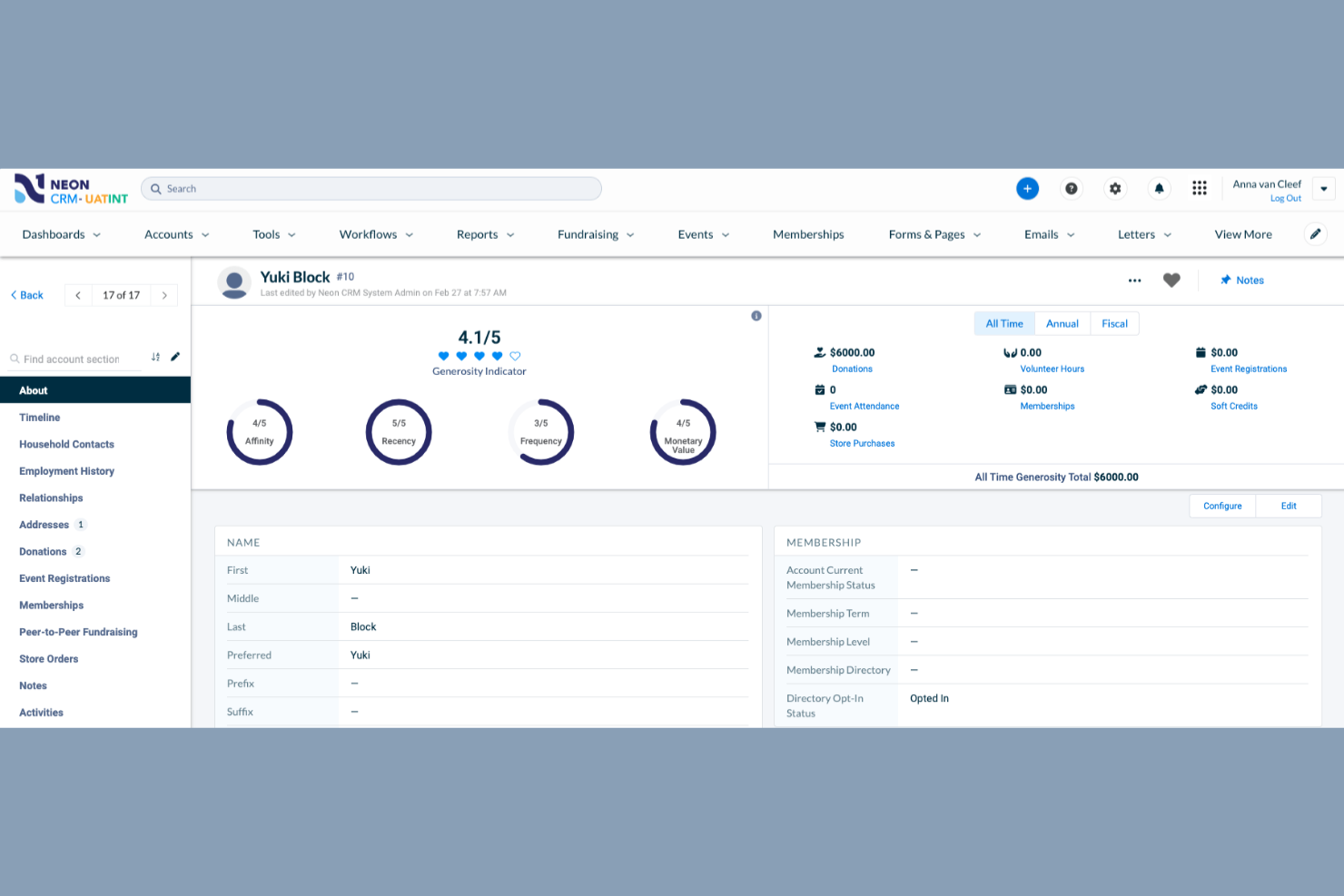
Neon One stands out for nonprofits that prioritize event management as a core part of their fundraising and engagement strategy. It’s especially useful for organizations that host frequent events and need tools for ticketing, registration, and attendee tracking. With Neon One, you can coordinate event logistics and donor data in one place, making it easier to connect event participation with ongoing supporter relationships.
Why I Picked Neon One
For organizations that rely on events to drive fundraising and community engagement, Neon One offers a focused set of tools that make event management much simpler. I picked Neon One because it provides built-in event registration, ticketing, and attendee tracking, all within the same platform as your donor database. You can customize event pages, manage guest lists, and track participation history, which helps you connect event activity to broader supporter engagement. If your nonprofit hosts galas, runs, or community gatherings, Neon One’s event management features are designed to keep everything organized and connected.
Neon One Key Features
Some other features that make Neon One useful for nonprofit management are:
- Donor Management Dashboard: View donor profiles, giving history, and engagement metrics in one place.
- Customizable Online Donation Forms: Create branded donation pages that integrate with your website.
- Membership Management Tools: Track member status, renewals, and communications for supporter programs.
- Automated Acknowledgment Letters: Generate and send thank-you letters or tax receipts directly from the platform.
Neon One Integrations
Integrations include QuickBooks, Windfall Data, Double the Donation, Eventbrite, Mailchimp, Constant Contact, VolunteerLocal, ClickBid, TaxJar, Chariot, and more.
Pros and Cons
Pros:
- Built-in email marketing tracks campaign results
- Donation forms support recurring giving options
- Event ticketing links directly to donor records
Cons:
- Peer-to-peer fundraising tools require add-ons
- Data migration from legacy systems can be slow

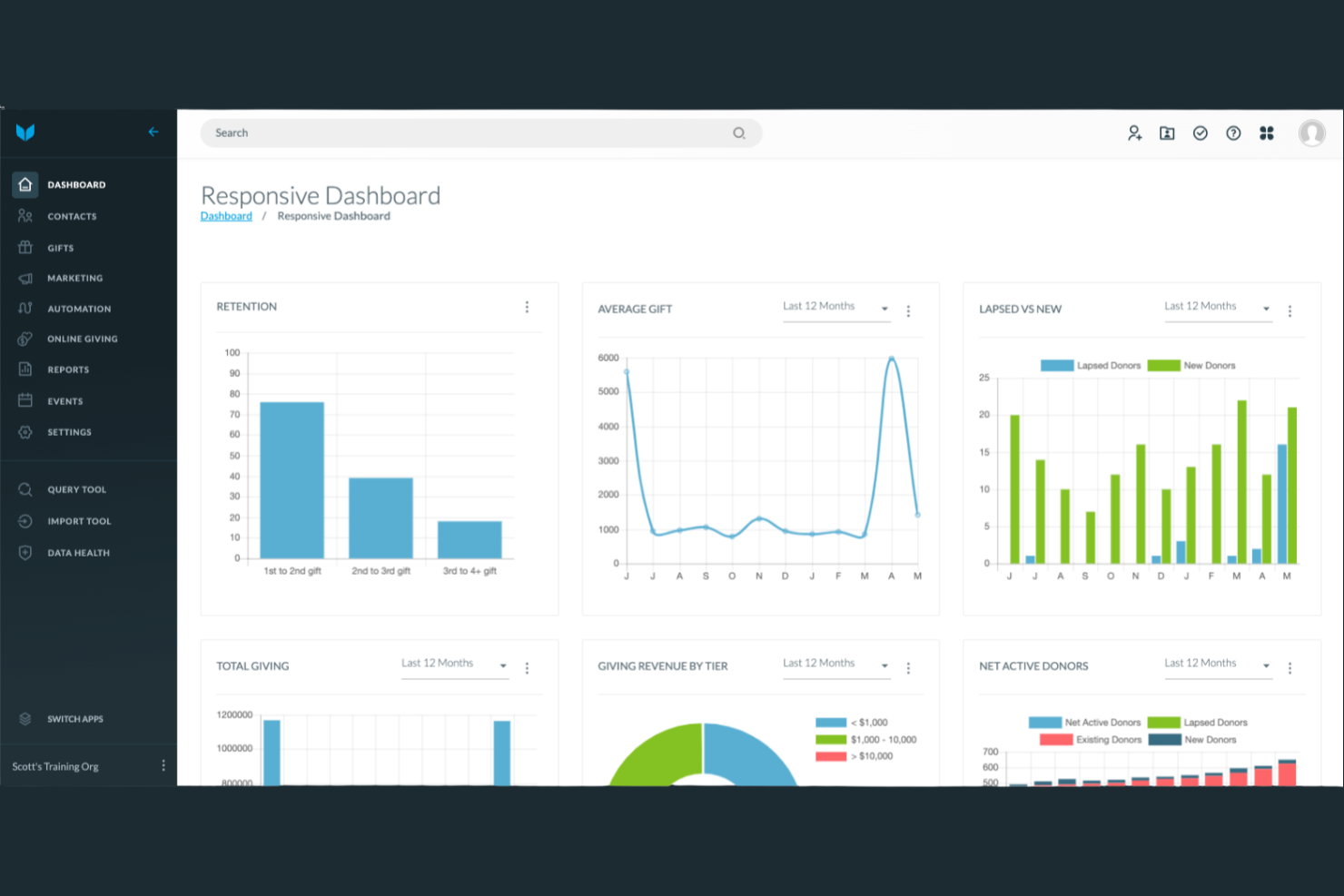
Virtuous is built for nonprofits that want to create highly personalized donor experiences at scale. It’s a strong fit for organizations focused on nurturing long-term relationships and automating tailored communications. With Virtuous, you can map out donor journeys, segment supporters, and trigger outreach based on real-time engagement data.
Why I Picked Virtuous
What sets Virtuous apart is its focus on building personalized donor journeys that help nonprofits deepen relationships over time. I picked Virtuous because it lets you automate multi-step communication workflows based on donor behavior and preferences, so every supporter receives messages that feel relevant and timely. The platform’s dynamic segmentation tools allow you to group donors by giving patterns, interests, or engagement level, making targeted outreach much easier. If your organization wants to move beyond generic appeals and create tailored experiences for each donor, Virtuous is designed to support that approach.
Virtuous Key Features
Some other features that make Virtuous valuable for nonprofit management are:
- Grant Management Tools: Track grant applications, deadlines, and reporting requirements within the platform.
- Volunteer Management Module: Organize volunteer data, schedules, and communications in one place.
- Integrated Email Marketing: Build, send, and track email campaigns directly from your CRM.
- Gift and Pledge Tracking: Monitor one-time and recurring gifts, pledges, and soft credits for accurate fundraising records.
Virtuous Integrations
Integrations include GiveCampus, GoFundMe Pro, NetSuite, Apple Pay, AQ2 Embrace, Aqubanc, AskGenius, BetterUnite, Double the Donation, and QuickBooks Online.
Pros and Cons
Pros:
- Integrated email marketing syncs with CRM
- Grant tools organize applications
- Workflows trigger from donor actions
Cons:
- Data import process can be time-consuming
- No built-in event ticketing features
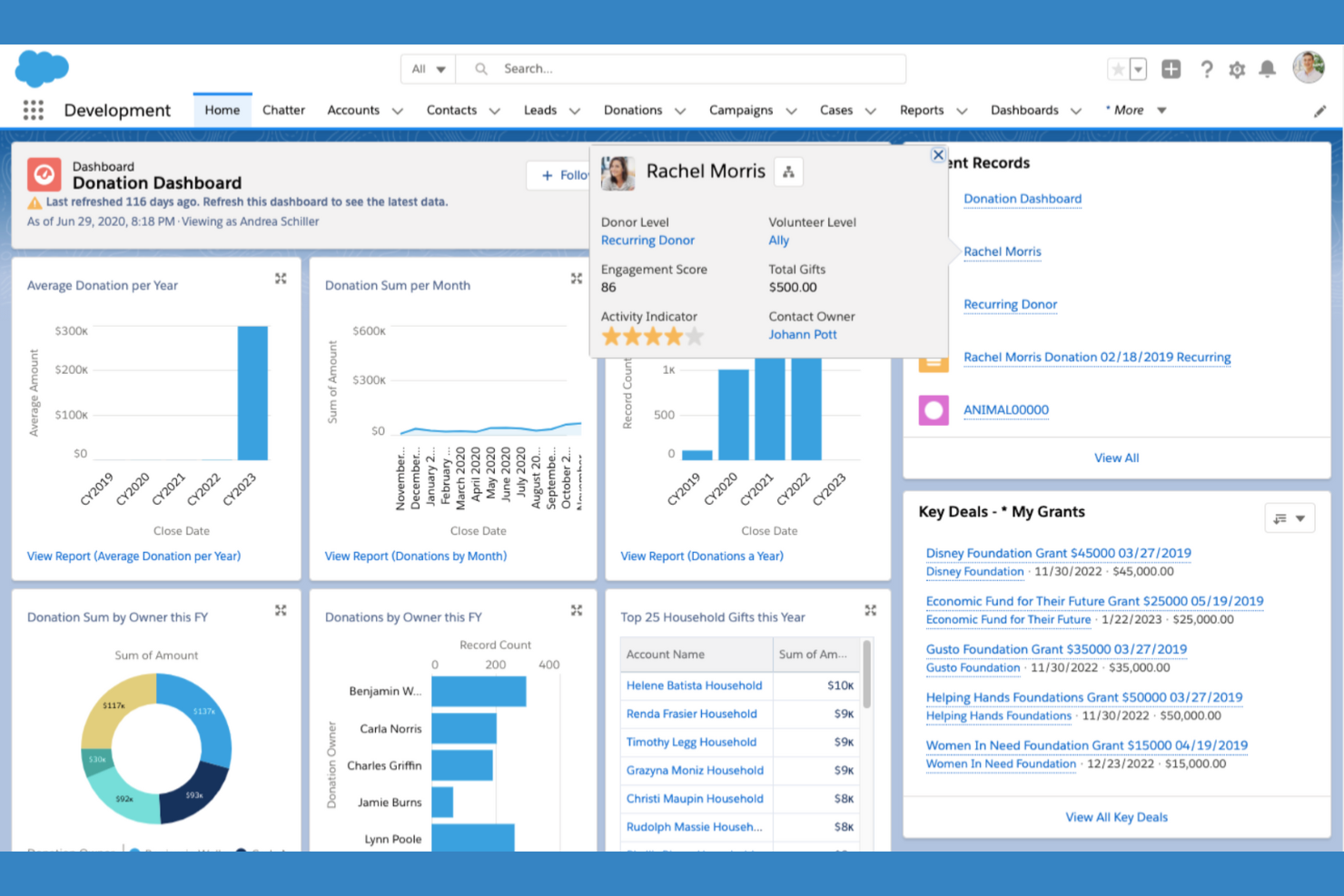
Salesforce for Nonprofits brings advanced CRM software capabilities to organizations that need to manage complex relationships and data. It’s a strong fit for larger nonprofits or those with multiple programs, chapters, or funding streams that require deep customization and integration. As part of the broader Salesforce ecosystem, it connects fundraising strategies, program management, marketing platform tools, and donor management software in one highly configurable system tailored to your unique workflows.
Why I Picked Salesforce
What makes Salesforce stand out for nonprofit management is its ability to handle advanced CRM integrations that many organizations need as they grow. I picked Salesforce because it lets you connect donor management, volunteer tracking, and program delivery data across multiple departments or locations. The platform’s AppExchange marketplace also gives you access to specialized nonprofit apps, so you can extend your CRM with tools for grants, events, or advocacy. For nonprofits with complex data needs and a desire to unify operations, Salesforce offers the flexibility and depth to build a truly integrated system.
Salesforce Key Features
Some other features that make Salesforce a strong option for nonprofit management are:
- Nonprofit Success Pack (NPSP): Use pre-built data models and workflows designed specifically for nonprofit organizations.
- Customizable Dashboards: Build visual dashboards to track fundraising, program outcomes, and engagement metrics.
- Grant Management Tools: Manage grant applications, reporting, and deadlines within the platform.
- Automated Workflow Rules: Set up triggers and automations for tasks like donor follow-ups or volunteer reminders.
Salesforce Integrations
Integrations include Classy, FinDock, DonorDrive, Posimente, WealthEngine, Amp Impact, Marketing Cloud, Data 360, Slack, and Tableau.
Pros and Cons
Pros:
- Multi-channel communication tools are built in
- Advanced automation supports donor stewardship
- AppExchange offers many nonprofit add-ons
Cons:
- User permissions can be difficult to configure
- Data migration from legacy systems is complex

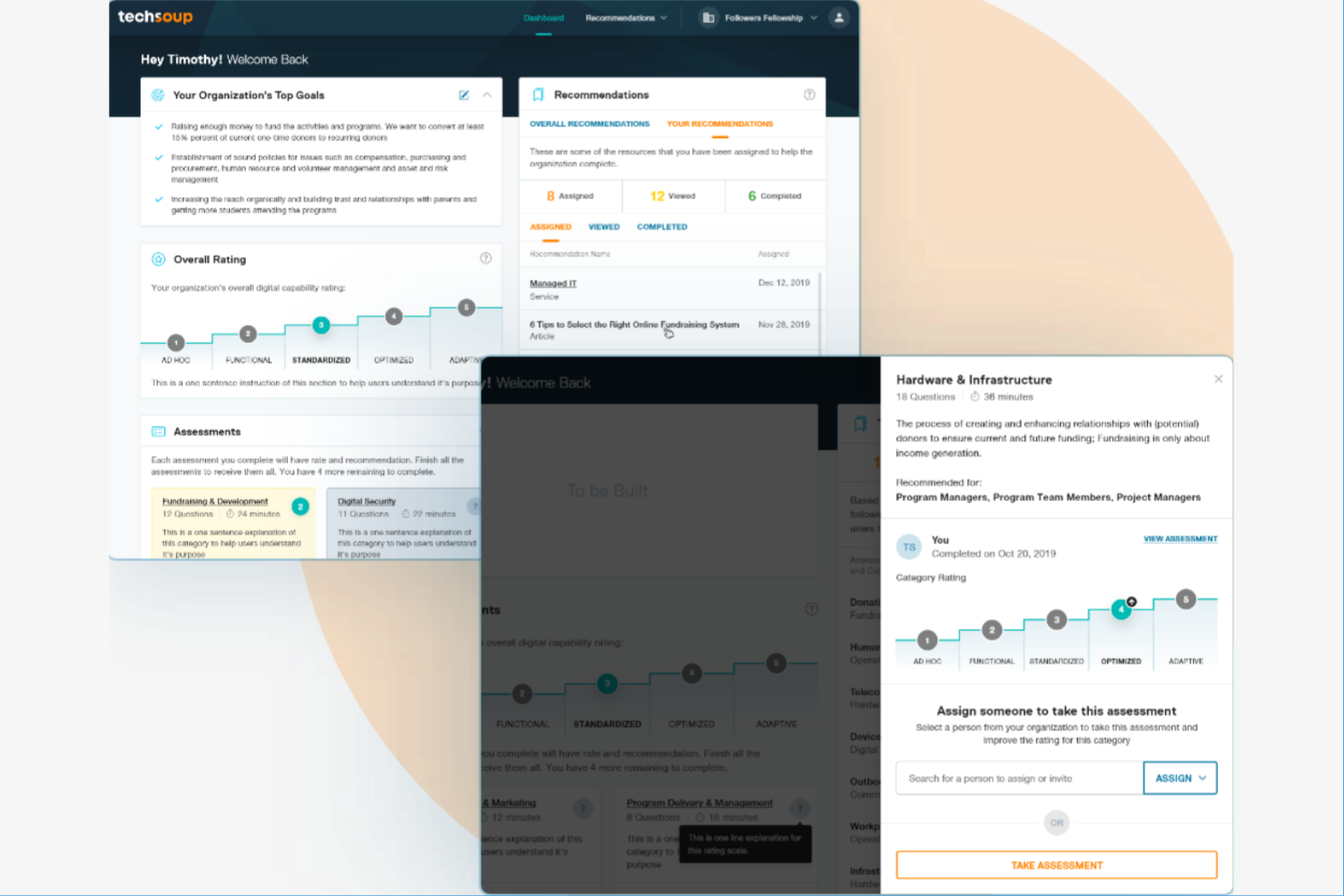
For nonprofits looking to stretch their technology budgets, TechSoup connects organizations with discounted software, hardware, and IT services. This platform is especially useful for churches and ministries that need access to tools like Microsoft 365, Adobe, nonprofit CRM systems, and fundraising software without paying retail prices. TechSoup helps streamline eligibility and procurement processes, making it easier to equip your team with the right technology to support your mission and donor engagement efforts.
Why I Picked TechSoup
When it comes to equipping nonprofits with affordable technology, TechSoup stands out for its exclusive access to discounted software and hardware. I picked TechSoup because it offers a wide range of products from major vendors like Microsoft, Adobe, and Cisco, all tailored for nonprofit eligibility. The platform also provides guidance on navigating donation programs and compliance, which can be a challenge for many organizations. For churches and ministries managing tight budgets, TechSoup makes it possible to access professional-grade tools that support both daily operations and long-term growth.
TechSoup Key Features
Some other features make TechSoup especially useful for nonprofit leaders managing technology needs:
- Product Catalog Search: Browse a searchable catalog of discounted software, hardware, and IT services from multiple vendors.
- Eligibility Verification: Submit and manage nonprofit eligibility documentation directly through the platform.
- Learning Resources: Access webinars, articles, and guides focused on nonprofit technology adoption and best practices.
- Community Forums: Participate in peer discussions and get advice from other nonprofit professionals on tech-related topics.
TechSoup Integrations
Integrations are not publicly listed.
Pros and Cons
Pros:
- Technology donation programs for nonprofits
- Discounted hardware from major brands
- Access to exclusive nonprofit discounts
Cons:
- Approval process may delay purchases
- Processing fees on most requests
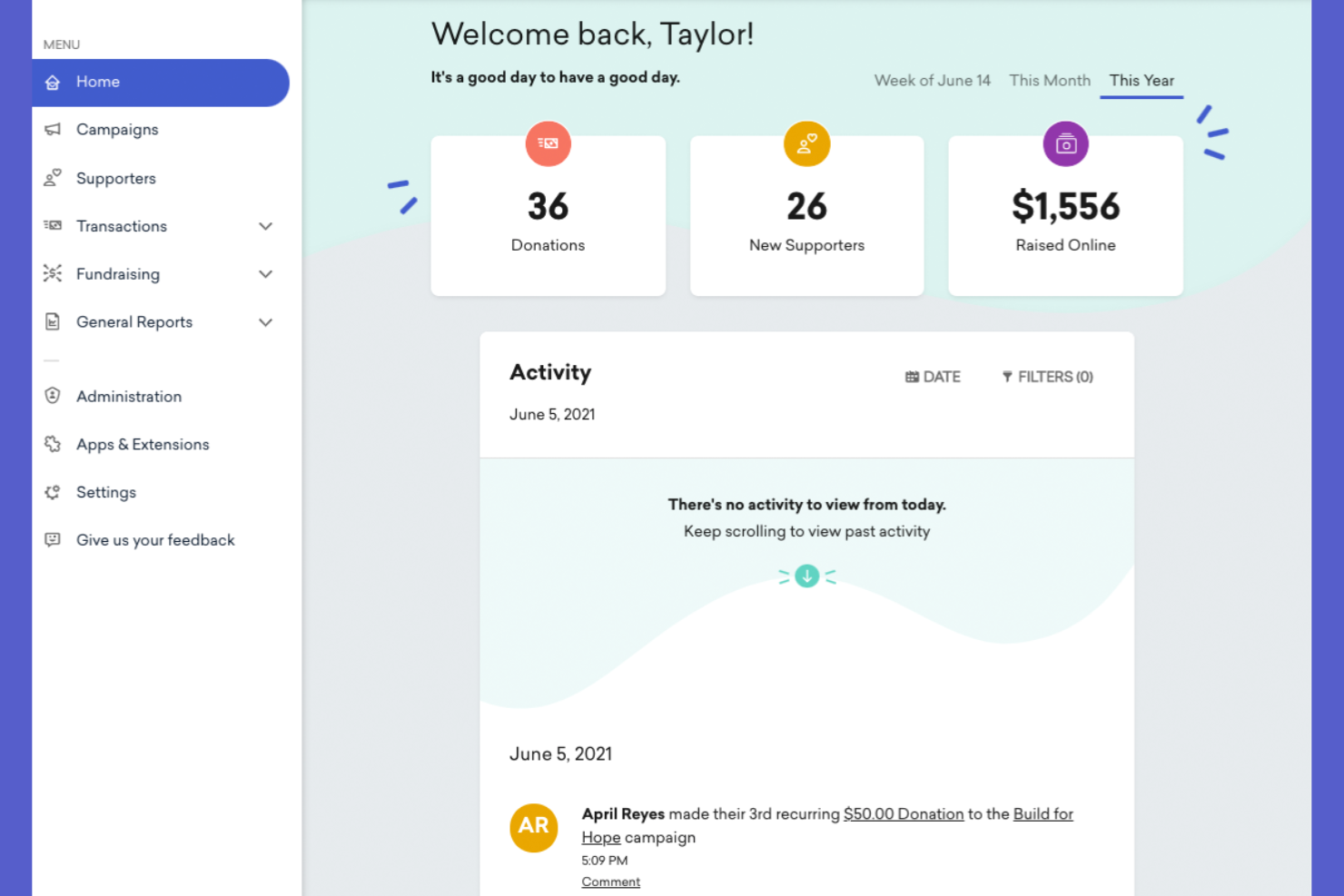
GoFundMe Pro is designed for nonprofits that want to expand their reach through peer-to-peer fundraising campaigns. It’s a strong fit for organizations looking to empower supporters to create their own fundraising pages and tap into new donor networks. With GoFundMe Pro, you can manage large-scale campaigns and track supporter-driven donations in real time.
Why I Picked GoFundMe Pro
What sets GoFundMe Pro apart is its focus on peer-to-peer fundraising, which is a powerful way for nonprofits to grow their donor base and increase campaign visibility. I picked GoFundMe Pro because it lets supporters create their own fundraising pages, making it easy to mobilize networks and encourage grassroots giving. The platform also provides real-time donation tracking and campaign management tools, so you can monitor progress and engage with fundraisers as campaigns unfold. If your organization wants to harness the energy of supporter-driven campaigns, GoFundMe Pro is built for that purpose.
GoFundMe Pro Key Features
Some other features that make GoFundMe Pro useful for nonprofit management are:
- Customizable Campaign Pages: Design branded fundraising pages with your organization’s logo and messaging.
- Donation Data Export: Download detailed donation and supporter data for reporting or analysis.
- Automated Tax Receipts: Send IRS-compliant receipts to donors automatically after each contribution.
- Team Fundraising Tools: Enable groups or teams to fundraise together under a single campaign umbrella.
GoFundMe Pro Integrations
Integrations are not publicly listed.
Pros and Cons
Pros:
- Team fundraising tools support group efforts
- Campaigns can accept international donations
- Donor tax receipts are sent automatically
Cons:
- Limited recurring donation management options
- No built-in donor CRM functionality

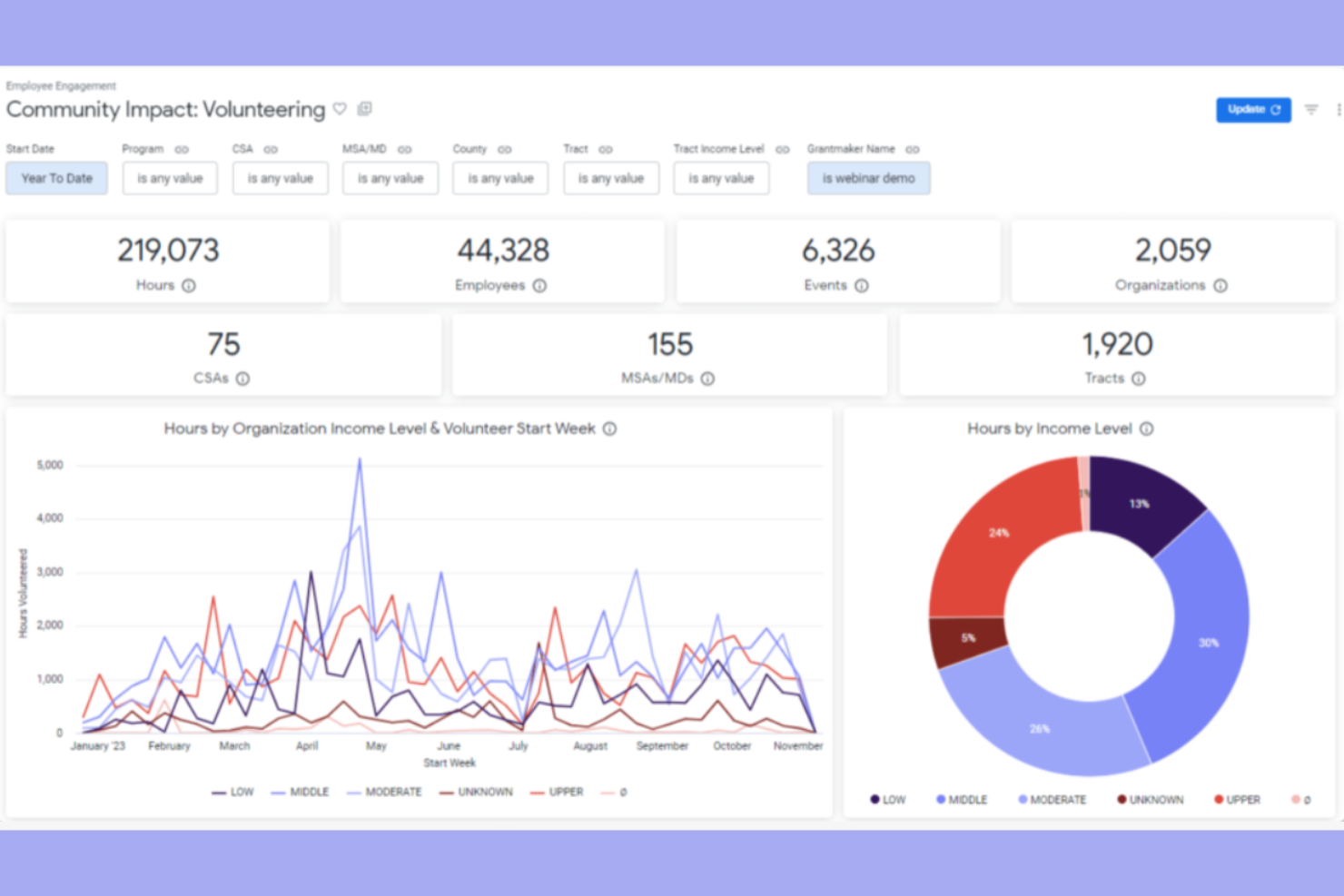
Bonterra offers a suite of tools designed for nonprofits that need to coordinate, track, and engage volunteers at scale. It’s especially useful for organizations with complex volunteer programs or those managing multiple events and shifts. With Bonterra, you can centralize volunteer scheduling, communication, and reporting to keep your team organized and responsive.
Why I Picked Bonterra
When it comes to managing volunteers, Bonterra offers specialized tools that go beyond basic nonprofit management software. I picked Bonterra because it provides a centralized dashboard for scheduling, tracking hours, and communicating with volunteers, which is essential for organizations with active volunteer programs. The platform also supports volunteer onboarding and background checks, helping you maintain compliance and safety standards. For nonprofits that rely on volunteers to deliver their mission, Bonterra brings together the features needed to keep teams organized and engaged.
Bonterra Key Features
In addition to its volunteer management strengths, Bonterra offers several other features worth noting:
- Donation Tracking: Monitor and record donations from individuals and organizations within the platform.
- Grant Management: Organize, track, and report on grant applications and awards.
- Customizable Reporting: Generate detailed reports on volunteer activity, donations, and program outcomes.
- Event Management Tools: Plan, schedule, and manage nonprofit events with built-in tools for registration and logistics.
Bonterra Integrations
Integrations are not publicly listed.
Pros and Cons
Pros:
- Centralized dashboard tracks volunteer hours
- Event tools for large-scale coordination
- Built-in volunteer background checks
Cons:
- Reporting lacks advanced data visualization
- Limited donor management features


Nonprofit Management Software Selection Criteria
When selecting the best nonprofit management software to include in this list, I considered common buyer needs and pain points like managing donor relationships and tracking fundraising campaigns. I also used the following framework to keep my evaluation structured and fair:
Core Functionality (25% of total score)
To be considered for inclusion in this list, each solution had to fulfill these common use cases:
- Manage donor and contact records
- Track donations and fundraising campaigns
- Generate financial and activity reports
- Organize volunteer information
- Communicate with supporters
Additional Standout Features (25% of total score)
To help further narrow down the competition, I also looked for unique features, such as:
- Peer-to-peer fundraising tools
- Automated tax receipt generation
- Grant management modules
- Event registration and ticketing
- Customizable donation forms
Usability (10% of total score)
To get a sense of the usability of each system, I considered the following:
- Simple and intuitive navigation
- Clean and modern interface design
- Logical workflow for common tasks
- Accessibility for users with varying tech skills
- Mobile-friendly experience
Onboarding (10% of total score)
To evaluate the onboarding experience for each platform, I considered the following:
- Step-by-step setup guides
- Availability of training videos and tutorials
- Access to pre-built templates
- Interactive product tours or walkthroughs
- Responsive onboarding support team
Customer Support (10% of total score)
To assess each software provider’s customer support services, I considered the following:
- Multiple support channels available
- Fast response times to inquiries
- Access to a searchable help center
- Availability of live chat or phone support
- Community forums or user groups
Value For Money (10% of total score)
To evaluate the value for money of each platform, I considered the following:
- Transparent and predictable pricing
- Features included at each pricing tier
- Discounts for nonprofits or charities
- No hidden fees or surprise charges
- Flexibility to scale as needs grow
Customer Reviews (10% of total score)
To get a sense of overall customer satisfaction, I considered the following when reading customer reviews:
- Consistent positive feedback on reliability
- Praise for customer support quality
- Reports of ease of adoption and use
- Comments on feature usefulness
- Noted areas for improvement or limitations
How to Choose Nonprofit Management Software
It’s easy to get bogged down in long feature lists and complex pricing structures. To help you stay focused as you work through your unique software selection process, here’s a checklist of factors to keep in mind:
| Factor | What to Consider |
|---|---|
| Scalability | Will the software support your organization as it grows in donors, campaigns, and staff? Check for user limits, data caps, and upgrade paths. |
| Integrations | Does the tool connect with your existing accounting, email, or CRM systems? Confirm native integrations and avoid relying solely on manual exports. |
| Customizability | Can you tailor forms, reports, and workflows to match your ministry’s unique processes? Look for flexible templates and field options. |
| Ease of use | Will staff and volunteers of varying tech skills be able to use the system confidently? Request demos and test the interface with real users. |
| Implementation and onboarding | How long will it take to get up and running? Ask about migration support, training resources, and the typical timeline for organizations of your size. |
| Cost | Are all fees clear, including transaction, setup, and support costs? Compare total annual costs and check for nonprofit discounts. |
| Security safeguards | Does the software protect donor and financial data with encryption, access controls, and compliance with privacy laws? Request documentation on security practices. |
| Support availability | What support channels are offered, and during what hours? Consider if you need live chat, phone, or only email, and check response time guarantees. |
What Is Nonprofit Management Software?
Nonprofit management software is a digital platform—often referred to as nonprofit software—that helps organizations manage donor relationships, fundraising campaigns, volunteer coordination, and financial reporting in one place. These tools are designed to support the unique operational, communication, and compliance needs of nonprofits, making it easier to track activities, engage supporters, report to funders and board members, and measure impact across all areas of ministry or service.
Features of Nonprofit Management Software
When selecting nonprofit management software, keep an eye out for the following key features:
- Donor management: Store, organize, and update donor profiles, track giving history, and segment supporters for targeted outreach and reporting.
- Fundraising campaign tracking: Plan, launch, and monitor fundraising campaigns, including online donations, event-based giving, and peer-to-peer initiatives.
- Volunteer management: Schedule, track, and communicate with volunteers, manage sign-ups, and record hours served for reporting and recognition.
- Financial reporting: Generate detailed reports on donations, expenses, and budgets to support transparency, compliance, and informed decision-making.
- Event management: Organize events with tools for registration, ticketing, attendee tracking, and post-event follow-up.
- Email and communication tools: Send newsletters, donation appeals, and updates to supporters, with options for segmentation and automated messaging.
- Customizable forms: Build and embed donation, registration, or survey forms that capture the information your organization needs.
- Grant management: Track grant applications, deadlines, reporting requirements, and funding status in one centralized location.
- Document storage: Securely store and organize important files, such as tax receipts, board documents, and compliance records, for easy access and sharing.
Common Nonprofit Management Software AI Features
Beyond the standard nonprofit management software features listed above, many of these solutions are incorporating AI with features like:
- Donor engagement predictions: Analyze giving patterns and engagement history to identify which supporters are most likely to donate or lapse, helping you prioritize outreach.
- Automated donor segmentation: Use AI to group donors based on behavior, preferences, and giving capacity, allowing for more personalized communication and appeals.
- Smart fundraising recommendations: Generate data-driven suggestions for campaign timing, messaging, and target audiences to improve fundraising outcomes.
- Natural language email drafting: Automatically draft personalized thank-you notes, appeals, or updates using AI that adapts tone and content to each recipient.
- Grant opportunity matching: Scan databases and match your organization’s profile with relevant grant opportunities, saving time on research and increasing funding chances.
Benefits of Nonprofit Management Software
Implementing nonprofit management software provides several benefits for your team and your business. Here are a few you can look forward to:
- Centralized data management: Keep donor, volunteer, and financial information organized in one secure location, making it easier to access and update records.
- Improved fundraising outcomes: Track campaigns, analyze giving trends, and use targeted outreach tools to increase donations and donor retention.
- Streamlined communication: Use built-in email and messaging features to keep supporters, volunteers, and staff informed and engaged.
- Simplified reporting and compliance: Generate accurate financial and activity reports to meet regulatory requirements and share impact with stakeholders.
- Improved volunteer coordination: Manage volunteer schedules, sign-ups, and hours efficiently, supporting better engagement and recognition.
- Faster onboarding and adoption: Access training resources, templates, and guided setup tools to help your team get started quickly and confidently.
- Scalable growth support: Adapt the software as your organization grows, with features and integrations that support expanding programs and outreach.
Costs and Pricing of Nonprofit Management Software
Selecting nonprofit management software requires an understanding of the various pricing models and plans available. Costs vary based on features, team size, add-ons, and more. The table below summarizes common plans, their average prices, and typical features included in nonprofit management software solutions:
Plan Comparison Table for Nonprofit Management Software
| Plan Type | Average Price | Common Features |
|---|---|---|
| Free Plan | $0 | Basic donor management, limited fundraising tools, simple reporting, and email support. |
| Personal Plan | $10-$30/user/month | Expanded contact records, campaign tracking, volunteer management, and basic integrations. |
| Business Plan | $40-$80/user/month | Advanced reporting, event management, customizable forms, multi-user access, and priority support. |
| Enterprise Plan | $100-$200/user/month | Custom workflows, advanced security, dedicated account management, API access, and compliance tools. |
Nonprofit Management Software FAQs
Here are some answers to common questions about nonprofit management software:
How do I know if my organization needs nonprofit management software?
If you’re struggling to keep track of donors, volunteers, or fundraising activities using spreadsheets or paper, it’s time to consider nonprofit management software. These tools help centralize information, automate routine tasks, and support growth as your organization expands.
Can nonprofit management software integrate with our existing accounting or email systems?
Yes, most nonprofit management software offers integrations with popular accounting platforms and email marketing tools. Always check compatibility with your current systems and ask about available connectors or APIs before making a decision.
What should I look for in terms of data security?
Look for software that uses encryption, role-based access controls, and regular security audits. Make sure the provider complies with relevant privacy laws and can provide documentation on how your data is protected.
How long does it take to implement nonprofit management software?
Implementation timelines vary, but most organizations can get up and running within a few weeks. Factors include data migration needs, staff training, and the complexity of your workflows. Ask vendors for typical onboarding timelines and available support resources.
Are there nonprofit discounts or special pricing available?
Yes, many vendors offer discounted rates or special plans for registered nonprofits. Be sure to ask about nonprofit pricing, eligibility requirements, and any additional fees that may apply.
What’s Next:
If you're in the process of researching the best nonprofit management software, connect with a SoftwareSelect advisor for free recommendations.
You fill out a form and have a quick chat where they get into the specifics of your needs. Then you'll get a shortlist of software to review. They'll even support you through the entire buying process, including price negotiations.