
Sage Expense Management (formerly Fyle) Review: Pros, Cons, Features and Pricing


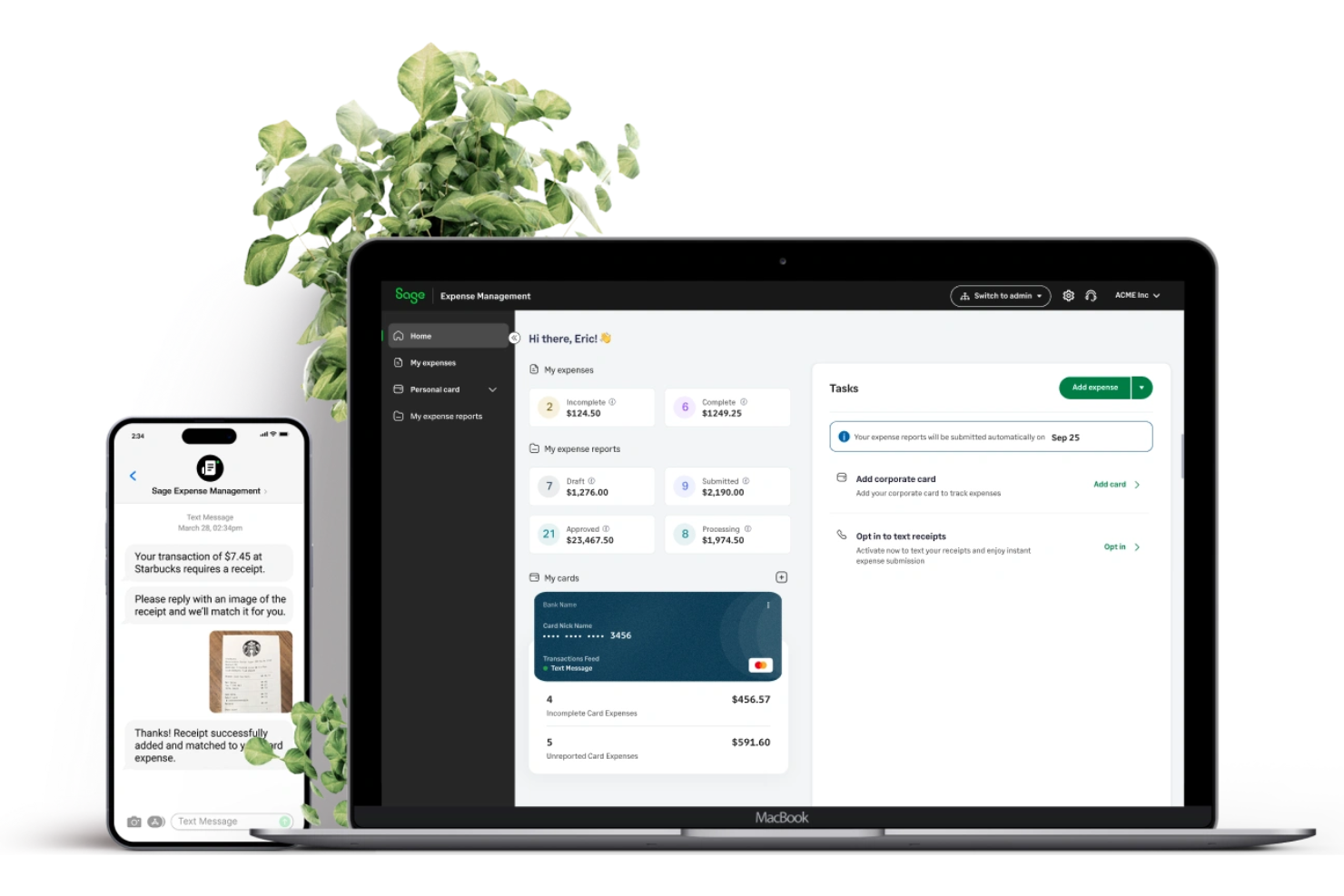
Sage Expense Management is a church accounting software that helps manage finances, expenses, and budgets. It best serves small to mid-sized churches and religious organizations looking for efficient expense tracking and reporting. Sage Expense Management simplifies financial management, making it accessible for churches of all sizes.
Sage Expense Management addresses issues like manual data entry and complicated reporting for finance teams and church administrators. In this article, I'll cover Sage Expense Management's features, pros and cons, use cases, and pricing so you can decide if this software aligns with your financial management needs and goals.
Sage Expense Management (formerly Fyle) Evaluation Summary
- From $11.99/active user/month (billed annually)
- Free demo available
Why Trust Our Software Reviews
We’ve been testing and reviewing church management software since 2020. As church leaders ourselves, we know how critical and difficult it is to make the right decision when selecting software.
We invest in deep research to help our audience make better software purchasing decisions. We’ve tested many tools for different church management use cases and written over 1,000 comprehensive software reviews. Learn how we stay transparent & our software review methodology.
Sage Expense Management (formerly Fyle) Overview
In my opinion, Sage Expense Management is a solid choice for small to mid-sized churches looking for reliable accounting software. It offers a user-friendly interface and good value for money, especially with its modular pricing. While it might not have the advanced features some larger organizations need, it excels in ease of use and customer support. Compared to other tools, Sage stands out for its affordability and straightforward setup, making it ideal for churches without complex accounting needs. If your church needs basic expense tracking and reporting, this could be a great fit.
pros
-
You can easily track and report expenses with its intuitive interface.
-
Your team benefits from efficient customer support that resolves issues quickly.
-
It's designed with user-friendly features that make onboarding simple for everyone.
cons
-
Your team might find the reporting features limited for complex financial tasks.
-
It may lack customization options that some churches require for specific needs.
-
You could face challenges with scalability if your church grows significantly.
-

ChMeetings
Visit WebsiteThis is an aggregated rating for this tool including ratings from Crozdesk users and ratings from other sites.4.9 -
Gracely
Visit WebsiteThis is an aggregated rating for this tool including ratings from Crozdesk users and ratings from other sites.4.8 -
Text In Church
Visit WebsiteThis is an aggregated rating for this tool including ratings from Crozdesk users and ratings from other sites.4.6


How We Test & Score Tools
We’ve spent years building, refining, and improving our software testing and scoring system. The rubric is designed to capture the nuances of software selection and what makes a tool effective, focusing on critical aspects of the decision-making process.
Below, you can see exactly how our testing and scoring works across seven criteria. It allows us to provide an unbiased evaluation of the software based on core functionality, standout features, ease of use, onboarding, customer support, integrations, customer reviews, and value for money.
Core Functionality (25% of final scoring)
The starting point of our evaluation is always the core functionality of the tool. Does it have the basic features and functions that a user would expect to see? Are any of those core features locked to higher-tiered pricing plans? At its core, we expect a tool to stand up against the baseline capabilities of its competitors.
Standout Features (25% of final scoring)
Next, we evaluate uncommon standout features that go above and beyond the core functionality typically found in tools of its kind. A high score reflects specialized or unique features that make the product faster, more efficient, or offer additional value to the user.
We also evaluate how easy it is to integrate with other tools typically found in the tech stack to expand the functionality and utility of the software. Tools offering plentiful native integrations, 3rd party connections, and API access to build custom integrations score best.
Ease of Use (10% of final scoring)
We consider how quick and easy it is to execute the tasks defined in the core functionality using the tool. High scoring software is well designed, intuitive to use, offers mobile apps, provides templates, and makes relatively complex tasks seem simple.
Onboarding (10% of final scoring)
We know how important rapid team adoption is for a new platform, so we evaluate how easy it is to learn and use a tool with minimal training. We evaluate how quickly a team member can get set up and start using the tool with no experience. High scoring solutions indicate little or no support is required.
Customer Support (10% of final scoring)
We review how quick and easy it is to get unstuck and find help by phone, live chat, or knowledge base. Tools and companies that provide real-time support score best, while chatbots score worst.
Customer Reviews (10% of final scoring)
Beyond our own testing and evaluation, we consider the net promoter score from current and past customers. We review their likelihood, given the option, to choose the tool again for the core functionality. A high scoring software reflects a high net promoter score from current or past customers.
Value for Money (10% of final scoring)
Lastly, in consideration of all the other criteria, we review the average price of entry level plans against the core features and consider the value of the other evaluation criteria. Software that delivers more, for less, will score higher.
Core Features
Expense Tracking: You can easily track expenses with real-time notifications, helping you manage your church's finances efficiently. This feature allows your team to input expenses quickly and view detailed summaries.
Budget Management: Manage your church's budget with tools that let you set limits and monitor spending. This helps you keep your finances in check and avoid overspending.
Reporting: Generate basic expense reports that give you insights into your church's financial health. Use these reports to make informed decisions for your organization.
User Access Control: Control who accesses financial data with customizable user permissions. This ensures only authorized team members can view or edit sensitive information.
Receipt Management: Store and organize receipts digitally, so you have a clear record of all transactions. This feature simplifies record-keeping and is easy to use.
Audit Trail: Maintain a clear audit trail of all financial activities to ensure transparency and accountability. This feature helps you track changes and identify any discrepancies.
Ease of Use
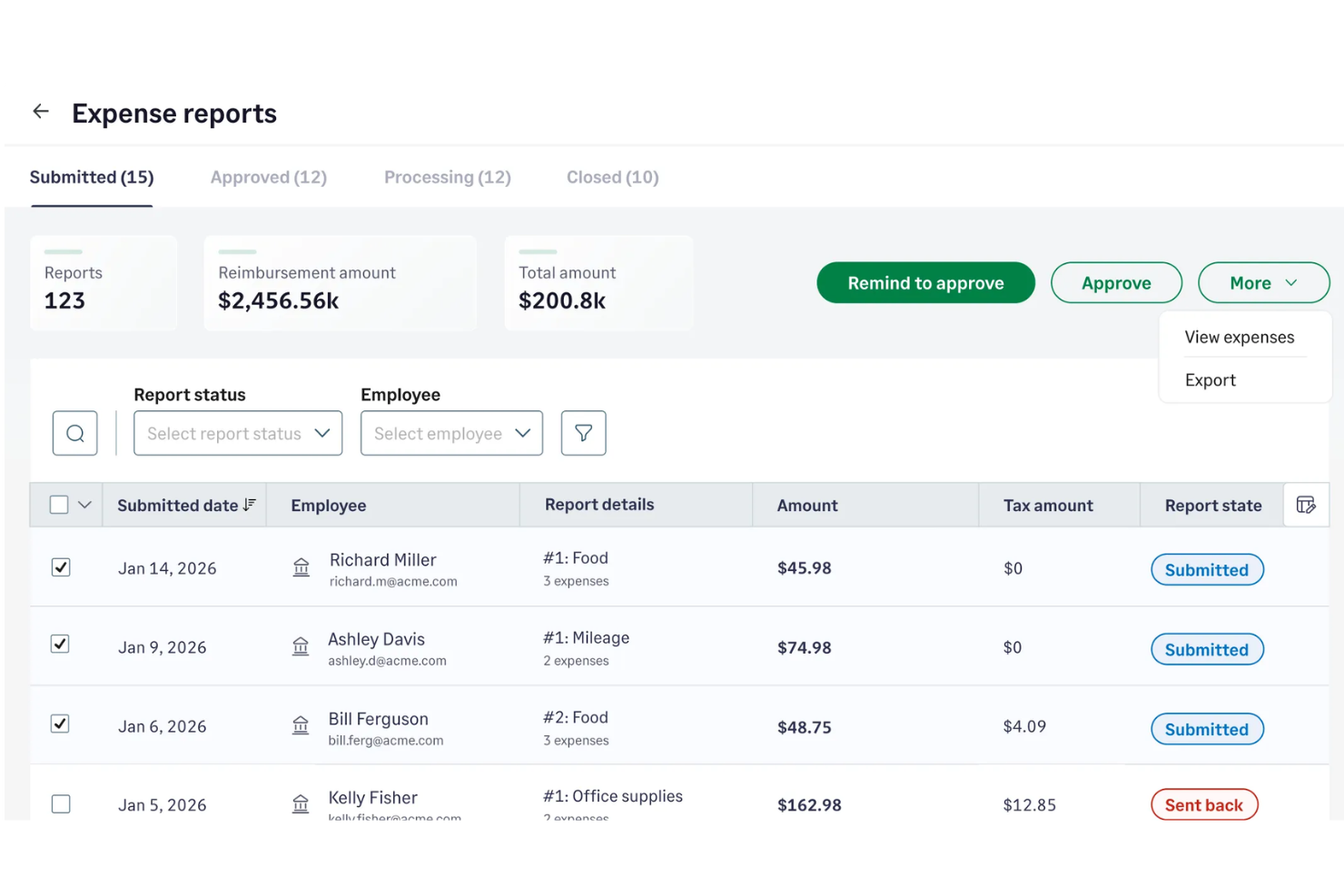
Sage Expense Management shines in user-friendliness, making it a breeze for your team to handle church accounting tasks. The intuitive interface, optimized for both desktop and the mobile app, requires minimal training, so you can get started quickly without hassle. Its straightforward navigation and clear layout let you easily track expenses and manage budgets. Compared to other software, users appreciate how easily they can access essential features without digging through complicated menus, ensuring your work is efficient and stress-free.
Integrations
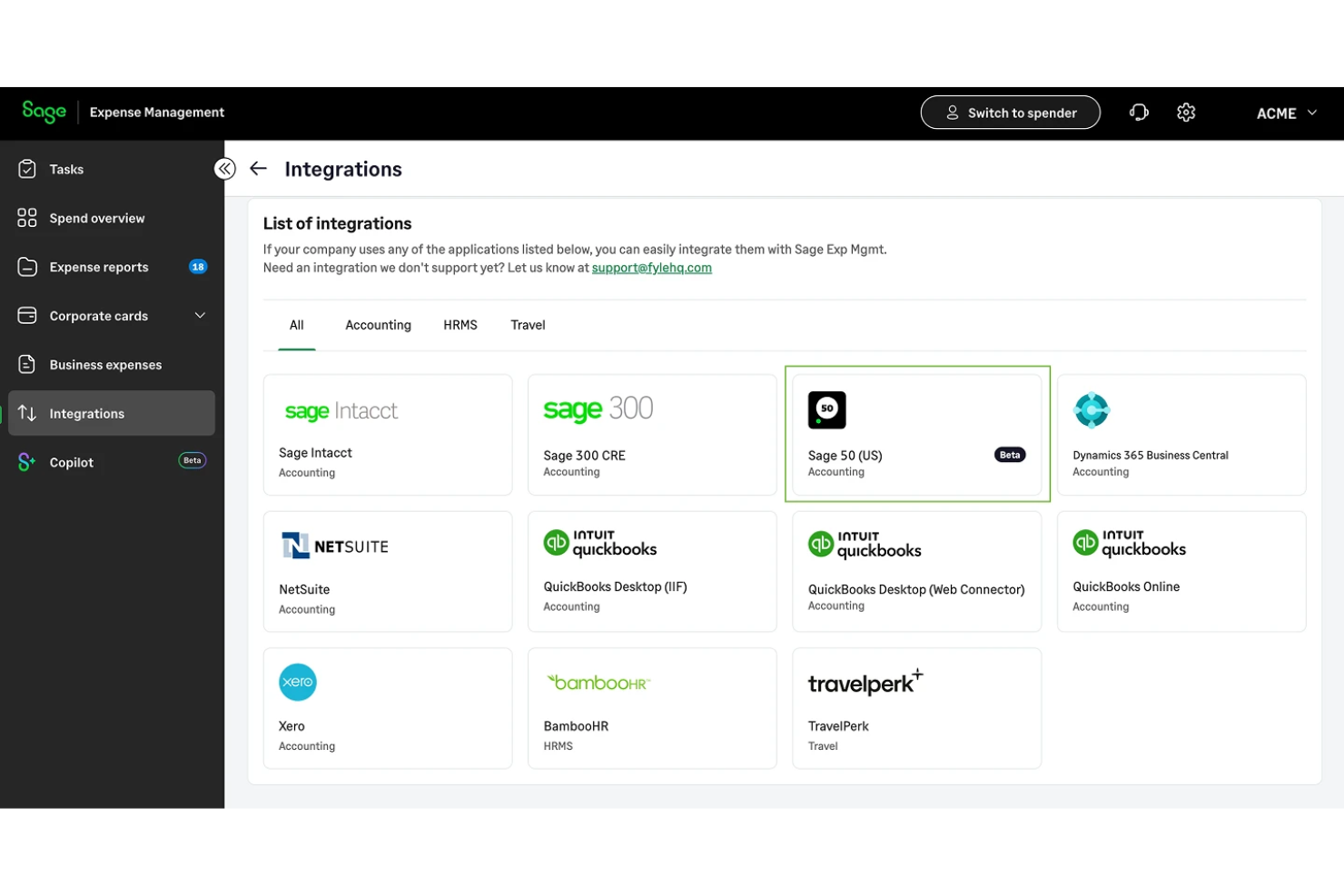
Sage Expense Management integrates with Sage accounting products including Sage Intacct, Sage 300 CRE, and Sage 50, and also connects with QuickBooks Online, QuickBooks Desktop, NetSuite, and Xero.
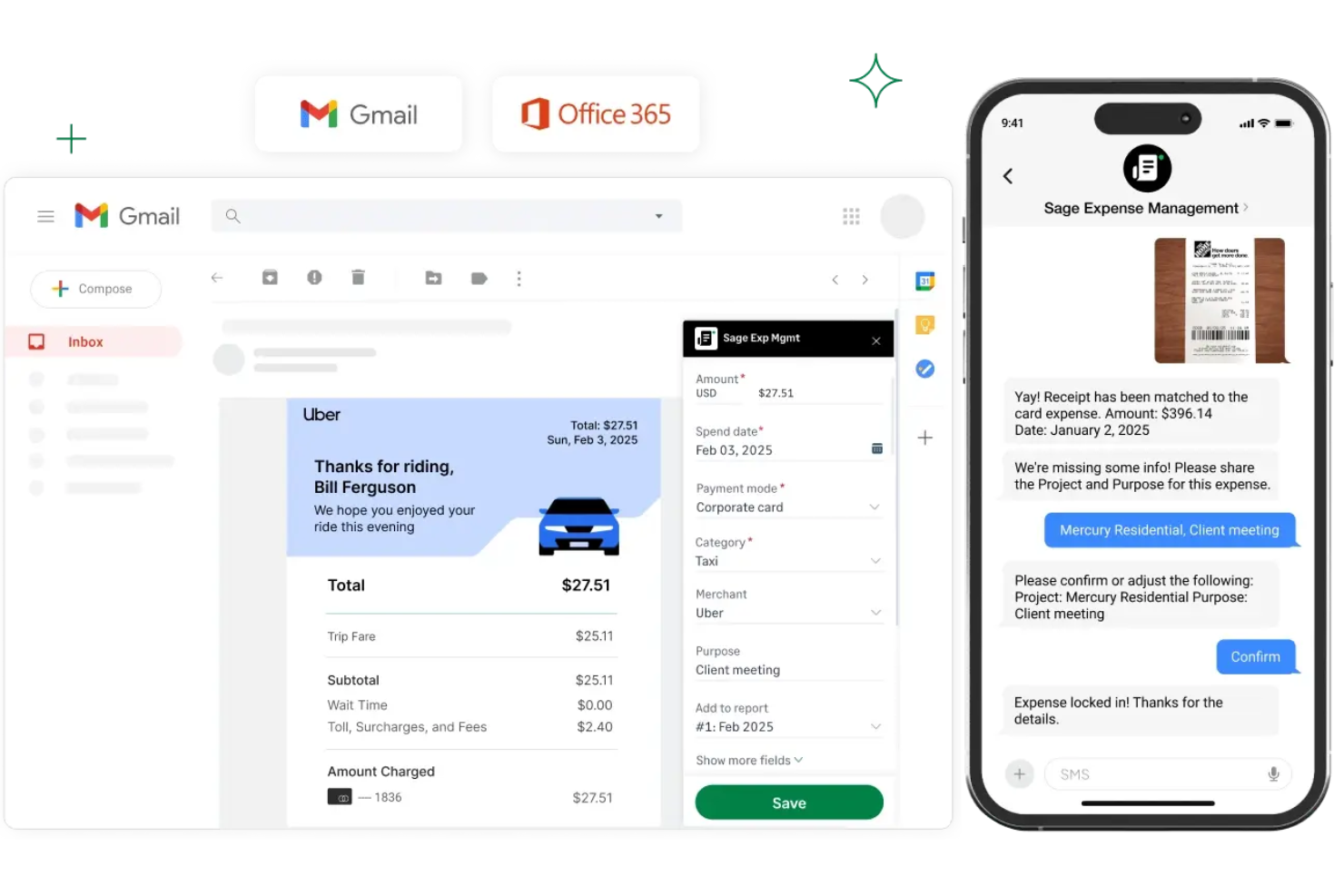
Sage Expense Management supports productivity tools like Gmail, Microsoft Outlook, and Slack, and provides an API for custom integrations and third-party automation workflows.
New Product Updates from Sage Expense Management (formerly Fyle)

Streamlined ACH Reimbursements for Churches
Sage Expense Management has introduced a new feature that streamlines the reimbursement process for churches by supporting ACH payments. This update simplifies transactions for finance teams by allowing direct payments to staff and volunteers’ bank accounts.
Some important aspects that were part of this update include:
- ACH Payments Support: Facilitate direct reimbursements to bank accounts with a single click, eliminating the need for paper checks.
- Real-Time Status Updates: Provides immediate feedback on the transaction status for both finance teams and submitters.
- Quick Payment Clearing: Most payments are processed within 1–2 business days after approval, enhancing efficiency.
Visit Sage Expense Management (formerly Fyle)'s official site for more details.
 for more details.
Sage Expense Management Rebrand and New Feature Enhancements
Sage Expense Management’s latest update introduces a refreshed look and usability improvements across web and mobile. Admins gain more control over policies and reminders, while users benefit from clearer guidance and smoother workflows. Here are the highlights:
- Fyle's Rebrand to Sage Expense Management: A new unified interface in Sage’s signature green, bringing consistent visuals and simplified guidance across all products and support channels.
- Simplified Gas Expense Tracking: Clearer messaging and visual labels for temporary fuel holds, reducing duplicate entries and improving reconciliation accuracy.
- Mobile App Enhancements: More intuitive expense capture with a visible ‘Add Expense’ button, smart prompts for missing details, and task counts that surface pending actions.
- Blocked Unmatched Expenses: Admins can now prevent unmatched corporate card expenses from being submitted, ensuring data accuracy and compliance.
- Custom Reminder Schedules: Set flexible reminders on your own cadence—daily, weekly, or monthly—to automate follow-ups and keep approvals on track.
- Card Mapping Reminders: Automatically alerts admins about unmapped cards with direct links to fix them, improving oversight and integration flow.
- Sage 50 Integration (Beta): Adds new connectivity for Sage 50 users to export expenses and reconcile transactions more easily.
Visit Sage Expense Management's official site for more details.
Sage Expense Management (formerly Fyle) Specs
- 2-Factor Authentication
- API
- Approval Workflows
- Audit Trail
- Balance Sheet
- Billing/Invoicing
- Budgeting
- Calendar Management
- Compliance Tracking
- Contact Management
- CRM Integration
- Custom Reports
- Customer Management
- Dashboard
- Data Export
- Data Import
- Data Visualization
- Document Management
- Expense Tracking
- External Integrations
- Forecasting
- Inventory Tracking
- Multi-Currency
- Multi-User
- Notifications
- P&L
- Risk Assessment
- SAP Integration
- Scheduling
- Supplier Management
- Workflow Management