ACS Technologies Church Management Software Review for 2026
In this review, I’m going to share my analysis and evaluation from hands-on experience with ACS Technologies. But first, if you’re just beginning your search for the best church management software, check out my picks of the best church management software.
This in-depth ACS Technologies review will walk you through pros and cons, features and functionality, to help guide you to better understand its capabilities and suitability for your scenario.
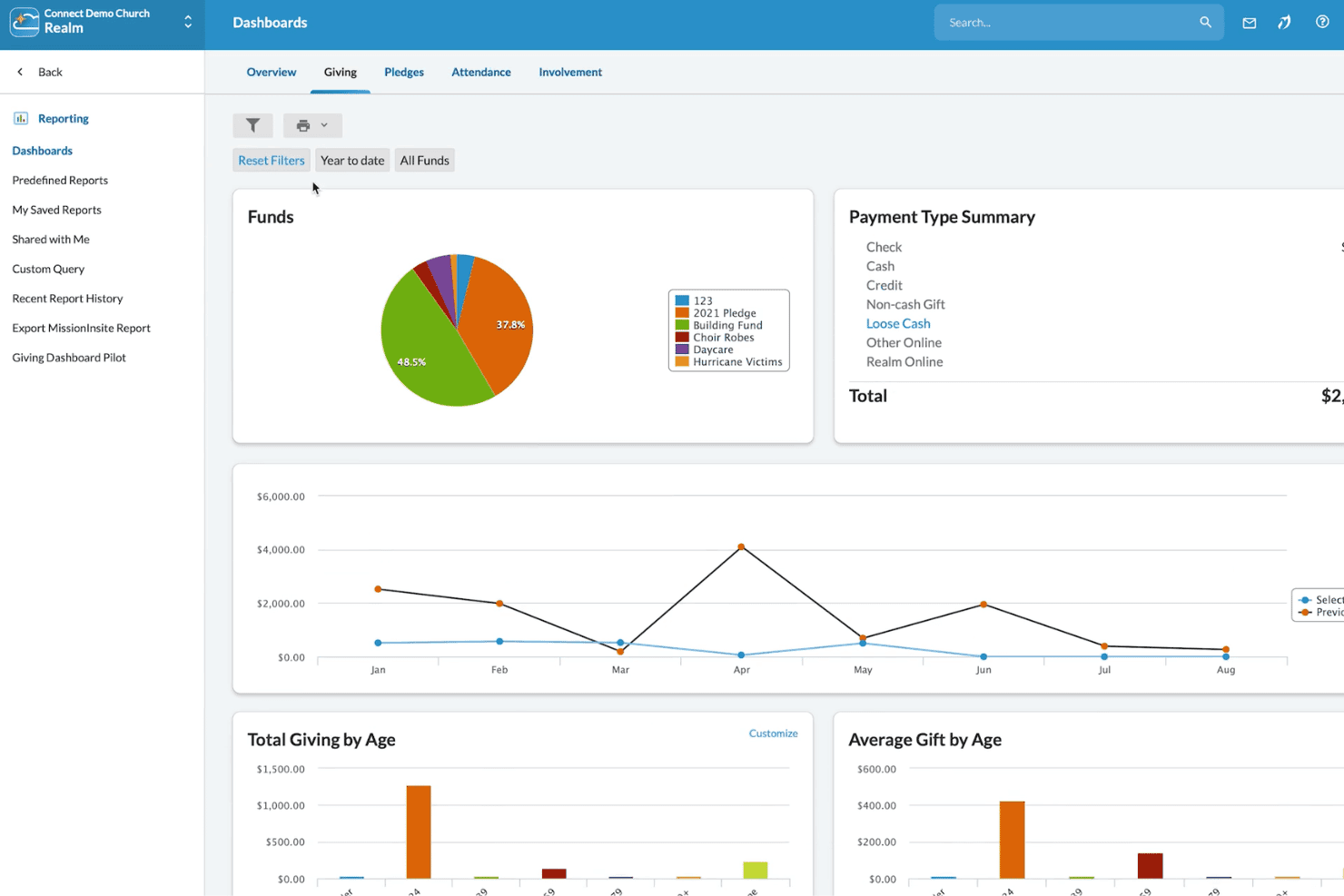
ACS Technologies is a leading church management software known for its extensive feature set tailored to the needs of religious organizations. Church administrators and leaders generally use ACS Technologies to support their day-to-day operations by managing membership, events, and contributions efficiently. It provides tools for effective communication, financial management, and member engagement, benefiting organizations by enhancing their administrative capabilities.
ACS Technologies addresses common pain points like membership management, financial tracking, and event scheduling. Its best features are its user-friendly interface, detailed reporting capabilities, and versatile communication tools.
ACS Technologies Church Management Software Review for 2025
In this review, I’m going to share my analysis and evaluation from hands-on experience with ACS Technologies. But first, if you’re just beginning your search for the best church management software, check out my picks of the best church management software.
This in-depth ACS Technologies review will walk you through pros and cons, features and functionality, to help guide you to better understand its capabilities and suitability for your scenario.
ACS Technologies is a leading church management software known for its extensive feature set tailored to the needs of religious organizations. Church administrators and leaders generally use ACS Technologies to support their day-to-day operations by managing membership, events, and contributions efficiently. It provides tools for effective communication, financial management, and member engagement, benefiting organizations by enhancing their administrative capabilities.
ACS Technologies addresses common pain points like membership management, financial tracking, and event scheduling. Its best features are its user-friendly interface, detailed reporting capabilities, and versatile communication tools.
ACS Evaluation Summary
- Pricing available upon request
- Free demo available
Why Trust Our Software Reviews
ACS Overview
pros
-
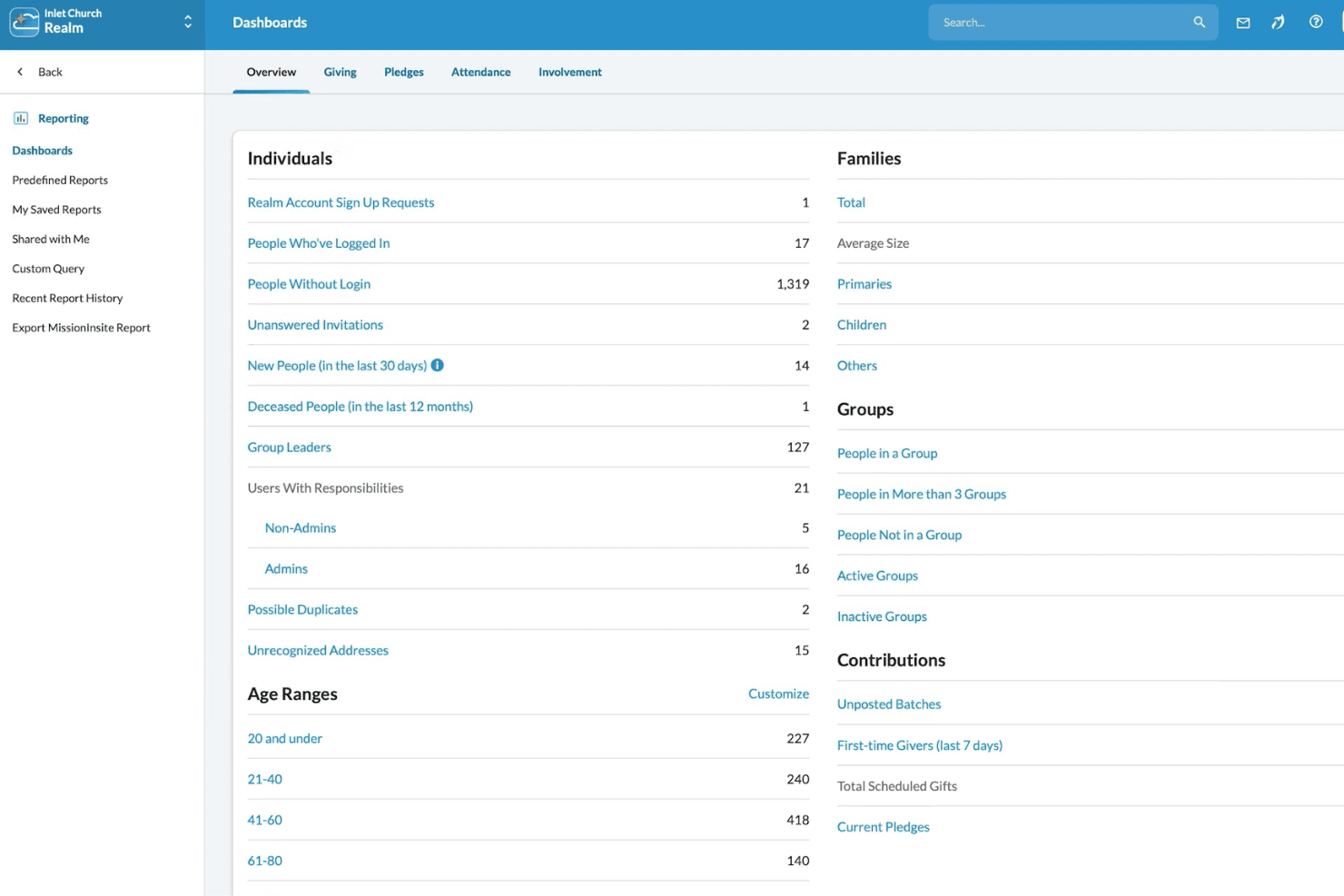
It provides extensive reporting tools that help churches analyze data effectively and make informed decisions.
-
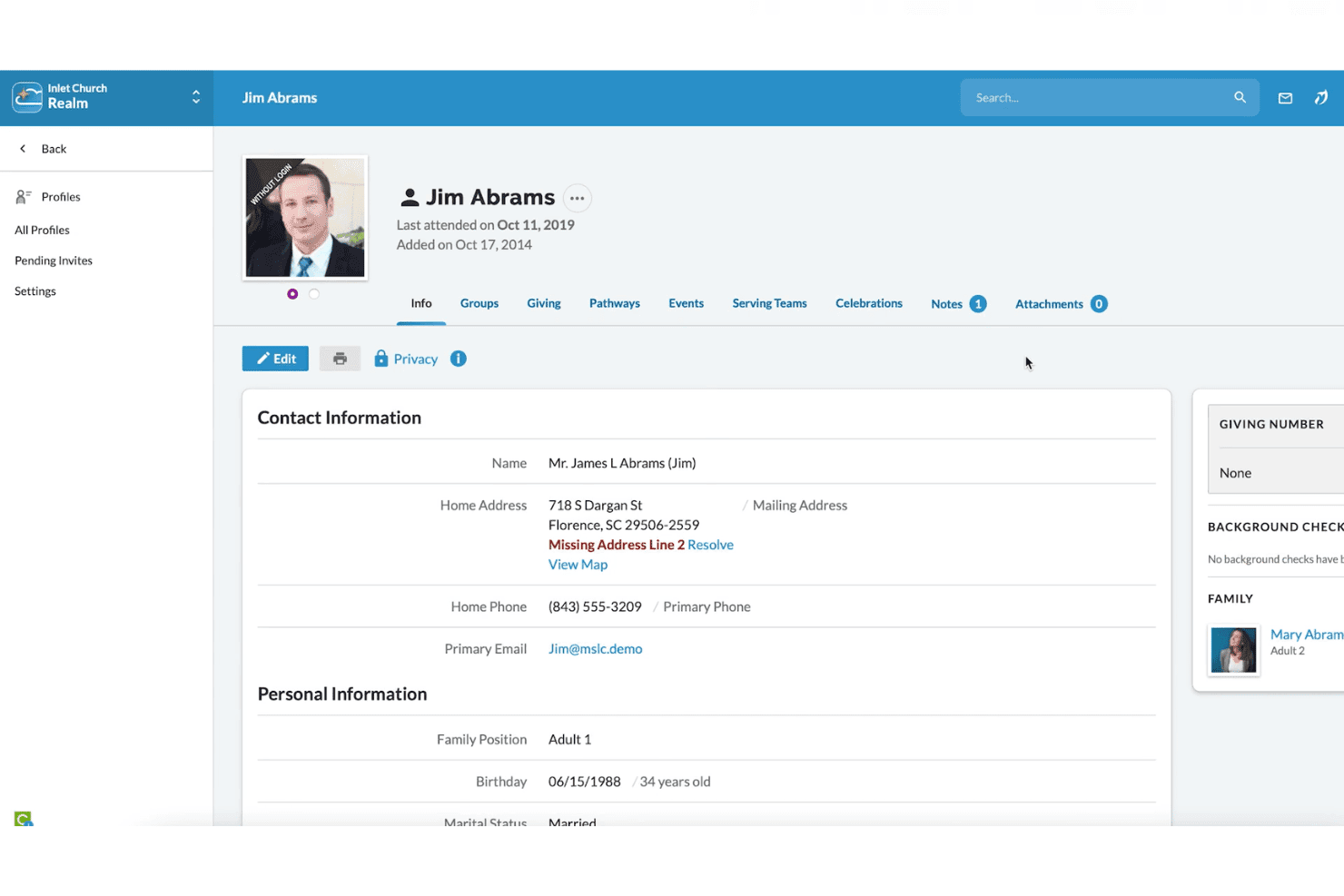
Member Management: The software excels in managing detailed member profiles, making it easier for churches to track engagement and involvement.
-
Customization Options: ACS Technologies offers a wide range of customization options, allowing churches to tailor the software to their specific needs.
cons
-
Limited Mobile Functionality: The mobile version lacks some of the features available on the desktop version, which might inconvenience users on the go.
-
User Interface: The interface can appear outdated compared to more modern church management software, potentially impacting user experience.
-
Learning Curve: New users may find the software challenging to learn due to its extensive features and functionalities.
-
ChMeetings
Visit WebsiteThis is an aggregated rating for this tool including ratings from Crozdesk users and ratings from other sites.4.8 -
Gracely
Visit WebsiteThis is an aggregated rating for this tool including ratings from Crozdesk users and ratings from other sites.5 -
Text In Church
Visit WebsiteThis is an aggregated rating for this tool including ratings from Crozdesk users and ratings from other sites.4.8
How We Test & Score Tools
We’ve spent years building, refining, and improving our software testing and scoring system. The rubric is designed to capture the nuances of software selection and what makes a tool effective, focusing on critical aspects of the decision-making process.
Below, you can see exactly how our testing and scoring works across seven criteria. It allows us to provide an unbiased evaluation of the software based on core functionality, standout features, ease of use, onboarding, customer support, integrations, customer reviews, and value for money.
Core Functionality (25% of final scoring)
The starting point of our evaluation is always the core functionality of the tool. Does it have the basic features and functions that a user would expect to see? Are any of those core features locked to higher-tiered pricing plans? At its core, we expect a tool to stand up against the baseline capabilities of its competitors.
Standout Features (25% of final scoring)
Next, we evaluate uncommon standout features that go above and beyond the core functionality typically found in tools of its kind. A high score reflects specialized or unique features that make the product faster, more efficient, or offer additional value to the user.
We also evaluate how easy it is to integrate with other tools typically found in the tech stack to expand the functionality and utility of the software. Tools offering plentiful native integrations, 3rd party connections, and API access to build custom integrations score best.
Ease of Use (10% of final scoring)
We consider how quick and easy it is to execute the tasks defined in the core functionality using the tool. High scoring software is well designed, intuitive to use, offers mobile apps, provides templates, and makes relatively complex tasks seem simple.
Onboarding (10% of final scoring)
We know how important rapid team adoption is for a new platform, so we evaluate how easy it is to learn and use a tool with minimal training. We evaluate how quickly a team member can get set up and start using the tool with no experience. High scoring solutions indicate little or no support is required.
Customer Support (10% of final scoring)
We review how quick and easy it is to get unstuck and find help by phone, live chat, or knowledge base. Tools and companies that provide real-time support score best, while chatbots score worst.
Customer Reviews (10% of final scoring)
Beyond our own testing and evaluation, we consider the net promoter score from current and past customers. We review their likelihood, given the option, to choose the tool again for the core functionality. A high scoring software reflects a high net promoter score from current or past customers.
Value for Money (10% of final scoring)
Lastly, in consideration of all the other criteria, we review the average price of entry level plans against the core features and consider the value of the other evaluation criteria. Software that delivers more, for less, will score higher.
How We Test & Score Tools
We’ve spent years building, refining, and improving our software testing and scoring system. The rubric is designed to capture the nuances of software selection and what makes a tool effective, focusing on critical aspects of the decision-making process.
Below, you can see exactly how our testing and scoring works across seven criteria. It allows us to provide an unbiased evaluation of the software based on core functionality, standout features, ease of use, onboarding, customer support, integrations, customer reviews, and value for money.
Core Functionality (25% of final scoring)
The starting point of our evaluation is always the core functionality of the tool. Does it have the basic features and functions that a user would expect to see? Are any of those core features locked to higher-tiered pricing plans? At its core, we expect a tool to stand up against the baseline capabilities of its competitors.
Standout Features (25% of final scoring)
Next, we evaluate uncommon standout features that go above and beyond the core functionality typically found in tools of its kind. A high score reflects specialized or unique features that make the product faster, more efficient, or offer additional value to the user.
We also evaluate how easy it is to integrate with other tools typically found in the tech stack to expand the functionality and utility of the software. Tools offering plentiful native integrations, 3rd party connections, and API access to build custom integrations score best.
Ease of Use (10% of final scoring)
We consider how quick and easy it is to execute the tasks defined in the core functionality using the tool. High scoring software is well designed, intuitive to use, offers mobile apps, provides templates, and makes relatively complex tasks seem simple.
Onboarding (10% of final scoring)
We know how important rapid team adoption is for a new platform, so we evaluate how easy it is to learn and use a tool with minimal training. We evaluate how quickly a team member can get set up and start using the tool with no experience. High scoring solutions indicate little or no support is required.
Customer Support (10% of final scoring)
We review how quick and easy it is to get unstuck and find help by phone, live chat, or knowledge base. Tools and companies that provide real-time support score best, while chatbots score worst.
Customer Reviews (10% of final scoring)
Beyond our own testing and evaluation, we consider the net promoter score from current and past customers. We review their likelihood, given the option, to choose the tool again for the core functionality. A high scoring software reflects a high net promoter score from current or past customers.
Value for Money (10% of final scoring)
Lastly, in consideration of all the other criteria, we review the average price of entry level plans against the core features and consider the value of the other evaluation criteria. Software that delivers more, for less, will score higher.
How We Test & Score Tools
We’ve spent years building, refining, and improving our software testing and scoring system. The rubric is designed to capture the nuances of software selection and what makes a tool effective, focusing on critical aspects of the decision-making process.
Below, you can see exactly how our testing and scoring works across seven criteria. It allows us to provide an unbiased evaluation of the software based on core functionality, standout features, ease of use, onboarding, customer support, integrations, customer reviews, and value for money.
Core Functionality (25% of final scoring)
The starting point of our evaluation is always the core functionality of the tool. Does it have the basic features and functions that a user would expect to see? Are any of those core features locked to higher-tiered pricing plans? At its core, we expect a tool to stand up against the baseline capabilities of its competitors.
Standout Features (25% of final scoring)
Next, we evaluate uncommon standout features that go above and beyond the core functionality typically found in tools of its kind. A high score reflects specialized or unique features that make the product faster, more efficient, or offer additional value to the user.
We also evaluate how easy it is to integrate with other tools typically found in the tech stack to expand the functionality and utility of the software. Tools offering plentiful native integrations, 3rd party connections, and API access to build custom integrations score best.
Ease of Use (10% of final scoring)
We consider how quick and easy it is to execute the tasks defined in the core functionality using the tool. High scoring software is well designed, intuitive to use, offers mobile apps, provides templates, and makes relatively complex tasks seem simple.
Onboarding (10% of final scoring)
We know how important rapid team adoption is for a new platform, so we evaluate how easy it is to learn and use a tool with minimal training. We evaluate how quickly a team member can get set up and start using the tool with no experience. High scoring solutions indicate little or no support is required.
Customer Support (10% of final scoring)
We review how quick and easy it is to get unstuck and find help by phone, live chat, or knowledge base. Tools and companies that provide real-time support score best, while chatbots score worst.
Customer Reviews (10% of final scoring)
Beyond our own testing and evaluation, we consider the net promoter score from current and past customers. We review their likelihood, given the option, to choose the tool again for the core functionality. A high scoring software reflects a high net promoter score from current or past customers.
Value for Money (10% of final scoring)
Lastly, in consideration of all the other criteria, we review the average price of entry level plans against the core features and consider the value of the other evaluation criteria. Software that delivers more, for less, will score higher.
How We Test & Score Tools
We’ve spent years building, refining, and improving our software testing and scoring system. The rubric is designed to capture the nuances of software selection and what makes a tool effective, focusing on critical aspects of the decision-making process.
Below, you can see exactly how our testing and scoring works across seven criteria. It allows us to provide an unbiased evaluation of the software based on core functionality, standout features, ease of use, onboarding, customer support, integrations, customer reviews, and value for money.
Core Functionality (25% of final scoring)
The starting point of our evaluation is always the core functionality of the tool. Does it have the basic features and functions that a user would expect to see? Are any of those core features locked to higher-tiered pricing plans? At its core, we expect a tool to stand up against the baseline capabilities of its competitors.
Standout Features (25% of final scoring)
Next, we evaluate uncommon standout features that go above and beyond the core functionality typically found in tools of its kind. A high score reflects specialized or unique features that make the product faster, more efficient, or offer additional value to the user.
We also evaluate how easy it is to integrate with other tools typically found in the tech stack to expand the functionality and utility of the software. Tools offering plentiful native integrations, 3rd party connections, and API access to build custom integrations score best.
Ease of Use (10% of final scoring)
We consider how quick and easy it is to execute the tasks defined in the core functionality using the tool. High scoring software is well designed, intuitive to use, offers mobile apps, provides templates, and makes relatively complex tasks seem simple.
Onboarding (10% of final scoring)
We know how important rapid team adoption is for a new platform, so we evaluate how easy it is to learn and use a tool with minimal training. We evaluate how quickly a team member can get set up and start using the tool with no experience. High scoring solutions indicate little or no support is required.
Customer Support (10% of final scoring)
We review how quick and easy it is to get unstuck and find help by phone, live chat, or knowledge base. Tools and companies that provide real-time support score best, while chatbots score worst.
Customer Reviews (10% of final scoring)
Beyond our own testing and evaluation, we consider the net promoter score from current and past customers. We review their likelihood, given the option, to choose the tool again for the core functionality. A high scoring software reflects a high net promoter score from current or past customers.
Value for Money (10% of final scoring)
Lastly, in consideration of all the other criteria, we review the average price of entry level plans against the core features and consider the value of the other evaluation criteria. Software that delivers more, for less, will score higher.
How We Test & Score Tools
We’ve spent years building, refining, and improving our software testing and scoring system. The rubric is designed to capture the nuances of software selection and what makes a tool effective, focusing on critical aspects of the decision-making process.
Below, you can see exactly how our testing and scoring works across seven criteria. It allows us to provide an unbiased evaluation of the software based on core functionality, standout features, ease of use, onboarding, customer support, integrations, customer reviews, and value for money.
Core Functionality (25% of final scoring)
The starting point of our evaluation is always the core functionality of the tool. Does it have the basic features and functions that a user would expect to see? Are any of those core features locked to higher-tiered pricing plans? At its core, we expect a tool to stand up against the baseline capabilities of its competitors.
Standout Features (25% of final scoring)
Next, we evaluate uncommon standout features that go above and beyond the core functionality typically found in tools of its kind. A high score reflects specialized or unique features that make the product faster, more efficient, or offer additional value to the user.
We also evaluate how easy it is to integrate with other tools typically found in the tech stack to expand the functionality and utility of the software. Tools offering plentiful native integrations, 3rd party connections, and API access to build custom integrations score best.
Ease of Use (10% of final scoring)
We consider how quick and easy it is to execute the tasks defined in the core functionality using the tool. High scoring software is well designed, intuitive to use, offers mobile apps, provides templates, and makes relatively complex tasks seem simple.
Onboarding (10% of final scoring)
We know how important rapid team adoption is for a new platform, so we evaluate how easy it is to learn and use a tool with minimal training. We evaluate how quickly a team member can get set up and start using the tool with no experience. High scoring solutions indicate little or no support is required.
Customer Support (10% of final scoring)
We review how quick and easy it is to get unstuck and find help by phone, live chat, or knowledge base. Tools and companies that provide real-time support score best, while chatbots score worst.
Customer Reviews (10% of final scoring)
Beyond our own testing and evaluation, we consider the net promoter score from current and past customers. We review their likelihood, given the option, to choose the tool again for the core functionality. A high scoring software reflects a high net promoter score from current or past customers.
Value for Money (10% of final scoring)
Lastly, in consideration of all the other criteria, we review the average price of entry level plans against the core features and consider the value of the other evaluation criteria. Software that delivers more, for less, will score higher.
Product Features
| Feature | ACS Technologies |
| Membership Management | ✅ |
| Donation Tracking | ✅ |
| Event Scheduling | ✅ |
| Communication Tools | ✅ |
| Volunteer Management | ✅ |
| Reporting and Analytics | ✅ |
| Mobile Access | ✅ |
| Online Giving | ✅ |
| Customizable Workflows | ✅ |
| Integrated Financial Suite | ✅ |
| Child Check-In | ✅ |
| Small Group Management | ✅ |
| Attendance Tracking | ✅ |
| Multi-Site Support | ✅ |
| API Access | ✅ |
| Zapier Integration | ✅ |
| Facility Management | ❌ |
| Task Management | ❌ |
| Social Media Integration | ✅ |
| Automated Messaging | ✅ |
| Live Streaming | ❌ |
| Custom Reports | ✅ |
| Email Marketing | ✅ |
| Calendar Sync | ✅ |
| Staff Management | ✅ |
ACS Specs
- API
- Calendar Management
- Contact Management
- Dashboards
- Data Export
- Data Import
- Document Management
- External Integrations
- Multi-User
- Notifications
- Payment Gateway Integration
- Scheduling
- Workflow Management
ACS Technologies Frequently Asked Questions
What is ACS Technologies?
ACS Technologies is a church management software designed to assist religious organizations in managing their administrative tasks. It offers a range of features including membership management, donation tracking, event scheduling, and communication tools. The software aims to support churches in enhancing their operational efficiency and member engagement.
Is there a mobile app for ACS Technologies?
Yes, ACS Technologies provides a mobile app for Android and iPad, allowing users to access key functionalities on the go. The app enables church staff to manage member information, track donations, and communicate with members from their mobile devices. While it offers convenience, some features may be limited compared to the desktop version.
Is ACS Technologies HIPAA compliant?
ACS Technologies is not specifically designed to be HIPAA compliant. Churches using the software to handle sensitive health information should exercise caution and consult with ACS Technologies for guidance on data protection. It is important to ensure that any health-related data is managed in accordance with applicable regulations.
Is ACS Technologies SOC 2 compliant?
ACS Technologies does not publicly state SOC 2 compliance. Churches concerned about data security should inquire directly with ACS Technologies for information on their security practices and certifications. Ensuring that data protection measures align with organizational needs is crucial.
Is ACS Technologies secure?
ACS Technologies implements security measures to protect user data, including encryption and access controls. However, churches should evaluate their security requirements and consult ACS Technologies for specific details on their security protocols. Regular updates and user training can also help maintain a secure environment.
Is ACS Technologies FedRAMP certified?
ACS Technologies is not FedRAMP certified. This certification is typically required for software used by U.S. federal agencies. Churches that require FedRAMP-certified solutions should consider other options or discuss their needs with ACS Technologies.
Is ACS Technologies GDPR compliant?
ACS Technologies does not explicitly state GDPR compliance, which is crucial for organizations handling personal data of EU citizens. Churches operating within the EU should confirm data protection practices with ACS Technologies to ensure compliance with GDPR requirements and safeguard member information.
How does ACS Technologies support data privacy?
ACS Technologies supports data privacy by implementing access controls and encryption to protect user data. They provide tools for managing permissions and ensuring that only authorized personnel can access sensitive information. Regular system updates and user training are recommended to maintain data privacy and security.
What's Next?
Subscribe to our newsletter to get the latest resources, best practices, and insights on managing churches from expert pastors and church leaders.