

10 Best Keap Alternatives for Church Communication in 2026

Best Keap Alternatives Shortlist


Managing a church community comes with its own set of challenges. You need tools that help with organizing events, managing donations, and communicating with your congregation. Keap may not always fit your specific needs, and that's where alternatives come in.
In my experience, finding the right church management software can make a huge difference for your team. You’re looking for something that simplifies tasks and fits your budget.
In this article, I’ll share my top picks for Keap alternatives. These recommendations are based on independent testing and a deep understanding of the church management industry. You'll find solutions tailored to your unique challenges, helping you make an informed decision.
What Is Keap?
Keap is a church database tool designed to help you manage contacts, automate marketing, and streamline operations. It's generally used by small business owners, church managers, and other professionals who need to keep track of customer relationships and improve efficiency. Features like contact management, automated follow-ups, and payment processing help with organizing your tasks and improving communication. Overall, Keap offers a practical way to manage your church's operations and enhance your team's productivity.
Why Trust Our Software Recommendations
Our team has been testing and reviewing software since 2012. As church leaders ourselves, we know how difficult—and important—it is to choose the right software.
For this guide, we evaluated tools using hands-on testing and independent research, scoring tools using our selection criteria.
Our reviews reflect our human editorial judgment, not a sales pitch.
Best Keap Alternatives Summary
This comparison chart summarizes pricing details for my top Keap alternative selections to help you find the best one for your budget and business needs.
| Tool | Best For | Trial Info | Price | ||
|---|---|---|---|---|---|
| 1 | Best for ease of use | Free demo available | From $72/month | Website | |
| 2 | Best for online and mobile giving | 30-day free trial available | From $72/month | Website | |
| 3 | Best for personalized support | Free demo available | Pricing upon request | Website | |
| 4 | Best for customizable features | Free trial available | From $69.99/month | Website | |
| 5 | Best for nonprofits and education | Free demo available | Pricing upon request | Website | |
| 6 | Best for all-in-one church management | 30-day free trial | From $50/month/account | Website | |
| 7 | Best for affordability and simplicity | 30-day free trial + free demo available | From $8/month (billed annually) | Website | |
| 8 | Best for event management | 30-day free trial | From $15.50/month/account | Website | |
| 9 | Best for modular pricing | Free plan + 30-day free trial available | From $15/20 members/month | Website | |
| 10 | Best for cost-effective solutions | 10-day free trial + free demo available | From $75/month | Website |
Best Keap Alternatives Reviews
Below are my detailed summaries of the best Keap alternatives that made it onto my shortlist. My reviews offer a detailed look at the key features, pros & cons, integrations, and ideal use cases of each tool to help you find the best one for you.

Best for ease of use

Breeze ChMS is a church management software designed for small to medium-sized churches. It helps you manage member data, track attendance, and handle contributions efficiently.
Why Breeze ChMS is a good Keap alternative: Breeze ChMS is known for its ease of use, making it ideal for churches that want a straightforward solution. You can quickly set up member profiles and track attendance without a steep learning curve. The software also provides tools for managing contributions and generating reports, helping you stay organized. Its intuitive interface and focus on simplicity make it a great choice for churches looking for an uncomplicated management tool.
Standout features & integrations:
Features include event management, volunteer scheduling, and custom forms. You can manage church events effortlessly and ensure volunteers are scheduled properly. The custom forms feature allows you to collect information tailored to your church’s needs.
Integrations include QuickBooks, Mailchimp, Planning Center, Google Calendar, PayPal, Stripe, Tithe.ly, Elvanto, Church Community Builder, and Slack.
Pros and Cons
Pros:
- Intuitive report generation
- Simple contribution management
- Quick attendance tracking
- Efficient member data management
- Easy setup and navigation
Cons:
- May lack advanced reporting tools
- Requires internet access
- Not ideal for large churches
- Basic customization options
- Limited advanced features

Tithe.ly
Best for online and mobile giving

Tithe.ly is a church management platform designed for church leaders and administrators. It helps you manage donations, engage with your congregation, and enhance your church's financial health.
Why Tithe.ly is a good Keap alternative: Tithe.ly excels in online and mobile giving, offering a user-friendly experience for both church members and administrators. You can easily set up recurring donations and provide a convenient mobile app for your congregation. The platform's focus on digital giving helps you reach a wider audience and increase donations. These capabilities make it a great choice for churches looking to modernize their giving solutions.
Standout features & integrations:
Features include custom church apps, text giving, and event registration. You can design a custom app for your church and offer text-based donations. Event registration features help you manage church events and track attendance.
Integrations include QuickBooks, Planning Center, Elvanto, Church Community Builder, Breeze, Mailchimp, Slack, Google Calendar, Stripe, and PayPal.
Pros and Cons
Pros:
- Supports recurring donations
- Efficient event registration
- Text giving options
- Customizable church apps
- Easy mobile giving setup
Cons:
- Basic customization options
- Some features need internet access
- Not ideal for small churches
- Limited advanced reporting
- May require training for setup

ACS
Best for personalized support

ACS is a church management software designed for church leaders and administrators. It helps you manage membership, financials, and events efficiently.
Why ACS is a good Keap alternative: ACS offers personalized support, which is crucial for churches needing tailored assistance. You can manage your membership database and track contributions with ease. The software also provides tools for event scheduling and attendance tracking, ensuring smooth church operations. Its focus on personalized support helps your team address specific needs and challenges.
Standout features & integrations:
Features include volunteer management, facility scheduling, and child check-in. You can organize and manage volunteer activities effectively. The facility scheduling feature helps you coordinate the use of church spaces.
Integrations include QuickBooks, Mailchimp, Vanco, Constant Contact, Microsoft Outlook, Google Calendar, PayPal, Planning Center, Stripe, and Square.
Pros and Cons
Pros:
- Detailed financial tracking
- Effective volunteer management
- Comprehensive membership management
- Efficient event scheduling
- Strong personalized support
Cons:
- Higher cost for small teams
- May be too complex for small churches
- Limited customization options
- Requires technical knowledge
- High initial learning curve

Best for customizable features
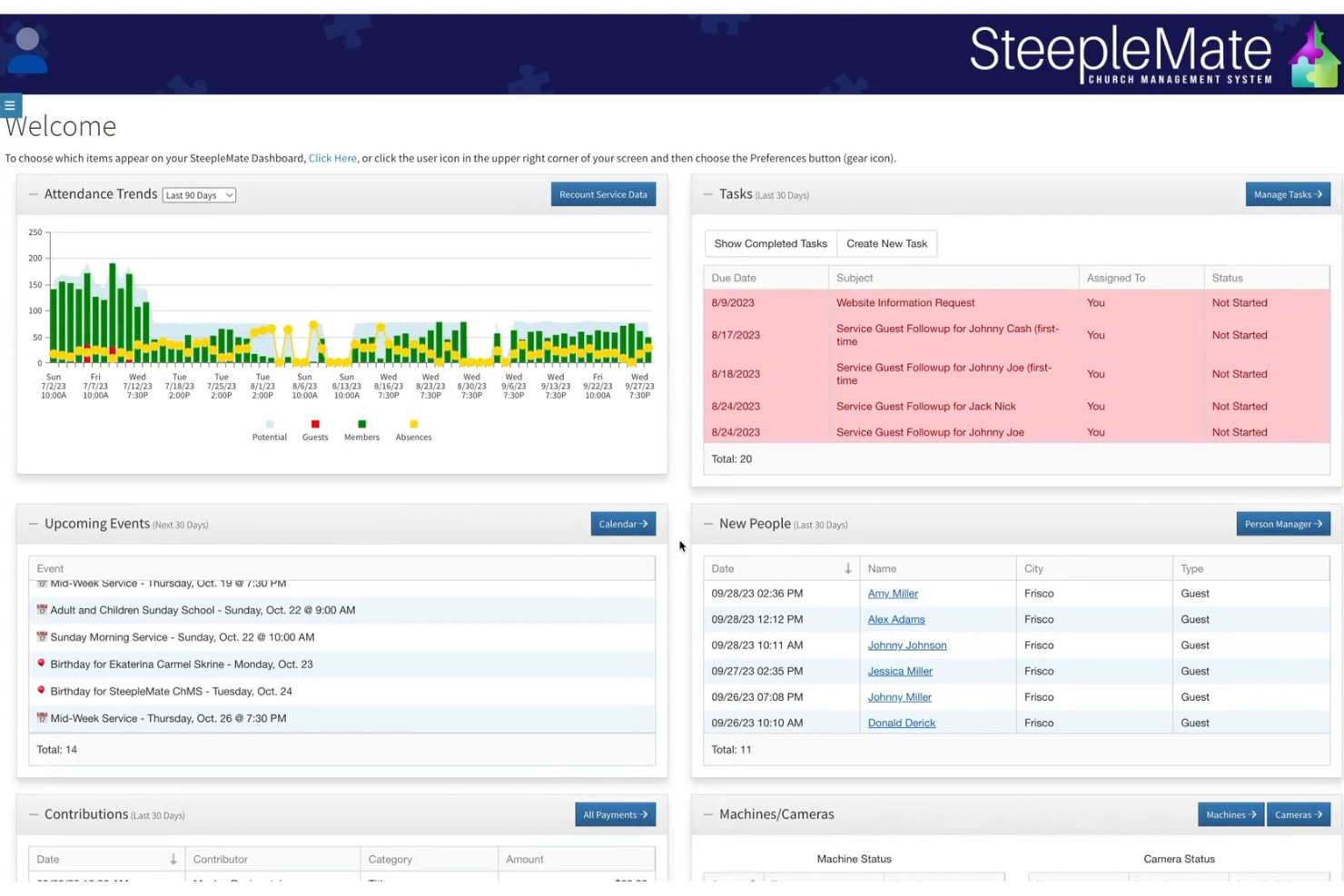
SteepleMate is a cloud-based church management system built to help ministries manage people, communication, events, giving, and academics. It’s aimed at church staff and volunteers who need flexible tools to run various church functions efficiently.
Why SteepleMate is a good software alternative: You get tools that adapt to how your team likes to work, offering features like custom member fields, workflows, and branded portals. You can tailor things like the mobile app layout, dashboard, and signage displays to fit your vibe. It lets you adjust navigation, permissions, and visuals so the system fits your ministry—not the other way around. That way, you and your team can make it look and act just how you need it.
Standout features & integrations:
Features include tracking attendance for services and events right in the app. You also get school-style management tools like tuition, lunch accounts, and menu planning. You can even set up a kiosk that lets people submit prayer requests, update info, or view announcements without extra effort.
Integrations include QuickBooks.
Pros and Cons
Pros:
- Includes kiosk tools for in-person use
- Handles school and tuition features
- Adapts mobile app look and feel
- Supports workflows for tracking engagement
- Lets you customize member fields
Cons:
- Could require extra thought to maintain consistency
- Lacks templated quick-start setups
- Options might overwhelm small teams
- May need training to set up customization
- Can feel too flexible at first

Best for nonprofits and education

Blackbaud is a cloud-based software solution tailored for nonprofits and educational institutions. It helps you manage fundraising, financial management, and constituent relationship management.
Why Blackbaud is a good Keap alternative: Blackbaud is designed specifically for nonprofits and educational institutions, offering advanced tools for fundraising and donor management. You can handle complex financial tasks and maintain detailed records of your supporters. Its focus on education and nonprofit needs ensures that you have the tools necessary for effective engagement and growth. These capabilities make it a strong choice for organizations seeking specialized management solutions.
Standout features & integrations:
Features include online fundraising, donor management, and grant tracking. You can manage your fundraising campaigns and track donations with ease. The grant tracking feature helps you monitor funding opportunities and applications.
Integrations include Microsoft Office, Salesforce, QuickBooks, Google Analytics, Mailchimp, Eventbrite, PayPal, Stripe, Classy, and Constant Contact.
Pros and Cons
Pros:
- Supports complex fundraising
- Efficient grant tracking
- Strong financial tools
- Advanced donor management
- Tailored for nonprofits
Cons:
- High cost for small organizations
- Limited customization options
- Not suitable for small teams
- Requires technical knowledge
- Steep learning curve

Elvanto
Best for all-in-one church management

Elvanto is a church management software designed for church leaders and administrators. It helps you manage services, people, and resources efficiently.
Why Elvanto is a good Keap alternative: Elvanto offers an all-in-one management solution, making it suitable for churches looking to centralize their operations. You can manage your services, track attendance, and handle volunteer scheduling all in one place. The software also provides tools for managing people and resources, ensuring everything is organized. Its comprehensive approach to church management makes it a practical choice for churches seeking a centralized system.
Standout features & integrations:
Features include worship planning, child check-in, and group management. You can plan worship services with ease and ensure secure child check-ins. Group management features help you organize and oversee small group activities.
Integrations include Planning Center, Mailchimp, QuickBooks, Google Calendar, Stripe, PayPal, Xero, Twilio, Slack, and Zoom.
Pros and Cons
Pros:
- Comprehensive resource management
- Supports volunteer scheduling
- Secure child check-in process
- Efficient worship planning
- Centralized management system
Cons:
- Requires internet for full use
- Not ideal for very large churches
- Basic reporting features
- Limited customization options
- May require training for setup


ChurchTrac is a church management software designed for pastors and church administrators. It helps you manage events, track attendance, and handle finances efficiently.
Why ChurchTrac is a good Keap alternative: ChurchTrac offers affordability and simplicity, making it accessible for small churches with limited budgets. You can easily track attendance and manage church finances without complex setups. The software focuses on providing essential features without overwhelming users, which is perfect for those looking for straightforward solutions. Its ease of use and low cost make it a great alternative for managing church operations.
Standout features & integrations:
Features include worship planning, member management, and financial tracking. You can plan worship services with ease and keep track of member information. The financial tracking feature helps you manage donations and expenses effectively.
Integrations include PayPal, QuickBooks, Mailchimp, Stripe, Planning Center, Google Calendar, Zoom, Elvanto, Church Community Builder, and Breeze.
Pros and Cons
Pros:
- Quick setup process
- Easy worship planning
- Efficient financial tracking
- Affordable pricing plans
- Simple user interface
Cons:
- Requires internet access for all features
- Not ideal for very large churches
- May lack advanced functionalities
- Basic reporting features
- Limited customization options


ChurchSuite is a church management software designed for church leaders and administrators. It helps you manage events, track attendance, and communicate with your congregation effectively.
Why ChurchSite is a good Keap alternative: ChurchSuite specializes in event management, making it ideal for churches with active event calendars. You can easily organize and track events, ensuring all details are covered. The software also offers tools for attendance tracking and communication, helping you stay connected with your congregation. Its focus on event management provides a streamlined way to handle church activities efficiently.
Standout features & integrations:
Features include child check-in, small group management, and member directory. You can manage child check-ins securely, ensuring safety and efficiency. The small group management feature helps you organize and coordinate group activities.
Integrations include Mailchimp, Google Calendar, Stripe, PayPal, QuickBooks, Xero, Planning Center, Slack, Microsoft Outlook, and Zoom.
Pros and Cons
Pros:
- Flexible communication tools
- Supports small group activities
- Secure child check-in
- Detailed attendance tracking
- Effective event management
Cons:
- Basic reporting features
- Requires internet for full functionality
- Not ideal for very large churches
- Limited customization options
- May require training for setup


Planning Center is a church management software designed for church leaders and administrators. It helps you manage events, resources, and communication within your church community.
Why Planning Center is a good Keap alternative: Planning Center offers modular pricing, allowing you to pay for only the features you need. You can customize your plan based on your church's specific requirements, ensuring cost-effectiveness. The software provides tools for event management and resource scheduling, making it easy to organize church activities. Its flexible pricing model and comprehensive feature set make it a suitable choice for churches looking for tailored solutions.
Standout features & integrations:
Features include volunteer scheduling, check-ins, and giving management. You can easily schedule volunteers and manage attendance with the check-in feature. The giving management tool helps you track donations and financial contributions.
Integrations include Mailchimp, QuickBooks, Stripe, PayPal, Google Calendar, Twilio, Slack, Zoom, Elvanto, and Breeze.
Pros and Cons
Pros:
- Comprehensive event management
- Supports volunteer management
- Efficient resource scheduling
- Customizable feature set
- Flexible modular pricing
Cons:
- Not ideal for very large churches
- Requires internet for full functionality
- Limited advanced customization
- Basic reporting capabilities
- May require time to learn


Faith Teams is a church management software designed for church leaders and small to medium-sized congregations. It helps you manage donations, events, and member information efficiently.
Why Faith Teams is a good Keap alternative: Faith Teams offers cost-effective solutions, making it ideal for budget-conscious churches. You can handle online giving and track donations without incurring high costs. The software also provides tools for event management and member communication, helping you stay organized without breaking the bank. Its affordability and focus on essential features make it a practical choice for churches looking to manage their operations efficiently.
Standout features & integrations:
Features include volunteer scheduling, email campaigns, and sermon archive. You can schedule volunteers easily, ensuring everyone knows their roles. The email campaigns feature helps you communicate effectively with your congregation.
Integrations include Planning Center, Mailchimp, Stripe, PayPal, Google Calendar, QuickBooks, Zoom, Slack, Twilio, and Microsoft Outlook.
Pros and Cons
Pros:
- Simple member management
- Supports email campaigns
- Easy volunteer scheduling
- Effective online giving tools
- Affordable for small churches
Cons:
- Requires internet for full use
- Not ideal for very large churches
- May require training for setup
- Limited advanced functionalities
- Basic reporting features
Other Keap Alternatives
Here are some additional Keap alternatives that didn’t make it onto my shortlist, but are still worth checking out:
- ChMeetings
For multilingual support
- One Church Software
For centralized communication
- Realm
For community engagement tools
- Touchpoint
For mobile app features
- Servant Keeper
For detailed member records
- iChurch
For online worship integration
- Excellerate
For customizable reporting


How I Evaluate Keap Alternatives
I split my evaluation into two layers: core functionality every tool must cover, like CRM, automation, and giving—plus differentiators like nonprofit pricing and ministry integrations that separate good from great.
Core Functionality (Table Stakes For This List)
When I'm selecting tools for my list, I rank each one on a scale from 0 (does not offer the functionality) to 5 (excels in this area) for each core functionality listed below. I then calculate the tool's total score into a percentage, using 65% as a benchmark to help assess its overall fit for the list.
- CRM & Contact Management: I look for segmentation, custom fields, and tagging that let you group congregants by ministry involvement, giving history, or visitor status.
- Marketing Automation Workflows: Visual builders with branching logic matter here—like triggering a welcome sequence when someone fills out a visitor card, then splitting the path based on whether they attend again.
- Email & SMS Marketing: I evaluate whether a tool supports both channels natively with templates, tracking, and audience segmentation for things like sermon reminders or volunteer shift alerts.
- Landing Pages & Forms: The form and page builders need to sync directly with the CRM so event registrations and small group sign-ups flow into contact records without manual imports.
- Payments & Recurring Billing: Recurring giving is table stakes for churches, so I check for native payment processing that handles one-time donations, recurring tithes, and event fees in one place.
- Pipeline & Task Management: Automated task assignment is what I'm looking for—tools that can move a new visitor through a follow-up pipeline and remind staff to send a personal note after their second visit.
Once I have a list of tools that meet the criteria, I consider what sets each platform apart.
Differentiating Factors (What Sets Vendors Apart)
Here's how I compare and contrast different vendors:
Standout Features
I check whether a platform supports household or family grouping, since churches need giving history and communications to roll up across related members rather than treating each person as a separate contact. Recurring giving portals also matter—I look for self-service options where donors can update payment methods and download year-end tax receipts without calling the church office. Beyond that, a native mobile app for staff is a real differentiator because pastors log care visits and update follow-up pipelines from hospital rooms, not desks.
Beyond Features
I check whether a platform offers nonprofit or ministry-specific pricing tiers, since most churches budget annually and need predictable costs as their contact list grows. Integration depth matters just as much—I look for native connections to tools like Planning Center, Tithe.ly, or QuickBooks so giving data stays reconciled without manual exports. I also evaluate onboarding support, especially migration help from legacy systems like Breeze or ChurchTrac, because non-technical staff need a guided path to go live.
Why Look For A Keap Alternative?
While Keap is a good choice of church database tools, there are a number of reasons why some users seek out alternative solutions. You might be looking for a Keap alternative because…
- You need more advanced reporting features
- Your team requires better multilingual support
- You're looking for more affordable pricing options
- You need a tool with better mobile app integration
- Your church requires more customization capabilities
If any of these sound like you, you’ve come to the right place. My list contains several church database tools options that are better suited for teams facing these challenges with Keap and looking for alternative solutions. I was unable to access the Keap website to retrieve the key features directly. However, based on general knowledge about CRM systems and previous information about Keap, I can provide a list of key features typically associated with Keap. If you need the most accurate and detailed features, I recommend visiting the Keap website directly.
Keap Key Features
Here are some of the key features of Keap, to help you contrast and compare what alternative solutions offer:
- CRM management: Keeps track of all your customer interactions and details in one place, making it easy to manage relationships.
- Automation builder: Allows you to automate repetitive tasks such as follow-ups, emails, and reminders, saving time for your team.
- Email and text marketing: Enables you to create and send marketing campaigns directly from the platform to engage your audience.
- Sales pipeline management: Helps you visualize and manage your sales process, from lead generation to closing deals.
- Landing pages: Lets you create custom landing pages to capture leads and drive conversions without needing a separate tool.
- Appointments scheduling: Simplifies the process of setting up meetings and appointments with clients, reducing back-and-forth communication.
- Payments processing: Integrates payment solutions to handle transactions directly within the platform, making financial management easier.
- Reporting and analytics: Provides insights into your sales and marketing efforts, helping you make data-driven decisions.
What’s Next:
If you're in the process of researching church database tools, connect with a SoftwareSelect advisor for free recommendations.
You fill out a form and have a quick chat where they get into the specifics of your needs. Then you'll get a shortlist of software to review. They'll even support you through the entire buying process, including price negotiations.