

2026’s Best Church Database Software Tools

10 Best Church Database Software Shortlist


Church database software stores and organizes the essential information every church needs to run well: names, contact info, attendance, giving history, volunteer roles, and more. A good database gives your team a clear, unified view of who’s part of your church and how they’re connected.
Over the past 20+ years in church leadership, I’ve seen how often critical details slip through the cracks. We used to rely on spreadsheets, email archives, and handwritten notes—and when someone asked, “Who followed up with them?” nobody could say for sure. Today, the churches that want to stay organized and responsive are leaning on church database software to keep their systems grounded. I've personally researched and reviewed dozens of software tools like this for churches, and of this I'm confident:
The clarity, stability, and shared access a solid database provides can bring much-needed order to your ministry. With that in mind, I’ve gathered a dependable list of tools designed to help churches track what matters most—without overcomplicating things.
Why Trust Our Software Recommendations
Our team has been testing and reviewing software since 2012. As church leaders ourselves, we know how difficult—and important—it is to choose the right software.
For this guide, we evaluated tools using hands-on testing and independent research, scoring tools using our selection criteria.
Our reviews reflect our human editorial judgment, not a sales pitch.
Church Database Software Solutions Comparison Table
The table below compares pricing details for my top church database software solutions.
| Tool | Best For | Trial Info | Price | ||
|---|---|---|---|---|---|
| 1 | Best for member data security | 30-day free trial | From $19/month (billed annually) | Website | |
| 2 | Best for all-in-one church management | Free plan available + 30-day free trial | From $12/month | Website | |
| 3 | Best for member engagement tracking | 30-day free trial | From $58/month | Website | |
| 4 | Best for customized member data | Free demo available | From $72/month | Website | |
| 5 | Best donation database | 30-day free trial available | From $72/month | Website | |
| 6 | Best for large churches | 30-day free trial available | From $37/month | Website | |
| 7 | Robust church database app with accounting suite | Free demo available | Pricing upon request | Website | |
| 8 | Best for detailed member tracking | Free trial available | From $69.99/month | Website | |
| 9 | Best for managing church stewardship | Free demo available | Pricing upon request | Website | |
| 10 | Church database with custom form builder | 30-day free trial | From $50/month/account | Website |
Reviews Of The Best Church Database Software Solutions
Here’s a brief description of each church database app to showcase each tool’s best use case, some noteworthy features, and screenshots to give a snapshot of the user interface.

Gracely
Best for member data security
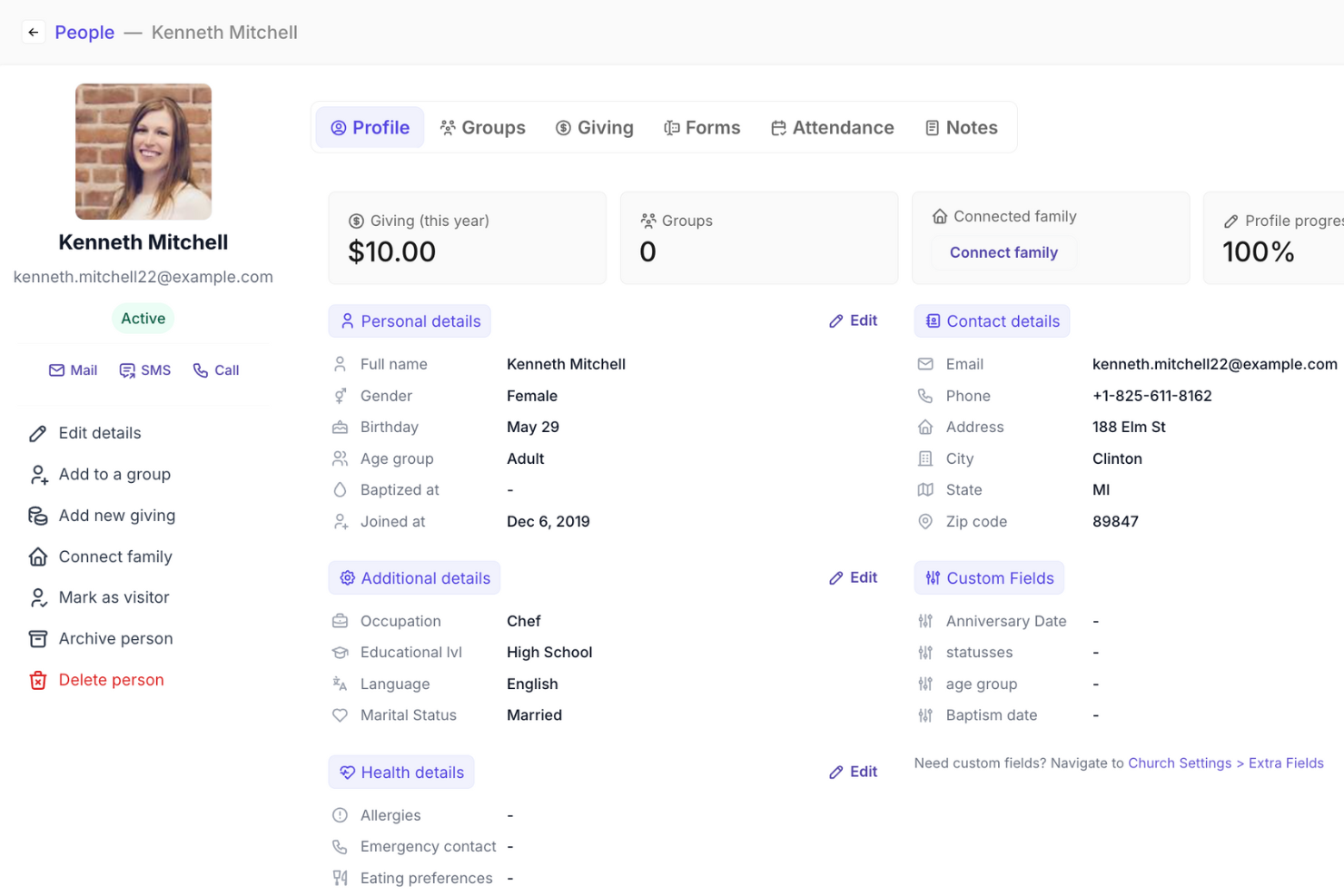
Gracely is a user-friendly church management software that offers features such as people management, events and attendance tracking, an online giving system, forms management, and email communication. Its platform is designed to be accessible to people without advanced tech skills and it offers a free plan, which is ideal for smaller churches with minimal resources.
As a church database software, Gracely has a detailed people directory that tracks contact information, age groups, and other optional fields like location and occupation. Additionally, the customizable church portal provides a centralized place to share updates, manage and track events and donations, and find groups within the database. Furthermore, Gracely ensures data protection by securely storing member and payment data in the encrypted cloud.
New Product Updates from Gracely

Gracely Rebuilds Accounting for Church Finance Management
Gracely rebuilds Accounting with fund tracking, income and expenses, transfers, reports, and exports. This gives churches a more complete way to manage finances in one place. For more information, visit Gracely’s official site.
 .
.
Best for all-in-one church management

ChMeetings is a cloud-based Church Management Software (ChMS) designed to help faith-based organizations in the US, Canada, UK, Australia, and South Africa streamline their operations. Used by over 7,000 churches across these regions, it provides an intuitive and affordable solution with multilingual support in 22 languages.
Why I Picked ChMeetings
Having worked in church ministry for over 20 years, I know how frustrating it is to juggle scattered systems. My readers tell me again and again that what they love about ChMeetings is how everything lives in one place. As an all-in-one church management system, ChMeetings excels as a comprehensive church database tool. It allows administrators to efficiently manage member records, track attendance, and oversee small groups or ministries with ease. The software also supports secure online donations, making it simple to collect and monitor contributions while providing built-in financial management features for budgeting and reporting.
Standout Features of ChMeetings
Beyond its core functions, ChMeetings stands out with additional features that enhance church operations. Event management tools help organize services, fundraisers, and community gatherings, while automated communication features enable churches to send emails, SMS, and push notifications to keep members engaged. Plus, every user gets access to a standard mobile app, with an option to upgrade to a branded version for a customized experience.
ChMeetings' Integrations
Integrations include Stripe, Twilio, Google Calendar, and Mailchimp. It also supports data exports and API access for advanced customizations.
Pros and Cons
Pros:
- Communication tools for group messaging
- Real-time updates across devices
- Accessible via mobile and web apps
Cons:
- Limited donation tracking features
- Extra setup for advanced configurations required
New Product Updates from ChMeetings

ChMeetings Adds ChatGPT Store Integration
ChMeetings is now in the ChatGPT Store, enabling read-only, plain-language questions about your church data like people, giving, and attendance, with summarized answers from existing records. For more information, visit ChMeetings' official site.
 .
.
Best for member engagement tracking

One Church Software is an all-in-one church database and management solution designed to help churches manage members, events, donations, and communications in a single platform. Built for congregations of all sizes, it combines administrative tools with engagement features to support growing church communities.
Why I Picked One Church Software
I picked One Church Software because it simplifies member engagement tracking while helping you stay connected with your congregation. With its member profiles, attendance tracking, and personalized communication tools, you can better understand and serve your community. The platform also automates administrative tasks like donation management, reporting, and event confirmations, saving you time to focus on ministry. Additionally, its integrated financial tools provide secure online giving and custom reports to keep your church finances transparent and organized.
Standout Features of One Church Software
One Church Software offers standout tools that strengthen communication, planning, and security. Its messaging tools let you send personalized updates to members, ensuring everyone stays informed. The kids check-in system improves safety during events with a smooth, family-friendly process, while volunteer coordination tools make it easier to manage schedules and responsibilities across ministries. The mobile app adds further convenience, allowing members to connect and leaders to manage events from anywhere.
One Church Software Integrations
Integrations include eSPACE, Pushpay, Online Giving, MailChimp, API, Webhooks, PraiseCharts, YouTube, Vimeo, Custom Apps, Third-Party Applications, and Smart Church Solutions.
Pros and Cons
Pros:
- Responsive customer support
- Eliminates the need for multiple church management tools
- Ideal for growing congregations
Cons:
- Higher costs associated with adding more users and accessing additional features
- Limited advanced features for financial management
New Product Updates from One Church Software

One Church Software Adds User Verification and Workflow Controls
One Church Software adds self-registered user verification, custom sending domains, daily recurring giving, and new form controls. These updates improve account security, email branding, and administrative workflows. For more information, visit One Church Software’s official site.
 .
.
Best for customized member data

Breeze ChMS is a church management software designed to assist churches in handling their administrative tasks efficiently. It offers a suite of features aimed at enhancing community engagement and operational management within church settings.
Why I Picked
I picked Breeze ChMS because it excels in member data management, allowing you to customize fields to store specific member information. This feature helps keep your church's database organized and adaptable to your community's unique needs. Moreover, the software supports digital giving options, integrating online and text giving directly into the platform. This eliminates the need for separate tools, making donation processes straightforward for your congregation. The event management and check-in capabilities also make Breeze ChMS stand out. You can schedule events, track attendance, and even print name tags on the spot. Plus, the software sends alerts for families who stop attending, helping you maintain strong community ties.
Standout Features
Features include comprehensive support, offering both email and phone assistance without extra charges, which ensures you can get help when you need it. The platform allows for unlimited access, so you can manage as many people and users as you want, facilitating extensive community engagement. Breeze also provides a dedicated mobile app, enabling you to manage church activities on the go, ensuring that you’re always connected with your congregation.
Integrations
Integrations include Breeze Worship Tools, Tithely Church Apps, Tithely Sites, Google Calendar, Apple Calendar, Stripe, Paypal, Authorize.Net, PastorsLine, OnlineGiving.org, KidCheck, and Mailchimp.
Pros and Cons
Pros:
- Customer support is noted to be responsive and helpful, addressing user concerns promptly.
- The software provides comprehensive event management features, including scheduling and attendance tracking.
- Breeze ChMS is praised for its easy setup and intuitive design, making it accessible for users without technical expertise.
Cons:
- The software does not allow for report downloads in PDF or other formats, which is a drawback for some users.
- Some users find the lack of advanced customization options limiting.

Tithe.ly
Best donation database

Tithe.ly is a powerful giving platform that simplifies donation management and helps churches grow their generosity through user-friendly tools.
Why I Picked Tithe.ly
Having tracked church software for several years now, I’ve seen how important it is for both staff and congregants to adopt a system. It can't be just a staff-led initiative. In fact, my readers describe Realm as user-friendly, flexible, and easy to train new staff on—a big plus for turnover-heavy churches.
Tithe.ly is built to handle all aspects of giving, making it perfect for churches focused on generosity. It supports one-time and recurring gifts, tracks donors' giving history, and even helps with tax statement preparation. For example, its text-to-give feature makes it easy for members to donate on the spot, while its seamless dashboard ensures you can access donor insights anytime.
Standout Features of Tithe.ly
Tithe.ly’s standout features include a mobile-first giving experience with text-to-give, app-based donations, and online portals, all of which make donating effortless. The platform also offers tools for managing campaigns and tracking progress toward financial goals, which is great for pledge drives or special projects. Its automated donor receipts save time during tax season.
Tithe.ly's Integrations
Integrations include QuickBooks, Mailchimp, Breeze, and Planning Center. Tithe.ly also supports API access for advanced customization and works with Zapier for additional third-party integrations.
Pros and Cons
Pros:
- Text-to-give functionality
- Easy tracking of donor history
- Mobile-first giving tools
Cons:
- Limited non-donation features
- No free tier available

Best for large churches

Churchteams is a comprehensive church management software built to meet the needs of large churches, with scalable tools for managing members, communication, and engagement.
Why I Picked Churchteams
Churchteams is tailored for the complexities of large churches, offering features like robust member management and powerful group tools. For example, it can handle multiple campuses and ministries with ease, track attendance across all activities, and enable streamlined communication with different groups at once. Its scalability ensures that even as your church grows, the platform can grow with you.
Standout Features of Churchteams
Churchteams excels with its group-based approach to management, allowing detailed tracking of small groups, teams, and ministries. Its automated follow-up system ensures no member is overlooked. Additionally, its text-to-church feature lets members check in, register for events, or give donations via text, making it incredibly user-friendly.
Churchteams' Integrations
Integrations include QuickBooks, Mailchimp, Planning Center, and Google Calendar. It also offers API access for advanced customizations and works with Zapier to connect with a wide range of third-party tools.
Pros and Cons
Pros:
- Developed with scalability in mind
- Multi-campus support
- Robust group management tools
Cons:
- Setup process more complex than other tools
- Advanced features require technical expertise

ACS
Robust church database app with accounting suite
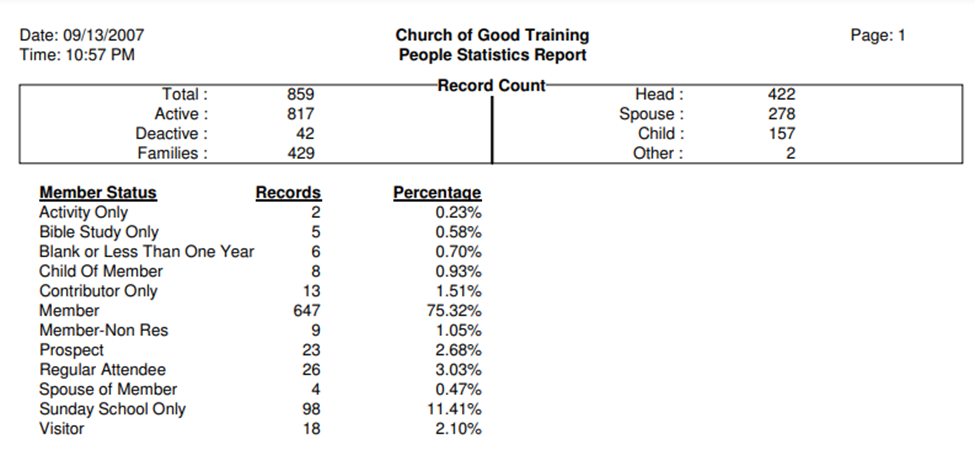
ACS is a powerful all-in-one church management solution designed to streamline member tracking and financial management for churches of all sizes.
Why I Picked ACS
ACS stands out because of its combination of database management and accounting tools, making it ideal for churches that need both in one system. It lets you manage member records, track giving, and handle finances, such as budgets and payroll, all in one place. For example, you can track donations and easily generate detailed financial reports for transparency and compliance.
Standout Features of ACS
ACS integrates its accounting tools seamlessly with its member management features, providing a comprehensive view of your church’s health. It also includes pledge tracking, event registration, and attendance management, ensuring you’re covered across various church functions. Its multi-campus support adds extra flexibility for larger churches.
ACS's Integrations
Integrations include QuickBooks, Constant Contact, Vanco, and Stripe. ACS also supports API access for advanced customizations and works with select third-party tools to expand its functionality.
Pros and Cons
Pros:
- Strong financial reporting features
- Event registration and attendance tracking
- Combines database and accounting tools
Cons:
- Lacks advanced visitor follow-up tools
- Steeper learning curve for beginners

Best for detailed member tracking

SteepleMate is a robust church database tool designed to help churches manage detailed member tracking, ensuring no one falls through the cracks.
Why I Picked SteepleMate
In my years of church leadership, I’ve interviewed enough ministry admins to know “easy” isn’t a throwaway word. That, and I consistently hear TheLeadPastor.com readers describe SteepleMate as genuinely easy to teach volunteers and new staff. The learning curve stays low.
Further, SteepleMate stands out because of its focus on maintaining detailed, accurate member records. It allows churches to track attendance, giving history, spiritual milestones (like baptisms), and more. For example, you can easily identify trends in member engagement and personalize outreach efforts. This makes it a great choice for churches that value individualized pastoral care and keeping everyone connected.
Standout Features of SteepleMate
It offers deep customization of member profiles, letting you add fields specific to your church's needs, like volunteer roles or ministry involvement. Its advanced reporting tools provide insights into member participation and giving patterns. Plus, its communication tools let you send group texts or emails, making coordination easier.
SteepleMate's Integrations
Integrations include QuickBooks, Mailchimp, Google Calendar, and Planning Center. It also offers API access for custom solutions and works with third-party tools like Zapier to expand functionality.
Pros and Cons
Pros:
- Clear coordination of events and schedules
- Highly customizable member profiles
- Comprehensive member tracking features
Cons:
- Limited mobile app functionality
- Requires consistent data entry for best results

Best for managing church stewardship

Blackbaud is a powerful tool for helping churches manage their finances and build stronger relationships with donors, making it a great choice for improving stewardship.
Why I Picked Blackbaud
Blackbaud makes it easy to show donors how their giving makes an impact. With tools for personalized reports and updates, you can share stories, financial breakdowns, and results in a way that encourages generosity. For example, you can send donors a report showing how their gifts helped fund a mission trip or community outreach, strengthening trust and connection.
Standout Features of Blackbaud
Blackbaud provides an online donor portal where people can log in to see their giving history, financial reports, and even thank-you messages. It also simplifies the process of creating donor updates and reports, saving time for your team while helping donors feel appreciated.
Blackbaud's Integrations
Integrations include QuickBooks, Mailchimp, and PayPal. Blackbaud also offers API access, so you can customize the platform to fit your church’s unique needs.
Pros and Cons
Pros:
- Robust financial tracking and reporting features
- Offers powerful donor engagement and stewardship tools
- Simple, effective tracking of finances and donations
Cons:
- Limited mobile app functionality
- Requires a learning curve for new users

Elvanto
Church database with custom form builder

Elvanto is a SaaS church management system for handling administrative tasks like maintaining your church calendar, managing membership database, worship planning, volunteer scheduling, and donor management. It has built-in templates allowing you to send mass emails and SMS to relay critical information to all members. Elvanto has a mobile app version that works on iOS and Android mobile devices so church volunteers can participate in event planning and collaborate with fellow volunteers.
Elvanto is the best church management system if you want to create custom forms to obtain membership details because of its form builder feature. Elvanto’s form builder feature provides you with customizable forms you can use for group memberships, worship services, fund-raising events, and others. This gives you complete control over the type of information you want to obtain for your church database software program. You can embed forms on your church website so you can automatically sync information, ensuring that your church database is constantly updated.
Elvanto integrates with other church management and productivity apps like SongSelect, PayPal, MailChimp, and Stripe.
Other Options
Here are a few other options if you haven’t found what you’re looking for yet.
- Aplos
For Fund Accounting
- ChurchSuite
Database to integrate newcomers
- Instant Church Directory
For mobile directory access
- Planning Center
For membership groups
- Fellowship One
For task management and event scheduling
- Faith Teams
For clear church-data dashboards
- Servant Keeper
For member management
- The Church Connectory
For secure member data management
- ChurchTrac
Free plan


How I Evaluate Church Database Software
I split my evaluation into what a tool must do—like tracking member records and giving history—and what makes it the right fit for a specific congregation's size and workflow.
Core Functionality (Table Stakes For This List)
When I'm selecting tools for my list, I rank each one on a scale from 0 (does not offer the functionality) to 5 (excels in this area) for each core functionality listed below. Then, I calculate the tool's total score into a percentage. Each tool needs to achieve a minimum total score of 65% to be considered for inclusion.
- Member & Household Database: I look for searchable member profiles with household linking, custom fields, and tagging—so a pastor can pull up a family's full history before a home visit.
- Attendance & Engagement Tracking: Each tool should let you record attendance across Sunday services, midweek groups, and special events, then surface patterns like declining engagement.
- Contribution & Donation Tracking: I evaluate how each platform logs tithes, offerings, and pledges by member and whether it generates year-end giving statements ready for tax season.
- Groups & Ministry Management: Tools should organize members into small groups, ministry teams, and volunteer rosters with leader-level access to manage their own rosters and communication.
- Congregant Communication Tools: I check whether a platform supports segmented email and SMS outreach—like texting only youth group parents about a schedule change.
- Event & Registration Management: The tool should handle event scheduling with sign-up forms and registration workflows, from VBS enrollment to baptism class signups.
Once I have a list of tools that meet this criteria, I consider what sets each platform apart.
Differentiating Factors (What Sets Vendors Apart)
Here's how I compare and contrast different vendors:
Standout Features
Automated follow-up workflows make a real difference—when a first-time visitor fills out a connection card, the right tool can trigger a welcome email, assign a pastoral follow-up task, and schedule a reminder without anyone lifting a finger. I also evaluate child check-in capabilities, since secure parent-tag matching and allergy alerts are a top concern for family ministry leaders. A branded mobile app is another separator, giving members one place to view the directory, give, and register for events outside of Sunday morning.
Beyond Features
Most church databases are managed by volunteers or part-time staff, so I evaluate how easily a non-technical user can navigate daily tasks like running a report or updating a member record. Integration fit matters too—I check whether a platform connects with tools churches already use, like QuickBooks for bookkeeping or a livestreaming service for Sunday broadcasts. Data security is another area I weigh carefully, especially role-based permissions that keep pastoral care notes and children's records visible only to authorized staff.
How to Choose Church Database Software
As you go through the process of choosing software, keep these points in mind:
- User-Friendly Interface: The software should be easy to use. Complex systems can frustrate your team and lead to inefficiencies. For instance, a church secretary should be able to manage the database without needing extensive training.
- Integration Capabilities: See if the software connects with other tools your church already uses, like accounting or email marketing software. This can save time and reduce data entry errors. For example, software that works well with your church management system can make daily tasks easier.
- Scalability: Make sure the software can grow with your church. As your congregation grows, your software needs may change too. Choosing a scalable solution now can save you the trouble of switching systems later. For instance, a database that handles your current needs should also be able to manage a larger group in the future.
- Security Features: Look for strong security measures, like encryption and user access controls, to protect sensitive information. This keeps your members’ data safe from breaches. For example, software with two-factor authentication adds an extra layer of security.
- Support and Training: Reliable support and helpful training resources are important. Quick and effective help can make all the difference when issues come up. For example, 24/7 support or easy-to-follow online tutorials can greatly improve user experience.
By considering these factors, you’ll be better prepared to choose the right church database software for your needs.
What is Church Database Software?
Church database software is a tool that helps churches store, manage, and access important information about their people and operations.
It keeps everything in one place—contact records, attendance logs, giving data, volunteer assignments, and communication history—so pastors and staff can quickly find what they need. This makes it easier to follow up, plan events, assign tasks, and serve people with care and consistency.
Key Features to Look For
When selecting church database software, keep an eye out for the following key features:
Member management: Easily store, organize, and update all your church members’ contact information, family relationships, and involvement. This lets you quickly look up anyone or send out group communications without shuffling through paper lists.
Attendance tracking: Log attendance for services, small groups, Sunday school, or events. This helps you spot trends, notice who might need a check-in, and celebrate those never-missed-a-Sunday streaks.
Donations and giving records: Track tithes, donations, and pledges, generate giving statements, and see trends over time. You can save hours during tax season and get a snapshot of financial health at any time.
Event management: Organize calendars, coordinate volunteers, manage registrations, and handle RSVPs for all your church activities—from potlucks to workshops. This makes scheduling and follow-up way less chaotic.
Communication tools: Send emails, texts, or newsletters to individuals, groups, or your whole congregation. This keeps everyone in the loop without wrestling multiple apps.
Reporting and analytics: Generate customizable reports on membership, attendance, giving, and more. You can spot areas for growth or celebrate where things are going well.
Security and permissions: Assign roles and set access levels so personal information stays safe and only the right people can view or edit sensitive data.
Mobile accessibility: Access and update information from anywhere on your phone or tablet. Great for quick check-ins, last-minute changes, or when you’re greeting people at the door.
Integration capabilities: Connect your church database with other platforms like accounting software, mass email tools, or your church website. This lets your systems work together, cutting down on double entry and mistakes.
Benefits of Church Database Software
Here are five key benefits for pastors and church leaders:
- Better Member Management: Easily track and update member info for stronger connections.
- Efficient Communication: Send important messages quickly to keep members engaged.
- Simple Donation Tracking: Keep donations organized, improving financial transparency.
- Effective Event Coordination: Manage events and volunteers efficiently, letting you focus on ministry.
- Quick Reporting: Generate reports fast, gaining insights that help you lead effectively.
Using church database software helps you manage church tasks more efficiently, freeing more time for ministry. These tools boost member engagement, improve financial oversight, and streamline admin work, ultimately strengthening your church.
Costs & Pricing for Church Database Software
When selecting church database software, understanding the different plan options and their prices is essential. This knowledge will help you find the best fit for your church’s needs and budget. Below is a table summarizing common plans, average prices, and included features.
| Plan Type | Average Price | Common Features | Best For... |
|---|---|---|---|
| Free | $0 | Basic member management, limited communication tools, basic reporting. | Small churches with tight budgets. |
| Basic | $20/month | Member management, email communication, donation tracking, basic event scheduling. | Small to medium churches needing core features. |
| Standard | $50/month | All Basic features, plus text messaging, advanced reporting, volunteer management. | Medium churches needing more tools. |
| Premium | $100/month | All Standard features, plus mobile app access, custom dashboards, enhanced security features. | Larger churches needing advanced features. |
| Enterprise | $200/month | All Premium features, plus full integration with other software, priority support, unlimited users. | Very large churches needing top-tier features. |
Each plan offers a variety of features to meet different needs. Think about your church size, budget, and specific needs when choosing a plan.
Church Database Software Frequently Asked Questions
What’s the real cost for a small church, beyond the advertised monthly fee?
Most software charges a basic monthly rate, but add-ons like extra users, text messaging, or advanced reporting can raise the price. Transaction fees for online giving are common, too. Always ask for a full breakdown before signing up, and check if you can turn off features you don’t need.
How hard is it to move our data from spreadsheets or old software into a new church database?
Data migration can be tricky, especially if your old system is outdated or messy. Some providers offer free help with data import, while others charge for it. Before you start, ask for a clear migration plan and see if there’s hands-on support for your team.
Can volunteers or part-time staff use church database software without a lot of training?
Many tools are designed to be simple, but some have a learning curve. Look for software with easy onboarding, clear guides, and quick support. If your team isn’t tech-savvy, ask for a demo and try out the basics before you commit.
Are there ways to keep costs low if our church only needs basic features?
Yes, some providers offer free or low-cost plans with just the essentials—like member management and basic communication. Don’t pay for extras you won’t use. Start small, and only upgrade if your needs grow. It’s worth comparing several options to find the best fit.
What happens if we outgrow the software or want to switch later on?
Good software should let you export your data easily if you need to move to something bigger. Ask about data portability and contract terms before you sign up. Avoid tools that lock you in or make it hard to leave; flexibility matters as your church changes.
Subscribe to The Lead Pastor Newsletter
Stay informed and make the best choices for your church! Join our newsletter for in-depth reviews and wisdom from experienced pastors.