

10 Best Church Communication Software Reviewed For 2026

10 Best Church Communication Software Shortlist


Church communication software helps churches keep their members, staff, and volunteers informed and engaged. It centralizes email, text, app notifications, and social media updates into one easy-to-use platform.
In 2019, I helped lead a church planting team in Cambridge, Ontario (Canada). Our team didn’t use church communication software; we used a mish-mash blend of Facebook, text chains, and email blasts. It worked—barely. Messages were missed, volunteers got confused, and we ended up spending lots of energy just staying coordinated. Thankfully - that's not the case anymore. Today, I've spent hundreds of hours reviewing church communication software, and I've learned THIS first-hand: church communication software lets you shift away from playing comms catch-up all the time.
That’s why I’ve put together this list of the top church communication software tools. With the right tool, you can unify your messaging, empower your team, and keep your congregation in the loop (without burning out your staff or relying on patchwork systems).
Why Trust Our Software Recommendations
Our team has been testing and reviewing software since 2012. As church leaders ourselves, we know how difficult—and important—it is to choose the right software.
For this guide, we evaluated tools using hands-on testing and independent research, scoring tools using our selection criteria.
Our reviews reflect our human editorial judgment, not a sales pitch.
The Best Church Communication Software Comparison Table
| Tool | Best For | Trial Info | Price | ||
|---|---|---|---|---|---|
| 1 | Best all-in-one church management | Free plan available + 30-day free trial | From $12/month | Website | |
| 2 | Best for real-time congregation engagement | 30-day free trial available | From $37/month | Website | |
| 3 | Best for sending personalized member communication | 30-day free trial | From $19/month (billed annually) | Website | |
| 4 | Best for live AI-powered sermon translation | Free trial available | From $150/month | Website | |
| 5 | Best for event planning communication | Free demo available | From $72/month | Website | |
| 6 | Best for building a church smartphone app | Free demo available | Pricing upon request | Website | |
| 7 | Best for people management | Free trial available | From $69.99/month | Website | |
| 8 | Best communication software with cash balancing | Free demo + 15-day free trial available | From $79/month | Website | |
| 9 | Best for communication & marketing solution | Free demo available | From $99/month | Website | |
| 10 | Best for managing church resources | Free plan + 30-day free trial available | From $15/20 members/month | Website |
The Best Church Communication Software Reviews
Here’s a brief description of each of the best church management software solutions with membership communication features. I’ll go over some best use cases, feature highlights, and provide screenshots to give you a glimpse of their inner workings.

Best all-in-one church management

ChMeetings is a cloud-based Church Management Software (ChMS) built for churches in the US, Canada, UK, Australia, and South Africa. Trusted by over 7,000 churches across these regions, it offers an intuitive, multilingual platform that simplifies church administration while staying affordable.
ChMeetings stands out because of its fully functional mobile app, which makes church communication simple for both leaders and members. Unlike other tools that offer a mobile experience as an afterthought, ChMeetings is built to work seamlessly on smartphones. You can send push notifications, manage groups, and even track attendance—right from your phone.
Additionally, ChMeetings' dynamic merge fields feature allows personalized communication by addressing members by their names, making interactions more meaningful. The platform also supports bulk messaging, which is crucial for reaching out to large congregations quickly.
Furthermore, as an all-in-one tool, ChMeetings offers an event management system, secure online donation processing to ensure contributions are easily managed, and financial tools that provide essential oversight for budgeting and reporting. It even has a member management system that consolidates all church contacts in one place, making it easy to group people into different ministries and search for contact information as needed.
New Product Updates from ChMeetings

ChMeetings Adds ChatGPT Store Integration
ChMeetings is now in the ChatGPT Store, enabling read-only, plain-language questions about your church data like people, giving, and attendance, with summarized answers from existing records. For more information, visit ChMeetings' official site.
 .
.
Best for real-time congregation engagement

Text In Church is a communication software designed specifically for churches to enhance engagement and streamline communication within their communities. It provides tools that facilitate personalized interactions and ensure that churches can effectively connect with their congregation through multiple channels.
One feature that stands out is the two-way texting capability. This allows you to engage in real-time conversations with your congregation, making communication more personal and immediate. Automated workflows are another highlight, allowing you to set up follow-up messages and reminders without manual intervention, which is perfect for keeping your community engaged without constant oversight.
In addition to these, messaging templates are available to help you quickly send out common messages without having to start from scratch each time. This feature saves time and ensures consistency in your communication. All these features combine to make Text In Church a great pick for any church looking to improve its communication strategies.
Features include calling capabilities with a digital receptionist and smart voicemail, which ensure that no call goes unanswered and every message receives attention. The platform also provides a local phone number for a more personalized touch in communication. Additionally, advanced analytics help you understand your communication's impact and make informed decisions to enhance your engagement strategies.
Integrations include Planning Center, Zapier, Church Community Builder, Mailchimp, Rock RMS, Open API Access, and others that enhance the communication management within the church setting.

Gracely
Best for sending personalized member communication

Gracely is a user-friendly church management software designed to help churches manage members, organize events, track giving, and communicate with their congregation. This all-in-one platform supports your ministry by providing essential tools for efficient church operations.
I picked Gracely as a good church communication software because it offers robust people and groups management features. You can easily organize members and groups, access personal details, and send personalized emails or SMS to engage your congregation. This helps you track attendance and foster a sense of belonging among members. Additionally, Gracely provides an online church portal that empowers members to update profiles, view giving history, register for events, and stay connected, which deepens engagement and strengthens community ties.
Another reason I chose Gracely is its event and attendance tracking capabilities. Planning and managing events becomes a breeze with Gracely, as you can inform everyone through emails or SMS, track attendance, and gain valuable insights to enhance participation. These features ensure that every event is meaningful and well-organized, contributing to a vibrant church community.
Features include online giving and contributions tracking, which simplifies the process of secure tithing and donation tracking, building trust and transparency within your church community. Gracely also offers customizable forms for registrations, surveys, and sign-ups, helping you save time and reduce paperwork while staying organized. Additionally, the software provides accounting and financial reporting tools to manage church finances, track income and expenses, and generate detailed financial reports for informed decision-making.
No integrations are available with Gracely yet.
New Product Updates from Gracely

Gracely Rebuilds Accounting for Church Finance Management
Gracely rebuilds Accounting with fund tracking, income and expenses, transfers, reports, and exports. This gives churches a more complete way to manage finances in one place. For more information, visit Gracely’s official site.
 .
.
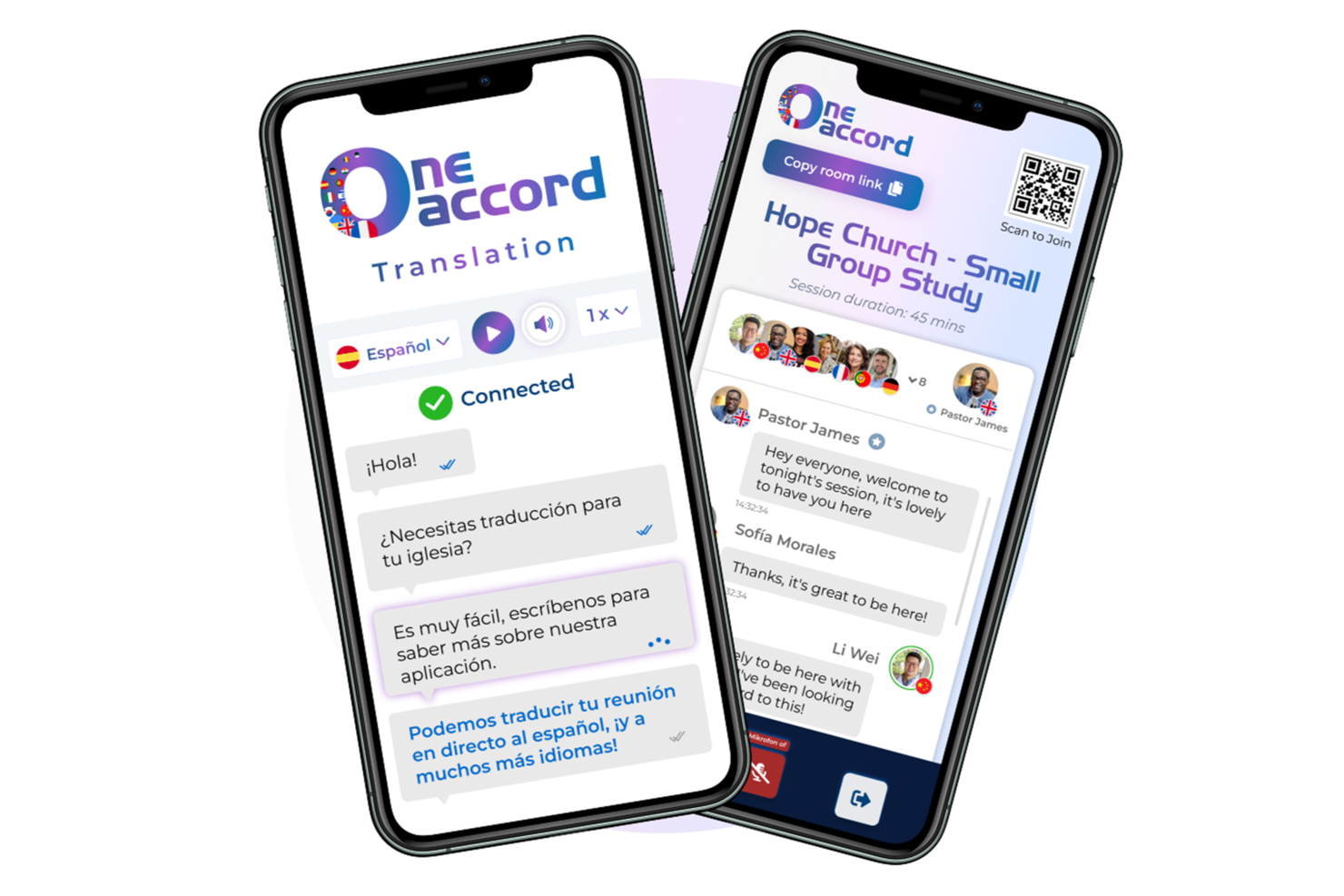
OneAccord is a church communication software platform that provides live AI-powered translation, real-time audio monitoring, and browser-based multilingual access for sermons and events.
Who Is OneAccord Best For?
Churches and ministries that need to communicate with multilingual congregations during live services and events.
Why I Picked OneAccord
I picked OneAccord as one of the best because I can deliver live AI-powered sermon translation to my congregation in real time. My team uses its multilingual audio streaming to reach people who speak different languages during services. I like that listeners can access translations instantly through their browsers without needing extra devices.
OneAccord Key Features
- Real-time audio quality monitoring: Track and manage audio clarity during live events.
- Custom vocabulary support: Add ministry-specific terms to improve translation accuracy.
- Browser-based listener access: Congregants join and listen to translations directly from any web browser.
OneAccord Integrations
Native integrations are not clearly documented. OneAccord provides an API for custom integrations.
Pros and Cons
Pros:
- Custom vocabulary for ministry-specific terms
- Audio quality monitoring with real-time visibility during events
- Browser-based access removes need for additional devices
Cons:
- Limited public documentation on advanced features
- No mobile app for listener participation

Best for event planning communication

Breeze church management software is a cloud-based solution for small to medium-sized churches. The intuitive interface allows you to search and find contact information quickly, tag people as required, and customize accordingly.
Breeze can be used for church communications as a powerful platform that simplifies and enhances communication processes within the church community. It provides features such as email and text messaging integration, allowing churches to easily send out announcements, newsletters, event invitations, and updates to their congregation. Breeze also enables targeted messaging, making it possible to create communication groups based on specific criteria or demographics within the church.
Additionally, it offers tools for tracking member engagement and communication history, ensuring personalized and meaningful interactions. Breeze's intuitive interface and mobile app capabilities make it convenient for both church staff and members to access and engage with communication materials. With Breeze, churches can optimize their communication strategies, strengthen relationships, and foster active involvement within their community.
Breeze also offers features to help with event registration, printing name tags, and tracking attendance. Alerts can be set to highlight individuals who have ceased attending for a given number of weeks.

Pushpay
Best for building a church smartphone app

Pushpay assists churches in managing a range of operations. Church admins can create a database of donor information, including contact details. PushPay offers a no-code solution to building a smartphone app for your church, including a dynamic home screen, visual customizations, interactive notifications, and a built-in audio player.
Pushpay can be used for church communications as a comprehensive platform that streamlines and enhances communication processes within the church community. It offers features such as personalized push notifications, in-app messaging, and email integration, allowing churches to send out announcements, event reminders, sermon notes, and other important updates directly to their congregation's mobile devices. Pushpay also facilitates targeted messaging by enabling churches to segment their audience based on specific criteria such as demographics or group membership.
Additionally, it provides tools for managing contact information, tracking member engagement, and analyzing communication effectiveness. With Pushpay, churches can optimize their communication strategies, increase engagement, and strengthen connections with their members, resulting in a more connected and informed church community.
Data can be imported from third-party sources or uploaded through the PushPay portal. Customer support is available via an online knowledge base.

Best for people management

SteepleMate is a church management solution designed to help your congregation connect, communicate, and grow. It offers tools for managing people, organizing sermons, expanding your church's digital presence, overseeing finances, and supporting educational programs.
One reason to choose SteepleMate is its comprehensive people management features. You can facilitate group management, track communications, and schedule events, which strengthens relationships and ensures smooth coordination within your congregation. This helps you stay connected with your members and manage church activities effectively.
You can also create engaging websites, manage mobile apps, and connect with members through email, SMS, and social media—all in one place.
Another valuable aspect is SteepleMate's finance management capabilities. It provides detailed financial reporting, campaign tracking, and integration with accounting tools like QuickBooks. This ensures transparency and accountability in your church's financial stewardship, making it easier to manage donations, expenses, and budgets.


Aplos offers a range of software tools to help large and small churches run more efficiently. Aplos offers custom communications, along with fund accounting software, church membership management, donation management, and reporting.
Aplos can be used for church communications as a comprehensive platform that facilitates efficient communication and engagement within the church community. It offers features such as email marketing and mass communication tools, allowing churches to send out personalized emails, newsletters, and event invitations to their congregation. Aplos also integrates with social media platforms, enabling churches to easily share updates and engage with their members across different channels.
Additionally, it provides tools for managing contact lists and tracking member engagement, ensuring targeted messaging and effective follow-up. With Aplos, churches can streamline their communication efforts, strengthen connections, and foster active participation and involvement within their community.
With Aplos, churches of all sizes can handle all their communications and group management needs in one place. This user-friendly software is well suited to small groups and medium-sized churches.


Neon One is a cloud-based contact management solution for nonprofit organizations of all sizes. The built-in fundraising tools include add-ons for email blasts, donor management, and automated membership renewals. They offer different modules for communication management, customer relationship management (CRM), fundraising, payroll, and website building.
The system can be customized to match the look and feel of an existing website, and event pages can be configured as required. Administrators can send automated event notifications to registered attendees. They integrate with apps like QuickBooks, Mailchimp, TrueGivers, Eventbrite, and Windfall.
Neon One can be used for church communications as a comprehensive platform that empowers churches to effectively connect and engage with their community. It provides features such as email marketing and text messaging capabilities, allowing churches to send out personalized communications, newsletters, event invitations, and donation appeals. Neon One also offers integrated donor management tools, enabling churches to track and analyze communication interactions with their members, donors, and volunteers.
With robust segmentation options, churches can create targeted communication lists based on specific demographics or engagement levels. Additionally, Neon One integrates with social media platforms, expanding churches' reach and enhancing their online presence. Overall, Neon One equips churches with the tools they need to implement cohesive and impactful communication strategies, fostering strong relationships and driving community involvement.


Planning Center is a suite of cloud-based applications designed to support church leaders in planning, scheduling, and managing church programs. The software is modular in design, so you only pay for the tools you need.
Planning Center can be used for church communications as a comprehensive tool that facilitates efficient communication and coordination within the church community. It offers features such as email and text messaging integration, allowing churches to send out important announcements, event reminders, and updates to their congregation.
Additionally, Planning Center provides tools for organizing and scheduling volunteers, enabling seamless communication with team members regarding their responsibilities and any changes or updates. It also allows for the creation of interactive event registration forms, making it easier for members to sign up and receive relevant information. With Planning Center, churches can enhance their communication strategies, ensuring effective and timely dissemination of information to their members and volunteers.
The publishing module allows you to create content and share it with your congregation. You can use customizable pages and the Android/iOS mobile app to distribute sermons and other messages.
Other Church Management Software Options
Here are a few more that didn’t make the top list.
Church communication software helps churches keep members, staff, and volunteers informed and engaged. It centralizes email, text, app notifications, and social media updates into one easy-to-use platform.
I’ve been in church leadership for over 20 years, and in 2019, I helped plant a church from the ground up. During those early days, we didn’t have church communication software. Instead, we cobbled together a strategy using a Facebook group, text chains, and email blasts. It worked—barely. Messages were missed, volunteers got confused, and we spent too much time just trying to stay coordinated. Eventually, we realized that without a tool built for churches, we were always going to be playing defense.
That’s why I’ve put together this list of the best church communication software options. With the right tool, you can unify your messaging, empower your team, and keep your congregation in the loop—without burning out your staff or relying on patchwork systems.
- Elexio
For mass email communication
- Servant Keeper
For digital discipleship
- Church Windows
For membership reports
- Slack
For real-time online engagement
- Textmagic
For two-way communications
- One Church Software
For empowering volunteers
- Communicate
For centralized church messaging
- Subsplash
All-in-one church communication software
- Tithe.ly
For automating tithe collection
- ACS
For large churches
- ChurchTrac
For service outlines with a song library
- FaithLife
For sermon prep
- Fellowship One
For background checks
- Wild Apricot
For building an online store
- CDM+
For complete data integration
- Pursuant
For fundraising analytics
- Donarius
For tracking contributions
- Excellerate
For automated follow-up letters
- Attendance Now
HTML email builder
- Church Teams
For discipleship communications
- Church Software by Grplife
Free church website & hosting
- Click Nonprofit
For free Google advertising


How I Evaluate Church Communication Software
I evaluate each tool in two layers—baseline must-haves like mass texting and ChMS sync, then differentiators like branded apps or prayer request workflows that fit specific ministry needs.
Core Functionality (Table Stakes For This List)
When I'm selecting tools for my list, I rank each one on a scale from 0 (does not offer the functionality) to 5 (excels in this area) for each core functionality listed below. Then, I calculate the tool's total score into a percentage. Each tool needs to achieve a minimum total score of 65% to be considered for inclusion.
- Mass Messaging: I check whether a tool can send bulk texts and emails to hundreds or thousands of members at once, like a Sunday service cancellation alert going out to an entire congregation.
- Member Segmentation: Each tool should let you group contacts by tags like youth ministry, small group, or new visitor so messages reach the right people instead of flooding everyone's inbox.
- Two-Way Communication: I look for tools that let members reply to messages and allow staff to manage those conversations, such as a parent texting back to confirm a child's VBS registration.
- Event & Announcement Tools: The platform should handle event invites and RSVP tracking for things like potlucks, service projects, or guest speaker weekends without needing a separate tool.
- Church Management Integration: I evaluate whether the tool syncs with popular ChMS platforms like Planning Center, Breeze, or Rock RMS to keep member data current across systems.
- Multi-Channel Delivery: I look for at least two unified channels—such as SMS and email from one dashboard—so your team isn't toggling between separate apps to reach members.
Once I have a list of tools that meet this criteria, I consider what sets each platform apart.
Differentiating Factors (What Sets Vendors Apart)
Here's how I compare and contrast different vendors:
Standout Features
A branded church app gives members one place to watch sermons, RSVP to events, and receive push notifications—all under your church's name. I also look for prayer request workflows that let members submit requests confidentially and route them to prayer teams without manual follow-up. Giving integration matters too, because tying donation data to your messaging lets you automate thank-you messages after a capital campaign or year-end appeal without jumping between platforms.
Beyond Features
Pricing structure matters a lot here—churches run on tight budgets, so I check whether vendors offer nonprofit pricing or scale costs by congregation size rather than a flat enterprise rate. Volunteer enablement is another big one. Most church communication platforms will be used by non-technical volunteers, so I evaluate whether the tool offers role-based permissions that let a youth pastor send messages to their group without accessing the full member database. I also consider how well a tool scales from a 100-member plant to a multi-campus church.
How to Choose Church Communication Software
As you work through your own unique software selection process, keep the following points in mind:
- Ease of Use: The best church communication software should be simple for your team and volunteers to use. If the system is too complicated, you might spend more time training people than actually using it. Look for tools with a clean design and intuitive features, like drag-and-drop email editors or one-click messaging, so your team can hit the ground running.
- Multi-Channel Communication: Every church has members who prefer different ways of staying connected—emails, texts, social media, or even app notifications. The right software will let you communicate across all these channels without having to juggle separate platforms. For example, if you need to remind people about an event, you can send out one message that reaches them wherever they are.
- Integration with Your Existing Tools: If your church already uses software for planning services, managing giving, or tracking attendance, make sure your new communication software works well with those tools. For instance, you might want to automatically sync your contact lists from your church database or send personalized messages based on attendance patterns.
- Customization and Targeting: Not every message needs to go to everyone in your church. Good software allows you to create groups—like parents, youth, or volunteers—so you can send updates that actually matter to them. Imagine how helpful it would be to remind just the worship team about their rehearsal or send prayer meeting details to those who’ve signed up.
- Reliable Support and Updates: Churches can’t afford to have their communication tools break down. Look for a provider with strong customer support and a track record of regular updates to improve features or fix bugs. It’s especially important to have reliable help if you run into tech issues on a Sunday morning or right before a big event.
Choosing church communication software isn’t just about checking boxes—it’s about finding a tool that makes your ministry smoother and more effective. Keep these considerations in mind, and you’ll be on your way to a solution that truly serves your church.
Trends in Church Communication Software
In 2026, church communication software has evolved to address the unique challenges faced by church leaders, focusing on enhancing engagement, ensuring security, and integrating advanced technologies. These developments highlight the ongoing shift toward creating tools that better serve ministry goals while reducing operational burdens.
Enhanced Engagement and Personalization
- AI-Powered Personalization: AI church communication software can tailor messages to individual congregants, fostering deeper connections and creating more meaningful interactions.
- Multi-Channel Communication: Modern platforms support emails, texts, social media, and app notifications, ensuring messages reach members through their preferred channels and increasing engagement.
Security and Data Protection
- Advanced Cybersecurity Measures: With the rise in digital communications, your church security plan is hugely important. There is a stronger focus on protecting sensitive information and ensuring the safety of online interactions.
Integration and Automation
- Seamless Integration with Church Management Systems: New solutions offer robust integration capabilities, allowing for unified management of church activities and communication.
- Automated Messaging and Scheduling: Features that automate routine communications, such as event reminders and follow-ups, have become standard, reducing administrative burdens on church staff.
Emerging Technologies
- Adoption of AI and Chatbots: Artificial intelligence is being brought to bear in so many areas of ministry (AI and discipleship? Who knew...) to automate responses to common queries, improving communication efficiency and freeing up staff for more personalized tasks.
- Virtual and Augmented Reality Integration: Some platforms are exploring VR and AR to create immersive experiences, like virtual faith communities and interactive Bible teachings, offering new ways to engage congregants.
These trends highlight the ongoing evolution of church communication software, reflecting the priority of enhancing engagement, improving security, and streamlining operations to better support church leaders and their ministries.
What is Church Communication Software?
Church communication software is a tool that lets churches manage all their communications from one central location.
The best tools support multiple channels, so whether you need to send an weekly newsletter, volunteer scheduling notification, SMS updates, or social media blasts - you're covered. Unlike generic messaging tools, church communication software often includes church-specific features like small group segmentation, volunteer scheduling, automated reminders, and integration with other event and volunteer management systems. The right tool makes it far easier for you and your staff to keep your church body updated on what's going on.
Simply put: church comm software reduces confusion, and means your people focus less on logistics, and more on ministry.
Features of Church Communication Software
When pastors spend too much energy on operations, ministry can take a back seat. Church communication software helps by simplifying the way we manage communication, stay organized, and connect with people. Here are three key benefits pastors will experience with the right software:
- Streamlined communication so you can focus on connecting, not coordinating.
- More time saved through automation to invest in preaching, teaching, and pastoral care.
- Clearer organization of groups and tasks so no one slips through the cracks.
To get these benefits, look for church communication software with these important features:
- Centralized Messaging Hub: Handles email, text, and social media in one place, so you don’t waste time bouncing between platforms.
- Group Messaging: Lets you target messages to specific groups, like small groups or volunteers, making communication faster and more relevant.
- Event Reminders: Automatically sends reminders for events or deadlines, ensuring fewer no-shows without extra work.
- Scheduling Tools: Makes it easy to schedule messages, events, or updates ahead of time, freeing you up for ministry tasks.
- Volunteer Management: Tracks volunteer schedules and sends updates, reducing confusion and last-minute cancellations.
- Automated Follow-Up Tools: Sends welcome messages to visitors or reminders to new members, making follow-up effortless.
- Contact Database Integration: Syncs with your church management software to keep contact lists up to date, so you don’t have to manage them separately.
- Mobile Access: Ensures you can manage communications on the go, whether you’re in the office, at home, or at an event.
- Analytics and Reporting: Shows what’s working (like message open rates) so you can focus on strategies that reach your people better.
- Customizable Templates: Speeds up the process of creating emails, texts, or announcements, giving you more time for personal ministry.
The right tools can free you from the grind of daily operations so you can focus on what you were called to do—serve, shepherd, and lead. Look for software that supports your ministry goals and makes your work easier.
Benefits of Church Communication Software
Church communication software makes it easier for pastors and church leaders to stay connected with their congregations, save time, and manage communication more effectively. By handling multiple communication channels in one place, this software helps churches operate smoothly and focus on ministry rather than logistics. Here are five primary benefits to consider:
- Centralized Communication: Having emails, texts, and social media in one platform eliminates confusion and ensures every message reaches the right people.
- Time-Saving Automation: Features like scheduled messages and automated follow-ups reduce repetitive tasks, giving church leaders more time for ministry.
- Improved Engagement: Targeted messaging and personalized communication keep congregants more connected and invested in the church’s mission.
- Simplified Volunteer Management: Tools to organize and communicate with volunteers make scheduling and updates effortless, keeping teams aligned.
- Better Tracking and Analytics: Insights into message performance and member engagement help leaders make smarter decisions about how to connect with their community.
By streamlining communication and making outreach more effective, church communication software lets pastors and leaders focus on what matters most—serving their people and growing their ministry. With the right tools, managing operations becomes a support for ministry, not a distraction.
Costs & Pricing for Church Communication Software
Church communication software offers various plans to accommodate different church sizes and communication needs. Here's a breakdown of common plan types, their average prices, included features, and which church scenarios they best serve:
| Plan Type | Average Price | Common Features | Best For... |
|---|---|---|---|
| Free Plan | $0/month | Basic messaging capabilities, limited number of contacts, minimal storage. | Small churches or those just starting out. |
| Basic Plan | $25–$50/month | Expanded contact list, email and text messaging, basic event management, limited automation features. | Small to mid-size churches with modest needs. |
| Standard Plan | $50–$100/month | All Basic features plus advanced automation, integrations with other tools, enhanced reporting. | Mid-size churches seeking more functionality. |
| Premium Plan | $100–$200/month | All Standard features plus unlimited messaging, comprehensive analytics, dedicated support, custom apps. | Large churches with extensive communication needs. |
| Enterprise Plan | Custom pricing | Fully customizable features, priority support, multi-campus management, advanced security. | Very large churches or multi-campus ministries. |
When selecting a plan, consider your church's size, your church leadership's communication plan, and budget to choose the option that aligns best with your ministry's goals.
Church Communication Software Frequently Asked Questions
1. How can church communication software help us reach people who aren’t tech-savvy?
Church communication software often includes options for different communication channels like text messages or automated calls, which are easier for less tech-savvy people to use. Some platforms also provide simple, one-click access to updates, so members don’t have to navigate complicated systems.
2. Can I use church communication software to manage communication during emergencies?
Yes, many tools allow you to send urgent updates via multiple channels—texts, emails, and push notifications—all at once. This ensures you can quickly reach everyone with important information while managing a church crisis or other emergencies like weather events or last-minute service changes.
3. Does church communication software support multi-language communication?
Some platforms have built-in features for multi-language messaging, allowing you to send messages in the preferred languages of your congregation members. This is especially helpful for churches with diverse ethnic communities.
4. How does church communication software support hybrid or online churches?
Church communication software often integrates with your church's livestreaming tool (or platforms), online event tools, and apps, making it easy to communicate with members attending virtually. You can also send reminders with links to online services or create follow-up messages for online attendees.
5. Will church communication software help us keep track of attendance and engagement?
Yes, many tools include tracking of church metrics and reporting features that monitor attendance, event participation, and even message engagement. This data can help you identify trends and adjust your church communication strategy to better connect with your congregation.
What’s Next:
If you're in the process of researching church communication software, connect with a SoftwareSelect advisor for free recommendations.
You fill out a form and have a quick chat where they get into the specifics of your needs. Then you'll get a shortlist of software to review. They'll even support you through the entire buying process, including price negotiations.