

10 Best Church Communication Apps In 2026

10 Church Communication Apps Shortlist


A great church communication app can be a game-changer, but finding the right one isn’t easy. With so many options—each promising to solve your problems—it’s hard to know which will actually work for your church. Without the right tool, you might experience:
- Important messages getting lost in the noise, leading to confusion.
- Low engagement because people miss updates or forget events.
- Wasted time juggling multiple platforms to reach different groups.
I’ve been there—it’s frustrating and exhausting. These struggles happen when churches don’t have a centralized, effective way to communicate with their teams and congregation. That’s why I’ve put together this list of the top church communication apps. This roundup will help you compare, evaluate, and find the best tool for your church’s needs.
Why Trust Our Software Recommendations
Our team has been testing and reviewing software since 2012. As church leaders ourselves, we know how difficult—and important—it is to choose the right software.
For this guide, we evaluated tools using hands-on testing and independent research, scoring tools using our selection criteria.
Our reviews reflect our human editorial judgment, not a sales pitch.
Best Church Communication App Summary
| Tool | Best For | Trial Info | Price | ||
|---|---|---|---|---|---|
| 1 | Best for multichannel church communication | Free demo available | Pricing upon request | Website | |
| 2 | Best for live AI-powered sermon translation | Free trial available | From $150/month | Website | |
| 3 | Best for unified church communication | Free plan available + 30-day free trial | From $12/month | Website | |
| 4 | Best for personalized 1-on-1 group texting | 3-day free trial available | From $9.99/month | Website | |
| 5 | Best for personalized two-way texting | 30-day free trial available | From $37/month | Website | |
| 6 | Best for organizing church groups | 30-day free trial | From $19/month (billed annually) | Website | |
| 7 | Best for church donor communications | Free demo available | From $72/month | Website | |
| 8 | Best for personalized email & SMS communications | 30-day free trial available | From $72/month | Website | |
| 9 | Best for connecting the entire church community | Not available | Pricing upon request | Website | |
| 10 | Best for personalized messages | Free trial available | From $69.99/month | Website |

Reviews Of The 10 Best Church Communication Apps
Here’s a brief description of each church communication app to showcase each tool’s best use case, some noteworthy features, and screenshots to give a snapshot of the user interface.

Best for multichannel church communication
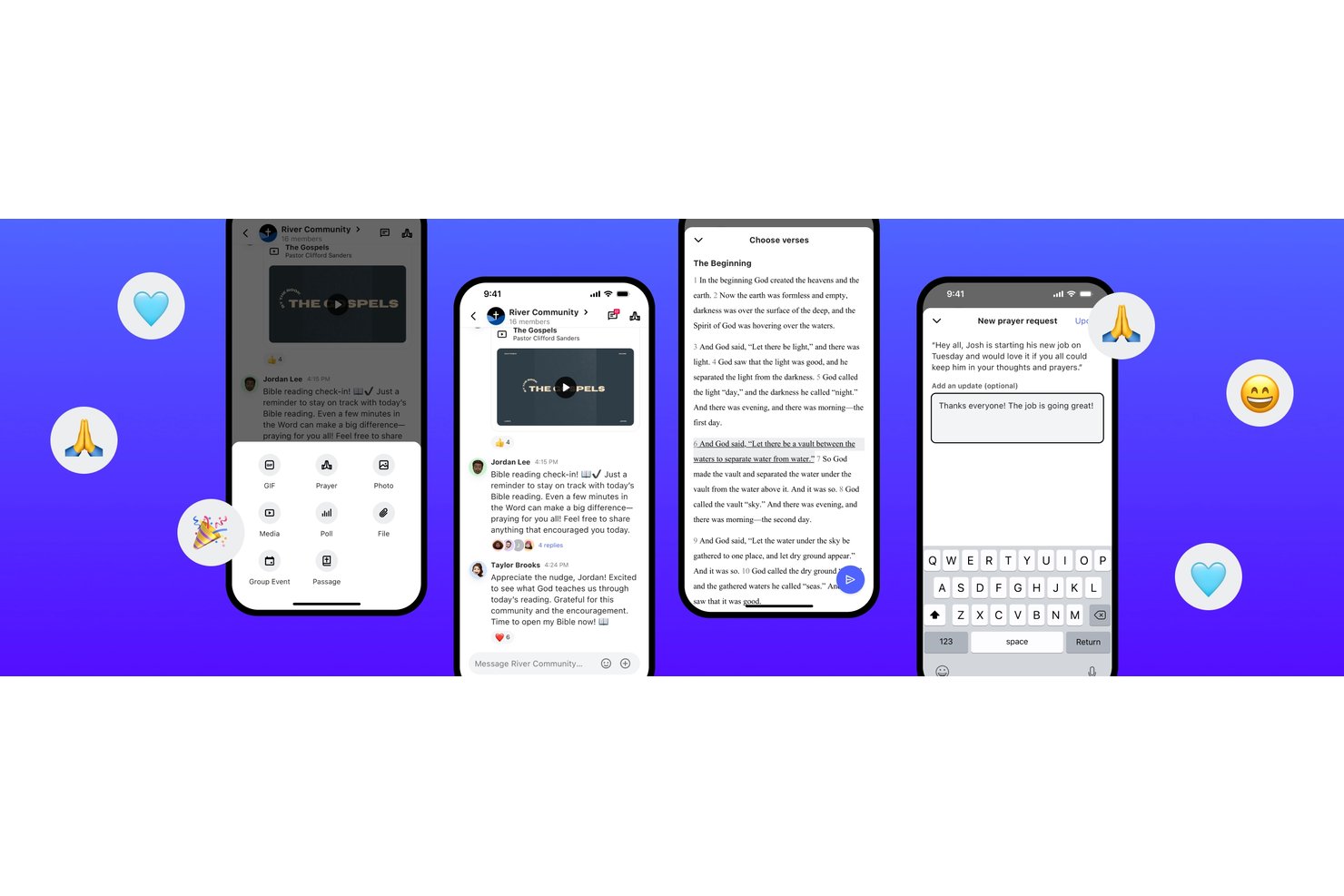
Subsplash is an all-in-one church platform combining a custom-branded mobile app, email and SMS messaging, live streaming, giving, and a native church management system into a single connected solution.
Who Is Subsplash Best For?
Subsplash is a strong fit for mid-to-large churches that want to consolidate their app, communications, giving, and member management into one platform.
Why I Picked Subsplash
I picked Subsplash because its email and SMS blasts are built directly into the same platform that manages your congregation's contacts, groups, and giving history. When I send a blast to first-time visitors or a specific ministry group, I'm pulling from a live, unified database rather than a manually imported list. The Workflows feature also lets me automate follow-up sequences, so new guests receive a welcome text without any manual effort on my part.
Subsplash Key Features
- Digital giving integration: Members can give tithes or donations directly through the app or website with built-in payment processing.
- Sermon and media hub: Upload, organize, and share audio and video sermon content that members can access on demand in the app.
- Volunteer scheduling: Coordinate and manage volunteer roles, schedules, and requests for events or regular services.
- Event registration and check-in: Track attendance, manage event signups, and provide secure child check-in features for families.
Subsplash Integrations
Subsplash offers native integrations with Planning Center, Zapier, Breeze, MortarStone, and more, and provides an API for custom integrations.
Pros and Cons
Pros:
- Native in-app sermon library with personalized content
- Strong mobile giving and recurring donation tools
- Unified app, giving, and media in one platform
Cons:
- Membership management features are limited
- Customer support can be slow to respond

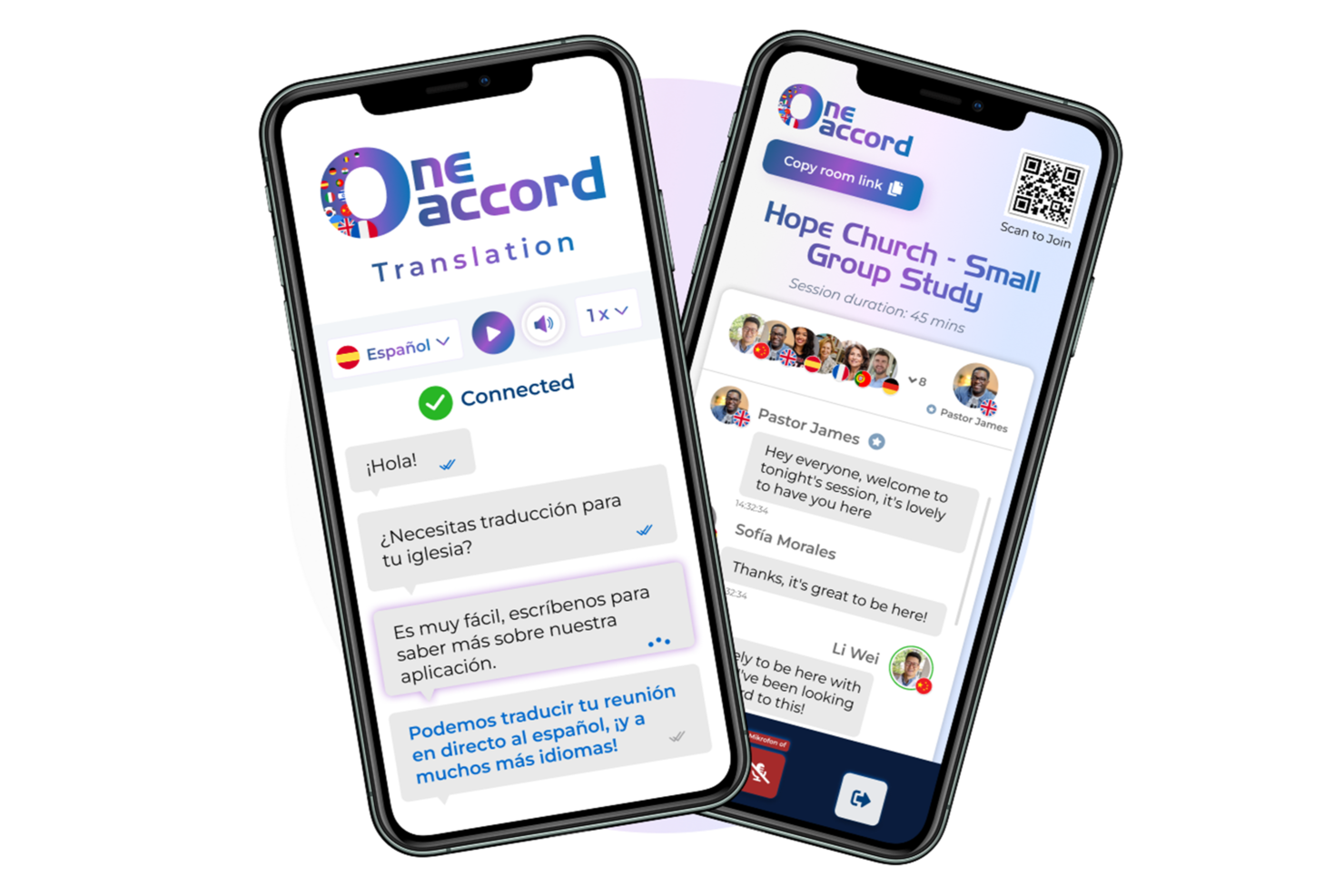
OneAccord is a church communication app that provides live AI-powered translation for sermons and events, offering real-time audio and text translation across more than 50 languages.
Who Is OneAccord Best For?
OneAccord is a good fit for churches and ministries that need to communicate with multilingual congregations during live services and events.
Why I Picked OneAccord
I picked OneAccord as one of the best because I can deliver live AI-powered sermon translation directly to attendees’ devices during services. My team uses its real-time audio and text translation to reach people who speak different languages without extra hardware. I like that I can manage translations for sermons, prayers, and announcements all from a single dashboard.
OneAccord Key Features
- Two translation modes: Broadcast mode for one-way real-time translation to the congregation during Sunday services, and conversation mode for multi-way translation in small group discussions.
- Speaker dashboard: View translation status, audience engagement, and message delivery metrics in real time.
- Custom vocabulary management: Add church-specific terms and names to improve translation accuracy.
- No download required: Congregation members access live translation by scanning a QR code with no app install needed.
OneAccord Integrations
Native integrations are not clearly documented. An API is available for custom integrations.
Pros and Cons
Pros:
- Multi-site support for simultaneous translation across campuses
- Custom branding with church-specific URL and interface
- Attendees can access translations on mobile devices
Cons:
- Analytics dashboard lacks export options
- Limited documentation for advanced configuration

Best for unified church communication

ChMeetings is a church communication and management platform that brings together messaging, event scheduling, member directories, and volunteer coordination in one place.
Who Is ChMeetings Best For?
ChMeetings is a good fit for small to mid-sized churches that need a single platform to manage member communication, groups, and events without juggling multiple tools.
Why I Picked ChMeetings
ChMeetings is on my shortlist because it handles every communication channel your church needs from a single platform. I like that you can send emails, SMS, voice messages, and push notifications without leaving the app. You can reach individual members, specific groups, or everyone registered for an event, all from the same interface. The drag-and-drop email designer lets my team build newsletters and announcements that look polished, while the group chat feature supports conversations with up to 200 participants directly inside the mobile app. It also lets you connect WhatsApp, Facebook Messenger, Viber, and Telegram from a member's profile, so you meet people on the channels they already use.
ChMeetings Key Features
- Attendance follow-up tools: Automatically flag members who miss multiple services so you can reach out before someone quietly drifts away.
- Custom forms builder: Create event sign-up forms, surveys, and feedback forms directly inside the platform without a third-party tool.
- Volunteer scheduling: Assign volunteers to specific roles, set reminders, and give everyone a clear view of where they're needed each week.
- Member portal: Let members update their own contact details, register for events, and give online through a self-service interface.
ChMeetings Integrations
ChMeetings offers native integrations with WhatsApp, Facebook Messenger, Viber, and Telegram for direct communication from member profiles. An API is available for custom integrations.
Pros and Cons
Pros:
- Easy group messaging
- Multi-campus communication support
- Instant push notifications
Cons:
- No built-in live streaming
- Desktop version less intuitive
New Product Updates from ChMeetings

ChMeetings Improves Reconciliation and Adds Fund By Month Report
ChMeetings adds a direct Reconcile button, improved save-for-later support, and a new Fund By Month report. These updates make reconciliation easier to resume and give teams clearer month-by-month fund visibility. For more information, visit ChMeetings’ official site.
 .
.

Fext is a church communication app for group and individual texting, contact management, and message scheduling.
Who Is Fext Best For?
Fext suits pastors and church leaders who want to reach congregation members directly through personalized text messaging.
Why I Picked Fext
Fext made my shortlist because it bridges mass messaging and personal connection. When I send a text to my congregation, each person receives it as a private, individual message from my own number—not a group chat, not a reply-all thread. I use the
@first
tag to auto-insert each contact's first name, so a Sunday reminder to 300 members still reads like I typed it just for them. Replies come only to me, which keeps pastoral conversations private and makes follow-up feel natural.
Fext Key Features
- Message templates: Save and reuse pre-written messages with a single tap, so recurring announcements like weekly service reminders don't need to be retyped each time.
- Media attachments: Attach images, videos, and voice notes directly from your iPhone to add context to any message you send.
- CSV contact import: Upload a spreadsheet of contacts and convert them into organized groups without manual data entry.
- Group and individual combining: Select a mix of groups and individual contacts in a single send, so you can target specific subsets of your congregation at once.
Fext Integrations
Native integrations are not clearly documented. An API is available for custom integrations.
Pros and Cons
Pros:
- Reusable templates save weekly time
- Easy setup and contact import
- Attachments enhance message engagement
Cons:
- No engagement analytics or reports
- No integrations with other tools

Best for personalized two-way texting

Text In Church is a church communication platform designed for ministries that want to manage texting, email messaging, guest follow-up, and group announcements in one place.
Who Is Text In Church Best For?
Text In Church is a good fit for small to mid-sized churches that want a dedicated tool for following up with guests and staying connected with their congregation.
Why I Picked Text In Church
Text In Church earns its spot on my shortlist because of how well it handles the back-and-forth that makes church communication feel personal. When a first-time guest fills out a digital connect card, the platform can automatically kick off a follow-up sequence, and when that guest texts back it opens a private one-on-one conversation rather than a group thread. I also like the name personalization built into outgoing messages, so texts don't read like broadcasts. For a pastor juggling Sunday prep and midweek ministry, that combination of automation and genuine two-way conversation is hard to replicate with a generic messaging tool.
Text In Church Key Features
- Digital connect cards: Collect guest contact information through unlimited customizable digital connect cards that can be embedded on your church website.
- Unlimited groups: Organize contacts into segments—such as life groups, volunteers, or parents—so you can send targeted messages to specific audiences.
- Scheduled messaging: Write and queue texts or emails in advance, so follow-ups and announcements go out at the right time without manual sending.
- Advanced analytics: Track message performance and communication activity through built-in reporting dashboards.
Text In Church Integrations
Text In Church offers native integrations with Planning Center, Church Community Builder, Mailchimp, Rock RMS, Tithely Church Management, Elvanto, and MinistrySafe. It also connects with Zapier and provides an open API for custom integrations.
Pros and Cons
Pros:
- Extensive integrations improve platform versatility
- Two-way texting enhances member engagement
- Automated workflows streamline communication processes
Cons:
- Pricing starts relatively high annually
- Limited visual interface information available

Gracely
Best for organizing church groups

Gracely is an all-in-one church management software designed to help you manage members, organize events, track giving, and communicate with your church community. It's built to support your ministry by providing a platform for engaging with your congregation.
Why I Picked Gracely
Gracely allows you to organize people and groups effortlessly, providing access to personal details and affiliations. This feature supports communication with personalized emails or SMS, helping you engage members and foster a sense of belonging. Combined with Gracely's event management and attendance tracking capabilities, you can plan and manage events with ease, keeping participants updated via text message and email.
Standout Features of Gracely
Gracely's communication features include a customizable forms management, which streamlines workflows for registrations, surveys, and sign-ups, saving time and reducing paperwork. The software also offers a church portal that allows members to update profiles, view giving history, and register for events, deepening engagement and belonging.
Gracely's Integrations
Integrations include Stripe, SendGrid, PayPal, Google Pay, Apple Pay, and Google Calendar.
Pros and Cons
Pros:
- Enhances visitor tracking and engagement efforts
- Facilitates personalized communication
- Effective for organizing church events and tracking attendance
Cons:
- Lacks advanced analytics for deeper insights
- Limited offline capabilities
New Product Updates from Gracely

Gracely Rebuilds Accounting for Church Finance Management
Gracely rebuilds Accounting with fund tracking, income and expenses, transfers, reports, and exports. This gives churches a more complete way to manage finances in one place. For more information, visit Gracely’s official site.
 .
.
Best for church donor communications

Breeze ChMS is a church management software that brings together communication tools, donor tracking, event scheduling, and member directory features for churches looking to centralize their outreach and administration.
Who Is Breeze ChMS Best For?
Breeze ChMS is a good fit for small to mid-sized churches that need an all-in-one system to manage their congregation, giving records, and communications in one place.
Why I Picked Breeze ChMS
Breeze ChMS earns its spot on my shortlist because of how well it connects donor management with direct communication tools. I love that giving statements can be customized and emailed directly to donors from within the platform—so when year-end tax season rolls around, my team isn't exporting data and switching between tools to get statements out. Pledge campaign tracking is also built in, which means I can follow up with donors based on where they are in their giving commitment. The drag-and-drop email editor and text messaging tools let me reach specific groups of people, so donor outreach doesn't have to be a one-size-fits-all blast.
Breeze ChMS Key Features
- People profiles: Store and manage detailed member records, including contact info, family connections, and custom fields you define.
- Event registration: Let congregation members sign up for events directly through Breeze, with attendance tracking built in.
- Children's check-in: Print name tags and parent tags at check-in, with barcode scanner support for faster processing.
- Volunteer management: Organize and schedule volunteers across ministries, with the ability to track roles and assignments.
Breeze ChMS Integrations
Breeze ChMS offers native integrations with Tithely, Mailchimp, and Google Calendar. Breeze ChMS also offers an API for custom integrations.
Pros and Cons
Pros:
- Built-in email and text messaging for givers
- Automated contribution tracking and reports
- Easy-to-use donor management system
Cons:
- Limited automation for donor follow-ups
- No native event or volunteer management

Tithe.ly
Best for personalized email & SMS communications

Tithely is a church communication and management platform that brings together email and SMS messaging, member directories, event coordination, and giving tools in one system.
Who Is Tithely Best For?
Tithely is a good fit for churches of any size that want a single platform to manage both congregational communication and day-to-day ministry operations.
Why I Picked Tithely
I picked Tithely as one of the best because of how well its messaging tools connect directly to your member data. The drag-and-drop email editor lets you build polished, on-brand emails fast, and mail merge fields make it easy to personalize each message with a member's name or group. I also like that group targeting lets you send texts or emails to specific roles, small groups, or volunteers without exporting a list or switching apps. Every account includes 250 free texts per month, and you can schedule messages in advance—so a Sunday reminder or event follow-up goes out exactly when it should.
Tithely Key Features
- Customizable tags: Organize members into groups like volunteers, small groups, or event attendees to target the right people with the right message.
- Automated workflows: Set up triggers to send birthday emails, assign members to groups, or manage follow-ups without manual input.
- Kids check-in: Print parent and child name tags, track attendance, and generate unique security codes for Sunday services and events.
- Public-facing forms: Build sign-up and registration forms that automatically link submissions to existing member profiles.
Tithely Integrations
Tithely offers native integrations with QuickBooks, Elvanto, and Breeze ChMS. Tithely also offers an API for custom integrations.
Pros and Cons
Pros:
- Supports text-to-give for easy donations
- Detailed donor management tools
- Easy financial reporting and transparency
Cons:
- Fewer design options for branding
- Limited website customization options

Realm
Best for connecting the entire church community
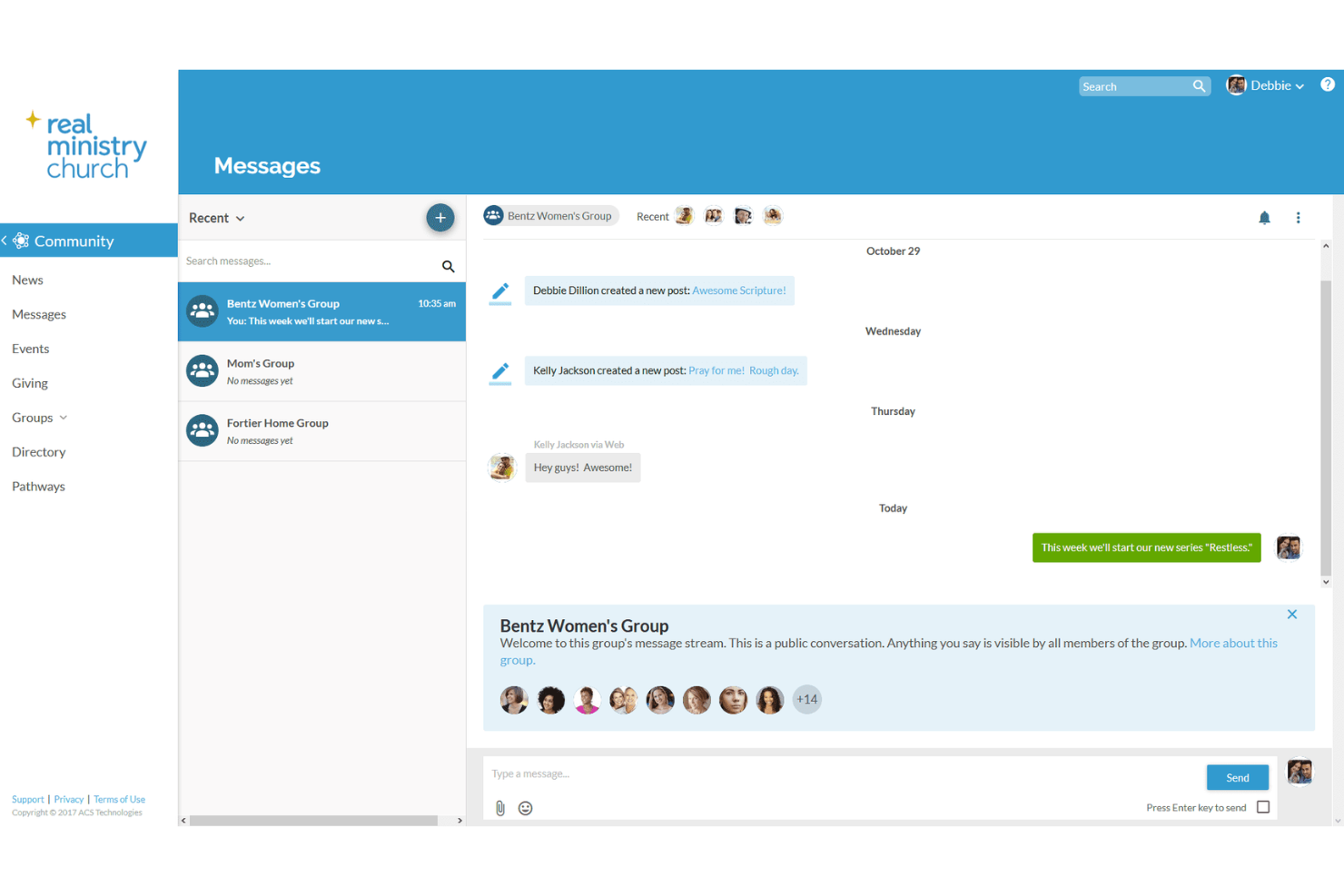
Realm is a church management platform that brings together messaging, event scheduling, group communication, and member directories for churches looking to centralize their communication.
Who Is Realm Best For?
Realm is a good fit for churches of all sizes that want a single platform to manage communication, membership, and community engagement across staff, volunteers, and congregants.
Why I Picked Realm
Realm earns its spot on my shortlist because it's built specifically to connect every layer of a church community—staff, small group leaders, and congregants—through one shared platform. I particularly like the newsfeed feature, where group leaders can post prayer requests, announcements, or photos directly to their groups, and members can comment and respond. That kind of back-and-forth keeps community alive between Sundays. I also use the unified inbox, which pulls together emails, texts, and in-app messages so nothing gets buried across different channels.
Realm Key Features
- Member profiles and directories: Store and access detailed member records, including contact info, family relationships, and personal notes, all searchable from one place.
- Volunteer scheduling: Assign volunteers to teams and roles based on their skills and interests, then build and manage schedules directly within the platform.
- Group management: Organize your congregation into ministry areas and small groups, with tools to add members, assign leaders, and track group activity.
- Custom reporting: Run predefined reports or build custom queries to search, filter, and export member data for follow-up, mailing lists, or ministry planning.
Realm Integrations
Realm offers native integrations with Vanco for online giving, Givelify, and Mailchimp, and provides an API for custom integrations.
Pros and Cons
Pros:
- All-in-one communication and management platform
- Scales well for churches of all sizes
- Secure, private social network for members
Cons:
- Learning curve for new users
- Limited customization for group messaging

SteepleMate
Best for personalized messages
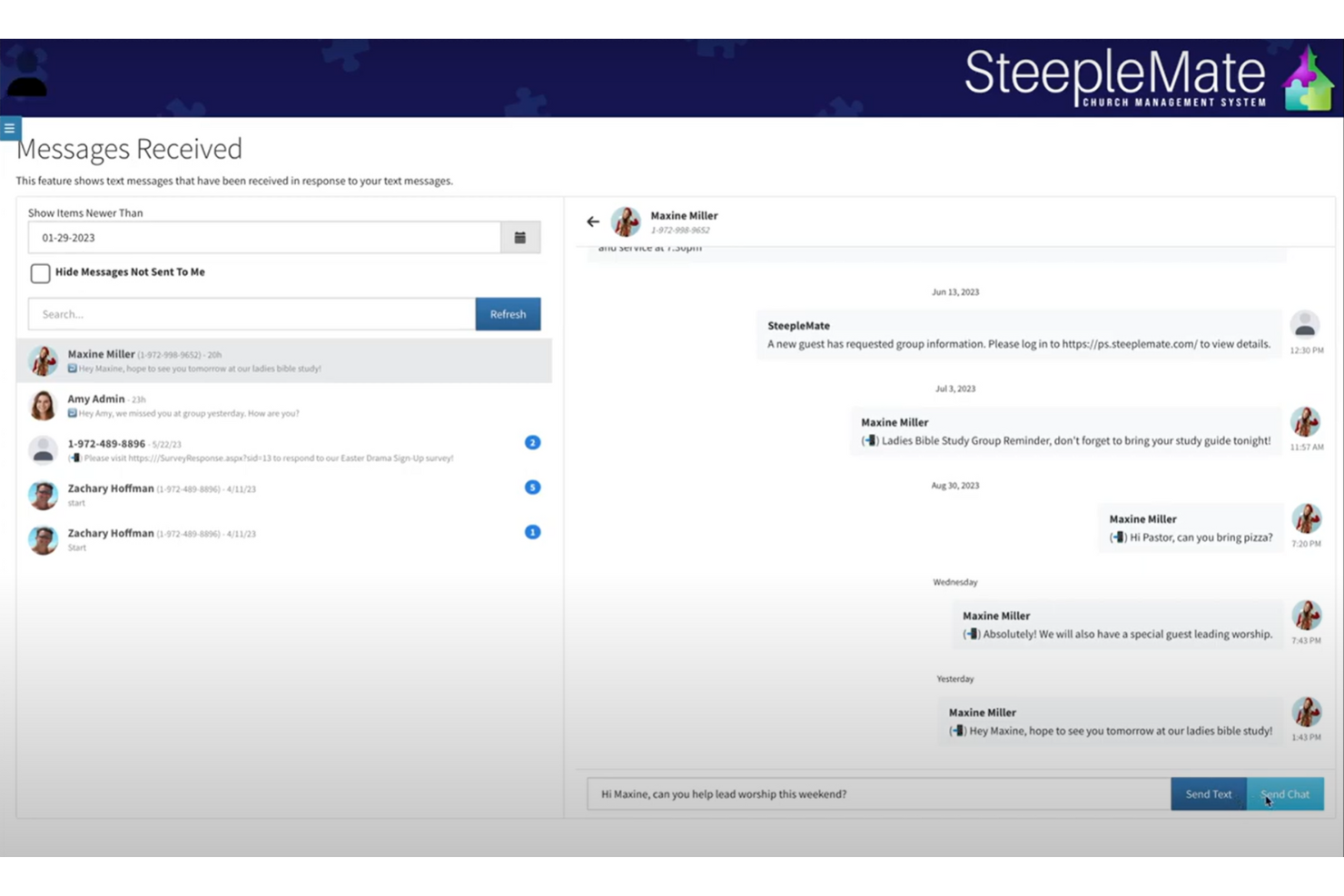
SteepleMate is a church management system designed to help you oversee various aspects of your church's operations. It offers tools for managing attendance, finances, and member information, all in one place. Its app excels in people management, offering tools like advanced group management, guest tracking, and communication activity reporting. Overall, these features let you keep track of your congregation's participation and outreach efforts efficiently.
Additionally, SteepleMate's messaging system allows you to send personalized messages through email, SMS, or in-app chat, which is crucial for keeping everyone updated on church activities. The prayer check-in feature also simplifies the process of submitting prayer requests and tracking participation, fostering a sense of community and support among members.
Other Church Communication Apps
Here are a few more that didn’t make the top list.
- Aplos
For personalized member outreach
- Neon One
For community outreach
- Planning Center
For communicating with church volunteers
- Elexio
For communicating around church projects & tasks
- Servant Keeper
For church membership management
- Church Windows
For member engagement analytics
- ChurchTrac
For mass emails and texts
- Slack
For live online church engagement
- Textmagic
For two-way communications
- One Church Software
For automating communications
- MinistryPlatform
For large churches
- Communicate
For centralized message planning
- Touchpoint
Church management system with a marketing feature for staying in touch with donors.
- FaithLife
Church management platform for creating announcements and automatically posting them on your website, mobile app, digital signage, and social media accounts.
- Fellowship One
Church management software with a push notification feature for broadcasting mass messages.
- Wild Apricot
Membership management software for creating and maintaining a church contact database.
- CDM+
Church software with contact management feature for managing member information.
- Donarius
Church management software for sending personalized letters, emails, and text messages.
- Excellerate
Church management solution for automating visitor follow-ups to grow your membership.
- Attendance Now
Church app for sending automatic follow-ups to website visitors to help increase church membership.


How I Evaluate Church Communication Apps
I evaluate these platforms in two layers: the baseline must-haves like mass messaging and member-facing apps, and the differentiators that separate top tools for different church sizes and ministry models.
Core Functionality (Table Stakes For This List)
When I'm selecting tools for my list, I rank each one on a scale from 0 (does not offer the functionality) to 5 (excels in this area) for each core functionality listed below. Then, I calculate the tool's total score into a percentage. Each tool needs to achieve a minimum total score of 65% to be considered for inclusion.
- Mass Messaging Channels: I check whether a platform supports bulk SMS, email, and push notifications so churches can reach members across the channels they actually use daily.
- Congregation Segmentation: Sending the same blast to everyone gets noisy fast. I look for group and list tools that let you target by ministry, campus, or member attributes.
- Two-Way Communication: I evaluate whether staff can hold real conversations with members, like fielding prayer requests or following up with first-time visitors through the app.
- Church Management Integration: The platform should sync with popular ChMS tools like Planning Center, Breeze, or Rock RMS so your member data stays current without manual imports.
- Volunteer & Group Coordination: I look for built-in ways to message ministry teams, confirm volunteer shifts, and coordinate small group leaders without jumping to a separate tool.
- Member-Facing Mobile Experience: Your congregation needs a clear, branded place to receive updates, watch sermons, and see event info. I evaluate the quality of the member-facing app or interface.
Once I have a list of tools that meet the criteria, I consider what sets each platform apart.
Differentiating Factors (What Sets Vendors Apart)
Here's how I compare and contrast different vendors:
Standout Features
Prayer request workflows are a big differentiator. I look for platforms where members can submit requests privately and staff can assign follow-up to keep pastoral care organized. Digital giving integration also separates tools—when congregants can tithe from the same app where they read announcements, it keeps engagement in one place. I consider whether a platform includes a sermon and media library too, so members can revisit Sunday's message or access midweek devotionals without leaving the app.
Beyond Features
Total cost of ownership matters a lot when churches run on tithes and donations. I check whether pricing scales fairly with congregation size and whether nonprofit discounts or free tiers exist for smaller churches. Data privacy is another key factor—especially around minors. I evaluate whether platforms offer role-based permissions and parental consent safeguards for children's ministry communications. I also consider onboarding support, since many church admins aren't full-time tech staff and benefit from church-specific training resources and implementation guidance.
How to Choose Church Communication App
As you work through your own unique software selection process, keep the following points in mind:
- Ease of Use: A church communication app should be simple enough for both tech-savvy and less tech-inclined users to navigate. If volunteers and staff struggle to use it, communication won’t improve—it’ll just create frustration. Look for an app with an intuitive design, easy onboarding, and minimal training required.
- Multi-Channel Communication: Churches need to reach people in different ways—some prefer texts, others emails, and some engage best through app notifications. The right app should allow you to send messages through multiple channels from a single platform. For example, an app that lets you schedule a Sunday reminder via email, a prayer request via text, and an event update via push notification will keep everyone in the loop.
- Integration with Church Management Software: Your communication app shouldn’t add another disconnected tool to your workflow. If it integrates with your church management system (ChMS), you can sync member data, automate follow-ups, and keep records organized. For instance, when a new family joins, an integrated app can automatically add them to your church’s mailing list and small group notifications.
- Scalability and Cost: Many churches start with a small team but grow over time. Your app should be able to scale with you, offering flexible pricing and features that accommodate growth. Some platforms charge per user, while others offer unlimited messaging. Consider what works best for your budget now and in the future.
- Engagement Tracking and Analytics: You can’t improve communication if you don’t know what’s working. The best apps provide engagement metrics, showing how many people open messages, click links, or RSVP to events. If few members open your weekly email, but most respond to text messages, you’ll know where to focus your efforts.
By keeping these factors in mind, you’ll be able to find a church communication app that truly supports your ministry’s needs—without adding more stress to your plate.
Trends in Church Communication App for 2025
In 2025, church communication apps have advanced significantly, focusing on enhancing engagement, streamlining operations, and integrating innovative technologies to meet the evolving needs of congregations.
Enhanced Member Engagement
- Personalized Communication: Modern apps now offer tailored messaging features, allowing churches to send customized content to different groups within the congregation. This ensures that members receive relevant information, increasing engagement and participation.
- Interactive Features: Incorporating live polls, Q&A sessions, and feedback forms within apps enables real-time interaction during services and events, fostering a more inclusive community experience.
Advanced Automation and AI Integration
- Automated Workflows: The rise of artificial intelligence (AI) and automation has made its way into church management software. AI-powered chatbots can handle routine inquiries, while automated workflows streamline repetitive administrative tasks, allowing church staff to focus more on ministry.
- Predictive Analytics: Some apps now utilize AI to analyze attendance and engagement data, helping leaders anticipate trends and make informed decisions about future programs and outreach efforts.
Comprehensive Event and Volunteer Management
- Integrated Event Scheduling: Advanced event management features, including registration, reminders, and resource allocation, have become standard, simplifying the planning process and ensuring smooth execution of church activities.
- Volunteer Coordination Tools: Enhanced tools for recruiting, scheduling, and communicating with volunteers help streamline operations, ensuring that all roles are filled and volunteers are well-informed.
Emphasis on Data Security and Privacy
- Robust Security Measures: With increasing concerns over data privacy, apps are now implementing advanced security protocols, such as encryption and multi-factor authentication, to protect sensitive member information.
- Compliance with Regulations: Ensuring adherence to data protection regulations has become a priority, with features that allow churches to manage consent and data retention effectively.
These trends reflect a commitment to leveraging technology to enhance community engagement, streamline administrative tasks, and uphold the trust of congregations through robust data security measures.
What is a Church Communication App?
A church communication app is a tool that helps pastors and church leaders connect with their congregation in one place. It replaces scattered emails, group texts, and printed bulletins with a single platform for sending updates, organizing events, and managing groups. Think of it as a digital bulletin board, group chat, and event planner rolled into one—making it easier to keep everyone in the loop without the hassle.
Features of Church Communication App
A good church communication app should take administrative work off my plate so I can focus on what matters—preaching, teaching, and shepherding people. The right app keeps communication running smoothly without me constantly managing it. Here are the features that make that possible:
- Automated Messaging: I can schedule texts, emails, and push notifications in advance, so I’m not scrambling to send last-minute reminders.
- Two-Way Communication: People need an easy way to ask questions, share prayer requests, or RSVP without calling the church office. A good app makes it simple.
- Event Management: Instead of tracking attendance manually, I can send invites, collect RSVPs, and send updates all in one place.
- Volunteer Coordination: Organizing volunteers takes too much back-and-forth. An app should help me assign roles, send reminders, and confirm attendance.
- Multi-Channel Messaging: Some people check email, others respond to texts, and a few rely on app notifications. A good tool lets me reach everyone in the way they prefer.
- Contact Database: I need an up-to-date list of members, visitors, and volunteers. A built-in directory keeps everything organized.
- Group Messaging: Small groups, ministry teams, and leadership need their own channels for communication. A good app makes that easy.
- Customizable Notifications: If I can control who gets what messages, I won’t spam the whole church with information only a few need.
- Integration with Church Software: When my communication tool works with my church management system, I don’t waste time updating records in two places.
- Message Analytics: If I know how many people open messages or click links, I can see what’s working and what’s not.
When communication runs smoothly, I don’t spend my week buried in emails or tracking down volunteers. I can give more time to prayer, teaching, and leading people well. That’s why the right church communication app isn’t just nice to have—it’s necessary.
Benefits of a Church Communication App
A church communication app makes it easier to keep the congregation informed, engaged, and connected without adding extra administrative work. By centralizing communication, automating routine tasks, and improving outreach, the right app allows pastors and church leaders to spend more time on ministry and less time managing logistics. Here are the key benefits:
- Simplifies Communication: Instead of juggling emails, texts, and phone calls, everything is managed from one platform, ensuring messages reach the right people at the right time.
- Increases Member Engagement: Personalized messaging, event reminders, and interactive features help keep members involved and connected to church life throughout the week.
- Automates Administrative Tasks: Scheduled messages, volunteer reminders, and event RSVPs reduce the manual workload, freeing up staff and volunteers for more meaningful ministry.
- Improves Outreach and Follow-Up: Whether welcoming first-time visitors or reconnecting with inactive members, automated follow-up tools ensure no one slips through the cracks.
- Enhances Event and Volunteer Coordination: With built-in scheduling, reminders, and sign-up features, organizing church activities becomes smoother, preventing last-minute confusion.
A strong church communication app doesn’t just make operations easier—it strengthens relationships within the church. By removing communication barriers and streamlining daily tasks, pastors and leaders can focus on what matters most: shepherding their people.
Costs & Pricing for Church Communication Apps
When evaluating church communication apps, it's important to understand the various pricing plans and features available to determine which best suits your congregation's needs. Below is a comparison of common plan types, their average prices, included features, and ideal use cases:
| Plan Type | Average Price | Common Features | Best For... |
|---|---|---|---|
| Free Plan | $0/month | Basic communication tools, limited member capacity, essential event management features. | Small churches or those new to using communication apps, looking to explore basic functionalities without financial commitment. |
| Basic Plan | $29–$50/month | Enhanced communication features, member directory, event scheduling, limited customization options. | Congregations seeking foundational tools with some customization to improve member engagement. |
| Standard Plan | $69–$100/month | Advanced communication tools, media sharing, volunteer management, integration with other church management systems. | Medium-sized churches aiming for a balance between functionality and cost, requiring more advanced features. |
| Premium Plan | $100–$150/month | Comprehensive feature set including live streaming, advanced analytics, extensive customization, priority support. | Larger congregations needing robust tools to manage extensive activities and communications efficiently. |
| Custom Enterprise Plan | Varies (typically $150+/month) | Tailored solutions with full customization, dedicated support, advanced security features, and scalable options to accommodate large member bases. | Mega churches or organizations with specific needs requiring personalized solutions and dedicated support. |
When selecting a plan, consider your church's size, specific communication needs, and budget constraints to ensure the chosen app aligns with your ministry objectives.
Church Communication App Frequently Asked Questions
How do I ensure my congregation actually uses the app?
Adoption is key for any church communication app to be effective. The best approach is a mix of clear communication, leadership buy-in, and ease of use. Start by introducing the app in a Sunday service, explaining its benefits, and providing simple instructions for downloading and using it. Encourage small group leaders and ministry heads to model app usage. Some apps offer built-in onboarding tools like welcome messages or tutorial pop-ups, which help new users get familiar with features quickly. Regularly reminding members about the app—through announcements, social media, or email—reinforces its value and increases engagement.
What kind of training do my staff and volunteers need to use the app effectively?
Most church communication apps are designed to be user-friendly, but a little training goes a long way. Staff and volunteers should at least understand how to send messages, schedule events, manage groups, and access member directories. Many apps provide training materials like video tutorials, webinars, or interactive guides. Hosting a short training session or assigning a tech-savvy volunteer as the go-to person for questions can help smooth the transition. The goal is to keep training minimal but effective so that everyone can use the app confidently without frustration.
Can I send automated reminders for small groups, prayer meetings, and volunteer shifts?
Yes, most church communication apps include automated messaging features. These allow you to schedule reminders for small group meetings, prayer gatherings, and volunteer commitments in advance. Some platforms even integrate with calendars, so members automatically receive notifications about upcoming events. Automated reminders reduce no-shows and miscommunication, ensuring that people stay informed without requiring constant manual follow-up from staff.
Does a church communication app replace the need for social media or email?
Not necessarily. A church communication app complements, rather than replaces, other communication channels. While an app centralizes member engagement and internal messaging, social media is still useful for outreach and community engagement beyond the church. Email remains valuable for more formal or long-form communication. The best approach is a multi-channel strategy: use the app for internal updates and group communication, social media for outreach and engagement, and email for detailed messages or newsletters.
Are there any downsides to using a church communication app that I should be aware of?
While church communication apps offer many benefits, they’re not without challenges.
- Adoption can be slow, especially among older members or those resistant to new technology.
- Some apps come with ongoing costs that may not fit every church’s budget.
- There’s also the risk of overloading members with notifications, which can lead to disengagement.
- Data security is another consideration—choosing a platform with strong privacy protections is crucial.
To minimize these downsides, churches should introduce the app gradually, use communication features thoughtfully, and ensure member data is handled securely.
What’s Next:
If you're in the process of researching church communication app, connect with a SoftwareSelect advisor for free recommendations.
You fill out a form and have a quick chat where they get into the specifics of your needs. Then you'll get a shortlist of software to review. They'll even support you through the entire buying process, including price negotiations.