

The best church administration software helps pastors streamline operations, centralize essential records, and free their team to focus on ministry instead of logistics. With the right platform, churches can simplify scheduling, standardize communication, and eliminate the chaos of scattered systems and outdated spreadsheets.
I’ve been in church leadership for 20+ years; one of my first staff positions was at a church with very little in the way of admin structure. I spent HOURS each week chasing down files, hunting for records, and trying to coordinate events and volunteers. I learned firsthand how much time and energy gets wasted without a centralized admin tool. Since then, I’ve reviewed and compared dozens of church administration tools, and the difference the right one makes is profound.
Church administration software brings critical structure. With a great tool in place, everything gets easier—scheduling stabilizes, communication improves, and ministry becomes more sustainable. This list will help you find the best church administration software for your team so you can focus more on people and less on paperwork.
Why Trust Our Software Recommendations
6,700+
Reviews
20
Industry experts
16+
Evaluation factors
14
Years
Our team has been testing and reviewing software since 2012. As church leaders ourselves, we know how difficult—and important—it is to choose the right software.
For this guide, we evaluated tools using hands-on testing and independent research, scoring tools using our selection criteria.
Our reviews reflect our human editorial judgment, not a sales pitch.
Church Administration Software Comparison Table
| Tool | Best For | Trial Info | Price | ||
|---|---|---|---|---|---|
| 1 | Best for built-in workflow automation | 30-day free trial | From $58/month | Website | |
| 2 | Best for member management | 30-day free trial | From $19/month (billed annually) | Website | |
| 3 | Best for all-in-one management | Free plan available + 30-day free trial | From $12/month | Website | |
| 4 | Best for event management | 30-day free trial available | From $72/month | Website | |
| 5 | Best for donation management | Free demo available | Pricing upon request | Website | |
| 6 | Best for volunteer scheduling | six-month subscription (with money-back guarantee), followed by annual renewals | Pricing varies based on plan and number of volunteers | Website | |
| 7 | Best for growing generosity | Free demo available | Pricing upon request | Website | |
| 8 | Best for financial stewardship | Not available | Pricing upon request | Website | |
| 9 | Best for offering a free plan | Free trial available | From $69.99/month | Website | |
| 10 | Best for organizing church slides and sermons | Free trial + free demo available | From $599 one-time | Website |


Reviews Of The Best Church Administration Software Solution
Here’s a brief description of each church administration app to showcase each tool’s best use case, some noteworthy features, and screenshots to give a snapshot of the user interface.
 Best for built-in workflow automation
- 30-day free trial
- From $58/month
Visit WebsiteCustomer Rating:4.8/5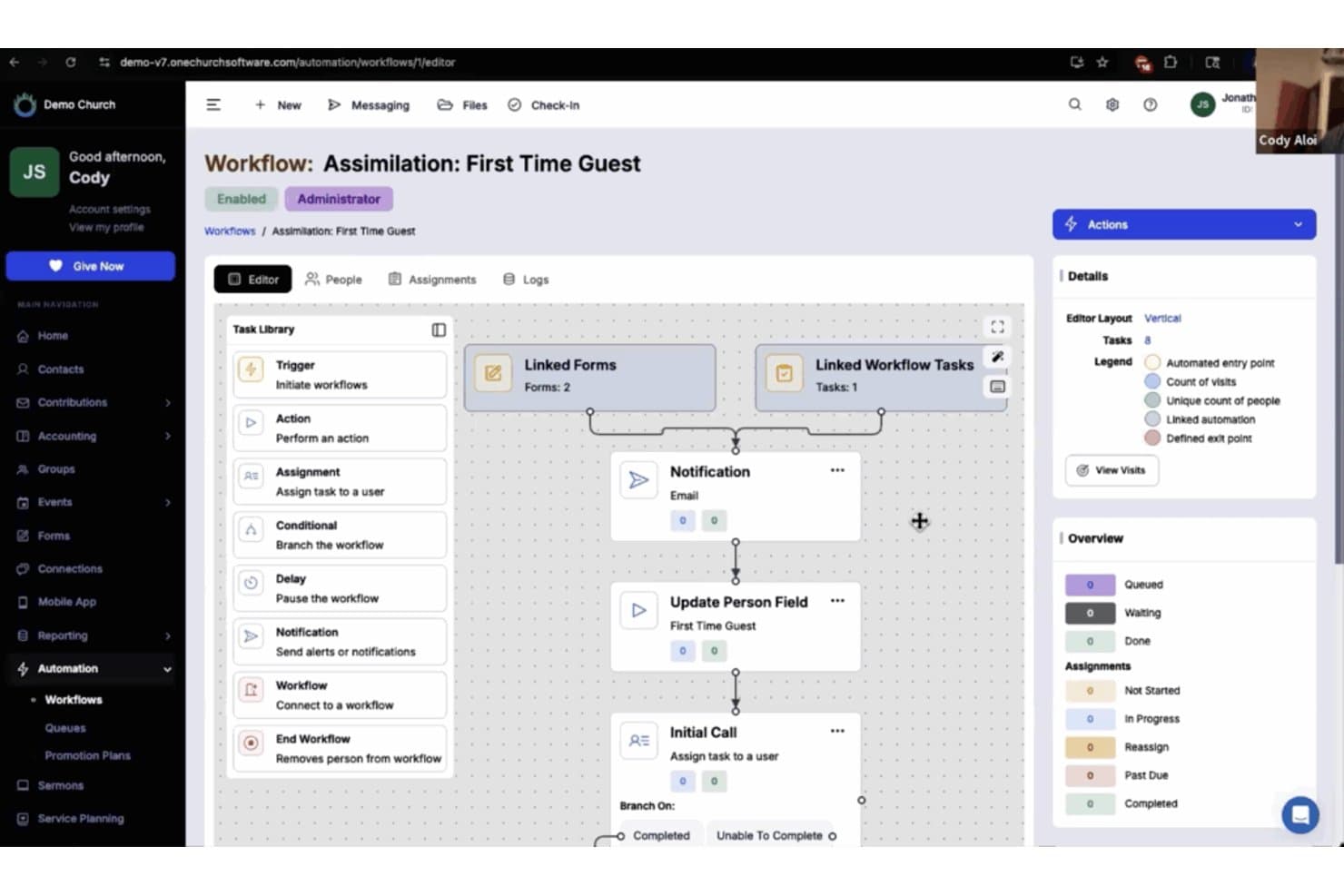
One Church Software offers an automated workflow builder for managing first-time guest assimilation with linked forms, notifications, and task assignments. One Church Software is a church management platform that brings together membership tracking, giving, event scheduling, volunteer coordination, communication, child check-in, and workflow automation into a single system.
Who Is One Church Software Best For?
It's a strong fit for church administrators and ministry coordinators at small to mid-sized congregations who need one platform to manage operations across multiple ministry areas.
Why I Picked One Church Software
One Church Software earns its spot on my shortlist because its automation suite is genuinely built into the platform, not added as an afterthought. I particularly like the branch logic feature, which lets me route new visitors through a different follow-up process than returning members, all triggered automatically by a form submission. I can also set tasks like "Add to Group" or "Update Person Fields" to fire without any manual input, which keeps my team focused on people rather than admin work.
One Church Software Key Features
- Small group management: Create groups, track attendance, message members, and access leader dashboards in one place.
- Child check-in system: Secure check-in with matching tags, guardian verification, and attendance tracking for all children's ministries.
- Multi-campus management: Partition data, permissions, and calendars by campus while maintaining a unified church database.
- Sermon and media library: Host, stream, and archive sermons and worship media for member access on web and mobile.
One Church Software Integrations
One Church Software offers native integrations with Mailchimp, Square, Pushpay, and PraiseCharts, and provides an API for custom integrations.
Pros and Cons
Pros:
- Branded mobile app for member engagement
- Dedicated multi-campus management tools
- Built-in workflow automation with branch logic
Cons:
- Mobile app customization limited by pricing tier
- Reporting tools lack depth for finance teams
Learn more about One Church Software: Best for member management
- 30-day free trial
- From $19/month (billed annually)
Visit WebsiteCustomer Rating:4.8/5
Gracely lets you create detailed profiles for church members. Gracely is an all-in-one church management software designed to help churches efficiently handle various administrative tasks. It offers tools for managing member information, organizing events, and tracking donations. By consolidating these functions, Gracely aims to support church leaders in fostering a more connected and engaged congregation.
Gracely's robust member management feature allows you to create detailed profiles for each congregant, including personal information, event participation, and giving history. This centralized system makes it easier to understand and meet the needs of your members. Additionally, Gracely's event management tools enable you to plan, schedule, and publish events online, connecting them with facilities and available volunteer resources through a centralized church calendar. This ensures that all aspects of your events are well-coordinated and accessible to your community.
Learn more about Gracely: Best for all-in-one management
- Free plan available + 30-day free trial
- From $12/month
Visit WebsiteCustomer Rating:4.9/5
The ChMeetings dashboard provides an overview of church activities and quick access to various management features. ChMeetings is a cloud-based Church Management Software (ChMS) built for churches in the US, Canada, UK, Australia, and South Africa. Trusted by over 7,000 churches across these regions, it offers an intuitive, multilingual platform that helps streamline church operations while staying budget-friendly.
After covering dozens of church platforms, I’ve learned that reliability matters just as much as features. My audience often tells me ChMeetings delivers solid usability at a great price, and that consistency keeps them happy.
Further, it helps you keep track of your congregation, organize group activities, manage events, and handle finances—all from one platform. You can easily create member profiles, add family relationships, and assign them to groups for different ministries. If you want to keep everyone in the loop, ChMeetings also lets you send out emails, text messages, or push notifications directly to your members.
You can organize free and paid events, track attendance, and schedule volunteers, all with minimal hassle. The platform also lets you handle financial management through a simple accounting module that tracks transactions, budgets, and contributions. Additionally, the system supports creating forms for things like event sign-ups or member surveys, with options to collect digital signatures.
Learn more about ChMeetings: Best for event management
- 30-day free trial available
- From $72/month
Visit WebsiteCustomer Rating:4.7/5
Tithe.ly enables you to organize and schedule service plans with detailed breakdowns of songs and readings. Tithe.ly is a cloud-based church management software that church leaders can use to manage small groups, volunteers, and employees. It has a worship planning feature for creating service guides, assigning songs, and coordinating volunteers. Tithe.ly admin has a fund accounting feature for monitoring your church’s financial health.
Having been in church ministry for over 20 years, I’ve seen plenty of software and church administrations platforms come and go. And, my readers consistently communicate that Tithe.ly is among the best and simplest they’ve used - making it easy for staff and volunteers to learn quickly.
Tithe.ly is the best church management software with an event management feature for successfully creating and managing church events. You can use Tithe.ly to set up event registrations and customize the information you collect on registration forms. This church management software allows you to create multiple ticket types for paid events. Tithe.ly admin lets you use QR codes for faster and more accurate event check-ins.
 Best for donation management
- Free demo available
- Pricing upon request
Visit WebsiteCustomer Rating:4.4/5
IconCMO provides a web-based member portal for online directory access. IconCMO is a church management software designed to meet the needs of churches and ministries. It offers a web-based platform with features that help churches manage their administrative tasks.
Why I Picked
I picked IconCMO for its donation management capabilities, including text and e-giving options, which allow your church to handle contributions. The software also tracks attendance and manages household and individual groups, making it a valuable tool for keeping your congregation engaged and organized. Additionally, IconCMO's IRS-compliant donor statements ensure your financial records are always accurate.
Another reason for choosing IconCMO is its event registration and check-in system. This feature simplifies organizing and managing church events, making it easier for you to connect with your community. Furthermore, the mass communication tools included in IconCMO enable you to reach out to your congregation efficiently, ensuring everyone stays informed.
Standout Features
Features include fund accounting that complies with FASB regulations, providing peace of mind for your church's financial management. IconCMO also offers multi-site software capabilities, making it ideal for churches with multiple locations that need to share data. The software's ability to manage organizational hierarchy allows for better oversight and management of your church's various departments and groups.
Integrations
Integrations include Vanco Payment Solutions, Kotapay, Protect My Ministry, Dynamic Systems, Paperless Transactions, Mailchimp, Text-Em-All, Constant Contact, BILL, Yearli, and Worldline.
Pros and Cons
Pros:
- Effective communication tools for engaging with congregants.
- Comprehensive features for managing memberships and donations.
- User-friendly interface that simplifies navigation.
Cons:
- Limited customization in certain areas compared to competitors.
- Some users report occasional technical glitches.
Learn more about IconCMO: Best for volunteer scheduling
- six-month subscription (with money-back guarantee), followed by annual renewals
- Pricing varies based on plan and number of volunteers
Visit WebsiteCustomer Rating:4.6/5
Church leaders can use Ministry Scheduler Pro to manage volunteer schedules and make sure that all services and events have enough manpower. Ministry Scheduler Pro is church administration software for handling all your church’s scheduling requirements. You can use it to ensure a proper rotation of readers. Ministry Scheduler Pro lets you print sign-in sheets during services and events for attendance tracking purposes. This church software also lets you monitor training and background checks to guarantee that volunteers and employees have proper skills and training.
Ministry Scheduler Pro is the best church administration software if you want to manage the schedule of volunteers effectively. Volunteers can upload their availability to help you avoid scheduling conflicts. You can use this church software to accommodate volunteers’ preferences. Ministry Scheduler Pro automatically sends SMS and email reminders to help minimize no-shows during events and church services.
Ministry Scheduler Pro integrates with other church software, including Access ACS, ParishSOFT, Gabriel Software, and Servant Keeper.
Learn more about Ministry Scheduler Pro:

You can use PushPay to create a worship service plan that volunteers and church employees can use as a guide. PushPay helps mid-sized to large churches deepen connection and boost giving by combining membership management, volunteer workflows, and donor tools in one platform. If you’re juggling spreadsheets, manual processes, and missed follow-ups, this solution focuses you on people and generosity rather than admin.
Why I Picked PushPay
I chose PushPay because it makes generosity and engagement measurable and manageable. You get giving tools built for donations of all types (one-time, recurring, non-cash). It includes full church-management features like check-in, event registration, volunteer scheduling, and attendance tracking so you’re not using separate systems.The mobile apps and leader-app help your team stay connected on the go, reach people rarely on-site, and track engagement across platforms. Finally, the analytics dashboard shows giving, attendance, serving trends so you can spot gaps and build stronger follow-up.
PushPay Key Features
- Giving Platform: Accept online, mobile and non-cash gifts in one place with detailed tracking.
- Volunteer & Service Scheduling: Set up worship plans, assign volunteers, manage resources and rooms.
- Member Journey Tracking: Monitor first-time guests through long-term members and engagement metrics.
- Mobile Apps & Communication: Branded church app + leader app plus push notifications and group messaging.
PushPay Integrations
Integrations include QuickBooks, Servant Keeper, Fellowship One, live-streaming platforms (via Resi), payment processors, and 80+ other tools.
Pros and Cons
Pros:
- Analytics make engagement/giving gaps visible
- Unified platform for people, giving and engagement
- Strong mobile giving experience for donors
Cons:
- Full feature-set may be more than smaller churches need
- Pricing requires custom quote (no fixed plan)
Learn more about Pushpay:

Realm centralizes all your administration-related tasks within a single dashboard and offers robust reporting capabilities. Realm is a church management software that offers an all-in-one approach to church administration, ministry planning, community building, accounting, and other operations.
Having reviewed countless church administrative systems with optional add-ons, I’ve found that integrated accounting is often overlooked. Realm gets praise from my readers for offering it within the same platform, helping them avoid patchwork solutions.
One of the key features is its comprehensive member management system, which allows churches to maintain up-to-date profiles, including member contact information and involvement in church activities. This system is integrated with tools for communication such as email and messaging, making it easy for church staff to reach out to members individually or in groups.
Additionally, Realm supports financial management and stewardship with features that simplify donation processing and financial reporting. Churches can manage tithes and offerings with options for online giving and automated record-keeping. The platform also has reporting tools that allow church administrators to generate detailed reports on attendance, financials, and other key metrics.
 Best for offering a free plan
- Free trial available
- From $69.99/month
Visit WebsiteCustomer Rating:4.8/5
SteepleMate lets you keep a detailed record of church members, from birthdays to family groupings. SteepleMate is a church management software tailored for churches looking to improve operations and community engagement. One reason I like SteepleMate is its ability to organize personal information for guests, staff, and volunteers. You can store contact details, relationships, and important dates like baptisms and spiritual milestones. This centralized information makes it easier to connect with your congregation and remember significant events.
Another useful feature is its attendance tracking which allows you to monitor participation in church events and services, creating easy-to-read reports and graphs. By keeping an eye on attendance patterns, you can identify trends and engage with members who may need more support. Additionally, SteepleMate offers tools to manage events, from scheduling to communication, ensuring everyone stays informed about upcoming activities. I also like that the platform offers a free tier with essential membership management and church directory tools for easier handling of administration.
Learn more about SteepleMate: Best for organizing church slides and sermons
- Free trial + free demo available
- From $599 one-time
Visit WebsiteCustomer Rating:3.7/5
MediaShout offers an intuitive editing interface for creating presentations. MediaShout is a church software designed to enhance administrate and support church worship services by displaying song lyrics, scriptures, and multimedia content. It's crafted to be user-friendly, making it accessible for church staff and volunteers to create engaging presentations easily.
Why I Picked
MediaShout can be helpful because it allows you to administrate and manage presentations on a dual-screen setup. This means you can control the presentation on one screen while your congregation views it on another. This feature ensures that you have full control over what your audience sees without having to be a tech wizard.
Another reason MediaShout stands out is its one-time purchase model, which eliminates ongoing subscription fees. This can be a significant advantage for churches looking to manage costs while still having access to a rich library of hymns and scriptures. It’s a practical option for those who want a reliable presentation tool without the hassle of recurring payments.
Standout Features
Features include a comprehensive library of hymns, automatic slide creation from over 70 Bible translations, and dual-screen support for efficient presentation management. The hymn library provides a wide array of options for worship songs, enhancing the musical aspect of services. Automatic slide creation allows for quick and easy preparation of scripture slides, saving you time. Dual-screen support ensures you have full control over what your congregation sees, making the presentation process smooth and controlled.
Integrations
Integrations include Planning Center, CCLI, SongSelect, BoxCast, and OBS.
Pros and Cons
Pros:
- Ministry-first features: 70 Bibles, lyrics, SongSelect, stage display
- Robust support with optional Plus Membership and Sunday emergency chat
- One-time, budget-friendly licensing
Cons:
- Limited automation with other admin tools compared to full ChMS suites
- Windows-centric focus; Mac feature parity may lag
Learn more about MediaShout:
Other Options
Here are a few more that didn’t make the top list. Some are specifically for churches, others for non-profit organizations more generally.
- 11AplosBest for built-in fund accounting software
- 12DonorPerfectBest for managing fundraising activities.
- 13ChurchSuiteBest for membership management
- 14Planning CenterBest for organizing church members
- 15Fellowship OneBest for comprehensive church management
- 16Church Office OnlineBest for people management
- 17SunergoBest for attendance tracking
- 18PowerChurchBest for detailed membership tracking
- 19GoDoChurchBest for boosting discipleship
- 20ChurchTracBest for robust online giving
- 21MinistryPlatformBest for large churches
- 22ClearPolicyBest for managing e-signatures and compliance
- 23CommunicateBest for centralized communication
Other Top Church Software Tools
- 10 Best Church Bookkeeping Software For Church Accounting
- 10 Best Church Membership Software
- 10 Best Church Attendance Software For Your Congregation
- 10 Best Church Payroll Software
How I Evaluate Church Administration Software
I split my evaluation into two layers: baseline capabilities like member tracking and giving tools, then differentiators that make one platform a better fit than another.
Core Functionality (Table Stakes For This List)
When I'm selecting tools for my list, I rank each one on a scale from 0 (does not offer the functionality) to 5 (excels in this area) for each core functionality listed below. Then, I calculate the tool's total score into a percentage. Each tool needs to achieve a minimum total score of 65% to be considered for inclusion.
- Membership & Household Management: I look for a centralized people database where you can link families, log baptisms or dedications, track attendance trends, and segment members by campus or small group.
- Contribution & Donation Tracking: Each tool should handle tithes, pledges, and one-time gifts while generating end-of-year giving statements that members can use for tax purposes.
- Event & Service Scheduling: I evaluate how well the calendar handles overlapping room bookings, recurring Sunday services, and event registration for things like VBS or retreats.
- Volunteer & Team Coordination: Scheduling worship team rotations, sending reminders before Sunday morning, and letting volunteers confirm or swap assignments are the details I check for here.
- Congregation Communication Tools: Whether it's a midweek prayer update via email or a last-minute service cancellation over SMS, I look for built-in messaging with group targeting.
- Child Check-In & Safety: Secure check-in with printed name tags, guardian matching codes, and allergy or medical alerts gives children's ministry leaders the safety tools they need on Sunday mornings.
Once I have a list of tools that meet this criteria, I consider what sets each platform apart.
Differentiating Factors (What Sets Vendors Apart)
Here's how I compare and contrast different vendors:
Standout Features
Workflow automation is a major differentiator—I look for tools that can trigger a follow-up task when a first-time visitor fills out a connect card or prompt a pastor when someone misses several weeks. Multi-site support also matters for growing churches that need separate campus calendars and volunteer rosters under one unified database. A branded mobile app rounds things out by giving members a single place to give, register for events, and access sermon archives without navigating the church website.
Beyond Features
Pricing transparency matters a lot here because most churches run on tight budgets—I check whether plans scale by congregation size and whether online giving fees or SMS credits add hidden costs. Integration support is another priority, especially connections to accounting tools like QuickBooks or Aplos and worship platforms like Planning Center. I also evaluate onboarding resources, since migrating years of member data from a legacy system like ACS or Servant Keeper can stall adoption if the vendor doesn't offer guided data migration and staff training.
How to Choose Church Administration Software
As you work through your church’s unique software selection process, the following points will help you streamline and simplify your choice.
- Ease of Use: If the software is complicated, your team might avoid using it altogether. Look for church administration software that's user-friendly, so everyone, from volunteers to staff, can navigate it without a struggle. For example, if your team struggles with managing member data, you'll want software with an intuitive interface that makes data entry and retrieval simple.
- Integration with Existing Tools: Your church likely uses other tools, like email platforms or accounting software. Make sure the church administration software you choose can easily integrate with those existing tools. This avoids double work and keeps everything connected. For instance, if you already use QuickBooks for finances, choose software that syncs well with it.
- Customization Options: Every church has different needs, so one-size-fits-all solutions don’t usually cut it. Look for software that allows you to customize forms, reports, and workflows to fit your church's unique processes. This is especially important if you run specialized programs like a large youth ministry or multi-campus operations.
- Support and Training: Even the best software is useless if your team can’t figure out how to use it. Check what kind of support and training is available. Good church administration software should offer easy-to-access help, whether through tutorials, customer support, or training sessions. This ensures that your team can make the most of the software from day one.
- Cost vs. Value: It’s tempting to go for the cheapest option, but consider the long-term value. Does the software save you time? Does it offer features that meet your needs? Sometimes, spending a bit more upfront on the right church administration software can save you headaches and extra costs down the road. Think about how the software might grow with your church, rather than just the initial price tag.
Trends in Church Administration Software
Church administration software is developing rapidly to keep pace, driven by the need for more efficient management of church operations and deeper engagement with congregations.
My team and I have been keeping our collective ear to the ground, reviewing product updates, press releases, and release logs from the leading tools in this space. We've observed several key trends shaping the future of church administration technology.
- Automation of Routine Tasks: Many software providers are focusing on enhancing automation, with AI-powered church administration tools increasingly supporting tasks like scheduling, communication, and other routine workflows. This trend reduces the time spent on manual tasks, allowing churches to focus more on ministry.
- Mobile-First Design: There is a significant push towards improving mobile accessibility. Features like mobile app updates and responsive design improvements are becoming standard, reflecting the demand for on-the-go access to church management tools.
- Advanced Reporting and Analytics: New tools are being introduced that offer more sophisticated reporting and data analysis. These features help church leaders make data-driven decisions, which are increasingly important in today’s environment.
- Customization Options: There’s a growing emphasis on customization, allowing churches to tailor software to fit their unique workflows and processes. This trend indicates a shift away from one-size-fits-all solutions towards more adaptable tools.
- Decline of Desktop-Only Solutions: Desktop-only solutions are becoming less common, with more churches demanding cloud-based, accessible-from-anywhere platforms. This shift reflects the need for flexibility and real-time access to church data.
These trends reflect the evolving needs of church leaders and the ongoing demand for tools that simplify church operations while enhancing engagement and security.
What is Church Administration Software?
Church administration software is a tool that centralizes and simplifies the logistical side of church life—events, communication, finances, facilities, and more.
Unlike general purpose office software, church-specific admin software tools are built to reflect how most churches operate in real life: shared spaces, seasonal rhythms, volunteer-heavy teams, and recurring events across multiple departments. The right tool won’t just help your admin staff get more done—it’ll free up time for your pastors, directors, and ministry leads to focus less on logistics and more on people.
Top Features of Church Admin Software
When you're choosing church administration software to help you spend less energy on operations and more on ministry, it's important to focus on features that make your job easier. Here are the most important ones to consider:
- Automation of Routine Tasks: Automating tasks like scheduling and member follow-ups reduces the manual workload, giving you more time to focus on ministry.
- Centralized Communication Tools: Built-in email and messaging systems keep all your communication in one place, making it easier to stay connected without juggling multiple platforms.
- Membership Management: This feature helps you organize and access member information quickly, so you can spend less time managing data and more time caring for your congregation.
- Attendance Tracking: Tracking who’s attending services and events helps you understand engagement levels without extra manual work, so you can address spiritual needs faster.
- Giving Management: Managing donations through the software simplifies tracking and reporting, freeing up time that would otherwise be spent on financial admin tasks.
- Event Planning Tools: Tools that help you plan and coordinate events streamline the process, allowing you to organize church activities efficiently with minimal effort.
- Customizable Reporting: Being able to generate reports that fit your specific needs saves time on data analysis, letting you focus on applying the insights to your ministry.
- Volunteer Management: Tools for scheduling and communicating with volunteers ensure everyone is where they need to be, reducing the time spent on coordinating people.
- Mobile Access: Accessing the software from your phone or tablet means you can handle tasks on the go, making it easier to stay on top of things without being tied to a desk.
- Integration Capabilities: The ability to integrate with other tools like accounting or email platforms keeps everything connected, cutting down on the time needed to switch between different systems.
When you choose software with these features, you’ll find that running church operations becomes simpler and less time-consuming. This gives you the freedom to focus more on what really matters—ministering to your congregation.
Benefits to Expect
In broad strokes, church administration software is designed to streamline operations, enhance communication, and improve overall church management, making life easier for church leaders and their teams.
In addition to that, though, here are other benefits you can expect:
- Time Savings: Automating routine tasks like scheduling, communication, and donation tracking frees up time, allowing church staff to focus on ministry rather than administrative work.
- Improved Communication: Centralized communication tools ensure that messages reach the right people quickly and efficiently, reducing misunderstandings and keeping everyone on the same page.
- Enhanced Data Management: The software organizes and stores member data in one accessible place, making it easier to retrieve information and generate reports when needed.
- Better Event Coordination: With integrated event planning features, churches can schedule, manage, and promote events more effectively, leading to higher attendance and smoother operations.
- Financial Transparency: Tools for managing donations and finances provide clear, detailed reports, helping churches maintain transparency and build trust with their congregation.
Using church administration software brings these benefits to life, helping churches operate more efficiently and allowing leaders to devote more time and energy to their ministry work. The right software can make a significant difference in how smoothly a church runs, impacting everything from communication to financial management.
Costs & Pricing for Church Administration Software
When evaluating church administration software plans and pricing, choose an option that aligns with your church’s needs and budget. This software typically offers a range of plans, from free options for smaller churches to more comprehensive plans for larger congregations.
Below, you’ll find a breakdown of typical plan types, their average pricing, and the features they typically include.
| Plan Type | Average Price | Common Features | Best For... |
| Free Plan | $0 | Basic member management, limited event scheduling, basic communication tools | Small churches with limited budgets |
| Basic Plan | $20-$50/month | Member management, event scheduling, donation tracking, basic reporting | Churches starting to automate processes |
| Standard Plan | $50-$100/month | Advanced member management, volunteer coordination, email marketing integration, customizable reports | Medium-sized churches with growing needs |
| Premium Plan | $100-$200/month | Full-featured tools including mobile app access, advanced reporting, multi-campus support, comprehensive financial management | Large churches with complex operations |
| Enterprise Plan | Custom Pricing | Tailored features, dedicated support, custom integrations, unlimited users | Mega-churches or multi-site churches needing full customization |
When choosing a plan, consider the size of your church, the complexity of your operations, and your budget. Each plan offers different features and levels of support, so select the one that best fits your needs now and in the future.
Church Administration Software Frequently Asked Questions
What hidden costs should I watch out for besides the listed subscription price?
Besides the monthly or annual fee, watch for extra charges like setup fees, payment processing on donations, add-on modules, or support upgrades. Some platforms charge for data backups, exporting records, or extra training. Always ask for a full breakdown before signing up, and read the fine print so you know what you’ll actually pay.
Will switching to new church administration software be expensive or complicated for a small church?
Switching can be costly if you need data moved over, special training, or custom setup. Some vendors offer free migration help or discounted onboarding for small churches. Ask about migration support up front, and look for software with simple import/export tools. Don’t be afraid to negotiate for a better deal if you’re a small or volunteer-run church.
If I pick a free or low-cost plan, what features am I likely to miss out on?
Free plans usually come with limits—fewer members, basic reporting, and little customization. You may not get automated reminders, advanced giving tools, or priority support. Compare what’s included with paid plans and decide which features are truly needed for your ministry. Sometimes paying a little more saves headaches later.
How can I avoid paying for features my church won’t use?
Start by making a list of what your church actually needs—don’t get distracted by fancy extras. Many platforms let you pick and choose modules, so only pay for what you’ll use. Talk to vendors about customizing your plan, and check if you can downgrade or turn off unused features without penalty.
What’s the best way to handle payments and donations to keep costs low?
Look for software that offers low transaction fees or lets you use your own payment processor. Some platforms charge a percentage on every donation, which adds up fast. Ask vendors for a clear breakdown of processing fees and see if your denomination has partnerships for lower rates. Always compare before deciding, so your church keeps more of what’s given.
Subscribe to The Lead Pastor Newsletter
Stay ahead with the best tools for your ministry. Join our newsletter to get well-researched reviews and practical wisdom from experienced pastors, straight to your inbox.