

Managing a church community comes with its own set of challenges. You're juggling membership records, event planning, and financial management, often with limited resources. It can be overwhelming.
That's where church organization software steps in. It helps you simplify administrative tasks, allowing you to focus more on your community's spiritual needs.
In my experience, choosing the right software can make a significant difference. I independently test and review these solutions to give you an unbiased, well-researched guide.
In this article, I'll share my top picks for church organization software. You'll find insights into features, benefits, and what might work best for your team. Let's find the tool that fits your needs.
Why Trust Our Software Recommendations
6,700+
Reviews
20
Industry experts
16+
Evaluation factors
14
Years
Our team has been testing and reviewing software since 2012. As church leaders ourselves, we know how difficult—and important—it is to choose the right software.
For this guide, we evaluated tools using hands-on testing and independent research, scoring tools using our selection criteria.
Our reviews reflect our human editorial judgment, not a sales pitch.
Best Church Organization Software Summary
This comparison chart summarizes pricing details for my top church organization software selections to help you find the best one for your budget and business needs.
| Tool | Best For | Trial Info | Price | ||
|---|---|---|---|---|---|
| 1 | Best with free data migration and onboarding | Free plan available + 30-day free trial | From $12/month | Website | |
| 2 | Best for user-friendly design | 30-day free trial | From $19/month (billed annually) | Website | |
| 3 | Best for online giving | 30-day free trial available | From $72/month | Website | |
| 4 | Best for group management | 30-day free trial available | From $37/month | Website | |
| 5 | Best for small churches | 30-day free trial + free demo available | From $8/month (billed annually) | Website | |
| 6 | Best for event management | Free plan + 30-day free trial available | From $15/20 members/month | Website | |
| 7 | Best for member records | Free demo available | From $$73.32/month (billed annually) | Website | |
| 8 | Best for mobile access | Free demo available | From $6,000 (billed annually) | Website | |
| 9 | Best for large congregations | Free demo available | Pricing upon request | Website | |
| 10 | Best for accounting features | Free trial + free demo available | From $19/month | Website |


Best Church Organization Software Reviews
Below are my detailed summaries of the best church organization software that made it onto my shortlist. My reviews offer a detailed look at the key features, pros & cons, integrations, and ideal use cases of each tool to help you find the best one for you.
 Best with free data migration and onboarding
- Free plan available + 30-day free trial
- From $12/month
Visit WebsiteCustomer Rating:4.9/5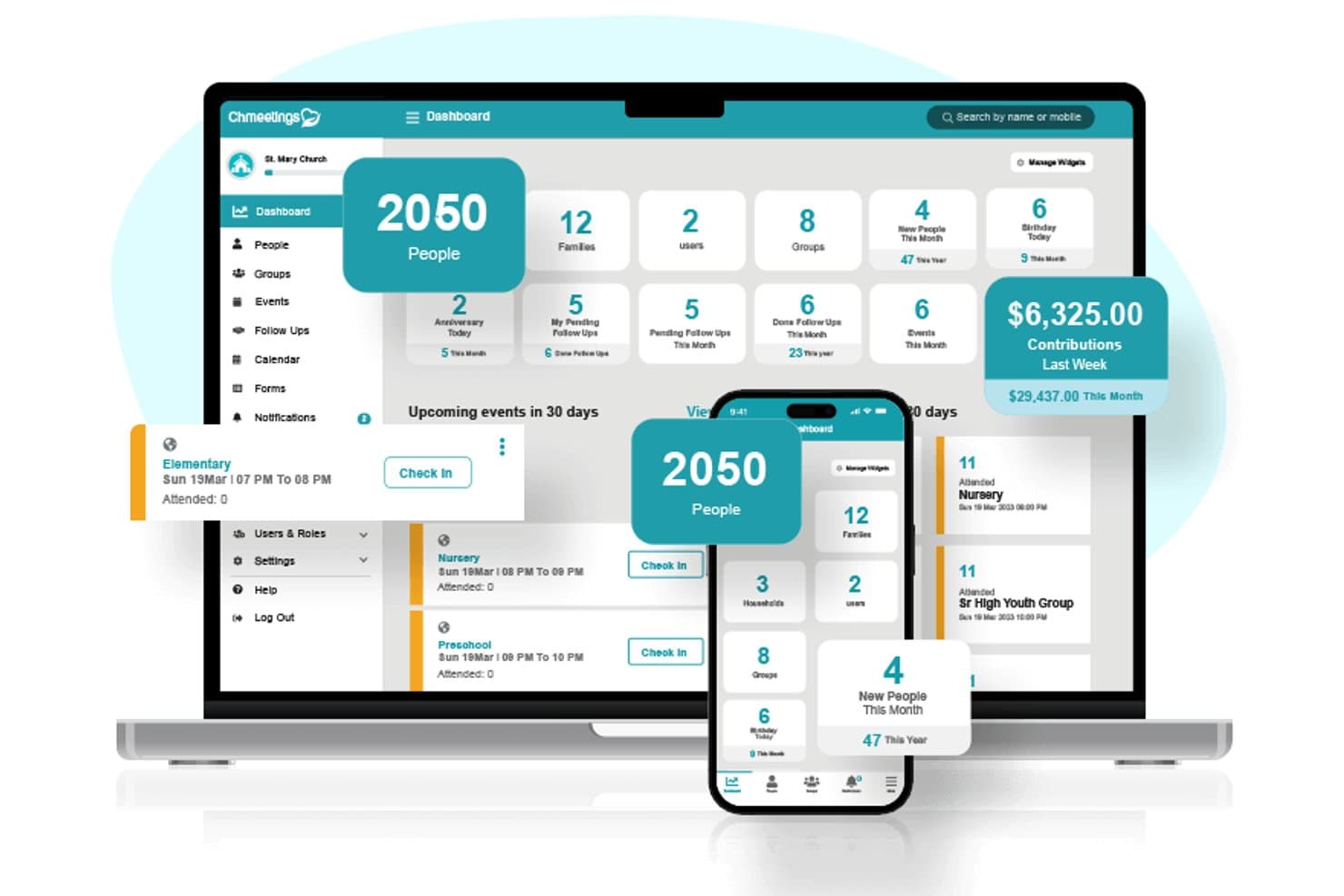
ChMeetings offers an all-in-one church management dashboard displaying member counts, contributions, events, and follow-ups across desktop and mobile devices. ChMeetings is a church management platform that combines membership tracking, online giving, volunteer scheduling, attendance and child check-in, congregational communication, worship planning, and built-in accounting in one system.
Who Is ChMeetings Best For?
ChMeetings is a strong fit for small to mid-sized churches that need a full-featured management platform without the cost or complexity of enterprise-tier software.
Why I Picked ChMeetings
ChMeetings earns its spot on my shortlist because switching church management platforms is notoriously painful, and free data migration changes that entirely. I picked it because ChMeetings migrates people records, giving history, groups, attendance, and accounting data from any source, typically within 3 to 10 business days. That means your church doesn't lose years of contribution records or membership history when making the switch.
ChMeetings Key Features
- Custom fields and role-based permissions: Tailor member profiles and control user access with customizable fields and detailed permissions for leaders, staff, and volunteers.
- Worship planning module: Plan services with song libraries, service templates, and team assignments in one integrated space.
- Integrated accounting features: Track church finances, budgets, bank reconciliation, and generate financial reports within the same platform.
- Diocese and multi-campus support: Manage multiple sites, campuses, or parish groupings within a unified dashboard.
ChMeetings Integrations
ChMeetings offers native integrations with Stripe, PayPal, and Twilio, Zapier, Mailchimp, and more, and provides an API for custom integrations.
Pros and Cons
Pros:
- Secure child check-in with printed labels
- Built-in accounting reduces need for separate software
- Free data migration and onboarding included
Cons:
- Reporting tools lack advanced customization options
- Mobile app feels limited compared to competitors
Learn more about ChMeetings: Best for user-friendly design
- 30-day free trial
- From $19/month (billed annually)
Visit WebsiteCustomer Rating:4.8/5
Gracely simplifies members, events, and contribution management. Gracely is a church management software built for churches seeking a simple, user-friendly way to manage members, events, contributions, and communications. It helps churches of all sizes streamline administrative tasks while keeping members engaged and informed.
Why I picked Gracely: Gracely stands out for its ease of use, making it accessible to all team members, including volunteers who may not be tech-savvy. It provides a member portal where congregants can update profiles, view giving history, and stay connected. Event management and contribution tracking are simplified, reducing administrative work and freeing staff to focus on ministry. Its design prioritizes clarity and simplicity without sacrificing essential church management functionality.
Standout features & integrations:
Features Gracely offers a personalized member portal that allows congregants to update their profiles, register for events, and view their giving history. Financial management tools track contributions, income, and expenses, making budgeting and reporting easier. Event management features help schedule activities, manage registrations, and communicate with attendees efficiently.
Integrations include QuickBooks, Mailchimp, Google Calendar, Zoom, Stripe, PayPal, Planning Center, FellowshipOne, Rock RMS, and Elvanto.
Pros and Cons
Pros:
- Affordable compared to competitors
- Quick data modifications
- Easy to use for all staff
Cons:
- Some users may need initial training
- Limited advanced features
Learn more about Gracely:

Tithely supports online giving, donations, and member engagement. Tithe.ly is a church management platform that caters to churches of all sizes, with a strong emphasis on online giving and donation management. It helps churches manage contributions, member engagement, and communication effectively.
Why I picked Tithe.ly: It's ideal for online giving, providing tools like mobile giving and text-to-give that simplify the donation process. You can manage recurring donations and track giving patterns to understand your congregation's generosity. Tithe.ly also offers a customizable giving form that integrates with your church's website. Its focus on making giving easy and accessible sets it apart from other church management solutions.
Standout features & integrations:
Features include a church app that keeps your community connected and engaged. The event management tool allows you to organize and promote church activities efficiently. You can also use the accounting feature to manage church finances and budgets.
Integrations include QuickBooks, Mailchimp, Planning Center, Elvanto, CCB, Breeze, Rock RMS, Pushpay, FellowshipOne, and Google Calendar.
Pros and Cons
Pros:
- Detailed donation tracking
- Mobile giving options and text-to-give functionality
- Easy online donation setup
Cons:
- Occasional app glitches
- Limited reporting capabilities
 Best for group management
- 30-day free trial available
- From $37/month
Visit WebsiteCustomer Rating:4.7/5
Churchteams helps manage church groups, events, and member engagement. Churchteams is a church management and organization platform built to help churches coordinate people, groups, events, and communication in one place. It’s designed for churches that rely on small groups, volunteers, and regular events and need a simple way to stay organized without juggling multiple tools.
Why I picked Churchteams: Churchteams excels at managing the relational side of church life. It makes it easy to organize small groups, track attendance, and see who is engaged—and who may need follow-up. Automated communication tools help leaders quickly notify members about schedule changes, events, or next steps without manual outreach. Its check-in system simplifies attendance tracking for services, kids’ programs, classes, and events, giving church staff and leaders a clear picture of participation and involvement.
Standout features & integrations:
Features include group and volunteer management, attendance check-ins, automated workflows for follow-ups, and text-to-church functionality that lets members engage via SMS. Volunteer scheduling tools help assign roles and track participation across ministries.
Integrations include QuickBooks, Mailchimp, Planning Center, Zoom, Google Calendar, WorshipPlanning, PayPal, Stripe, FellowshipOne, and Rock RMS.
Pros and Cons
Pros:
- Text-to-church interaction features
- Easy attendance check-ins
- Effective group communication tools
Cons:
- Learning curve for volunteers/new users unfamiliar with church software
- Pricing can add up with multiple add-ons or larger congregations
Learn more about Churchteams: Best for small churches
- 30-day free trial + free demo available
- From $8/month (billed annually)

ChurchTrac simplifies member, event, and giving management. ChurchTrac is a church management software designed for small to medium-sized churches. It focuses on membership management, event planning, and financial tracking, providing essential tools for church administration.
Why I picked ChurchTrac: It's great for small churches due to its affordability and user-friendly design. ChurchTrac offers features like member directories and online giving, which are a huge asset for smaller congregations. The software includes worship planning tools and automated administrative tasks that simplify daily operations. Its accessibility and comprehensive support make it a practical choice for churches with limited resources.
Standout features & integrations:
Features include member management, where you can easily track and update member information. The event planning tool helps coordinate church activities, ensuring everything runs smoothly. Financial tracking allows you to manage donations and budget with ease.
Integrations include QuickBooks, Mailchimp, Zoom, Google Calendar, Stripe, PayPal, Planning Center, Rock RMS, FellowshipOne, and Faithlife.
Pros and Cons
Pros:
- Accessible for non-tech users
- Includes worship planning tools
- Affordable for small budgets
Cons:
- May lack advanced features for larger churches
- Limited customization options
Learn more about ChurchTrac: Best for event management
- Free plan + 30-day free trial available
- From $15/20 members/month

Planning Center manages church services, volunteers, and events Planning Center is a church management software tailored for churches of all sizes, focusing on event planning and coordination. It helps teams manage services, schedule volunteers, and organize church activities effectively.
Why I picked Planning Center: It's ideal for event management, offering features like service planning and volunteer scheduling. Planning Center provides tools for creating detailed service outlines and assigning roles to volunteers, making event coordination a breeze. The software's flexibility allows you to adapt it to various church events, ensuring everything runs smoothly. Its focus on event planning helps your team stay organized and efficient.
Standout features & integrations:
Features include a mobile app that lets you access planning tools on the go. The check-in feature helps manage attendance and ensures child safety during events. You can also track donations and manage church finances through the giving module.
Integrations include Mailchimp, QuickBooks, Zoom, Google Calendar, Stripe, PayPal, ProPresenter, Rock RMS, Slack, and WorshipPlanning.
Pros and Cons
Pros:
- Mobile app accessibility
- Detailed volunteer management
- Flexible event customization options
Cons:
- Modular pricing can add up quickly
- May not be as beginner-friendly as other software options
Learn more about Planning Center: Best for member records
- Free demo available
- From $$73.32/month (billed annually)

Servant Keeper helps manage member data, communication, and donations. Servant Keeper is a church management software designed to efficiently handle member records and church data. It serves churches of all sizes, focusing on database management, communication, and donation tracking.
Why I picked Servant Keeper: It's excellent for managing member records, offering detailed profiles and customizable fields. You can track attendance, contributions, and personal information, making it easier to serve your congregation. The software's reporting features provide insights into member engagement and church activities. Its focus on detailed data management helps you maintain accurate and organized records.
Standout features & integrations:
Features include an easy-to-use donation tracking system that simplifies financial management. The communication tools let you send emails and texts directly to your congregation. You can also customize reports to fit your church's specific needs.
Integrations include QuickBooks, Mailchimp, Constant Contact, Vanco, PayPal, Google Calendar, Planning Center, Zoom, Slack, and WorshipPlanning.
Pros and Cons
Pros:
- Strong communication features
- Customizable database fields
- Detailed member profiles
Cons:
- Less suited to Mac users
- Limited modern features compared to some other software tools
Learn more about Servant Keeper: Best for mobile access
- Free demo available
- From $6,000 (billed annually)

TouchPoint boosts church engagement, events, and admin via mobile. TouchPoint is a church management software tailored for churches seeking to enhance member engagement and administrative efficiency through mobile access. It works well for churches of all sizes, offering tools for communication, event management, and member tracking.
Why I picked TouchPoint: It excels in mobile access, providing a mobile app that lets you manage church operations on the go. You can communicate with your congregation and manage events directly from your smartphone. The app makes it easy to track attendance and engage with members wherever you are. Its focus on mobile functionality allows you to stay connected and efficient outside the office.
Standout features & integrations:
Features include a robust reporting system that gives insights into member engagement and church activities. The volunteer management tool helps you organize and assign tasks effectively. You can also customize forms to collect information from members and visitors.
Integrations include QuickBooks, Mailchimp, Vanco, Google Calendar, Zoom, Planning Center, FellowshipOne, Pushpay, Stripe, and Constant Contact.
Pros and Cons
Pros:
- Volunteer management for scheduling, tracking, and task assignments
- Detailed reporting and dashboards for engagement and attendance insights
- Mobile app lets you manage church operations anywhere
Cons:
- Significant learning curve and training to master full functionalities
- Customizing emails with images can be tricky, and layouts don’t always adjust automatically
Learn more about TouchPoint Software:

FellowshipOne supports large churches with admin and engagement. FellowshipOne is a church management software designed to support large congregations by offering tools for administration, communication, and member engagement. It helps churches manage their operations efficiently with features tailored for extensive church communities.
Why I picked FellowshipOne: It's particularly suited for large congregations, offering scalable solutions that accommodate growth and complexity. You can manage extensive member directories and track attendance with ease. The software's reporting tools provide insights into church activities and member participation. Its focus on scalability and holistic management makes it ideal for larger church environments.
Standout features & integrations:
Features include an event management system that helps you organize and schedule church activities with ease. The communication module allows you to send targeted messages to your congregation. You can also use the volunteer management feature to coordinate and assign tasks efficiently.
Integrations include QuickBooks, Mailchimp, Planning Center, Vanco, Rock RMS, Pushpay, Church Community Builder, Zoom, Google Calendar, and Elvanto.
Pros and Cons
Pros:
- Strong event scheduling tools
- Effective volunteer management
- Scalable for large congregations
Cons:
- Update to the user Interface is welcomed
- Can be too complex for church administrators
Learn more about FellowshipOne: Best for accounting features
- Free trial + free demo available
- From $19/month

Church Windows manages church finances, donations, and memberships. Church Windows is a church management software that primarily serves churches focused on financial and membership management. It offers tools for accounting, donations, and member tracking that cater to churches of varying sizes.
Why I picked Church Windows: It's particularly useful for accounting features, providing detailed financial management tools. You can manage payroll, track expenses, and handle donations efficiently. The software's reporting features offer insights into financial health and member contributions. Its focus on financial management makes it a strong choice for churches needing robust accounting capabilities.
Standout features & integrations:
Features include a membership management module that helps you track and update member records. The software also offers event scheduling tools to organize church activities smoothly. You can generate detailed reports to analyze various aspects of church operations.
Integrations include QuickBooks, Vanco, PayPal, Stripe, Mailchimp, Planning Center, Constant Contact, Zoom, Google Calendar, and WorshipPlanning.
Pros and Cons
Pros:
- Flexible donation tracking
- Detailed payroll processing
- Strong financial management tools
Cons:
- Primarily a desktop (Windows) solution
- Modular pricing can add up
Learn more about Church Windows:
Other Church Organization Software
Here are some additional church organization software options that didn’t make it onto my shortlist, but are still worth checking out:
- 11One Church SoftwareBest for volunteer scheduling
- 12Join ItBest for membership tracking
- 13AplosBest for fund accounting
- 14ElvantoBest for service planning
How I Evaluate Church Organization Software
I split my evaluation into baseline criteria—like member databases, online giving, and child check-in—and the differentiators that separate the best tools from the rest.
Core Functionality (Table Stakes For This List)
When I'm selecting tools for my list, I rank each one on a scale from 0 (does not offer the functionality) to 5 (excels in this area) for each core functionality listed below. Then, I calculate the tool's total score into a percentage. Each tool needs to achieve a minimum total score of 65% to be considered for inclusion.
- Membership & Household Database: I look for detailed member profiles that link families into households, track milestones like baptisms, and store pastoral care notes.
- Online Giving & Contribution Tracking: Each tool should support recurring tithes, pledge campaigns, and automated year-end contribution statements for donors.
- Groups & Volunteer Management: I evaluate how each platform handles small group rosters, ministry team scheduling, and volunteer role assignments with shift reminders.
- Attendance & Child Check-In: Secure child check-in with printed name tags and allergy alerts matters as much as tracking Sunday service headcounts week over week.
- Congregational Communication Tools: I check whether the platform lets you send targeted emails, texts, or push notifications to specific groups like youth parents or worship team members.
- Event & Service Planning: From VBS registration to weekly worship team scheduling, I look at how each tool manages event signups, calendars, and service run-of-show planning.
Once I have a list of tools that meet this criteria, I consider what sets each platform apart.
Differentiating Factors (What Sets Vendors Apart)
Here's how I compare and contrast different vendors:
Standout Features
Workflow automation is a big differentiator. I look at whether a platform can trigger a follow-up sequence when a first-time guest fills out a connection card or a new member completes a class. A branded church mobile app also matters, since it gives members one place for sermons, giving, and group signups without relying on a third-party tool. For churches with multiple locations, I evaluate how well each vendor segments data, reporting, and volunteer schedules across campuses.
Beyond Features
Pricing transparency is something I evaluate closely, since many churches run on tight budgets and need to understand exactly what they're paying per member or per transaction on giving. I also consider how well each tool fits non-technical users—volunteer coordinators and older congregants often handle check-in or group updates, so role-based permissions and simple interfaces matter. Integration support is another key factor, especially connections to tools like QuickBooks, ProPresenter, or Mailchimp that churches already rely on.
How to Choose Church Organization Software
It’s easy to get bogged down in long feature lists and complex pricing structures. To help you stay focused as you work through your unique software selection process, here’s a checklist of factors to keep in mind:
| Factor | What to Consider |
|---|---|
| FactorScalability | What to ConsiderCan the software grow with your church? Consider future needs and expansion. If your congregation doubles, will the software handle the increased data and activity? |
| FactorIntegrations | What to ConsiderDoes it work with your existing systems? Check for compatibility with tools you already use, like accounting software or communication platforms. |
| FactorCustomizability | What to ConsiderCan you tailor the software to your workflows? Look for options to adjust settings, fields, and reports to match your church's unique processes. |
| FactorEase of use | What to ConsiderWill your team find it easy to use? Evaluate the interface for intuitiveness and simplicity to ensure quick adoption by staff and volunteers. |
| FactorImplementation and onboarding | What to ConsiderHow smooth is the transition? Consider the time and resources required for setup, training, and support during the initial phase. |
| FactorCost | What to ConsiderIs the pricing clear and within budget? Compare costs against features included and watch for hidden fees or charges for additional modules. |
| FactorSecurity safeguards | What to ConsiderHow does it protect your data? Review data encryption, user access controls, and privacy policies to ensure your congregation's information is secure. |
| FactorSupport availability | What to ConsiderWhat support options are available? Check for 24/7 support, live chat, or phone assistance to resolve issues quickly when they arise. |
What Is Church Organization Software?
Church organization software is a tool designed to help churches manage their administrative and community activities efficiently. Church leaders, administrators, and volunteers typically use these tools to improve communication, event planning, and resource management. Member management, donation tracking, and event scheduling features help with organizing church operations and enhancing community engagement. Overall, these tools simplify management tasks and support the growth and connection of church communities.
Features of Church Organization Software
When selecting church organization software, keep an eye out for the following key features:
- Member management: Tracks and organizes data for church members in a centralized church management system, helping maintain accurate records and support ongoing engagement.
- Donation tracking: Records financial gifts, including credit card donations and text giving, making it easier to manage church accounting and donor activity.
- Event scheduling: Supports planning and coordination for services and events, with built-in event registration tools to improve attendance and communication.
- Volunteer management: Organizes volunteer roles, schedules, and participation, helping churches assign responsibilities and stay coordinated.
- Communication tools: Sends emails, text messages, and notifications to keep church members informed and connected across the community.
- Mobile access: Provides cloud-based access to the CHMS from mobile devices, allowing staff and leaders to manage church operations from anywhere.
- Customizable reporting: Generates financial reports and engagement insights that help churches understand attendance, giving trends, and activity levels.
- Security safeguards: Protects sensitive church data with encryption and access controls, supporting secure handling of member and financial information.
- Integrations: Connects with tools like church directories, child check-in systems, and background checks to create an all-in-one church management system.
Benefits of Church Organization Software
Implementing church organization software provides several benefits for your team and your business. Here are a few you can look forward to:
- Improved communication: Keeps your congregation informed through emails and texts, fostering better engagement and connection within the community.
- Efficient event management: Simplifies planning and coordination of church activities, ensuring events run smoothly and are well-attended.
- Enhanced volunteer coordination: Organizes volunteer schedules and tasks, making it easier to manage participation and roles within the church.
- Accurate financial tracking: Monitors donations and expenses, helping you maintain clear and organized financial records.
- Increased accessibility: Provides mobile access to church management tools, allowing you to manage operations anytime, anywhere.
- Data security: Protects sensitive member and financial information with security safeguards, ensuring your church's data remains private and secure.
Costs and Pricing for Church Organization Software
Selecting church organization software requires an understanding of the various pricing models and plans available. Costs vary based on features, team size, add-ons, and more. The table below summarizes common plans, their average prices, and typical features included in church organization software solutions:
Plan Comparison Table for Church Organization Software
| Plan Type | Average Price | Common Features |
|---|---|---|
| Plan TypeFree Plan | Average Price$0 | Common FeaturesBasic tools for scheduling events, managing small groups, and simple internal communication.Best for individuals, new churches, or very small congregations organizing core activities. |
| Plan TypeSmall Church Plan | Average Price$5-$25/user/month | Common FeaturesExpanded scheduling, volunteer coordination, basic attendance tracking, and standard communication tools. Designed for small churches aiming to formalize internal operations and volunteer management. |
| Plan TypeMid-sized Churches | Average Price$30-$75/user/month | Common FeaturesAdvanced scheduling and workflows, mobile access for staff and volunteers, reporting dashboards, and enhanced communication across ministries.Ideal for mid-sized churches coordinating multiple teams, programs, and recurring activities. |
| Plan TypeLarge Churches | Average Price$80-$150/user/month | Common FeaturesMulti-campus management, advanced permissions and security controls, system integrations, automation at scale, and priority support.Built for large churches with complex organizational structures and high operational volume. |
Church Organization Software FAQs
Here are some answers to common questions about church organization software:
How should we migrate our legacy church records?
Before migrating legacy records, start by auditing your existing databases, spreadsheets, and paper files so you know exactly what should move. Clean obvious duplicates, outdated entries, and inconsistent formats first. Next, run a small test import into the new system to validate field mappings and permissions. Finally, schedule the full migration during a low-activity period, with clear backups and rollback plans in case anything goes wrong. Document decisions for admins.
How can tech support multi-campus church ministry?
Multi-campus churches benefit from shared databases that still respect local context. Look for software that supports separate campuses or services as distinct entities while rolling up attendance, giving, and groups into central dashboards. Robust permissions let local leaders manage their own people and events without seeing everything system-wide. Unified communication tools also help you send campus-specific messages, while maintaining consistent branding and reporting standards across the whole church network effectively.
How can churches train volunteers on new software?
Start by defining which tasks volunteers actually need to perform in the software, then design role-based training around those workflows instead of every feature. Short, hands-on sessions with real church scenarios usually beat long slide decks. Provide simple cheat sheets and short videos volunteers can revisit later. Finally, assign a few tech-savvy champions who can answer questions on Sundays and reinforce good habits over several weeks as volunteers grow confidence.
How does software handle pastoral confidentiality?
Pastoral confidentiality depends on both software design and your internal policies. Choose systems that support role-based access, encryption at rest, and secure logins like multi-factor authentication. Limit sensitive pastoral notes to specific fields and users, avoiding casual storage in general comments. Establish clear guidelines about what belongs in the system versus private conversations, and review access logs periodically so you can spot inappropriate viewing or exporting of confidential information promptly.
What’s Next:
If you're in the process of researching church organization software, connect with a SoftwareSelect advisor for free recommendations.
You fill out a form and have a quick chat where they get into the specifics of your needs. Then you'll get a shortlist of software to review. They'll even support you through the entire buying process, including price negotiations.