

Running a church comes with a long list of responsibilities—planning services, coordinating volunteers and church staff, keeping up with messages, and making sure everyone feels supported. It’s a lot to balance, and it can easily stretch your time and energy thin.
That’s why I’ve been paying close attention to tools that actually lighten the load. Some of these platforms can take over routine admin work and ministry work, organize information more clearly, and help you stay connected with your community in a more personal way.
In this guide, I’m sharing the high-quality church AI tools that stood out to me after testing different options. I’ll walk you through what each one offers, how it can help with day-to-day tasks, and the strengths and limitations to consider as you compare them.
Why Trust Our Software Recommendations
6,700+
Reviews
20
Industry experts
16+
Evaluation factors
14
Years
Our team has been testing and reviewing software since 2012. As church leaders ourselves, we know how difficult—and important—it is to choose the right software.
For this guide, we evaluated tools using hands-on testing and independent research, scoring tools using our selection criteria.
Our reviews reflect our human editorial judgment, not a sales pitch.
Church AI Tools Comparison Table
This comparison table summarizes pricing details for my top church AI tools selections:
| Tool | Best For | Trial Info | Price | ||
|---|---|---|---|---|---|
| 1 | Best for live multilingual sermon translation | Free trial available | From $150/month | Website | |
| 2 | Best for member Q&A automation | 60-day free trial available | From $99/month | Website | |
| 3 | Best for AI-based multi-channel workflows | Free demo available | Pricing upon request | Website | |
| 4 | Best for AI-driven biblical research | 30-day free trial | From $9.99/month | Website | |
| 5 | Best for smart AI data synchronization | Free demo available | Pricing upon request | Website | |
| 6 | Best for AI-assisted sermon preparation | Free trial available | From $39/month | Website | |
| 7 | Best for conversational AI | Free plan available | From $5/month | Website | |
| 8 | Best for generating sermon insights with AI | Free expert consultation available | Pricing upon request | Website | |
| 9 | Best for AI-powered church leadership insights | Free demo available | From $27/month | Website | |
| 10 | Best for integrating AI tools with your existing systems | Free plan available | From $65/month | Website |


Best Church AI Tools Reviews
Below are my detailed summaries of the best church AI tools that made it onto my shortlist. My reviews offer a detailed look at the key features, pros & cons, integrations, and ideal use cases of each tool to help you find the best one for you.
 Best for live multilingual sermon translation
- Free trial available
- From $150/month

OneAccord’s AI-powered translation app enables real-time multilingual communication for churches, helping congregations connect seamlessly across languages during services and group sessions. OneAccord is a church AI platform that provides live sermon translation, real-time audio monitoring, and browser-based congregation access for multilingual and hybrid worship environments.
Who Is OneAccord Best For?
Church leaders and tech teams who need AI-powered tools for multilingual worship services and accessible online congregation participation.
Why I Picked OneAccord
I picked OneAccord as one of the best because I can deliver live multilingual sermon translation to my congregation without extra hardware or complex setup. My team uses its AI-powered translation to reach people in their native languages during worship. I like that listeners can access real-time translations directly from their own devices, making it easy to include everyone in the service.
OneAccord Key Features
- Real-time audio quality monitoring: Track and manage audio clarity during live services from a central dashboard.
- Browser-based congregation access: Attendees join and listen to translations using any web browser on their devices.
- Custom branding options: Add your church’s logo and colors to the listening interface for a consistent experience.
OneAccord Integrations
Native integrations are not clearly documented. OneAccord provides an API for custom integrations.
Pros and Cons
Pros:
- Analytics dashboard tracks listener engagement
- Browser-based access supports multilingual congregation participation
- Custom branding maintains consistent church experience
Cons:
- No built-in video streaming support
- Limited documentation for advanced setup
Learn more about OneAccord:
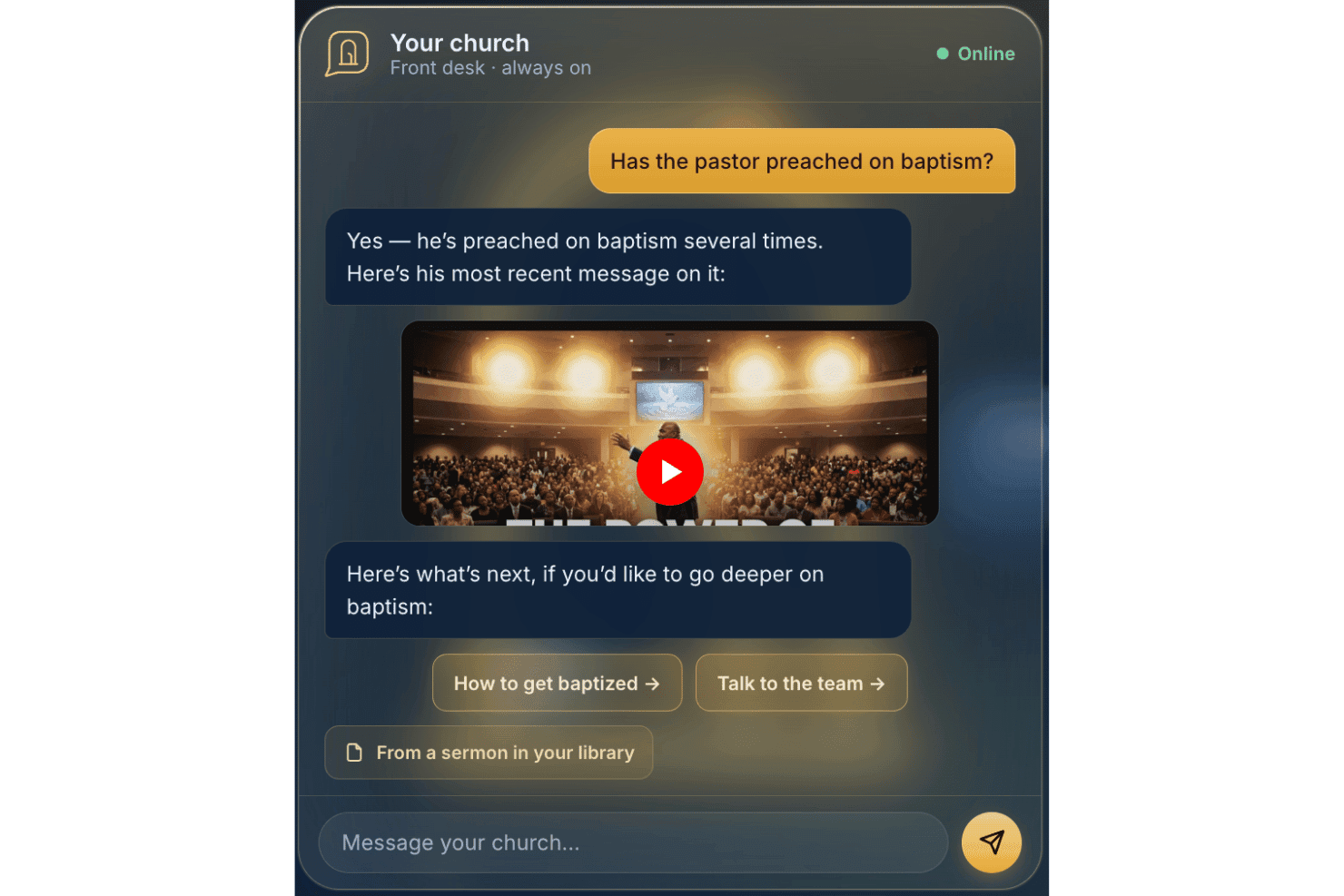
AskMyChurch offers a 24/7 AI-powered church answering service. AskMyChurch is a church AI assistant that answers member questions from your own published content, indexes your pastor's sermons, and routes sensitive conversations to your pastoral care team.
Who Is AskMyChurch Best For?
It's a strong fit for churches of any size that field a high volume of repeated member questions but don't have staff available to answer them around the clock.
Why I Picked AskMyChurch
I picked AskMyChurch because it answers only from your church's own published content, then runs a second-pass grounding check before sending any response. If it can't find a supported answer, it says so rather than guessing. I also like Canon, which indexes your pastor's sermons and links each answer to the exact minute it was said, so members get a grounded, citable response rooted in your church's actual teaching.
AskMyChurch Key Features
- Crisis gate: Detects distress signals and routes them to the 988 Suicide & Crisis Lifeline and your care team before any AI response.
- Themes reporting: Tracks anonymous question topics and surfaces trending member concerns each week.
- Plain-English topic controls: Lets you set boundaries for topics the AI should hand off to staff using simple dashboard commands.
- Multilingual support: Offers member Q&A automation in both English and Spanish out of the box.
AskMyChurch Integrations
Native integrations are not publicly documented. Content is ingested from your public website and sermon media, but there are no advertised connections to other church management or communication platforms.
Pros and Cons
Pros:
- Supports member Q&A in English and Spanish
- Routes sensitive topics to pastoral staff
- Answers only from your church’s content
Cons:
- Mobile app and SMS support not available
- Does not connect with church management software
Learn more about AskMyChurch: Best for AI-based multi-channel workflows
- Free demo available
- Pricing upon request
Visit WebsiteCustomer Rating:4.5/5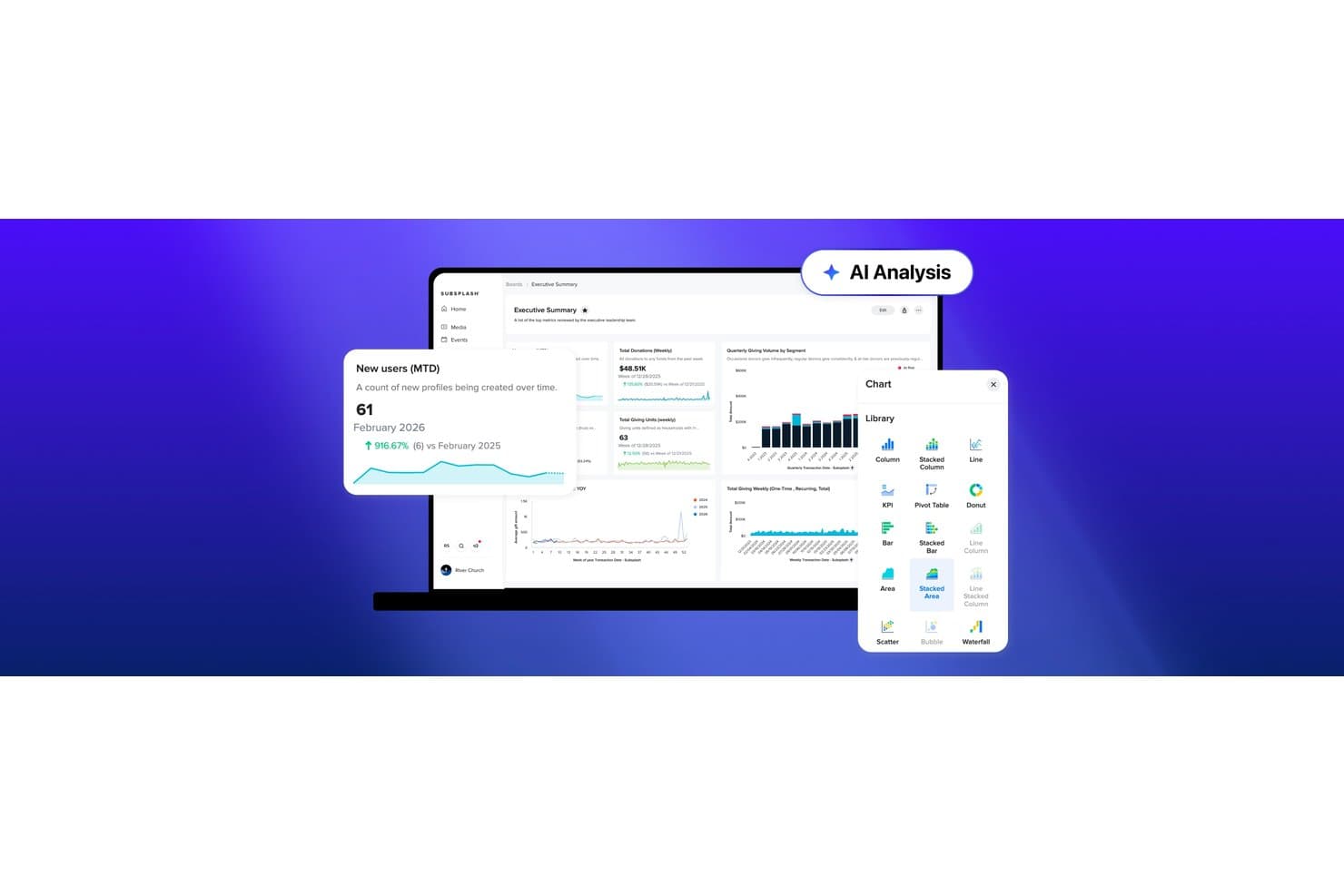
Subsplash offers an AI Analysis feature with an analytics dashboard displaying new user metrics, donation totals, giving trends, and a chart library with multiple visualization options. Subsplash is an all-in-one church platform that combines mobile apps, giving, live streaming, church management, and AI tools for sermon repurposing, workflow automation, and congregant engagement.
Who Is Subsplash Best For?
Subsplash suits growing churches that need one platform to coordinate communications, media, giving, and ministry operations across staff, volunteers, and congregation members.
Why I Picked Subsplash
Subsplash earns its spot on my shortlist because of how its Workflows feature uses AI to generate full ministry processes in seconds. I can describe a volunteer onboarding process or a new visitor follow-up sequence, and Subsplash drafts the entire Kanban board, checklists, and automated emails. What I especially like is that those emails fire automatically the moment a card moves to a new stage, reaching people across app, email, and SMS without any manual intervention.
Subsplash Key Features
- Pulpit AI media repurposing: Instantly creates sermon clips, discipleship materials, and social posts from uploaded sermons.
- Centralized people database: Stores all congregant, donor, and volunteer records in one integrated platform.
- Trends AI dashboards: Generates live data visualizations for giving, attendance, and group engagement.
- Multi-channel event publishing: Schedules and distributes events across website, app, and messaging channels simultaneously.
Subsplash Integrations
Subsplash offers native integrations with Planning Center, Zapier, Breeze, MortarStone, and more, and provides an API for custom integrations.
Pros and Cons
Pros:
- Trends dashboards surface giving and attendance data
- Pulpit AI converts sermons into social content
- AI Workflows generate full ministry processes instantly
Cons:
- No scripture-aware doctrinal guardrails built in
- AI toolset is newer and still maturing
 Best for AI-driven biblical research
- 30-day free trial
- From $9.99/month
Visit WebsiteCustomer Rating:4.5/5
Logos Bible Software enriches scripture study and improves sermon preparation. Logos Bible Software is designed for pastors, theologians, and scholars who need dedicated tools for biblical research and study. It offers an extensive library and AI-driven search capabilities that enhance scripture study and sermon preparation.
Why I picked Logos Bible Software: It provides advanced biblical research tools with features like AI-powered search and scripture analysis. You can access a vast library of resources to deepen your understanding of the Bible. The software also offers tools for sermon preparation, helping you craft insightful messages. These features make it a helpful tool for anyone serious about biblical study.
Standout Features & Integrations:
Features include an extensive digital library, sermon preparation tools, and a customizable study environment. These features help you explore biblical texts in depth. The software's intuitive interface makes it easy to navigate and utilize its resources effectively.
Integrations include BibleWorks, Evernote, Microsoft Word, Dropbox, OneDrive, Kindle, Zotero, Scrivener, Google Drive, and Microsoft PowerPoint.
Pros and Cons
Pros:
- Supports detailed scripture study
- Advanced AI-powered search capabilities
- Access to extensive biblical resources
Cons:
- Requires significant storage space
- Learning curve for beginners
Learn more about Logos Bible Software: Best for smart AI data synchronization
- Free demo available
- Pricing upon request

Church Community Builder organizes members, events, and group information. Church Community Builder is an AI cloud-based church management system that helps you organize and share key information about your congregation. It’s designed to help your team keep membership data, events, and group details in one place and ensure updates flow where you need them.
Why I picked Church Community Builder: Church Community Builder syncs member details, so updates people make show up in your records right away, and it sends event and group updates to the channels your congregation already uses. It creates pages for events and groups automatically, keeping information consistent across locations. Members can update their own contact details, which reduces manual data cleanup.
Standout Features & Integrations:
Features include automatic syncing of member information so your records stay current, event data flowing from your management system straight to your website or app, and group search with filters and map view so your people can find the right community. These options help you keep your congregation informed and involved.
Integrations include The Church Co website builder and the Members Portal that syncs with Church Community Builder, events pages through The Church Co integration, and group pages via The Church Co integration.
Pros and Cons
Pros:
- Group search with map filters
- Automatic event page creation
- Easy syncing of member updates
Cons:
- The interface can feel busy
- Can take time to learn all tools
Learn more about Church Community Builder:

Pulpit AI supports sermon writing and strengthens research and organization. Pulpit AI is tailored for pastors and church leaders who seek to enhance their sermon preparation process. It offers AI-driven tools to assist with sermon writing, research, and organization, making it a valuable asset for sermon development.
Why I picked Pulpit AI: It provides sermon preparation support with features like AI-assisted sermon outlines and research tools. You can quickly generate sermon drafts and access relevant biblical resources.
Standout Features & Integrations:
Features include AI-assisted sermon outlines, research tools, and sermon organization capabilities. These features help you craft well-structured sermons efficiently. The platform's intuitive design ensures that you can focus on delivering impactful messages. In addition, you can repurpose your sermons to be shared on social media or your church’s website as video clips, discussion questions, devotionals, blogs, and more.
Integrations include Subsplash and CrowdVibe.
Pros and Cons
Pros:
- Extensive discipleship-oriented capabilities
- Access to relevant biblical resources
- AI-assisted sermon outline creation
Cons:
- Requires time to learn features
- Limited to sermon-related tasks
Learn more about Pulpit AI:

ChatGPT powers conversational AI and enables interactive chat experiences. Chat GPT is an AI tool designed for developers and businesses seeking to implement conversational AI solutions. It offers natural language processing capabilities that facilitate interactive and intelligent chat experiences for users.
Why I picked Chat GPT: It provides conversational AI with features like context-aware responses and language generation. You can create chatbots that understand and respond to user queries in a human-like manner. The tool's ability to handle complex conversations makes it a valuable resource for customer service and engagement. These functionalities make it ideal for businesses looking to enhance their communication strategies.
Standout Features & Integrations:
Features include natural language processing, context-aware responses, and language generation capabilities. These features help you create engaging and intelligent chat experiences. The platform's user-friendly interface allows you to implement AI solutions with ease.
Integrations include Slack, Microsoft Teams, Zoom, Facebook Messenger, WhatsApp, Google Assistant, Amazon Alexa, Zendesk, Salesforce, and Shopify.
Pros and Cons
Pros:
- Enhances communication strategies
- Supports natural language processing
- Provides context-aware conversational responses
Cons:
- Limited to conversational tasks
- Does “Hallucinate” requiring manual fact-checking
Learn more about Chat GPT: Best for generating sermon insights with AI
- Free expert consultation available
- Pricing upon request

AI for Churches automates ministry tasks and supports sermon preparation. AI for Churches is designed for church leaders looking to integrate AI into their ministries. It helps automate routine tasks and provides insights for sermon preparation and congregation engagement.
Why I picked AI for Churches: It excels in sermon analysis, offering features like SermonSpark, which generates sermon ideas and outlines based on bible verses. The AI Tech Coach feature guides your team on how to use generative AI effectively. AI for Churches also provides clear AI strategies, helping you implement AI without compromising your church's values. These offerings make it a strong choice for enhancing sermon-related tasks.
Standout Features & Integrations:
Features include sermon idea generation, AI coaching for staff, and tools for congregation engagement. These features help you focus more on pastoral care and ministry while AI tools save time by handling routine tasks. The platform's AI guidance ensures your team uses technology confidently.
Integrations are not listed at this time.
Pros and Cons
Pros:
- Enhances congregation engagement
- AI-driven sermon preparation tools
- Custom AI strategies for churches
Cons:
- Requires initial setup and learning
- Limited to AI-specific functions
Learn more about AI for Churches: Best for AI-powered church leadership insights
- Free demo available
- From $27/month

AI for Church Leaders offers leadership insights and strengthens community engagement. AI for Church Leaders is tailored for church administrators and leaders seeking AI-driven insights to enhance their leadership roles. It focuses on providing analytical tools and resources to improve decision-making and community engagement.
Why I picked AI for Church Leaders: It offers leadership insights through features like AI-driven analytics and dashboards. These tools help you understand congregation trends and improve engagement strategies. The platform also includes coaching resources to guide you in implementing AI effectively. These insights and tools make it ideal for leaders aiming to enhance their strategic decision-making.
Standout Features & Integrations:
Features include AI-driven analytics, leadership coaching resources, and community engagement tools. These features help you make informed decisions and boost your leadership effectiveness. The platform’s coaching resources ensure you maximize the benefits of AI.
Integrations are not listed at this time.
Pros and Cons
Pros:
- Includes coaching for AI implementation
- Offers AI-driven analytics tools
- Provides detailed leadership insights
Cons:
- Limited customization options
- May require time to learn features
Learn more about AI for Church Leaders: Best for integrating AI tools with your existing systems
- Free plan available
- From $65/month

Church.tech supports church operations and improves communication with tech tools. Church.tech is a platform tailored for churches seeking to integrate technology into their operations. It offers tools for managing church activities, enhancing communication, and improving overall efficiency through AI-driven solutions.
Why I picked Church.tech: It excels in tech integration, offering AI features like automated scheduling and communication tools that sync with your existing systems. The platform provides insights into member engagement, helping you tailor your outreach efforts. Its tech integration capabilities ensure that your church's digital ecosystem is cohesive. These features make it a great choice for churches looking to merge technology with ministry.
Standout Features & Integrations:
Features include automated scheduling, communication tools, and member engagement insights. These features help you manage church activities efficiently. The platform's ability to sync with existing systems enhances its utility.
Integrations include Planning Center, Tithe.ly, Breeze, Slack, Google Calendar, Microsoft Outlook, Zoom, Mailchimp, QuickBooks, and Microsoft Teams.
Pros and Cons
Pros:
- Useful member engagement insights
- Automated scheduling features
- Strong tech integration capabilities
Cons:
- Limited customization options
- May require technical expertise
Learn more about Church.tech:
Other Church AI Tools
Here are some additional church AI tools options that didn’t make it onto my shortlist, but are still worth checking out:
- 11Pastors.aiBest for turning sermons into AI-generated study and shareable content
- 12Sermon ShotsBest for AI-generated sermon illustrations
- 13Dall-EBest for polished church visuals using AI
- 14Church AI NowBest for AI assistants for church communication and admin
- 15Doctrinally AIBest for syncing entire YouTube sermon libraries
- 16Claude CodeBest for AI coding assistance
- 17LovableBest for creative AI-generated design tasks
- 18WisprFlowBest for AI-driven communication
- 19AI Church ToolsBest for church-specific AI solutions
- 20Canva Magic AIBest for AI-enhanced design
How I Evaluate Church AI Tools
To make this list, a tool has to do more than slap an AI label on basic church management—it needs to deliver real, usable AI value for tasks like sermon prep, congregant follow-ups, or worship planning. I split my evaluation into two layers: the core functionality a tool must have to qualify, and the differentiating factors that separate good options from great ones.
Core Functionality (Table Stakes For This List)
When I'm selecting tools for my list, I rank each one on a scale from 0 (does not offer the functionality) to 5 (excels in this area) for each core functionality listed below. Then, I calculate the tool's total score into a percentage. Each tool needs to achieve a minimum total score of 55% to be considered for inclusion.
- AI Sermon & Content Creation: I check whether the tool can draft sermon outlines, generate discussion guides, or repurpose a Sunday message into devotionals and social posts.
- Intelligent Member Engagement: Automated follow-ups matter here—things like first-time visitor messages, birthday outreach, or re-engagement prompts for inactive members.
- Ministry-Specific AI Assistance: I look for AI that understands scripture context and pastoral tone, not generic chatbot responses stripped of theological awareness.
- AI-Driven Data & Insights: Tools should surface trends in giving, attendance, or engagement—like flagging a drop in small group participation before leaders notice it.
- Worship & Service Planning AI: I evaluate whether the AI helps build service orders, suggest songs based on sermon themes, or auto-generate presentation slides.
- Administrative Automation: Scheduling volunteers, sending donation receipts, coordinating event logistics—I look for AI that handles these recurring tasks without constant manual input.
Once I have a list of tools that meet the criteria, I consider what sets each platform apart.
Differentiating Factors (What Sets Vendors Apart)
Here's how I compare and contrast different vendors:
Standout Features
Scripture-aware guardrails are a big one—I look for AI that flags theologically questionable outputs before they reach a congregation. Voice and video AI also stands out, especially tools that auto-clip sermon highlights into short-form videos for social media. Prayer and care tracking is another differentiator I evaluate, where AI routes prayer requests to the right ministry team and prompts pastoral follow-ups so nobody falls through the cracks.
Beyond Features
Data privacy matters deeply here—congregants share sensitive prayer requests and giving information, so I check whether a vendor is transparent about how that data interacts with AI models. Integration with existing church tech stacks is another priority. A tool that syncs with platforms like Planning Center or ProPresenter saves hours of duplicate work each week. I also evaluate pricing structures, since most churches run on tight budgets and need plans that scale from a small plant to a multi-site ministry without surprise costs.
How to Choose Church AI Tools
It’s easy to get bogged down in long feature lists and complex pricing structures. To help you stay focused as you work through your unique software selection process, here’s a checklist of factors to keep in mind:
| Factor | What to Consider |
|---|---|
| FactorScalability | What to ConsiderCan the tool grow with your church? Consider future expansion and whether the tool can handle increased data and users without performance issues. |
| FactorIntegrations | What to ConsiderDoes it connect with your current systems? Check compatibility with existing software like scheduling and communication platforms to avoid workflow disruptions |
| FactorCustomizability | What to ConsiderCan you tailor it to your needs? Look for options to adjust settings and workflows to match your church's unique processes without needing technical skills. |
| FactorEase of use | What to ConsiderIs it user-friendly for all team members? Evaluate if non-tech staff can easily navigate the tool and complete tasks without extensive training. |
| FactorImplementation and Onboarding | What to ConsiderHow quickly can you start using it? Consider the time and resources needed for setup, including training and available support for a smooth transition. |
| FactorCost | What to ConsiderDoes it fit your budget? Compare pricing plans and consider total costs, including any hidden fees or charges for additional features or support. |
| FactorSecurity Safeguards | What to ConsiderHow does it protect your data? Ensure the tool complies with data protection regulations and offers encryption, backups, and user access controls. |
What Are Church AI Tools?
Church AI tools are software solutions that leverage artificial intelligence to assist churches in managing their operations and engaging with their communities. These tools are commonly used by church leaders, administrators, and volunteers to automate tasks, improve communication, and enhance decision-making.
Features like sermon preparation, congregation engagement, and donation management help with administrative efficiency and community involvement. Overall, these tools provide churches with the means to operate more effectively and connect better with their members.
Features
When selecting church AI tools, keep an eye out for the following key features:
- Sermon preparation assistance: Provides AI-driven outlines and research tools to help pastors craft meaningful sermons efficiently.
- Congregation engagement analytics: Offers insights into member behavior and preferences to improve community involvement and outreach efforts.
- Donation tracking: Utilizes AI to monitor and analyze giving patterns, helping churches manage their finances effectively.
- Automated communication: Sends personalized messages and updates to members through various channels, enhancing communication.
- Customizable chatbots: Facilitates real-time interaction with visitors and members, providing immediate support and information.
- Event scheduling tools: Automates the planning and management of church events, ensuring efficient use of resources and time.
- Bible study resources: Provides AI-assisted tools for deeper scripture analysis and study, supporting educational and spiritual growth.
- Language processing capabilities: Enables understanding and generation of human-like text, improving interactions and content creation.
- Volunteer coordination: Helps manage and organize volunteer efforts, ensuring that tasks are assigned and tracked efficiently.
Benefits
Implementing church AI tools provides several benefits for your team and your business. Here are a few you can look forward to:
- Improved efficiency: Automates routine tasks like scheduling and communication, allowing your team to focus on more important activities.
- Enhanced engagement: Uses analytics to understand member preferences, helping you tailor your outreach efforts for better community connection.
- Better financial management: Tracks and analyzes donation patterns with AI, ensuring effective financial oversight and planning.
- Streamlined sermon preparation: Provides AI-driven tools to assist with sermon crafting, saving pastors time and effort in their message creation.
- Real-time support: Offers customizable chatbots that provide immediate assistance to members and visitors, improving satisfaction.
- Informed decision-making: Delivers data-driven insights into church operations and member behavior, guiding strategic planning and actions.
- Resource optimization: Helps coordinate events and volunteer efforts, ensuring resources are used effectively and efficiently.
Costs and Pricing
Selecting church AI tools requires an understanding of the various pricing models and plans available. Costs vary based on features, team size, add-ons, and more. The table below summarizes common plans, their average prices, and typical features included in church AI tools solutions:
Plan Comparison Table for Church AI Tools
| Plan Type | Average Price | Common Features |
|---|---|---|
| Plan TypeFree Plan | Average Price$0 | Common FeaturesBasic sermon preparation, limited communication tools, and minimal analytics. |
| Plan TypePersonal Plan | Average Price$5-$25/user/month | Common FeaturesEnhanced sermon tools, basic donation tracking, and entry-level engagement features. |
| Plan TypeBusiness Plan | Average Price$30-$75/user/month | Common FeaturesAdvanced analytics, full communication suite, and comprehensive donation management. |
| Plan TypeEnterprise Plan | Average Price$100-$200/user/month | Common FeaturesCustom integrations, personalized support, and full suite of AI-driven features. |
Church AI Tools FAQs
Here are some answers to common questions about church AI tools:
Can church AI tools handle data privacy concerns?
Yes, many church AI tools have built-in features to address data privacy. Look for tools that comply with data protection regulations like GDPR or CCPA. They should offer encryption, access controls, and regular security audits. Make sure your team understands these features and how to use them effectively. You might also consider having a legal expert review the tool’s privacy policies to ensure they meet your church’s standards. This way, you can keep your congregation’s data safe and maintain trust.
Can these AI tools handle tasks for multiple ministries or departments without creating confusion?
Yes, most platforms divide ministries into separate workspaces so every team stays organized. Each group can manage its own tasks without interfering with others. You can set up permissions so only the right people see certain information. This helps reduce mix-ups during busy weeks. It also keeps communication cleaner and easier to follow.