

Managing church finances can be overwhelming. You might find Xero isn't meeting your unique needs. Perhaps its features don't align with your specific accounting practices or budget constraints.
I understand these challenges. In my experience, the right software can make a big difference. That's why I've reviewed and evaluated top Xero alternatives.
You'll find unbiased insights into tools that could better fit your church's needs. I'll cover features, pros, cons, and pricing, so you can make an informed decision.
Let's explore options that might offer the solutions you're looking for.
What is Xero?
Xero is a church accounting software designed to help you manage finances efficiently. It's commonly used by church managers, accountants, and financial administrators who need a reliable tool for handling their financial tasks. Features like invoicing, expense tracking, and financial reporting help with managing budgets and ensuring transparency in your church's financial operations. Overall, Xero offers a valuable solution for those looking to simplify and organize their financial management tasks.
Why Trust Our Software Recommendations
6,700+
Reviews
20
Industry experts
16+
Evaluation factors
14
Years
Our team has been testing and reviewing software since 2012. As church leaders ourselves, we know how difficult—and important—it is to choose the right software.
For this guide, we evaluated tools using hands-on testing and independent research, scoring tools using our selection criteria.
Our reviews reflect our human editorial judgment, not a sales pitch.
Xero Alternatives Comparison Table
This comparison table summarizes pricing details for my top Xero alternative selections:
Score legend (out of 5)
- Excellent4.5–5
- Good4–4.4
- Average3–3.9
- Below average2–2.9
- Poor1–1.9
Sorted by: Default
| Tool | Starting Price | Website | |||||||
|---|---|---|---|---|---|---|---|---|---|
Best for church giving solutions | Not rated | Not rated | 2 | 2 | 2 | Not rated | 4 | $72/month Free plan + 30-day trial + demo available | Website |
Best for simple bookkeeping | 3.2 out of 5 | 3 | 4 | 3 | 4 | 2 | 3 | $15/month Free plan + free trial available | Website |
Best for fund accounting | 2.8 out of 5 | 3 | 3 | 3 | 2 | 3 | 3 | $50/month 30-day free trial + free demo available | Website |
Best for automated bookkeeping | 2.5 out of 5 | 2 | 4 | 2 | 1 | 2 | 4 | $149/month Not available | Website |
Best for desktop accounting | 3.2 out of 5 | 3 | 3 | 3 | 3 | 4 | 3 | Pricing upon request Not available | Website |
Best for integrated church solutions | 3.2 out of 5 | 3 | 3 | 4 | 2 | 4 | 3 | Pricing upon request Free trial + free demo available | Website |
Best for payroll management | 3.3 out of 5 | 3 | 3 | 4 | 2 | 4 | 4 | Pricing upon request Free trial available | Website |
Best for nonprofits and government | 2.7 out of 5 | 2 | 2 | 4 | 1 | 3 | 4 | Pricing upon request Free demo available | Website |
Best for small churches | Not rated | 2 | 3 | 3 | 1 | Not rated | 3 | $29/month 30-day free trial + demo available | Website |
Best for church management | Not rated | 3 | 3 | 3 | Not rated | 1 | 4 | $12/month Free plan available | Book Demo |


Best Xero Alternatives Reviews
Below are my detailed summaries of the best Xero alternatives that made it onto my shortlist. My reviews offer a detailed look at the key features, pros & cons, integrations, and ideal use cases of each tool to help you find the best one for you.
 Best for church giving solutions
- Free plan + 30-day trial + demo available
- From $72/month
Visit WebsiteCustomer Rating:4.8/5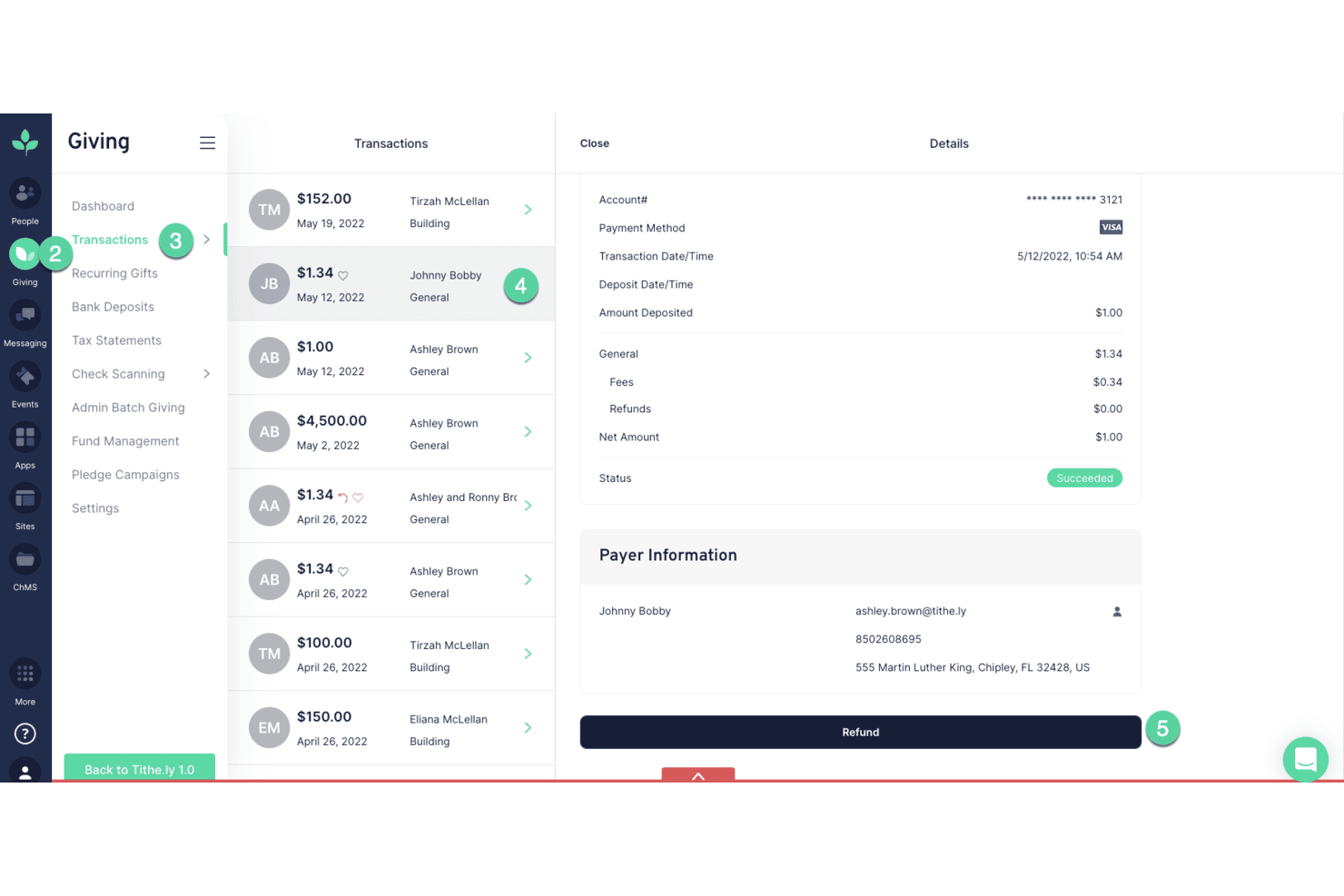
Tithe.ly lets users review and refund individual giving transactions. Tithe.ly is a church management platform built for ministry teams that want to handle giving, member records, volunteer coordination, and communications in one place—with a QuickBooks Online sync for churches that need to connect donation data to their bookkeeping workflow.
Who Is Tithe.ly Best For?
Tithe.ly is a strong fit for church leaders and ministry teams that want to manage giving, people records, volunteers, and communications from a single platform.
Why I Picked Tithe.ly
I picked Tithe.ly as one of the best because it's purpose-built around church giving in a way that general accounting tools simply aren't. Every donation made online or through the app automatically syncs to the matching member profile, so your giving records and your people database stay connected without manual data entry. I also appreciate the giving reports, which let you filter by fund, payment type, or date and export directly to CSV for sharing with your finance team or syncing to QuickBooks Online.
Tithe.ly Key Features
- Member profile database: Stores contact details, family records, attendance history, and custom fields for every person in your congregation.
- Role-based admin permissions: Assigns unlimited staff users to configurable roles, with product-level access restrictions to control what each person can see or manage.
- Tax statement generation: Produces individual contribution statements by year and location, which you can email or print directly from the platform.
- QuickBooks Online sync: Maps Tithely giving funds to QBO income accounts and automatically imports card, ACH, and batch giving transactions into your books.
Tithe.ly Integrations
Tithe.ly offers native integrations with QuickBooks Online and MinistrySafe, plus integrations with Church Community Builder, Rock RMS, Engiven, Elvanto, Salesforce, MinistryPlatform, Shelby, and FellowshipOne. API availability isn't documented.
Pros and Cons
Pros:
- Reviewers praise donation and membership tracking
- Giving reports support donor statements
- Donations stay linked to member records
Cons:
- No business invoicing or expense tracking
- No double-entry ledger for bookkeeping
 Best for simple bookkeeping
- Free plan + free trial available
- From $15/month
Visit WebsiteCustomer Rating:4.6/5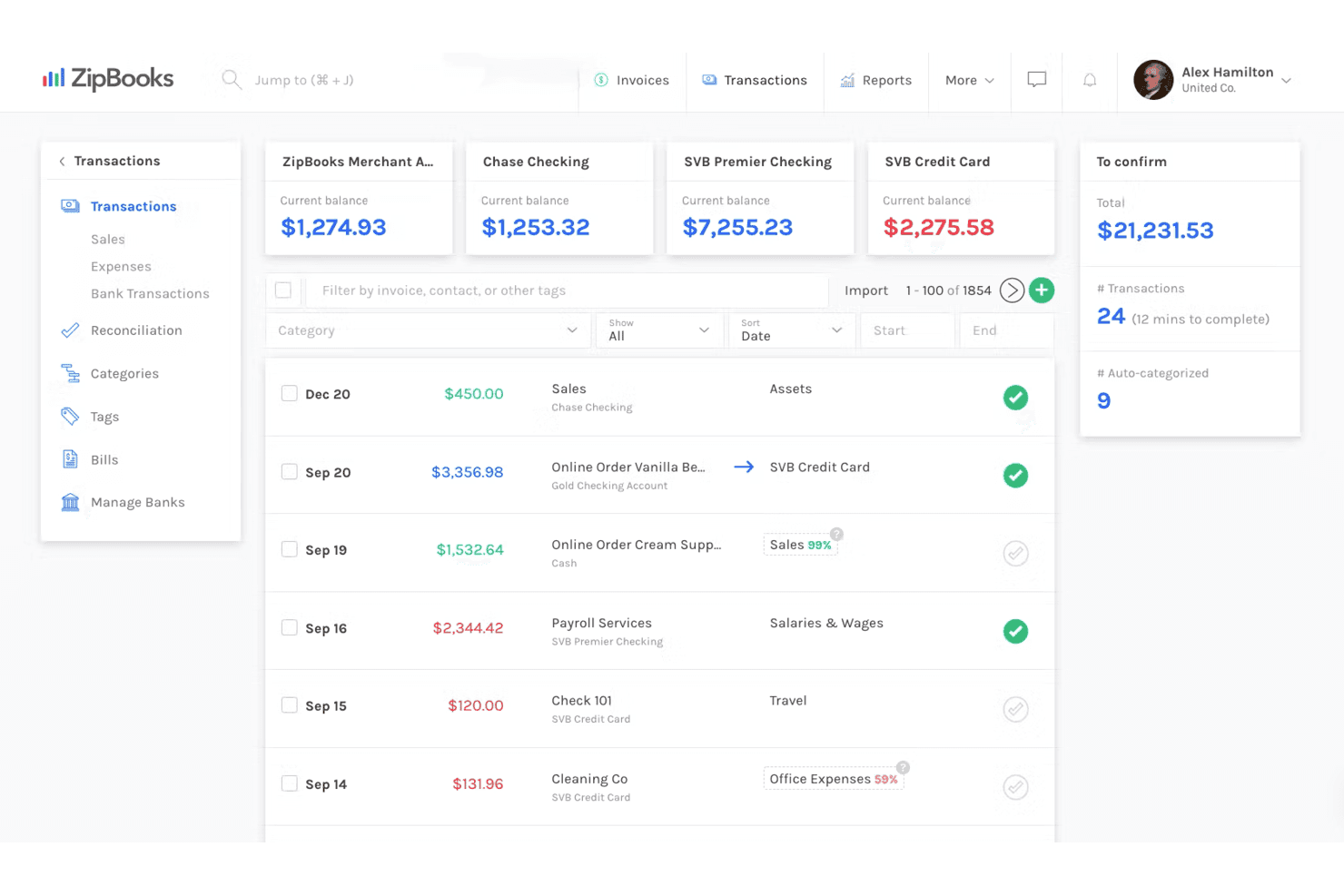
ZipBooks lets users track and categorize bank transactions in one view. ZipBooks is a straightforward accounting tool that covers invoicing, expense tracking, and bank reconciliation—making it a viable low-cost option for small churches that need basic bookkeeping without the complexity of a full-featured platform.
Who Is ZipBooks Best For?
ZipBooks is a solid pick for small churches and freelancers that need straightforward invoicing, expense tracking, and bank reconciliation without paying for features they'll never use.
Why I Picked ZipBooks
I picked ZipBooks as one of the best because it keeps bookkeeping genuinely simple without burying you in features your church will never touch. I appreciate how the bank reconciliation workflow lets you connect accounts, auto-categorize imported transactions using machine learning, and mark items as reconciled in one place. Pair that with recurring invoices and auto-billing on the Smarter plan, and routine financial tasks largely take care of themselves.
ZipBooks Key Features
- Machine-learning transaction categorization: Automatically assigns categories to imported bank transactions and refines its accuracy based on your corrections over time.
- Cash and accrual reporting: Lets you switch between cash-basis and accrual-basis reporting within the same account to match your church's financial reporting needs.
- 1099 payment tracking: Records and automates tracking for vendor payments that require 1099 reporting, keeping your year-end compliance work organized.
- Gusto payroll integration: Connects ZipBooks with Gusto to manage payroll directly alongside your bookkeeping records.
ZipBooks Integrations
ZipBooks has native integrations with Square, PayPal, Stripe, and Gusto for payments and payroll. It also offers a JSON API with JWT authentication for custom integrations.
Pros and Cons
Pros:
- Reviewers value bank syncing for bookkeeping
- Recurring billing automates reminders and collections
- Reviewers find invoice creation straightforward
Cons:
- No documented Xero-specific migration path
- Reviewers want deeper financial report drill-downs
Learn more about ZipBooks: Best for fund accounting
- 30-day free trial + free demo available
- From $50/month
Visit WebsiteCustomer Rating:4.4/5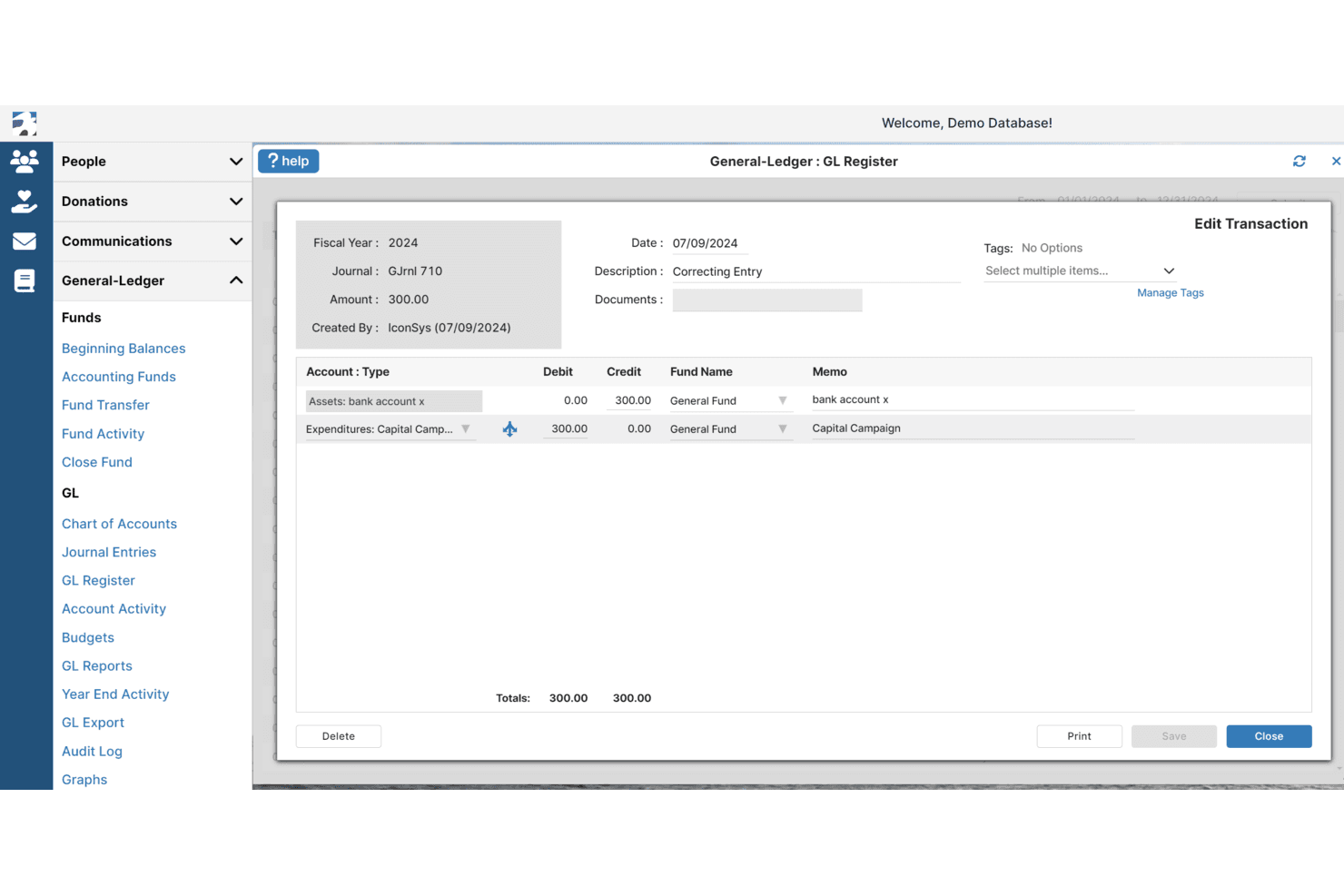
IconCMO lets users create and edit correcting journal entries in the GL Register. IconCMO is a church management and fund accounting platform built specifically for faith-based organizations that need to track designated funds, manage donations, and maintain FASB-compliant financial records alongside membership data.
Who Is IconCMO Best For?
IconCMO is built for churches and faith-based nonprofits that need to manage designated funds, track donations, and produce FASB-compliant financial reports in one place.
Why I Picked IconCMO
I picked IconCMO because its fund accounting is purpose-built for how churches actually manage money, tracking designated funds separately so a building fund never bleeds into a general operating fund. I appreciate that it produces FASB-compliant Statement of Activities and Statement of Financial Position reports for each individual fund, which is exactly what a finance committee or church board needs at year-end. The audit log captures every change to accounting entries, so your records stay clean and defensible.
IconCMO Key Features
- Bank transaction import: Pulls bank and credit card transactions into IconCMO, where you can match them to existing entries or use them to create new records.
- Role-based user permissions: Assigns each user Read, Read-Write, or No Access rights per module, with membership and accounting access kept fully separate.
- Electronic giving integration: Syncs one-time and recurring donations from processors like Vanco directly into the Donations module, eliminating manual data entry.
- Budgeting by fund: Sets budgets at the individual fund level and compares actual revenue and expenses against those budgets in reporting.
IconCMO Integrations
Documented integrations and partner connections include Vanco, Paperless Transactions, Kotapay, Yearli, Mailchimp, Constant Contact, and BILL. IconCMO also offers a Web Services API for custom integrations, though coverage varies by module and requires a developer account.
Pros and Cons
Pros:
- Donor and accounting records share one system
- Reviewers praise responsive support for accounting questions
- Fund-level statements support church finance teams
Cons:
- Multi-entity and multi-currency books aren't documented
- Customer invoices lack documented online collection
Learn more about IconCMO:
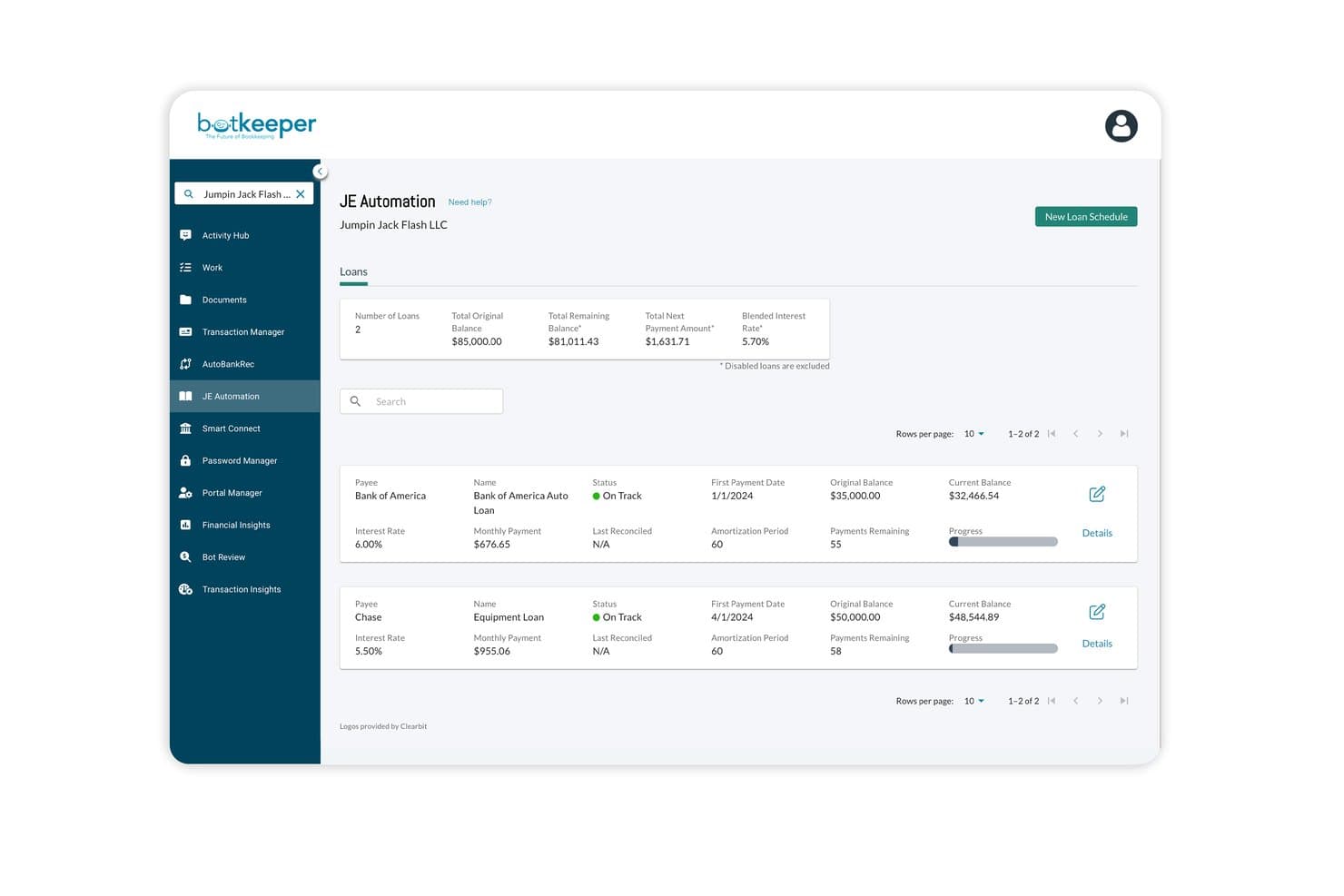
Botkeeper tracks loan schedules and balances within JE Automation. Botkeeper is an AI-powered bookkeeping automation platform built for accounting firms that want to offload transaction categorization, bank reconciliation, and month-end close work from their staff to an automated workflow.
Who Is Botkeeper Best For?
Botkeeper is a strong fit for accounting firms that manage bookkeeping for multiple church clients and want to automate transaction categorization and bank reconciliation across those accounts.
Why I Picked Botkeeper
I've included Botkeeper in my top picks because its AI-powered bookkeeping automation takes the most repetitive parts of month-end close off your plate. I particularly like how Auto Bank Rec pulls in bank feeds, matches transactions against the general ledger, and flags exceptions for review, so your team isn't manually hunting for discrepancies. Transaction Manager then categorizes those transactions using historical data and pushes high-confidence entries straight to QuickBooks Online or Xero.
Botkeeper Key Features
- Firm Insights dashboard: Displays real-time views of workload distribution, platform utilization, and team productivity across all client accounts.
- Close Tracker: Lets you view and manage closing statuses across all clients, including assigned staff and notes.
- JE Automation: Generates loan schedules and automatically posts principal-and-interest journal entries to your connected QuickBooks Online ledger.
- Role-based user permissions: Supports five defined user roles with firm- and client-level access controls and no limit on the number of platform users.
Botkeeper Integrations
Botkeeper Infinite has two documented native accounting integrations: QuickBooks Online and Xero. It uses these as connected general ledgers rather than replacing them; no public API or broader integration marketplace is documented.
Pros and Cons
Pros:
- Firm dashboards track workload and close status
- Transaction automation saves bookkeeping time
- Fast automated bank reconciliation
Cons:
- No documented customer-facing invoice creation
- Cannot replace your accounting ledger
Learn more about Botkeeper:
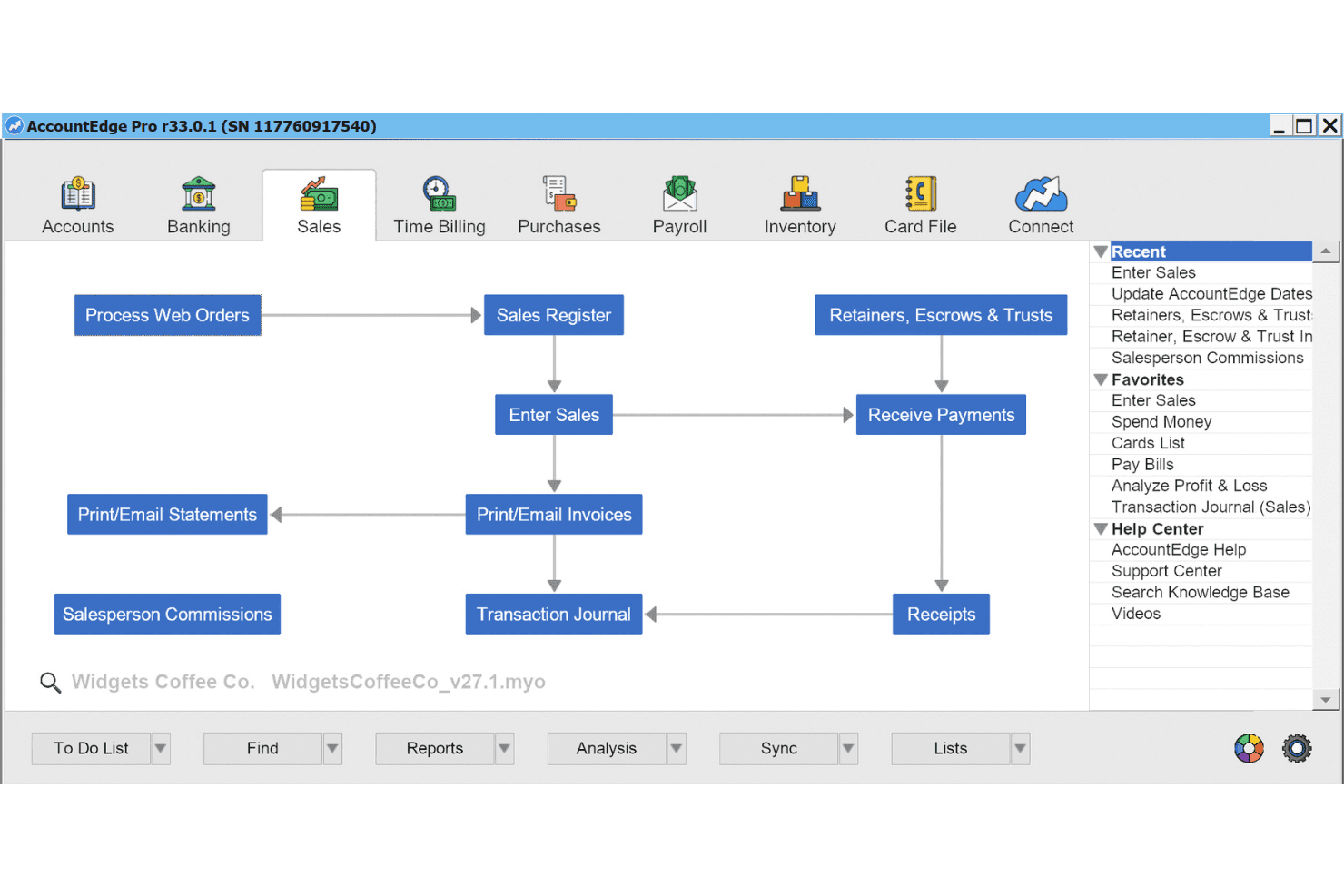
AccountEdge organizes the full sales workflow in one visual module. AccountEdge is a desktop-first accounting platform built for small organizations that want full control over their financial data, covering invoicing, expenses, payroll, and inventory without relying entirely on the cloud.
Who Is AccountEdge Best For?
AccountEdge suits small business owners and bookkeepers who want a full-featured, desktop-first accounting system and prefer keeping their financial data stored locally rather than entirely in the cloud.
Why I Picked AccountEdge
I picked AccountEdge because it's the only desktop-first option on my list, which matters if your church wants financial data stored locally rather than entirely in the cloud. I especially like its inventory and time-billing modules, which let you track billable activities, build invoices directly from timesheets, and manage program supplies without a separate system. It also has a dedicated Xero migration service through MMC Convert that transfers your chart of accounts, historical transactions, and contact records into a new company file.
AccountEdge Key Features
- Recurring sales billing schedules: Configure automated billing frequencies with fixed or variable item quantities for repeat customers.
- Job and project tracking: Assign transaction lines to jobs, track sub-jobs, monitor budgets, and report on income, expenses, and profitability.
- Payroll processing: Run payroll with current federal and state tax tables, manage deductions and accruals, and pay employees by check or ACH direct deposit.
- Serial number tracking: Track individual inventory items by serial number from purchase through sale, including warranty tracking and reporting.
AccountEdge Integrations
AccountEdge offers native integrations with Plaid, Square, Shopify through ShopSync, Power BI, and Dropbox. It also supports marketplace integrations through Zapier; no AccountEdge-specific API is documented.
Pros and Cons
Pros:
- Dedicated Xero migration transfers historical transactions
- Inventory and time billing cover operational needs
- Detailed ledger and reports earn reviewer praise
Cons:
- Remote collaboration depends on desktop-centered workflows
- Bank reconciliation can require manual statement matching
Learn more about AccountEdge: 6Best for integrated church solutions
ACS
- Free trial + free demo available
- Pricing upon request
Visit WebsiteCustomer Rating:3.8/5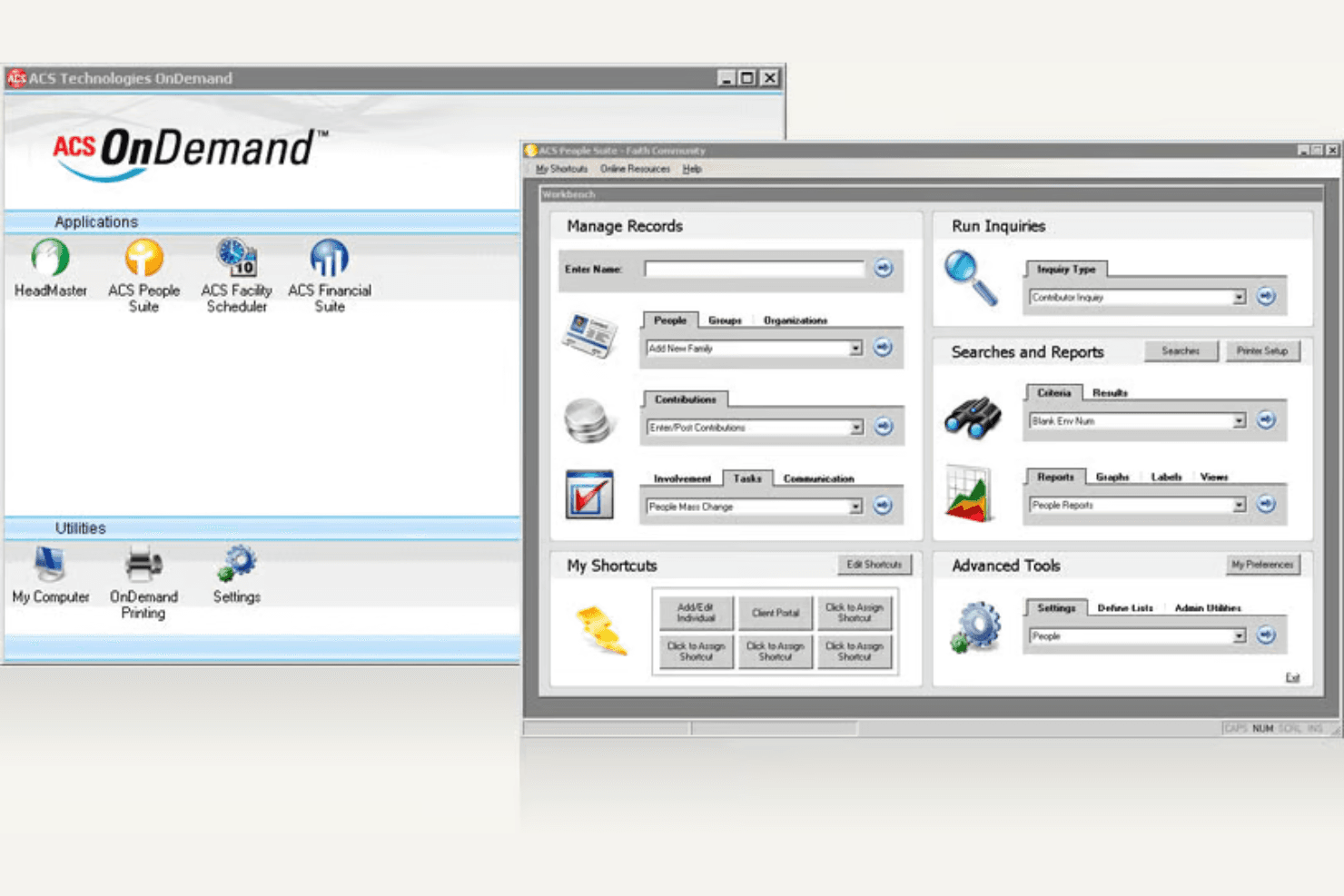
ACS centralizes church management across people, contributions, and reports. Realm Accounting by ACS Technologies is church-specific accounting software that brings fund accounting, giving integration, and financial reporting together for church finance teams managing donations, vendor payments, and budgets.
Who Is ACS Best For?
Realm Accounting is a strong fit for churches and ministries that want giving, fund accounting, and financial reporting managed in one connected system.
Why I Picked ACS
I picked ACS because Realm Accounting is built from the ground up for how churches actually handle money. I love that giving funds link directly to General Ledger accounts, so contribution batches from tools like Vanco post straight into your books without manual rekeying. Fund accounting with cash and accrual support, plus filterable financial statements with drill-down, means your finance team can produce board-ready reports by fund, department, or campus without workarounds.
ACS Key Features
- Budget import and export: Upload budgets from CSV files or export them for revision outside the system, then import updated figures back into Realm Accounting.
- Account segments: Tag transactions, budgets, and reports with details like department or campus to track financial activity across multiple locations or ministry areas.
- 1099 and tax form tools: Generate 1099s and file specified tax forms through the Yearli integration directly from your accounting records.
- Change log tracking: View a log entry whenever a posted General Ledger transaction is edited, giving your team visibility into any changes made after posting.
ACS Integrations
Realm Accounting integrates with MinistryPlatform, Engiven, Vanco, and Yearli for church management, giving, stock and cryptocurrency gifts, and tax-form filing. Its MinistryPlatform API integration sends batches for review and posting to the General Ledger.
Pros and Cons
Pros:
- Reconciles bank and credit-card accounts
- Reviewers praised financial reporting
- Fund accounting suits church finances
Cons:
- Non-giving transactions often need manual entry
- Customer invoice collection isn’t documented
Learn more about ACS:
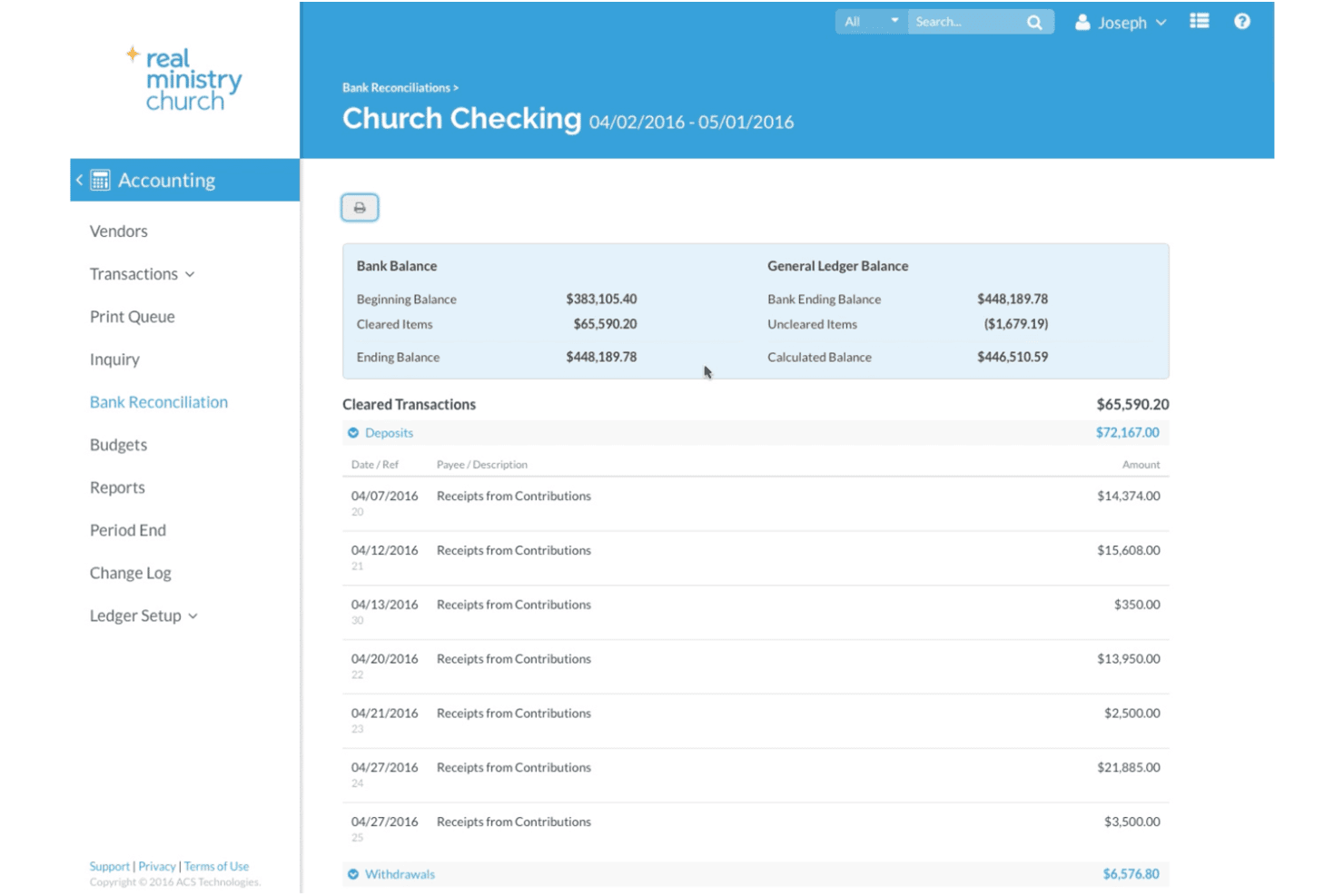
Realm streamlines church bank reconciliation with ledger balances. Realm is church management software from ACS Technologies that bundles fund accounting, payroll, and giving tools into one platform built specifically for churches and ministry organizations.
Who Is Realm Best For?
Realm is a strong fit for church finance staff and bookkeepers who need payroll, fund accounting, and giving tools managed in one place.
Why I Picked Realm
I picked Realm as one of the best because its payroll tools are built specifically for church staff structures, handling federal, FICA, state, and local tax withholdings through Symmetry Software. I appreciate that payroll entries post directly to the Realm Accounting general ledger, so there's no manual reconciliation between two disconnected systems. Tax e-filing, W-2 access, and direct deposit are all included, which covers the full payroll cycle without needing a separate platform.
Realm Key Features
- Fund accounting: Track income and expenses across multiple funds, departments, committees, and projects within a double-entry general ledger.
- Bank and credit-card reconciliation: Reconcile bank and credit-card accounts directly against general-ledger transactions to keep books accurate.
- Contribution batch posting: Link giving funds to general-ledger accounts and post contribution batches as deposits automatically or manually.
- Role-based accounting access: Assign distinct accounting roles that control access to budgets, reports, bank reconciliation, invoices, vendor details, and 1099s.
Realm Integrations
Realm offers 10 documented native integrations, including Nelco and Yearli for tax filing, plus Vanco and Engiven for giving. Planning Center People also connects with Realm for volunteer-team and group data.
Pros and Cons
Pros:
- Payroll entries post directly to the general ledger
- Giving batches post to general-ledger accounts
- Fund accounting tracks restricted ministry funds
Cons:
- Reviewers report recurring glitches and errors
- Customer invoicing and payment collection remain limited
Learn more about Realm: Best for nonprofits and government
- Free demo available
- Pricing upon request
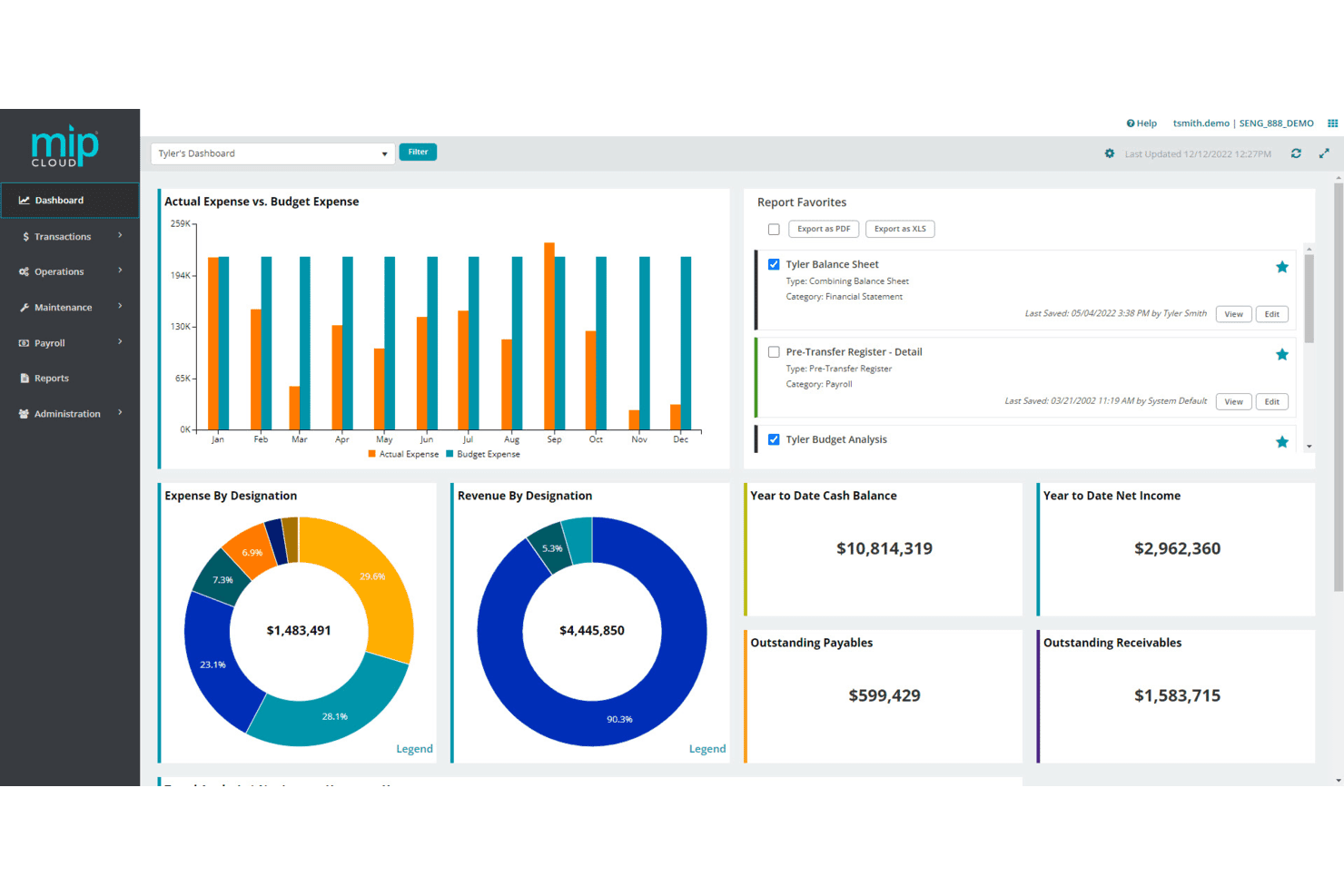
MIP Fund Accounting displays financial data across a customizable dashboard. MIP Fund Accounting is a fund accounting platform built for nonprofits and government entities that helps organizations track restricted funds, manage grants, and handle complex budgeting across multiple programs or departments.
Who Is MIP Fund Accounting Best For?
MIP Fund Accounting is a strong fit for nonprofits and government organizations that need to track restricted funds, manage grants, and report across multiple programs or departments.
Why I Picked MIP Fund Accounting
I picked MIP Fund Accounting because it's purpose-built for nonprofits and government entities in a way that general accounting tools simply aren't. I appreciate how its flexible chart of accounts lets you configure segments to track restricted funds, grants, programs, and departments all within a single system. Its budget management tools go further than most, letting you create original, revised, multiyear, and hypothetical budgets and compare them directly in reports.
MIP Fund Accounting Key Features
- Fund and grant tracking: Configure chart-of-accounts segments to track restricted funds, grants, programs, and departments within a single system.
- GiveSmart integration: Connects fundraising and donor management data directly with MIP financial records to reduce manual data entry.
- Auto Payments: Processes vendor accounts payable invoices through Corpay via Virtual Mastercard, ACH, or paper check.
- Account-level report security: Restricts which account codes and financial amounts appear in reports based on individual user permissions.
MIP Fund Accounting Integrations
MIP Fund Accounting integrates with GiveSmart for fundraising and donor data, donation tracking, and reporting. Its REST API supports POST, GET, PUT, and DELETE requests for custom integrations.
Pros and Cons
Pros:
- Reviewers cite broad nonprofit accounting modules
- Reviewers value reports by account segments
- Reviewers praise flexible fund and grant tracking
Cons:
- Bank imports and reconciliation can feel cumbersome
- Customer invoicing and online collections aren't established
Learn more about MIP Fund Accounting: Best for small churches
- 30-day free trial + demo available
- From $29/month
Visit WebsiteCustomer Rating:4.8/5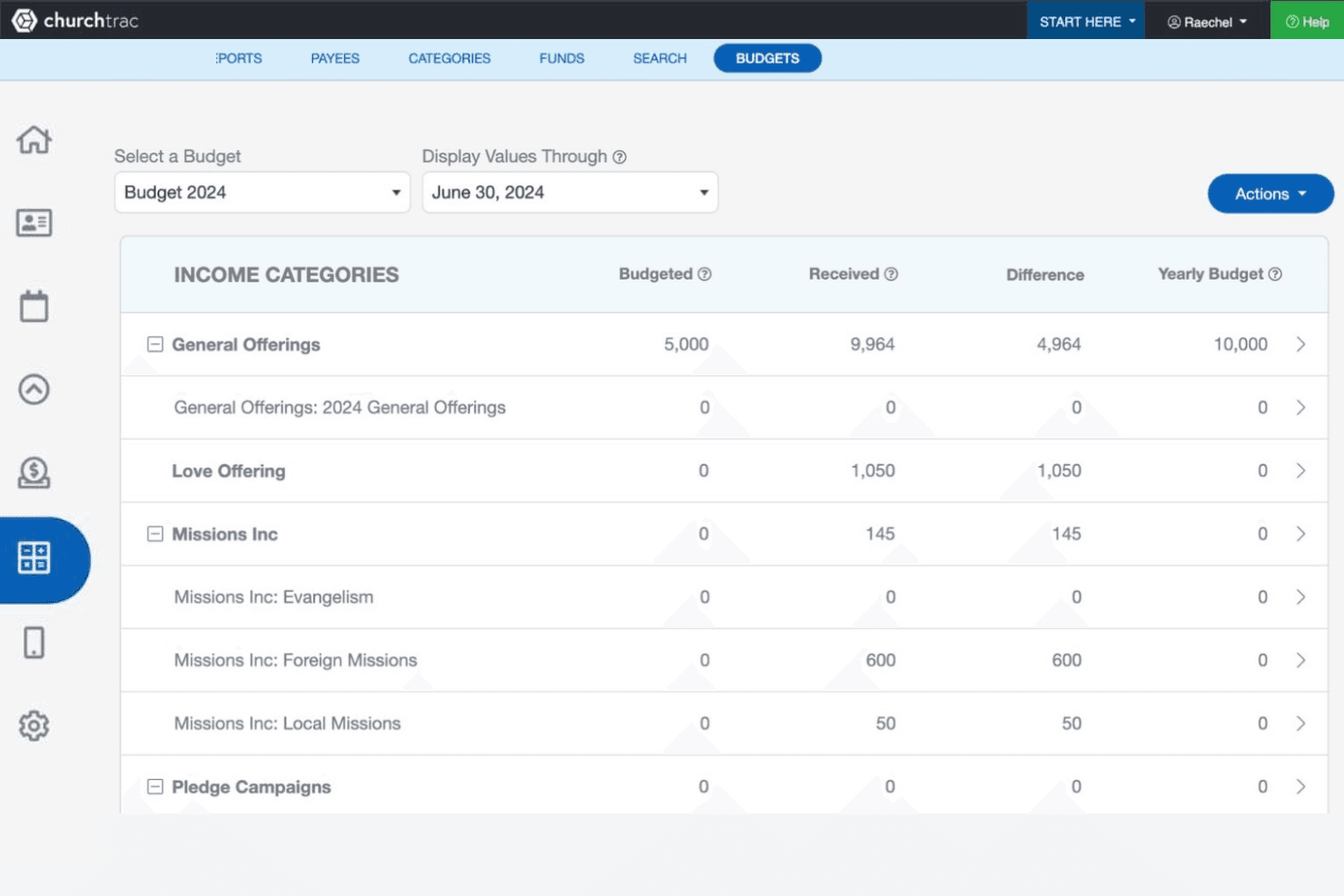
ChurchTrac lets users track income budgets vs. actual received funds. ChurchTrac is an all-in-one church management platform that bundles fund accounting, giving, member management, and communications tools for small congregations that need more than a general accounting tool.
Who Is ChurchTrac Best For?
ChurchTrac is a strong fit for small congregations that want to manage giving, fund accounting, and church operations in one place without paying for separate tools.
Why I Picked ChurchTrac
I picked ChurchTrac because it's purpose-built for small congregations that need giving, fund accounting, and member management in one place. I appreciate how it tracks designated and restricted funds across multiple bank accounts, so a small church treasurer can run a Budget vs. Actual report without piecing data together from separate tools. The Bank Link feature lets you review and reconcile transactions directly against your register, which is exactly the kind of focused accounting workflow a small church actually needs.
ChurchTrac Key Features
- Fund accounting: Track designated and restricted funds across multiple bank accounts with full budget-versus-actual reporting.
- Contribution statements: Generate bulk, family, or individual giving statements with customizable headers and footers for tax language.
- Giving categories and campaigns: Assign donations to specific funds, missionaries, or causes and run fundraising campaigns with dedicated goals and landing pages.
- User permissions with audit trails: Assign module-level access across Giving/Accounting and view logs of logins, IP addresses, and record changes per user.
ChurchTrac Integrations
ChurchTrac has documented integrations with Stripe, SongSelect, PraiseCharts, and MinistrySafe, plus a Google Analytics 4 connection. It has no API-level access, so custom accounting integrations aren't documented.
Pros and Cons
Pros:
- Fund reports track designated giving
- Church finances stay alongside member records
- Treasurers praise accessible bank reconciliation
Cons:
- No accounting invoices or customer billing
- Single-entry accounting falls short of Xero
Learn more about ChurchTrac:
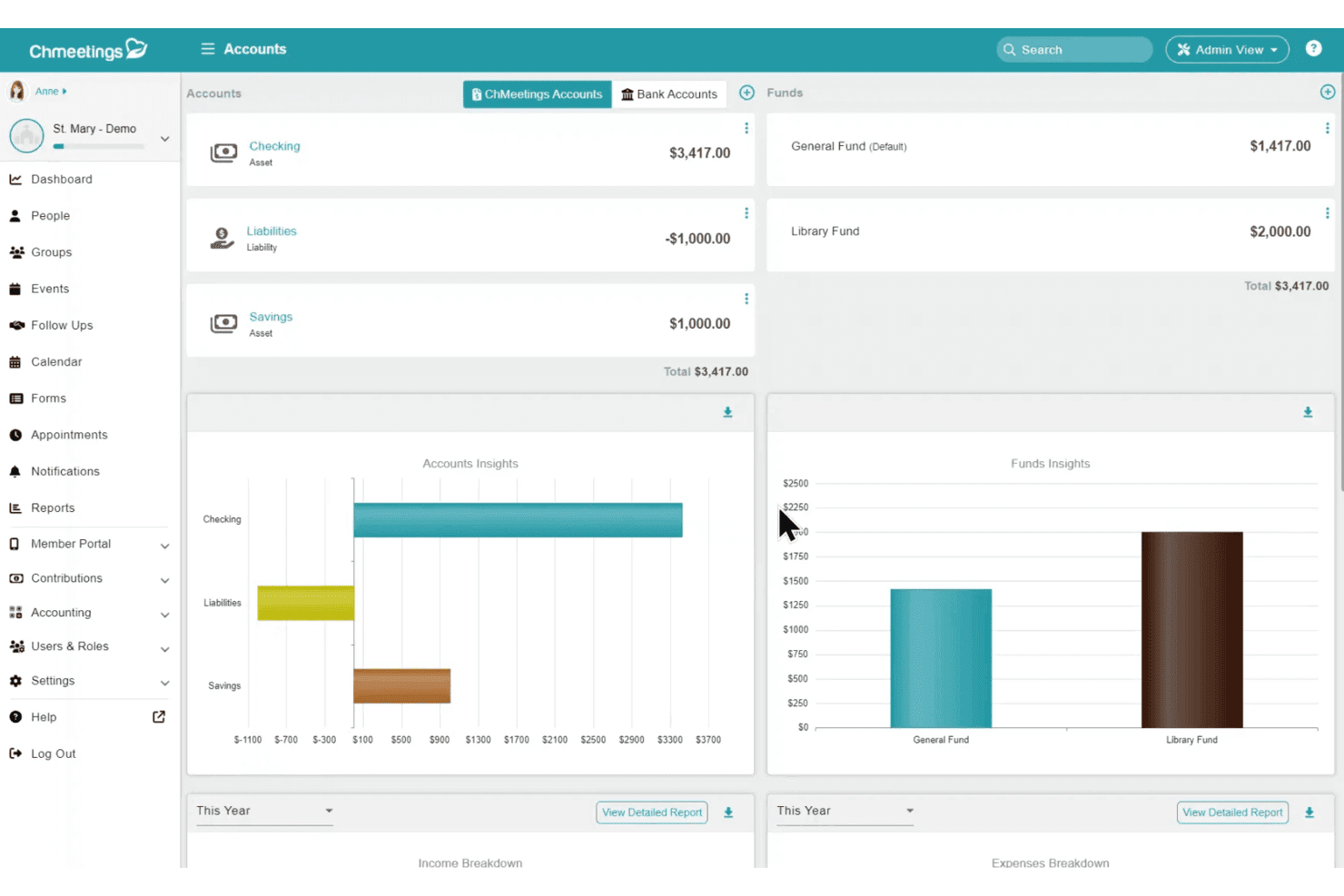
ChMeetings helps churches track funds and account balances visually. ChMeetings is a church management platform that bundles member records, giving, events, and fund-based accounting into one system—making it a practical fit for churches that want to consolidate their administrative and financial operations.
Who Is ChMeetings Best For?
ChMeetings is a strong fit for churches and dioceses that want member records, giving, events, and fund accounting managed in one place.
Why I Picked ChMeetings
I picked ChMeetings as one of the best because it's the only tool on this list built specifically for how churches actually manage money. Rather than adapting a general ledger to church life, it uses fund accounting natively, so you can track income and expenses by fund, record contribution batches directly into accounting, and reconcile against your bank statements without ever leaving the platform. I also appreciate that accounting permissions can be separated from people-data access, which means your treasurer can do their work without touching member records.
ChMeetings Key Features
- Online giving and contribution batches: Accept one-time and recurring donations online and record contribution batches directly against funds and financial accounts.
- Budget tracking: Build budgets by fund or category and compare planned versus actual results across months or fiscal years.
- 1099 summary report: Organize payee payment details and export annual summaries for use with an external filing service.
- Role-based accounting permissions: Grant access to specific accounting functions—such as reconciliation, check printing, or reports—independently of access to member records.
ChMeetings Integrations
ChMeetings has native integrations with Stripe, PayPal, and BlueSnap, while its API connects with Power BI and Google Sheets. It supports custom integrations through REST API, webhooks, and MCP, plus 9,000+ apps through Zapier.
Pros and Cons
Pros:
- Separate treasurer access from member records
- Church giving batches connect with fund accounting
- Reviewers value consolidated church administration
Cons:
- No customer invoicing or invoice collection
- Single-entry accounting omits debit-credit bookkeeping
Learn more about ChMeetings:
Other Xero Alternatives
Here are some additional Xero alternatives that didn’t make it onto my shortlist, but are still worth checking out:
- 11QuickBooks OnlineBest for business growth
- 12Sage Expense Management (formerly Fyle)Best for expense management automation
- 13Sage IntacctBest for financial management in healthcare
- 14BlackbaudBest for nonprofit fundraising
- 15SteepleMateBest for church member engagement
- 16GracelyBest for automated church communication
How I Evaluate Xero Alternatives
I split my evaluation into two layers: the baseline—like true fund accounting and clergy payroll—that gets a tool on the list, and the differentiators that separate the best from the rest.
Core Functionality (Table Stakes For This List)
When I'm selecting tools for my list, I rank each one on a scale from 0 (does not offer the functionality) to 5 (excels in this area) for each core functionality listed below. Then, I calculate the tool's total score into a percentage. Each tool needs to achieve a minimum total score of 55% to be considered for inclusion.
- Fund Accounting: I check whether the tool tracks restricted, designated, and unrestricted funds separately so churches can report on a missions fund or building campaign without manual workarounds.
- Contribution & Donor Management: Each tool needs to record tithes, offerings, and pledges by donor and generate year-end giving statements that meet tax-compliance requirements.
- Chart of Accounts & General Ledger: I look for a fully editable chart of accounts that maps to church categories like benevolence, missions, and youth ministry rather than forcing a generic small-business structure.
- Budgeting & Financial Reporting: The tool should let you build ministry-level budgets and produce variance reports, balance sheets, and income statements your finance committee can actually read.
- Bank Reconciliation & AP/AR: I evaluate whether bank feeds, vendor bill payments, and receivables are all supported so your treasurer can reconcile weekly deposits and cut checks to suppliers in one place.
- Payroll & Clergy Compensation: Tools earn higher marks when they handle or integrate with payroll that supports clergy-specific needs like housing allowance designation and dual tax status.
Once I have a list of tools that meet this criteria, I consider what sets each platform apart.
Differentiating Factors (What Sets Vendors Apart)
Here's how I compare and contrast different vendors:
Standout Features
I look for direct connections with online giving platforms so that Sunday donations, text-to-give transactions, and recurring gifts flow into the ledger without manual entry. ChMS integration matters just as much—syncing member and contribution data between systems like Planning Center or Breeze saves hours of duplicate work. For multi-site churches, I evaluate whether the tool can manage separate books per campus while producing consolidated reports. Board-ready dashboards also get my attention, since most elder teams want clear financial snapshots without wading through raw accounting data.
Beyond Features
Pricing matters for churches working with limited budgets, so I check whether a vendor offers nonprofit or ministry discounts and avoids per-user fees that penalize volunteer finance teams. I also evaluate onboarding support—a pre-built church chart of accounts and migration assistance from Xero or QuickBooks can save weeks of setup. Role-based permissions round out my evaluation, since churches need separate access levels for pastors, treasurers, and volunteer offering counters along with audit trails that support annual reviews.
Why Look For A Xero Alternative?
While Xero is a good choice of church accounting software, there are a number of reasons why some users seek out alternative solutions. You might be looking for an Xero alternative because…
- You need specialized features for church management
- Your team struggles with Xero's learning curve
- You require better integration with existing systems
- You're looking for more affordable pricing options
- You need support for multi-currency transactions
- Your church requires offline access capabilities
If any of these sound like you, you’ve come to the right place. My list contains several church accounting software options that are better suited for teams facing these challenges with Xero and looking for alternative solutions.
Xero Key Features
Here are some of the key features of Xero, to help you contrast and compare what alternative solutions offer:
- Online accounting software: Manage your financial tasks with ease and efficiency.
- Accept payments: Facilitate card payments and direct debits for your clients.
- Online invoicing: Create invoices with automated reminders to ensure timely payments.
- Bank connections: Connect with over 21,000 banks for easy transaction reconciliation.
- Expense management: Track and submit expenses to keep your finances organized.
- App integration: Connect with various apps to enhance your business operations.
- Bank reconciliation: Automate reconciliation for accurate financial records.
- Bill payment: Manage and track bills to maintain a healthy cash flow.
- Project tracking: Plan, budget, and invoice projects effectively.
- Multi-currency accounting: Handle transactions in over 160 currencies for global business.