

Online church software is a digital platform that helps your church manage worship services, connect with your community, and handle important administrative tasks from anywhere. If you’re searching for tools that make it easier to organize ministry, enable online giving, or lead hybrid and virtual services, you’re in the right place. With so many options, it’s tough to know which platform actually fits your needs and resources. This list will help you find the best solution to support your congregation and free you up to focus more on your calling.
Why Trust Our Software Recommendations
6,700+
Reviews
20
Industry experts
16+
Evaluation factors
14
Years
Our team has been testing and reviewing software since 2012. As church leaders ourselves, we know how difficult—and important—it is to choose the right software.
For this guide, we evaluated tools using hands-on testing and independent research, scoring tools using our selection criteria.
Our reviews reflect our human editorial judgment, not a sales pitch.
Online Church Software Comparison Table
This comparison table summarizes pricing details for my top online church software selections:
| Tool | Best For | Trial Info | Price | ||
|---|---|---|---|---|---|
| 1 | Best for multilingual congregation management | Free plan available + 30-day free trial | From $12/month | Website | |
| 2 | Best for free unlimited member management | 30-day free trial | From $19/month (billed annually) | Website | |
| 3 | Best for online giving and church apps | 30-day free trial available | From $72/month | Website | |
| 4 | Best for simple church management | 30-day free trial + free demo available | From $72/month | Website | |
| 5 | Best for church group management | 30-day free trial available | From $37/month | Website | |
| 6 | Best for digital giving and engagement | Free demo available | Pricing upon request | Website | |
| 7 | Best for all-in-one church management | 30-day free trial + free demo available | From $8/month (billed annually) | Website | |
| 8 | Best for church fund accounting | Free demo + 15-day free trial available | From $79/month | Website | |
| 9 | Best for growing church ministries | Free plan + 30-day free trial available | From $15/20 members/month | Website | |
| 10 | Best for cloud-based church management | 10-day free trial + free demo available | From $75/month | Website |


Best Online Church Software Reviews
Below are my detailed summaries of the best online church software that made it onto my shortlist. My reviews offer a detailed look at the features, integrations, and best use cases of each platform to help you find the best one for you.
 Best for multilingual congregation management
- Free plan available + 30-day free trial
- From $12/month
Visit WebsiteCustomer Rating:4.9/5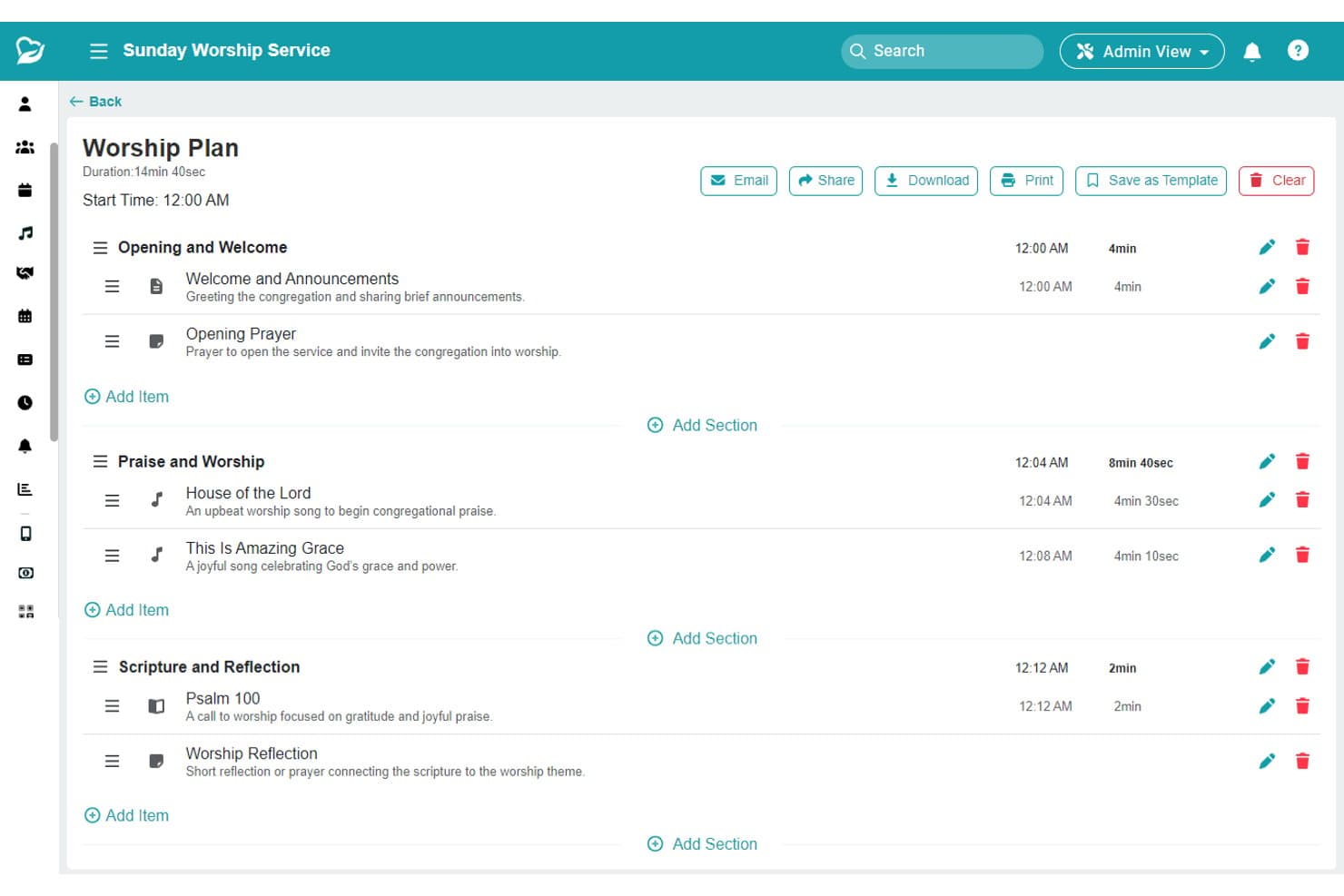
ChMeetings lets users build and time structured worship service plans. ChMeetings is a church management platform that combines member database management, online giving, event registration, volunteer scheduling, communication tools, and built-in accounting—with support for 22+ languages.
Who Is ChMeetings Best For?
ChMeetings is a strong fit for small-to-midsize churches serving diverse, multilingual congregations who need an all-in-one platform with built-in accounting and giving tools.
Why I Picked ChMeetings
ChMeetings earns its spot on my shortlist because it's the only church management platform I've seen that natively supports 22+ languages, making it a genuinely practical choice for multilingual congregations. I love that the AI-powered natural language search lets you pull segments like "Spanish-speaking members who haven't attended in 30 days" without building complex filters. The Member Portal also lets congregants self-serve in their own language, which reduces admin back-and-forth significantly.
ChMeetings Key Features
- Built-in accounting module: Track income, expenses, and budgets, reconcile bank accounts, print checks, and generate financial reports without a separate accounting tool.
- Child and family check-in: Check in children using QR codes, kiosk mode, or staff-assisted entry, with custom name tag printing included.
- Worship planning module: Build service orders with songs, scriptures, notes, and file attachments, then share or print handout sheets for your team.
- Automated messaging workflows: Set up date-based triggers and follow-up sequences across email, push notifications, and SMS to reach members at the right time.
ChMeetings Integrations
ChMeetings integrates with Stripe, PayPal, Square, Mailchimp, Plaid, and SMS providers including Twilio. It also offers an API, webhooks, an MCP connector for ChatGPT, Claude, and Gemini, plus Zapier.
Pros and Cons
Pros:
- AI-powered natural language search for reporting
- Includes built-in accounting module for churches
- Supports 22+ languages for member engagement
Cons:
- Branded church app costs extra monthly
- No native livestreaming functionality included
Learn more about ChMeetings: Best for free unlimited member management
- 30-day free trial
- From $19/month (billed annually)
Visit WebsiteCustomer Rating:4.8/5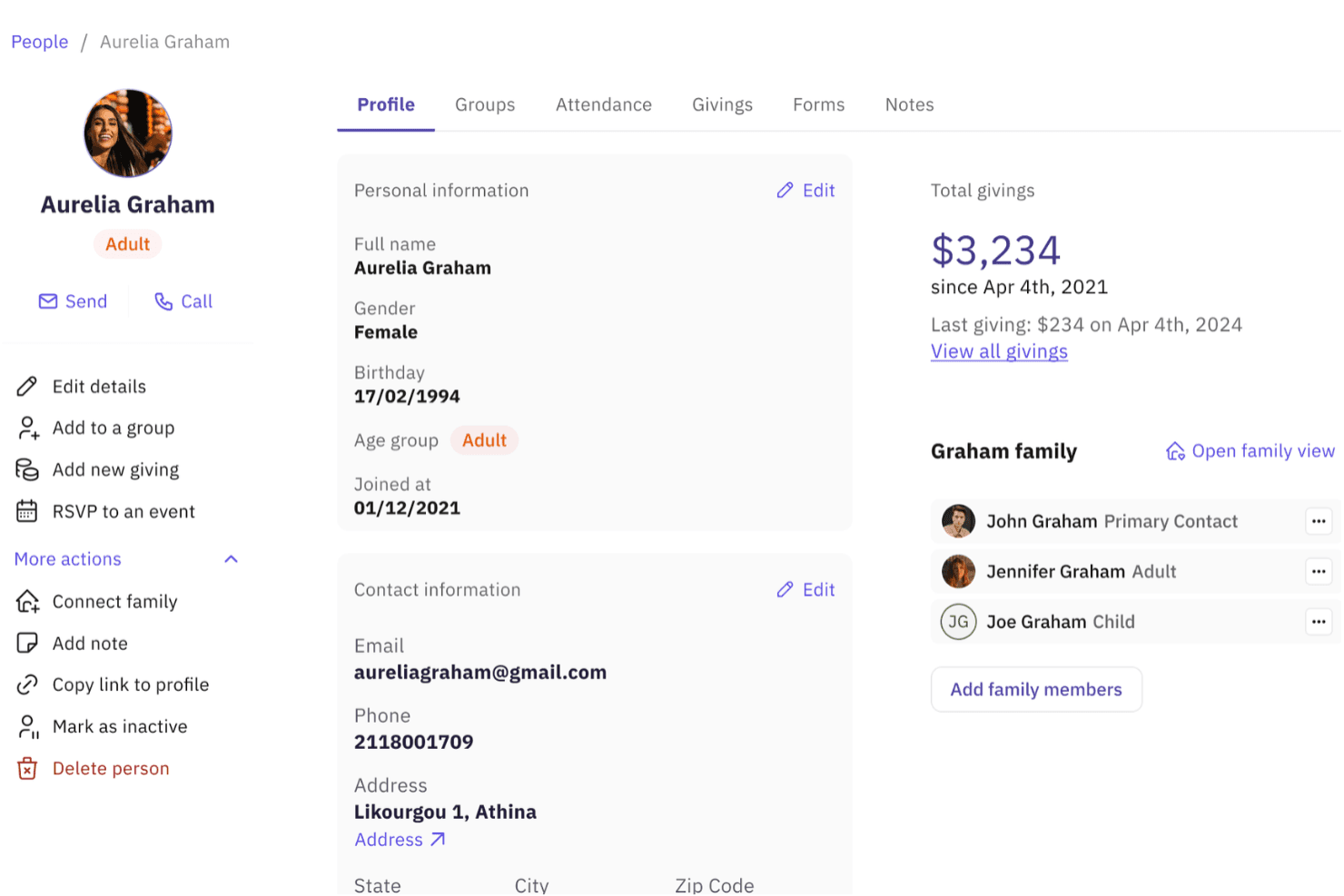
Gracely displays a detailed member profile page showing personal information, contact details, family connections, and giving history. Gracely is a cloud-based church management platform that combines member and family management, online giving, event coordination, volunteer scheduling, and congregant communication in one system.
Who Is Gracely Best For?
Gracely is a strong fit for small to mid-sized churches whose administrators need a full-featured management platform without the cost of per-member pricing models.
Why I Picked Gracely
Gracely earns its spot as one of the best on my shortlist because it's one of the very few church platforms that gives you truly unlimited member profiles at no cost. I like that this isn't just a basic contact list. Each profile supports family linking, custom fields, and follow-up tracking for pastoral care. In practice, I can segment and communicate with any subset of my congregation without hitting a paywall.
Gracely Key Features
- Church portal: Members can log in to view giving history, register for events, and update contact details.
- Online giving integrations: Supports Stripe, Apple Pay, Google Pay, and Zelle so congregants can give digitally.
- Custom forms builder: Create online forms for event sign-ups, volunteer registration, or surveys.
- Multiple calendars: Manage main calendar, birthdays, appointments, and follow-ups within the same platform.
Gracely Integrations
Gracely offers native integrations with Stripe and PayPal.
Pros and Cons
Pros:
- Multiple calendar views for pastoral scheduling
- Built-in children's check-in for Sunday services
- Unlimited member profiles on the free plan
Cons:
- Reporting tools lack advanced giving analytics
- Limited third-party software connectivity
Learn more about Gracely: Best for online giving and church apps
- 30-day free trial available
- From $72/month
Visit WebsiteCustomer Rating:4.7/5
Tithe.ly offers donation tracking, donor management, and giving analytics. Tithe.ly is an online church software platform that brings together digital giving, church management, a custom-branded app, and website building in a single subscription.
Who Is Tithe.ly Best For?
Tithe.ly is a natural fit for small to mid-sized churches that want giving, ChMS, and a mobile app under one subscription without managing multiple vendors.
Why I Picked Tithe.ly
I picked Tithe.ly as one of the best because it's one of the few platforms where giving, church management, a custom church app, and a website all live under a single subscription. I especially like the Cover the Fees feature, which prompts donors to cover processing costs at checkout, and pledge campaigns that let churches track commitments over time. The automatic app builder also stands out: you configure it once, and it pulls in sermons, events, and giving without ongoing technical maintenance.
Tithe.ly Key Features
- People management: Store member profiles, track attendance, and organize contacts into groups directly within the ChMS.
- Text giving: Donors can give by texting a keyword to a dedicated number, with no app download required.
- Event registration: Build event pages with RSVP and ticketing tools that connect to your church's website or app.
- Sermon media hosting: Upload and publish sermon audio and video through Tithe.ly Media for on-demand congregation access.
Tithe.ly Integrations
Tithe.ly offers native integrations with QuickBooks Online, Rock RMS, Planning Center, Elvanto, Salesforce, MinistryPlatform, Shelby, FellowshipOne, Church Community Builder, Breeze, and more. An API is available for custom integrations.
Pros and Cons
Pros:
- Automatic year-end giving statements for donors
- Text-to-give needs no app download
- Built-in website builder for churches
Cons:
- Media storage costs extra on lower tiers
- Reporting filters can feel limited
 Best for simple church management
- 30-day free trial + free demo available
- From $72/month
Visit WebsiteCustomer Rating:4.7/5
Breeze offers online giving, pledge tracking, donor management, and reports. Breeze is a church management platform built around people tracking, giving management, event registration, attendance records, and congregant communication tools.
Who Is Breeze Best For?
Breeze is a natural fit for smaller congregations that need straightforward people and giving management without a steep administrative overhead.
Why I Picked Breeze
I picked Breeze as one of the best because its flat-rate, single-plan model removes the guesswork that frustrates so many church admins shopping for software. I really like that the people database lets you store unlimited contacts and automatically ties form submissions back to individual member profiles, so nothing lives in a spreadsheet somewhere. The free data migration service is a genuine differentiator: their import team moves your existing records in for you, which makes switching far less painful for a small staff.
Breeze Key Features
- Groups management: Create and manage small groups, Bible studies, and ministry teams, with members able to join directly through the church app.
- Event and facility scheduling: Build a central church calendar, assign rooms and resources, and sync events with service planning and check-in.
- Attendance and giving reporting: Generate reports on attendance trends and giving activity directly from the member database.
- Kids check-in with name tags: Check children into events and print security name tags from within the same platform.
Breeze Integrations
Breeze offers native integrations with Mailchimp and QuickBooks Desktop. It also integrates with Tithely Giving through third-party connectors. An API is available for custom integrations.
Pros and Cons
Pros:
- Volunteers can self-manage group membership
- Automated giving alerts for lapsed donors
- Free data migration handled by their team
Cons:
- Text messages have limited character counts
- Volunteer scheduling tools lack depth
Learn more about Breeze: Best for church group management
- 30-day free trial available
- From $37/month
Visit WebsiteCustomer Rating:4.7/5
Churchteams offers church management, communication, giving, and reporting. Churchteams is a church management platform that combines member tracking, group management, volunteer scheduling, event registration, giving, and built-in two-way texting.
Who Is Churchteams Best For?
Churchteams is a strong fit for growing churches that rely on group-based ministry and need texting built directly into their management workflow.
Why I Picked Churchteams
I picked Churchteams as one of the best because its texting isn't a bolt-on feature; it's woven directly into the platform's core workflows. I use the Text-to-Church feature to let first-time visitors text a keyword to check in, join a group, or give, without downloading an app or creating a login. The fact that texting, group management, and giving all trigger from a single keyword interaction is something I haven't seen handled this cleanly in other church management platforms.
Churchteams Key Features
- Volunteer scheduling: Build volunteer teams, assign roles, and send automated reminders directly from within the platform.
- Children's check-in: Run a secure, label-printing check-in system for kids ministry with customizable security codes.
- Follow-up automation: Set triggered workflows that automatically assign follow-up tasks to staff when someone takes a ministry step.
- Online giving: Accept one-time and recurring donations through a donor-covered fee model that keeps more funds in the church.
Churchteams Integrations
Churchteams offers a small set of native integrations, including eSPACE for facilities management, Protect My Ministry for background checks, and Google Maps.
Pros and Cons
Pros:
- Pricing scales by attendance not user count
- Text-to-Church requires no member login
- Group health reports track ministry trends automatically
Cons:
- No dedicated mobile app for staff
- No built-in calendar for events
Learn more about Churchteams: Best for digital giving and engagement
- Free demo available
- Pricing upon request
Visit WebsiteCustomer Rating:4/5
Pushpay offers online giving, donor management, fund tracking, and reporting. Pushpay is a church management and digital giving platform that combines mobile donations, a custom-branded church app, ChMS, and congregation communication tools in one place.
Who Is Pushpay Best For?
Pushpay is a strong fit for mid-to-large churches that want a custom-branded mobile app paired with an integrated digital giving experience.
Why I Picked Pushpay
I've included Pushpay in my top picks because its Everygift technology is something I haven't seen matched elsewhere. It automatically recovers failed transactions, prevents lapsed recurring gifts, and nudges offline donors to give digitally, all without staff intervention. I also like that giving data, attendance, and serving activity roll up into a single Insights dashboard, so I can spot disengagement before someone quietly drifts away from the church.
Pushpay Key Features
- Custom-branded church app: Build a white-label mobile app with your church's name, logo, and colors for iOS and Android.
- Text-to-give: Donors can complete a gift by texting a keyword to a dedicated number without opening the app.
- Push notifications: Send targeted messages to specific congregation segments based on giving history or group membership.
- Child check-in: Manage secure drop-off and pickup for children's ministry with label printing and guardian matching.
Pushpay Integrations
Pushpay offers integrations with ministry tools, including direct database integrations with Sage Intacct, Elvanto, Fellowship One, and more, plus connections with Mailchimp, Planning Center, Checkr, and Clearstream. An API is available for custom integrations, including third-party systems.
Pros and Cons
Pros:
- Giving app toggles to Spanish and Vietnamese
- Multi-campus fund accounting and giving analytics
- One-tap mobile giving feels like a fintech app
Cons:
- Annual contracts required before proving adoption rates
- App builder is harder than it used to be
Learn more about Pushpay: Best for all-in-one church management
- 30-day free trial + free demo available
- From $8/month (billed annually)

ChurchTrac offers fund accounting, budget tracking, and church finances. ChurchTrac is an all-in-one church management platform covering member management, giving, worship planning, check-in, accounting, events, and church communications in a single app.
Who Is ChurchTrac Best For?
ChurchTrac is a strong fit for small to mid-sized churches that need a full suite of management tools without the budget for enterprise-level software.
Why I Picked ChurchTrac
I've included ChurchTrac in my top picks because it genuinely delivers a full church management suite at a price point most small churches can actually afford. What I find compelling is the built-in fund accounting add-on, which covers bank syncing, budgeting, and check printing. I also like that Church Connect, the website, app, and member portal, is included in every plan at no extra cost, which other platforms charge separately for.
ChurchTrac Key Features
- People management: Store member profiles, manage your church directory, and send mass emails or texts directly from within the platform.
- Giving and contribution tracking: Record contributions, manage pledges, enable online and text giving, and generate contribution statements for members.
- Volunteer scheduling: Build and manage volunteer teams, assign roles, and coordinate service coverage across your ministry.
- Church automations: Set up automated tasks, scheduled reports, and recurring messages to reduce repetitive admin work.
ChurchTrac Integrations
ChurchTrac offers native integrations with Stripe, PraiseCharts, Mailchimp, and more.
Pros and Cons
Pros:
- Responsive customer support via phone and email
- Includes member portal at every tier
- Built-in fund accounting with bank syncing
Cons:
- Limited customization for complex church setups
- Interface feels dated versus newer competitors
Learn more about ChurchTrac: Best for church fund accounting
- Free demo + 15-day free trial available
- From $79/month

Aplos offers nonprofit accounting, donation tracking, and financial reporting. Built for churches and nonprofits, Aplos is an online church management platform that covers fund accounting, donation management, contribution tracking, and member database management in a single system.
Who Is Aplos Best For?
Aplos is a natural fit for church administrators and treasurers who manage finances and member records without a formal accounting or IT background.
Why I Picked Aplos
I've included Aplos in my top picks because the accounting side is built specifically around nonprofit fund structures, not adapted from small business software. I can set up a budget by individual fund, then run a Statement of Financial Position that reflects how restricted and unrestricted funds are separated. Aplos also generates the reports you need at year-end, including a detailed transaction history by fund that holds up to donor or board scrutiny.
Aplos Key Features
- Contribution statements: Generate and email year-end giving statements to donors directly from recorded contribution data
- Event registration: Create event sign-up pages with attendance tracking and capacity limits for services or church programs
- Email newsletter tool: Design and send branded email campaigns to segmented contact lists from within the platform
- Contact tags: Assign custom tags to individuals or households to filter and group members for targeted outreach or reporting
Aplos Integrations
Aplos offers native integrations with Gusto, PEX, Ramp, Keela, Raisely, Church Community Builder, Bloomerang, PayPal, Donorelf, FACTS Management, and Sage Payroll. An open API is also available for custom integrations.
Pros and Cons
Pros:
- Co-founded by a CPA and executive pastor
- Tracks IRS fund restrictions automatically
- Uses church-specific language throughout the platform
Cons:
- Cannot record vendor credits in accounting
- Features gradually moved to higher-priced tiers
Learn more about Aplos: Best for growing church ministries
- Free plan + 30-day free trial available
- From $15/20 members/month

Planning Center offers attendance tracking, donor management, and workflows. Planning Center is a modular church management system that covers worship planning, volunteer scheduling, kids ministry check-in, group engagement, online giving, and event registration across a single connected platform.
Who Is Planning Center Best For?
Planning Center is a strong fit for mid-sized to large churches that need to coordinate multiple ministries across dedicated staff and volunteer teams.
Why I Picked Planning Center
Planning Center earns its spot on my shortlist because its modular app structure genuinely supports growing ministries. I love that you can start with just Services for worship scheduling and add apps like Check-Ins, Groups, or Giving as your ministry expands, without paying for what you don't need yet. The Services app in particular is something I find impressive, with its ability to assign songs, share chord charts, and send automated reminders to volunteers all in one place.
Planning Center Key Features
- People database: Store and manage detailed profiles for every member, including contact info, household relationships, and ministry involvement.
- Registrations: Build sign-up forms and manage event registration, including payments, headcounts, and attendee communications.
- Publishing: Create and manage a church website and branded mobile app directly within the platform.
- Music Stand app: Give musicians a digital stand for accessing sheet music, chord charts, and audio files during rehearsal or service.
Planning Center Integrations
Planning Center offers native integrations with Slack, Trello, Basecamp, Zendesk, GitHub, and more. It connects with Zapier and provides an open API for custom integrations.
Pros and Cons
Pros:
- Check-in system is the industry standard
- Automatic profile creation form activity
- Modular apps let you pay per need
Cons:
- No custom-branded mobile app for congregations
- No built-in accounting or fund management
Learn more about Planning Center: Best for cloud-based church management
- 10-day free trial + free demo available
- From $75/month

Faith Teams offers member management, giving, events, messaging, and reports. Faith Teams is a church management platform that covers member and family records, contribution tracking, attendance, kids check-in, volunteer scheduling, and built-in email and text communication.
Who Is Faith Teams Best For?
Faith Teams is a strong fit for growing churches with active children's ministries and volunteer programs that need structured coordination tools alongside member management.
Why I Picked Faith Teams
Faith Teams earns its spot on my shortlist because every module, from attendance to contributions, feeds into one member record. I like that when attendance drops off for a regular member, staff can see it and log a follow-up call without leaving the platform. That direct connection between attendance data and pastoral action is what sets it apart from more generic management tools.
Faith Teams Key Features
- Small group management: Create and manage small groups, track member participation, and log notes on group activity from within each member profile.
- Event registration: Build registration forms for church events and track RSVPs directly inside the platform.
- Customizable reporting: Generate reports on giving trends, attendance patterns, and member activity using built-in filters and date ranges.
- Online giving forms: Set up branded giving pages that accept one-time or recurring donations without a third-party tool.
Faith Teams Integrations
Faith Teams offers a native integration with Tithely to sync online giving data into your church database. It also has a RESTful API for custom integrations, letting you connect Faith Teams with your own apps or existing church systems.
Pros and Cons
Pros:
- Built-in texting and email messaging
- Free data migration from previous software
- Flat-rate pricing covers all features included
Cons:
- Designed mainly for small to mid-sized churches
- Limited third-party native integrations available
Learn more about Faith Teams:
Other Online Church Software
Here are some additional online church software options that didn’t make it onto my shortlist, but are still worth checking out:
- 11Church Online PlatformBest for online church streaming
- 12Church WindowsBest for church accounting and administration
- 13One Church SoftwareBest for church automation tools
- 14ProclaimBest for collaborative worship presentations
- 15MediaShoutBest for church worship presentations
- 16B1 ChurchBest for church membership
Online Church Software Selection Criteria
When selecting the best online church software to include in this list, I considered common buyer needs and pain points like simplifying communication with members and simplifying donation tracking. I also used the following framework to keep my evaluation structured and fair:
Core Functionality (25% of total score)
To be considered for inclusion in this list, each solution had to fulfill these common use cases:
- Manage member profiles and contact information
- Track attendance for services and events
- Schedule and coordinate volunteers
- Collect and track online donations
- Communicate with congregation via email or text
Additional Standout Features (25% of total score)
To help further narrow down the competition, I also looked for unique features, such as:
- Custom form builders for registrations and surveys
- Automated follow-up workflows for new guests
- Secure child check-in and pick-up systems
- Integration with live streaming or presentation tools
- Advanced reporting and analytics on engagement
Usability (10% of total score)
To get a sense of the usability of each system, I considered the following:
- Intuitive layout and navigation throughout the platform
- Minimal steps to complete core tasks
- Accessibility for leaders and volunteers with limited tech skills
- Visually clean and uncluttered dashboard
- Fast load times and responsive design
Onboarding (10% of total score)
To evaluate the onboarding experience for each platform, I considered the following:
- Clear training videos or step-by-step guides
- Availability of pre-built templates and checklists
- Easy access to interactive product tours or onboarding wizards
- Guided data import and migration assistance
- Post-purchase email or live chat onboarding support
Customer Support (10% of total score)
To assess each software provider’s customer support services, I considered the following:
- Availability of email, chat, and phone support
- Helpful online knowledge base or help center
- Quick response times to customer inquiries
- Ongoing training offerings like webinars
- Positive feedback from other church leaders
Value For Money (10% of total score)
To evaluate the value for money of each platform, I considered the following:
- Transparent and predictable pricing structure
- Range of features included for the cost
- Suitable lower-cost plans for small churches
- Free trial or demo available for evaluation
- Flexible plan options as churches grow
Customer Reviews (10% of total score)
To get a sense of overall customer satisfaction, I considered the following when reading customer reviews:
- High overall ratings for satisfaction
- Consistent positive comments on core features
- Reports of reliable software performance
- Praise for responsive customer support
- Honest feedback on limitations or frustrations
How to Choose Online Church Software
It’s easy to get bogged down in long feature lists and complex pricing structures. To help you stay focused as you work through your unique software selection process, here’s a checklist of factors to keep in mind:
| Factor | What to Consider |
| Scalability | Will the software still fit your ministry as your church grows or expands new ministries? Look for solutions that handle increased members, events, and volunteers without extra cost or complexity. |
| Integrations | Does it connect smoothly with your accounting, communication, presentation, or giving tools? Review specific native integrations and consider limitations if your workflow relies on third-party platforms. |
| Customizability | Can you tailor workflows, permissions, and forms for your church’s unique structure and ministry areas? Avoid tools that force you into a rigid, one-size-fits-all process. |
| Ease of use | Is the platform approachable for both staff and volunteers? Request a demo and ask real users to complete common tasks to check for unnecessary steps or hard-to-find controls. |
| Implementation and onboarding | How quickly can you migrate data and train your team? Check for onboarding costs, available live support, data migration help, and interactive resources. Avoid surprises in post-purchase setup time. |
| Cost | Are there hidden fees for support, advanced features, or storage? Compare real monthly costs—especially as your database grows. Confirm what’s included and get a clear contract before signing. |
| Security safeguards | How are member data and financial records protected? Look for role-based permissions, encryption, audit logs, and clear privacy policies. Ask about data access by support staff and third-party vendors. |
| Support availability | Can you get help after hours and on weekends? Check for live chat, phone, and online support, and whether your subscription tier affects response times or access to help. |
What Is Online Church Software?
Online church software is a church management software platform that helps churches manage communication, member records, event scheduling, online giving, and volunteer coordination in one place. These tools help streamline administrative tasks, making it easier for staff and the support team to serve church members and meet evolving church needs. Many platforms also offer email support and regular new features to help churches improve engagement and simplify day-to-day operations.
Features of Online Church Software
When selecting online church software, keep an eye out for the following key features:
- Member management: Store, update, and organize contact details, family connections, and engagement history for all members and visitors.
- Event scheduling: Plan, promote, and manage worship services, classes, and ministry events with RSVPs and calendar integrations.
- Online giving: Accept donations through web, mobile, or text, record giving history, and generate contribution statements.
- Volunteer coordination: Schedule volunteers, track participation, communicate assignments, and manage sign-ups for church activities.
- Communication tools: Send group emails, texts, newsletters, and announcements to specific groups or your entire congregation. AI-powered church communication software can also help automate and personalize this outreach.
- Attendance tracking: Record attendance for services, events, or small groups and generate reports on community engagement.
- Child check-in: Securely check in and check out children for youth programs, track allergies, and print security labels for pickup.
- Reporting and analytics: Generate visual reports on giving, attendance, volunteer hours, and engagement trends to support decision-making.
- Form builder: Create digital forms for registrations, prayer requests, or surveys and embed them on your website or share via email.
- Role-based permissions: Set access levels and permissions for staff, volunteers, and ministry leaders to keep sensitive data secure.
Benefits of Online Church Software
Implementing online church software provides several benefits for your team and your business. Here are a few you can look forward to:
- Centralized information: Access member data, attendance records, and volunteer schedules all from one secure platform.
- Simplified communication: Send messages, updates, and announcements to targeted groups or your entire congregation using built-in communication tools.
- Improved giving management: Track online contributions easily, generate giving statements, and provide simple giving options for your members.
- Efficient event coordination: Manage calendars, RSVPs, and volunteer sign-ups for events, classes, and services with less manual effort.
- Improved data security: Protect sensitive information and control access with permission settings and encrypted data storage.
- Better engagement insights: Use reporting features to understand participation, giving patterns, and ministry impact across your church.
- Simplified onboarding for staff and volunteers: Leverage user-friendly dashboards and guided setup to reduce training time and speed up adoption.
Costs and Pricing of Online Church Software
Selecting online church software requires an understanding of the various pricing models and plans available. Costs vary based on features, team size, add-ons, and more. The table below summarizes common plans, their average prices, and typical features included in online church software solutions:
Plan Comparison Table for Online Church Software
| Plan Type | Average Price | Common Features |
| Free Plan | $0–$20/month | Basic member management, limited event scheduling, basic communications, and entry-level online giving. |
| Personal Plan | $20–$40/month | All free features, moderate member database size, advanced communications, volunteer scheduling, and basic reports. |
| Business Plan | $40–$100/month | Full member database, robust event management, integrated giving tools, reporting, and multi-user access. |
| Enterprise Plan | $100–$300/month | Unlimited members, advanced analytics, custom permissions, priority support, integrations, and onboarding support. |
Online Church Software FAQs
Here are some answers to common questions about online church software:
How can online church software help manage volunteers?
Online church software helps you schedule volunteers, track assignments, and send reminders to keep everyone informed. This means fewer no-shows and better communication between team leaders and volunteers, making ministry operations smoother.
Is it difficult to switch to a new online church software platform?
No, most modern platforms offer import tools and guided onboarding to help you migrate your member data and train your team. Still, it’s wise to budget extra time for data cleanup and encourage staff and volunteers to use interactive tutorials or training resources.
Can our members give online securely with church software?
Yes, online church software typically includes secure giving portals with encryption and privacy safeguards. Many tools offer multiple donation methods—like credit card, ACH, and text giving—so members can contribute safely from anywhere.
What if our staff or volunteers aren’t tech-savvy?
Many solutions are designed for non-technical users, featuring clean dashboards, intuitive layouts, and support resources like video tutorials and chat help. Be sure to review a live demo and ask about training options before purchasing.
What integrations should we look for in church software?
Look for software that integrates with your website, email provider, accounting system, and presentation tools. This allows for a smoother workflow and means you spend less time on manual data entry or switching between systems.