

Giving platforms are online tools that help your church or nonprofit collect, manage, and track donations from supporters. If you’re searching for the best giving platforms, you’re likely looking for a secure, user-friendly donation platform that fits your ministry’s needs and budget. Many modern fundraising solutions support nonprofit fundraising through features like campaign pages, crowdfunding, and integrated fundraising software designed to help you raise funds more effectively. With so many options available, it’s important to find a platform that improves the donor experience, integrates with your existing systems, and supports your long-term goals. This list will help you compare top choices for 2026 so you can make an informed decision and focus on what matters most—serving your community.
Why Trust Our Software Recommendations
6,700+
Reviews
20
Industry experts
16+
Evaluation factors
14
Years
Our team has been testing and reviewing software since 2012. As church leaders ourselves, we know how difficult—and important—it is to choose the right software.
For this guide, we evaluated tools using hands-on testing and independent research, scoring tools using our selection criteria.
Our reviews reflect our human editorial judgment, not a sales pitch.
Best Giving Platforms Summary
This comparison chart summarizes pricing details for my top giving platforms selections to help you find the best one for your budget and business needs.
| Tool | Best For | Trial Info | Price | ||
|---|---|---|---|---|---|
| 1 | Best with instant ACH and digital wallet support | Free demo available | Pricing upon request | Website | |
| 2 | Best for multi-campaign management | Free plan available | From $0/month | Website | |
| 3 | Best for donor retention analytics | Free demo available | From $40/month (billed annually) | Website | |
| 4 | Best for text-to-give functionality | 30-day free trial available | From $72/month | Website | |
| 5 | Best for mobile donation experience | Free plan available | From 2.9% + $0.30 per donation | Website | |
| 6 | Best for customizable donation forms | Free plan available | From $99/month | Website | |
| 7 | Best for event-based fundraising features | 30-day free trial + free plan available | From $29/month (billed annually) | Website | |
| 8 | Best for unlimited fundraising campaigns | Free plan available | From $0/month | Website | |
| 9 | Best for integrating with livestream events | Free plan available | Free to use | Website | |
| 10 | Best for peer-to-peer fundraising tools | Free demo available | Pricing upon request | Website |


Giving Platforms Reviews
Below are my detailed summaries of the giving platforms that made it onto my shortlist. My reviews offer a detailed look at the features, best use cases, and pricing of each platform to help you find the best one for you.
 Best with instant ACH and digital wallet support
- Free demo available
- Pricing upon request
Visit WebsiteCustomer Rating:4.5/5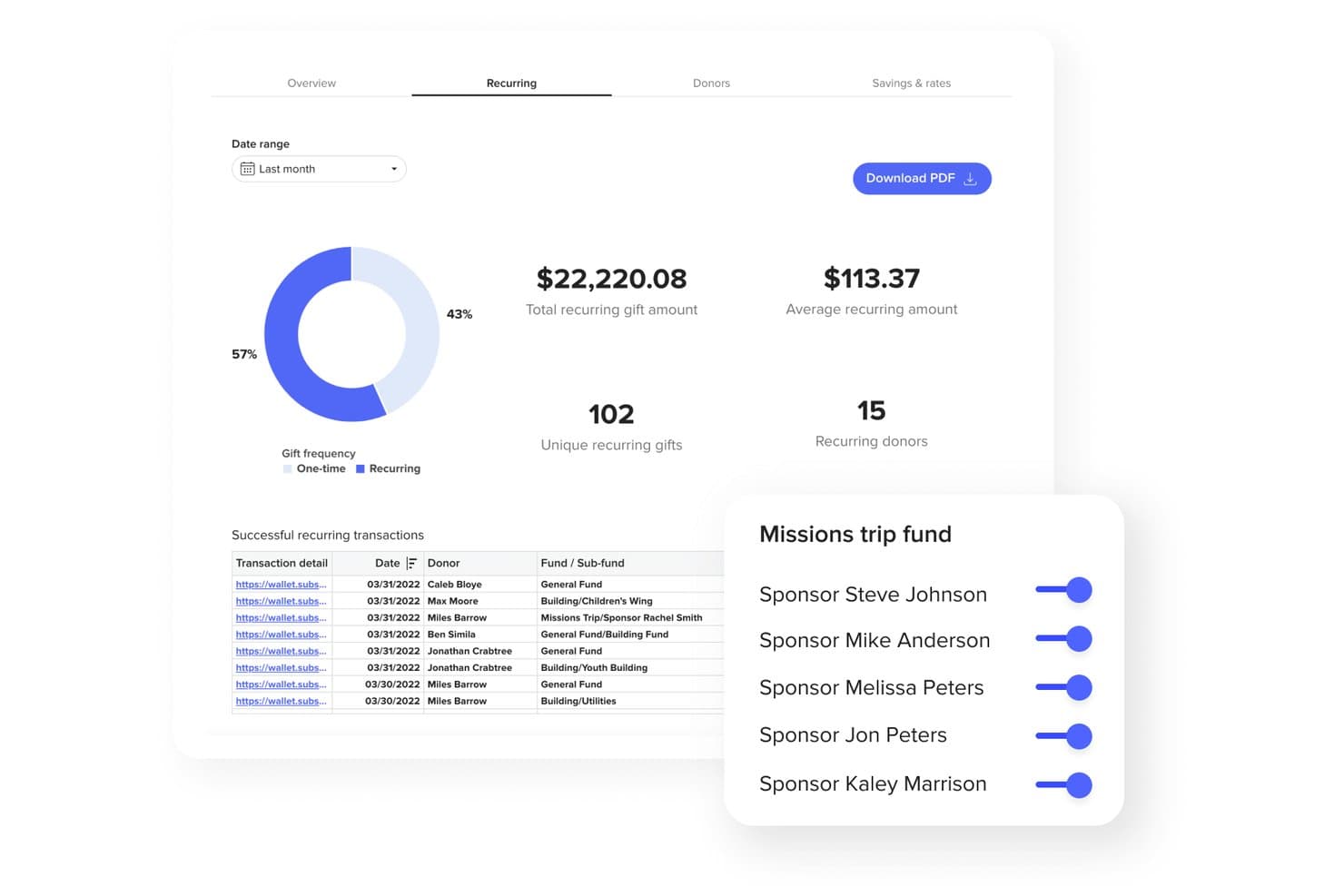
Subsplash offers a recurring giving dashboard with transaction details, donor stats, and fund sponsorship management tools. Subsplash is a church giving platform that supports online, mobile app, text-to-give, and NFC tap donations alongside donor management, fund tracking, automated tax statements, and multi-payment processing including ACH, cards, digital wallets, and stock or crypto gifts.
Who Is Subsplash Best For?
Subsplash is a strong fit for churches of any size that want to consolidate giving, app, and media tools into a single faith-focused platform.
Why I Picked Subsplash
Subsplash earns its spot on my shortlist because of how it handles payment speed and flexibility. Instant ACH with real-time bank verification means donations clear faster, and Apple Pay and Google Pay let congregants complete a gift in seconds. I also like Subsplash Tap, an NFC-based tool where donors simply tap their phone to give instantly, with no app download or QR code required.
Subsplash Key Features
- Text-to-give shortcodes: Enables giving by SMS with dedicated church keywords and instant text-based donations.
- Donor management dashboard: Tracks giver history, recurring gifts, and real-time analytics for contribution monitoring.
- Campaigns and pledge tracking: Lets churches launch goal-driven fundraising campaigns and manage donor commitments.
- Automated tax statement generation: Automatically creates and delivers IRS-compliant annual giving statements to donors.
Subsplash Integrations
Subsplash offers native integrations with Subsplash ChMS and Rock RMS. An API is available for custom integrations.
Pros and Cons
Pros:
- AI-driven lapsed donor alerts included
- NFC tap-to-give without an app download
- Supports stock, crypto, and DAF giving
Cons:
- Platform bundle extends beyond giving features
- Reporting depth lags behind dedicated giving tools
 Best for multi-campaign management
- Free plan available
- From $0/month
Visit WebsiteCustomer Rating:4.8/5
Anedot dashboard showing donation totals, revenue, and monthly trends overviews. Managing multiple fundraising efforts at once can get complicated, but Anedot is built to simplify that process for churches and nonprofits. This platform lets you run several campaigns simultaneously, each with its own donation page and tracking. It’s a strong fit for organizations juggling seasonal drives, special projects, or ongoing giving initiatives.
Why I Picked Anedot
When you need to manage several fundraising campaigns at once, Anedot stands out for its multi-campaign management capabilities. The platform lets you create and customize multiple donation pages, each with its own branding and tracking, so you can keep efforts separate and organized. I like that you can monitor performance for each campaign individually, making it easier to see what’s working and where to focus your attention. This setup is especially helpful for churches and ministries running seasonal appeals, capital campaigns, or special projects alongside regular giving.
Anedot Key Features
In addition to its campaign management tools, Anedot offers several other features worth noting:
- Text-to-Give: Allow donors to give by sending a simple text message.
- Embeddable Donation Forms: Add customizable giving forms directly to your website or landing pages.
- ACH and Card Processing: Accept donations via credit card, debit card, or ACH bank transfer.
- Donor Portal: Give supporters access to manage their recurring gifts and payment information.
Anedot Integrations
Integrations include HubSpot, Planning Center, RumbleUp, ActiveCampaign, SendGrid, Salesforce, Mailchimp, QuickBooks Online, Zapier, and more.
Pros and Cons
Pros:
- Donor portal for self-service giving management
- Text-to-give included at no extra cost
- Unlimited campaigns with separate donation pages
Cons:
- Reporting exports only available in CSV format
- Limited donor segmentation and tagging options
Learn more about Anedot: Best for donor retention analytics
- Free demo available
- From $40/month (billed annually)
Visit WebsiteCustomer Rating:4.7/5
Bloomerang focuses on improving donor retention with engagement insights. If your team wants to understand and improve donor loyalty, Bloomerang offers analytics built specifically for donor retention. This platform is designed for churches and nonprofits that want to track giving patterns and identify at-risk donors. Its focus on actionable retention insights helps leaders strengthen relationships and sustain long-term support.
Why I Picked Bloomerang
Donor retention analytics are at the heart of what makes Bloomerang valuable for churches and nonprofits. The platform tracks key metrics like donor retention rate, recapture rate, and donor engagement, giving you a clear picture of how well you’re building lasting relationships. I appreciate how Bloomerang highlights lapsed donors and suggests targeted follow-up actions, so you can act before support drops off. These analytics-driven features help you focus your efforts where they matter most for long-term giving.
Bloomerang Key Features
Some other features that make Bloomerang useful for giving platforms include:
- Online Giving Forms: Create branded donation forms that can be embedded on your website.
- Email Marketing Tools: Send newsletters, appeals, and automated thank-you messages directly from the platform.
- Constituent Timeline: View a chronological history of each donor’s interactions and giving activity.
- Mobile App: Access donor data and manage contacts from your phone or tablet.
Bloomerang Integrations
Integrations include QuickBooks, DonorSearch, Mailchimp, Constant Contact, Amilia, Verified First, Zapier, and more.
Pros and Cons
Pros:
- Constituent timeline tracks all donor interactions
- Built-in email marketing for donor outreach
- Donor retention dashboard updates in real time
Cons:
- Custom report builder has restricted filtering options
- No built-in text-to-give functionality
Learn more about Bloomerang: Best for text-to-give functionality
- 30-day free trial available
- From $72/month
Visit WebsiteCustomer Rating:4.7/5
GivingTools helps nonprofits collect donations while keeping transaction costs low. If keeping transaction costs low is a top priority for your church or nonprofit, GivingTools is designed with you in mind. This platform offers some of the lowest processing fees available, making it easier to maximize every donation. It’s a practical choice for organizations that want to stretch their giving dollars further without sacrificing essential features.
Why I Picked GivingTools
For organizations that want to minimize transaction fees, GivingTools offers a unique approach that stands out among giving platforms. The platform supports ACH bank transfers with ultra-low processing rates and even allows donors to cover transaction fees themselves. I appreciate that GivingTools provides transparent fee structures and lets you accept both one-time and recurring gifts without hidden costs. This makes it a strong fit for churches and ministries focused on maximizing the impact of every donation.
GivingTools Key Features
Some other features that make GivingTools appealing for churches and ministries include:
- Pledge Campaigns: Set up and manage multi-month or annual pledge drives for capital campaigns or special projects.
- Customizable Giving Forms: Design donation forms with your own branding, fields, and layout options.
- Physical Donation Integration: Record and track cash and check gifts alongside online donations.
- PDF Receipts: Automatically generate and send PDF receipts for every donation.
GivingTools Integrations
Integrations include QuickBooks, Mailchimp, Zapier, and more.
Pros and Cons
Pros:
- Customizable forms with branding and fields
- Supports physical and online donation tracking
- Donors can cover processing fees themselves
Cons:
- No recurring gift upgrade prompts for donors
- No mobile app for donor management
 Best for mobile donation experience
- Free plan available
- From 2.9% + $0.30 per donation
Visit WebsiteCustomer Rating:4.8/5
Givelify lets donors give quickly through a mobile-focused donation app. If you’re looking for a giving platform that prioritizes mobile donations, Givelify is designed with smartphone users in mind. Churches and faith-based organizations that want to make giving quick and accessible for their congregations will find its app-centered approach especially helpful. Givelify addresses the challenge of spontaneous and recurring giving by making the donation process fast, intuitive, and available from anywhere.
Why I Picked Givelify
Mobile-first giving is where Givelify truly shines, making it a strong fit for organizations that want to meet donors where they are—on their phones. The platform’s dedicated mobile app allows donors to give in just a few taps, whether they’re at home, in a service, or on the go. I appreciate how Givelify supports features like recurring giving and location-based donation prompts, which help churches and ministries encourage consistent support. For any group prioritizing a smooth mobile donation experience, Givelify offers tools that directly address this need.
Givelify Key Features
Some other features that make Givelify appealing for giving platforms include:
- Donation Tracking Dashboard: View and manage all donation activity in a centralized dashboard.
- Customizable Giving Links: Create unique giving links for specific campaigns or events.
- Instant Donation Receipts: Send automated receipts to donors immediately after each gift.
- Multi-Account Management: Manage multiple organizations or campuses from a single Givelify account.
Givelify Integrations
Integrations include Shelby Next, Shelby Arena, Power Church, Servant Keeper, ACS Realm, and ACS People.
Pros and Cons
Pros:
- Multi-campus management from a single account
- Location-based prompts encourage in-person donations
- Mobile app supports spontaneous giving during events
Cons:
- Limited branding options for donation pages
- No built-in event ticketing features
Learn more about Givelify: Best for customizable donation forms
- Free plan available
- From $99/month
Visit WebsiteCustomer Rating:4.4/5
Donately lets organizations create branded donation forms for online giving. If you need donation forms that match your ministry’s branding and workflow, Donately gives you full control over customization. This platform is designed for churches and nonprofits that want to tailor every aspect of the giving experience, from form fields to embedded widgets. It’s a strong fit for leaders who want to create a smooth, branded donation process across websites, emails, and campaigns.
Why I Picked Donately
What sets Donately apart is its focus on customizable donation forms, which is essential for organizations that want to maintain consistent branding and gather specific donor information. You can adjust form fields, colors, and layouts to match your church’s website or campaign needs. I like that Donately also lets you embed forms directly into your site or share them as standalone pages, giving you flexibility in how you collect donations. This level of customization helps you create a giving experience that feels personal and aligned with your ministry’s identity.
Donately Key Features
Some other features that make Donately useful for churches and nonprofits include:
- Recurring Donation Management: Set up and manage automated recurring gifts from donors.
- Donation Tracking Dashboard: View real-time donation data and trends in a centralized dashboard.
- Text-to-Give Functionality: Allow donors to give by sending a simple text message.
- Team Fundraising Pages: Create and manage collaborative fundraising campaigns with multiple team members.
Donately Integrations
Integrations include HubSpot, Salesforce, Mailchimp, Slack, Webflow, QuickBooks Online, Google Analytics, Constant Contact, Monday.com, and more.
Pros and Cons
Pros:
- Team fundraising pages for group campaigns
- Real-time donation tracking dashboard available
- Custom form builder supports advanced field logic
Cons:
- No donor portal for self-service management
- ACH bank transfer only on higher plans
Learn more about Donately: Best for event-based fundraising features
- 30-day free trial + free plan available
- From $29/month (billed annually)
Visit WebsiteCustomer Rating:4.7/5
Givebutter supports event-driven fundraising with live and peer campaigns. Givebutter stands out for organizations that want to combine fundraising with live or virtual events. Nonprofits, churches, and community groups looking to engage donors through ticketed events, auctions, or peer-to-peer campaigns will find its event-focused features especially useful. The platform helps teams manage event registration, ticket sales, and live donation tracking all in one place.
Why I Picked Givebutter
When it comes to event-based fundraising, Givebutter offers a toolkit that’s hard to match for churches and nonprofits hosting live or virtual events. The platform lets you create custom event pages with ticketing, registration, and live donation tracking built in. I like that you can run auctions, manage peer-to-peer fundraising teams, and display real-time donation feeds during your event. These features make Givebutter a strong choice for organizations that want to energize giving through interactive, event-driven campaigns.
Givebutter Key Features
Some other features that make Givebutter appealing for giving platforms include:
- Text-to-Donate: Donors can give by sending a simple text message.
- Customizable Donation Forms: Build branded forms to match your organization’s look and feel.
- Automated Thank-You Messages: Send personalized acknowledgments to donors after each gift.
- Team Fundraising Pages: Set up group fundraising pages for collaborative campaigns.
Givebutter Integrations
Integrations include Bloomerang, Double the Donation, Canva, Constant Contact, DonorSearch, HubSpot, monday.com, QuickBooks Online, Salesforce, and more.
Pros and Cons
Pros:
- Live donation feed displays during events
- Peer-to-peer fundraising tools support teams
- Event ticketing and registration are built in
Cons:
- Recurring donation options lack advanced controls
- ACH donations require manual verification steps
Learn more about Givebutter:

Give Lively enables nonprofits to fundraise online without platform fees. Give Lively offers a no-cost fundraising platform designed for nonprofit organizations that want unlimited campaigns without monthly fees. It’s a strong fit for churches and organizations looking to maximize donations and support online fundraising without worrying about platform costs. If you need flexible tools to reach your fundraising goals with transparent pricing, Give Lively stands out for its commitment to free access.
Why I Picked Give Lively
I chose Give Lively because it removes limits on the number of fundraising campaigns you can run, which is rare among giving platforms. You can create as many campaigns, donation pages, and peer-to-peer fundraisers as your ministry or nonprofit needs throughout the year. The platform also supports team fundraising and event ticketing, making it easy to manage multiple initiatives at once. This flexibility is especially helpful for churches and organizations that run frequent or seasonal giving drives.
Give Lively Key Features
Some other features that make Give Lively a strong choice for giving platforms include:
- Text-to-Donate: Donors can give by texting a custom keyword, making mobile giving quick and accessible.
- Donation Widget: Add a donation form directly to your website so supporters never have to leave your site to give.
- Supporter Portal: Donors can manage their recurring gifts, view donation history, and update payment information in a self-service portal.
- Integrations with Salesforce and Mailchimp: Sync donor data and communications with popular CRM and email marketing tools.
Give Lively Integrations
Integrations include Salesforce, Double the Donation, PayPal, Venmo, Apple Pay, Google Pay, DAFpay, Zapier, and more.
Pros and Cons
Pros:
- Donor portal for managing recurring gifts
- Supports text-to-donate and event ticketing
- Unlimited fundraising campaigns and donation pages
Cons:
- Payouts only through Stripe or PayPal
- No direct phone support for users
Learn more about Give Lively:

Pledge enables companies to manage employee and corporate giving programs. Pledge is designed for organizations that want to connect giving directly to livestreams and virtual events. Churches, nonprofits, and event hosts can use its tools to embed donation forms and real-time fundraising overlays into platforms like Zoom, Twitch, and YouTube. This approach helps teams turn digital gatherings into interactive fundraising opportunities without disrupting the flow of their events.
Why I Picked Pledge
For organizations that want to turn livestreams into fundraising moments, Pledge offers a direct way to embed giving into digital events. The platform provides donation overlays and widgets that work with Zoom, Twitch, YouTube, and other streaming services, so viewers can give without leaving the event. I appreciate that Pledge also supports real-time fundraising thermometers and on-screen donor recognition, which help keep audiences engaged. These features make it a strong fit for churches and nonprofits looking to connect digital participation with immediate giving opportunities.
Pledge Key Features
Some other features that make Pledge useful for giving platforms include:
- Text-to-Donate: Donors can contribute by sending a text message with a unique code.
- Customizable Donation Pages: Create branded donation pages tailored to your organization’s needs.
- Matching Gifts Integration: Connect with corporate matching gift programs to increase donation impact.
- Multi-Currency Support: Accept donations in various currencies for international campaigns.
Pledge Integrations
Integrations include Zoom, Shopify, Mailchimp, Slack, Constant Contact, Salesforce, Apple Pay, Bloomerang, Discord, and more.
Pros and Cons
Pros:
- Multi-currency support for international donors
- Text-to-donate feature supports mobile giving
- Livestream donation overlays work with major platforms
Cons:
- Reporting tools lack advanced segmentation filters
- No built-in event ticketing functionality
Learn more about Pledge: Best for peer-to-peer fundraising tools
- Free demo available
- Pricing upon request

GoFundMe Pro helps individuals raise money through shareable fundraising campaigns. GoFundMe Pro is built for organizations that want to harness the power of peer-to-peer fundraising at scale. It’s especially useful for churches, ministries, and nonprofits looking to mobilize supporters to create their own campaigns. If you need a platform that empowers your community to fundraise on your behalf, GoFundMe Pro offers specialized tools for team-based and individual fundraising efforts.
Why I Picked GoFundMe Pro
What sets GoFundMe Pro apart is its focus on peer-to-peer fundraising, which is essential for organizations that want to expand their reach through supporter-driven campaigns. The platform lets you empower individuals and teams to create their own fundraising pages, all connected to your main campaign. I appreciate how GoFundMe Pro provides real-time dashboards and campaign management tools so you can track progress across multiple fundraisers. This approach is especially valuable for churches and nonprofits that rely on community engagement to drive giving.
GoFundMe Pro Key Features
Some other features that make GoFundMe Pro a strong option for giving platforms include:
- Customizable Donation Pages: Tailor donation pages with your organization’s branding and messaging.
- Automated Tax Receipts: Send IRS-compliant tax receipts to donors automatically after each contribution.
- Matching Gift Integration: Connect with matching gift programs to help donors double their impact.
- Fundraiser Coaching Resources: Access training materials and support to help your team and supporters run successful campaigns.
GoFundMe Pro Integrations
Integrations include Salesforce, Blackbaud, DonorPerfect, Mailchimp, Google Analytics, Facebook, Double the Donation, Constant Contact, Bonfire, CiviCRM, and more.
Pros and Cons
Pros:
- Built-in matching gift integration
- Real-time dashboards for campaign tracking
- Peer-to-peer fundraising tools for supporters
Cons:
- No built-in volunteer management features
- Limited control over donor data exports
Learn more about GoFundMe Pro:
Other Giving Platforms
Here are some additional giving platforms options that didn’t make it onto my shortlist, but are still worth checking out:
- 11GivingToolsBest for low transaction fees
- 12DonorsChooseBest for project-based fundraising
- 13DonorboxBest for integrating with livestream events
- 14BetterWorldBest for auction and raffle fundraising
- 15GiveSendGoBest for faith-based fundraising support
Related Reviews
How I Evaluate Giving Platforms
I evaluate giving platforms in two layers: core requirements like recurring donations and fund designation, and differentiators—like text-to-give and ChMS sync—that matter to your church.
Core Functionality (Table Stakes For This List)
When I'm selecting tools for my list, I rank each one on a scale from 0 (does not offer the functionality) to 5 (excels in this area) for each core functionality listed below. Then, I calculate the tool's total score into a percentage. Each tool needs to achieve a minimum total score of 65% to be considered for inclusion.
- Online & Recurring Giving: I check whether donors can set up their own recurring schedules and manage them—things like adjusting amounts before a capital campaign or pausing during a sabbatical.
- Multi-Channel Giving Options: A platform should support giving beyond just a web form. I look for text-to-give, mobile apps, kiosk modes, and QR codes that work during a live Sunday service.
- Donor Management & Statements: I evaluate how each platform tracks individual giving history and generates year-end contribution statements that your finance team can send out without manual formatting.
- Fund & Designation Tracking: Churches run multiple funds at once—general tithes, building campaigns, missions, benevolence. I look for clear per-fund reporting and the ability to let donors choose designations at checkout.
- Payment Processing & Methods: Each platform should handle both card and ACH payments with PCI-compliant infrastructure. I also check for options like Apple Pay, Google Pay, or donor-covered processing fees.
- ChMS & Accounting Integrations: Giving data needs to flow into your existing systems. I look for native sync with platforms like Planning Center, Breeze, or QuickBooks so contribution records stay consistent without manual entry.
Once I have a list of tools that meet this criteria, I consider what sets each platform apart.
Differentiating Factors (What Sets Vendors Apart)
Here's how I compare and contrast different vendors:
Standout Features
Pledge and campaign tools matter when your church launches a building fund or missions drive—I look for platforms that let you set goals, track commitments, and show real-time progress to your congregation. Giving insights and analytics also separate good platforms from great ones, especially lapsed-donor alerts that help pastors re-engage members before they drift. I also check for donor-covered fee options, which let givers absorb processing costs so every dollar reaches your ministry budget.
Beyond Features
Pricing and fee structure deserve close attention—I evaluate whether a platform charges flat monthly rates, per-transaction fees, or both, since that balance shifts depending on your congregation's giving volume. Church size and scalability also matter. A 200-member church plant has different needs than a multi-campus organization that requires campus-level reporting under one account. I also consider support availability, particularly weekend and Sunday coverage, because giving issues during a live service can't wait until Monday morning.
How to Choose Giving Platforms
It’s easy to get bogged down in long feature lists and complex pricing structures. To help you stay focused as you work through your unique software selection process, here’s a checklist of factors to keep in mind:
| Factor | What to Consider |
|---|---|
| FactorScalability | What to ConsiderWill the platform handle growth in donors, campaigns, or giving volume without major disruptions or extra costs? |
| FactorIntegrations | What to ConsiderDoes it connect natively with your church management, accounting, or email marketing tools? Check for compatibility with your existing systems. |
| FactorCustomizability | What to ConsiderCan you tailor donation forms, receipts, and donor communications to fit your ministry’s branding and workflows? |
| FactorEase of use | What to ConsiderWill staff and volunteers be able to manage donations and reporting without extensive training or technical support? |
| FactorImplementation and onboarding | What to ConsiderHow long will it take to set up, migrate data, and train your team? Look for clear onboarding resources and support. |
| FactorCost | What to ConsiderAre all fees transparent, including transaction, monthly, and add-on costs? Compare the total cost of ownership, not just the base price. |
| FactorSecurity safeguards | What to ConsiderDoes the platform offer PCI compliance, data encryption, and fraud prevention to protect donor information? |
| FactorSupport availability | What to ConsiderWhat support channels are offered (chat, phone, email), and are they available during your ministry’s key hours? |
What Are Giving Platforms?
Giving platforms are online tools that enable churches and nonprofits to collect, manage, and track donations from individuals or groups. These platforms support a variety of giving methods, such as one-time gifts, recurring donations, and text-to-give. They also help organizations manage donor information, generate receipts, and analyze giving trends, making it easier to support fundraising efforts and maintain donor relationships.
Features of Giving Platforms
When selecting giving platforms, keep an eye out for the following key features:
- Online donation processing: Accept gifts through credit cards, debit cards, and ACH bank transfers, making it easy for donors to give from anywhere.
- Recurring giving setup: Allow donors to schedule automatic, ongoing contributions at intervals they choose, supporting consistent financial support.
- Customizable donation forms: Design and brand donation forms to match your organization’s identity and collect the information you need from donors.
- Donor management tools: Store, organize, and update donor profiles, track giving history, and segment supporters for targeted communication.
- Automated receipt generation: Instantly send tax-compliant receipts and thank-you messages to donors after each contribution.
- Campaign and event tracking: Create, manage, and monitor multiple fundraising campaigns or events, tracking progress and donor engagement for each.
- Reporting and analytics: Access dashboards and exportable reports that show giving trends, donor retention, and campaign performance.
- Text-to-give functionality: Enable donors to contribute by sending a text message, offering a quick and convenient giving option.
- Integration capabilities: Connect with accounting, email marketing, and church management systems to simplify workflows and data sharing.
- Security and compliance: Ensure donor data is protected with encryption, PCI compliance, and fraud prevention measures.
Benefits of Giving Platforms
Implementing giving platforms provides several benefits for your team and your business. Here are a few you can look forward to:
- Increased giving flexibility: Support one-time, recurring, and mobile donations, making it easier for people to give in ways that fit their preferences.
- Centralized donor management: Organize donor information, track giving history, and segment supporters for more personalized communication and stewardship.
- Simplified financial tracking: Automatically generate receipts, reports, and analytics to simplify accounting and monitor fundraising progress.
- Improved donor engagement: Use customizable forms, automated thank-yous, and campaign tracking to build stronger relationships with your supporters.
- Improved data security: Protect sensitive donor information with encryption, PCI compliance, and fraud prevention tools built into the platform.
- Time savings for staff: Automate manual tasks like receipt generation, data entry, and reporting, freeing up your team for higher-impact ministry work.
- Easy integration with existing systems: Connect giving data to your accounting, email marketing, and church management tools for a more efficient workflow.
Costs and Pricing of Giving Platforms
Selecting giving platforms requires an understanding of the various pricing models and plans available. Costs vary based on features, team size, add-ons, and more. The table below summarizes common plans, their average prices, and typical features included in giving platform solutions:
Plan Comparison Table for Giving Platforms
| Plan Type | Average Price | Common Features |
|---|---|---|
| Plan TypeFree Plan | Average Price$0 | Common FeaturesBasic online donation processing, limited donor management, standard reporting, and basic support. |
| Plan TypePersonal Plan | Average Price$10–$30/month | Common FeaturesCustomizable donation forms, recurring giving, basic integrations, and email support. |
| Plan TypeBusiness Plan | Average Price$50–$150/month | Common FeaturesAdvanced donor management, campaign tracking, text-to-give, improved reporting, and phone support. |
| Plan TypeEnterprise Plan | Average Price$200–$500/month | Common FeaturesCustom integrations, advanced security, dedicated account management, priority support, and API access. |
Giving Platforms FAQs
Here are some answers to common questions about giving platforms:
How do giving platforms handle recurring donations?
Giving platforms let donors set up automatic, scheduled gifts at intervals they choose. This helps churches and nonprofits maintain steady support and reduces administrative work by automating payment processing and receipt generation.
Can giving platforms integrate with church management or accounting software?
Yes, most giving platforms offer integrations with popular church management and accounting tools. This allows you to sync donor data, track giving history, and simplify financial reporting without manual data entry.
What security measures do giving platforms use to protect donor information?
Giving platforms typically use encryption, PCI compliance, and fraud detection tools to safeguard sensitive data. Always confirm that your chosen platform meets industry standards for data security and privacy.
Are there fees associated with using giving platforms?
Yes, most platforms charge transaction fees, monthly subscription fees, or both. Some also have additional costs for premium features or integrations. Review all pricing details to understand your total cost.
How quickly can donations be accessed after they are made?
Most giving platforms deposit funds into your organization’s bank account within a few business days. Processing times can vary based on the platform and payment method, so check payout schedules before choosing a solution.