

Managing events at your church can be overwhelming—from coordinating registrations to handling communications, it's easy to feel swamped. That's where the right event registration software comes in. It eases the burden, simplifying everything from sign-ups to tracking attendance.
In my experience, finding the right tool can transform how your team manages event registration. I've tested and reviewed various options to bring you an unbiased look at the best on the market.
In this article, you'll discover event registration software solutions that address your unique challenges. I'll cover the features, pros and cons, and pricing of each so you can make an informed choice for your church.
Why Trust Our Software Recommendations
6,700+
Reviews
20
Industry experts
16+
Evaluation factors
14
Years
Our team has been testing and reviewing software since 2012. As church leaders ourselves, we know how difficult—and important—it is to choose the right software.
For this guide, we evaluated tools using hands-on testing and independent research, scoring tools using our selection criteria.
Our reviews reflect our human editorial judgment, not a sales pitch.
Event Registration Software Comparison Table
This comparison table summarizes pricing details for my top brand monitoring tools selections:
| Tool | Best For | Trial Info | Price | ||
|---|---|---|---|---|---|
| 1 | Best for zero-fee nonprofit event ticketing | Free plan available | Pricing upon request | Website | |
| 2 | Best for managing multiple service times | Free trial + free demo available | From $399/event | Website | |
| 3 | Best for private events | Free plan + free demo available | From $24/month (billed annually) | Website | |
| 4 | Best for hybrid events | Free demo available | Pricing upon request | Website | |
| 5 | Best for attendee engagement | Free demo available | Pricing upon request | Website | |
| 6 | Best for flat-fee enterprise event programs | Free demo available | From $11,800/year (billed annually) | Website | |
| 7 | Best for onsite check-in and badge printing | Free demo available | From $7,500/event | Website | |
| 8 | Best for virtual event hosting | Free demo available | From $499/user/month (billed annually) | Website | |
| 9 | Best for virtual trade shows | Free demo available | Pricing upon request | Website | |
| 10 | Best for data analytics | Not available | Pricing upon request | Website |


Best Event Registration Software Reviews
Below are my detailed summaries of the best event registration software that made it onto my shortlist. My reviews offer a detailed look at the key features, pros and cons, integrations, and ideal use cases of each tool to help you find the best one for you.
 Best for zero-fee nonprofit event ticketing
- Free plan available
- Pricing upon request
Visit WebsiteCustomer Rating:4.9/5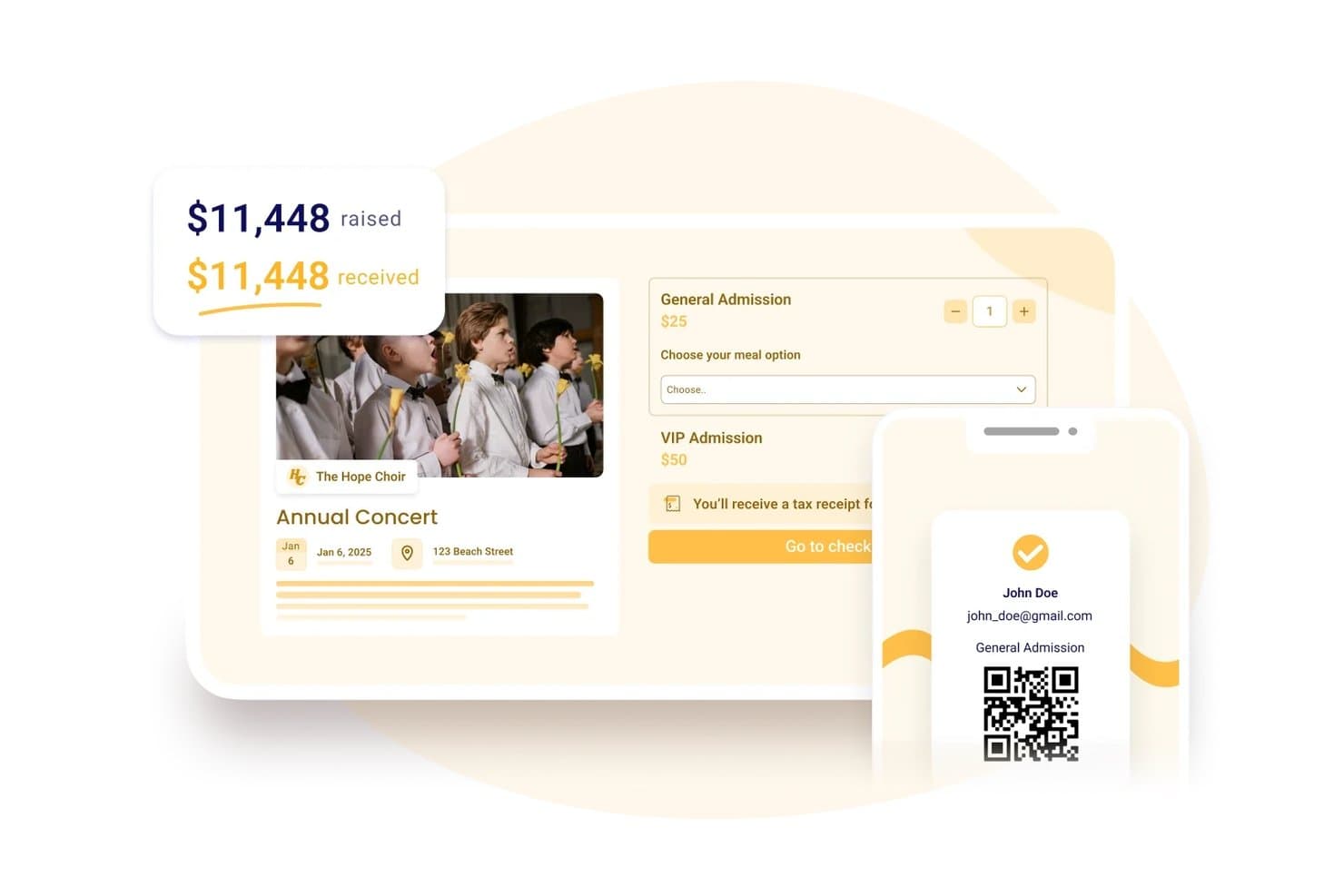
Zeffy lets users sell tickets and track funds raised in one place. My Evaluation Score
- Payment Processing
- Strong
- Attendee Management
- Strong
- Check-In Functionality
- Strong
- Online Registration Forms
- Adequate
- Automated Confirmations & Reminders
- Adequate
- Event Capacity & Scheduling Controls
- Adequate
Zeffy is a nonprofit-focused event registration and fundraising platform that combines ticketing, donor management, membership tools, and in-person payments in one system.
Who Is Zeffy Best For?
Zeffy is a strong fit for registered nonprofits in the US, Canada, UK, Ireland, Australia, and Germany that want to run ticketed events without paying platform or transaction fees.
Why I Picked Zeffy
I picked Zeffy as one of the best because it's the only platform on my list where nonprofits pay absolutely nothing in platform or transaction fees, ever. I love that you can sell group tickets, collect per-attendee custom questions like meal selections, and check guests in by QR scan, all without a single fee eating into your fundraising. For a church running its annual gala or a holiday benefit concert, that zero-fee model means every dollar from ticket sales goes directly to your ministry.
Zeffy Key Features
- Multi-date event scheduling: Set up recurring events on daily, weekly, or monthly schedules, with buyers selecting their date and time before choosing tickets.
- Donor and attendee CRM: Supporter profiles store giving history, event attendance, memberships, email engagement, notes, and tags in one place.
- Tap to Pay app: Accept card, Apple Pay, and Google Pay payments directly on a phone for in-person ticket sales, merchandise, and donations with no terminal needed.
- Embeddable event forms: Paste generated HTML into any website builder to embed a registration form directly on your church's site.
Zeffy Integrations
Zeffy offers native integrations with QuickBooks Online and WordPress. It also supports Salesforce, Mailchimp, and other connections through viaSocket, a public API, webhooks, and Zapier.
Pros and Cons
Pros:
- Ticketing and donor records share one workspace
- QR check-in keeps gala arrivals moving
- Reviewers praise clean, quick event setup
Cons:
- Limited form and email design frustrates organizers
- Buyers sometimes mistake checkout contributions for fees
Learn more about Zeffy: Best for managing multiple service times
- Free trial + free demo available
- From $399/event

Church RSVP displays an event occurrence management screen with seat type tracking. My Evaluation Score
- Payment Processing
- Does not offer
- Event Page & Ticketing
- Adequate
- Reporting & Data Export
- Adequate
- Automated Communications
- Adequate
- Custom Registration Forms
- Strong
- Attendee Management & Check-In
- Adequate
Church RSVP is an event management platform designed specifically for churches and ministries to organize everything from weekly services to multi-day conferences. It simplifies complex administrative tasks like volunteer recruitment and VBS registration while ensuring you never exceed the seating limit.
Who Is Church RSVP Best For?
Church RSVP is a good fit for churches and ministries that need a dedicated tool to manage event registrations, coordinate multiple services, and track attendance for faith-based gatherings.
Why I Picked Church RSVP
Managing multiple service times is a common challenge for churches, and that’s why I picked Church RSVP for this list. It allows congregants to select their preferred service time during registration, which automatically updates the live headcounts for each session. This is particularly useful for holiday services or special events where you need to balance attendance across multiple start times to avoid overcrowding. This focus on flexible scheduling makes Church RSVP especially useful for ministries with several gatherings each week.
Church RSVP Key Features
Some other features that make Church RSVP useful for event registration include:
- Customizable registration forms: Create forms with fields tailored to your event’s needs, such as attendee names, contact details, or special requests.
- Automated confirmation emails: Send instant confirmation messages to registrants, helping attendees know their spot is reserved.
- Attendance tracking dashboard: Monitor real-time attendance numbers and view historical data for each event or service.
- Volunteer sign-up management: Allow volunteers to register for specific roles or shifts, making it easier to coordinate event staffing.
Church RSVP Integrations
Integrations are not publicly listed.
Pros and Cons
Pros:
- Allows unlimited registrations without extra fees
- Offers automated confirmations and reminders
- Lets attendees choose in-person or online
Cons:
- No attendee messaging beyond email reminders
- No built-in payment processing for paid events
Learn more about Church RSVP: Best for private events
- Free plan + free demo available
- From $24/month (billed annually)
Visit WebsiteCustomer Rating:4.8/5
RSVPify coordinates guest management for private events. My Evaluation Score
- Payment Processing
- Strong
- Event Page & Ticketing
- Excels
- Reporting & Data Export
- Strong
- Automated Communications
- Strong
- Custom Registration Forms
- Excels
- Attendee Management & Check-In
- Excels
RSVPify is an event management tool well-suited for churches and faith-based organizations hosting private or invitation-only events. It’s ideal for managing RSVPs for gatherings such as church dinners, leadership meetings, retreats, weddings, baptisms, and special ministry events, with tools for guest lists, customization, and communication.
Why I picked RSVPify: RSVPify works well for church events that require guest list control and personal touches. Churches can create custom event pages, track RSVPs, and manage attendee details like meal preferences or seating needs. Automated reminders help reduce no-shows, while the platform’s customization options make it easy to create a welcoming, organized experience for congregants and invited guests.
Standout Features and Integrations:
Features include drag-and-drop seating charts, event reminders, and guest check-in capabilities. RSVPify makes it simple to manage meal preferences and create detailed guest profiles. The platform also allows for real-time updates to your event.
Integrations include Stripe, Mailchimp, Google Analytics, Zapier, PayPal, and more.
Pros and Cons
Pros:
- Simple guest list management
- Supports meal preferences
- Ideal for private events
Cons:
- Basic design customization
- Limited for large-scale events
Learn more about RSVPify:

Whova manages event registrations and attendee engagement. My Evaluation Score
- Payment Processing
- Strong
- Event Page & Ticketing
- Excels
- Reporting & Data Export
- Strong
- Automated Communications
- Excels
- Custom Registration Forms
- Excels
- Attendee Management & Check-In
- Excels
Whova is an event registration software designed for event organizers who manage hybrid events. It offers solutions for managing registrations, attendee engagement, and event marketing from conferences to workshops.
Why I picked Whova: Whova shines in managing hybrid events, offering features such as personalized registration, attendee networking opportunities, and on-demand, on-site badge printing. It provides tools for creating various ticket types and handling payments efficiently. The software also supports virtual event hosting, making it versatile for different event formats. Attendees can access event materials and participate in live polls to elevate their overall experience.
Standout Features and Integrations:
Features include networking capabilities, live polling, and virtual session hosting. Whova offers hassle-free customization for registration forms and ticket sales management. The platform allows for detailed reporting and analytics to track event success.
Integrations include Eventbrite, Constant Contact, Cvent, RegFox, and Zapier.
Pros and Cons
Pros:
- Supports virtual sessions
- Customizable registration forms
- Easy to manage hybrid events
Cons:
- Limited offline support
- Limited customization for branding
Learn more about Whova: Best for attendee engagement
- Free demo available
- Pricing upon request
Visit WebsiteCustomer Rating:4.6/5
EventMobi boosts attendee engagement for in-person and virtual events. My Evaluation Score
- Payment Processing
- Strong
- Event Page & Ticketing
- Excels
- Reporting & Data Export
- Strong
- Automated Communications
- Excels
- Custom Registration Forms
- Excels
- Attendee Management & Check-In
- Excels
EventMobi is an event management platform well-suited for churches and faith-based organizations that want to create engaging, interactive event experiences. It works for both in-person and virtual church events, such as conferences, leadership training, youth gatherings, and multi-session ministry events.
Why I picked EventMobi: EventMobi stands out for churches because of its strong focus on attendee engagement. Churches can use interactive agendas, live polls, and in-app announcements to keep attendees informed and involved throughout the event. Customizable event apps allow for personalized schedules, session content, and speaker information, while real-time feedback tools help church leaders understand what resonated most. Built-in analytics make it easier to measure engagement and improve future church events.
Standout Features and Integrations:
Features include customizable branding, audience response systems, and gamification elements. You can use EventMobi’s live Q&A and chat features to generate interaction. The platform also offers session tracking to monitor attendance.
Integrations include Salesforce Campaigns, Marketo, HubSpot, Mailchimp, and more.
Pros and Cons
Pros:
- Real-time feedback collection
- Supports personalized event experiences
- Effective for attendee interaction
Cons:
- May need additional resources for large events
- Limited mobile app customization
Learn more about EventMobi: Best for flat-fee enterprise event programs
- Free demo available
- From $11,800/year (billed annually)
Visit WebsiteCustomer Rating:4.8/5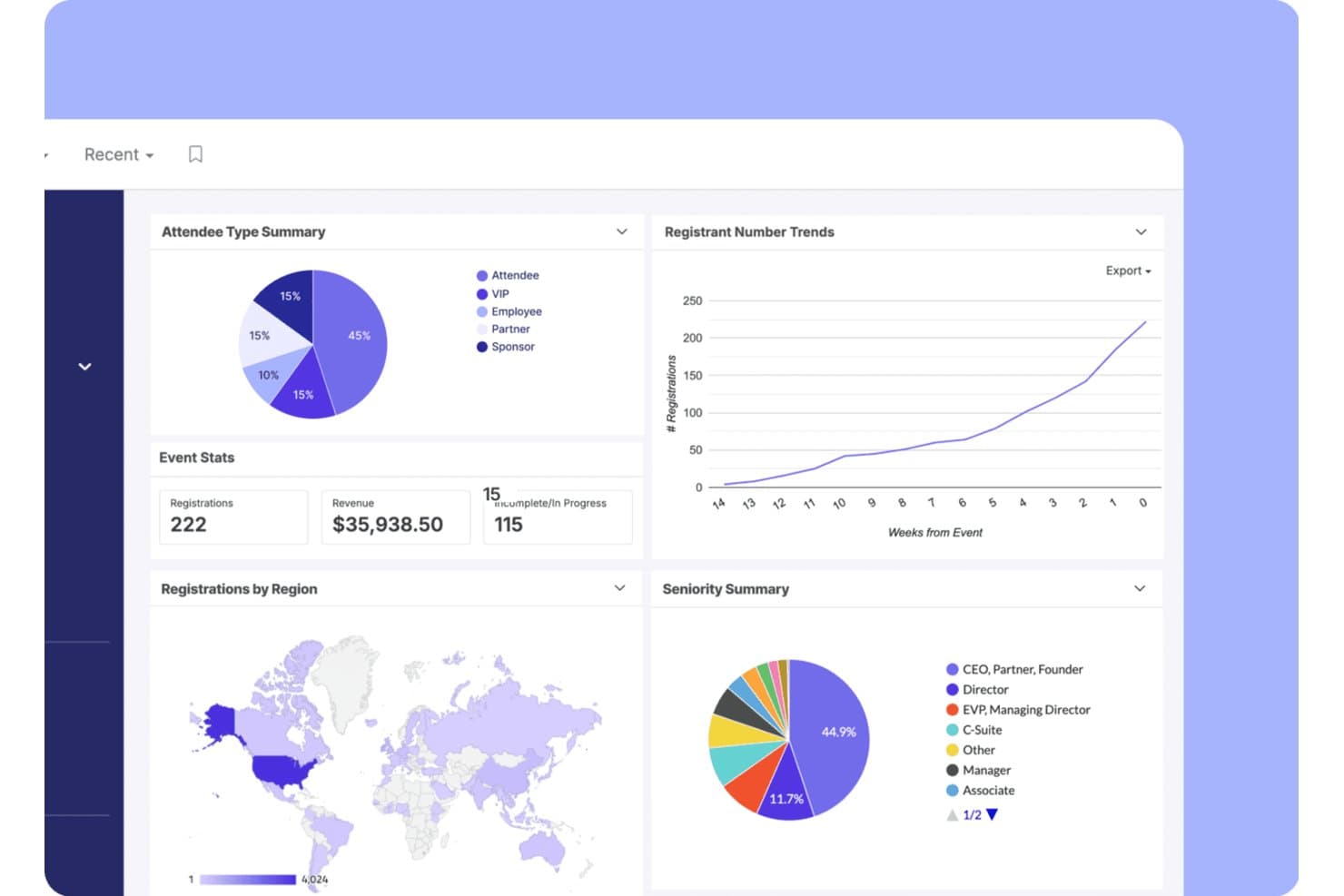
Swoogo tracks registrations, revenue, and attendee trends in one dashboard. My Evaluation Score
- Payment Processing
- Excels
- Event Page & Ticketing
- Excels
- Reporting & Data Export
- Excels
- Automated Communications
- Strong
- Custom Registration Forms
- Excels
- Attendee Management & Check-In
- Excels
Swoogo is an enterprise event registration platform built around flat-fee annual licensing, offering unlimited events, white-labeled event websites, conditional registration forms, on-site check-in, and deep CRM integrations.
Who Is Swoogo Best For?
Swoogo is a strong fit for large churches and denominational organizations that run professional-scale conferences and leadership summits with dedicated event staff.
Why I Picked Swoogo
Swoogo earns its spot on my shortlist because its flat-fee licensing model is genuinely built for organizations running events at scale. I love that unlimited events and unlimited registrations are included at one annual price, so a denominational body hosting a leadership summit, a regional conference, and a series of smaller gatherings pays the same rate regardless of volume. The conditional registration builder is best-in-class: unlimited registrant types, unlimited logic rules, and approval workflows let you create distinct registration paths for speakers, sponsors, and general attendees in a single form.
Swoogo Key Features
- Go Onsite check-in app: A mobile app for on-site check-in with QR code scanning, on-demand badge printing, self-serve kiosk mode, and real-time attendance tracking.
- Cross-event reporting: A customizable report builder with 15+ built-in reports, real-time dashboards, and cross-event trend comparisons that can be shared with non-Swoogo users.
- Automated email sequences: A drag-and-drop email builder that triggers pre- and post-event communications based on registrant type, behavior, and workflow rules.
- Native CRM sync: Two-way data integration with Salesforce, HubSpot, and Marketo that pushes registration and attendance data without manual CSV exports.
Swoogo Integrations
Swoogo offers 30+ integrations, including Salesforce, HubSpot, Marketo, Zoom, ON24, Stripe, Avalara, and Google Analytics. It also provides a REST API, webhooks, and Zapier for custom connectivity.
Pros and Cons
Pros:
- Cross-event reporting and dashboards
- Best-in-class conditional registration builder
- Unlimited registrations without extra fees
Cons:
- No child or family check-in workflows
- No church management system integrations
Learn more about Swoogo: Best for onsite check-in and badge printing
- Free demo available
- From $7,500/event
Visit WebsiteCustomer Rating:4.7/5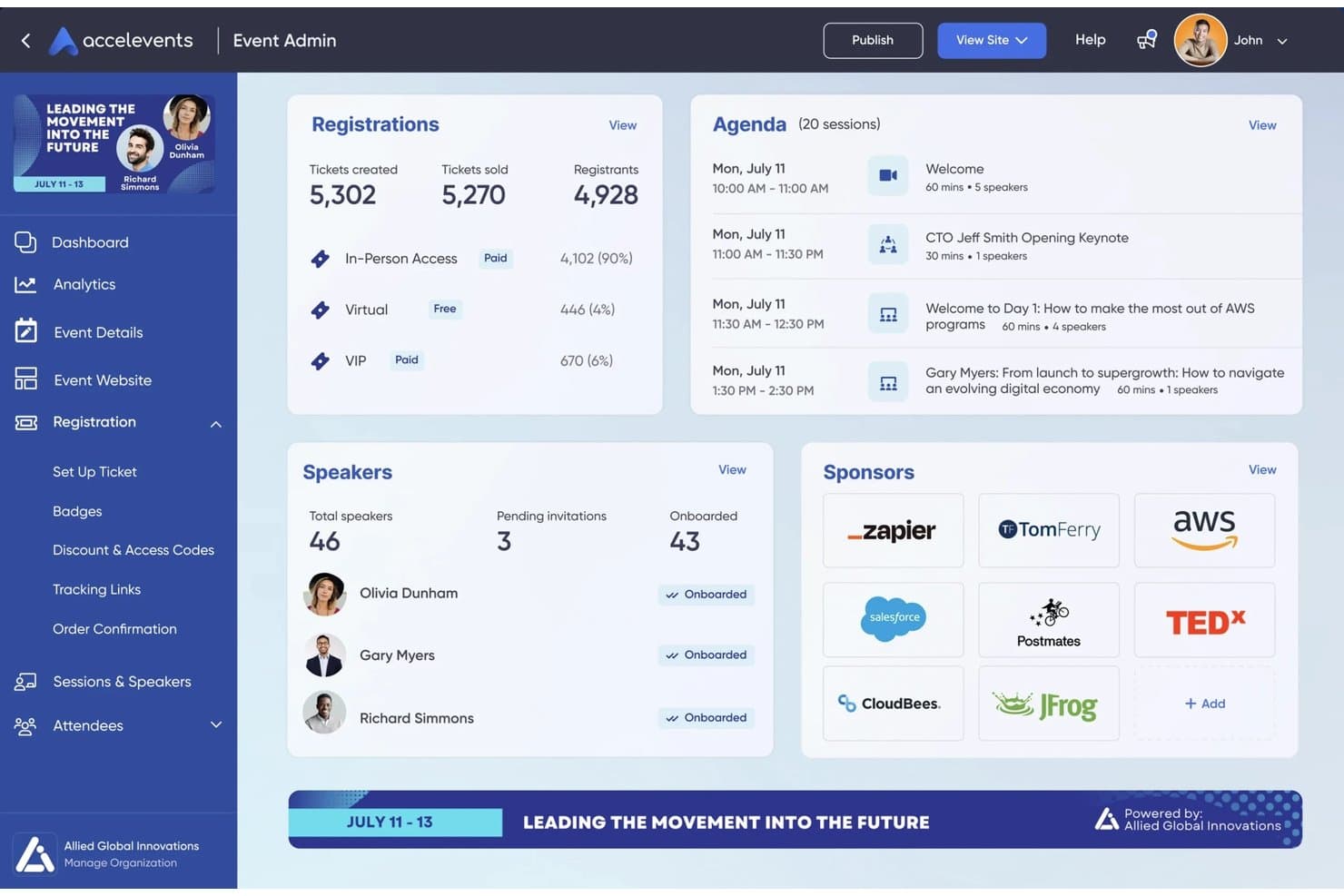
Accelevents centralizes event registrations, agenda, speakers, and sponsors in one dashboard. My Evaluation Score
- Payment Processing
- Excels
- Event Page & Ticketing
- Excels
- Reporting & Data Export
- Excels
- Automated Communications
- Strong
- Custom Registration Forms
- Excels
- Attendee Management & Check-In
- Excels
Accelevents is an event registration and management platform that combines ticketing, custom registration forms, payment processing, onsite check-in, badge printing, and attendee data reporting in one system.
Who Is Accelevents Best For?
Accelevents is a strong fit for professional event teams and nonprofits running large-scale conferences, trade shows, or fundraisers who need reliable onsite check-in and badge printing.
Why I Picked Accelevents
Accelevents earns its spot on my shortlist because of how well it handles the physical reality of a large event: getting hundreds of people through the door quickly and into the right sessions. I love that the iPad kiosk setup prints badges in about 3 seconds and runs in offline mode, so a spotty venue Wi-Fi connection won't stall your check-in line. The Badge Designer also lets you set conditional images and dynamic text based on registration responses, which means VIP attendees, exhibitors, and general admission can all get distinct, print-ready badges from a single workflow.
Accelevents Key Features
- Custom registration form builder: Create unlimited registration paths with conditional logic, routing rules, approval workflows, and ticket-level custom fields.
- Silent auction and donation tools: Run text-to-bid silent auctions and collect integrated donations directly within the event registration checkout flow.
- Native CRM sync: Connect bidirectionally with Salesforce, HubSpot, and Marketo to keep attendee data current across your marketing and sales systems.
- Session-level check-in: Track attendance and manage capacity at the individual session level, with support for continuing education credit tracking.
Accelevents Integrations
Accelevents offers native integrations with Salesforce, HubSpot, Marketo, Salesforce Pardot, NetForum AMS, Novi AMS, Protech, Zoom, Google Analytics, and Google Tag Manager. It also provides REST APIs, webhooks, and Zapier connectivity for custom connections.
Pros and Cons
Pros:
- Combined registration, auctions, and donations workflow
- Self-service check-in runs in offline mode
- Onsite badge printing in about three seconds
Cons:
- No family or child safety check-in features
- No native church management system integration
Learn more about Accelevents: Best for virtual event hosting
- Free demo available
- From $499/user/month (billed annually)
Visit WebsiteCustomer Rating:4.5/5
Bizzabo powers virtual events with engagement and analytics. My Evaluation Score
- Payment Processing
- Excels
- Event Page & Ticketing
- Excels
- Reporting & Data Export
- Excels
- Automated Communications
- Excels
- Custom Registration Forms
- Excels
- Attendee Management & Check-In
- Excels
Bizzabo is a versatile event management platform well-suited for churches and faith-based organizations hosting virtual, hybrid, or in-person events. It helps church teams plan and run online conferences, leadership summits, training sessions, and livestreamed gatherings, with tools for registration, engagement, and performance tracking.
Why I picked Bizzabo: Bizzabo works well for churches because it supports virtual, hybrid, and in-person events in one platform, making it easy to reach both local and remote congregations. Churches can host live streams, interactive worship sessions, panels, and workshops, while engaging attendees through polls and Q&A. Customizable event pages help maintain consistent branding, and detailed analytics allow church leaders to measure attendance, participation, and overall engagement across events of any size.
Standout Features and Integrations:
Features include customizable branding options, networking tools, and email campaign automation. You can use its real-time audience engagement features to keep participants involved. The platform also offers extensive reporting capabilities for post-event analysis.
Integrations include Salesforce Campaigns, Marketo, HubSpot, Google Analytics, and more.
Pros and Cons
Pros:
- Real-time audience engagement
- Detailed performance analytics
- Effective for large virtual events
Cons:
- Limited design flexibility
- Support quality can be inconsistent
Learn more about Bizzabo: Best for virtual trade shows
- Free demo available
- Pricing upon request
Visit WebsiteCustomer Rating:4.7/5
vFairs hosts immersive virtual trade shows. My Evaluation Score
- Payment Processing
- Excels
- Event Page & Ticketing
- Excels
- Reporting & Data Export
- Excels
- Automated Communications
- Strong
- Custom Registration Forms
- Excels
- Attendee Management & Check-In
- Excels
vFairs is a virtual event platform well suited for churches and faith-based organizations hosting online conferences, ministry expos, training events, and large virtual gatherings. It helps churches create immersive digital experiences with tools for networking, session hosting, and engaging attendees in a visually interactive environment.
Why I picked vFairs: vFairs works well for church events that benefit from a more immersive virtual format, such as ministry fairs, leadership conferences, or global gatherings. The platform supports interactive virtual booths, which churches can use for ministries, missions, sponsors, or resources, along with live webinars for sermons, workshops, and panel discussions. Networking lounges and chat features encourage connection and fellowship among attendees, while built-in analytics help church leaders measure engagement and evaluate the success of virtual events.
Standout Features and Integrations:
Features include customizable virtual lobbies, gamification elements, and live streaming capabilities. You can set up virtual booths with resource downloads and videos. The platform also supports multi-language options to reach a global audience.
Integrations include Salesforce CRM, Zoom, Marketo, HubSpot, and more.
Pros and Cons
Pros:
- Supports multi-language events
- Offers interactive booths for exhibitors
- Ideal for virtual trade shows
Cons:
- Multi-language setups can require guidance
- Complex configuration for 3D environments and booths
Learn more about vFairs:

RainFocus monitors event performance at scale. My Evaluation Score
- Payment Processing
- Strong
- Event Page & Ticketing
- Excels
- Reporting & Data Export
- Excels
- Automated Communications
- Excels
- Custom Registration Forms
- Excels
- Attendee Management & Check-In
- Excels
RainFocus is an event management platform well-suited for churches and faith-based organizations that host large conferences, conventions, or multi-day ministry events. It offers tools for registration, attendee engagement, and performance tracking, helping church teams manage complex events with multiple sessions, tracks, and activities.
Why I picked RainFocus: RainFocus is a good fit for church events that require detailed insights into attendance and engagement. The platform provides advanced analytics that help track attendee behavior and participation in real time. Churches can customize reports to evaluate session popularity, engagement levels, and overall event effectiveness. Its support for complex event structures and personalized attendee experiences allows church leaders to use data to improve future conferences and large-scale gatherings.
Standout Features and Integrations:
Features include customizable dashboards, real-time data visualization, and advanced reporting tools. You can manage multiple events from a single interface. The platform also supports personalized content delivery to increase attendee engagement.
Integrations include Salesforce CRM, Marketo, HubSpot, Slack, Zoom, and more.
Pros and Cons
Pros:
- Real-time engagement tracking
- Supports complex event structures
- Detailed data analytics available
Cons:
- Multi-event management can require support
- Complex data model and permission setup
Learn more about RainFocus:
Other Event Registration Software
Here are some additional event registration software options that didn’t make it onto my shortlist, but are still worth checking out:
- 11CventBest for large-scale conferences
- 12RegFoxBest for budget-friendly pricing
- 13BrushfireBest for faith-based camps and retreat sign-ups
- 14EventbriteBest for small to medium events
- 15EventleafBest for professional development event check-in
- 16EventzillaBest for customizable registration
- 17Webex EventsBest for end-to-end conference management
- 18TicketbudBest for flexible ticketing
- 19Cvent SplashBest for branded event pages
- 20Planning Center RegistrationsBest for church suite registration workflows
- 21SplashBest for martech-integrated event programs
How I Evaluate Event Registration Software
I split my evaluation into two layers: baseline requirements every tool must meet—like family registration, ChMS sync, and payment processing—and the differentiators that set the best apart.
Core Functionality (Table Stakes For This List)
When I'm selecting tools for my list, I rank each one on a scale from 0 (does not offer the functionality) to 5 (excels in this area) for each core functionality listed below. Then, I calculate the tool's total score into a percentage. Each tool needs to achieve a minimum total score of 65% to be considered for inclusion.
- Event Registration Forms: I look for flexible form builders that handle the realities of church programming—things like session selection for VBS, capacity limits for retreats, and waitlists for popular small groups.
- Payment Processing: Each tool needs to support event fee collection, and I check for extras like installment plans for camp fees, optional donation add-ons, and discount or scholarship codes.
- ChMS Integration: Whether a platform syncs with Planning Center, Breeze, or another ChMS, I evaluate how well registrant data flows into existing member profiles without manual re-entry.
- Attendee & Family Management: A parent registering three kids for a weekend retreat needs household-level signups, guardian fields, medical info, and digital waivers—so I look for all of those.
- Automated Communications: I check whether confirmation emails, event reminders, and post-event follow-ups can be triggered automatically rather than requiring staff to send each one manually.
- Check-In & Attendance Tracking: Secure child check-in with matching pickup tags is a big one, along with digital roster tracking for classes, services, and midweek programs.
Once I have a list of tools that meet this criteria, I consider what sets each platform apart.
Differentiating Factors (What Sets Vendors Apart)
Here's how I compare and contrast different vendors:
Standout Features
Recurring event support matters a lot when your church runs weekly small groups or multi-week classes that need persistent rosters. I also look at volunteer scheduling—being able to assign and notify volunteers from the same place you manage registrations saves coordinators real time. Fundraising tools are worth evaluating too, especially for camps or mission trips where families may need "pay what you can" pricing or sponsorship options to make events accessible.
Beyond Features
Pricing model matters when you're working with a church budget—I check whether a platform offers nonprofit discounts, free tiers, or reasonable per-transaction fees that won't eat into camp or retreat revenue. Data security and child safety compliance also weigh heavily, especially PCI-DSS compliance and secure check-in protocols that protect minors' personal and medical information. I evaluate onboarding support too, since many church teams rely on volunteers with limited tech experience who need accessible training resources to get up and running.
How To Choose the Best Event Registration Software
It’s easy to get bogged down in long feature lists and complex pricing structures. To help you stay focused as you work through your unique software selection process, here’s a checklist of factors to keep in mind:
| Factor | What To Consider |
|---|---|
| FactorScalability | What To ConsiderWill the software grow with your events? Consider the number of attendees you expect now and in the future. Look for tools that can handle increased volume. |
| FactorIntegrations | What To ConsiderDoes it connect with your existing tools? Check for compatibility with CRM systems, marketing platforms, and payment gateways you already use. |
| FactorCustomizability | What To ConsiderCan you tailor the software to your needs? Ensure it allows you to customize forms, branding, and user experiences to fit your specific event requirements. |
| FactorEase of use | What To ConsiderIs it user-friendly for your team? Evaluate the interface and navigation. Test it with non-technical users to ensure it’s accessible. |
| FactorImplementation and onboarding | What To ConsiderHow quickly can you get up and running? Look for clear onboarding processes, training resources, and customer support to assist during setup. |
| FactorCost | What To ConsiderIs it within your budget? Compare pricing plans and consider any additional costs for features or support. Evaluate whether the value matches the price. |
| FactorSecurity safeguards | What To ConsiderDoes it protect your data? Ensure it complies with data protection regulations and offers encryption and secure payment processing. |
| FactorSupport availability | What To ConsiderWill you get help when needed? Check the availability of customer support, including live chat, phone support, and response times for inquiries. |
What Is Event Registration Software?
The best event registration software solutions are tools that help organizers manage event sign-ups, attendee data, and payment processing. Event planners, marketers, and coordinators typically use these tools to simplify event management and elevate attendee experiences. Customizable registration forms, payment gateways, and reporting features help with efficient event planning, data management, and financial transactions. These tools provide value by saving time, reducing errors, and improving overall event organization.
Features
When selecting event registration software, keep an eye out for the following key features:
- Customizable registration forms: Allow you to fit your event's registration flow, elevating user experience and data collection.
- Payment processing: Facilitates secure transactions, offering multiple payment options to accommodate different attendee preferences.
- Reporting and analytics: Provide insights into event performance, helping you make data-driven decisions for future events.
- Attendee management: Simplifies tracking and organizing attendee information, making it easier to manage communications and logistics.
- Integration capabilities: Connect with tools such as CRM and marketing platforms to organize workflows and improve data consistency.
- Mobile access: Enables on-the-go management and attendee check-ins, increasing flexibility and efficiency during events.
- Email automation: Sends automated confirmation emails and reminders, ensuring attendees receive timely information without manual effort.
- Virtual event support: Offers tools for hosting online events, including live streaming and interactive features, to expand your event's reach.
- Security safeguards: Ensure data protection and compliance with regulations, safeguarding attendee information and transactions.
- Networking tools: Facilitate attendee interaction through features such as chat and forums, increasing engagement and event value.
Benefits
Implementing the best event registration software provides several benefits for your team and your business. Here are a few you can look forward to:
- Time saving: Automated registration and payment processes can free up your team to focus on other event planning tasks.
- Improved accuracy: Reduces manual data entry errors by capturing attendee information directly through customizable forms.
- Improved attendee experience: Offers easy registration and communication, boosting satisfaction and engagement.
- Data-driven insights: Provide detailed analytics and reporting, helping you evaluate event success and make informed decisions.
- Scalability: Supports events of various sizes so you can grow your events without changing your software.
- Increased security: Protects sensitive attendee data through secure payment gateways and compliance with data protection standards.
- Better communication: Automation of email reminders and updates ensures attendees receive timely information and reduces manual follow-up.
Costs & Pricing
Selecting the best event registration software requires an understanding of the various pricing models and plans available. Costs vary based on features, team size, add-ons, and more. The table below summarizes common plans, their average prices, and typical features included in the best event registration software solutions:
Plan Comparison Table for the Best Event Registration Software
| Plan Type | Average Price | Common Features |
|---|---|---|
| Plan TypeFree Plan | Average Price$0 | Common FeaturesBasic registration forms, limited reporting, and basic email support |
| Plan TypePersonal Plan | Average Price$9-$30/user/month | Common FeaturesCustomizable forms, basic analytics, email support, and payment processing |
| Plan TypeBusiness Plan | Average Price$50-$100/user/month | Common FeaturesAdvanced analytics, integrations with CRM tools, priority support, and customizable branding |
| Plan TypeEnterprise Plan | Average Price$150-$499/user/month | Common FeaturesFull customization, dedicated account manager, detailed analytics, and multi-event support. |
Best Event Registration Software FAQs
Here are some answers to common questions about event registration software:
What is the difference between event registration software and event management software?
Event registration tools focus on managing attendee sign-ups and payments, while event management software includes broader functionalities such as scheduling, venue management, and event marketing. If you need all-in-one management tools, consider an event management platform. For simple registration needs, a registration tool might suffice.
Can event registration software handle international events?
Yes, many solutions support international events by offering multi-language options and handling multiple currencies. Check if the software you’re considering provides these features, especially if you plan to host global events. This ensures smooth transactions and a better experience for international attendees.
How secure is event registration software?
Most event registration software includes security measures such as data encryption and secure payment gateways. Always verify that the software complies with relevant data protection regulations, such as GDPR, to protect your attendees’ information and avoid potential legal issues. Ask the vendor about their specific security protocols.
Can I customize the look of my event registration page?
Yes, most platforms allow you to customize the registration page to match your branding. You can usually adjust colors, logos, and layout. This customization helps maintain brand consistency and gives your event a professional appearance. Verify the extent of customization you require before choosing a platform.