

10 Best Board Management Software for Nonprofits for 2026

Best Board Management Software for Nonprofits Shortlist


Board management software for nonprofits is a digital platform that helps your board organize meetings, share documents, and manage governance tasks in one place. If you’re searching for ways to keep your board connected, informed, and focused on your mission—especially with limited time and resources—finding the right software is essential.
This list will help you compare leading options, so you can choose the right board solution that fits your organization’s needs, supports your leadership, and strengthens your ministry’s impact.
Why Trust Our Software Recommendations
Our team has been testing and reviewing software since 2012. As church leaders ourselves, we know how difficult—and important—it is to choose the right software.
For this guide, we evaluated tools using hands-on testing and independent research, scoring tools using our selection criteria.
Our reviews reflect our human editorial judgment, not a sales pitch.
Comparison Table: Board Management Software for Nonprofits
This comparison table summarizes pricing details for my top board management software for nonprofits selections.
| Tool | Best For | Trial Info | Price | ||
|---|---|---|---|---|---|
| 1 | Best with AI-driven agenda and minutes creation | Free demo available | Pricing upon request | Website | |
| 2 | Best with real-time collaboration tools | Free trial + free demo available | Pricing upon request | Website | |
| 3 | Best for centralized document sharing | 14-day free trial available | From $20.99/user/month (billed annually) | Website | |
| 4 | Best for advanced analytics reporting | Free demo available | Pricing upon request | Website | |
| 5 | Best for secure virtual meetings | Free trial available | Pricing upon request | Website | |
| 6 | Best for automated meeting workflows | 30-day free trial + free demo available | From $165/board/month | Website | |
| 7 | Best for dedicated customer support | Free trial available | Pricing upon request | Website | |
| 8 | Best for global governance needs | Free demo available | Pricing upon request | Website | |
| 9 | Best for intuitive user interface | Free demo available | From $49/month | Website | |
| 10 | Best with unlimited user access | 30-day free trial + free demo available | From $9.99/user/month | Website |
Best Board Management Software for Nonprofits Reviews
Below are my detailed summaries of board management software for nonprofits that made it onto my shortlist. My reviews offer a detailed look at the features, best use cases, and pricing of each platform to help you find the best one for your organization.
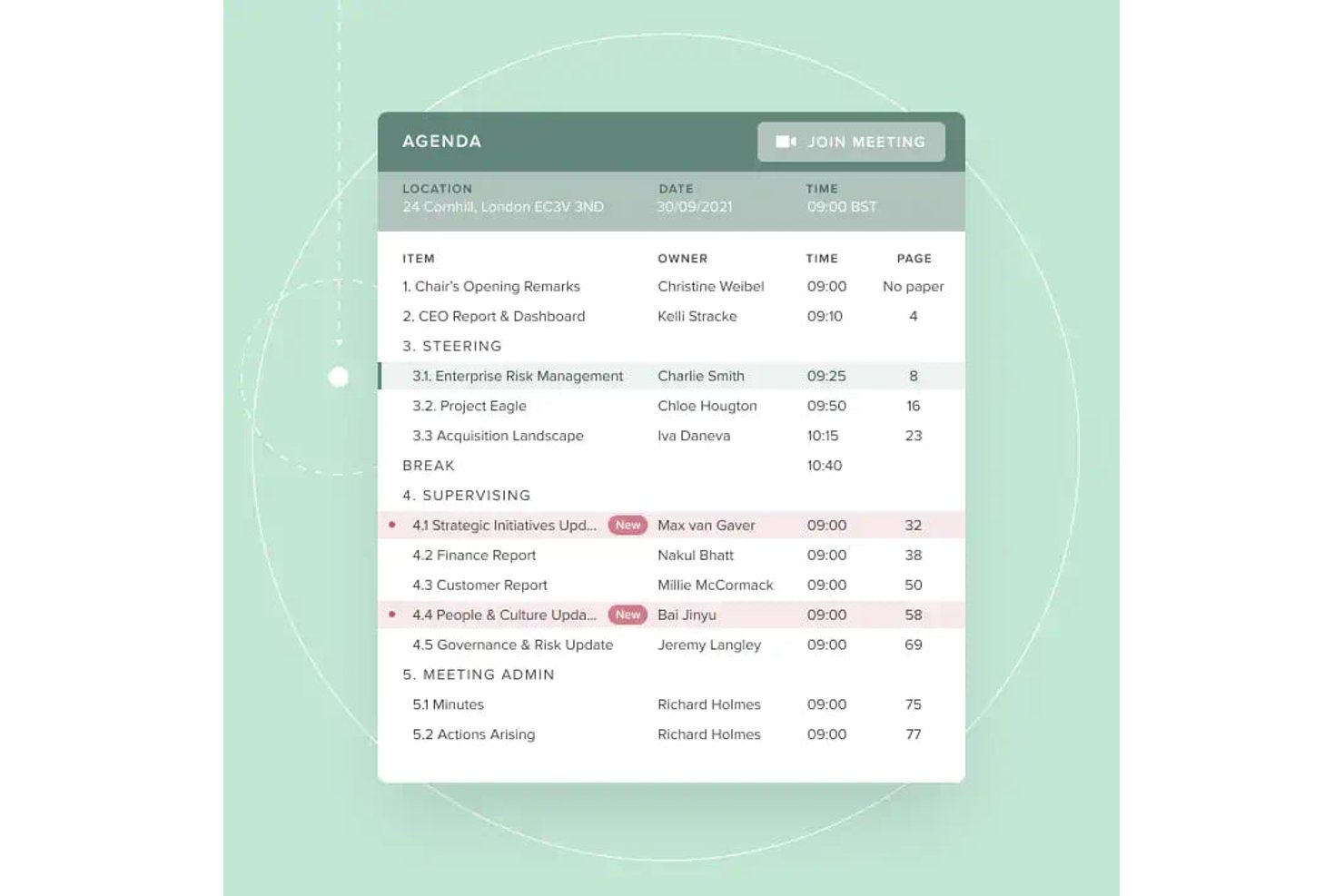
Board Intelligence is a board management platform that covers agenda planning, board pack creation, AI-assisted minutes, secure document distribution, and board performance analytics across the full governance cycle.
Who Is Board Intelligence Best For?
It's a strong fit for governance teams and company secretaries at mid-to-large nonprofits managing multiple boards or committees with complex reporting cycles.
Why I Picked Board Intelligence
Board Intelligence earns its spot on my shortlist because its AI-driven agenda and minutes tools genuinely cut the administrative load on governance teams. I love how the Minute Writer AI turns meeting transcripts into polished draft minutes, while the Agenda Planner links each agenda item directly to the organisation's strategic priorities. In practice, my team can produce a complete, structured board pack without rebuilding it from scratch every meeting cycle.
Board Intelligence Key Features
- Board portal: Securely distributes digital board packs and gives users instant access across devices.
- Report writer AI: Generates clear, board-ready reports from notes or documents right within Microsoft 365.
- Action tracker: Captures board action items and tracks progress between meetings for full accountability.
- Single sign-on: Allows users to log in with existing corporate credentials to simplify secure access.
Board Intelligence Integrations
Board Intelligence integrates natively with Microsoft 365, including Microsoft Word through its Report Writer AI add-in. It can send calendar invites to Outlook and other major calendar platforms.
Pros and Cons
Pros:
- Strong governance workflows for nonprofit boards
- Supports granular permission controls for documents
- Automated agenda and minute drafting with AI
Cons:
- Can be overwhelming for first-time users
- Lacks native mobile app for board members
OnBoard
Best with real-time collaboration tools
OnBoard stands out for nonprofits that want to boost real-time collaboration during board meetings and document reviews. The platform is built for organizations that need to keep board members engaged and working together, whether they’re in the same room or remote. OnBoard’s live annotation and discussion tools help teams make decisions quickly and keep everyone on the same page.
Why I Picked OnBoard
What drew me to OnBoard is its focus on real-time collaboration tools that help nonprofit boards work together more efficiently. The platform offers live document annotation, so board members can mark up agendas and reports together during meetings. I appreciate the built-in discussion threads, which let users comment and ask questions directly on documents without switching platforms. These features make OnBoard a strong choice for nonprofits that want to keep board engagement high and decision-making transparent.
OnBoard Key Features
Some other features in OnBoard that nonprofits may find valuable include:
- Board Book Builder: Lets you compile meeting materials into a single, organized digital board book.
- eSignatures: Allows board members to sign documents securely within the platform.
- Granular Permissions: Enables you to control access to sensitive documents and meeting materials for different users.
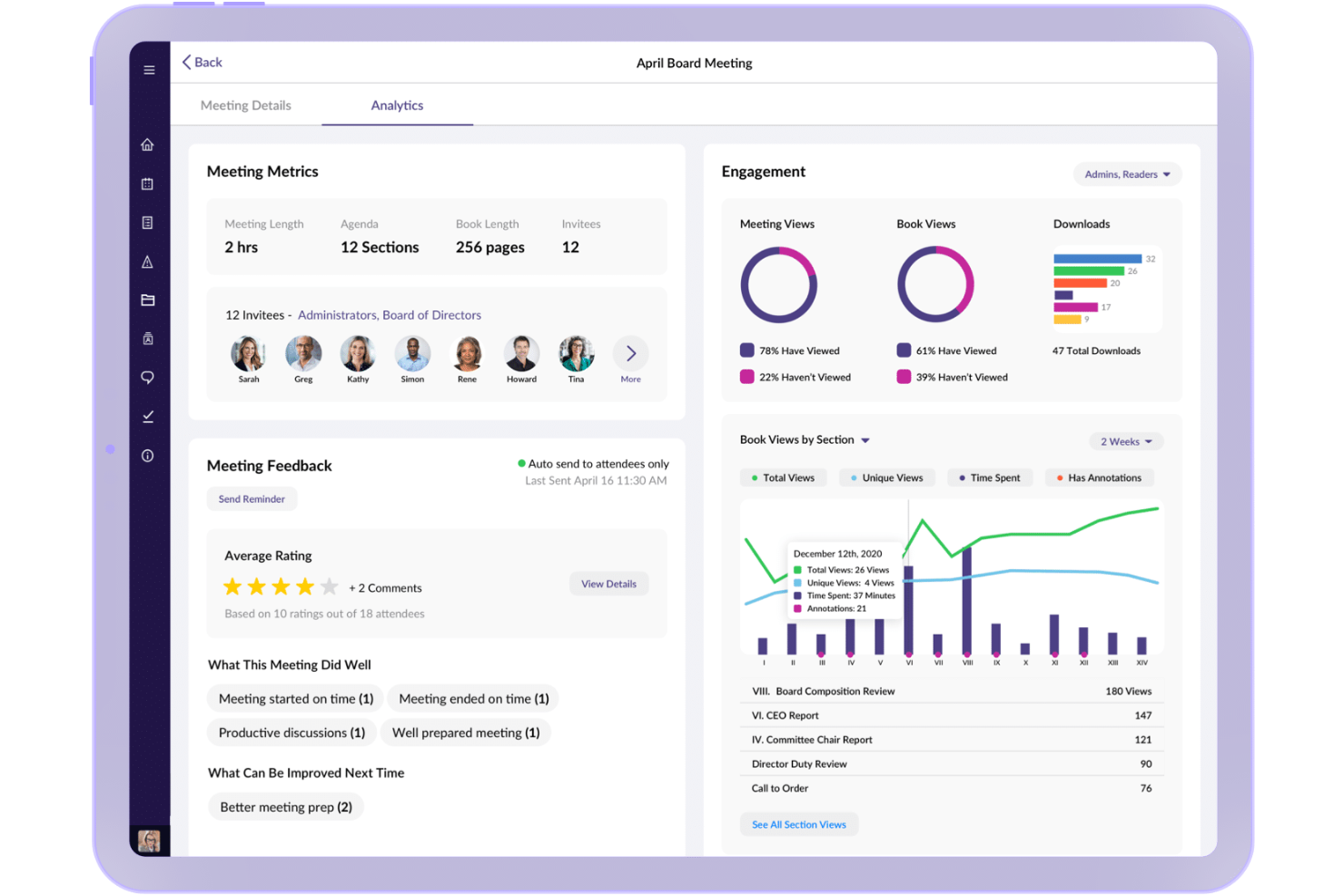
- Meeting Analytics: Provides insights into board engagement and meeting participation through built-in analytics tools.
OnBoard Integrations
Integrations include Microsoft 365, Docusign, Zoom, Microsoft Teams, and Google Workspace.
Pros and Cons
Pros:
- Board book builder for organized meeting prep
- Meeting analytics to track board engagement
- Granular user permissions for sensitive materials
Cons:
- Pricing is not transparent on the website
- Occasional sync delays with calendar
Best for centralized document sharing
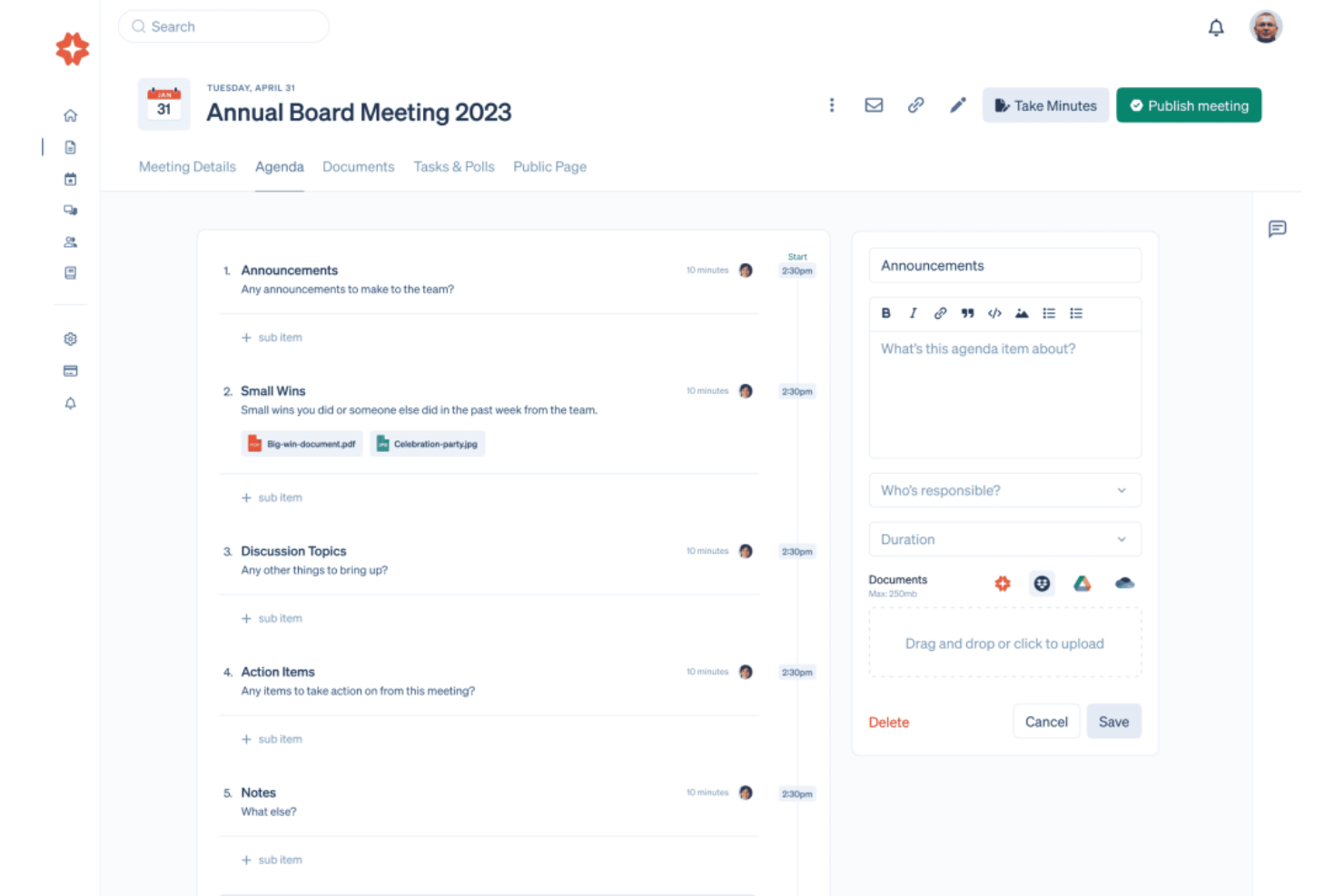
If your nonprofit needs a central place to organize board documents and communications, Boardable is worth a look. This platform is designed for organizations that want to keep agendas, minutes, and files accessible to board members in one secure hub. Boardable helps simplify document sharing and meeting prep, especially for teams managing multiple committee meetings or remote participants.
Why I Picked Boardable
I chose Boardable because it offers a focused solution for nonprofits that need centralized document sharing. The platform lets you store, organize, and distribute board packets, agendas, and meeting minutes in a secure, searchable repository. I appreciate how Boardable’s document center allows board members to access the latest files from any device, reducing confusion over email attachments or outdated versions. Its permission controls also help you manage who can view or edit sensitive information, which is especially important for nonprofit boards handling confidential information.
Boardable Key Features
Some other features in Boardable that nonprofits may find useful include:
- Meeting Scheduler: Lets you coordinate meeting times by polling board members and automatically finding the best fit.
- E-signatures: Allows board members to sign documents securely within the platform, reducing paperwork delays.
- Task Management: Assigns action items to individuals or committees and tracks progress between meetings.
- Voting and Polls: Enables secure, in-platform voting on motions or decisions, with results recorded for future reference.
Boardable Integrations
Integrations include Zoom, Microsoft Teams, Google Drive, Microsoft OneDrive, Google Calendar, Outlook, and more.
Pros and Cons
Pros:
- Schedule meetings with calendar integrations
- In-platform voting and polling features
- Built-in e-signature for board approvals
Cons:
- No built-in fundraising or donor management
- Limited customization for agenda templates
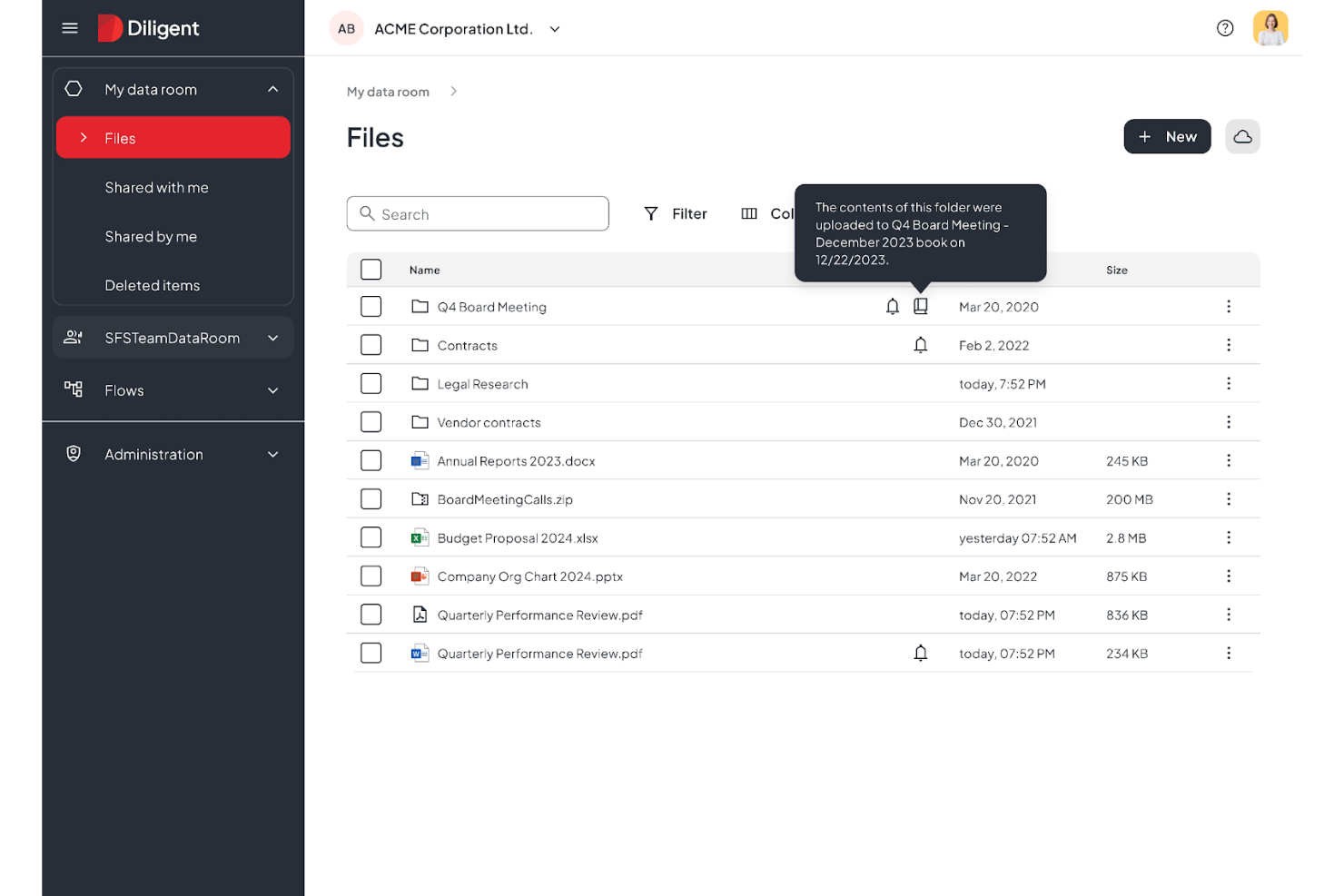
Nonprofit leaders who want to dig deeper into board performance and governance trends may find Diligent especially useful. This platform stands out for its advanced analytics and reporting tools, which help boards track engagement, compliance, and decision-making patterns. Diligent is a fit for organizations that need to turn board data into actionable insights for better oversight and transparency.
Why I Picked Diligent
For nonprofit boards that want to move beyond basic reporting, Diligent offers advanced analytics that help leaders make data-driven decisions. The platform provides customizable dashboards and in-depth reporting tools, so you can track board engagement, attendance, and voting patterns over time. I picked Diligent because its analytics features allow you to visualize trends and identify areas for improvement in governance and compliance. These capabilities are especially valuable for organizations that need to demonstrate accountability and transparency to stakeholders.
Diligent Key Features
Some other features that make Diligent useful for nonprofit boards include:
- Secure Document Sharing: Lets you upload, organize, and distribute docs and other board materials with granular access controls.
- Meeting Agenda Builder: Allows you to create, edit, and share agendas directly within the platform.
- E-signature Collection: Enables board members to sign documents electronically for faster approvals.
- Mobile App Access: Provides a dedicated mobile app so board members can review materials and participate from anywhere.
Diligent Integrations
Integrations are not publicly available.
Pros and Cons
Pros:
- Offline access for document annotations
- Customizable dashboards for governance reporting
- Advanced analytics for board engagement tracking
Cons:
- Admin setup requires vendor assistance
- Complex document navigation
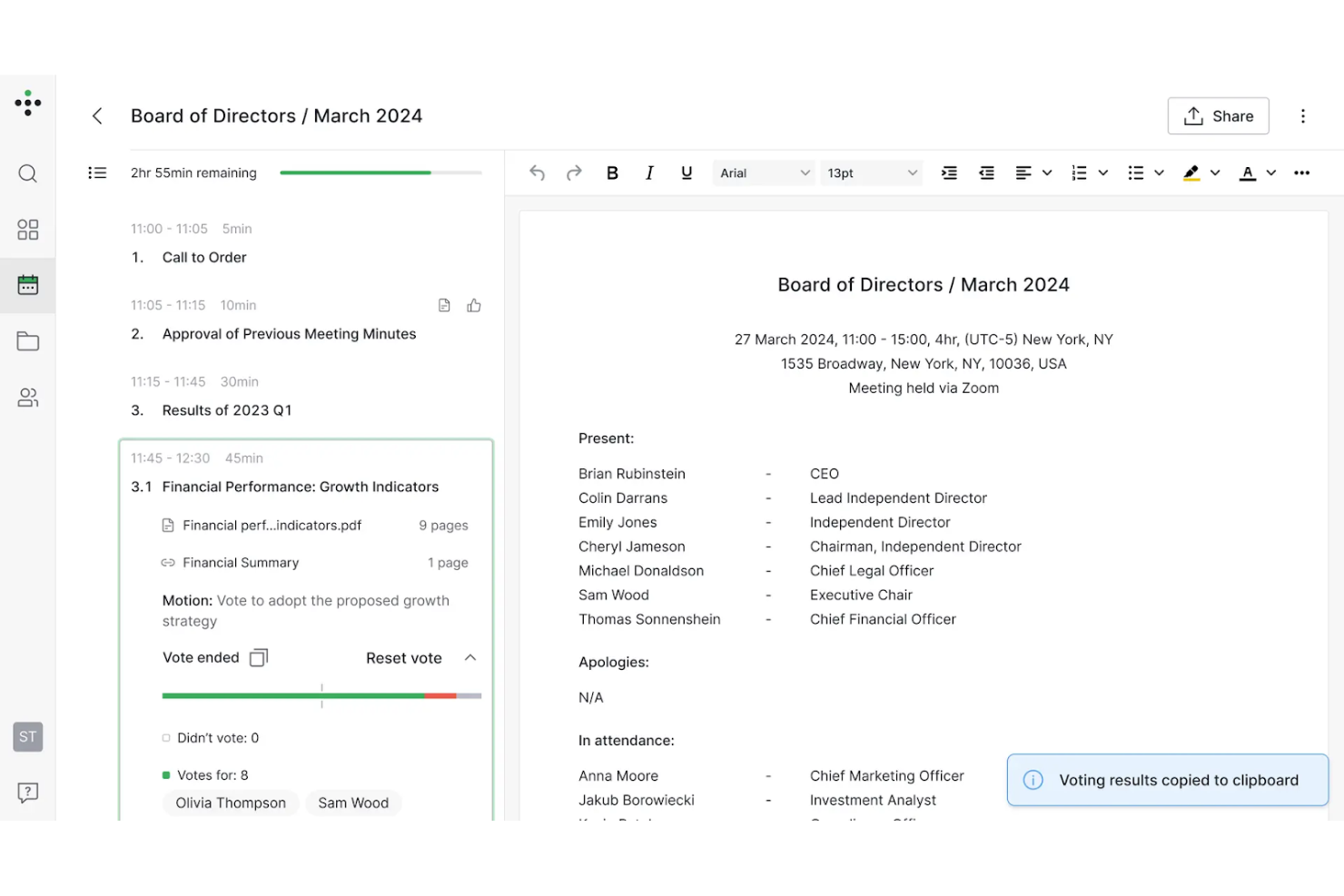
If your nonprofit needs to prioritize privacy and confidentiality in board meetings, Ideals Board is designed with secure virtual collaboration in mind. It’s especially useful for organizations handling sensitive discussions or documents, offering advanced security features that go beyond standard video conferencing. With Ideals Board, you can host virtual meetings, share files, and manage board activities while keeping your data protected.
Why I Picked Ideals Board
Security is often a top concern for nonprofit boards, especially when meetings involve confidential topics or sensitive documents. Ideals Board stands out for its focus on secure virtual meetings, offering features like encrypted video conferencing and granular access controls for participants. I picked Ideals Board because it allows you to manage who can join, view, or share materials during meetings, which is essential for organizations with strict privacy requirements. These security-focused tools help nonprofits maintain trust and compliance while collaborating remotely.
Ideals Board Key Features
Some other features that make Ideals Board useful for nonprofit boards include:
- Document Sharing: Lets you upload, organize, and distribute board packets and files securely.
- Meeting Agenda Builder: Allows you to create and share structured agendas for each meeting.
- Voting and Polls: Enables real-time voting and decision-making during virtual sessions.
- Audit Trail: Tracks all user actions and document changes for accountability.
Ideals Board Integrations
Integrations are not publicly available.
Pros and Cons
Pros:
- Automatic quorum tracking for voting
- Audit trail records every user action
- End-to-end encryption for all virtual meetings
Cons:
- Lacks advanced performance analytics
- Limited offline functionality for browsers
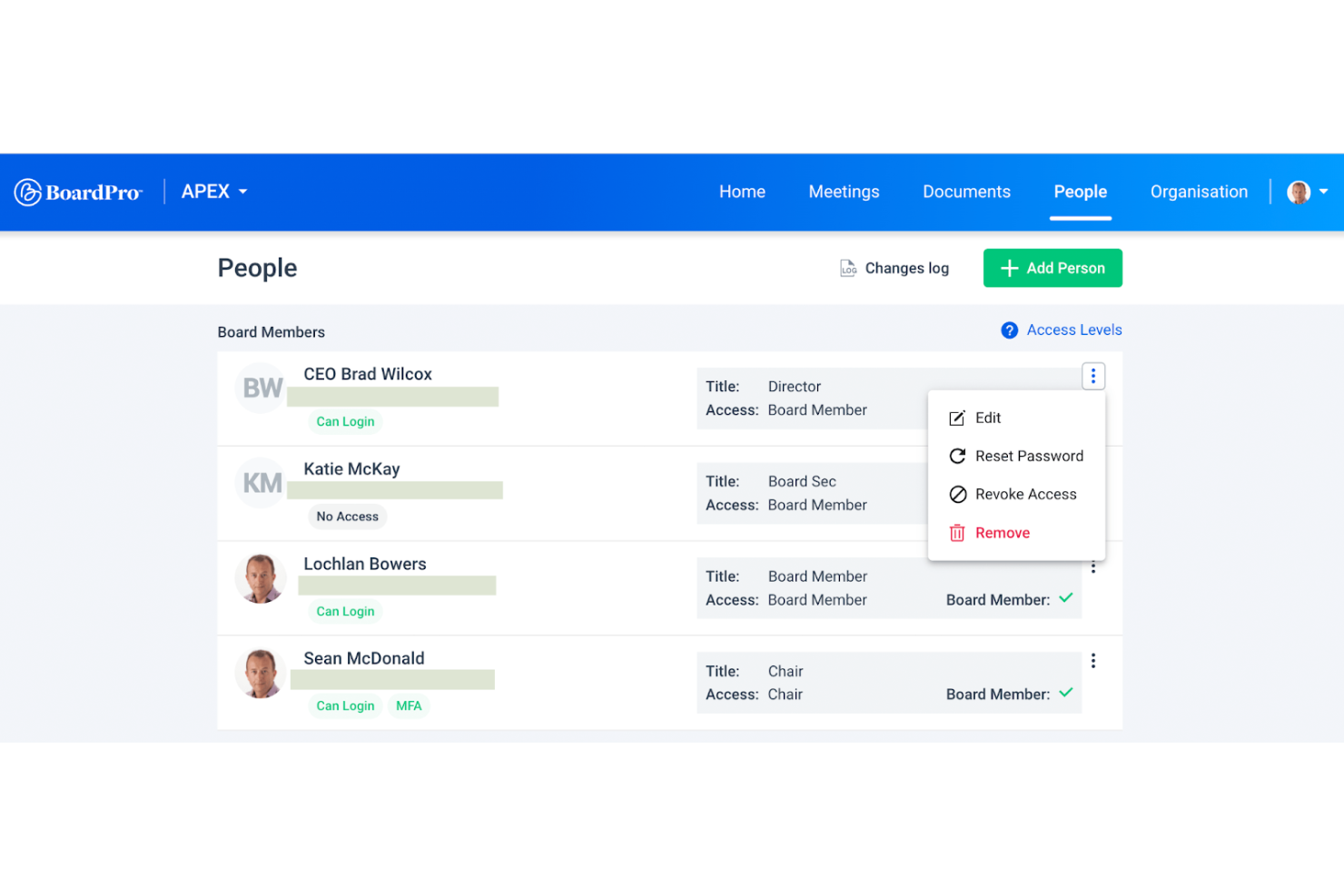
BoardPro is designed for nonprofits that want to automate workflows and move toward a paperless board meeting. It’s especially useful for organizations looking to reduce manual admin tasks like agenda creation, minute taking, and action tracking. With BoardPro, you can keep meetings organized and ensure follow-ups don’t fall through the cracks.
Why I Picked BoardPro
BoardPro stands out for nonprofits that want to automate repetitive meeting tasks and keep board operations running smoothly. The platform’s automated agenda builder and minute-taking tools help you prepare for meetings and capture decisions without manual effort. I like that BoardPro also tracks action items and sends reminders, so nothing gets lost between meetings. These workflow automations make it easier for nonprofit boards to stay organized and focused on their mission.
BoardPro Key Features
Some other features that BoardPro offers for nonprofit boards include:
- Document Repository: Stores board documents and meeting materials in a centralized, searchable location.
- Board Pack Builder: Compiles all meeting documents into a single, organized board pack for easy distribution.
- Decision Register: Records and tracks board decisions for future reference and accountability.
- Conflict of Interest Declarations: Allows board members to declare and manage conflicts of interest within the platform.
BoardPro Integrations
Integrations are not publicly available.
Pros and Cons
Pros:
- Conflict of interest declarations are built in
- Decision register tracks board resolutions
- Automates minute-taking documentation
Cons:
- No built-in video conferencing feature
- Limited document formatting options
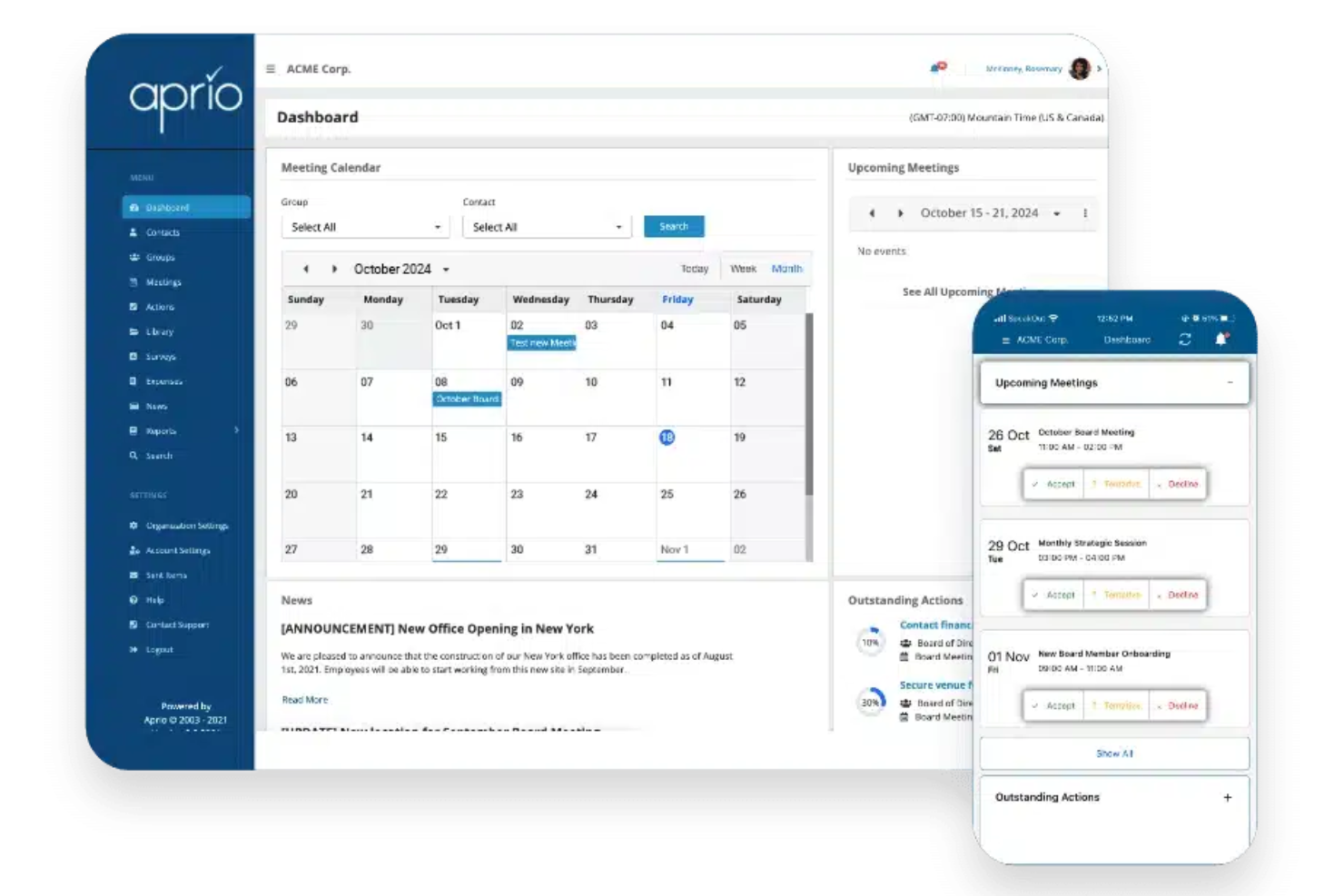
Nonprofit boards that want hands-on support throughout their software journey may find Aprio a strong fit. The platform is designed for organizations that value responsive, personalized customer service alongside secure document management and meeting tools. Aprio helps teams navigate board governance with confidence, especially when technical guidance or onboarding assistance is a priority.
Why I Picked Aprio
For nonprofit leaders who want reliable help at every step, Aprio’s dedicated customer support stands out. The platform offers onboarding assistance and ongoing training, making it easier for teams to adopt new processes and features. I picked Aprio because its support team is available by phone, email, and live chat, so board members can get answers quickly when issues arise. This level of service is especially valuable for organizations with limited IT resources or those new to board management software.
Aprio Key Features
Some other features that make Aprio useful for nonprofit boards include:
- Board Packet Builder: Lets you compile and distribute meeting materials in a single, organized file.
- Voting and Surveys: Allows board members to vote on motions or complete surveys directly within the platform.
- Calendar Sync: Integrates meeting schedules with personal calendars for easier planning.
- Document Version Control: Tracks changes and maintains a history of document updates.
Aprio Integrations
Integrations are not publicly available.
Pros and Cons
Pros:
- Includes board member expense reporting
- Choice of international data residency locations
- Live support available by phone and chat
Cons:
- Lacks native board survey templates
- No public list of native integrations

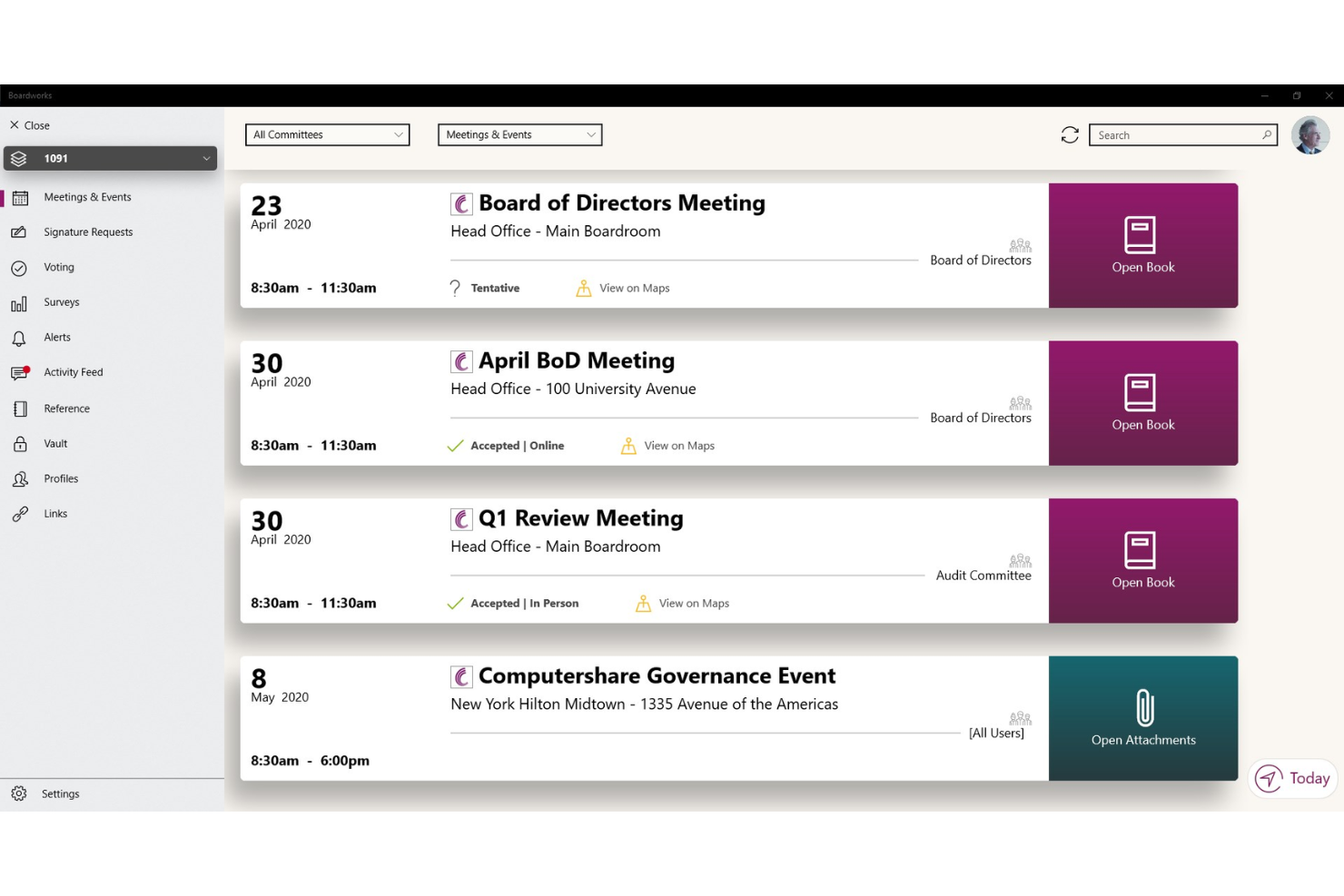
Nonprofits with international operations or complex governance needs may find Computershare’s BoardWorks especially relevant. This platform is designed to help organizations manage board activities across multiple countries and regulatory environments. It’s a strong choice for leaders who need to coordinate global compliance, secure document sharing, and multilingual board communication.
Why I Picked BoardWorks
When it comes to managing nonprofit boards with members or operations in multiple countries, Computershare BoardWorks stands out for its global governance capabilities. The platform supports multilingual interfaces and offers tools for handling region-specific compliance requirements, which is essential for organizations navigating different legal frameworks. I picked Computershare because it allows nonprofits to securely share documents and coordinate meetings across borders without sacrificing security or regulatory alignment. These features make it a strong fit for nonprofits that need to maintain oversight and communication on an international scale.
BoardWorks Key Features
Some other features that make Computershare BoardWorks useful for nonprofit boards include:
- Offline Access Mode: Lets board members view documents and meeting materials without an internet connection.
- Voting and Resolution Tools: Allows for secure digital voting and tracking of board resolutions.
- Annotation and Note-Taking: Enables users to add private or shared notes directly on board documents.
- Calendar Integration: Syncs board meetings and events with external calendar tools for easier scheduling.
BoardWorks Integrations
Integrations include Microsoft 365 and Docusign.
Pros and Cons
Pros:
- Biometric and two-factor authentication logins
- Offline access to board materials
- Multilingual support for international board members
Cons:
- Limited nonprofit-specific training resources
- Duplicate agenda entries during updates

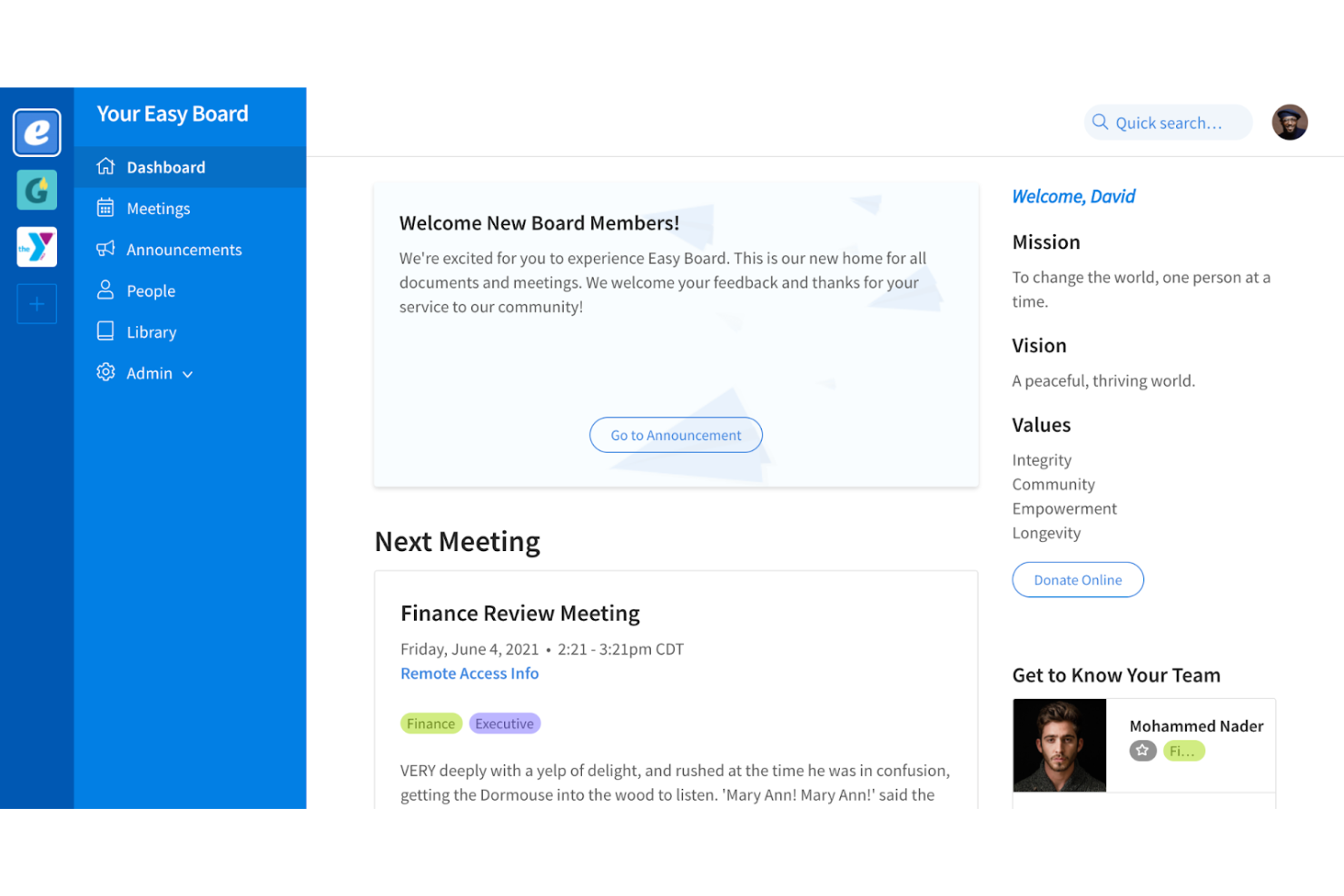
For nonprofit leaders who want a board portal software that’s easy for everyone to use, Easy Board puts simplicity at the center of its design. The platform is built for organizations that need to onboard board members quickly and keep meetings, documents, and communication accessible without technical hurdles. Its intuitive interface helps teams focus on collaboration and governance instead of navigating complex software.
Why I Picked Easy Board
When I look for board management software that nonprofits can adopt quickly, I pay close attention to how the interface supports users with varying tech skills. Easy Board stands out for its clean dashboard that organizes meetings, documents, and communications in a way that’s easy to navigate. I picked Easy Board because its drag-and-drop agenda builder and centralized document library help board members find what they need without confusion. These features make it a strong choice for organizations that want to minimize training time and keep everyone engaged.
Easy Board Key Features
Some other features that make Easy Board practical for nonprofit boards include:
- RSVP and Attendance Tracking: Lets you manage meeting invitations and monitor who plans to attend.
- E-signatures: Allows board members to sign documents electronically within the platform.
- Discussion Threads: Supports ongoing conversations tied to specific meetings or documents.
- Role-Based Permissions: Gives you control over board roles and what each user can view or edit.
Easy Board Integrations
Integrations are not publicly available.
Pros and Cons
Pros:
- Discussion threads linked to specific documents
- RSVP tracking for meeting attendance
- Drag-and-drop agenda builder for meetings
Cons:
- Manual PDF reorganization is often required
- No native iOS or Android apps
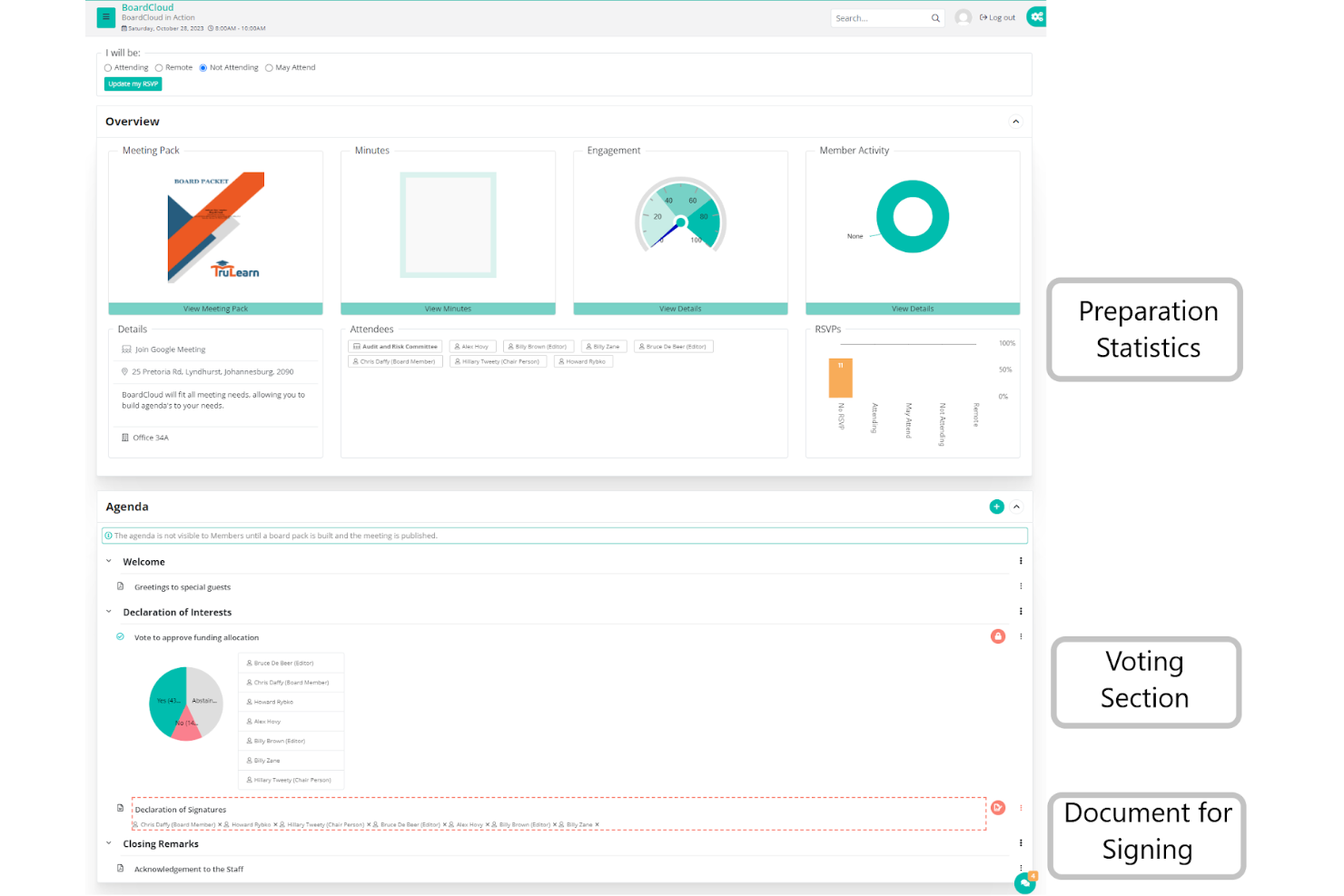
BoardCloud is a board management platform built for nonprofits that need to include large or growing teams in their governance process. It’s a strong fit for organizations that want unlimited user access without worrying about extra fees as their board or committees expand. BoardCloud helps you with meeting management and collaboration through its flexible board software interface.
Why I Picked BoardCloud
For nonprofits that need to bring many people into their board processes, BoardCloud’s unlimited user access is a major advantage. You can add as many board members, committee participants, or volunteers as you need without worrying about hitting a cap or incurring extra charges. I appreciate that BoardCloud supports this with features like group-based permissions and bulk user management, so you can organize large teams efficiently. This makes it a practical choice for organizations with evolving or complex governance structures.
BoardCloud Key Features
In addition to its unlimited user access, BoardCloud offers several other features for nonprofit boards:
- Agenda Builder: Lets you create, edit, and share meeting agendas with your board.
- Document Repository: Stores board packets, policies, and meeting materials in a centralized location.
- Voting and Resolutions: Provides tools for conducting secure online votes and tracking board decisions.
- Meeting Calendar: Displays upcoming meetings and deadlines for all board members.
BoardCloud Integrations
Integrations include Microsoft Teams, Zoom, and SharePoint.
Pros and Cons
Pros:
- Automated board pack PDF generation
- Real-time synced meeting agenda view
- Supports private on-premise server hosting
Cons:
- Mobile app lacks administrative functions
- Charges per-gigabyte for storage overages
Other Board Management Software for Nonprofits
Here are some additional board management software for nonprofits options that didn’t make it onto my shortlist, but are still worth checking out:
- Nasdaq Directors Desk
For compliance management
- My Board View
For customizable agenda templates
- Boardlogic
With granular access controls
- Stellar Board
For simple meeting pack creation


How I Evaluate Board Management Software for Nonprofits
I split my evaluation into baseline criteria—like whether a platform can actually manage board packets and digital voting—and differentiating factors that separate tools for church governance needs.
Core Functionality (Table Stakes For This List)
When I'm selecting tools for my list, I rank each one on a scale from 0 (does not offer the functionality) to 5 (excels in this area) for each core functionality listed below. Then, I calculate the tool's total score into a percentage. Each tool needs to achieve a minimum total score of 55% to be considered for inclusion.
- Board Meeting Management: I check whether a tool supports the full meeting lifecycle—agenda building, board packet assembly, minutes capture, and action item tracking—so volunteer clerks aren't piecing things together manually.
- Secure Document Repository: Bylaws, financial statements, and policy manuals need a permissioned home with version control, so I evaluate how each platform organizes, protects, and archives board records.
- Voting & Approvals: I look for digital motions, resolution workflows, and e-signature support that let boards pass decisions between meetings—like approving a building lease without calling a special session.
- Member & Committee Management: Each tool should track board member profiles, term dates, and committee assignments, so leadership transitions during annual elections don't create information gaps.
- Secure Messaging & Collaboration: I evaluate whether the platform offers board-only communication channels separate from general church email, giving elders a private space for sensitive pastoral discussions.
- Nonprofit Governance Compliance: Features like conflict-of-interest disclosures, policy attestation tracking, and audit-ready exports matter here, especially for boards accountable to denominational bodies or regulatory filings.
Once I have a list of tools that meet the criteria, I consider what sets each platform apart.
Differentiating Factors (What Sets Vendors Apart)
Here's how I compare and contrast different vendors:
Standout Features
I look for integration with church management systems like Planning Center or Breeze, which lets boards pull giving reports and membership data directly into meeting materials. Executive session tools also matter—elder boards regularly handle confidential pastoral reviews or personnel concerns, so a dedicated private workspace with restricted access is a real upgrade. A native mobile app rounds things out, since volunteer board members often review packets between services or on the go.
Beyond Features
Pricing matters here more than in most categories—church boards run on tight budgets, so I check whether vendors offer nonprofit discounts or flat-rate models that don't penalize you for adding volunteer members. Onboarding is another factor I weigh carefully, since board members rotate frequently and aren't always tech-savvy. A platform with guided setup and ready-made governance templates saves weeks of admin work during annual transitions. Security also deserves attention, particularly encryption and role-based access for protecting sensitive personnel and financial records.
How to Choose Board Management Software for Nonprofits
It’s easy to get bogged down in long feature lists and complex pricing structures. To help you stay focused as you work through your unique software selection process, here’s a checklist of factors to keep in mind:
| Factor | What to Consider |
|---|---|
| Scalability | Will the software support your board as it grows or changes? Consider user limits, storage, and future expansion. |
| Integrations | Does it connect with your existing tools (like email, calendars, or document storage)? Check for native integrations, not just API options. |
| Customizability | Can you tailor workflows, permissions, or templates to fit your board’s unique governance needs? |
| Ease of use | Will board members of all tech skill levels be able to navigate and use the platform confidently? |
| Implementation and onboarding | How long will it take to get up and running? Ask about migration support, training resources, and onboarding help. |
| Cost | Are pricing tiers clear and predictable? Watch for hidden fees, per-user charges, or extra costs for support or storage. |
| Security safeguards | Does the platform offer encryption, access controls, and SOC-compliant audit trails to protect sensitive board data? |
| Compliance requirements | Will the software help you meet nonprofit governance, HIPAA data privacy, or record-keeping standards relevant to your region? |
What Is Board Management Software for Nonprofits?
Board management software for nonprofits is a digital platform designed to help nonprofit organizations organize, communicate, and document board activities. These tools centralize meeting scheduling, document sharing, secure messaging, and record-keeping, making it easier for board members to collaborate and fulfill governance responsibilities. By centralizing administrative tasks, board management software supports transparency, compliance, and effective decision-making within nonprofit boards.
Features
When selecting board management software for nonprofits, keep an eye out for the following key features:
- Meeting scheduling: Lets you set up, manage, and notify board members about upcoming meetings, often with calendar sync and RSVP tracking.
- Document management: Provides a secure space to upload, organize, and share board packets, agendas, minutes, and supporting materials.
- Secure messaging: Enables confidential communication between board members within the platform, reducing reliance on email.
- Voting and resolutions: Facilitates digital voting on motions and tracks resolution outcomes for accurate record-keeping.
- Role-based permissions: Allows you to control access to sensitive documents and features based on each user’s role or committee assignment.
- Minutes and action tracking: Offers tools to record meeting minutes, assign action items, and monitor follow-up tasks.
- Audit trails: Maintains a detailed log of user activity, document changes, and board decisions to ensure transparency and GDPR compliance.
- Calendar integration: Syncs board meetings and deadlines with external calendar tools to keep everyone aligned.
- Offline access: Lets board members view important documents and meeting materials even without an internet connection.
- E-signature support: Allows board members to sign documents electronically, speeding up approvals and reducing paperwork.
Benefits
Implementing board management software for nonprofits provides several benefits for your team and your business. Here are a few you can look forward to:
- Centralized information: All board documents, meeting materials, and communications are stored in one secure location for easy access.
- Improved governance: Built-in compliance tracking, audit trails, and digital voting help your board meet regulatory and reporting requirements.
- Enhanced collaboration: Secure messaging, document annotation, and shared calendars make it easier for board members to work together between meetings.
- Time savings: Automated scheduling, agenda templates, and e-signature tools reduce manual administrative work for staff and volunteers.
- Greater transparency: Role-based permissions and detailed activity logs ensure board actions and decisions are visible and accountable.
- Stronger data security: Encryption, access controls, and secure document sharing protect sensitive board information from unauthorized access.
- Better engagement: User-friendly interfaces and mobile access help board members stay informed and involved, regardless of their location.
Costs and Pricing
Selecting board management software for nonprofits requires an understanding of the various pricing models and plans available. Costs vary based on features, team size, add-ons, and more. The table below summarizes common plans, their average prices, and typical features included in board management software for nonprofits solutions:
Plan Comparison Table
| Plan Type | Average Price | Common Features |
|---|---|---|
| Free Plan | $0 | Basic meeting scheduling, limited document storage, simple user management, and email notifications. |
| Personal Plan | $5-$15/user/month | Document sharing, calendar integration, secure messaging, and basic voting tools. |
| Business Plan | $20-$40/user/month | Advanced permissions, audit trails, e-signature support, compliance tracking, and mobile access. |
| Enterprise Plan | $50-$100/user/month | Custom workflows, dedicated support, advanced security, multilingual support, and integration with external systems. |
Board Management Software for Nonprofits FAQs
Here are some answers to common questions about board management software for nonprofits:
Can board management software help with nonprofit compliance requirements?
Yes, many board management software solutions include features like audit trails, digital voting records, and secure document storage to help nonprofits meet governance and compliance standards. These tools can simplify annual reporting and ensure your board’s actions are well-documented.
How do nonprofits ensure data security when using board management software?
Nonprofits should look for software that offers encryption, role-based access controls, and regular security audits. It’s also important to review the vendor’s data privacy policies and confirm that sensitive board information is protected from unauthorized access.
What should we consider when onboarding new board members to the software?
Provide access to training resources like video tutorials, product tours, and help centers. Choose software with an intuitive interface and onboarding support to help new members get comfortable quickly, regardless of their technical background.
Is it possible to integrate board management software with other nonprofit tools?
Yes, many platforms offer integrations with email, calendar, and document storage tools. Check if the software connects with your existing systems to avoid duplicate work and keep your board’s workflow efficient.
How do we choose the right pricing plan for our nonprofit?
Assess your board’s size, feature needs, and budget. Start with a free trial or demo if available, and compare what’s included at each pricing tier. Look for nonprofit discounts and make sure there are no hidden fees before committing.