

10 Best Text Giving for Churches Reviewed in 2026

Best Text Giving for Churches Shortlist


Managing a church community comes with unique challenges, especially when it comes to collecting donations. You want to make giving as easy as possible for your congregation while also keeping track of funds efficiently. That's where text giving solutions come in. They simplify the donation process and make it more accessible for everyone.
I've spent time testing and reviewing these tools to bring you an unbiased list of the best options out there. You can trust that my picks are based on real-world use and a deep understanding of church management needs.
In this article, I'll share my top recommendations for text giving solutions, focusing on what makes each one stand out. You'll find practical insights to help your team choose the right tool.
Why Trust Our Software Recommendations
Our team has been testing and reviewing software since 2012. As church leaders ourselves, we know how difficult—and important—it is to choose the right software.
For this guide, we evaluated tools using hands-on testing and independent research, scoring tools using our selection criteria.
Our reviews reflect our human editorial judgment, not a sales pitch.
Why Trust Our Software Recommendations
Our team has been testing and reviewing software since 2012. As church leaders ourselves, we know how difficult—and important—it is to choose the right software.
For this guide, we evaluated tools using hands-on testing and independent research, scoring tools using our selection criteria.
Our reviews reflect our human editorial judgment, not a sales pitch.
Best Text Giving for Churches Summary
This comparison chart summarizes pricing details for my top text giving for churches selections to help you find the best one for your budget and business needs.
| Tool | Best For | Trial Info | Price | ||
|---|---|---|---|---|---|
| 1 | Best with multichannel giving experiences | Free demo available | Pricing upon request | Website | |
| 2 | Best for church-specific features | 30-day free trial available | From $72/month | Website | |
| 3 | Best for detailed reporting | Free trial available | From $25/month | Website | |
| 4 | Best for integration options | Free trial available | Pricing upon request | Website | |
| 5 | Best for customizable campaigns | Free demo available | From $149/month | Website | |
| 6 | Best for nonprofit use | Not available | Website | ||
| 7 | Best for event fundraising | Not available | Website | ||
| 8 | Best for recurring donations | Free demo available | From $35/month | Website | |
| 9 | Best for quick setup | Free demo available | Pricing upon request | Website | |
| 10 | Best for simplicity | Not available | Website |

Best Text Giving for Churches Review
Below are my detailed summaries of the best text giving for churches that made it onto my shortlist. My reviews offer a detailed look at the key features, pros & cons, integrations, and ideal use cases of each tool to help you find the best one for you.

Best with multichannel giving experiences
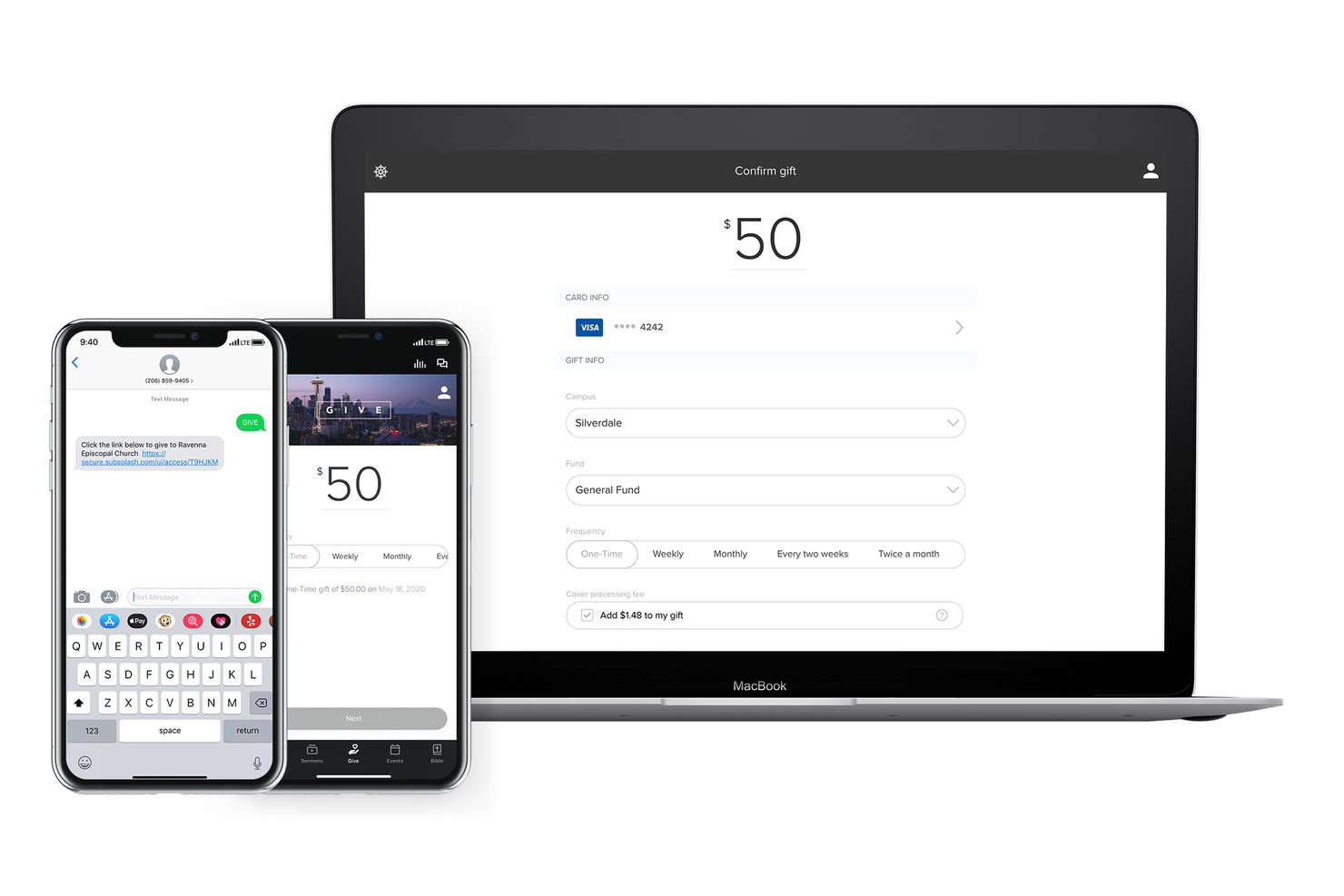
Subsplash is a church giving platform that brings together text-to-give, mobile, web, in-app, tap, and live stream giving alongside donor management, ChMS integrations, and contribution reporting in one unified system.
Who Is Subsplash Best For?
Subsplash is a strong fit for mid-to-large churches that want giving woven into every touchpoint — app, livestream, in-person, and text — within a single platform.
Why I Picked Subsplash
Subsplash earns its spot on my shortlist because no other platform weaves giving into as many touchpoints at once. A congregant can text a keyword during the offering, tap an NFC disc at the lobby kiosk, or respond to a giving prompt mid-livestream, and every transaction flows back to the same tokenized donor profile. I especially appreciate how Subsplash Tap brings contactless giving to in-person services without requiring a separate app download or device.
Subsplash Key Features
- Campaigns and pledging: Create, track, and manage special giving campaigns with customizable pledges for donors.
- Automated tax statements: Generate and distribute IRS-compliant donor statements automatically for year-end reporting.
- Bulk check scanning: Scan and process over 100 checks per batch for rapid offline gift entry and reconciliation.
- Trends AI analytics: Surface giving patterns, donor retention stats, and contribution insights through built-in analytics dashboards.
Subsplash Integrations
Subsplash offers native integrations with Planning Center, Zapier, Breeze, MortarStone, and more, and provides an API for custom integrations.
Pros and Cons
Pros:
- Lapsed-giver flags built into analytics dashboard
- Automated thank-you texts fire after each gift
- Covers giving across every channel simultaneously
Cons:
- Setup relies on vendor-managed short codes
- All-in-one scope may overwhelm smaller congregations

Tithe.ly
Best for church-specific features

Tithe.ly is a text giving platform tailored for churches, enabling them to collect donations via SMS. It serves church leaders and administrators who want to enhance their giving processes and engage their congregations effectively.
Why I picked Tithe.ly: It offers church-specific features, such as the ability to customize donation forms with church branding. You can set up recurring donations to provide a steady flow of contributions. The platform also supports special campaigns, enabling you to boost fundraising efforts for specific events. Additionally, it provides detailed reporting tools to track donation trends and make informed decisions.
Standout features & integrations:
Features include customizable donation receipts that can be personalized for your congregation. The platform provides a mobile app to manage donations on the go. You can also set up automated thank-you messages to engage donors and show appreciation.
Integrations include Planning Center, Church Community Builder, Breeze, FellowshipOne, Shelby Systems, ACS Technologies, QuickBooks, Pushpay, Realm, and Servant Keeper.
Pros and Cons
Pros:
- Detailed reporting tools
- Supports special fundraising campaigns
- Church-specific customization options
Cons:
- May need additional staff training
- Initial setup complexity

Qgiv
Best for detailed reporting

Qgiv Text-to-Give is a donation platform that enables churches and nonprofits to collect donations via SMS. It serves organizations that require comprehensive data insights to analyze donor behavior and improve fundraising strategies.
Why I picked Qgiv Text-to-Give: It offers detailed reporting features that allow you to track donation trends and donor engagement. You can customize reports to focus on specific metrics important to your organization. The platform supports both one-time and recurring donations, providing flexibility for your donors. Additionally, real-time dashboards give you an up-to-date view of fundraising progress, enabling informed decision-making.
Standout features & integrations:
Features include customizable donation forms that align with your branding. You can set up automated thank-you messages to enhance donor relations. The platform also supports peer-to-peer fundraising, expanding your reach beyond direct donations.
Integrations include Salesforce, Mailchimp, QuickBooks, Constant Contact, Double the Donation, PayPal, Stripe, Google Analytics, Eventbrite, and Raiser’s Edge.
Pros and Cons
Pros:
- Real-time fundraising dashboards
- Customizable reporting features
- Comprehensive data insights
Cons:
- Requires internet access
- Initial setup complexity


EasyTithe is a text giving solution tailored for churches, providing an efficient way for congregations to donate via text messages. It primarily serves church leaders and financial administrators looking to streamline donation processes.
Why I picked EasyTithe: The platform offers a wide range of integration options, allowing you to connect with various church management systems. You can customize your text giving settings to match your church's specific needs. EasyTithe supports different giving types, from one-time donations to recurring gifts. Its flexible integration capabilities make it a versatile tool for diverse church setups.
Standout features & integrations:
Features include the ability to customize donation forms, giving you control over the information you collect. It offers detailed reporting tools, which help you track and analyze donation patterns. You can also set up automated thank-you messages to acknowledge donors promptly.
Integrations include Planning Center, Church Community Builder, Breeze, FellowshipOne, Shelby Systems, ACS Technologies, QuickBooks, Pushpay, Realm, and Tithe.ly.
Pros and Cons
Pros:
- Flexible integration capabilities
- Supports multiple giving types
- Automated thank-you messages
Cons:
- Basic customer support options
- Requires stable internet connection


SecureGive is a text giving solution designed for churches to facilitate quick and easy donations through text messages. It caters mainly to church administrators looking to enhance donation convenience and increase contributions.
Why I picked SecureGive: The platform allows you to create customizable campaigns, making it easy to tailor the giving experience to fit your church's culture. With features like custom phone numbers and keywords, you can personalize the text giving process. SecureGive also supports both donations and payments, allowing you to manage various transaction types in one place. It stands out for enabling true in-message giving, which means your members can donate without needing to open a web browser.
Standout features & integrations:
Features include the ability to choose between a toll-free or local area code for your text-to-give number, and the use of custom keywords for different donation categories. It also allows quick transactions, making it the fastest way to give.
Integrations include QuickBooks, Salesforce, Planning Center, Pushpay, Church Community Builder, FellowshipOne, Realm, Shelby Systems, ACS Technologies, and Servant Keeper.
Pros and Cons
Pros:
- True in-message giving
- Local or toll-free number choice
- Custom keywords for campaigns
Cons:
- Limited support hours
- Additional fees for some features


Pledge Text-to-Give is a text donation platform designed for nonprofits and churches to efficiently collect donations via SMS. It serves organizations focused on increasing donor engagement and simplifying the giving process.
Why I picked Pledge Text-to-Give: It offers features tailored to nonprofit needs, such as easy setup and management of text donation campaigns. You can customize donation pages to align with your organization's branding. The platform supports both one-time and recurring donations, providing flexibility for donors. Additionally, it includes tools for tracking and reporting donations, ensuring you have the data you need to make informed decisions.
Standout features & integrations:
Features include customizable donation pages, which allow you to maintain consistency with your branding. The platform also enables you to track donations in real-time, offering insights into donor behavior. You can set up automated thank-you messages, ensuring donors feel appreciated.
Integrations include Salesforce, QuickBooks, Mailchimp, Zapier, Eventbrite, Stripe, PayPal, Google Analytics, Constant Contact, and Double the Donation.
Pros and Cons
Pros:
- Real-time donation tracking
- Customizable donation pages
- Supports recurring donations
Cons:
- Basic customer support options
- Initial setup can be complex


Handbid Text-to-Give is a platform designed to facilitate donations through text messages, particularly for fundraising events. It primarily serves event organizers and church leaders who want to boost engagement and donations during events.
Why I picked Handbid Text-to-Give: It offers a unique focus on event fundraising, making it easy to manage donations during live events. You can set up campaigns quickly, ensuring everything is ready before your event starts. The platform allows for real-time donation tracking, giving you insights as contributions come in. Additionally, it supports multiple fundraising types, such as auctions and raffles, enhancing your event's fundraising potential.
Standout features & integrations:
Features include the ability to host silent auctions alongside text donations, providing a comprehensive fundraising experience. You can also create custom donation pages tailored to your event's theme. The system offers real-time leaderboards, which display top donors and motivate others to contribute.
Integrations include Salesforce, Mailchimp, QuickBooks, Stripe, PayPal, Double the Donation, Eventbrite, Bidding for Good, Greater Giving, and NeonCRM.
Pros and Cons
Pros:
- Real-time donation tracking
- Quick campaign setup
- Supports multiple fundraising types
Cons:
- Basic customer support options
- May require additional training


OnlineGiving.org is a text donation platform tailored for churches, specializing in managing both one-time and recurring donations efficiently. It primarily serves church administrators looking to enhance their giving processes and maintain steady donation inflows.
Why I picked OnlineGiving.org: The platform excels in managing recurring donations, offering flexible options for donors to set up regular contributions. You can easily customize donation intervals to fit your congregation's needs. It provides automated reminders to ensure donors stay engaged with their commitments. Additionally, its dashboard offers a clear view of donation trends, helping you make informed decisions.
Standout features & integrations:
Features include the ability to generate detailed donation reports, allowing you to analyze giving patterns over time. The platform also supports multi-campus giving, making it ideal for churches with multiple locations. You can customize donor receipts, adding a personal touch to each transaction.
Integrations include Planning Center, Church Community Builder, Breeze, FellowshipOne, Shelby Systems, ACS Technologies, QuickBooks, Pushpay, Realm, and Tithe.ly.
Pros and Cons
Pros:
- Detailed donation reports
- Automated donor reminders
- Flexible recurring donation options
Cons:
- Limited offline capabilities
- Initial setup can be complex


Snowball Text-to-Give is a fundraising tool designed to help churches and nonprofits collect donations via text messages. It serves organizations seeking a straightforward way to engage donors and boost contributions.
Why I picked Snowball Text-to-Give: The platform is known for its quick setup, allowing you to get started without delay. You can create campaigns easily and begin accepting text donations in minutes. It offers a user-friendly interface, which means your team won't need extensive training. Additionally, Snowball provides tools for managing both one-time and recurring donations, making it versatile for various fundraising needs.
Standout features & integrations:
Features include the ability to customize donation pages to match your church's branding. You can also track donation progress with real-time analytics, helping you make data-driven decisions. The platform supports multi-channel fundraising, allowing you to reach donors through different mediums.
Integrations include Salesforce, QuickBooks, Mailchimp, Zapier, PayPal, Stripe, Eventbrite, Constant Contact, Google Analytics, and Double the Donation.
Pros and Cons
Pros:
- User-friendly interface
- Supports recurring donations
- Quick and easy setup
Cons:
- Requires stable internet connection
- Limited customization options


SimplifyGive is a text giving platform designed to make the donation process straightforward for churches and their congregations. It primarily serves church leaders who want an uncomplicated tool for managing text donations.
Why I picked SimplifyGive: It offers a simple setup process that gets you started quickly without technical hurdles. You can manage donations effortlessly with its intuitive dashboard, which requires minimal training for your team. The platform provides direct text-to-give functionality, allowing members to donate without needing additional apps. Its focus on simplicity ensures that anyone can use it with ease, making it ideal for churches looking to avoid complexity.
Standout features & integrations:
Features include an easy-to-use dashboard that lets you track donations in real-time. You can also customize donation receipts to add a personal touch. The platform provides quick reporting features, helping you analyze giving trends effortlessly.
Integrations include Planning Center, Church Community Builder, Breeze, FellowshipOne, Shelby Systems, ACS Technologies, QuickBooks, Pushpay, Realm, and Tithe.ly.
Pros and Cons
Pros:
- Direct text-to-give functionality
- Intuitive dashboard
- Simple setup process
Cons:
- Requires internet access
- Limited advanced features
Other Text Giving for Churches
Here are some additional text giving for churches options that didn’t make it onto my shortlist, but are still worth checking out:


How I Evaluate Text Giving for Churches
I split my evaluation into two layers: baseline requirements—true SMS giving, fund designation, and recurring gifts—and differentiators that reveal which tools fit real church workflows.
Core Functionality (Table Stakes For This List)
When I'm selecting tools for my list, I rank each one on a scale from 0 (does not offer the functionality) to 5 (excels in this area) for each core functionality listed below. Then, I calculate the tool's total score into a percentage. Each tool needs to achieve a minimum total score of 55% to be considered for inclusion.
- SMS-Initiated Donations: I check whether donors can text a keyword or dollar amount to give, rather than just receiving a link to a web form they complete separately.
- Recurring Text Gifts: I look for donor self-service options to set up, pause, or cancel recurring giving through the SMS flow or a connected donor portal.
- Fund Designation: I evaluate how donors select specific funds—like missions, benevolence, or a building campaign—when they text a gift.
- Secure Payment Storage: Tokenized card and ACH storage matters here, so returning donors can give again without re-entering payment details each time.
- ChMS and Accounting Integration: I look at native connections with platforms like Planning Center, Breeze, or QuickBooks to confirm gift data syncs without manual CSV imports.
- Contribution Reporting and Statements: I evaluate whether the platform generates year-end giving statements and provides admin-facing reports for reconciliation and audits.
Once I have a list of tools that meet this criteria, I consider what sets each platform apart.
Differentiating Factors (What Sets Vendors Apart)
Here's how I compare and contrast different vendors:
Standout Features
I pay close attention to whether a platform lets donors opt to cover processing fees, which can add up to thousands over a year for a mid-size congregation. Automated donor follow-up is another separator—tools that send a personalized thank-you text or a first-time giver welcome immediately after a gift help churches build connection without adding work for staff. I also evaluate generosity analytics, like lapsed-giver alerts and campaign performance trends, which give finance teams real data to shape stewardship efforts.
Beyond Features
Transaction pricing matters here because churches process high volumes of small gifts—a few percentage points difference on each one compounds quickly. I also evaluate scalability, checking whether a platform supports multi-campus fund segmentation and role-based permissions for a growing church the same way it serves a 200-member congregation. PCI-DSS compliance and tokenized payment handling round out my assessment, since donors trust their church with sensitive financial data and that trust depends on how well the vendor protects it.
How to Choose Text Giving for Churches
It’s easy to get bogged down in long feature lists and complex pricing structures. To help you stay focused as you work through your unique software selection process, here’s a checklist of factors to keep in mind:
| Factor | What to Consider |
| Scalability | Can the tool handle your growth? Consider how well it supports an increasing number of donations and users. Look for options that don’t limit your potential. |
| Integrations | Does it work with your existing systems? Ensure it connects smoothly with your church management software and accounting tools. |
| Customizability | Can you tailor it to your needs? Check if you can customize donation forms and settings to match your church’s branding and processes. |
| Ease of use | Is it user-friendly? Evaluate how intuitive the interface is for both your team and donors, minimizing the learning curve. |
| Implementation and onboarding | How quickly can you get started? Assess the time and resources needed to set up and train your team on the new system. |
| Cost | Does it fit your budget? Compare pricing structures and watch for hidden fees. Consider whether the cost aligns with the value it provides. |
| Security safeguards | Are transactions secure? Check for encryption and compliance with data protection standards to keep donor information safe. |
What Is Text Giving for Churches?
Text giving for churches is a tool that allows congregations to donate via text messages. Church leaders and financial administrators generally use these tools to simplify the donation process and engage their community. Features like automated donation receipts, customizable donation forms, and real-time tracking help with managing contributions and maintaining donor relationships. Overall, these tools make it easier for churches to collect donations and foster a culture of giving.
Features of Text Giving for Churches
When selecting text giving for churches, keep an eye out for the following key features:
- Automated donation receipts: Automatically sends receipts to donors, ensuring they receive immediate acknowledgment for their contributions.
- Customizable donation forms: Allows you to tailor donation forms to match your church's branding and specific needs.
- Real-time tracking: Provides live updates on donations, helping you monitor progress and make informed decisions.
- Recurring donations: Enables donors to set up regular contributions, ensuring a steady flow of funds.
- Multi-channel fundraising: Supports donations through various platforms, expanding your reach beyond just text messages.
- Secure transaction processing: Ensures all donations are encrypted and compliant with data protection standards.
- Integration capabilities: Connects with existing church management and accounting software for seamless data flow.
- Mobile app access: Offers a mobile application for managing donations on the go, enhancing convenience for administrators.
- Donor management tools: Helps organize donor information, making it easier to engage and communicate with your community.
- Automated thank-you messages: Sends personalized thank-you notes to donors, fostering goodwill and encouraging future contributions.
Benefits of Text Giving for Churches
Implementing text giving for churches provides several benefits for your team and your business. Here are a few you can look forward to:
- Increased convenience: Makes donating easy for your congregation by allowing them to give via text, removing barriers to contribution.
- Enhanced engagement: Keeps donors connected with automated thank-you messages and personalized interactions, fostering a stronger community bond.
- Steady cash flow: Supports recurring donations, ensuring a consistent stream of funds for church operations and projects.
- Efficient tracking: Real-time tracking features let you monitor donations as they come in, helping you stay informed and responsive.
- Brand consistency: Customizable donation forms and receipts maintain your church’s branding, providing a cohesive giving experience.
- Secure transactions: Protects donor information with secure processing, building trust with your congregation.
- Better data management: Integration capabilities allow for seamless data flow into existing systems, improving overall management and reporting.
Costs and Pricing of Text Giving for Churches
Selecting text giving for churches requires an understanding of the various pricing models and plans available. Costs vary based on features, team size, add-ons, and more. The table below summarizes common plans, their average prices, and typical features included in text giving for churches solutions:
Plan Comparison Table for Text Giving for Churches
| Plan Type | Average Price | Common Features |
| Free Plan | $0 | Basic donation processing, limited customization, and standard security features. |
| Personal Plan | $10-$30/ month | Customizable forms, automated receipts, and basic reporting tools. |
| Business Plan | $50-$100/month | Recurring donations, real-time tracking, and integration with church management systems. |
| Enterprise Plan | $200-$500/month | Advanced analytics, multi-channel fundraising, and dedicated customer support with enhanced security. |
Text Giving for Churches FAQs
Here are some answers to common questions about text giving for churches:
How do donors receive receipts?
Donors receive automated, branded receipts via email immediately after making a donation. This helps confirm their contribution and provides them with a record for their personal use. Ensure your system is set up to customize these receipts with your church’s branding for a professional touch.
Do donations process instantly?
Yes, donations are processed in real-time and appear immediately in the administrative dashboard. This allows your team to track contributions as they come in and manage funds efficiently. Real-time processing ensures transparency and quick access to donation data.
Is a merchant account necessary?
Yes, a merchant account is required to process digital payments. Your church can partner with top payment processors to find the best fit for your needs. Having a merchant account ensures that you can handle transactions securely and professionally.
Can we customize the donation process?
Absolutely, you can customize the giving form with your church’s logos and colors. This ensures that the donation experience aligns with your church’s branding and provides a consistent look and feel. Customization helps in making the process more personal and engaging for donors.
Is there a need for an app?
No app download is necessary, which simplifies the donation process for your congregation. By eliminating the need for an app, you reduce barriers to giving and make it more convenient for donors to contribute using just their mobile phones.
How quickly can we set up an account?
Accounts can be set up within 48 hours, especially for events. This quick setup time means you can start accepting donations promptly, which is crucial for time-sensitive campaigns or events. Planning and coordination with your provider can ensure a smooth setup process.
What’s Next:
If you're in the process of researching text giving for churches, connect with a SoftwareSelect advisor for free recommendations.
You fill out a form and have a quick chat where they get into the specifics of your needs. Then you'll get a shortlist of software to review. They'll even support you through the entire buying process, including price negotiations.