

Managing a church's payroll can be challenging, especially if you're using a tool that doesn't quite fit your needs. You might find yourself frustrated with Paylocity, whether it's due to its complexity, cost, or lack of specific features that cater to church management.
In my experience, the right software can make a world of difference. That's why I've independently reviewed and tested various competitors to Paylocity.
In this article, I'll share my top picks. I'll help you find a solution that meets your unique needs, whether you're focused on ease of use, affordability, or specific church-related features. Let's explore the options that can make your payroll process smoother and more efficient.
What is Paylocity?
Paylocity is a church payroll software designed to help manage payroll tasks efficiently. It's commonly used by HR professionals and financial administrators in churches and other organizations for its ability to simplify payroll management.
Features like automated tax filing, direct deposit, and employee self-service help reduce manual workload and improve accuracy. Overall, Paylocity provides value by making payroll processing more manageable for your team.
Why Trust Our Software Recommendations
6,700+
Reviews
20
Industry experts
16+
Evaluation factors
14
Years
Our team has been testing and reviewing software since 2012. As church leaders ourselves, we know how difficult—and important—it is to choose the right software.
For this guide, we evaluated tools using hands-on testing and independent research, scoring tools using our selection criteria.
Our reviews reflect our human editorial judgment, not a sales pitch.
Best Paylocity Competitors Summary
This comparison chart summarizes pricing details for my top Paylocity competitor selections to help you find the best one for your budget and business needs.
| Tool | Best For | Trial Info | Price | ||
|---|---|---|---|---|---|
| 1 | Best for employee self-service automation | Not available | Pricing upon request | Website | |
| 2 | Best for global payroll compliance | Free demo available | From $29/user/month | Website | |
| 3 | Best for extensive benefits administration | Not available | From $599/employee/month | Website | |
| 4 | Best for global contractor and EOR hiring | Free demo available | From $199/employee/month | Website | |
| 5 | Best for time and attendance tracking | 30-day free trial + free demo available | From $50/user/month | Website | |
| 6 | Best for digital giving solutions | 30-day free trial available | From $72/month | Website | |
| 7 | Best for accounting and invoicing | 30-day free trial available | From $2.50/month | Website | |
| 8 | Best for church engagement tools | Free trial available | From $69.99/month | Website | |
| 9 | Best for free invoicing and payments | Free plan available | From $16/user/month | Website | |
| 10 | Best for small and medium businesses | Free demo available | From $49/month + $6/user/month | Website |


Best Paylocity Competitors Reviews
Below are my detailed summaries of the best Paylocity competitors that made it onto my shortlist. My reviews offer a detailed look at the key features, pros & cons, integrations, and ideal use cases of each tool to help you find the best one for you.
 Best for employee self-service automation
- Not available
- Pricing upon request
Visit WebsiteCustomer Rating:4.3/5
Paycom offers a multi-device payroll and HR platform with earnings statements, pay stub access, and employee change tracking for workforce management. Paycom gives midsize and large organizations a unified HR and payroll platform with deep automation and self-service capabilities. If you're looking for software that empowers employees, simplifies compliance, and brings all core HR functions together, Paycom is a practical option.
Who Is Paycom Best For?
Paycom is a solid fit for HR teams at midsize to large organizations that want employees to manage their own payroll and HR tasks.
Why Paycom Is a Good Paylocity Competitor
I picked Paycom specifically for its self-service automation, which goes further than most HR platforms. The standout feature here is Beti, Paycom's employee-first payroll tool, which lets employees verify and approve their own payroll before submission—catching errors before they reach payroll administrators. I also appreciate the employee self-service portal, where staff can update personal information, request time off, and access pay history without HR involvement. In practice, that means my team spends far less time fielding routine requests and more time on work that actually matters.
Paycom Key Features
- Talent acquisition tools: Post jobs, track applicants, and manage onboarding from a single HR platform.
- Benefits administration: Employees enroll in and manage their benefits directly through the Paycom portal.
- Time and attendance tracking: Log hours, manage schedules, and track time-off balances with built-in tools.
- Compliance management: Built-in ACA, FMLA, and FLSA tracking helps HR teams stay on top of regulatory requirements.
Paycom Integrations
Integrations are primarily delivered through Paycom's native HR and payroll suite, which includes built-in tools for talent management, time tracking, benefits administration, and employee self-service within a single database.
Pros and Cons
Pros:
- Automated task notifications reduce manual follow-up
- Mobile app allows full HR access
- Employee self-service puts users in control
Cons:
- Limited flexibility in payroll configuration
- Setup process can be time-consuming
Learn more about Paycom: Best for global payroll compliance
- Free demo available
- From $29/user/month
Visit WebsiteCustomer Rating:4.9/5
Deel simplifies global payroll with built-in compliance features. Deel is a payroll and compliance platform designed for businesses with a global workforce. HR professionals and finance teams primarily use it to manage international payroll and compliance efficiently.
Why it's a good Paylocity alternative: Deel offers unique advantages for teams needing global payroll solutions. Its compliance capabilities ensure that you stay aligned with international labor laws.
The platform's automated tax calculations and localized contracts help with managing a diverse workforce. Deel's focus on global compliance makes it a strong alternative to Paylocity for companies operating across borders.
Standout features & integrations:
Features include automated tax calculations, localized contracts, and a global compliance dashboard. These features enable your team to handle payroll tasks with ease. Deel also offers a centralized platform for managing international contractors and employees.
Integrations include QuickBooks, Xero, NetSuite, Workday, BambooHR, Greenhouse, Lever, Ashby, Personio, and Bob.
Pros and Cons
Pros:
- Centralized international management
- Localized contracts
- Automated tax calculations
Cons:
- May need third-party tools for analytics
- Requires internet access
Learn more about Deel Payroll: Best for extensive benefits administration
- Not available
- From $599/employee/month
Visit WebsiteCustomer Rating:4.6/5
Justworks offers extensive benefits administration alongside payroll and HR. For businesses seeking a reliable HR and payroll solution, Justworks offers a platform tailored to meet the diverse needs of small to medium-sized enterprises, with extensive benefits administration as a key strength. With its ability to streamline payroll processing, benefits administration, and time tracking, Justworks appeals to companies aiming to enhance their HR operations while maintaining compliance. It addresses challenges such as managing employee benefits, facilitating international payroll, and supporting employee onboarding, making it an attractive option for those looking to improve their human resources functions.
Why I Picked Justworks
I picked Justworks for its extensive benefits administration, which is a key need for teams comparing Paylocity alternatives. It supports benefits enrollment and ongoing administration, with access to medical, dental, and vision plans through major carriers. Beyond benefits, Justworks also includes payroll with time tracking support to reduce manual entry and keep pay runs consistent. It can operate as a PEO, and it also offers EOR services for companies that need help hiring in other locations.
Justworks Key Features
In addition to extensive benefits administration, Justworks offers:
- Time Off Management: Allows you to create custom leave policies and track employee leave balances, although it requires manual setup.
- Compliance Solutions: Offers PEO and EOR services to help manage payroll and compliance, especially for international business expansion.
- Employee Onboarding: Streamlines the onboarding process for new hires, ensuring a smooth transition into the company.
- Reporting Capabilities: Provides pre-built and customizable payroll reports, though integration with other data types is limited.
Justworks Integrations
Integrations include QuickBooks, Xero, BambooHR, JazzHR, Guideline, and Mineral. An API is also available for custom integrations.
Pros and Cons
Pros:
- Clear employee dashboard for benefits and pay information
- Centralizes payroll, HR, and health insurance administration
- Transparent pricing options for Payroll or PEO plans, add-ons available
Cons:
- Fewer advanced HR features than larger enterprise platforms
- Limited customization for workflows, approvals, and complex org structures
Learn more about Justworks: Best for global contractor and EOR hiring
- Free demo available
- From $199/employee/month
Visit WebsiteCustomer Rating:4.7/5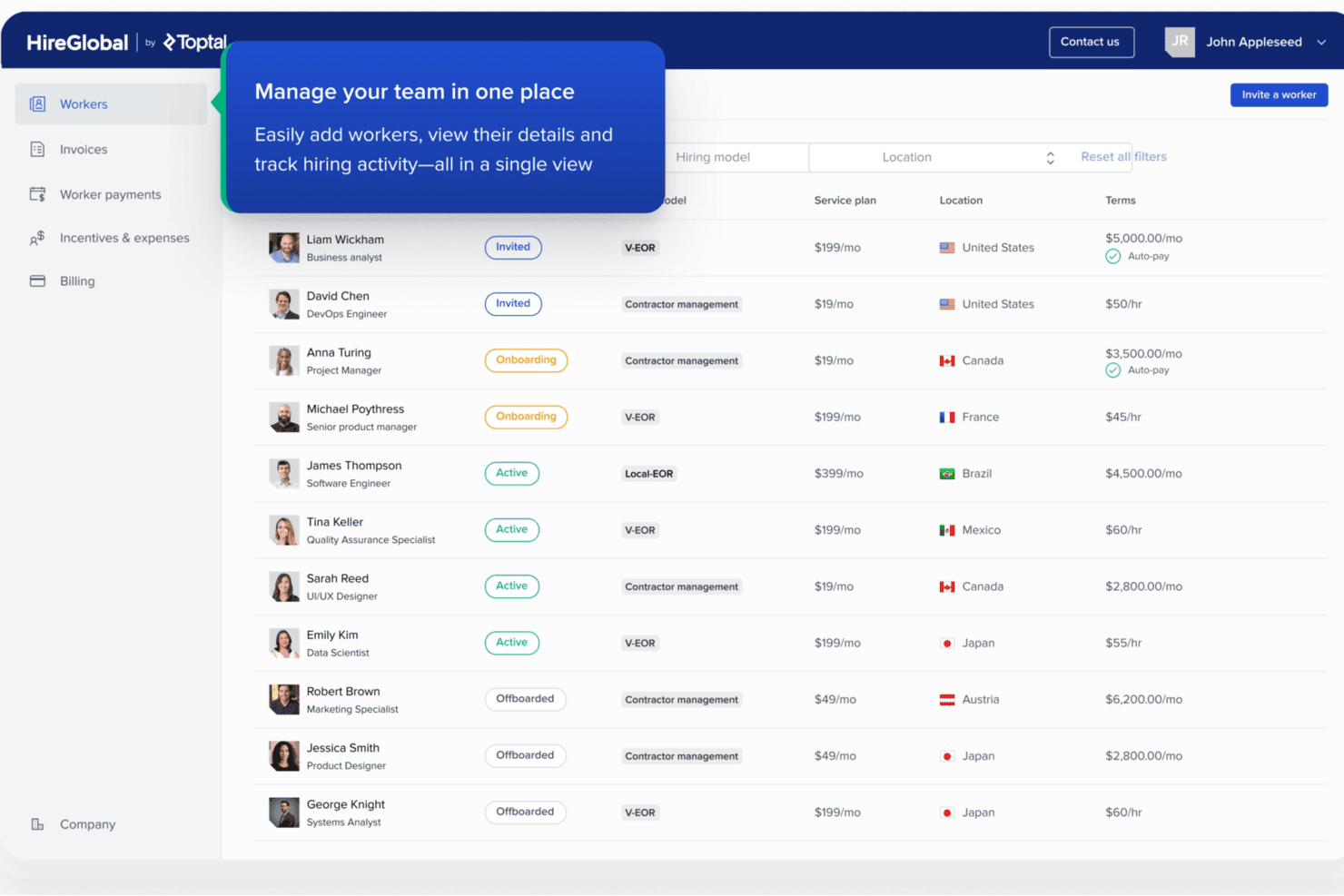
HireGlobal centralizes global worker management in a single dashboard. HireGlobal is a global employment platform for churches and organizations hiring international staff or contractors, helping manage payroll, compliance, and cross-border worker administration.
Who Is HireGlobal Best For?
HireGlobal suits churches and ministries hiring international staff or contractors that need help managing cross-border payroll and compliance.
Why HireGlobal Is a Good Best Paylocity Competitors
I picked HireGlobal for Best for global contractor and EOR hiring because it supports churches hiring international staff and contractors. I like how it brings cross-border payroll, compliance, and worker administration into one platform. My team can use it when international ministry hiring creates payroll responsibilities across multiple countries.
HireGlobal Key Features
- Built-in HRIS: Store employee records and employment details in one system.
- Hiring checks: Review candidate information during the onboarding process.
- Employment contracts: Prepare local employment agreements for new hires.
- Benefits administration: Manage employee benefits alongside EOR employment.
HireGlobal Integrations
Native integrations are not currently listed.
Pros and Cons
Pros:
- Combines contractor and employee administration
- Handles local contracts, payroll, and benefits
- Supports hiring across 180+ countries
Cons:
- Contractor workflows are less clearly documented
- Multiple providers may create service inconsistencies
Learn more about HireGlobal: Best for time and attendance tracking
- 30-day free trial + free demo available
- From $50/user/month
Visit WebsiteCustomer Rating:4.5/5
TimeTrex offers workforce management tools for employee scheduling, attendance tracking, payroll, and HR administration. TimeTrex is a workforce management platform designed for organizations that want all-in-one HR, payroll, and employee attendance features. It’s a great choice for companies needing streamlined processes across time tracking, payroll, and scheduling in one flexible system.
Who Is TimeTrex Best For?
TimeTrex suits HR teams and operations managers at mid-sized businesses seeking precise employee attendance tracking and compliance.
Why TimeTrex Is a Good Paylocity Competitor
I picked TimeTrex for this list because of how far it goes with time and attendance tracking compared to most payroll-first platforms. I appreciate that it supports biometric punch-in methods—including fingerprint and facial recognition, which gives my team a much higher level of accuracy than PIN or badge-based systems. TimeTrex also lets me build out detailed attendance policies, including custom overtime rules and absence tracking, so I'm not forced into rigid defaults. For organizations managing shift workers or hourly staff across multiple locations, that level of control is genuinely hard to find in a single platform.
TimeTrex Key Features
- Payroll processing: Run payroll calculations automatically based on hours worked, including deductions and garnishments.
- Employee self-service portal: Let employees view pay stubs, request time off, and update personal information independently.
- Scheduling tools: Build and assign employee shifts with drag-and-drop scheduling across departments or locations.
- HR document management: Store and manage employee records, contracts, and compliance documents in one place.
TimeTrex Integrations
TimeTrex offers native integrations with QuickBooks, Sage, ADP, Paychex, Surepay, and more. It also provides an API for custom integrations.
Pros and Cons
Pros:
- Real-time employee punch monitoring
- Flexible overtime and attendance policy settings
- Advanced biometric and facial recognition options
Cons:
- Mobile app stability is inconsistent across devices
- Interface design appears dated and cluttered
Learn more about TimeTrex: Best for digital giving solutions
- 30-day free trial available
- From $72/month
Visit WebsiteCustomer Rating:4.7/5
Tithe.ly streamlines digital giving with mobile and text donation tools. Tithe.ly is a church management software focused on providing digital giving solutions for churches and religious organizations. Its main users are church leaders and administrators who need to manage online donations and member engagement efficiently.
Why it's a good Paylocity alternative: Tithe.ly offers specialized digital giving tools that make it a strong alternative to Paylocity for churches. You can manage online donations, track giving trends, and engage with your congregation through mobile apps.
The platform's focus on digital giving includes features like text and app giving. These tools help your team enhance donation management and communication with members, addressing needs beyond payroll.
Standout features & integrations:
Features include text giving, mobile app donations, and giving trend analysis. You can also access tools for event registration and member communication. Tithe.ly provides a user-friendly dashboard to help manage donations and engagement.
Integrations include QuickBooks, Planning Center, Elvanto, CCB, Rock RMS, Church Community Builder, Breeze, Faithlife, Shepherd's Staff, and ACS Technologies.
Pros and Cons
Pros:
- Giving trend analysis
- Mobile app donations
- Specialized digital giving tools
Cons:
- Requires internet access
- Limited payroll capabilities
 7Best for accounting and invoicing
Xero
- 30-day free trial available
- From $2.50/month
Visit WebsiteCustomer Rating:4.4/5
Xero unifies payroll with invoicing, expenses, and real-time reports. Xero is an accounting software tailored for small to medium-sized businesses, providing tools for managing finances and invoicing. Its main users include accountants and business owners who need efficient financial management and reporting.
Why it's a good Paylocity alternative: Xero offers a range of accounting features that make it suitable for businesses looking for more than just payroll services. You can manage invoicing, bank reconciliation, and expense tracking all in one place.
Xero's real-time financial reporting helps you keep track of your business's financial health. Its focus on accounting and invoicing makes it a solid alternative to Paylocity for those who need comprehensive financial management.
Standout features & integrations:
Features include bank reconciliation, expense tracking, and real-time financial reporting. You can also manage fixed assets and multi-currency accounting. Xero's dashboard provides an overview of your financial performance at a glance.
Integrations include HubSpot, Stripe, Square, Shopify, PayPal, Gusto, Expensify, Deputy, Vend, and Squarespace.
Pros and Cons
Pros:
- Flexible invoicing options
- Fixed asset management
- Comprehensive financial management
Cons:
- Learning curve for new users
- Limited payroll features
 Best for church engagement tools
- Free trial available
- From $69.99/month
Visit WebsiteCustomer Rating:4.8/5
SteepleMate supports church engagement with tools for outreach and planning. SteepleMate is a church management software tailored for churches seeking to enhance community engagement and operational efficiency. Its main users are church leaders and administrators who need tools for managing people, finances, and outreach activities.
Why it's a good Paylocity alternative: SteepleMate provides engagement tools that are specifically designed for churches, making it a strong alternative to Paylocity. You can manage people and groups, plan sermons, and enhance your church's digital presence.
The software's focus on engagement includes features like outreach and academic support. These capabilities help your team foster a connected and informed church community, addressing needs beyond payroll processing.
Standout features & integrations:
Features include sermon planning tools, financial reporting, and academic program management. You can also manage your church's digital presence with a website and social media tools. SteepleMate offers detailed reporting to help track and manage church operations.
Integrations include QuickBooks, Mailchimp, Facebook, Google Calendar, Twitter, Instagram, Zoom, PayPal, Stripe, and Slack.
Pros and Cons
Pros:
- Digital presence enhancement
- Academic program management
- Sermon planning support
Cons:
- Basic reporting capabilities
- Learning curve for advanced features
Learn more about SteepleMate:

WAVE handles invoicing and payments with a clean, easy-to-use interface. WAVE is a financial management software aimed at small businesses and freelancers, offering tools for accounting, invoicing, and payment processing. Its main users are small business owners and independent professionals who need cost-effective financial solutions.
Why it's a good Paylocity alternative: WAVE provides free invoicing and payment features, making it an attractive option for businesses on a budget. You can manage your business accounting and cash flow without incurring additional costs.
The software's intuitive interface helps your team easily navigate financial tasks. WAVE's focus on providing essential financial tools for free makes it a strong alternative to Paylocity for those prioritizing cost-efficiency.
Standout features & integrations:
Features include customizable invoicing, receipt scanning, and expense tracking. You can also manage your cash flow with real-time financial dashboards. WAVE's accounting tools help you keep track of your business finances in one place.
Integrations include PayPal, Etsy, Shopify, Shoeboxed, Zapier, Google Sheets, HubSpot, Slack, Mailchimp, and Stripe.
Pros and Cons
Pros:
- Easy expense tracking
- Real-time financial dashboards
- Free invoicing and payments
Cons:
- Basic reporting capabilities
- No phone support
Learn more about WAVE:

Gusto simplifies HR with automated payroll and benefits management. Gusto is a payroll and HR software designed for small and medium-sized businesses, offering payroll processing, benefits administration, and HR management. Its main users are business owners and HR teams who need an all-in-one platform for managing payroll and employee benefits.
Why it's a good Paylocity alternative: Gusto provides a user-friendly interface and a comprehensive set of HR tools, making it ideal for small and medium businesses. You can manage payroll, benefits, and compliance effortlessly.
The software's automated payroll filings and benefits management help your team save time. Gusto’s focus on simplifying HR processes makes it a valuable alternative to Paylocity for businesses looking for ease of use and efficiency.
Standout features & integrations:
Features include automated payroll filings, benefits administration, and compliance management. You can also access employee self-service tools for managing personal information. Gusto provides detailed payroll reports to help you track financial data.
Integrations include QuickBooks, Xero, Clover, FreshBooks, Trainual, Deputy, TSheets, When I Work, Homebase, and Shopify.
Pros and Cons
Pros:
- Employee self-service options
- Easy payroll management
- Comprehensive HR tools
Cons:
- Basic analytics
- Limited customization options
Learn more about Gusto:
Other Paylocity Competitors
Here are some additional Paylocity competitors that didn’t make it onto my shortlist, but are still worth checking out:
- 11Fellowship OneBest for comprehensive church management
- 12PowerChurch PlusBest for church administration
- 13CDM+Best for nonprofit management
- 14Church WindowsBest for church financial management
- 15OnPayBest for small business HR integration
- 16Patriot PayrollBest for small business affordability
- 17BambooHR®Best for small to medium HR teams
- 18One Church SoftwareBest for integrated church management
- 19WagepointBest for simple payroll processing
- 20MinistryWorksBest for church-specific payroll needs
How I Evaluate Paylocity Competitors
When a church admin faces housing allowance setup or dual-status minister filings, the tools on my list must clear baseline requirements first—then I evaluate what sets each apart.
Core Functionality (Table Stakes For This List)
When I'm selecting tools for my list, I rank each one on a scale from 0 (does not offer the functionality) to 5 (excels in this area) for each core functionality listed below. Then, I calculate the tool's total score into a percentage. Each tool needs to achieve a minimum total score of 55% to be considered for inclusion.
- Clergy Payroll Processing: I check whether a platform handles housing allowance designations and dual-status minister tax treatment natively or requires manual workarounds each pay run.
- Tax Filing & Compliance: Each tool needs to cover federal, state, and local filings along with year-end W-2 and 1099 generation, especially for nonprofit entities with mixed staff classifications.
- HR & Employee Management: I look for a core HRIS that stores employee records, manages onboarding documents, and keeps staff data organized across departments or ministry teams.
- Benefits & PTO Administration: Whether your church offers a denominational health plan or a third-party option, I evaluate how each tool handles enrollment, deductions, and PTO policy configuration.
- Time & Attendance Tracking: Hourly worship techs and part-time childcare workers need reliable clock-in options, so I look at timesheet capture, approval workflows, and payroll sync.
- Direct Deposit & Self-Service: Staff should be able to access pay stubs, tax documents, and update personal details on their own, so I evaluate each platform's employee portal and mobile access.
Once I have a list of tools that meet this criteria, I consider what sets each platform apart.
Differentiating Factors (What Sets Vendors Apart)
Here's how I compare and contrast different vendors:
Standout Features
I look for native integrations with ChMS platforms like Planning Center or Breeze so staff data stays in sync without manual entry. Multi-entity payroll matters too, especially for churches running several campuses or affiliated ministries under separate 501(c)(3) entities. Fund accounting sync is another feature I evaluate closely because payroll expenses often need to be allocated across multiple ministry budgets. Built-in background check workflows also stand out when a church needs recurring screening for children's ministry volunteers.
Beyond Features
Church-specific support expertise matters because a generic payroll rep often can't guide you through housing allowance setup or SECA tax questions. I evaluate whether a vendor's support team understands clergy tax law firsthand. Pricing structure is equally important since many churches run on tight budgets with a mix of full-time, part-time, and seasonal staff. I also consider how smooth the mid-year migration process is, especially whether a platform can reconcile prior wages and filings when switching away from Paylocity outside of January.
Why Look For a Paylocity Alternative?
While Paylocity is a good choice of church payroll software, there are a number of reasons why some users seek out alternative solutions. You might be looking for a Paylocity alternative because…
- You need more church-specific features
- Your team struggles with complex interfaces
- You're looking for more affordable options
- You require better customer support
- You need software that scales with growth
- You're seeking better integration capabilities
If any of these sound like you, you’ve come to the right place. My list contains several church payroll software options that are better suited for teams facing these challenges with Paylocity and looking for alternative solutions.
Paylocity Key Features
Here are some of the key features of Paylocity, to help you contrast and compare what alternative solutions offer:
- Automated payroll processing: Handles payroll calculations and distributions efficiently, reducing manual errors for your team.
- Employee self-service portal: Allows your employees to access their payroll information, pay stubs, and tax documents independently.
- Time and attendance tracking: Helps you monitor employee hours and manage time-off requests seamlessly.
- Tax compliance management: Automates tax calculations and filings, ensuring your business stays compliant with regulations.
- Reporting and analytics tools: Provide detailed insights into payroll data and workforce metrics to aid in decision-making.
- Mobile access: Enables your team to manage payroll tasks on the go with a mobile-friendly interface.
- Integration with other HR systems: Ensures smooth data flow between payroll and HR functions, enhancing overall efficiency.
- Benefits administration: Simplifies the management of employee benefits, including enrollment and tracking.
- Direct deposit options: Offers secure and timely deposit of employee wages directly into their bank accounts.
- Customizable workflows: Allow you to tailor payroll processes to meet specific organizational needs.
What’s Next:
If you're in the process of researching church payroll software, connect with a SoftwareSelect advisor for free recommendations.
You fill out a form and have a quick chat where they get into the specifics of your needs. Then you'll get a shortlist of software to review. They'll even support you through the entire buying process, including price negotiations.