Software-ul de gestionare a bisericii (ChMS) ajută la reducerea semnificativă a orelor pe care liderii bisericii le petrec cu administrarea, programarea și comunicarea. Nu doar că îi ajută pe liderii, angajații și voluntarii dumneavoastră să fie la curent cu aceleași informații, ci eliberează și intervale mari de timp pe care dumneavoastră și echipa pastorală le puteți investi în rugăciune, predare și formare spirituală.
Am făcut parte din echipele de conducere ale bisericii în 4 biserici pe parcursul celor peste 20 de ani de experiență în slujire. De-a lungul carierei, am lucrat îndeaproape cu zeci de biserici și pastori din toată America de Nord și am petrecut sute de ore evaluând și folosind instrumente de gestionare a bisericii. Am văzut direct că, atunci când echipele pastorale adoptă software de gestionare a bisericii, petrec mai puțin timp reacționând la situații urgente, mai mult timp în rugăciune, formare spirituală și predare și au un control mult mai bun asupra timpului lor.
Sunt convins că, pentru pastori în prezent, software-ul de gestionare a bisericii nu este opțional, ci esențial. Când procesele și sistemele dumneavoastră sunt defectuoase sau învechite, voluntarii pierd ore întregi, vizitatorii sunt neglijați, iar oportunitățile de slujire se pierd. Însă software-ul potrivit creează o comunicare mai sănătoasă, o îngrijire pastorală mai consecventă și operațiuni de slujire mai fluide în toate domeniile. De aceea am alcătuit această listă: pentru a vă ajuta să găsiți un ChMS care să vă susțină cu adevărat misiunea.
Motive pentru a avea încredere în recenziile mele despre software-ul de gestionare a bisericii:
- Testez și evaluez software pentru biserici din 2019.
- Sunt pastor și am trăit pe propria piele consecințele alegerii unui software nepotrivit.
- Folosesc cercetări aprofundate pentru a-i ajuta pe alți lideri ai bisericilor să ia decizii de achiziție bine fundamentate.
- Eu și echipa mea am testat peste 2.000 de instrumente pentru diferite nevoi ale bisericilor.
- Eu și echipa mea am redactat peste 1.000 de recenzii software cuprinzătoare.
- Sunt dedicat transparenței.
- Folosesc o metodologie riguroasă de evaluare a software-ului de gestionare a bisericii.
Why Trust Our Software Recommendations
6,700+
Reviews
20
Industry experts
16+
Evaluation factors
14
Years
Our team has been testing and reviewing software since 2012. As church leaders ourselves, we know how difficult—and important—it is to choose the right software.
For this guide, we evaluated tools using hands-on testing and independent research, scoring tools using our selection criteria.
Our reviews reflect our human editorial judgment, not a sales pitch.
Tabel comparativ al software-urilor de gestionare a bisericii
Sorted by: Default
| Tool | Starting Price | Website | |
|---|---|---|---|
Best for managing church donations and events | 4.8 out of 5 | $19/month Free plan + 30-day trial available | Website |
Best for remote congregation engagement | 4.5 out of 5 | Pricing upon request Free plan + free demo available | Website |
Best for all-in-one church management | 4.6 out of 5 | $12/month Free plan available | Book Demo |
Best for growing congregations | 4.8 out of 5 | $58/month 30-day free trial available | Website |
Best for automated church communication | 4.6 out of 5 | $30/month 14-day free trial + free demo available | Website |
Best for AI-assisted church data entry | 5.0 out of 5 | $20/month Free plan + 2-month free trial available | Website |
Best for ease of use | 4.8 out of 5 | $72/month 30-day free trial + free demo available | Website |
Best for recurring donations | 4.8 out of 5 | $72/month Free plan + 30-day trial + demo available | Website |
Best for member information tracking | 4.7 out of 5 | $37/month 30-day free trial available | Website |
Best for connecting the church community | 4.1 out of 5 | Pricing upon request Free trial + free demo available | Website |


Cele mai bune 20 de recenzii ale software-urilor de gestionare a bisericii
În această postare, am încercat să acoperim un spectru larg de software, luând în considerare complexitatea, nivelurile de preț și funcționalitatea.
 Best for managing church donations and events
- Free plan + 30-day trial available
- From $19/month (billed annually)
Visit WebsiteCustomer Rating:4.8/5
Gracely’s dashboard gives church leaders a real-time view of members, families, groups, upcoming birthdays, and giving activity, all in one place. Gracely is a church management platform designed for faith communities that want to simplify donation tracking, event planning, and member engagement in one place.
Who Is Gracely Best For?
Gracely is a good fit for small to mid-sized churches that need a straightforward way to manage giving and organize ministry events without a steep learning curve.
Why I Picked Gracely
Gracely earns its spot on my shortlist because of how well it handles the two things most churches struggle to keep organized: donations and events. I like that the donation tools let you track one-time and recurring gifts, generate giving statements, and monitor campaign progress without needing a separate accounting tool. On the events side, I've found the registration and ticketing features genuinely useful for managing everything from Sunday services to fundraising dinners. By combining both in one platform, Gracely helps churches avoid juggling multiple tools.
Gracely Key Features
- Member profiles: Store personal details, contact information, family connections, and giving history for each congregation member in a centralized directory.
- Child check-in: Log and track child attendance with a secure check-in system, including exportable attendance history for safety follow-up.
- Customizable forms: Build forms for registrations, surveys, and sign-ups to replace paper-based processes and capture member information digitally.
- Church accounting: Track income and expenses across multiple accounts, categorize transactions with custom labels, and apply tax tags for financial reporting.
Gracely Integrations
No native integrations are listed.
Pros and Cons
Pros:
- Effective features for connecting members
- User-friendly interface
- A free plan is available
Cons:
- Limited integrations available
- Limited language support
Learn more about Gracely: Best for remote congregation engagement
- Free plan + free demo available
- Pricing upon request
Visit WebsiteCustomer Rating:4.5/5
Subsplash helps you plan the order of your service, including worship music, sermon notes, and announcements. Subsplash gives churches a unified platform to manage digital giving, media, events, and communication, helping ministry teams connect with their congregations through custom apps, websites, and integrated engagement tools.
Who Is Subsplash Best For?
Subsplash is a strong fit for churches of any size that want to build a consistent digital presence and keep both in-person and remote members engaged through mobile apps, streaming, and online giving.
Why I Picked Subsplash
Subsplash earns its spot on my shortlist because it's purpose-built for churches that need to reach members beyond the Sunday morning crowd. I particularly like the custom-branded mobile app, which lets congregations stream sermons, access sermon archives, and receive push notifications—all in one place their members already check daily. I also use the integrated online giving tools, which make it easy for remote members to tithe without ever setting foot in the building. For churches with hybrid or distributed congregations, that combination of media delivery and giving in a single app is genuinely hard to replicate elsewhere.
Subsplash Key Features
- Event registration: Members can register for church events directly through the app or website, with all registrations managed from a single dashboard.
- Child check-in: A built-in check-in tool lets staff and volunteers track children's attendance and manage safety workflows during services.
- People profiles: Store and manage individual member records, including contact details and engagement history, within the church management dashboard.
- Volunteer management: Assign, schedule, and track volunteers across ministries from within the same platform used for giving and media.
Subsplash Integrations
Native integrations are not currently listed.
Pros and Cons
Pros:
- Great mobile app functionality
- User-friendly interface with modern UI
- Offers "all-in-one" coverage of all basic church needs
Cons:
- Limited integrations with other systems
 Best for all-in-one church management
- Free plan available
- From $12/month
Visit WebsiteCustomer Rating:4.6/5
ChMeetings provides a centralized dashboard that provides a quick overview of church activities, including contributions, attendance, events, and follow-up tasks. ChMeetings is a church management platform built for pastors and ministry leaders who want to organize member data, events, communication, and giving in one place, making it easier to coordinate church activities and engage their congregation.
Who Is ChMeetings Best For?
ChMeetings is a strong fit for small to mid-sized churches that need a single platform to manage members, events, and giving without juggling multiple tools.
Why I Picked ChMeetings
ChMeetings earns its spot as one of the best on my shortlist because it genuinely covers every core area of church administration in a single platform. I like that member profiles, giving records, event management, worship planning, and built-in accounting all live in one place—so my team isn't toggling between separate tools to get a complete picture of what's happening in the church. The worship planning feature is a good example of this depth: I can build out a full service order, manage songs, and assign team members all within the same system I use to track attendance and send communications. The built-in accounting module is another area where ChMeetings goes further than most, letting me track expenses, monitor funds, and generate reports without needing a separate finance tool.
ChMeetings Key Features
- Volunteer scheduling: Assign volunteers to specific roles, set reminders, and manage availability across services and events.
- Member portal: Give members a self-service space to update their own contact details, register for events, and give online.
- Attendance follow-up tools: Automatically flag members who have missed multiple services so leaders can reach out before someone quietly disengages.
- Custom forms: Build forms for event sign-ups, surveys, or feedback directly within the platform without needing a third-party tool.
ChMeetings Integrations
Integrations include Stripe, PayPal, Mailchimp, Twilio, and an API is available for custom integrations.
Pros and Cons
Pros:
- Multilingual support
- Supports secure donation tracking and online payments
- Very affordable, tiered pricing based on church size
Cons:
- Could offer more advanced financial management features
- Mobile app could use some improvements
Learn more about ChMeetings: Best for growing congregations
- 30-day free trial available
- From $58/month
Visit WebsiteCustomer Rating:4.8/5
One Church Software's dashboard provides an overview of news, tasks, and upcoming events. One Church Software is a cloud-based church management platform built for churches and ministries that want to simplify member engagement, event planning, giving, and volunteer coordination in one unified system.
Who Is One Church Software Best For?
One Church Software is a strong fit for growing congregations that need scalable tools to manage increasing membership, giving, and ministry activity without outgrowing their platform.
Why I Picked One Church Software
One Church Software earns its spot on my shortlist because it's built to scale alongside a congregation as it grows. I particularly like the multi-campus support, which lets you organize members, teams, and reporting by location without losing visibility across the whole church. The automation tools are also a real asset here—I use them to trigger follow-up emails and SMS messages based on form submissions or attendance patterns, so no new visitor or lapsed member slips through the cracks. Add in the prebuilt lapse donor and lapse attendance reports, and you've got a system that actively helps you stay connected as your congregation expands.
One Church Software Key Features
- Online giving: Accept one-time and recurring donations through customizable giving pages with text-to-give and kiosk options.
- Child check-in: Manage secure check-in and check-out for children's ministry with label printing and allergy or medical notes.
- Group management: Organize members into small groups, classes, or ministry teams with built-in communication and attendance tracking.
- Event registration: Create and manage event sign-ups with custom forms, capacity limits, and automated confirmation emails.
One Church Software Integrations
Native integrations are not currently listed.
Pros and Cons
Pros:
- Mobile app available
- Integrates all church management functions in one
- Convenient event management
Cons:
- Can get pricey with more profile users and feature add-ons
- Lack of integrations
Learn more about One Church Software: Best for automated church communication
- 14-day free trial + free demo available
- From $30/month (billed annually)
Visit WebsiteCustomer Rating:4.6/5
Mobile interface of Text In Church showing two-way messaging for church communication and member engagement Text In Church helps pastors and church leaders connect with members and guests through automated messaging, and helps manage follow-ups, reminders, and group communication within your congregation.
Who Is Text In Church Best For?
Text In Church is a great fit for small to mid-sized churches that want a dedicated tool for staying in touch with first-time guests and regular attendees through text and email.
Why I Picked Text In Church
I picked Text In Church as one of the best because its automated workflows handle follow-up that many churches struggle to maintain. When a first-time guest fills out a digital connect card, the platform automatically triggers a personalized text sequence over the following weeks—no manual reminders needed. I also like the unlimited keywords feature, which lets you set up text-in prompts for RSVPs, prayer requests, or volunteer sign-ups, so people can respond on their own time. The staff notification system alerts your team when a new guest connects, so the right person follows up at the right moment.
Text In Church Key Features
- Two-way texting: Send and receive individual text conversations with members directly within the platform.
- Group messaging: Segment your congregation into groups and send targeted texts or emails to specific audiences.
- Scheduled messaging: Plan and schedule texts or emails in advance for upcoming events, services, or announcements.
- Giving links in messages: Include direct giving links inside text or email messages so members can donate.
Text In Church Integrations
Integrations include Planning Center, Church Community Builder, Mailchimp, Rock RMS, and Zapier.
Pros and Cons
Pros:
- Integrations support cross-platform data synchronization
- Automated workflows streamline follow-up processes
- Two-way messaging enables real-time engagement
Cons:
- Requires internet for full functionality
- Limited customization for automated messages
Learn more about Text In Church: Best for AI-assisted church data entry
- Free plan + 2-month free trial available
- From $20/month
Visit WebsiteCustomer Rating:5/5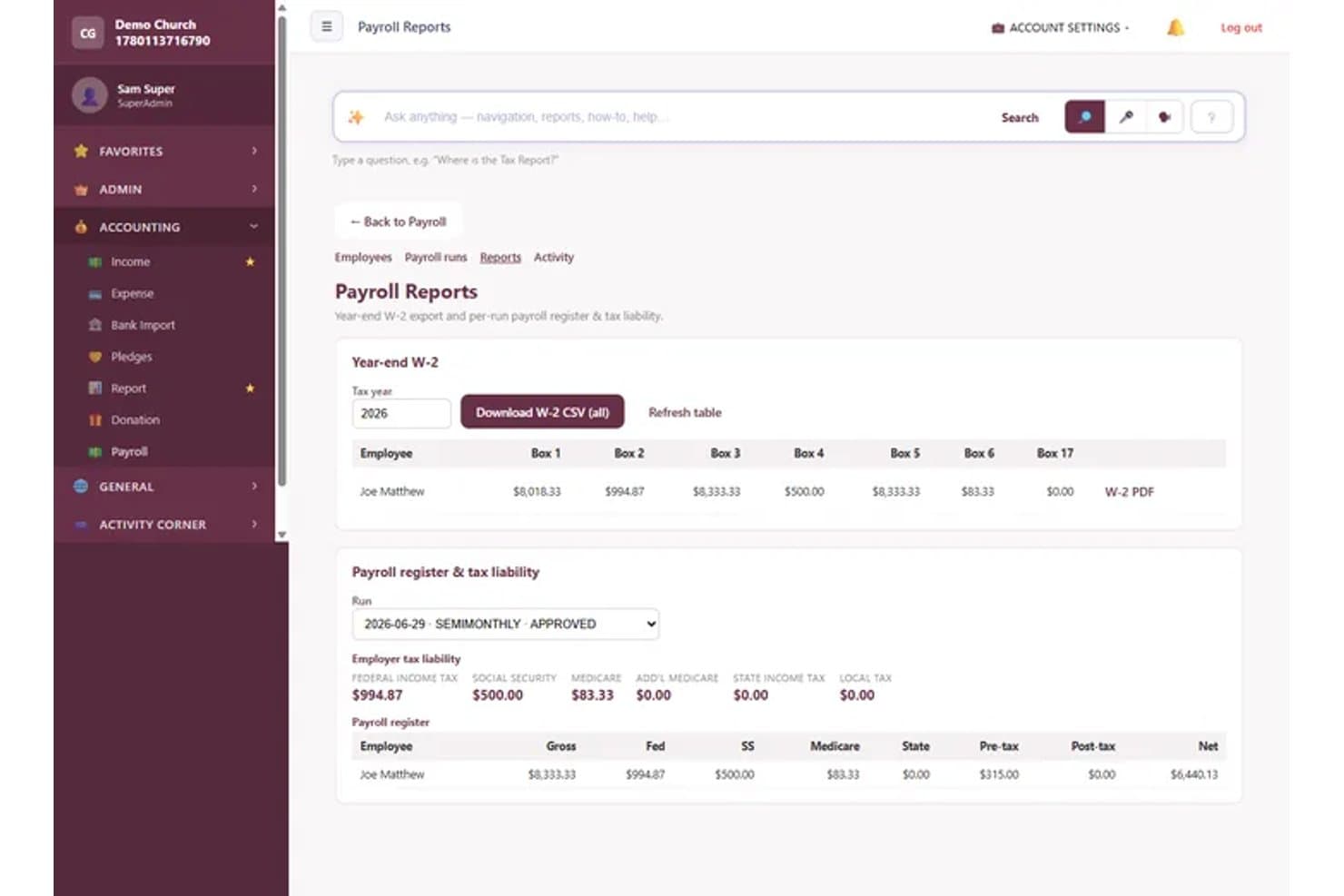
Church Genius simplifies payroll tax reporting with W-2 and liability tools. ChurchGeniusPro is a church management platform that combines member and family records, giving and accounting, communication, events, and ministry scheduling with a built-in AI assistant.
Who Is ChurchGeniusPro Best For?
ChurchGeniusPro is a strong fit for small to mid-sized churches that want AI-assisted data entry to reduce the administrative burden on a lean staff or volunteer team.
Why I Picked ChurchGeniusPro
ChurchGeniusPro earns its spot on my shortlist because the AI-assisted data entry features genuinely reduce the manual work that bogs down small church offices. I particularly like the voice auto-fill for accounting entries, where you speak an income or expense and the AI captures the amount, date, and category without any typing. The membership form scan is equally useful: point your camera at a paper form and ChurchGeniusPro fills in the new member's profile automatically.
ChurchGeniusPro Key Features
- Pledge and campaign management: Track giving campaigns with a target amount, end date, and a live dashboard showing pledged, collected, pending, and percent-complete figures.
- Prayer request tracking: Assign prayer requests to volunteers, move them through statuses from New to Closed, and log timestamped notes on each request.
- Kids check-in with security codes: Check children in by phone number or QR code and generate a security code for parent pickup.
- Worship planning and setlists: Build service orders, assign worship team members, upload chord charts, and notify the team from one place.
ChurchGeniusPro Integrations
The only documented third-party integration is Stripe for online donations, event payments, and recurring giving. No API or additional named integrations are documented.
Pros and Cons
Pros:
- Child check-in uses pickup security codes
- Prayer workflows track requests through follow-up
- AI-assisted entry reduces bookkeeping and form transcription
Cons:
- No documented native iOS app
- No documented room or facility booking
Learn more about Church Genius: Best for ease of use
- 30-day free trial + free demo available
- From $72/month
Visit WebsiteCustomer Rating:4.8/5
An example of Breeze's report generating interface for donation management. Breeze ChMS is a church management platform built for small to mid-sized churches that want to simplify member tracking, event planning, giving, and communication in one place.
Who Is Breeze ChMS Best For?
Breeze ChMS is a strong fit for small to mid-sized churches that need an approachable, no-fuss system their staff and volunteers can learn with minimal training.
Why I Picked Breeze ChMS
Breeze ChMS earns its spot on my shortlist because it requires little setup and is straightforward to deploy. I love the customizable tags and groups feature—you can segment your congregation by small group, volunteer role, or ministry team in minutes, then message those groups directly without jumping between tools. The kids' check-in system is another highlight: it prints parent and child name tags, assigns unique security codes, and tracks attendance without requiring any technical setup. For churches where staff and volunteers aren't particularly tech-savvy, that kind of out-of-the-box simplicity is hard to come by.
Breeze ChMS Key Features
- Online giving: Congregants can give via credit card, debit card, or ACH directly through your church's giving page, with contributions automatically logged to donor profiles.
- Event registration: Create events with custom registration forms, set capacity limits, and track sign-ups from within the same platform you use to manage members.
- Contribution statements: Generate and email year-end giving statements to donors in bulk, pulling directly from recorded contribution data.
- Volunteer scheduling: Assign volunteers to specific roles and service times, then send automated reminders to confirm availability.
Breeze ChMS Integrations
Integrations include Tithely Giving, Tithely People, Tithely Messaging, Tithely Church Apps, Tithely Events, Tithely Sites, Sermonly Sermon Writer, Tithely Print, Accept Bitcoin and Crypto through Engiven, and a public API for custom integrations.
Pros and Cons
Pros:
- Responsive customer support
- Easy data transfer from other systems
Cons:
- Some features are quite basic
Learn more about Breeze ChMS: Best for recurring donations
- Free plan + 30-day trial + demo available
- From $72/month
Visit WebsiteCustomer Rating:4.8/5
Tithe.ly enables you to organize and schedule service plans with detailed breakdowns of songs and readings. Tithely is a church management platform for faith communities, offering tools to simplify giving, manage members, organize events, and communicate with their congregation from a single dashboard.
Who Is Tithely Best For?
Tithely is a strong fit for small to mid-sized churches that need an all-in-one platform to manage both their congregation and their giving programs.
Why I Picked Tithely
Tithely earns its spot on my shortlist because of how well it handles recurring giving. I like that donors can set up, pause, or update their recurring gifts entirely on their own—without needing to contact your admin team. That kind of donor-controlled flexibility keeps giving consistent without adding work for your staff. I also use the pledge campaign tools to set giving goals and track progress in real time, which makes stewardship conversations with your congregation much more concrete and data-driven.
Tithely Key Features
- Kids check-in: Print parent and child name tags, track attendance, and assign unique security codes for each child during services and events.
- Workflow automation: Set up automated tasks like birthday emails, group assignments, and follow-up messages to reduce manual admin work.
- Customizable tags: Organize members into groups—such as volunteers, small groups, or event attendees—to target communication and track engagement.
- Service planning: Coordinate weekend worship services, including a song library and SongSelect® integration, through a built-in planning tool.
Tithely Integrations
Integrations include SongSelect, MinistrySafe, and the Tithely Worship App.
Pros and Cons
Pros:
- Mobile-first giving tools
- Easy tracking of donor history
- Text-to-give functionality
Cons:
- No free tier available
- Limited non-donation features
 Best for member information tracking
- 30-day free trial available
- From $37/month
Visit WebsiteCustomer Rating:4.7/5
Churchteams offers an intuitive check-in interface for managing family additions. Churchteams is a church management platform built for pastors and ministry leaders who want to organize member data, streamline communication, and coordinate groups and events in one place.
Who Is Churchteams Best For?
Churchteams is a strong fit for small to mid-sized churches that need a dedicated system for tracking congregation members, managing groups, and staying connected with their community.
Why I Picked Churchteams
Churchteams earns its spot as one of the best on my shortlist because of how thoroughly it handles member information tracking. I like that member fields are fully customizable, so my team can capture exactly the data that matters to our ministry—whether that's spiritual gifts, background check status, or discipleship milestones. Connection card responses and pastoral conversations can be logged directly to individual member records, and follow-up tasks can be assigned with automatic email and text reminders if they go unfinished. The ability to let members update their own information with a single click from an email also keeps the database current without putting all the work on staff.
Churchteams Key Features
- Child check-in security tags: Print name tags or send parents a unique security code via text that matches the code on their child's tag at check-in.
- Automated communication workflows: Set up triggered email and text sequences for scenarios like guest follow-up, volunteer training, and event reminders.
- Text-to-Church keyword texting: Let members access giving, event registration, and volunteer schedules by texting a keyword—no app or login needed.
- Attendance tracking and reporting: View real-time check-in data, run attendance summary reports, and receive scheduled alerts for member absences.
Churchteams Integrations
Native integrations are not currently listed.
Pros and Cons
Pros:
- Comprehensive church management features, including donation tracking, team building, and event management.
- User-friendly interface suitable for varying tech skills, minimizing the learning curve.
- Excellent 24/7 customer support, providing guidance and solutions to improve the user experience.
Cons:
- Lacks an online calendar feature, which can limit scheduling capabilities.
- Only online training available, with no options for in-person training.
Learn more about Churchteams: 10Best for connecting the church community
Realm
- Free trial + free demo available
- Pricing upon request
Visit WebsiteCustomer Rating:4.1/5
Realm provides reports for your church in a simple dashboard view. Realm is a cloud-based church management platform built for churches and ministries that want to organize member data, manage giving, coordinate events, and strengthen engagement across their congregation.
Who Is Realm Best For?
Realm suits small to mid-sized churches looking for an all-in-one platform to manage members, giving, and ministry operations.
Why I Picked Realm
Realm earned a spot on my shortlist because it's built around community connection. I love the Connected Groups feature—congregation members can search for and join small groups on their own, post messages to group walls, and check meeting schedules without staff having to manage every interaction. I also like that group leaders get their own set of tools to manage rosters, track attendance, and share resources, which takes real pressure off church staff. Realm's targeted communication lets leaders message a specific group rather than the whole congregation, so a small group leader can notify only their members via email, in-app alert, or text.
Realm Key Features
- Online giving: Congregation members can make one-time or recurring donations directly through Realm's giving portal or mobile app.
- Contribution statements: Automatically generate and distribute year-end giving statements to members for tax reporting purposes.
- Event registration: Create events, set capacity limits, and collect registrations and payments from members in one place.
- Volunteer management: Schedule volunteers for specific roles and services, and track their participation history over time.
Realm Integrations
Integrations include Constant Contact, Givelify, Vanco, QuickBooks, ShelbyNext, MinistrySafe, Protect My Ministry, and an API for custom integrations.
Pros and Cons
Pros:
- Event registration and payment processing features
- Connectivity and communication features
- Integrated solution for church management
Cons:
- Potential learning curve for new users
- User interface could be improved
Alte software-uri de gestionare a bisericii
Niciuna dintre opțiunile de mai sus nu funcționează pentru dumneavoastră? Consultați lista de mai jos pentru instrumente software suplimentare de gestionare a bisericii:
- 11SteepleMateBest for organizing member information
- 12BlackbaudBest for managing people and payments
- 13ElvantoBest for church finances
- 14Wild ApricotBest for member database management
- 15Planning CenterBest for scaling with church growth
- 16Fellowship OneBest for online administrative management
- 17TouchpointBest mobile app experience
- 18ElexioBest for people management
- 19PowerChurchBest for detailed membership records
- 20ExcellerateBest for on-site local network installation
- 21ChurchTracBest for centralizing church functions
- 22WhatspotBest for public booking access
- 23MinistryPlatformBest for large churches
- 24CommunicateBest for drag-and-drop scheduling
- 25RakletBest for building your own branded app
- 26FaithLifeBest church website builder
- 27ParishSOFTBest for Catholic parishes
- 28ShelbySystemsBest denominational headquarters solution
- 29ACS RealmBest for small churches
- 30CDM+Best charity/NGO fundraising app
- 31SeekerWorksBest new guest onboarding
- 32Church WindowsBest shared calendar & event scheduling
- 33Kyrios ChMsBest church reporting dashboard
- 34CCISBest technical support & training
- 35CFS LiveBest feature-based subscription model
Alte instrumente software conexe importante
Acestea sunt, de asemenea, testate temeinic, verificate și aprobate de pastori principali:
- Instrumente de gestionare a membrilor
- Software de gestionare a donatorilor
- Software pentru donații destinat bisericilor
- Software de contabilitate pentru biserici
- Cel mai bun software pentru închinare
How I Evaluate Church Management Software
I split my evaluation into two layers: the core tools every church admin depends on—member records, giving, check-in—and the differentiators that help one platform stand out from another.
Core Functionality (Table Stakes For This List)
When I'm selecting tools for my list, I rank each one on a scale from 0 (does not offer the functionality) to 5 (excels in this area) for each core functionality listed below. Then, I calculate the tool's total score into a percentage. Each tool needs to achieve a minimum total score of 65% to be considered for inclusion.
- Member & Household Database: I look for rich congregant profiles that go beyond basic contact info—things like household grouping, pastoral care notes, and custom tags for tracking milestones like baptisms or membership classes.
- Contribution & Giving Management: Every tool I evaluate should handle online giving, recurring donations, and pledge tracking, plus generate year-end tax statements your finance team can send without manual work.
- Group & Volunteer Scheduling: I check whether you can organize small groups, build volunteer rosters, and set up serving rotations—like scheduling nursery teams or worship band members across multiple Sunday services.
- Event & Attendance Tracking: This covers service registration, event sign-ups, and secure child check-in with features like printed name tags and authorized pickup lists that children's ministry leaders rely on weekly.
- Congregation Communication: I evaluate built-in messaging tools—email, SMS, or push notifications—and whether you can segment by group, campus, or ministry so your message about a youth retreat only reaches the right families.
- Church Accounting & Reporting: Fund-based accounting matters here, since churches track giving across designated funds like missions, building campaigns, and general operations differently than standard business accounting.
Once I have a list of tools that meet the criteria, I consider what sets each platform apart.
Differentiating Factors (What Sets Vendors Apart)
Here's how I compare and contrast different vendors:
Standout Features
Workflow automation is a major differentiator—I look for tools that trigger follow-up sequences when a first-time visitor fills out a connect card or a new member completes a class. Multi-campus support also matters for churches managing separate locations, service times, and volunteer teams under one account. A branded mobile app where members can give, register for events, and stream sermons ties everything together for congregants between Sundays.
Beyond Features
Pricing structure is one of the first things I evaluate, since many churches run on tight budgets and need transparent per-member or tiered pricing without surprise giving transaction fees. I also check integrations—most churches already use QuickBooks or a tool like ProPresenter, and a platform that connects with those saves hours of duplicate data entry. Implementation support matters too, especially for smaller congregations where a volunteer is handling the migration from spreadsheets or a legacy system and needs hands-on onboarding help.
Cum să alegeți software-ul de gestionare a bisericii
1. Luați în considerare scalabilitatea.
Cele mai bune instrumente sunt concepute să crească ÎMPREUNĂ cu biserica dumneavoastră.
Desigur, acum aveți nevoie doar de ceva mic, dar alegeți un software care se poate extinde pe măsură ce biserica dumneavoastră crește. Altfel... va trebui să faceți din nou toate acestea peste 3-5 ani... când costurile (și miza) vor fi mai mari.
2. Acordați prioritate ușurinței de utilizare.
Nivelul de competențe tehnice al echipei dumneavoastră va varia, așa că alegeți un software ușor de utilizat pentru toată lumea:
- Instruire: tutorialele și seminarele online sunt extrem de importante.
- Interfață simplă: accesibilă pentru toți angajații și voluntarii.
- Acces bazat pe cloud: permite lucrul de oriunde.
3. Căutați integrarea.
Scopul unui ChMS este să simplifice și să eficientizeze gestionarea bisericii dumneavoastră. Ar trebui să reducă numărul de instrumente software cu care trebuie să vă descurcați. De exemplu:
- Ar trebui să vă permită să transferați informații între acesta și software-ul dumneavoastră de contabilitate.
- Ar trebui să comunice fără probleme cu serviciul dumneavoastră de e-mail sau cu rețelele sociale
- Ar trebui să se interconecteze direct cu software-ul de donații al bisericii dumneavoastră (astfel încât să puteți asocia donații specifice unor membri specifici)
Când se întâmplă acest lucru, petreceți MULT mai puțin timp trecând de la un instrument la altul.
4. Alegeți flexibilitatea
Biserica dumneavoastră are nevoi unice, așa că asigurați-vă că ChMS-ul pe care îl luați în considerare se poate adapta acestora. Cele două domenii principale care vor susține flexibilitatea sunt:
- Posibilitatea de a personaliza tipurile de informații pe care le stocați. Adaptați datele membrilor la nevoile bisericii dumneavoastră.
- Posibilitatea de a personaliza tipurile de rapoarte pe care le generați. Generați rapoarte relevante pentru lucrarea dumneavoastră și care susțin direct viziunea și misiunea acesteia.
5. Nu faceți economii la asistența pentru clienți și instruire
Dacă biserica dumneavoastră nu are un departament IT dedicat, acest aspect este deosebit de important. Asigurați-vă că instrumentul ChMS pe care îl alegeți oferă următoarele:
- Instruire cuprinzătoare: tutoriale, webinarii și forumuri pentru utilizatori.
- Asistență accesibilă: opțiuni de asistență prin telefon, e-mail și conversații în timp real.
- Gestionarea automatizată a sarcinilor: ajută la gestionarea eficientă a creșterii.
- Stocare extensibilă: vă asigură că nu rămâneți niciodată fără spațiu.
Tendințe în software-ul de gestionare a bisericii
Îmi place să fiu în avangarda tehnologiei pentru biserici, așa că analizez în mod regulat cele mai recente lansări, recenzii și actualizări software de la principalii actori din domeniul software-ului pentru biserici.
Iată ce este de ultimă generație astăzi:
- ChMS + rețele sociale + platforme de transmisie în flux:
Multe instrumente se conectează acum la rețelele sociale și la serviciile de transmisie în direct (pentru a contribui la extinderea razei lor de acțiune către membrii online). - Orientarea către dispozitive mobile și dezvoltarea de aplicații
Cele mai bune instrumente oferă aplicații dedicate și funcționează EXCELENT pe telefoane. Util pentru motive evidente. - Analiză și raportare avansată
Pe măsură ce tot mai mulți oameni folosesc telefoane și aplicații, se colectează păduri întregi de date. Aceste date conțin informații care pot fi extrem de utile în luarea deciziilor. Totuși, nu deveniți prea intruzivi cu membrii dumneavoastră.
Lucruri futuriste / de ultimă generație:
- Comunicare bazată pe inteligență artificială
Valorificați puterea LLM-urilor pentru a personaliza comunicarea cu membrii și chiar implicarea specifică a donatorilor. NOTĂ: acest lucru nu este pentru toată lumea. Unii oameni reacționează negativ chiar și la simpla menționare a inteligenței artificiale. Aveți grijă cum implementați aceste soluții. - Servicii de realitate virtuală (VR)
Câteva platforme avansate testează tehnologia VR pentru experiențe captivante de participare la distanță. Este o lume fascinantă.
Pe cale de dispariție...
- Spuneți adio asistenței pentru tipărirea directoarelor și trimiterea corespondenței fizice
Majoritatea bisericilor s-au îndepărtat de trimiterile poștale și directoarele care consumă multe resurse... iar eu observ că furnizorii de ChMS renunță tot mai mult la această funcție - Instrumentele locale dispar treptat...
Nu mai trebuie să fiți la birou pentru a vă conecta la ChMS. Software-ul bazat pe internet este acum standardul implicit. Este mai ușor de accesat, mai simplu de actualizat și necesită mai puțin suport IT.
Ce este software-ul de gestionare a bisericii?
Software-ul de gestionare a bisericii (ChMS) este un instrument care face operațiunile de zi cu zi ale bisericii dumneavoastră mai simple, mai ușoare și mai ieftine. Cu ChMS-ul potrivit la îndemână, gestionarea bisericii dumneavoastră va necesita mult mai puțin efort. Acesta vă permite să:
- mențineți actualizate informațiile despre membrii bisericii
- simplificați comunicarea cu personalul, voluntarii și membrii dumneavoastră
- automatizați urmărirea donațiilor și a finanțelor
Nu îmi pot imagina să păstoresc biserica mea fără el (ei bine, pot — dar este groaznic).
Funcțiile software-ului de gestionare a bisericii
Atunci când selectați software-ul de gestionare a bisericii, urmăriți următoarele funcții esențiale:
- Gestionarea bazei de date a membrilor: Stocați și organizați profilurile membrilor, inclusiv datele de contact, relațiile de familie și evidențele participării. Această funcție vă ajută să găsiți rapid orice persoană din congregație și să rămâneți conectați la evenimentele importante din viața sa.
- Monitorizarea prezenței: Urmăriți cine participă la servicii religioase, cursuri sau evenimente. Puteți vedea tiparele de prezență de-a lungul timpului, ceea ce vă ajută să identificați tendințele și să încurajați o implicare mai mare.
- Gestionarea donațiilor și contribuțiilor: Înregistrați, urmăriți și raportați donațiile. Astfel, puteți trimite cu ușurință documente fiscale, le puteți mulțumi donatorilor și vă puteți păstra finanțele bisericii organizate — fără să vă înecați în hârtii.
- Planificarea evenimentelor și a calendarului: Programați evenimentele bisericii, automatizați mementourile și evitați suprapunerile. Puteți gestiona totul, de la serviciile religioase săptămânale până la marile strângeri de fonduri, fără să pierdeți niciun detaliu.
- Instrumente de comunicare: Trimiteți e-mailuri, mesaje text sau mesaje congregației direct de pe platformă. Informarea tuturor cu privire la noutăți, modificări ale programului sau oportunități de voluntariat devine foarte simplă.
- Gestionarea voluntarilor: Recrutați, programați și coordonați voluntari pentru activități și evenimente. Nu mai există panică de ultim moment pentru asigurarea personalului la școala duminicală sau pentru ajutorul la cantina socială.
- Raportare și analiză: Generați rapoarte privind prezența, donațiile și implicarea membrilor. Aceste informații vă oferă o imagine clară asupra stării bisericii și vă ajută să luați decizii mai bune.
- Înregistrarea și siguranța copiilor: Oferiți un proces sigur și simplificat de înregistrare pentru activitățile destinate copiilor. Părinții se pot relaxa știind că cei mici sunt monitorizați și că doar adulții autorizați îi pot prelua.
Beneficiile pe care ar trebui să le ofere ChMS
Software-ul de gestionare a bisericii este indispensabil în lumea digitală de astăzi. Ajută bisericile să funcționeze mai eficient, eliberând resurse precum timpul, banii și voluntarii pentru implicarea în comunitate și activitățile de contactare a acesteia.
1. Veți petrece mai puțin timp cu activitățile administrative.
Software-ul automatizează sarcinile de rutină, precum urmărirea membrilor, programarea și raportarea. Acest lucru economisește timp și efort, permițând personalului bisericii să se concentreze mai mult asupra activității pastorale.
2. Comunicarea va deveni mai simplă.
Îmbunătățește comunicarea cu membrii prin e-mailuri în masă, mesaje text și integrarea cu rețelele sociale. Astfel, informațiile și actualizările importante ajung rapid și eficient la toată lumea.
3. Gestionarea financiară se va îmbunătăți.
Software-ul urmărește donațiile, gestionează bugetele și generează rapoarte financiare. Acest lucru oferă o imagine clară asupra finanțelor bisericii, ajutând la luarea unor decizii informate și promovând responsabilitatea.
4. Membrii vor fi mai implicați.
Funcții precum înscrierea la evenimente, înscrierea voluntarilor și gestionarea grupurilor stimulează implicarea membrilor. Le facilitează membrilor să găsească și să se alăture activităților care îi interesează.
5. Mai multă claritate în luarea deciziilor.
Colectarea și analizarea datelor privind prezența, donațiile și implicarea îi ajută pe liderii bisericii să ia decizii informate. Aceste informații ghidează planificarea și eforturile de contactare a comunității, contribuind la dezvoltarea bisericii și la sporirea impactului acesteia.
Costul și prețurile software-ului de gestionare a bisericii
| Tipul planului | Preț mediu | Funcții comune | Potrivit pentru... |
|---|---|---|---|
| Tipul planuluiGratuit | Preț mediu$0 | Funcții comuneGestionarea de bază a membrilor, instrumente de comunicare limitate, raportare de bază. | Potrivit pentru...Biserici mici cu bugete limitate. |
| Tipul planuluiDe bază | Preț mediu$25/lună | Funcții comuneGestionarea membrilor, comunicare prin e-mail, urmărirea donațiilor, programarea de bază a evenimentelor. | Potrivit pentru...Biserici mici și medii care au nevoie de funcțiile esențiale. |
| Tipul planuluiStandard | Preț mediu$60/lună | Funcții comuneToate funcțiile planului De bază, plus mesaje text, raportare avansată, gestionarea voluntarilor. | Potrivit pentru...Biserici medii care au nevoie de mai multe instrumente. |
| Tipul planuluiPremium | Preț mediu$120/lună | Funcții comuneToate funcțiile planului Standard, plus acces la aplicația mobilă, tablouri de bord personalizate, funcții de securitate îmbunătățite. | Potrivit pentru...Biserici mai mari care au nevoie de funcții avansate. |
| Tipul planuluiPentru întreprinderi | Preț mediu$250/lună | Funcții comuneToate funcțiile planului Premium, plus integrare completă cu alte software-uri, asistență prioritară, utilizatori nelimitați. | Potrivit pentru...Biserici foarte mari care au nevoie de funcții de top. |
Întrebări frecvente despre software-ul de gestionare a bisericii
Există costuri ascunse la care ar trebui să fiu atent atunci când cumpăr software pentru gestionarea bisericii?
Da, multe sisteme de gestionare a bisericii promovează un preț lunar scăzut, însă ar trebui să verificați existența unor taxe suplimentare pentru migrarea datelor, asistență, instruire sau funcții adăugate. Întrebați întotdeauna despre costurile pentru upgrade-uri, adăugarea utilizatorilor sau integrarea altor instrumente. Citiți contractul și solicitați o defalcare completă a costurilor înainte de a vă angaja, pentru a nu avea surprize mai târziu.
Dacă biserica noastră se dezvoltă sau trebuie să trecem la o altă platformă, cât de dificil și costisitor este să ne mutăm datele?
Schimbarea platformei poate dura și uneori implică costuri suplimentare, mai ales dacă aveți nevoie de ajutor pentru mutarea datelor. Unii furnizori oferă migrare gratuită, în timp ce alții percep taxe pentru aceasta. Înainte de a cumpăra, întrebați cât de ușor vă puteți exporta datele și dacă este disponibil ajutor. Planificarea din timp vă poate scuti de probleme și cheltuieli pe viitor.
Cât de ușor le este voluntarilor și membrilor personalului care nu se pricep la tehnologie să învețe să folosească sistemul?
Majoritatea software-urilor moderne sunt concepute pentru a fi simple, însă unele instrumente sunt mai ușor de utilizat decât altele. Căutați sisteme cu instrucțiuni clare, ghiduri video și asistență promptă. Dacă aveți voluntari sau membri ai personalului mai în vârstă, solicitați o demonstrație și testați sistemul mai întâi. Instruirea adecvată și un design ușor de utilizat fac o diferență considerabilă.
Este riscant să alegi o soluție gratuită sau foarte ieftină de gestionare a bisericii?
Opțiunile gratuite sau cu cost redus pot funcționa pentru bisericile mici, dar pot avea limitări în ceea ce privește funcțiile, asistența sau securitatea datelor. Unele versiuni gratuite nu oferă copii de rezervă sau actualizări, ceea ce ar putea pune în pericol informațiile bisericii tale. Cântărește avantajele și dezavantajele și gândește-te dacă plata unei sume puțin mai mari îți va oferi fiabilitatea și ajutorul de care ai nevoie.
La ce costuri recurente ar trebui să mă aștept, în afară de prețul lunar?
Pe lângă taxa lunară, este posibil să plătești pentru utilizatori suplimentari, funcții avansate, asistență sau stocarea datelor. Unele sisteme percep taxe pentru actualizări, personalizări sau integrări cu alte instrumente. Cere furnizorilor o listă completă a tuturor costurilor posibile, astfel încât să îți poți planifica bugetul corect și să eviți surprizele pe măsură ce nevoile bisericii tale se schimbă.
ChMS te va ajuta să conduci și să gestionezi eficient
Cel mai bun program de gestionare a bisericii oferă funcții care sporesc eficiența și productivitatea. Implementarea cu succes a programului de gestionare a bisericii înseamnă că îți vei administra mai bine comunitatea, vei urmări donațiile, vei gestiona membrii și vei comunica cu membrii comunității bisericii tale.