O software de gestão de igrejas (ChMS) ajuda a reduzir drasticamente as horas que os líderes das igrejas dedicam à administração, ao planeamento e à comunicação. Não só mantém os seus líderes, funcionários e voluntários em sintonia, como também liberta grandes períodos de tempo para que você e a sua equipa pastoral possam investir na oração, no ensino e no discipulado.
Fiz parte de equipas de liderança de igrejas em 4 igrejas ao longo dos mais de 20 anos da minha experiência no ministério. Durante a minha carreira, trabalhei em estreita colaboração com dezenas de igrejas e pastores em toda a América do Norte e passei centenas de horas a avaliar e utilizar ferramentas de gestão de igrejas. Vi em primeira mão que, quando as equipas pastorais adotam software de gestão de igrejas, passam menos tempo a reagir a situações, mais tempo em oração, discipulado e ensino, e têm muito mais controlo sobre o seu tempo.
Estou convencido de que, para os pastores de hoje, o software de gestão de igrejas não é opcional — é essencial. Quando os seus processos e sistemas apresentam falhas ou estão desatualizados, os seus voluntários desperdiçam horas, os visitantes são esquecidos e as oportunidades de ministério perdem-se. Mas o software certo cria uma comunicação mais saudável, um acompanhamento pastoral mais consistente e operações ministeriais mais fluidas em todas as áreas. Foi por isso que compilei esta lista: para o ajudar a encontrar um ChMS que apoie verdadeiramente a sua missão.
Razões para confiar nas minhas avaliações de software de gestão de igrejas:
- Testo e avalio software para igrejas desde 2019.
- Sou pastor e vivi as consequências de escolher software inadequado.
- Utilizo uma investigação aprofundada para ajudar outros líderes de igrejas a tomar decisões de compra acertadas.
- Eu e a minha equipa testámos mais de 2.000 ferramentas para diferentes necessidades das igrejas.
- Eu e a minha equipa escrevemos mais de 1.000 avaliações abrangentes de software.
- Estou empenhado na transparência.
- Utilizo uma metodologia rigorosa de avaliação de software de gestão de igrejas.
Why Trust Our Software Recommendations
6,700+
Reviews
20
Industry experts
16+
Evaluation factors
14
Years
Our team has been testing and reviewing software since 2012. As church leaders ourselves, we know how difficult—and important—it is to choose the right software.
For this guide, we evaluated tools using hands-on testing and independent research, scoring tools using our selection criteria.
Our reviews reflect our human editorial judgment, not a sales pitch.
Tabela de comparação de software de gestão de igrejas
| Tool | Best For | Trial Info | Price | ||
|---|---|---|---|---|---|
| 1 | Best for managing church donations and events | Free plan available | From $19/month (billed annually) | Website | |
| 2 | Best for remote congregation engagement | Free demo available | Pricing upon request | Website | |
| 3 | Best for all-in-one church management | Free plan available + 30-day free trial | From $12/month | Website | |
| 4 | Best for growing congregations | 30-day free trial | From $58/month | Website | |
| 5 | Best for automated church communication | 30-day free trial available | From $37/month | Website | |
| 6 | Best for AI-assisted church data entry | Free plan + 2-month free trial available | From $20/month | Website | |
| 7 | Best for ease of use | 30-day free trial + free demo available | From $72/month | Website | |
| 8 | Best for recurring donations | Free trial available | From $72/month | Website | |
| 9 | Best for member information tracking | 30-day free trial available | From $37/month | Website | |
| 10 | Best for connecting the church community | Free trial + free demo available | Pricing upon request | Website |


As 20 melhores avaliações de software de gestão de igrejas
Nesta publicação, tentámos abranger um amplo espectro de software, tendo em consideração a complexidade, os preços e a funcionalidade.
 Best for managing church donations and events
- Free plan available
- From $19/month (billed annually)
Visit WebsiteCustomer Rating:4.8/5
Gracely’s dashboard gives church leaders a real-time view of members, families, groups, upcoming birthdays, and giving activity, all in one place. Gracely is a church management platform designed for faith communities that want to simplify donation tracking, event planning, and member engagement in one place.
Who Is Gracely Best For?
Gracely is a good fit for small to mid-sized churches that need a straightforward way to manage giving and organize ministry events without a steep learning curve.
Why I Picked Gracely
Gracely earns its spot on my shortlist because of how well it handles the two things most churches struggle to keep organized: donations and events. I like that the donation tools let you track one-time and recurring gifts, generate giving statements, and monitor campaign progress without needing a separate accounting tool. On the events side, I've found the registration and ticketing features genuinely useful for managing everything from Sunday services to fundraising dinners. By combining both in one platform, Gracely helps churches avoid juggling multiple tools.
Gracely Key Features
- Member profiles: Store personal details, contact information, family connections, and giving history for each congregation member in a centralized directory.
- Child check-in: Log and track child attendance with a secure check-in system, including exportable attendance history for safety follow-up.
- Customizable forms: Build forms for registrations, surveys, and sign-ups to replace paper-based processes and capture member information digitally.
- Church accounting: Track income and expenses across multiple accounts, categorize transactions with custom labels, and apply tax tags for financial reporting.
Gracely Integrations
No native integrations are listed.
Pros and Cons
Pros:
- Effective features for connecting members
- User-friendly interface
- A free plan is available
Cons:
- Limited integrations available
- Limited language support
Learn more about Gracely: Best for remote congregation engagement
- Free demo available
- Pricing upon request
Visit WebsiteCustomer Rating:4.5/5
Subsplash helps you plan the order of your service, including worship music, sermon notes, and announcements. Subsplash gives churches a unified platform to manage digital giving, media, events, and communication, helping ministry teams connect with their congregations through custom apps, websites, and integrated engagement tools.
Who Is Subsplash Best For?
Subsplash is a strong fit for churches of any size that want to build a consistent digital presence and keep both in-person and remote members engaged through mobile apps, streaming, and online giving.
Why I Picked Subsplash
Subsplash earns its spot on my shortlist because it's purpose-built for churches that need to reach members beyond the Sunday morning crowd. I particularly like the custom-branded mobile app, which lets congregations stream sermons, access sermon archives, and receive push notifications—all in one place their members already check daily. I also use the integrated online giving tools, which make it easy for remote members to tithe without ever setting foot in the building. For churches with hybrid or distributed congregations, that combination of media delivery and giving in a single app is genuinely hard to replicate elsewhere.
Subsplash Key Features
- Event registration: Members can register for church events directly through the app or website, with all registrations managed from a single dashboard.
- Child check-in: A built-in check-in tool lets staff and volunteers track children's attendance and manage safety workflows during services.
- People profiles: Store and manage individual member records, including contact details and engagement history, within the church management dashboard.
- Volunteer management: Assign, schedule, and track volunteers across ministries from within the same platform used for giving and media.
Subsplash Integrations
Native integrations are not currently listed.
Pros and Cons
Pros:
- Great mobile app functionality
- User-friendly interface with modern UI
- Offers "all-in-one" coverage of all basic church needs
Cons:
- Limited integrations with other systems
 Best for all-in-one church management
- Free plan available + 30-day free trial
- From $12/month
Visit WebsiteCustomer Rating:4.6/5
ChMeetings provides a centralized dashboard that provides a quick overview of church activities, including contributions, attendance, events, and follow-up tasks. ChMeetings is a church management platform built for pastors and ministry leaders who want to organize member data, events, communication, and giving in one place, making it easier to coordinate church activities and engage their congregation.
Who Is ChMeetings Best For?
ChMeetings is a strong fit for small to mid-sized churches that need a single platform to manage members, events, and giving without juggling multiple tools.
Why I Picked ChMeetings
ChMeetings earns its spot as one of the best on my shortlist because it genuinely covers every core area of church administration in a single platform. I like that member profiles, giving records, event management, worship planning, and built-in accounting all live in one place—so my team isn't toggling between separate tools to get a complete picture of what's happening in the church. The worship planning feature is a good example of this depth: I can build out a full service order, manage songs, and assign team members all within the same system I use to track attendance and send communications. The built-in accounting module is another area where ChMeetings goes further than most, letting me track expenses, monitor funds, and generate reports without needing a separate finance tool.
ChMeetings Key Features
- Volunteer scheduling: Assign volunteers to specific roles, set reminders, and manage availability across services and events.
- Member portal: Give members a self-service space to update their own contact details, register for events, and give online.
- Attendance follow-up tools: Automatically flag members who have missed multiple services so leaders can reach out before someone quietly disengages.
- Custom forms: Build forms for event sign-ups, surveys, or feedback directly within the platform without needing a third-party tool.
ChMeetings Integrations
Integrations include Stripe, PayPal, Mailchimp, Twilio, and an API is available for custom integrations.
Pros and Cons
Pros:
- Multilingual support
- Supports secure donation tracking and online payments
- Very affordable, tiered pricing based on church size
Cons:
- Could offer more advanced financial management features
- Mobile app could use some improvements
Learn more about ChMeetings:

One Church Software's dashboard provides an overview of news, tasks, and upcoming events. One Church Software is a cloud-based church management platform built for churches and ministries that want to simplify member engagement, event planning, giving, and volunteer coordination in one unified system.
Who Is One Church Software Best For?
One Church Software is a strong fit for growing congregations that need scalable tools to manage increasing membership, giving, and ministry activity without outgrowing their platform.
Why I Picked One Church Software
One Church Software earns its spot on my shortlist because it's built to scale alongside a congregation as it grows. I particularly like the multi-campus support, which lets you organize members, teams, and reporting by location without losing visibility across the whole church. The automation tools are also a real asset here—I use them to trigger follow-up emails and SMS messages based on form submissions or attendance patterns, so no new visitor or lapsed member slips through the cracks. Add in the prebuilt lapse donor and lapse attendance reports, and you've got a system that actively helps you stay connected as your congregation expands.
One Church Software Key Features
- Online giving: Accept one-time and recurring donations through customizable giving pages with text-to-give and kiosk options.
- Child check-in: Manage secure check-in and check-out for children's ministry with label printing and allergy or medical notes.
- Group management: Organize members into small groups, classes, or ministry teams with built-in communication and attendance tracking.
- Event registration: Create and manage event sign-ups with custom forms, capacity limits, and automated confirmation emails.
One Church Software Integrations
Native integrations are not currently listed.
Pros and Cons
Pros:
- Mobile app available
- Integrates all church management functions in one
- Convenient event management
Cons:
- Can get pricey with more profile users and feature add-ons
- Lack of integrations
Learn more about One Church Software: Best for automated church communication
- 30-day free trial available
- From $37/month
Visit WebsiteCustomer Rating:4.6/5
Mobile interface of Text In Church showing two-way messaging for church communication and member engagement Text In Church helps pastors and church leaders connect with members and guests through automated messaging, and helps manage follow-ups, reminders, and group communication within your congregation.
Who Is Text In Church Best For?
Text In Church is a great fit for small to mid-sized churches that want a dedicated tool for staying in touch with first-time guests and regular attendees through text and email.
Why I Picked Text In Church
I picked Text In Church as one of the best because its automated workflows handle follow-up that many churches struggle to maintain. When a first-time guest fills out a digital connect card, the platform automatically triggers a personalized text sequence over the following weeks—no manual reminders needed. I also like the unlimited keywords feature, which lets you set up text-in prompts for RSVPs, prayer requests, or volunteer sign-ups, so people can respond on their own time. The staff notification system alerts your team when a new guest connects, so the right person follows up at the right moment.
Text In Church Key Features
- Two-way texting: Send and receive individual text conversations with members directly within the platform.
- Group messaging: Segment your congregation into groups and send targeted texts or emails to specific audiences.
- Scheduled messaging: Plan and schedule texts or emails in advance for upcoming events, services, or announcements.
- Giving links in messages: Include direct giving links inside text or email messages so members can donate.
Text In Church Integrations
Integrations include Planning Center, Church Community Builder, Mailchimp, Rock RMS, and Zapier.
Pros and Cons
Pros:
- Integrations support cross-platform data synchronization
- Automated workflows streamline follow-up processes
- Two-way messaging enables real-time engagement
Cons:
- Requires internet for full functionality
- Limited customization for automated messages
Learn more about Text In Church: Best for AI-assisted church data entry
- Free plan + 2-month free trial available
- From $20/month
Visit WebsiteCustomer Rating:5/5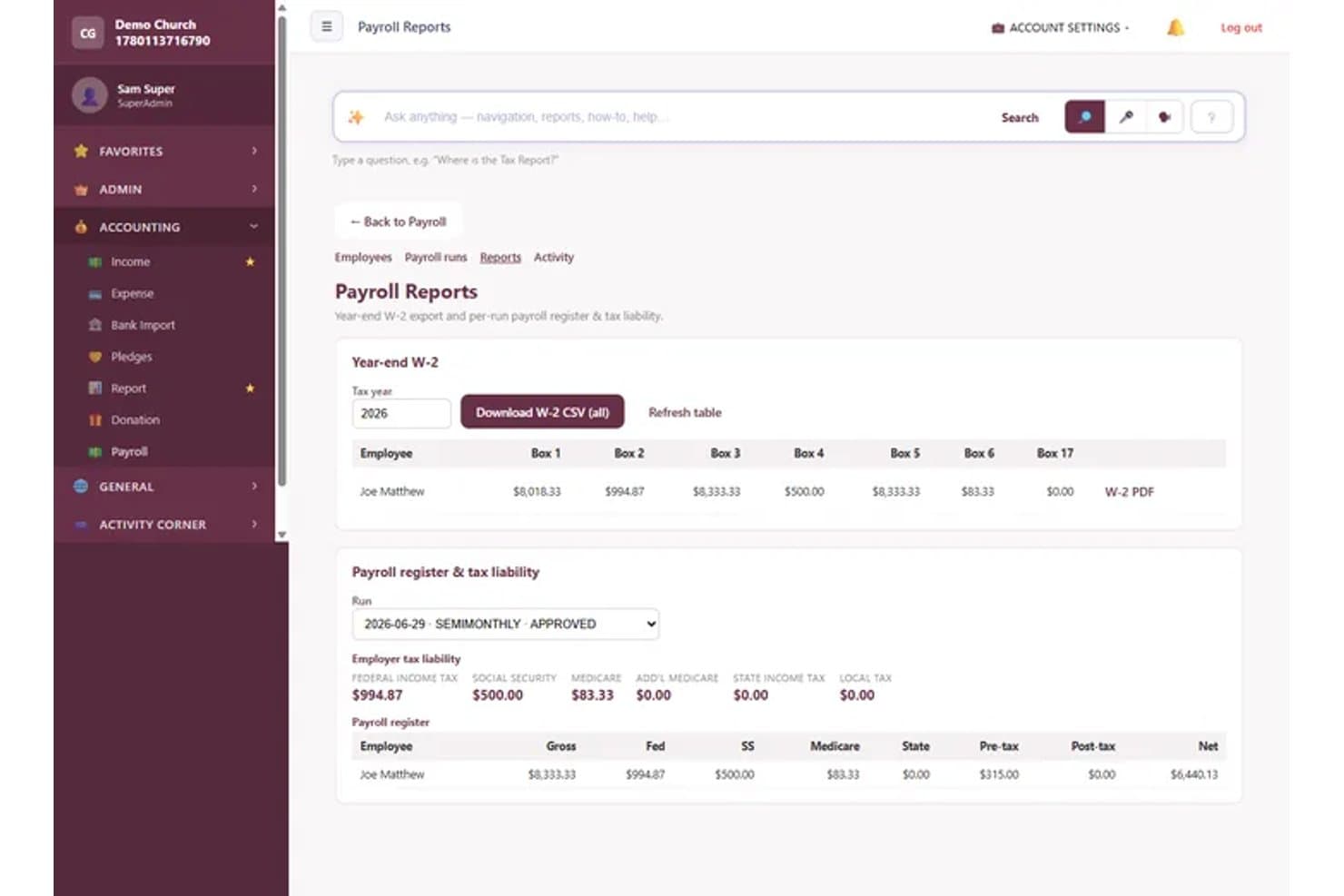
Church Genius simplifies payroll tax reporting with W-2 and liability tools. ChurchGeniusPro is a church management platform that combines member and family records, giving and accounting, communication, events, and ministry scheduling with a built-in AI assistant.
Who Is ChurchGeniusPro Best For?
ChurchGeniusPro is a strong fit for small to mid-sized churches that want AI-assisted data entry to reduce the administrative burden on a lean staff or volunteer team.
Why I Picked ChurchGeniusPro
ChurchGeniusPro earns its spot on my shortlist because the AI-assisted data entry features genuinely reduce the manual work that bogs down small church offices. I particularly like the voice auto-fill for accounting entries, where you speak an income or expense and the AI captures the amount, date, and category without any typing. The membership form scan is equally useful: point your camera at a paper form and ChurchGeniusPro fills in the new member's profile automatically.
ChurchGeniusPro Key Features
- Pledge and campaign management: Track giving campaigns with a target amount, end date, and a live dashboard showing pledged, collected, pending, and percent-complete figures.
- Prayer request tracking: Assign prayer requests to volunteers, move them through statuses from New to Closed, and log timestamped notes on each request.
- Kids check-in with security codes: Check children in by phone number or QR code and generate a security code for parent pickup.
- Worship planning and setlists: Build service orders, assign worship team members, upload chord charts, and notify the team from one place.
ChurchGeniusPro Integrations
The only documented third-party integration is Stripe for online donations, event payments, and recurring giving. No API or additional named integrations are documented.
Pros and Cons
Pros:
- Child check-in uses pickup security codes
- Prayer workflows track requests through follow-up
- AI-assisted entry reduces bookkeeping and form transcription
Cons:
- No documented native iOS app
- No documented room or facility booking
Learn more about Church Genius: Best for ease of use
- 30-day free trial + free demo available
- From $72/month
Visit WebsiteCustomer Rating:4.8/5
An example of Breeze's report generating interface for donation management. Breeze ChMS is a church management platform built for small to mid-sized churches that want to simplify member tracking, event planning, giving, and communication in one place.
Who Is Breeze ChMS Best For?
Breeze ChMS is a strong fit for small to mid-sized churches that need an approachable, no-fuss system their staff and volunteers can learn with minimal training.
Why I Picked Breeze ChMS
Breeze ChMS earns its spot on my shortlist because it requires little setup and is straightforward to deploy. I love the customizable tags and groups feature—you can segment your congregation by small group, volunteer role, or ministry team in minutes, then message those groups directly without jumping between tools. The kids' check-in system is another highlight: it prints parent and child name tags, assigns unique security codes, and tracks attendance without requiring any technical setup. For churches where staff and volunteers aren't particularly tech-savvy, that kind of out-of-the-box simplicity is hard to come by.
Breeze ChMS Key Features
- Online giving: Congregants can give via credit card, debit card, or ACH directly through your church's giving page, with contributions automatically logged to donor profiles.
- Event registration: Create events with custom registration forms, set capacity limits, and track sign-ups from within the same platform you use to manage members.
- Contribution statements: Generate and email year-end giving statements to donors in bulk, pulling directly from recorded contribution data.
- Volunteer scheduling: Assign volunteers to specific roles and service times, then send automated reminders to confirm availability.
Breeze ChMS Integrations
Integrations include Tithely Giving, Tithely People, Tithely Messaging, Tithely Church Apps, Tithely Events, Tithely Sites, Sermonly Sermon Writer, Tithely Print, Accept Bitcoin and Crypto through Engiven, and a public API for custom integrations.
Pros and Cons
Pros:
- Responsive customer support
- Easy data transfer from other systems
Cons:
- Some features are quite basic
Learn more about Breeze ChMS:

Tithe.ly enables you to organize and schedule service plans with detailed breakdowns of songs and readings. Tithely is a church management platform for faith communities, offering tools to simplify giving, manage members, organize events, and communicate with their congregation from a single dashboard.
Who Is Tithely Best For?
Tithely is a strong fit for small to mid-sized churches that need an all-in-one platform to manage both their congregation and their giving programs.
Why I Picked Tithely
Tithely earns its spot on my shortlist because of how well it handles recurring giving. I like that donors can set up, pause, or update their recurring gifts entirely on their own—without needing to contact your admin team. That kind of donor-controlled flexibility keeps giving consistent without adding work for your staff. I also use the pledge campaign tools to set giving goals and track progress in real time, which makes stewardship conversations with your congregation much more concrete and data-driven.
Tithely Key Features
- Kids check-in: Print parent and child name tags, track attendance, and assign unique security codes for each child during services and events.
- Workflow automation: Set up automated tasks like birthday emails, group assignments, and follow-up messages to reduce manual admin work.
- Customizable tags: Organize members into groups—such as volunteers, small groups, or event attendees—to target communication and track engagement.
- Service planning: Coordinate weekend worship services, including a song library and SongSelect® integration, through a built-in planning tool.
Tithely Integrations
Integrations include SongSelect, MinistrySafe, and the Tithely Worship App.
Pros and Cons
Pros:
- Mobile-first giving tools
- Easy tracking of donor history
- Text-to-give functionality
Cons:
- No free tier available
- Limited non-donation features
 Best for member information tracking
- 30-day free trial available
- From $37/month
Visit WebsiteCustomer Rating:4.7/5
Churchteams offers an intuitive check-in interface for managing family additions. Churchteams is a church management platform built for pastors and ministry leaders who want to organize member data, streamline communication, and coordinate groups and events in one place.
Who Is Churchteams Best For?
Churchteams is a strong fit for small to mid-sized churches that need a dedicated system for tracking congregation members, managing groups, and staying connected with their community.
Why I Picked Churchteams
Churchteams earns its spot as one of the best on my shortlist because of how thoroughly it handles member information tracking. I like that member fields are fully customizable, so my team can capture exactly the data that matters to our ministry—whether that's spiritual gifts, background check status, or discipleship milestones. Connection card responses and pastoral conversations can be logged directly to individual member records, and follow-up tasks can be assigned with automatic email and text reminders if they go unfinished. The ability to let members update their own information with a single click from an email also keeps the database current without putting all the work on staff.
Churchteams Key Features
- Child check-in security tags: Print name tags or send parents a unique security code via text that matches the code on their child's tag at check-in.
- Automated communication workflows: Set up triggered email and text sequences for scenarios like guest follow-up, volunteer training, and event reminders.
- Text-to-Church keyword texting: Let members access giving, event registration, and volunteer schedules by texting a keyword—no app or login needed.
- Attendance tracking and reporting: View real-time check-in data, run attendance summary reports, and receive scheduled alerts for member absences.
Churchteams Integrations
Native integrations are not currently listed.
Pros and Cons
Pros:
- Comprehensive church management features, including donation tracking, team building, and event management.
- User-friendly interface suitable for varying tech skills, minimizing the learning curve.
- Excellent 24/7 customer support, providing guidance and solutions to improve the user experience.
Cons:
- Lacks an online calendar feature, which can limit scheduling capabilities.
- Only online training available, with no options for in-person training.
Learn more about Churchteams: 10Best for connecting the church community
Realm
- Free trial + free demo available
- Pricing upon request
Visit WebsiteCustomer Rating:4.1/5
Realm provides reports for your church in a simple dashboard view. Realm is a cloud-based church management platform built for churches and ministries that want to organize member data, manage giving, coordinate events, and strengthen engagement across their congregation.
Who Is Realm Best For?
Realm suits small to mid-sized churches looking for an all-in-one platform to manage members, giving, and ministry operations.
Why I Picked Realm
Realm earned a spot on my shortlist because it's built around community connection. I love the Connected Groups feature—congregation members can search for and join small groups on their own, post messages to group walls, and check meeting schedules without staff having to manage every interaction. I also like that group leaders get their own set of tools to manage rosters, track attendance, and share resources, which takes real pressure off church staff. Realm's targeted communication lets leaders message a specific group rather than the whole congregation, so a small group leader can notify only their members via email, in-app alert, or text.
Realm Key Features
- Online giving: Congregation members can make one-time or recurring donations directly through Realm's giving portal or mobile app.
- Contribution statements: Automatically generate and distribute year-end giving statements to members for tax reporting purposes.
- Event registration: Create events, set capacity limits, and collect registrations and payments from members in one place.
- Volunteer management: Schedule volunteers for specific roles and services, and track their participation history over time.
Realm Integrations
Integrations include Constant Contact, Givelify, Vanco, QuickBooks, ShelbyNext, MinistrySafe, Protect My Ministry, and an API for custom integrations.
Pros and Cons
Pros:
- Event registration and payment processing features
- Connectivity and communication features
- Integrated solution for church management
Cons:
- Potential learning curve for new users
- User interface could be improved
Outro software de gestão de igrejas
Nenhuma das opções acima funciona para si? Consulte a lista abaixo para ver ferramentas adicionais de software de gestão de igrejas:
- 11SteepleMateBest for organizing member information
- 12BlackbaudBest for managing people and payments
- 13ElvantoBest for church finances
- 14Wild ApricotBest for member database management
- 15Planning CenterBest for scaling with church growth
- 16Fellowship OneBest for online administrative management
- 17TouchpointBest mobile app experience
- 18ElexioBest for people management
- 19PowerChurchBest for detailed membership records
- 20ExcellerateBest for on-site local network installation
- 21ChurchTracBest for centralizing church functions
- 22WhatspotBest for public booking access
- 23MinistryPlatformBest for large churches
- 24CommunicateBest for drag-and-drop scheduling
- 25RakletBest for building your own branded app
- 26FaithLifeBest church website builder
- 27ParishSOFTBest for Catholic parishes
- 28ShelbySystemsBest denominational headquarters solution
- 29ACS RealmBest for small churches
- 30CDM+Best charity/NGO fundraising app
- 31SeekerWorksBest new guest onboarding
- 32Church WindowsBest shared calendar & event scheduling
- 33Kyrios ChMsBest church reporting dashboard
- 34CCISBest technical support & training
- 35CFS LiveBest feature-based subscription model
Outras ferramentas de software relacionadas importantes
Estas também foram rigorosamente testadas, avaliadas e aprovadas por pastores principais:
- Ferramentas de gestão de membros
- Software de gestão de doadores
- Software de donativos para igrejas
- Software de contabilidade para igrejas
- Melhor software de adoração
How I Evaluate Church Management Software
I split my evaluation into two layers: the core tools every church admin depends on—member records, giving, check-in—and the differentiators that help one platform stand out from another.
Core Functionality (Table Stakes For This List)
When I'm selecting tools for my list, I rank each one on a scale from 0 (does not offer the functionality) to 5 (excels in this area) for each core functionality listed below. Then, I calculate the tool's total score into a percentage. Each tool needs to achieve a minimum total score of 65% to be considered for inclusion.
- Member & Household Database: I look for rich congregant profiles that go beyond basic contact info—things like household grouping, pastoral care notes, and custom tags for tracking milestones like baptisms or membership classes.
- Contribution & Giving Management: Every tool I evaluate should handle online giving, recurring donations, and pledge tracking, plus generate year-end tax statements your finance team can send without manual work.
- Group & Volunteer Scheduling: I check whether you can organize small groups, build volunteer rosters, and set up serving rotations—like scheduling nursery teams or worship band members across multiple Sunday services.
- Event & Attendance Tracking: This covers service registration, event sign-ups, and secure child check-in with features like printed name tags and authorized pickup lists that children's ministry leaders rely on weekly.
- Congregation Communication: I evaluate built-in messaging tools—email, SMS, or push notifications—and whether you can segment by group, campus, or ministry so your message about a youth retreat only reaches the right families.
- Church Accounting & Reporting: Fund-based accounting matters here, since churches track giving across designated funds like missions, building campaigns, and general operations differently than standard business accounting.
Once I have a list of tools that meet the criteria, I consider what sets each platform apart.
Differentiating Factors (What Sets Vendors Apart)
Here's how I compare and contrast different vendors:
Standout Features
Workflow automation is a major differentiator—I look for tools that trigger follow-up sequences when a first-time visitor fills out a connect card or a new member completes a class. Multi-campus support also matters for churches managing separate locations, service times, and volunteer teams under one account. A branded mobile app where members can give, register for events, and stream sermons ties everything together for congregants between Sundays.
Beyond Features
Pricing structure is one of the first things I evaluate, since many churches run on tight budgets and need transparent per-member or tiered pricing without surprise giving transaction fees. I also check integrations—most churches already use QuickBooks or a tool like ProPresenter, and a platform that connects with those saves hours of duplicate data entry. Implementation support matters too, especially for smaller congregations where a volunteer is handling the migration from spreadsheets or a legacy system and needs hands-on onboarding help.
Como escolher um software de gestão de igrejas.
1. Considere a escalabilidade.
As melhores ferramentas são concebidas para crescer COM a sua igreja.
É certo que, neste momento, só precisa de algo pequeno — mas escolha um software que possa expandir-se à medida que a sua igreja cresce. Caso contrário... vai ter de fazer tudo isto novamente daqui a 3-5 anos... quando os custos (e os riscos) forem mais elevados.
2. Dê prioridade à facilidade de utilização.
As competências tecnológicas da sua equipa irão variar, por isso escolha um software que seja fácil de utilizar por todos:
- Formação: os tutoriais e os webinars são essenciais.
- Interface simples: Acessível a todos os funcionários e voluntários.
- Acesso baseado na nuvem: Permite trabalhar a partir de qualquer lugar.
3. Procure integração.
O OBJETIVO de um ChMS é simplificar e agilizar a gestão da sua igreja. Deve reduzir o número de ferramentas de software com as quais precisa de lidar. Por exemplo:
- Deve permitir-lhe transferir informações entre si e o seu software de contabilidade.
- Deve comunicar de forma fluida com o seu serviço de e-mail ou canais de redes sociais
- Deve estabelecer uma ligação direta com o software de donativos da sua igreja (para que possa associar donativos específicos a membros específicos)
Quando isto acontece, passa MUITO menos tempo a alternar entre ferramentas.
4. Escolha flexibilidade
A sua igreja tem necessidades únicas, por isso certifique-se de que o ChMS que está a considerar consegue adaptar-se às mesmas. As duas principais áreas que irão proporcionar flexibilidade são:
- A possibilidade de personalizar os tipos de informação que armazena. Adapte os dados dos membros às necessidades da sua igreja.
- A possibilidade de personalizar os tipos de relatórios que extrai. Gere relatórios relevantes para o seu ministério e que apoiem diretamente a sua visão e missão.
5. Não poupe no suporte ao cliente e na formação
Se a sua igreja não tiver uma equipa de TI dedicada, isto é especialmente importante. Certifique-se de que a ferramenta ChMS que escolher oferece o seguinte:
- Formação abrangente: Tutoriais, webinars e fóruns de utilizadores.
- Suporte acessível: Opções de contacto por telefone, e-mail e chat em direto.
- Gestão automatizada de tarefas: Ajuda a gerir o crescimento de forma eficiente.
- Armazenamento expansível: Garante que nunca fica sem espaço.
Tendências no software de gestão de igrejas
Adoro estar na vanguarda da tecnologia para igrejas — por isso, revejo regularmente os lançamentos, as avaliações e as atualizações de software mais recentes dos principais intervenientes no setor do software para igrejas.
Eis o que há de mais avançado atualmente:
- ChMS + Redes sociais + Plataformas de transmissão:
Muitas ferramentas ligam-se agora às redes sociais e aos serviços de transmissão em direto (para ajudar a alargar o seu alcance aos membros online). - Foco crescente no desenvolvimento móvel e de aplicações
As melhores ferramentas oferecem aplicações dedicadas e funcionam MUITO BEM em telemóveis. Útil por razões óbvias. - Análise avançada / Relatórios
Com cada vez mais pessoas a utilizarem telemóveis e aplicações, estão a ser recolhidas enormes quantidades de dados. Esses dados contêm informações que podem ser extremamente úteis na tomada de decisões. No entanto, não seja invasivo com os seus membros.
Tecnologia futurista / de ponta:
- Comunicações potenciadas por IA
Aproveite o poder dos LLM para personalizar a comunicação com os membros e até o envolvimento específico dos doadores. NOTA: isto não é para todos. Algumas pessoas ficam incomodadas só de ouvir mencionar a IA. Tenha cuidado com a forma como implementa estas soluções. - Serviços de realidade virtual (VR)
Algumas plataformas avançadas estão a testar tecnologia VR para proporcionar experiências imersivas de participação à distância. É um mundo verdadeiramente extraordinário.
A caminho de desaparecer...
- Diga adeus ao suporte para a impressão de diretórios e ao correio físico
A maioria das igrejas afastou-se dos envios postais e diretórios que exigem muitos recursos... e tenho visto os fornecedores de ChMS retirarem cada vez mais esse suporte - As ferramentas no local estão a desaparecer...
Já não tem de estar no escritório para iniciar sessão no seu ChMS. O software baseado na nuvem é agora o padrão. É mais fácil de aceder, mais simples de atualizar e requer menos suporte informático.
O que é o software de gestão de igrejas?
O software de gestão de igrejas (ChMS) é uma ferramenta que torna as operações quotidianas da sua igreja mais simples, fáceis e económicas. Com o ChMS certo, gerir a sua igreja exigirá muito menos esforço. Permite-lhe:
- manter atualizadas as informações dos membros da igreja
- simplificar a comunicação com a sua equipa, voluntários e membros
- automatizar o acompanhamento dos donativos e das finanças
Não consigo imaginar pastorear a minha igreja sem ele (bem, consigo — mas é terrível).
Funcionalidades do software de gestão de igrejas
Ao escolher um software de gestão de igrejas, procure as seguintes funcionalidades essenciais:
- Gestão da base de dados dos membros: Armazene e organize os perfis dos membros, incluindo dados de contacto, relações familiares e registos de participação. Esta funcionalidade ajuda-o a encontrar rapidamente qualquer pessoa da sua congregação e a manter-se ligado aos acontecimentos importantes da sua vida.
- Acompanhamento da assiduidade: Monitorize quem participa nos cultos, aulas ou eventos. Pode consultar os padrões de participação ao longo do tempo, o que ajuda a identificar tendências e a incentivar um maior envolvimento.
- Gestão de donativos e contribuições: Registe, acompanhe e faça relatórios sobre os donativos. Isto permite-lhe enviar facilmente declarações para efeitos fiscais, agradecer aos doadores e manter as finanças da sua igreja organizadas — tudo sem se afogar em papelada.
- Planeamento de eventos e calendário: Agende eventos da igreja, automatize lembretes e evite marcações duplicadas. Pode gerir tudo, desde os cultos semanais até às grandes angariações de fundos, sem falhar.
- Ferramentas de comunicação: Envie e-mails, mensagens de texto ou outras mensagens à sua congregação diretamente a partir da plataforma. Manter todos informados sobre novidades, alterações de horários ou oportunidades de voluntariado é muito simples.
- Gestão de voluntários: Recrute, agende e coordene voluntários para atividades e eventos. Acabaram-se os pânicos de última hora para assegurar a cobertura da escola dominical ou obter ajuda na despensa alimentar.
- Relatórios e análise de dados: Gere relatórios sobre a assiduidade, os donativos e o envolvimento dos membros. Estas informações dão-lhe uma visão clara do estado da sua igreja e ajudam-no a tomar melhores decisões.
- Registo e segurança das crianças: Proporcione um processo de registo seguro e simplificado para os ministérios infantis. Os pais podem ficar tranquilos, sabendo que as crianças estão devidamente registadas e que apenas adultos autorizados as podem recolher.
Benefícios que o seu ChMS deve proporcionar
O software de gestão de igrejas é indispensável no mundo digital atual. Ajuda as igrejas a funcionar de forma mais eficiente, libertando recursos como tempo, dinheiro e voluntários para o envolvimento com a comunidade e o trabalho de evangelização.
1. Passará menos tempo na administração.
O software automatiza tarefas rotineiras, como o acompanhamento dos membros, o agendamento e a elaboração de relatórios. Isto poupa tempo e esforço, permitindo que a equipa da igreja se concentre mais no ministério.
2. A comunicação tornar-se-á mais simples.
Melhora a comunicação com os membros através de e-mails em massa, mensagens de texto e integração com as redes sociais. Isto garante que as informações e atualizações importantes chegam a todos de forma rápida e eficiente.
3. A gestão financeira melhorará.
O software acompanha os donativos, gere orçamentos e gera relatórios financeiros. Isto proporciona uma visão clara das finanças da sua igreja, ajudando a tomar decisões informadas e promovendo a responsabilização.
4. Os membros estarão mais envolvidos.
Funcionalidades como a inscrição em eventos, a inscrição de voluntários e a gestão de grupos aumentam o envolvimento dos membros. Facilitam aos membros encontrar e participar em atividades que lhes interessam.
5. Maior clareza na tomada de decisões.
Recolher e analisar dados sobre a assiduidade, os donativos e o envolvimento ajuda os líderes da igreja a tomar decisões informadas. Estas informações orientam o planeamento e os esforços de evangelização, ajudando a igreja a crescer e a aprofundar o seu impacto.
Custos e preços do software de gestão de igrejas
| Tipo de plano | Preço médio | Funcionalidades comuns | Mais adequado para... |
|---|---|---|---|
| Tipo de planoGratuito | Preço médio$0 | Funcionalidades comunsGestão básica de membros, ferramentas de comunicação limitadas, relatórios básicos. | Mais adequado para...Igrejas pequenas com orçamentos reduzidos. |
| Tipo de planoBásico | Preço médio$25/mês | Funcionalidades comunsGestão de membros, comunicação por e-mail, acompanhamento de donativos, agendamento básico de eventos. | Mais adequado para...Igrejas pequenas a médias que necessitam das funcionalidades essenciais. |
| Tipo de planoPadrão | Preço médio$60/mês | Funcionalidades comunsTodas as funcionalidades do plano Básico, mais mensagens de texto, relatórios avançados e gestão de voluntários. | Mais adequado para...Igrejas médias que necessitam de mais ferramentas. |
| Tipo de planoPremium | Preço médio$120/mês | Funcionalidades comunsTodas as funcionalidades do plano Padrão, mais acesso a uma aplicação móvel, painéis personalizados e funcionalidades de segurança melhoradas. | Mais adequado para...Igrejas maiores que necessitam de funcionalidades avançadas. |
| Tipo de planoEmpresarial | Preço médio$250/mês | Funcionalidades comunsTodas as funcionalidades do plano Premium, mais integração completa com outro software, suporte prioritário e utilizadores ilimitados. | Mais adequado para...Igrejas muito grandes que necessitam de funcionalidades de topo. |
Perguntas frequentes sobre software de gestão de igrejas
Existem custos ocultos a que devo estar atento ao comprar software de gestão de igrejas?
Sim, muitos sistemas de gestão de igrejas anunciam um preço mensal baixo, mas deve procurar taxas adicionais, como as relativas à migração de dados, ao suporte, à formação ou a funcionalidades extra. Pergunte sempre pelos custos das atualizações, da adição de utilizadores ou da integração de outras ferramentas. Leia o contrato e peça uma discriminação completa dos custos antes de se comprometer, para não ter surpresas mais tarde.
Se a nossa igreja crescer ou precisar de mudar para uma plataforma diferente, quão difícil e dispendioso será transferir os nossos dados?
Mudar de plataforma pode levar tempo e, por vezes, implica custos adicionais, sobretudo se precisar de ajuda para transferir os seus dados. Alguns fornecedores oferecem migração gratuita, enquanto outros cobram por esse serviço. Antes de comprar, pergunte quão fácil é exportar os seus dados e se existe ajuda disponível. Planear antecipadamente pode poupar-lhe dificuldades e dinheiro no futuro.
Quão fácil é para voluntários e funcionários com poucos conhecimentos tecnológicos aprenderem a utilizar o sistema?
A maioria do software moderno foi concebida para ser simples, mas algumas ferramentas são mais fáceis de utilizar do que outras. Procure sistemas com instruções claras, guias em vídeo e suporte rápido. Se tiver voluntários ou funcionários mais velhos, peça uma demonstração e experimente o sistema primeiro. Uma boa formação e um design intuitivo fazem uma grande diferença.
É arriscado optar por uma solução gratuita ou muito barata de gestão de igrejas?
As opções gratuitas ou de baixo custo podem funcionar para igrejas pequenas, mas podem ter limitações ao nível das funcionalidades, do suporte ou da segurança dos dados. Algumas versões gratuitas não oferecem cópias de segurança nem atualizações, o que pode colocar em risco as informações da sua igreja. Pondere as vantagens e desvantagens e considere se pagar um pouco mais lhe proporcionará a fiabilidade e a ajuda de que necessita.
Que custos contínuos devo esperar para além do preço mensal?
Para além da mensalidade, poderá pagar por utilizadores adicionais, funcionalidades avançadas, suporte ou armazenamento de dados. Alguns sistemas cobram pelas atualizações, personalizações ou integrações com outras ferramentas. Peça aos fornecedores uma lista completa dos possíveis encargos para poder elaborar um orçamento rigoroso e evitar surpresas à medida que as necessidades da sua igreja mudam.
O seu ChMS ajudá-lo-á a liderar e gerir com eficiência
O melhor software de gestão de igrejas oferece funcionalidades que aumentam a eficiência e a produtividade. Implementar software de gestão de igrejas com sucesso significa gerir melhor a sua congregação, acompanhar os donativos, gerir os membros e comunicar com as suas congregações.