

Managing a church's payroll can be challenging. You might be dealing with complex tax regulations, varying staff roles, or limited budgets. If Deel isn't meeting your unique needs, you're not alone. Many church managers are looking for alternatives that cater specifically to their requirements.
In my experience, finding the right software makes a world of difference. I’ve reviewed several Deel competitors to help you find the best fit. You'll discover options that offer specialized features, cater to different geographic needs, and ensure compliance with specific regulations.
This article will guide you through the top choices, focusing on what makes each one a viable option for your church. Let's find the perfect tool to support your team and simplify your payroll process.
Why Trust Our Software Recommendations
6,700+
Reviews
20
Industry experts
16+
Evaluation factors
14
Years
Our team has been testing and reviewing software since 2012. As church leaders ourselves, we know how difficult—and important—it is to choose the right software.
For this guide, we evaluated tools using hands-on testing and independent research, scoring tools using our selection criteria.
Our reviews reflect our human editorial judgment, not a sales pitch.
What is Deel?
Deel is a church payroll software that helps manage payments and compliance for church staff. It's typically used by church administrators and finance teams who need to handle payroll efficiently.
Deel's global payroll capabilities, compliance management, and user-friendly interface help with managing diverse payroll needs and navigating complex regulations. Overall, Deel offers a valuable solution for churches looking to simplify payroll tasks and ensure accuracy in financial management.
Deel Competitors Comparison Table
This comparison table summarizes pricing details for my top Deel competitor selections:
| Tool | Best For | Trial Info | Price | ||
|---|---|---|---|---|---|
| 1 | Best for paying missionaries across 180+ countries | Free demo available | From $199/employee/month | Website | |
| 2 | Best for cross-border team onboarding | Free demo available | From $199/employee/month | Website | |
| 3 | Best for PEO services | Not available | From $599/employee/month | Website | |
| 4 | Best for employee scheduling automation | 30-day free trial | From $50/month (billed annually) | Website | |
| 5 | Best for Canadian small businesses | 30-day free trial available | From $2.50/month | Website | |
| 6 | Best for automated tax filings | Free plan available | From $16/user/month | Website | |
| 7 | Best for automated payroll processing | Free demo available | From $49/month + $6/user/month | Website | |
| 8 | Best for church management integration | Download free demo | costs from $395 | Website | |
| 9 | Best for nonprofit organizations | Free demo available | From $50/month | Website | |
| 10 | Best for customizable church modules | Free trial + free demo available | From $19/month | Website |


Best Deel Competitors Reviews
Below are my detailed summaries of the best Deel competitors that made it onto my shortlist. My reviews offer a detailed look at the key features, pros & cons, integrations, and ideal use cases of each tool to help you find the best one for you.
 Best for paying missionaries across 180+ countries
- Free demo available
- From $199/employee/month
Visit WebsiteCustomer Rating:4.7/5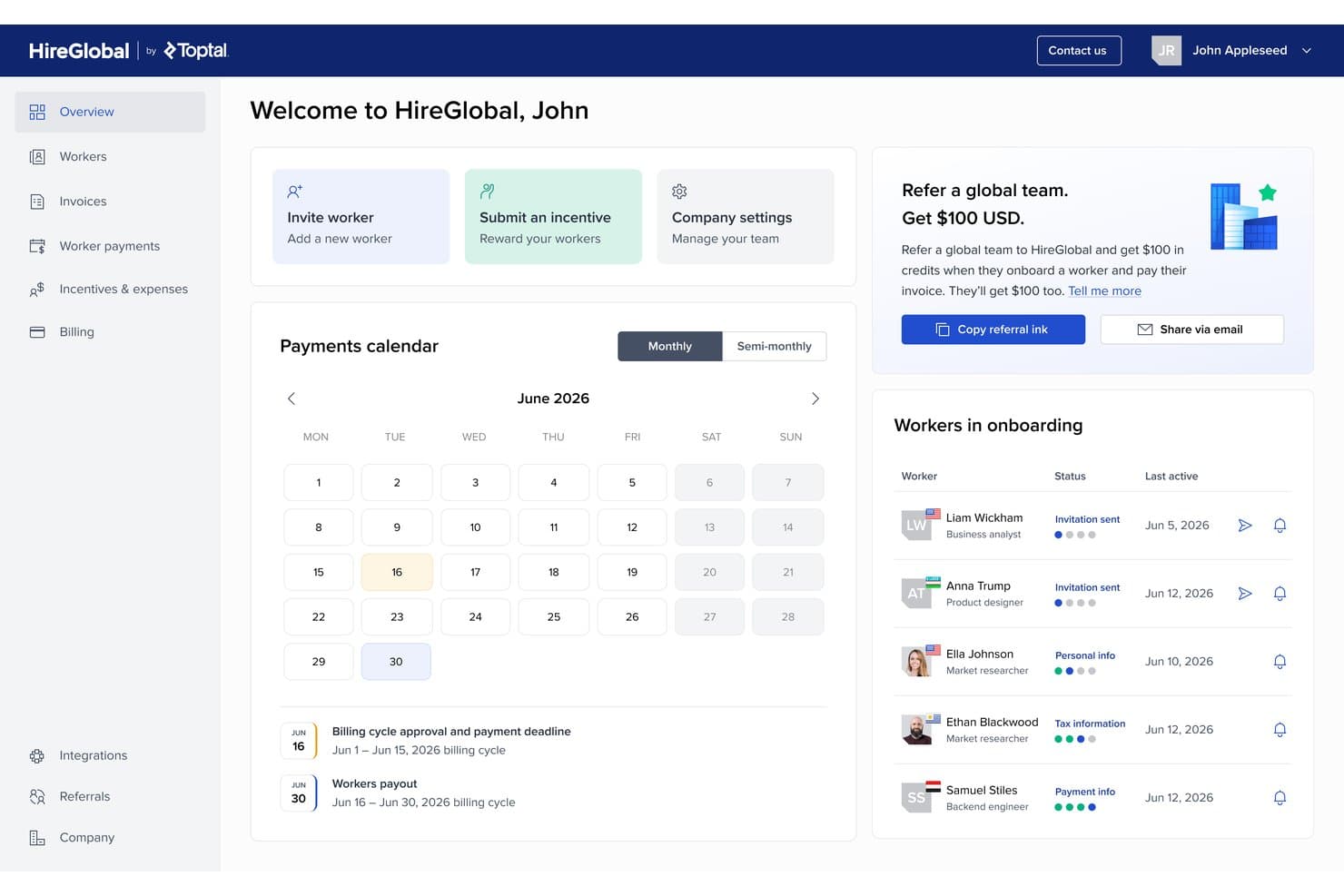
HireGlobal's dashboard centralizes global worker onboarding and payroll scheduling. HireGlobal is a payroll and HR solution designed for churches and mission-driven organizations that need to navigate complex international payments, compliance, and staff management challenges.
Who Is HireGlobal Best For?
HireGlobal is a strong fit for churches, ministries, and mission organizations managing staff and payments across multiple countries.
Why HireGlobal Is a Good Deel Competitor
I’ve included HireGlobal in my top picks because I’ve seen how well it handles payroll and HR for mission work worldwide. I appreciate how my team can pay missionaries across 180+ countries while staying compliant with complex international regulations. HireGlobal makes it easy for us to manage both staff payments and cross-border HR tasks in one place.
HireGlobal Key Features
- Multi-currency payroll processing: Handle payroll in numerous currencies without manual conversions or calculations.
- Integrated document management: Store contracts, identification, and compliance records directly within the platform.
- Automated tax calculations: Calculate and withhold country-specific taxes automatically for global team members.
- Customizable permission controls: Set access levels for staff, volunteers, and administrators to protect sensitive HR data.
HireGlobal Integrations
HireGlobal offers native integration with TopTracker.
Pros and Cons
Pros:
- Handles multi-currency payments automatically
- Centralizes HR and compliance for missionaries
- Supports payroll in over 180 countries
Cons:
- Pricing details not publicly transparent
- Limited documentation about native integrations
Learn more about HireGlobal: Best for cross-border team onboarding
- Free demo available
- From $199/employee/month
Visit WebsiteCustomer Rating:5/5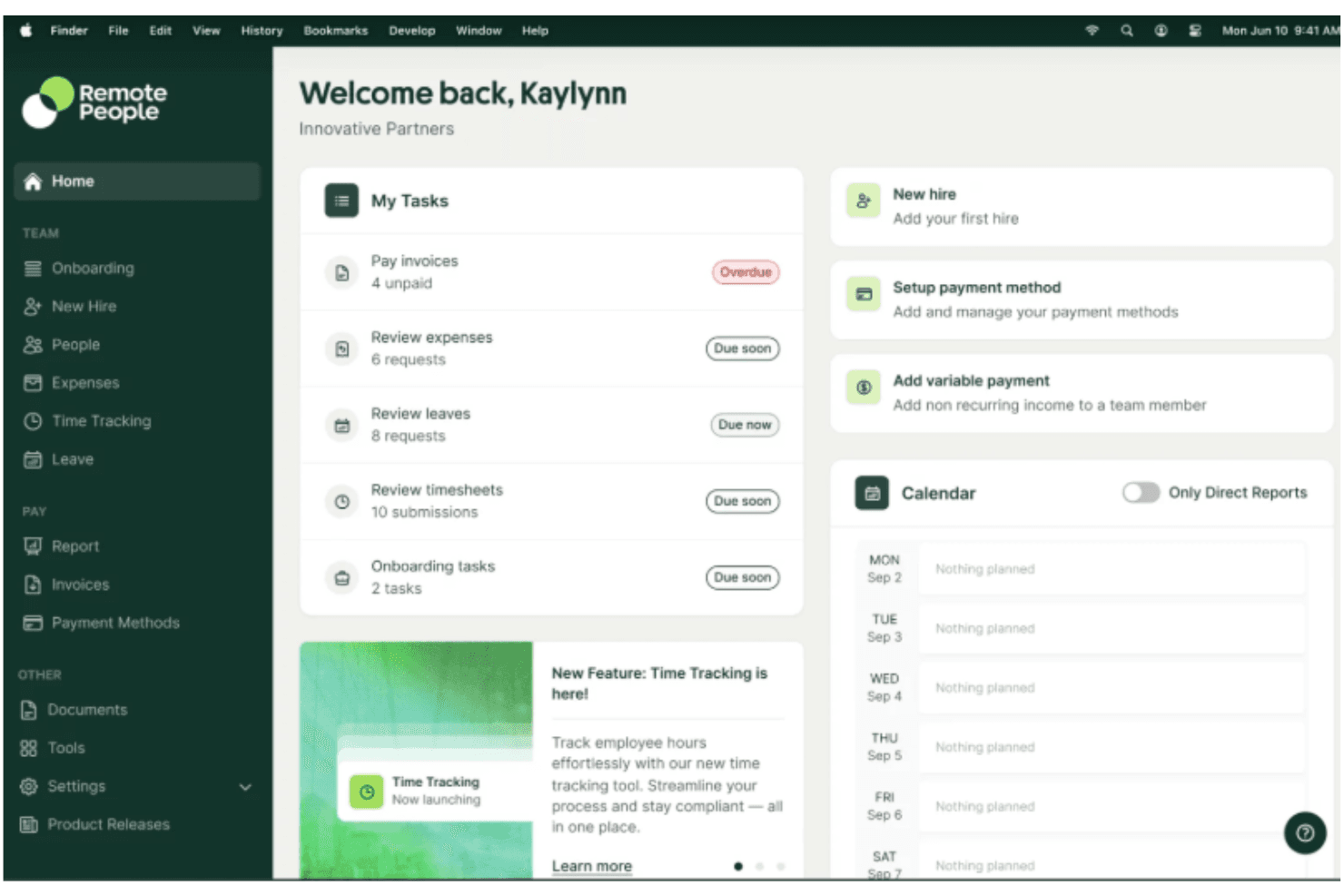
RemotePeople offers full-service global recruitment including sourcing, screening, and shortlisting candidates in 150+ countries. RemotePeople helps organizations manage and support international teams with HR and compliance challenges. If you’re hiring across borders, this platform can simplify onboarding, contracts, and the ongoing management of remote employees.
Who Is RemotePeople Best For?
HR leaders and operations teams managing distributed, global workforces across multiple countries and legal regions.
Why RemotePeople Is a Good Deel Competitor
Cross-border onboarding is where I think RemotePeople genuinely pulls ahead. The platform is built around a 48-hour onboarding window—meaning a new hire in a foreign country can have a compliant contract signed and benefits enrolled within a day of starting. I also appreciate that RemotePeople covers the full hiring sequence in one place: in-house recruiters source and screen candidates, then hand them directly to the EOR workflow for same-day onboarding. For teams hiring across 150+ countries without setting up local entities, that end-to-end connection between recruitment and compliant employment is something Deel doesn't offer in the same integrated way.
RemotePeople Key Features
- Global payroll processing: Run payroll for employees and contractors across 150+ countries in local currencies.
- Localized benefits administration: Set up and manage country-specific benefits packages, including health insurance and pension plans.
- Compliance monitoring: Track changes to local labor laws and automatically flag contract or policy updates needed.
- Contractor management: Onboard, pay, and manage independent contractors under locally compliant agreements.
RemotePeople Integrations
Native integrations are not clearly documented.
Pros and Cons
Pros:
- Supports payroll for remote global employees
- Offers built-in compliance guardrails for hiring
- Automates onboarding for multinational teams
Cons:
- No mobile app available for admin users
- Limited customization for reports and analytics
Learn more about RemotePeople:

Justworks provides payroll and HR management through integrated PEO services. Justworks offers payroll and HR tools for businesses that want to manage employees, benefits, and compliance in one platform. As a Deel competitor, it also provides PEO services that help companies handle payroll, HR administration, and employee benefits without managing these processes internally. The platform is often used by small- to mid-sized businesses seeking support with workforce management and payroll operations.
Why I Picked Justworks
I picked Justworks as a strong competitor to Deel because its PEO services help businesses manage payroll, HR administration, and employee benefits through a single provider. This setup allows companies to handle payroll tax filings and compliance tasks without managing these processes internally. Justworks also provides benefits administration and HR tools that support employee management alongside payroll operations.
Justworks Key Features
In addition to PEO services, Justworks offers
- HR Tools: Provides a company directory and calendar sync to keep your team organized and informed.
- Time Tracking: Offers digital time clocks and attendance reports to accurately capture work hours.
- Employee Onboarding: Simplifies the onboarding process with easy setup and document storage.
Justworks Integrations
Integrations include QuickBooks, Xero, BambooHR, JazzHR, Guideline, and Mineral. An API is also available for custom integrations.
Pros and Cons
Pros:
- Centralizes payroll, HR, and health insurance administration
- Fast responses from support team for payroll questions
- Straightforward onboarding workflow for new hires
Cons:
- Higher per-employee monthly pricing
- Reporting tools offer limited in-depth business insights
Learn more about Justworks: Best for employee scheduling automation
- 30-day free trial
- From $50/month (billed annually)
Visit WebsiteCustomer Rating:4.5/5
TimeTrex helps with shift scheduling with a detailed attendance dashboard. TimeTrex delivers a cloud-based platform designed for organizations needing reliable workforce management beyond just payroll. I think midsize businesses and HR teams will appreciate how it simplifies time tracking, scheduling, and compliance tasks in one place.
Who Is TimeTrex Best For?
TimeTrex fits operations managers and church administrators who need to coordinate large, varied staff schedules and recurring shifts across multiple locations.
Why TimeTrex Is a Good Deel Competitor
Scheduling automation is where TimeTrex genuinely earns its place on this list. I like how it uses availability templates and recurring shift patterns to auto-populate schedules, cutting down the manual work of rebuilding rosters every week. My team is able to set eligibility rules based on qualifications or certifications, so the right people are always assigned to the right roles. In practice, that means fewer last-minute scrambles when coverage gaps appear—TimeTrex flags conflicts automatically before the schedule is ever published.
TimeTrex Key Features
- Payroll processing: Calculate and process payroll directly within the platform, including deductions, taxes, and net pay.
- Shift scheduling: Build and publish employee schedules with drag-and-drop tools and shift assignment rules.
- Leave accrual tracking: Automatically accrue vacation, sick, and other leave balances based on configurable policies.
- Punch-in restrictions: Limit when and where employees can clock in based on location, device, or scheduled shift times.
TimeTrex Integrations
TimeTrex offers native integrations with QuickBooks, Sage, and ADP, and provides an API for custom integrations.
Pros and Cons
Pros:
- Real-time overtime alerts and controls
- Custom rules for attendance enforcement
- Advanced biometric time tracking options
Cons:
- Mobile app has reported reliability issues
- User interface feels dated
Learn more about TimeTrex: 5Best for Canadian small businesses
Xero
- 30-day free trial available
- From $2.50/month
Visit WebsiteCustomer Rating:4.4/5
Xero streamlines Canadian payroll with automation and compliance tools. Xero is an online accounting software designed for small businesses, offering payroll and financial management tools. Small business owners and accountants mainly use it to manage finances and payroll efficiently.
Why it's a good Deel alternative: Xero offers payroll features specifically tailored for Canadian small businesses, making it a strong option if you're operating in Canada. Its automated payroll processing ensures accurate and timely payments to your team.
Xero's compliance tools help you adhere to Canadian tax regulations effortlessly. The software's financial reporting features provide insights into your business's financial health, aiding better decision-making.
Standout features & integrations:
Features include expense tracking, invoicing, and bank reconciliation. Expense tracking helps you keep tabs on your spending, while invoicing allows you to manage billing efficiently. Bank reconciliation simplifies matching your financial records with bank statements.
Integrations include PayPal, Stripe, Square, HubSpot, Shopify, Mailchimp, Vend, Squarespace, WooCommerce, and Microsoft 365.
Pros and Cons
Pros:
- Easy bank reconciliation
- Detailed financial reporting
- Tailored for Canadian businesses
Cons:
- Limited scalability for large businesses
- Basic mobile app features


WAVE offers payroll, tax filing, invoicing, and bookkeeping tools. WAVE is an online payroll and accounting software designed for small businesses, offering tools to manage payroll, invoicing, and bookkeeping. It's primarily used by small business owners and accountants to streamline financial tasks.
Why it's a good Deel alternative: WAVE provides automated tax filings, making tax season less stressful for your team. Its payroll features ensure accurate and timely payments to your staff.
WAVE's invoicing capabilities help you manage billing efficiently. Additionally, its bookkeeping tools offer a comprehensive solution for tracking your financials.
Standout features & integrations:
Features include receipt scanning, expense tracking, and cash flow management. Receipt scanning allows you to digitize and organize your receipts effortlessly. Expense tracking helps you monitor spending and manage budgets. Cash flow management provides insights into your financial health, aiding better decision-making.
Integrations include QuickBooks, PayPal, Shopify, Etsy, Stripe, Zapier, Square, HubSpot, Mailchimp, and Google Workspace.
Pros and Cons
Pros:
- Easy receipt scanning
- Efficient invoicing system
- Comprehensive bookkeeping tools
Cons:
- Basic reporting features
- Limited customer support
Learn more about WAVE: Best for automated payroll processing
- Free demo available
- From $49/month + $6/user/month

Gusto automates payroll and benefits with built-in tax compliance. Gusto is a payroll and HR software designed for small to medium-sized businesses, providing payroll, benefits, and HR management tools. It's used by business owners and HR teams to manage employee-related tasks efficiently.
Why it's a good Deel alternative: Gusto offers automated payroll processing, simplifying the payroll tasks for your team. It ensures accurate and timely payments, reducing the manual effort required.
Gusto's tax compliance tools help you adhere to regulations without hassle. Additionally, its benefits management feature provides a comprehensive solution for handling employee benefits.
Standout features & integrations:
Features include employee onboarding, time tracking, and performance reviews. Employee onboarding helps you streamline the process of bringing new hires onboard. Time tracking allows you to monitor employee hours accurately. Performance reviews provide a structured way to evaluate your team's performance.
Integrations include QuickBooks, Xero, TSheets, Deputy, Clover, Trainual, Expensify, Shopify, HubSpot, and Zoom.
Pros and Cons
Pros:
- Accurate time tracking
- Efficient employee onboarding
- Comprehensive benefits management
Cons:
- Can be complex for beginners
- Limited advanced reporting
Learn more about Gusto: Best for church management integration
- Download free demo
- costs from $395

PowerChurch Plus blends accounting, events, and member tracking tools. PowerChurch Plus is a church management software designed to assist churches in managing their administrative tasks, including accounting, membership, and event management. It's mainly used by church administrators and finance teams to streamline church operations.
Why it's a good Deel alternative: PowerChurch Plus offers strong church management integration, making it a suitable alternative if your church needs a comprehensive solution. Its accounting features help you manage finances effectively.
The membership management tools help you keep track of your congregation. Additionally, the event management capabilities allow you to organize church activities efficiently.
Standout features & integrations:
Features include contribution tracking, attendance management, and customizable reports. Contribution tracking helps you monitor and record donations accurately. Attendance management lets you keep tabs on member participation in services and events. Customizable reports provide insights tailored to your church's needs.
Integrations include QuickBooks, Vanco, PayPal, Realm, Planning Center, Church Community Builder, ACS Technologies, FellowshipOne, Shelby Systems, and EasyTithe.
Pros and Cons
Pros:
- Accurate contribution tracking
- Strong accounting features
- Comprehensive church management tools
Cons:
- Complex setup process
- Limited mobile app features
Learn more about PowerChurch Plus:

CDM+ combines nonprofit payroll, accounting, and donation tracking. CDM+ is a church management software that provides payroll, membership, and accounting solutions tailored for churches and nonprofit organizations. Church administrators and finance teams use it to handle various administrative tasks efficiently.
Why it's a good Deel alternative: CDM+ offers specialized features for nonprofit organizations, making it ideal if your church needs a solution beyond basic payroll. Its membership management tools help you keep track of your congregation.
The software's accounting features provide comprehensive financial management capabilities. Additionally, CDM+ supports donation tracking, aiding in financial transparency and reporting.
Standout features & integrations:
Features include event management, attendance tracking, and customizable reporting. Event management helps you organize and coordinate church events. Attendance tracking lets you monitor participation in services and activities. Customizable reporting provides insights tailored to your specific needs.
Integrations include QuickBooks, Mailchimp, Vanco, PayPal, Realm, Planning Center, Church Community Builder, ACS Technologies, FellowshipOne, and Shelby Systems.
Pros and Cons
Pros:
- Efficient membership tools
- Strong donation tracking
- Comprehensive financial management
Cons:
- Limited scalability
- Requires technical knowledge
Learn more about CDM+: Best for customizable church modules
- Free trial + free demo available
- From $19/month

Church Windows customizes modules for finance, events, and members. Church Windows is a church management software designed to help churches manage their administrative tasks, including membership, accounting, and event planning. It's used by church administrators and finance teams to streamline church operations.
Why it's a good Deel alternative: Church Windows offers customizable church modules, allowing you to tailor the software to your specific needs. Its membership management features help you keep track of your congregation effectively.
The accounting capabilities provide comprehensive financial management tools for your church. Moreover, Church Windows' event planning features aid in organizing and coordinating church activities.
Standout features & integrations:
Features include donation tracking, attendance management, and volunteer coordination. Donation tracking helps you monitor and record contributions accurately. Attendance management allows you to keep tabs on member participation in services and events. Volunteer coordination provides tools to manage and organize volunteer activities efficiently.
Integrations include QuickBooks, Vanco, PayPal, Realm, Planning Center, Church Community Builder, ACS Technologies, FellowshipOne, Shelby Systems, and EasyTithe.
Pros and Cons
Pros:
- Strong membership management
- Efficient event planning
- Customizable modules
Cons:
- Basic user interface
- Complex setup process
Learn more about Church Windows:
Other Deel Competitors
Here are some additional Deel competitors that didn’t make it onto my shortlist, but are still worth checking out:
- 11PaylocityBest for global payroll features
- 12QuickBooks PayrollBest for tax penalty protection
- 13OnPayBest for small business compliance
- 14Patriot PayrollBest for US-based support
How I Evaluate Deel Competitors
When a church needs to pay a missionary in Kenya or onboard a part-time worship leader abroad, I split my evaluation into baseline requirements and differentiators.
Core Functionality (Table Stakes For This List)
When I'm selecting tools for my list, I rank each one on a scale from 0 (does not offer the functionality) to 5 (excels in this area) for each core functionality listed below. Then, I calculate the tool's total score into a percentage. Each tool needs to achieve a minimum total score of 65% to be considered for inclusion.
- Global Payroll Processing: I check how many countries a platform supports for running payroll, since churches with missionaries in multiple regions need a single place to manage it all.
- Contractor Management: Guest musicians, retreat speakers, and event workers all need compliant agreements, so I evaluate how each tool handles onboarding and paying contractors.
- Employer of Record Services: For churches hiring ministry staff in countries where they lack a legal entity, I look at how many regions a platform covers with its own EOR infrastructure.
- Compliance & Tax Handling: Each platform's ability to automate local tax filings and generate region-specific documents matters, especially for clergy with unique tax classifications.
- Benefits Administration: I evaluate whether a tool lets you offer health coverage, retirement plans, and stipends to staff across different countries from one dashboard.
- Multi-Currency Payments: Missionary support often flows across dozens of currencies, so I look at how many currencies a platform supports and what payout methods are available.
Once I have a list of tools that meet this criteria, I consider what sets each platform apart.
Differentiating Factors (What Sets Vendors Apart)
Here's how I compare and contrast different vendors:
Standout Features
Clergy tax support is a big differentiator—I look for platforms that handle housing allowance classifications and dual-status tax scenarios without manual workarounds. Multi-entity consolidation also matters when a denomination runs payroll across several campuses or affiliated ministries from one account. I evaluate how each tool manages missionary stipends, since support-based compensation and variable stipend schedules require different workflows than standard salary payments.
Beyond Features
Pricing structure matters for churches, so I check whether a platform offers nonprofit discounts or flexible per-seat pricing that accommodates seasonal mission staff. I also evaluate how each tool connects with church-specific software like Planning Center or Aplos, since most ministries already rely on these for donor management and fund accounting. Data security is another key consideration—missionaries in sensitive regions need platforms with role-based access controls and strong encryption to protect personnel information.
Why Look For a Deel Alternative?
While Deel is a good choice of church payroll software, there are a number of reasons why some users seek out alternative solutions. You might be looking for a Deel alternative because…
- You need more church-specific features
- Your team requires better local support
- You face budget constraints with Deel
- You need a simpler user interface
- Your organization requires offline access
If any of these sound like you, you’ve come to the right place. My list contains several church payroll software options that are better suited for teams facing these challenges with Deel and looking for alternative solutions.
Deel Key Features
Here are some of the key features of Deel, to help you contrast and compare what alternative solutions offer:
- Global payroll management: Manage payroll across over 130 countries, ensuring your team gets paid accurately and on time.
- Compliance with local laws: Stay compliant with local labor laws, minimizing risks for your organization.
- HRIS integration: Integrate with various HR systems, streamlining your HR processes and improving efficiency.
- Contractor management: Handle global contractors with ease, supporting your remote workforce effectively.
- Onboarding and offboarding: Simplify the onboarding and offboarding process, saving your team time and effort.
- Compliance hub: Access a dedicated hub for regulatory updates and risk management, keeping your organization informed.
- Performance tracking: Monitor and evaluate employee performance, aiding in better decision-making.
- Remote work support: Provide extensive support for businesses with remote workers, ensuring smooth operations.
- PEO services: Access Professional Employer Organization services for comprehensive HR management.
- User-friendly interface: Enjoy a platform that's easy to navigate, enhancing your team's productivity.