

10 Best Church Directory Software Reviewed in 2026

Best Church Directory Software Shortlist


Managing a church community presents its own unique set of challenges. From keeping track of members to coordinating events, there's a lot on your plate. Church Directory Software can help you manage these tasks more efficiently, saving you time and reducing stress.
In my experience, these tools offer a way to organize member information and improve communication within your congregation. They simplify the process of connecting with your community, letting you focus on what truly matters.
I've tested and reviewed several solutions and will share my top picks. You'll find unbiased insights into what each software offers, so you can choose the best fit for your team. Let's dive into the options that can make your church management duties a bit easier.
Why Trust Our Software Recommendations
Our team has been testing and reviewing software since 2012. As church leaders ourselves, we know how difficult—and important—it is to choose the right software.
For this guide, we evaluated tools using hands-on testing and independent research, scoring tools using our selection criteria.
Our reviews reflect our human editorial judgment, not a sales pitch.
Best Church Directory Software Summary
This comparison chart summarizes pricing details for my top Church Directory Software selections to help you find the best one for your budget and business needs.
| Tool | Best For | Trial Info | Price | ||
|---|---|---|---|---|---|
| 1 | Best for event management | Free plan available + 30-day free trial | From $12/month | Website | |
| 2 | Best for personalized church portals | 30-day free trial | From $19/month (billed annually) | Website | |
| 3 | Best for ease of use | Free demo available | From $72/month | Website | |
| 4 | Best for worship planning | Free plan available | From $15/month | Website | |
| 5 | Best for user-friendly interface | 30-day free trial | From $9.99/month | Website | |
| 6 | Best for customizable options | Free trial available | From $114/year | Website | |
| 7 | Best for integrated website features | Free trial available | From $71/month | Website | |
| 8 | Best for mobile access | 30-day free trial + free plan + free demo available | From $19/month (billed annually) | Website | |
| 9 | Best for simple setup | Free 30-day trial | From $9/mo | Website | |
| 10 | Best for small congregations | 30-day free trial | From $10.99/month | Website |
Best Church Directory Software Review
Below are my detailed summaries of the best Church Directory Software that made it onto my shortlist. My reviews offer a detailed look at the key features, pros & cons, integrations, and ideal use cases of each tool to help you find the best one for you.

Best for event management

ChMeetings is a church management software crafted for organizing and managing church events and member data. Its main users are church leaders and administrators who need an efficient way to oversee event planning and membership records. The software provides tools for scheduling, communication, and member tracking.
Why I picked ChMeetings: ChMeetings makes event planning simple with tools that help you schedule and send updates to your attendees. You can keep track of members in detail, which helps with organizing groups and activities. The layout is easy to use, so your team won’t have trouble getting started.
Standout Features & Integrations:
Features include automated reminders that keep your congregation informed about upcoming events. The member directory feature allows for easy access to contact information and group management. You can also create custom reports to gain insights into your church's activities and attendance.
Integrations include Mailchimp, Google Calendar, Microsoft Outlook, Slack, Zoom, Facebook, Twitter, Instagram, QuickBooks, and Dropbox.
Pros and Cons
Pros:
- Detailed member tracking
- Automated reminders
- Efficient event scheduling
Cons:
- Basic analytics tools
- Limited customization options
New Product Updates from ChMeetings

ChMeetings Improves Reconciliation and Adds Fund By Month Report
ChMeetings adds a direct Reconcile button, improved save-for-later support, and a new Fund By Month report. These updates make reconciliation easier to resume and give teams clearer month-by-month fund visibility. For more information, visit ChMeetings’ official site.
 .
.
Gracely
Best for personalized church portals

Gracely is a church management and directory software designed to help you handle the diverse needs of your congregation. It provides a comprehensive suite of tools to manage everything from member directories and group organization to financial tracking and event planning.
Why I Picked Gracely: I chose Gracely for its strong directory and people management features, making it easy to organize member profiles, track attendance, and manage small groups. Its personalized church portal allows members to update their details, register for events, and view giving history, helping foster a sense of community. Alongside these capabilities, Gracely simplifies donations with secure online giving and offers robust financial tools for tracking contributions and expenses.
Standout Features & Integrations:
Features include a personalized church portal, accounting and financial reports, and free data transfer. The personalized church portal lets members update their profiles, view giving history, and register for events, fostering a sense of community. Accounting and financial reports simplify financial management by tracking income and expenses, while free data transfer ensures easy migration to Gracely so you can get started without any hiccups.
Integrations are not currently listed by Gracely.
Pros and Cons
Pros:
- Allows tracking of member profiles, event participation, and donations
- Built-in tools for recurring donations and event tracking
- Free plan available
Cons:
- Lacks advanced analytics features for detailed reporting
- The absence of built-in accounting features might require additional tools for financial management
New Product Updates from Gracely

Gracely Rebuilds Accounting for Church Finance Management
Gracely rebuilds Accounting with fund tracking, income and expenses, transfers, reports, and exports. This gives churches a more complete way to manage finances in one place. For more information, visit Gracely’s official site.
 .
.
Best for ease of use

Breeze ChMS is church management software built for churches of any size to manage directories, contributions, and events. It's mainly used by church staff and administrators who need a simple way to run daily operations. The software includes tools for tracking members, scheduling events, and managing finances.
Why I picked Breeze ChMS: Breeze ChMS is easy to use, even if you or your team aren’t tech-savvy. You can manage member info and track giving without any hassle. The event tools make it simple to plan church activities. You also get clear reports to see what’s going on with your church and its finances.
Standout Features & Integrations:
Features include customizable member profiles that let you track detailed information. The contribution tracking feature offers transparency in financial management. You can also use the attendance tracking tool to monitor event participation effectively.
Integrations include Mailchimp, QuickBooks, Google Calendar, Planning Center, Slack, Zoom, Facebook, Twitter, Instagram, and Dropbox.
Pros and Cons
Pros:
- Simple financial tracking
- Efficient member management
- Intuitive interface
Cons:
- Basic analytics tools
- Limited advanced customization

Best for worship planning

Planning Center is church management software built to help churches run day-to-day operations, especially worship planning and member management. It’s mainly used by church leaders and worship teams who need tools to organize services and handle member info. The platform supports scheduling, communication, and managing church resources.
Why I picked Planning Center: Planning Center offers strong worship planning tools that help you organize services and manage your worship team. You can schedule volunteers, plan service details, and keep track of songs all in one place. Built-in communication tools keep your team in the loop. You can also adjust workflows to match how your church runs things.
Standout Features & Integrations:
Features include resource management tools that help you allocate and track church assets. The attendance tracking feature provides insights into service participation. You can also use the group management tools to organize and communicate with different ministry teams effectively.
Integrations include Mailchimp, Google Calendar, Microsoft Outlook, Slack, Zoom, Facebook, Twitter, Instagram, QuickBooks, and Dropbox.
Pros and Cons
Pros:
- Detailed resource management
- Flexible scheduling options
- Comprehensive worship planning tools
Cons:
- Basic reporting tools
- Limited advanced analytics


Instant Church Directory is an online tool that helps churches create and manage photo directories. It’s built for church administrators and members who need quick access to up-to-date contact details. The platform supports real-time updates and offers both digital and printable versions of the directory.
Why I picked Instant Church Directory: Instant Church Directory’s interface is simple, so you and your team can update info without confusion. The mobile app keeps everything synced, so everyone always sees the latest details. You can adjust the layout to fit your church’s style. The platform also keeps member info private and secure.
Standout Features & Integrations:
Features include easy member information input, with updates synced across devices for real-time accuracy. You can manage church groups, track birthdays and anniversaries, and export data for mailing labels. Customization options for directory design allow you to personalize the look and feel.
Integrations include Mailchimp, Google Calendar, Microsoft Outlook, Slack, Zoom, Facebook, Twitter, Instagram, QuickBooks, and Dropbox.
Pros and Cons
Pros:
- Customizable layouts
- Real-time updates
- Intuitive interface
Cons:
- No payroll integration
- Limited advanced features


Online Church Directory gives you and your team 24/7 access to updated contact info through the web and mobile app. You can let members update their details, print the directory when needed, and keep member info private.
Why I picked Online Church Directory: Online Church Directory lets you adjust the setup to match your church’s needs. You can update member profiles easily, and the mobile app gives you access wherever you are. You can also print custom directories for events or special use. Privacy settings make sure only the right people see member info.
Standout Features & Integrations:
Features include customizable print options allowing you to create directories that match your specific needs. Privacy protection ensures that member information is kept secure. The mobile app offers unlimited messaging capabilities, making communication with your congregation easy.
Integrations include Google Calendar, Mailchimp, Microsoft Outlook, Slack, Zoom, Facebook, Twitter, Instagram, QuickBooks, and Dropbox.
Pros and Cons
Pros:
- Unlimited messaging
- Secure privacy features
- Customizable directory options
Cons:
- No payroll integration
- Limited advanced analytics


ChurchSpring Directory is a digital platform built for churches to manage both their member directories and websites. It's mainly used by church administrators who need one tool for handling contact information and maintaining an online presence. Key features include member updates, web hosting, and event management.
Why I picked ChurchSpring Directory: ChurchSpring Directory lets you manage your church website and directory in one place. You can use the built-in templates to build a clean, simple site without much effort. It also includes event tools to help you plan and share church activities. The directory connects with the website, so member info stays current.
Standout Features & Integrations:
Features include customizable website templates that allow you to tailor your church's online presence. The event management tools help you organize and promote church activities efficiently. The platform also offers built-in donation processing, making it easy for members to contribute online.
Integrations include Planning Center, Mailchimp, Google Calendar, Microsoft Outlook, Slack, Zoom, Facebook, Twitter, Instagram, QuickBooks, and Dropbox.
Pros and Cons
Pros:
- Built-in donation processing
- Easy event management
- Integrated website features
Cons:
- No payroll integration
- Limited advanced analytics


Gracely is an all-in-one church management tool that helps you handle members, events, and giving. It’s built for church leaders and admins who want something easy to use. You can manage people, set up online giving, and plan events all in one place.
Why I picked Gracely: Gracely offers mobile access so you and your team can stay connected wherever you are. You can manage member info, track giving, and plan events right from your phone. Members can log in to update their profiles and check their giving history. Its mobile-friendly setup makes it easy to stay involved on the go.
Standout Features & Integrations:
Features include customizable forms for registrations and surveys, making data collection straightforward. The accounting and financial reports feature helps you manage church finances with transparency. You can also use the church portal for member engagement and community building.
Integrations include Mailchimp, Google Calendar, Microsoft Outlook, Slack, Zoom, Facebook, Twitter, Instagram, QuickBooks, and Dropbox.
Pros and Cons
Pros:
- Easy event organization
- Comprehensive member management
- Convenient mobile access
Cons:
- No payroll integration
- Limited advanced analytics


The Church Connectory is an online directory solution built for church communities. It’s designed for church managers and members who need easy access to a regularly updated directory from both web and mobile platforms.
Why I picked The Church Connectory: The Church Connectory lets you get your directory up and running fast without a complicated setup. You and your members can update and check the directory anytime using the mobile app. It supports multiple languages, which helps if your church has a diverse congregation. You can also link directories to share info with other churches while keeping control. Data is encrypted to help keep your members’ information safe.
Standout Features & Integrations:
Features include mobile app access for on-the-go updates, multi-language support for diverse congregations, and directory linking to connect with other churches. Security features include SSL encryption and member-specific access revocation, ensuring data safety.
Integrations include Mailchimp, Google Calendar, Microsoft Outlook, Slack, Zoom, Facebook, Twitter, Instagram, QuickBooks, and Dropbox.
Pros and Cons
Pros:
- Mobile app for updates
- Multi-language support
- Easy setup process
Cons:
- Basic reporting tools
- Limited advanced features

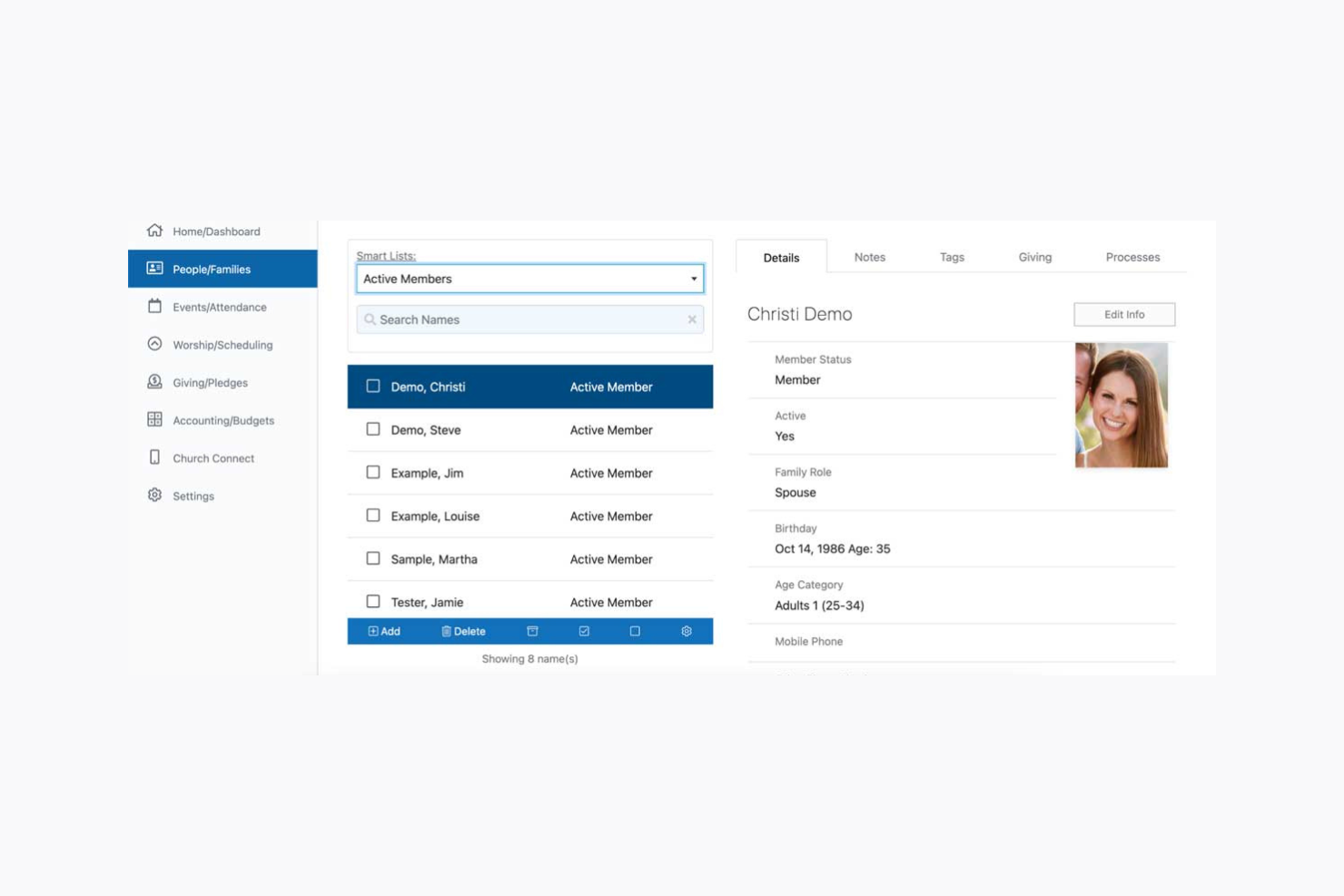
My Church Directory is an online platform designed for churches to create and manage member directories. It’s used by church administrators and members who need quick access to up-to-date contact information. The platform supports both digital and printable directories, offering customizable templates for each.
Why I picked My Church Directory: My Church Directory suits small congregations because it's simple to set up and budget-friendly. You can add up to three extra editors at no added cost, so your team can share the work. Members can update their details through the app, keeping the directory up to date. The platform keeps member information safe.
Standout Features & Integrations:
Features include customizable directory templates for both digital and print formats. The mobile apps allow members to access and update their information conveniently. You can also track birthdays and anniversaries, helping you maintain community connections.
Integrations include CSV file imports for data management, allowing seamless updates.
Pros and Cons
Pros:
- Affordable pricing
- User-friendly interface
- Quick setup process
Cons:
- Technology challenges for some users
- Initial setup time for large groups
Other Church Directory Software
Here are some additional Church Directory Software options that didn’t make it onto my shortlist, but are still worth checking out:
- ChurchTrac
For budget-friendly pricing
- Subsplash
For media integration
- SteepleMate
For volunteer management
- Churchteams
For group management
- Pushpay
For mobile giving options
- Tithe.ly
For donation tracking
- ACS Realm
For member engagement
- Touch Point
For customizable workflows


How I Evaluate Church Directory Software
I split my evaluation into core must-haves—like photo directory output and member self-service—and the differentiators that make one tool a better fit than another.
Core Functionality (Table Stakes For This List)
When I'm selecting tools for my list, I rank each one on a scale from 0 (does not offer the functionality) to 5 (excels in this area) for each core functionality listed below. Then, I calculate the tool's total score into a percentage. Each tool needs to achieve a minimum total score of 65% to be considered for inclusion.
- Member & Family Profiles: I check whether the tool links individuals into households so a family search returns parents, kids, and contact details in one view.
- Photo Directory Output: Each platform should let you generate a printable or digital directory with member photos—not just export a raw contact list.
- Mobile Member App: I look for a member-facing mobile app where congregants can browse the directory and update their own phone numbers or addresses.
- Group & Ministry Segmentation: Tagging members by small group, worship team, or youth ministry matters, so I evaluate how each tool organizes and filters groups.
- Privacy & Access Controls: I consider whether admins can restrict which fields members see—like hiding addresses from the general directory while keeping them visible to pastors.
- Communication Tools: The ability to email or text a specific ministry group directly from the directory saves staff from toggling between platforms, so I look for built-in messaging.
Once I have a list of tools that meet the criteria, I consider what sets each platform apart.
Differentiating Factors (What Sets Vendors Apart)
Here's how I compare and contrast different vendors:
Standout Features
Online giving tied directly to member profiles is a big differentiator—it lets staff pull stewardship reports without reconciling data across separate systems. I also look for automated workflows that trigger follow-ups when a first-time visitor fills out a connect card or a member misses several weeks. A custom branded app carrying your church's name and logo instead of the vendor's builds familiarity and drives stronger adoption among congregants.
Beyond Features
Pricing structure matters a lot here—some platforms charge per member, which can squeeze a growing church's budget fast, so I evaluate whether the model scales fairly. Data migration is another factor I weigh, because most churches are moving from spreadsheets or an older ChMS and need a clear import path. I also check how well each tool connects with the broader ministry stack, like syncing giving data to QuickBooks or pulling contacts into Mailchimp for weekly newsletters.
How to Choose Church Directory Software
It’s easy to get bogged down in long feature lists and complex pricing structures. To help you stay focused as you work through your unique software selection process, here’s a checklist of factors to keep in mind:
| Factor | What to Consider |
|---|---|
| Scalability | Will it support your growth? Consider if the software can handle more members and data as your church expands. Look for options that grow with you. |
| Integrations | Does it work with your current tools? Check for compatibility with existing systems like email, accounting, and calendar to avoid extra work. |
| Customizability | Can you tailor it to fit your needs? Assess if you can modify the software to match your church’s specific processes and branding. |
| Ease of Use | Is it simple for everyone? Ensure the software is intuitive for both tech-savy users and those less comfortable with technology. |
| Implementation and Onboarding | How quickly can you get started? Look for clear setup guides, training resources, and support to ease the transition. |
| Cost | Does it fit your budget? Compare pricing plans and check for hidden fees. Consider discounts for churches or non-profits. |
| Security Safeguards | Is your data protected? Ensure the software has strong security measures like encryption and access controls to protect member information. |
| Support Availability | Can you get help when you need it? Check if the vendor offers timely support through chat, phone or email, especially during critical times. |
What Is Church Directory Software?
Church Directory Software is a tool designed to help churches manage member information, track attendance, and facilitate communication. These tools are typically used by church administrators, pastors, and volunteers who need to keep their congregations organized and informed.
Features like contact management, event scheduling, and communication tools help with maintaining member records, planning activities, and engaging the community. Overall, these tools save time and enhance the efficiency of church operations.
Features of Church Directory Software
When selecting Church Directory Software, keep an eye out for the following key features:
- Contact management: Organizes member information in a centralized database, making it easy to update and access.
- Event scheduling: Allows you to plan and manage church events, ensuring everyone stays informed and organized.
- Communication tools: Facilitates messaging and announcements to keep your congregation connected and engaged.
- Attendance tracking: Monitors participation in services and events, helping you understand member engagement.
- Mobile access: Provides on-the-go access to directories and tools, enabling you to manage church activities anywhere.
- Customizable templates: Offers the ability to tailor directories and reports to fit your church's needs and branding.
- Donation tracking: Records contributions and provides financial insights, supporting transparent financial management.
- Volunteer management: Helps organize and schedule volunteers, ensuring smooth operation of church activities.
- Security safeguards: Protects sensitive member data with encryption and access controls, ensuring privacy and compliance.
- Integration capabilities: Connects with existing tools like email and accounting software, reducing duplicate efforts.
Benefits of Church Directory Software
Implementing Church Directory Software provides several benefits for your team and your business. Here are a few you can look forward to:
- Improved organization: Centralizes member information, making it easier to manage and access data efficiently.
- Enhanced communication: Facilitates quick and effective messaging within your congregation, keeping everyone informed and engaged.
- Time savings: Automates administrative tasks like attendance tracking and event scheduling, freeing up time for other important activities.
- Increased engagement: Offers tools like volunteer management and event planning to boost participation and involvement in church activities.
- Financial transparency: Tracks donations and provides insights into financial contributions, supporting accountability and trust.
- Data security: Protects sensitive member information with strong security measures, ensuring privacy and compliance.
- Accessibility: Provides mobile access to directories and management tools, allowing you to work and connect from anywhere.
Costs and Pricing of Church Directory Software
Selecting Church Directory Software requires an understanding of the various pricing models and plans available. Costs vary based on features, team size, add-ons, and more. The table below summarizes common plans, their average prices, and typical features included in Church Directory Software solutions:
Plan Comparison Table for Church Directory Software
| Plan Type | Average Price | Common Features |
|---|---|---|
| Free Plan | $0/user/month | Basic member management, limited support, and restricted access to features. |
| Personal Plan | $5 - $25/user/month | Member directory, event scheduling, email notifications, and basic reporting. |
| Business Plan | $30 - $50/user/month | Advanced reporting, volunteer management, donation tracking, and mobile access. |
| Enterprise Plan | $60-$100/user/month | Customizable features, integration capabilities, dedicated support, and enhanced security measures. |
Church Directory Software FAQs
Here are some answers to common questions about Church Directory Software:
How can I create a church directory?
Creating a church directory involves gathering member information, such as contact details and photos. Use a software tool that allows you to input and organize this data efficiently. Ensure you have permissions for sharing member details and provide options for members to update their information as needed.
How much does church directory software cost?
Church directory software costs can vary based on features and the size of your congregation. On average, you might find plans ranging from $5 to $100 per month. Consider what features are essential for your church and choose a plan that offers the best value for your needs.
How do I set up an instant church directory?
Setting up an instant church directory involves importing member data, organizing it, and customizing the directory format. Most software tools offer templates and guides to help you through the process. Ensure your member list is accurate and complete for a smooth setup.
What features should I look for in church directory software?
Look for features like member contact management, event scheduling, and communication tools. These features help you keep your congregation organized and informed. Additionally, consider mobile access and security measures to protect member data.
Can I integrate church directory software with other tools?
Yes, many church directory software solutions offer integrations with tools like email platforms, calendars, and accounting software. Check the integration capabilities of the software to ensure it fits well with your existing systems and workflows.
How do I ensure data privacy with church directory software?
To ensure data privacy, choose software with strong security features, such as encryption and access controls. Make sure the software complies with data protection regulations and provides options for members to control their own information visibility.
What’s Next?
If you're in the process of researching church directory software, connect with a SoftwareSelect advisor for free recommendations.
You fill out a form and have a quick chat where they get into the specifics of your needs. Then you'll get a shortlist of software to review. They'll even support you through the entire buying process, including price negotiations.