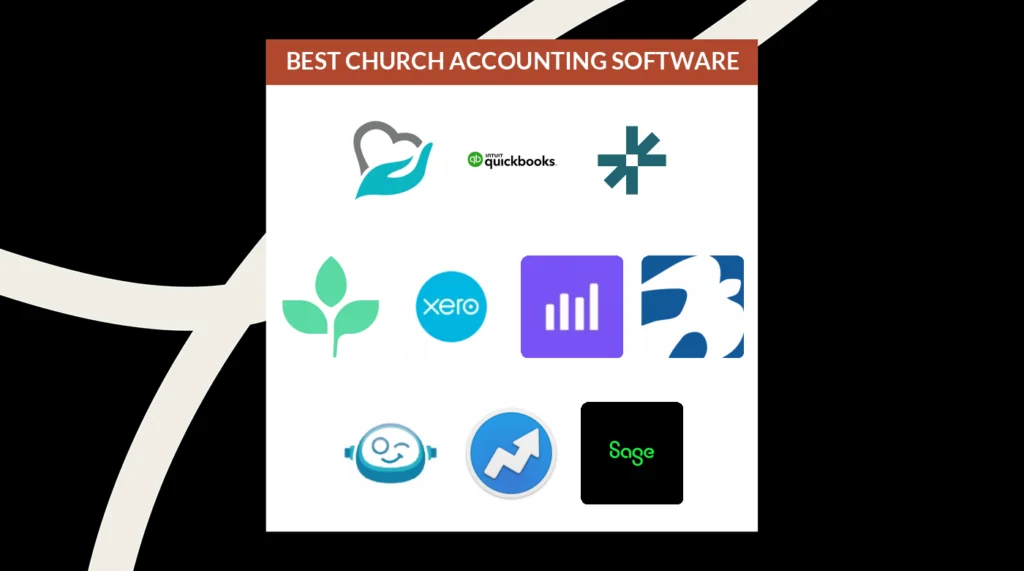
O melhor software de contabilidade para igrejas ajuda os pastores a apresentar relatórios financeiros claros, evitar erros orçamentais e manter a conformidade com o IRS. Substitui folhas de cálculo dispersas por um sistema único e preciso em que pode confiar, tal como o seu contabilista.
Trabalho na liderança de igrejas há mais de 20 anos. Durante esse período, acompanhei dezenas de pastores e igrejas em toda a América do Norte. Certa vez, trabalhei com um pastor que passou vários dias a preparar um relatório trimestral para a direção — só para perceber, durante a reunião, que tinha obtido o total incorreto do fundo designado. O erro atrasou várias decisões importantes de financiamento e demorou semanas a resolver. Analisei pessoalmente várias dezenas de ferramentas de contabilidade para igrejas — qualquer uma delas teria evitado esse erro dispendioso.
Atualmente, demasiadas igrejas utilizam ferramentas manuais ou genéricas para acompanhar as suas finanças — e deparam-se com relatórios pouco claros e erros arriscados. O software adequado proporciona clareza financeira, decisões mais rápidas e reforça a confiança entre os membros e a equipa de liderança. É por isso que o software CERTO para a sua igreja é importante — e este artigo vai ajudá-lo a encontrá-lo.
Why Trust Our Software Recommendations
6,700+
Reviews
20
Industry experts
16+
Evaluation factors
14
Years
Our team has been testing and reviewing software since 2012. As church leaders ourselves, we know how difficult—and important—it is to choose the right software.
For this guide, we evaluated tools using hands-on testing and independent research, scoring tools using our selection criteria.
Our reviews reflect our human editorial judgment, not a sales pitch.
Tabela comparativa de software de contabilidade para igrejas
Esta tabela comparativa resume os detalhes de preços das minhas principais seleções de software de contabilidade para igrejas:
| Tool | Best For | Trial Info | Price | ||
|---|---|---|---|---|---|
| 1 | Best for managing church finances | Free plan available | From $19/month (billed annually) | Website | |
| 2 | Best for integrated church accounting | Free plan available + 30-day free trial | From $12/month | Website | |
| 3 | Best for built-in multi-currency support | Free trial available | From $27/month | Website | |
| 4 | Best for comprehensive bookkeeping | Free trial available | From $38/month | Website | |
| 5 | Best for AI-powered transaction matching | Free demo available | Pricing upon request | Website | |
| 6 | Best for donation syncing with Quickbooks | Free trial available | From $72/month | Website | |
| 7 | Best for free church bookkeeping | Free plan + free trial available | From $15/month | Website | |
| 8 | Best for scalability | Free demo available | From £1,200/month | Website | |
| 9 | Best fund accounting for churches | 30-day free trial + demo available | From $50/month | Website | |
| 10 | Best for AI-automated bookkeeping | Not available | From $149/month | Website |


As melhores avaliações de software de contabilidade para igrejas
Eis uma breve descrição de cada software de contabilidade para igrejas da minha lista, mostrando aquilo que faz melhor, além de capturas de ecrã que destacam algumas das funcionalidades.
 Best for managing church finances
- Free plan available
- From $19/month (billed annually)
Visit WebsiteCustomer Rating:4.8/5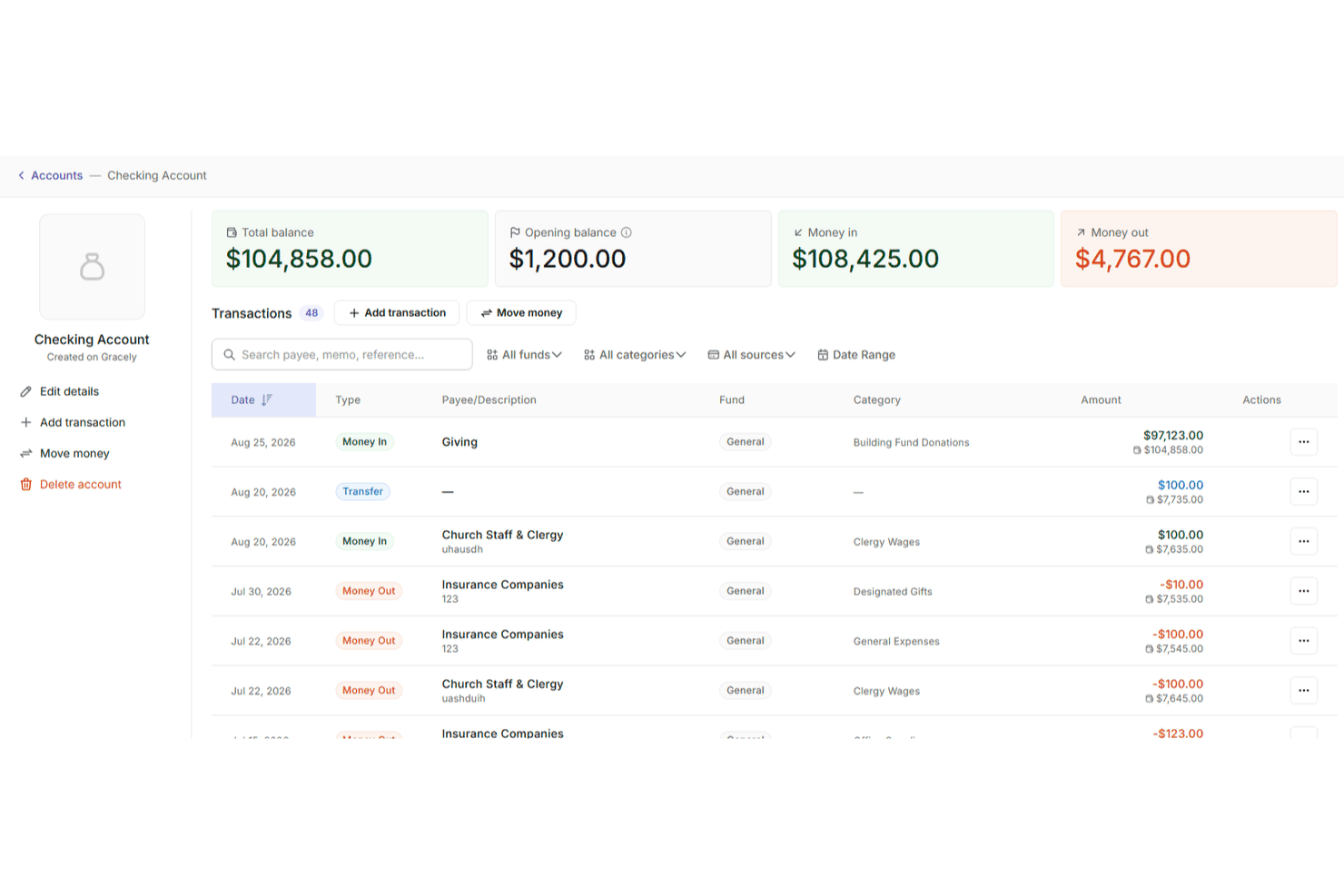
Gracely lets users track account transactions with balances and categories. Gracely is a cloud-based church management software that helps ministries manage people, giving, events, and finances all in one place. It’s built specifically for churches, with user-friendly tools that support both day-to-day administration and big-picture financial stewardship.
Why I Picked Gracely: I chose Gracely because it makes managing church finances approachable without compromising on depth. You can track income and expenses, generate detailed reports, and see giving trends at a glance—all while maintaining transparency with your congregation. What stood out to me is how tightly integrated the online giving tools are with the financial reporting. You don’t need to pull data from different platforms to understand how your budget is doing or where your resources are going.
I also liked that Gracely is designed for volunteers and part-time staff. Its clean interface, guided setup, and centralized dashboards let you spend less time buried in spreadsheets and more time focused on ministry.
Gracely Standout Features & Integrations
Features include customizable forms for donations and event signups, attendance tracking, a secure member portal, and built-in tools to help you plan events and communicate with your congregation. You can manage multiple church groups, generate tax-ready contribution statements, and access role-based permissions to safeguard sensitive data.
Integrations include Stripe for payments and SendGrid for email communication.
Learn more about Gracely: Best for integrated church accounting
- Free plan available + 30-day free trial
- From $12/month
Visit WebsiteCustomer Rating:4.6/5
You can access the financial dashboard to keep track of church funds and financial accounts. ChMeetings is a cloud-based Church Management Software (ChMS) designed to help faith-based organizations in the US, Canada, UK, Australia, and South Africa streamline their operations. Used by over 7,000 churches across these regions, it provides an intuitive, multilingual platform that simplifies church administration while remaining budget-friendly.
After writing hundreds of software reviews for The Lead Pastor, I’ve come to expect mixed opinions from my readers about the various church software mobile apps. But the feedback I keep hearing is that ChMeetings’ app works well and is simple enough for church members to pick up immediately.
Why I picked ChMeetings: As a church accounting software, ChMeetings allows users to manage finances by tracking expenses, monitoring funds, and generating visual reports for financial insights. The software also integrates accounting functions with other church operations, enabling the addition and management of transactions, accounts, funds, categories, and payees. This integration helps churches maintain accurate financial records and perform reconciliations without requiring advanced accounting knowledge
Users can also create tailored budgets and track progress, giving visibility into available resources to help the church achieve its goals. Furthermore, the platform is known for accommodating different church sizes, with various priced plans and a free plan available.
ChMeetings Standout Features & Integrations
Features that make this software stand out include its all-in-one approach, with member profile management, event booking and check-in, outreach, confession appointments, event calendar, donations, online payment, ad-hoc forms, and granular access control. The platform is also GDPR-ready, secure, and available in multiple languages.
Integrations include MailChimp, PayPal, Twilio, and SMSGlobal. It also offers a developer API.
Learn more about ChMeetings: 3Best for built-in multi-currency support
Xero
- Free trial available
- From $27/month
Visit WebsiteCustomer Rating:4.4/5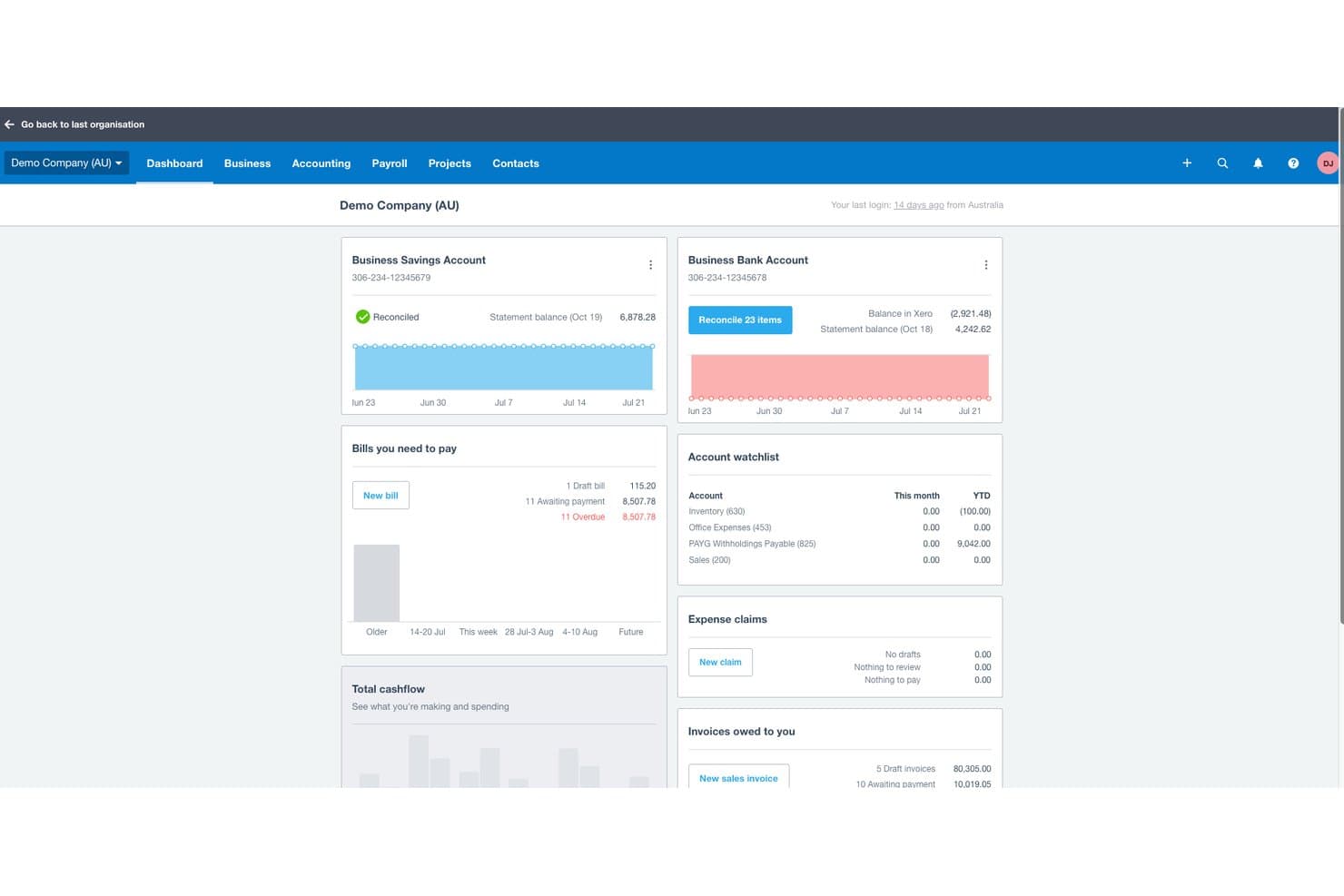
Xero offers a financial dashboard displaying bank account balances, bills payable, invoices owed, and cash flow summaries for church or business accounting. Xero is a cloud-based accounting platform that covers invoicing, bank reconciliation, expense tracking, financial reporting, payroll, and multi-currency management for small to mid-sized churches and nonprofits.
Who Is Xero Best For?
Xero is a strong fit for small to mid-sized churches whose bookkeepers or treasurers need an intuitive general accounting tool without a steep learning curve.
Why I Picked Xero
I picked Xero as one of the best because its built-in multi-currency support is a genuine differentiator for churches running international missions or receiving foreign-currency donations. On the Established plan, I can process international bill payments, reconcile transactions across currencies, and pull reports that consolidate everything into the church's home currency automatically. That removes the manual conversion work that typically creates errors in mission-field expense reporting.
Xero Key Features
- Unlimited user access: Invite multiple staff, volunteers, or advisors to collaborate simultaneously without extra license fees.
- Customizable chart of accounts: Set up your own accounts and tracking categories to align with church ministries or projects.
- Automated bank reconciliation: Import bank transactions automatically and match them to receipts or payments for easier monthly closing.
- Mobile expense claims: Capture and submit receipts on the go through Xero’s mobile app for fast reimbursement.
Xero Integrations
Xero offers native integrations with Hubdoc, Stripe, Square, Shopify, and Etsy, and it connects with Zapier. An API is available for custom integrations.
Pros and Cons
Pros:
- Unlimited users support volunteer accounting teams
- Automated bank reconciliation speeds monthly close
- Tracks foreign-currency donations across multiple missions
Cons:
- Clergy housing allowance requires manual workarounds
- No native fund accounting for restricted gifts
Learn more about Xero: Best for comprehensive bookkeeping
- Free trial available
- From $38/month
Visit WebsiteCustomer Rating:4/5
QuickBooks cloud accounting software helps you track all your church financials in one place. QuickBooks Online is a versatile, cloud-based accounting software tailored to meet the needs of small to medium-sized businesses, including specialized sectors like churches requiring unique financial management features. Its comprehensive set of features and user-friendly interface position it as a suitable choice for businesses seeking a robust bookkeeping solution that can handle a variety of financial tasks.
I've been using Quickbooks Online for 5 years, and it is a game-changer for managing our finances. It saves my team and I countless hours. I used to block out time each week to track down expenses and receipts, but with the app, I can quickly upload expense receipts right on the spot, and they’re instantly organized. Quickbooks integrates smoothly with the other tools we use, and when tax season comes, our accountant simply pulls the information they need directly from our QBO account.
Why I picked QuickBooks Online: This software excels as church accounting software by offering customizable accounting solutions, donation tracking, and financial reporting tailored to the specific needs of religious organizations. Additionally, the software helps automate tax preparation for non-profits and maintain compliance with tax regulations.
A huge differentiator is its capability to automate various bookkeeping tasks, which can be particularly beneficial for churches with limited accounting staff.
QuickBooks Online Standout Features & Integrations
Features that make this software stand out include donation tracking which helps you simplify donation management which is critical for accurate donor records and financial transparency. Also, its fund accounting helps track designated funds and grants accurately.
Integrations include PayPal, Square, Shopify, Stripe, Gusto, TSheets, Bill.com, Hubdoc, Receipt Bank, Fathom.
Learn more about QuickBooks Online: Best for AI-powered transaction matching
- Free demo available
- Pricing upon request
Visit WebsiteCustomer Rating:4.9/5
DualEntry gives your team a real-time financial snapshot across revenue, expenses, cash flow, and operational insights—all in one dashboard. DualEntry is an AI-driven ERP system that can help churches handle complex financial operations like fund accounting, multi-campus financial consolidation, and tax management. It’s designed to reduce manual data entry and can support high transaction volumes, which is especially useful for large or growing churches.
Why I Picked DualEntry: I picked DualEntry because it can help churches simplify their financial close process with AI-powered transaction matching and automatic reconciliations. This is especially helpful if your church manages multiple campuses or funds, since the software makes it easier to consolidate and report on your finances.
I also like that DualEntry is built with CPA-led support and a quick go-live process, which can ease the learning curve for church teams.
DualEntry Standout Features & Integrations:
Features include automated revenue recognition, detailed audit trails, and customizable dashboards for tracking fund balances and cash flow. DualEntry also includes tax management tools that integrate with Avalara and Vertex, helping you manage local tax reporting when needed.
Integrations include BambooHR, Bill.com, Brex, Deel, Google SSO, Gusto, HubSpot, Ramp, Rippling, Salesforce, Stripe Billing, and Stripe Invoicing.
Pros and Cons
Pros:
- Automated revenue recognition ensures compliance with standards
- Supports multi-entity and multi-currency operations
- Advanced AI features help with complex accounting tasks
Cons:
- As an ERP, it may offer more features than needed for simpler accounting needs
- Customization options require careful setup
Learn more about DualEntry: Best for donation syncing with Quickbooks
- Free trial available
- From $72/month
Visit WebsiteCustomer Rating:4.8/5
Tithe.ly enables you to organize and schedule service plans with detailed breakdowns of songs and readings. Tithe.ly is a church management system designed to help you manage your church’s finances, events, and community engagement through a centralized platform. It offers tools for digital giving, financial tracking, member management, and communication—all designed to simplify day-to-day church operations.
In reviewing church software year after year, I’ve noticed that “clunky” is the word very often used to describe church accounting/giving systems. My readers tell me, though, that Tithe.ly breaks the mold with a streamlined, straightforward giving process that simply works.
Why I Picked Tithe.ly: I picked Tithe.ly because of its digital giving tools, which make it easy for your congregation to donate via mobile, text, or online. These donations sync with QuickBooks Online, making it easier to manage finances and ensure accurate records without manual entry. Tithe.ly also supports recurring donations and provides reporting features that help track giving trends, offering clarity for financial oversight.
Additionally, Tithe.ly includes event management features that allow you to handle registrations and payments for gatherings of all sizes. Its customizable church app helps keep your community engaged throughout the week, providing a space to share updates, sermons, and announcements—all tailored to your congregation’s needs.
Tithe.ly Standout Features & Integrations
Features include a people database to track member engagement, a website builder to create a church website, messaging tools for text and email communications, kids’ check-in for added security, and background checks and training resources for maintaining safe environments.
Integrations include QuickBooks, RockRMS, Engiven, Salesforce, MinistryPlatform, Shelby, FellowshipOne, Planning Center Online, Church Community Builder, and Elvanto.
 Best for free church bookkeeping
- Free plan + free trial available
- From $15/month
Visit WebsiteCustomer Rating:4.6/5
You can also use ZipBooks to view basic reports and stay updated on your church’s financial status. If you are looking for a software package with a free forever plan you can use to manage your church’s bookkeeping needs, you may want to consider ZipBooks. ZipBooks is a cloud-based accounting software that provides small business owners with easy-to-use financial management tools. Though not church-specific software, it can of course be used by churches.
Why I Picked ZipBooks: ZipBooks is a user-friendly accounting software designed for small businesses and not-for-profits. One of the things that ZipBooks does well is its ease of use. It has a simple, intuitive interface that allows users to quickly navigate through the different features and functions, making it easy for even those with little or no accounting experience to use. ZipBooks also offers a wide range of features that help small businesses manage their finances, including invoicing, expenses tracking, and financial reporting.
Another strength of ZipBooks is its flexibility. ZipBooks can be accessed from any device with an internet connection, making it easy for users to access their financial information from anywhere at any time. Additionally, ZipBooks offers a variety of integrations that allow users to connect their accounting software with other tools they use in their business, such as payment processors, time tracking software, and more. This makes it easy for small business owners to manage their finances and streamline their workflow.
ZipBooks has the ability to automate many tasks and provide real-time data which helps in better decision making. ZipBooks is also cost-effective and offers a free version which can be upgraded to the paid one for more advanced features.
ZipBooks Standout Features & Integrations
Features include invoicing and billing, expense tracking, financial reporting, online payments, bank and credit card reconciliation, sales tax tracking, multi-currency support, time tracking, project management, team collaboration, customizable templates, mobile app support, customizable dashboards, data import and export, automatic bookkeeping, budgeting and forecasting, payroll support, inventory management, tax compliance, and third-party integrations/add-ons.
Integrations include Google Drive, PayPal, Slack, Google Workspace, Asana, Gusto, Spiceworks, and Enrollsy.
Learn more about ZipBooks:

Sage Intacct provides users a quick view of their financials so they can assess their church’s financial health easily. Sage Intacct is a cloud-based financial management software designed for small to medium-sized businesses, that offers features such as accounting, budgeting, financial reporting, and revenue recognition capabilities.
Why I Picked Sage Intacct: Sage Intacct is highly praised for its cloud-based architecture and scalability, which allows small to medium-sized businesses to access their financial data from anywhere and easily grow their use of the software as their church needs expand.
Sage Intacct can automate many financial processes, such as invoicing, purchasing, and revenue recognition, which can save time and improve efficiency. The software's financial reporting capabilities are also comprehensive, with real-time data, customizable reports, and drill-down capabilities that make it easy to access and analyze the financial information you need to make informed decisions.
In addition, Sage Intacct is known for its strong accounting capabilities, including multi-entity management, and its ability to handle complex accounting requirements such as revenue recognition and ASC 606 compliance.
Overall, Sage Intacct is seen as a powerful and flexible financial management software that can help businesses streamline their financial processes, improve efficiency, and make more informed decisions with real-time financial data.
Sage Intacct Standout Features & Integrations
Features include financial management, automation, financial reporting, multi-entity management, revenue recognition, accounting, budgeting, cloud-based, mobile access, and third-party integrations/add-ons.
Integrations include a host of tools, including Emburse Nexonia, Baker Tilly SaaS Intelligence, FloQast, APS Online, Yooz Accounts Payable Automation, RadiusOne, Workforce, and QCommission.
Learn more about Sage Intacct: Best fund accounting for churches
- 30-day free trial + demo available
- From $50/month
Visit WebsiteCustomer Rating:4.4/5
IconCMO allows you to handle your church’s tax-reporting requirements while ensuring compliance with state and federal laws. IconCMO is a church management software that provides tools for membership management, contributions and donations management, financial management, event management, communication, and reporting.
Why I Picked IconCMO: IconCMO is a church management software that excels in several areas like fund management, membership management, accounting, and collaboration.
IconCMO is super easy to navigate and intuitive to use. The interface is user-friendly and straightforward, making it easy for churches to manage their information.
IconCMO provides robust financial management capabilities, including accounting, budgeting, financial reporting, and revenue recognition. Users appreciate the software's ability to track income, expenses, and donations and generate financial statements.
IconCMO does more than just accounting, too. It offers tools for tracking member information, including contact details, attendance, and giving history. Pastors can manage member information and create custom attendance and donations reports. IconCMO even allows churches to schedule, register, and track attendance for events, such as classes, meetings, and fundraisers.
IconCMO is a great "jack-of-all-trades" software with tools for modern church communications including email, text messaging, and social media, alongside everything you expect from a church accounting software.
IconCMO Standout Features & Integrations
Features include membership management, financial management, event management, communication, reporting, online giving, mobile access, security, cloud-based, and third-party integrations/add-ons.
Integrations include Vanco, PayPal, Stripe, Elavon, First Data, Authorize.net, ADP, Paychex, QuickBooks Online, Xero, Church Community Builder, Fellowship One, Planning Center, MailChimp, Constant Contact, Emma, Facebook, Twitter, and LinkedIn.
Learn more about IconCMO:

Botkeeper's Smart Connect feature makes pulling up bank and credit card statements easy for quick account reconciliation. Botkeeper is an AI-powered bookkeeping software that automates financial tasks and provides real-time data insights for businesses.
Why I Picked Botkeeper: Botkeeper is an AI-powered bookkeeping software that is designed to automate many of the financial tasks that churches typically have to handle manually. One of the key features that Botkeeper excels at is its automation capabilities. The software uses advanced artificial intelligence algorithms to automate tasks such as data entry, bank reconciliation, and financial reporting. This allows church leaders to save time and reduce the risk of errors.
Another strength of Botkeeper is its ability to provide real-time data insights. Botkeeper is able to analyze financial data in real-time, providing churches with a clear picture of their financial health and performance. This allows them to identify trends, identify areas for improvement, and make more informed decisions about their financial strategies.
Botkeeper also offers a great customer support, which ensures that any issues or concerns are addressed quickly. The software is user-friendly and easy to navigate even for those with little or no accounting experience. Furthermore, Botkeeper is cloud-based, which means that churches can access their financial information and data from anywhere at any time.
Botkeeper Standout Features & Integrations
Features include automated bookkeeping, analytics, ai, financial forecasting, customizable reports, multi-user access and permissions, cloud-based access, mobile app access, 24/7 customer support, reminders and notifications, billing and invoicing, expense tracking, payroll processing, budgeting, and third-party integrations/add-ons.
Integrations include Stripe, Gusto, QuickBooks, HubSpot, LinkedIn, Hootsuite, PayPal, Zendesk, Kissmetrics, and Chargify.
Learn more about Botkeeper:
Outras opções: as nossas menções honrosas
Embora estas opções não tenham entrado nas 20 melhores, vale a pena mencioná-las (e também explorá-las, se for o seu caso!)
- 11AccountEdgeBest for small churches
- 12RealmBest for financial discipline and transparency
- 13ACSBest for budget management
- 14SteepleMateBest for centralized financial tracking
- 15Blackbaud Financial Edge NXTBest for financial planning & analysis
- 16MIP Fund AccountingBest for flexible accounting reports
- 17PowerChurch PlusBest all-in-one ChMS system
- 18ChurchTracBest for user-friendliness
- 19Sage Expense Management (formerly Fyle)Best for expense tracking
- 20MinistryPlatformBest for customizable ministry ecosystems
- 21GustoBest for payroll systems
- 22Breeze ChMSBest for ease of use
- 23GivelifyBest for mobile giving
- 24WAVEBest for a simple bookkeeping and payments option
- 25AplosBest ChMS for customizability
- 26ElexioBest for denominational headquarters
- 27CDM+Best for church event budgets
- 28FlockBaseBest fully-featured & affordable option
- 29Church WindowsBest church database with financials tied in
- 30ChurchProBest all-in-one church management solution
- 31JewelBest for check payments & tracking
- 32ShelbyNextBest for complex church payroll needs
- 33Church360 LedgerBest for easy ledger generation
- 34ExpensePlusBest for midsized churches
- 35MartusToolsBest for budgeting & reporting
- 36Paxton Charities AccountingBest for UK-based churches
Avaliações relacionadas de software para igrejas
A maioria das igrejas depende de ferramentas de software para manter tudo organizado e a funcionar sem problemas. Investigámos exaustivamente as principais ferramentas do setor disponíveis para simplificar as suas decisões. As nossas avaliações vão ajudá-lo a:
- Reduzir a sua carga administrativa com soluções líderes de gestão de igrejas.
- Manter o processamento salarial a funcionar sem problemas com o melhor software de processamento salarial para igrejas
- Explorar as principais alternativas ao QuickBooks para a contabilidade da sua igreja

4 dicas para tirar o máximo partido do seu software de contabilidade para igrejas
How I Evaluate Church Accounting Software
I evaluate church accounting tools in two layers: the core must-haves like fund accounting and giving statements, and the differentiators that separate the strongest options from the rest.
Core Functionality (Table Stakes For This List)
When I'm selecting tools for my list, I rank each one on a scale from 0 (does not offer the functionality) to 5 (excels in this area) for each core functionality listed below. Then, I calculate the tool's total score into a percentage. Each tool needs to achieve a minimum total score of 65% to be considered for inclusion.
- Fund Accounting: I check whether a tool can track restricted, unrestricted, and designated funds separately—like isolating a building campaign from your general tithe fund.
- Contribution Management: Each tool should let you record gifts tied to individual donors and generate year-end giving statements that meet tax compliance requirements.
- Church-Oriented Chart of Accounts: I look for a COA that reflects how churches actually organize finances—by ministry, campus, or program—rather than a generic business template.
- Nonprofit Financial Reporting: The tool needs to produce reports like Statement of Activities and budget-vs-actual breakdowns by fund, the kind your elder board or finance committee expects to see.
- Accounts Payable & General Ledger: Core bookkeeping matters here—vendor management, bill pay, journal entries, and bank reconciliation all need to be present and functional.
- Payroll & Clergy Tax Handling: I evaluate whether the platform handles clergy-specific items like housing allowance designations and dual tax status, either natively or through a dedicated payroll integration.
Once I have a list of tools that meet this criteria, I consider what sets each platform apart.
Differentiating Factors (What Sets Vendors Apart)
Here's how I compare and contrast different vendors:
Standout Features
ChMS integration is a big one—I look for tools that sync giving data directly with platforms like Planning Center or Breeze, so your team isn't double-entering donations. Multi-campus accounting also matters for growing churches that need consolidated reporting across locations. Board and elder dashboards are another differentiator I evaluate, since finance committees often include volunteers who need clear financial snapshots without navigating a full ledger.
Beyond Features
Implementation support matters when your bookkeeper is a volunteer who's migrating from spreadsheets or QuickBooks—I evaluate whether the vendor offers guided setup, data migration help, and training geared toward non-accountants. Compliance and audit readiness are other factors I consider, especially for churches that need clean audit trails and segregation of duties to satisfy denominational oversight. I also look at how well the tool fits different church sizes and governance structures, from a small congregation with one treasurer to a multi-site church with layered approvals.
Como escolher um software de contabilidade para igrejas
Cada igreja tem um processo de tomada de decisão diferente, mas há alguns aspetos essenciais que se aplicam a todas. Ao escolher um software de contabilidade, eis o que deve priorizar:
1. Orçamentação e acompanhamento de fundos eficientes
Os orçamentos das igrejas são limitados. O seu software deve facilitar o acompanhamento das receitas e despesas de vários fundos — como manter as doações para o fundo de missões separadas do fundo geral.
2. Acompanhamento e relatórios de donativos
Manter registos precisos dos doadores não é opcional. O software adequado automatiza os recibos para efeitos fiscais, os resumos das contribuições e os relatórios específicos de cada fundo — ajudando-o a acompanhar os donativos para projetos de construção, ações de sensibilização e fundos designados sem trabalho adicional.
3. Interface simples e adequada para voluntários
A maioria das igrejas depende de voluntários para a contabilidade. Escolha software fácil de aprender, com painéis claros, para que pessoas sem conhecimentos de contabilidade possam acompanhar as finanças sem uma curva de aprendizagem acentuada.
4. Integração perfeita com os sistemas da sua igreja
A introdução duplicada de dados faz perder tempo. Se a sua igreja já utiliza o Planning Center, o Fellowship One ou outra ferramenta de gestão, escolha software de contabilidade que sincronize os dados para manter os registos exatos e atualizados.
5. Conformidade e apoio à auditoria integrados
As igrejas estão sujeitas a supervisão financeira. O melhor software simplifica as auditorias, garante a transparência e mantém a sua organização em conformidade através de funcionalidades como registos de auditoria, planos de contas personalizáveis e contabilidade por fundos.
Precisa de uma solução que vá além da contabilidade? A maioria das principais ferramentas de software de gestão de igrejas oferece apoio à contabilidade — no contexto de um sistema tudo-em-um. Além disso, se precisar, existem também excelentes ferramentas de software de gestão de doadores disponíveis.
Tendências no software de contabilidade para igrejas
O software de contabilidade para igrejas continua a evoluir, impulsionado pela necessidade de maior eficiência, transparência e conformidade. Analisámos atualizações de produtos, notas de lançamento e anúncios de intervenientes importantes como a Aplos, a QuickBooks for Nonprofits e a Breeze. Eis o rumo que a gestão financeira das igrejas está a tomar este ano:
Automatização e integração mais inteligentes
- Sincronização da gestão de doadores – Plataformas como a Aplos e a QuickBooks oferecem agora uma integração mais profunda da gestão de doadores, reduzindo a introdução manual de dados.
- Reconciliação bancária automatizada – As novas funcionalidades (por exemplo, da ACS Technologies) correspondem imediatamente às transações, poupando horas.
- API e webhooks – Os utilizadores avançados podem agora ligar perfeitamente os sistemas de contabilidade às ferramentas de gestão de igrejas.
Melhor supervisão financeira
- Relatórios personalizados para conselhos e doadores – A Aplos e o Church Community Builder fornecem agora relatórios financeiros totalmente personalizados para melhorar a transparência.
- Painéis em tempo real – A QuickBooks e a Breeze atualizaram os seus painéis para oferecer informações instantâneas sobre donativos, saldos de fundos e orçamentos.
- Análise preditiva – A Pushpay e o Planning Center oferecem agora ferramentas de orçamentação baseadas em IA para prever despesas com maior precisão.
Maior conformidade e segurança
- Relatórios fiscais mais simples – As atualizações de 2025 simplificam as declarações de contribuições de fim de ano e as declarações 1099.
- Acesso baseado em funções – Melhores definições de permissões protegem os dados sensíveis e garantem a conformidade com as políticas.
Melhor experiência do utilizador
- Interfaces mais simples – A QuickBooks, a Breeze e a Aplos simplificaram os seus designs para facilitar a navegação — especialmente para pessoas sem conhecimentos de contabilidade.
- Base de conhecimentos ampliada – A ACS Technologies e o Planning Center oferecem agora guias detalhados e tutoriais em vídeo, reduzindo os pedidos de apoio.
O que está a desaparecer?
- Relatórios impressos – Os painéis digitais e as declarações automatizadas estão a substituir os relatórios em papel.
- Contabilidade básica – As igrejas estão a ir além da contabilidade simples, adotando ferramentas financeiras especializadas criadas para as necessidades dos ministérios.
Estas mudanças mostram que o software adequado não serve apenas para acompanhar o dinheiro — serve para ajudar os pastores a liderar com clareza e confiança.
O que é o software de contabilidade para igrejas?
O software de contabilidade para igrejas é uma ferramenta que organiza as finanças da sua igreja. Permite controlar, rever e organizar donativos, processamento de salários, acompanhamento de fundos e orçamentação num só lugar. Quer esteja a liderar uma pequena congregação ou uma igreja com vários campus, o software de contabilidade para igrejas ajuda a simplificar as finanças para que se possa concentrar no ministério.
Funcionalidades do software de contabilidade para igrejas
Ao selecionar um software de contabilidade para igrejas, esteja atento às seguintes funcionalidades essenciais:
- Contabilidade por fundos: Permite acompanhar e gerir vários fundos ou contas separadamente, garantindo que os donativos designados, subsídios e orçamentos permanecem organizados e não se misturam. Isto é especialmente útil para igrejas que gerem vários ministérios ou fundos para obras em simultâneo.
- Acompanhamento de donativos: Regista todos os donativos, quer se trate de um cheque colocado na bandeja das ofertas, quer de um donativo online recorrente. Isto simplifica a comunicação de informações fiscais e facilita o envio de recibos e notas de agradecimento aos seus generosos doadores.
- Gestão de membros: Combina a contabilidade com uma base de dados dos membros da igreja, ajudando a acompanhar donativos, compromissos de doação e informações de contacto num só lugar. Torna os extratos anuais e a comunicação personalizada muito mais fáceis.
- Ferramentas de orçamentação: Ajudam a planear e acompanhar as despesas e receitas da igreja. Com painéis orçamentais claros, pode identificar tendências, evitar gastos excessivos e tomar decisões financeiras com confiança.
- Processamento de salários: Trata dos salários, benefícios e retenções fiscais do pessoal e do clero. Um bom software garante o cumprimento tanto dos regulamentos específicos das igrejas como das leis fiscais gerais.
- Relatórios financeiros: Gera relatórios financeiros detalhados — como balanços e demonstrações de resultados — adaptados aos conselhos da igreja, ao pessoal e às reuniões da congregação. Elimina as incertezas ao partilhar a situação financeira da sua igreja.
- Contas a pagar e a receber: Acompanha as faturas recebidas e os pagamentos efetuados, bem como quaisquer receitas devidas à igreja. Manter este controlo deixa os seus fornecedores satisfeitos e os seus registos corretos.
- Reconciliação bancária: Garante que os seus registos contabilísticos digitais correspondem aos extratos bancários reais, detetando rapidamente erros ou transações em falta. É uma grande ajuda durante auditorias ou revisões de fim de ano.
- Permissões de utilizador e segurança: Permite controlar quem pode consultar, editar ou gerir determinados dados financeiros. Mantém as informações sensíveis seguras e reduz o risco de erros ou fraude.
- Integração com sistemas de gestão de igrejas: Liga-se facilmente a outras plataformas que já utiliza — como ferramentas de agendamento de eventos ou de comunicação — para que o seu ecossistema tecnológico funcione em conjunto e não contra si.
Benefícios do software de contabilidade para igrejas
Gerir as finanças da igreja sem o software adequado conduz a erros, perda de tempo e pontos cegos financeiros. O melhor software de contabilidade para igrejas faz mais do que processar números — mantém a sua igreja financeiramente saudável e focada no ministério.
5 principais benefícios para pastores principais:
- Acompanhamento preciso dos fundos – Mantenha os fundos designados organizados e em conformidade.
- Gestão simplificada de donativos – Automatize o acompanhamento e os relatórios das contribuições.
- Relatórios financeiros claros – Obtenha informações financeiras em tempo real para tomar melhores decisões.
- Processamento de salários sem esforço – Garanta uma remuneração precisa do clero e do pessoal.
- Automatização que poupa tempo – Liberte horas de trabalho do pessoal para o ministério em vez da burocracia.
Ao anteciparem estas tendências, os pastores podem liderar com confiança, sabendo que as suas igrejas dispõem das ferramentas certas para garantir clareza financeira, integridade e crescimento.
A utilização de software de contabilidade especializado ajuda os pastores a concentrarem-se na sua vocação principal, deixando os pormenores da gestão financeira para os especialistas.
Joshua GOrdon
Custos & preços do software de contabilidade para igrejas
Os planos de preços variam normalmente em função da dimensão da igreja, da complexidade das necessidades financeiras e das funcionalidades pretendidas. Eis uma análise dos tipos de planos e das opções de preços mais comuns no setor:
| Tipo de plano | Preço médio | Funcionalidades comuns | Ideal para... |
|---|---|---|---|
| Tipo de planoGrátis | Preço médio$0/mês | Funcionalidades comunsContabilidade, contabilidade de fundos, acompanhamento de donativos, relatórios básicos, permissões para voluntários | Ideal para...Igrejas pequenas com necessidades financeiras simples |
| Tipo de planoBásico | Preço médio$25-$50/mês | Funcionalidades comunsTodas as funcionalidades do plano Grátis, orçamentação, processamento de salários, reconciliação bancária | Ideal para...Igrejas de média dimensão que necessitam de funcionalidades de processamento de salários e orçamentação |
| Tipo de planoPadrão | Preço médio$50-$100/mês | Funcionalidades comunsTodas as funcionalidades do plano Básico, suporte para vários locais, permissões baseadas em funções, relatórios personalizados | Ideal para...Igrejas maiores que necessitam de uma gestão financeira abrangente e colaboração entre equipas |
| Tipo de planoAvançado | Preço médio$100-$200/mês | Funcionalidades comunsTodas as funcionalidades do plano Padrão, integração da gestão de doadores, análises avançadas, aplicação móvel | Ideal para...Igrejas grandes com operações financeiras complexas e necessidades específicas de personalização |
| Tipo de planoEmpresarial | Preço médio$200+/mês | Funcionalidades comunsTodas as funcionalidades do plano Avançado, utilizadores ilimitados, gestor de conta dedicado, acesso à API | Ideal para...Megacongregações ou organizações com operações financeiras altamente complexas e de grande escala |
A seleção do plano adequado depende da dimensão da sua igreja e das suas necessidades específicas de gestão financeira. Considere começar com um plano grátis ou básico para explorar as funcionalidades. A partir daí, opte por uma solução mais abrangente à medida que as suas necessidades aumentarem.
Perguntas frequentes