De beste boekhoudsoftware voor kerken helpt voorgangers duidelijke financiële rapporten op te stellen, budgetfouten te voorkomen en aan de IRS-vereisten te voldoen. De software vervangt verspreide spreadsheets door één accuraat systeem waarop jij en je boekhouder kunnen vertrouwen.
Ik werk al meer dan 20 jaar in de kerkleiding. In die tijd heb ik tientallen voorgangers en kerken in heel Noord-Amerika begeleid. Ooit werkte ik samen met een voorganger die enkele dagen bezig was met de voorbereiding van een kwartaalrapport voor het bestuur — om tijdens de vergadering te ontdekken dat hij het verkeerde totaal van het aangewezen fonds had gebruikt. De fout vertraagde verschillende belangrijke financieringsbeslissingen en kostte weken om recht te zetten. Ik heb persoonlijk enkele tientallen boekhoudtools voor kerken beoordeeld — en met elk daarvan had die kostbare fout voorkomen kunnen worden.
Te veel kerken gebruiken vandaag de dag handmatige of algemene tools om hun financiën bij te houden — en worden geconfronteerd met onduidelijke rapporten en riskante fouten. De juiste software zorgt voor financiële duidelijkheid, snellere beslissingen en meer vertrouwen tussen zowel je gemeenteleden als je leiderschapsteam. Daarom is de JUISTE software voor jouw kerk belangrijk — en dit artikel helpt je die te vinden.
Waarom u onze softwareaanbevelingen kunt vertrouwen
6,700+
Reviews
20
Industry experts
16+
Evaluation factors
14
Years
Ons team test en beoordeelt software sinds 2012. Als kerkleiders weten we zelf hoe moeilijk — en belangrijk — het is om de juiste software te kiezen.
Voor deze gids hebben we tools geëvalueerd met behulp van praktijktests en onafhankelijk onderzoek, waarbij we tools beoordeelden aan de hand van onze selectiecriteria.
Onze reviews weerspiegelen ons menselijke redactionele oordeel, geen verkooppraatje.
Vergelijkingstabel voor boekhoudsoftware voor kerken
Deze vergelijkingstabel vat de prijsgegevens samen van mijn beste selecties van boekhoudsoftware voor kerken:
| Tool | Best For | Trial Info | Price | ||
|---|---|---|---|---|---|
| 1 | Ideaal voor het beheren van kerkfinanciën | 30 dagen gratis proefperiode | Vanaf $19/maand (jaarlijks gefactureerd) | Website | |
| 2 | Beste voor geïntegreerde kerkboekhouding | 30 dagen gratis uitproberen + gratis abonnement beschikbaar | Vanaf $12/maand | Website | |
| 3 | Beste ondersteuning voor meerdere valuta | Gratis proefperiode van 30 dagen | Vanaf $25/maand | Website | |
| 4 | Beste voor uitgebreide boekhouding | 30 dagen gratis proberen | Vanaf $19/maand | Website | |
| 5 | Beste voor AI-aangedreven transactiekoppeling | Gratis demo beschikbaar | Prijs op aanvraag | Website | |
| 6 | Beste voor het synchroniseren van donaties met QuickBooks | Gratis proefperiode van 30 dagen beschikbaar | Vanaf $72/maand | Website | |
| 7 | Beste voor gratis kerkboekhouding | Gratis abonnement beschikbaar | Vanaf $15/gebruiker/maand | Website | |
| 8 | Beste voor schaalbaarheid | 30 dagen gratis uitproberen | Prijzen zijn op aanvraag beschikbaar | Website | |
| 9 | Beste fondsboekhouding voor kerken | 30 dagen gratis uitproberen | Vanaf $35 per account per maand, met extra kosten voor bepaalde toevoegingen | Website | |
| 10 | Beste voor AI-geautomatiseerde boekhouding | Gratis abonnement beschikbaar | Vanaf $55/account/maand | Website |


De beste beoordelingen van boekhoudsoftware voor kerken
Hier volgt een korte beschrijving van elke boekhoudsoftware voor kerken in mijn lijst, met informatie over waar deze het beste in is en screenshots van enkele functies.
 Ideaal voor het beheren van kerkfinanciën
- 30 dagen gratis proefperiode
- Vanaf $19/maand (jaarlijks gefactureerd)
Visit WebsiteCustomer Rating:4.8/5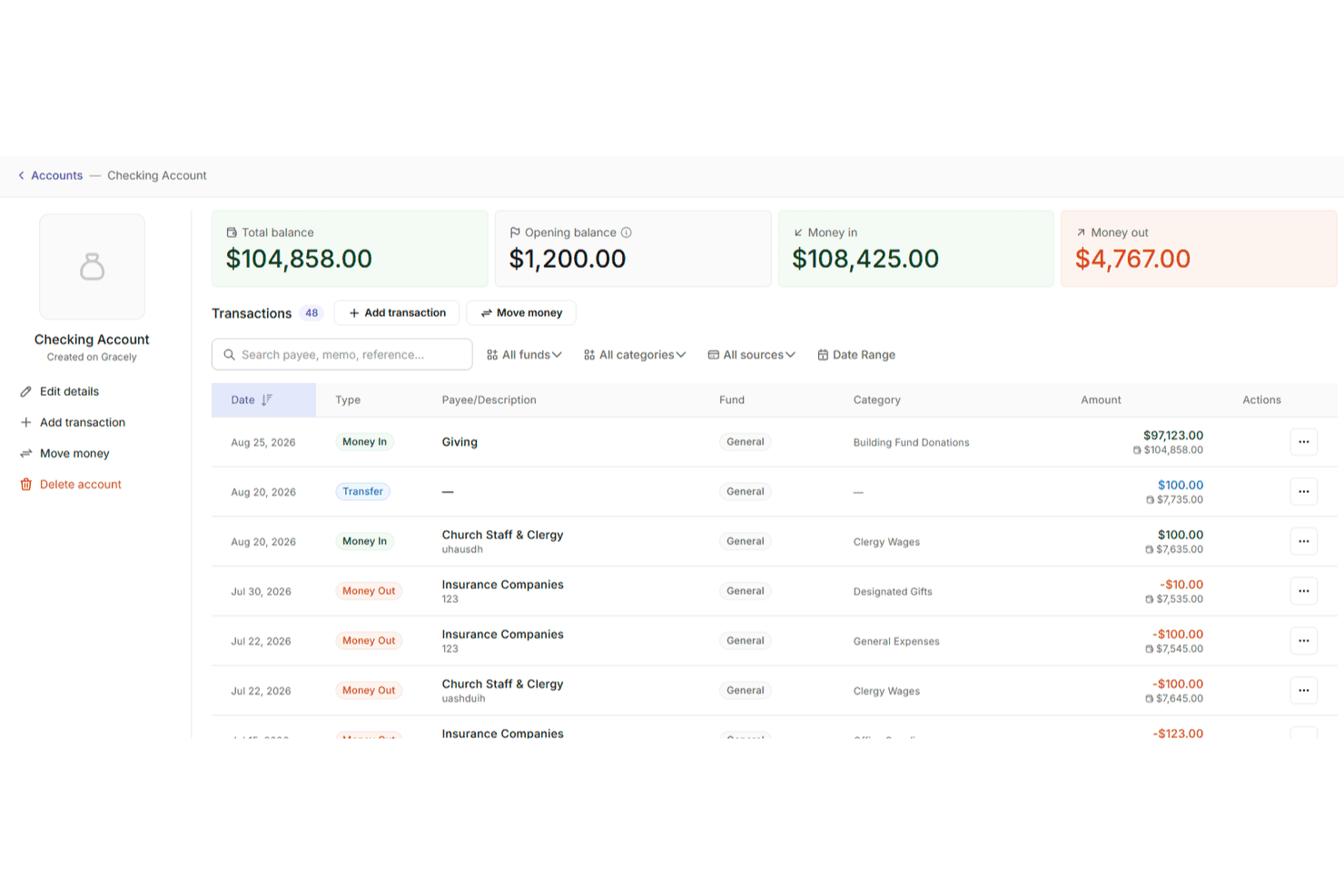
Met Gracely kunnen gebruikers rekeningtransacties met saldi en categorieën bijhouden. Gracely is cloudgebaseerde software voor kerkbeheer die kerken en bedieningen helpt om mensen, giften, evenementen en financiën allemaal op één plek te beheren. De software is speciaal ontwikkeld voor kerken, met gebruiksvriendelijke hulpmiddelen die zowel de dagelijkse administratie als het financiële beheer op lange termijn ondersteunen.
Waarom ik voor Gracely koos: Ik koos voor Gracely omdat het financieel beheer van een kerk toegankelijk maakt zonder in te leveren op uitgebreide mogelijkheden. Je kunt inkomsten en uitgaven bijhouden, gedetailleerde rapporten genereren en giftentrends in één oogopslag bekijken, terwijl je transparant blijft tegenover je gemeente. Wat mij opviel, is hoe nauw de online hulpmiddelen voor giften geïntegreerd zijn met de financiële rapportage. Je hoeft geen gegevens uit verschillende platforms samen te voegen om te begrijpen hoe je budget ervoor staat of waar je middelen naartoe gaan.
Ik vond het ook prettig dat Gracely is ontworpen voor vrijwilligers en parttime medewerkers. Dankzij de overzichtelijke interface, begeleide installatie en gecentraliseerde dashboards besteed je minder tijd aan spreadsheets en meer tijd aan de bediening.
Opvallende functies en integraties van Gracely
Functies omvatten aanpasbare formulieren voor donaties en aanmeldingen voor evenementen, aanwezigheidsregistratie, een beveiligd ledenportaal en ingebouwde hulpmiddelen om evenementen te plannen en met je gemeente te communiceren. Je kunt meerdere kerkgroepen beheren, belastingklare overzichten van bijdragen genereren en op rollen gebaseerde machtigingen instellen om gevoelige gegevens te beschermen.
Integraties omvatten Stripe voor betalingen en SendGrid voor e-mailcommunicatie.
Learn more about Gracely: Beste voor geïntegreerde kerkboekhouding
- 30 dagen gratis uitproberen + gratis abonnement beschikbaar
- Vanaf $12/maand
Visit WebsiteCustomer Rating:4.6/5
Je hebt toegang tot het financiële dashboard om kerkelijke fondsen en financiële rekeningen bij te houden. ChMeetings is cloudgebaseerde software voor kerkbeheer (ChMS), ontworpen om geloofsorganisaties in de VS, Canada, het VK, Australië en Zuid-Afrika te helpen hun activiteiten te stroomlijnen. De software wordt gebruikt door meer dan 7.000 kerken in deze regio's en biedt een intuïtief, meertalig platform dat de kerkadministratie vereenvoudigt en tegelijkertijd budgetvriendelijk blijft.
Na honderden softwarebeoordelingen te hebben geschreven voor The Lead Pastor, ben ik gewend geraakt aan uiteenlopende meningen van mijn lezers over de verschillende mobiele apps voor kerksoftware. Maar de feedback die ik blijf horen, is dat de app van ChMeetings goed werkt en eenvoudig genoeg is voor kerkleden om er meteen mee aan de slag te gaan.
Waarom ik ChMeetings koos: Als boekhoudsoftware voor kerken stelt ChMeetings gebruikers in staat financiën te beheren door uitgaven bij te houden, fondsen te monitoren en visuele rapporten te genereren voor financieel inzicht. De software integreert boekhoudfuncties ook met andere kerkelijke activiteiten, waardoor transacties, rekeningen, fondsen, categorieën en begunstigden kunnen worden toegevoegd en beheerd. Deze integratie helpt kerken nauwkeurige financiële gegevens bij te houden en afstemmingen uit te voeren zonder geavanceerde boekhoudkundige kennis.
Gebruikers kunnen ook aangepaste budgetten maken en de voortgang bijhouden, waardoor ze inzicht krijgen in de beschikbare middelen om de kerk haar doelen te laten bereiken. Bovendien staat het platform bekend om zijn geschiktheid voor kerken van verschillende groottes, met diverse betaalde abonnementen en een gratis abonnement.
Opvallende functies en integraties van ChMeetings
Functies die deze software onderscheiden, zijn onder meer de alles-in-éénbenadering, met beheer van ledenprofielen, het boeken van evenementen en inchecken, outreach, afspraken voor biechten, een evenementenkalender, donaties, online betalingen, formulieren voor ad-hocgebruik en gedetailleerd toegangsbeheer. Het platform is ook klaar voor de AVG, veilig en beschikbaar in meerdere talen.
Integraties omvatten MailChimp, PayPal, Twilio en SMSGlobal. Er is ook een API voor ontwikkelaars beschikbaar.
Learn more about ChMeetings: 3Beste ondersteuning voor meerdere valuta
Xero
- Gratis proefperiode van 30 dagen
- Vanaf $25/maand
Visit WebsiteCustomer Rating:4.4/5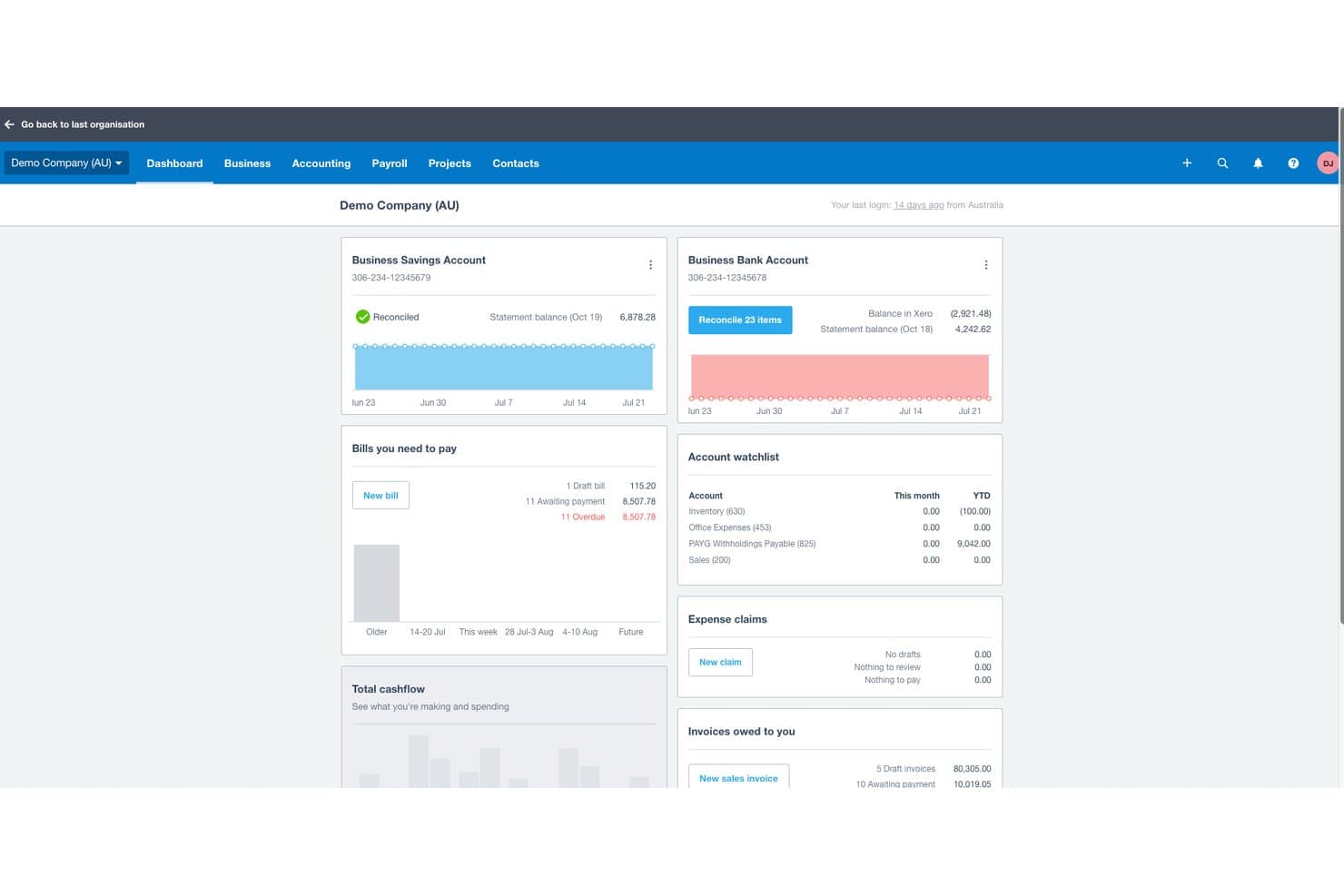
Xero biedt een financieel dashboard met banksaldi, te betalen rekeningen, openstaande facturen en kasstroomoverzichten voor kerkelijke of zakelijke boekhouding. Xero is een cloudgebaseerd boekhoudplatform dat facturering, bankafstemming, onkostentracking, financiële rapportage, salarisadministratie en beheer van meerdere valuta omvat voor kleine tot middelgrote kerken en non-profitorganisaties.
Voor wie is Xero het meest geschikt?
Xero is zeer geschikt voor kleine tot middelgrote kerken waarvan de boekhouders of penningmeesters een intuïtief algemeen boekhoudprogramma nodig hebben zonder een steile leercurve.
Waarom ik voor Xero heb gekozen
Ik heb Xero geselecteerd als een van de beste opties omdat de ingebouwde ondersteuning voor meerdere valuta een echte onderscheidende factor is voor kerken die internationale missies uitvoeren of donaties in vreemde valuta ontvangen. Met het Established-abonnement kan ik internationale factuurbetalingen verwerken, transacties in verschillende valuta's afstemmen en rapporten opvragen die alles automatisch consolideren in de thuisvaluta van de kerk. Daarmee verdwijnt het handmatige omrekenwerk dat doorgaans fouten veroorzaakt in de rapportage van onkosten uit het missiegebied.
Belangrijkste functies van Xero
- Onbeperkte gebruikerstoegang: Nodig meerdere medewerkers, vrijwilligers of adviseurs uit om tegelijkertijd samen te werken zonder extra licentiekosten.
- Aanpasbaar rekeningschema: Stel je eigen rekeningen en trackingcategorieën in, afgestemd op kerkelijke bedieningen of projecten.
- Geautomatiseerde bankafstemming: Importeer banktransacties automatisch en koppel ze aan bonnen of betalingen voor een eenvoudigere maandafsluiting.
- Mobiele declaraties: Leg onderweg bonnen vast en dien ze in via de mobiele app van Xero voor snelle terugbetaling.
Xero-integraties
Xero biedt native integraties met Hubdoc, Stripe, Square, Shopify en Etsy, en kan worden gekoppeld aan Zapier. Er is een API beschikbaar voor aangepaste integraties.
Pros and Cons
Pros:
- Houdt donaties in vreemde valuta bij voor meerdere missies
- Geautomatiseerde bankafstemming versnelt de maandafsluiting
- Ondersteuning voor onbeperkte gebruikers voor vrijwilligersteams in de boekhouding
Cons:
- Geen native fondsboekhouding voor geoormerkte giften
- De huisvestingsvergoeding voor geestelijken vereist handmatige omwegen
Learn more about Xero: Beste voor uitgebreide boekhouding
- 30 dagen gratis proberen
- Vanaf $19/maand
Visit WebsiteCustomer Rating:4/5
Met de cloudboekhoudsoftware van QuickBooks kun je al je kerkelijke financiën op één plek bijhouden. QuickBooks Online is veelzijdige, cloudgebaseerde boekhoudsoftware die is afgestemd op de behoeften van kleine tot middelgrote bedrijven, waaronder gespecialiseerde sectoren zoals kerken die unieke functies voor financieel beheer nodig hebben. De uitgebreide functies en gebruiksvriendelijke interface maken het een geschikte keuze voor bedrijven die op zoek zijn naar een robuuste boekhoudoplossing die verschillende financiële taken aankan.
Ik gebruik QuickBooks Online al 5 jaar en het is een baanbrekende oplossing voor het beheren van onze financiën. Het bespaart mijn team en mij talloze uren. Vroeger reserveerde ik elke week tijd om uitgaven en bonnetjes op te sporen, maar met de applicatie kan ik bonnetjes van uitgaven direct uploaden en worden ze meteen georganiseerd. QuickBooks integreert probleemloos met de andere hulpmiddelen die we gebruiken en wanneer het belastingseizoen aanbreekt, haalt onze accountant de benodigde informatie rechtstreeks uit ons QBO-account.
Waarom ik voor QuickBooks Online heb gekozen: Deze software blinkt uit als boekhoudsoftware voor kerken door aanpasbare boekhoudoplossingen, het bijhouden van donaties en financiële rapportages te bieden die zijn afgestemd op de specifieke behoeften van religieuze organisaties. Daarnaast helpt de software bij het automatiseren van de belastingvoorbereiding voor non-profitorganisaties en het naleven van belastingvoorschriften.
Een groot onderscheidend kenmerk is de mogelijkheid om verschillende boekhoudkundige taken te automatiseren, wat vooral gunstig kan zijn voor kerken met beperkte boekhoudkundige personeelscapaciteit.
Opvallende functies en integraties van QuickBooks Online
Functies die deze software onderscheiden, zijn onder andere het bijhouden van donaties, waarmee je het beheer van donaties kunt vereenvoudigen. Dit is essentieel voor een nauwkeurige administratie van donateurs en financiële transparantie. Daarnaast helpt de fondsenboekhouding bij het nauwkeurig bijhouden van geoormerkte fondsen en subsidies.
Integraties zijn onder andere PayPal, Square, Shopify, Stripe, Gusto, TSheets, Bill.com, Hubdoc, Receipt Bank en Fathom.
Learn more about QuickBooks Online: Beste voor AI-aangedreven transactiekoppeling
- Gratis demo beschikbaar
- Prijs op aanvraag
Visit WebsiteCustomer Rating:4.9/5
DualEntry geeft je team een realtime financieel overzicht van omzet, uitgaven, kasstromen en operationele inzichten—allemaal in één dashboard. DualEntry is een AI-aangedreven ERP-systeem dat kerken kan helpen bij het afhandelen van complexe financiële activiteiten, zoals fondsboekhouding, financiële consolidatie van meerdere campussen en belastingbeheer. Het is ontworpen om handmatige gegevensinvoer te verminderen en kan grote transactievolumes ondersteunen, wat vooral nuttig is voor grote of groeiende kerken.
Waarom ik voor DualEntry heb gekozen: Ik heb voor DualEntry gekozen omdat het kerken kan helpen hun financiële afsluitingsproces te vereenvoudigen met AI-aangedreven transactiekoppeling en automatische reconciliaties. Dit is vooral nuttig als je kerk meerdere campussen of fondsen beheert, omdat de software het eenvoudiger maakt om je financiën te consolideren en erover te rapporteren.
Ik vind het ook prettig dat DualEntry ondersteuning onder leiding van CPA's biedt en een snel implementatieproces heeft, wat de leercurve voor kerkelijke teams kan verkorten.
Belangrijkste functies & integraties van DualEntry:
Functies omvatten geautomatiseerde omzetverantwoording, gedetailleerde audittrail en aanpasbare dashboards voor het volgen van fondsbalansen en kasstromen. DualEntry bevat ook tools voor belastingbeheer die integreren met Avalara en Vertex, zodat je lokale belastingrapportage kunt beheren wanneer dat nodig is.
Integraties omvatten BambooHR, Bill.com, Brex, Deel, Google SSO, Gusto, HubSpot, Ramp, Rippling, Salesforce, Stripe Billing en Stripe Invoicing.
Pros and Cons
Pros:
- Geavanceerde AI-functies helpen bij complexe boekhoudkundige taken
- Ondersteunt activiteiten met meerdere entiteiten en valuta
- Geautomatiseerde omzetverantwoording zorgt voor naleving van standaarden
Cons:
- Aanpassingsopties vereisen een zorgvuldige configuratie
- Als ERP biedt het mogelijk meer functies dan nodig is voor eenvoudigere boekhoudkundige behoeften
Learn more about DualEntry: Beste voor het synchroniseren van donaties met QuickBooks
- Gratis proefperiode van 30 dagen beschikbaar
- Vanaf $72/maand
Visit WebsiteCustomer Rating:4.8/5
Met Tithe.ly kun je dienstplannen organiseren en inplannen met gedetailleerde overzichten van liederen en lezingen. Tithe.ly is een kerkbeheersysteem dat is ontworpen om je te helpen de financiën, evenementen en betrokkenheid van je kerkgemeenschap te beheren via één centraal platform. Het biedt hulpmiddelen voor digitaal geven, financiële administratie, ledenbeheer en communicatie—allemaal ontworpen om de dagelijkse activiteiten van je kerk te vereenvoudigen.
Bij het jaar na jaar beoordelen van kerksoftware heb ik gemerkt dat “omslachtig” heel vaak wordt gebruikt om kerkelijke boekhoud- en giftenbeheersystemen te beschrijven. Mijn lezers vertellen me echter dat Tithe.ly met de standaard breekt dankzij een gestroomlijnd, eenvoudig geefproces dat gewoon werkt.
Waarom ik voor Tithe.ly heb gekozen: Ik heb voor Tithe.ly gekozen vanwege de hulpmiddelen voor digitaal geven, waarmee je gemeente eenvoudig kan doneren via mobiel, sms of online. Deze donaties worden gesynchroniseerd met QuickBooks Online, waardoor het gemakkelijker wordt om de financiën te beheren en nauwkeurige administratie bij te houden zonder handmatige invoer. Tithe.ly ondersteunt ook terugkerende donaties en biedt rapportagefuncties waarmee je geeftrends kunt volgen, wat duidelijkheid biedt voor financieel toezicht.
Daarnaast bevat Tithe.ly functies voor evenementenbeheer waarmee je registraties en betalingen voor bijeenkomsten van elke omvang kunt regelen. De aanpasbare kerkapp helpt je gemeenschap gedurende de hele week betrokken te houden en biedt ruimte om updates, preken en aankondigingen te delen—allemaal afgestemd op de behoeften van je gemeente.
Belangrijkste functies en integraties van Tithe.ly
Functies omvatten een personendatabase om de betrokkenheid van leden bij te houden, een websitebouwer om een kerkwebsite te maken, hulpmiddelen voor berichten voor sms- en e-mailcommunicatie, check-in voor kinderen voor extra veiligheid en antecedentenonderzoeken en trainingsbronnen voor het onderhouden van veilige omgevingen.
Integraties omvatten QuickBooks, RockRMS, Engiven, Salesforce, MinistryPlatform, Shelby, FellowshipOne, Planning Center Online, Church Community Builder en Elvanto.
 Beste voor gratis kerkboekhouding
- Gratis abonnement beschikbaar
- Vanaf $15/gebruiker/maand
Visit WebsiteCustomer Rating:4.6/5
Je kunt ZipBooks ook gebruiken om basisrapporten te bekijken en op de hoogte te blijven van de financiële status van je kerk. Als je op zoek bent naar een softwarepakket met een gratis abonnement voor altijd dat je kunt gebruiken om de boekhouding van je kerk te beheren, kun je ZipBooks overwegen. ZipBooks is cloudgebaseerde boekhoudsoftware die eigenaren van kleine bedrijven gebruiksvriendelijke tools voor financieel beheer biedt. Hoewel het geen specifieke kerksoftware is, kan het natuurlijk wel door kerken worden gebruikt.
Waarom ik voor ZipBooks heb gekozen: ZipBooks is gebruiksvriendelijke boekhoudsoftware die is ontworpen voor kleine bedrijven en non-profitorganisaties. Een van de dingen waarin ZipBooks uitblinkt, is het gebruiksgemak. Het heeft een eenvoudige, intuïtieve interface waarmee gebruikers snel door de verschillende functies en mogelijkheden kunnen navigeren, waardoor het zelfs voor mensen met weinig of geen boekhoudervaring eenvoudig te gebruiken is. ZipBooks biedt ook een breed scala aan functies waarmee kleine bedrijven hun financiën kunnen beheren, waaronder facturering, onkostenregistratie en financiële rapportage.
Een ander sterk punt van ZipBooks is de flexibiliteit. ZipBooks is toegankelijk vanaf elk apparaat met een internetverbinding, waardoor gebruikers hun financiële informatie overal en op elk moment kunnen raadplegen. Daarnaast biedt ZipBooks verschillende integraties waarmee gebruikers hun boekhoudsoftware kunnen verbinden met andere tools die ze in hun bedrijf gebruiken, zoals betalingsverwerkers, tijdregistratiesoftware en meer. Hierdoor kunnen eigenaren van kleine bedrijven hun financiën eenvoudig beheren en hun werkprocessen stroomlijnen.
ZipBooks kan veel taken automatiseren en realtimegegevens leveren, wat helpt bij het nemen van betere beslissingen. ZipBooks is bovendien kosteneffectief en biedt een gratis versie die kan worden geüpgraded naar de betaalde versie voor meer geavanceerde functies.
Belangrijkste functies en integraties van ZipBooks
Functies omvatten facturering en declaraties, onkostenregistratie, financiële rapportage, online betalingen, afstemming van bank- en creditcardrekeningen, registratie van omzetbelasting, ondersteuning voor meerdere valuta, tijdregistratie, projectbeheer, teamsamenwerking, aanpasbare sjablonen, ondersteuning voor mobiele apps, aanpasbare dashboards, import en export van gegevens, automatische boekhouding, budgettering en prognoses, ondersteuning voor salarisadministratie, voorraadbeheer, naleving van belastingregels en integraties/toevoegingen van derden.
Integraties omvatten Google Drive, PayPal, Slack, Google Workspace, Asana, Gusto, Spiceworks en Enrollsy.
Learn more about ZipBooks: Beste voor schaalbaarheid
- 30 dagen gratis uitproberen
- Prijzen zijn op aanvraag beschikbaar
Visit WebsiteCustomer Rating:4.3/5
Sage Intacct biedt gebruikers een snel overzicht van hun financiële gegevens, zodat ze de financiële gezondheid van hun kerk eenvoudig kunnen beoordelen. Sage Intacct is cloudgebaseerde financiële beheersoftware, ontworpen voor kleine tot middelgrote bedrijven, die functies biedt zoals boekhouding, budgettering, financiële rapportage en mogelijkheden voor omzetverantwoording.
Waarom ik voor Sage Intacct koos: Sage Intacct wordt zeer gewaardeerd om zijn cloudgebaseerde architectuur en schaalbaarheid. Hierdoor kunnen kleine tot middelgrote bedrijven overal toegang krijgen tot hun financiële gegevens en het gebruik van de software eenvoudig uitbreiden naarmate de behoeften van hun kerk toenemen.
Sage Intacct kan veel financiële processen automatiseren, zoals facturering, inkoop en omzetverantwoording, wat tijd kan besparen en de efficiëntie kan verbeteren. De financiële rapportagemogelijkheden van de software zijn ook uitgebreid, met realtimegegevens, aanpasbare rapporten en mogelijkheden om naar onderliggende details door te klikken, waardoor het eenvoudig is om toegang te krijgen tot de financiële informatie die u nodig hebt om weloverwogen beslissingen te nemen en deze te analyseren.
Daarnaast staat Sage Intacct bekend om zijn sterke boekhoudkundige mogelijkheden, waaronder beheer van meerdere entiteiten, en om zijn vermogen om complexe boekhoudkundige vereisten af te handelen, zoals omzetverantwoording en naleving van ASC 606.
Over het algemeen wordt Sage Intacct gezien als krachtige en flexibele financiële beheersoftware die bedrijven kan helpen hun financiële processen te stroomlijnen, de efficiëntie te verbeteren en beter geïnformeerde beslissingen te nemen met behulp van realtime financiële gegevens.
Belangrijkste functies en integraties van Sage Intacct
Functies omvatten financieel beheer, automatisering, financiële rapportage, beheer van meerdere entiteiten, omzetverantwoording, boekhouding, budgettering, cloudgebaseerde werking, mobiele toegang en integraties en aanvullingen van derden.
Integraties omvatten een groot aantal tools, waaronder Emburse Nexonia, Baker Tilly SaaS Intelligence, FloQast, APS Online, Yooz Accounts Payable Automation, RadiusOne, Workforce en QCommission.
Learn more about Sage Intacct: Beste fondsboekhouding voor kerken
- 30 dagen gratis uitproberen
- Vanaf $35 per account per maand, met extra kosten voor bepaalde toevoegingen
Visit WebsiteCustomer Rating:4.4/5
Met IconCMO kun je voldoen aan de vereisten van je kerk voor belastingrapportage en tegelijkertijd naleving van staats- en federale wetgeving waarborgen. IconCMO is kerkbeheersoftware die tools biedt voor ledenbeheer, het beheer van bijdragen en donaties, financieel beheer, evenementenbeheer, communicatie en rapportage.
Waarom ik voor IconCMO heb gekozen: IconCMO is kerkbeheersoftware die uitblinkt op verschillende gebieden, zoals fondsbeheer, ledenbeheer, boekhouding en samenwerking.
IconCMO is zeer eenvoudig te navigeren en intuïtief in gebruik. De interface is gebruiksvriendelijk en overzichtelijk, waardoor kerken hun informatie eenvoudig kunnen beheren.
IconCMO biedt uitgebreide mogelijkheden voor financieel beheer, waaronder boekhouding, budgettering, financiële rapportage en omzetverantwoording. Gebruikers waarderen de mogelijkheid van de software om inkomsten, uitgaven en donaties bij te houden en financiële overzichten te genereren.
IconCMO doet meer dan alleen boekhouden. Het biedt ook tools voor het bijhouden van ledeninformatie, waaronder contactgegevens, aanwezigheid en donatiegeschiedenis. Predikanten kunnen ledeninformatie beheren en aangepaste aanwezigheids- en donatierapporten maken. Met IconCMO kunnen kerken zelfs evenementen, zoals lessen, vergaderingen en inzamelingsacties, plannen, registreren en de aanwezigheid bijhouden.
IconCMO is veelzijdige software met tools voor moderne kerkcommunicatie, waaronder e-mail, sms-berichten en sociale media, naast alles wat je van kerkelijke boekhoudsoftware verwacht.
Belangrijkste functies en integraties van IconCMO
Functies omvatten ledenbeheer, financieel beheer, evenementenbeheer, communicatie, rapportage, online donaties, mobiele toegang, beveiliging, cloudgebaseerde werking en integraties/toevoegingen van derden.
Integraties omvatten Vanco, PayPal, Stripe, Elavon, First Data, Authorize.net, ADP, Paychex, QuickBooks Online, Xero, Church Community Builder, Fellowship One, Planning Center, MailChimp, Constant Contact, Emma, Facebook, Twitter en LinkedIn.
Learn more about IconCMO: Beste voor AI-geautomatiseerde boekhouding
- Gratis abonnement beschikbaar
- Vanaf $55/account/maand
Visit WebsiteCustomer Rating:4.4/5
Met de Smart Connect-functie van Botkeeper kunnen bank- en creditcardafschriften eenvoudig worden opgehaald voor een snelle accountafstemming. Botkeeper is AI-aangedreven boekhoudsoftware die financiële taken automatiseert en bedrijven realtime inzicht in hun gegevens biedt.
Waarom ik voor Botkeeper koos: Botkeeper is AI-aangedreven boekhoudsoftware die is ontworpen om veel van de financiële taken te automatiseren die kerken doorgaans handmatig moeten uitvoeren. Een van de belangrijkste functies waarin Botkeeper uitblinkt, is de mogelijkheid tot automatisering. De software gebruikt geavanceerde algoritmen voor kunstmatige intelligentie om taken zoals gegevensinvoer, bankafstemming en financiële rapportage te automatiseren. Hierdoor kunnen kerkleiders tijd besparen en het risico op fouten verkleinen.
Een ander sterk punt van Botkeeper is de mogelijkheid om realtime inzicht in gegevens te bieden. Botkeeper kan financiële gegevens in realtime analyseren en kerken een duidelijk beeld geven van hun financiële gezondheid en prestaties. Hierdoor kunnen ze trends herkennen, verbeterpunten identificeren en beter geïnformeerde beslissingen nemen over hun financiële strategieën.
Botkeeper biedt ook uitstekende klantenondersteuning, zodat problemen of zorgen snel worden aangepakt. De software is gebruiksvriendelijk en eenvoudig te navigeren, zelfs voor mensen met weinig of geen ervaring met boekhouden. Bovendien is Botkeeper cloudgebaseerd, wat betekent dat kerken altijd en overal toegang hebben tot hun financiële informatie en gegevens.
Opvallende functies & integraties van Botkeeper
Functies omvatten geautomatiseerde boekhouding, analyses, AI, financiële prognoses, aanpasbare rapporten, toegang voor meerdere gebruikers en machtigingen, cloudgebaseerde toegang, toegang via een mobiele app, 24/7-klantenondersteuning, herinneringen en meldingen, facturering en facturen, onkostentracking, loonverwerking, budgettering en integraties/invoegtoepassingen van derden.
Integraties omvatten Stripe, Gusto, QuickBooks, HubSpot, LinkedIn, Hootsuite, PayPal, Zendesk, Kissmetrics en Chargify.
Learn more about Botkeeper:
Andere opties: eervolle vermeldingen
Hoewel deze niet tot onze top 20 behoren, zijn ze het vermelden waard (en ook de moeite waard om door jou te worden verkend!)
- 11AccountEdgeHet beste voor kleine kerken
- 12RealmBeste voor financiële discipline en transparantie
- 13ACSBest voor budgetbeheer
- 14SteepleMateBeste voor gecentraliseerde financiële registratie
- 15Blackbaud Financial Edge NXTBeste voor financiële planning en analyse
- 16MIP Fund AccountingBeste voor flexibele boekhoudrapportages
- 17PowerChurch PlusBeste alles-in-één-ChMS-systeem
- 18ChurchTracHet beste voor gebruiksvriendelijkheid
- 19Sage Expense Management (formerly Fyle)Beste voor het bijhouden van uitgaven
- 20MinistryPlatformBeste voor aanpasbare ecosystemen voor kerkelijk werk
Gerelateerde beoordelingen van kerksoftware
De meeste kerken vertrouwen op softwaretools om alles georganiseerd en soepel werkend te houden. We hebben de beste beschikbare tools in de sector grondig onderzocht om je beslissingen eenvoudiger te maken. Onze beoordelingen helpen je om:
- Je administratieve werklast te verminderen met toonaangevende oplossingen voor kerkbeheer.
- De loonadministratie probleemloos te laten verlopen met de beste software voor loonadministratie in kerken
- De beste alternatieven voor QuickBooks voor je kerkelijke boekhouding te verkennen

4 tips om het meeste uit uw kerkelijke boekhoudsoftware te halen
Hoe ik boekhoudsoftware voor kerken beoordeel
Ik beoordeel boekhoudtools voor kerken in twee lagen: de essentiële functies, zoals fondsboekhouding en overzichten van giften, en de onderscheidende kenmerken die de sterkste opties van de rest onderscheiden.
Essentiële functionaliteit (basisvereisten voor deze lijst)
Bij het selecteren van tools voor mijn lijst geef ik elke tool voor elke hieronder genoemde kernfunctionaliteit een score op een schaal van 0 (biedt de functionaliteit niet) tot 5 (blink uit op dit gebied). Vervolgens bereken ik de totaalscore van de tool als percentage. Elke tool moet een minimale totaalscore van 65% behalen om in aanmerking te komen voor opname.
- Fondsboekhouding: Ik controleer of een tool beperkte, onbeperkte en aangewezen fondsen afzonderlijk kan bijhouden—zoals het isoleren van een bouwcampagne van je algemene tiendenfonds.
- Beheer van bijdragen: Elke tool moet het mogelijk maken om giften aan individuele donateurs te koppelen en jaaroverzichten van giften te genereren die voldoen aan de vereisten voor fiscale naleving.
- Rekeningschema voor kerken: Ik zoek naar een rekeningschema dat weerspiegelt hoe kerken hun financiën daadwerkelijk organiseren—per bediening, locatie of programma—in plaats van een generiek bedrijfsmodel.
- Financiële rapportage voor non-profitorganisaties: De tool moet rapporten kunnen produceren, zoals een activiteitenoverzicht en uitsplitsingen van begroting versus werkelijke cijfers per fonds, zoals je oudstenraad of financiële commissie verwacht te zien.
- Crediteurenadministratie & grootboek: De basis van de boekhouding is hier van belang—leveranciersbeheer, factuurbetaling, journaalposten en bankafstemming moeten allemaal aanwezig en functioneel zijn.
- Salarisadministratie & belastingverwerking voor geestelijken: Ik beoordeel of het platform specifieke zaken voor geestelijken verwerkt, zoals de toewijzing van een huisvestingsvergoeding en een dubbele fiscale status, hetzij standaard, hetzij via een speciale integratie voor de salarisadministratie.
Zodra ik een lijst heb met tools die aan deze criteria voldoen, kijk ik naar wat elk platform onderscheidt.
Onderscheidende factoren (wat leveranciers van elkaar onderscheidt)
Zo vergelijk ik verschillende leveranciers met elkaar:
Opvallende functies
Integratie met een ChMS is een belangrijke factor—ik zoek naar tools die gegevens over giften rechtstreeks synchroniseren met platforms zoals Planning Center of Breeze, zodat je team donaties niet dubbel hoeft in te voeren. Boekhouding voor meerdere locaties is ook belangrijk voor groeiende kerken die geconsolideerde rapportage over verschillende locaties nodig hebben. Dashboards voor besturen en oudstensraden zijn een ander onderscheidend kenmerk dat ik beoordeel, omdat financiële commissies vaak bestaan uit vrijwilligers die duidelijke financiële momentopnames nodig hebben zonder door een volledig grootboek te hoeven navigeren.
Meer dan functies alleen
Ondersteuning bij de implementatie is belangrijk wanneer je boekhouder een vrijwilliger is die overstapt van spreadsheets of QuickBooks—ik beoordeel of de leverancier begeleide installatie, hulp bij gegevensmigratie en training voor niet-boekhouders aanbiedt. Naleving en auditgereedheid zijn andere factoren die ik in overweging neem, vooral voor kerken die behoefte hebben aan duidelijke auditsporen en functiescheiding om aan het toezicht van een kerkgenootschap te voldoen. Ik kijk ook hoe goed de tool past bij verschillende kerkformaten en bestuursstructuren, van een kleine gemeente met één penningmeester tot een kerk met meerdere locaties en gelaagde goedkeuringsprocedures.
Hoe kiest u boekhoudsoftware voor kerken?
Elke kerk heeft een ander besluitvormingsproces, maar sommige essentiële zaken gelden overal. Bij het kiezen van boekhoudsoftware moet u hierop letten:
1. Sterke budgettering en fondsenadministratie
De budgetten van kerken zijn krap. Uw software moet het eenvoudig maken om inkomsten en uitgaven over meerdere fondsen bij te houden—zoals het gescheiden houden van giften voor het zendingsfonds en het algemene fonds.
2. Donaties bijhouden en rapporteren
Nauwkeurige donateursgegevens zijn onmisbaar. De juiste software automatiseert belastingkwitanties, overzichten van bijdragen en fondsgerichte rapporten—zodat u giften voor bouwprojecten, gemeenschapswerk en aangewezen fondsen kunt bijhouden zonder extra werk.
3. Eenvoudige, vrijwilligersvriendelijke interface
De meeste kerken vertrouwen op vrijwilligers voor de boekhouding. Kies software die gemakkelijk te leren is en duidelijke dashboards biedt, zodat niet-boekhoudkundigen de financiën kunnen bijhouden zonder een steile leercurve.
4. Naadloze integratie met je kerksystemen
Dubbele gegevensinvoer kost tijd. Als je kerk Planning Center, Fellowship One of een andere beheertool al gebruikt, kies dan boekhoudsoftware die synchroniseert om gegevens nauwkeurig en up-to-date te houden.
5. Ingebouwde ondersteuning voor naleving & audits
Kerken krijgen te maken met financieel toezicht. De beste software vereenvoudigt audits, zorgt voor transparantie en helpt je aan de regelgeving te voldoen met functies zoals auditsporen, aanpasbare rekeningschema's en fondsboekhouding.
Heb je een oplossing nodig die verder gaat dan boekhouding? De meeste van de beste softwaretools voor kerkbeheer bieden ondersteuning voor boekhouding - binnen de context van een alles-in-éénsysteem. En als je die nodig hebt, zijn er ook uitstekende tools voor donorbeheer beschikbaar.
Trends in boekhoudsoftware voor kerken
Boekhoudsoftware voor kerken blijft zich ontwikkelen, gedreven door de behoefte aan meer efficiëntie, transparantie en naleving. We analyseerden productupdates, release-opmerkingen en aankondigingen van belangrijke spelers zoals Aplos, QuickBooks for Nonprofits en Breeze. Dit is de richting waarin financieel beheer van kerken dit jaar gaat:
Intelligentere automatisering & integratie
- Synchronisatie van donorbeheer – Platforms zoals Aplos en QuickBooks bieden nu diepgaandere integratie met donorbeheer, waardoor handmatige gegevensinvoer wordt beperkt.
- Geautomatiseerde bankafstemming – Nieuwe functies (bijv. ACS Technologies) koppelen transacties direct, waardoor uren worden bespaard.
- API's & webhooks – Gevorderde gebruikers kunnen boekhoudsystemen nu naadloos verbinden met tools voor kerkbeheer.
Beter financieel toezicht
- Aangepaste rapporten voor besturen & donoren – Aplos en Church Community Builder bieden nu volledig op maat gemaakte financiële overzichten om de transparantie te verbeteren.
- Dashboards met realtimegegevens – QuickBooks en Breeze hebben hun dashboards verbeterd voor direct inzicht in giften, fondsbalansen en budgetten.
- Voorspellende analyses – Pushpay en Planning Center bieden nu door AI aangestuurde budgetteringstools om uitgaven nauwkeuriger te voorspellen.
Betere naleving & beveiliging
- Eenvoudigere belastingrapportage – Updates voor 2025 vereenvoudigen jaaroverzichten van bijdragen en 1099-aangiften.
- Toegang op basis van rollen – Betere rechteninstellingen beschermen gevoelige gegevens en zorgen ervoor dat beleid wordt nageleefd.
Betere gebruikerservaring
- Eenvoudigere interfaces – QuickBooks, Breeze en Aplos hebben hun ontwerpen gestroomlijnd voor eenvoudigere navigatie—vooral voor niet-boekhoudkundigen.
- Uitgebreidere kennisbanken – ACS Technologies en Planning Center bieden nu gedetailleerde handleidingen en videotutorials, waardoor het aantal supporttickets afneemt.
Wat verdwijnt er?
- Geprinte rapporten – Digitale dashboards en geautomatiseerde overzichten vervangen rapporten op papier.
- Basisboekhouding – Kerken gaan verder dan eenvoudige boekhouding en stappen over op gespecialiseerde financiële tools die zijn ontwikkeld voor de behoeften van het kerkelijk werk.
Deze veranderingen laten zien dat de juiste software niet alleen draait om het bijhouden van geld—het gaat erom pastors te helpen met helderheid en vertrouwen leiding te geven.
Wat is boekhoudsoftware voor kerken?
Boekhoudsoftware voor kerken is een hulpmiddel dat de financiën van uw kerk organiseert. Hiermee kunt u donaties, salarisadministratie, fondsenbeheer en budgettering op één plek beheren, controleren en organiseren. Of u nu leiding geeft aan een kleine gemeente of een kerk met meerdere locaties, boekhoudsoftware voor kerken helpt de financiën te vereenvoudigen, zodat u zich kunt richten op het gemeentewerk.
Functies van boekhoudsoftware voor kerken
Let bij het kiezen van boekhoudsoftware voor kerken op de volgende belangrijke functies:
- Fondsenboekhouding: Hiermee kunt u meerdere fondsen of rekeningen afzonderlijk volgen en beheren, zodat u ervoor kunt zorgen dat geoormerkte giften, subsidies en budgetten georganiseerd blijven en niet door elkaar raken. Dit is vooral nuttig voor kerken die meerdere bedieningen of bouwfondsen tegelijk beheren.
- Donatiebeheer: Houdt elke donatie bij, of het nu gaat om een cheque in de collecteschaal of een terugkerende online gift. Dit vereenvoudigt de belastingrapportage en maakt het eenvoudig om ontvangstbewijzen en bedankbriefjes naar uw gulle donateurs te sturen.
- Ledenbeheer: Combineert uw boekhouding met een database van kerkleden, zodat u giften, toezeggingen en contactgegevens op één plek kunt bijhouden. Hierdoor worden jaaroverzichten en gepersonaliseerde communicatie een stuk eenvoudiger.
- Budgetteringshulpmiddelen: Helpen u de uitgaven en inkomsten van de kerk te plannen en te bewaken. Met duidelijke budgetoverzichten kunt u trends herkennen, te hoge uitgaven voorkomen en vol vertrouwen financiële beslissingen nemen.
- Salarisverwerking: Verwerkt salarissen, arbeidsvoorwaarden en belastinginhoudingen voor uw medewerkers en geestelijk leiders. Goede software zorgt ervoor dat u voldoet aan zowel kerkspecifieke voorschriften als de algemene belastingwetgeving.
- Financiële rapportage: Genereert gedetailleerde financiële rapporten, zoals balansen en winst-en-verliesrekeningen, die zijn afgestemd op kerkbesturen, medewerkers en gemeentevergaderingen. Hierdoor hoeft u niet langer te gissen bij het delen van de financiële gezondheid van uw kerk.
- Crediteuren- en debiteurenbeheer: Houdt binnenkomende rekeningen en uitgaande betalingen bij, evenals inkomsten die de kerk nog tegoed heeft. Door dit goed bij te houden, blijven uw leveranciers tevreden en uw administratie nauwkeurig.
- Bankafstemming: Zorgt ervoor dat uw digitale boekhouding overeenkomt met de daadwerkelijke bankafschriften en spoort snel fouten of ontbrekende transacties op. Dit is van onschatbare waarde tijdens audits of controles aan het einde van het jaar.
- Gebruikersrechten en beveiliging: Hiermee kunt u bepalen wie bepaalde financiële gegevens mag bekijken, bewerken of beheren. Zo blijven gevoelige gegevens veilig en wordt het risico op fouten of fraude beperkt.
- Integratie met kerkbeheersystemen: Maakt naadloos verbinding met andere platforms die u al gebruikt, zoals hulpmiddelen voor evenementenplanning of communicatie, zodat uw technische ecosysteem samenwerkt in plaats van u tegen te werken.
Voordelen van boekhoudsoftware voor kerken
Het beheren van de financiën van een kerk zonder de juiste software leidt tot fouten, tijdverlies en financiële blinde vlekken. De beste boekhoudsoftware voor kerken doet meer dan alleen cijfers verwerken: ze houdt uw kerk financieel gezond en gericht op het gemeentewerk.
5 belangrijke voordelen voor voorgangers:
- Nauwkeurig fondsenbeheer – Houd geoormerkte fondsen georganiseerd en in overeenstemming met de voorschriften.
- Vereenvoudigd donatiebeheer – Automatiseer het bijhouden en rapporteren van bijdragen.
- Duidelijke financiële rapportage – Krijg financiële inzichten in real time voor betere beslissingen.
- Moeiteloze salarisverwerking – Zorg voor een nauwkeurige beloning van geestelijk leiders en medewerkers.
- Tijdbesparende automatisering – Maak uren van medewerkers vrij voor gemeentewerk in plaats van papierwerk.
Door deze trends voor te blijven, kunnen voorgangers vol vertrouwen leidinggeven, in de wetenschap dat hun kerken over de juiste hulpmiddelen beschikken voor financiële duidelijkheid, integriteit en groei.
Door gespecialiseerde boekhoudsoftware te gebruiken, kunnen voorgangers zich richten op hun belangrijkste roeping en de fijne kneepjes van financieel beheer aan experts overlaten.
Joshua Gordon
Kosten en prijzen van boekhoudsoftware voor kerken
Prijsplannen variëren doorgaans op basis van de omvang van de kerk, de complexiteit van de financiële behoeften en de gewenste functies. Hier volgt een overzicht van de soorten abonnementen en prijsopties die in de sector het meest voorkomen:
| Plantype | Gemiddelde prijs | Veelvoorkomende functies | Het meest geschikt voor... |
|---|---|---|---|
| PlantypeGratis | Gemiddelde prijs$0/per maand | Veelvoorkomende functiesBoekhouding, fondsboekhouding, donatietracking, basisrapportage, vrijwilligersmachtigingen | Het meest geschikt voor...Kleine kerken met eenvoudige financiële behoeften |
| PlantypeBasis | Gemiddelde prijs$25-$50/per maand | Veelvoorkomende functiesAlle functies van Gratis, budgettering, salarisverwerking, bankafstemming | Het meest geschikt voor...Middelgrote kerken die mogelijkheden voor salarisverwerking en budgettering nodig hebben |
| PlantypeStandaard | Gemiddelde prijs$50-$100/per maand | Veelvoorkomende functiesAlle functies van Basis, ondersteuning voor meerdere locaties, op rollen gebaseerde machtigingen, aangepaste rapporten | Het meest geschikt voor...Grotere kerken die uitgebreid financieel beheer en teamsamenwerking nodig hebben |
| PlantypeGeavanceerd | Gemiddelde prijs$100-$200/per maand | Veelvoorkomende functiesAlle functies van Standaard, integratie van donateursbeheer, geavanceerde analyses, mobiele app | Het meest geschikt voor...Grote kerken met complexe financiële activiteiten en specifieke behoeften aan maatwerk |
| PlantypeZakelijk | Gemiddelde prijs$200+/per maand | Veelvoorkomende functiesAlle functies van Geavanceerd, onbeperkt aantal gebruikers, toegewijde accountmanager, API-toegang | Het meest geschikt voor...Megakerken of organisaties met zeer complexe financiële activiteiten op grote schaal |
Het kiezen van het juiste plan hangt af van de omvang van je kerk en de specifieke behoeften op het gebied van financieel beheer. Overweeg te beginnen met een gratis of basisplan om de functies te verkennen. Kies van daaruit voor een uitgebreidere optie naarmate je behoeften toenemen.
Veelgestelde vragen