Den beste regnskapsprogramvaren for kirker hjelper pastorer med å utarbeide tydelige økonomirapporter, unngå budsjettfeil og overholde IRS-krav. Den erstatter spredte regneark med ett enkelt og nøyaktig system som du og regnskapsføreren din kan stole på.
Jeg har arbeidet i kirkeledelse i over 20 år. I løpet av den tiden har jeg fulgt dusinvis av pastorer og kirker over hele Nord-Amerika. En gang arbeidet jeg sammen med en pastor som brukte flere dager på å forberede en kvartalsrapport til styret – bare for å oppdage under møtet at han hadde hentet totalbeløpet for feil øremerkede fond. Feilen forsinket flere viktige finansieringsbeslutninger, og det tok flere uker å rydde opp i den. Jeg har selv gjennomgått flere dusin regnskapsverktøy for kirker – og alle kunne ha forhindret den kostbare feilen.
Altfor mange kirker bruker i dag manuelle eller generiske verktøy for å holde oversikt over økonomien sin – og møter uklare rapporter og risikable feil. Den riktige programvaren gir økonomisk oversikt, raskere beslutninger og styrker tilliten mellom medlemmene og ledergruppen. Derfor er det viktig å velge den RIKTIGE programvaren for kirken din – og denne artikkelen hjelper deg med å finne den.
Hvorfor du kan stole på våre programvareanbefalinger
6,700+
Reviews
20
Industry experts
16+
Evaluation factors
14
Years
Teamet vårt har testet og anmeldt programvare siden 2012. Vi er selv kirkeledere, så vi vet hvor vanskelig og hvor viktig det er å velge riktig programvare.
I denne guiden har vi vurdert verktøyene gjennom praktisk testing og uavhengig research og gitt dem poeng ut fra våre utvelgelseskriterier.
Anmeldelsene våre bygger på vår egen redaksjonelle vurdering. De er ikke et salgsargument.
Sammenligningstabell for regnskapsprogramvare for kirker
Denne sammenligningstabellen oppsummerer prisdetaljene for mine beste utvalg av regnskapsprogramvare for kirker:
| Tool | Best For | Trial Info | Price | ||
|---|---|---|---|---|---|
| 1 | Best for integrated church accounting | Free plan available + 30-day free trial | From $12/month | Website | |
| 2 | Best for built-in multi-currency support | 30-day free trial | From $25/month | Website | |
| 3 | Best for comprehensive bookkeeping | Free plan + 30-day free trial available | From $38/month | Website | |
| 4 | Best for AI-powered transaction matching | Free demo available | Pricing upon request | Website | |
| 5 | Best for donation syncing with Quickbooks | 30-day free trial available | From $72/month | Website | |
| 6 | Best for free church bookkeeping | Free plan + 30-day free trial available | From $15/month | Website | |
| 7 | Best for scalability | Free demo available | From £1,200/month | Website | |
| 8 | Best fund accounting for churches | Free demo available | Pricing upon request | Website | |
| 9 | Best for AI-automated bookkeeping | Free plan available | From $69/license/month | Website | |
| 10 | Best for small churches | 30-day free trial available | From $20/month | Website |


Anmeldelser av den beste regnskapsprogramvaren for kirker
Her er en kort beskrivelse av hvert av regnskapsprogrammene for kirker på listen min, med en oversikt over hva de gjør best, samt skjermbilder som viser noen av funksjonene.
 Best for integrated church accounting
- Free plan available + 30-day free trial
- From $12/month
Visit WebsiteCustomer Rating:4.9/5
You can access the financial dashboard to keep track of church funds and financial accounts. ChMeetings is a cloud-based Church Management Software (ChMS) designed to help faith-based organizations in the US, Canada, UK, Australia, and South Africa streamline their operations. Used by over 7,000 churches across these regions, it provides an intuitive, multilingual platform that simplifies church administration while remaining budget-friendly.
After writing hundreds of software reviews for The Lead Pastor, I’ve come to expect mixed opinions from my readers about the various church software mobile apps. But the feedback I keep hearing is that ChMeetings’ app works well and is simple enough for church members to pick up immediately.
Why I picked ChMeetings: As a church accounting software, ChMeetings allows users to manage finances by tracking expenses, monitoring funds, and generating visual reports for financial insights. The software also integrates accounting functions with other church operations, enabling the addition and management of transactions, accounts, funds, categories, and payees. This integration helps churches maintain accurate financial records and perform reconciliations without requiring advanced accounting knowledge
Users can also create tailored budgets and track progress, giving visibility into available resources to help the church achieve its goals. Furthermore, the platform is known for accommodating different church sizes, with various priced plans and a free plan available.
ChMeetings Standout Features & Integrations
Features that make this software stand out include its all-in-one approach, with member profile management, event booking and check-in, outreach, confession appointments, event calendar, donations, online payment, ad-hoc forms, and granular access control. The platform is also GDPR-ready, secure, and available in multiple languages.
Integrations include MailChimp, PayPal, Twilio, and SMSGlobal. It also offers a developer API.
Learn more about ChMeetings: 2Best for built-in multi-currency support
Xero
- 30-day free trial
- From $25/month
Visit WebsiteCustomer Rating:4.4/5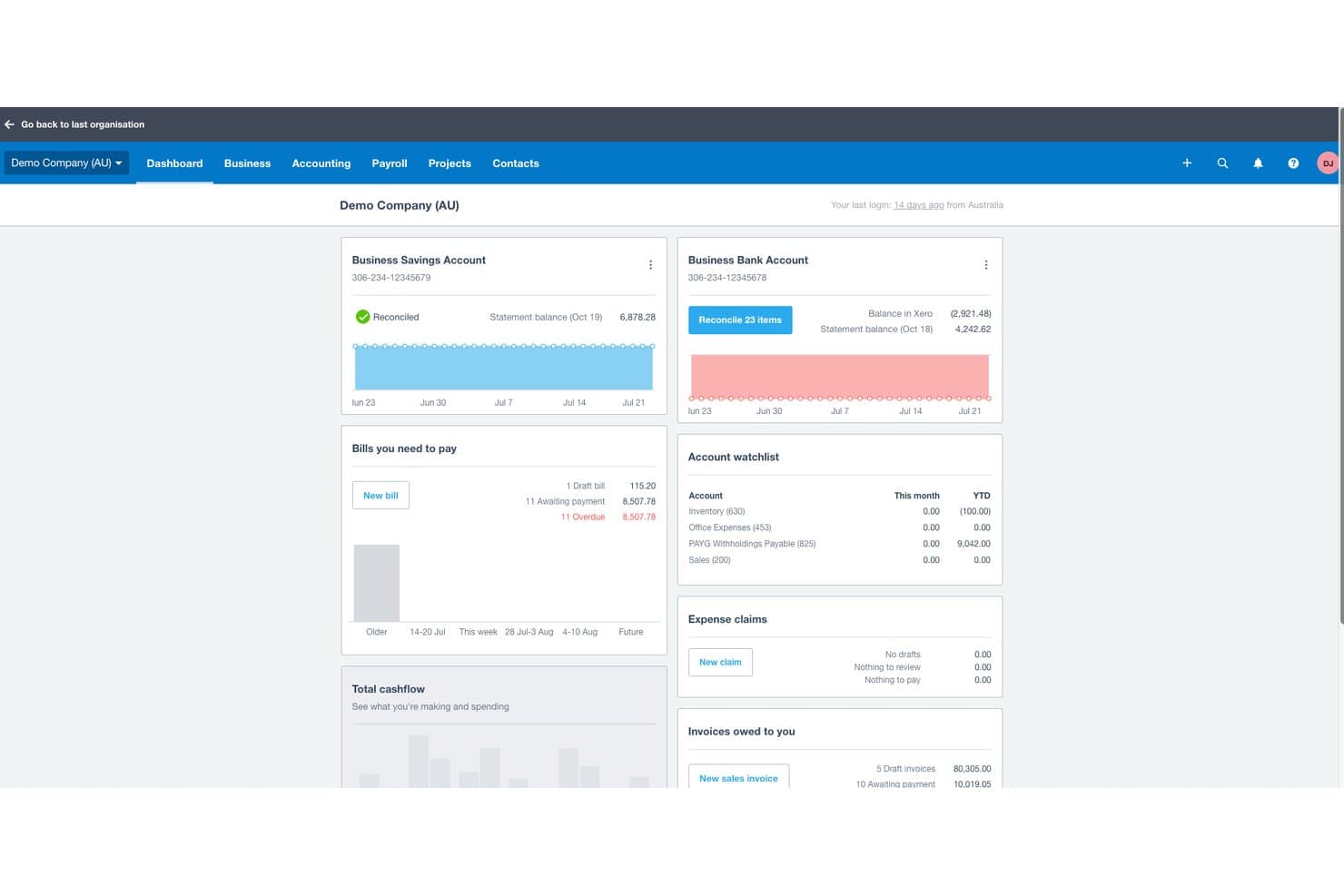
Xero offers a financial dashboard displaying bank account balances, bills payable, invoices owed, and cash flow summaries for church or business accounting. Xero is a cloud-based accounting platform that covers invoicing, bank reconciliation, expense tracking, financial reporting, payroll, and multi-currency management for small to mid-sized churches and nonprofits.
Who Is Xero Best For?
Xero is a strong fit for small to mid-sized churches whose bookkeepers or treasurers need an intuitive general accounting tool without a steep learning curve.
Why I Picked Xero
I picked Xero as one of the best because its built-in multi-currency support is a genuine differentiator for churches running international missions or receiving foreign-currency donations. On the Established plan, I can process international bill payments, reconcile transactions across currencies, and pull reports that consolidate everything into the church's home currency automatically. That removes the manual conversion work that typically creates errors in mission-field expense reporting.
Xero Key Features
- Unlimited user access: Invite multiple staff, volunteers, or advisors to collaborate simultaneously without extra license fees.
- Customizable chart of accounts: Set up your own accounts and tracking categories to align with church ministries or projects.
- Automated bank reconciliation: Import bank transactions automatically and match them to receipts or payments for easier monthly closing.
- Mobile expense claims: Capture and submit receipts on the go through Xero’s mobile app for fast reimbursement.
Xero Integrations
Xero offers native integrations with Hubdoc, Stripe, Square, Shopify, and Etsy, and it connects with Zapier. An API is available for custom integrations.
Pros and Cons
Pros:
- Unlimited users support volunteer accounting teams
- Automated bank reconciliation speeds monthly close
- Tracks foreign-currency donations across multiple missions
Cons:
- Clergy housing allowance requires manual workarounds
- No native fund accounting for restricted gifts
Learn more about Xero: Best for comprehensive bookkeeping
- Free plan + 30-day free trial available
- From $38/month
Visit WebsiteCustomer Rating:4/5
QuickBooks cloud accounting software helps you track all your church financials in one place. QuickBooks Online is a versatile, cloud-based accounting software tailored to meet the needs of small to medium-sized businesses, including specialized sectors like churches requiring unique financial management features. Its comprehensive set of features and user-friendly interface position it as a suitable choice for businesses seeking a robust bookkeeping solution that can handle a variety of financial tasks.
I've been using Quickbooks Online for 5 years, and it is a game-changer for managing our finances. It saves my team and I countless hours. I used to block out time each week to track down expenses and receipts, but with the app, I can quickly upload expense receipts right on the spot, and they’re instantly organized. Quickbooks integrates smoothly with the other tools we use, and when tax season comes, our accountant simply pulls the information they need directly from our QBO account.
Why I picked QuickBooks Online: This software excels as church accounting software by offering customizable accounting solutions, donation tracking, and financial reporting tailored to the specific needs of religious organizations. Additionally, the software helps automate tax preparation for non-profits and maintain compliance with tax regulations.
A huge differentiator is its capability to automate various bookkeeping tasks, which can be particularly beneficial for churches with limited accounting staff.
QuickBooks Online Standout Features & Integrations
Features that make this software stand out include donation tracking which helps you simplify donation management which is critical for accurate donor records and financial transparency. Also, its fund accounting helps track designated funds and grants accurately.
Integrations include PayPal, Square, Shopify, Stripe, Gusto, TSheets, Bill.com, Hubdoc, Receipt Bank, Fathom.
Learn more about QuickBooks Online: Best for AI-powered transaction matching
- Free demo available
- Pricing upon request
Visit WebsiteCustomer Rating:4.9/5
DualEntry gives your team a real-time financial snapshot across revenue, expenses, cash flow, and operational insights—all in one dashboard. DualEntry is an AI-driven ERP system that can help churches handle complex financial operations like fund accounting, multi-campus financial consolidation, and tax management. It’s designed to reduce manual data entry and can support high transaction volumes, which is especially useful for large or growing churches.
Why I Picked DualEntry: I picked DualEntry because it can help churches simplify their financial close process with AI-powered transaction matching and automatic reconciliations. This is especially helpful if your church manages multiple campuses or funds, since the software makes it easier to consolidate and report on your finances.
I also like that DualEntry is built with CPA-led support and a quick go-live process, which can ease the learning curve for church teams.
DualEntry Standout Features & Integrations:
Features include automated revenue recognition, detailed audit trails, and customizable dashboards for tracking fund balances and cash flow. DualEntry also includes tax management tools that integrate with Avalara and Vertex, helping you manage local tax reporting when needed.
Integrations include BambooHR, Bill.com, Brex, Deel, Google SSO, Gusto, HubSpot, Ramp, Rippling, Salesforce, Stripe Billing, and Stripe Invoicing.
Pros and Cons
Pros:
- Automated revenue recognition ensures compliance with standards
- Supports multi-entity and multi-currency operations
- Advanced AI features help with complex accounting tasks
Cons:
- As an ERP, it may offer more features than needed for simpler accounting needs
- Customization options require careful setup
Learn more about DualEntry: Best for donation syncing with Quickbooks
- 30-day free trial available
- From $72/month
Visit WebsiteCustomer Rating:4.7/5
Tithe.ly enables you to organize and schedule service plans with detailed breakdowns of songs and readings. Tithe.ly is a church management system designed to help you manage your church’s finances, events, and community engagement through a centralized platform. It offers tools for digital giving, financial tracking, member management, and communication—all designed to simplify day-to-day church operations.
In reviewing church software year after year, I’ve noticed that “clunky” is the word very often used to describe church accounting/giving systems. My readers tell me, though, that Tithe.ly breaks the mold with a streamlined, straightforward giving process that simply works.
Why I Picked Tithe.ly: I picked Tithe.ly because of its digital giving tools, which make it easy for your congregation to donate via mobile, text, or online. These donations sync with QuickBooks Online, making it easier to manage finances and ensure accurate records without manual entry. Tithe.ly also supports recurring donations and provides reporting features that help track giving trends, offering clarity for financial oversight.
Additionally, Tithe.ly includes event management features that allow you to handle registrations and payments for gatherings of all sizes. Its customizable church app helps keep your community engaged throughout the week, providing a space to share updates, sermons, and announcements—all tailored to your congregation’s needs.
Tithe.ly Standout Features & Integrations
Features include a people database to track member engagement, a website builder to create a church website, messaging tools for text and email communications, kids’ check-in for added security, and background checks and training resources for maintaining safe environments.
Integrations include QuickBooks, RockRMS, Engiven, Salesforce, MinistryPlatform, Shelby, FellowshipOne, Planning Center Online, Church Community Builder, and Elvanto.
 Best for free church bookkeeping
- Free plan + 30-day free trial available
- From $15/month
Visit WebsiteCustomer Rating:4.6/5
You can also use ZipBooks to view basic reports and stay updated on your church’s financial status. If you are looking for a software package with a free forever plan you can use to manage your church’s bookkeeping needs, you may want to consider ZipBooks. ZipBooks is a cloud-based accounting software that provides small business owners with easy-to-use financial management tools. Though not church-specific software, it can of course be used by churches.
Why I Picked ZipBooks: ZipBooks is a user-friendly accounting software designed for small businesses and not-for-profits. One of the things that ZipBooks does well is its ease of use. It has a simple, intuitive interface that allows users to quickly navigate through the different features and functions, making it easy for even those with little or no accounting experience to use. ZipBooks also offers a wide range of features that help small businesses manage their finances, including invoicing, expenses tracking, and financial reporting.
Another strength of ZipBooks is its flexibility. ZipBooks can be accessed from any device with an internet connection, making it easy for users to access their financial information from anywhere at any time. Additionally, ZipBooks offers a variety of integrations that allow users to connect their accounting software with other tools they use in their business, such as payment processors, time tracking software, and more. This makes it easy for small business owners to manage their finances and streamline their workflow.
ZipBooks has the ability to automate many tasks and provide real-time data which helps in better decision making. ZipBooks is also cost-effective and offers a free version which can be upgraded to the paid one for more advanced features.
ZipBooks Standout Features & Integrations
Features include invoicing and billing, expense tracking, financial reporting, online payments, bank and credit card reconciliation, sales tax tracking, multi-currency support, time tracking, project management, team collaboration, customizable templates, mobile app support, customizable dashboards, data import and export, automatic bookkeeping, budgeting and forecasting, payroll support, inventory management, tax compliance, and third-party integrations/add-ons.
Integrations include Google Drive, PayPal, Slack, Google Workspace, Asana, Gusto, Spiceworks, and Enrollsy.
Learn more about ZipBooks:

Sage Intacct provides users a quick view of their financials so they can assess their church’s financial health easily. Sage Intacct is a cloud-based financial management software designed for small to medium-sized businesses, that offers features such as accounting, budgeting, financial reporting, and revenue recognition capabilities.
Why I Picked Sage Intacct: Sage Intacct is highly praised for its cloud-based architecture and scalability, which allows small to medium-sized businesses to access their financial data from anywhere and easily grow their use of the software as their church needs expand.
Sage Intacct can automate many financial processes, such as invoicing, purchasing, and revenue recognition, which can save time and improve efficiency. The software's financial reporting capabilities are also comprehensive, with real-time data, customizable reports, and drill-down capabilities that make it easy to access and analyze the financial information you need to make informed decisions.
In addition, Sage Intacct is known for its strong accounting capabilities, including multi-entity management, and its ability to handle complex accounting requirements such as revenue recognition and ASC 606 compliance.
Overall, Sage Intacct is seen as a powerful and flexible financial management software that can help businesses streamline their financial processes, improve efficiency, and make more informed decisions with real-time financial data.
Sage Intacct Standout Features & Integrations
Features include financial management, automation, financial reporting, multi-entity management, revenue recognition, accounting, budgeting, cloud-based, mobile access, and third-party integrations/add-ons.
Integrations include a host of tools, including Emburse Nexonia, Baker Tilly SaaS Intelligence, FloQast, APS Online, Yooz Accounts Payable Automation, RadiusOne, Workforce, and QCommission.
Learn more about Sage Intacct: Best fund accounting for churches
- Free demo available
- Pricing upon request
Visit WebsiteCustomer Rating:4.4/5
IconCMO allows you to handle your church’s tax-reporting requirements while ensuring compliance with state and federal laws. IconCMO is a church management software that provides tools for membership management, contributions and donations management, financial management, event management, communication, and reporting.
Why I Picked IconCMO: IconCMO is a church management software that excels in several areas like fund management, membership management, accounting, and collaboration.
IconCMO is super easy to navigate and intuitive to use. The interface is user-friendly and straightforward, making it easy for churches to manage their information.
IconCMO provides robust financial management capabilities, including accounting, budgeting, financial reporting, and revenue recognition. Users appreciate the software's ability to track income, expenses, and donations and generate financial statements.
IconCMO does more than just accounting, too. It offers tools for tracking member information, including contact details, attendance, and giving history. Pastors can manage member information and create custom attendance and donations reports. IconCMO even allows churches to schedule, register, and track attendance for events, such as classes, meetings, and fundraisers.
IconCMO is a great "jack-of-all-trades" software with tools for modern church communications including email, text messaging, and social media, alongside everything you expect from a church accounting software.
IconCMO Standout Features & Integrations
Features include membership management, financial management, event management, communication, reporting, online giving, mobile access, security, cloud-based, and third-party integrations/add-ons.
Integrations include Vanco, PayPal, Stripe, Elavon, First Data, Authorize.net, ADP, Paychex, QuickBooks Online, Xero, Church Community Builder, Fellowship One, Planning Center, MailChimp, Constant Contact, Emma, Facebook, Twitter, and LinkedIn.
Learn more about IconCMO: Best for AI-automated bookkeeping
- Free plan available
- From $69/license/month
Visit WebsiteCustomer Rating:4.4/5
Botkeeper's Smart Connect feature makes pulling up bank and credit card statements easy for quick account reconciliation. Botkeeper is an AI-powered bookkeeping software that automates financial tasks and provides real-time data insights for businesses.
Why I Picked Botkeeper: Botkeeper is an AI-powered bookkeeping software that is designed to automate many of the financial tasks that churches typically have to handle manually. One of the key features that Botkeeper excels at is its automation capabilities. The software uses advanced artificial intelligence algorithms to automate tasks such as data entry, bank reconciliation, and financial reporting. This allows church leaders to save time and reduce the risk of errors.
Another strength of Botkeeper is its ability to provide real-time data insights. Botkeeper is able to analyze financial data in real-time, providing churches with a clear picture of their financial health and performance. This allows them to identify trends, identify areas for improvement, and make more informed decisions about their financial strategies.
Botkeeper also offers a great customer support, which ensures that any issues or concerns are addressed quickly. The software is user-friendly and easy to navigate even for those with little or no accounting experience. Furthermore, Botkeeper is cloud-based, which means that churches can access their financial information and data from anywhere at any time.
Botkeeper Standout Features & Integrations
Features include automated bookkeeping, analytics, ai, financial forecasting, customizable reports, multi-user access and permissions, cloud-based access, mobile app access, 24/7 customer support, reminders and notifications, billing and invoicing, expense tracking, payroll processing, budgeting, and third-party integrations/add-ons.
Integrations include Stripe, Gusto, QuickBooks, HubSpot, LinkedIn, Hootsuite, PayPal, Zendesk, Kissmetrics, and Chargify.
Learn more about Botkeeper:

AccountEdge Pro enables users to handle their church’s daily financial activities like making payments, printing checks, or handling purchases. AccountEdge Pro is a small business accounting software that provides advanced financial management and inventory tracking tools.
Why I Picked AccountEdge Pro: AccountEdge Pro is a comprehensive accounting software designed for small businesses (or churches) that provides advanced financial management and inventory tracking tools. AccountEdge Pro offers a wide range of financial management tools such as invoicing, billing, and tracking of expenses. It also provides detailed financial reporting and analysis capabilities, allowing users to track their business's financial performance and make informed business decisions.
AccountEdge Pro is designed to be user-friendly and easy to navigate, allowing users to quickly and easily manage their finances and inventory. It also offers a variety of tutorials and support resources to help users get started.
AccountEdge Pro has inventory tracking and sales tax calculations if you sell anything through the church, like Bibles, t-shirts, or event tickets.
The one-time fee option for Windows is great for churches who aren't looking for a monthly software-as-a-service subscription, which can really add up cost-wise over time. One payment and you own it forever. Unfortunately, the single-use license isn't available for Mac, which offers a per-month subscription only.
AccountEdge Pro Standout Features & Integrations
Features include financial management, inventory management, contact management, sales tax, payroll, time billing, job costing, multi-currency, and third-party integrations/add-ons.
Integrations include QuickBooks, Salesforce, Square, Microsoft Excel, TSheets, Harvest, and most bank feeds.
Learn more about AccountEdge:
Andre alternativer: Verdt å nevne
Selv om disse ikke kom med blant våre 20 beste, er de verdt å nevne (og verdt å utforske for deg også!)
- 11RealmBest for financial discipline and transparency
- 12ACSBest for budget management
- 13SteepleMateBest for centralized financial tracking
- 14Blackbaud Financial Edge NXTBest for financial planning & analysis
- 15MIP Fund AccountingBest for flexible accounting reports
- 16PowerChurch PlusBest all-in-one ChMS system
- 17ChurchTracBest for user-friendliness
- 18Sage Expense Management (formerly Fyle)Best for expense tracking
- 19GracelyBest for managing church finances
- 20MinistryPlatformBest for customizable ministry ecosystems
- 21GustoBest for payroll systems
- 22Breeze ChMSBest for ease of use
- 23GivelifyBest for mobile giving
- 24WAVEBest for a simple bookkeeping and payments option
- 25AplosBest ChMS for customizability
- 26ElexioBest for denominational headquarters
- 27CDM+Best for church event budgets
- 28FlockBaseBest fully-featured & affordable option
- 29Church WindowsBest church database with financials tied in
- 30ChurchProBest all-in-one church management solution
- 31JewelBest for check payments & tracking
- 32ShelbyNextBest for complex church payroll needs
- 33Church360 LedgerBest for easy ledger generation
- 34ExpensePlusBest for midsized churches
- 35MartusToolsBest for budgeting & reporting
- 36Paxton Charities AccountingBest for UK-based churches
Relaterte anmeldelser av kirkeprogramvare
De fleste kirker er avhengige av programvareverktøy for å holde orden og sørge for at ting fungerer problemfritt. Vi har undersøkt de beste bransjeverktøyene som er tilgjengelige, grundig, for å gjøre valgene dine enklere. Anmeldelsene våre hjelper deg med å:
- Redusere den administrative arbeidsmengden med bransjeledende løsninger for kirkeadministrasjon.
- Sørge for problemfrie lønnsutbetalinger med den beste lønnsprogramvaren for kirker
- Utforske de beste alternativene til Quickbooks for regnskapet i kirken din

4 tips for å få mest mulig ut av kirkens regnskapsprogramvare
How I Evaluate Church Accounting Software
I evaluate church accounting tools in two layers: the core must-haves like fund accounting and giving statements, and the differentiators that separate the strongest options from the rest.
Core Functionality (Table Stakes For This List)
When I'm selecting tools for my list, I rank each one on a scale from 0 (does not offer the functionality) to 5 (excels in this area) for each core functionality listed below. Then, I calculate the tool's total score into a percentage. Each tool needs to achieve a minimum total score of 65% to be considered for inclusion.
- Fund Accounting: I check whether a tool can track restricted, unrestricted, and designated funds separately—like isolating a building campaign from your general tithe fund.
- Contribution Management: Each tool should let you record gifts tied to individual donors and generate year-end giving statements that meet tax compliance requirements.
- Church-Oriented Chart of Accounts: I look for a COA that reflects how churches actually organize finances—by ministry, campus, or program—rather than a generic business template.
- Nonprofit Financial Reporting: The tool needs to produce reports like Statement of Activities and budget-vs-actual breakdowns by fund, the kind your elder board or finance committee expects to see.
- Accounts Payable & General Ledger: Core bookkeeping matters here—vendor management, bill pay, journal entries, and bank reconciliation all need to be present and functional.
- Payroll & Clergy Tax Handling: I evaluate whether the platform handles clergy-specific items like housing allowance designations and dual tax status, either natively or through a dedicated payroll integration.
Once I have a list of tools that meet this criteria, I consider what sets each platform apart.
Differentiating Factors (What Sets Vendors Apart)
Here's how I compare and contrast different vendors:
Standout Features
ChMS integration is a big one—I look for tools that sync giving data directly with platforms like Planning Center or Breeze, so your team isn't double-entering donations. Multi-campus accounting also matters for growing churches that need consolidated reporting across locations. Board and elder dashboards are another differentiator I evaluate, since finance committees often include volunteers who need clear financial snapshots without navigating a full ledger.
Beyond Features
Implementation support matters when your bookkeeper is a volunteer who's migrating from spreadsheets or QuickBooks—I evaluate whether the vendor offers guided setup, data migration help, and training geared toward non-accountants. Compliance and audit readiness are other factors I consider, especially for churches that need clean audit trails and segregation of duties to satisfy denominational oversight. I also look at how well the tool fits different church sizes and governance structures, from a small congregation with one treasurer to a multi-site church with layered approvals.
Slik velger du regnskapsprogramvare for kirken
Alle kirker har ulike beslutningsprosesser, men noen grunnleggende krav gjelder for alle. Når du velger regnskapsprogramvare, bør du prioritere følgende:
1. Effektiv budsjettering og fondsoppfølging
Kirkebudsjetter er stramme. Programvaren bør gjøre det enkelt å følge inntekter og utgifter på tvers av flere fond – for eksempel ved å holde donasjoner til misjonsfondet atskilt fra det generelle fondet.
2. Oppfølging og rapportering av donasjoner
Nøyaktige giveropplysninger er ikke valgfritt. Den riktige programvaren automatiserer skattebekreftelser, bidragssammendrag og fondsspesifikke rapporter – og hjelper deg med å følge gaver til byggeprosjekter, utadrettet arbeid og øremerkede fond uten ekstra arbeid.
3. Enkelt og frivilligvennlig grensesnitt
De fleste kirker er avhengige av frivillige til regnskapsføringen. Velg programvare som er enkel å lære, med tydelige kontrollpaneler, slik at personer uten regnskapsbakgrunn kan følge med på økonomien uten en bratt læringskurve.
4. Sømløs integrasjon med kirkens systemer
Dobbel dataregistrering er tidkrevende. Hvis kirken din allerede bruker Planning Center, Fellowship One eller et annet administrasjonsverktøy, bør du velge regnskapsprogramvare som synkroniserer data slik at postene holdes nøyaktige og oppdaterte.
5. Innebygd støtte for samsvar og revisjon
Kirker er underlagt økonomisk tilsyn. Den beste programvaren forenkler revisjoner, sikrer åpenhet og hjelper deg med å overholde regelverket gjennom funksjoner som revisjonsspor, tilpassbare kontoplaner og fondsregnskap.
Trenger du en løsning som går utover regnskap? De fleste av de beste verktøyene for kirkens administrasjon tilbyr regnskapsstøtte – som en del av et alt-i-ett-system. Og hvis du trenger det, finnes det også noen utmerkede verktøy for programvare for giveradministrasjon.
Trender innen regnskapsprogramvare for kirker
Regnskapsprogramvare for kirker fortsetter å utvikle seg, drevet av behovet for bedre effektivitet, åpenhet og etterlevelse av regelverket. Vi analyserte produktoppdateringer, versjonsmerknader og kunngjøringer fra sentrale aktører som Aplos, QuickBooks for Nonprofits og Breeze. Slik utvikler økonomistyringen i kirker seg i år:
Smartere automatisering og integrasjon
- Synkronisering med giveradministrasjon – Plattformer som Aplos og QuickBooks tilbyr nå dypere integrasjon med giveradministrasjon, noe som reduserer manuell dataregistrering.
- Automatisk bankavstemming – Nye funksjoner (f.eks. ACS Technologies) matcher transaksjoner umiddelbart og sparer mange timer.
- API-er og webhooks – Avanserte brukere kan nå koble sammen regnskapssystemer og verktøy for kirkens administrasjon på en sømløs måte.
Bedre økonomisk oversikt
- Tilpassede rapporter for styrer og givere – Aplos og Church Community Builder tilbyr nå fullstendig skreddersydde økonomiske rapporter for å øke åpenheten.
- Kontrollpaneler i sanntid – QuickBooks og Breeze har oppgradert kontrollpanelene sine for å gi øyeblikkelig innsikt i gaver, fondsbalanser og budsjetter.
- Prediktiv analyse – Pushpay og Planning Center tilbyr nå AI-drevne budsjetteringsverktøy som kan forutsi utgifter med større nøyaktighet.
Bedre samsvar og sikkerhet
- Enklere skatterapportering – Oppdateringene i 2025 forenkler årsoppgaver for bidrag og innsending av 1099-skjemaer.
- Rollebasert tilgang – Bedre innstillinger for tillatelser beskytter sensitive data og sikrer at retningslinjene overholdes.
Bedre brukeropplevelse
- Enklere grensesnitt – QuickBooks, Breeze og Aplos har forenklet utformingen for å gjøre navigeringen enklere – spesielt for personer uten regnskapsbakgrunn.
- Mer omfattende kunnskapsbaser – ACS Technologies og Planning Center tilbyr nå detaljerte veiledninger og videoopplæringer, noe som reduserer antallet supportsaker.
Hva er på vei ut?
- Utskrevne rapporter – Digitale kontrollpaneler og automatiserte rapporter erstatter papirrapporter.
- Grunnleggende bokføring – Kirker går videre fra enkel bokføring til spesialiserte økonomiverktøy utviklet for behovene i kirkearbeidet.
Disse endringene viser at riktig programvare ikke bare handler om å holde oversikt over penger – det handler om å hjelpe pastorer med å lede med klarhet og trygghet.
Hva er regnskapsprogramvare for kirker?
Regnskapsprogramvare for kirker er et verktøy som organiserer kirkens økonomi. Det lar deg kontrollere, gjennomgå og organisere donasjoner, lønn, fondsstyring og budsjettering på ett sted. Enten du leder en liten menighet eller en kirke med flere lokasjoner, bidrar regnskapsprogramvare for kirker til å forenkle økonomien, slik at du kan fokusere på menighetsarbeidet.
Funksjoner i regnskapsprogramvare for kirker
Når du velger regnskapsprogramvare for kirker, bør du se etter følgende viktige funksjoner:
- Fondregnskap: Lar deg spore og administrere flere fond eller kontoer separat, slik at du kan sørge for at øremerkede gaver, tilskudd og budsjetter holdes organisert og ikke blandes sammen. Dette er spesielt nyttig for kirker som administrerer flere menighetsarbeid eller byggefond samtidig.
- Donasjonssporing: Holder oversikt over alle donasjoner, enten det er en sjekk i kollekten eller en gjentakende nettgave. Dette forenkler skatterapporteringen og gjør det enkelt å sende kvitteringer og takkemeldinger til de gavmilde giverne.
- Medlemsadministrasjon: Kombinerer regnskapet med en database over kirkens medlemmer, slik at du kan spore givning, givertilsagn og kontaktinformasjon på ett sted. Det gjør årsoppgaver og personlig kommunikasjon enkelt.
- Budsjetteringsverktøy: Hjelper deg med å planlegge og følge med på kirkens utgifter og inntekter. Med tydelige budsjettoversikter kan du oppdage trender, unngå overforbruk og ta økonomiske beslutninger med trygghet.
- Lønnsbehandling: Håndterer lønn, ytelser og skattetrekk for ansatte og geistlige. God programvare sørger for at du overholder både kirkespesifikke regler og vanlige skattelover.
- Økonomirapportering: Genererer detaljerte økonomirapporter – som balanser og resultatregnskap – som er tilpasset kirkeråd, ansatte og menighetsmøter. Det fjerner usikkerheten når du skal dele informasjon om kirkens økonomiske situasjon.
- Leverandørgjeld og kundefordringer: Holder oversikt over innkommende regninger og utgående betalinger, samt inntekter kirken har til gode. Når du har kontroll på dette, holder du leverandørene fornøyde og regnskapet nøyaktig.
- Bankavstemming: Sørger for at det digitale regnskapet samsvarer med faktiske kontoutskrifter, og oppdager raskt feil eller manglende transaksjoner. Dette er uvurderlig under revisjoner eller gjennomganger ved årets slutt.
- Brukertillatelser og sikkerhet: Lar deg kontrollere hvem som kan se, redigere eller administrere bestemte økonomiske data. Dette holder sensitiv informasjon trygg og reduserer risikoen for feil eller svindel.
- Integrasjon med kirkeadministrasjonssystemer: Kobler seg sømløst til andre plattformer du allerede bruker – som verktøy for arrangementsplanlegging eller kommunikasjon – slik at teknologiløsningene dine fungerer sammen, ikke mot hverandre.
Fordeler med regnskapsprogramvare for kirker
Å håndtere kirkens økonomi uten riktig programvare fører til feil, bortkastet tid og økonomiske blindsoner. Den beste regnskapsprogramvaren for kirker gjør mer enn å knuse tall – den holder kirken økonomisk sunn og fokusert på menighetsarbeidet.
5 viktige fordeler for hovedpastorer:
- Nøyaktig fondssporing – Hold øremerkede fond organiserte og i samsvar med regelverket.
- Forenklet donasjonsadministrasjon – Automatiser sporing og rapportering av bidrag.
- Tydelig økonomirapportering – Få økonomisk innsikt i sanntid for bedre beslutninger.
- Enkel lønnsbehandling – Sørg for nøyaktig lønn til geistlige og ansatte.
- Tidsbesparende automatisering – Frigjør arbeidstid for de ansatte, slik at de kan fokusere på menighetsarbeid i stedet for papirarbeid.
Ved å ligge i forkant av disse trendene kan pastorer lede med trygghet, vel vitende om at kirkene deres har de riktige verktøyene for økonomisk oversikt, integritet og vekst.
Ved å bruke spesialisert regnskapsprogramvare kan pastorer fokusere på sitt viktigste kall, mens de overlater detaljene i økonomistyringen til ekspertene.
Joshua Gordon
Kostnader og priser for regnskapsprogramvare for kirker
Prisplanene varierer vanligvis basert på kirkens størrelse, hvor komplekse de økonomiske behovene er, og hvilke funksjoner som ønskes. Her er en oversikt over plantyper og prisalternativer som er vanligst i bransjen:
| Plantype | Gjennomsnittspris | Vanlige funksjoner | Best egnet for … |
|---|---|---|---|
| PlantypeGratis | Gjennomsnittspris$0/måned | Vanlige funksjonerBokføring, fondsregnskap, sporing av donasjoner, grunnleggende rapportering, tillatelser for frivillige | Best egnet for …Små kirker med enkle økonomiske behov |
| PlantypeGrunnleggende | Gjennomsnittspris$25-$50/måned | Vanlige funksjonerAlle funksjonene i Gratis, budsjettering, lønnskjøring, bankavstemming | Best egnet for …Mellomstore kirker som trenger funksjoner for lønnskjøring og budsjettering |
| PlantypeStandard | Gjennomsnittspris$50-$100/måned | Vanlige funksjonerAlle funksjonene i Grunnleggende, støtte for flere lokasjoner, rollebaserte tillatelser, tilpassede rapporter | Best egnet for …Større kirker som trenger omfattende økonomistyring og teamsamarbeid |
| PlantypeAvansert | Gjennomsnittspris$100-$200/måned | Vanlige funksjonerAlle funksjonene i Standard, integrasjon for giveradministrasjon, avansert analyse, mobilapp | Best egnet for …Store kirker med komplekse økonomiske prosesser og behov for spesifikke tilpasninger |
| PlantypeBedrift | Gjennomsnittspris$200+/måned | Vanlige funksjonerAlle funksjonene i Avansert, ubegrenset antall brukere, dedikert kundeansvarlig, API-tilgang | Best egnet for …Megakirker eller organisasjoner med svært komplekse økonomiske prosesser i stor skala |
Valg av riktig abonnement avhenger av størrelsen på kirken din og de spesifikke behovene dine innen økonomistyring. Vurder å begynne med et gratis eller grunnleggende abonnement for å utforske funksjonene. Derfra kan du gå over til et mer omfattende alternativ etter hvert som behovene dine øker.
Vanlige spørsmål