

Managing a church's schedule can be overwhelming. Between coordinating volunteers, planning events, and managing resources, it's easy to feel swamped. That's where church scheduling software steps in to help you keep everything organized.
I've spent time testing and reviewing various software solutions to bring you the best options available. My experience in the church management industry allows me to offer an unbiased perspective. You can trust that my reviews are well-researched and focused on your needs.
In this article, I'll guide you through top church scheduling software picks, highlighting their benefits and features. You'll find the right tool to make your scheduling tasks easier and more efficient.
Why Trust Our Software Recommendations
6,700+
Reviews
20
Industry experts
16+
Evaluation factors
14
Years
Our team has been testing and reviewing software since 2012. As church leaders ourselves, we know how difficult—and important—it is to choose the right software.
For this guide, we evaluated tools using hands-on testing and independent research, scoring tools using our selection criteria.
Our reviews reflect our human editorial judgment, not a sales pitch.
Best Church Scheduling Software Summary
This comparison chart summarizes pricing details for my top church scheduling software selections to help you find the best one for your budget and business needs.
| Tool | Best For | Trial Info | Price | ||
|---|---|---|---|---|---|
| 1 | Best for church facility and event booking | Free demo available | From $99/month (billed annually) | Website | |
| 2 | Best for one-time and recurring events | Free plan available + 30-day free trial | From $12/month | Website | |
| 3 | Best for simple church facility scheduling | 14-day free trial | From $19/spot/month | Website | |
| 4 | Best for simple appointment scheduling | 14-day free trial + free plan + free demo available | From $10/seat/month (billed annually) | Website | |
| 5 | Best for small to medium churches | Free demo available | From $72/month | Website | |
| 6 | Best for flexible team management | Free plan available | From $15/month | Website | |
| 7 | Best for team collaboration features | 30-day free trial available | From $37/month | Website | |
| 8 | Best for volunteer scheduling | six-month subscription (with money-back guarantee), followed by annual renewals | Pricing varies based on plan and number of volunteers | Website | |
| 9 | Best for unifying worship, volunteer, and facility schedules | Free demo available | Pricing upon request | Website | |
| 10 | Best for event-focused scheduling | Free demo upon request. | Customized pricing upon request | Website |


Best Church Scheduling Software Reviews
Below are my detailed summaries of the best church scheduling software that made it onto my shortlist. My reviews offer a detailed look at the key features, pros & cons, integrations, and ideal use cases of each tool to help you find the best one for you.
 Best for church facility and event booking
- Free demo available
- From $99/month (billed annually)
Visit WebsiteCustomer Rating:4.3/5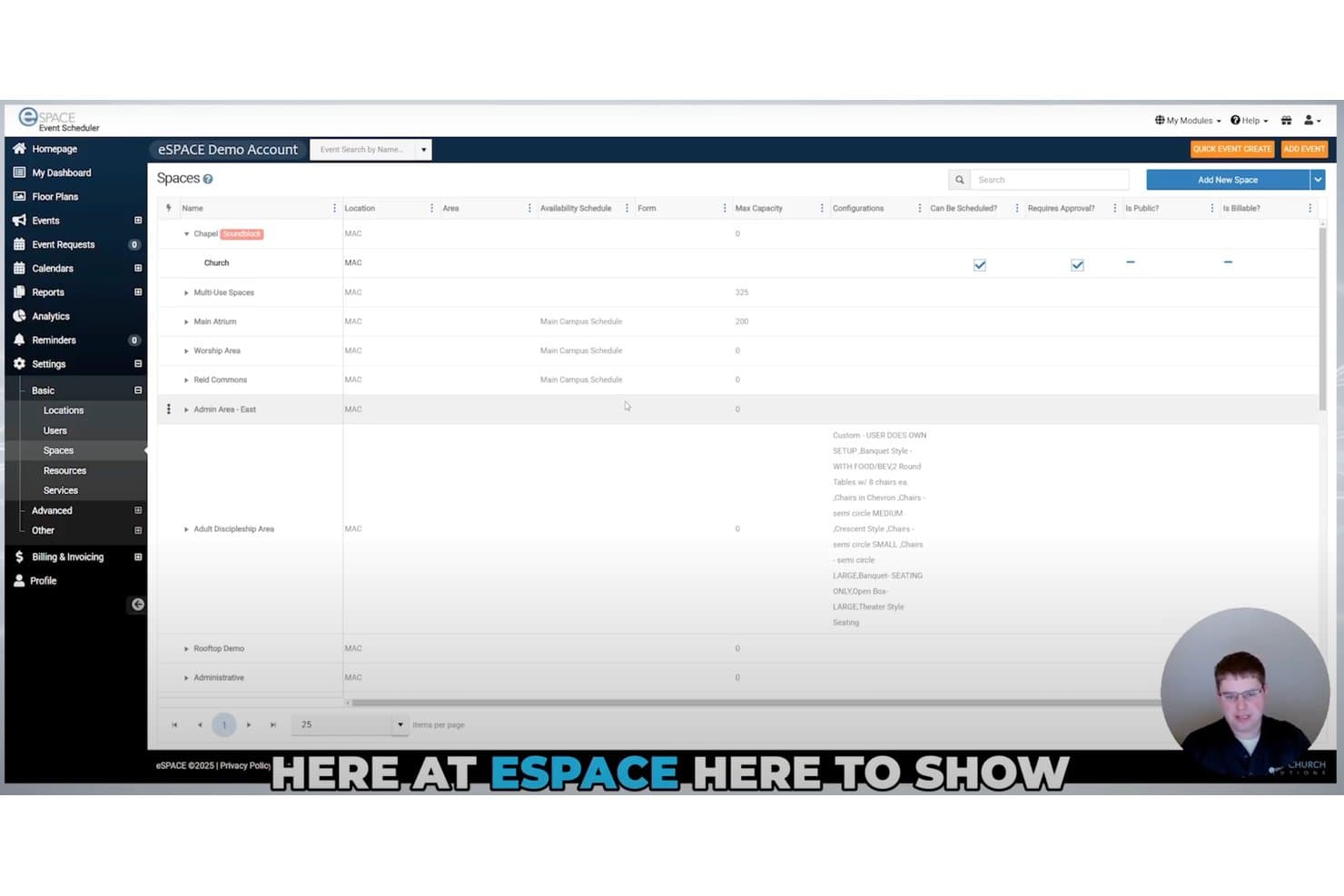
eSPACE lets users manage and view all schedulable church spaces in one place. eSPACE is a church facility and event scheduling platform that handles room and resource booking, conflict detection, event calendars, work orders, and IoT-based facility automation.
Who Is eSPACE Best For?
eSPACE is a strong fit for church administrators who manage facility bookings, room reservations, and event logistics across one or more campuses.
Why I Picked eSPACE
eSPACE earns its spot on my shortlist because facility and event booking is genuinely where it shines. I love how its real-time conflict detection catches double bookings across rooms, resources like tables and chairs, and services like child care, all in one request. You can also set up public event request forms and a church website calendar, so outside groups can submit bookings without calling the office.
eSPACE Key Features
- Public event request forms: Outside groups and ministries can submit booking requests directly through a public-facing form, without calling the office.
- Multi-view calendar display: Color-coded categories, group templates, and multiple calendar views give admins a clear picture of what's happening across your facility.
- ChMS integrations: eSPACE connects with Planning Center, Rock RMS, Breeze, and several other church management systems to keep data in sync.
- Work order management: A separate module lets your facilities team create, track, and manage maintenance work orders and preventive schedules alongside event bookings.
eSPACE Integrations
eSPACE offers documented integrations with Planning Center, Rock RMS, Breeze, ACS Technologies, Ministry Platform, ChurchTeams, TouchPoint, and DynaCal. It also connects with Google Calendar and Outlook, supports iCal export, and provides an open API for custom integrations.
Pros and Cons
Pros:
- Connects event schedules with facility automation
- Handles public event requests without office calls
- Prevents double bookings across rooms and resources
Cons:
- Omits service plans, songs, and substitutions
- Doesn't schedule volunteers or worship teams
Learn more about eSPACE: Best for one-time and recurring events
- Free plan available + 30-day free trial
- From $12/month
Visit WebsiteCustomer Rating:4.9/5
ChMeetings dashboard displaying key church metrics, including people, events, contributions, volunteer follow-ups, and recent attendance data. ChMeetings caters to churches seeking to enhance their organizational efficiency and community engagement. Designed for church leaders and administrators, this software addresses the need for streamlined scheduling, effective volunteer management, and simplified event coordination. By integrating essential functionalities into one platform, ChMeetings alleviates the complexities of managing church activities, allowing you to focus on fostering a vibrant church community.
Why I Picked ChMeetings
I picked ChMeetings because it excels in simplifying the complexities of church scheduling and volunteer management. Its robust event management system allows you to organize both one-time and recurring events effortlessly, complete with RSVP tracking and capacity management. Additionally, the volunteer scheduling feature is invaluable, enabling you to assign roles and send automated reminders to ensure smooth operations. These features directly address the challenges faced by church administrators, making ChMeetings a practical choice for managing church activities.
ChMeetings Key Features
Aside from its standout event and volunteer management capabilities, ChMeetings offers several other features that enhance its utility as a church scheduling tool.
- People & Groups Management: Create and manage detailed member profiles and group assignments, ensuring everyone is connected and accounted for.
- Worship Planning: Coordinate worship services by managing songs and service elements to create a seamless worship experience.
- Member Portal: Empower members to update their information, register for events, and access group details through a user-friendly portal.
- Messaging Tools: Communicate effortlessly with your congregation through integrated email, text, and push notification options.
ChMeetings Integrations
Integrations include PayPal, Mailchimp, Stripe, and Zapier for connecting with over 7,000 additional apps, enhancing its flexibility and functionality.
Pros and Cons
Pros:
- Member portal for self-service access
- Volunteer scheduling with automated reminders
- Robust event scheduling and attendance
Cons:
- No fully offline functionality currently
- Advanced reporting may feel limited
Learn more about ChMeetings: Best for simple church facility scheduling
- 14-day free trial
- From $19/spot/month
Visit WebsiteCustomer Rating:4.6/5
Whatspot calendar view filtering bookings by resource groups like rooms and labs. Whatspot is a straightforward facility and resource booking system designed to help organizations manage shared spaces and equipment. For churches, it serves as an effective tool to eliminate the chaos of double-booked fellowship halls, classrooms, and church vans. It solves the challenge of coordinating multiple ministry events across a busy campus by centralizing all physical resource reservations.
Who Is Whatspot Best For?
It is best for small to mid-sized churches that need a dedicated, easy-to-use system solely for managing physical spaces and assets.
Why I Picked Whatspot
While many church platforms focus heavily on volunteer rosters, I included Whatspot because managing the actual physical building is just as crucial. It stands out as the best for simple church facility scheduling, ensuring ministries aren't fighting over the same meeting room. The standout feature is its QR code functionality, allowing church staff or small group leaders to walk up to a room, scan a code on their phone, and instantly secure the space if it is empty.
Whatspot Key Features
- QR code bookings: Enables users to scan a code placed outside a church room to instantly book it or check its daily schedule.
- Resource grouping: Allows administrators to categorize bookable assets, such as grouping all multimedia equipment or church vehicles together.
- Approval workflows: Provides an option to require a facility manager's approval before a large space, like the sanctuary, is fully reserved.
- Visual calendar: Displays a clear, color-coded daily or weekly overview of all campus spaces so staff can easily spot availability.
Whatspot Integrations
Integrations include Google Calendar, Microsoft Outlook, and Microsoft Teams.
Pros and Cons
Pros:
- Free plan for up to 3 resources
- Cloud-based with no installation
- Prevents double-booking rooms
Cons:
- Lacks worship planning features
- Limited user roles on base plans
Learn more about Whatspot: Best for simple appointment scheduling
- 14-day free trial + free plan + free demo available
- From $10/seat/month (billed annually)
Visit WebsiteCustomer Rating:4.7/5
Calendly automates appointments by syncing calendars and managing availability. Calendly is a scheduling tool designed for individuals and teams needing appointment management. It helps users automate meeting scheduling by syncing with calendars and managing availability.
Why I picked Calendly: It's ideal for simple appointment scheduling, offering a straightforward interface to coordinate meetings. You can set your availability preferences, allowing others to book time slots without back-and-forth emails. The software integrates with various calendars to avoid double bookings. In my experience, its simplicity and focus on eliminating scheduling conflicts make it a great choice for churches and organizations needing easy appointment management.
Standout features & integrations:
Features include customizable scheduling links that you can share with others, automatic time zone detection to prevent confusion, and buffer times between meetings to ensure you have enough prep time. These features help your appointment scheduling process.
Integrations include Google Calendar, Microsoft Outlook, Zoom, Slack, Salesforce, HubSpot, Mailchimp, Stripe, PayPal, and Microsoft Teams.
Pros and Cons
Pros:
- Handles cross-time zone bookings
- Supports multiple meeting types
- Reduces email scheduling backlogs
Cons:
- Complex events need other tools
- No church specific data fields
Learn more about Calendly: Best for small to medium churches
- Free demo available
- From $72/month
Visit WebsiteCustomer Rating:4.8/5
Tithely Church Management (formerly Breeze ChMs) helps small churches handle everyday tasks like attendance, roles, and events. Tithely Church Management (Breeze ChMs) is a church management software designed for small to medium churches. It offers tools for scheduling, member management, and event coordination to help with church operations.
Why I picked Tithely Church Management (Breeze ChMs): It's tailored for small to medium churches, providing easy-to-use scheduling and communication features. You can manage events and track attendance, keeping your church activities organized. The software also offers member management tools that help you maintain detailed records. In my experience, its user-friendly interface makes it a great fit for churches with limited tech resources.
Standout features & integrations:
Features include a built-in calendar for event planning, customizable member profiles to track engagement, and a donation management system to handle contributions. These features ensure you can manage your church’s needs.
Integrations include QuickBooks, Mailchimp, Google Calendar, Microsoft Outlook, Planning Center, PayPal, Stripe, Twilio, Zoom, and Elvanto.
Pros and Cons
Pros:
- Supports basic volunteer rotations
- Fits small church teams
- Simple recurring event tools
Cons:
- Check-in hardware options narrow
- Larger churches may outgrow
Learn more about Breeze ChMS: Best for flexible team management
- Free plan available
- From $15/month
Visit WebsiteCustomer Rating:4.7/5
Planning Center manages volunteers, resources, and events. Planning Center is a church scheduling software designed for churches of all sizes. It helps manage volunteer scheduling, resource planning, and event coordination.
Why I picked Planning Center: It's ideal for flexible team management, offering features like customizable scheduling templates and volunteer communication tools. The software allows you to create and adjust schedules easily, accommodating changes in your team. You can also use its check-in system to track attendance and manage events. The ability to communicate directly with volunteers through the platform means all your details are in one place.
Standout features & integrations:
Features include a drag-and-drop scheduler for easy adjustments, a check-in system for managing attendance, and a centralized communication hub for connecting with your team.
Integrations include Mailchimp, Zoom, QuickBooks, Stripe, PayPal, Twilio, Google Calendar, Microsoft Outlook, Slack, and Dropbox.
Pros and Cons
Pros:
- Strong volunteer rotation controls
- Handles multi-site campuses
- Adapts to many ministries
Cons:
- Smaller churches may overbuy
- Many modules to configure
Learn more about Planning Center: Best for team collaboration features
- 30-day free trial available
- From $37/month
Visit WebsiteCustomer Rating:4.7/5
Churchteams centers on group life, helping teams coordinate roles and follow up. Churchteams is a church management software designed to facilitate team collaboration and communication. It caters to churches of all sizes, helping with scheduling, member management, and group coordination.
Why I picked Churchteams: It works with team collaboration features, offering tools that aid communication among church staff and volunteers. The software includes a group management system that helps you organize and track small groups. You can also use its text and email communication tools to keep everyone informed. In my experience, its focus on team collaboration makes it particularly useful for churches with active volunteer teams.
Standout features & integrations:
Features include an automated follow-up system to engage new members, a customizable form builder for gathering information, and a check-in system for events and services. These features help you maintain engagement and manage church activities.
Integrations include QuickBooks, Mailchimp, Planning Center, PayPal, Stripe, Google Calendar, Microsoft Outlook, Zoom, Twilio, and FellowshipOne.
Pros and Cons
Pros:
- Flexible volunteer templates available
- Good oversight across ministries
- Helpful automation for follow up
Cons:
- Plans capped by size/quantity of people
- No general calendar view
Learn more about Churchteams: Best for volunteer scheduling
- six-month subscription (with money-back guarantee), followed by annual renewals
- Pricing varies based on plan and number of volunteers
Visit WebsiteCustomer Rating:4.6/5
Ministry Scheduler Pro organizes volunteers and keeps communication simple. Ministry Scheduler Pro is a church scheduling software tailored for volunteer management. It serves churches of various sizes by organizing volunteer schedules and simplifying communication.
Why I picked Ministry Scheduler Pro: It's ideal for volunteer scheduling, offering features like automated reminders and conflict management. The software helps you manage volunteer availability, preventing scheduling conflicts. You can also send automated emails to keep your team informed and engaged. In my experience, its ability to handle complex scheduling needs makes it a good choice for churches with active volunteer programs.
Standout features & integrations:
Features include detailed volunteer profiles that store preferences and availability, a mobile app for on-the-go access, and customizable reports to track participation. These features help you manage your volunteer program.
Integrations include Google Calendar, Microsoft Outlook, Apple Calendar, Mailchimp, Planning Center, Church Community Builder, Elvanto, Realm, FellowshipOne, and Servant Keeper.
Pros and Cons
Pros:
- Helpful swap request workflows
- Handles large ministry rosters
- Strong conflict avoidance logic
Cons:
- Harder for casual coordinators
- Limited broader admin features
Learn more about Ministry Scheduler Pro: Best for unifying worship, volunteer, and facility schedules
- Free demo available
- Pricing upon request
Visit WebsiteCustomer Rating:4/5
Pushpay boosts mobile giving, engagement, and donor interaction. Pushpay is a church management platform built to help churches coordinate everything that happens on a Sunday—from the worship plan to volunteer assignments to the rooms and resources each ministry needs. It’s designed for churches that want their scheduling, service planning, and facility coordination to live in one place rather than across multiple tools.
Why I picked Pushpay: Pushpay stands out for how tightly it connects worship service plans to the people and spaces involved. Its auto-scheduling tools help you fill volunteer roles based on rotations and availability, while its Rooms & Resources system ensures events and services get the right spaces and equipment without double-booking. In my experience, this “all-in-one scheduling ecosystem” is especially helpful for churches with multiple ministries, service types, or campuses.
Standout features & integrations:
Features include unified service and volunteer scheduling, allowing you to build detailed service plans and assign roles in the same workflow. Pushpay also offers auto-scheduling to fill volunteer positions based on serving patterns, plus facility management tools for reserving rooms, managing equipment, and preventing conflicts across ministries. You can sync event and room calendars with Google, iCal, or Outlook, and keep everyone informed with built-in communication tools for sending reminders, updates, and service details.
Integrations include Salesforce, Planning Center, QuickBooks, Church Community Builder, Rock RMS, Elvanto, Google Calendar, Microsoft Outlook, Zoom, and Twilio.
Pros and Cons
Pros:
- Scales well for churches with multiple ministries
- Ideal for multi-campus churches needing coordinated service plans
- Also offers donation tools and features
Cons:
- Configuration paths feel complex
- Adds another administrative layer if you already use separate planning tools
Learn more about Pushpay: 10Best for event-focused scheduling
EventPro
- Free demo upon request.
- Customized pricing upon request
Visit WebsiteCustomer Rating:4.1/5
EventPro handles planning, organizing, and executing detailed events. EventPro is an event management software designed for organizations needing scheduling solutions. It serves various users, including churches, by offering tools to plan, organize, and execute events.
Why I picked EventPro: It specializes in event-focused scheduling, providing detailed tools for managing large and small events. You can coordinate multiple aspects of an event, from venue booking to resource allocation. The software also offers scheduling tools that help you stay on top of timelines and deadlines. In my experience, its focus on event management makes it good for churches with active event calendars.
Standout features & integrations:
Features include a venue management system that helps you book and manage spaces, a resource management module to allocate equipment and staff, and a timeline feature to keep track of event schedules. These features ensure your events are well-organized and executed smoothly.
Integrations include Microsoft Outlook, Google Calendar, QuickBooks, Salesforce, Mailchimp, Zoom, Twilio, Eventbrite, Constant Contact, and Slack.
Pros and Cons
Pros:
- Good multi-day event handling
- Helpful planning timelines built in
- Excels at complex event logistics
Cons:
- Not built with specific Church-use in mind
- Many parameters to configure
Learn more about EventPro:
Other Church Scheduling Software
Here are some additional church scheduling software options that didn’t make it onto my shortlist, but are still worth checking out:
- 11ChurchTracBest for budget-conscious churches
- 12ParishSOFTBest for Catholic parishes
- 13Fellowship OneBest for large church networks
- 14Shepherd's StaffBest for traditional church operations
- 15B1 ChurchBest for community engagement
- 16One Church SoftwareBest for integrated church management
- 17DoodleBest for group scheduling simplicity
- 18
- 19Faith TeamsBest for all-in-one church management
- 20Event Scheduler by Smart Church SolutionsBest for facility management
How I Evaluate Church Scheduling Software
I split my evaluation into three parts, with the most weight on assigning recurring volunteer roles and capturing availability for services and rehearsals. Next, I consider mobile access and multi-campus support. Finally, I look at onboarding, support, and nonprofit-friendly pricing.
Core Functionality (Table Stakes For This List)
When I'm selecting tools for my list, I score each one on a scale from 0 (does not offer the functionality) to 5 (excels in this area) for each core functionality listed below. I then convert the total into a percentage to help assess each tool's overall fit, with extra weight on any functionalities I’ve deemed essential.
- Volunteer Scheduling (Essential): I look for recurring and one-time assignments for services, rehearsals, events, and ministry roles.
- Availability Management (Essential): I check whether volunteers can submit blackout dates and recurring availability before coordinators assign shifts.
- Automated Notifications: I assess confirmations and reminders for upcoming assignments, rehearsals, schedule changes, and unconfirmed roles.
- Shift Swaps And Replacements: I look for volunteer-initiated swap requests, approval steps, and routing to qualified available replacements.
- Service And Event Planning: I evaluate links between assignments and service plans, event details, rehearsals, or worship schedules.
- Role And Team Organization: I check whether teams such as musicians, greeters, and A/V volunteers support targeted scheduling.
Once I have a list of tools that meet the criteria, I consider what sets each platform apart.
Differentiating Factors (What Sets Vendors Apart)
Here's how I compare and contrast different vendors:
Standout Features
I check whether a tool supports CCLI or OneLicense reporting, since manually tracking song usage across multiple services each week is tedious and error-prone. Multi-campus support also matters—I look for shared volunteer pools alongside site-specific scheduling so a worship leader at one location can pull from a centralized roster without conflicting with another campus. Custom position permissions let ministry leaders manage their own teams without exposing sensitive member data, which is especially important when children's ministry coordinators need access scoped only to their volunteers.
Beyond Features
I evaluate how quickly non-technical volunteers can actually adopt a platform. A children's ministry coordinator who serves twice a month shouldn't need a training session to confirm a shift, so I look for onboarding flows that let occasional users respond from a single link or text. I also check whether pricing scales by campus or site rather than per seat, since per-seat models punish churches with large volunteer rosters. Finally, I consider how well each tool syncs with an existing ChMS like Breeze or Church Community Builder, because duplicate member records between systems create the exact scheduling conflicts you're trying to prevent.
How to Choose Church Scheduling Software
It’s easy to get bogged down in long feature lists and complex pricing structures. To help you stay focused as you work through your unique software selection process, here’s a checklist of factors to keep in mind:
| Factor | What to Consider |
| Scalability | Will the software support your church's growth? Check if it can handle more users and events as your community expands. |
| Integrations | Does it connect with tools you already use, like Google Calendar or Mailchimp? Data flow saves time and reduces errors. |
| Customizability | Can you tailor the software to fit your church's specific needs and workflows? Look for flexible settings and options. |
| Ease of use | Is the software intuitive for staff and volunteers? A user-friendly interface minimizes training time and boosts adoption. |
| Implementation and onboarding | How long will it take to get up and running? Consider the ease of data migration, setup steps, and available training resources. |
| Cost | Does the pricing fit your budget? Look beyond the sticker price—consider total cost of ownership, including add-ons and future upgrades. |
| Security safeguards | How does the software protect your data? Ensure it meets your security standards with encryption and regular updates. |
| Support availability | What support channels are available? Ensure timely help with live chat, phone support, and a useful knowledge base. |
What Is Church Scheduling Software?
Church scheduling software is a tool designed to help churches manage events, volunteers, and resources efficiently. Church administrators, event coordinators, and volunteer managers typically use these tools to organize activities and improve communication. Calendar management, volunteer coordination, and automated reminders help with organizing schedules and managing resources. Overall, these tools simplify administration and enhance community engagement within churches.
Features of Church Scheduling Software
When selecting church scheduling software, keep an eye out for the following key features:
- Volunteer coordination: Manage and schedule volunteers efficiently to ensure all roles are filled during events and services.
- Event management: Organize and track church events, including room bookings and resource allocation, to avoid conflicts and overlap.
- Automated reminders: Send notifications to volunteers and staff to keep everyone informed and reduce last-minute changes.
- Calendar integration: Sync with popular calendar apps like Google Calendar and Outlook to keep all schedules in one place.
- Member management: Maintain a database of church members with contact information and engagement history for better relationship management.
- Customizable templates: Use pre-designed templates to quickly set up schedules and events tailored to your church's needs.
- Mobile app access: Allow users to manage schedules and check availability on the go, increasing convenience and accessibility.
- Reporting and analytics: Generate reports on attendance, volunteer participation, and event success to make informed decisions.
- Security features: Protect sensitive data with encryption and access controls to ensure privacy and compliance.
- Communication tools: Facilitate communication between staff, volunteers, and members through integrated messaging and email systems.
Benefits of Church Scheduling Software
Implementing church scheduling software provides several benefits for your team and your business. Here are a few you can look forward to:
- Improved organization: Keep track of events, volunteers, and resources in one place, reducing the risk of scheduling conflicts.
- Time savings: Automate reminders and scheduling tasks to free up time for more important activities.
- Enhanced communication: Use built-in tools to keep staff, support team, volunteers, and members informed and engaged.
- Increased participation: Easily manage volunteer schedules to ensure all roles are filled and encourage greater involvement.
- Data-driven decisions: Generate reports and analytics to understand trends and improve church operations.
- Greater accessibility: Access schedules and manage events from anywhere with mobile app capabilities.
- Better member engagement: Maintain detailed member records to strengthen relationships and personalize interactions.
Costs and Pricing of Church Scheduling Software
Selecting church scheduling software requires an understanding of the various pricing models and plans available. Costs vary based on features, team size, add-ons, and more. The table below summarizes common plans, their average prices, and typical features included in church scheduling software solutions:
Plan Comparison Table for Church Scheduling Software
| Plan Type | Average Price | Common Features |
| Free Plan | $0 | Basic event scheduling, limited volunteer management, and basic communication tools. |
| Personal Plan | $5-$25/user/month | Advanced scheduling options, customizable templates, and mobile app access. |
| Business Plan | $25-$50/user/month | Comprehensive member management, automated reminders, and detailed reporting and analytics. |
| Enterprise Plan | $50-$100/user/month | Full integration capabilities, advanced security features, and priority customer support. |
Church Scheduling Software FAQs
Here are some answers to common questions about church scheduling software:
How do you decide between a stand-alone tool and an all-in-one church management system?
When comparing options, start by identifying what your church leaders need to manage each week. If your focus is scheduling volunteers, tracking rooms, or handling recurring events, a stand-alone scheduler may be simpler to learn and adopt. If you also want features like online giving, attendance tracking, online donations, or church website integrations, choosing an all-in-one system may reduce the number of software tools you rely on. Consider your budget, how cloud-based systems fit your workflow, and whether you want everything connected in a single platform often found in the best church management software.
How many people on your team should have admin access to church scheduling software?
Most churches only need a few trusted leaders to have full admin access. Reserve those permissions for staff members and select volunteer managers who oversee schedules or sensitive information. Others can use limited roles to view assignments, receive updates, or respond to text messages or confirmations. Keeping admin access small reduces errors while ensuring at least two people can manage critical tasks if someone is unavailable.
How can church scheduling software help with volunteers who don’t use email or smartphones?
You can still centralize everything in your church scheduling software even if some volunteers prefer offline communication. Keep the digital version as your primary record, then print schedules or export spreadsheets for those who need physical copies. A designated team lead can share updates through phone calls, text messages, or in-person reminders. The goal is maintaining accurate information in one place while supporting volunteers who do not interact with technology.
What’s the best way to roll out church scheduling software if you currently use paper sign-up sheets?
Start small by moving one ministry or service into the new system. Continue using paper sign-up sheets briefly but enter those sign-ups into the software so your team becomes familiar with a digital workflow. Show volunteers how their roles appear in the new tool and how updates will be shared. As everyone gets comfortable, you can phase out paper and rely fully on your cloud-based church scheduling software.
How can you use church scheduling software data to prevent volunteer burnout?
Most systems provide helpful insights such as how often individuals serve, which roles they fill, and when they last took time off. Using this data, you can plan healthier rotations, balance responsibilities, and avoid overloading the same people each week. Tracking patterns over time helps identify when someone needs a break and when new volunteers should be invited into the rotation.
What should you do if your church outgrows its current church scheduling software?
If you notice limits around teams, events, or user access, it may be time to evaluate options. First review whether your current provider offers higher tiers or add-ons that suit growing church plants or expanding ministries. If not, list your must-have features, such as child check-in, attendance tracking, or integrations with online giving or your church website, and compare alternative systems based on those needs. Transition gradually by testing the new platform with one ministry before moving everything over.
What’s Next:
If you're in the process of researching church scheduling software, connect with a SoftwareSelect advisor for free recommendations.
You fill out a form and have a quick chat where they get into the specifics of your needs. Then you'll get a shortlist of software to review. They'll even support you through the entire buying process, including price negotiations.