

Church expense management software helps you track, approve, and report on your ministry’s spending, so you can steward resources with clarity and accountability. If you’re searching for the best church expense management software, you’re likely balancing the need for financial transparency with the realities of limited staff, volunteer turnover, and complex reporting requirements.
The right tool can help you manage budgets, automate approvals, and keep your congregation’s trust—without adding to your administrative burden. In this guide, you’ll find a carefully researched shortlist of solutions designed for large and small churches, so you can compare features and choose the best fit for your ministry’s needs.
Why Trust Our Software Recommendations
6,700+
Reviews
20
Industry experts
16+
Evaluation factors
14
Years
Our team has been testing and reviewing software since 2012. As church leaders ourselves, we know how difficult—and important—it is to choose the right software.
For this guide, we evaluated tools using hands-on testing and independent research, scoring tools using our selection criteria.
Our reviews reflect our human editorial judgment, not a sales pitch.
Church Expense Management Software Comparison Table
This comparison table summarizes pricing details for my top church expense management software selections:
| Tool | Best For | Trial Info | Price | ||
|---|---|---|---|---|---|
| 1 | Best for expense policy enforcement | Free demo available | From $11.99/user/month (billed annually) | Website | |
| 2 | Best for procurement-focused inventory purchasing | 90-day free trial | From $100/month | Website | |
| 3 | Best for integration with existing accounting tools | 30-day free trial | From $38/month | Website | |
| 4 | Best for automated compliance workflows | 15-day free trial | From $79/month | Website | |
| 5 | Best with built-in fund accounting | 30-day free trial + free demo available | From $8/month (billed annually) | Website | |
| 6 | Best for payroll and check printing | 14-day free trial | From $24/month | Website | |
| 7 | Best for desktop and online deployment options | Free demo available | From $47/month | Website | |
| 8 | Best with integrated physical and virtual cards | Free plan available | From $29/month | Website | |
| 9 | Best for user-friendly financial reporting | 30-day free trial + free plan + free demo available | From $19/month (billed annually) | Website | |
| 10 | Best for free data migration | Free plan available + 30-day free trial | From $12/month | Website |


Church Expense Management Software Reviews
Below are my detailed summaries of church expense management software that made it onto my shortlist. My reviews offer a detailed look at the features, pricing, and integrations of each software to help you find the best one for you.
 Best for expense policy enforcement
- Free demo available
- From $11.99/user/month (billed annually)
Visit WebsiteCustomer Rating:4.6/5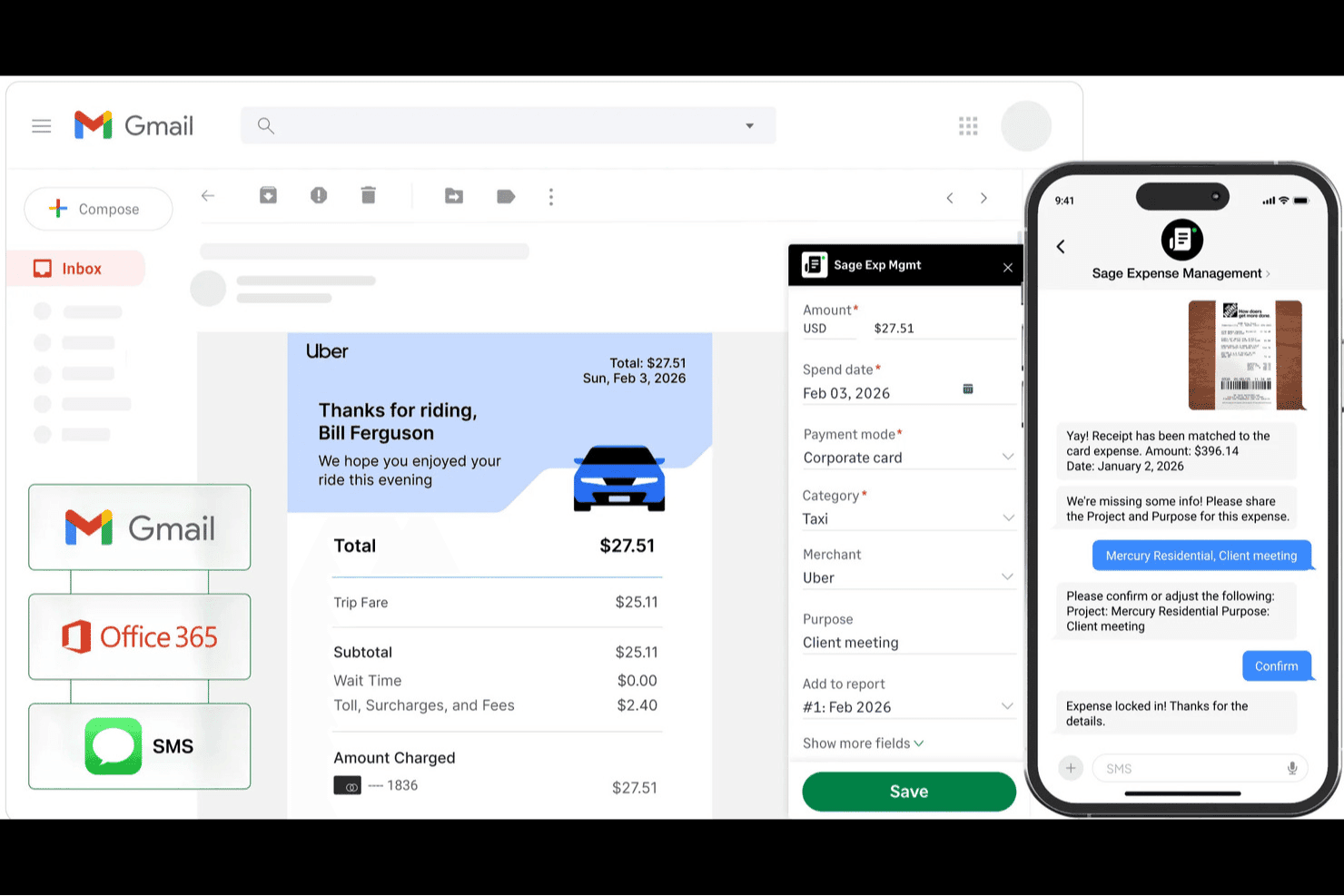
Sage Expense Management (formerly Fyle) helps church teams capture receipts, automatically match transactions, and track expenses with categorized spending details. Sage Expense Management is a church expense management platform with AI-powered receipt capture, multi-level approval workflows, real-time budget monitoring by ministry or fund, ACH reimbursements, and deep integration with QuickBooks, Xero, and Sage accounting systems.
Who Is Sage Expense Management Best For?
Sage Expense Management is a strong fit for church finance administrators and executive pastors who need to enforce consistent spending policies across multiple ministries or campuses.
Why I Picked Sage Expense Management
I picked Sage Expense Management as one of the best because its policy engine is genuinely built to prevent miscoded expenses before they reach your finance team. Admins can make fund and ministry tags mandatory at submission, so a volunteer buying supplies for Youth Ministry can't accidentally code it to Missions. I also like that the system can automatically route policy-violating expenses to the right approver based on your church's hierarchy, with a full audit trail attached to every transaction.
Sage Expense Management Key Features
- Text-based receipt capture: Staff and volunteers can text a photo of a receipt to submit an expense, with no app login required.
- Budget threshold alerts: Admins set multiple alert thresholds per department, project, or fund, and email notifications go out automatically when spending approaches the limit.
- ACH reimbursement: Approved expenses are paid directly to staff or volunteer bank accounts, individually or in bulk, with status tracking for both the submitter and finance team.
- Amex virtual card issuance: Admins can issue unlimited virtual cards with spending controls drawn on an existing Amex business credit line.
Sage Expense Management Integrations
Sage Expense Management offers native integrations with QuickBooks Online, QuickBooks Desktop, Xero, Sage 50, Sage Intacct, and Sage 300 CRE. Its API supports custom integrations for church finance workflows.
Pros and Cons
Pros:
- Approvers retain transaction-level audit trails
- Required ministry tags prevent miscoding
- Volunteers submit receipts by text
Cons:
- Fund tracking depends on custom tags
- Receipt OCR sometimes misreads transaction details
Learn more about Sage Expense Management (formerly Fyle): Best for procurement-focused inventory purchasing
- 90-day free trial
- From $100/month
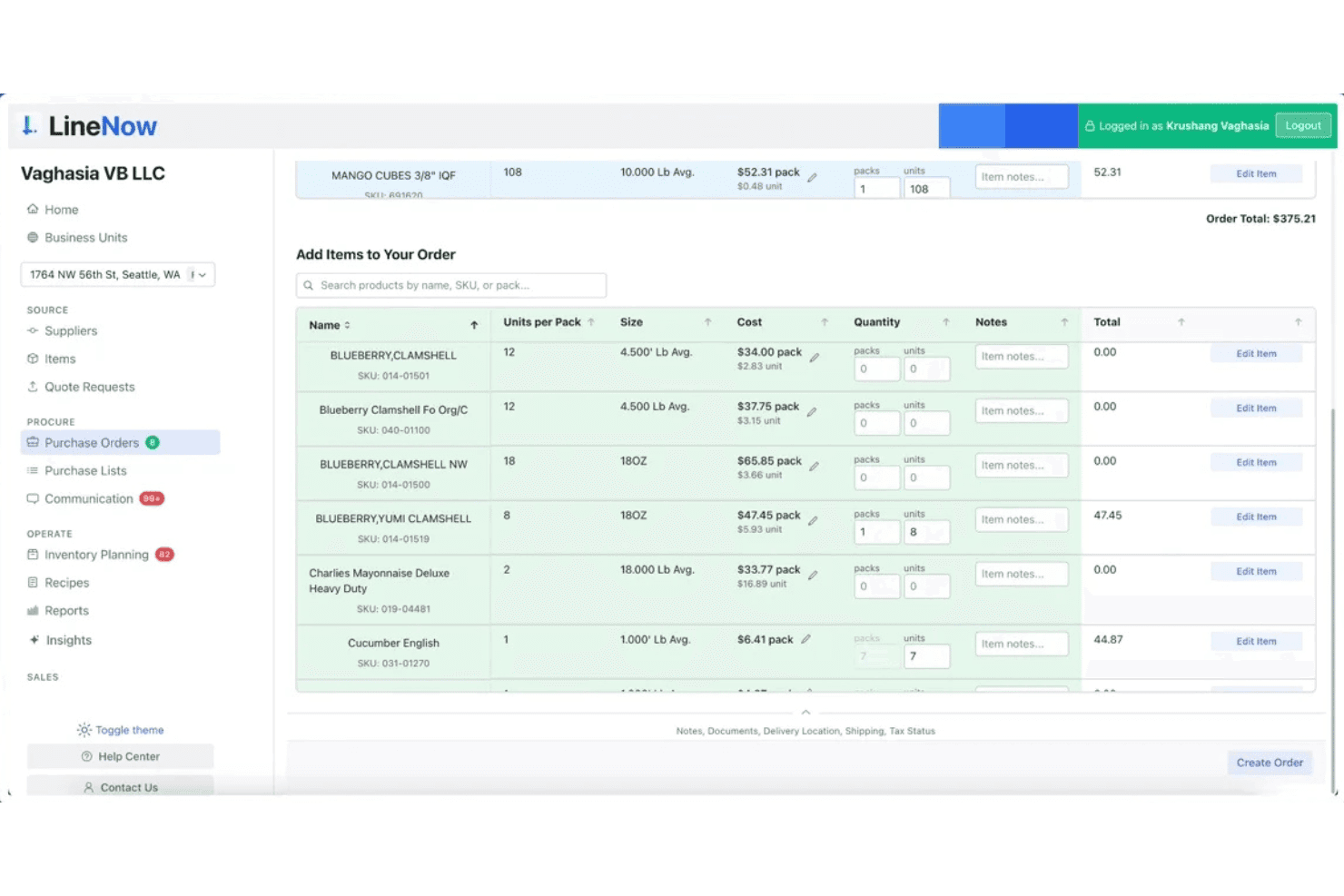
LineNow lets users build and manage purchase orders with item search and pricing. LineNow is a procurement and purchase order management platform that handles inventory purchasing, supplier communication, and order tracking across multiple locations.
Who Is LineNow Best For?
LineNow suits churches and ministry organizations that manage inventory purchasing—like food pantries, bookstores, or café ministries—and want a dedicated procurement tool to handle supplier orders and track stock across locations.
Why I Picked LineNow
I've included LineNow in my top picks because it's purpose-built for procurement-focused inventory purchasing, making it a strong fit for churches running food pantries, bookstore ministries, or café operations. I like how its AI-powered PO creation automatically builds purchase orders from inventory data, and its supplier communication tools let you send and track orders without ever leaving the platform. Multi-location support means a church managing stock across several ministry sites can centralize all purchasing in one place.
LineNow Key Features
- AI-powered purchase order creation: Automatically builds purchase orders from your current inventory data, reducing manual entry for ministry store or pantry purchasing.
- Supplier price tracking: Monitors supplier pricing over time and flags changes, so you can catch cost increases before they affect your ministry budget.
- Receiving workflows: Logs incoming deliveries against open purchase orders, giving you a clear record of what arrived, when, and from whom.
- Role-based team permissions: Assigns different access levels to staff and volunteers, so only the right people can create, send, or approve orders.
LineNow Integrations
Integration includes QuickBooks, Xero, Square, Shopify, Toast, Clover, Lightspeed, Amazon, and Faire.
Pros and Cons
Pros:
- Tracks supplier price changes over time
- Centralizes purchasing for multiple church locations
- Fast supplier order creation with AI assistance
Cons:
- Lacks reimbursement and church approval workflows
- No ministry or fund expense tracking
Learn more about LineNow: Best for integration with existing accounting tools
- 30-day free trial
- From $38/month
Visit WebsiteCustomer Rating:4.4/5
QuickBooks helps churches track donations, expenses, and budgets with reliable reporting. QuickBooks is a well-known accounting platform that many churches use to manage finances with familiar tools. It’s a strong fit for churches that want detailed tracking of expenses, donations, and budgets in a system trusted by accountants. If your church needs reliable financial oversight and reporting, QuickBooks can help you organize and monitor every dollar.
Who Is QuickBooks Best For?
QuickBooks suits churches of any size that want to manage finances using familiar accounting workflows and detailed reporting.
Why I Picked QuickBooks
I chose QuickBooks because it connects easily with a wide range of other accounting, bookkeeping, and financial tools that many churches already use. This makes it simple to sync expense data, donations, and budgets with your bank accounts, payroll providers, and payment processors. I see this as especially helpful for churches that want to avoid manual data entry or double-handling of financial records. With QuickBooks, you can keep your church’s financial information organized and up to date across multiple platforms.
QuickBooks Key Features
In addition to its integration capabilities, QuickBooks offers several features that support church expense management:
- Fund tracking: Track designated funds and restricted accounts separately for accurate church financial oversight.
- Donation recording: Record, categorize, and report on donations from multiple sources within the platform.
- Customizable chart of accounts: Set up and manage accounts tailored to church-specific financial categories and reporting needs.
- Automated recurring transactions: Schedule and automate regular expenses like utilities, subscriptions, or vendor payments.
QuickBooks Integrations
Integrations include Amazon Business, PayPal, Square, Etsy, Amazon Seller, and Gusto.
Pros and Cons
Pros:
- Supports recurring and scheduled expense entries
- Offers detailed fund accounting for churches
- Syncs with major donation and payroll platforms
Cons:
- Lacks features for volunteer expense tracking
- No built-in church membership management
 Best for automated compliance workflows
- 15-day free trial
- From $79/month
Visit WebsiteCustomer Rating:4.5/5
Aplos is cloud accounting software for churches and nonprofits to manage finances and reporting. Aplos is a cloud-based platform built for churches and nonprofits that need to manage finances with accuracy and transparency. It appeals to leaders who want to simplify accounting, giving, and reporting in one place. With features tailored for faith-based organizations, Aplos helps you keep financial records organized and compliant.
Who Is Aplos Best For?
Aplos fits small to mid-sized churches and nonprofits that need specialized accounting and donation tracking.
Why I Picked Aplos
What stands out about Aplos is how it automates compliance tasks that can otherwise overwhelm church finance teams. I picked Aplos because it offers built-in workflows for tracking designated funds, preparing IRS-compliant donation statements, and managing audit trails—all essential for churches that need to meet strict reporting standards. The platform also supports customizable charts of accounts and automated recurring transactions, which help maintain accuracy and reduce manual errors. These features make Aplos a strong choice for churches that want to stay organized and compliant without extra administrative burden.
Aplos Key Features
Some other features that make Aplos useful for church expense management include:
- Online giving tools: Accept and track donations through customizable online forms and giving portals.
- Budgeting module: Create, manage, and monitor multiple budgets for different ministries or funds.
- Accounts payable management: Enter, schedule, and pay bills directly from the platform.
- Bank reconciliation: Match transactions with bank statements to ensure financial records are accurate.
Aplos Integrations
Integrations include Keela, Raisely, Ramp, PEX, Gusto, DonorElf, Church Community Builder, and Stripe.
Pros and Cons
Pros:
- Online giving forms and event registration
- Budgeting tools for multiple ministries or funds
- Tracks pledges, giving, and donor history
Cons:
- Mobile app lacks full financial functionality
- Bank sync can be unreliable at times
Learn more about Aplos: Best with built-in fund accounting
- 30-day free trial + free demo available
- From $8/month (billed annually)

ChurchTrac helps churches manage finances, giving, budgets, and members in one system. ChurchTrac offers a dedicated platform for churches looking to manage expenses, giving, and budgets in one place. It’s designed for ministries that want to keep financial records organized while also handling membership and event details. This tool appeals to church leaders who need a straightforward way to oversee both finances and daily operations without juggling multiple systems.
Who Is ChurchTrac Best For?
ChurchTrac suits small to mid-sized churches that want an all-in-one solution for managing finances, membership, and ministry activities.
Why I Picked ChurchTrac
I picked ChurchTrac because its built-in fund accounting is designed specifically for the unique needs of churches. With dedicated tools for tracking designated funds, you can easily separate and report on restricted and unrestricted giving. The platform also lets you manage budgets and generate detailed financial statements tailored for ministry oversight. This focus on fund accounting helps ensure transparency and accountability for every dollar your congregation entrusts to you.
ChurchTrac Key Features
In addition to its fund accounting capabilities, ChurchTrac offers several other features designed to support church administration and ministry operations:
- Member management: Track contact details, family relationships, attendance, and involvement for everyone in your congregation.
- Event scheduling: Create, manage, and share church events with built-in calendar tools and room/resource reservations.
- Online giving integration: Accept and track online donations directly within the platform, with automatic donor records.
- Volunteer management: Organize volunteer teams, schedule service roles, and communicate assignments to participants.
ChurchTrac Integrations
Integrations include Mailchimp.
Pros and Cons
Pros:
- Offers online giving and event tools
- Manages both expenses and membership data
- Generates detailed financial and budget reports
Cons:
- Importing historical financial data is manual
- No payroll processing features included
Learn more about ChurchTrac:

FlockBase is church accounting software for managing finances and member records. FlockBase is a church accounting software designed for congregations that need reliable financial management and recordkeeping. It appeals to churches looking for tools that handle contributions, expenses, and member data in one place. With features tailored for faith-based organizations, FlockBase helps simplify complex financial tasks for church treasurers and administrators.
Who Is FlockBase Best For?
FlockBase fits small to mid-sized churches that need dedicated accounting and payroll tools for faith-based organizations.
Why I Picked FlockBase
What stands out about FlockBase is its focus on payroll and check printing, which are often pain points for churches managing staff and vendor payments. The built-in payroll module handles clergy-specific tax rules and generates tax forms, so you can process payroll without needing a separate system. I also like that FlockBase supports direct check printing from within the platform, making it easier to pay bills and reimbursements directly from your church’s accounts. These features help churches keep payroll and expense payments organized and compliant in one place.
FlockBase Key Features
In addition to payroll and check printing, FlockBase offers several other features that support church expense management:
- Fund accounting: Track designated funds separately to ensure proper stewardship and reporting for restricted donations.
- Contribution tracking: Record, categorize, and report on member giving for both tax and internal purposes.
- Bank reconciliation: Match transactions with bank statements to maintain accurate financial records.
- Custom financial reports: Generate detailed reports tailored to church boards, committees, and leadership needs.
FlockBase Integrations
Native integrations include CSG Forte and QuickBooks.
Pros and Cons
Pros:
- Very affordable for small churches
- Integrated IRS-compliant payroll
- Built specifically for fund accounting
Cons:
- Cloud version lacks desktop features
- Reporting customization is restricted
Learn more about FlockBase: Best for desktop and online deployment options
- Free demo available
- From $47/month

PowerChurch offers church management and accounting tools for tracking members and finances. PowerChurch offers a church management system and accounting software designed for congregations that want flexibility in how they access their data. It appeals to churches that need both financial tracking and member management in one system. With features for managing contributions, expenses, and attendance, PowerChurch helps church leaders keep operations organized and transparent.
Who Is PowerChurch Best For?
PowerChurch suits small to mid-sized churches that want both desktop and online options for managing finances and membership records.
Why I Picked PowerChurch
What makes PowerChurch stand out is its flexibility to run as either a desktop or an online solution, which is rare among church expense management tools. This dual deployment option means your team can choose the setup that fits your church’s technology preferences and internet reliability. I appreciate that PowerChurch includes full accounting modules, so you can manage expenses, track contributions, and handle payroll from the same platform. The ability to switch between local and cloud access gives churches more control over their data and workflows.
PowerChurch Key Features
Some other features that help churches manage expenses and operations include:
- Accounts payable management: Enter, track, and pay bills directly from the system.
- Contribution tracking: Record and report on member giving for tax and stewardship purposes.
- Event scheduling: Organize and manage church events, facilities, and resource reservations.
- Custom financial reporting: Generate detailed financial statements and custom reports for leadership and committees.
PowerChurch Integrations
Integrations include Vanco, SimpleTexting, Protect My Ministry, PowerChurch E-File, and Constant Contact.
Pros and Cons
Pros:
- Tracks designated and restricted giving funds
- Handles clergy-specific payroll and tax forms
- Offers both desktop and cloud deployment
Cons:
- Does not include built-in document storage
- No multi-campus or multi-entity support
Learn more about PowerChurch: Best with integrated physical and virtual cards
- Free plan available
- From $29/month

KleerCard is expense management software for churches, with real-time tracking and controls. KleerCard offers a modern expense management platform designed for churches and faith-based organizations. It appeals to leaders who want to simplify spending controls, automate expense tracking, and manage staff purchases in real time. With features tailored for multi-user oversight and clear transaction visibility, KleerCard helps churches keep financial processes organized and accountable.
Who Is KleerCard Best For?
KleerCard suits churches and ministries that need centralized control over staff spending and expense tracking.
Why I Picked KleerCard
What drew me to KleerCard is its ability to issue both physical and virtual cards, which gives churches flexible options for managing staff and volunteer expenses. I picked KleerCard because you can set spending limits, track purchases in real time, and instantly deactivate cards if needed—all from a single dashboard. This level of control is especially helpful for churches with multiple ministries or events, where different team members need access to funds but oversight is essential. The platform’s credit card management features help reduce the risk of unauthorized spending and make reconciliation much simpler.
KleerCard Key Features
Some other features that support church financial management and oversight include:
- Custom spending controls: Set transaction limits and merchant restrictions for each card issued to staff or volunteers.
- Receipt capture via mobile app: Upload and attach receipts to transactions directly from a smartphone.
- Automated expense categorization: Assign expenses to specific categories or ministry budgets for easier tracking and reporting.
- Real-time transaction monitoring: View and review card activity as it happens to maintain oversight and accountability.
KleerCard Integrations
Integrations include QuickBooks Online, NetSuite, Sage, Aplos, ACS, Realm, and Shelby.
Pros and Cons
Pros:
- Integrates with major church accounting platforms
- Automated receipt capture and matching
- Custom approval workflows for church policies
Cons:
- Mobile app lacks full admin controls
- No built-in reimbursement processing
Learn more about KleerCard: Best for user-friendly financial reporting
- 30-day free trial + free plan + free demo available
- From $19/month (billed annually)

Gracely is a simple financial management platform for churches and ministries. Gracely offers a financial management platform designed for churches and ministries that want clear, accessible oversight of their finances. It appeals to leaders who need to track expenses, manage budgets, and generate reports without a complex learning curve. With its focus on simplicity, Gracely helps churches keep financial processes organized and transparent.
Who Is Gracely Best For?
Gracely suits small to mid-sized churches and ministries that want straightforward financial tracking and reporting.
Why I Picked Gracely
What drew me to Gracely is how it makes financial reporting accessible for church leaders who may not have an accounting background. The platform offers visual dashboards and customizable report templates, so you can quickly see where funds are going and how budgets are tracking. I also appreciate that Gracely lets you drill down into specific expense categories and export reports for board meetings or audits. These features help churches maintain transparency, accurate records, and make informed decisions without getting lost in complicated spreadsheets.
Gracely Key Features
Some other features that help churches manage finances and operations include:
- Automated bank feeds: Connect bank accounts to automatically import and reconcile transactions within the platform.
- Budget creation tools: Build and manage annual or project-based budgets with customizable categories.
- Document storage: Upload and organize receipts, invoices, and financial documents for easy access and audit trails.
- Multi-user access: Invite staff or finance team members with customizable permissions for collaboration and oversight.
Gracely Integrations
Native integrations are not currently listed by Gracely.
Pros and Cons
Pros:
- Easy member data import process
- Fast and responsive support team
- Affordable flat-rate pricing
Cons:
- Advanced reporting lacks depth
- Member login process is cumbersome
Learn more about Gracely: Best for free data migration
- Free plan available + 30-day free trial
- From $12/month
Visit WebsiteCustomer Rating:4.9/5
ChMeetings is a church management platform with built-in accounting and member tracking tools. ChMeetings offers a church management software platform with built-in accounting features designed for congregations of all sizes. It appeals to church leaders who want to handle member data, giving, and expense tracking in one place. With its focus on simplifying financial oversight, ChMeetings helps churches keep records organized and accessible.
Who Is ChMeetings Best For?
ChMeetings fits churches and ministries that want an all-in-one platform for managing membership, giving, and expenses.
Why I Picked ChMeetings
What stands out about ChMeetings is its commitment to making transitions easy for churches by offering free data migration. I picked ChMeetings because moving financial records and member data from an old system can be a major barrier for many congregations, and this feature removes that obstacle. The platform also provides dedicated support during the migration process, which helps ensure that sensitive financial and giving data is transferred accurately. This makes ChMeetings a practical choice for churches that want to upgrade their expense management tools without risking data loss or disruption.
ChMeetings Key Features
In addition to its data migration support, ChMeetings offers several features to help churches manage their operations:
- Donation tracking: Record, organize, and report on all donations received, including recurring gifts and pledges.
- Attendance management: Monitor attendance for services, events, and small groups with customizable tracking options.
- Mobile app access: Use the ChMeetings mobile app to manage church data, communicate, and access features on the go.
- Role-based permissions: Assign different access levels to staff and volunteers to protect sensitive information and maintain security.
ChMeetings Integrations
Integrations include Stripe, PayPal, Bluesnap, Paystack, MailChimp, Twilio, SMS Global, Clickatell, and Zeffy.
Pros and Cons
Pros:
- Role-based permissions for financial data
- Recurring expense and pledge management
- Free data migration for new users
Cons:
- Budgeting tools are basic compared to peers
- Customization can feel restricted
Learn more about ChMeetings:
Other Church Expense Management Software
Here are some additional church expense management software options that didn’t make it onto my shortlist, but are still worth checking out:
- 11One Church SoftwareBest for customizable automation features
- 12XeroBest with real-time mobile expense tracking
- 13ExpensifyBest for automated receipt scanning
- 14AmplifyBest for integrated giving and accounting
How I Evaluate Church Expense Management Software
I evaluate every tool on two levels: whether it handles fund accounting and ministry budgets at baseline, then what sets it apart for the finance teams and pastors actually managing the books.
Core Functionality (Table Stakes For This List)
When I'm selecting tools for my list, I rank each one on a scale from 0 (does not offer the functionality) to 5 (excels in this area) for each core functionality listed below. Then, I calculate the tool's total score into a percentage. Each tool needs to achieve a minimum total score of 55% to be considered for inclusion.
- Fund Accounting Support: I check whether a tool tracks expenses against restricted and unrestricted funds, like separating building fund purchases from general operating costs.
- Expense Reporting & Reimbursement: Volunteers and staff need to snap a receipt photo after a supply run and submit it for reimbursement without learning an accounting system.
- Ministry Card Issuance & Controls: I look for physical or virtual card options where you can set per-card spending limits, like capping a youth pastor's card for retreat supplies.
- Multi-Level Approval Workflows: Routing a worship team purchase through a ministry lead before it reaches the finance office matters, so I evaluate configurable approval chains.
- Church Accounting Integration: I evaluate how each tool syncs with platforms churches already use, such as QuickBooks, Aplos, or Realm, to avoid duplicate data entry.
- Budget Tracking by Ministry: Each ministry needs real-time visibility into its remaining budget, so I look for fund-level tracking that updates as transactions post.
Once I have a list of tools that meet this criteria, I consider what sets each platform apart.
Differentiating Factors (What Sets Vendors Apart)
Here's how I compare and contrast different vendors:
Standout Features
Multi-campus churches need expense segmentation by location, so I look for tools that let each campus manage its own cards and budgets while rolling data up to a central dashboard. Board and congregation reporting is another factor I weigh. When a finance committee asks for a quarterly transparency report, pre-built outputs save hours of manual formatting. I also consider how well the mobile app works for volunteers who aren't finance-trained, since a confusing interface means receipts pile up unreported.
Beyond Features
Pricing matters here because most churches run on tight budgets. I evaluate whether a platform charges per user, since adding ten ministry leaders and volunteers shouldn't double the cost. Integration with the church tech stack is equally important. If a tool connects with Planning Center or Pushpay, the finance team gets full visibility without toggling between systems. I also consider onboarding support, since many church treasurers are volunteers who need guided setup rather than a self-serve knowledge base.
How to Choose Church Expense Management Software
It’s easy to get bogged down in long feature lists and complex pricing structures. To help you stay focused as you work through your unique software selection process, here’s a checklist of factors to keep in mind:
| Factor | What to Consider |
| Scalability | Will the software support your church as it grows, adds campuses, or expands ministries? Check for multi-entity support and flexible user limits. |
| Integrations | Does the tool connect with your existing accounting, payroll, or donor management systems? Confirm native integrations and data sync options. |
| Customizability | Can you tailor workflows, approval processes, and reporting to match your church’s structure and policies? Avoid rigid systems that force workarounds. |
| Ease of use | Will staff and volunteers with varying tech skills be able to use the system confidently? Look for clear navigation and minimal training requirements. |
| Implementation and onboarding | How long will it take to get up and running? Ask about migration support, training resources, and typical onboarding timelines for churches your size. |
| Cost | Are pricing tiers transparent and predictable? Consider total cost of ownership, including setup, support, and any add-ons you may need. |
| Security safeguards | Does the software offer role-based permissions, audit trails, and data encryption? Ensure it meets your church’s privacy and stewardship standards. |
| Support availability | What support channels are offered, and during what hours? Consider if you’ll need after-hours help or a dedicated account manager for urgent issues. |
What Is Church Expense Management Software?
Church expense management software is a digital tool designed to help churches track income, approve, and report on spending across ministries, campuses, and events. It centralizes expense data, supports budgeting and fund allocation, and ensures financial transparency for leadership and congregations. These systems help churches maintain accountability, simplify reimbursements, and meet compliance requirements, all while adapting to the unique financial structures and oversight needs of faith-based organizations.
Features of Church Expense Management Software
When selecting church expense management software, keep an eye out for the following key features:
- Expense tracking: Record, categorize, and monitor all church-related expenses in one centralized system, making it easier to manage spending across ministries and events.
- Fund accounting: Separate and track designated, restricted, and unrestricted funds to ensure compliance with donor intent and church policies.
- Budget management: Set, monitor, and adjust budgets for ministries, departments, or events, helping leaders stay accountable and make informed financial decisions.
- Approval workflows: Route expense requests and reimbursements through customizable approval chains to maintain oversight and prevent unauthorized spending.
- Financial reporting: Generate detailed reports on expenses, budgets, and fund balances to provide transparency for leadership, boards, and congregations.
- Document attachment: Upload and link receipts, invoices, and supporting documents directly to transactions for easy reference and audit readiness.
- Role-based permissions: Control access to sensitive financial data by assigning user roles and permissions based on staff or volunteer responsibilities.
- Bank reconciliation: Match recorded transactions with bank statements to ensure accuracy and catch discrepancies quickly.
- Integration capabilities: Connect with accounting, payroll, and donor management systems to streamline data flow and reduce manual entry.
- Mobile access: Allow staff and volunteers to submit expenses, approvals, or receipts from their phones or tablets, supporting ministry work on the go.
Benefits of Church Expense Management Software
Implementing church expense management software provides several benefits for your team and your business. Here are a few you can look forward to:
- Improved financial transparency: Centralized expense tracking and reporting make it easier to share clear, accurate financial information with leadership and congregations.
- Stronger fund accountability: Fund accounting features help ensure designated and restricted funds are used according to donor intent and church policies.
- Streamlined approval processes: Customizable approval workflows reduce bottlenecks and prevent unauthorized spending by routing requests through the right channels.
- Simplified audits and compliance: Document attachment and audit trails make it easier to prepare for audits and meet regulatory or denominational requirements.
- Better budget management: Real-time budget tracking and alerts help ministry leaders make informed decisions and avoid overspending.
- Time savings for staff and volunteers: Automated data entry, integrations, and mobile access reduce manual work and free up time for ministry activities.
- Scalability for growing churches: Multi-campus and multi-entity support allow your financial processes to grow alongside your church’s ministries and outreach.
Costs and Pricing of Church Expense Management Software
Selecting church expense management software requires an understanding of the various pricing models and plans available. Costs vary based on features, team size, add-ons, and more. The table below summarizes common plans, their average prices, and typical features included in church expense management software solutions:
Plan Comparison Table for Church Expense Management Software
| Plan Type | Average Price | Common Features |
| Free Plan | $0 | Basic expense tracking, limited users, simple reporting, and manual data entry. |
| Personal Plan | $12-$79/month | Expense tracking, basic fund accounting, budget management, and limited approval workflows. |
| Business Plan | $49-$129/month | Advanced fund accounting, multi-campus support, custom approval workflows, integrations, and reporting. |
| Enterprise Plan | $200+/month | Multi-entity management, advanced security, custom onboarding, dedicated support, and audit trails. |
Church Expense Management Software FAQs
Here are some answers to common questions about church expense management software:
How is church expense management software different from regular business expense software?
Church expense management software is designed for the unique needs of churches, such as fund accounting, donor restrictions, and multi-campus oversight. It helps track designated funds, manage ministry budgets, and ensure compliance with nonprofit regulations, which standard business tools may not support.
Can volunteers and non-financial staff use church expense management software easily?
Yes, most church expense management software is built with user-friendly interfaces and simple workflows. Many solutions offer mobile access and role-based permissions, making it easy for volunteers and staff with limited accounting experience to submit expenses and receipts.
What types of expenses can be tracked with church expense management software?
You can track a wide range of expenses, including ministry supplies, event costs, staff reimbursements, facility maintenance, and outreach spending. The software allows you to categorize expenses by fund, department, or project for better oversight.
How does church expense management software help with audits and compliance?
These tools store receipts, invoices, and approval records alongside each transaction, creating a clear audit trail. They also support fund accounting and reporting, making it easier to demonstrate compliance with donor intent, denominational policies, and nonprofit regulations.
Is it possible to integrate church expense management software with other church systems?
Yes, many solutions offer integrations with accounting platforms, donor management systems, and payroll tools. This reduces manual data entry, keeps records consistent, and helps maintain a complete financial picture across your church’s operations.