

Church event management software is a tool that helps you plan, promote, and run church events—without the chaos. It brings everything—scheduling, registration, volunteer coordination, communication, budgeting, and follow-up—into one place so nothing slips through the cracks.
In 2007, I was a pastoral intern at for a church plant in Southern Ontario, Canada. We were organizing a full-day community festival at a nearby low-income housing complex. The event itself was a huge success—but the process nearly broke us. This was long before 'event management software' was a thing. If we'd had any one of the dozens of event mgmt tools I've reviewed? Game changer! Unfortunately, the day of? Sign-up sheets went missing. Volunteers forgot their assignments. We ran into issues with getting permits from the city.
That experience taught me something important: even the most meaningful events fall apart without solid systems in place. A lot has changed since 2007 . That’s why I’ve reviewed the top church event management software tools available today. These tools can give your team structure, clarity, and peace of mind—so your events are organized on the inside and powerful on the outside.
Why Trust Our Software Recommendations
6,700+
Reviews
20
Industry experts
16+
Evaluation factors
14
Years
Our team has been testing and reviewing software since 2012. As church leaders ourselves, we know how difficult—and important—it is to choose the right software.
For this guide, we evaluated tools using hands-on testing and independent research, scoring tools using our selection criteria.
Our reviews reflect our human editorial judgment, not a sales pitch.
The Best Church Event Management Software Solution Summary
| Tool | Best For | Trial Info | Price | ||
|---|---|---|---|---|---|
| 1 | Best for automating event tasks | 30-day free trial | From $58/month | Website | |
| 2 | Best for custom event recurrences | 30-day free trial | From $19/month (billed annually) | Website | |
| 3 | Best for flexible event registration options | Free demo available | Pricing upon request | Website | |
| 4 | Best for branded event pages | Free trial + free demo available | From $399/event | Website | |
| 5 | Best for all-in-one church management | Free plan available + 30-day free trial | From $12/month | Website | |
| 6 | Best for embedding event venue bookings | 14-day free trial | From $19/spot/month | Website | |
| 7 | Best for church fundraising events | Free plan + free demo available | From $24/month (billed annually) | Website | |
| 8 | Best for easy-to-use registration forms | 30-day free trial available | From $72/month | Website | |
| 9 | Best for event marketing | 30-day free trial | From $99/organizer/month (billed annually) | Website | |
| 10 | Best for scheduling events | Not available | Pricing upon request | Website |


Reviews Of The Best Church Event Management Software Solution
Here’s a brief description of each church event management system to showcase each tool’s best use case, some noteworthy features, and screenshots to give a snapshot of the user interface.

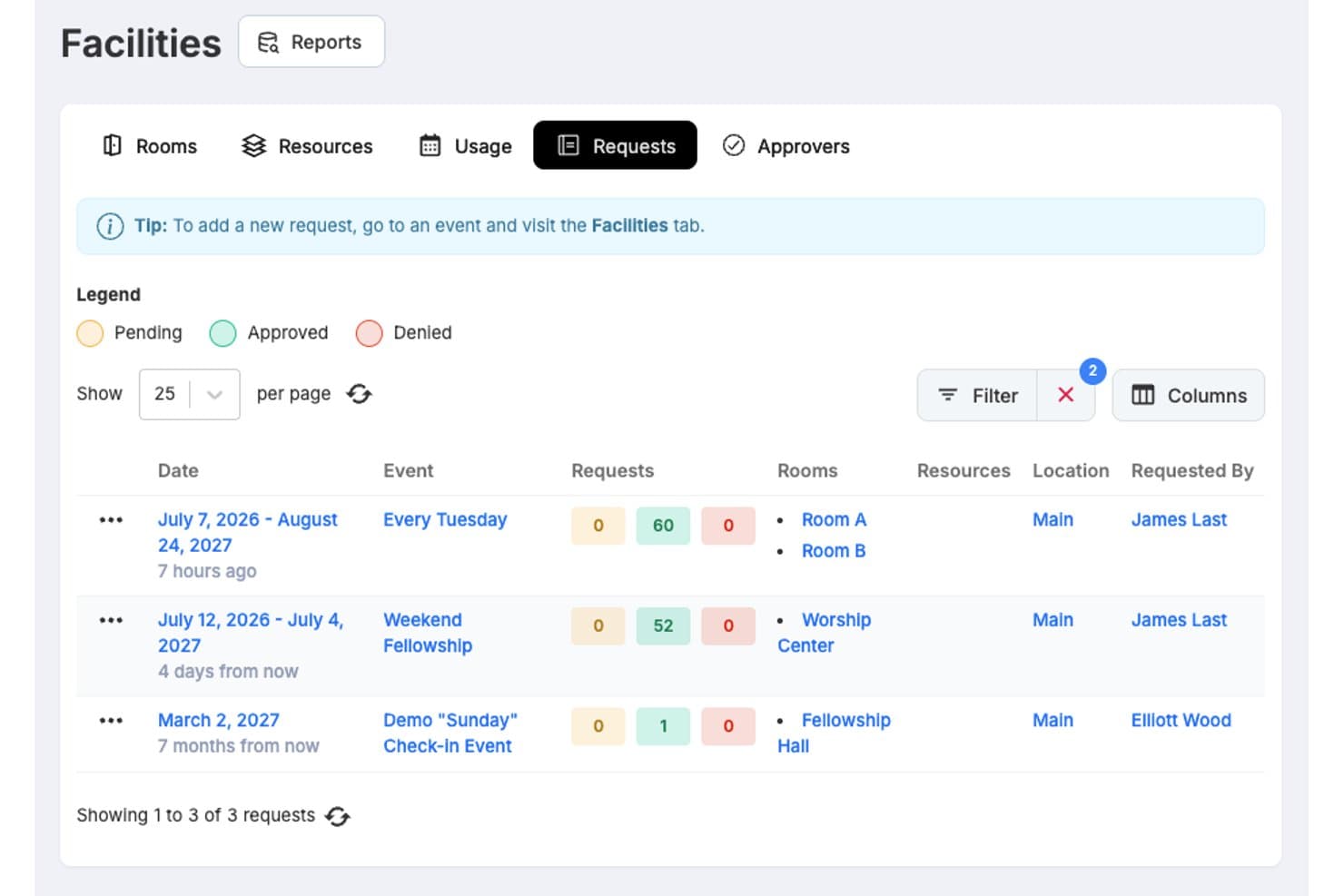
One Church Software offers a Facilities Requests dashboard that lets staff view, filter, and track room booking requests with approval statuses across multiple events. One Church Software is a church management platform that combines event scheduling, online registration, kid's check-in, volunteer coordination, facility booking, integrated giving, and member communication tools in a single system.
Who Is One Church Software Best For?
It's a strong fit for church administrators and event coordinators managing multi-ministry calendars, volunteer teams, and member communications from a single platform.
Why I Picked One Church Software
One Church Software earns its spot on my shortlist because the Automation Suite is genuinely built around the event lifecycle. When a registration form is submitted, I can trigger a full sequence: confirmation email, volunteer role assignment, and a follow-up SMS, all without any manual steps. I also rely on the Bulk Event Actions feature to update or move multiple events across ministry calendars at once, which saves real time during high-demand seasons like Easter or Christmas.
One Church Software Key Features
- Child check-in security: Lets you print matching security tags for kids and parents to ensure safe pick-ups.
- Multi-campus support: Enables management of calendars, resources, and events across multiple church locations.
- Mobile app access: Provides members, staff, and volunteers with on-the-go access to schedules and event registrations.
- Small group management: Helps you organize, promote, and track attendance for small groups and classes within the platform.
One Church Software Integrations
One Church Software offers native integrations with Mailchimp, Square, Pushpay, and PraiseCharts, and provides an API for custom integrations.
Pros and Cons
Pros:
- Handles giving, events, and people in one platform
- Icludes matching security tag printing
- Reduces manual event coordination tasks
Cons:
- Mobile app can feel inconsistent for volunteers
- Reporting lacks depth for detailed event analytics
Learn more about One Church Software: Best for custom event recurrences
- 30-day free trial
- From $19/month (billed annually)
Visit WebsiteCustomer Rating:4.8/5
Gracely displays your full event calendar so you can plan, manage, and track church gatherings all in one place. Gracely is a church management software that helps you handle various church operations. Whether it's managing events or tracking contributions, Gracely offers tools to make your church's administrative tasks easier.
Its event management tool lets you create events with custom recurrence patterns—daily, weekly, monthly—and control capacity or add payment options like ticketing. This helps you organize services, fundraisers, or classes at scale without juggling separate tools. Gracely even tracks RSVPs and attendance in one place, making follow-up and engagement analysis straightforward.
The platform also offers volunteer coordination features that integrate tightly with event management. You can assign teams and roles, and avoid scheduling overlap during signup or check‑in.
Learn more about Gracely: Best for flexible event registration options
- Free demo available
- Pricing upon request
Visit WebsiteCustomer Rating:4.5/5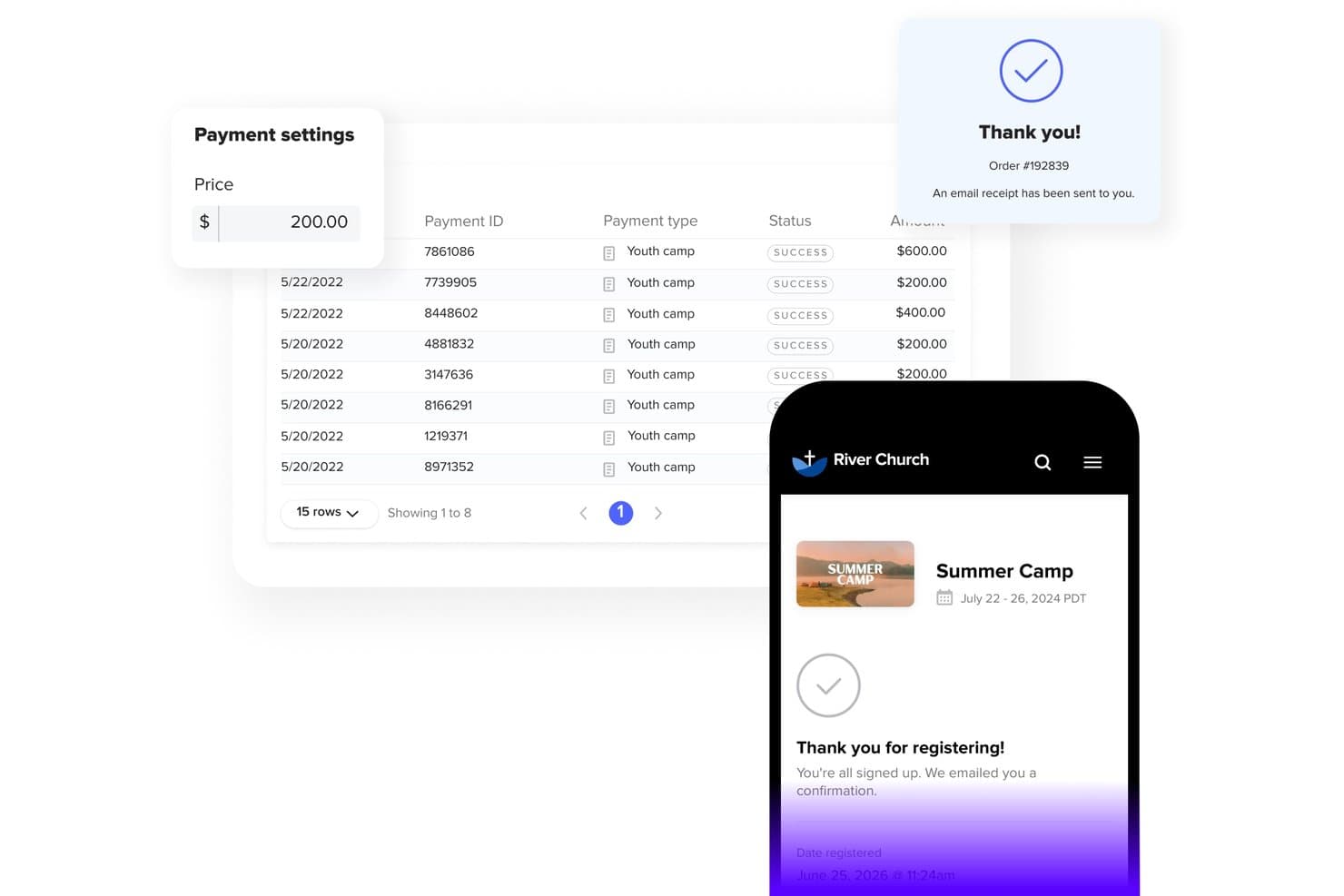
Subsplash offers event payment management with payment tracking, success statuses, and a mobile registration confirmation flow for church events like Summer Camp. Subsplash is an all-in-one church engagement platform that combines event registration, online giving, volunteer management, child check-in, mobile apps, and member communication tools in a single dashboard.
Who Is Subsplash Best For?
Subsplash is a strong fit for church administrators and event coordinators at growing congregations that want event registration, giving, and member engagement managed from a single platform.
Why I Picked Subsplash
I picked Subsplash as one of the best because its event registration options go well beyond a simple sign-up form. I like that you can create multiple ticket types with distinct pricing, build discount codes for early registrants or staff, and allow partial payments with automated balance reminders sent leading up to the event. For a church running a multi-day retreat or conference, that installment billing feature alone removes a real barrier to getting people registered.
Subsplash Key Features
- Child check-in security: Offers child check-in via AirPrint stations with unique parent/child PINs for added safety.
- Mobile app access: Publishes events to a branded church mobile app, enabling registration and communication on the go.
- Multi-campus support: Allows management of events and communication across multiple church sites within one dashboard.
- Small group management: Includes group tools to create, promote, and track attendance for small groups and ministry activities.
Subsplash Integrations
Native integrations are not clearly documented. An API is available for custom integrations.
Pros and Cons
Pros:
- Dedicated child check-in with secure parent/child PINs
- Combines giving, media, and events in one dashboard
- Branded mobile app keeps congregation digitally connected
Cons:
- Built-in website builder trails dedicated web platforms on SEO
- Subsplash's calendar can't sync with external calendars like Google Calendar
 Best for branded event pages
- Free trial + free demo available
- From $399/event

Church RSVP allows attendees to select physical, virtual, or hybrid sessions with real time availability tracking. For churches seeking a reliable event management solution, Church RSVP offers an intuitive platform designed to simplify the complexity of organizing events like Easter and Christmas services. This tool appeals to church administrators and event coordinators who need to manage multiple service times, track attendance, and handle both in-person and virtual events seamlessly. With features that address the challenges of capacity management and automated communication, Church RSVP ensures that your congregation stays informed and engaged.
Why I Picked Church RSVP
I picked Church RSVP for its ability to handle complex events with ease, making it a compelling choice for church event management. The platform's multiple service times feature allows attendees to choose their preferred service, ensuring smooth capacity management for each event. Additionally, its flexible seating options cater to various needs, whether it's general admission or reserved seating. These features, combined with the capability to support both in-person and online events, make Church RSVP a versatile tool for any church looking to enhance its event planning and execution.
Church RSVP Key Features
In addition to the standout features mentioned, I also found several other functionalities that enhance Church RSVP's appeal:
- Branded Event Pages: Create custom landing pages that reflect your church's unique style, complete with colours, logos, and rich content.
- Customizable Notifications: Send tailored confirmation emails and reminders, ensuring attendees are well-informed and engaged.
- Real-Time Capacity Tracking: Monitor availability as RSVPs come in, preventing overbooking and ensuring a smooth event experience.
- Team Collaboration: Add staff members with customizable access levels to manage events collaboratively.
Church RSVP Integrations
Native integrations are not currently listed by Church RSVP.
Pros and Cons
Pros:
- Mobile optimized registration pages
- Supports in person and online events
- Real time capacity tracking
Cons:
- No built in giving management
- No centralized member database
Learn more about Church RSVP: Best for all-in-one church management
- Free plan available + 30-day free trial
- From $12/month
Visit WebsiteCustomer Rating:4.9/5
ChMeetings has a dynamic church calendar for scheduling and managing various events. ChMeetings is a cloud-based Church Management Software (ChMS) designed to help churches in the US, Canada, UK, Australia, and South Africa manage their operations efficiently. Used by over 7,000 churches across these regions, it offers an intuitive interface, multilingual support in 22 languages, and cost-effective pricing. Whether for small congregations or large ministries, ChMeetings simplifies administration with an all-in-one approach.
As a church event management solution, ChMeetings streamlines event planning, attendance tracking, and volunteer coordination. Churches can schedule services, manage RSVPs, and automate reminders to ensure smooth event execution. The platform also supports secure online donations, making it easy to accept and monitor contributions during fundraising events. Beyond event management, ChMeetings includes powerful tools like a mobile app (with a branded upgrade option) and customizable forms for registrations and surveys.
ChMeetings has a limited free plan for up to 50 people, making it good for churches of all sizes.
Learn more about ChMeetings: Best for embedding event venue bookings
- 14-day free trial
- From $19/spot/month
Visit WebsiteCustomer Rating:4.6/5
Embeddable Whatspot widget showing venue details and available event spaces. Whatspot is a specialized facility and resource booking system that streamlines how organizations manage their physical spaces. For churches juggling multiple events, it eliminates the confusion of double-booked rooms and disorganized rental schedules. It simplifies event venue management by providing a public-facing portal where users can easily view availability and reserve specific areas.
Who Is Whatspot Best For?
It is best for small to mid-sized churches that frequently host community events, rent out their facilities, or need a clean portal for ministries to reserve spaces.
Why I Picked Whatspot
While traditional event software focuses heavily on ticketing attendees, I selected Whatspot because securing the actual physical venue is the critical first step of any church event. It stands out as the best for embedding event venue bookings, allowing churches to place a seamless reservation widget directly on their website. This workflow is especially valuable for churches that rent out their sports courts, conference rooms, or fellowship halls to the local community, as it automates space scheduling without requiring constant staff intervention.
Whatspot Key Features
Embeddable booking widget: Generates an HTML code snippet allowing you to place your venue's availability calendar directly onto your church's website.
Resource availability tracking: Displays real-time schedules for specific event spaces like lecture rooms, conference centers, or outdoor courts.
Approval workflows: Allows church administrators to review, approve, or reject public venue reservation requests before an event is finalized on the calendar.
Customizable booking rules: Enables staff to set strict parameters on how far in advance, or for how long, an event space can be reserved by external or internal groups.
Whatspot Integrations
Integrations include Google Calendar, Microsoft Outlook, and Microsoft Teams.
Pros and Cons
Pros:
- Prevents venue double-booking
- Clean public-facing UI
- Easy QR code check-ins
Cons:
- No attendee ticketing
- No built-in payment gateway
Learn more about Whatspot: Best for church fundraising events
- Free plan + free demo available
- From $24/month (billed annually)
Visit WebsiteCustomer Rating:4.8/5
You can use RSVPify to sell tickets to fundraising events. RSVPify is an events management software for churches, businesses, and non-profit organizations that need software to efficiently plan and execute events. You can use it for event planning and tracking invitees giving you an idea of how many attendees to expect during the actual event. RSVPify also allows you to create customized event registration and online reservation forms to collect attendees’ contact information and get to know your audience before an event.
Generating funds is critical for your church because it can help you provide services to your congregation and initiate outreach programs for your community. Rsvpify can help you sell tickets for events to generate funds. You can use RSVPify to sell ticket variations like VIP tickets so you can maximize the potential of fundraising activities. RSVPify also gives you the option of collecting online donations for specific events, giving church members the freedom to choose the amount they want to give.
RSVPify integrates with other event planning and communication tools, including Facebook, Slack, Salesforce, and Gmail.
Learn more about RSVPify: Best for easy-to-use registration forms
- 30-day free trial available
- From $72/month
Visit WebsiteCustomer Rating:4.7/5
Tithe.ly enables you to organize and schedule service plans with detailed breakdowns of songs and readings. Tithe.ly is a church management software designed to support churches of all sizes with a suite of tools for administration, communication, giving, and engagement. Among its many features, it provides robust event management capabilities that help churches plan and coordinate activities efficiently.
Tithe.ly’s event management tools simplify organizing church events by offering easy-to-use registration forms and payment processing options. This helps you handle everything from volunteer sign-ups to children's check-ins, ensuring your events run smoothly from start to finish. The platform’s integrated communication tools make it easy to keep your congregation informed about upcoming activities through email and text, while its people database helps you manage attendee information and engagement effectively. These features combine to provide churches with a streamlined solution for hosting successful events while staying connected with their community.
 Best for event marketing
- 30-day free trial
- From $99/organizer/month (billed annually)
Visit WebsiteCustomer Rating:4.5/5
Hopin has an event builder functionality to ensure customization of events to make them more appealing to invitees. Hopin is a management software for handling not just in-person events but online events and hybrid events too. You can use it as a planning center to manage your event in its entirety, from planning to post-event evaluation. It has an analytics feature to help you analyze critical data like attendee statistics, chat transcripts, and event recordings so you can use event data to plan future events.
No matter how amazing your event is, it can turn into a disaster if you cannot market it properly, which is why Hopin’s event marketing feature is a vital feature. You can use Hopin to create an amazing landing page that can help promote your event and drive attendance or launch an email marketing campaign. It also has an attendee management feature for resending tickets, creating promo codes, issuing refunds, and others that can help increase attendance at your events.
Hopin integrates with other amazing event management tools like Twitter, Mailchimp, GoFundMe, Figma, and Slack.
Learn more about RingCentral Events: 10Best for scheduling events
Realm
- Not available
- Pricing upon request
Visit WebsiteCustomer Rating:4.1/5
Customize and manage your church events with Realm's centralized platform. Realm is a church management platform that facilitates an all-in-one approach to event management, ministry planning, donor management, volunteer management, accounting, and other operations. As an event management software, Realm features tools for scheduling events, managing registrations, and collecting payments. It also includes capabilities for setting up recurring events, tracking attendance, and managing RSVPs. Realm enables churches to coordinate event-related tasks such as assigning volunteers, conducting background checks, and customizing check-in kiosks.
The software also facilitates communication with event registrants and allows for the sharing of events on church websites and social media. You can view the event registrant list at any time to contact or follow up with a person directly. Additionally, Realm offers a mobile app that supports event check-in and provides access to event details for the church community.
The platform integrates with Growth Method, Constant Contact, Nelco, Go Method, Verified First, Vanco, and more.
Other Options
- 11EventProBest for managing equipment & service rentals
- 12SteepleMateBest for customizable event portals
- 13ArloBest for educational events
- 14Swift EventsBest for online church events
- 15PowerChurch PlusBest church event management software for task tracking
- 16ChurchTracBest for event attendance tracking
- 17eSPACEBest church facility management for event planning
- 18MinistryPlatformBest for large churches
- 19Fellowship OneBest church events calendar
Related Software Tools:
- 10 Best Church Volunteer Management Software
- 10 Best Church Data Management Systems
- Our Cutting-Edge Church Management Software Picks
How I Evaluate Church Event Management Software
From Sunday service check-in to VBS registration and retreat payments, I evaluate each tool against baseline must-haves first, then weigh differentiators that separate the best fits from the rest.
Core Functionality (Table Stakes For This List)
When I'm selecting tools for my list, I rank each one on a scale from 0 (does not offer the functionality) to 5 (excels in this area) for each core functionality listed below. Then, I calculate the tool's total score into a percentage. Each tool needs to achieve a minimum total score of 65% to be considered for inclusion.
- Event Scheduling & Calendar: I check whether I can set up recurring services, midweek groups, and one-off events like baptisms or concerts with flexible recurrence rules and calendar views.
- Online Registration & Check-In: Tools should let families register for events like VBS or retreats online and then check in on-site via kiosks or mobile devices with attendance tracking.
- Volunteer & Team Coordination: I look for the ability to build serving teams, assign roles like greeter or audio tech, and send automated schedule reminders so coordinators aren't chasing people down.
- Facility & Resource Booking: Room and resource reservations matter—especially for churches sharing spaces across youth, worship, and community ministries where double-booking creates real headaches.
- Event Payments & Donations: I evaluate whether the platform processes registration fees for camps or conferences and supports event-specific giving without requiring a separate payment tool.
- Member Communication Tools: The platform should offer email or SMS capabilities to push event reminders, last-minute changes, or follow-ups to targeted groups like parents or small group leaders.
Once I have a list of tools that meet this criteria, I consider what sets each platform apart.
Differentiating Factors (What Sets Vendors Apart)
Here's how I compare and contrast different vendors:
Standout Features
Child check-in security is a big differentiator—I look for parent/child tag matching and allergy alerts that keep kids safe during events like VBS or Sunday services. Multi-campus support matters for churches coordinating calendars and resources across locations. A dedicated mobile app helps volunteers confirm serving times or swap shifts without calling the church office. I also evaluate small group management, since platforms that tie group sign-ups into event workflows save coordinators from juggling separate systems.
Beyond Features
I check how well each platform integrates with existing church management systems like Planning Center or Breeze, since syncing member data and giving records across tools saves hours of duplicate entry. Pricing structure is another key factor—churches range from 50-person plants to multi-site congregations, so I look for plans that scale with attendance rather than locking small ministries into enterprise pricing. Training resources also matter because most event coordinators are volunteers, not IT staff, and platforms with video libraries and ministry-specific guides get teams up and running faster.
How to Choose Church Event Management Software
Finding the right church event management software can feel overwhelming, but the right choice can transform your ministry. The wrong tool, though, might leave your team frustrated or bogged down by inefficiencies. Here’s what to prioritize so you can find a tool that truly works for your church:
- Ease of Use: If the software is too complicated, your team won’t use it. Look for an intuitive interface that simplifies your work. For example, some tools offer drag-and-drop features for quick event setups.
- Integration with Existing Tools: Your church already relies on tools like a church management system or email service. The software you choose should integrate seamlessly to save time and reduce frustration.
- Scalability: As your church grows, so will your events. Choose software that can handle larger groups, multiple locations, or expanding ministries without skipping a beat.
- Support and Training: Good software isn’t enough if you can’t use it effectively. Look for companies that offer reliable customer support, training materials, or even live sessions to get your team up and running.
- Cost: Stewardship is critical in ministry. Compare prices, ask about hidden fees, and check for discounts for non-profits or long-term plans. A little research now can save your budget later.
The right church event management software will save your team time, reduce stress, and make events easier to plan—leaving you free to focus on what matters most: your ministry.
Trends in Church Event Management Software
The future of church event management software is exciting, with tools becoming more integrated and user-friendly than ever.
- Enhanced integrations: Tools that work seamlessly with church management systems, social media, and email platforms.
- Mobile-first design: Manage events easily from your smartphone or tablet.
- Automated communication: Keep everyone in the loop with scheduled reminders and notifications.
- Advanced analytics: Gain deeper insights into your event’s success with detailed reporting.
- Volunteer tools: Better scheduling and communication features to support your team.
- Customization: Tailor software to your church’s specific needs for a more personal experience.
These trends are making it easier than ever for pastors to manage events and focus on what matters most: ministry.
What is Church Event Management Software?
Church event management software is a tool that helps churches plan, coordinate, and execute events with greater efficiency and fewer errors.
It handles key logistics like volunteer scheduling, attendee registration, communication, budgeting, and post-event follow-up—all in one place. Unlike general event planning tools, church-specific platforms are designed to support ministry goals, multi-use spaces, recurring events, and team-based coordination. The right software doesn’t just make your events easier to manage—it helps ensure that every outreach, celebration, or gathering runs smoothly and makes a lasting impact.
Features of Church Event Management Software
When selecting church event management, keep an eye out for the following key features:
Member registration and tracking: Manage sign-ups for events and keep detailed records of attendees. This lets you know exactly who’s coming and helps you anticipate headcounts, special needs, or repeat visitors.
Calendar integration: Sync church events with digital calendars so everyone stays in the loop. With this, people can get automatic updates about schedule changes or upcoming activities, minimizing confusion.
Resource scheduling: Coordinate the use of rooms, equipment, and volunteers easily. For example, you won’t accidentally double-book the sanctuary or run out of chairs for Sunday brunch.
Communication tools: Send emails, texts, or app notifications to attendees and volunteers. This makes it simple to share event updates, reminders, or last-minute announcements without playing phone tag.
Volunteer management: Track volunteer availability, assign roles, and coordinate schedules. This stops you from scrambling to fill spots and helps you match the right people with the right tasks.
Registration forms customization: Create sign-up forms that collect only the information you need for each event. You can add unique questions, dietary preferences, or ask about childcare—all in one place.
Payment processing: Accept event fees or donations securely online. This takes the hassle out of handling cash and offers a reusable audit trail for accounting or thank-you notes.
Reporting and analytics: See event attendance, participation trends, and finances at a glance. These insights help you decide what’s working and where you might improve next time.
Common Church Event Management AI Features
Beyond the standard church event management features listed above, many of these solutions are incorporating AI with features like:
Automated attendance tracking: AI can recognize returning attendees and update records without manual input, saving you time and minimizing check-in lines.
Smart communication scheduling: AI determines the best times to send reminders or updates, boosting open rates and ensuring people don’t miss important info.
Predictive volunteer matching: AI analyzes skills and past activity to recommend volunteers for roles where they’re most likely to succeed and feel fulfilled.
Event turnout forecasting: AI sifts through historical data and trends to predict how many people will attend, helping you plan more accurately.
Personalized event recommendations: AI suggests relevant future events to members based on their interests and past registrations, encouraging more community engagement.
Benefits of Church Event Management Software
Using event management software offers significant advantages for your church:
- Simplified planning: Save time and reduce stress with streamlined workflows.
- Improved communication: Ensure attendees and volunteers stay informed.
- Efficient volunteer coordination: Organize schedules and tasks in one place.
- Centralized data management: Easily access event details without hunting for information.
- Financial transparency: Track expenses and income with clear reporting.
By adopting this software, you’ll free up time and resources to focus on what matters most: serving your congregation and growing your ministry.
Costs & Pricing for Church Event Management Software
When considering church event management software, understanding the available plans and pricing is crucial for making the right choice. Here are the common plan options, their average prices, and features to help you decide which one best fits your needs.
| Plan Type | Average Price | Common Features | Best for... |
|---|---|---|---|
| Plan TypeFree | Average Price$0 | Common FeaturesBasic event scheduling, attendee registration, limited communication tools | Best for...Small churches, church plants |
| Plan TypeBasic | Average Price$10/month | Common FeaturesEvent scheduling, attendee registration, email reminders, basic reporting | Best for...Small to medium churches |
| Plan TypeStandard | Average Price$30/month | Common FeaturesAll Basic features, volunteer management, mobile access, advanced reporting | Best for...Medium churches |
| Plan TypePremium | Average Price$60/month | Common FeaturesAll Standard features, custom templates, automated workflows, integration with other tools | Best for...Large churches, multi-site churches |
| Plan TypeEnterprise | Average PriceCustom Pricing | Common FeaturesAll Premium features, dedicated support, unlimited users, advanced customization | Best for...Very large churches, complex needs |
Each plan offers different features tailored to the size and needs of your church. Consider what features are essential for your operations and choose the plan that best supports those needs.
Church Event Management Software Frequently Asked Questions
Can church event management software handle multiple events at once?
Yes, most church event management software can handle multiple events simultaneously. These tools typically offer features like separate dashboards for each event, allowing you to manage and track each one without confusion.
How secure is the data stored in church event management software?
Data security is a top priority for most church event management software providers. They usually employ encryption, regular backups, and secure access controls to protect your data. It's always good to check the specific security measures of the software you choose.
Can we customize the event registration forms to fit our needs?
Many church event management software solutions offer customizable registration forms. These forms allow you to tailor fields to gather specific information from attendees, making it easier to manage event-specific requirements.
Does church event management software support online payments?
Yes, many church event management tools support online payments. They integrate with payment processors to allow attendees to pay for events directly through the software, making the process smooth and efficient for both organizers and attendees.
Is there training available for church staff to learn how to use the software?
Most providers offer various training resources, including video tutorials, webinars, and help articles. Some even provide live training sessions or dedicated support to help your team get up to speed quickly.
These questions cover important aspects of church event management software not previously discussed, helping pastors make more informed decisions.
Haven't Found the Right Info Yet?
My SEO team tells me that when someone scrolls THIS far down the page, they haven't found the information they're looking for. If that's you, here are some additional articles to widen and deepen your knowledge on this stuff:
- The Top 5 Benefits of a Great Church Management System
- How to Choose Church Management Software You (and Your Team) Will Love
- Complete Guide To Church Event Management & Planning
HOWEVER... maybe you've read this far down because I'm a brilliant writer (hey, it could happen!)
In that case, I have one recommendation:
What’s Next:
If you're in the process of researching church event management software, connect with a SoftwareSelect advisor for free recommendations.
You fill out a form and have a quick chat where they get into the specifics of your needs. Then you'll get a shortlist of software to review. They'll even support you through the entire buying process, including price negotiations.