

20 Best Church Management Software Tools for 2026

10 Best Church Management Software Shortlist


Church management software (ChMS) helps dramatically reduces the hours church leaders spend on administration, scheduling, and communication. Not only does it keeps your leaders, staff, and volunteers on the same page - but it frees up large tracts of time for you and your pastoral staff to invest in prayer, teaching, and discipleship.
I've been part of church leadership teams in 4 churches over the past 20+ years of ministry experience. During my career, I've worked closely with dozens of churches and pastors all over North America and spent hundreds of hours evaluating and using church management tools. I've seen firsthand that when pastoral teams adopt church management software, they spend less time being reactive, more time in prayer, discipleship, and teaching, while having far more control over their time.
I'm convinced that for pastors today, church management software isn’t optional—it’s essential. When your processes and systems are buggy or outdated, your volunteers waste hours, guests get overlooked, and ministry opportunities fall through the cracks. But the right software creates healthier communication, more consistent pastoral care, and smoother ministry operations across the board. That’s why I pulled this list together: to help you find a ChMS that actually supports your mission.
Reasons to Trust My Church Management Software Reviews:
- I've been testing / reviewing church software since 2019.
- I'm a pastor who's lived through the consequences of poorly chosen software.
- I use deep research to help other church leaders make sound purchasing decisions.
- My team and I have tested 2,000+ tools for different church needs.
- My team and I have written 1,000+ comprehensive software reviews.
- I'm committed to transparency.
- I use a rigorous church management software review methodology .
The 10 Best Church Management Software Summary
| Tool | Best For | Trial Info | Price | ||
|---|---|---|---|---|---|
| 1 | Best for all-in-one church management | Free plan available | From $12/month (billed monthly) | Website | |
| 2 | Best for managing church donations and events | Free plan available | From $19/month | Website | |
| 3 | Best for automated church communication | 30-day free trial available | From $37/month | Website | |
| 4 | Best for growing congregations | 30-day free trial available | From $58/month | Website | |
| 5 | Best for public booking access | 14-day free trial + free plan + free demo available | From $22/month (billed annually) | Website | |
| 6 | Best for ease of use | Free demo available | From $72/month | Website | |
| 7 | Best for recurring donations | 30-day free trial + free plan available | From $72/month | Website | |
| 8 | Best for member information tracking | 30-day free trial | From $37/month | Website | |
| 9 | Best for remote congregation engagement | Free demo available | Pricing upon request | Website | |
| 10 | Best for connecting the church community | Not available | Pricing upon request | Website |
-

ChMeetings
Visit WebsiteThis is an aggregated rating for this tool including ratings from Crozdesk users and ratings from other sites.4.9 -
Gracely
Visit WebsiteThis is an aggregated rating for this tool including ratings from Crozdesk users and ratings from other sites.4.8 -
Text In Church
Visit WebsiteThis is an aggregated rating for this tool including ratings from Crozdesk users and ratings from other sites.4.6


The 20 Best Church Management Software Reviews
In this post, we’ve tried to cover a broad spectrum of software, considering the complexity, price points, and functionality.


ChMeetings is a church management platform built for pastors and ministry leaders who want to organize member data, events, communication, and giving in one place, making it easier to coordinate church activities and engage their congregation.
Who Is ChMeetings Best For?
ChMeetings is a strong fit for small to mid-sized churches that need a single platform to manage members, events, and giving without juggling multiple tools.
Why I Picked ChMeetings
ChMeetings earns its spot as one of the best on my shortlist because it genuinely covers every core area of church administration in a single platform. I like that member profiles, giving records, event management, worship planning, and built-in accounting all live in one place—so my team isn't toggling between separate tools to get a complete picture of what's happening in the church. The worship planning feature is a good example of this depth: I can build out a full service order, manage songs, and assign team members all within the same system I use to track attendance and send communications. The built-in accounting module is another area where ChMeetings goes further than most, letting me track expenses, monitor funds, and generate reports without needing a separate finance tool.
ChMeetings Key Features
- Volunteer scheduling: Assign volunteers to specific roles, set reminders, and manage availability across services and events.
- Member portal: Give members a self-service space to update their own contact details, register for events, and give online.
- Attendance follow-up tools: Automatically flag members who have missed multiple services so leaders can reach out before someone quietly disengages.
- Custom forms: Build forms for event sign-ups, surveys, or feedback directly within the platform without needing a third-party tool.
ChMeetings Integrations
Integrations include Stripe, PayPal, Mailchimp, Twilio, and an API is available for custom integrations.
Pros and Cons
Pros:
- Multilingual support
- Supports secure donation tracking and online payments
- Very affordable, tiered pricing based on church size
Cons:
- Could offer more advanced financial management features
- Mobile app could use some improvements
New Product Updates from ChMeetings

ChMeetings Adds Digital Giving, Messaging, and Accounting Updates
ChMeetings adds Apple Pay and Google Pay support, volunteer text messaging improvements, accounting enhancements, and new diocese admin controls. These updates help churches simplify donations, improve communication, manage financial records, and control organization settings. For more information, visit ChMeetings’s official site.
 .
.
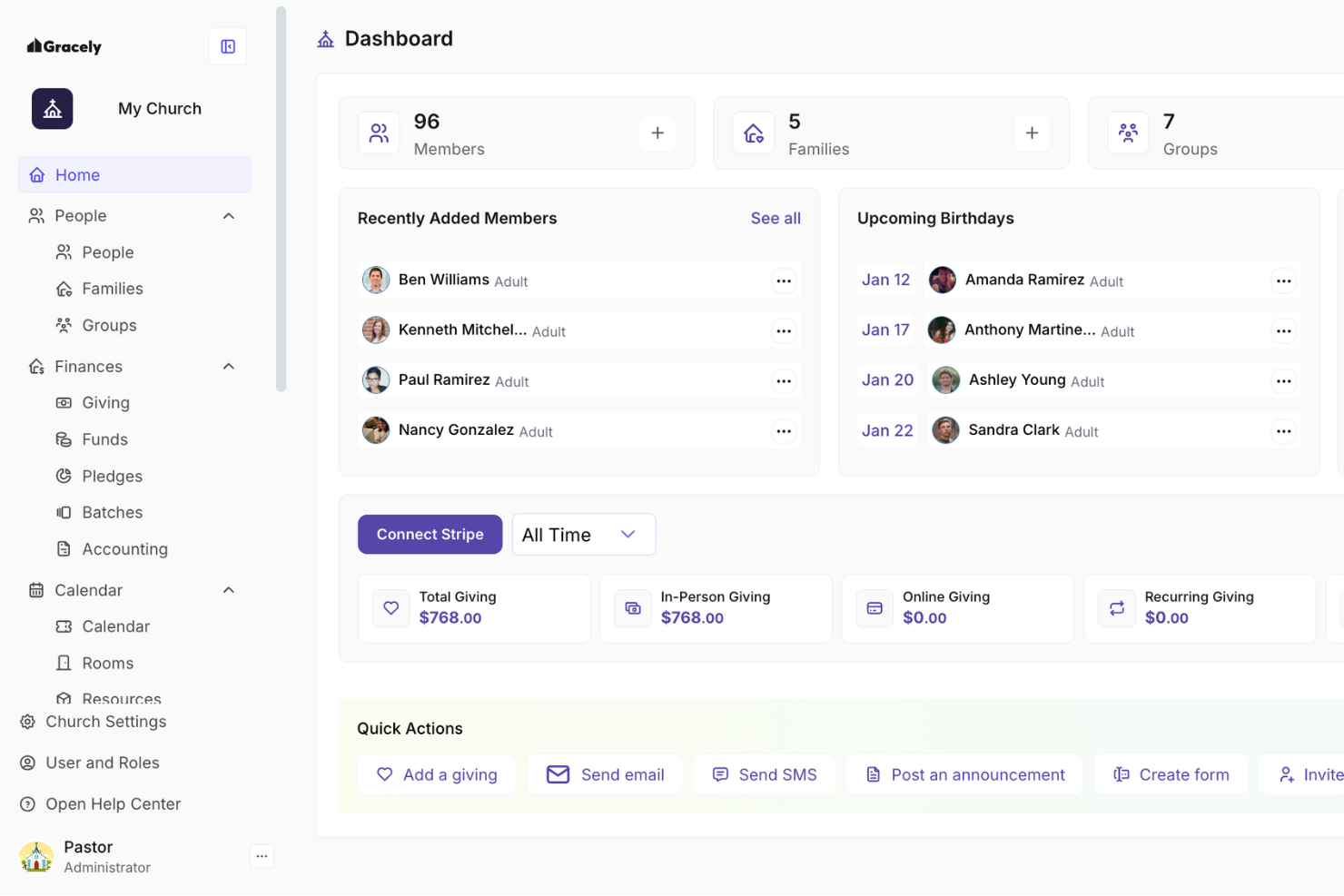
Gracely is a church management platform designed for faith communities that want to simplify donation tracking, event planning, and member engagement in one place.
Who Is Gracely Best For?
Gracely is a good fit for small to mid-sized churches that need a straightforward way to manage giving and organize ministry events without a steep learning curve.
Why I Picked Gracely
Gracely earns its spot on my shortlist because of how well it handles the two things most churches struggle to keep organized: donations and events. I like that the donation tools let you track one-time and recurring gifts, generate giving statements, and monitor campaign progress without needing a separate accounting tool. On the events side, I've found the registration and ticketing features genuinely useful for managing everything from Sunday services to fundraising dinners. By combining both in one platform, Gracely helps churches avoid juggling multiple tools.
Gracely Key Features
- Member profiles: Store personal details, contact information, family connections, and giving history for each congregation member in a centralized directory.
- Child check-in: Log and track child attendance with a secure check-in system, including exportable attendance history for safety follow-up.
- Customizable forms: Build forms for registrations, surveys, and sign-ups to replace paper-based processes and capture member information digitally.
- Church accounting: Track income and expenses across multiple accounts, categorize transactions with custom labels, and apply tax tags for financial reporting.
Gracely Integrations
No native integrations are listed.
Pros and Cons
Pros:
- Effective features for connecting members
- User-friendly interface
- A free plan is available
Cons:
- Limited integrations available
- Limited language support
New Product Updates from Gracely
Gracely Improves Donation Entry and Payment Tracking
Gracely introduced smarter batch donation entry and added Zelle as a payment method option. The updates help churches speed up donation recording and track more payment types within the platform. For more information, visit Gracely’s official site.
 .
.

Text In Church helps pastors and church leaders connect with members and guests through automated messaging, and helps manage follow-ups, reminders, and group communication within your congregation.
Who Is Text In Church Best For?
Text In Church is a great fit for small to mid-sized churches that want a dedicated tool for staying in touch with first-time guests and regular attendees through text and email.
Why I Picked Text In Church
I picked Text In Church as one of the best because its automated workflows handle follow-up that many churches struggle to maintain. When a first-time guest fills out a digital connect card, the platform automatically triggers a personalized text sequence over the following weeks—no manual reminders needed. I also like the unlimited keywords feature, which lets you set up text-in prompts for RSVPs, prayer requests, or volunteer sign-ups, so people can respond on their own time. The staff notification system alerts your team when a new guest connects, so the right person follows up at the right moment.
Text In Church Key Features
- Two-way texting: Send and receive individual text conversations with members directly within the platform.
- Group messaging: Segment your congregation into groups and send targeted texts or emails to specific audiences.
- Scheduled messaging: Plan and schedule texts or emails in advance for upcoming events, services, or announcements.
- Giving links in messages: Include direct giving links inside text or email messages so members can donate.
Text In Church Integrations
Integrations include Planning Center, Church Community Builder, Mailchimp, Rock RMS, and Zapier.
Pros and Cons
Pros:
- Integrations support cross-platform data synchronization
- Automated workflows streamline follow-up processes
- Two-way messaging enables real-time engagement
Cons:
- Requires internet for full functionality
- Limited customization for automated messages


One Church Software is a cloud-based church management platform built for churches and ministries that want to simplify member engagement, event planning, giving, and volunteer coordination in one unified system.
Who Is One Church Software Best For?
One Church Software is a strong fit for growing congregations that need scalable tools to manage increasing membership, giving, and ministry activity without outgrowing their platform.
Why I Picked One Church Software
One Church Software earns its spot on my shortlist because it's built to scale alongside a congregation as it grows. I particularly like the multi-campus support, which lets you organize members, teams, and reporting by location without losing visibility across the whole church. The automation tools are also a real asset here—I use them to trigger follow-up emails and SMS messages based on form submissions or attendance patterns, so no new visitor or lapsed member slips through the cracks. Add in the prebuilt lapse donor and lapse attendance reports, and you've got a system that actively helps you stay connected as your congregation expands.
One Church Software Key Features
- Online giving: Accept one-time and recurring donations through customizable giving pages with text-to-give and kiosk options.
- Child check-in: Manage secure check-in and check-out for children's ministry with label printing and allergy or medical notes.
- Group management: Organize members into small groups, classes, or ministry teams with built-in communication and attendance tracking.
- Event registration: Create and manage event sign-ups with custom forms, capacity limits, and automated confirmation emails.
One Church Software Integrations
Native integrations are not currently listed.
Pros and Cons
Pros:
- Mobile app available
- Integrates all church management functions in one
- Convenient event management
Cons:
- Can get pricey with more profile users and feature add-ons
- Lack of integrations

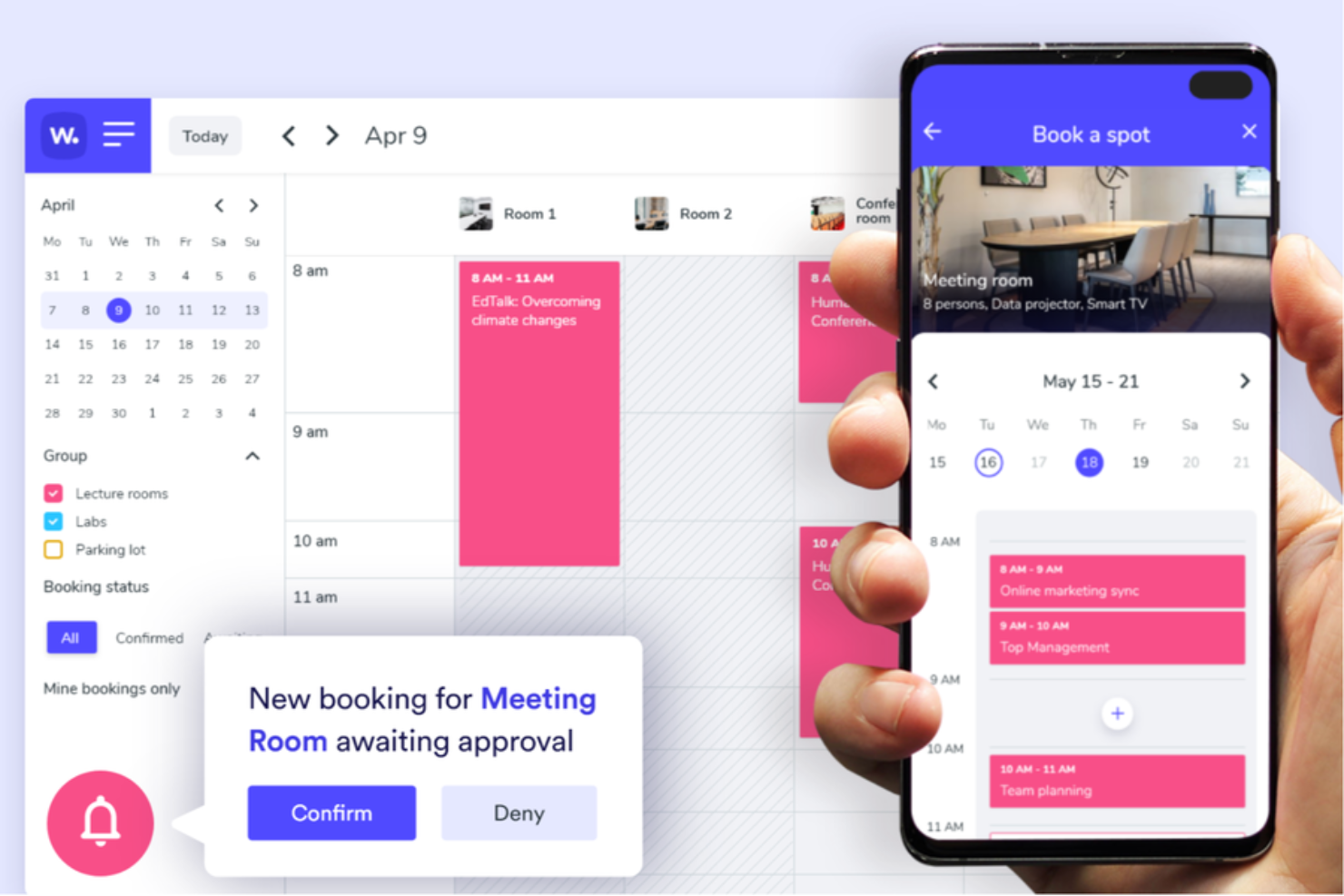
Whatspot is a booking platform designed for churches and community organizations that need a simple way to manage shared spaces, facility reservations, and approval-based booking access while avoiding scheduling conflicts.
Who Is Whatspot Best For?
Whatspot is a good fit for small to mid-sized churches that need a straightforward way to manage shared spaces, meeting rooms, and facility bookings across staff and volunteers.
Why I Picked Whatspot
Whatspot earns its spot on my shortlist because it gives churches a structured way to manage shared spaces across staff, ministries, and external community groups. I like that churches can offer public booking access through embeddable booking pages while still controlling approvals and access permissions from a central dashboard. The platform also makes it easier to separate internal and external bookings, helping teams coordinate facility use without manual scheduling back-and-forth.
Whatspot Key Features
- Booking rules and limits: Set custom rules that define when a space can be booked, how often, and by whom to manage fair access across your congregation.
- Visitor booking access: Allow guests and external groups to request space bookings without requiring full account registration.
- Interactive floor plan view: See real-time desk and room availability across your facility using a visual floor plan layout.
- Admin approval controls: Review, approve, or reject booking requests from a central dashboard to keep facility use organized.
- Embeddable booking pages: Add booking widgets to your church website so members and community groups can request space access online.
Whatspot Integrations
Integrations include Microsoft Outlook, Microsoft Teams, and Google Calendar.
Pros and Cons
Pros:
- Handles recurring events and shared space scheduling
- Allows public booking requests for community groups
- Supports approval-based facility booking workflows
Cons:
- QR-based booking features may be unnecessary for some churches
- Lacks built-in donor management
New Product Updates from Whatspot

Whatspot Enhances Reservation Alerts and Admin Bookings
Whatspot has introduced upcoming reservation reminders and booking support for colleagues and guests. These updates help teams reduce unused reservations and simplify workplace and visitor booking management. For more information, visit Whatspot’s official site.
 .
.

Breeze ChMS is a church management platform built for small to mid-sized churches that want to simplify member tracking, event planning, giving, and communication in one place.
Who Is Breeze ChMS Best For?
Breeze ChMS is a strong fit for small to mid-sized churches that need an approachable, no-fuss system their staff and volunteers can learn with minimal training.
Why I Picked Breeze ChMS
Breeze ChMS earns its spot on my shortlist because it requires little setup and is straightforward to deploy. I love the customizable tags and groups feature—you can segment your congregation by small group, volunteer role, or ministry team in minutes, then message those groups directly without jumping between tools. The kids' check-in system is another highlight: it prints parent and child name tags, assigns unique security codes, and tracks attendance without requiring any technical setup. For churches where staff and volunteers aren't particularly tech-savvy, that kind of out-of-the-box simplicity is hard to come by.
Breeze ChMS Key Features
- Online giving: Congregants can give via credit card, debit card, or ACH directly through your church's giving page, with contributions automatically logged to donor profiles.
- Event registration: Create events with custom registration forms, set capacity limits, and track sign-ups from within the same platform you use to manage members.
- Contribution statements: Generate and email year-end giving statements to donors in bulk, pulling directly from recorded contribution data.
- Volunteer scheduling: Assign volunteers to specific roles and service times, then send automated reminders to confirm availability.
Breeze ChMS Integrations
Integrations include Tithely Giving, Tithely People, Tithely Messaging, Tithely Church Apps, Tithely Events, Tithely Sites, Sermonly Sermon Writer, Tithely Print, Accept Bitcoin and Crypto through Engiven, and a public API for custom integrations.
Pros and Cons
Pros:
- Responsive customer support
- Easy data transfer from other systems
Cons:
- Some features are quite basic


Tithely is a church management platform for faith communities, offering tools to simplify giving, manage members, organize events, and communicate with their congregation from a single dashboard.
Who Is Tithely Best For?
Tithely is a strong fit for small to mid-sized churches that need an all-in-one platform to manage both their congregation and their giving programs.
Why I Picked Tithely
Tithely earns its spot on my shortlist because of how well it handles recurring giving. I like that donors can set up, pause, or update their recurring gifts entirely on their own—without needing to contact your admin team. That kind of donor-controlled flexibility keeps giving consistent without adding work for your staff. I also use the pledge campaign tools to set giving goals and track progress in real time, which makes stewardship conversations with your congregation much more concrete and data-driven.
Tithely Key Features
- Kids check-in: Print parent and child name tags, track attendance, and assign unique security codes for each child during services and events.
- Workflow automation: Set up automated tasks like birthday emails, group assignments, and follow-up messages to reduce manual admin work.
- Customizable tags: Organize members into groups—such as volunteers, small groups, or event attendees—to target communication and track engagement.
- Service planning: Coordinate weekend worship services, including a song library and SongSelect® integration, through a built-in planning tool.
Tithely Integrations
Integrations include SongSelect, MinistrySafe, and the Tithely Worship App.
Pros and Cons
Pros:
- Mobile-first giving tools
- Easy tracking of donor history
- Text-to-give functionality
Cons:
- No free tier available
- Limited non-donation features


Churchteams is a church management platform built for pastors and ministry leaders who want to organize member data, streamline communication, and coordinate groups and events in one place.
Who Is Churchteams Best For?
Churchteams is a strong fit for small to mid-sized churches that need a dedicated system for tracking congregation members, managing groups, and staying connected with their community.
Why I Picked Churchteams
Churchteams earns its spot as one of the best on my shortlist because of how thoroughly it handles member information tracking. I like that member fields are fully customizable, so my team can capture exactly the data that matters to our ministry—whether that's spiritual gifts, background check status, or discipleship milestones. Connection card responses and pastoral conversations can be logged directly to individual member records, and follow-up tasks can be assigned with automatic email and text reminders if they go unfinished. The ability to let members update their own information with a single click from an email also keeps the database current without putting all the work on staff.
Churchteams Key Features
- Child check-in security tags: Print name tags or send parents a unique security code via text that matches the code on their child's tag at check-in.
- Automated communication workflows: Set up triggered email and text sequences for scenarios like guest follow-up, volunteer training, and event reminders.
- Text-to-Church keyword texting: Let members access giving, event registration, and volunteer schedules by texting a keyword—no app or login needed.
- Attendance tracking and reporting: View real-time check-in data, run attendance summary reports, and receive scheduled alerts for member absences.
Churchteams Integrations
Native integrations are not currently listed.
Pros and Cons
Pros:
- Comprehensive church management features, including donation tracking, team building, and event management.
- User-friendly interface suitable for varying tech skills, minimizing the learning curve.
- Excellent 24/7 customer support, providing guidance and solutions to improve the user experience.
Cons:
- Lacks an online calendar feature, which can limit scheduling capabilities.
- Only online training available, with no options for in-person training.


Subsplash gives churches a unified platform to manage digital giving, media, events, and communication, helping ministry teams connect with their congregations through custom apps, websites, and integrated engagement tools.
Who Is Subsplash Best For?
Subsplash is a strong fit for churches of any size that want to build a consistent digital presence and keep both in-person and remote members engaged through mobile apps, streaming, and online giving.
Why I Picked Subsplash
Subsplash earns its spot on my shortlist because it's purpose-built for churches that need to reach members beyond the Sunday morning crowd. I particularly like the custom-branded mobile app, which lets congregations stream sermons, access sermon archives, and receive push notifications—all in one place their members already check daily. I also use the integrated online giving tools, which make it easy for remote members to tithe without ever setting foot in the building. For churches with hybrid or distributed congregations, that combination of media delivery and giving in a single app is genuinely hard to replicate elsewhere.
Subsplash Key Features
- Event registration: Members can register for church events directly through the app or website, with all registrations managed from a single dashboard.
- Child check-in: A built-in check-in tool lets staff and volunteers track children's attendance and manage safety workflows during services.
- People profiles: Store and manage individual member records, including contact details and engagement history, within the church management dashboard.
- Volunteer management: Assign, schedule, and track volunteers across ministries from within the same platform used for giving and media.
Subsplash Integrations
Native integrations are not currently listed.
Pros and Cons
Pros:
- Great mobile app functionality
- User-friendly interface with modern UI
- Offers "all-in-one" coverage of all basic church needs
Cons:
- Limited integrations with other systems


Realm is a cloud-based church management platform built for churches and ministries that want to organize member data, manage giving, coordinate events, and strengthen engagement across their congregation.
Who Is Realm Best For?
Realm suits small to mid-sized churches looking for an all-in-one platform to manage members, giving, and ministry operations.
Why I Picked Realm
Realm earned a spot on my shortlist because it's built around community connection. I love the Connected Groups feature—congregation members can search for and join small groups on their own, post messages to group walls, and check meeting schedules without staff having to manage every interaction. I also like that group leaders get their own set of tools to manage rosters, track attendance, and share resources, which takes real pressure off church staff. Realm's targeted communication lets leaders message a specific group rather than the whole congregation, so a small group leader can notify only their members via email, in-app alert, or text.
Realm Key Features
- Online giving: Congregation members can make one-time or recurring donations directly through Realm's giving portal or mobile app.
- Contribution statements: Automatically generate and distribute year-end giving statements to members for tax reporting purposes.
- Event registration: Create events, set capacity limits, and collect registrations and payments from members in one place.
- Volunteer management: Schedule volunteers for specific roles and services, and track their participation history over time.
Realm Integrations
Integrations include Constant Contact, Givelify, Vanco, QuickBooks, ShelbyNext, MinistrySafe, Protect My Ministry, and an API for custom integrations.
Pros and Cons
Pros:
- Event registration and payment processing features
- Connectivity and communication features
- Integrated solution for church management
Cons:
- Potential learning curve for new users
- User interface could be improved
Other Church Management Software
Do none of the above work for you? Check out the list below for additional church management software tools:
- Blackbaud
For managing people and payments
- Elvanto
For church finances
- Wild Apricot
For member database management
- Planning Center
For scaling with church growth
- Fellowship One
For online administrative management
- Touchpoint
Mobile app experience
- Elexio
For people management
- PowerChurch
For detailed membership records
- Excellerate
For on-site local network installation
- ChurchTrac
For centralizing church functions
- SteepleMate
For organizing member information
- MinistryPlatform
For large churches
- Communicate
For drag-and-drop scheduling
- Raklet
For building your own branded app
- FaithLife
Church website builder
- ParishSOFT
For Catholic parishes
- ShelbySystems
Denominational headquarters solution
- ACS Realm
For small churches
- CDM+
Charity/NGO fundraising app
- SeekerWorks
New guest onboarding
- Church Windows
Shared calendar & event scheduling
- Kyrios ChMs
Church reporting dashboard
- CCIS
Technical support & training
- CFS Live
Feature-based subscription model


Other Key Related Software Tools
These are also thoroughly tested, vetted, lead pastor-approved:
- Membership management tools
- Donor management software
- Church giving software
- Church accounting software
- Best worship software
Selection Criteria for Church Management Software
To do this well:
- Know the software features you need.
- Define your church's unique needs.
Unless you do THAT well, you will NOT be well-positioned to find the tool uniquely suited to:
- Your current church needs
- Support your church growth
- Increase your member engagement
To surface the BEST results, we look at SEVEN areas:
Core Church Management Features (25% of total weighting score)
Our non-negotiable features:
- Member directory
- Donation management
- Event scheduling
- Volunteer management
- Financial reporting
- Communication tools
- Check-in systems
- Mobile access
- Worship planning
- Integration with other tools
The software should:
- Manage a member database
- Streamline donations and finances
- Coordinate events and volunteers
- Enhance church communication
- Offer secure check-ins for children
Standout Features (25% of total weighting score)
This year's best-of-the-best tool will offer THESE above-and-beyond solutions:
- AI-powered insights for donor engagement
- Advanced metrics and analysis on member involvement
- Tools that make it easier for staff and volunteers to work together
- Supplementary dedicated apps
- The ability to create custom reports, dashboards, and comms for your church.
Usability (10% of total weighting score)
If THESE elements aren't present, your people will struggle to adapt to it:
- Intuitive interfaces
- Drag-and-drop calendar scheduling
- Clear, simple workflows for critical tasks (like financial reconciliation or event planning)
Onboarding (10% of total weighting score)
Each tool needs to make it EASY for even your elderly volunteers to learn and begin using. We look for:
- Training videos or setup guides
- Templates for importing pre-existing information (member records, etc)
- Easy to follow product tour
- Onboarding/training support
Customer Support (10% of total weighting score)
This is obvious. Unless these things are present, we don't want to recommend a too:
- Live chat, email, or phone support
- Quick response times
- Community forums, FAQs, and webinars
Value for Money (10% of total weighting score)
Stewardship is key. An expensive tool that underperforms is a poor use of your congregations hard-earned, freely given money.
We look for:
- Fair pricing for features
- No hidden fees
- Good short-term AND long-term value
Customer Reviews (10% of total weighting score)
We look deeper than the software vendor's marketing, too. We comb through customer reviews, looking for customer mentions of the following:
- Ease of use
- Effective customer support
- Proof the tool reduced admin
Since 2019, we've seen that this evaluation metric is effect, and consistently bubbles up reliable, useful, worthy tools.
How To Choose Church Management Software.
1. Consider Scalability.
The best tools are designed to grow WITH your church.
Sure, you only need something small now - but pick a software that can expand as your church grows. Otherwise... you're just going to have to do this all over again 3-5 years down the road... when the costs (and stakes) will be higher.
2. Prioritize User-Friendliness.
Your team’s tech skills will vary, so choose software that’s easy to use for everyone:
- Training: tutorials and webinars are massive.
- Simple Interface: Accessible for all staff and volunteers.
- Cloud-Based Access: Allows work from anywhere.
3. Look for Integration.
The POINT of a ChMS is to simplify and streamline your church management. It should lower the number of software tools you need to futz with. For example:
- It should allow you to move information between itself and your accounting software.
- It should talk seamlessly to your email service or social media channels
- It should interface directly with your church's giving software (so you can tie specific donations to specific members)
When this is happening, you spend WAY less time jumping between tools.
4. Choose Flexibility
Your church has unique needs, so make sure the ChMS you consider can adapt to those. The two major areas that will support flexibility are:
- The ability to customize the types of information you store. Tailor member data to your church’s needs.
- The ability to customize the types of reports you pull. Generate reports that matter to your ministry, and directly support your vision and mission.
5. Don't Skimp on Customer Support and Training
If your church doesn't have dedicated IT - this is especially crucial. Make sure the ChMS tool you choose offers the following:
- Comprehensive Training: Tutorials, webinars, and user forums.
- Accessible Support: Phone, email, and live chat options available.
- Automated Task Management: Helps manage growth efficiently.
- Expandable Storage: Ensures you never run out of space.
Trends in Church Management Software
I love being on the forefront of church tech - so I regularly review the most recent releases, reviews, and software updates from the top church software movers and shakers.
Here's what's cutting edge today:
- ChMS + Social Media + Streaming Platforms:
Many tools now connect with social media and live streaming services (to help spread their reach to online members). - Shifting Focus to Mobile & App Development
The best tools offer dedicated apps, and work GREAT on phones. Helpful for obvious reasons. - Advanced Analytics / Reporting
With more folks using phones and apps, forests of data are being collected. That data contains insights that can be insanely useful in decision-making. Don't get creepy on your members, though.
Futuristic / Bleeding-Edge Stuff:
- AI-Fueled Communications
Harness the power of LLMs to personalize member communication and even donor-specific engagement. NOTE: this isn't for everyone. Some folks prickle at the mere mention of AI. Be careful about how you implement this stuff. - Virtual Reality (VR) Services
A few advanced platforms are testing VR technology for immersive remote attendance experiences. It's a wild world.
On the Way Out...
- Say goodby to support for printing directories & physical mail
Most churches have shifted away from resource intensive mailings and directories... and I'm seeing ChMS vendors are pulling that support more and more - On-site tools are fading...
You don't have to be in the office to log into your ChMS anymore. Cloud-based software is the default standard now. It's easier to access, simpler to update, and requires less IT support.
What is Church Management Software?
Church Management Software (ChMS) is a tool that makes the day-to-day operations of your church simpler, easier, and cheaper. With the right ChMS in hand, managing your church will require a lot less hassle. It allows you to:
- keep church member information up-to-date
- streamline communication with your staff, volunteers, and members
- automate donation & financial tracking
I can't imagine pastoring at my church without it (well, I can - but it's terrible).
Features of Church Management Software
When selecting church management software, keep an eye out for the following key features:
- Member database management: Store and organize member profiles, including contact details, family relationships, and participation records. This feature helps you quickly find anyone in your congregation and stay connected to their life events.
- Attendance tracking: Monitor who’s coming to services, classes, or events. You can see attendance patterns over time, which helps you spot trends and encourage more engagement.
- Donation and giving management: Record, track, and report on donations. This lets you easily send tax statements, thank donors, and keep your church finances organized—all without drowning in paperwork.
- Event and calendar planning: Schedule church events, automate reminders, and avoid double-bookings. You can run everything from weekly services to big fundraisers without missing a beat.
- Communication tools: Email, text, or message your congregation right from the platform. Keeping everyone informed about news, schedule changes, or volunteer opportunities is a breeze.
- Volunteer management: Recruit, schedule, and coordinate volunteers for activities and events. No more last-minute panics for Sunday school coverage or help in the food pantry.
- Reporting and analytics: Generate reports on attendance, giving, and member engagement. These insights give you a clear picture of your church’s health and help you make better decisions.
- Child check-in and security: Provide safe, streamlined check-in for children’s ministries. Parents can relax knowing kids are accounted for and only authorized adults can pick them up.
Benefits Your ChMS Should Provide
Church management software is a must-have in today’s digital world. It helps churches run more efficiently, freeing up resources like time, money, and volunteers for community engagement and outreach.
1. You'll spend less time in admin.
The software automates routine tasks like member tracking, scheduling, and reporting. This saves time and effort, allowing church staff to focus more on ministry.
2. Communication will get simpler.
It improves communication with members through mass emails, text messaging, and social media integration. This ensures important information and updates reach everyone quickly and efficiently.
3. Financial management will improve.
The software tracks donations, manages budgets, and generates financial reports. This provides a clear view of your church’s finances, helping make informed decisions and promoting accountability.
4. Members will be more engaged.
Features like event registration, volunteer sign-ups, and group management boost member involvement. It makes it easy for members to find and join activities that interest them.
5. More clarity in decision making.
Collecting and analyzing data on attendance, donations, and engagement helps church leaders make informed decisions. These insights guide planning and outreach efforts, helping grow the church and deepen its impact.
Cost & Pricing for Church Management Software
| Plan Type | Average Price | Common Features | Best For... |
|---|---|---|---|
| Free | $0 | Basic member management, limited communication tools, basic reporting. | Small churches with tight budgets. |
| Basic | $25/month | Member management, email communication, donation tracking, basic event scheduling. | Small to medium churches needing core features. |
| Standard | $60/month | All Basic features, plus text messaging, advanced reporting, volunteer management. | Medium churches needing more tools. |
| Premium | $120/month | All Standard features, plus mobile app access, custom dashboards, enhanced security features. | Larger churches needing advanced features. |
| Enterprise | $250/month | All Premium features, plus full integration with other software, priority support, unlimited users. | Very large churches needing top-tier features. |
Church Management Software Frequently Asked Questions
Are there any hidden costs I should watch out for when buying church management software?
Yes, many church management systems advertise a low monthly price, but you should look for extra fees like data migration, support, training, or added features. Always ask about costs for upgrades, adding users, or integrating other tools. Read the contract and ask for a full breakdown before you commit, so you don’t get surprised later.
If our church grows or needs to switch to a different platform, how hard and expensive is it to move our data?
Switching platforms can take time and sometimes costs extra, especially if you need help moving your data. Some vendors offer free migration, while others charge for it. Before you buy, ask how easy it is to export your data and if there’s help available. Planning ahead can save you headaches and money down the road.
How easy is it for volunteers and staff who aren’t tech-savvy to learn the system?
Most modern software is designed to be simple, but some tools are easier than others. Look for systems with clear instructions, video guides, and responsive support. If you have older volunteers or staff, ask for a demo and try it out first. Good training and a user-friendly design make a big difference.
Is it risky to go with a free or very cheap church management solution?
Free or low-cost options can work for small churches, but they may have limits on features, support, or data security. Some free versions don’t offer backups or updates, which could put your church’s information at risk. Weigh the pros and cons, and consider if paying a little more will give you the reliability and help you need.
What ongoing costs should I expect beyond the monthly price?
Besides the monthly fee, you might pay for extra users, advanced features, support, or data storage. Some systems charge for updates, customizations, or integrations with other tools. Ask vendors for a full list of possible charges so you can budget accurately and avoid surprises as your church’s needs change.
Your ChMS Will Help to Lead and Manage Efficiently
The best church management software offers features that boost efficiency and productivity. Successfully implementing church management software means you'll manage your congregation better, track donations, manage members, and communicate with their congregations.
Finally, Subscribe to Our Newsletter!
It's full of great advice and seasoned strategies from ministry veterans.