

Gerir as finanças e a comunidade de uma igreja não é uma tarefa pequena. O Tithe.ly pode responder a algumas necessidades, mas as funcionalidades limitadas ou a falta de personalização podem deixar lacunas. Para apoiar verdadeiramente a sua missão, precisa de um software que se adapte aos seus requisitos específicos.
Com base na minha experiência, as melhores ferramentas de contabilidade para igrejas simplificam o acompanhamento das doações, reforçam o envolvimento e adaptam-se ao seu fluxo de trabalho. Testei várias opções para destacar as alternativas mais fortes ao Tithe.ly.
Neste artigo, partilharei análises imparciais das principais opções, apresentando as suas funcionalidades, vantagens e desvantagens. Isto ajudá-lo-á a escolher a ferramenta certa para apoiar a sua equipa e os objetivos da sua igreja.
O que é o Tithe.ly?
O Tithe.ly é um software de contabilidade para igrejas concebido para ajudar as igrejas a gerir doações, finanças e o envolvimento da comunidade. É normalmente utilizado por líderes de igrejas, administradores financeiros e equipas ministeriais que precisam de ferramentas eficientes para acompanhar contribuições e estabelecer ligação com as suas congregações.
Funcionalidades como donativos online, gestão de igrejas e inscrição em eventos apoiam o acompanhamento financeiro, simplificam a interação com a comunidade e melhoram a coordenação de eventos. De um modo geral, o Tithe.ly oferece uma forma valiosa de gerir as necessidades financeiras e comunitárias da sua igreja.
Tabela de comparação das alternativas ao Tithe.ly
Esta tabela de comparação resume os detalhes de preços das minhas principais alternativas ao Tithe.ly:
Score legend (out of 5)
- Excellent4.5–5
- Good4–4.4
- Average3–3.9
- Below average2–2.9
- Poor1–1.9
Sorted by: Default
| Tool | Starting Price | Website | |||||||
|---|---|---|---|---|---|---|---|---|---|
Best for custom branded church apps | 3.5 out of 5 | 4 | 4 | 3 | 4 | 2 | 4 | Pricing upon request Free plan + free demo available | Website |
Best for easy giving and member tracking | 3.7 out of 5 | 3 | 4 | 4 | 3 | 4 | 4 | $19/month Free plan + 30-day trial available | Website |
Best for multilingual support | 3.7 out of 5 | 4 | 4 | 3 | 3 | 5 | 3 | $12/month Free plan available | Book Demo |
Best for all-in-one church engagement | 3.8 out of 5 | 4 | 4 | 2 | 4 | 5 | 4 | $58/month 30-day free trial available | Website |
Best for small business accounting | 2.2 out of 5 | 4 | 2 | 2 | 2 | 2 | 1 | $27/month 1-month free trial available | Website |
Best for comprehensive IRS compliance | 3.8 out of 5 | 3 | 4 | 2 | 4 | 5 | 5 | $50/month 30-day free trial + free demo available | Website |
Best for desktop accounting | 2.3 out of 5 | 4 | 1 | 3 | 2 | 2 | 2 | Pricing upon request Not available | Website |
Best for nonprofit financial management | Not rated | 4 | Not rated | 2 | 3 | 2 | 1 | Pricing upon request Free demo available | Website |
Best for community engagement | 3.5 out of 5 | 4 | 4 | 2 | 4 | 4 | 3 | Pricing upon request Free trial available | Website |
Best for nonprofit fund accounting | Not rated | 4 | Not rated | 1 | 3 | 2 | Not rated | Pricing upon request Free demo available | Website |


Why Trust Our Software Recommendations
6,700+
Reviews
20
Industry experts
16+
Evaluation factors
14
Years
Our team has been testing and reviewing software since 2012. As church leaders ourselves, we know how difficult—and important—it is to choose the right software.
For this guide, we evaluated tools using hands-on testing and independent research, scoring tools using our selection criteria.
Our reviews reflect our human editorial judgment, not a sales pitch.
Análises das melhores alternativas ao Tithe.ly
Apresentamos abaixo os meus resumos detalhados das melhores alternativas ao Tithe.ly que entraram na minha lista. As minhas análises oferecem uma visão detalhada das principais funcionalidades, vantagens e desvantagens, integrações e casos de utilização ideais de cada ferramenta, para o ajudar a encontrar a melhor opção para si.
 Best for custom branded church apps
- Free plan + free demo available
- Pricing upon request
Visit WebsiteCustomer Rating:4.5/5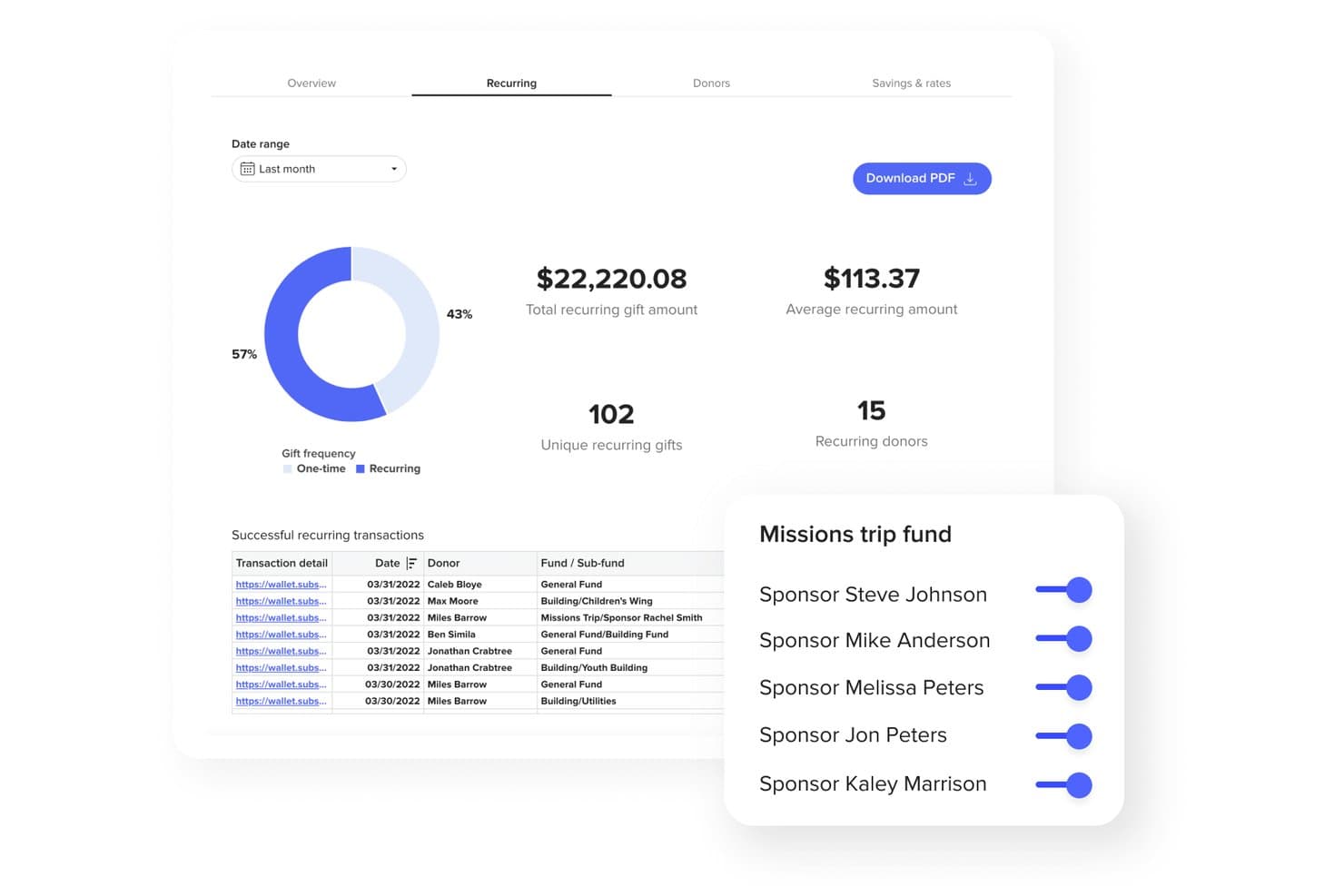
Subsplash offers a recurring giving dashboard that displays total gift amounts, donor counts, transaction history, and sub-fund sponsorship management. Subsplash is a church platform that combines online giving, donor management, custom-branded mobile apps, and media tools—making it a strong fit for churches that want giving and congregation engagement in one place.
Who Is Subsplash Best For?
Subsplash is a strong fit for churches that want giving, media, and a custom-branded mobile app all running from one platform.
Why I Picked Subsplash
I picked Subsplash as one of the best Tithe.ly alternatives because it's the only platform I've seen that ties giving directly into a fully custom-branded church app. When a donor opens your church's app to watch a sermon replay, they can give in the same session without switching tools. I especially like the GrowCurve feature, which automatically reduces processing rates as your giving volume grows, so larger congregations see real savings over time.
Subsplash Key Features
- Bulk check scanning: Staff can scan more than 100 checks at once, with scanned images and records automatically saved to the Giving dashboard.
- Stock and cryptocurrency giving: Churches can accept stock and crypto donations through an Engiven partnership, with gifts tracked and included in tax statements.
- Campaign pledging: Administrators can create giving campaigns with financial goals, date ranges, and pledge tracking, letting donors monitor their own pledge progress in-app.
- Planning Center integration: Subsplash Giving connects with Planning Center People and Planning Center Giving to sync donor profiles and transaction data across both platforms.
Subsplash Integrations
Subsplash lists integrations with Planning Center, Rock RMS, Breeze, Community Church Builder, and MortarStone, plus Zapier. It also offers a REST API and webhooks for custom connections, alongside CSV exports for ACS, Elvanto, PowerChurch, and other church systems.
Pros and Cons
Pros:
- Reviewers value consolidated ministry tools
- Bulk check scanning eases year-end reconciliation
- Custom church app keeps giving in context
Cons:
- Admins report time-consuming backend workflows
- Some churches find the platform costly
 Best for easy giving and member tracking
- Free plan + 30-day trial available
- From $19/month (billed annually)
Visit WebsiteCustomer Rating:4.8/5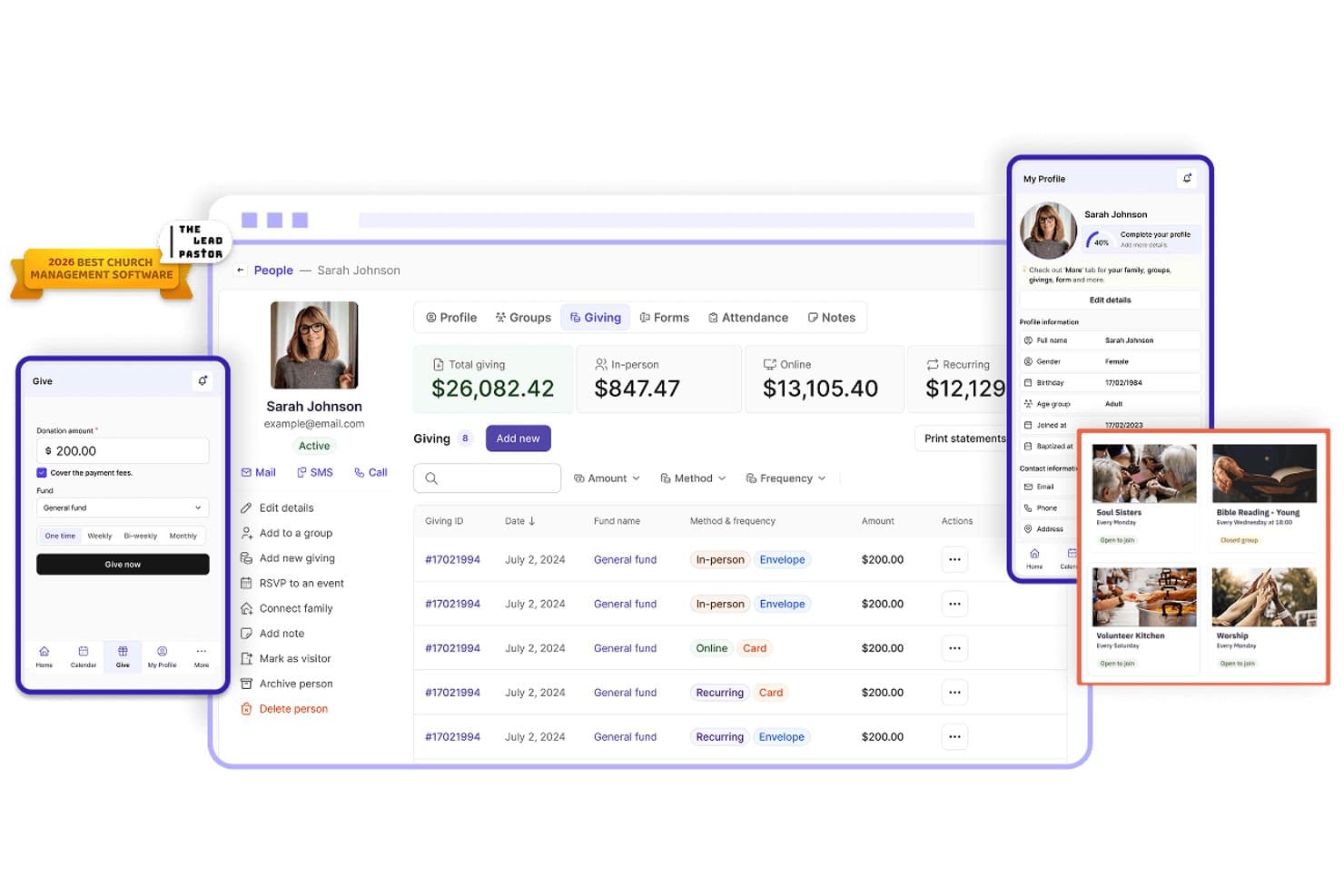
Gracely's person record showing giving totals, donation history and a mobile giving screen. Gracely is an all-in-one church management platform that brings member records, online giving, group organization, events, and built-in fund accounting together for churches that want to replace scattered tools with a single system.
Who Is Gracely Best For?
Gracely suits small to mid-sized churches that want giving, member records, groups, and accounting in one place without paying for separate tools.
Why I Picked Gracely
I've included Gracely in my top picks because it genuinely unifies giving and member tracking in a way that removes the need for separate tools. When a donation comes in through the portal or the My Gracely app, it's automatically matched to a member profile and folded into contribution reports and bulk tax statements without any manual reconciliation. I also appreciate that gifts can be split across multiple funds at checkout, so a member tithing to both the general fund and a building campaign doesn't require any admin cleanup afterward.
Gracely Key Features
- Pledge management: Create pledge campaigns tied to a fund, then track each member's pledged amount, amount given, and remaining balance as donations come in.
- Child check-in: Check children in and out from a mobile device, tablet, or kiosk, with name tag generation and pickup verification built in.
- Fund accounting: Maintain separate fund balances, sync bank transactions, and produce financial reports including an income statement, fund balance summary, and balance sheet.
- Role-based permissions: Assign predefined or custom roles to staff and volunteers, controlling who can access giving, accounting, member records, and administrative settings.
Gracely Integrations
Gracely connects with Stripe and PayPal for online giving. QuickBooks Online, Mailchimp, and Checkr are listed as forthcoming connections; API availability isn't documented.
Pros and Cons
Pros:
- Statements reduce spreadsheet-based contribution tracking
- Donors can split gifts across funds
- Giving automatically matches member records
Cons:
- No documented text-to-give or giving kiosks
- Recurring gifts require portal cancellation
Learn more about Gracely:
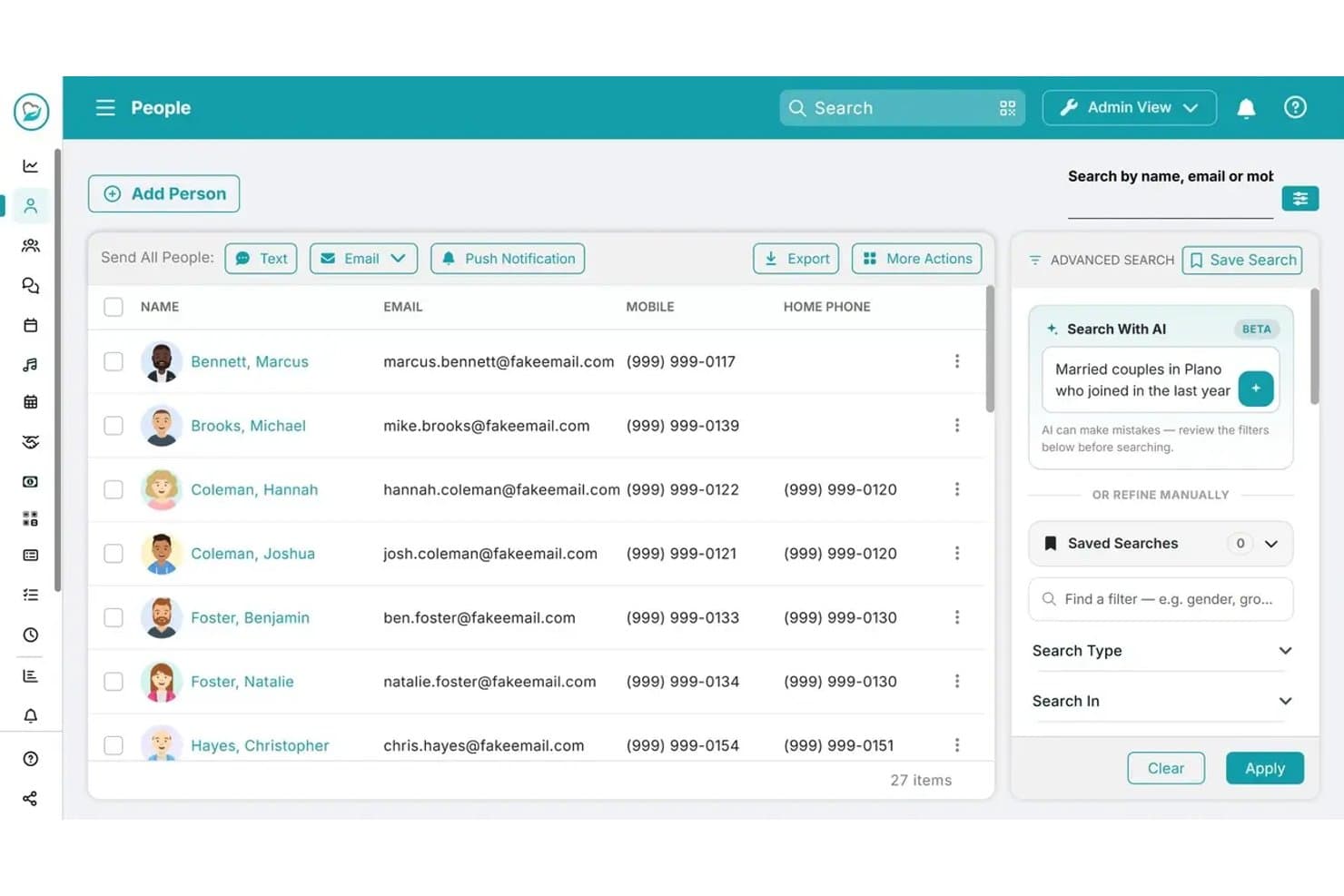
ChMeetings People directory with advanced search filters and AI-assisted search for finding members. ChMeetings is an all-in-one church management platform that handles giving, member records, accounting, communications, and volunteer scheduling—making it a strong fit for churches that want to consolidate multiple tools into one system.
Who Is ChMeetings Best For?
ChMeetings is a strong fit for multilingual and internationally active congregations that need giving, member management, and accounting in one place.
Why I Picked ChMeetings
I picked ChMeetings as one of the best because it's the only tool on my list that lets every member of a multilingual congregation navigate the platform in their own language, with support for over 20 languages including Arabic, Chinese, French, Spanish, and Amharic, all within a single church account. That's a real advantage if your services run in multiple languages or your congregation spans multiple countries. I also appreciate that giving, member records, and built-in accounting all live in one place, so there's no syncing between separate tools.
ChMeetings Key Features
- Pledge campaign tracking: Set up giving campaigns, record individual or family commitments, and track contributions against pledges for both online and offline gifts.
- Built-in fund accounting: Manage income, expenses, budgets, bank reconciliation, and financial reports without a separate accounting tool (available on Small plan and above).
- Volunteer scheduling: Create roles, assign team members, send automated reminders, and let volunteers sign up through shareable links or QR codes.
- Donor fee coverage controls: Give donors the option to cover payment-processing fees, set it as the default, or require it on your giving page.
ChMeetings Integrations
Native integrations include Stripe, PayPal, Square, Mailchimp, Power BI, and Google Sheets. ChMeetings also offers a REST API, webhooks, and an MCP server for custom connections, plus Zapier.
Pros and Cons
Pros:
- Giving data migration support eases switching
- Giving records connect directly to church accounting
- Multilingual member access across one account
Cons:
- Text-to-give cannot schedule recurring gifts
- Giving reports offer limited visual customization
Learn more about ChMeetings: Best for all-in-one church engagement
- 30-day free trial available
- From $58/month
Visit WebsiteCustomer Rating:4.8/5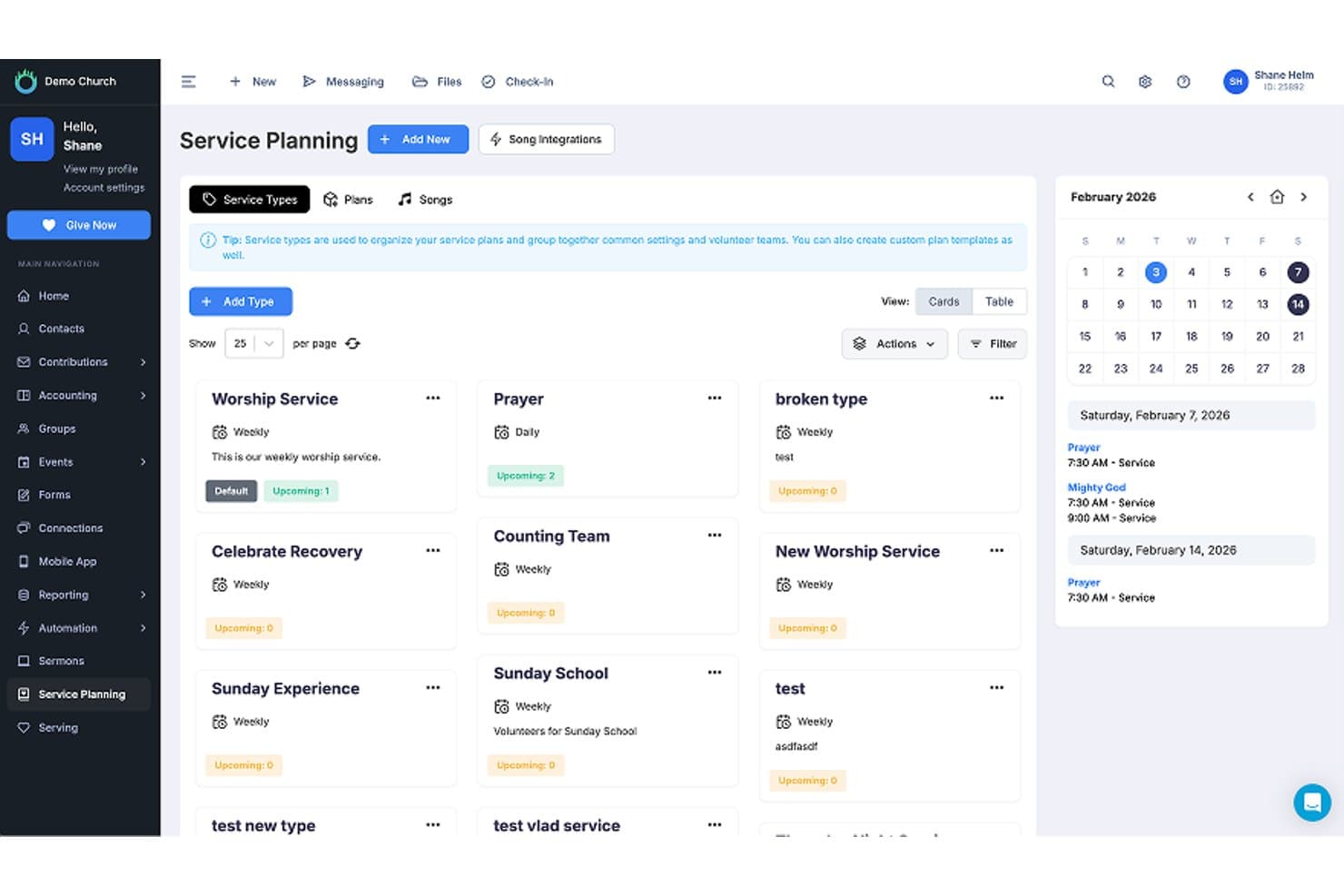
One Church Software offers a Service Planning module with service types, plans, and scheduling views organized in a card-based dashboard. One Church Software is a church management platform that brings member records, online giving, group management, service planning, and fund accounting together in one place—making it a natural fit for churches that want to replace multiple disconnected tools.
Who Is One Church Software Best For?
One Church Software is a strong fit for churches that want to manage members, giving, groups, and accounting in a single platform instead of juggling separate tools.
Why I Picked One Church Software
I picked One Church Software as one of the best because it's the rare platform that genuinely replaces Tithe.ly without leaving gaps. Where Tithe.ly keeps giving and church management separate, One Church Software connects them natively: contribution batches post directly to the general ledger, and text-to-give gifts process automatically after a donor's one-time setup. It also brings in service planning, volunteer scheduling, and group management under the same roof.
One Church Software Key Features
- Volunteer scheduling: Send availability requests by text or email, set volunteer preferences and blackout dates, and schedule teams months in advance.
- Custom workflow automation: Build automated workflows that trigger from form submissions, search results, or scheduled reports to send emails, texts, and assignments.
- Check-in with security labels: Run family or self check-in with custom security labels that include notes like allergies or medical needs.
- Background screening integration: Order and manage staff and volunteer background checks directly through a built-in Protect My Ministry integration.
One Church Software Integrations
Native integrations include Square, eSPACE, Protect My Ministry, YouTube, and Vimeo. One Church Software also offers an API and webhooks for custom integrations.
Pros and Cons
Pros:
- Member, giving, and accounting records stay connected
- Scheduled custom reports support donor follow-up
- Giving batches post directly to church books
Cons:
- Attendance takes extra navigation
- Service-planning templates need more depth
Learn more about One Church Software: 5Best for small business accounting
Xero
- 1-month free trial available
- From $27/month
Visit WebsiteCustomer Rating:4.4/5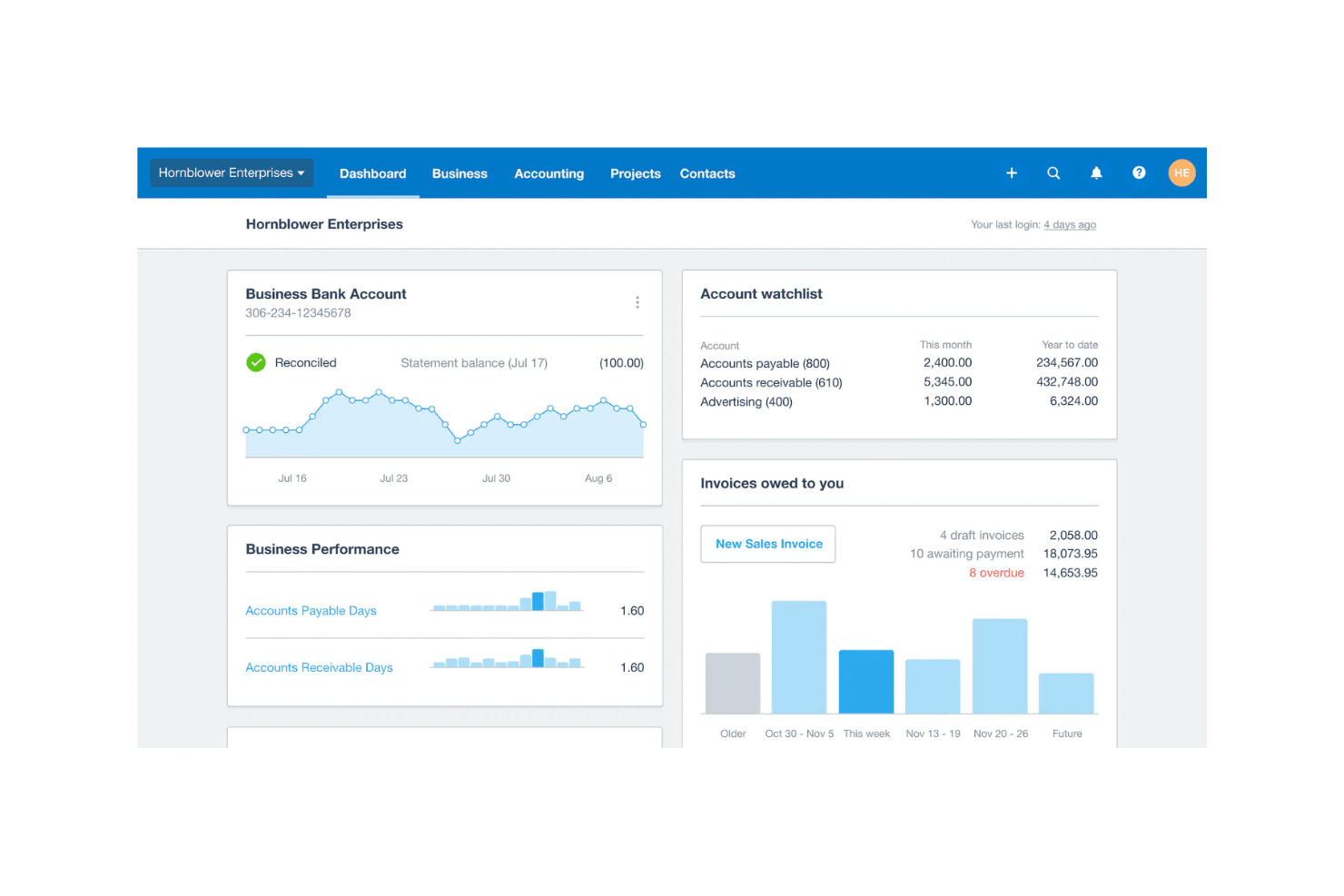
The Xero dashboard shows bank reconciliation, account watchlist, and invoices owed at a glance. Xero is cloud-based accounting software that church administrators and finance staff use to manage bank reconciliation, expense tracking, and financial reporting—making it a backend bookkeeping option for ministries that need accounting support beyond what a dedicated giving platform provides.
Who Is Xero Best For?
Xero works well for church finance staff and bookkeepers who need a dedicated accounting backend to manage bank reconciliation, expense tracking, and financial reporting alongside a separate giving platform.
Why I Picked Xero
I've included Xero in my top picks because it's the strongest small business accounting backend I've found for churches that already have a giving platform but need cleaner books. Xero's bank reconciliation automatically matches incoming donations to the right income account, and its tracking categories let your finance team tag transactions by fund or program for a Tracking Summary report that holds up at a board meeting.
Xero Key Features
- Bank feed connections: Xero connects to over 21,000 financial institutions worldwide to automatically import bank transactions into your accounting records.
- Tracking categories: Tag income and expenses by fund, program, or grant using tracking categories, then run a Tracking Summary report to review activity by designation.
- Online invoice payments: Add a Pay Now button to invoices so donors or funders can pay by card, ACH, or digital wallet through a connected payment provider.
- Unlimited user access: Add unlimited general users—including treasurers, board members, and volunteers—at no extra cost across your organization.
Xero Integrations
Xero’s App Store lists over 1,000 apps, including marketplace integrations with infoodle, Stripe, Dext, and Avalara. Xero also provides Accounting and other APIs for custom integrations, plus connected Google Sheets report exports.
Pros and Cons
Pros:
- Reviewers praise bookkeeping automation
- Tracks funds in financial reports
- Automates donation bank reconciliation
Cons:
- No donor profiles or giving statements
- No native recurring tithe workflows
 Best for comprehensive IRS compliance
- 30-day free trial + free demo available
- From $50/month
Visit WebsiteCustomer Rating:4.4/5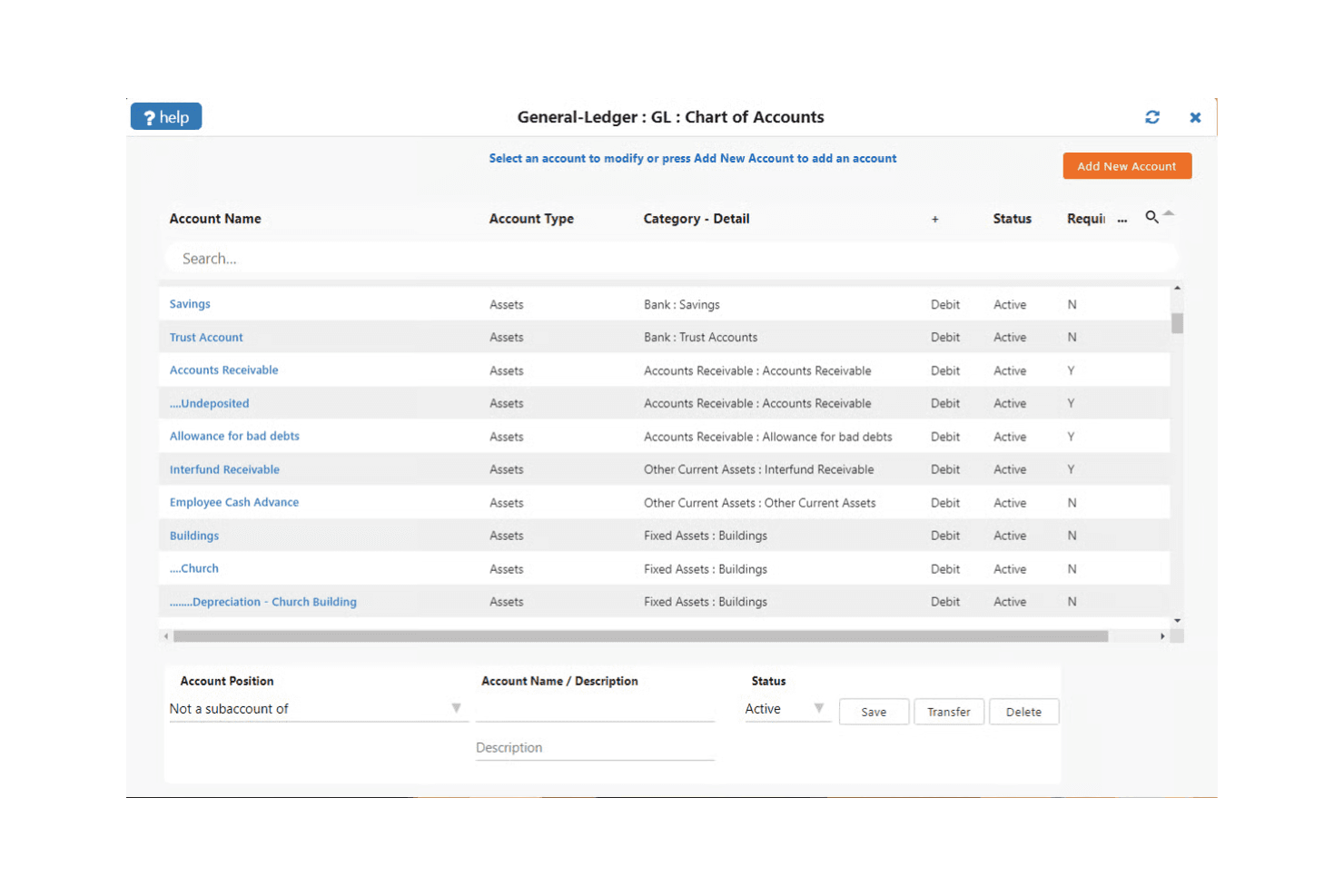
The chart of accounts screen in the General-Ledger module, listing assets with their categories and status. Icon Church Management is an all-in-one church software that brings together membership, fund accounting, donation tracking, and donor communications—making it a strong fit for churches that need their finances and giving records to stay tightly connected.
Who Is IconCMO Best For?
IconCMO is a strong fit for churches where finance and bookkeeping staff need fund accounting, donor records, and IRS-compliant giving statements all in one place.
Why I Picked IconCMO
I picked IconCMO as one of the best Tithe.ly alternatives because of how seriously it takes IRS compliance for donor giving records. I appreciate that it generates Standard and Simple statement formats that meet IRS documentation requirements, so year-end giving statements aren't something you have to piece together manually. It also automatically posts donation batches to the built-in fund accounting system, which means your giving records and your books stay in sync without double entry.
IconCMO Key Features
- Fund accounting: Tracks revenues, expenses, and balances by fund, including designated funds, with budget comparisons and board-ready financial reports.
- Pledge and campaign tracking: Records multi-year pledges per donor and fund, with tools to share mission goals and giving progress with your congregation.
- Vanco giving import: Imports electronic donation batches from Vanco into the Donations module, with options for daily, weekly, monthly, or manual import frequency.
- Role-based user permissions: Assigns Read, Read-Write, or No Access settings per system area, with up to five users on Standard and unlimited users on Premium.
IconCMO Integrations
Integrations include Vanco and Worldline for donation imports, plus CSV and tab-delimited file imports. IconCMO also offers a Web Services API with read-write access for custom integrations.
Pros and Cons
Pros:
- Reviewers praise responsive, knowledgeable phone support
- Donor histories connect directly with fund accounting
- IRS-ready year-end statements reduce manual work
Cons:
- Some mobile tasks feel less convenient
- Financial reports can be difficult to tailor
Learn more about IconCMO:
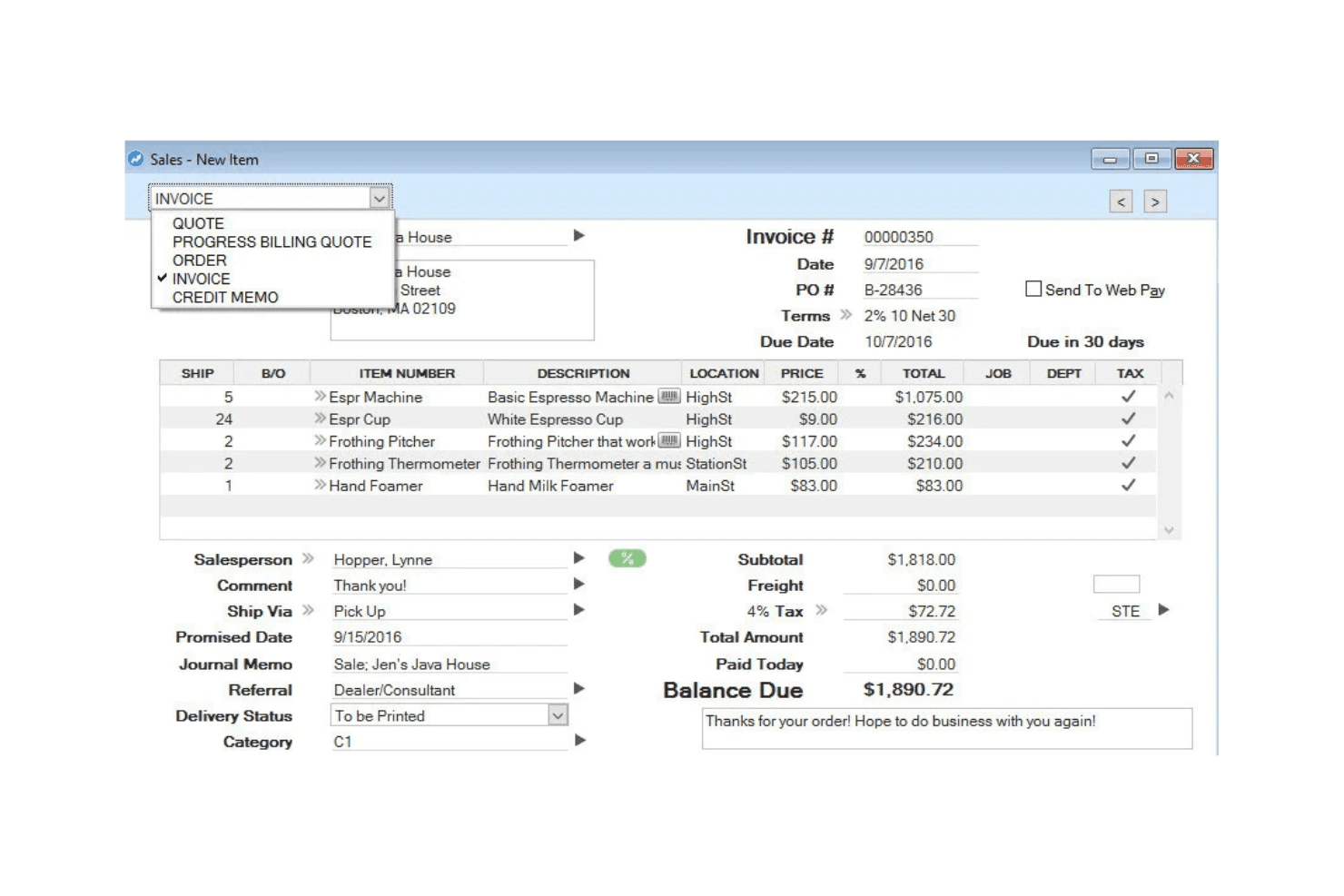
AccountEdge sales window for creating an invoice, with itemized lines, tax, and balance due. AccountEdge is desktop accounting software for churches and religious organizations that need to track donations, manage ministry fund reporting, and handle payroll and expenses from a locally installed platform.
Who Is AccountEdge Best For?
AccountEdge suits churches with dedicated finance or bookkeeping staff who need a full-featured desktop accounting system to manage the books locally.
Why I Picked AccountEdge
I picked AccountEdge as one of the best because it's the only desktop-first option on this list, which matters if your church wants financial records stored locally rather than in the cloud. I appreciate how its church accounting module handles donation tracking, ministry fund reporting, and donor contact records directly within the general ledger, so your bookkeeper isn't toggling between separate systems. The 200+ built-in reports, including ministry and mission fund breakdowns, give finance staff the detail they need for board reporting or annual audits.
AccountEdge Key Features
- Donation and dues recording: Logs donations, collections, dues, and membership fees directly within the general ledger.
- Recurring transaction scheduling: Sets up automatic or manual recurring transactions for regular contributions, with configurable frequency and occurrence limits.
- Departmental budgeting: Assigns transaction lines to departments and tracks budgets by account and fiscal period.
- Bank feed reconciliation: Imports bank and card statements and matches transactions automatically to support accurate bookkeeping.
AccountEdge Integrations
AccountEdge has documented native integrations with Square, UPS, Plaid, Microsoft Power BI, Microsoft Office, and SurePayroll. It supports Zapier connectivity, but no API or dedicated ChMS or giving integration is documented.
Pros and Cons
Pros:
- Reviews praise broad accounting and reporting
- Local books remain available offline
- Detailed ministry and mission fund reports
Cons:
- No automated year-end giving statements
- No donor-facing online or mobile giving
Learn more about AccountEdge: Best for nonprofit financial management
- Free demo available
- Pricing upon request
Visit WebsiteCustomer Rating:3.5/5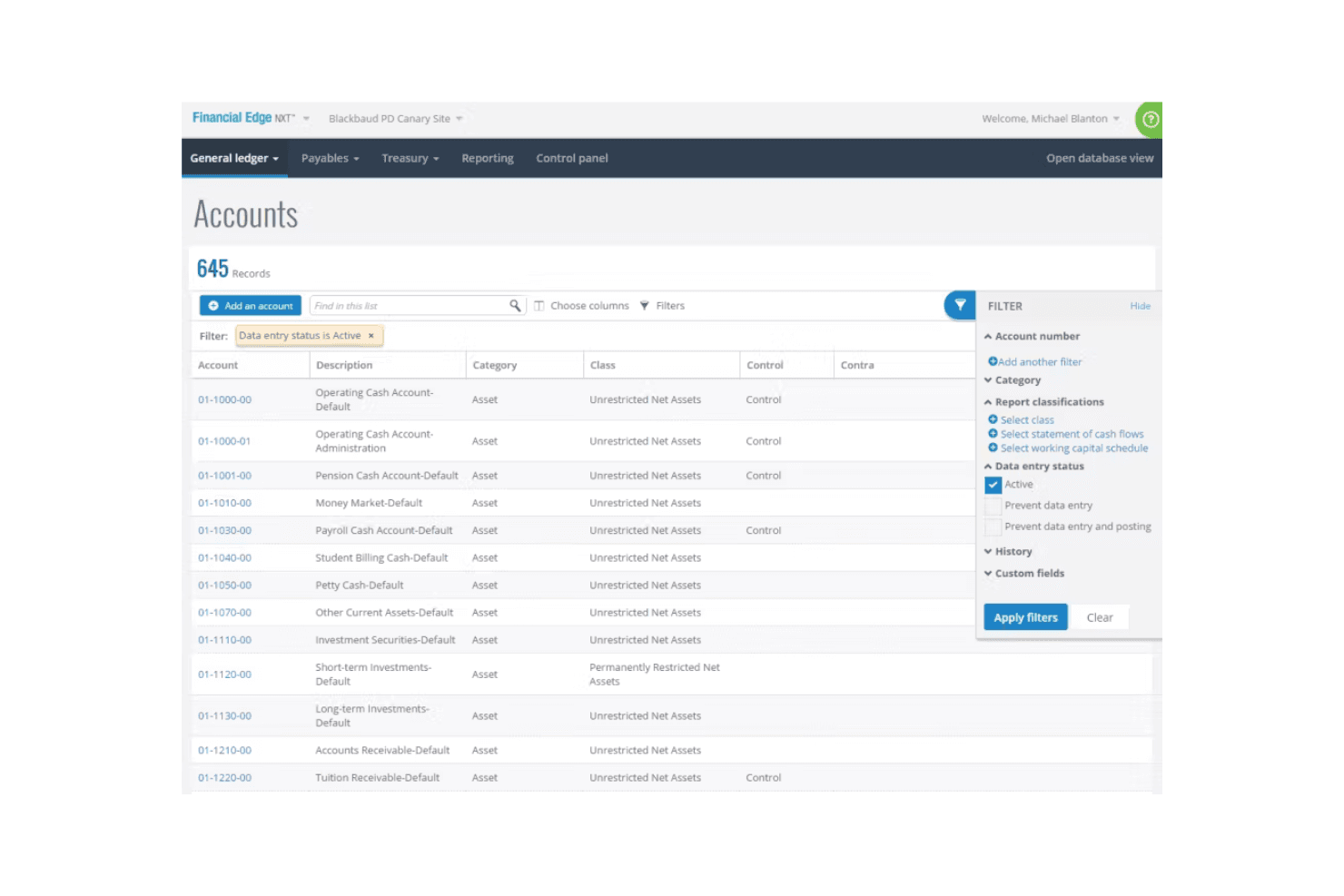
Financial Edge NXT general ledger showing a filtered list of active accounts. Blackbaud Financial Edge NXT is a fund accounting platform built for nonprofit finance teams that need to manage restricted funds, grants, and compliance reporting with precision.
Who Is Blackbaud Best For?
Blackbaud Financial Edge NXT is built for nonprofit finance and bookkeeping teams that need rigorous fund accounting, restricted-fund tracking, and compliance reporting.
Why I Picked Blackbaud
I've included Blackbaud Financial Edge NXT in my top picks because it's one of the strongest nonprofit fund accounting platforms available, and that matters when your church needs to track restricted gifts with precision. I love how it uses hierarchical subfund records to manage grants, endowments, and restricted donations separately, so you can always show donors exactly how their money was used. Its real-time financial dashboards and built-in nonprofit report templates make compliance reporting far less painful at year-end.
Blackbaud Financial Edge NXT Key Features
- Subfund accounting: Tracks restricted funds, grants, endowments, and contracts through hierarchical subfund records with spending guidelines and key dates.
- Role-based access controls: Limits what each team member can view or edit to support separation of duties across your finance team.
- Automated expense submission: Routes expense submissions automatically with built-in budget checking to flag potential overspending before it happens.
- View-only licenses: Gives non-finance staff read access to financial data so they can respond to ad hoc reporting requests without full system access.
Blackbaud Integrations
Blackbaud Financial Edge NXT offers native integrations with Blackbaud Raiser’s Edge NXT and Blackbaud Tuition Management. Marketplace integrations include Budget Creator, Journal Entry Batch Creator, and Ramp, plus REST APIs for custom accounting integrations.
Pros and Cons
Pros:
- Role controls support finance separation
- Real-time nonprofit financial dashboards
- Detailed restricted-fund and grant tracking
Cons:
- Report setup and queries can take time
- No documented online or mobile giving

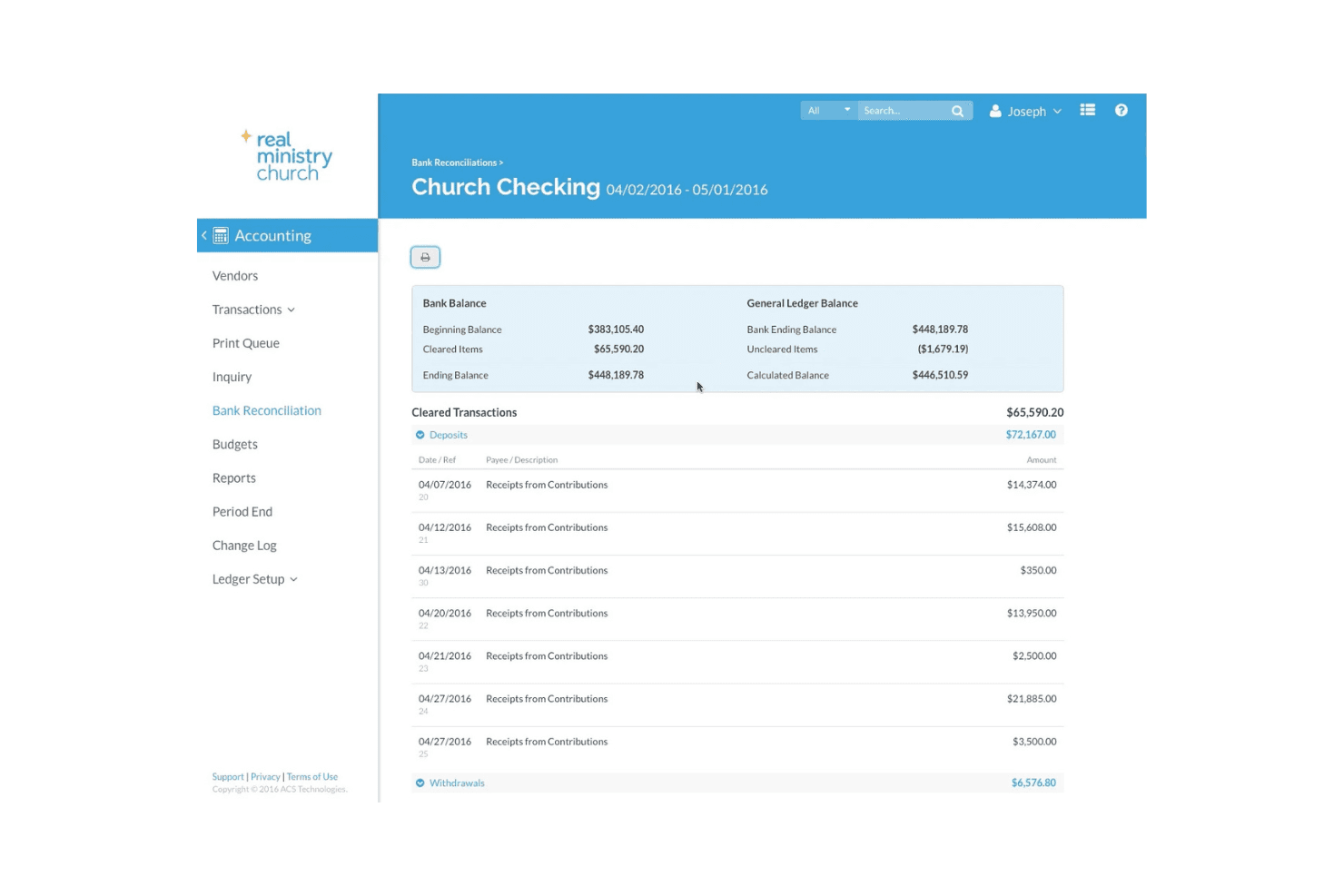
Realm's Accounting module reconciles church checking accounts against bank balances and cleared deposits. Realm is a church management platform from ACS Technologies that connects staff, leaders, and congregation members through giving, member profiles, group management, and communication tools—making it a natural fit for churches that want one system to handle both administration and member engagement.
Who Is Realm Best For?
Realm works best for churches that want a single platform to manage giving, member profiles, groups, and pastoral care—without stitching together separate tools.
Why I Picked Realm
I've included Realm in my top picks because it's the strongest option on this list for churches that want giving and congregation engagement living in the same place. I love that group discovery, member messaging, and event participation all connect directly to donor profiles, so your team can see the full picture of how someone is engaged, not just what they've given. The Shepherd tool for pastoral care and the Connect mobile app for congregation-side giving and community posts are what make Realm feel genuinely different from a standalone giving platform.
Realm Key Features
- Pledge campaign management: Staff can create fund-based pledge campaigns with custom date ranges and configure whether prepayments and post-payments count toward a donor's pledge total.
- Custom reporting and queries: Staff can build, save, and share custom reports and queries, then generate mailing or email lists directly from report results.
- Role-based access controls: Administrators can assign staff roles that limit access to specific member data, contribution records, and confidential information.
- Multi-site campus administration: The Multiply plan gives staff location-specific data access, cross-campus content sharing, and trend analysis across all church locations.
Realm Integrations
Realm offers a native integration with Vanco and marketplace integrations with Engiven, Planning Center People, Constant Contact, and Verified First. These connections support giving, donor profiles, communications, and background checks.
Pros and Cons
Pros:
- Reports track giving and attendance trends
- Group communication supports congregation-wide connection
- Giving histories stay connected to donor records
Cons:
- Congregant adoption may take extra effort
- Check-in workflows can feel cumbersome
Learn more about Realm: Best for nonprofit fund accounting
- Free demo available
- Pricing upon request
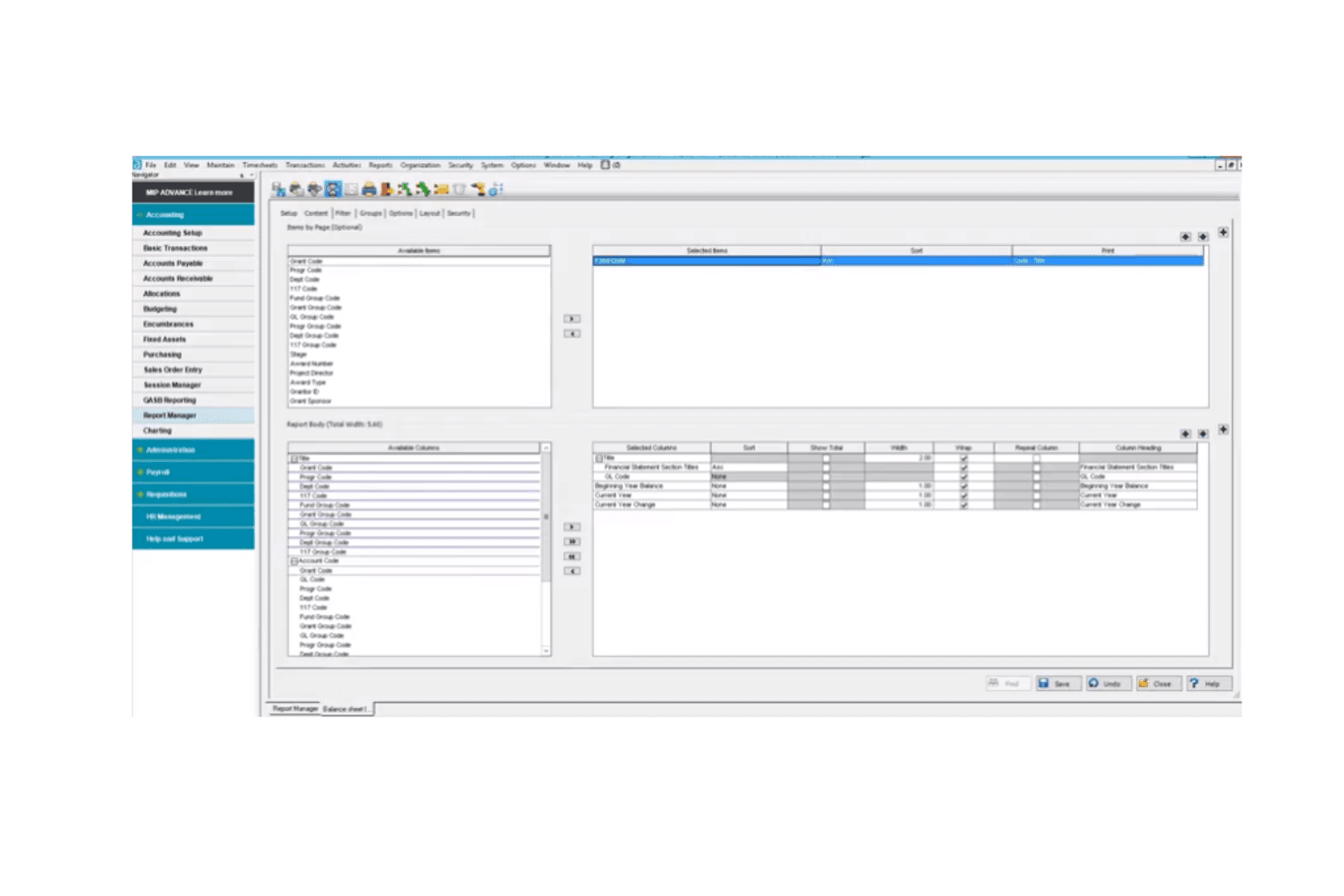
MIP Fund Accounting's Report Manager lets users configure report body columns, sorting, widths and headings. MIP Fund Accounting is a nonprofit-focused accounting platform built for finance teams managing multiple funds, grants, and budgets—making it a potential fit for churches that need rigorous back-office financial controls rather than donor-facing giving tools.
Who Is MIP Fund Accounting Best For?
MIP Fund Accounting is a strong fit for nonprofit finance teams that need rigorous multi-fund accounting, grant tracking, and audit controls—not donor-facing giving tools.
Why I Picked MIP Fund Accounting
I picked MIP Fund Accounting because it's purpose-built for nonprofit fund accounting in a way that few tools match. I appreciate how it lets you track unlimited funds with a fully customizable chart of accounts, so grants, programs, and restricted gifts each live in their own clearly defined bucket. Pair that with 340+ out-of-the-box reports and budget-versus-actual tracking by fund, and your finance team gets the audit-ready controls that church bookkeepers actually need.
MIP Fund Accounting Key Features
- Multi-fund accounting: Track unlimited funds simultaneously, with each grant, program, or restricted gift kept in its own clearly defined account structure.
- Accounts payable and receivable: Manage vendor payments, invoices, and incoming funds within the same platform as your financial books.
- Audit trail tracking: Log every action taken within the system to support internal controls and funder audits.
- GiveSmart integration: Transfer fundraising and event revenue, including individual gifts and transactions, directly into MIP Accounting records.
MIP Fund Accounting Integrations
Documented integrations include GiveSmart, NimbleAMS, YourMembershipAMS, NetForumAMS, Bill.com, and Ramp. MIP Fund Accounting also offers a REST API for custom integrations, but no Tithe.ly or church-management connector is documented.
Pros and Cons
Pros:
- Core accounting covers budgets and payables
- Detailed reports support financial oversight
- Reviewers value fund and grant tracking
Cons:
- Financial reports can require setup and tailoring
- No donor-facing online or mobile giving
Learn more about MIP Fund Accounting:
Outras alternativas ao Tithe.ly
Eis algumas alternativas adicionais ao Tithe.ly que não entraram na minha lista, mas que vale a pena considerar:
- 11GracelyBest for user-friendly church management
- 12ChurchTracBest for cost-effective management
- 13QuickBooks OnlineBest for AI automation
- 14Breeze ChMSBest for intuitive church management
- 15AplosBest for fund accounting simplicity
- 16ElexioBest for integrated church websites
- 17SteepleMateBest for small church budgets
- 18ExpensePlusBest for expense management focus
How I Evaluate Tithe.ly Alternatives
I look at every tool through two lenses: the core giving, member, and contribution-tracking basics it must cover, and the differentiators—like fee structures and migration support—that truly matter.
Core Functionality (Table Stakes For This List)
When I'm selecting tools for my list, I rank each one on a scale from 0 (does not offer the functionality) to 5 (excels in this area) for each core functionality listed below. Then, I calculate the tool's total score into a percentage. Each tool needs to achieve a minimum total score of 65% to be considered for inclusion.
- Online & Mobile Giving: I check whether congregants can give via web, app, text, or kiosk—and whether recurring gifts, ACH, and card payments are all supported.
- Member & Household Management: A good ChMS links individuals to households, tracks attendance, and logs engagement so pastors can follow up with families personally.
- Contribution Tracking & Statements: I evaluate how each tool records fund-designated gifts and whether it can generate year-end giving statements donors need for tax filing.
- Groups, Events & Volunteer Scheduling: I look at whether small group rosters, event sign-ups, and serve team scheduling are tied to member records in one place.
- Church Communication Tools: Email blasts and SMS that pull from member segments matter here—like texting only youth group parents about a schedule change.
- Church-Specific Financial Reporting: I evaluate whether the tool supports designated fund tracking and reporting that aligns with how churches actually manage budgets.
Once I have a list of tools that meet this criteria, I consider what sets each platform apart.
Differentiating Factors (What Sets Vendors Apart)
Here's how I compare and contrast different vendors:
Standout Features
Multi-site support matters if your church runs more than one campus—I look at whether each location gets its own giving, groups, and reporting under a single account. A branded church app is another differentiator, giving congregants one place for sermons, giving, and event sign-ups tied to your church's identity. I also evaluate child check-in features, since secure guardian matching and allergy alerts are a real need for family ministries on Sunday mornings.
Beyond Features
Pricing and fee structures vary widely in this space, so I evaluate whether a platform charges per-transaction fees, monthly subscriptions, or both—and whether donors can opt to cover processing costs. Data migration is equally important when switching from Tithe.ly; I check whether vendors offer guided imports of giving history and recurring gift schedules. I also look at integrations with tools churches already use, like QuickBooks for accounting or Planning Center for worship scheduling.
Por que procurar uma alternativa ao Tithe.ly?
Embora o Tithe.ly seja uma boa escolha de software de contabilidade para igrejas, existem vários motivos pelos quais alguns utilizadores procuram soluções alternativas. Poderá estar à procura de uma alternativa ao Tithe.ly porque…
- Precisa de opções de elaboração de relatórios mais avançadas
- A sua equipa necessita de suporte multilingue
- Está à procura de melhores funcionalidades para aplicações móveis
- O software não se enquadra nas suas limitações orçamentais
- Precisa de um acompanhamento de donativos mais personalizável
- A sua igreja opera numa região não suportada
Se alguma destas situações lhe é familiar, veio ao lugar certo. A minha lista inclui várias opções de software de contabilidade para igrejas mais adequadas a equipas que enfrentam estes desafios com o Tithe.ly e procuram soluções alternativas.
Principais funcionalidades do Tithe.ly
Eis algumas das principais funcionalidades do Tithe.ly, para ajudar a comparar e contrastar o que as soluções alternativas oferecem:
- Ferramentas de donativos: Oferece opções gratuitas para donativos online, através de dispositivos móveis e por mensagem de texto, sem custos ocultos.
- Ferramentas de administração: Gestão centralizada de donativos, dados dos membros e atividades da igreja.
- Aplicação personalizada para a igreja: Envolve os membros com uma aplicação personalizada para as interações diárias.
- Construtor de sites: Simplifica a criação de sites de igrejas envolventes para a sua comunidade.
- Acompanhamento dos membros: Integra as informações dos membros com os dados dos donativos para obter melhores perspetivas.
- Integração: Ligação simples ao QuickBooks Online e ao Church Management Suite do Tithe.ly.
- Donativos recorrentes: Permite aos doadores gerir e configurar facilmente donativos recorrentes.
- Suporte linguístico: Deteta automaticamente e adapta-se ao idioma preferido do utilizador.
- Painéis em tempo real: Fornece informações sobre os donativos e as atividades da igreja para decisões fundamentadas.