

Il miglior software per la gestione delle chiese per le piccole chiese semplifica la pianificazione dei volontari, rende più efficiente e incrementa la raccolta di donazioni ricorrenti e mantiene tutte le informazioni pertinenti ordinate in modo chiaro.
Faccio parte della leadership di una chiesa da oltre 20 anni. Ho visto pastori fedeli logorarsi a causa di sistemi disorganizzati. Un tempo mettevamo insieme fogli di calcolo, messaggi di gruppo, calendari condivisi e archivi pieni di polvere. Oggi non è più necessario. Ho trascorso centinaia di ore a esaminare e confrontare gli strumenti per la gestione delle chiese.
La chiarezza, la coerenza e la visibilità condivisa offerte da un buon ChMS possono trasformare il modo in cui il vostro team collabora. Tenendo presente questo aspetto, ho raccolto un elenco completo di strumenti pensati per le piccole chiese: ognuno pratico, accessibile e sottoposto a una verifica approfondita.
Perché fidarsi dei nostri consigli sui software
6,700+
Reviews
20
Industry experts
16+
Evaluation factors
14
Years
Il nostro team testa e recensisce software dal 2012. In quanto leader ecclesiastici noi stessi, sappiamo quanto sia difficile — e importante — scegliere il software giusto.
Per questa guida, abbiamo valutato gli strumenti attraverso test pratici e ricerche indipendenti, assegnando un punteggio agli strumenti in base ai nostri criteri di selezione.
Le nostre recensioni riflettono il nostro giudizio editoriale umano, non un discorso di vendita.
Riepilogo dei migliori software per la gestione delle piccole chiese
| Tool | Best For | Trial Info | Price | ||
|---|---|---|---|---|---|
| 1 | Ideale per piccole chiese in crescita | Piano gratuito disponibile | Da $10/mese e aumenta in base alle dimensioni della congregazione. | Website | |
| 2 | Ideale per lo streaming in diretta dei servizi religiosi | Demo gratuita disponibile | Prezzo su richiesta | Website | |
| 3 | Mejor para la programación mediante arrastrar y soltar | Prueba gratuita disponible | Desde $32.50/mes | Website | |
| 4 | Ideale per dati dei membri personalizzabili | Demo gratuita disponibile | Da $72/mese | Website | |
| 5 | Ideale per donazioni digitali accessibili | Prova gratuita di 30 giorni disponibile | Da $72/mese | Website | |
| 6 | Ideale per una comunicazione migliorata con i membri | Prova gratuita di 30 giorni disponibile | A partire da $37/mese | Website | |
| 7 | Ideale per la comunicazione che promuove il coinvolgimento | Non disponibile | Prezzi su richiesta | Website | |
| 8 | Ideale per la gestione delle persone | Prova gratuita disponibile | A partire da $69.99/mese | Website | |
| 9 | Ideale per costruire una comunità | Prezzi personalizzati su richiesta | Website | ||
| 10 | Ideale per la gestione dei donatori | Demo gratuita disponibile | A partire da $99/mese per un massimo di 1.000 record | Website |


Panoramica dei 20 migliori software per la gestione delle piccole chiese
Ecco una breve descrizione di ciascun software per la gestione delle piccole chiese, per illustrarne il caso d’uso migliore, alcune funzionalità degne di nota e schermate che offrono una panoramica dell’interfaccia.
 Ideale per piccole chiese in crescita
- Piano gratuito disponibile
- Da $10/mese e aumenta in base alle dimensioni della congregazione.
Visit WebsiteCustomer Rating:4.9/5
ChMeetings dispone di una dashboard centralizzata che offre una panoramica rapida delle attività della chiesa, incluse le donazioni, la presenza, gli eventi e le attività di follow-up. ChMeetings è un software di gestione parrocchiale (ChMS) basato su cloud, progettato per aiutare le organizzazioni religiose negli Stati Uniti, Canada, Regno Unito, Australia e Sudafrica a semplificare le proprie operazioni. Utilizzato da oltre 7.000 chiese in queste regioni, offre un’interfaccia intuitiva, supporto multilingue in 22 lingue e prezzi accessibili. Che si tratti di gestire i membri, monitorare le presenze o gestire le finanze, ChMeetings fornisce una soluzione tutto-in-uno.
Per le piccole chiese, ChMeetings si distingue come opzione economica e facile da usare. Offre un piano gratuito fino a 50 membri, rendendolo accessibile per le congregazioni con budget limitato. Il software semplifica le attività amministrative come l’organizzazione dei membri, la gestione dei gruppi e le donazioni online sicure, permettendo ai responsabili della chiesa di concentrarsi maggiormente sulla loro missione anziché sulla burocrazia. I suoi strumenti finanziari aiutano inoltre alla pianificazione del budget, ai report e al monitoraggio dei contributi.
Oltre alle funzioni di gestione principali, ChMeetings include ulteriori caratteristiche che migliorano le attività della chiesa. Gli strumenti di comunicazione automatica consentono di inviare email, SMS e notifiche push, mantenendo i membri coinvolti. Le capacità di gestione eventi permettono una pianificazione e registrazione agevole delle attività della chiesa. Dispone anche di un’app mobile che può essere completamente personalizzata e rebrandizzata per un’esperienza più personalizzata.
Learn more about ChMeetings: Ideale per lo streaming in diretta dei servizi religiosi
- Demo gratuita disponibile
- Prezzo su richiesta
Visit WebsiteCustomer Rating:4.5/5
Subsplash ti permette di progettare ed inviare comunicazioni email e SMS con la tua congregazione. Subsplash è una piattaforma centralizzata per la gestione delle chiese, progettata per migliorare il coinvolgimento e l’interazione della comunità. Con funzionalità come app mobili personalizzate e diretta streaming, mira ad aumentare la visibilità della chiesa e a favorire le connessioni all’interno della comunità.
Perché l’ho scelto
Ho scelto Subsplash per le piccole chiese per la sua attenzione all’hosting dei media e allo streaming in diretta. Queste funzionalità ti permettono di trasmettere i tuoi servizi e gli eventi, aiutandoti a raggiungere i membri che non possono essere presenti di persona. Può essere un ottimo modo per mantenere il senso di comunità anche quando non tutti possono stare insieme fisicamente.
Un altro motivo per cui ho scelto Subsplash sono le sue capacità di gestione degli eventi. Questa funzione ti permette di organizzare e gestire gli eventi della chiesa senza difficoltà, dai piccoli incontri di gruppo agli eventi parrocchiali più grandi. Fornisce gli strumenti necessari per coordinare i dettagli e comunicare efficacemente con la congregazione, rendendo la pianificazione degli eventi molto meno complicata.
Funzionalità principali
Le funzionalità includono la gestione dei gruppi, che ti aiuta a organizzare i membri in gruppi più piccoli e facilmente gestibili per attività e comunicazioni. Gli strumenti di messaggistica facilitano la comunicazione diretta con la congregazione, mantenendo tutti informati e connessi. Inoltre, Subsplash offre un sistema di check-in per tracciare le presenze e garantire la sicurezza dei membri, soprattutto dei bambini.
Integrazioni
Le integrazioni includono Rock RMS, Zapier, Community Church Builder, MortarStone, Ministry Platform, Planning Center, Breeze, StudioC, BoxCast, Pushpay, MediaFusion e Church Community Builder.
Pros and Cons
Pros:
- Gli utenti apprezzano le capacità all-in-one, che migliorano efficacemente l’engagement della chiesa e gli strumenti digitali.
- Molti utenti elogiano l’aggiunta continua di nuove funzioni e miglioramenti.
- La piattaforma è apprezzata per l'eccellente assistenza clienti e la velocità di risposta.
Cons:
- Alcuni utenti esprimono insoddisfazione per il processo di cancellazione, citando link non funzionanti e una scarsa comunicazione.
- Sono stati segnalati problemi tecnici e limiti nella flessibilità di design, soprattutto rispetto alla concorrenza.
 Mejor para la programación mediante arrastrar y soltar
- Prueba gratuita disponible
- Desde $32.50/mes
Visit WebsiteCustomer Rating:4.8/5
Communicate utiliza la programación por arrastrar y soltar para organizar las comunicaciones de la iglesia. Para las iglesias que buscan mejorar sus estrategias de comunicación y organización, Communicate ofrece una solución personalizada que aborda las necesidades únicas de los equipos de la iglesia, incluyendo la programación de eventos y actividades mediante arrastrar y soltar. Al centralizar los esfuerzos de comunicación y proporcionar herramientas para una planificación eficiente, Communicate es ideal para el personal y los voluntarios de la iglesia que desean optimizar los mensajes y la coordinación. Su enfoque en reducir la comunicación desorganizada ayuda a asegurar que los equipos permanezcan alineados y efectivos.
Por qué elegí Communicate
Aprecio la programación por arrastrar y soltar de Communicate, que facilita a las iglesias la planificación de servicios, eventos y campañas sin tener que gestionar hojas de cálculo o herramientas separadas. El calendario centralizado de comunicaciones ayuda a tu equipo a ver qué está programado y cuándo saldrán los mensajes. Además, la comunicación multicanal te permite llegar a los miembros a través de diferentes plataformas desde un solo lugar. Juntas, estas funciones apoyan una planificación más clara y una comunicación de la iglesia más consistente.
Funciones clave de Communicate
Además de la programación por arrastrar y soltar, Communicate ofrece:
- Seguimiento del estado de los mensajes: Esta función te permite monitorear el avance de tus comunicaciones, asegurando que tus mensajes lleguen a su audiencia prevista.
- Plantillas para eventos recurrentes: Ofrece plantillas prediseñadas para agilizar la planificación de actividades y servicios regulares de la iglesia.
- Optimización móvil: Garantiza que tu equipo pueda acceder y gestionar las comunicaciones estando en movimiento, proporcionando flexibilidad y comodidad.
Integraciones de Communicate
Actualmente, Communicate no enumera integraciones nativas.
Pros and Cons
Pros:
- Mejora la alineación del equipo con funciones de mensajes centralizados
- Soporta comunicación multicanal para mayor alcance de audiencia
- Ofrece plantillas reutilizables para eventos recurrentes de la iglesia
Cons:
- Funciones de análisis limitadas para obtener información profunda sobre la comunicación
- Algunos usuarios reportan retrasos ocasionales en las actualizaciones de mensajes
Learn more about One Church Software: Ideale per dati dei membri personalizzabili
- Demo gratuita disponibile
- Da $72/mese
Visit WebsiteCustomer Rating:4.8/5
Breeze ChMS mostra una dashboard intuitiva per le donazioni online, così da monitorare le offerte. Il Software di Gestione Parrocchiale Breeze (ChMS) è progettato specificamente per le piccole chiese, offrendo strumenti che migliorano sia le operazioni sia il coinvolgimento della comunità. È pensato per aiutarti a gestire la tua congregazione in modo più efficace con funzionalità come la gestione dei membri e le donazioni digitali.
Perché l'ho scelto
Ho scelto Breeze ChMS perché offre una gestione completa dei membri, consentendo di archiviare dati personalizzabili dei membri. Questo è fondamentale per le piccole chiese, dove tenere traccia dei membri può diventare un compito arduo. Inoltre, la funzione di gestione degli eventi ti aiuta a organizzare e monitorare gli eventi della chiesa, così non dovrai mai preoccuparti di dimenticare date o dettagli importanti.
Un altro motivo per cui ho scelto Breeze ChMS sono i suoi strumenti integrati per le donazioni online e tramite SMS. Questa funzionalità è essenziale per le piccole chiese che dipendono fortemente dalle donazioni, offrendo un modo comodo per i membri di contribuire. Inoltre, il software include il monitoraggio della partecipazione e una reportistica completa, strumenti preziosi per comprendere e gestire la dinamica della tua congregazione.
Funzionalità principali
Le funzionalità includono l'archiviazione personalizzabile dei dati dei membri, che ti permette di adattare le informazioni alle esigenze specifiche della tua chiesa. Lo strumento di gestione degli eventi consente di organizzare e monitorare gli eventi senza sforzo, assicurando che tu sia sempre aggiornato su tutte le attività della chiesa. È incluso anche il monitoraggio della partecipazione, che fornisce informazioni sulle presenze e sul coinvolgimento dei membri.
Integrazioni
Le integrazioni includono Tithe.ly, Google Calendar, Outlook Calendar, Apple Calendar, Mailchimp, KidCheck, Planning Center e SongSelect.
Pros and Cons
Pros:
- Facile da configurare e modificare secondo necessità, il che semplifica l'onboarding per i nuovi utenti.
- Offre report personalizzabili, permettendo alle chiese di creare report su misura per le proprie esigenze.
- Il monitoraggio della partecipazione è molto apprezzato per la sua efficacia, rendendo semplice per le chiese controllare la partecipazione.
Cons:
- È difficile modificare i rapporti finali dopo aver generato una directory, il che può essere scomodo per gli utenti che necessitano di aggiustamenti specifici.
- Alcuni utenti segnalano bug e problemi con il software, che possono interrompere le normali attività.
Learn more about Breeze ChMS: Ideale per donazioni digitali accessibili
- Prova gratuita di 30 giorni disponibile
- Da $72/mese
Visit WebsiteCustomer Rating:4.7/5
Tithe.ly ti aiuta a gestire e filtrare le liste dei partecipanti per specifici servizi della chiesa. Tithe.ly è un efficace software di gestione per chiese che si rivolge in particolare alle piccole comunità, unendo una vasta gamma di funzionalità a un design intuitivo. Offre strumenti essenziali come donazioni digitali, gestione dei membri, programmazione degli eventi, messaggistica e un'app personalizzata per la chiesa—tutti elementi fondamentali per aiutare le chiese a gestire con facilità le operazioni quotidiane. Queste funzionalità centralizzate consentono alle piccole chiese di coinvolgere le proprie comunità e di gestire le attività amministrative senza la complessità o i costi elevati tipici di alcuni sistemi di livello aziendale.
Oltre alle sue funzioni principali di gestione, Tithe.ly offre strumenti di donazione avanzati che supportano donazioni tramite mobile, SMS e online. Questo permette ai fedeli di contribuire nel modo a loro più congeniale, offrendo allo stesso tempo ai responsabili della chiesa una visione chiara attraverso dashboard e report. Un altro punto di forza sono gli strumenti per la gestione delle persone e la messaggistica, che permettono di tracciare la presenza, organizzare gruppi e comunicare via email o SMS—tutto da un'unica piattaforma. Questo aiuta le piccole chiese a mantenere un forte coinvolgimento con i propri membri, anche senza un ampio team amministrativo.
Per le chiese che desiderano migliorare ulteriormente le proprie operazioni, Tithe.ly offre anche strumenti di coordinamento dei volontari, controllo dei precedenti, pianificazione dei servizi e creazione di siti web. Questi strumenti supportano chiese di ogni dimensione, ma sono particolarmente utili per le comunità più piccole che hanno bisogno di una soluzione tutto-in-uno accessibile per restare organizzate e connesse.
 Ideale per una comunicazione migliorata con i membri
- Prova gratuita di 30 giorni disponibile
- A partire da $37/mese
Visit WebsiteCustomer Rating:4.7/5
Churchteams offre l'opzione di aggiungere una nuova famiglia durante il check-in. Churchteams è un software di gestione per chiese che ti aiuta a gestire vari aspetti delle operazioni della tua comunità. È progettato per migliorare la comunicazione, l'organizzazione e il coinvolgimento all'interno della tua chiesa.
Perché l'ho scelto
Uno dei motivi per cui ho scelto Churchteams è la sua funzione Text-to-Church. Questa ti permette di comunicare con i membri in modo semplice e diretto, facilitando il mantenimento della connessione e dell'informazione. L'app per i membri è un altro strumento prezioso, che ti consente di monitorare senza sforzo la presenza e i dati dei membri. Questi strumenti puntano a migliorare il modo in cui interagisci e gestisci la tua comunità ecclesiastica.
Un'altra funzione che spicca è il supporto per la gestione dei volontari. Churchteams ti aiuta nel reclutare, formare, programmare e monitorare i volontari senza difficoltà. La funzione di registrazione raccoglie adesioni e informazioni di pagamento tramite moduli, rendendo la pianificazione degli eventi molto più semplice. Queste funzionalità sono particolarmente vantaggiose per le piccole chiese che necessitano di metodi efficienti per gestire questi compiti.
Funzionalità principali
Tra le funzionalità ci sono strumenti per creare e gestire i siti web della chiesa, utili per mantenere una presenza online. La funzione donazioni permette di gestire offerte sia online che di persona, garantendo che gli aspetti finanziari della chiesa siano ben gestiti. Inoltre, la funzione di check-in è essenziale per la sicurezza dei bambini e per tracciare le presenze durante gli eventi, dandoti serenità.
Pros and Cons
Pros:
- Centralizza i dati di membri, gruppi, volontari e donazioni in un unico sistema.
- Assistenza clienti apprezzata per reattività e attenzione personale.
- Ottime capacità di programmazione dei volontari e gestione dei gruppi.
Cons:
- La profondità dei report e le opzioni di esportazione personalizzate possono essere inferiori rispetto ad altre opzioni.
- Esperienza mobile e navigazione a volte meno fluide rispetto al desktop.
Learn more about Churchteams: Ideale per la comunicazione che promuove il coinvolgimento
- Non disponibile
- Prezzi su richiesta
Visit WebsiteCustomer Rating:4.1/5
Realm offre vari modi per permettere ai membri della congregazione di connettersi, inclusi i messaggi di gruppo. Realm è una piattaforma di gestione parrocchiale basata sul cloud che fornisce strumenti e servizi per aiutare le chiese a gestire i propri ministeri, connettersi con la congregazione e occuparsi delle attività amministrative. La sua capacità di integrare più operazioni e funzioni, come la gestione delle donazioni, dei volontari e la contabilità, la rende ideale per le piccole chiese con risorse limitate.
Il software include strumenti di comunicazione, monitoraggio del discepolato, note pastorali e app mobili che permettono ai membri della congregazione di rimanere connessi e donare online. Offre anche soluzioni integrate per gli amministratori, con dashboard in tempo reale, reportistica, contabilità e controlli dei precedenti.
Una caratteristica distintiva è la Connect app di Realm, progettata per facilitare una comunicazione chiara tra pastori e membri della congregazione e promuovere il coinvolgimento. Consente agli utenti di inviarsi messaggi, creare post e leggere notizie della chiesa, aiutandoli a sentirsi connessi anche quando non sono in chiesa. L'app consente inoltre la gestione delle donazioni e delle offerte, che si integrano perfettamente con la piattaforma di gestione parrocchiale di Realm per la reportistica e la contabilità.
 Ideale per la gestione delle persone
- Prova gratuita disponibile
- A partire da $69.99/mese
Visit WebsiteCustomer Rating:4.8/5
SteepleMate ti consente di gestire i profili dei membri e i gruppi in un unico posto. SteepleMate è un software di gestione per chiese progettato per aiutare le parrocchie di ogni dimensione a gestire le proprie attività e coinvolgere efficacemente le congregazioni.
Uno degli aspetti più notevoli di SteepleMate sono le sue complete funzionalità di gestione delle persone. La piattaforma facilita la gestione dei gruppi, il monitoraggio delle comunicazioni e la pianificazione degli eventi, elementi essenziali per mantenere relazioni solide e garantire una coordinazione fluida all'interno della congregazione. Queste caratteristiche permettono ai responsabili della chiesa di organizzare gruppi in modo efficiente, monitorare le interazioni e pianificare eventi, migliorando così il coinvolgimento della comunità.
Inoltre, gli strumenti di preparazione dei sermoni di SteepleMate sono particolarmente utili per le piccole chiese. Il software offre risorse per la pianificazione dei sermoni, la condivisione di materiale e la programmazione dei ministeri, tutte pensate per supportare il personale pastorale e i volontari. Altre funzionalità includono la creazione di siti web, strumenti per la gestione finanziaria e donazioni online.
Learn more about SteepleMate:

Utilizza ChurchStaq per gestire il tuo calendario e migliorare il coinvolgimento della comunità programmando eventi e visite con i parrocchiani. ChurchStaq è una soluzione per il coinvolgimento della comunità che puoi utilizzare per gestire i profili dei membri della tua congregazione. Include un'app personalizzata per la chiesa che ti consente di accedere ai dati di ChurchStaq mentre lavori da remoto. Puoi anche utilizzare ChurchStaq per gestire il tuo calendario e programmare eventi.
ChurchStaq è ideale per chi desidera migliorare il coinvolgimento della comunità perché può aiutarti a misurare e comprendere l'impatto del tuo ministero sulla comunità attraverso report facili da generare. Ti offre inoltre un mezzo per connetterti con i parrocchiani sia di persona che online.
ChurchStaq si integra con Intuit QuickBooks, Elvanto e altri programmi CMS.
Learn more about ChurchStq: Ideale per la gestione dei donatori
- Demo gratuita disponibile
- A partire da $99/mese per un massimo di 1.000 record

DonorPerfect rende facile la donazione per i sostenitori grazie a un'interfaccia click-and-pay semplice. DonorPerfect è un CRM per la raccolta fondi che può aiutare la tua chiesa a ottimizzare gli sforzi di fundraising. Puoi utilizzare DonorPerfect per creare moduli personalizzati con il logo della tua chiesa, incoraggiando più donatori a supportare le tue iniziative. I moduli di DonorPerfect sono configurabili e ottimizzati per dispositivi mobili; puoi inviarli tramite email, sito web della chiesa o attraverso gli account sui social media.
DonorPerfect è il miglior CRM per la raccolta fondi per instaurare un rapporto migliore con i tuoi donatori, poiché consente di mantenere una campagna di email marketing costante per coinvolgere i donatori. Puoi anche utilizzare DonorPerfect per rendere più semplice la donazione attraverso un semplice metodo di clic e pagamento. Inoltre, puoi usare DonorPerfect per inviare ricevute automatiche con messaggi di ringraziamento, mostrando così gratitudine ai tuoi sostenitori.
Learn more about DonorPerfect:
Altre opzioni di software per la gestione delle piccole chiese: menzioni d'onore
Ecco alcune altre opzioni che, pur essendo degne di nota, non sono entrate nella nostra lista principale:
- 11Neon OneLa migliore per le integrazioni
- 12FlocknoteIdeale per comunicazioni via SMS ed email
- 13Planning CenterIdeale per la gestione dei membri
- 14SimpleChurch CRMIdeale per organizzare i membri della chiesa
- 15ChurchCRMMigliore app mobile
- 16ChurchInfoIdeale per organizzare scuole domenicali
- 17Church WindowsIdeale per la gestione delle buste paga
- 18ChurchTracIdeale per centralizzare le funzioni della chiesa
- 19WhatspotIdeale per prenotazioni di spazi tramite QR code istantaneo
- 20GracelyIdeale per la gestione dei membri
- 21MinistryPlatformIdeale per flussi di lavoro ministeriali personalizzabili
- 22CommunicateIdeale per la pianificazione delle campagne
Software correlati per piccole chiese
Oltre al software per la gestione delle chiese, una piccola chiesa può trarre vantaggio anche da altre soluzioni software:
- Software per siti web di chiese: assicuratevi che la piattaforma online della vostra chiesa sia supportata da un sito web ben progettato e adattabile.
- Software amministrativo per chiese: semplificate le vostre operazioni e riducete il tempo e l'energia necessari per gestire l'attività della chiesa.
- Software di contabilità per chiese: potenziate le capacità finanziarie digitali della vostra chiesa con un software di contabilità che crescerà insieme a voi.
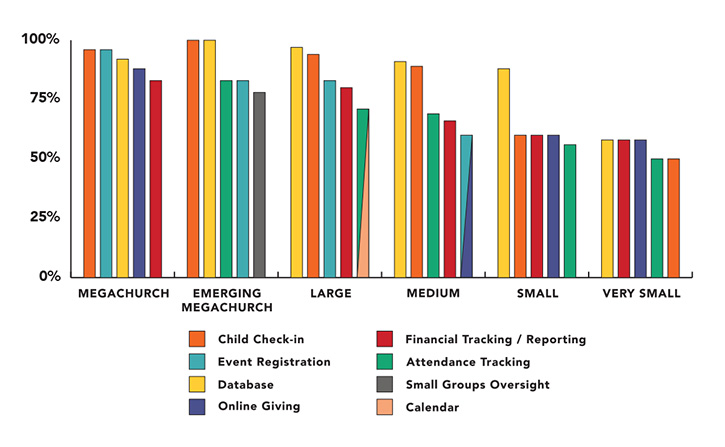
I cinque principali utilizzi dei ChMS in base alle dimensioni della chiesa
Come Valuto i Software di Gestione per Piccole Chiese
Scompongo la mia valutazione in due livelli: la base che uno strumento deve soddisfare—come la gestione dei membri e le donazioni online—e i fattori differenzianti che rendono uno strumento adatto a una piccola comunità.
Funzionalità Principali (Requisiti Minimi per Questa Lista)
Quando seleziono gli strumenti per la mia lista, valuto ciascuno su una scala da 0 (non offre la funzionalità) a 5 (eccelle in questo ambito) per ogni funzionalità principale elencata di seguito. Poi, calcolo il punteggio totale dello strumento in percentuale. Ogni strumento deve raggiungere un punteggio totale minimo del 65% per essere considerato idoneo all'inclusione.
- Gestione Membri & Famiglie: Cerco un database centrale delle persone in cui puoi collegare i membri della famiglia, registrare visite pastorali e etichettare i membri in base al loro coinvolgimento nei ministeri o alla fase della vita.
- Contributi & Donazioni Online: Ogni strumento dovrebbe permettere ai membri di donare online, impostare donazioni ricorrenti e generare resoconti di fine anno che il tesoriere può ottenere senza lavoro manuale su fogli di calcolo.
- Presenze & Monitoraggio Gruppi: Verifico se la piattaforma registra le presenze alle funzioni domenicali e gestisce le liste dei piccoli gruppi, così che un pastore possa individuare andamenti delle presenze nelle riunioni settimanali o gruppi giovanili.
- Pianificazione Volontari & Eventi: Gli strumenti di pianificazione dovrebbero permettere di assegnare ruoli come tecnico audio o volontario all’asilo, inviare promemoria e gestire iscrizioni per eventi come VBS o cene comunitarie.
- Comunicazione con la Congregazione: Valuto se è possibile inviare email o SMS mirati a gruppi specifici, come una cancellazione all’ultimo minuto per tutte le famiglie registrate o un aggiornamento di preghiera al consiglio degli anziani.
- Prezzi & Scalabilità per Piccole Chiese: I prezzi e il pacchetto di funzionalità della piattaforma dovrebbero seriamente servire una comunità sotto i 250 membri con personale limitato, invece di costringerti a sottoscrivere piani livello enterprise.
Una volta che ho una lista di strumenti che rispettano questi criteri, considero cosa rende ciascuna piattaforma unica.
Fattori Differenzianti (Cosa Distingue i Fornitori)
Ecco come confronto e metto a paragone i diversi fornitori:
Funzionalità Distintive
I flussi di lavoro automatizzati per il follow-up sono molto importanti per le piccole chiese. Quando un visitatore compila la scheda di contatto, uno strumento che avvia una sequenza automatica di email di benvenuto mantiene coinvolta quella persona senza aggiungere lavoro extra al pastore il lunedì. Valuto anche le funzionalità per il check-in dei bambini, poiché i genitori si aspettano la corrispondenza sicura dei badge e la verifica al ritiro anche in una chiesa da 100 membri. Un'app mobile personalizzata è un altro elemento distintivo: i membri possono controllare i dettagli degli eventi, donare o ascoltare il sermone della settimana precedente senza dover navigare su un sito web completo.
Oltre le Funzionalità
La struttura dei prezzi è una delle prime cose che valuto, poiché molte piccole chiese operano con budget ridotti e necessitano di piani trasparenti per membro o a tariffa fissa, senza costi imprevisti sulle donazioni. Anche l’importazione dei dati pesa molto: se una chiesa sta abbandonando fogli di calcolo o un vecchio ChMS, verifico se la piattaforma offre importazione guidata e assistenza all’avvio per team senza personale IT. Le opzioni di integrazione completano la mia valutazione, in particolare le connessioni con strumenti come QuickBooks, Mailchimp o piattaforme per la pianificazione di culto su cui molte piccole chiese fanno già affidamento.
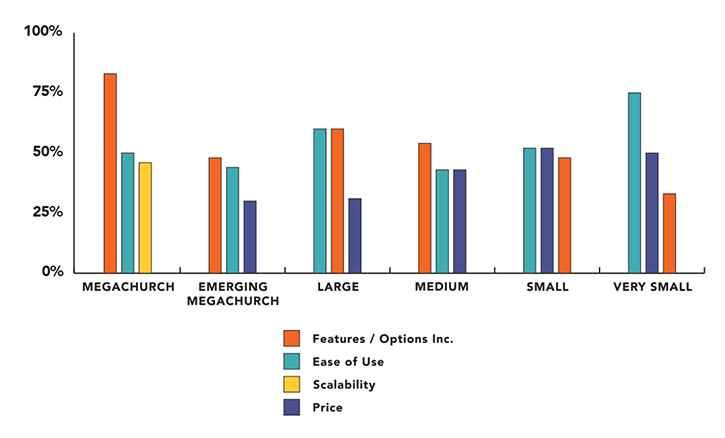
I tre principali fattori di acquisto in base alle dimensioni della chiesa
Tendenze nei software di gestione delle chiese per le piccole chiese
Nel 2024, i software di gestione delle chiese (ChMS) per le piccole chiese stanno migliorando, grazie alle esigenze in evoluzione dei membri della chiesa e alla crescita della tecnologia. Ora i pastori hanno più strumenti che mai per aiutarli a gestire i loro ministeri in modo più efficace.
Abbiamo esaminato gli aggiornamenti e le novità degli strumenti ChMS più popolari e abbiamo individuato le seguenti tendenze e funzionalità sempre più diffuse:
Maggiore integrazione con l'IA e altre piattaforme
- Maggiore capacità di integrazione: gli strumenti ChMS si collegano ora meglio ad altre piattaforme, come i social media, i software finanziari e gli strumenti per l'apprendimento online. Questo facilita la gestione di diverse attività in un unico luogo.
- Funzionalità basate sull'IA: un numero sempre maggiore di strumenti ChMS utilizza l'intelligenza artificiale per svolgere automaticamente attività di routine, come la programmazione, il ricontatto dei visitatori e l'invio di messaggi personalizzati. Questo può far risparmiare molto tempo ai pastori e permettere loro di concentrarsi maggiormente sul ministero.
- Gestione finanziaria semplificata: la gestione delle finanze della chiesa sta diventando più semplice grazie a strumenti più intelligenti che tengono traccia automaticamente dei bilanci e si collegano ai software di contabilità più diffusi. Con le fughe di dati che stanno diventando un problema sempre più grave, queste funzionalità sono molto richieste.
Orientamento sempre più incentrato sui dispositivi mobili
- Ottimizzazione per dispositivi mobili: gli strumenti ChMS stanno migliorando per l'uso sui dispositivi mobili. Poiché sempre più persone utilizzano gli smartphone, cresce la necessità di app che funzionino bene sui dispositivi mobili. Queste app offrono ora funzionalità come promemoria per gli eventi, donazioni tramite dispositivi mobili e comunicazione in tempo reale.
- Maggiore sicurezza e privacy dei dati: con l'aumento delle violazioni dei dati, i fornitori di ChMS si stanno concentrando maggiormente sulla protezione delle informazioni sensibili. Ciò include una crittografia migliore e controlli più rigorosi su chi può accedere ai dati.
In calo: necessità di soluzioni locali
- Passaggio a soluzioni basate sul cloud: sempre più chiese stanno abbandonando i software locali per passare a opzioni basate sul cloud, perché sono più economiche, più facilmente accessibili e più semplici da mantenere.
In definitiva, queste tendenze dimostrano che, con il progresso della tecnologia, gli strumenti ChMS stanno diventando più connessi, sicuri e facili da usare. Questo rende più semplice per le piccole chiese gestire bene le proprie attività e rimanere connesse alle loro comunità.
Che cos'è un software di gestione delle chiese per le piccole chiese?
Il software di gestione delle chiese è uno strumento per organizzare le informazioni sui membri, i dati sulle donazioni e le comunicazioni della chiesa.
Per le piccole chiese, può rappresentare una svolta. Permette a una sola persona di entrare in contatto con i membri, monitorare i numeri fondamentali e supervisionare molte altre attività quotidiane, senza prosciugare il budget.
L'utilizzo di questo software aiuta le chiese a funzionare in modo più fluido, a rimanere connesse con i propri membri e a costruire una comunità più forte.
Funzionalità dei software di gestione delle chiese per le piccole chiese
Quando scegli un software di gestione delle chiese per piccole chiese, presta attenzione alle seguenti funzionalità chiave:
- Gestione dei membri: Archivia e organizza facilmente informazioni dettagliate su ogni membro, inclusi i dati di contatto, i legami familiari e i ruoli di volontariato. Questo ti aiuta a tenere traccia della tua congregazione e rende semplicissimo contattare le persone giuste.
- Monitoraggio delle presenze: Monitora facilmente le presenze ai servizi, agli eventi e agli incontri di gruppo, così puoi individuare le tendenze nella partecipazione, identificare i nuovi ospiti e ricontattare chi potrebbe aver bisogno di maggiore attenzione.
- Gestione delle donazioni e delle offerte: Registra i contributi, gestisci le campagne di impegno e genera gli estratti delle offerte ai fini fiscali. Questo semplifica il monitoraggio finanziario e mantiene informati i donatori.
- Programmazione degli eventi: Pianifica servizi, riunioni e altre attività della chiesa con calendari integrati e promemoria automatici. Puoi coordinare i team e gli spazi senza il fastidio di infinite email o doppie prenotazioni.
- Strumenti di comunicazione: Invia email e messaggi di testo in massa o persino newsletter stampate alla tua congregazione. La messaggistica di gruppo ti consente di condividere rapidamente aggiornamenti con i team dei ministeri o i piccoli gruppi.
- Report e analisi: Genera report chiari sulle presenze, sulle offerte e sull'attività dei membri. Queste informazioni ti aiutano a prendere decisioni consapevoli sulle priorità del ministero e sulle opportunità di evangelizzazione.
- Gestione dei volontari: Organizza i team, monitora i turni dei volontari e assegna le persone ai ruoli più adatti alle loro competenze. Questo permette alle attività della chiesa di svolgersi senza intoppi e mantiene i volontari coinvolti.
- Sistema di registrazione dei bambini: Offri una procedura sicura di registrazione all'ingresso e all'uscita per i programmi dedicati ai bambini, garantendo tranquillità ai genitori e conservando i dati per la sicurezza o in caso di emergenze.
- Accesso da dispositivi mobili: Usa il software su smartphone o tablet, rendendo semplice per te e per i tuoi responsabili aggiornare le informazioni o comunicare anche quando siete lontani dall'ufficio.
- Moduli personalizzabili: Crea moduli online per le iscrizioni agli eventi, le richieste di preghiera o i sondaggi, semplificando il modo in cui raccogli informazioni dalla tua congregazione.
Vantaggi dei software gestionali pensati per le chiese più piccole
Le attività quotidiane della tua chiesa sono fondamentali per mantenerla in buona salute. Tuttavia, molti pastori non hanno intrapreso il ministero per occuparsi della gestione della chiesa: lo hanno fatto per predicare, condividere il Vangelo e guidare le persone nel discepolato.
Il vantaggio più grande di un software gestionale per chiese? Ti solleva da gran parte del lavoro amministrativo. Ecco altri cinque vantaggi che puoi ottenere:
- Comunicazione migliore nella chiesa: rende semplice rimanere in contatto con il personale e la congregazione. Puoi inviare aggiornamenti, newsletter e comunicazioni sugli eventi, così tutti restano informati e connessi.
- Gestione finanziaria più semplice: ti aiuta a monitorare e rendicontare le finanze. Il software gestisce automaticamente le donazioni e i report finanziari, così puoi tenere sotto controllo il budget senza dover essere un esperto di contabilità.
- Informazioni sui membri organizzate: conserva tutte le informazioni sui membri in un unico posto. Puoi gestire i profili dei membri, monitorare le presenze e avere a portata di mano i dati di contatto, rendendo più semplice prenderti cura della congregazione.
- Pianificazione degli eventi semplificata: offre strumenti per pianificare e coordinare gli eventi. Dalla programmazione alla registrazione dei partecipanti, il software rende l'organizzazione degli eventi della chiesa più fluida e produttiva.
- Cresce insieme alla tua chiesa: si adatta alle dimensioni e alle esigenze della tua chiesa. Man mano che la congregazione cresce, il software può aggiungere più funzionalità e gestire un numero maggiore di membri, rimanendo utile durante la crescita.
Con questi strumenti avrai più tempo ed energie da dedicare al ministero, mentre il lavoro amministrativo diventerà più semplice.
Costi e prezzi generali dei software gestionali per piccole chiese
Quando scegli un software gestionale per chiese, è importante selezionare un piano tariffario adatto alle dimensioni e alle esigenze della tua chiesa. I diversi piani offrono funzionalità differenti. Alcuni sono pensati per chiese molto piccole, mentre altri sono più adatti alle chiese in crescita che hanno bisogno di strumenti più avanzati.
| Tipo di piano | Prezzo medio | Funzionalità comuni | Ideale per... |
|---|---|---|---|
| Tipo di pianoGratuito | Prezzo medio$0 | Funzionalità comuniGestione di base dei membri, report limitati, assistenza via email | Ideale per...Una piccola chiesa con fondi molto limitati ed esigenze semplici |
| Tipo di pianoBase | Prezzo medio$10-30/mese | Funzionalità comuniGestione dei membri, monitoraggio delle donazioni, programmazione degli eventi, assistenza di base | Ideale per...Una piccola chiesa che ha bisogno di aiuto per monitorare membri ed eventi |
| Tipo di pianoStandard | Prezzo medio$30-50/mese | Funzionalità comuniReport migliori, marketing via email, gestione dei volontari, assistenza telefonica | Ideale per...Una piccola chiesa che sta iniziando a crescere e ha bisogno di più strumenti |
| Tipo di pianoPremium | Prezzo medio$50-100/mese | Funzionalità comuniReport avanzati, integrazioni personalizzate, accesso multiutente, assistenza prioritaria | Ideale per...Una piccola chiesa con grandi progetti che ha bisogno di strumenti solidi e di più utenti |
Per i pastori principali delle piccole chiese, esistono diverse considerazioni relative ai prezzi delle soluzioni software per la gestione delle chiese. Questa è una panoramica generale dei costi e delle aspettative di prezzo del settore.
Ogni piano offre più funzionalità e un'assistenza migliore man mano che si sale di livello. Quando scegli un piano, pensa a ciò di cui la tua chiesa ha bisogno ora e alla direzione verso cui è orientata.
Domande frequenti - Software di gestione ecclesiastica per piccole chiese
Quanto tempo occorre per implementare un software di gestione ecclesiastica in una piccola chiesa?
\u003cspan style=\u0022font-weight: 400\u0022\u003eIl tempo di implementazione può variare a seconda della complessità del software e delle competenze tecniche dei membri della chiesa. I fornitori presenti in questo elenco puntano a rendere il processo di onboarding il più rapido e semplice possibile, offrendo spesso una guida passo dopo passo per iniziare.\u003c/span\u003e
Il software di gestione ecclesiastica è difficile da usare?
\u003cspan style=\u0022font-weight: 400\u0022\u003eIn genere no. La maggior parte dei sistemi è progettata pensando alla facilità d’uso e offre interfacce intuitive e materiali di supporto, come tutorial e helpdesk per l’assistenza clienti, per aiutarti.\u003c/span\u003e
Cosa succede se supero la capacità del mio software di gestione ecclesiastica?
\u003cspan style=\u0022font-weight: 400\u0022\u003eLe soluzioni software che consigliamo offrono piani scalabili, il che significa che puoi iniziare con un pacchetto base e passare a un livello superiore con la crescita delle tue esigenze. Questa flessibilità garantisce che il software possa continuare a servire efficacemente la tua chiesa man mano che cresce.\u003c/span\u003e
Se il tuo software attuale NON offre questa possibilità, ti consiglio di valutare seriamente il passaggio a un’opzione più scalabile.
Quali costi nascosti devo tenere in considerazione con un software di gestione ecclesiastica?
\u003cp class=\u0022p1\u0022\u003eFai attenzione ai costi aggiuntivi per servizi come l’invio di messaggi di testo, l’aggiunta di altri utenti o l’integrazione con altre app. Alcune piattaforme fanno pagare gli aggiornamenti, l’assistenza o le funzionalità premium non incluse nel prezzo base. Chiedi sempre un dettaglio completo dei costi prima di registrarti e cerca prezzi chiari, senza sorprese.\u003c/p\u003e
Qual è il modo più semplice per eseguire il backup dei dati della nostra chiesa e mantenerli al sicuro?
\u003cp class=\u0022p1\u0022\u003eScegli un sistema di gestione ecclesiastica basato sul cloud che esegua automaticamente il backup dei tuoi dati. In questo modo le tue informazioni saranno al sicuro da guasti hardware o incidenti. Assicurati che solo i responsabili di fiducia possano accedere alle informazioni sensibili e chiedi informazioni sulle funzionalità di sicurezza, come la crittografia e le autorizzazioni degli utenti, prima di scegliere una piattaforma.\u003cspan class=\u0022s1\u0022\u003e
\u003c/span\u003e/faq\u003c/p\u003e
Rimani connesso e migliora il tuo ministero.
Iscriviti alla newsletter di TheLeadPastor per ricevere aggiornamenti regolari sulle ultime tendenze, consigli e strumenti per la gestione ecclesiastica. Acquisisci le conoscenze necessarie per semplificare le operazioni, coinvolgere la tua comunità e far crescere la tua congregazione. Unisciti alla nostra comunità di pastori impegnati iscrivendoti oggi.