Il miglior software di contabilità per chiese aiuta i pastori a presentare report finanziari chiari, evitare errori di bilancio e rispettare i requisiti dell'IRS. Sostituisce i fogli di calcolo sparsi con un unico sistema accurato, di cui tu e il tuo contabile potete fidarvi.
Lavoro nella leadership ecclesiastica da oltre 20 anni. Durante questo periodo, ho affiancato decine di pastori e chiese in tutta l'America del Nord. Una volta ho lavorato con un pastore che aveva trascorso diversi giorni a preparare un report trimestrale per il consiglio, salvo rendersi conto durante la riunione di aver inserito il totale errato del fondo vincolato. L'errore ha ritardato diverse decisioni importanti sui finanziamenti e ci sono volute settimane per venirne a capo. Ho personalmente esaminato diverse decine di strumenti di contabilità per chiese, e uno qualsiasi di questi avrebbe evitato quel costoso errore.
Oggi troppe chiese utilizzano strumenti manuali o generici per tenere traccia delle proprie finanze e si trovano ad affrontare report poco chiari ed errori rischiosi. Il software giusto porta chiarezza finanziaria, accelera le decisioni e rafforza la fiducia tra i membri e il team di leadership. Ecco perché il software GIUSTO per la tua chiesa è importante: questo articolo ti aiuterà a trovarlo.
Perché fidarsi dei nostri consigli sui software
6,700+
Reviews
20
Industry experts
16+
Evaluation factors
14
Years
Il nostro team testa e recensisce software dal 2012. In quanto leader ecclesiastici noi stessi, sappiamo quanto sia difficile — e importante — scegliere il software giusto.
Per questa guida, abbiamo valutato gli strumenti attraverso test pratici e ricerche indipendenti, assegnando un punteggio agli strumenti in base ai nostri criteri di selezione.
Le nostre recensioni riflettono il nostro giudizio editoriale umano, non un discorso di vendita.
Tabella comparativa dei software di contabilità per chiese
Questa tabella comparativa riassume i dettagli sui prezzi delle mie migliori selezioni di software di contabilità per chiese:
| Tool | Best For | Trial Info | Price | ||
|---|---|---|---|---|---|
| 1 | Ideale per la gestione delle finanze della chiesa | Prova gratuita di 30 giorni | A partire da $19/mese (con fatturazione annuale) | Website | |
| 2 | Ideale per contabilità integrata delle chiese | Piano gratuito disponibile | Da $12/mese (fatturazione mensile) | Website | |
| 3 | La soluzione migliore per il supporto multivaluta integrato | Prova gratuita di 30 giorni | A partire da $25/mese | Website | |
| 4 | Ideale per la tracciabilità delle spese | Demo gratuita disponibile | Da $11.99/utente/mese (fatturazione annuale) | Website | |
| 5 | Ideale per l'abbinamento delle transazioni potenziato dall'IA | Demo gratuita disponibile | Prezzo su richiesta | Website | |
| 6 | Ideale per sincronizzare le donazioni con Quickbooks | Prova gratuita di 30 giorni disponibile | Da $72/mese | Website | |
| 7 | Ideale per la contabilità gratuita della chiesa | Piano gratuito disponibile | Da $15/utente/mese | Website | |
| 8 | Migliore per la scalabilità | Prova gratuita di 30 giorni | I prezzi sono disponibili su richiesta | Website | |
| 9 | Migliore contabilità dei fondi per chiese | Prova gratuita di 30 giorni | Da $35/account/mese con costi aggiuntivi per alcuni componenti aggiuntivi | Website | |
| 10 | Ideale per la contabilità automatizzata con IA | Piano gratuito disponibile | A partire da $55/account/mese | Website |


Le recensioni dei migliori software di contabilità per chiese
Ecco una breve descrizione di ciascun software di contabilità per chiese presente nel mio elenco, con le funzioni in cui eccelle e alcune schermate che mostrano alcune delle sue caratteristiche.
 Ideale per la gestione delle finanze della chiesa
- Prova gratuita di 30 giorni
- A partire da $19/mese (con fatturazione annuale)
Visit WebsiteCustomer Rating:4.8/5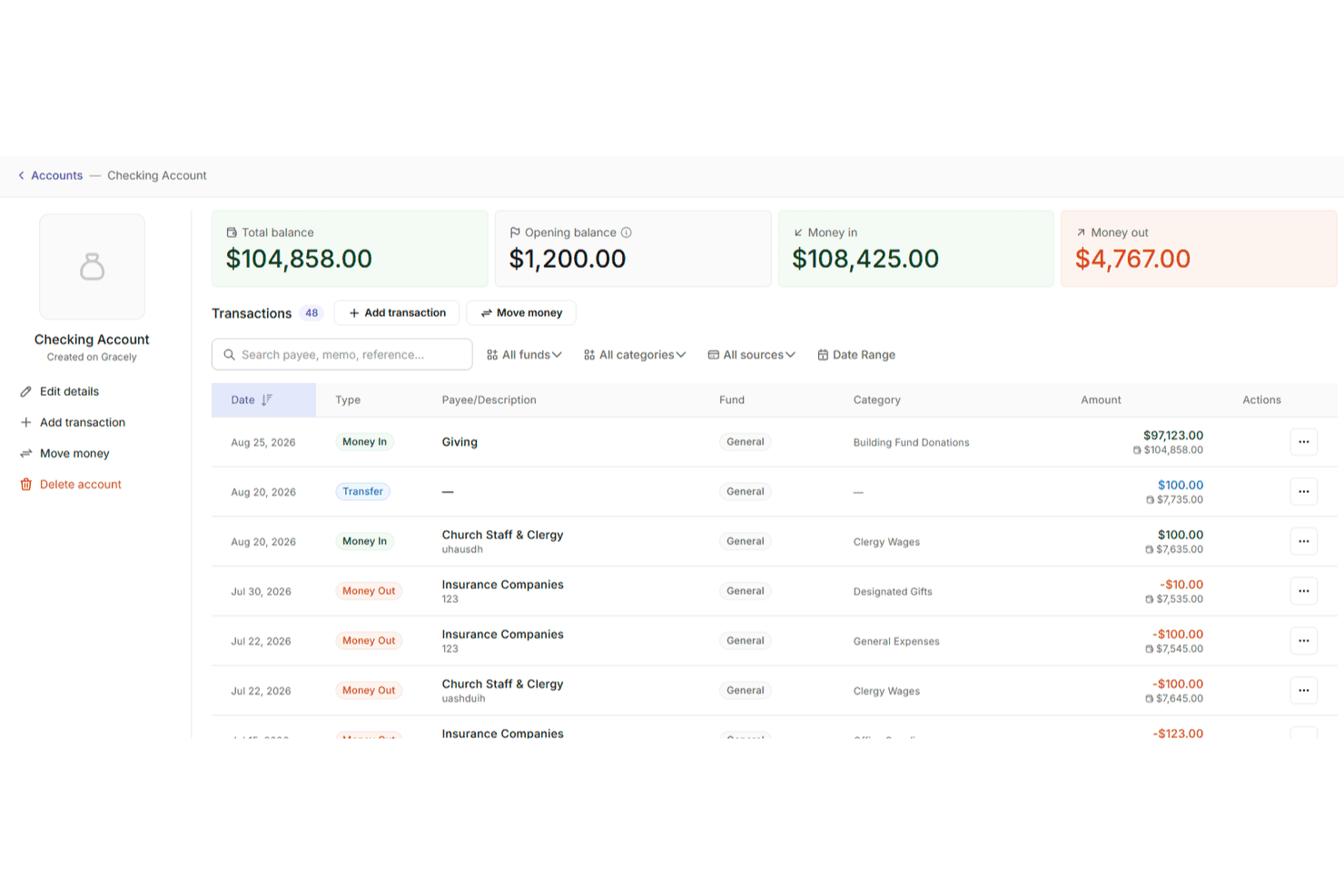
Gracely consente agli utenti di monitorare le transazioni dei conti con saldi e categorie. Gracely è un software di gestione ecclesiastica basato sul cloud che aiuta i ministeri a gestire persone, donazioni, eventi e finanze tutto in un unico posto. È stato progettato specificamente per le chiese, con strumenti intuitivi che supportano sia l'amministrazione quotidiana sia la gestione finanziaria responsabile a lungo termine.
Perché ho scelto Gracely: Ho scelto Gracely perché rende la gestione delle finanze della chiesa accessibile senza comprometterne la profondità. Puoi monitorare entrate e uscite, generare report dettagliati e visualizzare le tendenze delle donazioni a colpo d'occhio, mantenendo al contempo la trasparenza con la tua congregazione. Ciò che mi ha colpito è l'integrazione particolarmente stretta tra gli strumenti per le donazioni online e la reportistica finanziaria. Non è necessario estrarre dati da piattaforme diverse per capire come sta andando il tuo budget o dove vengono destinate le tue risorse.
Ho apprezzato anche il fatto che Gracely sia progettato per volontari e personale part-time. La sua interfaccia pulita, la configurazione guidata e i pannelli di controllo centralizzati ti permettono di passare meno tempo sommerso dai fogli di calcolo e più tempo concentrato sul ministero.
Funzionalità e integrazioni principali di Gracely
Le funzionalità includono moduli personalizzabili per le donazioni e le iscrizioni agli eventi, il monitoraggio delle presenze, un portale sicuro per i membri e strumenti integrati per aiutarti a pianificare eventi e comunicare con la tua congregazione. Puoi gestire più gruppi ecclesiastici, generare dichiarazioni dei contributi pronte per la dichiarazione dei redditi e utilizzare autorizzazioni basate sui ruoli per proteggere i dati sensibili.
Le integrazioni includono Stripe per i pagamenti e SendGrid per le comunicazioni via e-mail.
Learn more about Gracely: Ideale per contabilità integrata delle chiese
- Piano gratuito disponibile
- Da $12/mese (fatturazione mensile)
Visit WebsiteCustomer Rating:4.9/5
Puoi accedere al cruscotto finanziario per tenere traccia dei fondi e dei conti finanziari della chiesa. ChMeetings è un software di gestione parrocchiale (ChMS) basato su cloud, progettato per aiutare le organizzazioni religiose negli Stati Uniti, in Canada, Regno Unito, Australia e Sudafrica a semplificare le proprie operazioni. Utilizzato da oltre 7.000 chiese in queste regioni, offre una piattaforma intuitiva e multilingue che semplifica l’amministrazione ecclesiastica mantenendo un prezzo accessibile.
Dopo aver scritto centinaia di recensioni di software per The Lead Pastor, mi aspetto ormai opinioni contrastanti dai lettori riguardo alle varie app mobili per la gestione delle chiese. Tuttavia, il feedback che continuo a ricevere è che l’app di ChMeetings funziona bene ed è abbastanza semplice da essere utilizzata subito dai membri della chiesa.
Perché ho scelto ChMeetings: Come software contabile per chiese, ChMeetings consente agli utenti di gestire le finanze monitorando le spese, controllando i fondi e generando report visivi per analisi finanziarie. Il software integra inoltre le funzioni contabili con altre attività della chiesa, permettendo l’aggiunta e la gestione di transazioni, conti, fondi, categorie e beneficiari. Questa integrazione aiuta le chiese a mantenere registri finanziari accurati ed eseguire riconciliazioni senza necessitare di conoscenze contabili avanzate.
Gli utenti possono anche creare budget personalizzati e monitorarne l’andamento, offrendo visibilità sulle risorse disponibili per aiutare la chiesa a raggiungere i propri obiettivi. Inoltre, la piattaforma è nota per adattarsi a diverse dimensioni di chiese, con piani tariffari differenziati e un piano gratuito disponibile.
Funzionalità e integrazioni distintive di ChMeetings
Le funzionalità che rendono questo software unico includono il suo approccio tutto-in-uno, con gestione dei profili dei membri, prenotazione e check-in agli eventi, attività di outreach, appuntamenti per confessioni, calendario eventi, donazioni, pagamenti online, moduli ad hoc e controllo granulare degli accessi. La piattaforma è inoltre conforme al GDPR, sicura e disponibile in più lingue.
Le integrazioni includono MailChimp, PayPal, Twilio e SMSGlobal. Offre anche una API per sviluppatori.
Learn more about ChMeetings: 3La soluzione migliore per il supporto multivaluta integrato
Xero
- Prova gratuita di 30 giorni
- A partire da $25/mese
Visit WebsiteCustomer Rating:4.4/5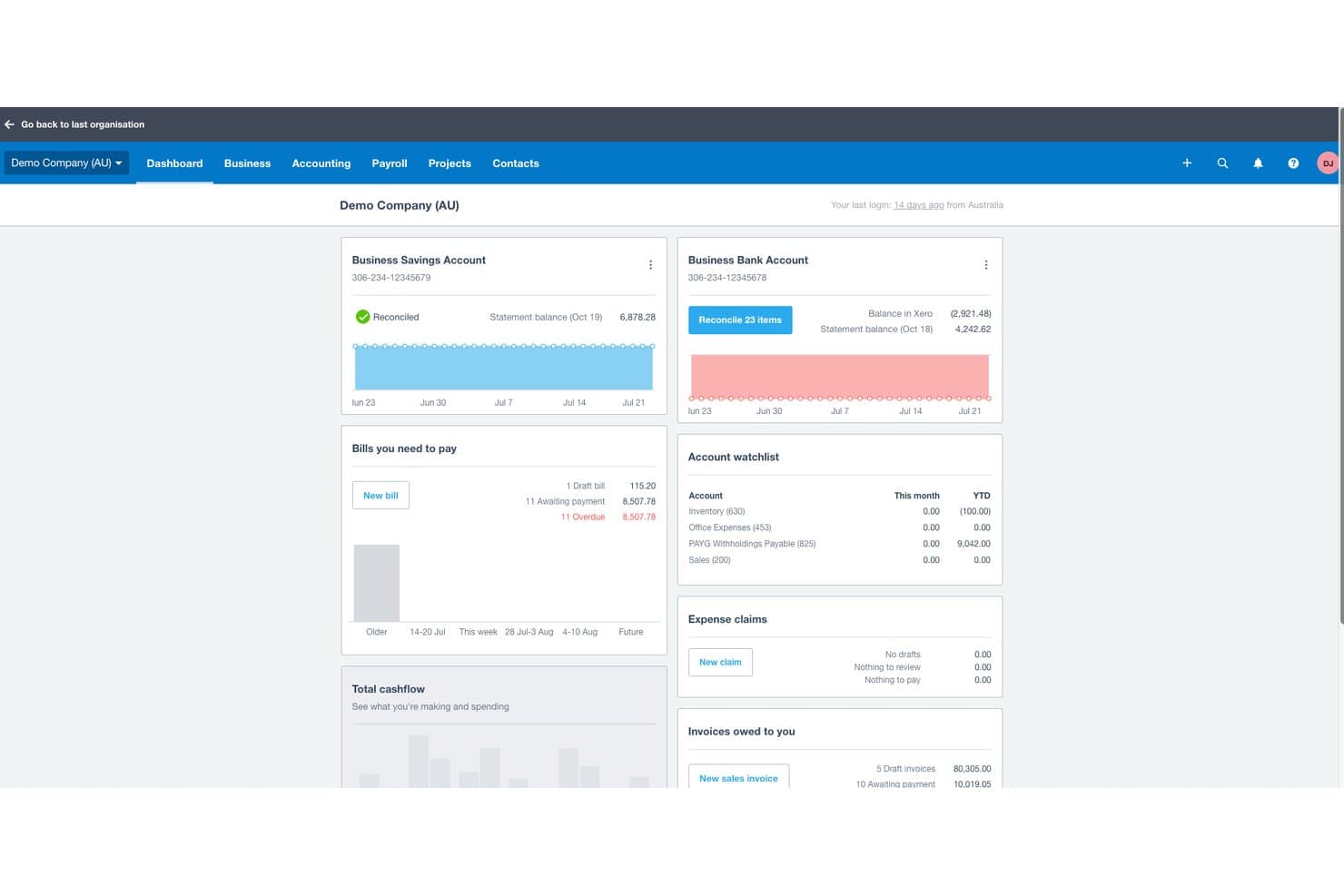
Xero offre un pannello di controllo finanziario che mostra i saldi dei conti bancari, le fatture da pagare, le fatture da incassare e i riepiloghi del flusso di cassa per la contabilità di una chiesa o di un'azienda. Xero è una piattaforma di contabilità basata sul cloud che include fatturazione, riconciliazione bancaria, monitoraggio delle spese, report finanziari, gestione delle paghe e gestione multivaluta per chiese e organizzazioni non profit di piccole e medie dimensioni.
Per chi è più adatto Xero?
Xero è una soluzione particolarmente adatta alle chiese di piccole e medie dimensioni i cui contabili o tesorieri hanno bisogno di uno strumento intuitivo per la contabilità generale, senza una curva di apprendimento ripida.
Perché ho scelto Xero
Ho scelto Xero come una delle migliori soluzioni perché il supporto multivaluta integrato rappresenta un vero elemento distintivo per le chiese che gestiscono missioni internazionali o ricevono donazioni in valuta estera. Con il piano Established, posso elaborare pagamenti internazionali delle fatture, riconciliare transazioni in diverse valute ed estrarre report che consolidano automaticamente tutti i dati nella valuta principale della chiesa. Questo elimina il lavoro di conversione manuale che generalmente causa errori nella rendicontazione delle spese sul campo missionario.
Caratteristiche principali di Xero
- Accesso illimitato per gli utenti: Invita più dipendenti, volontari o consulenti a collaborare simultaneamente senza costi aggiuntivi per le licenze.
- Piano dei conti personalizzabile: Configura i tuoi conti e le categorie di monitoraggio per adattarli ai ministeri o ai progetti della chiesa.
- Riconciliazione bancaria automatizzata: Importa automaticamente le transazioni bancarie e abbinale a ricevute o pagamenti per semplificare la chiusura mensile.
- Richieste di rimborso delle spese da dispositivo mobile: Acquisisci e invia le ricevute ovunque ti trovi tramite l'app mobile di Xero per ottenere rimborsi rapidamente.
Integrazioni di Xero
Xero offre integrazioni native con Hubdoc, Stripe, Square, Shopify ed Etsy e si collega a Zapier. È disponibile un'API per le integrazioni personalizzate.
Pros and Cons
Pros:
- Monitora le donazioni in valuta estera tra più missioni
- La riconciliazione bancaria automatizzata accelera la chiusura mensile
- Supporto per utenti illimitati, ideale per i team di volontari che si occupano della contabilità
Cons:
- Nessuna contabilità nativa per fondi destinati a donazioni vincolate
- L'indennità abitativa del clero richiede procedure manuali alternative
Learn more about Xero: Ideale per la tracciabilità delle spese
- Demo gratuita disponibile
- Da $11.99/utente/mese (fatturazione annuale)
Visit WebsiteCustomer Rating:4/5
Fyle abbina automaticamente le ricevute alle transazioni della carta e aggiorna i tuoi registri spese in tempo reale tramite messaggio. Fyle è una soluzione per la gestione delle spese che ti aiuta a tenere traccia e gestire le spese. Le sue funzionalità soddisfano varie esigenze organizzative, rendendolo una scelta versatile per diversi contesti, comprese le chiese.
Perché ho scelto Fyle: Ho scelto Fyle per la sua estrazione e codifica delle ricevute in tempo reale. Il suo OCR legge esercente, data, importo e categoria, chiedendo tramite messaggio di compilare eventuali campi mancanti per i centri di costo ministeriali o i fondi. Questo significa che ottieni dati sulle spese organizzati immediatamente, aiutandoti a mantenere una contabilità dei fondi accurata.
Mi piace anche la corrispondenza e la riconciliazione automatica delle ricevute della piattaforma. Fyle collega le ricevute alle transazioni della carta di credito giuste utilizzando feed in tempo reale da Visa, Mastercard, AmEx o caricamenti. Puoi persino rimborsare i volontari tramite ACH.
Caratteristiche e integrazioni di Fyle
Le funzionalità includono strumenti solidi per l'applicazione delle politiche e la conformità. Puoi impostare limiti di spesa, obbligo di ricevute e richiedere approvazioni specifiche in base a fondo, reparto o livello di volontariato. Fyle supporta anche la gestione delle spese in valuta multipla, recuperando automaticamente i tassi di cambio correnti quando viaggi o acquisti oltreconfine.
Le integrazioni includono NetSuite, Sage Intacct, Xero, QuickBooks Online, QuickBooks Desktop, Sage 300 CRE, TravelPerk e Bamboo HR.
Learn more about QuickBooks Online: Ideale per l'abbinamento delle transazioni potenziato dall'IA
- Demo gratuita disponibile
- Prezzo su richiesta
Visit WebsiteCustomer Rating:4.9/5
DualEntry offre al tuo team una panoramica finanziaria in tempo reale di ricavi, spese, flusso di cassa e dati operativi—tutto in un'unica dashboard. DualEntry è un sistema ERP guidato dall'IA che può aiutare le chiese a gestire operazioni finanziarie complesse come la contabilità per fondi, la consolidazione finanziaria multi-campus e la gestione fiscale. È progettato per ridurre l'inserimento manuale dei dati e può supportare volumi elevati di transazioni, il che è particolarmente utile per chiese grandi o in crescita.
Perché ho scelto DualEntry: Ho scelto DualEntry perché può aiutare le chiese a semplificare il processo di chiusura finanziaria grazie all'abbinamento delle transazioni basato sull'IA e alle riconciliazioni automatiche. Questo è particolarmente utile se la tua chiesa gestisce più campus o fondi, poiché il software facilita la consolidazione e la reportistica delle finanze.
Apprezzo anche che DualEntry sia progettato con supporto guidato da revisori contabili e un processo di avvio rapido, il che può rendere più agevole l'apprendimento per i team delle chiese.
Funzionalità e integrazioni principali di DualEntry:
Le funzionalità includono riconoscimento automatico dei ricavi, tracce di audit dettagliate e dashboard personalizzabili per il monitoraggio dei saldi dei fondi e del flusso di cassa. DualEntry comprende anche strumenti di gestione fiscale che si integrano con Avalara e Vertex, aiutandoti a gestire la reportistica fiscale locale quando necessario.
Le integrazioni includono BambooHR, Bill.com, Brex, Deel, Google SSO, Gusto, HubSpot, Ramp, Rippling, Salesforce, Stripe Billing e Stripe Invoicing.
Pros and Cons
Pros:
- Funzionalità AI avanzate aiutano nei compiti contabili complessi
- Supporta operazioni multi-entità e multi-valuta
- Il riconoscimento automatico dei ricavi garantisce la conformità agli standard
Cons:
- Le opzioni di personalizzazione richiedono un'attenta configurazione
- Essendo un ERP, può offrire più funzionalità del necessario per esigenze contabili più semplici
Learn more about DualEntry: Ideale per sincronizzare le donazioni con Quickbooks
- Prova gratuita di 30 giorni disponibile
- Da $72/mese
Visit WebsiteCustomer Rating:4.7/5
Tithe.ly ti consente di organizzare e pianificare i servizi con dettagli su canti e letture. Tithe.ly è un sistema di gestione per chiese progettato per aiutarti a gestire le finanze, gli eventi e il coinvolgimento della comunità della tua chiesa tramite una piattaforma centralizzata. Offre strumenti per le offerte digitali, il monitoraggio finanziario, la gestione dei membri e la comunicazione—tutto pensato per semplificare le operazioni quotidiane della chiesa.
Rivedendo i software per chiese anno dopo anno, ho notato che 'macchinoso' è il termine spesso usato per descrivere i sistemi di contabilità/offerte delle chiese. I miei lettori mi dicono, però, che Tithe.ly rompe gli schemi con un processo di donazione snello e diretto che funziona semplicemente.
Perché ho scelto Tithe.ly: Ho scelto Tithe.ly per i suoi strumenti di donazione digitale, che rendono facile per la tua congregazione donare tramite cellulare, SMS o online. Queste donazioni si sincronizzano con QuickBooks Online, rendendo più semplice la gestione delle finanze e assicurando registri accurati senza inserimenti manuali. Tithe.ly supporta inoltre le donazioni ricorrenti e offre funzionalità di reportistica che aiutano a monitorare l’andamento delle offerte, fornendo chiarezza nella supervisione finanziaria.
Inoltre, Tithe.ly include funzionalità di gestione eventi che ti permettono di gestire le iscrizioni e i pagamenti per riunioni di ogni dimensione. La sua app per chiese personalizzabile mantiene la tua comunità coinvolta durante tutta la settimana, offrendo uno spazio per condividere aggiornamenti, sermoni e annunci—tutto adattato alle esigenze della tua congregazione.
Funzionalità e integrazioni di spicco di Tithe.ly
Le funzionalità comprendono un database delle persone per monitorare il coinvolgimento dei membri, un costruttore di siti web per creare il sito della tua chiesa, strumenti di messaggistica per comunicazioni via SMS ed e-mail, check-in per bambini per maggiore sicurezza, controlli sui precedenti e risorse di formazione per mantenere ambienti sicuri.
Le integrazioni includono QuickBooks, RockRMS, Engiven, Salesforce, MinistryPlatform, Shelby, FellowshipOne, Planning Center Online, Church Community Builder ed Elvanto.
 Ideale per la contabilità gratuita della chiesa
- Piano gratuito disponibile
- Da $15/utente/mese
Visit WebsiteCustomer Rating:4.6/5
Puoi anche utilizzare ZipBooks per visualizzare i report di base e rimanere aggiornato sullo stato finanziario della tua chiesa. Se stai cercando un pacchetto software con un piano gratuito per sempre che puoi utilizzare per gestire la contabilità della tua chiesa, potresti prendere in considerazione ZipBooks. ZipBooks è un software di contabilità basato su cloud che fornisce ai titolari di piccole imprese strumenti di gestione finanziaria facili da usare. Sebbene non sia un software specifico per le chiese, può ovviamente essere utilizzato dalle chiese.
Perché ho scelto ZipBooks: ZipBooks è un software di contabilità intuitivo progettato per piccole imprese e organizzazioni non profit. Una delle cose che ZipBooks fa bene è la facilità d'uso. Ha un'interfaccia semplice e intuitiva che permette agli utenti di navigare rapidamente tra le diverse funzioni e caratteristiche, rendendolo facile da usare anche per chi ha poca o nessuna esperienza contabile. ZipBooks offre inoltre una vasta gamma di funzionalità che aiutano le piccole imprese a gestire le proprie finanze, tra cui fatturazione, monitoraggio delle spese e report finanziari.
Un altro punto di forza di ZipBooks è la sua flessibilità. ZipBooks può essere accessibile da qualsiasi dispositivo con una connessione a Internet, rendendo facile per gli utenti consultare le proprie informazioni finanziarie ovunque e in qualsiasi momento. Inoltre, ZipBooks offre una varietà di integrazioni che consentono di collegare il software di contabilità ad altri strumenti utilizzati nell'attività, come soluzioni per i pagamenti, software di monitoraggio dei tempi e altro ancora. Questo consente ai titolari di piccole imprese di gestire facilmente le proprie finanze e di ottimizzare il proprio flusso di lavoro.
ZipBooks ha la capacità di automatizzare molte attività e fornire dati in tempo reale, il che aiuta a prendere decisioni migliori. ZipBooks inoltre è conveniente e offre una versione gratuita che può essere aggiornata a quella a pagamento per caratteristiche più avanzate.
Caratteristiche e integrazioni principali di ZipBooks
Le funzionalità comprendono fatturazione ed emissione fatture, monitoraggio delle spese, reportistica finanziaria, pagamenti online, riconciliazione bancaria e con carta di credito, monitoraggio delle imposte sulle vendite, supporto multi-valuta, monitoraggio dei tempi, gestione progetti, collaborazione in team, modelli personalizzabili, supporto per app mobile, dashboard personalizzabili, importazione ed esportazione dati, contabilità automatica, pianificazione e previsione del budget, supporto per paghe, gestione dell'inventario, conformità fiscale e integrazioni/componenti aggiuntivi di terze parti.
Le integrazioni includono Google Drive, PayPal, Slack, Google Workspace, Asana, Gusto, Spiceworks ed Enrollsy.
Learn more about ZipBooks: Migliore per la scalabilità
- Prova gratuita di 30 giorni
- I prezzi sono disponibili su richiesta
Visit WebsiteCustomer Rating:4.3/5
Sage Intacct fornisce agli utenti una panoramica rapida delle loro finanze, così possono valutare facilmente la salute finanziaria della loro chiesa. Sage Intacct è un software di gestione finanziaria basato su cloud progettato per le piccole e medie imprese, che offre funzionalità come contabilità, budgeting, reportistica finanziaria e capacità di riconoscimento dei ricavi.
Perché ho scelto Sage Intacct: Sage Intacct è molto apprezzato per la sua architettura cloud e la scalabilità, che consente alle piccole e medie imprese di accedere ai propri dati finanziari ovunque e di aumentare facilmente l'utilizzo del software man mano che crescono le esigenze della chiesa.
Sage Intacct può automatizzare molti processi finanziari, come la fatturazione, gli acquisti e il riconoscimento dei ricavi, consentendo di risparmiare tempo e migliorare l'efficienza. Le funzionalità di reportistica finanziaria del software sono anch'esse complete, con dati in tempo reale, report personalizzabili e possibilità di approfondimento dettagliato, che rendono facile accedere e analizzare le informazioni finanziarie necessarie per prendere decisioni informate.
Inoltre, Sage Intacct è noto per le sue forti capacità contabili, tra cui la gestione multi-entità, e per la sua capacità di gestire requisiti contabili complessi come il riconoscimento dei ricavi e la conformità ASC 606.
Nel complesso, Sage Intacct è considerato un potente e flessibile software di gestione finanziaria che può aiutare le aziende a semplificare i processi finanziari, migliorare l'efficienza e prendere decisioni più informate grazie ai dati finanziari in tempo reale.
Funzionalità e integrazioni distintive di Sage Intacct
Funzionalità includono gestione finanziaria, automazione, reportistica finanziaria, gestione multi-entità, riconoscimento dei ricavi, contabilità, budgeting, soluzione cloud, accesso da mobile e integrazioni/componenti aggiuntivi di terze parti.
Integrazioni includono numerosi strumenti, tra cui Emburse Nexonia, Baker Tilly SaaS Intelligence, FloQast, APS Online, Yooz Accounts Payable Automation, RadiusOne, Workforce e QCommission.
Learn more about Sage Intacct: Migliore contabilità dei fondi per chiese
- Prova gratuita di 30 giorni
- Da $35/account/mese con costi aggiuntivi per alcuni componenti aggiuntivi
Visit WebsiteCustomer Rating:4.4/5
IconCMO ti permette di gestire gli obblighi fiscali della tua chiesa garantendo la conformità alle normative statali e federali. IconCMO è un software di gestione parrocchiale che offre strumenti per la gestione dei membri, la gestione delle donazioni e dei contributi, la gestione finanziaria, la gestione degli eventi, la comunicazione e la creazione di report.
Perché ho scelto IconCMO: IconCMO è un software di gestione parrocchiale che si distingue in vari ambiti come la gestione dei fondi, la gestione dei membri, la contabilità e la collaborazione.
IconCMO è semplicissimo da navigare e intuitivo da usare. L’interfaccia è intuitiva e lineare, rendendo semplice per le chiese gestire le proprie informazioni.
IconCMO offre potenti funzionalità per la gestione finanziaria, tra cui contabilità, gestione del budget, reportistica finanziaria e riconoscimento dei ricavi. Gli utenti apprezzano la capacità del software di tracciare entrate, spese e donazioni e generare bilanci finanziari.
IconCMO va oltre la semplice contabilità. Offre strumenti per monitorare le informazioni sui membri, inclusi dettagli di contatto, presenza e cronologia delle donazioni. I pastori possono gestire i dati dei membri e creare report personalizzati su presenze e donazioni. IconCMO consente anche alle chiese di pianificare, registrare e tracciare la partecipazione agli eventi, come corsi, riunioni e raccolte fondi.
IconCMO è un vero e proprio “tuttofare” con strumenti per la comunicazione moderna delle chiese tra cui email, messaggistica SMS e social media, oltre a tutto ciò che ti aspetti da un software di contabilità per chiese.
Funzionalità principali & integrazioni di IconCMO
Le funzionalità includono gestione dei membri, gestione finanziaria, gestione eventi, comunicazione, reportistica, donazioni online, accesso da mobile, sicurezza, cloud e integrazioni/plug-in di terze parti.
Le integrazioni includono Vanco, PayPal, Stripe, Elavon, First Data, Authorize.net, ADP, Paychex, QuickBooks Online, Xero, Church Community Builder, Fellowship One, Planning Center, MailChimp, Constant Contact, Emma, Facebook, Twitter e LinkedIn.
Learn more about IconCMO: Ideale per la contabilità automatizzata con IA
- Piano gratuito disponibile
- A partire da $55/account/mese
Visit WebsiteCustomer Rating:4.4/5
La funzione Smart Connect di Botkeeper rende semplice recuperare estratti conto bancari e delle carte di credito per una rapida riconciliazione contabile. Botkeeper è un software di contabilità alimentato dall'IA che automatizza le attività finanziarie e fornisce approfondimenti sui dati in tempo reale per le aziende.
Perché ho scelto Botkeeper: Botkeeper è un software di contabilità basato sull'IA progettato per automatizzare molte delle attività finanziarie che di solito le chiese devono gestire manualmente. Una delle caratteristiche principali in cui Botkeeper eccelle è la sua capacità di automazione. Il software utilizza avanzati algoritmi di intelligenza artificiale per automatizzare attività come l'inserimento dei dati, la riconciliazione bancaria e la reportistica finanziaria. Questo permette ai responsabili delle chiese di risparmiare tempo e ridurre il rischio di errori.
Un altro punto di forza di Botkeeper è la sua capacità di fornire approfondimenti sui dati in tempo reale. Botkeeper è in grado di analizzare i dati finanziari in tempo reale, offrendo alle chiese una visione chiara della loro salute finanziaria e delle loro prestazioni. Questo consente di individuare tendenze, aree di miglioramento e di prendere decisioni più consapevoli sulle strategie finanziarie.
Botkeeper offre inoltre un eccellente supporto clienti, assicurando che eventuali problemi o preoccupazioni vengano affrontati rapidamente. Il software è intuitivo e facile da usare anche per chi ha poca o nessuna esperienza contabile. Inoltre, Botkeeper è basato sul cloud, il che significa che le chiese possono accedere alle informazioni e ai dati finanziari da qualsiasi luogo e in qualsiasi momento.
Funzionalità e integrazioni di spicco di Botkeeper
Le funzionalità includono contabilità automatizzata, analisi, IA, previsioni finanziarie, report personalizzabili, accesso e permessi multi-utente, accesso cloud, accesso tramite app mobile, supporto clienti 24/7, promemoria e notifiche, fatturazione e creazione di fatture, monitoraggio delle spese, gestione paghe, budgeting e integrazioni/componenti aggiuntivi di terze parti.
Le integrazioni includono Stripe, Gusto, QuickBooks, HubSpot, LinkedIn, Hootsuite, PayPal, Zendesk, Kissmetrics e Chargify.
Learn more about Botkeeper:
Altre opzioni: le nostre menzioni d'onore
Anche se non sono rientrate nella nostra top 20, vale la pena menzionarle (e vale la pena esplorarle anche per te!)
- 11AccountEdgeIdeale per piccole chiese
- 12RealmIdeale per disciplina e trasparenza finanziaria
- 13ACSAm besten geeignet für Reporting-Tools
- 14SteepleMateIdeale per la gestione finanziaria centralizzata
- 15Blackbaud Financial Edge NXTIdeale per la pianificazione e l'analisi finanziaria
- 16MIP Fund AccountingIdeale per report contabili flessibili
- 17PowerChurch PlusIl miglior sistema ChMS tutto-in-uno
- 18ChurchTracIdeale per facilità d'uso
- 19Sage Expense Management (formerly Fyle)Ideale per il monitoraggio delle spese
- 20MinistryPlatformIdeale per ecosistemi ministeriali personalizzabili
Recensioni correlate sui software per chiese
La maggior parte delle chiese si affida a strumenti software per mantenere tutto organizzato e funzionante senza intoppi. Abbiamo svolto ricerche approfondite sui principali strumenti del settore disponibili, per semplificare le tue decisioni. Le nostre recensioni ti aiuteranno a:
- Ridurre il carico amministrativo con soluzioni di gestione per chiese leader del settore.
- Gestire le buste paga senza intoppi con il miglior software per le buste paga delle chiese
- Scoprire le migliori alternative a Quickbooks per la contabilità della tua chiesa

4 consigli per ottenere il massimo dal tuo software di contabilità per chiese
Come valuto il software di contabilità per chiese
Valuto gli strumenti di contabilità per chiese su due livelli: quelli fondamentali, come la contabilità per fondi e le dichiarazioni delle donazioni, e i fattori che differenziano le migliori opzioni dalle altre.
Funzionalità principali (Requisiti indispensabili per questa lista)
Quando seleziono gli strumenti per la mia lista, valuto ciascuno su una scala da 0 (non offre la funzionalità) a 5 (eccelle in quest'area) per ognuna delle funzionalità fondamentali sotto elencate. Poi, calcolo il punteggio totale dello strumento in percentuale. Ogni strumento deve raggiungere un punteggio minimo totale del 65% per essere considerato.
- Contabilità per fondi: Verifico se uno strumento può tracciare separatamente fondi vincolati, non vincolati e designati—come isolare la campagna per un nuovo edificio dal fondo generale delle decime.
- Gestione delle donazioni: Ogni strumento dovrebbe permettere di registrare doni collegati a singoli donatori e generare dichiarazioni di donazioni annuali conformi agli obblighi fiscali.
- Piano dei conti orientato alle chiese: Cerco un piano dei conti che rifletta come le chiese organizzano effettivamente le finanze—per ministero, sede o programma—invece di un modello generico per aziende.
- Reportistica finanziaria per nonprofit: Lo strumento deve produrre report come il Rendiconto delle attività e confronti budget-effettivo per fondo, quelli che il consiglio degli anziani o il comitato finanze si aspettano di vedere.
- Contabilità fornitori e libro mastro generale: Qui contano le attività di base—gestione fornitori, pagamento fatture, inserimento delle scritture contabili e riconciliazione bancaria devono essere presenti e funzionanti.
- Gestione paghe e tassazione specifica per il clero: Valuto se la piattaforma gestisce elementi tipici del clero come la designazione dell'alloggio e lo status fiscale doppio, sia nativamente che tramite un'integrazione dedicata per le paghe.
Una volta ottenuta una lista di strumenti che soddisfano questi criteri, considero cosa rende unica ciascuna piattaforma.
Fattori differenzianti (Cosa distingue i fornitori)
Ecco come confronto e metto a confronto i diversi fornitori:
Caratteristiche distintive
L'integrazione con i ChMS è molto importante—cerco strumenti che sincronizzino i dati delle donazioni direttamente con piattaforme come Planning Center o Breeze, così il tuo team non deve registrare i dati due volte. La contabilità multi-sede è anch'essa fondamentale per le chiese in crescita che necessitano di report consolidati tra le varie sedi. Dashboard per il consiglio e gli anziani sono un altro fattore distintivo che valuto, dato che i comitati finanziari spesso includono volontari che hanno bisogno di panoramiche chiare senza dover navigare un intero libro mastro.
Oltre le funzionalità
Il supporto nell'implementazione è rilevante quando il contabile è un volontario che sta migrando da fogli di calcolo o QuickBooks—valuto se il fornitore offre configurazione guidata, assistenza per la migrazione dei dati e formazione rivolta a chi non è contabile di professione. La conformità e la preparazione agli audit sono altri aspetti che considero, soprattutto per le chiese che necessitano di tracce di audit pulite e separazione dei compiti per soddisfare la supervisione denominazionale. Valuto anche quanto bene lo strumento si adatti a diverse dimensioni di chiesa e strutture di governance, da una piccola congregazione con un solo tesoriere a una chiesa multi-sede con livelli multipli di approvazione.
Come scegliere un software di contabilità per chiese
Ogni chiesa ha un processo decisionale diverso, ma alcuni elementi essenziali valgono per tutte. Quando scegli un software di contabilità, ecco a cosa dare la priorità:
1. Budget efficace e monitoraggio dei fondi
I budget delle chiese sono limitati. Il tuo software dovrebbe semplificare il monitoraggio delle entrate e delle spese tra più fondi, ad esempio mantenendo separate le donazioni al fondo per le missioni dal fondo generale.
2. Monitoraggio e rendicontazione delle donazioni
Registri accurati dei donatori non sono facoltativi. Il software giusto automatizza le ricevute fiscali, i riepiloghi dei contributi e i report specifici per fondo, aiutandoti a monitorare le donazioni per progetti edilizi, attività di sensibilizzazione e fondi vincolati senza lavoro aggiuntivo.
3. Interfaccia semplice e adatta ai volontari
La maggior parte delle chiese si affida ai volontari per la contabilità. Scegli un software facile da imparare con dashboard chiare, in modo che anche chi non si occupa di contabilità possa tenere sotto controllo le finanze senza una curva di apprendimento ripida.
4. Integrazione perfetta con i sistemi della chiesa
Inserire gli stessi dati due volte fa perdere tempo. Se la tua chiesa utilizza già Planning Center, Fellowship One o un altro strumento di gestione, scegli un software di contabilità che si sincronizzi per mantenere i registri accurati e aggiornati.
5. Supporto integrato alla conformità e agli audit
Le chiese sono soggette a controlli finanziari. Il software migliore semplifica gli audit, garantisce la trasparenza e aiuta a mantenere la conformità grazie a funzionalità come tracce di audit, piani dei conti personalizzabili e contabilità per fondi.
Hai bisogno di una soluzione che vada oltre la contabilità? La maggior parte dei principali strumenti software per la gestione delle chiese offre supporto alla contabilità, nell'ambito di un sistema tutto-in-uno. Inoltre, se ne hai bisogno, sono disponibili anche alcuni eccellenti strumenti di software per la gestione dei donatori.
Tendenze nei software di contabilità per chiese
I software di contabilità per chiese continuano a evolversi, spinti dalla necessità di maggiore efficienza, trasparenza e conformità. Abbiamo analizzato aggiornamenti dei prodotti, note di rilascio e annunci di importanti operatori come Aplos, QuickBooks for Nonprofits e Breeze. Ecco in quale direzione si sta muovendo quest'anno la gestione finanziaria delle chiese:
Automazione e integrazione più intelligenti
- Sincronizzazione della gestione dei donatori – Piattaforme come Aplos e QuickBooks offrono ora un'integrazione più approfondita della gestione dei donatori, riducendo l'inserimento manuale dei dati.
- Riconciliazione bancaria automatizzata – Le nuove funzionalità (ad esempio, ACS Technologies) abbinano istantaneamente le transazioni, facendo risparmiare ore.
- API e webhook – Gli utenti avanzati possono ora collegare perfettamente i sistemi di contabilità agli strumenti di gestione delle chiese.
Maggiore controllo finanziario
- Report personalizzati per consigli direttivi e donatori – Aplos e Church Community Builder forniscono ora rendiconti finanziari completamente personalizzati per migliorare la trasparenza.
- Dashboard in tempo reale – QuickBooks e Breeze hanno aggiornato le dashboard per offrire informazioni immediate su donazioni, saldi dei fondi e budget.
- Analisi predittiva – Pushpay e Planning Center offrono ora strumenti di budgeting basati sull'intelligenza artificiale per prevedere le spese con maggiore precisione.
Maggiore conformità e sicurezza
- Report fiscali più semplici – Gli aggiornamenti del 2025 semplificano i rendiconti dei contributi di fine anno e la presentazione dei moduli 1099.
- Accesso basato sui ruoli – Impostazioni dei permessi migliori proteggono i dati sensibili e garantiscono la conformità alle policy.
Migliore esperienza utente
- Interfacce più semplici – QuickBooks, Breeze e Aplos hanno snellito i loro design per facilitare la navigazione, soprattutto per chi non si occupa di contabilità.
- Basi di conoscenza ampliate – ACS Technologies e Planning Center offrono ora guide dettagliate e tutorial video, riducendo le richieste di assistenza.
Cosa sta scomparendo?
- Report stampati – Le dashboard digitali e i rendiconti automatizzati stanno sostituendo i report cartacei.
- Contabilità di base – Le chiese stanno andando oltre la semplice contabilità, adottando strumenti finanziari specializzati progettati per le esigenze del ministero.
Questi cambiamenti dimostrano che il software giusto non serve solo a tenere traccia del denaro: serve a aiutare i pastori a guidare con chiarezza e sicurezza.
Che cos'è un software di contabilità per chiese?
Il software di contabilità per chiese è uno strumento che organizza le finanze della tua chiesa. Ti permette di controllare, esaminare e organizzare donazioni, paghe, monitoraggio dei fondi e bilancio in un unico posto. Che tu stia guidando una piccola congregazione o una chiesa con più sedi, il software di contabilità per chiese aiuta a semplificare le finanze, così puoi concentrarti sul ministero.
Funzionalità del software di contabilità per chiese
Quando scegli un software di contabilità per chiese, presta attenzione alle seguenti funzionalità principali:
- Contabilità per fondi: ti consente di monitorare e gestire separatamente più fondi o conti, così puoi assicurarti che donazioni designate, sovvenzioni e bilanci rimangano organizzati e non vengano mescolati. È particolarmente utile per le chiese che gestiscono contemporaneamente diversi ministeri o fondi per l'edilizia.
- Monitoraggio delle donazioni: tiene traccia di ogni donazione, che si tratti di un assegno nella cassetta delle offerte o di una donazione online ricorrente. Semplifica la rendicontazione fiscale e facilita l'invio di ricevute e messaggi di ringraziamento ai tuoi generosi donatori.
- Gestione dei membri: combina la contabilità con un database dei membri della chiesa, aiutandoti a monitorare offerte, impegni di donazione e informazioni di contatto in un unico posto. Rende semplici i rendiconti annuali e le comunicazioni personalizzate.
- Strumenti di bilancio: ti aiutano a pianificare e monitorare le spese e le entrate della chiesa. Grazie a dashboard di bilancio chiare, puoi individuare le tendenze, evitare spese eccessive e prendere decisioni finanziarie con sicurezza.
- Elaborazione delle paghe: gestisce stipendi, benefit e ritenute fiscali per il personale e il clero. Un buon software garantisce il rispetto sia delle normative specifiche per le chiese sia delle leggi fiscali standard.
- Rendicontazione finanziaria: genera report finanziari dettagliati, come bilanci patrimoniali e prospetti dei ricavi, personalizzati per i consigli della chiesa, il personale e le riunioni della congregazione. Elimina le incertezze quando condividi la situazione finanziaria della tua chiesa.
- Debiti e crediti: tiene traccia delle fatture ricevute e dei pagamenti effettuati, nonché di eventuali entrate dovute alla chiesa. Tenere tutto sotto controllo permette di mantenere soddisfatti i fornitori e accurati i registri.
- Riconciliazione bancaria: assicura che i registri contabili digitali corrispondano agli estratti conto bancari reali, individuando rapidamente errori o transazioni mancanti. È fondamentale durante gli audit o le verifiche di fine anno.
- Autorizzazioni e sicurezza degli utenti: ti consente di controllare chi può visualizzare, modificare o gestire determinati dati finanziari. In questo modo le informazioni sensibili rimangono al sicuro e si riduce il rischio di errori o frodi.
- Integrazione con i sistemi di gestione della chiesa: si collega facilmente alle altre piattaforme che utilizzi già, come gli strumenti per la pianificazione degli eventi o per la comunicazione, così il tuo ecosistema tecnologico funziona in modo integrato, anziché ostacolarsi.
Vantaggi del software di contabilità per chiese
Gestire le finanze della chiesa senza il software giusto porta a errori, perdita di tempo e punti ciechi finanziari. Il miglior software di contabilità per chiese fa più che elaborare numeri: mantiene la tua chiesa finanziariamente sana e concentrata sul ministero.
5 vantaggi principali per i pastori principali:
- Monitoraggio accurato dei fondi – Mantieni i fondi designati organizzati e conformi alle normative.
- Gestione semplificata delle donazioni – Automatizza il monitoraggio e la rendicontazione dei contributi.
- Rendicontazione finanziaria chiara – Ottieni informazioni finanziarie in tempo reale per prendere decisioni migliori.
- Elaborazione delle paghe senza sforzo – Garantisci una retribuzione accurata del clero e del personale.
- Automazione che fa risparmiare tempo – Libera ore del personale da dedicare al ministero invece che alle pratiche burocratiche.
Anticipando queste tendenze, i pastori possono guidare con fiducia, sapendo che le loro chiese dispongono degli strumenti giusti per garantire chiarezza finanziaria, integrità e crescita.
L'utilizzo di un software di contabilità specializzato aiuta i pastori a concentrarsi sulla loro vocazione principale, lasciando agli esperti gli aspetti complessi della gestione finanziaria.
Joshua GOrdon
Costi e prezzi del software di contabilità per chiese
I piani tariffari variano generalmente in base alle dimensioni della chiesa, alla complessità delle esigenze finanziarie e alle funzionalità desiderate. Ecco una panoramica dei tipi di piano e delle opzioni di prezzo più comuni nel settore:
| Tipo di piano | Prezzo medio | Funzionalità comuni | Ideale per... |
|---|---|---|---|
| Tipo di pianoGratuito | Prezzo medio$0/mese | Funzionalità comuniContabilità, contabilità dei fondi, monitoraggio delle donazioni, reportistica di base, autorizzazioni per volontari | Ideale per...Piccole chiese con esigenze finanziarie semplici |
| Tipo di pianoBase | Prezzo medio$25-$50/mese | Funzionalità comuniTutte le funzionalità del piano Gratuito, definizione del budget, elaborazione delle buste paga, riconciliazione bancaria | Ideale per...Chiese di medie dimensioni che necessitano di funzionalità per la gestione delle buste paga e del budget |
| Tipo di pianoStandard | Prezzo medio$50-$100/mese | Funzionalità comuniTutte le funzionalità del piano Base, supporto per più sedi, autorizzazioni basate sui ruoli, report personalizzati | Ideale per...Chiese più grandi che necessitano di una gestione finanziaria completa e della collaborazione del team |
| Tipo di pianoAvanzato | Prezzo medio$100-$200/mese | Funzionalità comuniTutte le funzionalità del piano Standard, integrazione della gestione dei donatori, analisi avanzate, app per dispositivi mobili | Ideale per...Chiese grandi con operazioni finanziarie complesse ed esigenze specifiche di personalizzazione |
| Tipo di pianoAziendale | Prezzo medio$200+/mese | Funzionalità comuniTutte le funzionalità del piano Avanzato, utenti illimitati, responsabile dedicato dell'account, accesso API | Ideale per...Chiese molto grandi o organizzazioni con operazioni finanziarie altamente complesse e su larga scala |
La scelta del piano giusto dipende dalle dimensioni della chiesa e dalle sue specifiche esigenze di gestione finanziaria. Valuta la possibilità di iniziare con un piano gratuito o base per esplorare le funzionalità. Successivamente, passa a un'opzione più completa man mano che le tue esigenze aumentano.