

El mejor software de gestión de iglesias para iglesias pequeñas simplifica la programación de voluntarios, agiliza y aumenta las donaciones recurrentes, y mantiene toda la información relevante perfectamente organizada.
Llevo más de 20 años en el liderazgo de iglesias. He visto cómo pastores fieles se desgastan por sistemas desorganizados. Solíamos combinar hojas de cálculo, mensajes de grupo, calendarios compartidos y archivadores polvorientos. Hoy, eso ya no es necesario. He dedicado cientos de horas a revisar y comparar herramientas de gestión de iglesias.
La claridad, la coherencia y la visibilidad compartida que proporciona un buen ChMS pueden transformar la forma en que trabaja tu equipo. Con esto en mente, he reunido una lista sólida de herramientas diseñadas para iglesias pequeñas; cada una es práctica, accesible y ha sido evaluada exhaustivamente.
Por qué confiar en nuestras recomendaciones de software
6,700+
Reviews
20
Industry experts
16+
Evaluation factors
14
Years
Nuestro equipo lleva probando y evaluando software desde 2012. Como líderes eclesiásticos, sabemos lo difícil —y lo importante— que es elegir el software adecuado.
Para esta guía, evaluamos las herramientas mediante pruebas prácticas e investigación independiente, puntuando las herramientas según nuestros criterios de selección.
Nuestras reseñas reflejan nuestro criterio editorial humano, no un discurso de ventas.
Resumen del mejor software de gestión de iglesias para iglesias pequeñas
| Tool | Best For | Trial Info | Price | ||
|---|---|---|---|---|---|
| 1 | Mejor opción para iglesias pequeñas en crecimiento | Plan gratuito disponible | Desde $10/mes y aumenta según el tamaño de la congregación. | Website | |
| 2 | Ideal para transmitir servicios religiosos en vivo | Demo gratuita disponible | Precio disponible bajo consulta | Website | |
| 3 | Mejor para el seguimiento del compromiso de los miembros | No hay prueba gratuita disponible | Desde $58/mes | Website | |
| 4 | La mejor opción para datos de miembros personalizables | Demostración gratuita disponible | Desde $72/mes | Website | |
| 5 | La mejor opción para donaciones digitales asequibles | Prueba gratuita de 30 días disponible | Desde $72/mes | Website | |
| 6 | Ideal para mejorar la comunicación con los miembros | Prueba gratuita de 30 días disponible | Desde $37/mes | Website | |
| 7 | Ideal para la comunicación que fomenta el compromiso | No disponible | Precio a consultar | Website | |
| 8 | La mejor opción para la gestión de personas | Prueba gratuita disponible | Desde $69.99/mes | Website | |
| 9 | Ideal para construir comunidad | Precios personalizados bajo solicitud | Website | ||
| 10 | Mejor para la gestión de donantes | Demo gratuita disponible | Desde $99/mes por hasta 1,000 registros | Website |


Reseñas de los 20 mejores programas de gestión de iglesias para iglesias pequeñas
Aquí tienes una breve descripción de cada software de gestión de iglesias para iglesias pequeñas, con el fin de mostrar el caso de uso más adecuado de cada herramienta, algunas funciones destacadas y capturas de pantalla que ofrecen una vista general de la interfaz.
 Mejor opción para iglesias pequeñas en crecimiento
- Plan gratuito disponible
- Desde $10/mes y aumenta según el tamaño de la congregación.
Visit WebsiteCustomer Rating:4.9/5
ChMeetings cuenta con un panel centralizado con una visión rápida de las actividades de la iglesia, incluyendo contribuciones, asistencia, eventos y tareas de seguimiento. ChMeetings es un software de gestión de iglesias (ChMS) basado en la nube, diseñado para ayudar a organizaciones religiosas en EE. UU., Canadá, Reino Unido, Australia y Sudáfrica a optimizar sus operaciones. Utilizado por más de 7,000 iglesias en estas regiones, ofrece una interfaz intuitiva, soporte multilingüe en 22 idiomas y precios accesibles. Ya sea gestionando membresías, controlando la asistencia o administrando las finanzas, ChMeetings proporciona una solución integral.
Para iglesias pequeñas, ChMeetings destaca como una opción asequible y fácil de usar. Ofrece un plan gratuito para hasta 50 miembros, lo que lo hace accesible para congregaciones con presupuestos limitados. El software simplifica las tareas administrativas como la organización de miembros, la gestión de grupos y las donaciones en línea seguras, permitiendo que los líderes religiosos se enfoquen más en su misión que en el papeleo. Sus herramientas financieras también ayudan con la elaboración de presupuestos, informes y seguimiento de contribuciones.
Más allá de las funciones básicas de gestión, ChMeetings incluye características adicionales destacadas que mejoran las operaciones de la iglesia. Las herramientas de comunicación automatizada permiten a las iglesias enviar correos electrónicos, mensajes SMS y notificaciones push, manteniendo a los miembros comprometidos. Las capacidades de gestión de eventos facilitan la planificación y el registro de actividades religiosas. Incluso cuenta con una aplicación móvil que puede ser totalmente personalizada y adaptada para una experiencia más personal.
Learn more about ChMeetings: Ideal para transmitir servicios religiosos en vivo
- Demo gratuita disponible
- Precio disponible bajo consulta
Visit WebsiteCustomer Rating:4.5/5
Subsplash te permite diseñar y enviar comunicaciones por correo electrónico y SMS a tu congregación. Subsplash es una plataforma centralizada de gestión de iglesias diseñada para mejorar el compromiso y el alcance comunitario. Con funciones como aplicaciones móviles personalizadas y transmisión en vivo, busca aumentar la visibilidad de la iglesia y fomentar las conexiones dentro de la comunidad.
Por qué lo elegí
Elegí Subsplash para iglesias pequeñas debido a su enfoque en el alojamiento de medios y la transmisión en vivo. Estas funciones permiten transmitir tus servicios y eventos, ayudando a llegar a los miembros que no pueden asistir en persona. Esto puede ser una excelente manera de mantener un sentido de comunidad incluso cuando no todos pueden estar juntos físicamente.
Otra razón por la que elegí Subsplash son sus capacidades de gestión de eventos. Esta función te permite organizar y manejar eventos de la iglesia de manera fluida, desde reuniones de grupos pequeños hasta eventos más grandes de toda la iglesia. Proporciona las herramientas necesarias para coordinar detalles y comunicarte eficazmente con tu congregación, haciendo que la planificación de eventos sea mucho menos problemática.
Funciones destacadas
Las funciones incluyen la gestión de grupos, que te ayuda a organizar a los miembros en grupos más pequeños y manejables para actividades y comunicación. Las herramientas de mensajería facilitan la comunicación directa con tu congregación, manteniendo a todos informados y conectados. Además, Subsplash ofrece un sistema de registro para hacer seguimiento de la asistencia y garantizar la seguridad de tus miembros, especialmente de los niños.
Integraciones
Las integraciones incluyen Rock RMS, Zapier, Community Church Builder, MortarStone, Ministry Platform, Planning Center, Breeze, StudioC, BoxCast, Pushpay, MediaFusion y Church Community Builder.
Pros and Cons
Pros:
- Los usuarios aprecian las capacidades todo en uno, que mejoran eficazmente la participación en la iglesia y las herramientas digitales.
- Muchos usuarios destacan la continua adición de nuevas funciones y mejoras.
- La plataforma es elogiada por su excelente soporte al cliente y capacidad de respuesta.
Cons:
- Algunos usuarios expresan insatisfacción con el proceso de cancelación, citando enlaces rotos y mala comunicación.
- Se observan problemas técnicos y limitaciones en la flexibilidad de diseño, especialmente en comparación con la competencia.
 Mejor para el seguimiento del compromiso de los miembros
- No hay prueba gratuita disponible
- Desde $58/mes
Visit WebsiteCustomer Rating:4.8/5
One Church Software muestra su versatilidad en múltiples dispositivos para una gestión eficiente de la iglesia. One Church Software es una solución de gestión diseñada para iglesias pequeñas que desean simplificar las operaciones y fomentar conexiones comunitarias más fuertes. Combina herramientas para la administración de miembros, planificación de eventos, seguimiento financiero y comunicación en una plataforma intuitiva, ayudando a los líderes de la iglesia a centrarse en el ministerio en lugar de las tareas administrativas.
Elegí One Church Software por sus sólidas capacidades de compromiso con los miembros y gestión de donaciones. Permite a las iglesias llevar el control de la asistencia, gestionar las donaciones y organizar grupos desde un solo panel, lo que facilita mantenerse conectado con los feligreses. Las herramientas integradas de programación y coordinación de voluntarios también ayudan a las iglesias pequeñas a optimizar la planificación de servicios y eventos sin depender de varios sistemas.
One Church Software incluye herramientas centralizadas para la gestión de grupos y la programación de eventos, permitiendo a los líderes coordinar a los voluntarios y equipos de adoración de manera más eficiente. Su aplicación móvil gratuita, disponible para iOS y Android, ofrece acceso a funciones esenciales en cualquier lugar, mientras que el sistema de registro para niños garantiza la seguridad durante los eventos. Además, las integraciones con plataformas como Pushpay y MailChimp aumentan la flexibilidad para las donaciones y comunicaciones. Las integraciones incluyen eSPACE, Pushpay, OnlineGiving.org, MailChimp, PraiseCharts y aplicaciones personalizadas vía API.
Learn more about One Church Software: La mejor opción para datos de miembros personalizables
- Demostración gratuita disponible
- Desde $72/mes
Visit WebsiteCustomer Rating:4.8/5
Breeze ChMS muestra un panel intuitivo de donaciones en línea para hacer seguimiento de las contribuciones. El software de gestión eclesiástica Breeze Church Management Software (ChMS) está diseñado específicamente para iglesias pequeñas, ofreciendo herramientas que mejoran tanto las operaciones como la participación de la comunidad. Está pensado para ayudarte a gestionar tu congregación de manera más eficaz con funciones como la gestión de miembros y las donaciones digitales.
Por qué lo elegí
Elegí Breeze ChMS porque ofrece una gestión integral de los miembros, lo que te permite almacenar datos personalizables de cada feligrés. Esto es fundamental para las iglesias pequeñas, donde llevar un control de los miembros puede convertirse en una tarea abrumadora. Además, su función de gestión de eventos te ayuda a organizar y hacer seguimiento de las actividades del grupo, evitando así que se te pasen fechas o detalles importantes.
Otra razón para elegir Breeze ChMS son sus herramientas integradas para donaciones en línea y por mensaje de texto. Esta funcionalidad es esencial para las iglesias pequeñas que dependen en gran parte de las donaciones, brindando una manera cómoda y sencilla para que los miembros puedan contribuir. Asimismo, el software incluye seguimiento de asistencia e informes completos, herramientas invaluables para comprender y gestionar la dinámica de tu congregación.
Funciones destacadas
Las funciones incluyen almacenamiento personalizable de los datos de los miembros, permitiéndote adaptar la información a las necesidades específicas de tu iglesia. La herramienta de gestión de eventos te permite organizar y controlar todas las actividades de la iglesia sin esfuerzo, asegurando que no pierdas detalle de lo que sucede. El seguimiento de asistencia también está incluido, proporcionando información útil sobre la participación e involucramiento de los miembros.
Integraciones
Las integraciones incluyen Tithe.ly, Google Calendar, Outlook Calendar, Apple Calendar, Mailchimp, KidCheck, Planning Center y SongSelect.
Pros and Cons
Pros:
- Fácil de configurar y realizar cambios según sea necesario, lo que simplifica el proceso de incorporación para nuevos usuarios.
- Ofrece informes personalizables, permitiendo a las iglesias crear reportes adaptados a sus necesidades específicas.
- El seguimiento de asistencia es elogiado por su eficacia, facilitando que las iglesias supervisen la participación.
Cons:
- Dificultad para editar los informes finales después de generar un directorio, lo que puede resultar engorroso para quienes necesitan ajustes específicos.
- Algunos usuarios informan errores y problemas con el software, lo que puede interrumpir las operaciones habituales.
Learn more about Breeze ChMS: La mejor opción para donaciones digitales asequibles
- Prueba gratuita de 30 días disponible
- Desde $72/mes
Visit WebsiteCustomer Rating:4.7/5
Tithe.ly te ayuda a gestionar y filtrar listas de asistentes para servicios específicos de la iglesia. Tithe.ly es un software de gestión eclesiástica efectivo para iglesias pequeñas, que combina un conjunto amplio de funciones con un diseño fácil de usar. Ofrece herramientas esenciales como donaciones digitales, gestión de miembros, programación de eventos, mensajería y una aplicación personalizada para la iglesia; todas fundamentales para ayudar a las iglesias a gestionar sus operaciones diarias sin complicaciones. Estas funciones centralizadas permiten que las iglesias pequeñas involucren a sus comunidades y gestionen tareas administrativas sin la complejidad ni los altos costos que se encuentran en algunos sistemas de nivel empresarial.
Además de sus capacidades principales de gestión, Tithe.ly proporciona sólidas herramientas de donación que admiten donaciones a través de dispositivos móviles, mensajes de texto y en línea. Esto facilita que los congregantes contribuyan de la manera que les resulte más conveniente, mientras que los líderes de la iglesia obtienen información clara mediante paneles y reportes. Otro aspecto destacado son las herramientas de gestión de personas y mensajería de Tithe.ly, que permiten a las iglesias registrar asistencia, organizar grupos y comunicarse por correo electrónico o SMS, todo desde una sola plataforma. Esto ayuda a las iglesias pequeñas a mantener un compromiso constante y fuerte con sus miembros, incluso sin un gran equipo administrativo.
Para las iglesias que buscan mejorar aún más sus operaciones, Tithe.ly también ofrece coordinación de voluntarios, verificaciones de antecedentes, herramientas de planificación de servicios y funciones para la creación de sitios web. Estas herramientas ayudan a iglesias de cualquier tamaño, pero son especialmente valiosas para congregaciones más pequeñas que necesitan una solución asequible y todo en uno para mantenerse organizadas y conectadas.
 Ideal para mejorar la comunicación con los miembros
- Prueba gratuita de 30 días disponible
- Desde $37/mes
Visit WebsiteCustomer Rating:4.7/5
Churchteams ofrece la opción de agregar una nueva familia durante el registro de entrada. Churchteams es un software de gestión de iglesias que te ayuda a administrar varios aspectos de las operaciones de tu iglesia. Está diseñado para mejorar la comunicación, organización y compromiso dentro de tu comunidad eclesiástica.
Por qué lo elegí
Una de las razones por las que elegí Churchteams es por su función Texto a la Iglesia. Esto te permite comunicarte con tus miembros de manera sencilla, facilitando mantenerse conectados e informados. La aplicación para miembros es otra herramienta valiosa, ya que te brinda una forma de registrar la asistencia y los datos de los miembros sin complicaciones. Estas herramientas se centran en mejorar cómo interactúas y gestionas tu comunidad eclesiástica.
Otra función destacada es el soporte para la gestión de voluntarios. Churchteams te ayuda a reclutar, capacitar, programar y monitorear a los voluntarios sin inconvenientes. La función de registro recopila información de inscripciones y pagos a través de formularios, haciendo que la planificación de eventos sea mucho más manejable. Estas funcionalidades son especialmente beneficiosas para iglesias pequeñas que necesitan soluciones eficientes para manejar estas tareas.
Funciones destacadas
Las funciones incluyen herramientas para crear y gestionar sitios web de iglesias, que te ayudan a mantener una presencia en línea. La función de donaciones permite gestionar tanto las donaciones en línea como las presenciales, asegurando que los aspectos financieros de tu iglesia se gestionen sin problemas. Además, la función de registro de entrada es esencial para garantizar la seguridad infantil y monitorear la asistencia durante los eventos de la iglesia, brindándote tranquilidad.
Pros and Cons
Pros:
- Centraliza los datos de miembros, grupos, voluntarios y donaciones en un solo sistema.
- Atención al cliente destacada por su capacidad de respuesta y trato personal.
- Buena programación de voluntarios y capacidades de gestión de grupos.
Cons:
- La profundidad de los informes y las opciones de exportación personalizada pueden ser inferiores a las de otras opciones.
- Se reporta que la experiencia móvil y la navegación no son tan fluidas como en la versión de escritorio.
Learn more about Churchteams: Ideal para la comunicación que fomenta el compromiso
- No disponible
- Precio a consultar
Visit WebsiteCustomer Rating:4.1/5
Realm ofrece varias formas para que los miembros de la congregación se conecten, incluso a través de mensajería grupal. Realm es una plataforma de gestión de iglesias basada en la nube que proporciona herramientas y servicios para ayudar a las iglesias a gestionar sus ministerios, conectar con su congregación y manejar tareas administrativas. Su capacidad para integrar múltiples operaciones y funciones, como la gestión de donaciones, de voluntarios y la contabilidad, la hace ideal para iglesias pequeñas con recursos limitados.
El software incluye herramientas de comunicación, seguimiento de discipulado, notas pastorales y aplicaciones móviles para que los miembros de la congregación se mantengan conectados y puedan donar en línea. También ofrece soluciones integradas para administradores, con paneles de control en tiempo real, informes, contabilidad y verificaciones de antecedentes.
Una característica destacada es la app Connect de Realm, diseñada para facilitar una comunicación clara entre pastores y miembros de la congregación y fomentar el compromiso. Permite a los usuarios enviarse mensajes, crear publicaciones y leer noticias de la iglesia, ayudándoles a sentirse conectados incluso cuando no están en la iglesia. La aplicación también permite la gestión de donaciones y aportaciones, que se integra perfectamente con la plataforma de gestión de iglesias Realm para fines de reporte y contabilidad.
 La mejor opción para la gestión de personas
- Prueba gratuita disponible
- Desde $69.99/mes
Visit WebsiteCustomer Rating:4.8/5
SteepleMate te permite gestionar los perfiles de los miembros y los grupos en un solo lugar. SteepleMate es un software de gestión para iglesias diseñado para ayudar a las congregaciones de todos los tamaños a administrar sus operaciones y fomentar la participación de sus miembros de manera efectiva.
Uno de los aspectos más destacados de SteepleMate son sus completas capacidades de gestión de personas. La plataforma facilita la administración de grupos, el seguimiento de la comunicación y la programación de eventos, lo cual es esencial para mantener relaciones sólidas y asegurar una coordinación fluida dentro de la congregación. Estas funciones permiten a los líderes de la iglesia organizar grupos de manera eficiente, monitorear interacciones y planificar eventos, mejorando así la participación comunitaria.
Además, las herramientas de preparación de sermones de SteepleMate son especialmente útiles para iglesias pequeñas. El software proporciona recursos para la planificación de sermones, el intercambio de materiales y la programación ministerial, todo diseñado para apoyar al personal pastoral y a los voluntarios. Otras características incluyen la creación de sitios web, herramientas de gestión financiera y donaciones en línea.
Learn more about SteepleMate:

Usa ChurchStaq para gestionar tu calendario y mejorar el compromiso comunitario programando eventos y visitas con los congregantes. ChurchStaq es una solución de compromiso comunitario que puedes usar para gestionar los perfiles de los miembros de tu congregación. Cuenta con una aplicación personalizada para iglesias que te permite acceder a los datos de ChurchStaq mientras trabajas de forma remota. También puedes utilizar ChurchStaq para administrar tu calendario y programar eventos.
ChurchStaq es ideal para quienes desean mejorar el compromiso de la comunidad porque te ayuda a medir y comprender el impacto de tu ministerio en tu comunidad mediante informes fáciles de generar. Además, te ofrece una forma de conectarte con los congregantes tanto de manera presencial como en línea.
ChurchStaq se integra con Intuit QuickBooks, Elvanto y otros programas CMS.
Learn more about ChurchStq: Mejor para la gestión de donantes
- Demo gratuita disponible
- Desde $99/mes por hasta 1,000 registros

DonorPerfect facilita las donaciones para los colaboradores mediante una interfaz sencilla de clic y pago. DonorPerfect es un CRM de recaudación de fondos que puede ayudar a tu iglesia a optimizar tus esfuerzos de recaudación. Puedes utilizar DonorPerfect para crear formularios personalizados que incluyan el logotipo de tu iglesia y animar a más donantes a unirse a tus iniciativas de recaudación de fondos. Los formularios de DonorPerfect son configurables y compatibles con dispositivos móviles; puedes enviarlos por correo electrónico, a través del sitio web de tu iglesia o mediante cuentas de redes sociales.
DonorPerfect es el mejor CRM de recaudación de fondos para construir una mejor relación con tus donantes porque te permite mantener una campaña constante de marketing por correo electrónico para mantener a tus donantes comprometidos. También puedes usar DonorPerfect para facilitar las donaciones a través de un método sencillo de clic y pago. Además, puedes utilizar DonorPerfect para enviar recibos automáticos con mensajes de agradecimiento para mostrar gratitud a tus colaboradores.
Learn more about DonorPerfect:
Otras opciones de software de gestión para iglesias pequeñas: menciones honoríficas
Estas son algunas opciones más que, aunque destacables, no llegaron a nuestra lista principal:
- 11Neon OneMejor para integraciones
- 12FlocknoteIdeal para comunicaciones por mensajes de texto y correo electrónico
- 13Planning CenterIdeal para la gestión de miembros
- 14SimpleChurch CRMIdeal para organizar los miembros de la iglesia
- 15ChurchCRMMejor aplicación móvil
- 16ChurchInfoIdeal para organizar escuelas dominicales
- 17Church WindowsMejor para gestión de nómina
- 18ChurchTracIdeal para centralizar las funciones de la iglesia
- 19WhatspotIdeal para reservas instantáneas de espacios mediante código QR
- 20GracelyIdeal para la gestión de miembros
- 21MinistryPlatformIdeal para flujos de trabajo de ministerio personalizables
- 22CommunicateIdeal para la planificación de campañas
Software relacionado para iglesias pequeñas
Además del software de gestión de iglesias, una iglesia pequeña también puede beneficiarse de otras soluciones de software:
- Software para sitios web de iglesias: asegúrate de que la plataforma en línea de tu iglesia se base en un sitio web bien diseñado y adaptable.
- Software administrativo para iglesias: agiliza tus operaciones y reduce el tiempo y la energía necesarios para gestionar la actividad de la iglesia.
- Software de contabilidad para iglesias: mejora la capacidad financiera digital de tu iglesia con un software de contabilidad que crecerá contigo.
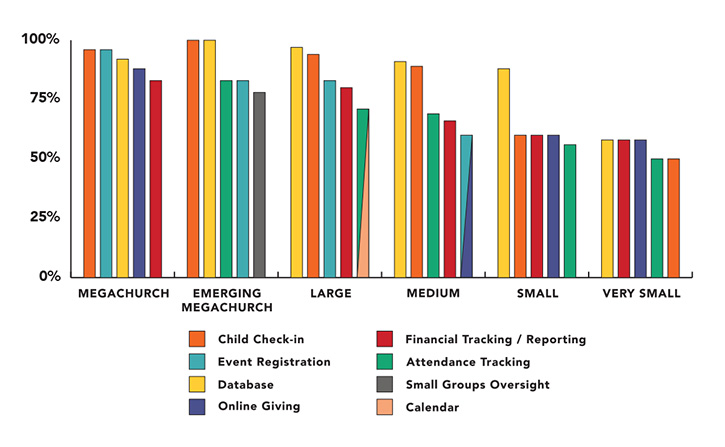
Los cinco usos principales de ChMS según el tamaño de la iglesia
Wie ich Kirchenverwaltungssoftware für kleine Gemeinden bewerte
Ich teile meine Bewertung in zwei Ebenen auf: Das Grundsätzlichste, das ein Tool erfüllen muss – wie Mitgliederverwaltung und Online-Spenden – und die Unterscheidungsmerkmale, die ein Tool zur richtigen Wahl für eine kleine Gemeinde machen.
Kernfunktionen (Muss-Kriterien für diese Liste)
Wenn ich Tools für meine Liste auswähle, bewerte ich jedes einzelne auf einer Skala von 0 (bietet diese Funktion nicht) bis 5 (hervorragend in diesem Bereich) hinsichtlich jeder unten aufgeführten Kernfunktion. Dann rechne ich die Gesamtpunktzahl des Tools in einen Prozentsatz um. Jedes Tool muss mindestens 65% der Gesamtkriterien erreichen, um in Betracht gezogen zu werden.
- Mitglieder- & Familiendaten: Ich achte auf eine zentrale Personendatenbank, in der Familienmitglieder verknüpft, seelsorgerliche Besuche dokumentiert und Personen nach Mitarbeit oder Lebensphase markiert werden können.
- Spenden & Online-Gaben: Jedes Tool sollte es ermöglichen, dass Mitglieder online spenden, wiederkehrende Spenden einrichten und Jahresend-Spendenbescheinigungen generiert werden können, ohne dass der Kassierer manuell mit Excel arbeiten muss.
- Anwesenheits- & Gruppenerfassung: Ich prüfe, ob die Plattform die Teilnehmerzahlen beim Sonntagsgottesdienst erfasst und Kleingruppenlisten verwaltet, sodass ein Pastor Besucherlücken bei Bibelkreisen unter der Woche oder Jugendgruppen erkennt.
- Ehrenamtlichen- & Veranstaltungsplanung: Die Planungstools sollten ermöglichen, Aufgaben wie Tontechnik oder Kinderbetreuung zuzuweisen, Erinnerungen zu verschicken und Anmeldungen für Veranstaltungen wie die Kinderbibelwoche oder das Gemeindefest zu verwalten.
- Kommunikation mit der Gemeinde: Ich bewerte, ob gezielte E-Mails oder SMS an bestimmte Gruppen versendet werden können, z. B. eine kurzfristige Absage wegen Unwetter an alle registrierten Familien oder ein Gebetsupdate an den Ältestenkreis.
- Preisgestaltung & Skalierung für kleine Gemeinden: Die Preisstruktur und das Funktionspaket der Plattform sollten realistisch auf eine Gemeinde mit unter 250 Mitgliedern und wenig Personal zugeschnitten sein, anstatt zum teuren Firmen-Tarif zu zwingen.
Wenn ich eine Liste von Tools habe, die diese Kriterien erfüllen, prüfe ich, was jede Plattform besonders macht.
Unterscheidungsmerkmale (Was Anbieter abhebt)
Hier vergleiche und kontrastiere ich die Anbieter:
Herausragende Funktionen
Automatisierte Nachfass-Workflows sind für kleine Gemeinden besonders wertvoll. Wenn ein Erstbesucher eine Kontaktkarte ausfüllt, sorgt ein Tool mit automatischer Willkommens-E-Mail-Sequenz dafür, dass diese Person eingebunden bleibt, ohne dass für den Pastor am Montag zusätzlicher Aufwand entsteht. Ich achte auch auf Kinder-Check-in-Funktionen, da Eltern selbst bei nur 100 Mitgliedern Wert auf sichere Namensetiketten und Abholkontrollen legen. Eine eigene Gemeinde-App ist ein weiteres Unterscheidungsmerkmal – Mitglieder können Veranstaltungsinfos prüfen, spenden oder die Predigt von letzter Woche anhören, ohne sich durch die komplette Webseite navigieren zu müssen.
Mehr als nur Funktionen
Die Preisstruktur schaue ich mir als erstes an, da viele kleine Gemeinden ein knappes Budget haben und transparente Preise pro Mitglied oder Pauschalpreise ohne unerwartete Gebühren für Spenden benötigen. Datenmigration hat ebenfalls einen hohen Stellenwert – wenn eine Gemeinde von Excel-Listen oder einem alten ChMS umsteigt, prüfe ich, ob die Plattform einen geführten Import und Unterstützung beim Einstieg ohne IT-Personal anbietet. Integrationsmöglichkeiten runden meine Bewertung ab, besonders Schnittstellen zu etablierten Tools wie QuickBooks, Mailchimp oder Gottesdienstplanungsplattformen, auf die kleine Gemeinden oft angewiesen sind.
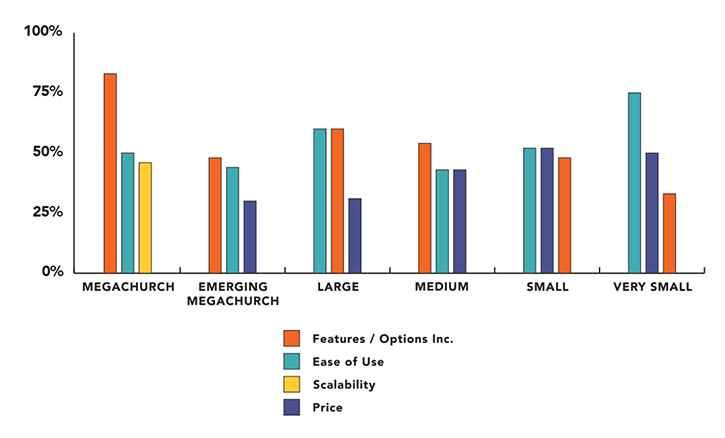
Los tres principales factores de compra según el tamaño de la iglesia
Tendencias en el software de gestión eclesial para iglesias pequeñas
En 2024, el software de gestión eclesial (ChMS) para iglesias pequeñas está mejorando gracias a las necesidades cambiantes de los miembros de la iglesia y al crecimiento de la tecnología. Ahora los pastores cuentan con más herramientas que nunca para ayudarles a gestionar sus ministerios de manera más eficaz.
Hemos revisado las actualizaciones y noticias de las herramientas ChMS más populares y hemos encontrado que las siguientes tendencias y funciones están ganando popularidad:
Mayor integración con la IA y otras plataformas
- Mayores capacidades de integración: Ahora las herramientas ChMS se conectan mejor con otras plataformas, como las redes sociales, el software financiero y las herramientas de aprendizaje en línea. Esto facilita la gestión de distintas tareas desde un solo lugar.
- Funciones impulsadas por IA: Cada vez más herramientas ChMS utilizan la inteligencia artificial para realizar automáticamente tareas rutinarias, como programar, hacer seguimiento a los visitantes y enviar mensajes personalizados. Esto puede ahorrarles mucho tiempo a los pastores y permitirles centrarse más en el ministerio.
- Gestión financiera simplificada: Gestionar las finanzas de la iglesia es cada vez más fácil gracias a herramientas más inteligentes que hacen un seguimiento automático de los presupuestos y se conectan con programas de contabilidad populares. A medida que las filtraciones de datos se convierten en un problema importante, estas funciones tienen una gran demanda.
Orientación cada vez mayor hacia los dispositivos móviles
- Optimización para dispositivos móviles: Las herramientas ChMS están mejorando para su uso en dispositivos móviles. Como cada vez más personas utilizan teléfonos inteligentes, existe una necesidad creciente de aplicaciones que funcionen bien en estos dispositivos. Ahora estas aplicaciones ofrecen funciones como recordatorios de eventos, donaciones desde dispositivos móviles y comunicación en tiempo real.
- Mayor seguridad y privacidad de los datos: Con el aumento de las filtraciones de datos, los proveedores de ChMS se están centrando más en proteger la información confidencial. Esto incluye un mejor cifrado y controles más estrictos sobre quién puede acceder a los datos.
En declive: necesidad de soluciones locales
- Transición a soluciones basadas en la nube: Cada vez más iglesias están abandonando el software local en favor de opciones basadas en la nube porque son más económicas, de más fácil acceso y más sencillas de mantener.
En definitiva, estas tendencias muestran que, a medida que avanza la tecnología, las herramientas ChMS están cada vez más conectadas, son más seguras y fáciles de usar. Esto facilita que las iglesias pequeñas gestionen bien sus operaciones y mantengan el contacto con sus comunidades.
¿Qué ES el software de gestión eclesial para iglesias pequeñas?
El software de gestión eclesial es una herramienta para organizar la información de los miembros, los detalles de las donaciones y la comunicación de la iglesia.
Para las iglesias pequeñas, esto puede marcar una gran diferencia. Permite que una sola persona se conecte con los miembros, haga un seguimiento de cifras importantes y supervise muchas otras tareas diarias, sin gastar una fortuna.
El uso de este software ayuda a las iglesias a funcionar con mayor fluidez, mantenerse conectadas con sus miembros y construir una comunidad más sólida.
Funciones del software de gestión eclesial para iglesias pequeñas
Al seleccionar un software de gestión eclesial para iglesias pequeñas, presta atención a las siguientes funciones clave:
- Gestión de miembros: Almacena y organiza fácilmente registros detallados de cada miembro, incluida la información de contacto, las conexiones familiares y las funciones de voluntariado. Esto te ayuda a llevar un seguimiento de tu congregación y facilita contactar con las personas adecuadas.
- Seguimiento de la asistencia: Registra fácilmente la asistencia a los servicios, eventos y grupos para que puedas observar las tendencias de participación, identificar a los nuevos visitantes y hacer seguimiento de quienes puedan necesitar atención adicional.
- Gestión de donaciones y aportaciones: Registra las contribuciones, gestiona las campañas de compromisos de donación y genera estados de cuenta de las aportaciones para fines fiscales. Esto simplifica el seguimiento financiero y mantiene informados a los donantes.
- Programación de eventos: Planifica servicios, reuniones y otras actividades de la iglesia con calendarios integrados y recordatorios automatizados. Puedes coordinar equipos y espacios sin la molestia de los interminables correos electrónicos ni las reservas duplicadas.
- Herramientas de comunicación: Envía correos electrónicos masivos, mensajes de texto o incluso boletines impresos a tu congregación. La mensajería grupal te permite compartir rápidamente novedades con los equipos de ministerio o los grupos pequeños.
- Informes y análisis: Genera informes claros sobre la asistencia, las aportaciones y la actividad de los miembros. Estos datos te ayudan a tomar decisiones informadas sobre las prioridades del ministerio y las oportunidades de alcance.
- Gestión de voluntarios: Organiza equipos, lleva un seguimiento de los horarios de los voluntarios y asigna a las personas funciones que se ajusten a sus habilidades. Esto mantiene las actividades de tu iglesia funcionando sin problemas y ayuda a que los voluntarios sigan involucrados.
- Sistema de registro de niños: Proporciona un proceso seguro de entrada y salida para los programas infantiles, ofreciendo tranquilidad a los padres y conservando registros para situaciones de seguridad o emergencia.
- Acceso móvil: Utiliza el software en teléfonos inteligentes o tabletas, lo que facilita que tú y tus líderes actualicen la información o se comuniquen incluso cuando estén fuera de la oficina.
- Formularios personalizables: Crea formularios en línea para inscripciones a eventos, peticiones de oración o encuestas, agilizando la manera en que recopilas información de tu congregación.
Beneficios del software de gestión enfocado en iglesias pequeñas
Las operaciones diarias de tu iglesia son fundamentales para mantenerla saludable. Sin embargo, muchos pastores no se dedicaron al ministerio para encargarse de las operaciones de la iglesia, sino para predicar, compartir el evangelio y discipular a las personas.
¿El mayor beneficio del software de gestión para iglesias? Te quita gran parte del trabajo administrativo. Estos son otros cinco beneficios que puedes obtener:
- Mejor comunicación en la iglesia: Facilita mantenerte en contacto con el personal y la congregación. Puedes enviar actualizaciones, boletines y avisos de eventos para que todos estén informados y conectados.
- Gestión financiera más sencilla: Te ayuda a realizar un seguimiento de las finanzas y elaborar informes. El software gestiona automáticamente las donaciones y los informes financieros, para que puedas controlar tu presupuesto sin necesidad de ser un experto en contabilidad.
- Información de los miembros organizada: Mantiene toda la información de los miembros en un solo lugar. Esto significa que puedes gestionar los perfiles de los miembros, realizar un seguimiento de la asistencia y tener a mano los datos de contacto, lo que facilita el cuidado de tu congregación.
- Planificación de eventos simplificada: Incluye herramientas para ayudar a planificar y coordinar eventos. Desde la programación hasta el registro de asistentes, el software facilita la organización de eventos de la iglesia y mejora sus resultados.
- Crece con tu iglesia: El software se adapta al tamaño y las necesidades de tu iglesia. A medida que tu congregación crece, el software puede añadir más funciones y gestionar a más miembros, por lo que sigue siendo útil durante el crecimiento.
Con estas herramientas, tendrás más tiempo y energía para centrarte en el ministerio, mientras el trabajo administrativo se vuelve más sencillo.
Costes generales y precios del software de gestión para iglesias pequeñas
Al elegir un software de gestión para iglesias, es importante seleccionar un plan de precios que se ajuste al tamaño y las necesidades de tu iglesia. Los distintos planes ofrecen funciones diferentes. Algunos están diseñados para iglesias muy pequeñas, mientras que otros son más adecuados para iglesias que están creciendo y necesitan herramientas más avanzadas.
| Tipo de plan | Precio medio | Funciones habituales | Ideal para... |
|---|---|---|---|
| Tipo de planGratis | Precio medio$0 | Funciones habitualesGestión básica de miembros, informes limitados, asistencia por correo electrónico | Ideal para...Una iglesia pequeña con fondos muy limitados y necesidades sencillas |
| Tipo de planBásico | Precio medio$10-30/mes | Funciones habitualesGestión de miembros, seguimiento de donaciones, programación de eventos, asistencia básica | Ideal para...Una iglesia pequeña que necesita ayuda para realizar un seguimiento de los miembros y los eventos |
| Tipo de planEstándar | Precio medio$30-50/mes | Funciones habitualesMejores informes, marketing por correo electrónico, gestión de voluntarios, asistencia telefónica | Ideal para...Una iglesia pequeña que está empezando a crecer y necesita más herramientas |
| Tipo de planPrémium | Precio medio$50-100/mes | Funciones habitualesInformes avanzados, integraciones personalizadas, acceso multiusuario, asistencia prioritaria | Ideal para...Una iglesia pequeña con grandes planes que necesita herramientas sólidas y más usuarios |
Para los pastores principales de iglesias pequeñas, existen diversas consideraciones de precios para las soluciones de software de gestión para iglesias. Esta es una visión general de los costes y las expectativas de precios del sector.
Cada plan te ofrece más funciones y mejor asistencia a medida que subes de nivel. Al elegir un plan, piensa en lo que tu iglesia necesita ahora y en la dirección que está tomando.
Mantente conectado y mejora tu ministerio.
Suscríbete al boletín de TheLeadPastor para recibir actualizaciones periódicas sobre las últimas tendencias, consejos y herramientas de gestión eclesial. Adquiere los conocimientos que necesitas para optimizar las operaciones, conectar con tu comunidad y hacer crecer tu congregación. Únete hoy a nuestra comunidad de pastores comprometidos.