El mejor software de contabilidad para iglesias ayuda a los pastores a elaborar informes financieros claros, evitar errores presupuestarios y cumplir con los requisitos del IRS. Sustituye las hojas de cálculo dispersas por un único sistema preciso en el que tú y tu contable podéis confiar.
Llevo más de 20 años trabajando en el liderazgo de iglesias. Durante ese tiempo, he acompañado a docenas de pastores e iglesias por toda Norteamérica. En una ocasión trabajé con un pastor que pasó varios días preparando un informe trimestral para la junta, solo para darse cuenta durante la reunión de que había incluido el total equivocado del fondo designado. El error retrasó varias decisiones clave de financiación y llevó semanas resolverlo. He revisado personalmente varias docenas de herramientas de contabilidad para iglesias, cualquiera de las cuales habría evitado ese costoso error.
Hoy en día, demasiadas iglesias utilizan herramientas manuales o genéricas para hacer un seguimiento de sus finanzas y se enfrentan a informes poco claros y errores arriesgados. El software adecuado aporta claridad financiera, permite tomar decisiones más rápidamente y refuerza la confianza tanto de los miembros como del equipo directivo. Por eso es importante elegir el software ADECUADO para tu iglesia, y este artículo te ayudará a encontrarlo.
Por qué confiar en nuestras recomendaciones de software
6,700+
Reviews
20
Industry experts
16+
Evaluation factors
14
Years
Nuestro equipo lleva probando y evaluando software desde 2012. Como líderes eclesiásticos, sabemos lo difícil —y lo importante— que es elegir el software adecuado.
Para esta guía, evaluamos las herramientas mediante pruebas prácticas e investigación independiente, puntuando las herramientas según nuestros criterios de selección.
Nuestras reseñas reflejan nuestro criterio editorial humano, no un discurso de ventas.
Tabla comparativa de software de contabilidad para iglesias
Esta tabla comparativa resume los detalles de precios de mis principales selecciones de software de contabilidad para iglesias:
| Tool | Best For | Trial Info | Price | ||
|---|---|---|---|---|---|
| 1 | Ideal para contabilidad integrada en iglesias | Plan gratuito disponible | Desde $12/mes (facturado mensualmente) | Website | |
| 2 | La mejor opción por su compatibilidad integrada con múltiples divisas | Prueba gratuita de 30 días | Desde $25/mes | Website | |
| 3 | Ideal para una contabilidad integral | Prueba gratuita de 30 días | Desde $19/mes | Website | |
| 4 | Ideal para el emparejamiento de transacciones con IA | Demo gratuita disponible | Precio bajo solicitud | Website | |
| 5 | Ideal para sincronización de donaciones con Quickbooks | Prueba gratuita de 30 días disponible | Desde $72/mes | Website | |
| 6 | Ideal para contabilidad gratuita de iglesias | Plan gratuito disponible | Desde $15/usuario/mes | Website | |
| 7 | Mejor opción para la escalabilidad | Prueba gratuita de 30 días | La información de precios está disponible bajo petición | Website | |
| 8 | La mejor contabilidad de fondos para iglesias | Prueba gratuita de 30 días | Desde $35/cuenta/mes con cargos adicionales por ciertos complementos | Website | |
| 9 | Ideal para contabilidad automatizada con IA | Plan gratuito disponible | Desde $55/cuenta/mes | Website | |
| 10 | Mejor para iglesias pequeñas | Prueba gratis de 30 días disponible | Pago único de $499 para usuarios de Windows, mientras que los usuarios de Mac pueden obtener el software por $15/cuenta/mes. | Website |


Reseñas del mejor software de contabilidad para iglesias
Aquí tienes una breve descripción de cada uno de los programas de contabilidad para iglesias de mi lista, con información sobre aquello que hacen mejor y capturas de pantalla que muestran algunas de sus funciones.
 Ideal para contabilidad integrada en iglesias
- Plan gratuito disponible
- Desde $12/mes (facturado mensualmente)
Visit WebsiteCustomer Rating:4.9/5
Puedes acceder al panel financiero para llevar un control de los fondos y cuentas financieras de la iglesia. ChMeetings es un software de gestión eclesiástica (ChMS) basado en la nube, diseñado para ayudar a organizaciones religiosas en Estados Unidos, Canadá, Reino Unido, Australia y Sudáfrica a optimizar sus operaciones. Utilizado por más de 7,000 iglesias en estas regiones, ofrece una plataforma intuitiva y multilingüe que simplifica la administración de las iglesias sin dejar de ser económica.
Después de escribir cientos de reseñas de software para The Lead Pastor, he llegado a esperar opiniones diversas de mis lectores acerca de las distintas aplicaciones móviles para iglesias. Pero el comentario que siempre escucho es que la app de ChMeetings funciona bien y es lo suficientemente sencilla para que los miembros de la iglesia la utilicen de inmediato.
Por qué elegí ChMeetings: Como software contable para iglesias, ChMeetings permite a los usuarios gestionar las finanzas mediante el seguimiento de gastos, monitoreo de fondos y generación de informes visuales para obtener perspectivas financieras. Además, el software integra funciones contables con otras operaciones de la iglesia, facilitando la adición y gestión de transacciones, cuentas, fondos, categorías y beneficiarios. Esta integración ayuda a las iglesias a mantener registros financieros precisos y realizar conciliaciones sin requerir conocimientos contables avanzados.
Los usuarios también pueden crear presupuestos personalizados y monitorear su avance, brindando visibilidad sobre los recursos disponibles para ayudar a la iglesia a alcanzar sus objetivos. Además, la plataforma se destaca por adaptarse a diferentes tamaños de iglesia, con varios planes de precios y una opción gratuita disponible.
Características y Integraciones Destacadas de ChMeetings
Las características que hacen que este software sobresalga incluyen su enfoque integral, con gestión de perfiles de miembros, reservas y registro en eventos, alcance, citas para confesiones, calendario de eventos, donaciones, pagos en línea, formularios personalizados y control de acceso detallado. La plataforma también está preparada para GDPR, es segura y está disponible en varios idiomas.
Las integraciones incluyen MailChimp, PayPal, Twilio y SMSGlobal. También ofrece una API para desarrolladores.
Learn more about ChMeetings: 2La mejor opción por su compatibilidad integrada con múltiples divisas
Xero
- Prueba gratuita de 30 días
- Desde $25/mes
Visit WebsiteCustomer Rating:4.4/5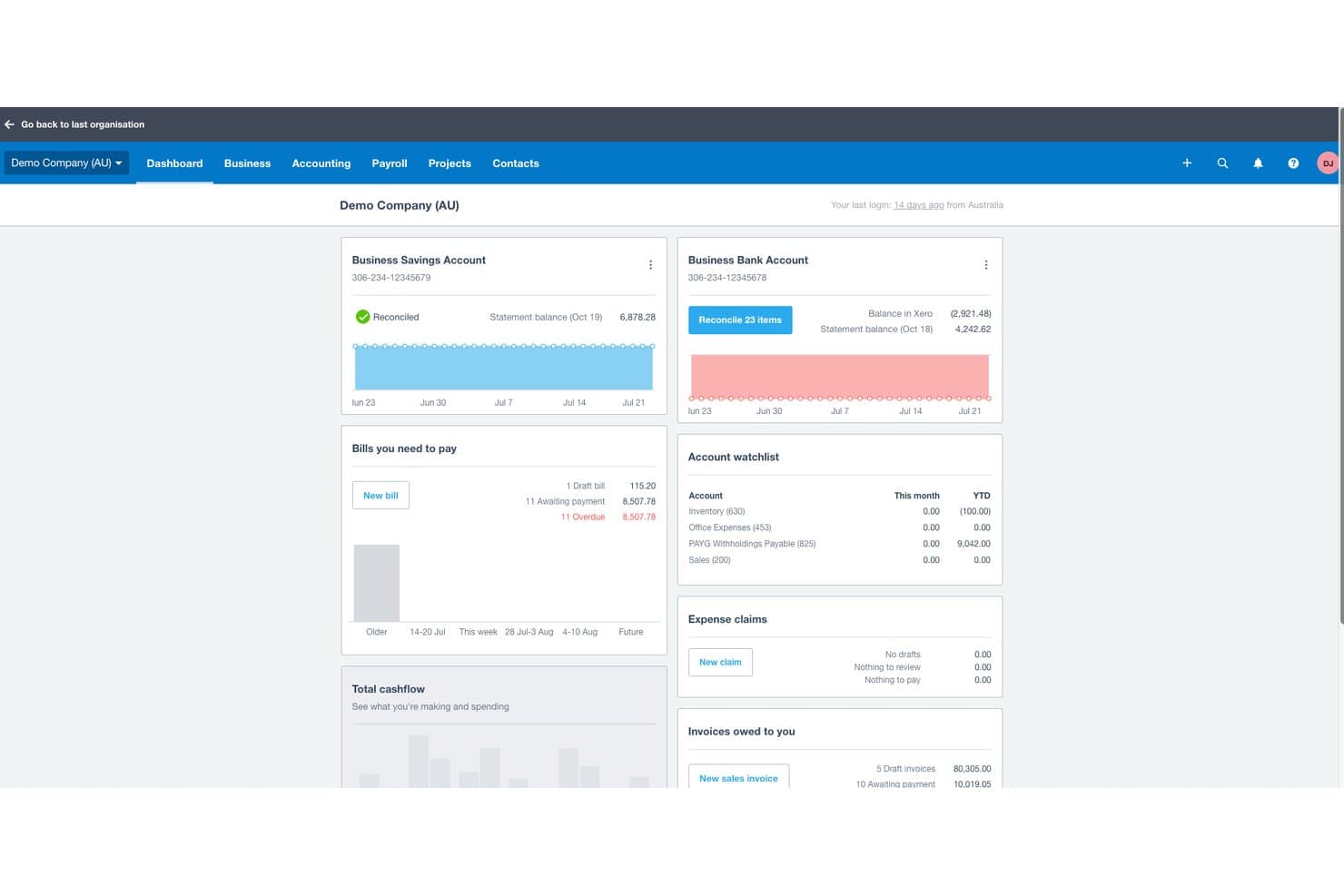
Xero ofrece un panel financiero que muestra saldos de cuentas bancarias, facturas por pagar, facturas pendientes de cobro y resúmenes del flujo de efectivo para la contabilidad de iglesias o empresas. Xero es una plataforma de contabilidad basada en la nube que incluye facturación, conciliación bancaria, seguimiento de gastos, informes financieros, nóminas y gestión multidivisa para iglesias y organizaciones sin fines de lucro pequeñas y medianas.
¿Para quién es más adecuado Xero?
Xero es una excelente opción para iglesias pequeñas y medianas cuyos contables o tesoreros necesitan una herramienta intuitiva de contabilidad general sin una curva de aprendizaje pronunciada.
Por qué elegí Xero
Elegí Xero como una de las mejores opciones porque su compatibilidad integrada con múltiples divisas es un verdadero diferenciador para las iglesias que gestionan misiones internacionales o reciben donaciones en moneda extranjera. Con el plan Established, puedo procesar pagos internacionales de facturas, conciliar transacciones en distintas divisas y generar informes que consolidan automáticamente toda la información en la moneda local de la iglesia. Esto elimina el trabajo manual de conversión que suele provocar errores en los informes de gastos de los proyectos misioneros.
Características principales de Xero
- Acceso ilimitado para usuarios: Invita a varios empleados, voluntarios o asesores a colaborar simultáneamente sin pagar licencias adicionales.
- Plan contable personalizable: Configura tus propias cuentas y categorías de seguimiento para adaptarlas a los ministerios o proyectos de la iglesia.
- Conciliación bancaria automatizada: Importa automáticamente las transacciones bancarias y compáralas con recibos o pagos para facilitar el cierre mensual.
- Solicitudes de reembolso de gastos desde el móvil: Captura y envía recibos sobre la marcha a través de la aplicación móvil de Xero para agilizar los reembolsos.
Integraciones de Xero
Xero ofrece integraciones nativas con Hubdoc, Stripe, Square, Shopify y Etsy, y se conecta con Zapier. También dispone de una API para integraciones personalizadas.
Pros and Cons
Pros:
- Realiza el seguimiento de donaciones en moneda extranjera en varias misiones
- La conciliación bancaria automatizada agiliza el cierre mensual
- Admite usuarios ilimitados para equipos de contabilidad formados por voluntarios
Cons:
- No ofrece contabilidad de fondos nativa para donaciones restringidas
- La asignación para vivienda del clero requiere soluciones manuales
Learn more about Xero: Ideal para una contabilidad integral
- Prueba gratuita de 30 días
- Desde $19/mes
Visit WebsiteCustomer Rating:4/5
El software de contabilidad en la nube QuickBooks te ayuda a gestionar todas las finanzas de tu iglesia en un solo lugar. QuickBooks Online es un software de contabilidad versátil basado en la nube, diseñado para satisfacer las necesidades de pequeñas y medianas empresas, incluyendo sectores especializados como iglesias que requieren funciones únicas de gestión financiera. Su conjunto integral de funciones y su interfaz fácil de usar lo posicionan como una opción adecuada para organizaciones que buscan una solución de contabilidad sólida capaz de gestionar diversas tareas financieras.
Llevo usando QuickBooks Online durante 5 años y ha sido un cambio radical para la gestión de nuestras finanzas. Nos ahorra a mi equipo y a mí innumerables horas. Antes dedicaba tiempo cada semana a buscar gastos y recibos, pero con la aplicación, puedo subir rápidamente los comprobantes de gasto justo en el momento, y se organizan al instante. QuickBooks se integra fácilmente con las demás herramientas que utilizamos, y cuando llega la temporada de impuestos, nuestro contador simplemente obtiene la información necesaria directamente de nuestra cuenta de QBO.
Por qué elegí QuickBooks Online: Este software sobresale como contabilidad para iglesias al ofrecer soluciones contables personalizables, seguimiento de donaciones y reportes financieros adaptados a las necesidades específicas de organizaciones religiosas. Además, el software ayuda a automatizar la preparación de impuestos para organizaciones sin fines de lucro y a mantener el cumplimiento normativo fiscal.
Un gran diferenciador es su capacidad para automatizar varias tareas de contabilidad, lo que puede ser especialmente útil para iglesias con personal contable limitado.
Características y conexiones destacadas de QuickBooks Online
Características que hacen que este software destaque incluyen el seguimiento de donaciones, lo que facilita la gestión de donaciones, fundamental para mantener registros precisos de donantes y transparencia financiera. Además, su contabilidad por fondos ayuda a rastrear fondos y subvenciones designados de forma precisa.
Conexiones incluyen PayPal, Square, Shopify, Stripe, Gusto, TSheets, Bill.com, Hubdoc, Receipt Bank, Fathom.
Learn more about QuickBooks Online: Ideal para el emparejamiento de transacciones con IA
- Demo gratuita disponible
- Precio bajo solicitud
Visit WebsiteCustomer Rating:4.9/5
DualEntry proporciona a tu equipo una instantánea financiera en tiempo real que abarca ingresos, gastos, flujo de efectivo y datos operativos, todo en un solo panel. DualEntry es un sistema ERP impulsado por IA que puede ayudar a las iglesias a gestionar operaciones financieras complejas como la contabilidad de fondos, la consolidación financiera de múltiples campus y la gestión fiscal. Está diseñado para reducir la entrada manual de datos y puede soportar altos volúmenes de transacciones, lo que resulta especialmente útil para iglesias grandes o en crecimiento.
Por qué elegí DualEntry: Elegí DualEntry porque puede ayudar a las iglesias a simplificar su proceso de cierre financiero gracias al emparejamiento de transacciones impulsado por IA y conciliaciones automáticas. Esto es especialmente útil si tu iglesia gestiona múltiples campus o fondos, ya que el software facilita la consolidación y el reporte de tus finanzas.
También me gusta que DualEntry cuenta con soporte dirigido por contadores públicos certificados (CPA) y un proceso de puesta en marcha rápida, lo que puede facilitar la curva de aprendizaje para los equipos de la iglesia.
Funciones y conexiones destacadas de DualEntry:
Funciones incluyen reconocimiento automatizado de ingresos, auditoría detallada y tableros personalizables para el seguimiento de balances de fondos y flujo de efectivo. DualEntry también incluye herramientas de gestión fiscal que se integran con Avalara y Vertex, ayudándote a gestionar reportes fiscales locales cuando sea necesario.
Conexiones incluyen BambooHR, Bill.com, Brex, Deel, Google SSO, Gusto, HubSpot, Ramp, Rippling, Salesforce, Stripe Billing y Stripe Invoicing.
Pros and Cons
Pros:
- Las funciones avanzadas de IA ayudan con tareas contables complejas
- Admite operaciones multi-entidad y multi-moneda
- El reconocimiento automatizado de ingresos asegura el cumplimiento de normativas
Cons:
- Las opciones de personalización requieren una configuración cuidadosa
- Como ERP, puede ofrecer más funciones de las necesarias para necesidades contables simples
Learn more about DualEntry: Ideal para sincronización de donaciones con Quickbooks
- Prueba gratuita de 30 días disponible
- Desde $72/mes
Visit WebsiteCustomer Rating:4.7/5
Tithe.ly te permite organizar y programar planes de servicio con desglose detallado de canciones y lecturas. Tithe.ly es un sistema de gestión para iglesias diseñado para ayudarte a administrar las finanzas, eventos y la participación de la comunidad de tu iglesia desde una plataforma centralizada. Ofrece herramientas para donaciones digitales, seguimiento financiero, gestión de miembros y comunicación, todo pensado para simplificar las operaciones diarias de la iglesia.
Al revisar software para iglesias año tras año, he notado que “torpe” es una palabra que a menudo se usa para describir los sistemas de contabilidad y donaciones para iglesias. Sin embargo, mis lectores me dicen que Tithe.ly rompe ese molde con un proceso de donación ágil y directo que simplemente funciona.
Por qué elegí Tithe.ly: Elegí Tithe.ly por sus herramientas de donaciones digitales, que facilitan que tu congregación done desde el móvil, por mensaje de texto o en línea. Estas donaciones se sincronizan con QuickBooks Online, lo que facilita la gestión de las finanzas y asegura registros precisos sin la necesidad de ingreso manual. Tithe.ly también admite donaciones recurrentes y ofrece funciones de informes que ayudan a analizar tendencias de donaciones, brindando claridad para la supervisión financiera.
Además, Tithe.ly incluye funciones de gestión de eventos que te permiten manejar inscripciones y pagos para reuniones de cualquier tamaño. Su aplicación de iglesia personalizable mantiene a tu comunidad conectada durante toda la semana, proporcionando un espacio para compartir actualizaciones, sermones y anuncios, todo adaptado a las necesidades de tu congregación.
Características e integraciones destacadas de Tithe.ly
Características: base de datos de personas para rastrear la participación de los miembros, creador de sitios web para desarrollar una página web de la iglesia, herramientas de mensajería para comunicaciones por texto y correo electrónico, registro de niños para mayor seguridad, además de verificaciones de antecedentes y recursos de formación para mantener entornos seguros.
Integraciones: QuickBooks, RockRMS, Engiven, Salesforce, MinistryPlatform, Shelby, FellowshipOne, Planning Center Online, Church Community Builder y Elvanto.
 Ideal para contabilidad gratuita de iglesias
- Plan gratuito disponible
- Desde $15/usuario/mes
Visit WebsiteCustomer Rating:4.6/5
También puedes usar ZipBooks para ver informes básicos y mantenerte al día sobre la situación financiera de tu iglesia. Si estás buscando un paquete de software con un plan gratuito para siempre que puedas usar para gestionar la contabilidad de tu iglesia, puede que quieras considerar ZipBooks. ZipBooks es un software de contabilidad basado en la nube que ofrece a los propietarios de pequeñas empresas herramientas de gestión financiera fáciles de usar. Aunque no es un software específico para iglesias, por supuesto puede ser utilizado por ellas.
Por qué elegí ZipBooks: ZipBooks es un software de contabilidad fácil de usar diseñado para pequeñas empresas y organizaciones sin ánimo de lucro. Una de las cosas que ZipBooks hace bien es su facilidad de uso. Tiene una interfaz sencilla e intuitiva que permite a los usuarios navegar rápidamente por las diferentes funciones y características, facilitando su uso incluso a quienes tienen poca o ninguna experiencia en contabilidad. ZipBooks también ofrece una amplia gama de características que ayudan a las pequeñas empresas a gestionar sus finanzas, incluyendo facturación, seguimiento de gastos e informes financieros.
Otra fortaleza de ZipBooks es su flexibilidad. ZipBooks puede ser accedido desde cualquier dispositivo con conexión a internet, lo que facilita a los usuarios consultar su información financiera desde cualquier lugar y en cualquier momento. Además, ZipBooks ofrece una variedad de integraciones que permiten a los usuarios conectar su software de contabilidad con otras herramientas que utilizan en su negocio, como procesadores de pago, software de seguimiento de tiempo y más. Esto facilita que los propietarios de pequeñas empresas gestionen sus finanzas y optimicen su flujo de trabajo.
ZipBooks tiene la capacidad de automatizar muchas tareas y proporcionar datos en tiempo real, lo que ayuda a tomar mejores decisiones. ZipBooks también es rentable y ofrece una versión gratuita que puede ser mejorada a la de pago para obtener funciones más avanzadas.
Características y conexiones destacadas de ZipBooks
Las características incluyen facturación y cobros, seguimiento de gastos, informes financieros, pagos en línea, conciliación de cuentas bancarias y tarjetas de crédito, seguimiento de impuestos sobre ventas, soporte multimoneda, seguimiento del tiempo, gestión de proyectos, colaboración en equipo, plantillas personalizables, soporte para aplicaciones móviles, tableros personalizables, importación y exportación de datos, contabilidad automática, presupuestación y previsión, soporte para nómina, gestión de inventarios, cumplimiento fiscal e integraciones/add-ons de terceros.
Las integraciones incluyen Google Drive, PayPal, Slack, Google Workspace, Asana, Gusto, Spiceworks y Enrollsy.
Learn more about ZipBooks: Mejor opción para la escalabilidad
- Prueba gratuita de 30 días
- La información de precios está disponible bajo petición
Visit WebsiteCustomer Rating:4.3/5
Sage Intacct ofrece a los usuarios una visión rápida de sus finanzas para que puedan evaluar fácilmente la salud financiera de su iglesia. Sage Intacct es un software de gestión financiera basado en la nube, diseñado para pequeñas y medianas empresas, que ofrece funciones como contabilidad, presupuestación, generación de informes financieros y capacidades de reconocimiento de ingresos.
Por qué elegí Sage Intacct: Sage Intacct es altamente valorado por su arquitectura en la nube y su escalabilidad, lo que permite a las pequeñas y medianas empresas acceder a sus datos financieros desde cualquier lugar y ampliar fácilmente el uso del software a medida que crecen las necesidades de su iglesia.
Sage Intacct puede automatizar muchos procesos financieros, como la facturación, las compras y el reconocimiento de ingresos, lo que puede ahorrar tiempo y mejorar la eficiencia. Las capacidades de generación de informes financieros del software también son completas, con datos en tiempo real, informes personalizables y capacidades de desglose que facilitan el acceso y análisis de la información financiera necesaria para tomar decisiones informadas.
Además, Sage Intacct es conocido por sus sólidas capacidades contables, incluida la gestión multi-entidad, y su capacidad para manejar requisitos contables complejos como el reconocimiento de ingresos y el cumplimiento de ASC 606.
En general, Sage Intacct es considerado como un software de gestión financiera potente y flexible que puede ayudar a las empresas a optimizar sus procesos financieros, mejorar la eficiencia y tomar decisiones más informadas con datos financieros en tiempo real.
Funciones y compatibilidades destacadas de Sage Intacct
Funciones incluyen gestión financiera, automatización, generación de informes financieros, gestión multi-entidad, reconocimiento de ingresos, contabilidad, presupuestación, basado en la nube, acceso móvil e integraciones/complementos de terceros.
Integraciones incluyen una gran variedad de herramientas, entre ellas Emburse Nexonia, Baker Tilly SaaS Intelligence, FloQast, APS Online, Yooz Accounts Payable Automation, RadiusOne, Workforce y QCommission.
Learn more about Sage Intacct: La mejor contabilidad de fondos para iglesias
- Prueba gratuita de 30 días
- Desde $35/cuenta/mes con cargos adicionales por ciertos complementos
Visit WebsiteCustomer Rating:4.4/5
IconCMO le permite manejar los requisitos de informes fiscales de su iglesia mientras asegura el cumplimiento con las leyes estatales y federales. IconCMO es un software de gestión para iglesias que proporciona herramientas para la gestión de miembros, gestión de contribuciones y donaciones, gestión financiera, gestión de eventos, comunicación e informes.
Por qué elegí IconCMO: IconCMO es un software de gestión para iglesias que destaca en varias áreas como la gestión de fondos, gestión de miembros, contabilidad y colaboración.
IconCMO es muy fácil de navegar e intuitivo de usar. La interfaz es amigable y sencilla, lo que facilita a las iglesias administrar su información.
IconCMO ofrece sólidas capacidades de gestión financiera, incluyendo contabilidad, presupuestación, informes financieros y reconocimiento de ingresos. Los usuarios aprecian la capacidad del software para rastrear ingresos, gastos y donaciones y generar estados financieros.
IconCMO hace más que solo contabilidad. Ofrece herramientas para rastrear la información de los miembros, incluidos datos de contacto, asistencia e historial de donaciones. Los pastores pueden administrar la información de los miembros y crear informes personalizados de asistencia y donaciones. IconCMO incluso permite a las iglesias programar, registrar y rastrear la asistencia a eventos, como clases, reuniones y recaudaciones de fondos.
IconCMO es un verdadero 'todoterreno' con herramientas para la comunicación moderna de la iglesia, incluyendo correo electrónico, mensajes de texto y redes sociales, junto con todo lo que se espera de un software de contabilidad para iglesias.
Características e integraciones destacadas de IconCMO
Las características incluyen gestión de miembros, gestión financiera, gestión de eventos, comunicación, informes, donaciones en línea, acceso móvil, seguridad, basado en la nube e integraciones/agregados de terceros.
Las integraciones incluyen Vanco, PayPal, Stripe, Elavon, First Data, Authorize.net, ADP, Paychex, QuickBooks Online, Xero, Church Community Builder, Fellowship One, Planning Center, MailChimp, Constant Contact, Emma, Facebook, Twitter y LinkedIn.
Learn more about IconCMO: Ideal para contabilidad automatizada con IA
- Plan gratuito disponible
- Desde $55/cuenta/mes
Visit WebsiteCustomer Rating:4.4/5
La función Smart Connect de Botkeeper facilita la extracción de estados bancarios y de tarjetas de crédito para una rápida conciliación de cuentas. Botkeeper es un software de contabilidad impulsado por IA que automatiza tareas financieras y proporciona información de datos en tiempo real para las empresas.
Por qué elegí Botkeeper: Botkeeper es un software de contabilidad automatizada con inteligencia artificial diseñado para automatizar muchas de las tareas financieras que las iglesias suelen manejar manualmente. Una de las características clave en las que Botkeeper sobresale es en sus capacidades de automatización. El software utiliza algoritmos avanzados de inteligencia artificial para automatizar tareas como la introducción de datos, la conciliación bancaria y la elaboración de informes financieros. Esto permite a los líderes de las iglesias ahorrar tiempo y reducir el riesgo de errores.
Otra fortaleza de Botkeeper es su capacidad para proporcionar información financiera en tiempo real. Botkeeper puede analizar datos financieros al instante, brindando a las iglesias una visión clara de su salud y desempeño financiero. Esto les permite identificar tendencias, reconocer áreas de mejora y tomar decisiones más informadas sobre sus estrategias financieras.
Botkeeper también ofrece un excelente servicio de atención al cliente, lo que garantiza que cualquier problema o inquietud se resuelva rápidamente. El software es fácil de usar y navegar, incluso para quienes tienen poca o ninguna experiencia en contabilidad. Además, al ser basado en la nube, las iglesias pueden acceder a su información y datos financieros desde cualquier lugar y en cualquier momento.
Características destacadas e integraciones de Botkeeper
Características incluyen contabilidad automatizada, análisis, IA, previsión financiera, informes personalizables, acceso multiusuario y permisos, acceso basado en la nube, acceso a través de aplicación móvil, atención al cliente 24/7, recordatorios y notificaciones, facturación y cobro, seguimiento de gastos, procesamiento de nómina, presupuestación e integraciones/complementos de terceros.
Las integraciones incluyen Stripe, Gusto, QuickBooks, HubSpot, LinkedIn, Hootsuite, PayPal, Zendesk, Kissmetrics y Chargify.
Learn more about Botkeeper: Mejor para iglesias pequeñas
- Prueba gratis de 30 días disponible
- Pago único de $499 para usuarios de Windows, mientras que los usuarios de Mac pueden obtener el software por $15/cuenta/mes.
Visit WebsiteCustomer Rating:4.2/5
AccountEdge Pro permite a los usuarios gestionar las actividades financieras diarias de su iglesia, como realizar pagos, imprimir cheques o manejar compras. AccountEdge Pro es un software de contabilidad para pequeñas empresas que proporciona herramientas avanzadas de gestión financiera y seguimiento de inventario.
Por qué elegí AccountEdge Pro: AccountEdge Pro es un software de contabilidad completo diseñado para pequeñas empresas (o iglesias) que brinda herramientas avanzadas de gestión financiera y seguimiento de inventario. AccountEdge Pro ofrece una amplia gama de herramientas de gestión financiera, como facturación, cobros y seguimiento de gastos. También proporciona capacidades detalladas de análisis e informes financieros, permitiendo a los usuarios rastrear el rendimiento financiero de su negocio y tomar decisiones informadas.
AccountEdge Pro está diseñado para ser fácil de usar y de navegar, permitiendo a los usuarios gestionar rápidamente sus finanzas e inventario. También ofrece una variedad de tutoriales y recursos de soporte para ayudar a los usuarios a comenzar.
AccountEdge Pro incluye seguimiento de inventario y cálculo de impuestos sobre las ventas si vendes cualquier producto a través de la iglesia, como biblias, camisetas o entradas para eventos.
La opción de pago único para Windows es ideal para iglesias que no buscan una suscripción mensual de software como servicio, la cual puede encarecerse mucho con el tiempo. Un solo pago y lo tienes para siempre. Lamentablemente, la licencia de uso único no está disponible para Mac, que solo ofrece una suscripción mensual.
Características y conexiones destacadas de AccountEdge Pro
Características incluyen gestión financiera, gestión de inventario, gestión de contactos, impuestos sobre las ventas, nómina, facturación por tiempo, costos de trabajos, multimoneda e integraciones/complementos de terceros.
Integraciones incluyen QuickBooks, Salesforce, Square, Microsoft Excel, TSheets, Harvest y la mayoría de las conexiones bancarias.
Learn more about AccountEdge:
Otras opciones: menciones honoríficas
Aunque estas no llegaron a estar entre nuestras 20 mejores opciones, merece la pena mencionarlas (y explorarlas también, si te interesan).
- 11RealmIdeal para disciplina financiera y transparencia
- 12ACSIdeal para la gestión de presupuestos
- 13SteepleMateIdeal para el seguimiento financiero centralizado
- 14Blackbaud Financial Edge NXTIdeal para planificación y análisis financiero
- 15MIP Fund AccountingIdeal para informes contables flexibles
- 16PowerChurch PlusMejor sistema ChMS todo-en-uno
- 17ChurchTracIdeal por su facilidad de uso
- 18Sage Expense Management (formerly Fyle)Ideal para el seguimiento de gastos
- 19GracelyIdeal para gestionar las finanzas de la iglesia
- 20MinistryPlatformMejor para ecosistemas ministeriales personalizables
Reseñas relacionadas de software para iglesias
La mayoría de las iglesias depende de herramientas de software para mantener todo organizado y funcionando sin problemas. Hemos investigado a fondo las principales herramientas del sector disponibles para facilitar tus decisiones. Nuestras reseñas te ayudarán a:
- Reducir tu carga administrativa con soluciones líderes de gestión de iglesias.
- Mantener la nómina funcionando sin contratiempos con el mejor software de nóminas para iglesias
- Explorar las mejores alternativas a Quickbooks para la contabilidad de tu iglesia

4 consejos para aprovechar al máximo el software de contabilidad de su iglesia
Cómo Evalúo el Software de Contabilidad para Iglesias
Evalúo las herramientas de contabilidad para iglesias en dos niveles: los elementos esenciales como la contabilidad por fondos y los estados de donaciones, y los diferenciadores que separan las mejores opciones del resto.
Funcionalidad Esencial (Requisitos Indispensables para esta Lista)
Cuando selecciono herramientas para mi lista, califico cada una en una escala del 0 (no ofrece la funcionalidad) al 5 (sobresale en esta área) para cada funcionalidad esencial que se detalla a continuación. Luego, calculo la puntuación total de la herramienta en un porcentaje. Cada herramienta necesita alcanzar una puntuación mínima total del 65% para ser considerada para su inclusión.
- Contabilidad por Fondos: Verifico si una herramienta puede rastrear fondos restringidos, no restringidos y designados por separado—por ejemplo, aislar una campaña de construcción de tu fondo general de diezmos.
- Gestión de Contribuciones: Cada herramienta debe permitir registrar donaciones vinculadas a donantes individuales y generar estados de donación de fin de año que cumplan con los requisitos fiscales.
- Plan de Cuentas Orientado a Iglesias: Busco un plan de cuentas que refleje cómo las iglesias realmente organizan sus finanzas—por ministerio, sede o programa—en lugar de una plantilla genérica empresarial.
- Informes Financieros para Organizaciones Sin Fines de Lucro: La herramienta debe generar informes como el Estado de Actividades y comparativos de presupuesto vs. real por fondo, el tipo que tu consejo de ancianos o comité financiero espera ver.
- Cuentas por Pagar y Libro Mayor: Aquí importan las labores básicas de contabilidad—gestión de proveedores, pago de cuentas, asientos contables y conciliación bancaria—todo debe estar presente y ser funcional.
- Nómina y Manejo de Impuestos para Clérigos: Evalúo si la plataforma maneja elementos específicos para el clero como la designación de la asignación de vivienda y el estatus tributario dual, ya sea de forma nativa o mediante una integración de nómina dedicada.
Una vez que tengo una lista de herramientas que cumplen con este criterio, considero qué diferencia a cada plataforma.
Factores Diferenciadores (Lo que Distingue a los Proveedores)
Así es como comparo y contrasto diferentes proveedores:
Características Destacadas
La integración con sistemas de gestión de iglesias es clave—busco herramientas que sincronicen los datos de donaciones directamente con plataformas como Planning Center o Breeze, para que tu equipo no tenga que registrar las donaciones dos veces. La contabilidad para múltiples sedes también es importante para iglesias en crecimiento que necesitan reportes consolidados entre ubicaciones. También evalúo tableros para el consejo y los ancianos, ya que los comités financieros a menudo incluyen voluntarios que necesitan resúmenes financieros claros sin tener que navegar por todo el libro mayor.
Más Allá de las Características
El soporte para la implementación es relevante cuando tu contador es un voluntario que está migrando desde hojas de cálculo o QuickBooks—evalúo si el proveedor ofrece configuración guiada, ayuda con la migración de datos y capacitación orientada a personas sin experiencia contable. El cumplimiento normativo y la preparación para auditorías son otros factores que considero, especialmente para iglesias que necesitan auditorías limpias y segregación de funciones para cumplir con la supervisión denominacional. También analizo qué tan bien se adapta la herramienta a diferentes tamaños y estructuras de gobierno de iglesias, desde una pequeña congregación con un solo tesorero hasta una iglesia multisede con aprobaciones en capas.
Cómo elegir un software de contabilidad para iglesias
Cada iglesia tiene un proceso de toma de decisiones diferente, pero hay algunos aspectos esenciales que se aplican a todas. Al elegir un software de contabilidad, esto es lo que debe priorizar:
1. Presupuestos y seguimiento de fondos sólidos
Los presupuestos de las iglesias son ajustados. Su software debe facilitar el seguimiento de los ingresos y gastos de varios fondos, como mantener las donaciones al fondo de misiones separadas del fondo general.
2. Seguimiento y elaboración de informes sobre donaciones
Los registros precisos de los donantes no son opcionales. El software adecuado automatiza los recibos fiscales, los resúmenes de contribuciones y los informes específicos de cada fondo, lo que le ayuda a controlar las donaciones destinadas a proyectos de construcción, actividades de divulgación y fondos designados sin trabajo adicional.
3. Interfaz sencilla y fácil de usar para voluntarios
La mayoría de las iglesias depende de voluntarios para la contabilidad. Elige un software fácil de aprender con paneles claros para que quienes no sean contables puedan supervisar las finanzas sin una curva de aprendizaje pronunciada.
4. Integración fluida con los sistemas de tu iglesia
Introducir los datos dos veces hace perder tiempo. Si tu iglesia ya utiliza Planning Center, Fellowship One u otra herramienta de gestión, elige un software de contabilidad que se sincronice para mantener los registros precisos y actualizados.
5. Cumplimiento normativo y asistencia para auditorías integrados
Las iglesias están sujetas a supervisión financiera. El mejor software simplifica las auditorías, garantiza la transparencia y te ayuda a cumplir la normativa mediante funciones como pistas de auditoría, planes contables personalizables y contabilidad por fondos.
¿Necesitas una solución que vaya más allá de la contabilidad? La mayoría de las principales herramientas de gestión de iglesias ofrecen asistencia contable, en el contexto de un sistema todo en uno. Además, si la necesitas, también hay excelentes herramientas de gestión de donantes disponibles.
Tendencias en el software de contabilidad para iglesias
El software de contabilidad para iglesias sigue evolucionando, impulsado por la necesidad de mayor eficiencia, transparencia y cumplimiento normativo. Hemos analizado actualizaciones de productos, notas de lanzamiento y anuncios de actores clave como Aplos, QuickBooks for Nonprofits y Breeze. Esto es lo que depara este año la gestión financiera de las iglesias:
Automatización e integración más inteligentes
- Sincronización de la gestión de donantes – Plataformas como Aplos y QuickBooks ofrecen ahora una integración más profunda con la gestión de donantes, lo que reduce la introducción manual de datos.
- Conciliación bancaria automatizada – Las nuevas funciones (por ejemplo, ACS Technologies) cotejan las transacciones al instante, lo que ahorra horas.
- API y avisos web – Ahora los usuarios avanzados pueden conectar sin problemas los sistemas contables con las herramientas de gestión de iglesias.
Mayor supervisión financiera
- Informes personalizados para juntas y donantes – Aplos y Church Community Builder ofrecen ahora estados financieros totalmente adaptados para mejorar la transparencia.
- Paneles en tiempo real – QuickBooks y Breeze han mejorado sus paneles para ofrecer información instantánea sobre las donaciones, los saldos de los fondos y los presupuestos.
- Análisis predictivo – Pushpay y Planning Center ofrecen ahora herramientas de presupuestación impulsadas por AI para prever los gastos con mayor precisión.
Mayor cumplimiento normativo y seguridad
- Declaraciones fiscales más sencillas – Las actualizaciones de 2025 simplifican las declaraciones de contribuciones de fin de año y las presentaciones del formulario 1099.
- Acceso basado en roles – Una mejor configuración de permisos protege los datos confidenciales y garantiza el cumplimiento de las políticas.
Mejor experiencia de usuario
- Interfaces más sencillas – QuickBooks, Breeze y Aplos han simplificado sus diseños para facilitar la navegación, especialmente a quienes no son contables.
- Ampliación de las bases de conocimientos – ACS Technologies y Planning Center ofrecen ahora guías detalladas y tutoriales en vídeo, lo que reduce las solicitudes de asistencia.
¿Qué está desapareciendo?
- Informes impresos – Los paneles digitales y los estados automatizados están sustituyendo a los informes en papel.
- Contabilidad básica – Las iglesias están dejando atrás la contabilidad sencilla para adoptar herramientas financieras especializadas diseñadas para las necesidades del ministerio.
Estos cambios demuestran que el software adecuado no solo sirve para controlar el dinero, sino también para ayudar a los pastores a liderar con claridad y confianza.
¿Qué es el software de contabilidad para iglesias?
El software de contabilidad para iglesias es una herramienta que organiza las finanzas de tu iglesia. Te permite controlar, revisar y organizar las donaciones, las nóminas, el seguimiento de fondos y los presupuestos, todo en un mismo lugar. Tanto si diriges una congregación pequeña como una iglesia con varios campus, el software de contabilidad para iglesias ayuda a simplificar las finanzas para que puedas centrarte en el ministerio.
Características del software de contabilidad para iglesias
Al seleccionar un software de contabilidad para iglesias, presta atención a las siguientes características clave:
- Contabilidad por fondos: Te permite hacer un seguimiento y gestionar varios fondos o cuentas por separado, para que puedas asegurarte de que las donaciones designadas, las subvenciones y los presupuestos permanezcan organizados y no se mezclen. Esto resulta especialmente útil para las iglesias que gestionan varios ministerios o fondos para obras al mismo tiempo.
- Seguimiento de donaciones: Registra cada donación, ya sea un cheque en el cepillo de la ofrenda o una donación periódica en línea. Esto simplifica la declaración de impuestos y facilita el envío de recibos y notas de agradecimiento a tus generosos donantes.
- Gestión de miembros: Combina la contabilidad con una base de datos de los miembros de la iglesia, lo que te ayuda a hacer un seguimiento de las donaciones, los compromisos de donación y la información de contacto, todo en un mismo lugar. Facilita enormemente la elaboración de extractos anuales y la comunicación personalizada.
- Herramientas de presupuestación: Te ayudan a planificar y supervisar los gastos y los ingresos de la iglesia. Con paneles de control presupuestario claros, puedes detectar tendencias, evitar gastos excesivos y tomar decisiones financieras con confianza.
- Gestión de nóminas: Gestiona los salarios, las prestaciones y las retenciones fiscales de tu personal y del clero. Un buen software garantiza el cumplimiento tanto de las normativas específicas para iglesias como de las leyes fiscales generales.
- Informes financieros: Genera informes financieros detallados —como balances y cuentas de resultados— adaptados a las juntas directivas de la iglesia, el personal y las reuniones de la congregación. Elimina las conjeturas al compartir la situación financiera de tu iglesia.
- Cuentas por pagar y por cobrar: Hace un seguimiento de las facturas recibidas y los pagos efectuados, así como de cualquier ingreso que se adeude a la iglesia. Mantener esto bajo control ayuda a conservar buenas relaciones con tus proveedores y a mantener tus registros precisos.
- Conciliación bancaria: Garantiza que tus libros contables digitales coincidan con los extractos bancarios reales, detectando rápidamente errores o transacciones que falten. Es de gran ayuda durante las auditorías o las revisiones de fin de año.
- Permisos de usuario y seguridad: Te permite controlar quién puede ver, editar o gestionar determinados datos financieros. Esto mantiene segura la información confidencial y reduce el riesgo de errores o fraude.
- Integración con sistemas de gestión de iglesias: Se conecta fácilmente con otras plataformas que ya utilizas, como herramientas de programación de eventos o de comunicación, para que todo tu ecosistema tecnológico funcione conjuntamente y no en tu contra.
Beneficios del software de contabilidad para iglesias
Gestionar las finanzas de la iglesia sin el software adecuado provoca errores, pérdida de tiempo y puntos ciegos financieros. El mejor software de contabilidad para iglesias hace más que procesar números: mantiene la salud financiera de tu iglesia y el enfoque en el ministerio.
5 beneficios clave para los pastores principales:
- Seguimiento preciso de fondos – Mantén los fondos designados organizados y en cumplimiento de la normativa.
- Gestión simplificada de donaciones – Automatiza el seguimiento y los informes de las contribuciones.
- Informes financieros claros – Obtén información financiera en tiempo real para tomar mejores decisiones.
- Gestión sencilla de nóminas – Garantiza una compensación precisa para el clero y el personal.
- Automatización que ahorra tiempo – Libera horas del personal para dedicarlas al ministerio en lugar de al papeleo.
Al adelantarse a estas tendencias, los pastores pueden dirigir con confianza, sabiendo que sus iglesias cuentan con las herramientas adecuadas para lograr claridad financiera, integridad y crecimiento.
El uso de un software de contabilidad especializado ayuda a los pastores a centrarse en su vocación principal y dejar los entresijos de la gestión financiera en manos de expertos.
Joshua GOrdon
Costes y precios del software de contabilidad para iglesias
Los planes de precios suelen variar en función del tamaño de la iglesia, la complejidad de sus necesidades financieras y las características deseadas. A continuación, se desglosan los tipos de planes y las opciones de precios más habituales del sector:
| Tipo de plan | Precio medio | Características habituales | Ideal para... |
|---|---|---|---|
| Tipo de planGratuito | Precio medio$0/mes | Características habitualesContabilidad, contabilidad de fondos, seguimiento de donaciones, informes básicos, permisos para voluntarios | Ideal para...Iglesias pequeñas con necesidades financieras sencillas |
| Tipo de planBásico | Precio medio$25-$50/mes | Características habitualesTodas las funciones del plan gratuito, presupuestos, procesamiento de nóminas, conciliación bancaria | Ideal para...Iglesias medianas que necesitan funciones de nóminas y presupuestos |
| Tipo de planEstándar | Precio medio$50-$100/mes | Características habitualesTodas las funciones del plan básico, compatibilidad con varias sedes, permisos basados en roles, informes personalizados | Ideal para...Iglesias grandes que necesitan una gestión financiera integral y colaboración en equipo |
| Tipo de planAvanzado | Precio medio$100-$200/mes | Características habitualesTodas las funciones del plan estándar, integración de la gestión de donantes, análisis avanzados, aplicación móvil | Ideal para...Iglesias grandes con operaciones financieras complejas y necesidades específicas de personalización |
| Tipo de planEmpresarial | Precio medio$200+/mes | Características habitualesTodas las funciones del plan avanzado, usuarios ilimitados, gestor de cuenta dedicado, acceso a la API | Ideal para...Megacongregaciones u organizaciones con operaciones financieras muy complejas y de gran escala |
La elección del plan adecuado depende del tamaño de tu iglesia y de sus necesidades específicas de gestión financiera. Considera empezar con un plan gratuito o básico para explorar las funciones. A partir de ahí, opta por una opción más completa a medida que tus necesidades aumenten.
Preguntas frecuentes