

Shelby Systems Review: Pros, Cons, Features & Pricing
Shelby Systems excels in church management by offering comprehensive tools tailored for church-specific needs, making your community management more effective.

We review tools independently, and commissions help fund our testing. See our transparency policy, our methodology, or suggest a tool.
Shelby Systems is a church software built for mid-to-large congregations managing membership, contributions, and fund accounting in one platform. It's worth considering when your church has outgrown lighter tools and needs financial management that's genuinely built in. Planning Center handles ministry coordination well but leans on third-party tools for church finances. Shelby Systems keeps accounting and membership management in the same place.
ShelbySystems Evaluation Summary
0/5
- Pricing upon request
- 30-day free trial upon request
Why Trust Our Software Recommendations
6,700+
Reviews
20
Industry experts
16+
Evaluation factors
14
Years
Our team has been testing and reviewing software since 2012. As church leaders ourselves, we know how difficult—and important—it is to choose the right software.
For this guide, we evaluated tools using hands-on testing and independent research, scoring tools using our selection criteria.
Our reviews reflect our human editorial judgment, not a sales pitch.
ShelbySystems Overview
In my opinion, Shelby Systems is a strong contender in the church management software space, offering comprehensive tools that cater to the specific needs of larger church organizations. While its interface might not be the most intuitive, the software compensates with excellent customer support and a thorough onboarding process.
It outshines competitors with its robust financial management features, though its pricing should be carefully considered by smaller churches who may not need Shelby System’s detailed financial capabilities..
At the end of the day, I believe Shelby Systems is best suited for churches that require detailed administrative control and can benefit from its extensive support and training options.
Pros
- You get excellent financial management tools for your church.
- The customer support team is responsive and helpful.
- Onboarding is thorough, making it easier for your team to get started.
Cons
- The interface can feel outdated and clunky.
- Navigating the system isn't always intuitive for new users.
- Customization options are limited compared to other tools.
Is ShelbySystems Right For Your Needs?
Who Would Be a Good Fit for Shelby Systems?
Mid to large-sized churches and religious organizations would be well-suited for Shelby Systems due to its robust financial management tools and responsive customer support. If your church needs detailed administrative control and values thorough onboarding, Shelby Systems can streamline your operations and help your team focus more on community engagement. It's particularly beneficial if you have a dedicated administrative staff ready to leverage its full capabilities.
- Large ChurchesShelby Systems excels in managing complex operations and large congregations with its detailed financial and membership tools.
- Church TreasurersThe software provides comprehensive financial management features that help church treasurers maintain accurate and organized records.
- Administrative TeamsWith its structured onboarding and customer support, administrative teams can efficiently manage day-to-day operations and focus on community building.
- Religious OrganizationsShelby Systems offers tools that support the unique needs of religious organizations, from membership tracking to event management.
- Financial ManagersThe robust financial tools make it easier for financial managers to handle budgeting, accounting, and reporting tasks.
- Community CoordinatorsCommunity coordinators benefit from its ability to manage events and communication, helping to foster better engagement within the congregation.
Who Would Be a Bad Fit for Shelby Systems?
Small churches or volunteer-run organizations might not find Shelby Systems suitable due to its complex interface and extensive features that can be overwhelming. If budget constraints are a concern, the pricing might not align with your needs. Additionally, if you require a highly customizable solution, Shelby Systems' limited customization could be a drawback, making it less ideal for those who need tailored functionalities.
- Small ChurchesSmall churches may find Shelby Systems' extensive features unnecessary and costly for their limited needs.
- Volunteer-Run TeamsVolunteer-run teams could struggle with the software's complexity and lack the resources for thorough onboarding.
- Tech-Averse UsersUsers who aren't comfortable with technology might find the interface clunky and challenging to navigate.
- Budget-Conscious OrganizationsOrganizations with tight budgets may struggle with the software's price tag and find it not cost-effective.
- Highly Customized NeedsIf you need a highly customizable solution, Shelby Systems' limited customization options might not meet your requirements.
- Simple Administrative TasksFor those managing simple administrative tasks, the comprehensive nature of Shelby Systems might be overkill and not worth the investment.
How We Test & Score Tools
We’ve spent years building, refining, and improving our software testing and scoring system. The rubric is designed to capture the nuances of software selection and what makes a tool effective, focusing on critical aspects of the decision-making process.
Below, you can see exactly how our testing and scoring works across seven criteria. It allows us to provide an unbiased evaluation of the software based on core functionality, standout features, ease of use, onboarding, customer support, integrations, customer reviews, and value for money.
Core Functionality (25% of final scoring)
The starting point of our evaluation is always the core functionality of the tool. Does it have the basic features and functions that a user would expect to see? Are any of those core features locked to higher-tiered pricing plans? At its core, we expect a tool to stand up against the baseline capabilities of its competitors.
Standout Features (25% of final scoring)
Next, we evaluate uncommon standout features that go above and beyond the core functionality typically found in tools of its kind. A high score reflects specialized or unique features that make the product faster, more efficient, or offer additional value to the user.
We also evaluate how easy it is to integrate with other tools typically found in the tech stack to expand the functionality and utility of the software. Tools offering plentiful native integrations, 3rd party connections, and API access to build custom integrations score best.
Ease of Use (10% of final scoring)
We consider how quick and easy it is to execute the tasks defined in the core functionality using the tool. High scoring software is well designed, intuitive to use, offers mobile apps, provides templates, and makes relatively complex tasks seem simple.
Onboarding (10% of final scoring)
We know how important rapid team adoption is for a new platform, so we evaluate how easy it is to learn and use a tool with minimal training. We evaluate how quickly a team member can get set up and start using the tool with no experience. High scoring solutions indicate little or no support is required.
Customer Support (10% of final scoring)
We review how quick and easy it is to get unstuck and find help by phone, live chat, or knowledge base. Tools and companies that provide real-time support score best, while chatbots score worst.
Customer Reviews (10% of final scoring)
Beyond our own testing and evaluation, we consider the net promoter score from current and past customers. We review their likelihood, given the option, to choose the tool again for the core functionality. A high scoring software reflects a high net promoter score from current or past customers.
Value for Money (10% of final scoring)
Lastly, in consideration of all the other criteria, we review the average price of entry level plans against the core features and consider the value of the other evaluation criteria. Software that delivers more, for less, will score higher.
Core Features
Membership Management:
Track and manage your congregation's information effortlessly, keeping records organized and up-to-date for easy access.
Financial Management:
Handle budgeting, accounting, and reporting with robust tools that ensure your church's finances are precise and well-organized.
Event Management:
Plan and organize church events seamlessly, allowing your team to coordinate logistics and communicate details effectively.
Donation Tracking:
Record and manage donations with ease, ensuring transparency and accuracy in donor contributions and reporting.
Communications:
Send newsletters and updates to your congregation, keeping everyone informed and engaged with your church's activities.
Volunteer Management:
Organize and schedule volunteers efficiently, ensuring your church events and activities run smoothly with the right support.
.png&w=3840&q=75)
Standout Features
Check-In System:
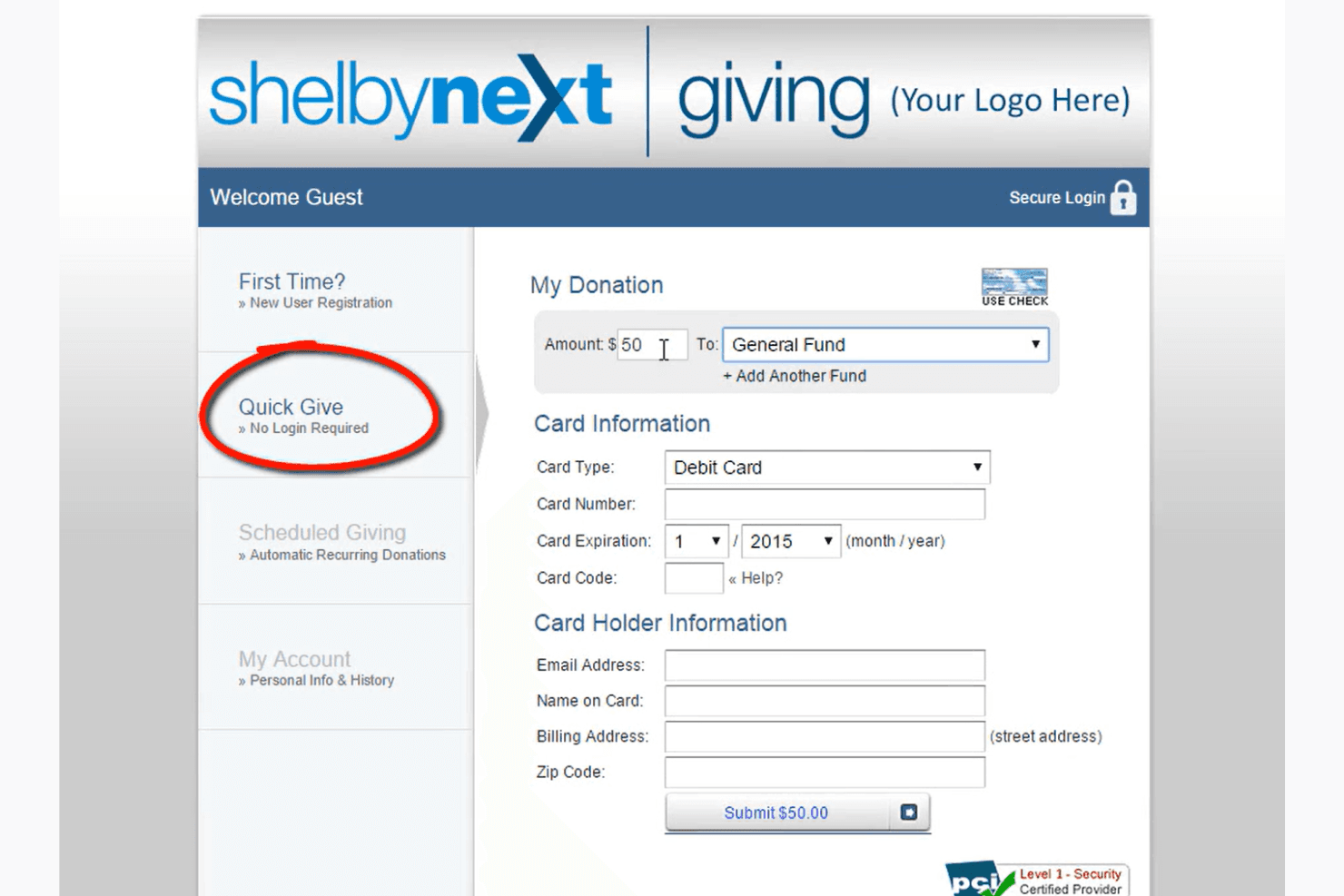
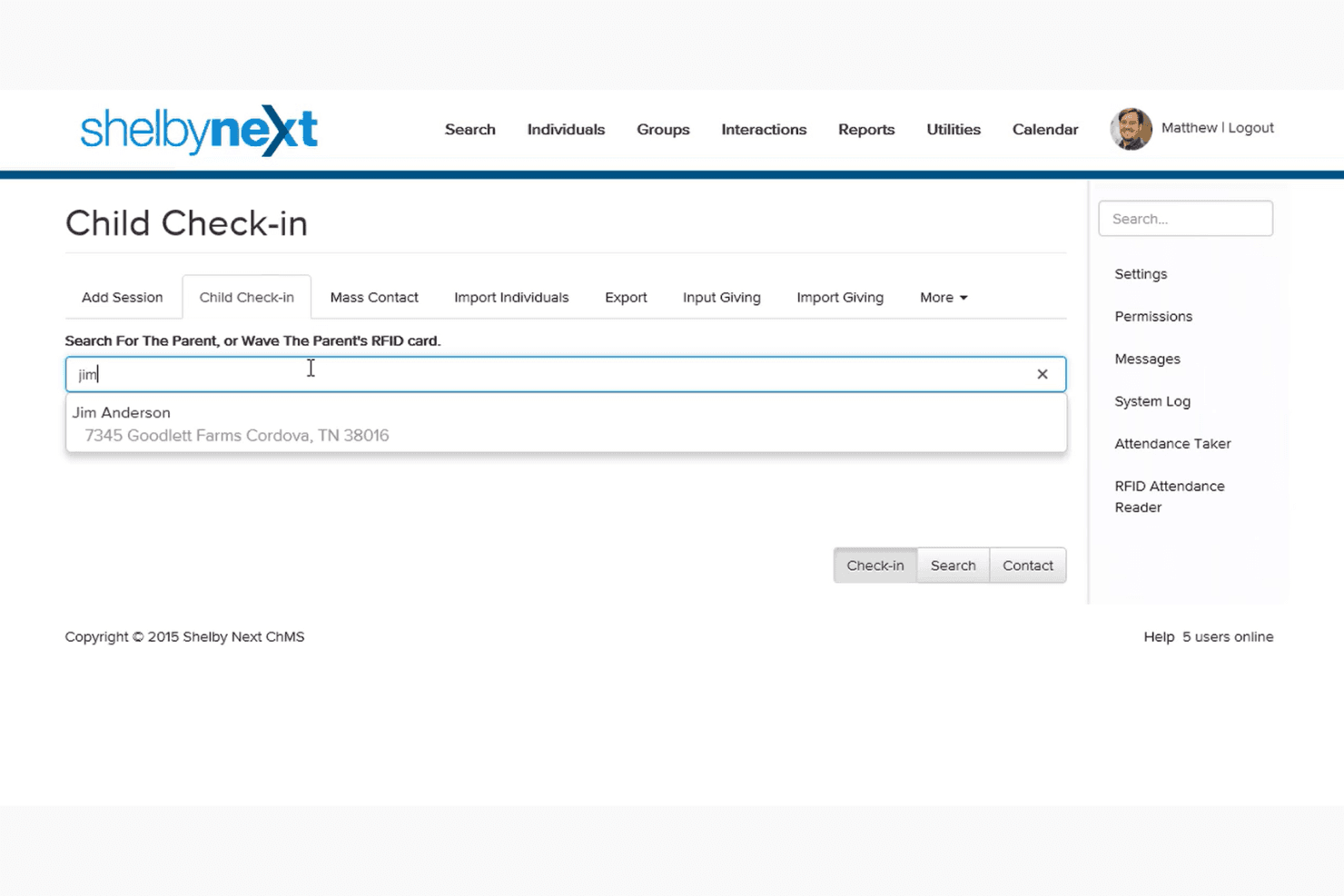
Implement a secure and efficient check-in process for children and volunteers, enhancing safety and streamlining attendance tracking during events and services.
Real-Time Reporting and Analytics:
Access up-to-date reports and analytics on various aspects of church operations, aiding in informed decision-making and strategic planning.
Ease of Use
Shelby Systems isn't the most intuitive option out there, which can make it challenging for new users. Its interface feels a bit dated, and navigating through features requires a learning curve. However, once you get the hang of it, the comprehensive tools become valuable for managing your church's operations. If your team is tech-savvy or willing to invest time in training, you'll find its capabilities rewarding for your administrative needs.
.png&w=3840&q=75)
Onboarding
Shelby Systems offers a thorough onboarding process that helps your team get up to speed efficiently. The detailed guidance and resources ensure you understand the software's extensive features from the start. Users often appreciate the responsive support team that's readily available to address questions and concerns. This proactive approach reduces the time to value, making it easier for your team to integrate the software into daily operations and begin seeing benefits quickly.
.png&w=3840&q=75)
Customer Support
Shelby Systems stands out with its responsive and helpful customer support. Users frequently praise the team for being accessible and quick to resolve issues. The variety of support channels, including phone and email, ensures you can get assistance when you need it. This strong support network helps your team tackle challenges effectively, so you can focus on managing your church's operations without unnecessary downtime.
.png&w=3840&q=75)
Value for Money
Shelby Systems offers flexible pricing based on your church’s size and needs. It’s especially well-suited for mid-sized to large churches, providing a wide range of robust features. From financial management to event planning and reporting, the platform delivers scalable tools to support complex church operations.
.png&w=3840&q=75)
ShelbySystems Specs
- API: No
- Calendar Management: No
- Contact Management: No
- Dashboards: No
- Data Export: No
- Data Import: No
- Document Management: No
- External Integrations: No
- Multi-User: No
- Notifications: No
- Payment Gateway Integration: No
- Scheduling: No
- Workflow Management: No
ShelbySystems FAQs
ShelbySystems Company Overview & History
Founded in 1976, Shelby Systems provides management solutions tailored for ministries, focusing on membership and financial needs. Headquartered in Memphis, Tennessee, it became part of the Ministry Brands family in 2015, enhancing its offerings for churches and faith-based nonprofits.
Shelby Systems serves over 9,000 customers in more than 45 countries, including notable clients like The Salvation Army. The company is recognized for its ethical practices and commitment to supporting ministries with innovative software solutions.
Shelby Systems Major Milestones
- 1976: Shelby Systems founded, with Second Baptist Church in Memphis as its first customer.
- 1980s: Developed initial PC software for church financials.
- 2000: Frank Canady became CEO after the founder's passing.
- 2000s: First church management software company to achieve Microsoft Gold Partner Certification.
- 2015: Partnered with Ministry Brands, expanding its reach and capabilities.
- Present: Serves over 9,000 customers (including the Salvation Army) in more than 45 countries.
What's Next?
Subscribe to our newsletter to get the latest resources, best practices, and insights on managing churches from expert pastors and church leaders.