

10 Flocknote Alternatives for Church Messaging in 2026

Best Flocknote Alternatives Shortlist


Managing church communications can be challenging. You need tools that fit your community’s unique needs, but sometimes Flocknote doesn’t quite hit the mark. Maybe you're looking for better support, more features, or just a change.
I've spent time digging into the best alternatives to Flocknote. I know the ins and outs of church management software, and I've tested these tools myself. My goal is to give you a clear, unbiased look at what's out there.
In this article, I'll share my top picks for Flocknote alternatives. You’ll find insights into each tool's strengths, helping you make an informed decision for your team. Let's find the right fit for your church's communication needs.
What Is Flocknote?
Flocknote is a church communications tool designed to help you manage your community's outreach and engagement. It's commonly used by church leaders, administrators, and volunteers who want a straightforward way to connect with their congregation. Email, text messaging, and contact management features help with keeping everyone informed and involved. Overall, Flocknote offers a simple way to handle your church's communication needs.
Flocknote Alternatives Comparison Table
This comparison table summarizes pricing details for my top Hello Flocknote alternative selections:
| Tool | Best For | Trial Info | Price | ||
|---|---|---|---|---|---|
| 1 | Best for ease of use | 30-day free trial | From $19/month (billed annually) | Website | |
| 2 | Best for multilingual support | Free plan available + 30-day free trial | From $12/month | Website | |
| 3 | Best for interactive two-way texting | 30-day free trial available | From $37/month | Website | |
| 4 | Best for online giving options | 30-day free trial available | From $72/month | Website | |
| 5 | Best for community engagement | Free plan available | From $49/month | Website | |
| 6 | Best for mobile connectivity | Not available | Pricing upon request | Website | |
| 7 | Best for financial management | Free trial available | Free download available | Website | |
| 8 | Best for affordability | 30-day free trial + free demo available | From $8/month (billed annually) | Website | |
| 9 | Best for team collaboration | Free plan + 15-day free trial + free demo available | From $49/organization/month (billed annually) | Website | |
| 10 | Best for donor engagement | Free plan available | From $29/month | Website |
Why Trust Our Software Recommendations
Our team has been testing and reviewing software since 2012. As church leaders ourselves, we know how difficult—and important—it is to choose the right software.
For this guide, we evaluated tools using hands-on testing and independent research, scoring tools using our selection criteria.
Our reviews reflect our human editorial judgment, not a sales pitch.
Best Flocknote Alternatives Reviews
Below are my detailed summaries of the best Flocknote alternatives that made it onto my shortlist. My reviews offer a detailed look at the key features, pros & cons, integrations, and ideal use cases of each tool to help you find the best one for you.

Gracely
Best for ease of use

Gracely is a user-friendly church management software designed for church leaders and administrators. It helps manage members, organize events, track giving, and facilitate communication within your church community.
Why Gracely is a good Flocknote alternative: Gracely offers an intuitive interface that simplifies managing church operations. Its people and group management features allow you to effortlessly handle member details and group communications. The event and attendance tracking tools make organizing church activities straightforward. Additionally, the online giving and contributions tracking enhance financial transparency and management.
Standout features & integrations:
Features include forms management for registrations and surveys, a dedicated church portal for member engagement, and detailed accounting and financial reports. You can also manage events and track attendance efficiently. The software helps reduce administrative tasks, giving you more time for ministry.
Integrations include Stripe, PayPal, QuickBooks, Planning Center, Elvanto, Church Community Builder, Fellowship One, Google Calendar, Mailchimp, and Microsoft Outlook.
Pros and Cons
Pros:
- Free data migration
- Comprehensive member management
- Detailed financial reports
- Efficient event management
- Intuitive user interface
Cons:
- No built-in accounting module
- Limited customer support hours
- No mobile app
- Basic reporting features
- Limited customization options
New Product Updates from Gracely

Gracely Rebuilds Accounting for Church Finance Management
Gracely rebuilds Accounting with fund tracking, income and expenses, transfers, reports, and exports. This gives churches a more complete way to manage finances in one place. For more information, visit Gracely’s official site.
 .
.
Best for multilingual support

ChMeetings is a church management software that caters to churches looking to simplify their operations. It's mainly used by church leaders and administrators to manage members, events, finances, and communication.
Why it's a good Flocknote alternative: ChMeetings offers multilingual support, making it ideal for diverse congregations. You can manage member data, schedule events, and handle donations all in one place. Its volunteer scheduling and member portal features enhance community involvement. The tool's focus on multilingual capabilities helps you connect with a broader audience.
Standout features & integrations:
Features include customizable member directories, event management tools, and financial tracking. You can also benefit from volunteer management capabilities and a member portal for self-service updates. The software's communication tools allow you to send emails, texts, and push notifications.
Integrations include Google Calendar, Mailchimp, Stripe, PayPal, QuickBooks, Planning Center, Elvanto, Church Community Builder, and Fellowship One.
Pros and Cons
Pros:
- Free data migration
- Comprehensive communication tools
- Customizable member directories
- Easy volunteer scheduling
- Multilingual support
Cons:
- No built-in accounting module
- Limited integration options
- Basic reporting features
- No dedicated mobile app
- Limited customization options
New Product Updates from ChMeetings

ChMeetings Improves Reconciliation and Adds Fund By Month Report
ChMeetings adds a direct Reconcile button, improved save-for-later support, and a new Fund By Month report. These updates make reconciliation easier to resume and give teams clearer month-by-month fund visibility. For more information, visit ChMeetings’ official site.
 .
.
Best for interactive two-way texting

Text In Church is a dedicated service designed to enhance communication and engagement within church communities. It offers tools that help churches connect with their members through personalized messaging and automated workflows.
Why Text In Church is a good Flocknote alternative: I picked Text In Church because it helps you move beyond one-way messaging. Its two-way texting lets you have real conversations with your congregation, making follow-ups and engagement feel more personal. The automated workflows can send reminders, follow-up messages, and welcome texts without extra manual effort. If you’re looking for a solution that strengthens community interaction while keeping communication organized, this tool can be a great fit.
Standout features & integrations:
Features include automated workflows for follow-ups and reminders, video and voicemail messaging to personalize outreach, and advanced analytics to track communication performance. You can also use customizable connect cards to gather visitor information and manage contact groups easily.
Integrations include Planning Center, Zapier, Church Community Builder, Mailchimp, Rock RMS, and Open API access.
Pros and Cons
Pros:
- Provides interactive two-way texting
- Enables automated communication workflows
- Supports extensive third-party integrations
Cons:
- Omits built-in event management
- Lacks donor management capabilities

Tithe.ly
Best for online giving options

Tithe.ly is a church management software that is primarily used by church leaders and financial administrators. It facilitates online giving, manages donations, and helps with community engagement through digital tools.
Why Tithe.ly is a good Flocknote alternative: Tithe.ly excels in online giving options, making it easy for your congregation to donate through various digital channels. You can set up recurring donations, track giving history, and generate financial reports. The platform also offers communication tools to engage with your members effectively. Its focus on digital giving aligns with modern donation trends, providing a seamless experience for both you and your donors.
Standout features & integrations:
Features include automated donation receipts, customizable giving forms, and a mobile app for on-the-go management. You can also access detailed analytics to track donation trends and member engagement. The software's event registration and management tools help streamline church activities.
Integrations include QuickBooks, Planning Center, Elvanto, Church Community Builder, Breeze, Mailchimp, Constant Contact, Fellowship One, Google Calendar, and Salesforce.
Pros and Cons
Pros:
- Event management features
- Mobile app availability
- Detailed financial reporting
- Recurring donation setup
- Strong online giving capabilities
Cons:
- No built-in accounting module
- Limited customer support hours
- Learning curve for new users
- Basic communication features
- Limited customization options

Raklet
Best for community engagement

Raklet is a membership management platform designed for organizations to build and nurture community relationships. It's used by various organizations to manage members, events, and communications efficiently.
Why Raklet is a good Flocknote alternative: Raklet excels in community engagement, offering tools to foster interaction within your organization. You can create and manage events, send newsletters, and build a member directory. The platform's social network feature allows members to connect and engage in discussions. Its focus on building a thriving community makes it a suitable choice for organizations looking to enhance connectivity and interaction.
Standout features & integrations:
Features include event management tools that let you organize and track events with ease. You can also create custom forms for registrations and surveys. The software's analytics provide insights into member engagement and activity.
Integrations include Mailchimp, Stripe, Zoom, QuickBooks, Salesforce, Slack, Eventbrite, Google Analytics, PayPal, and Zapier.
Pros and Cons
Pros:
- Social network feature
- Insightful analytics
- Customizable forms and surveys
- Effective event management
- Strong community engagement tools
Cons:
- No built-in CRM module
- Limited mobile app functionality
- Steeper learning curve
- Basic reporting features
- Limited customization options

Realm
Best for mobile connectivity

Realm is a church management software designed for church leaders and administrators to enhance community connectivity. It offers a range of tools for managing pastoral care, events, and volunteers.
Why Realm is a good Flocknote alternative: Realm provides mobile connectivity through the Realm Connect app, allowing your congregation to engage with your church wherever they are. You can manage online giving, streamline communication, and coordinate volunteers effectively. The software's group management features help you organize and engage with different church groups. Its emphasis on mobile access makes it ideal for keeping your community connected on the go.
Standout features & integrations:
Features include dashboards and reporting tools to track church activities and engagement. You can also manage events efficiently with built-in event management tools. The software facilitates online giving, making contributions easy and accessible for your congregation.
Integrations include QuickBooks, Mailchimp, Vanco, Givelify, PayPal, Stripe, Microsoft Outlook, Google Calendar, Zoom, and Slack.
Pros and Cons
Pros:
- Detailed reporting features
- Easy online giving setup
- Comprehensive event tools
- Effective group management
- Strong mobile connectivity
Cons:
- No built-in accounting module
- Limited integration options
- Learning curve for new users
- Basic volunteer coordination tools
- Limited customization options

Best for financial management
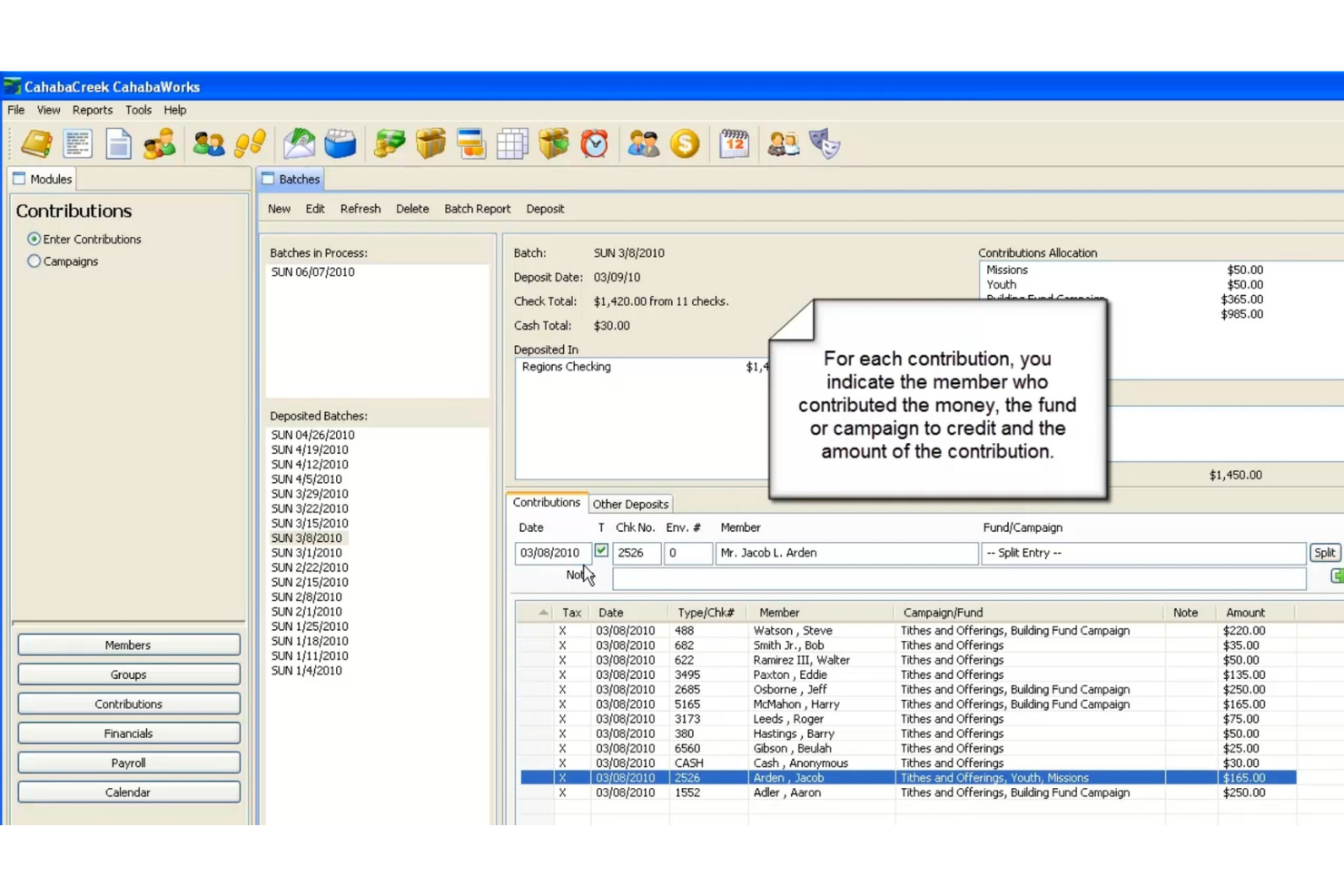
CahabaWorks is a church management / accounting software made to help churches with membership, contributions, payroll, fund accounting, and other financial-tasks. Its main users are church treasurers, finance teams, and administrators who need both member tracking and strong financial controls.
Why CahabaWorks is a good Flocknote alternative: You get fund accounting designed for churches, letting you track dedicated funds, restricted money, and multiple accounts. It includes contributions, pledge tracking, and payroll so your team doesn’t need separate finance tools. You can also manage members, groups, and check-ins while tying people records to giving and accounting. Its reporting and budgeting features give clear insight into your church’s finances.
Standout features & integrations:
Features include fund financials with sub-funds, account tracking, and expense and income management. It also has payroll with tax withholding, deductions, and minister dual status rules. In my experience, the check-in and child safety labels are useful for classes and children’s ministry.
Integrations include QuickBooks, Excel, Word, Outlook, and PowerPoint.
Pros and Cons
Pros:
- Good offline / local install support
- Unlimited people/assets tracking even on free version
- Payroll module supports IRS / minister dual status rules
- One-time purchase option rather than ongoing subscription
- Strong fund accounting geared toward church finances
Cons:
- Some features locked behind higher-cost editions / support tiers
- Reporting customizations not as flexible in base versions
- Limited mobile or remote access features
- Windows-only desktop-style software (not cloud first)
- Steeper learning curve for non-accounting users


ChurchTrac is a church management software designed for church leaders and administrators. It helps manage membership, track attendance, and organize worship planning and events.
Why ChurchTrac is a good Flocknote alternative: ChurchTrac offers affordable pricing, making it accessible for smaller congregations with tight budgets. Its membership management tools allow you to track and organize your community efficiently. The worship planning feature is particularly useful for coordinating services and events. Additionally, ChurchTrac's financial management tools help you handle donations and budgeting with ease.
Standout features & integrations:
Features include worship planning tools to coordinate services and events, as well as attendance tracking to monitor community engagement. You can also manage donations effectively with financial tools. The software's communication features let you send emails and texts directly to your congregation.
Integrations include QuickBooks, PayPal, Stripe, Mailchimp, Tithely, Planning Center, Church Community Builder, Elvanto, Fellowship One, and Google Calendar.
Pros and Cons
Pros:
- Easy budget management
- Detailed attendance tracking
- Effective donation management
- Comprehensive worship planning
- Affordable pricing
Cons:
- No advanced analytics
- Limited customer support hours
- No mobile app
- Basic reporting capabilities
- Limited customization options


Bitrix24 is a collaborative software platform designed for businesses and teams seeking to enhance communication and project management. It's widely used by organizations that need tools for CRM, task management, and team collaboration.
Why Bitrix24 is a good Flocknote alternative: Bitrix24 offers extensive team collaboration features that help your team stay connected and organized. With tools like task management and document sharing, you can efficiently manage projects and team communications. The platform's CRM capabilities let you handle member data and interactions with ease. Its focus on collaboration makes it an ideal choice for teams needing integrated communication and management tools.
Standout features & integrations:
Features include task and project management tools that keep your team on track. You can also use document management to store and share files securely. The platform offers communication tools like group chats and video conferencing to enhance team interaction.
Integrations include Microsoft Office, Google Workspace, Mailchimp, Slack, Dropbox, Zoom, Salesforce, QuickBooks, Trello, and Asana.
Pros and Cons
Pros:
- Flexible project tracking
- Effective task management
- Secure document management
- Strong CRM capabilities
- Comprehensive collaboration tools
Cons:
- Limited mobile functionality
- Complex setup process
- Basic reporting features
- Limited customization options
- Steeper learning curve


Continue to Give is an online giving platform designed for churches, nonprofits, and individuals to manage donations and fundraising efforts. It's primarily used by church leaders and administrators to facilitate donations and engage with donors.
Why Continue to Give is a good Flocknote alternative: Continue to Give offers extensive donor engagement tools, allowing you to connect with your supporters effectively. You can set up recurring donations, manage fundraising campaigns, and track donor interactions. The platform's text-to-give feature makes it easy for your congregation to contribute. Its focus on enhancing donor relationships and simplifying giving processes makes it a valuable tool for churches looking to increase engagement.
Standout features & integrations:
Features include customizable donation forms that you can tailor to your church's needs. The software also offers event registration and ticketing tools to manage fundraising events. You can access detailed reports to analyze donation trends and campaign performance.
Integrations include QuickBooks, PayPal, Stripe, Mailchimp, Salesforce, Google Calendar, Microsoft Outlook, Eventbrite, Slack, and Zapier.
Pros and Cons
Pros:
- Detailed donation reporting
- Customizable donation forms
- Text-to-give feature
- Recurring donation setup
- Strong donor engagement tools
Cons:
- No built-in CRM module
- Limited mobile app functionality
- Learning curve for new users
- Basic event management tools
- Limited customization options
Other Flocknote Alternatives
Here are some additional Flocknote alternatives that didn’t make it onto my shortlist, but are still worth checking out:
- ChurchCRM
For CRM capabilities
- ChurchInfo
For open-source users
- SteepleMate
For small church communities
- Fellowship One
For large church management
- Neon One
For nonprofit fundraising needs
- Planning Center
For worship planning tools
- TextEmAll
For voice and text alerts


How I Evaluate Flocknote Alternatives
I evaluate these tools in two layers—baseline requirements like group texting and member management, and differentiators like ChMS integrations and pricing that fits a 200-person parish.
Core Functionality (Table Stakes For This List)
When I'm selecting tools for my list, I rank each one on a scale from 0 (does not offer the functionality) to 5 (excels in this area) for each core functionality listed below. Then, I calculate the tool's total score into a percentage. Each tool needs to achieve a minimum total score of 65% to be considered for inclusion.
- Mass Text Messaging: I check whether a platform supports bulk SMS broadcasts to groups or the whole congregation, including scheduling for weekly reminders or last-minute cancellations.
- Group Email Communication: Each tool should let you send segmented emails to specific ministries or lists, like a youth group update that only goes to parents of teens.
- Member & Group Management: I look for a contact database that organizes people into groups and subgroups, so a member can belong to both the choir and the Wednesday night Bible study.
- Two-Way Messaging: Congregants should be able to reply to messages and carry on conversations with staff without exposing personal phone numbers on either side.
- Event Sign-Ups & RSVPs: Built-in forms or RSVP tools matter here, especially for things like VBS registration, potluck headcounts, or volunteer sign-ups for Easter services.
- Church-Specific Design: I evaluate whether the platform is purpose-built for churches, with terminology, workflows, and templates that reflect parish or ministry structures out of the box.
Once I have a list of tools that meet this criteria, I consider what sets each platform apart.
Differentiating Factors (What Sets Vendors Apart)
Here's how I compare and contrast different vendors:
Standout Features
Built-in giving tools are a big differentiator. When a platform handles tithes and recurring donations alongside your messaging, your congregation doesn't need to bounce between apps during a stewardship campaign. I also look at volunteer scheduling—tools that let you assign roles, send shift reminders, and track who served at last Sunday's service save ministry leaders hours each week. A dedicated mobile app matters too, since staff and members increasingly manage everything from their phones.
Beyond Features
Pricing structure matters a lot here. I look at whether a platform charges by contact count or by feature tier, and whether a small church plant can get started without overcommitting financially. Integration with your existing ChMS is equally important—if you're already running Planning Center or Breeze, a tool that syncs your member data saves you from managing duplicate records. I also evaluate ease of adoption, since many church admins are volunteers who need to send a bulletin reminder within minutes of logging in for the first time.
Why Look For A Flocknote Alternative?
While Flocknote is a good choice of church communications, there are a number of reasons why some users seek out alternative solutions. You might be looking for a Flocknote alternative because…
- You need more customization options
- Your team requires advanced reporting tools
- You're seeking better integration capabilities
- You want enhanced mobile app features
- You're looking for a more affordable solution
If any of these sound like you, you’ve come to the right place. My list contains several church communications options that are better suited for teams facing these challenges with Flocknote and looking for alternative solutions.
Flocknote Key Features
Here are some of the key features of Flocknote, to help you contrast and compare what alternative solutions offer:
- Email and text messaging: You can send updates and announcements to your members by email or text from one place.
- Member management: Your team can organize people into groups so messages go to the right folks.
- Unlimited groups: You can create as many groups as you need for ministries, classes, or committees.
- Two-way communication: Members can reply to your messages, and you’ll see all responses in one inbox.
- Simple sign-ups: People can join your list with a quick text or by filling out a form online.
- Polls and RSVPs: You can ask questions or collect event responses right in your messages.
- Content library: Your team can share notes, files, and resources with members in one spot.
- Analytics: You’ll see who’s opening your emails and texts so you know what’s working.