

Para a maioria dos pastores e líderes de igrejas, cuidar das finanças da igreja é uma parte vital do seu ministério… no entanto, se o software financeiro da sua igreja não estiver à altura, as coisas podem rapidamente transformar-se numa confusão. Se o Sage Intacct não correspondeu às suas expectativas, não é o único a procurar soluções melhores.
As ferramentas de contabilidade específicas para igrejas podem simplificar tudo, desde o acompanhamento de donativos e a gestão de orçamentos até à garantia de transparência financeira e conformidade. Merece um software que trabalhe com a sua equipa, e não contra ela.
Neste guia, apresentarei as principais alternativas ao Sage Intacct — com base em testes independentes — para que possa encontrar a opção certa para as necessidades financeiras da sua igreja e concentrar-se mais em servir a sua comunidade.
O que é o Sage Intacct?
O Sage Intacct é um software de contabilidade para igrejas concebido para ajudar a gerir tarefas financeiras específicas das operações de uma igreja. É utilizado por profissionais de finanças e administradores de igrejas que precisam de ferramentas eficientes de gestão financeira. As funcionalidades de acompanhamento de orçamentos, gestão de donativos e elaboração de relatórios de conformidade ajudam a responder às necessidades financeiras específicas da sua igreja. De um modo geral, o Sage Intacct proporciona à sua comunidade religiosa as vantagens de uma gestão financeira personalizada.
Why Trust Our Software Recommendations
6,700+
Reviews
20
Industry experts
16+
Evaluation factors
14
Years
Our team has been testing and reviewing software since 2012. As church leaders ourselves, we know how difficult—and important—it is to choose the right software.
For this guide, we evaluated tools using hands-on testing and independent research, scoring tools using our selection criteria.
Our reviews reflect our human editorial judgment, not a sales pitch.
Tabela comparativa das alternativas ao Sage Intacct
Esta tabela comparativa resume os detalhes de preços das minhas principais alternativas ao Sage Intacct.
Score legend (out of 5)
- Excellent4.5–5
- Good4–4.4
- Average3–3.9
- Below average2–2.9
- Poor1–1.9
Sorted by: Default
| Tool | Starting Price | Website | |||||||
|---|---|---|---|---|---|---|---|---|---|
Best for church-specific tools | Not rated | 1 | 1 | Not rated | Not rated | 3 | Not rated | $72/month 30-day free trial + free demo available | Website |
Best for mobile accounting | 3.5 out of 5 | 4 | 3 | 3 | 4 | 3 | 4 | $27/month 1-month free trial available | Website |
Best for free church accounting | 2.8 out of 5 | 2 | 3 | 3 | 4 | 3 | 2 | $15/month Free plan + free trial available | Website |
Best for comprehensive church financial management | Not rated | 2 | 2 | 4 | 3 | Not rated | 3 | Pricing upon request Free trial + free demo available | Website |
Best for QuickBooks integration | Not rated | 2 | 2 | 2 | Not rated | 4 | 1 | $69.99/month Free plan + demo available | Website |
Best for small churches | 3.0 out of 5 | 3 | 3 | 3 | 4 | 2 | 3 | $19/month Free plan + 30-day free trial available | Website |
Best for nonprofit accounting | 2.8 out of 5 | 3 | 3 | 3 | 2 | 4 | 2 | $119/month Free plan + 14-day trial + demo available | Website |
Best for cloud-based solutions | Not rated | Not rated | 3 | 3 | 2 | 2 | 2 | Pricing upon request Free trial available | Website |
Best for member management | 3.0 out of 5 | 2 | 4 | 4 | 3 | 2 | 3 | $50/month Free demo available | Website |
Best for easy church accounting | Not rated | 2 | 2 | 3 | Not rated | 1 | 3 | Pricing upon request Not available | Website |


Análises das melhores alternativas ao Sage Intacct
Apresentamos abaixo os meus resumos detalhados das melhores alternativas ao Sage Intacct que foram incluídas na minha lista. As minhas análises apresentam uma visão detalhada das principais funcionalidades, vantagens e desvantagens, integrações e casos de utilização ideais de cada ferramenta, para o ajudar a encontrar a melhor opção para si.
 Best for church-specific tools
- 30-day free trial + free demo available
- From $72/month
Visit WebsiteCustomer Rating:4.8/5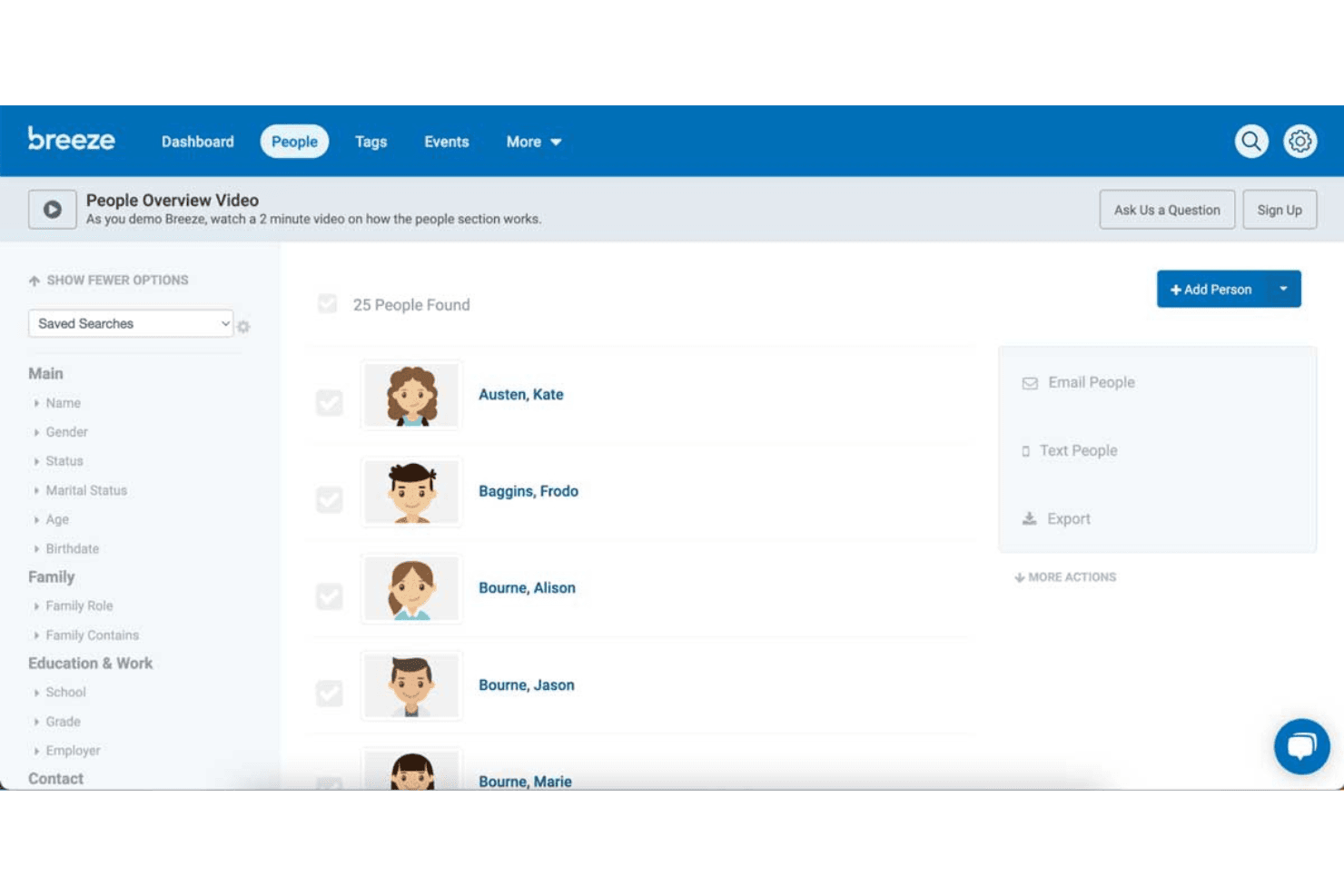
Breeze ChMS lets users search and manage church member profiles easily. Breeze ChMS is a church management platform built specifically for congregations that need to organize members, track giving, coordinate volunteers, and manage events—all in one place, without the complexity of a general-purpose accounting system.
Who Is Breeze ChMS Best For?
Breeze ChMS is a natural fit for churches and ministries that need an approachable, all-in-one platform to manage their congregation, volunteers, and giving records.
Why I Picked Breeze ChMS
I picked Breeze ChMS as one of the best because it's built from the ground up for church administration, not adapted from generic business software. I love how the people database ties directly into giving records, so I can pull contribution statements by member, fund, or date range without any manual cross-referencing. The volunteer scheduling and kids check-in tools are genuinely church-specific: I can match children to guardians at pickup using unique security codes, something no general-purpose accounting platform offers.
Breeze ChMS Key Features
- Drag-and-drop email editor: Build and send congregation-wide emails and newsletters using a visual editor without any coding.
- Kids check-in kiosks: Set up self-service check-in stations for children's ministry, classes, and events that print name tags with allergy and special-needs alerts.
- Automated volunteer reminders: Send scheduled reminders to volunteers and let them confirm or decline shifts directly by email or through the app.
- QuickBooks Online sync: Map Tithely giving funds to QuickBooks income accounts and sync card, ACH, and event transactions for bookkeeping in a separate accounting system.
Breeze ChMS Integrations
Breeze ChMS has a documented QuickBooks Online integration for syncing giving data to mapped income accounts. Tithely also lists connections with Salesforce, Rock RMS, Planning Center Online, Church Community Builder, and MinistryPlatform.
Pros and Cons
Pros:
- Reviewers praise responsive customer support
- Giving and attendance reports support church administration
- Member profiles and tags organize congregations
Cons:
- No invoicing or accounts receivable support
- No general ledger or bookkeeping
Learn more about Breeze ChMS: 2Best for mobile accounting
Xero
- 1-month free trial available
- From $27/month
Visit WebsiteCustomer Rating:4.4/5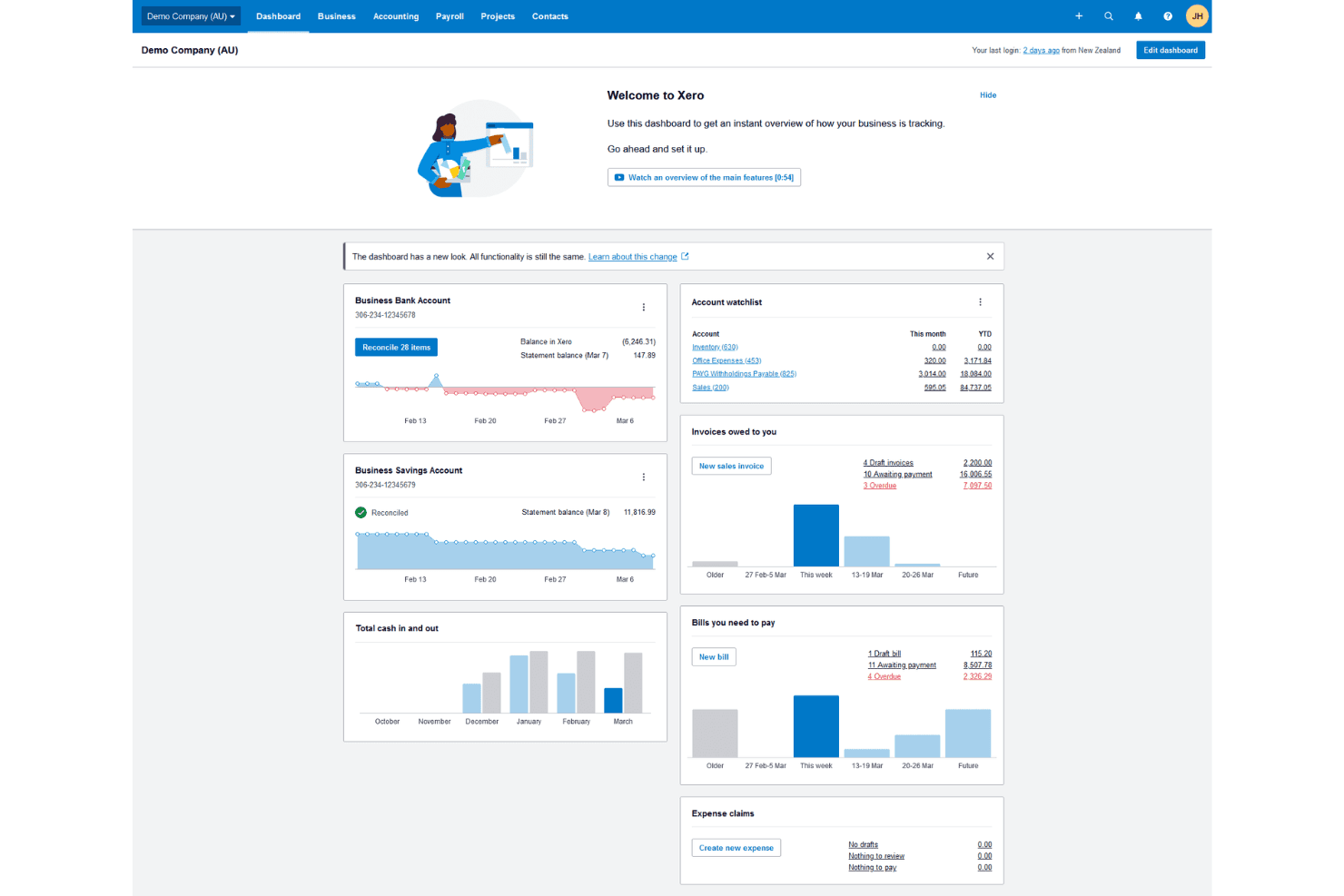
Xero gives users a real-time financial overview from one dashboard. Xero is cloud accounting software that suits smaller churches and ministries looking to simplify bookkeeping, automate invoicing, and reconcile bank transactions without the complexity of a full enterprise finance platform.
Who Is Xero Best For?
Xero is a strong fit for smaller churches and ministries that want straightforward bookkeeping, invoicing, and bank reconciliation without the complexity of an enterprise finance platform.
Why I Picked Xero
I picked Xero as one of the best because its mobile app lets you handle real accounting tasks on the go, not just check balances. I can approve invoices, reconcile bank transactions, and capture receipts from my phone between services or meetings. The app's automated bank matching via JAX reduces the manual back-and-forth that typically eats up a treasurer's week.
Xero Key Features
- Automated bill entry: Growing and Established plans automatically extract and enter bill data, reducing manual data input for recurring vendor payments.
- Cash flow forecasting: View rolling cash flow projections up to 180 days ahead, depending on your plan, to plan ministry spending and giving seasons.
- Multi-currency support: Pay and receive payments in more than 160 currencies, available on the Established plan, for churches with international mission partners.
- Unlimited user access: All plans include unlimited invited users at no extra per-seat cost, so your finance team, staff, and external bookkeeper can all work in the same account.
Xero Integrations
Xero has over 1,000 marketplace integrations, including Gusto, Stripe, Dext, and G-Accon for Xero with Google Sheets. It also offers APIs and SDKs for custom integrations.
Pros and Cons
Pros:
- Sage switch described as fairly painless
- Bank feeds cut monthly reconciliation work
- Mobile app handles bookkeeping away from your desk
Cons:
- Bank feeds sometimes disconnect or stop updating
- Limited consolidation for multi-entity operations
 Best for free church accounting
- Free plan + free trial available
- From $15/month
Visit WebsiteCustomer Rating:4.6/5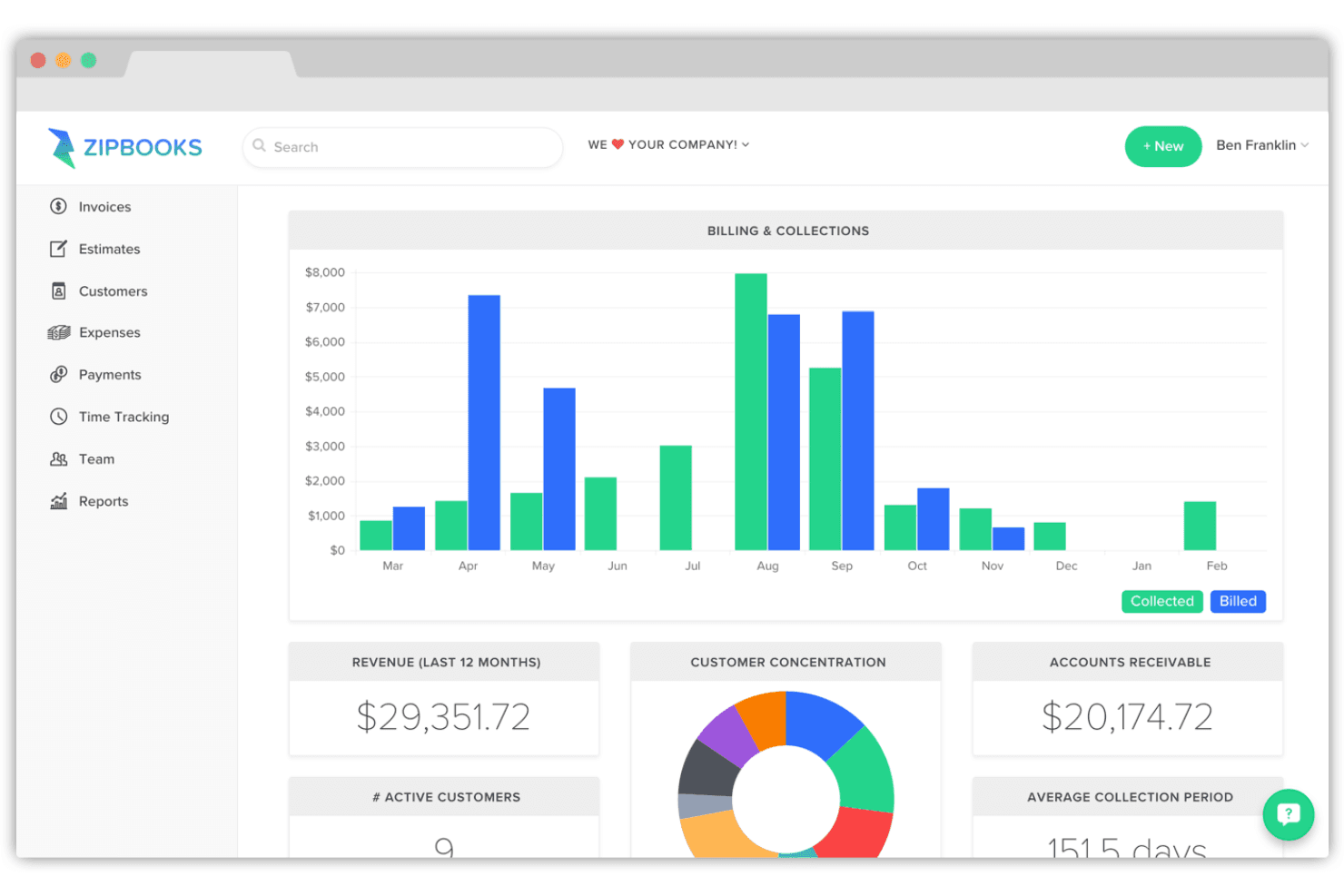
ZipBooks displays billing, collections, and revenue on one dashboard. ZipBooks is a cloud-based accounting tool built for small organizations that want straightforward bookkeeping, invoicing, and expense tracking without the complexity or cost of larger platforms.
Who Is ZipBooks Best For?
ZipBooks is a good fit for small churches and volunteer treasurers who need straightforward invoicing and bookkeeping without the cost of a full-featured platform.
Why I Picked ZipBooks
I picked ZipBooks as one of the best because it's the only option on this list with a genuinely usable free tier built for church accounting. The Starter plan covers unlimited invoices, vendor tracking, and Square or PayPal payments with no time limit and no cost. For small congregations where a volunteer treasurer handles the books, ZipBooks' ML-powered transaction categorization cuts down manual data entry without requiring accounting expertise.
ZipBooks Key Features
- Multi-currency invoicing: Create and send invoices in multiple currencies to accommodate international donors or vendors.
- Transaction tagging: Tag transactions by project, location, customer, or custom label to filter and run reports by ministry or program.
- Gusto payroll sync: Sync time entries from ZipBooks to Gusto and pull payroll wage and tax details back into your books automatically.
- Account reconciliation with locked books: Match transactions against your bank statement and lock completed periods to prevent accidental edits.
ZipBooks Integrations
ZipBooks offers native integrations with Gusto, PayPal, and Square, plus bank connections through supported financial institutions. It also provides a REST-style API with JWT authentication for custom integrations.
Pros and Cons
Pros:
- Accountant tools support client data migration
- Useful income and expense reports
- Clear invoices with billable time tracking
Cons:
- No documented bill approvals or payment workflow
- Statement matching requires manual checking
Learn more about ZipBooks: 4Best for comprehensive church financial management
ACS
- Free trial + free demo available
- Pricing upon request
Visit WebsiteCustomer Rating:3.8/5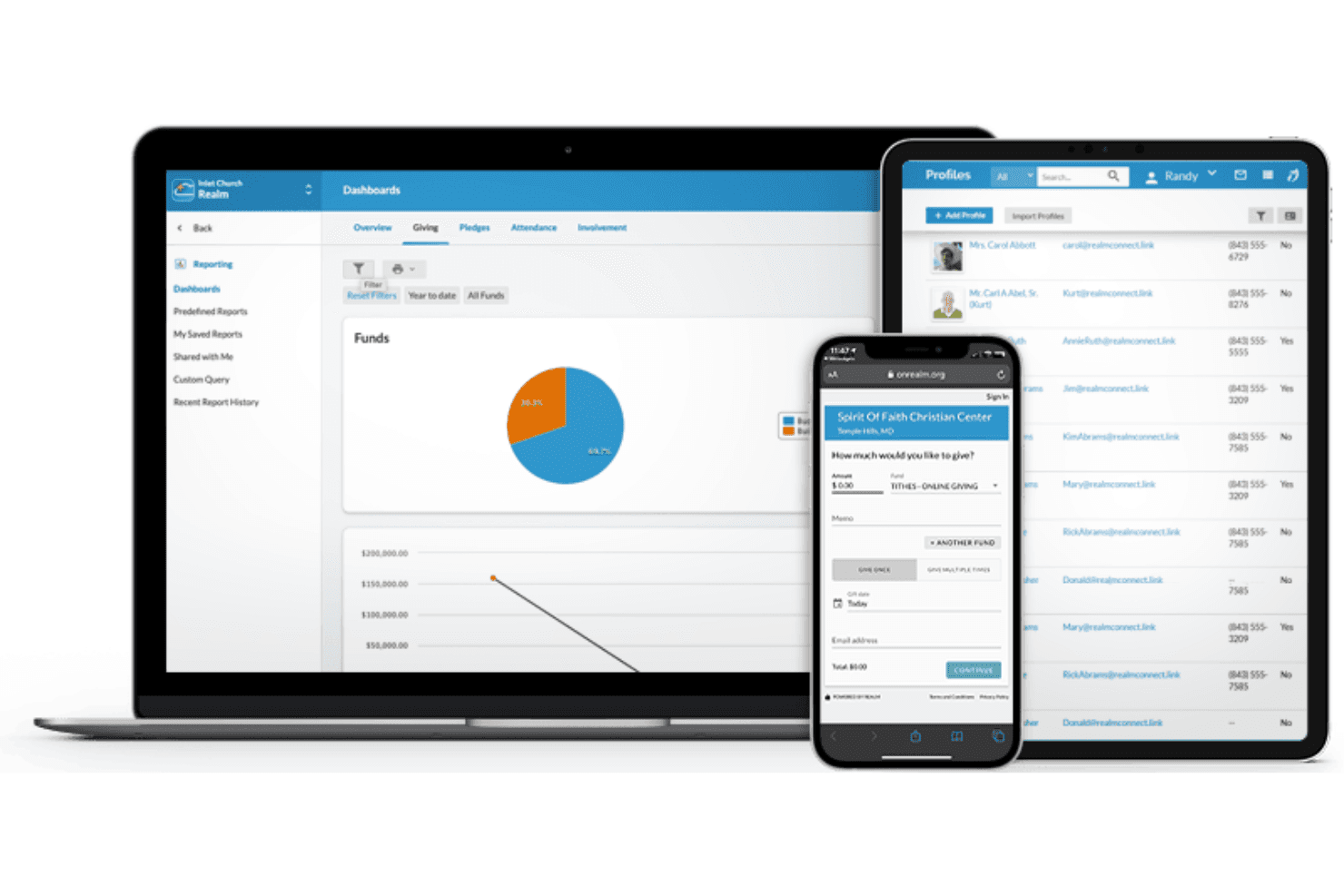
ACS Realm supports giving, profiles, and fund reporting across devices. ACS Financials is church accounting software built specifically for congregations that need nonprofit-grade fund accounting, payroll with clergy-specific details, and giving management in one place.
Who Is ACS Best For?
ACS Financials is built for churches and congregations that need purpose-built fund accounting, clergy payroll, and giving management in a single system.
Why I Picked ACS
I picked ACS as one of the best because it's built from the ground up for church financial management, covering fund accounting, clergy payroll, and giving management in a single system. I appreciate how the general ledger tracks budgets by fund, department, committee, and project simultaneously, so a church running both a general fund and a restricted building campaign never has to reconcile those buckets manually. The clergy-specific payroll module handles housing allowances and insurance details that generic accounting software simply doesn't account for.
ACS Key Features
- Fixed asset tracking: Monitor equipment and assets, including acquisition costs, depreciation schedules, and maintenance records.
- Purchase order management: Set spending plans, automate spending approvals, and configure alerts to cross-check purchases before they're made.
- Accounts receivable with batch invoicing: Define unlimited revenue centers, set customized income frequencies, and generate batch invoices across multiple accounts.
- Tax e-filing for W-2s and 1099s: Electronically file payroll and vendor tax forms directly with government agencies through the built-in ACS Tax E-File service.
ACS Financials Integrations
ACS Financials offers documented integrations with ACS Contributions, HeadMaster billing, and ACS People, plus an interface with Microsoft Excel. An API and banking connectors aren't documented.
Pros and Cons
Pros:
- Recurring invoices support scheduled payables
- Clergy payroll handles housing allowances
- Fund-based books track restricted giving
Cons:
- Older interface and slow report generation
- Reports can be difficult to configure
Learn more about ACS: Best for QuickBooks integration
- Free plan + demo available
- From $69.99/month
Visit WebsiteCustomer Rating:4.8/5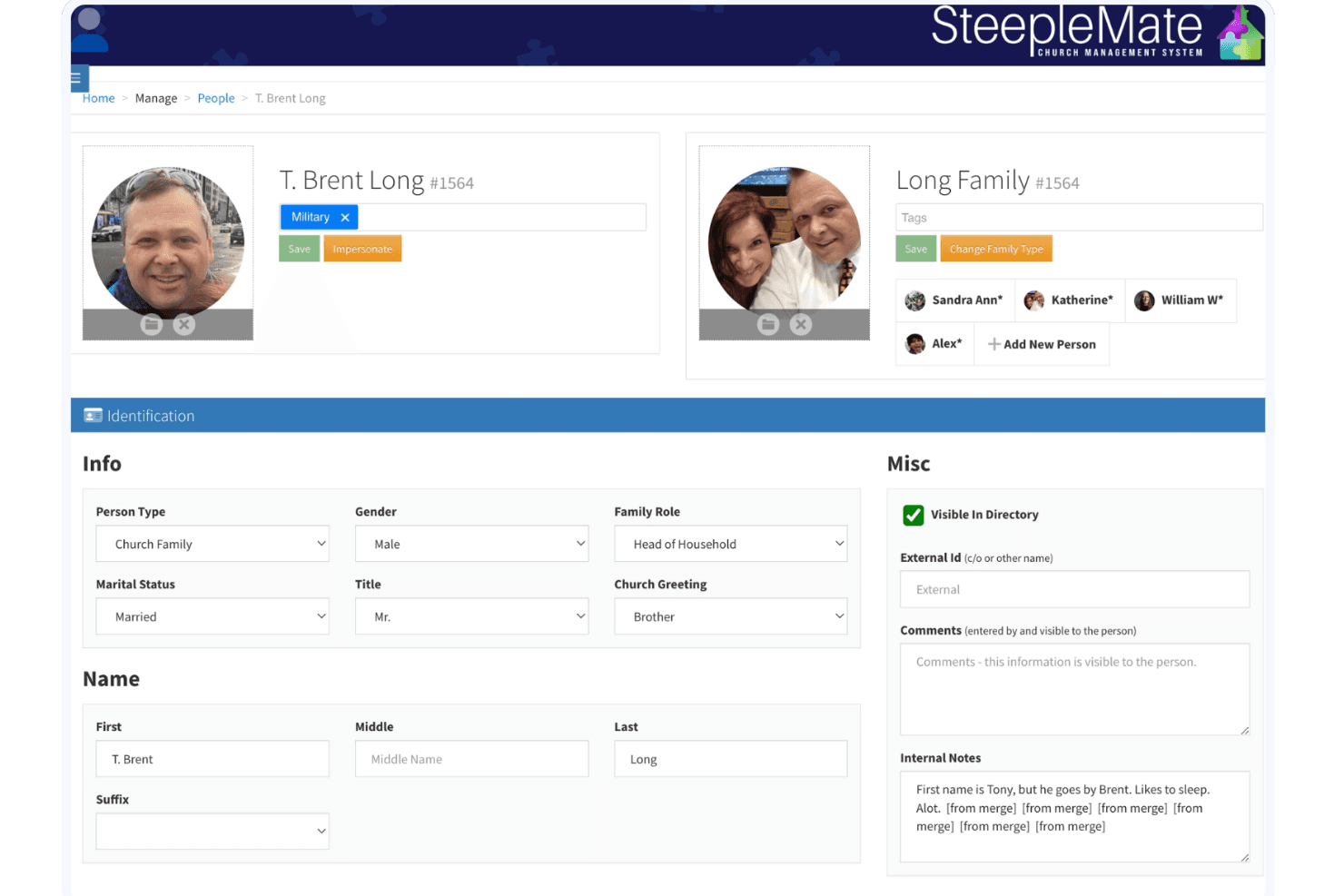
SteepleMate lets users manage detailed member profiles and family records. SteepleMate is a church management system built for ministries that need to bring giving, budgeting, donor records, and financial reporting together in one place.
Who Is SteepleMate Best For?
SteepleMate is built for churches and ministries that want to manage giving, donor records, and budgets in one place while keeping their books in QuickBooks.
Why I Picked SteepleMate
I've included SteepleMate in my top picks because its QuickBooks Online integration is genuinely built for how churches manage giving, not just bolted on. When a deposit is processed, SteepleMate maps each payment category directly to a QuickBooks income account, class, or project, so your giving records land in QuickBooks exactly where they belong. I also appreciate that the system consolidates multiple donations into a single deposit slip before posting, which keeps your QuickBooks ledger clean and your bank reconciliation straightforward.
SteepleMate Key Features
- Online and in-person giving channels: Accept donations through mobile, QR code, text, kiosk, and manual entry for cash and check contributions.
- Designated fund and campaign tracking: Create and monitor fundraising campaigns, track pledges, and manage disbursements tied to specific funds or projects.
- Year-end giving statements: Generate donor contribution statements automatically for tax and reporting purposes.
- Role-based permissions with audit logs: Assign access levels for administrators, staff, and volunteers, with logged records of data changes across the system.
SteepleMate Integrations
SteepleMate offers a native QuickBooks Online integration for mapping giving data to accounts, classes, and projects. It also connects with OfferingMate and FIS for donation processing; API availability isn’t documented.
Pros and Cons
Pros:
- Finance reports readily available to treasurers
- Support team praised for hands-on training
- Church finance and administration share one system
Cons:
- Mobile app omits task management
- No standard invoicing or receivables workflows
Learn more about SteepleMate: Best for small churches
- Free plan + 30-day free trial available
- From $19/month
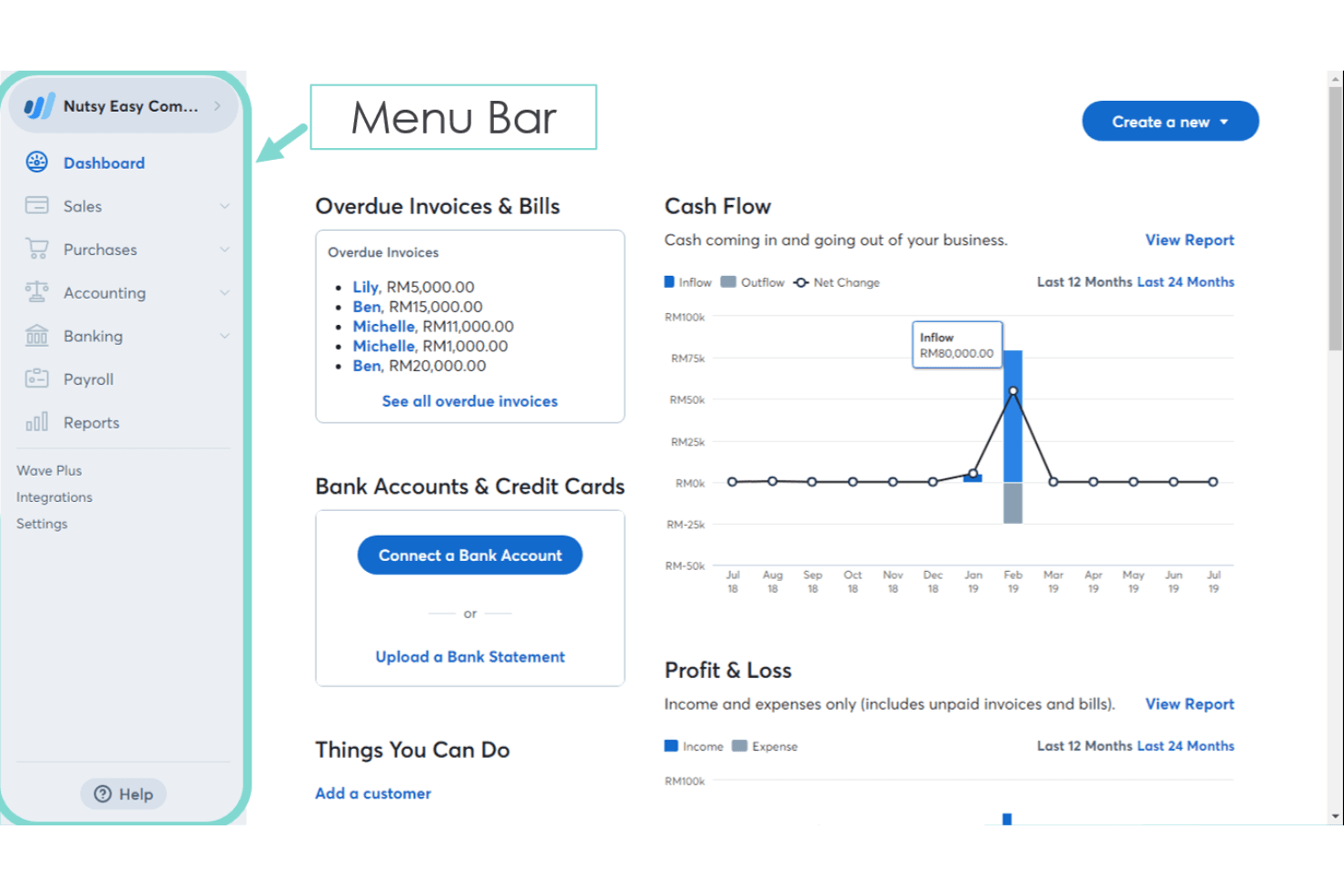
Wave Financial's dashboard gives users a real-time business overview. Wave Financial is a cloud-based accounting tool built for small businesses that need straightforward income tracking, invoicing, and expense management without the cost or complexity of enterprise software.
Who Is Wave Financial Best For?
Wave Financial is a good fit for small congregations that need basic income and expense tracking without the overhead of full church accounting software.
Why I Picked Wave Financial
I picked Wave Financial as one of the best because it gives small congregations a real double-entry bookkeeping foundation without requiring a budget for it. The free Starter plan covers unlimited income and expense tracking, invoicing, and bills, so a small church treasurer can keep the books organized from day one. On the Pro plan, automatic bank transaction imports and tag-based reporting let you compare income and expenses across specific funds or ministries without needing a dedicated accountant on staff.
Wave Financial Key Features
- Customizable chart of accounts: Tailor your account names and categories to match how your church organizes its finances, including renaming equity accounts as net assets.
- Tag Comparison report: Compare income and expenses across up to seven ministry tags side by side for any date range, with drilldown into individual transactions.
- Collaborator roles: Invite your treasurer, bookkeeper, or accountant as an Admin, Editor, or Viewer, each with different levels of access to your account data.
- Mobile invoicing: Create, send, and manage invoices from the iOS or Android app, with notifications when an invoice is viewed, due, or paid.
Wave Financial Integrations
Wave Financial offers 13+ marketplace integrations, including Google Sheets, Amazon, Etsy, MinuteDock, and Online Check Writer. It also supports a public API with GraphQL, webhooks, and OAuth, plus 1,000+ workflows through Make.com.
Pros and Cons
Pros:
- Core reports help monitor cash flow
- Reviewers praise clear, professional invoices
- Free bookkeeping includes double-entry accounting
Cons:
- Fixed permissions limit finance team access
- No true fund accounting for restricted gifts
Learn more about Wave Financial: Best for nonprofit accounting
- Free plan + 14-day trial + demo available
- From $119/month
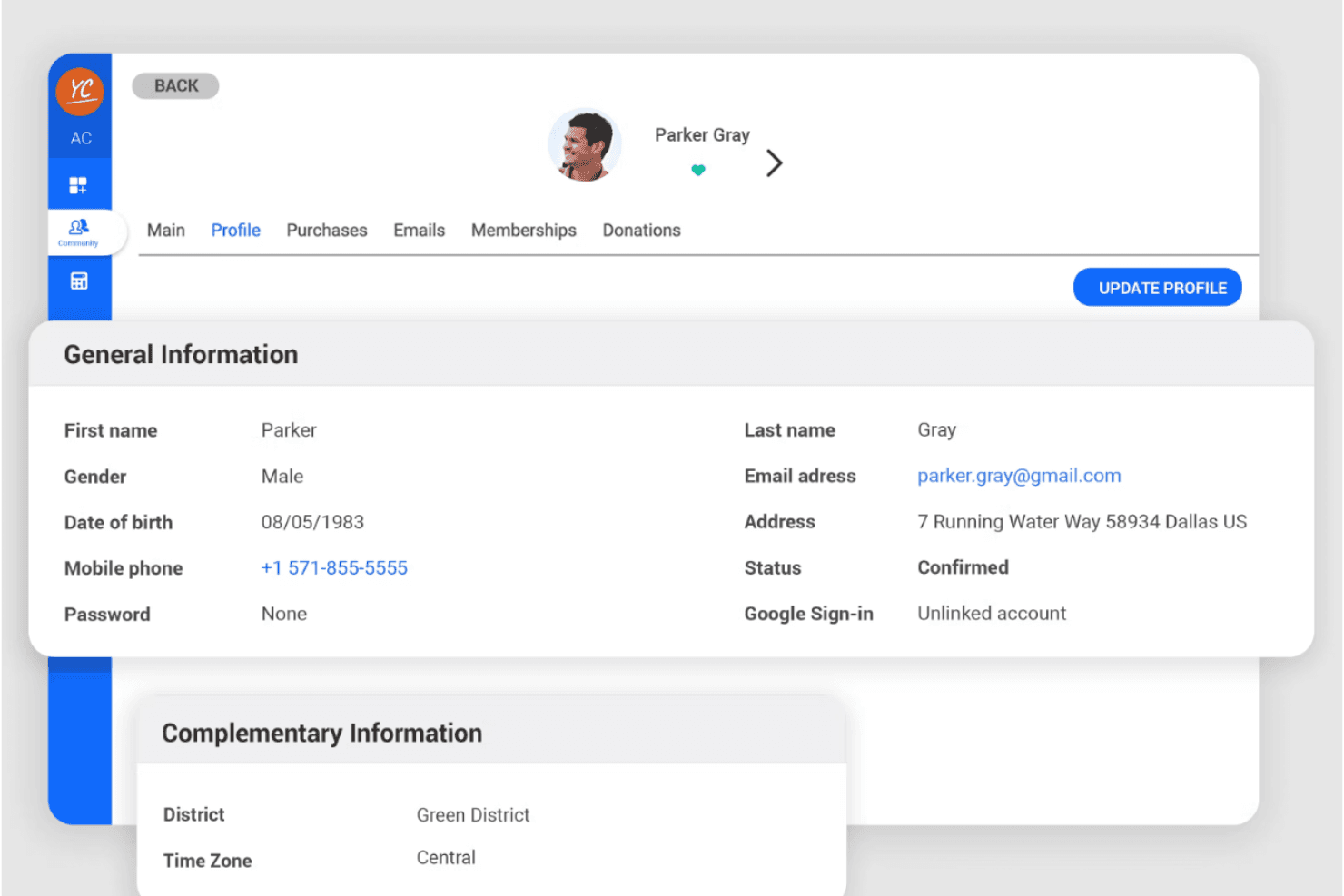
Springly lets users view and manage detailed member profile data. Springly is an all-in-one nonprofit management platform that pairs fund accounting with membership, donor tracking, and payment tools—making it a natural fit for churches and faith-based organizations that want to manage finances and community in one place.
Who Is Springly Best For?
Springly suits small nonprofits and faith-based organizations that want fund accounting, donor tracking, and membership tools in one platform.
Why I Picked Springly
I picked Springly as one of the best because it's purpose-built for nonprofit accounting in a way that general accounting tools simply aren't. I appreciate how fund accounting is baked directly into the platform, so you can create separate funds for specific projects or programs, allocate transactions to the right fund, and generate fund income statements without any workarounds. Donor payments recorded online are automatically posted to the correct cost elements, which cuts down reconciliation time significantly.
Springly Key Features
- Bank reconciliation: Match your software records against bank statements to verify that your financial data is accurate and complete.
- Cash or accrual accounting: Switch between cash and accrual accounting methods depending on your organization's reporting needs.
- Unlimited user access: Add as many team members or administrators as you need, with role-based permissions controlling access to finance, contacts, and communications.
- QuickBooks data import and export: Move transactions, receipts, and invoices between Springly and QuickBooks to keep your accounting records in sync.
Springly Integrations
Springly supports integrations with QuickBooks for importing and exporting transactions, receipts, and invoices, plus Adyen for payment processing and PayPal for online-store payments. Its Professional plan includes an API for custom integrations.
Pros and Cons
Pros:
- Fund tracking fits program-specific nonprofit budgets
- Shared cloud records support administrator teamwork
- Online donations enter the right cost elements
Cons:
- Custom reports can be difficult to extract
- Manual invoice creation limits Sage-like receivables
Learn more about Springly:
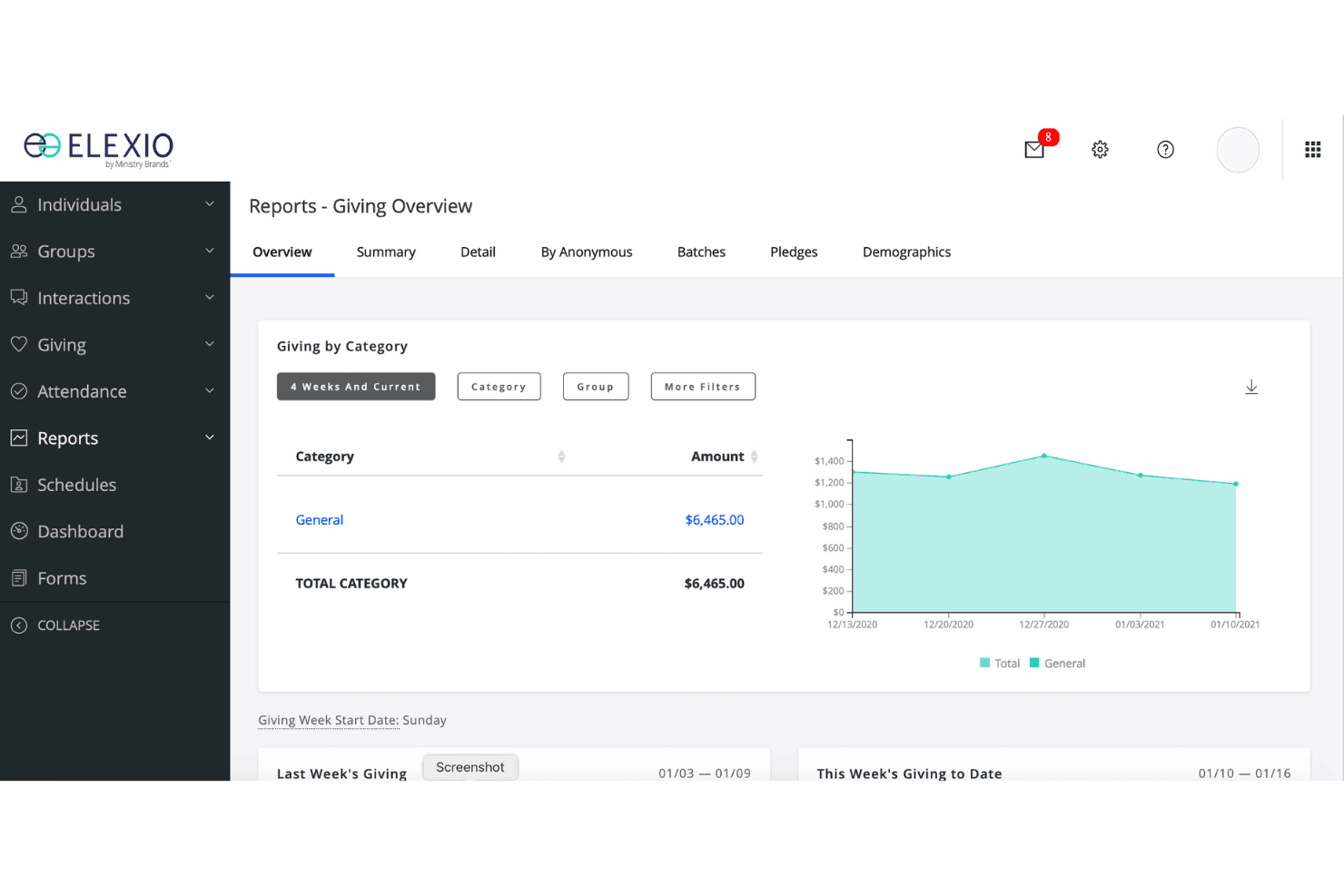
Elexio lets users track church giving by category over time. Elexio is a cloud-based church accounting platform built specifically for ministry organizations, covering fund accounting, payroll, accounts payable and receivable, and financial reporting—all within an ecosystem that connects to giving and member management tools.
Who Is Elexio Best For?
Elexio is a strong fit for churches and ministry organizations that want fund accounting, giving management, and member records connected in one cloud-based system.
Why I Picked Elexio
I've included Elexio in my top picks because it's built entirely in the cloud, meaning my team can access financial records, run fund reports, and manage accounts payable from anywhere without being tethered to a local server. I particularly like how the general ledger supports true fund accounting, letting me track restricted and unrestricted giving across separate funds with drill-down access into individual journal entries. The direct connection between Church Accounting and Elexio Online Giving means contribution deposits can post automatically, keeping giving records and financial books in sync without manual data entry.
Elexio Key Features
- Clergy payroll management: The payroll application handles special clergy allocations, benefits, and tax-compliant reporting for both clergy and lay staff.
- Fund-based permissions: Administrators can set user access by both function and fund, limiting what each team member can view or edit.
- Revenue center invoicing: Accounts receivable uses Revenue Centers with multiple item codes to create invoices and statements for specific services or activities.
- Excel import/export: The general ledger supports Excel-based data import and export, making it easier to move financial data in and out of the system.
Elexio Integrations
Elexio offers native integrations with Elexio Community and Elexio Online Giving, connecting church-management, giving, and accounting data for financial reporting. No API or third-party accounting integrations are documented.
Pros and Cons
Pros:
- Church-specific reports reflect ministry finances
- Reviewers value weekly envelope-entry totals
- Bookkeepers praise restricted-fund tracking
Cons:
- Reported outages have delayed accounting work
- Reviewers describe dated technology and clunky navigation
Learn more about Elexio:
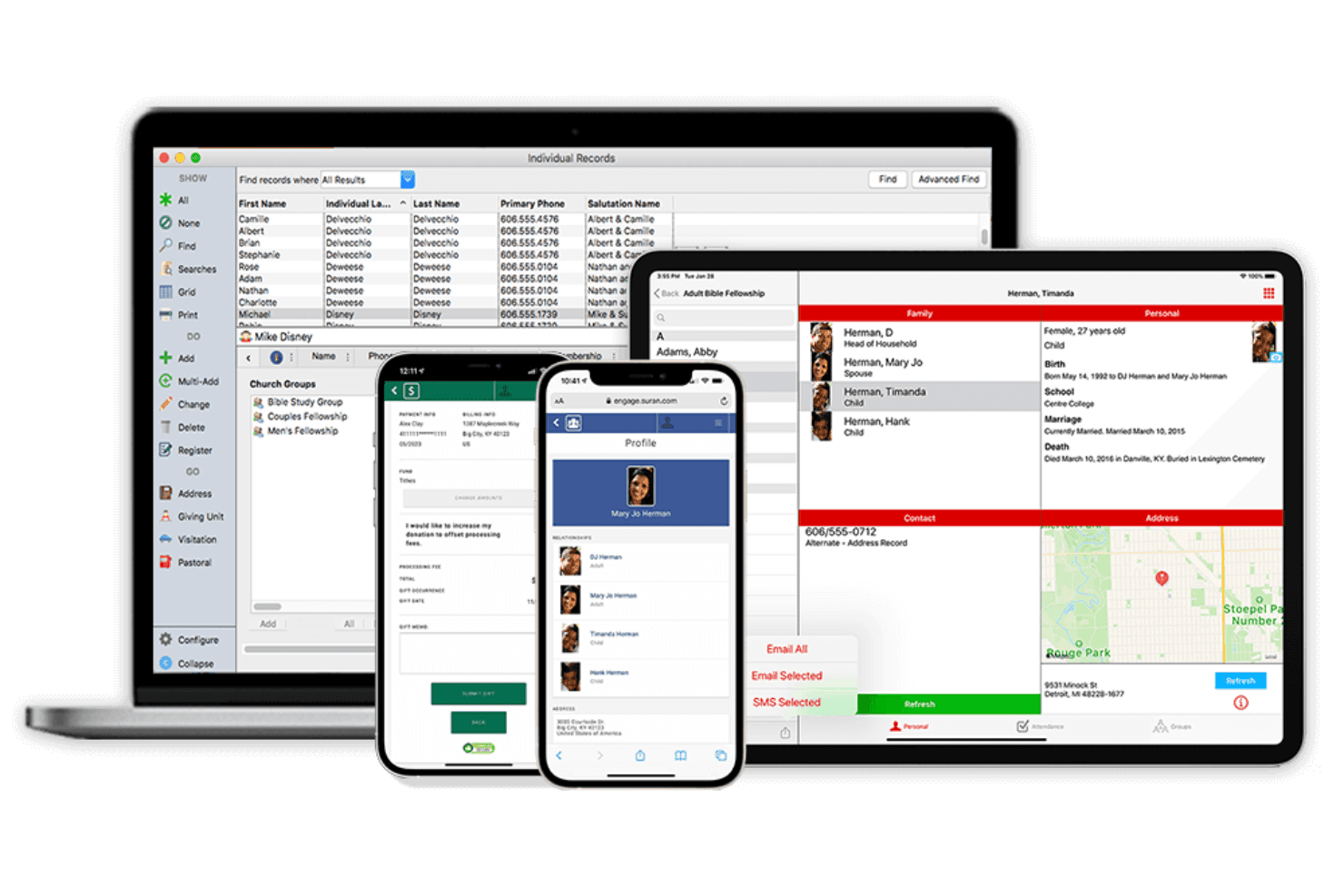
CDM+ manages church member records across desktop, tablet, and mobile. CDM+ is a fund accounting and church management platform built specifically for faith-based organizations that need to track members, manage giving, and handle payroll alongside their financials.
Who Is CDM+ Best For?
CDM+ is built for churches and faith-based nonprofits that need member management, giving tracking, and fund accounting in one connected system.
Why I Picked CDM+
I picked CDM+ as one of the best because it's the only tool on my list built specifically around member management for faith-based organizations. I love how member records connect directly to giving history, group membership, and family relationships, so your staff can see a complete picture of each person in one place. The Groups and small groups features let you track attendance, roles, and term history without jumping between systems.
CDM+ Key Features
- Fund accounting ledger: Double-entry general ledger with journal entries, checks, deposits, custom journal-entry types, and an unchangeable audit trail.
- Online and text giving: Accept one-time, recurring, and text gifts by debit card, credit card, or ACH, with funds allocated to designated accounts.
- Payroll processing: Calculate hourly and salary pay, clergy-specific withholdings, deductions, and direct deposit, with posting directly to the ledger.
- Budget-to-actual reporting: Compare actual income and expenses against multiple concurrent budgets, with monthly and quarterly breakdowns exportable to Excel.
CDM+ Integrations
The documented native integration is Aatrix for printing or e-filing 1099 and 1096 forms. CDM+ also offers a REST API for custom integrations, while named CRM, banking, and third-party payment integrations aren’t documented.
Pros and Cons
Pros:
- Custom reports export for board review
- Fund-level budgets support ministry oversight
- Member records connect giving and family relationships
Cons:
- Permission controls lack documented role details
- Bank reconciliation relies on manual imports
Learn more about CDM+:
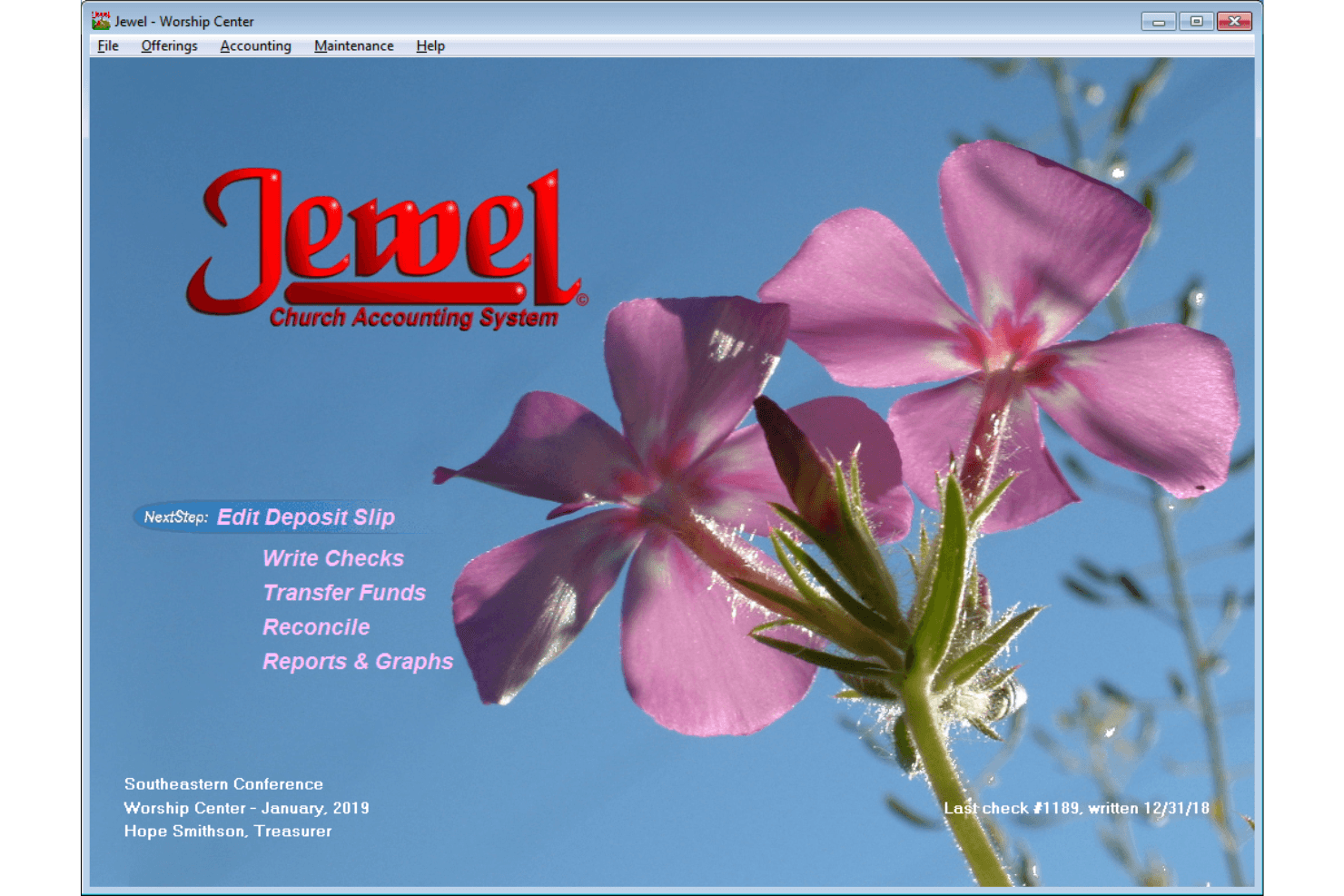
Jewel's home screen guides treasurers through key accounting tasks. Jewel is church accounting software built for Seventh-day Adventist treasurers, guiding users through contribution tracking, check writing, budgeting, and conference remittance reporting.
Who Is Jewel Best For?
Jewel is built for Seventh-day Adventist church treasurers who need guided, step-by-step help managing contributions, checks, and conference remittances.
Why I Picked Jewel
I picked Jewel as one of the best because it's purpose-built for Seventh-day Adventist church treasurers who need guided, step-by-step help through every accounting task. I love how the NextStep button walks you through offering entry, deposits, budget allocations, and monthly closings without requiring prior accounting knowledge. The built-in conference remittance reporting also means your monthly report to the Conference gets handled directly inside the same workflow.
Jewel Key Features
- AdventistGiving import: Jewel pulls contribution data directly from AdventistGiving into your records without manual re-entry.
- Automatic data backup: Jewel backs up your database to the hard drive and external memory automatically, with an additional offsite copy sent to the Server at monthly closing.
- Multi-currency support: Jewel accommodates various national currencies, making it usable for church treasurers outside the United States.
- ScreenShare auditor access: Jewel's ScreenShare feature lets a conference auditor view and control your screen in real time for remote training or technical support.
Jewel Integrations
Jewel’s documented integrations include AdventistGiving imports and a Server/Reporter workflow that transfers remittance data into Conference software. No API or broader integration catalog is documented.
Pros and Cons
Pros:
- ScreenShare supports auditor training and assistance
- Tracks church funds and budget allocations
- NextStep guides recurring accounting tasks
Cons:
- May not suit larger organizations’ needs
- No documented invoicing or receivables
Learn more about Jewel:
Outras alternativas ao Sage Intacct
Eis algumas alternativas adicionais ao Sage Intacct que não foram incluídas na minha lista, mas que ainda vale a pena conhecer:
- 11ChMeetingsBest for event management
- 12GracelyBest for donation tracking
- 13Tithe.lyBest for online giving tools
- 14AplosBest for small nonprofits
- 15RealmBest for church communication
- 16MinistryPlatformBest for financial stewardship
- 17MIP Fund AccountingBest for fund accounting
How I Evaluate Sage Alternatives
I split my evaluation into two layers: the baseline any Sage replacement must offer—true fund accounting, clergy payroll, contribution tracking—and the differentiators that separate the best options.
Core Functionality (Table Stakes For This List)
When I'm selecting tools for my list, I rank each one on a scale from 0 (does not offer the functionality) to 5 (excels in this area) for each core functionality listed below. Then, I calculate the tool's total score into a percentage. Each tool needs to achieve a minimum total score of 55% to be considered for inclusion.
- Fund Accounting: I check whether a platform supports true fund segregation—tracking building campaigns, missions funds, and benevolence reserves separately with inter-fund transfers.
- Contribution & Donation Tracking: Each tool should let you record tithes, pledges, and one-time gifts at the donor level and generate year-end giving statements without manual workarounds.
- Church-Specific Chart of Accounts: I look for prebuilt church or nonprofit COA templates rather than generic for-profit structures that force your bookkeeper to rebuild everything from scratch.
- Financial Reporting & Board Compliance: The platform should produce nonprofit-standard reports like statements of activities and budget-vs.-actual by fund that you can hand directly to your board or denomination.
- Payroll & Clergy Compensation: Clergy tax situations are unique, so I evaluate whether the tool handles housing allowances, dual-status tax treatment, and minister payroll natively.
- Accounts Payable & Bank Reconciliation: A viable Sage replacement needs solid AP workflows and bank reconciliation—vendor payments, bill approvals, and bank feed imports should all be in place.
Once I have a list of tools that meet this criteria, I consider what sets each platform apart.
Differentiating Factors (What Sets Vendors Apart)
Here's how I compare and contrast different vendors:
Standout Features
Online and mobile giving is a big differentiator—I look for platforms where members can give via text, app, or web without routing through a separate donation processor. Built-in congregation management also matters because tracking families, attendance, and small groups alongside financials saves your admin team from juggling two systems. For churches running multiple campuses, I evaluate whether a platform can maintain separate books and fund reports per location under one login.
Beyond Features
Migration from Sage can be painful, so I evaluate whether a vendor offers guided data migration for your chart of accounts, historical GL, and donor records. Pricing transparency matters too—church budgets are tight, and I look for plans scaled to congregation size without hidden fees. I also consider deployment and access controls, since your treasurer, board members, and campus pastors all need cloud-based login with role-based permissions that protect sensitive donor and payroll data.
Related Reviews
Por que motivo procurar uma alternativa ao Sage Intacct?
Embora o Sage Intacct seja uma boa opção de software de contabilidade para igrejas, existem vários motivos pelos quais alguns utilizadores procuram soluções alternativas. Pode estar à procura de uma alternativa ao Sage Intacct porque…
- Não dispõe de funcionalidades específicas para igrejas
- A sua equipa precisa de uma interface mais intuitiva
- Procura uma solução mais económica
- Precisa de uma melhor integração com outras ferramentas
- Gere uma congregação mais pequena
- Precisa de suporte para operações internacionais
Se alguma destas situações lhe parece familiar, veio ao lugar certo. A minha lista inclui várias opções de software de contabilidade para igrejas mais adequadas a equipas que enfrentam estes desafios com o Sage Intacct e procuram soluções alternativas.
Principais funcionalidades do Sage Intacct
Eis algumas das principais funcionalidades do Sage Intacct, para o ajudar a comparar as ofertas das soluções alternativas:
- Contas a pagar: Automatiza processos e poupa tempo na gestão de pagamentos.
- Contas a receber: Aumenta o fluxo de caixa através de processos de faturação eficientes.
- Razão geral: Oferece flexibilidade com análises financeiras multidimensionais.
- Gestão de tesouraria: Proporciona visibilidade em tempo real sobre o dinheiro disponível e a liquidez.
- Gestão de encomendas: Simplifica o processamento de encomendas e reduz o trabalho manual.
- Compras: Controla as despesas através de fluxos de trabalho de compras automatizados.
- Contabilidade de projetos: Regista com precisão os custos e a rentabilidade dos projetos.
- Gestão de tempo e despesas: Simplifica o registo e a aprovação de despesas.
- Gestão de inventário: Gere os níveis de inventário e melhora o controlo de stock.
- Relatórios financeiros: Fornece informações úteis através de painéis e relatórios personalizáveis.