

Freshbooks-beoordeling: Voordelen, Nadelen, Functies & Prijzen
Wat komt hierna? Abonneer je op onze nieuwsbrief en ontvang de nieuwste hulpmiddelen, beste werkwijzen en inzichten van deskundige predikanten en kerkleiders over het beheren van kerken.

We review tools independently, and commissions help fund our testing. See our transparency policy, our methodology, or suggest a tool.
FreshBooks is a church accounting software built for small to mid-sized ministries that need to track donations, manage expenses, and handle invoicing without a dedicated finance team. I'd recommend it if your church has outgrown spreadsheets but finds QuickBooks more complex than your actual financial needs require. FreshBooks covers the core accounting functions with a much lower learning curve, which makes it a practical fit for pastors or administrators managing the books alongside everything else on their plate.
FreshBooks Evaluation Summary
4.5/5
- From $12/month (billed annually)
- Free demo + 30-day free trial available
Waarom u onze softwareaanbevelingen kunt vertrouwen
6,700+
Reviews
20
Industry experts
16+
Evaluation factors
14
Years
Ons team test en beoordeelt software sinds 2012. Als kerkleiders weten we zelf hoe moeilijk — en belangrijk — het is om de juiste software te kiezen.
Voor deze gids hebben we tools geëvalueerd met behulp van praktijktests en onafhankelijk onderzoek, waarbij we tools beoordeelden aan de hand van onze selectiecriteria.
Onze reviews weerspiegelen ons menselijke redactionele oordeel, geen verkooppraatje.
FreshBooks Overview
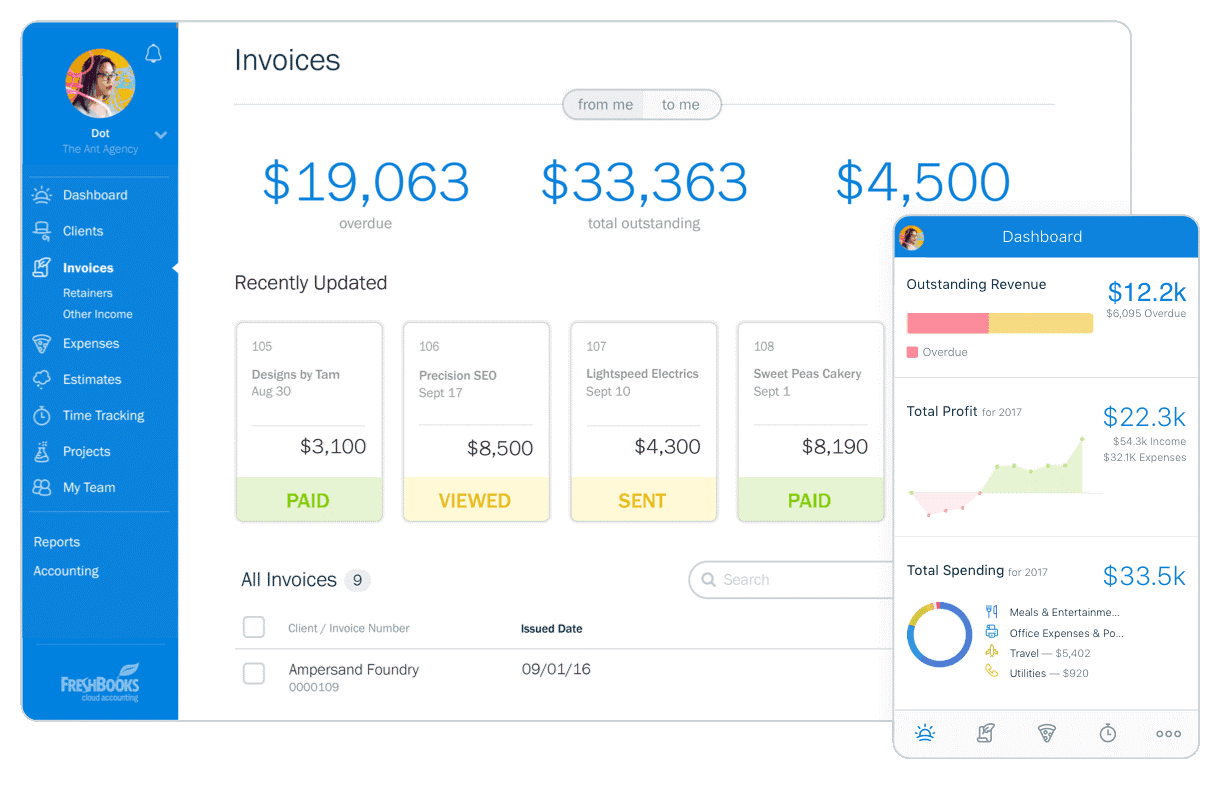
In my opinion, Freshbooks is a solid option for churches looking for straightforward accounting software. It outshines competitors with its user-friendly interface and efficient invoice management. While its feature set may not be as extensive as some other platforms, it excels in simplicity and ease of use, making it ideal for small to medium-sized churches.
For those who value simplicity and effective customer support, Freshbooks is a worthy consideration. However, for larger organizations needing more detailed transaction tracking and reporting, other options might better serve those needs.
Pros
- You can easily track expenses and manage invoices with Freshbooks.
- The intuitive interface makes it simple for your team to use.
- Freshbooks offers reliable customer support to assist you when needed.
Cons
- Freshbooks may lack some advanced reporting features for detailed financial analysis.
- It can be less suitable for very large churches with complex accounting needs.
- Freshbooks might require some manual workarounds for specific church-related transactions.
Is FreshBooks Right For Your Needs?
Voor wie is Freshbooks geschikt?
Small to medium-sized churches and non-profit organizations would be a good fit for Freshbooks. If your church needs simple invoicing and expense tracking without the complexity of larger systems, Freshbooks offers a straightforward solution. Youth ministries and community outreach programs, which often require quick and efficient financial management, will find Freshbooks's user-friendly interface and reliable support particularly beneficial.
Kleine tot middelgrote kerken en non-profitorganisaties zouden goed bij Freshbooks passen. Als je kerk behoefte heeft aan eenvoudige facturering en het bijhouden van uitgaven zonder de complexiteit van grotere systemen, biedt Freshbooks een overzichtelijke oplossing. Jeugdwerk en programma’s voor gemeenschapsactiviteiten, waarvoor vaak snel en efficiënt financieel beheer nodig is, zullen vooral profiteren van de gebruiksvriendelijke interface en betrouwbare ondersteuning van Freshbooks.
- Small ChurchesFreshbooks is great for small churches needing basic accounting without complex features.
- Youth MinistriesIts easy-to-use interface helps youth ministries manage their budgets efficiently.
- Community OutreachFreshbooks supports simple expense tracking for community outreach projects.
- Non-Profit OrganizationsNon-profits benefit from Freshbooks's straightforward invoicing and expense tools.
- Freelance AccountantsFreelance accountants can use Freshbooks for managing multiple small clients with ease.
- Volunteer TeamsVolunteer teams find Freshbooks useful for handling basic financial tasks without hassle.
Voor wie is Freshbooks niet geschikt?
Large churches or organizations with complex financial needs wouldn't be a good fit for Freshbooks. If your church requires detailed financial reporting, advanced transaction tracking, or multiple integrations, Freshbooks might fall short. Large finance departments needing comprehensive accounting solutions will find its feature set too basic for their needs.
Grote kerken of organisaties met complexe financiële behoeften zouden niet goed bij Freshbooks passen. Als je kerk behoefte heeft aan gedetailleerde financiële rapportages, geavanceerde transactievolging of meerdere integraties, kan Freshbooks tekortschieten. Grote financiële afdelingen die uitgebreide boekhoudoplossingen nodig hebben, zullen de functieset te beperkt vinden voor hun behoeften.
- Large ChurchesLarge churches need more advanced reporting and complex accounting functionalities.
- Corporate AccountingCorporate accounting requires detailed financial analysis that Freshbooks doesn't offer.
- Finance DepartmentsFinance departments need robust features beyond Freshbooks's basic capabilities.
- Educational InstitutionsSchools often require more comprehensive budgeting and financial management tools.
- Government AgenciesGovernment agencies demand intricate financial systems Freshbooks can't provide.
- Manufacturing CompaniesManufacturers need detailed cost tracking and inventory management, which Freshbooks lacks.
Core Features
Invoicing:
Freshbooks lets you create and send professional invoices quickly. Customize templates to suit your church's branding, making your financial interactions more personal.
Expense Tracking:
You can easily track and categorize expenses, helping you manage your church's budget efficiently. Snap photos of receipts and attach them directly to expenses for better record-keeping.
Time Tracking:
Track time spent on various church activities or projects, ensuring accurate billing and time management. This feature is especially useful for managing volunteer hours.
Reporting:
Freshbooks offers basic financial reports that give you a clear view of your church's financial health. Access income statements and expense reports with just a few clicks.
Estimates:
Create detailed estimates for church projects or events, and convert them into invoices once approved. This helps you manage project finances from start to finish.
Client Portal:
Your team can provide clients or church members with a portal to view invoices and payment history. This transparency builds trust and streamlines communication.

Ease of Use
Freshbooks stands out for its user-friendly interface, making it a breeze for your team to navigate. The clean design and intuitive layout mean you won't waste time hunting for features. Even those with minimal accounting experience can manage church finances with ease. Its straightforward setup and accessible help resources ensure you get up and running quickly. Compared to other options, Freshbooks simplifies tasks like invoicing and expense tracking, making it a favorite for busy church staff.

Integrations
Integrations include FreshCurrencies, Cash Flow Frog, Approveit, Tallyfor, Syft Analytics, FreshBooks Payroll, Gusto, SurePayroll, Payment Evolution, NiceJob, Acuity Scheduling, and Gmail and Microsoft Outlook Add-Ons.
FreshBooks Specs
- 2-Factor Authentication: Yes
- Accounts Payable: Yes
- Accounts Receivable: Yes
- API: Yes
- Balance Sheet: Yes
- Billing/Invoicing: Yes
- BitCoin: No
- Budgeting: Yes
- Calendar Management: No
- Contact Management: No
- CRM Integration: Yes
- Customer Management: Yes
- Dashboard: Yes
- Data Export: Yes
- Data Import: Yes
- Data Visualization: Yes
- Expense Tracking: Yes
- External Integrations: Yes
- Forecasting: No
- General Account Ledger: Yes
- Inventory Tracking: No
- Multi-Currency: Yes
- Multi-User: No
- Notifications: Yes
- P&L: Yes
- PayPal: Yes
- Payroll: Yes
- SAP Integration: No
- Stripe: Yes
- Supplier Management: No
- Tax Management: Yes
Alternatives to FreshBooks


FreshBooks FAQs
Wat is de volgende stap?
Abonneer je op onze nieuwsbrief voor de nieuwste hulpmiddelen, beste praktijken en inzichten van deskundige voorgangers en kerkleiders over het leiden van kerken.