

Het beheren van de salarisadministratie van een kerk kan lastig zijn, vooral als je een tool gebruikt die niet helemaal aansluit op je behoeften. Misschien raak je gefrustreerd door Paylocity, vanwege de complexiteit, de kosten of het ontbreken van specifieke functies voor kerkbeheer.
Uit mijn ervaring weet ik dat de juiste software een enorm verschil kan maken. Daarom heb ik verschillende concurrenten van Paylocity onafhankelijk beoordeeld en getest.
In dit artikel deel ik mijn beste keuzes. Ik help je een oplossing te vinden die aansluit op jouw unieke behoeften, of je nu vooral let op gebruiksgemak, betaalbaarheid of specifieke functies voor kerken. Laten we de opties bekijken die je salarisverwerking eenvoudiger en efficiënter kunnen maken.
Wat is Paylocity?
Paylocity is salarisadministratiesoftware voor kerken die is ontworpen om salarisadministratieve taken efficiënt te beheren. Het wordt vaak gebruikt door HR-professionals en financieel beheerders in kerken en andere organisaties vanwege de mogelijkheid om het beheer van de salarisadministratie te vereenvoudigen.
Functies zoals geautomatiseerde belastingaangifte, directe storting en zelfbediening voor werknemers helpen de handmatige werklast te verminderen en de nauwkeurigheid te verbeteren. Over het algemeen biedt Paylocity meerwaarde doordat het de verwerking van salarissen beter beheersbaar maakt voor je team.
Waarom u onze softwareaanbevelingen kunt vertrouwen
6,700+
Reviews
20
Industry experts
16+
Evaluation factors
14
Years
Ons team test en beoordeelt software sinds 2012. Als kerkleiders weten we zelf hoe moeilijk — en belangrijk — het is om de juiste software te kiezen.
Voor deze gids hebben we tools geëvalueerd met behulp van praktijktests en onafhankelijk onderzoek, waarbij we tools beoordeelden aan de hand van onze selectiecriteria.
Onze reviews weerspiegelen ons menselijke redactionele oordeel, geen verkooppraatje.
Samenvatting van de beste Paylocity-concurrenten
In deze vergelijkingstabel worden de prijsgegevens van mijn beste keuzes onder de concurrenten van Paylocity samengevat, zodat je de beste optie voor je budget en zakelijke behoeften kunt vinden.
| Tool | Best For | Trial Info | Price | ||
|---|---|---|---|---|---|
| 1 | Het beste voor geautomatiseerde selfservice voor werknemers | Gratis demo beschikbaar | Prijzen op aanvraag | Website | |
| 2 | Beste voor wereldwijde naleving van salarisadministratie | Gratis demo beschikbaar | Vanaf $29/werknemer/maand | Website | |
| 3 | Beste voor uitgebreid beheer van arbeidsvoorwaarden | Gratis demo beschikbaar | Vanaf $8/gebruiker/maand | Website | |
| 4 | Beste voor de wereldwijde inhuur van contractanten en via EOR | Gratis demo beschikbaar | Vanaf $19/medewerker/maand | Website | |
| 5 | Het beste voor tijd- en aanwezigheidsregistratie | 30 dagen gratis proefperiode + gratis demo beschikbaar | Vanaf $50/maand | Website | |
| 6 | Ideaal voor digitale geefoplossingen | Gratis proefperiode van 30 dagen beschikbaar | Vanaf $72/maand | Website | |
| 7 | Beste voor boekhouding en facturering | Gratis proefperiode van 30 dagen beschikbaar | Vanaf $2.50/maand | Website | |
| 8 | Ideaal voor tools voor kerkelijke betrokkenheid | Gratis proefversie beschikbaar | Vanaf $69.99/maand | Website | |
| 9 | Beste voor gratis facturatie en betalingen | Gratis abonnement beschikbaar | Vanaf $16/gebruiker/maand | Website | |
| 10 | Het beste voor kleine en middelgrote bedrijven | Gratis demo beschikbaar | Vanaf $49/maand + $6/gebruiker/maand | Website |


Beoordelingen van de beste Paylocity-concurrenten
Hieronder vind je mijn gedetailleerde samenvattingen van de beste concurrenten van Paylocity die mijn shortlist hebben gehaald. In mijn beoordelingen bespreek ik de belangrijkste functies, voordelen & nadelen, integraties en ideale gebruikssituaties van elke tool in detail, zodat je de beste optie voor jou kunt vinden.
 Het beste voor geautomatiseerde selfservice voor werknemers
- Gratis demo beschikbaar
- Prijzen op aanvraag
Visit WebsiteCustomer Rating:4.3/5
Paycom biedt een loonadministratie- en HR-platform voor meerdere apparaten met loonoverzichten, toegang tot loonstroken en het bijhouden van wijzigingen door werknemers voor personeelsbeheer. Paycom biedt middelgrote en grote organisaties een uniform HR- en loonadministratieplatform met uitgebreide automatiserings- en selfservicefuncties. Als je op zoek bent naar software die werknemers meer mogelijkheden geeft, compliance vereenvoudigt en alle kernfuncties van HR samenbrengt, is Paycom een praktische optie.
Voor wie is Paycom het meest geschikt?
Paycom is zeer geschikt voor HR-teams binnen middelgrote tot grote organisaties die willen dat werknemers hun eigen loonadministratie- en HR-taken beheren.
Waarom Paycom een goede concurrent van Paylocity is
Ik heb specifiek voor Paycom gekozen vanwege de selfserviceautomatisering, die verder gaat dan die van de meeste HR-platforms. De opvallendste functie hier is Beti, de loonadministratietool van Paycom die werknemers centraal stelt. Hiermee kunnen werknemers hun eigen loonadministratie controleren en goedkeuren voordat deze wordt ingediend, zodat fouten worden opgespoord voordat ze de loonadministrateurs bereiken. Ik waardeer ook het selfserviceportaal voor werknemers, waar medewerkers persoonlijke gegevens kunnen bijwerken, verlof kunnen aanvragen en hun loonhistorie kunnen bekijken zonder tussenkomst van HR. In de praktijk betekent dit dat mijn team veel minder tijd kwijt is aan het afhandelen van routinematige verzoeken en meer tijd kan besteden aan werk dat er echt toe doet.
Belangrijkste functies van Paycom
- Hulpmiddelen voor talentwerving: Plaats vacatures, volg sollicitanten en beheer het inwerkproces vanuit één HR-platform.
- Beheer van arbeidsvoorwaarden: Werknemers kunnen zich rechtstreeks via het Paycom-portaal aanmelden voor hun arbeidsvoorwaarden en deze beheren.
- Registratie van werktijd en aanwezigheid: Registreer uren, beheer roosters en houd verlofsaldi bij met ingebouwde hulpmiddelen.
- Compliancebeheer: Ingebouwde registratie voor ACA, FMLA en FLSA helpt HR-teams om te voldoen aan wettelijke vereisten.
Integraties van Paycom
Integraties worden voornamelijk geleverd via de eigen HR- en loonadministratiesuite van Paycom, die ingebouwde hulpmiddelen bevat voor talentbeheer, tijdregistratie, beheer van arbeidsvoorwaarden en selfservice voor werknemers binnen één database.
Pros and Cons
Pros:
- Selfservice voor werknemers geeft gebruikers de controle
- De mobiele app biedt volledige toegang tot HR
- Geautomatiseerde taakmeldingen verminderen handmatige opvolging
Cons:
- Het installatieproces kan tijdrovend zijn
- Beperkte flexibiliteit in de loonadministratieconfiguratie
Learn more about Paycom: Beste voor wereldwijde naleving van salarisadministratie
- Gratis demo beschikbaar
- Vanaf $29/werknemer/maand
Visit WebsiteCustomer Rating:4.9/5
Deel vereenvoudigt wereldwijde salarisadministratie met ingebouwde nalevingsfuncties. Deel is een platform voor salarisadministratie en naleving, ontworpen voor bedrijven met een wereldwijd personeelsbestand. HR-professionals en financiële teams gebruiken het voornamelijk om internationale salarisadministratie en naleving efficiënt te beheren.
Waarom het een goed alternatief voor Paylocity is: Deel biedt unieke voordelen voor teams die wereldwijde salarisoplossingen nodig hebben. De nalevingsmogelijkheden zorgen ervoor dat u voldoet aan internationale arbeidswetgeving.
De geautomatiseerde belastingberekeningen en gelokaliseerde contracten van het platform helpen bij het beheren van een divers personeelsbestand. De focus van Deel op wereldwijde naleving maakt het een sterk alternatief voor Paylocity voor bedrijven die grensoverschrijdend actief zijn.
Opvallende functies & integraties:
Functies omvatten geautomatiseerde belastingberekeningen, gelokaliseerde contracten en een wereldwijd nalevingsdashboard. Met deze functies kan uw team salarisadministratieve taken eenvoudig afhandelen. Deel biedt ook een gecentraliseerd platform voor het beheren van internationale contractanten en werknemers.
Integraties omvatten QuickBooks, Xero, NetSuite, Workday, BambooHR, Greenhouse, Lever, Ashby, Personio en Bob.
Pros and Cons
Pros:
- Geautomatiseerde belastingberekeningen
- Gelokaliseerde contracten
- Gecentraliseerd internationaal beheer
Cons:
- Vereist internettoegang
- Mogelijk zijn tools van derden nodig voor analyses
Learn more about Deel Payroll: Beste voor uitgebreid beheer van arbeidsvoorwaarden
- Gratis demo beschikbaar
- Vanaf $8/gebruiker/maand
Visit WebsiteCustomer Rating:4.6/5
Justworks biedt uitgebreid beheer van arbeidsvoorwaarden naast loonadministratie en HR. Voor bedrijven die op zoek zijn naar een betrouwbare oplossing voor HR en loonadministratie biedt Justworks een platform dat is afgestemd op de uiteenlopende behoeften van kleine en middelgrote ondernemingen, waarbij uitgebreid beheer van arbeidsvoorwaarden een belangrijke kracht is. Dankzij de mogelijkheid om de verwerking van de loonadministratie, het beheer van arbeidsvoorwaarden en tijdregistratie te stroomlijnen, spreekt Justworks bedrijven aan die hun HR-processen willen verbeteren en tegelijkertijd aan de regelgeving willen blijven voldoen. Het helpt bij uitdagingen zoals het beheren van arbeidsvoorwaarden, het faciliteren van internationale loonadministratie en het ondersteunen van het inwerken van medewerkers, waardoor het een aantrekkelijke optie is voor organisaties die hun HR-functies willen verbeteren.
Waarom ik voor Justworks heb gekozen
Ik heb voor Justworks gekozen vanwege het uitgebreide beheer van arbeidsvoorwaarden, wat een belangrijke behoefte is voor teams die alternatieven voor Paylocity vergelijken. Het ondersteunt de inschrijving voor arbeidsvoorwaarden en het doorlopende beheer ervan, met toegang tot medische, tandheelkundige en oogzorgverzekeringen via grote verzekeraars. Naast arbeidsvoorwaarden omvat Justworks ook loonadministratie met ondersteuning voor tijdregistratie, om handmatige invoer te verminderen en loonverwerkingen consistent te houden. Het kan als PEO opereren en biedt ook EOR-diensten voor bedrijven die hulp nodig hebben bij het aannemen van personeel op andere locaties.
Belangrijkste functies van Justworks
Naast uitgebreid beheer van arbeidsvoorwaarden biedt Justworks:
- Verlofbeheer: Hiermee kun je aangepast verlofbeleid opstellen en verlofsaldi van medewerkers bijhouden, hoewel hiervoor handmatige configuratie nodig is.
- Complianceoplossingen: Biedt PEO- en EOR-diensten om te helpen bij het beheren van loonadministratie en compliance, vooral bij internationale bedrijfsexpansie.
- Inwerken van medewerkers: Stroomlijnt het inwerkproces voor nieuwe medewerkers en zorgt voor een soepele overgang binnen het bedrijf.
- Rapportagemogelijkheden: Biedt vooraf samengestelde en aanpasbare loonadministratierapporten, hoewel de integratie met andere gegevenstypen beperkt is.
Integraties van Justworks
Integraties omvatten QuickBooks, Xero, BambooHR, JazzHR, Guideline en Mineral. Er is ook een API beschikbaar voor aangepaste integraties.
Pros and Cons
Pros:
- Transparante prijsopties voor loonadministratie- of PEO-abonnementen, met beschikbare add-ons
- Centraliseert loonadministratie, HR en het beheer van zorgverzekeringen
- Duidelijk medewerkersdashboard voor informatie over arbeidsvoorwaarden en salaris
Cons:
- Beperkte aanpassingsmogelijkheden voor workflows, goedkeuringen en complexe organisatiestructuren
- Minder geavanceerde HR-functies dan grotere bedrijfsplatforms
Learn more about Justworks: Beste voor de wereldwijde inhuur van contractanten en via EOR
- Gratis demo beschikbaar
- Vanaf $19/medewerker/maand
Visit WebsiteCustomer Rating:4.7/5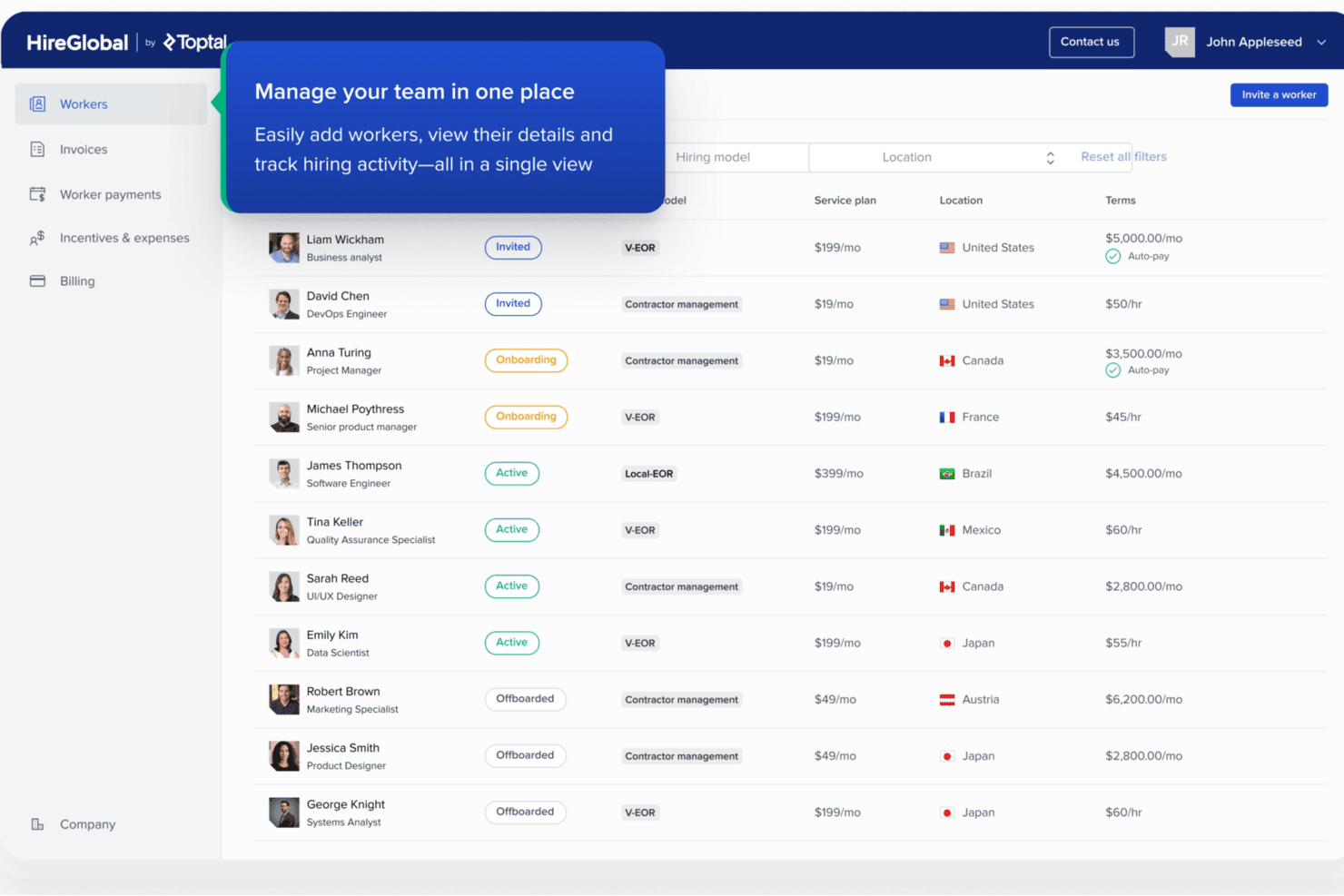
HireGlobal centraliseert het beheer van wereldwijde werknemers in één overzicht. HireGlobal is een wereldwijd werkgelegenheidsplatform voor kerken en organisaties die internationaal personeel of contractanten inhuren. Het helpt bij het beheren van salarisadministratie, naleving en administratie van grensoverschrijdende werknemers.
Voor wie is HireGlobal het meest geschikt?
HireGlobal is geschikt voor kerken en bedieningen die internationaal personeel of contractanten inhuren en hulp nodig hebben bij het beheren van grensoverschrijdende salarisadministratie en naleving.
Waarom HireGlobal een goede keuze is als concurrent van Paylocity
Ik heb HireGlobal gekozen als beste oplossing voor de wereldwijde inhuur van contractanten en via EOR, omdat het kerken ondersteunt die internationaal personeel en contractanten inhuren. Ik vind het prettig dat het grensoverschrijdende salarisadministratie, naleving en werknemersadministratie in één platform samenbrengt. Mijn team kan het gebruiken wanneer internationale inhuur voor de bediening leidt tot salarisverantwoordelijkheden in meerdere landen.
Belangrijkste functies van HireGlobal
- Ingebouwd HRIS: Sla personeelsdossiers en arbeidsgegevens op in één systeem.
- Controles bij indiensttreding: Controleer kandidaatgegevens tijdens het onboardingproces.
- Arbeidsovereenkomsten: Stel lokale arbeidsovereenkomsten op voor nieuwe medewerkers.
- Beheer van arbeidsvoorwaarden: Beheer arbeidsvoorwaarden naast een EOR-dienstverband.
Integraties van HireGlobal
Er worden momenteel geen ingebouwde integraties vermeld.
Pros and Cons
Pros:
- Ondersteunt inhuur in meer dan 180 landen
- Regelt lokale contracten, salarisadministratie en arbeidsvoorwaarden
- Combineert de administratie van contractanten en werknemers
Cons:
- Meerdere dienstverleners kunnen leiden tot inconsistenties in de dienstverlening
- De werkstromen voor contractanten zijn minder duidelijk gedocumenteerd
Learn more about HireGlobal: Het beste voor tijd- en aanwezigheidsregistratie
- 30 dagen gratis proefperiode + gratis demo beschikbaar
- Vanaf $50/maand
Visit WebsiteCustomer Rating:4.5/5
TimeTrex biedt tools voor personeelsbeheer voor medewerkersplanning, aanwezigheidsregistratie, salarisadministratie en HR-beheer. TimeTrex is een platform voor personeelsbeheer dat is ontworpen voor organisaties die alles-in-éénfuncties voor HR, salarisadministratie en medewerkerstijdregistratie willen. Het is een uitstekende keuze voor bedrijven die gestroomlijnde processen nodig hebben voor tijdregistratie, salarisadministratie en planning in één flexibel systeem.
Voor wie is TimeTrex het meest geschikt?
TimeTrex is geschikt voor HR-teams en operationele managers bij middelgrote bedrijven die nauwkeurige tijdregistratie van medewerkers en naleving van regelgeving nastreven.
Waarom TimeTrex een goede concurrent van Paylocity is
Ik heb TimeTrex voor deze lijst gekozen vanwege de uitgebreide mogelijkheden voor tijd- en aanwezigheidsregistratie in vergelijking met de meeste platforms die primair op salarisadministratie zijn gericht. Ik waardeer dat het biometrische methoden voor inklokken ondersteunt, waaronder vingerafdruk- en gezichtsherkenning, waardoor mijn team een veel hogere nauwkeurigheid bereikt dan met systemen op basis van pincodes of badges. Met TimeTrex kan ik ook gedetailleerde aanwezigheidsregels opstellen, waaronder aangepaste regels voor overuren en het bijhouden van afwezigheid, zodat ik niet word gedwongen om met starre standaardinstellingen te werken. Voor organisaties die ploegendienstmedewerkers of uurloonmedewerkers op meerdere locaties beheren, is een dergelijk niveau van controle echt moeilijk te vinden in één platform.
Belangrijkste functies van TimeTrex
- Salarisverwerking: Voer salarisberekeningen automatisch uit op basis van gewerkte uren, inclusief inhoudingen en loonbeslagen.
- Portaal voor zelfbediening van medewerkers: Laat medewerkers zelfstandig loonstroken bekijken, verlof aanvragen en persoonlijke gegevens bijwerken.
- Planningsfuncties: Stel medewerkersdiensten samen en wijs deze toe met planning via slepen en neerzetten voor verschillende afdelingen of locaties.
- Beheer van HR-documenten: Sla personeelsdossiers, contracten en nalevingsdocumenten op één plek op en beheer ze daar.
TimeTrex-integraties
TimeTrex biedt rechtstreekse integraties met QuickBooks, Sage, ADP, Paychex, Surepay en meer. Het biedt ook een API voor aangepaste integraties.
Pros and Cons
Pros:
- Geavanceerde opties voor biometrische identificatie en gezichtsherkenning
- Flexibele instellingen voor overuren- en aanwezigheidsregels
- Realtime monitoring van inklokmomenten van medewerkers
Cons:
- Het ontwerp van de interface oogt verouderd en rommelig
- De stabiliteit van de mobiele app verschilt per apparaat
Learn more about TimeTrex: Ideaal voor digitale geefoplossingen
- Gratis proefperiode van 30 dagen beschikbaar
- Vanaf $72/maand
Visit WebsiteCustomer Rating:4.7/5
Tithe.ly stroomlijnt digitaal geven met mobiele hulpmiddelen en hulpmiddelen voor donaties via sms. Tithe.ly is kerkbeheersoftware die zich richt op het bieden van digitale geefoplossingen voor kerken en religieuze organisaties. De belangrijkste gebruikers zijn kerkleiders en beheerders die online donaties en betrokkenheid van leden efficiënt moeten beheren.
Waarom het een goed alternatief voor Paylocity is: Tithe.ly biedt gespecialiseerde digitale geefhulpmiddelen die het een sterk alternatief voor Paylocity voor kerken maken. U kunt online donaties beheren, geeftrends volgen en via mobiele apps contact houden met uw gemeente.
De focus van het platform op digitaal geven omvat functies zoals geven via sms en via de app. Deze hulpmiddelen helpen uw team het beheer van donaties en de communicatie met leden te verbeteren en voorzien in behoeften die verder gaan dan salarisadministratie.
Belangrijkste functies en integraties:
Functies omvatten geven via sms, donaties via mobiele apps en analyse van geeftrends. U hebt ook toegang tot hulpmiddelen voor evenementregistratie en communicatie met leden. Tithe.ly biedt een gebruiksvriendelijk dashboard om donaties en betrokkenheid te helpen beheren.
Integraties omvatten QuickBooks, Planning Center, Elvanto, CCB, Rock RMS, Church Community Builder, Breeze, Faithlife, Shepherd's Staff en ACS Technologies.
Pros and Cons
Pros:
- Gespecialiseerde digitale geefhulpmiddelen
- Donaties via mobiele apps
- Analyse van geeftrends
Cons:
- Beperkte mogelijkheden voor salarisadministratie
- Internettoegang vereist
 7Beste voor boekhouding en facturering
Xero
- Gratis proefperiode van 30 dagen beschikbaar
- Vanaf $2.50/maand
Visit WebsiteCustomer Rating:4.4/5
Xero combineert salarisadministratie met facturering, onkosten en realtime rapporten. Xero is boekhoudsoftware voor kleine tot middelgrote bedrijven, met tools voor het beheren van financiën en facturering. De belangrijkste gebruikers zijn accountants en bedrijfseigenaren die behoefte hebben aan efficiënt financieel beheer en rapportage.
Waarom het een goed alternatief voor Paylocity is: Xero biedt een reeks boekhoudfuncties die het geschikt maken voor bedrijven die meer nodig hebben dan alleen salarisdiensten. U kunt facturering, bankafstemming en onkostenregistratie allemaal op één plek beheren.
De realtime financiële rapportage van Xero helpt u de financiële gezondheid van uw bedrijf bij te houden. De focus op boekhouding en facturering maakt het een sterk alternatief voor Paylocity voor wie uitgebreid financieel beheer nodig heeft.
Belangrijkste functies en integraties:
Functies omvatten bankafstemming, onkostenregistratie en realtime financiële rapportage. U kunt ook vaste activa en boekhouding in meerdere valuta beheren. Het dashboard van Xero geeft in één oogopslag een overzicht van uw financiële prestaties.
Integraties omvatten HubSpot, Stripe, Square, Shopify, PayPal, Gusto, Expensify, Deputy, Vend en Squarespace.
Pros and Cons
Pros:
- Uitgebreid financieel beheer
- Beheer van vaste activa
- Flexibele factureringsopties
Cons:
- Beperkte salarisfuncties
- Leercurve voor nieuwe gebruikers
 Ideaal voor tools voor kerkelijke betrokkenheid
- Gratis proefversie beschikbaar
- Vanaf $69.99/maand
Visit WebsiteCustomer Rating:4.8/5
SteepleMate ondersteunt kerkelijke betrokkenheid met hulpmiddelen voor gemeenschapsbereik en planning. SteepleMate is beheersoftware voor kerken, afgestemd op kerken die de betrokkenheid van hun gemeenschap en de operationele efficiëntie willen verbeteren. De belangrijkste gebruikers zijn kerkleiders en beheerders die hulpmiddelen nodig hebben voor het beheren van mensen, financiën en activiteiten voor gemeenschapsbereik.
Waarom het een goed alternatief voor Paylocity is: SteepleMate biedt betrokkenheidstools die speciaal voor kerken zijn ontworpen, waardoor het een sterk alternatief voor Paylocity is. U kunt mensen en groepen beheren, preken plannen en de digitale aanwezigheid van uw kerk verbeteren.
De software richt zich op betrokkenheid en omvat functies zoals activiteiten voor gemeenschapsbereik en academische ondersteuning. Deze mogelijkheden helpen uw team een verbonden en goed geïnformeerde kerkgemeenschap te bevorderen en voorzien in behoeften die verder gaan dan de verwerking van salarisbetalingen.
Opvallende functies & integraties:
Functies omvatten hulpmiddelen voor het plannen van preken, financiële rapportage en het beheer van academische programma's. U kunt ook de digitale aanwezigheid van uw kerk beheren met hulpmiddelen voor websites en sociale media. SteepleMate biedt gedetailleerde rapportage om kerkelijke activiteiten te volgen en te beheren.
Integraties omvatten QuickBooks, Mailchimp, Facebook, Google Calendar, Twitter, Instagram, Zoom, PayPal, Stripe en Slack.
Pros and Cons
Pros:
- Ondersteuning bij het plannen van preken
- Beheer van academische programma's
- Verbetering van de digitale aanwezigheid
Cons:
- Leercurve voor geavanceerde functies
- Basismogelijkheden voor rapportage
Learn more about SteepleMate: 9Beste voor gratis facturatie en betalingen
WAVE
- Gratis abonnement beschikbaar
- Vanaf $16/gebruiker/maand

WAVE verwerkt facturatie en betalingen via een overzichtelijke, gebruiksvriendelijke interface. WAVE is software voor financieel beheer gericht op kleine bedrijven en freelancers, met tools voor boekhouding, facturatie en betalingsverwerking. De belangrijkste gebruikers zijn eigenaars van kleine bedrijven en zelfstandige professionals die kosteneffectieve financiële oplossingen nodig hebben.
Waarom het een goed alternatief voor Paylocity is: WAVE biedt gratis facturatie- en betaalfuncties, waardoor het een aantrekkelijke optie is voor bedrijven met een beperkt budget. Je kunt je bedrijfsboekhouding en cashflow beheren zonder extra kosten te maken.
De intuïtieve interface van de software helpt je team om financiële taken eenvoudig uit te voeren. De focus van WAVE op het gratis aanbieden van essentiële financiële tools maakt het een sterk alternatief voor Paylocity voor wie kostenefficiëntie vooropstelt.
Opvallende functies & integraties:
Functies omvatten aanpasbare facturatie, het scannen van ontvangstbewijzen en het bijhouden van uitgaven. Je kunt je cashflow ook beheren met realtime financiële dashboards. De boekhoudtools van WAVE helpen je om al je bedrijfsfinanciën op één plek bij te houden.
Integraties omvatten PayPal, Etsy, Shopify, Shoeboxed, Zapier, Google Sheets, HubSpot, Slack, Mailchimp en Stripe.
Pros and Cons
Pros:
- Gratis facturatie en betalingen
- Realtime financiële dashboards
- Eenvoudig uitgaven bijhouden
Cons:
- Geen telefonische ondersteuning
- Basisrapportagemogelijkheden
Learn more about WAVE: 10Het beste voor kleine en middelgrote bedrijven
Gusto
- Gratis demo beschikbaar
- Vanaf $49/maand + $6/gebruiker/maand

Gusto vereenvoudigt HR met geautomatiseerd salaris- en voordelenbeheer. Gusto is salaris- en HR-software voor kleine en middelgrote bedrijven, met functies voor salarisverwerking, voordelenbeheer en HR-management. De belangrijkste gebruikers zijn bedrijfseigenaren en HR-teams die een alles-in-éénplatform nodig hebben voor het beheren van salarissen en werknemersvoordelen.
Waarom het een goed alternatief voor Paylocity is: Gusto biedt een gebruiksvriendelijke interface en een uitgebreide reeks HR-tools, waardoor het ideaal is voor kleine en middelgrote bedrijven. U kunt moeiteloos salarissen, voordelen en naleving beheren.
De geautomatiseerde aangiften van salarissen en het voordelenbeheer van de software helpen uw team tijd te besparen. Gusto’s focus op het vereenvoudigen van HR-processen maakt het een waardevol alternatief voor Paylocity voor bedrijven die op zoek zijn naar gebruiksgemak en efficiëntie.
Opvallende functies & integraties:
Functies omvatten geautomatiseerde aangiften van salarissen, voordelenbeheer en nalevingsbeheer. U hebt ook toegang tot selfservicetools voor werknemers voor het beheren van persoonlijke gegevens. Gusto biedt gedetailleerde salarisrapporten om u te helpen financiële gegevens te volgen.
Integraties omvatten QuickBooks, Xero, Clover, FreshBooks, Trainual, Deputy, TSheets, When I Work, Homebase en Shopify.
Pros and Cons
Pros:
- Uitgebreide HR-tools
- Eenvoudig salarisbeheer
- Selfservicemogelijkheden voor werknemers
Cons:
- Beperkte aanpassingsmogelijkheden
- Basale analyses
Learn more about Gusto:
Andere concurrenten van Paylocity
Hier zijn enkele andere concurrenten van Paylocity die mijn shortlist niet hebben gehaald, maar die toch het bekijken waard zijn:
- 11Fellowship OneIdeaal voor uitgebreid kerkbeheer
- 12PowerChurch PlusHet beste voor kerkbeheer
- 13CDM+Beste voor beheer van non-profitorganisaties
- 14Church WindowsBeste voor financieel beheer van kerken
- 15OnPayIdeaal voor HR-integratie in kleine bedrijven
- 16Patriot PayrollBeste keuze voor betaalbaarheid voor kleine bedrijven
Hoe ik concurrenten van Paylocity evalueer
Wanneer een kerkbeheerder te maken krijgt met het instellen van een huisvestingstoelage of belastingaangiften voor predikanten met een dubbele status, moeten de tools op mijn lijst eerst aan de basiseisen voldoen—daarna beoordeel ik wat elke tool onderscheidt.
Kernfunctionaliteit (basisvereisten voor deze lijst)
Wanneer ik tools voor mijn lijst selecteer, beoordeel ik elke tool op een schaal van 0 (biedt de functionaliteit niet) tot 5 (blink uit op dit gebied) voor elke hieronder genoemde kernfunctionaliteit. Vervolgens bereken ik de totaalscore van de tool als percentage. Elke tool moet een minimale totaalscore van 55% behalen om in aanmerking te komen voor opname.
- Loonverwerking voor geestelijken: Ik controleer of een platform huisvestingstoelagen en de fiscale behandeling van predikanten met een dubbele status standaard ondersteunt, of dat er bij elke loonrun handmatige oplossingen nodig zijn.
- Belastingaangiften en naleving: Elke tool moet federale, staats- en lokale aangiften ondersteunen, evenals het genereren van W-2- en 1099-formulieren aan het einde van het jaar, vooral voor non-profitorganisaties met verschillende personeelsclassificaties.
- HR en personeelsbeheer: Ik zoek naar een centraal HRIS dat personeelsdossiers opslaat, documenten voor onboarding beheert en personeelsgegevens tussen afdelingen of bedieningsteams georganiseerd houdt.
- Beheer van arbeidsvoorwaarden en PTO: Of je kerk nu een gezondheidsplan van een kerkgenootschap of een optie van een derde partij aanbiedt, ik beoordeel hoe elke tool inschrijving, inhoudingen en de configuratie van PTO-beleid verwerkt.
- Tijd- en aanwezigheidsregistratie: Uurloon ontvangen technici voor de eredienst en parttime kinderopvangmedewerkers hebben betrouwbare inklokmogelijkheden nodig. Daarom kijk ik naar het vastleggen van urenstaten, goedkeuringsprocessen en synchronisatie met de loonadministratie.
- Directe storting en zelfbediening: Medewerkers moeten zelf loonstroken en belastingdocumenten kunnen bekijken en persoonlijke gegevens kunnen bijwerken. Daarom beoordeel ik het medewerkersportaal en de mobiele toegang van elk platform.
Zodra ik een lijst heb met tools die aan deze criteria voldoen, kijk ik naar wat elk platform onderscheidt.
Onderscheidende factoren (wat leveranciers van elkaar onderscheidt)
Zo vergelijk ik verschillende leveranciers:
Opvallende functies
Ik zoek naar standaardintegraties met ChMS-platforms zoals Planning Center of Breeze, zodat personeelsgegevens zonder handmatige invoer gesynchroniseerd blijven. Loonadministratie voor meerdere entiteiten is ook belangrijk, vooral voor kerken met meerdere campussen of aangesloten bedieningen die onder afzonderlijke 501(c)(3)-entiteiten vallen. Synchronisatie met fondsadministratie is een andere functie die ik nauwgezet beoordeel, omdat loonkosten vaak over meerdere bedieningsbudgetten moeten worden verdeeld. Ingebouwde workflows voor antecedentenonderzoek vallen ook op wanneer een kerk regelmatig controles nodig heeft voor vrijwilligers in de kinderbediening.
Meer dan functies alleen
Specifieke expertise op het gebied van ondersteuning voor kerken is belangrijk, omdat een algemene medewerker van een loonadministratiedienst je vaak niet kan begeleiden bij het instellen van een huisvestingstoelage of vragen over SECA-belastingen. Ik beoordeel of het ondersteuningsteam van een leverancier uit eerste hand bekend is met de belastingwetgeving voor geestelijken. De prijsstructuur is eveneens belangrijk, aangezien veel kerken met krappe budgetten werken en een mix hebben van fulltime, parttime en seizoensmedewerkers. Ik kijk ook naar hoe soepel het migratieproces halverwege het jaar verloopt, vooral of een platform eerdere lonen en aangiften kan afstemmen wanneer je buiten januari overstapt van Paylocity.
Waarom zoeken naar een alternatief voor Paylocity?
Hoewel Paylocity een goede keuze is voor salarisadministratiesoftware voor kerken, zijn er verschillende redenen waarom sommige gebruikers op zoek gaan naar alternatieve oplossingen. Misschien zoek je een alternatief voor Paylocity omdat…
- Je meer functies specifiek voor kerken nodig hebt
- Je team moeite heeft met complexe interfaces
- Je op zoek bent naar betaalbaardere opties
- Je betere klantenondersteuning nodig hebt
- Je software nodig hebt die meegroeit met de organisatie
- Je betere integratiemogelijkheden zoekt
Als een van deze punten op jou van toepassing is, ben je hier aan het juiste adres. Mijn lijst bevat verschillende opties voor salarisadministratiesoftware voor kerken die beter geschikt zijn voor teams die met deze uitdagingen van Paylocity te maken hebben en op zoek zijn naar alternatieve oplossingen.
Belangrijkste functies van Paylocity
Hier zijn enkele van de belangrijkste functies van Paylocity, zodat je kunt vergelijken wat alternatieve oplossingen bieden:
- Geautomatiseerde salarisverwerking: Verwerkt salarisberekeningen en uitbetalingen efficiënt, waardoor handmatige fouten voor je team worden verminderd.
- Portaal voor zelfbediening door werknemers: Hiermee kunnen je werknemers zelfstandig toegang krijgen tot hun salarisgegevens, loonstroken en belastingdocumenten.
- Registratie van werktijd en aanwezigheid: Helpt je het aantal gewerkte uren te controleren en verlofaanvragen naadloos te beheren.
- Beheer van belastingcompliance: Automatiseert belastingberekeningen en aangiften, zodat je organisatie aan de regelgeving blijft voldoen.
- Rapportage- en analysetools: Bieden gedetailleerde inzichten in salarisgegevens en personeelsindicatoren ter ondersteuning van besluitvorming.
- Mobiele toegang: Stelt je team in staat om onderweg salarisgerelateerde taken te beheren via een mobielvriendelijke interface.
- Integratie met andere HR-systemen: Zorgt voor een soepele gegevensstroom tussen salarisverwerking en HR-functies, waardoor de algehele efficiëntie toeneemt.
- Beheer van arbeidsvoorwaarden: Vereenvoudigt het beheer van arbeidsvoorwaarden voor werknemers, inclusief inschrijving en registratie.
- Opties voor rechtstreekse storting: Biedt een veilige en tijdige rechtstreekse storting van werknemerslonen op hun bankrekeningen.
- Aanpasbare werkstromen: Stellen je in staat salarisprocessen af te stemmen op specifieke organisatorische behoeften.
Wat nu:
Als je momenteel onderzoek doet naar salarissoftware voor kerken, neem dan contact op met een SoftwareSelect-adviseur voor gratis aanbevelingen.
Je vult een formulier in en voert een kort gesprek waarin ze ingaan op de specifieke kenmerken van je behoeften. Vervolgens ontvang je een selectie van softwareoplossingen om te beoordelen. Ze begeleiden je zelfs tijdens het volledige aankoopproces, inclusief prijsonderhandelingen.