

AI-tools voor kerkbeheer zijn softwareoplossingen die kunstmatige intelligentie gebruiken om kerken te helpen hun activiteiten te organiseren, leden te betrekken en hun doelen voor het gemeentewerk te ondersteunen. Als je op zoek bent naar manieren om spiritueel leiderschap in balans te brengen met administratieve taken, kunnen deze tools je helpen routinetaken te automatiseren, de communicatie te verbeteren en datagestuurde beslissingen te nemen.
Met beperkte middelen en toenemende verwachtingen kan het kiezen van de juiste AI-tools tijd vrijmaken voor pastorale zorg en de impact van je kerk versterken.
In deze lijst vind je betrouwbare opties om evenementen, donaties, communicatie en meer te beheren, zodat je je kunt richten op het goed leiden van je gemeente.
Waarom u onze softwareaanbevelingen kunt vertrouwen
6,700+
Reviews
20
Industry experts
16+
Evaluation factors
14
Years
Ons team test en beoordeelt software sinds 2012. Als kerkleiders weten we zelf hoe moeilijk — en belangrijk — het is om de juiste software te kiezen.
Voor deze gids hebben we tools geëvalueerd met behulp van praktijktests en onafhankelijk onderzoek, waarbij we tools beoordeelden aan de hand van onze selectiecriteria.
Onze reviews weerspiegelen ons menselijke redactionele oordeel, geen verkooppraatje.
Overzicht van de beste AI-tools voor kerkbeheer
Deze vergelijkingsgrafiek vat de prijsgegevens samen van mijn selectie van de beste AI-tools voor kerkbeheer, zodat je de beste optie voor je budget en zakelijke behoeften kunt vinden.
| Tool | Best For | Trial Info | Price | ||
|---|---|---|---|---|---|
| 1 | Het beste voor AI-antwoorden op basis van kerkelijke inhoud | Een gratis proefperiode van 60 dagen beschikbaar | Vanaf $99/maand | Website | |
| 2 | Het meest geschikt voor het doorzoeken van kerkgegevens via je eigen AI | Gratis abonnement beschikbaar OF gratis proefperiode van 30 dagen | Vanaf $12/maand | Website | |
| 3 | Beste voor live meertalige vertaling van preken | Gratis proefversie beschikbaar | Vanaf $150/maand | Website | |
| 4 | Het beste voor digitaal geven en donatiebeheer | Een gratis proefperiode van 30 dagen beschikbaar | Vanaf $72/maand | Website | |
| 5 | Het beste voor het coördineren van vrijwilligersroosters | Gratis proefperiode van 30 dagen beschikbaar | Vanaf $15/maand | Website | |
| 6 | Het beste voor functies voor mobiele betrokkenheid | Gratis demo beschikbaar | Prijzen op aanvraag | Website | |
| 7 | Het beste voor het maken en beheren van websites | 14 dagen gratis proefperiode | Vanaf $29/maand (jaarlijks gefactureerd) | Website | |
| 8 | Het beste voor aanpasbaar gegevensbeheer | Gratis demo beschikbaar | Prijs op aanvraag | Website | |
| 9 | Ideaal voor het omzetten van preken in deelbare inhoud | Gratis proefversie beschikbaar | Vanaf $39/maand | Website | |
| 10 | Het meest geschikt voor geautomatiseerde werkstromen voor evenementenplanning | Gratis abonnement beschikbaar | Vanaf $65/maand | Website |


Beoordelingen van AI-tools voor kerkbeheer
Hieronder vind je mijn uitgebreide samenvattingen van de beste AI-tools voor kerkbeheer die op mijn shortlist zijn beland. In mijn beoordelingen bespreek ik de functies, beste gebruiksscenario’s en integraties van elk platform in detail, zodat je de beste optie voor jouw kerk kunt vinden.
 Het beste voor AI-antwoorden op basis van kerkelijke inhoud
- Een gratis proefperiode van 60 dagen beschikbaar
- Vanaf $99/maand
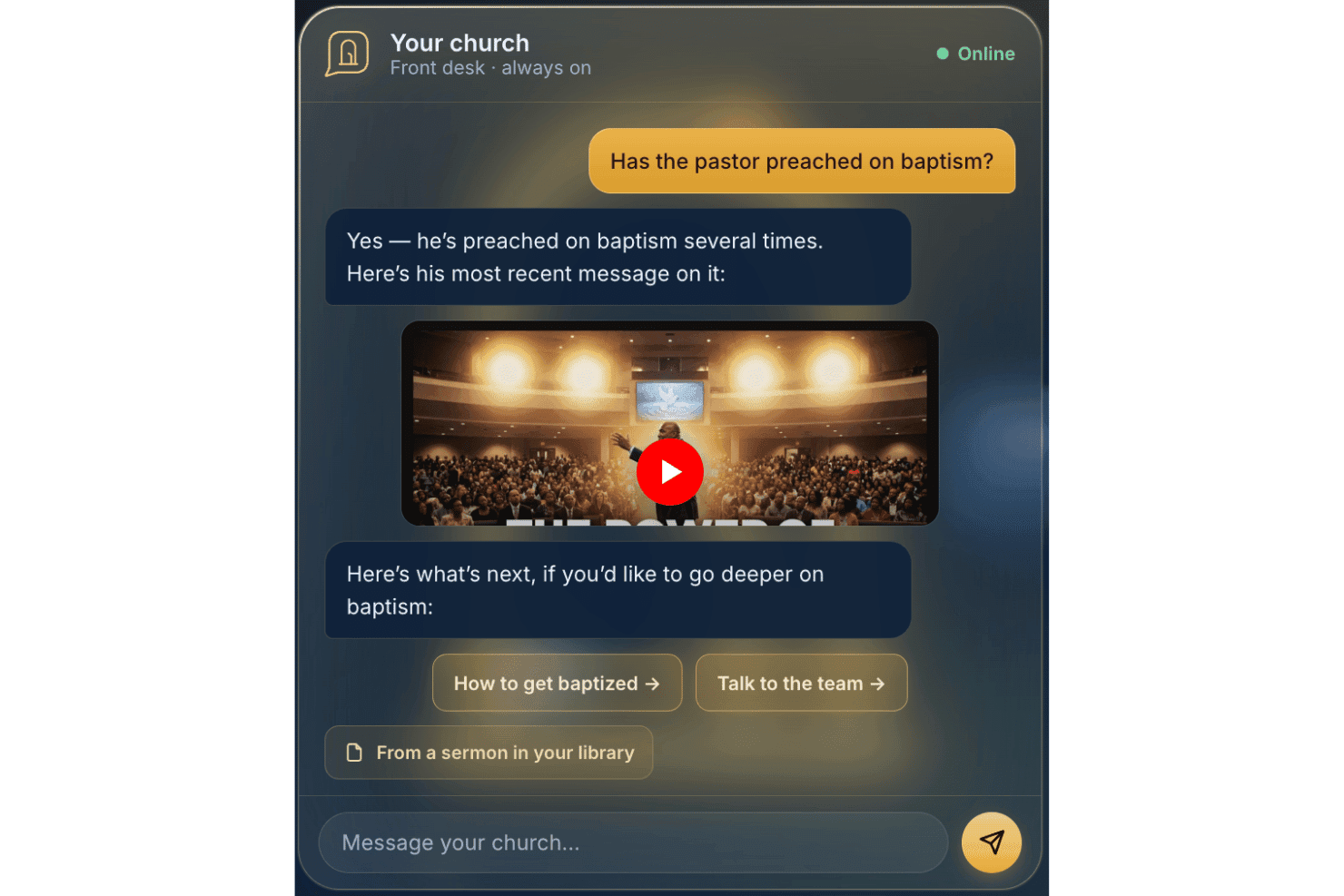
AskMyChurch biedt een 24/7 AI-gestuurde beantwoorder voor kerken. AskMyChurch is ontwikkeld voor kerkwebsites en is een AI-assistent voor gemeenteleden die vragen beantwoordt op basis van de eigen pagina's, preken en video's van uw kerk, met een functie voor geciteerde preekfragmenten in de stem van de pastor en een rechtstreeks ingebouwde routering voor crisisescalatie.
Voor wie is AskMyChurch het meest geschikt?
AskMyChurch is een goede keuze voor kleine tot middelgrote kerken die grote aantallen terugkerende vragen van bezoekers krijgen, maar over beperkte administratieve ondersteuning beschikken om deze de klok rond te beantwoorden.
Waarom ik voor AskMyChurch heb gekozen
AskMyChurch staat op mijn shortlist omdat het de belofte dat antwoorden afkomstig zijn uit kerkelijke inhoud zeer serieus neemt. De assistent voert na elk antwoord een tweede verificatieronde uit om te bevestigen dat het antwoord gebaseerd is op wat uw kerk daadwerkelijk heeft gepubliceerd. Als de assistent het antwoord niet kan vinden, zegt hij dat in plaats van te gokken. Ook de Canon-functie spreekt me aan: bezoekers kunnen vragen stellen over eerdere preken en krijgen een geciteerd antwoord met tijdsaanduiding, gekoppeld aan de exacte minuut waarop de pastor het zei.
Belangrijkste functies van AskMyChurch
- Hardgecodeerde crisiscontrole: Urgente of verontrustende berichten worden rechtstreeks doorgestuurd naar crisishulplijnen en pastorale zorg van de kerk voordat er een AI-antwoord wordt gegeven.
- Anonieme ervaring zonder aanmelding: Bezoekers kunnen vragen stellen zonder een account aan te maken of persoonlijke gegevens te delen.
- Meertalige ondersteuning: De assistent verwerkt vragen en crisisescalatie zowel in het Engels als in het Spaans.
- Inhoudsbeheer in gewone taal: U kunt rechtstreeks vanuit uw dashboard snel aanpassen welke vragen de assistent wel of niet mag beantwoorden.
Ingebouwde integraties van AskMyChurch
Ingebouwde integraties zijn niet openbaar gedocumenteerd. De assistent indexeert de pagina's, preken en video's van uw kerk voor inhoud, maar maakt geen officiële integraties met externe hulpmiddelen of platforms bekend.
Pros and Cons
Pros:
- Past antwoorden aan zodat ze de huisstijl van de kerk weerspiegelen
- Beantwoordt vragen van gemeenteleden de klok rond
- Ingebouwde crisisroutering zonder plug-in vereist
Cons:
- Geen hulpmiddelen voor personenregistratie, giften of evenementen
- Niet ontworpen voor de productiviteit van interne medewerkers
Learn more about AskMyChurch: Het meest geschikt voor het doorzoeken van kerkgegevens via je eigen AI
- Gratis abonnement beschikbaar OF gratis proefperiode van 30 dagen
- Vanaf $12/maand
Visit WebsiteCustomer Rating:4.9/5
Met ChMeetings kunnen gebruikers kerkfondsen en rekeningsaldi visueel bijhouden. ChMeetings is een kerkbeheerplatform dat ledengegevens, donaties, aanwezigheid, vrijwilligersplanning, aanbiddingsplanning en communicatie omvat, met een groeiende reeks AI-tools, waaronder een assistent voor het schrijven van e-mails, zoeken naar personen in natuurlijke taal en een MCP-connector die je actuele kerkgegevens koppelt aan externe AI-assistenten zoals ChatGPT, Claude en Gemini.
Voor wie is ChMeetings het meest geschikt?
ChMeetings is zeer geschikt voor kleine tot middelgrote kerken die een complete basis voor kerkbeheer willen en de flexibiliteit om hun eigen gegevens te raadplegen via AI-tools zoals ChatGPT of Claude.
Waarom ik voor ChMeetings heb gekozen
Ik heb voor ChMeetings gekozen omdat de MCP-connector anders is dan alles wat ik tot nu toe in kerkbeheersoftware heb gezien. Hiermee kan je team actuele kerkgegevens, zoals donatiegegevens, aanwezigheidsgegevens en notities over leden, rechtstreeks via ChatGPT, Claude of Gemini raadplegen met behulp van gewoon Nederlands. Vraag: 'Wie zijn deze maand onze grootste donateurs?' en je AI-assistent haalt het antwoord uit echte ChMeetings-gegevens. Combineer dat met zoeken naar personen in natuurlijke taal op basis van AI, en volgens mij heb je een echt flexibele oplossing voor medewerkers die hun eigen AI-tools voor hun werk willen gebruiken.
Belangrijkste functies van ChMeetings
- Assistent voor het schrijven van e-mails met AI: Stelt e-mailinhoud op, past de toon aan en vertaalt de inhoud rechtstreeks in de e-mailontwerper op basis van een prompt in gewoon Nederlands.
- Kindercheck-in met QR-scanning: Ondersteunt check-in voor gezinnen, het scannen van QR-codes en het afdrukken van naamkaartjes voor veilige aanwezigheidsregistratie.
- Planning van erediensten: Hiermee kan je team programma's voor diensten samenstellen met liederen, gebeden en preekonderdelen, een centrale liedbibliotheek beheren en leden van het aanbiddingsteam inplannen.
- Geautomatiseerde opvolgingsworkflows: Start opvolgingstaken voor nieuwkomers, afwezigen en deelnemers aan evenementen op basis van aanwezigheidsgegevens en aangepaste datumvelden.
Integraties van ChMeetings
ChMeetings kan worden geïntegreerd met Stripe, PayPal, Square, Mailchimp, Twilio en Plaid, evenals met ChatGPT, Claude, Gemini en Grok via de MCP-connector. Het biedt een REST API en Zapier voor aangepaste integraties.
Pros and Cons
Pros:
- Medewerkers kunnen actuele kerkgegevens met AI doorzoeken
- Assistent voor het schrijven van e-mails ondersteunt toonaanpassing en vertaling
- Meertalige ondersteuning voor 26 talen
Cons:
- Geen voorspellende analyses voor donaties of aanwezigheid
- Geen AI-chatbot voor ledenbetrokkenheid
Learn more about ChMeetings: Beste voor live meertalige vertaling van preken
- Gratis proefversie beschikbaar
- Vanaf $150/maand

One Accord Translation biedt realtime meertalige vertaling voor kerkelijke bijeenkomsten, waardoor live meertalige interpretatie via een mobiele app mogelijk wordt. OneAccord is een door AI aangedreven kerkbeheerplatform dat live vertaling van preken, realtime audiomonitoring en browsergebaseerde toegang voor kerkgangers biedt voor meertalige en hybride erediensten.
Voor wie is OneAccord het meest geschikt?
Kerkleiders en technologieteams die AI-gestuurde hulpmiddelen nodig hebben voor meertalige erediensten en toegankelijke, browsergebaseerde deelname van kerkgangers.
Waarom ik OneAccord heb gekozen
Ik heb OneAccord gekozen als een van de beste opties omdat ik live meertalige vertaling van preken rechtstreeks aan mijn gemeente kan aanbieden. Ik vind het prettig dat het realtime spraakherkenning en vertaling voor tientallen talen ondersteunt, zodat iedereen kan meeluisteren. Mijn team gebruikt de browsergebaseerde interface om deelnemers tijdens diensten op hun eigen apparaten toegang te geven tot vertalingen.
Belangrijkste functies van OneAccord
- Audiokwaliteitsbewaking: Bewaakt en toont realtime audioniveaus en helderheid tijdens live-evenementen.
- Sessieopname: Neemt preken en vertalingen op om ze later te bekijken of te delen.
- Beheerdersdashboard: Centraliseert de controle voor het beheren van evenementen, gebruikers en vertaalinstellingen.
Integraties van OneAccord
Native integraties zijn niet duidelijk gedocumenteerd. Er is een API beschikbaar voor aangepaste integraties.
Pros and Cons
Pros:
- Audiokwaliteitsbewaking met directe waarschuwingen
- Aangepaste huisstijl zorgt voor een consistente kerkervaring tijdens alle sessies
- Sessieopname met downloadbare transcripten
Cons:
- De prijs kan hoog zijn voor kleine kerken
- Geen ingebouwde tools voor evenementenplanning of agenda's
Learn more about OneAccord: Het beste voor digitaal geven en donatiebeheer
- Een gratis proefperiode van 30 dagen beschikbaar
- Vanaf $72/maand
Visit WebsiteCustomer Rating:4.8/5
Tithe.ly beheert digitale giften en ordent kerkelijke donorgegevens. Als je op zoek bent naar een platform waarmee kerken digitale giften en de betrokkenheid van leden kunnen beheren, is Tithely het bekijken waard. Het is ontworpen voor kerkelijke leiders en financiële teams die online donaties willen vereenvoudigen en bijdragen willen bijhouden. Tithe.ly biedt een oplossing voor de uitdaging van het beheren van meerdere geefkanalen, terwijl donorgegevens georganiseerd en toegankelijk blijven.
Voor wie is Tithely het meest geschikt?
Tithely is geschikt voor kerken en ministeries van elke omvang die hun digitale geefprocessen willen centraliseren en moderniseren.
Waarom ik voor Tithely heb gekozen
Wat mij aantrok in Tithely is de specialisatie in digitaal geven en donatiebeheer voor kerken. Het platform biedt verschillende geefopties, waaronder geven via sms, geven via een mobiele app en het instellen van terugkerende donaties. Daardoor kunnen gemeenteleden eenvoudig bijdragen op de manier die het beste bij hen past. Daarnaast combineert het digitaal geven met ethische overwegingen.
Ik waardeer ook de ingebouwde rapportagetools waarmee kerkelijke leiders geeftrends en geefpatronen van donoren in realtime kunnen volgen. Voor kerken die hun rentmeesterschap willen moderniseren en geven overal toegankelijk willen maken, maken de gerichte functies van Tithely het een sterke keuze.
Belangrijkste functies van Tithely
Andere functies die Tithely nuttig maken voor kerkbeheer zijn onder meer:
- Evenementregistratie en ticketverkoop: Beheer aanmeldingen en betalingen voor kerkevenementen rechtstreeks binnen het platform.
- Aangepaste appbouwer voor kerken: Maak een mobiele app in de huisstijl van je kerk om leden te betrekken en inhoud te delen.
- Automatische e-mail- en sms-communicatie: Verstuur geplande of geactiveerde berichten om je gemeente op de hoogte te houden.
- Dashboard voor ledenbeheer: Organiseer, volg en werk ledenprofielen en de betrokkenheidsgeschiedenis op één plek bij.
Integraties van Tithely
Integraties omvatten QuickBooks Online, RockRMS, Engiven, Elvanto, Salesforce, MinistryPlatform, Planning Center en meer.
Pros and Cons
Pros:
- Ondersteunt meerdere methoden voor digitaal geven
- Maakt het mogelijk een kerkapp in de huisstijl te creëren
- Biedt gedetailleerde rapporten over giften en donoren
Cons:
- De functies voor evenementenbeheer zijn basaal
- Beperkte aanpassingsmogelijkheden voor formulieren
 Het beste voor het coördineren van vrijwilligersroosters
- Gratis proefperiode van 30 dagen beschikbaar
- Vanaf $15/maand
Visit WebsiteCustomer Rating:4.7/5
Planning Center organiseert kerkelijke teams, roosters en dienstplanningen. Planning Center biedt een reeks cloudgebaseerde hulpmiddelen voor kerken die mensen, evenementen en middelen moeten organiseren. Het is vooral nuttig voor leiders en beheerders van bedieningen die teams willen coördineren, de dienstplanning willen beheren en communicatie willen centraliseren. Als uw kerk meerdere vrijwilligers en complexe roosters coördineert, helpt Planning Center uw activiteiten overzichtelijk en gestructureerd te maken.
Voor wie is Planning Center het meest geschikt?
Planning Center is geschikt voor kerken van elke omvang die vrijwilligers moeten coördineren, diensten moeten inplannen en bedieningsteams moeten beheren.
Waarom ik voor Planning Center heb gekozen
Wat mij opvalt aan Planning Center is hoe doelgericht het is ontworpen voor het coördineren van vrijwilligersroosters binnen een kerkelijke context. Met het platform kunt u gedetailleerde dienstplanningen maken, rollen toewijzen en automatische herinneringen naar vrijwilligers sturen, waardoor verwarring en last-minute wijzigingen worden beperkt. Ik waardeer ook de manier waarop het de beschikbaarheid en voorkeuren van vrijwilligers bijhoudt, waardoor het gemakkelijker wordt om openstaande plekken in te vullen en planningsconflicten te voorkomen.
Voor kerken die afhankelijk zijn van een groot vrijwilligersbestand brengt Planning Center structuur en duidelijkheid in het volledige coördinatieproces.
Belangrijkste functies van Planning Center
Andere functies die Planning Center nuttig maken voor kerkbeheer zijn onder meer:
- Personendatabase: Sla ledenprofielen, contactgegevens en familierelaties op één plek op en organiseer ze.
- Evenementregistratie: Stel aangepaste registratieformulieren voor evenementen in, houd de aanwezigheid bij en beheer betalingen.
- Inchecksysteem: Bied veilige in- en uitcheckmogelijkheden voor kinderen tijdens kinderbedieningen en evenementen.
- Middelenbeheer: Reserveer ruimtes, apparatuur en andere middelen voor diensten en activiteiten.
Integraties van Planning Center
Integraties omvatten Checkr, Mailchimp, PraiseCharts, RehearsalMix, SongSelect, Clearstream, MinistrySafe, Protect My Ministry en meer.
Pros and Cons
Pros:
- Automatische herinneringen aan vrijwilligers verminderen het aantal afwezigen
- Sjablonen voor dienstplanningen besparen insteltijd
- Veilig inchecksysteem voor kinderbedieningen
Cons:
- Geen ingebouwde chatbots voor berichten
- Afzonderlijke modules zijn nodig voor volledige functionaliteit
Learn more about Planning Center: Het beste voor functies voor mobiele betrokkenheid
- Gratis demo beschikbaar
- Prijzen op aanvraag
Visit WebsiteCustomer Rating:4/5
Pushpay combineert digitale donaties, evenementbeheer en tools voor kerkelijke betrokkenheid. Pushpay biedt een digitaal geef- en engagementplatform voor kerken en geloofsorganisaties. Het is een sterke optie voor leiders die via mobiele technologie en digitale communicatietools contact willen maken met hun geloofsgemeenschappen. Als je geven wilt vereenvoudigen, evenementen wilt beheren en voortdurende betrokkenheid wilt bevorderen, voorziet Pushpay in deze behoeften binnen één platform.
Voor wie is Pushpay het meest geschikt?
Pushpay is geschikt voor kerken en bedieningen die prioriteit geven aan mobiele betrokkenheid en digitale geefoplossingen.
Waarom ik voor Pushpay heb gekozen
Wat mij opvalt aan Pushpay is de focus op mobiele betrokkenheid, die steeds belangrijker wordt voor kerken die contact willen maken met leden, waar ze zich ook bevinden. Het platform biedt een speciale mobiele app die digitaal geven, aanmeldingen voor evenementen en gepersonaliseerde communicatie ondersteunt, allemaal vanaf een smartphone.
Ik vind het ook prettig dat Pushpay functies bevat voor het versturen van gerichte berichten en pushmeldingen, waardoor leiders hun geloofsgemeenschap gemakkelijker geïnformeerd en betrokken kunnen houden. Voor kerken die prioriteit willen geven aan mobiele interactie en realtimecontact sluit de aanpak van Pushpay goed aan bij de behoeften van moderne bedieningen.
Belangrijkste functies van Pushpay
Andere functies die Pushpay nuttig maken voor kerkbeheer zijn onder meer:
- Dashboard voor donatiebeheer: Houd de geefgeschiedenis bij, beheer donateursprofielen en genereer bijdrageoverzichten vanuit een centraal dashboard.
- Instellen van terugkerende donaties: Geef leden de mogelijkheid om terugkerende donaties rechtstreeks via het platform in te plannen en te beheren.
- Tools voor evenementregistratie: Maak aanmeldingen voor kerkevenementen, lessen en vrijwilligersmogelijkheden aan, promoot ze en beheer ze.
- Aanpasbare rapportage: Genereer gedetailleerde rapporten over geeftrends, betrokkenheidsstatistieken en deelname aan evenementen ter ondersteuning van datagestuurde beslissingen.
Integraties van Pushpay
Integraties omvatten Planning Center, QuickBooks, Gusto, Mailchimp, Rock RMS en meer.
Pros and Cons
Pros:
- De mobiele app ondersteunt donaties en aanmeldingen voor evenementen
- Het maken van een kerkapp met eigen huisstijl is mogelijk
- Inclusief geautomatiseerde tools voor communicatie met donateurs
Cons:
- Handmatige verificatie van AI-uitvoer vereist
- Beperkte AI-functies in zelfstandige versies
Learn more about Pushpay: Het beste voor het maken en beheren van websites
- 14 dagen gratis proefperiode
- Vanaf $29/maand (jaarlijks gefactureerd)

The Church Co maakt kerkwebsites voor het bijwerken van inhoud en online bereik. Als je kerk een moderne, eenvoudig te beheren website wil, is The Church Co het overwegen waard. Dit platform is ontworpen voor kerken die hun online aanwezigheid actueel willen houden zonder afhankelijk te zijn van technisch personeel. Het helpt bedieningsteams om snel inhoud bij te werken, preken te delen en online contact te maken met bezoekers.
Voor wie is The Church Co het meest geschikt?
The Church Co is een goede keuze voor kleine tot middelgrote kerken die hun websites willen beheren en bijwerken zonder technische expertise.
Waarom ik voor The Church Co koos
Wat mij aantrok in The Church Co is hoe specifiek het is ontwikkeld voor kerken die hun websites willen maken en beheren zonder technische drempels. Het platform biedt een websitebouwer met slepen-en-neerzettenfunctionaliteit, zodat bedieningsteams snel pagina's kunnen bijwerken, preken kunnen toevoegen en evenementen kunnen plaatsen wanneer de behoeften veranderen. Ik waardeer ook de ingebouwde prekenbibliotheek en evenementenkalender, die kerken helpen hun online aanwezigheid actueel en relevant te houden voor leden en bezoekers.
Voor leiders die zich op bediening willen richten in plaats van op webontwikkeling, maakt The Church Co het eenvoudig om een professionele en boeiende website te onderhouden.
Belangrijkste functies van The Church Co
Andere functies die The Church Co nuttig maken voor kerkbeheer zijn onder meer:
- Integratie voor online donaties: Verbindt met digitale donatieplatforms, zodat leden rechtstreeks via je website kunnen doneren.
- Systeem voor gebedsverzoeken: Stelt bezoekers en leden in staat gebedsverzoeken in te dienen die door kerkmedewerkers kunnen worden beheerd en beantwoord.
- Aanmeldingsformulieren voor vrijwilligers: Biedt aanpasbare formulieren voor het werven en organiseren van vrijwilligers voor evenementen en bedieningen.
- Blogs en nieuwsberichten plaatsen: Stelt kerken in staat om updates, overdenkingen en aankondigingen via een ingebouwde blog met hun gemeente te delen.
Integraties van The Church Co
Integraties zijn onder meer Planning Center, Tithely, Church Community Builder, Church Suite, Stripe, Google Analytics en meer.
Pros and Cons
Pros:
- Ingebouwde hosting voor audio en video van preken
- Aanpasbare hulpmiddelen voor gebedsverzoeken en reacties
- Voor mobiel geoptimaliseerde sjablonen voor kerkwebsites
Cons:
- Geen functies voor door AI aangedreven inhoud
- Geen ingebouwde database voor kerkbeheer (ChMS)
Learn more about The Church Co: Het beste voor aanpasbaar gegevensbeheer
- Gratis demo beschikbaar
- Prijs op aanvraag

MinistryPlatform centraliseert kerkgegevens, evenementen en het bijhouden van betrokkenheid. Als uw kerk een flexibel platform nodig heeft om complexe gegevens en bedieningsactiviteiten te beheren, is MinistryPlatform het bekijken waard. Deze oplossing is ontworpen voor kerken en bedieningen die ledeninformatie, evenementen en betrokkenheid centraal willen beheren. MinistryPlatform spreekt leiders aan die gegevens moeten organiseren, analyseren en gebruiken om de groei van hun bediening en besluitvorming te ondersteunen.
Voor wie is MinistryPlatform het meest geschikt?
MinistryPlatform is een goede keuze voor grote kerken en bedieningen met meerdere locaties die geavanceerde mogelijkheden voor gegevensbeheer en rapportage nodig hebben.
Waarom ik voor MinistryPlatform heb gekozen
Wat mij opvalt aan MinistryPlatform is hoe uitgebreid u gegevensvelden, workflows en rapporten kunt aanpassen aan de unieke structuur van uw kerk. Dit flexibiliteitsniveau is vooral waardevol voor kerken met complexe bedieningen of activiteiten op meerdere locaties die een breed scala aan ledengegevens, betrokkenheidsstatistieken en bedieningsactiviteiten moeten bijhouden.
Ik waardeer ook dat u met MinistryPlatform aangepaste dashboards kunt ontwerpen en datagedreven processen kunt automatiseren, zodat u het platform kunt aanpassen naarmate uw bediening groeit of verandert. Voor leiders die hun kerkbeheersysteem willen afstemmen op hun specifieke behoeften, biedt MinistryPlatform een mate van controle die elders moeilijk te vinden is.
Belangrijkste functies van MinistryPlatform
Andere functies die MinistryPlatform nuttig maken voor kerkbeheer zijn onder meer:
- Tools voor groepsbeheer: Organiseer, volg en communiceer met kleine groepen, klassen en bedieningsteams vanuit één centraal dashboard.
- Module voor evenementenbeheer: Plan evenementen, beheer registraties en coördineer middelen voor kerkelijke activiteiten en programma's.
- Integratie voor online geven: Maak verbinding met digitale geefplatforms om donaties bij te houden en overzichten van bijdragen te genereren.
- Mobielvriendelijk ledenportaal: Geef leden vanaf elk apparaat toegang tot hun profielen, evenementregistraties en communicatietools.
Integraties van MinistryPlatform
Integraties zijn onder meer Realm, MinistrySafe, Twilio, SendGrid en meer.
Pros and Cons
Pros:
- Zeer aanpasbare gegevensvelden en workflows
- Geavanceerde rapportage en analyses voor bedieningen
- Ledenportaal met mobiele toegangsfuncties
Cons:
- De interface kan verouderd aanvoelen in vergelijking met die van concurrenten
- Voor geavanceerde aanpassingen is training vereist
Learn more about MinistryPlatform: Ideaal voor het omzetten van preken in deelbare inhoud
- Gratis proefversie beschikbaar
- Vanaf $39/maand

Pulpit AI zet preken om in deelbare inhoud voor wekelijkse betrokkenheid bij de kerk. Als je preken wilt omzetten in praktische hulpmiddelen voor je gemeente, biedt Pulpit AI een gerichte oplossing. Deze krachtige tool is ontworpen voor voorgangers en kerkelijke communicatieteams die preekinhoud opnieuw willen gebruiken voor een bredere betrokkenheid. De tool helpt bij het aanpakken van de uitdaging om je boodschap de hele week toegankelijk en relevant te houden.
Voor wie is Pulpit AI het meest geschikt?
Pulpit AI is geschikt voor voorgangers en kerkelijke communicatieteams die preken willen omzetten in hoogwaardige digitale inhoud voor voortdurende betrokkenheid.
Waarom ik voor Pulpit AI koos
Wat mij aantrok in Pulpit AI is de manier waarop het AI gebruikt om preken om te zetten in verschillende deelbare formaten, zoals gespreksgidsen, berichten voor sociale media en e-mailsamenvattingen. Deze focus op inhoudstransformatie helpt kerken om hun boodschap ook na zondag in het leven van mensen aanwezig te houden. Ik waardeer ook dat het proces wordt geautomatiseerd, zodat je je preken niet elke week handmatig hoeft te herschrijven of opnieuw te verpakken.
Voor kerken die het bereik en de impact van hun onderwijs willen vergroten, maken deze functies Pulpit AI tot een praktische keuze.
Belangrijkste functies van Pulpit AI
Enkele andere functies die Pulpit AI nuttig maken voor kerkbeheer zijn:
- Bulksgewijs uploaden van preekarchieven: Importeer meerdere eerdere preken tegelijk om inhoud te genereren uit je bestaande bibliotheek.
- Ondersteuning voor meerdere talen: Genereer inhoud in verschillende talen om een breder publiek te bereiken.
- Goedkeuringsproces voor inhoud: Beoordeel en keur gegenereerde materialen goed voordat je ze publiceert of deelt.
- Hulpmiddelen voor teamsamenwerking: Nodig medewerkers of vrijwilligers uit om samen te werken aan het bewerken en verspreiden van inhoud op basis van preken.
Integraties van Pulpit AI
De integratie omvat Subsplash.
Pros and Cons
Pros:
- Zet preken om in verschillende inhoudsformaten
- Ondersteunt het genereren van inhoud in meerdere talen
- Biedt bulksgewijs uploaden voor preekarchieven
Cons:
- Biedt geen directe publicatie naar sociale media
- Automatiseert het uitschrijven van preken niet
Learn more about Pulpit AI: Het meest geschikt voor geautomatiseerde werkstromen voor evenementenplanning
- Gratis abonnement beschikbaar
- Vanaf $65/maand

Church.tech helpt kerken bij het beheren van evenementen, preken en drukke agenda's van bedieningen. Church.tech biedt AI-gestuurde oplossingen voor kerken die de planning en coördinatie van evenementen willen vereenvoudigen. Dit platform is geschikt voor leiders en beheerders van bedieningen die drukke agenda's, preken en meerdere activiteiten beheren. Het helpt handmatig planningswerk te verminderen en zorgt ervoor dat iedereen op één lijn blijft.
Voor wie is Church.tech het meest geschikt?
Church.tech is geschikt voor kerkbeheerders en bedieningsteams die evenementen en agenda's voor meerdere groepen of locaties moeten coördineren.
Waarom ik voor Church.tech heb gekozen
Ik heb voor Church.tech gekozen omdat de geautomatiseerde werkstromen voor evenementenplanning een veelvoorkomende uitdaging voor kerkleiders aanpakken: het beheren van overlappende activiteiten en drukke agenda's. Het platform gebruikt AI om optimale tijden voor evenementen voor te stellen, waardoor conflicten in het dagelijkse werk van de bediening worden verminderd.
Ik waardeer ook dat het teamleden en vrijwilligers automatisch op de hoogte kan brengen van wijzigingen in de planning, zodat iedereen geïnformeerd blijft. Deze functies maken het platform bijzonder nuttig voor kerken met meerdere bedieningen of regelmatige evenementen.
Belangrijkste functies van Church.tech
Andere functies die Church.tech nuttig maken voor kerkbeheer zijn onder andere:
- Hulpmiddelen voor vrijwilligersbeheer: Wijs vrijwilligers toe, houd hun inzet bij en communiceer met hen voor specifieke evenementen of doorlopende behoeften van de bediening.
- Systeem voor het boeken van middelen: Reserveer ruimtes, apparatuur en andere middelen rechtstreeks binnen het platform om dubbele boekingen te voorkomen.
- Aanpasbare evenementensjablonen: Maak sjablonen voor terugkerende evenementen en gebruik ze opnieuw, zodat je tijd bespaart bij regelmatige kerkactiviteiten.
- Aanwezigheidsregistratie: Houd deelname aan evenementen bij en genereer rapporten ter ondersteuning van opvolging en betrokkenheid.
Integraties van Church.tech
Er worden momenteel geen ingebouwde integraties vermeld.
Pros and Cons
Pros:
- Geautomatiseerde planning voor coördinatiewerkzaamheden
- Biedt hulpmiddelen voor vrijwilligersbeheer
- Heeft aanpasbare evenementensjablonen
Cons:
- Beperkte rapportagemogelijkheden voor financiële registratie
- Geen ingebouwd beheer van donaties of giften
Learn more about Church.tech:
Andere AI-tools voor kerkbeheer
Hier zijn enkele aanvullende AI-tools voor kerkbeheer die mijn shortlist niet hebben gehaald, maar die toch de moeite waard zijn om te bekijken:
- 11ChurchSocialBeste voor automatisering van groepscommunicatie
- 12Church Sync AIHet beste voor AI-gestuurde inzichten in de betrokkenheid van leden
- 13GlooHet beste met integraties voor verbinding met de gemeenschap
- 14ReliusHet beste voor AI-ondersteuning bij administratieve taken
- 15Doctrinally AIBeste voor aangepaste AI die is getraind op kerkelijke leerstellingen
Hoe ik AI-hulpmiddelen voor kerkbeheer evalueer
Ik zoek naar hulpmiddelen waarbij AI meer doet dan alleen een chatbot aan een ledenbestand toevoegen: het moet patronen in betrokkenheid zichtbaar maken, inhoud voor de bediening opstellen of de opvolging automatiseren op manieren die medewerkers daadwerkelijk uren werk besparen. Ik deel mijn evaluatie op in kernfunctionaliteiten waaraan elk hulpmiddel moet voldoen om in aanmerking te komen, en onderscheidende factoren die het ene platform van het andere onderscheiden.
Kernfunctionaliteiten (basisvereisten voor deze lijst)
Bij het selecteren van hulpmiddelen voor mijn lijst beoordeel ik elk hulpmiddel op een schaal van 0 (biedt de functionaliteit niet) tot 5 (blink uit op dit gebied) voor elke hieronder genoemde kernfunctionaliteit. Vervolgens bereken ik de totaalscore van het hulpmiddel als percentage. Elk hulpmiddel moet een minimale totaalscore van 65% behalen om in aanmerking te komen voor opname.
- AI-inzichten in ledenbetrokkenheid: Ik controleer of het platform AI gebruikt om dalingen in aanwezigheid of veranderingen in geefgedrag te signaleren en vervolgstappen aan te bevelen, in plaats van alleen statische rapporten weer te geven.
- Generatieve contentcreatie: Hulpmiddelen moeten op basis van prompts bruikbare preekschetsen, overdenkingen of teksten voor nieuwsbrieven kunnen opstellen. Ik beoordeel de kwaliteit van de output en de mogelijkheden om de theologische toon te sturen.
- Kerngegevens voor kerkbeheer: Een degelijk ledenbestand met huishoudens, aanwezigheid, giften en groepen vormt de basis. Ik kijk hoe goed de AI-laag verbinding maakt met deze gegevens.
- AI-aangedreven communicatie & bereik: Ik beoordeel of het hulpmiddel e-mail- of sms-communicatie personaliseert met behulp van AI, bijvoorbeeld door een opvolgingsreeks voor nieuwe bezoekers af te stemmen op basis van de details van hun eerste bezoek.
- Intelligente automatisering & workflows: Het platform moet taken kunnen automatiseren, zoals het toewijzen van vrijwilligers aan teams of het activeren van herinneringen voor pastorale zorg wanneer een lid meerdere weken achter elkaar afwezig is.
- Conversational AI-assistent: Ik zoek naar een AI-assistent die medewerkers kunnen raadplegen voor snelle antwoorden, zoals het opvragen van de aanwezigheidstrend van een kleine groep, of die gemeenteleden kunnen gebruiken voor gebedsverzoeken.
Zodra ik een lijst heb met hulpmiddelen die aan deze criteria voldoen, kijk ik naar wat elk platform onderscheidt.
Onderscheidende factoren (wat leveranciers onderscheidt)
Zo vergelijk ik verschillende leveranciers met elkaar:
Opvallende functies
Intelligentie voor pastorale zorg is een belangrijke onderscheidende factor. Ik zoek naar hulpmiddelen die hiaten in aanwezigheid of verschuivingen in sentiment detecteren en medewerkers aansporen om contact op te nemen voordat iemand ongemerkt afhaakt. Voorspellende analyses van geefgedrag zijn ook belangrijk, vooral voor financiële teams die kapitaalcampagnes plannen of trends in rentmeesterschap aan het einde van het jaar voorspellen. Slimme matching van vrijwilligers maakt het geheel compleet door gemeenteleden aan diensten te koppelen op basis van hun geestelijke gaven en beschikbaarheid, in plaats van handmatig met spreadsheets te moeten werken.
Meer dan functies
Gegevensprivacy is hier belangrijker dan in de meeste softwarecategorieën. Ik beoordeel hoe elke leverancier omgaat met gevoelige notities over pastorale gesprekken en gegevens over giften, en of gegevens van gemeenteleden buiten openbare AI-trainingssets blijven. Theologische waarborgen zijn een andere belangrijke overweging: door AI gegenereerde content moet de leerstellige standpunten van je kerk respecteren en geen theologie produceren die niet bij je kerk past en die je team voortdurend moet bewerken. Ik controleer ook de prijsstructuren om te zien of deze eerlijk meegroeien met kleinere gemeenten of kerkstichtingen die met krappe budgetten werken.
AI-tools voor kerkbeheer kiezen
Het is gemakkelijk om te verdwalen in lange lijsten met functies en complexe prijsstructuren. Om je te helpen gefocust te blijven terwijl je jouw unieke selectieproces voor software doorloopt, vind je hier een checklist met factoren om rekening mee te houden:
| Factor | Waar u op moet letten |
|---|---|
| FactorSchaalbaarheid | Waar u op moet lettenOndersteunt de tool uw kerk naarmate deze groeit in leden, bedieningen of locaties? Controleer gebruikerslimieten, datalimieten en mogelijkheden om te upgraden. |
| FactorIntegraties | Waar u op moet lettenKan de tool verbinding maken met uw bestaande systemen, zoals boekhoud-, e-mail- of presentatiesoftware? Controleer of er native integraties zijn, niet alleen API-mogelijkheden. |
| FactorAanpasbaarheid | Waar u op moet lettenKunt u workflows, formulieren of dashboards aanpassen aan de unieke processen van uw kerk? Vermijd tools die u dwingen om rigide sjablonen te gebruiken. |
| FactorGebruiksgemak | Waar u op moet lettenKunnen medewerkers en vrijwilligers met uiteenlopende technische vaardigheden de tool vol vertrouwen gebruiken? Let op duidelijke navigatie en minimale trainingsvereisten. |
| FactorImplementatie en ingebruikname | Waar u op moet lettenHoe lang duurt het voordat alles operationeel is? Vraag naar ondersteuning bij de migratie, trainingsmateriaal en of u externe IT-hulp nodig hebt. |
| FactorKosten | Waar u op moet lettenZijn alle kosten transparant, inclusief installatie, maandelijkse kosten en uitbreidingen? Vergelijk prijsniveaus en let op verborgen kosten of verplichte upgrades. |
| FactorBeveiligingsmaatregelen | Waar u op moet lettenHoe beschermt de tool gevoelige gegevens van leden en donateurs? Let op versleuteling, toegangscontroles en naleving van privacynormen. |
| FactorBeschikbaarheid van ondersteuning | Waar u op moet lettenWanneer en hoe kunt u de ondersteuning bereiken als er problemen ontstaan? Controleer of er opties zijn voor livechat, telefoon of e-mail en of ondersteuning inbegrepen is of extra kost. |
Wat zijn AI-tools voor kerkbeheer?
AI-tools voor kerkbeheer zijn softwareplatforms die kunstmatige intelligentie gebruiken om administratieve en bedieningstaken binnen een kerk te automatiseren, te organiseren en te verbeteren. Deze tools helpen bij het beheren van gegevens over kerkelijke bedieningen, planning, communicatie, donaties en rapportages.
Door AI te benutten kunnen kerken handmatig werk verminderen, de nauwkeurigheid verbeteren en medewerkers en vrijwilligers meer tijd geven om zich te richten op bediening en betrokkenheid bij de gemeenschap.
Functies
Let bij het selecteren van AI-tools voor kerkbeheer op de volgende belangrijke functies:
- Geautomatiseerde planning: Gebruikt AI om agenda's te coördineren, ruimtes te reserveren en herinneringen te versturen voor diensten, vergaderingen en evenementen, waardoor handmatige coördinatie wordt verminderd.
- Intelligente communicatietools: Automatiseert e-mail-, sms- of appmeldingen aan leden en vrijwilligers, zodat updates tijdig worden gedeeld en berichten minder vaak worden gemist.
- Donatiebeheer: Legt giften, toezeggingen en terugkerende donaties vast, categoriseert deze en rapporteert erover, waardoor financieel toezicht en betrokkenheid van donateurs eenvoudiger worden.
- Vrijwilligersbeheer: Koppelt vrijwilligers op basis van beschikbaarheid en vaardigheden aan rollen, houdt uren bij en automatiseert de opvolging voor toekomstige mogelijkheden.
- Documentbeheer: Organiseert, bewaart en vindt kerkelijke documenten, beleidsstukken en formulieren terug, waarbij AI relevante bestanden naar voren haalt wanneer dat nodig is.
- Beheer van ledenbestanden: Houdt actuele gegevens bij van leden, gezinnen en bezoekers, met door AI aangestuurde inzichten voor betrokkenheid en contact met de gemeenschap.
- Bezoekanalyses: Houdt bezoekpatronen voor diensten en evenementen bij, waarbij AI trends identificeert en veranderingen signaleert die pastorale aandacht kunnen vereisen.
- Taakautomatisering: Voert repetitieve administratieve taken uit, zoals gegevensinvoer, het genereren van afbeeldingen en het routeren van workflows, waardoor medewerkers tijd besparen.
- Ondersteuning bij evenementenplanning: Helpt bij logistiek, registratie en communicatie voor kerkelijke evenementen, waarbij AI behoeften voorspelt en middelen optimaal inzet.
- Beveiligings- en privacycontroles: Gebruikt AI om toegang te bewaken, ongebruikelijke activiteiten te detecteren en ervoor te zorgen dat gevoelige gegevens volgens de privacynormen worden beschermd.
Voordelen
Het implementeren van AI-aangestuurde tools voor kerkbeheer biedt verschillende voordelen voor uw team en uw organisatie. Dit zijn enkele voordelen waar u naar kunt uitkijken:
- Minder administratieve werklast: Door planning, communicatie en gegevensinvoer te automatiseren, krijgen medewerkers en vrijwilligers meer tijd voor werk dat op de bediening is gericht.
- Verbeterde nauwkeurigheid: AI-aangestuurd gegevensbeheer en rapportage beperken fouten in ledenbestanden, donaties en het bijhouden van aanwezigheid.
- Snellere besluitvorming: Realtime-analyses en voorspellende inzichten helpen leiders snel te reageren op trends in aanwezigheid, giften en betrokkenheid.
- Meer betrokkenheid van leden: Geautomatiseerde, gepersonaliseerde communicatietools zorgen ervoor dat leden en vrijwilligers tijdig updates en herinneringen ontvangen.
- Betere toewijzing van middelen: AI-aangestuurde planning en evenementenorganisatie optimaliseren het gebruik van faciliteiten, vrijwilligers en budgetten.
- Verbeterde gegevensbeveiliging: Ingebouwde privacycontroles en monitoringfuncties helpen gevoelige leden- en financiële informatie te beschermen.
- Schaalbare activiteiten: AI-tools passen zich aan naarmate uw kerk groeit en ondersteunen extra leden, bedieningen en locaties zonder uw team te overbelasten.
Kosten en prijzen
Bij het selecteren van AI-tools voor kerkbeheer is inzicht nodig in de verschillende beschikbare prijsmodellen en abonnementen. De kosten variëren op basis van functies, teamgrootte, uitbreidingen en meer. De onderstaande tabel geeft een overzicht van veelvoorkomende abonnementen, hun gemiddelde prijzen en de typische functies die zijn inbegrepen in AI-tools voor oplossingen voor kerkbeheer:
Vergelijkingstabel van abonnementen voor AI-tools voor kerkbeheer
| Type abonnement | Gemiddelde prijs | Veelvoorkomende functies |
|---|---|---|
| Type abonnementGratis abonnement | Gemiddelde prijs$0 | Veelvoorkomende functiesBasisbeheer van leden, beperkte planning, eenvoudige communicatietools en basisrapportages. |
| Type abonnementPersoonlijk abonnement | Gemiddelde prijs$5-$15/gebruiker/maand | Veelvoorkomende functiesLedenbestand, planning van evenementen, registratie van donaties, e-mailmeldingen en beperkte analyses. |
| Type abonnementZakelijk abonnement | Gemiddelde prijs$20-$40/gebruiker/maand | Veelvoorkomende functiesGeavanceerde automatisering, beheer van vrijwilligers, documentopslag, aangepaste rapportages en integratiemogelijkheden. |
| Type abonnementOndernemingsabonnement | Gemiddelde prijs$50-$100/gebruiker/maand | Veelvoorkomende functiesAangepaste werkstromen, geavanceerde beveiliging, prioriteitsondersteuning, beheer van meerdere campussen en API-toegang. |
Veelgestelde vragen over AI-tools voor kerkbeheer
Hier zijn enkele antwoorden op veelgestelde vragen over AI-tools voor kerkbeheer:
Hoe helpen AI-tools kerken tijd te besparen?
AI-tools automatiseren repetitieve taken, zoals planning, gegevensinvoer en het versturen van herinneringen. Dit vermindert handmatig werk voor medewerkers en vrijwilligers, zodat zij zich meer kunnen richten op het gemeentewerk en minder op administratie.
Kunnen AI-tools voor kerkbeheer worden geïntegreerd met bestaande kerksoftware?
Ja, veel AI-tools bieden integraties met systemen voor boekhouding, e-mail, presentaties en donorbeheer. Controleer altijd de compatibiliteit met je huidige software voordat je een tool kiest.
Zijn AI-tools voor kerkbeheer veilig?
Ja, de meeste gerenommeerde AI-tools gebruiken versleuteling, toegangsbeheer en regelmatige beveiligingsupdates om gevoelige leden- en financiële gegevens te beschermen. Bekijk altijd het beveiligingsbeleid en de nalevingsnormen van een leverancier voordat je een oplossing implementeert.
Welke training is nodig om AI-tools voor kerkbeheer te gebruiken?
De meeste tools zijn ontworpen voor gebruiksgemak en bieden hulpmiddelen voor de ingebruikname, zoals handleidingen, webinars en helpcenters. Voor sommige tools zijn mogelijk korte trainingen voor medewerkers of vrijwilligers nodig, vooral voor geavanceerde functies zoals het gebruik van AI-chatbots.
Hoe ondersteunen AI-tools de betrokkenheid van leden?
AI-tools kunnen communicatie personaliseren, opvolging automatiseren en aanwezigheidstrends bijhouden. Hierdoor kan de kerkleiding consistenter contact houden met leden en tijdig op behoeften reageren.
Waar moet ik rekening mee houden bij het budgetteren voor AI-tools voor kerkbeheer?
Houd rekening met het aantal gebruikers, de benodigde functies, integratiebehoeften en mogelijke kosten voor uitbreidingen. Zoek naar transparante prijzen en vraag naar kortingen voor non-profitorganisaties of mogelijkheden voor een gratis proefperiode.