

Het beheren van een kerkgemeenschap kan een uitdaging zijn, vooral als het gaat om iedereen met elkaar verbonden te houden. Misschien heb je te maken met verouderde contactlijsten of inefficiënte communicatie. Daar komt een kerkledenapp goed van pas. Deze helpt je om ledeninformatie eenvoudig te organiseren en te raadplegen.
Uit mijn ervaring kunnen deze apps je leven eenvoudiger maken door tijd te besparen en stress te verminderen. Ik test en beoordeel software onafhankelijk, met de focus op wat echt belangrijk is voor jou en je team. In dit artikel deel ik mijn beste keuzes voor kerkledenapps en belicht ik hun voordelen en functies. Je vindt hier duidelijke, onbevooroordeelde inzichten die je helpen de juiste tool voor jouw gemeenschap te kiezen.
Waarom u onze softwareaanbevelingen kunt vertrouwen
6,700+
Reviews
20
Industry experts
16+
Evaluation factors
14
Years
Ons team test en beoordeelt software sinds 2012. Als kerkleiders weten we zelf hoe moeilijk — en belangrijk — het is om de juiste software te kiezen.
Voor deze gids hebben we tools geëvalueerd met behulp van praktijktests en onafhankelijk onderzoek, waarbij we tools beoordeelden aan de hand van onze selectiecriteria.
Onze reviews weerspiegelen ons menselijke redactionele oordeel, geen verkooppraatje.
Vergelijkingstabel: kerkledenapp
Deze vergelijkingstabel vat de prijsgegevens samen van mijn beste keuzes voor kerkledenapps.
| Tool | Best For | Trial Info | Price | ||
|---|---|---|---|---|---|
| 1 | Het beste voor groeiende kerken | Gratis proefperiode van 30 dagen + gratis abonnement beschikbaar | Vanaf $12/maand | Website | |
| 2 | Beste voor geautomatiseerde ledenwerkstromen | Gratis proefperiode van 30 dagen | Vanaf $58/maand | Website | |
| 3 | Beste voor beheer van personen en groepen | Gratis abonnement beschikbaar | Vanaf $19/maand | Website | |
| 4 | Beste voor multimedia-integratie | Gratis demo beschikbaar | Vanaf $99/maand | Website | |
| 5 | het beste voor een alles-in-één mobiele app met aangepaste huisstijl | Gratis proefperiode van 30 dagen | Vanaf USD $89 per maand | Website | |
| 6 | Beste voor een gebruiksvriendelijke interface | Gratis abonnement + gratis demo beschikbaar | Vanaf $72/maand | Website | |
| 7 | het beste voor mobiel georiënteerde kerkelijke betrokkenheid | Gratis demo beschikbaar | vanaf $149/maand | Website | |
| 8 | Het beste voor directe updates van de ledengids | 30 dagen gratis proefperiode | Vanaf $9.99/maand | Website | |
| 9 | Ideaal voor integratie met andere tools | 30 dagen gratis proefperiode + gratis demo beschikbaar | Vanaf $15/maand | Website | |
| 10 | Medewerkers kunnen ledenprofielen in de mobiele app direct bijhouden en bijwerken. | Gratis proefperiode van 30 dagen | vanaf $49/maand | Website |


Beoordelingen van de beste kerkledenapps
Hieronder vind je mijn gedetailleerde samenvattingen van de beste kerkledenapps die op mijn shortlist zijn gekomen. In mijn beoordelingen geef ik een uitgebreid overzicht van de belangrijkste functies, plus- en minpunten, integraties en ideale gebruikssituaties van elke tool, zodat je de beste optie voor jou kunt vinden.
 Het beste voor groeiende kerken
- Gratis proefperiode van 30 dagen + gratis abonnement beschikbaar
- Vanaf $12/maand
Visit WebsiteCustomer Rating:4.9/5
Met ChMeetings kun je gedetailleerde ledengegevens met contactgegevens, groepen en bedieningen op één plek beheren en doorzoeken. ChMeetings is een kerkenbeheertool die is ontworpen om bedieningen te helpen mensen, evenementen en giften op één plek georganiseerd te houden. Het biedt een digitaal platform waarop je ledengegevens kunt beheren, bijeenkomsten kunt plannen en bijdragen met minder moeite kunt verwerken.
Waarom ik voor ChMeetings heb gekozen: Ik heb voor ChMeetings gekozen omdat je er gedetailleerde ledenprofielen mee kunt opbouwen met informatie over gezinnen en groepen, terwijl gegevens eenvoudig te doorzoeken en te rapporteren zijn. Het koppelt de gegevens van mensen ook aan evenementen en giften, zodat je op één plek kunt zien wie betrokken is, waar ze dienen en hoe ze je bediening financieel ondersteunen.
Opvallende functies & integraties:
Functies omvatten dienstplanning, waarmee je kerkdiensten kunt voorbereiden met schriftlezingen, liederen en notities die allemaal in duidelijke secties zijn ingedeeld. Met de berichtentools kun je ook eenvoudig aankondigingen, nieuwsbrieven of herinneringen rechtstreeks via e-mail, sms of pushmeldingen naar leden sturen.
Integraties omvatten Stripe, PayPal, BlueSnap, Paystack, MailChimp, Twilio, SMS Global, Clickatell, Eazismspro, Zeffy en Zapier. Er is ook de ChMeetings API voor aangepaste integraties.
Pros and Cons
Pros:
- Gedetailleerde profielen van leden en gezinnen
- Uitgebreide tracking van evenementen en aanwezigheid
- Ingebouwde opties voor donaties en toezeggingen
Cons:
- Beperkte aanpassingsmogelijkheden voor complexe behoeften
- Rapportagemogelijkheden kunnen beperkend aanvoelen
Learn more about ChMeetings: Beste voor geautomatiseerde ledenwerkstromen
- Gratis proefperiode van 30 dagen
- Vanaf $58/maand
Visit WebsiteCustomer Rating:4.8/5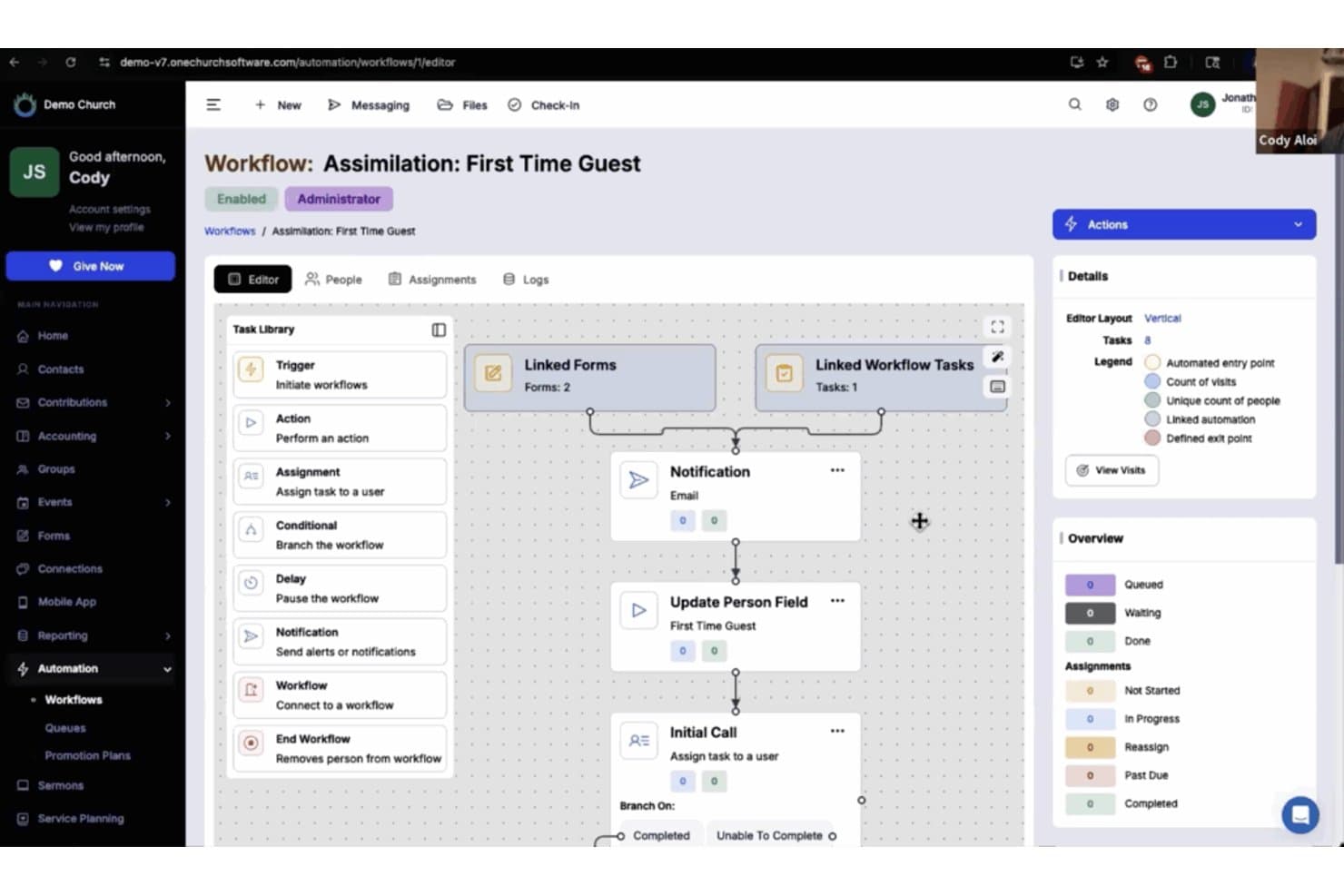
One Church Software biedt een geautomatiseerde werkstroombouwer voor het beheren van de opname van gasten die voor het eerst komen, met gekoppelde formulieren, meldingen en taaktoewijzingen. One Church Software is een kerkbeheerplatform dat ledenlijsten, gezinsprofielen, organisatie van kleine groepen, communicatietools en donaties in één systeem centraliseert.
Voor wie is One Church Software het meest geschikt?
Het is zeer geschikt voor kerkbeheerders en ledenadministratoren die een groeiende gemeente binnen meerdere bedieningen vanuit één platform moeten beheren.
Waarom ik voor One Church Software heb gekozen
One Church Software staat op mijn shortlist vanwege de manier waarop de automatiseringssuite het ondankbare werk van de opvolging van leden afhandelt. Ik vind het geweldig dat ik geactiveerde werkstromen kan opbouwen om automatisch SMS-berichten te versturen, taken toe te wijzen en nieuwe bezoekers door een zorgtraject te leiden zonder handmatige stappen. Wanneer een gast een contactkaart indient, verstuurt One Church automatisch een opvolgmail, brengt het een pastor op de hoogte en plant het een bezoek ter controle in, en dat allemaal zonder een toetsenbord aan te raken.
Belangrijkste functies van One Church Software
- Afdrukbare export van de ledenlijst: Genereer actuele afdrukbare ledenlijsten of PDF-ledenlijsten om eenvoudig te delen met gemeenteleden die de voorkeur geven aan fysieke exemplaren.
- Geïntegreerde kindercontrole: Beheer aanwezigheid bij evenementen en de veiligheid van kinderen met ingebouwde controle bij aankomst die rechtstreeks aan gezinsprofielen is gekoppeld.
- Hulpmiddelen voor vrijwilligersplanning: Wijs vrijwilligers toe, plan hen in en houd hun inzet bij voor dienende teams en rollen binnen bedieningen, rechtstreeks vanuit het platform.
- Inschrijvingen voor evenementen en kleine groepen: Geef leden de mogelijkheid om rechtstreeks vanuit de ledenlijst evenementen of kleine groepen te bekijken, zich in te schrijven en zich aan te sluiten.
Integraties van One Church Software
One Church Software biedt ingebouwde integraties met Mailchimp, Square, Pushpay en PraiseCharts, en biedt een API voor aangepaste integraties.
Pros and Cons
Pros:
- Handelt zorgtrajecten voor leden automatisch af
- Ingebouwde controle bij aankomst koppelt aanwezigheid aan ledenlijstprofielen
- Ondersteunt volledige registratie van familierelaties
Cons:
- De mobiele app heeft beperkte functies voor zelfbediening
- De zoekfilters van de ledenlijst zijn beperkter dan bij concurrerende platforms
Learn more about One Church Software: Beste voor beheer van personen en groepen
- Gratis abonnement beschikbaar
- Vanaf $19/maand
Visit WebsiteCustomer Rating:4.8/5
De weergave van het individuele profiel in Gracely geeft kerkleiders een volledig beeld van elke persoon, met contactgegevens, betrokkenheid bij groepen, geschiedenis van giften en aangepaste velden in één overzichtelijk dossier. Gracely is alles-in-één kerkbeheersoftware die is ontworpen om je te helpen leden te beheren, evenementen te organiseren en giften bij te houden. Het biedt een geavanceerd platform ter ondersteuning van je bediening, zodat je je gemakkelijker kunt richten op wat er echt toe doet.
Waarom ik voor Gracely koos: Gracely biedt uitgebreide functies voor het beheer van personen en groepen. Je kunt contacten en groepen moeiteloos organiseren, persoonlijke gegevens bekijken en zelfs aanwezigheid bijhouden. Zo kun je een goed georganiseerde ledenlijst bijhouden en een gevoel van verbondenheid onder je leden bevorderen. Bovendien stelt de kerkportaalfunctie van de software leden in staat hun profielen bij te werken, hun geschiedenis van giften te bekijken en verbonden te blijven, waardoor hun band met de kerkgemeenschap uiteindelijk wordt verdiept.
Belangrijkste functies & integraties:
Functies omvatten online giften en het bijhouden van bijdragen, wat het proces van tienden geven en het beheren van donaties vereenvoudigt. De communicatietools houden je gemeente ook verbonden en betrokken, zodat je gepersonaliseerde e-mails of sms-berichten naar leden kunt sturen.
Integraties omvatten Stripe, SendGrid, PayPal, Google Calendar, Google Pay en Apple Pay.
Pros and Cons
Pros:
- Uitgebreide mobiele app
- Gebruiksvriendelijke interface
- Gepersonaliseerde sms- en e-mailberichten
- Beheer van groepen en evenementen
- Bezoekers- en betrokkenheidstracking
Cons:
- Beperkte rapportagefuncties
- Mogelijke leercurve
- Moeilijk installatieproces
- Af en toe technische problemen
- Beperkte klantenondersteuning
Learn more about Gracely: Beste voor multimedia-integratie
- Gratis demo beschikbaar
- Vanaf $99/maand

De Subsplash-kerkapp deelt preken, beheert evenementen en vergroot de betrokkenheid. De Subsplash-kerkapp is een digitaal platform dat is ontworpen voor kerken om multimedia-inhoud en betrokkenheid van leden te beheren. Het ondersteunt kerkleiders door hulpmiddelen te bieden om preken te delen, evenementen te beheren en met de gemeente te communiceren.
Waarom ik voor de Subsplash-kerkapp heb gekozen: De app blinkt uit in multimedia-integratie, waardoor je moeiteloos preken, video's en podcasts kunt delen. Je kunt een aangepaste app maken om via verschillende mediakanalen contact te leggen met je gemeenschap. Het platform ondersteunt livestreaming, zodat je diensten in realtime kunt uitzenden. Dankzij de focus op multimedia kan je kerk leden op creatieve en effectieve wijze betrekken.
Opvallende functies & integraties:
Functies omvatten een geefplatform dat donaties en tienden voor je gemeente vereenvoudigt. De app biedt hulpmiddelen voor evenementenbeheer om je te helpen kerkelijke activiteiten te organiseren en te promoten. De app biedt ook pushmeldingen om je gemeenschap op de hoogte te houden van belangrijke updates.
Integraties omvatten Planning Center, Mailchimp, CCB, YouTube, Vimeo en Facebook Live.
Pros and Cons
Pros:
- Sterke multimediamogelijkheden
- Aangepaste app maken
- Ondersteuning voor livestreaming
- Geïntegreerd geefplatform
- Hulpmiddelen voor evenementenbeheer
Cons:
- Steilere leercurve
- Beperkte offlinefuncties
- Internettoegang vereist
- Basismogelijkheden voor aanpassing
- Beperkte ondersteuningsmogelijkheden
Learn more about Subsplash Church App: het beste voor een alles-in-één mobiele app met aangepaste huisstijl
- Gratis proefperiode van 30 dagen
- Vanaf USD $89 per maand

Tithe.ly Custom Church App beschikt over een intuïtieve lay-outeditor voor het aanpassen van app-pagina's. Tithe.ly Custom Church App is een dynamische tool die is ontworpen om de betrokkenheid en het beheer van kerkgemeenschappen te verbeteren. Met functies zoals online donaties, evenementenplanning en het volgen van leden biedt het een uitgebreide oplossing voor kerken om verbonden te blijven met hun gemeenten.
Waarom ik voor deze app koos
Wat Tithe.ly Custom Church App onderscheidt als app voor kerkelijke ledenregisters, is de uitgebreide functie voor het volgen van leden. Hiermee kunt u gedetailleerde gegevens van uw gemeente bijhouden, zodat u altijd toegang hebt tot belangrijke informatie wanneer dat nodig is. Dit vergroot uw vermogen om met leden in contact te komen doordat iedereen geïnformeerd en verbonden blijft.
Een andere reden waarom ik voor Tithe.ly heb gekozen, zijn de mogelijkheden voor evenementenplanning, die naadloos integreren met het ledenregister. U kunt evenementen maken en beheren en tegelijkertijd de aanwezigheid en deelname bijhouden. Deze functie ondersteunt de missie van uw kerk door betrokkenheid bij de gemeenschap te bevorderen en leden een gevoel van verbondenheid te geven.
Belangrijkste functies
Tot de functies behoort een interactieve gebedsmuur, waarmee leden gebedsverzoeken kunnen delen en elkaar in realtime kunnen ondersteunen. De functie voor doneren in de app biedt leden een handige manier om financieel bij te dragen aan de missie van de kerk. Daarnaast zorgen het streamen en de archieven van preken in de app ervoor dat leden preken kunnen beluisteren wanneer het hun uitkomt, wat geestelijke groei en betrokkenheid bevordert.
Integraties
Integraties omvatten online donatieformulieren, een mobiele donatie-app, doneren via sms, een campagne voor toezeggingen, een dashboard met inzichten in donaties, berichten, groepen, antecedentenonderzoeken, dienstplanning, evenementen & check-in, tools voor het aanbiddingsteam en het maken van websites.
Pros and Cons
Pros:
- Maakt mobiele communicatie met de gemeente in realtime mogelijk, voorzien van uw eigen huisstijl
- Combineert donaties, media, evenementen en groepen in één app-hub
- De installatie via slepen en neerzetten vermindert de behoefte aan externe ontwikkelaars
Cons:
- De app blijft binnen de omgeving van de leverancier, tenzij er extra implementatiekosten worden betaald
- De abonnementskosten lopen door, ongeacht of het gebruik laag blijft of groeit
Learn more about Tithe.ly Custom Church App: Beste voor een gebruiksvriendelijke interface
- Gratis abonnement + gratis demo beschikbaar
- Vanaf $72/maand

Breeze helpt kerken bij het beheren van leden, communicatie en evenementplanningen. Breeze Online Kerkdirectory is een beheertool voor kerken, ontworpen voor kleine tot middelgrote kerken. Het helpt gebruikers om ledeninformatie, communicatie en evenementplanning efficiënt te beheren.
Waarom ik voor Breeze Online Kerkdirectory heb gekozen: Dankzij de gebruiksvriendelijke interface kan je team eenvoudig navigeren en kerkgegevens beheren. Je kunt ledenprofielen snel bijwerken en aanwezigheid bijhouden. De app biedt ook aanpasbare velden die aansluiten bij de unieke behoeften van jouw kerk. Dankzij het eenvoudige ontwerp wordt het inwerken van nieuwe gebruikers een fluitje van een cent.
Onderscheidende functies & integraties:
Functies omvatten de mogelijkheid om donaties bij te houden en donatierapporten te genereren, zodat je de financiën van je kerk kunt beheren. De app ondersteunt evenementbeheer, waarmee je moeiteloos evenementen kunt plannen en promoten. Daarnaast biedt de app een systeem voor het inchecken van kinderen voor extra veiligheid tijdens diensten.
Integraties omvatten QuickBooks, Mailchimp, Google Calendar en Planning Center voor naadloze gegevenssynchronisatie en communicatie.
Pros and Cons
Pros:
- Eenvoudige navigatie
- Aanpasbare velden
- Ledenprofielen snel bijwerken
- Eenvoudig onboardingproces
- Effectieve aanwezigheidsregistratie
Cons:
- Beperkte geavanceerde functies
- Geen gratis versie
- Basisrapportagetools
- Internettoegang vereist
- Beperkte opties voor klantenondersteuning
Learn more about Breeze Online Church Directory: het beste voor mobiel georiënteerde kerkelijke betrokkenheid
- Gratis demo beschikbaar
- vanaf $149/maand

Pushpay biedt veel manieren om de betrokkenheid van je leden te vergroten. De Pushpay-kerkapp is een veelzijdige tool die is ontworpen om kerkbeheer en betrokkenheid van de gemeenschap te verbeteren. De app biedt een reeks functies die aansluiten bij de behoeften van gemeenten en helpt een verbonden en actieve kerkgemeenschap te bevorderen.
Waarom ik hiervoor heb gekozen
Ik heb de Pushpay-kerkapp gekozen als een uitstekende keuze voor een kerkgidsapp vanwege de functie voor aangepaste mobiele apps. Deze op maat gemaakte applicaties bevorderen de betrokkenheid en communicatie binnen de kerkgemeenschap en bieden een gepersonaliseerde ervaring die helpt om iedereen verbonden te houden. De mogelijkheid om aangepaste apps te maken betekent dat je de app kunt afstemmen op de specifieke behoeften van je kerk, waardoor het gevoel van verbondenheid onder leden wordt versterkt.
Een andere reden voor mijn keuze is de functie voor inzichten en analyses van de app. Deze biedt bruikbare gegevens om de gezondheid van de kerk en de betrokkenheid van leden te monitoren, zodat je niet-betrokken leden kunt identificeren en weloverwogen beslissingen kunt nemen. Met toegang tot deze inzichten kun je de behoeften van je gemeente beter begrijpen en werken aan een levendigere en meer betrokken gemeenschap.
Opvallende functies - beschrijvend overzicht
De functies omvatten een geefplatform dat online donaties vereenvoudigt en meer vrijgevigheid onder gemeenteleden stimuleert. De software voor kerkbeheer stroomlijnt de activiteiten en biedt inzichten in de gezondheid van de kerk en de betrokkenheid van leden. Daarnaast biedt de app hulpmiddelen voor evenementenbeheer, waarmee het plannen en uitvoeren van kerkelijke evenementen wordt vergemakkelijkt. Deze zijn cruciaal voor gemeenschapsvorming en betrokkenheid.
Integraties
Integraties omvatten ChurchStaq, ParishStaq, Resi, Quickbooks, Planning Center, Text-Em-All, Fellowship One, SecureSearch, Virtus, VisitorReach, Church Data Connect en Clearstream.
Pros and Cons
Pros:
- Biedt inzichten voor datagestuurde beslissingen binnen het gemeentewerk.
- Vereenvoudigt de coördinatie van evenementen en vrijwilligers.
- Stimuleert consistent geven via mobiele betrokkenheid.
Cons:
- De reactietijd van de klantenservice kan lang zijn.
- Beperkte aanpassingsmogelijkheden voor gidsvelden.
Learn more about Pushpay Church App: Het beste voor directe updates van de ledengids
- 30 dagen gratis proefperiode
- Vanaf $9.99/maand

Instant Church Directory helpt kerken hun ledengidsen te beheren en eenvoudig te communiceren. Instant Church Directory is een online hulpmiddel waarmee kerken ledengidsen kunnen maken en onderhouden. Het is bedoeld voor kerkbeheerders en leden en biedt hulpmiddelen voor eenvoudig beheer van de gids en communicatie.
Waarom ik Instant Church Directory heb gekozen: Het biedt directe updates, zodat je je gids zonder vertraging actueel kunt houden. Het platform biedt zowel online als afdrukbare opties voor de gids. Je kunt in realtime foto's en contactgegevens van leden uploaden. Dankzij de intuïtieve interface kan je team moeiteloos updates beheren.
Opvallende functies & integraties:
Functies omvatten een gebruiksvriendelijke mobiele app waarmee leden de gids altijd kunnen raadplegen. Het platform ondersteunt een beveiligd inlogsysteem om ledengegevens te beschermen. Het biedt ook aanpasbare indelingen voor de gids, afgestemd op de voorkeuren van je kerk.
Integraties omvatten opties om gegevens te exporteren voor adresetiketten en communicatie, maar specifieke integraties bij naam worden niet vermeld.
Pros and Cons
Pros:
- Directe updates van de ledengids
- Online en afdrukbare opties
- Foto's in realtime uploaden
- Beveiligd inlogsysteem
- Aanpasbare indelingen
Cons:
- Beperkte geavanceerde functies
- Geen genoemde integraties met derden
- Basisaanpassingsmogelijkheden
- Internettoegang vereist
- Beperkte ondersteuningsmogelijkheden
Learn more about Instant Church Directory: Ideaal voor integratie met andere tools
- 30 dagen gratis proefperiode + gratis demo beschikbaar
- Vanaf $15/maand

Planning Center People helpt kerken bij het beheren van ledengegevens en betrokkenheid. Planning Center People is kerkbeheersoftware die kerken helpt ledengegevens en communicatie te organiseren. Het wordt voornamelijk gebruikt door kerkbeheerders om ledeninformatie te beheren en de betrokkenheid te vergroten.
Waarom ik voor Planning Center People heb gekozen: De software blinkt uit in integratiemogelijkheden, waardoor je verbinding kunt maken met verschillende kerktools voor een samenhangende beheerervaring. Je kunt eenvoudig aanwezigheid bijhouden, groepen beheren en met leden communiceren. De integratie van de software met andere Planning Center-producten zorgt voor een naadloze werkstroom bij verschillende kerkactiviteiten. De flexibiliteit om verbinding te maken met meerdere tools maakt het een waardevol hulpmiddel voor uitgebreid kerkbeheer.
Opvallende functies & integraties:
Functies omvatten een uitgebreid ledenprofielsysteem waarmee je persoonlijke en gezinsinformatie kunt bijhouden. De app biedt aanpasbare werkstromen om de processen van je kerk te stroomlijnen. Je kunt ook geautomatiseerde acties instellen voor taken zoals het versturen van welkomst-e-mails naar nieuwe leden.
Integraties omvatten Planning Center Check-Ins, Planning Center Giving, Planning Center Services, Mailchimp en QuickBooks.
Pros and Cons
Pros:
- Uitstekende integratiemogelijkheden
- Aanpasbare werkstromen
- Geautomatiseerde taakacties
- Uitgebreide ledenprofielen
- Flexibele beheertools
Cons:
- Internettoegang vereist
- Leercurve voor nieuwe gebruikers
- Beperkte offlinefuncties
- Basismogelijkheden voor aanpassing
- Beperkte ondersteuningsmogelijkheden
Learn more about Planning Center People: Medewerkers kunnen ledenprofielen in de mobiele app direct bijhouden en bijwerken.
- Gratis proefperiode van 30 dagen
- vanaf $49/maand

ACS Realm biedt een weergave van de interface op meerdere apparaten, waarmee de toegankelijkheid op verschillende platforms wordt getoond. Realm van ACS Technologies Group, Inc. is een alles-in-één kerkbeheertool die leiders in het gemeentewerk in staat stelt hun leden te betrekken en activiteiten te stroomlijnen. Het beheert ledenprofielen, bijdragen, aanwezigheid, vrijwilligersplanning en communicatie, zodat kerkteams zich meer kunnen richten op het gemeentewerk en minder op logistiek.
Waarom ik voor Realm heb gekozen:
Deze tool past bij kerken die één geïntegreerd platform willen voor medewerkers en gemeenteleden, zonder verschillende systemen naast elkaar te hoeven gebruiken. Het werkt vooral goed voor gemeenten die veel waarde hechten aan mobiele toegang—voor voorgangers die onderweg zijn en gemeenteleden die zelfbediening verwachten. Aan de andere kant kunnen zeer kleine kerken sommige functies uitgebreider vinden dan nodig en misschien de voorkeur geven aan een eenvoudigere, goedkopere optie. Overweeg alternatieven als je je uitsluitend richt op donaties of registratie en geen volledig ledenbeheer nodig hebt.
Belangrijkste functies en integraties:
Functies omvatten gedetailleerde ledenprofielen met aangepaste velden, mobiel geven en een overzicht van giften, hulpmiddelen voor vrijwilligers- en evenementenplanning, geautomatiseerde aanwezigheidsregistratie en een geïntegreerde communicatiestroom.
Integraties omvatten platforms voor online geven, boekhoudsystemen voor kerken, leveranciers van antecedentenonderzoeken, mobiele apps voor gemeenteleden en systemen voor evenementenbeheer.
Pros and Cons
Pros:
- Omvat hulpmiddelen voor vrijwilligersplanning en evenementen binnen één ecosysteem.
- Biedt een geïntegreerde database, zodat informatie consistent is voor medewerkers en vrijwilligers.
- Maakt mobiel geven en zelfbediening voor gemeenteleden mogelijk.
Cons:
- Kerken met meerdere locaties of zeer grote kerken moeten mogelijk controleren of de schaal en prijs passend zijn.
- Voor sommige werkprocessen die specifiek zijn voor het gemeentewerk kan extra configuratie nodig zijn.
Learn more about ACS Realm:
Andere kerkledenapps
Hier zijn enkele aanvullende opties voor kerkledenapps die mijn shortlist niet hebben gehaald, maar toch de moeite waard zijn om te bekijken:
- 11Ministry OneBeste voor aangepaste appfuncties
- 12Online Church DirectoryBeste voor veilige gegevensopslag
- 13DirectorySpot for ChurchesIdeaal voor mobiele toegang tot een directory
- 14Aware3 Church AppBeste voor digitale communicatie
- 15Go Church AppBeste voor het op de hoogte houden van leden
- 16ChurchSpring DirectoryBeste combinatie van website en ChMS
- 17Church Directory (Church Work LLC)Beste voor uitgebreide ledenprofielen
- 18The Church ConnectoryIdeaal voor eenvoudig ledenbeheer
- 19My Church DirectoryBeste voor aanpasbare directory's
- 20Church Directory AppBeste voor eenvoudige navigatie
- 21ChurchTracBeste voor budgetvriendelijke opties
Hoe ik kerkadresboek-apps beoordeel
Ik beoordeel kerkadresboek-apps in twee lagen: essentiële functies zoals ledenprofielen en privacyinstellingen, en onderscheidende functies zoals ChMS-integratie en mobiele toegang, die uitstekende tools onderscheiden.
Essentiële functionaliteit (basisvereisten voor deze lijst)
Wanneer ik tools voor mijn lijst selecteer, beoordeel ik elke tool op een schaal van 0 (biedt de functionaliteit niet aan) tot 5 (blink uit op dit gebied) voor elke hieronder genoemde essentiële functionaliteit. Vervolgens bereken ik de totaalscore van de tool als percentage. Elke tool moet een minimale totaalscore van 65% behalen om in aanmerking te komen voor opname.
- Ledenprofielen en foto's: Ik controleer of elk profiel een foto, contactgegevens en aangepaste velden ondersteunt, zoals een doopdatum of lidmaatschapsstatus, die weerspiegelen hoe kerken hun leden in de praktijk bijhouden.
- Huishoudens en gezinsindeling: Gezinnen gaan samen naar de kerk, dus ik zoek naar tools die echtgenoten, kinderen en personen ten laste koppelen in huishoudens met gedeelde adressen en aanduidingen van de relatie.
- Zelfbedieningstoegang voor gemeenteleden: Ik beoordeel of leden vanaf een telefoon of browser kunnen inloggen om medegemeenteleden op te zoeken en hun eigen contactgegevens bij te werken zonder het kerkelijk kantoor te bellen.
- Privacy- en toestemmingsinstellingen: Kerkleden moeten zelf kunnen kiezen wat ze delen, dus ik kijk of een tool personen hun telefoonnummer of adres laat verbergen terwijl hun naam zichtbaar blijft.
- Indeling op basis van groepen en bedieningen: Ik controleer of het mogelijk is het adresboek te filteren op kleine groepen, aanbiddingsteams of jongerenbedieningslijsten, zodat leiders snel de mensen in hun werkgebied kunnen vinden.
- Communicatietools voor het adresboek: De mogelijkheid om iemand rechtstreeks vanuit de adresboekvermelding te bellen, sms'en of e-mailen is belangrijk. Daarom beoordeel ik of de app contact in de context met personen en groepen ondersteunt.
Zodra ik een lijst heb met tools die aan de criteria voldoen, kijk ik naar wat elk platform onderscheidt.
Onderscheidende factoren (wat leveranciers van elkaar onderscheidt)
Zo vergelijk ik verschillende leveranciers met elkaar:
Opvallende functies
Een afdrukbare export van het adresboek is iets wat ik altijd controleer: veel kerken geven nog steeds adresboeken met foto's aan mensen die aan huis gebonden zijn of aan oudere gemeenteleden die de voorkeur geven aan papier. Ik kijk ook of leden rechtstreeks vanuit het adresboek kleine groepen of evenementen kunnen bekijken en zich ervoor kunnen inschrijven. Het koppelen van vrijwilligersplanning aan adresboekprofielen is een andere onderscheidende factor. Zo kan een coördinator van de kinderbediening dienstroosters beheren zonder naar een aparte tool te hoeven gaan.
Meer dan functies alleen
Integratie met het ChMS-ecosysteem is erg belangrijk. Als je kerk al met Planning Center of Breeze werkt, bespaart een adresboek-app die standaard synchroniseert uren aan dubbele gegevensinvoer. Ik beoordeel ook de ondersteuning bij de ingebruikname, omdat degene die het adresboek instelt vaak een parttime beheerder of vrijwilliger is en geen IT-professional. Ook de prijsstructuur verdient aandacht. Sommige leveranciers rekenen per lid, wat groeiende kerken benadeelt, terwijl andere abonnementen met een vast tarief aanbieden die meegroeien met je gemeente.
Een kerkledenapp kiezen
Het is gemakkelijk om verstrikt te raken in lange functielijsten en ingewikkelde prijsstructuren. Om je te helpen gefocust te blijven tijdens je unieke softwareselectieproces, volgt hier een checklist met factoren om rekening mee te houden:
| Factor | Waar je op moet letten |
| Schaalbaarheid | Kan de app meegroeien met je kerk? Let op het aantal leden dat de app kan verwerken en hoe gemakkelijk je nieuwe gebruikers of functies kunt toevoegen naarmate je kerk groeit. |
| Integraties | Kan de app worden gekoppeld aan je bestaande systemen? Controleer de compatibiliteit met tools zoals agenda's, e-mailplatforms en financiële software om versnipperde informatie te voorkomen. |
| Aanpasbaarheid | Kun je de app aanpassen aan de behoeften van je kerk? Zoek naar opties om velden, indelingen en rapporten aan te passen, zodat de app aansluit bij je processen. |
| Gebruiksgemak | Is de app intuïtief voor alle gebruikers? Beoordeel de interface en navigatie. Een complexe tool kan de ingebruikname vertragen en meer training vereisen. |
| Implementatie en ingebruikname | Hoe snel kun je aan de slag? Houd rekening met de insteltijd, beschikbare trainingsmiddelen en eventuele ondersteuning tijdens de overgangsfase. |
| Kosten | Past de prijs binnen je budget? Vergelijk abonnementen en houd rekening met verborgen kosten, zoals gebruikerslimieten of extra modules. Een lage initiële prijs kan tot hogere uitgaven leiden. |
| Beveiligingsmaatregelen | Hoe beschermt de app de gegevens van leden? Let op versleuteling, toegangsbeheer en naleving van regelgeving voor gegevensbescherming om ervoor te zorgen dat informatie veilig blijft. |
| Beschikbaarheid van ondersteuning | Krijg je de hulp die je nodig hebt? Controleer of ondersteuning beschikbaar is wanneer je die nodig hebt en via je voorkeurskanalen, zoals telefoon, chat of e-mail. |
Wat is een kerkledenapp?
De app voor de kerkelijke ledenlijst is een digitale tool die is ontworpen om kerken te helpen contactgegevens van leden te beheren en te organiseren. Kerkleiders, beheerders en vrijwilligers gebruiken deze tools doorgaans om nauwkeurige ledenlijsten bij te houden en de communicatie binnen de gemeente te vergemakkelijken. Functies zoals realtime updates, veilige gegevensopslag en mobiele toegang helpen om ledeninformatie actueel en toegankelijk te houden. Over het algemeen vereenvoudigen deze tools het beheer van ledenlijsten en versterken ze de betrokkenheid bij de gemeenschap.
Functies van een app voor de kerkelijke ledenlijst
Let bij het kiezen van een app voor de kerkelijke ledenlijst op de volgende belangrijke functies:
- Realtime updates: Met deze functie kun je ledeninformatie actueel houden, zodat iedereen toegang heeft tot de meest recente contactgegevens.
- Veilige gegevensopslag: Beschermt gevoelige ledeninformatie door middel van versleuteling en toegangscontroles, waardoor privacy en veiligheid gewaarborgd blijven.
- Mobiele toegang: Hiermee kunnen gebruikers de ledenlijst onderweg bekijken en bijwerken, wat flexibiliteit en gemak biedt.
- Aanpasbare sjablonen: Hiermee kun je de uitstraling en velden van de ledenlijst afstemmen op de unieke behoeften van je kerk.
- Integratiemogelijkheden: Verbindt met andere tools, zoals agenda's en e-mailplatforms, en maakt efficiënt gegevensbeheer mogelijk.
- Evenementbeheer: Helpt bij het organiseren en promoten van kerkelijke activiteiten, zodat de gemeente geïnformeerd en betrokken blijft.
- Foto-uploads: Voegt een persoonlijk element toe door foto's van leden aan de ledenlijst toe te voegen, waardoor herkenning en verbondenheid worden versterkt.
- Pushmeldingen: Houdt leden op de hoogte van belangrijke updates en evenementen en verbetert zo de communicatie binnen de kerk.
- Ondersteuning voor online donaties: Vereenvoudigt het donatieproces, zodat leden gemakkelijk financieel kunnen bijdragen aan de kerk.
- Aangepaste appfuncties: Biedt de mogelijkheid om een app in de huisstijl te maken die de identiteit en gemeenschap van je kerk weerspiegelt.
Voordelen van een app voor de kerkelijke ledenlijst
De implementatie van een app voor de kerkelijke ledenlijst biedt verschillende voordelen voor je team en je organisatie. Dit zijn enkele voordelen waar je naar kunt uitkijken:
- Verbeterde communicatie: Realtime updates en pushmeldingen houden je gemeente geïnformeerd en verbonden.
- Verbeterde beveiliging: Veilige gegevensopslag beschermt ledeninformatie en zorgt voor privacy en vertrouwen.
- Grotere toegankelijkheid: Dankzij mobiele toegang kunnen gebruikers ledenlijsten overal bekijken en bijwerken, wat gemak en flexibiliteit biedt.
- Gepersonaliseerde ervaring: Aanpasbare sjablonen en foto-uploads helpen de ledenlijst af te stemmen op de behoeften van je kerk en bevorderen de gemeenschapszin.
- Efficiënt beheer: Integratiemogelijkheden en tools voor evenementbeheer stroomlijnen administratieve taken en besparen tijd en moeite.
- Meer betrokkenheid: Ondersteuning voor online donaties en aangepaste appfuncties moedigen leden aan om deel te nemen en zich actief in te zetten.
- Kostenefficiënte oplossing: Door het beheer van de ledenlijst te centraliseren, is er minder behoefte aan meerdere tools, waardoor middelen en budget optimaal worden benut.
Kosten en prijzen van een app voor de kerkelijke ledenlijst
Bij het kiezen van een app voor de kerkelijke ledenlijst is inzicht in de verschillende beschikbare prijsmodellen en abonnementen vereist. De kosten variëren op basis van functies, teamgrootte, uitbreidingen en meer. In de onderstaande tabel worden veelvoorkomende abonnementen, de gemiddelde prijzen en de gebruikelijke inbegrepen functies van oplossingen voor apps voor kerkelijke ledenlijsten samengevat:
Vergelijkingstabel van abonnementen voor een app voor de kerkelijke ledenlijst
| Type abonnement | Gemiddelde prijs | Veelvoorkomende functies |
| Gratis abonnement | $0 | Basisbeheer van de ledenlijst, beperkte ledenprofielen en mobiele toegang. |
| Persoonlijk abonnement | $5-$25/ gebruiker/maand | Realtime updates, veilige gegevensopslag en aanpasbare sjablonen. |
| Zakelijk abonnement | $50-$100/ maand | Integratiemogelijkheden, evenementbeheer en foto-uploads. |
| Enterprise-abonnement | $100-$25/ maand | Aangepaste appfuncties, ondersteuning voor online donaties en geavanceerde beveiligingsmaatregelen. |
Veelgestelde vragen over kerkapps
Hier vindt u antwoorden op veelgestelde vragen over kerkapps: