

Recensione di Whova: Pro, Contro, Funzionalità e Prezzi Spiegati
Whova si distingue per le sue robuste funzionalità di gestione eventi e l'interfaccia intuitiva, rendendolo una scelta ottimale per le chiese che desiderano semplificare la pianificazione degli eventi e aumentare il coinvolgimento della comunità.

Recensiamo gli strumenti in modo indipendente e le commissioni ci aiutano a finanziare i nostri test. Consulta la nostra politica sulla trasparenza, la nostra metodologia, oppure suggerisci uno strumento.
Whova is a church event management software built around attendee engagement—covering registration, session scheduling, and in-app networking for conferences, retreats, and multi-day events. I'd consider it when your church runs larger events where you need attendees to connect and participate beyond just showing up. If you've looked at Planning Center, Whova gives you significantly more attendee-facing features out of the box, making it the stronger pick when event experience—not just logistics—is the priority.
Whova Evaluation Summary
4.8/5
- Pricing upon request
- Free demo available
Perché fidarsi dei nostri consigli sui software
6,700+
Reviews
20
Industry experts
16+
Evaluation factors
14
Years
Il nostro team testa e recensisce software dal 2012. In quanto leader ecclesiastici noi stessi, sappiamo quanto sia difficile — e importante — scegliere il software giusto.
Per questa guida, abbiamo valutato gli strumenti attraverso test pratici e ricerche indipendenti, assegnando un punteggio agli strumenti in base ai nostri criteri di selezione.
Le nostre recensioni riflettono il nostro giudizio editoriale umano, non un discorso di vendita.
Whova Overview
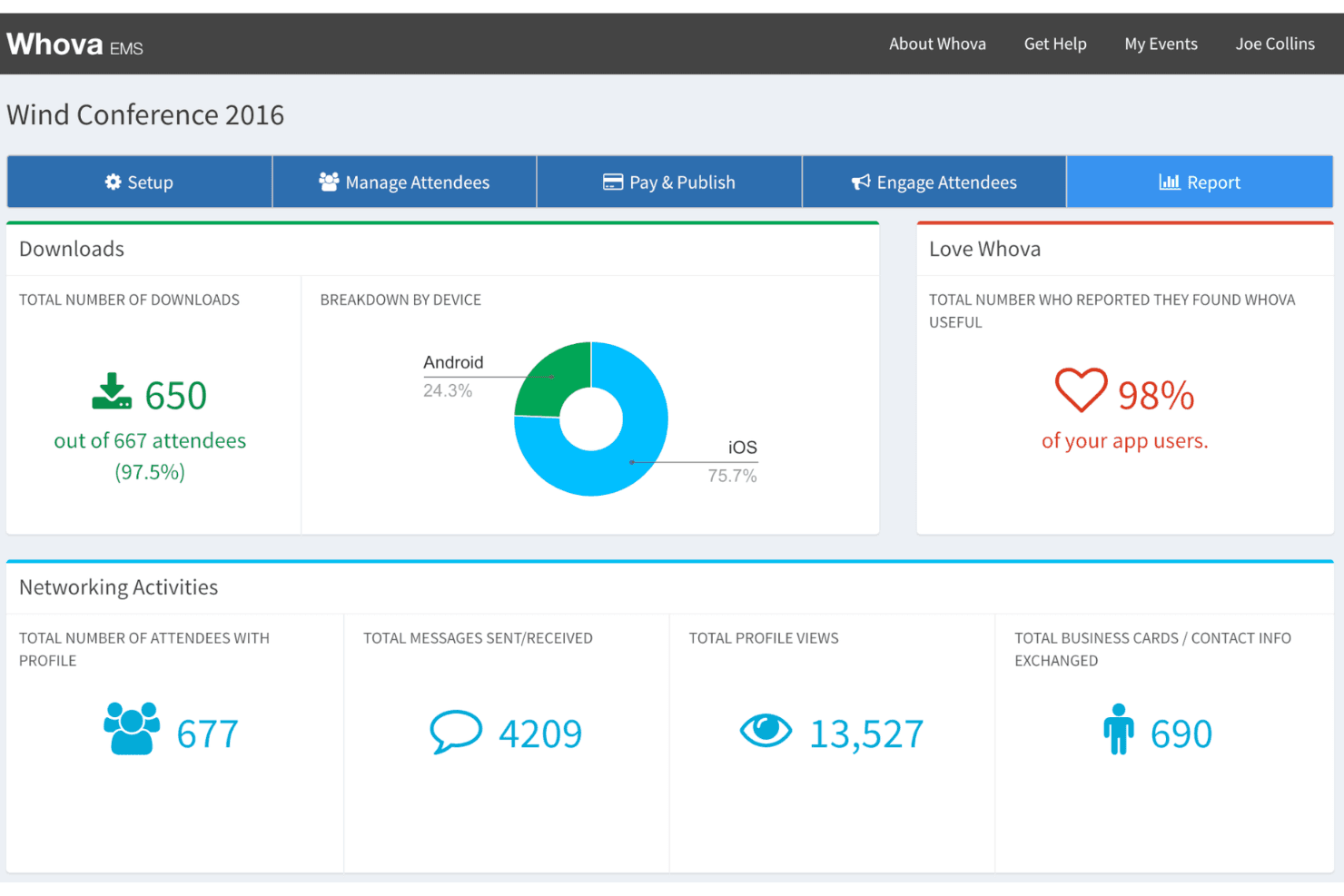
When judging Whova as a church event management software, its intuitive interface and strong attendee engagement tools set it apart from many competitors. The mobile app, live polling, and networking features make it ideal for churches hosting multi-day conferences or community events. Pricing is mid-range, and onboarding is straightforward, though some advanced customization options are limited. Whova’s integrations and responsive support help churches manage complex events, but smaller congregations with simple needs may find it more than necessary. If you’re selecting a solution for larger or tech-forward ministries, then you might want to use Whova.
Pros
- Mobile app supports live polls and attendee networking.
- Agenda management and personalized schedules are highly rated.
- Customer support responds quickly, even on weekends.
Cons
- No print function for web version event materials.
- Advanced branding options are limited for smaller events.
- Some users report the interface feels cluttered with features.
Is Whova Right For Your Needs?
Who Would be a Good Fit for Whova?
Whova is best suited for churches and organizations that host large-scale or multi-day events, need attendee engagement tools, or require mobile access for on-the-go coordination. Its agenda management, networking features, and real-time updates make it a strong choice for teams that value communication and interactive user experiences. Ministries with dedicated event staff or volunteers will benefit from Whova’s centralized dashboard and responsive support, especially when managing complex logistics or large events.
- Large ChurchesWhova handles high attendee volumes and complex event schedules smoothly.
- Youth MinistriesMobile app features support interactive sessions and real-time engagement.
- Conference OrganizersPersonalized agendas and networking tools enhance conference experiences.
- Volunteer CoordinatorsCentralized communication and scheduling simplify volunteer management.
- Tech-Savvy TeamsMobile-first design and digital engagement tools fit digital ministries.
- Regional Church NetworksMulti-event management and attendee tracking support network-wide gatherings.
Who Would be a Bad Fit for Whova?
Whova may not be the best choice for small congregations, teams with minimal tech experience, or those who need only basic event management. Its feature-rich platform can feel overwhelming for simple gatherings, and some functions—like advanced branding or print materials—are limited. Churches with tight budgets or infrequent events may find Whova’s pricing and capabilities more than they need.
- Small CongregationsFeature set and pricing exceed needs for simple gatherings.
- Budget-Conscious ChurchesSubscription costs may not justify infrequent event use.
- Non-Tech TeamsInterface complexity can overwhelm teams with limited tech skills.
- Single-Event PlannersMulti-event management tools are unnecessary for one-off events.
- Traditional MinistriesLimited print options hinder those relying on physical materials.
- Informal GroupsNetworking and engagement features are excessive for casual meetings.
Come Testiamo e Valutiamo gli Strumenti
Abbiamo trascorso anni a costruire, perfezionare e migliorare il nostro sistema di test e valutazione dei software. Il nostro metodo è progettato per cogliere tutte le sfumature della selezione software e ciò che rende uno strumento efficace, concentrandosi sugli aspetti critici del processo decisionale. Qui sotto puoi vedere esattamente come funzionano i nostri test e valutazioni in base a sette criteri. Questo ci permette di offrire una valutazione imparziale dei software considerando funzionalità di base, caratteristiche distintive, facilità d’uso, onboarding, supporto clienti, integrazioni, recensioni dei clienti e rapporto qualità-prezzo.
Funzionalità di Base (25% del punteggio finale)
Il punto di partenza della nostra valutazione è sempre la funzionalità di base dello strumento. Dispone delle funzionalità e caratteristiche essenziali che un utente si aspetterebbe di trovare? Alcune di queste funzioni di base sono limitate a piani con prezzi superiori? In sostanza, ci aspettiamo che uno strumento sia all’altezza delle capacità minime offerte dai concorrenti.
Caratteristiche Distintive (25% del punteggio finale)
Successivamente analizziamo le caratteristiche distintive che vanno oltre la funzionalità base tipica degli strumenti di questa tipologia. Un punteggio alto riflette funzioni specializzate o uniche che rendono il prodotto più veloce, efficiente o offrono valore aggiunto all’utente. Valutiamo anche quanto sia semplice integrare altri strumenti comunemente presenti nello stack tecnologico per espandere la funzionalità e l’utilità del software. Gli strumenti che offrono numerose integrazioni native, connessioni di terze parti e accesso API per creare integrazioni personalizzate ottengono il punteggio migliore.
Facilità d’Uso (10% del punteggio finale)
Consideriamo quanto sia veloce e facile eseguire i compiti principali definiti usando lo strumento. I software con punteggi elevati sono ben progettati, intuitivi, offrono app mobili, mettono a disposizione modelli e rendono semplici anche i compiti più complessi.
Onboarding (10% del punteggio finale)
Sappiamo quanto sia importante adottare rapidamente una nuova piattaforma, quindi valutiamo quanto sia semplice imparare e utilizzare uno strumento con il minimo training. Esaminiamo quanto rapidamente un membro del team possa essere operativo senza esperienza precedente. Le soluzioni con punteggio alto richiedono poco o nessun supporto.
Supporto Clienti (10% del punteggio finale)
Valutiamo quanto sia rapido e semplice risolvere i problemi e ottenere assistenza tramite telefono, chat dal vivo o knowledge base. Gli strumenti e le aziende che forniscono supporto in tempo reale ottengono il punteggio migliore, mentre i chatbot ottengono la valutazione più bassa.
Recensioni dei Clienti (10% del punteggio finale)
Oltre ai nostri test e valutazioni, prendiamo in considerazione il net promoter score di clienti attuali e passati. Esaminiamo la loro propensione, data la scelta, a selezionare nuovamente lo strumento per le funzioni principali. Un software con punteggio alto riflette un net promoter score elevato da parte dei clienti attuali o precedenti.
Rapporto Qualità-Prezzo (10% del punteggio finale)
Infine, considerando tutti gli altri criteri, esaminiamo il prezzo medio dei piani base rispetto alle funzionalità principali e valutiamo il valore degli altri indicatori. I software che offrono di più, a meno, ottengono un punteggio superiore.
Core Features
Mobile Event App
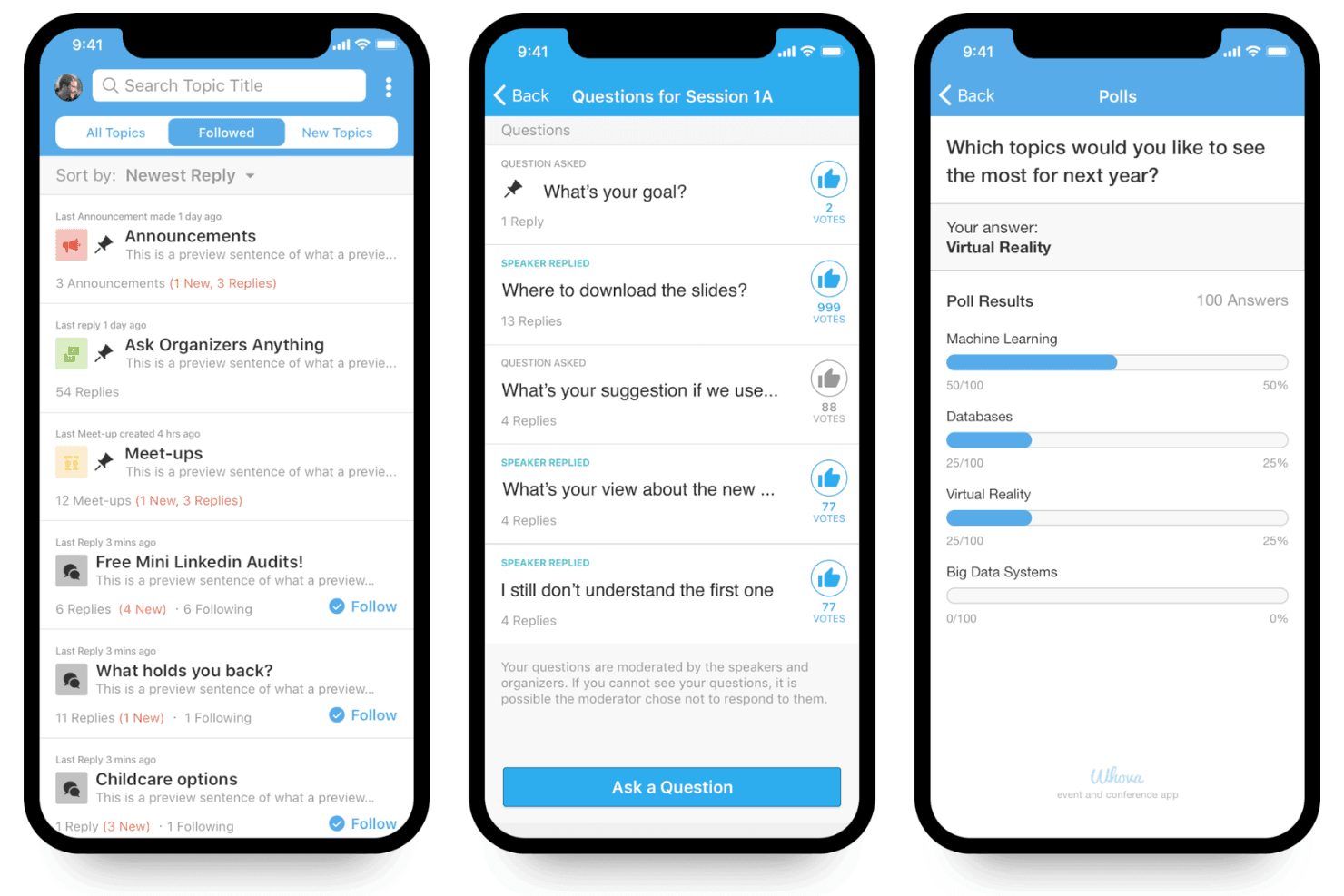
Attendees access schedules, live polls, and networking tools from their phones. The app keeps everyone updated with real-time announcements.
Agenda Management
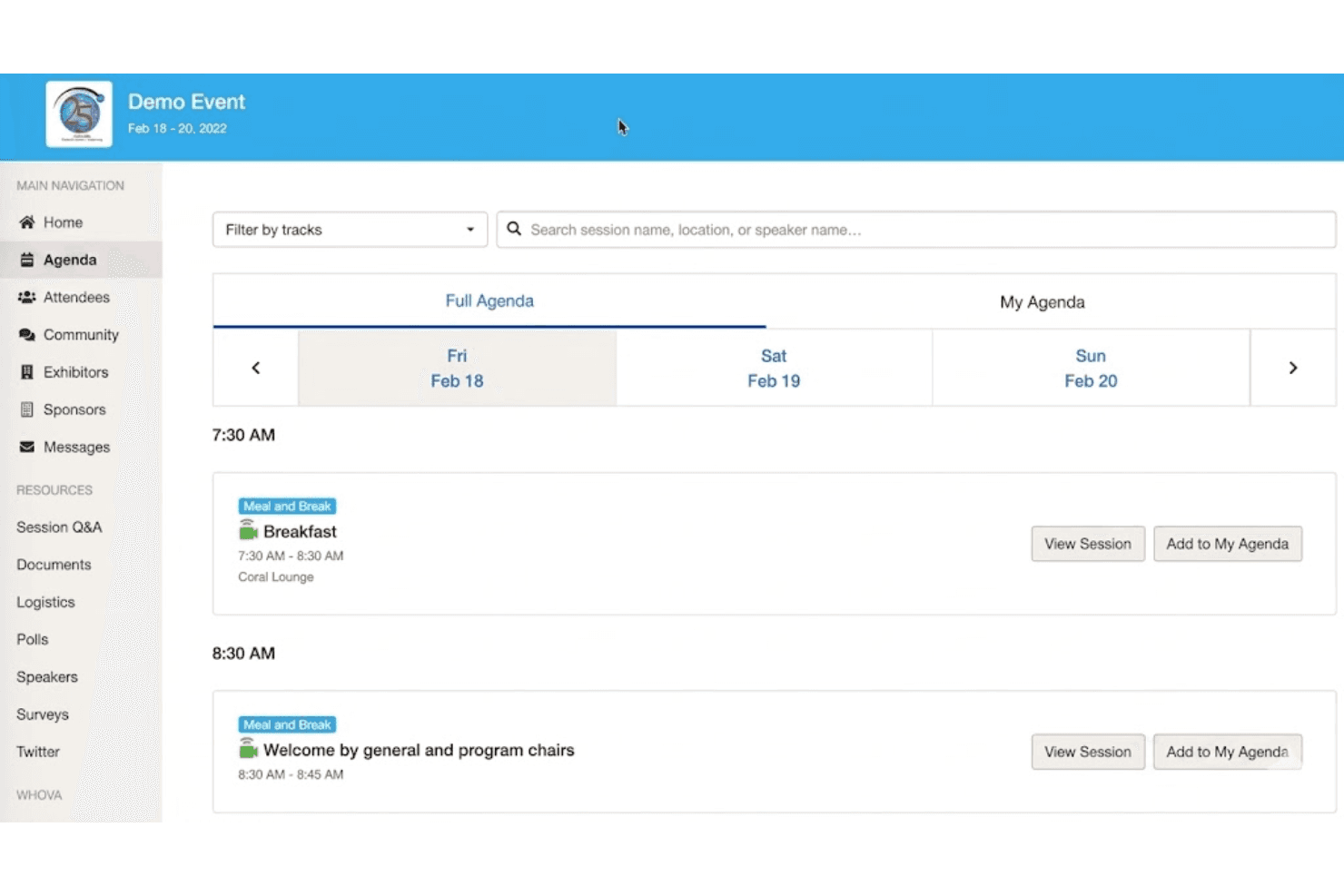
Organizers create, update, and share multi-session agendas and notifications easily. Attendees can personalize their schedules and receive reminders.
Event Registration
Whova offers online registration with customizable forms and payment processing. Organizers track sign-ups and manage attendee lists in one place.
Attendee Networking
Built-in messaging, discussion boards, and attendee profiles foster connections. Features like business card scanning, social media exchanges, and group chats encourage engagement.
Live Polls and Q&A
Organizers run live polls and Q&A sessions directly in the app. This boosts participation during sessions and helps gather instant feedback.
Sponsor and Exhibitor Tools
Sponsors get visibility through digital booths, lead capture, and in-app promotions. Exhibitors can scan QR codes and connect with attendees efficiently.
Ease of Use
Whova offers a user-friendly experience, especially for organizers familiar with digital tools. The dashboard is well-organized, and the mobile app makes it easy for attendees to access schedules, updates, and networking features. Some users mention the interface can feel crowded with options, but most appreciate the clear navigation and responsive support. For churches managing complex events, Whova’s usability stands out by reducing manual tasks and keeping communication centralized.
Integrations
Whova integrates with Eventbrite, Cvent, RegFox, WildApricot, Constant Contact, Glupe, and YourMembership, among others.
Whova also offers a limited API and connects with third-party integration tools like Zapier.

Whova Specs
- Accounts Payable: No
- Accounts Receivable: No
- API: Yes
- Audience Targeting: No
- Budgeting: No
- Calendar Management: Yes
- Contact Management: Yes
- Customer Management: No
- Dashboard: Yes
- Data Export: Yes
- Data Import: Yes
- Data Visualization: Yes
- Expense Tracking: No
- External Integrations: Yes
- Forecasting: No
- General Account Ledger: No
- Inventory Tracking: No
- Lead Management: Yes
- Lead Scoring: No
- Marketing Automation: Yes
- Multi-User: Yes
- Notifications: Yes
- Project Management: No
- Scheduling: Yes
- Social-Media Integration: Yes
- Supplier Management: No
- Third-Party Plugins/Add-Ons: Yes
- Travel Management: No


