

Il software di contabilità per piccole chiese aiuta a tenere traccia delle donazioni, gestire le spese e occuparsi delle attività contabili adattate alle esigenze specifiche delle organizzazioni religiose più piccole. Se desideri semplificare la gestione finanziaria, mantenere l’ordine e garantire la trasparenza della tua chiesa, il software di contabilità per chiese adatto può fare davvero la differenza. Questo elenco ti aiuterà a confrontare le migliori opzioni di software di contabilità per chiese per il 2026, così potrai trovare una soluzione adatta alle dimensioni, al budget e al flusso di lavoro del tuo ministero, dedicando meno tempo alla contabilità senza sacrificare precisione o controllo.
Perché fidarsi dei nostri consigli sui software
6,700+
Reviews
20
Industry experts
16+
Evaluation factors
14
Years
Il nostro team testa e recensisce software dal 2012. In quanto leader ecclesiastici noi stessi, sappiamo quanto sia difficile — e importante — scegliere il software giusto.
Per questa guida, abbiamo valutato gli strumenti attraverso test pratici e ricerche indipendenti, assegnando un punteggio agli strumenti in base ai nostri criteri di selezione.
Le nostre recensioni riflettono il nostro giudizio editoriale umano, non un discorso di vendita.
Tabella comparativa dei software di contabilità per piccole chiese
Questa tabella comparativa riassume i dettagli dei prezzi delle mie migliori selezioni di software di contabilità per piccole chiese:
| Tool | Best For | Trial Info | Price | ||
|---|---|---|---|---|---|
| 1 | Ideale per il tracciamento delle donazioni | Piano gratuito disponibile | Da $12/mese (fatturazione mensile) | Website | |
| 2 | Ideale per la contabilità gestita da un tesoriere volontario | Piano gratuito disponibile | A partire da $19/mese (con fatturazione annuale) | Website | |
| 3 | Ideale per facilità d'uso | Prova gratuita di 30 giorni disponibile | Da $72/mese | Website | |
| 4 | Ideale per le opzioni di integrazione | Prova gratuita di 30 giorni | Da $30/mese | Website | |
| 5 | Ideale per interfaccia user-friendly | Prova gratuita di 30 giorni disponibile | A partire da $2.50/mese | Website | |
| 6 | Ideale per la reportistica dettagliata | Demo gratuita disponibile | Prezzo su richiesta | Website | |
| 7 | Ideale per accesso basato su cloud | Demo gratuita disponibile | Prezzi su richiesta | Website | |
| 8 | Ideale per la contabilità delle organizzazioni non profit | Dimostrazione gratuita + prova gratuita di 15 giorni disponibile | A partire da $79/mese | Website | |
| 9 | Ideale per grandi chiese | Prova gratuita di 30 giorni su richiesta | Prezzi su richiesta | Website | |
| 10 | Migliore per piccole congregazioni | Prova gratuita di 14 giorni | Da $24/mese | Website |


Recensioni dei software di contabilità per piccole chiese
Di seguito sono riportati i miei riepiloghi dettagliati dei software di contabilità per piccole chiese inclusi nella mia selezione. Le mie recensioni offrono un’analisi approfondita delle funzionalità, dei prezzi e dei casi d’uso ideali di ciascun software, per aiutarti a trovare quello più adatto a te.
 Ideale per il tracciamento delle donazioni
- Piano gratuito disponibile
- Da $12/mese (fatturazione mensile)
Visit WebsiteCustomer Rating:4.9/5
ChMeetings tiene traccia di donazioni, eventi, presenze e follow-up in un unico posto. ChMeetings è una piattaforma di gestione parrocchiale con un modulo di contabilità integrato che include contabilità per fondi, tracciamento delle donazioni, gestione delle spese, pianificazione del budget e rendicontazione finanziaria, progettata specificamente per le chiese.
Per chi è ideale ChMeetings?
ChMeetings è adatto a chiese di piccole e medie dimensioni che desiderano strumenti di gestione finanziaria integrati nel loro sistema di gestione parrocchiale.
Perché ho scelto ChMeetings
Ho scelto ChMeetings tra i migliori perché il tracciamento delle donazioni è davvero integrato nel cuore della piattaforma. Mi piace che colleghi direttamente le donazioni ai profili dei membri, così quando preparo il resoconto fiscale di fine anno, è già associato alla persona giusta e pronto per essere inviato per email in blocco. La possibilità di depositare i lotti di contributi direttamente nel modulo di contabilità significa anche che non devo riconciliare manualmente le donazioni con i libri contabili.
Caratteristiche chiave di ChMeetings
- Contabilità per fondi: Assegna entrate e spese a fondi specifici e monitora in tempo reale il saldo di ciascun fondo.
- Monitoraggio del budget: Confronta le spese effettive con i budget pianificati tra i vari ministeri e apporta modifiche quando necessario.
- Sincronizzazione bancaria: Collega il tuo conto bancario tramite Plaid per importare le transazioni e applicare la categorizzazione basata su regole.
- Riconciliazione contabile: Abbina le transazioni bancarie alle registrazioni effettuate utilizzando un'interfaccia guidata passo-passo che segnala voci mancanti o duplicate.
Integrazioni di ChMeetings
ChMeetings offre integrazioni native con Stripe, PayPal, BlueSnap, Paystack, Mailchimp, Twilio, SMS Global, Clickatell, Eazismspro, Bulk SMS Nigeria e Zeffy. È inoltre compatibile con Zapier e fornisce un'API per integrazioni personalizzate.
Pros and Cons
Pros:
- Tracciabilità delle donazioni integrata con assegnazione ai fondi
- Sincronizzazione bancaria automatica e regole personalizzate
- Gestione dei pagamenti degli eventi e dei biglietti
Cons:
- Capacità avanzate di business limitate
- Personalizzazione finanziaria limitata per ministeri complessi
Learn more about ChMeetings: Ideale per la contabilità gestita da un tesoriere volontario
- Piano gratuito disponibile
- A partire da $19/mese (con fatturazione annuale)
Visit WebsiteCustomer Rating:4.8/5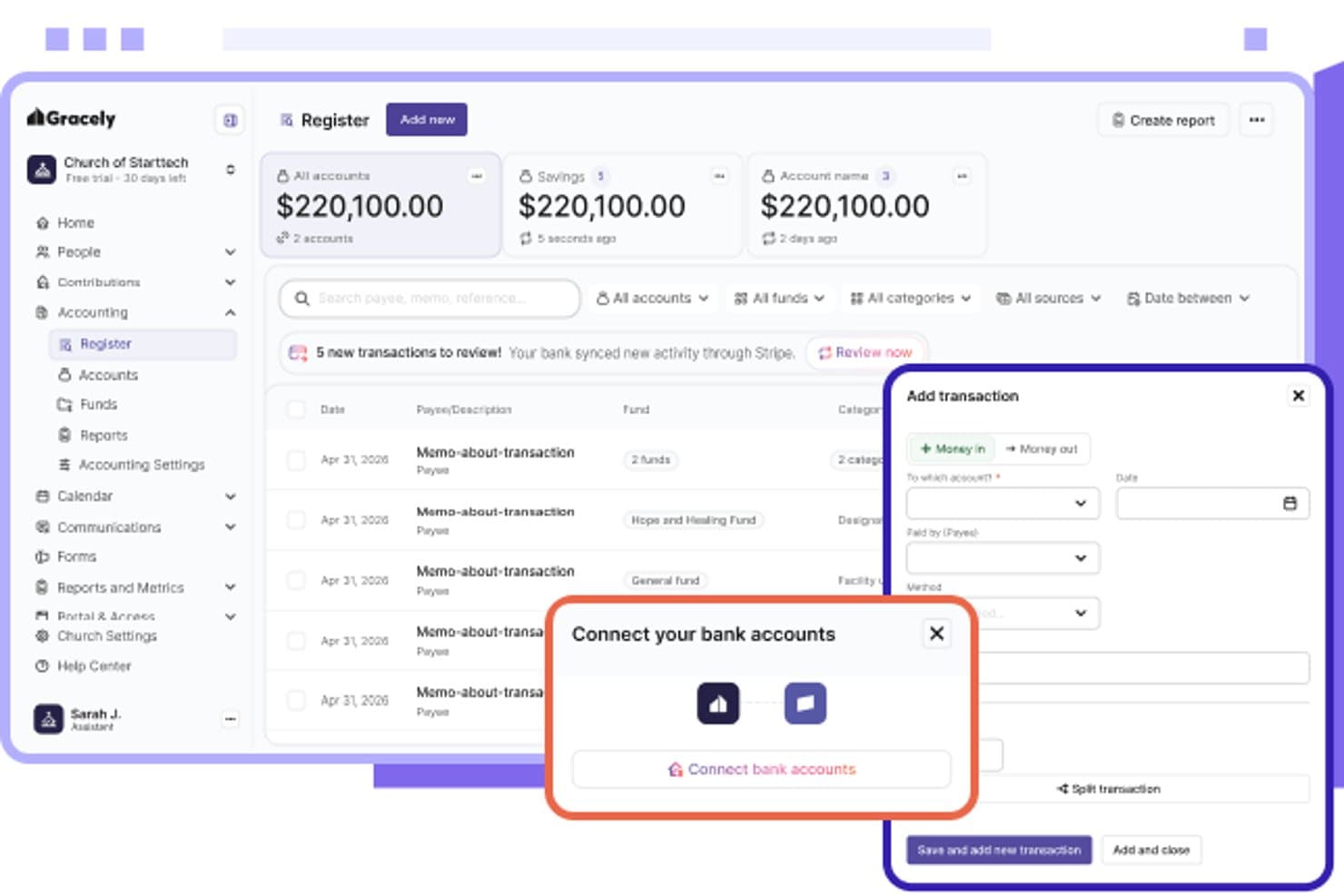
Gracely consente agli utenti di collegare facilmente i conti bancari e registrare le transazioni. Gracely è una piattaforma completa per la gestione delle chiese che combina contabilità dei fondi, monitoraggio delle donazioni e dei contributi, rendiconti dei donatori, rapporti finanziari e gestione delle persone e degli eventi in un unico sistema.
Per chi è più adatto Gracely?
Gracely è particolarmente adatto alle chiese di piccole dimensioni con un tesoriere volontario che gestisce la contabilità, soprattutto a quelle che desiderano avere donazioni, gestione delle persone e contabilità dei fondi in un unico posto, senza che il gergo contabile diventi un ostacolo.
Perché ho scelto Gracely
Gracely è entrato nella mia rosa dei preferiti perché è una delle poche piattaforme progettate tenendo davvero conto delle esigenze dei tesorieri volontari, sostituendo il gergo contabile con etichette in linguaggio semplice come 'Denaro in entrata, denaro in uscita' invece di 'Debiti & crediti'. Apprezzo il fatto che la contabilità dei fondi sia integrata direttamente nella piattaforma, così un tesoriere volontario può monitorare i saldi separati per fondi come missioni, edilizia o assistenza ai bisognosi senza bisogno di una formazione contabile. Anche i registri dei contributi, il monitoraggio degli impegni di donazione e i rendiconti annuali delle donazioni sono tutti disponibili in un unico posto, il che significa meno passaggi per chi gestisce la contabilità in una domenica pomeriggio.
Caratteristiche principali di Gracely
- Monitoraggio delle campagne di impegni: Assegna le campagne di impegni ai singoli membri e monitora il totale promesso, l'importo raccolto e il saldo rimanente per ciascun membro.
- Abbinamento delle attività bancarie: Sincronizza le attività bancarie, esamina le transazioni in entrata e approva ogni voce prima che venga registrata nella contabilità.
- Generazione dei rendiconti fiscali di fine anno: Produci automaticamente i rendiconti annuali delle donazioni e la documentazione fiscale scaricabile con esportazione in PDF.
- Gestione delle donazioni in blocco: Registra e gestisci le donazioni effettuate di persona in blocchi, supportando contanti, assegni e altri metodi di pagamento.
Integrazioni di Gracely
Gracely si integra con Stripe e PayPal per l'elaborazione delle donazioni online e dei pagamenti.
Pros and Cons
Pros:
- I saldi dei fondi si aggiornano con le transazioni
- Secondo i recensori, i rapporti sulle donazioni sono semplici da consultare
- Le etichette in linguaggio semplice sono adatte ai tesorieri volontari
Cons:
- Non è documentato il monitoraggio effettivo rispetto al bilancio preventivo
- I recensori desiderano rapporti più approfonditi e più facili da stampare
Learn more about Gracely: Ideale per facilità d'uso
- Prova gratuita di 30 giorni disponibile
- Da $72/mese
Visit WebsiteCustomer Rating:4.8/5
Tithely Church Management tiene traccia delle promesse, dei progressi e dei dettagli dei donatori. Tithely Church Management è pensato per le chiese che desiderano una contabilità semplice insieme a strumenti per la gestione dei membri e delle donazioni in un unico luogo. Se stai cercando una soluzione che combini il monitoraggio delle donazioni, la contabilità di base e una reportistica facile da utilizzare, Tithely Church Management mantiene tutto semplice per piccoli team. È particolarmente utile per le chiese che vogliono gestire le finanze senza bisogno di un sistema contabile separato.
A chi è più indicato Tithely Church Management?
Personale delle chiese e team finanziari di congregazioni di piccole e medie dimensioni in Nord America che cercano strumenti di gestione e donazione facili da usare.
Perché ho scelto Tithely Church Management
Per le chiese che desiderano la contabilità integrata direttamente nel loro sistema di gestione, Tithely Church Management si distingue per la sua semplicità e l'approccio tutto in uno. Ho scelto Tithely Church Management perché unisce la gestione delle offerte, il monitoraggio delle contribuzioni e la reportistica finanziaria di base in un'unica piattaforma. Puoi registrare donazioni, generare dichiarazioni di donazione e monitorare i fondi senza dover passare tra più strumenti. Questo rende Tithely Church Management una scelta ideale per le piccole chiese che vogliono mantenere i processi finanziari semplici e collegati alla gestione più ampia del ministero.
Funzionalità principali di Tithely Church Management
Altre funzionalità che rendono Tithely Church Management utile per la contabilità delle piccole chiese includono:
- Registrazione a lotti delle transazioni: Inserisci più donazioni o pagamenti contemporaneamente per risparmiare tempo nell'inserimento dei dati.
- Categorie finanziarie personalizzabili: Crea le tue categorie di entrata e uscita per adattarle al piano dei conti della tua chiesa.
- Report finanziari esportabili: Scarica i dati finanziari e delle donazioni in formato CSV o Excel per ulteriori analisi o condivisione.
- Controlli di accesso per gli utenti: Assegna diversi livelli di permessi a personale e volontari per proteggere le informazioni finanziarie sensibili.
Integrazioni di Tithely Church Management
Le integrazioni includono QuickBooks, Tithely Church Apps, Tithely Sites, SongSelect, Mailchimp, Planning Center, Google Calendar, Stripe, PayPal, Pushpay, Church Community Builder e altri ancora.
Pros and Cons
Pros:
- Include strumenti integrati per la gestione delle offerte e delle contribuzioni
- Offre categorie finanziarie personalizzabili per le chiese
- Genera dichiarazioni dei donatori per fini fiscali
Cons:
- Mancano funzioni complete di contabilità a partita doppia
- Tracciamento della cronologia delle transazioni finanziarie limitato
 Ideale per le opzioni di integrazione
- Prova gratuita di 30 giorni
- Da $30/mese
Visit WebsiteCustomer Rating:4.4/5
QuickBooks mostra fatture, spese, conti bancari, riepiloghi di profitti e vendite. QuickBooks offre alle piccole chiese una piattaforma contabile familiare con funzionalità di monitoraggio dei fondi per enti non profit. Se hai bisogno di gestire fondi designati, tracciare le spese e generare report finanziari per il consiglio direttivo o la congregazione, questo strumento offre flessibilità e profondità. Il suo ampio utilizzo significa che spesso puoi trovare contabili locali o volontari già pratici delle sue modalità operative.
Per chi è più indicato QuickBooks?
Team di contabilità e finanza in piccole e medie chiese e organizzazioni non profit a livello globale che necessitano di integrazione con altri strumenti e servizi finanziari.
Perché ho scelto QuickBooks
Molte piccole chiese conoscono già QuickBooks come soluzione contabile affidabile, ma l’ho scelto per la sua capacità di gestire il monitoraggio dei fondi per enti non profit all’interno di un’interfaccia familiare. QuickBooks ti permette di impostare e gestire più fondi o classi, così puoi tracciare donazioni destinate e conti vincolati con chiarezza. La piattaforma offre anche una reportistica dettagliata, semplificando la preparazione delle rendicontazioni per il consiglio direttivo o la congregazione. Per le chiese che desiderano uno strumento ampiamente usato con funzionalità per enti non profit, QuickBooks propone un approccio flessibile alla contabilità ecclesiastica.
Funzionalità principali di QuickBooks
Altre funzionalità di QuickBooks aiutano le chiese a gestire le proprie finanze in modo più completo:
- Collegamenti bancari automatici: Collega i conti bancari della tua chiesa per importare e categorizzare automaticamente le transazioni.
- Transazioni ricorrenti: Imposta pagamenti o depositi ricorrenti per spese e entrate regolari.
- Gestione di fatture e ricevute: Crea, invia e monitora fatture e ricevute per eventi, affitti o altre attività della chiesa.
- Permessi utente: Assegna diversi livelli di accesso a personale o volontari in base ai loro ruoli.
Integrazioni di QuickBooks
Le integrazioni includono Shopify, PayPal, Square, Gusto, Expensify, Bill.com, Amazon Business e altro ancora.
Pros and Cons
Pros:
- Offre transazioni ricorrenti per donazioni regolari
- Include collegamenti automatici a banche e carte di credito
Cons:
- Supporta la contabilità per fondi con monitoraggio per classi
- Nessuna gestione integrata dei membri della chiesa
- Non dispone della generazione integrata della dichiarazione di contribuzione
 5Ideale per interfaccia user-friendly
Xero
- Prova gratuita di 30 giorni disponibile
- A partire da $2.50/mese
Visit WebsiteCustomer Rating:4.4/5
Xero mostra metriche di profitti e perdite, tendenze di flusso di cassa e suddivisione delle spese. Se cerchi una soluzione di contabilità basata su cloud che gestisca automaticamente i collegamenti bancari e la riconciliazione, Xero vale la pena di essere considerato. Questo software è adatto a piccole chiese che desiderano semplificare la contabilità e accedere ai dati finanziari da qualsiasi luogo. Le funzioni di automazione di Xero possono aiutare a ridurre l'inserimento manuale dei dati e a mantenere le finanze della tua chiesa organizzate.
Per chi è ideale Xero?
Team finanziari e contabili di organizzazioni non profit di piccole e medie dimensioni a livello globale che utilizzano un'interfaccia contabile online facile da usare.
Perché ho scelto Xero
Xero si distingue per le piccole chiese che necessitano di una contabilità su cloud con collegamenti bancari e riconciliazione automatizzati. Ho scelto Xero perché le sue importazioni automatiche delle transazioni bancarie e la riconciliazione in tempo reale aiutano a ridurre il lavoro manuale di contabilità, una sfida comune per i team finanziari guidati da volontari. Il software consente anche di categorizzare le transazioni e generare report finanziari aggiornati, favorendo la trasparenza e la responsabilità. Queste funzioni rendono più semplice per le piccole chiese mantenere registri accurati e restare aggiornate sulle proprie finanze senza carichi amministrativi aggiuntivi.
Funzionalità principali di Xero
Altre funzionalità di Xero possono aiutare le piccole chiese a gestire le proprie finanze in modo più efficiente:
- Supporto multi-valuta: Traccia e gestisci le transazioni in diverse valute se la tua chiesa riceve donazioni internazionali.
- Piano dei conti personalizzabile: Configura categorie di conto che corrispondano ai fondi e alle tipologie di spesa specifiche della tua chiesa.
- Creazione di fatture ricorrenti: Pianifica e automatizza fatture regolari per affitti di spazi o donazioni ricorrenti.
- Accesso da app mobile: Visualizza transazioni, approva spese e controlla saldi dal tuo telefono o tablet.
Integrazioni Xero
Le integrazioni includono Quadient, Shopify, Gusto, Zapier, Stripe, HubSpot, GoCardless e altro ancora.
Pros and Cons
Pros:
- I collegamenti bancari automatizzati riducono l'inserimento manuale
- Report finanziari in tempo reale per la trasparenza
- L'app mobile supporta le attività di contabilità da remoto
Cons:
- Gestione limitata dei donatori e rendicontazione delle contribuzioni
- La personalizzazione del piano dei conti della chiesa è manuale
 Ideale per la reportistica dettagliata
- Demo gratuita disponibile
- Prezzo su richiesta
Visit WebsiteCustomer Rating:4.3/5
Sage Intacct mostra dati su profitti e perdite nel dashboard clienti. Sage Intacct offre una contabilità fondi basata su cloud, progettata per le organizzazioni che necessitano di controlli finanziari avanzati e reportistica approfondita. Se la tua chiesa gestisce più fondi, sovvenzioni o donazioni vincolate, questa piattaforma ti aiuta a mantenere tutto organizzato e conforme. È particolarmente adatto per le chiese che desiderano automatizzare compiti contabili complessi e ottenere una visione più approfondita delle proprie finanze.
A chi è maggiormente indicato Sage Intacct?
Team finanziari di organizzazioni nonprofit di medie e grandi dimensioni in tutto il mondo che necessitano di reportistica finanziaria dettagliata e funzionalità di contabilità basata su cloud.
Perché ho scelto Sage Intacct
Ciò che distingue Sage Intacct è la sua attenzione alla contabilità fondi in cloud con reportistica avanzata, particolarmente importante per le chiese che gestiscono più fondi o donazioni vincolate. Ho scelto Sage Intacct perché permette di monitorare separatamente ogni fondo, supportando la conformità e la trasparenza delle donazioni designate. Gli strumenti di report personalizzabili della piattaforma consentono di generare bilanci dettagliati su misura per le esigenze della tua chiesa. Per le piccole chiese che devono gestire requisiti contabili complessi e offrire supervisione finanziaria chiara, Sage Intacct offre un livello di controllo e flessibilità difficile da eguagliare.
Funzionalità principali di Sage Intacct
Oltre ai suoi punti di forza nella contabilità fondi e nella reportistica, Sage Intacct offre diverse altre funzionalità che supportano le esigenze di contabilità delle piccole chiese:
- Flussi di lavoro automatizzati per i conti da pagare: Imposta processi di approvazione e automatizza i pagamenti ai fornitori per ridurre l'inserimento manuale dei dati.
- Gestione multi-entità: Gestisci le finanze di più campus o ministeri all'interno di un unico sistema.
- Strumenti per la riconciliazione bancaria: Importa le transazioni bancarie e abbinale ai tuoi registri per facilitare il bilanciamento dei conti.
- Permessi utente basati sui ruoli: Controlla l'accesso ai dati finanziari sensibili assegnando ruoli specifici a personale e volontari.
Integrazioni Sage Intacct
Le integrazioni includono Salesforce, Bill.com, ADP, FloQast, BlueSnap, Brightpearl, Yooz e altre ancora.
Pros and Cons
Pros:
- Gestisce la contabilità multi-entità e multi-campus
- Offre un monitoraggio dettagliato dei fondi e delle sovvenzioni
- Fornisce report finanziari avanzati e personalizzabili
Cons:
- Richiede un contratto annuale per la maggior parte degli abbonamenti
- Non dispone di strumenti integrati per donazioni e offerte
Learn more about Sage Intacct: Ideale per accesso basato su cloud
- Demo gratuita disponibile
- Prezzi su richiesta
Visit WebsiteCustomer Rating:4.4/5
IconCMO mostra lo storico delle email e i dettagli dei destinatari per le comunicazioni della chiesa. Se cerchi una soluzione di contabilità basata su cloud progettata specificamente per le chiese, IconCMO offre contabilità a fondi in tempo reale e gestione dei membri in un'unica piattaforma. Questo strumento è molto adatto per congregazioni di piccole e medie dimensioni che desiderano gestire finanze, donazioni e comunicazioni da qualsiasi luogo. I suoi report in tempo reale e l'accesso online sicuro aiutano i responsabili delle chiese a mantenere i registri finanziari precisi e accessibili a personale e volontari.
A chi è più adatto IconCMO?
Team finanziari e amministratori di chiesa in congregazioni di piccole e medie dimensioni nel Nord America che sfruttano l'accesso al cloud per la contabilità e la gestione.
Perché ho scelto IconCMO
Ciò che distingue IconCMO è il suo approccio cloud alla gestione e alla contabilità della chiesa, particolarmente prezioso per le piccole chiese che necessitano di flessibilità e accesso remoto. Ho scelto IconCMO perché offre una contabilità a fondi in tempo reale, così puoi monitorare i fondi destinati e generare report finanziari aggiornati ovunque ti trovi. La piattaforma consente inoltre di gestire contributi e registri dei membri in un unico luogo, facilitando l'organizzazione dei dati finanziari e dei membri della chiesa. Questa combinazione di accesso in tempo reale e tracciamento integrato dei fondi rende IconCMO una scelta pratica per le chiese che vogliono abbandonare i software desktop.
Funzionalità principali di IconCMO
Altre funzionalità che rendono IconCMO utile per la contabilità delle piccole chiese includono:
- Donazioni ricorrenti automatizzate: Imposta e gestisci donazioni programmate per membri e famiglie.
- Gestione dei conti da pagare: Monitora fatture, gestisci pagamenti a fornitori e stampa assegni direttamente dalla piattaforma.
- Gestione eventi e calendario: Organizza eventi della chiesa, programma stanze e coordina le risorse in un unico posto.
- Rendiconti finanziari personalizzabili: Genera ed esporta report finanziari dettagliati adattati alle esigenze della tua chiesa.
Integrazioni IconCMO
Le integrazioni includono Vanco, Mailchimp, Yearli, Kotapay, Constant Contact e altro ancora.
Pros and Cons
Pros:
- Accesso cloud che supporta le attività di contabilità da remoto
- Contabilità a fondi in tempo reale per fondi dedicati
- Gestione delle donazioni ricorrenti per i donatori abituali
Cons:
- Le opzioni di personalizzazione dei report sono alquanto limitate
- La navigazione nell'interfaccia può risultare a volte poco intuitiva
Learn more about IconCMO: Ideale per la contabilità delle organizzazioni non profit
- Dimostrazione gratuita + prova gratuita di 15 giorni disponibile
- A partire da $79/mese

Pannello di controllo dei rendiconti di Aplos con preferiti, rendiconti recenti e ricerca. Aplos è progettato specificamente per chiese e organizzazioni non profit che necessitano di una vera contabilità per fondi e del monitoraggio delle donazioni in un unico luogo. Se cerchi una soluzione che gestisca fondi vincolati, generi rendiconti delle donazioni e gestisca le comunicazioni con i donatori, questa piattaforma riunisce tutte queste funzionalità. È particolarmente adatta alle piccole chiese che desiderano strumenti contabili sviluppati attorno alle esigenze del ministero, anziché ai flussi di lavoro aziendali.
Per chi è più adatto Aplos?
Team finanziari di organizzazioni non profit e chiese in Nord America ed Europa che gestiscono contabilità specializzata, donazioni e monitoraggio dei fondi.
Perché ho scelto Aplos
Ciò che distingue Aplos è la sua attenzione alla contabilità per fondi e al monitoraggio delle donazioni progettati specificamente per le chiese. Ho scelto Aplos perché consente di creare e gestire più fondi, monitorare le donazioni vincolate e generare rendiconti per i donatori senza ricorrere a soluzioni alternative. La piattaforma include inoltre strumenti integrati per gestire le comunicazioni con i donatori e le donazioni online, aspetti essenziali per le piccole chiese. Se hai bisogno di un software contabile progettato intorno alle finanze delle chiese e alle relazioni con i donatori, Aplos offre funzionalità che rispondono direttamente a queste esigenze.
Funzionalità principali di Aplos
Oltre alla contabilità per fondi e al monitoraggio delle donazioni, Aplos offre diverse altre funzionalità che supportano la contabilità delle chiese:
- Gestione delle iscrizioni agli eventi: Monitora le iscrizioni agli eventi e i pagamenti direttamente all'interno della piattaforma.
- Configurazione delle donazioni ricorrenti: Consente ai donatori di programmare donazioni ricorrenti automatiche online.
- Strumenti per la definizione del budget: Crea, monitora e modifica i budget per diversi fondi o ministeri.
- Rendiconti finanziari personalizzabili: Genera rendiconti personalizzati in base alle specifiche esigenze di monitoraggio finanziario della tua chiesa.
Integrazioni di Aplos
Le integrazioni includono Raisely, PEX, Gusto, Keela, FACTS Management, PayPal, Donorelf e altre.
Pros and Cons
Pros:
- Rendiconti delle donazioni integrati per i donatori
- Monitora più fondi con una vera contabilità per fondi
- Include la gestione delle iscrizioni agli eventi e il monitoraggio dei pagamenti
Cons:
- Funzionalità paghe limitate per le chiese
- Nessuno strumento integrato per la gestione dei volontari
Learn more about Aplos: Ideale per grandi chiese
- Prova gratuita di 30 giorni su richiesta
- Prezzi su richiesta

Creazione di fatture in ShelbySystems per i conti da ricevere e la fatturazione della chiesa. ShelbySystems è pensato per le chiese che necessitano di controlli contabili avanzati e registri dettagliati per la revisione. Questa piattaforma si rivolge a team finanziari e amministratori che desiderano gestire fondi, budget e reportistica con trasparenza e precisione. La sua attenzione ai registri pronti per la revisione e alla reportistica personalizzabile aiuta le piccole chiese a rispettare gli standard di rendicontazione e a monitorare ogni dollaro con sicurezza.
Per chi è migliore ShelbySystems?
Team finanziari e amministrativi di grandi chiese in Nord America che gestiscono adesioni, donazioni e dati operativi su larga scala.
Perché ho scelto ShelbySystems
Quando cercavo una soluzione che privilegiasse la responsabilità e la trasparenza, ShelbySystems si è distinto per le sue capacità avanzate di reportistica e tracciamento delle revisioni. La piattaforma consente di generare rendiconti finanziari dettagliati e report personalizzati, essenziali per le piccole chiese che devono presentare registri chiari ai consigli direttivi o alle congregazioni. Apprezzo il fatto che ogni transazione sia tracciata con un audit trail completo, rendendo più semplice la revisione e la verifica dell'attività finanziaria. Queste funzioni aiutano le piccole chiese a restare conformi e a costruire fiducia nelle proprie comunità.
Caratteristiche principali di ShelbySystems
Altre funzionalità che rendono ShelbySystems pratico per la contabilità delle piccole chiese includono:
- Contabilità multi-fondo: Monitora e gestisci diversi fondi all'interno di un unico piano dei conti.
- Automazione dei conti da pagare: Gestisci le fatture, programma i pagamenti e tieni traccia dei fornitori.
- Strumenti di riconciliazione bancaria: Concilia le transazioni e i conti direttamente all'interno della piattaforma.
- Modulo di gestione del budget: Imposta, monitora e adatta i budget per i diversi ministeri o dipartimenti.
Integrazioni di ShelbySystems
Le integrazioni includono MinistryOne, Clover Sites e altro ancora.
Pros and Cons
Pros:
- I registri di audit tracciano ogni transazione finanziaria
- La contabilità multi-fondo supporta la gestione finanziaria complessa delle chiese
- Gli strumenti di budgeting consentono il monitoraggio specifico per ministero
Cons:
- La configurazione iniziale richiede un piano dei conti dettagliato
- L'esportazione dei report richiede talvolta una formattazione manuale
Learn more about ShelbySystems:

FlockBase mostra i profili dei membri con informazioni personali, offerte con assegni e gruppi. FlockBase è pensato per le piccole chiese che hanno bisogno di una gestione semplice di contabilità, paghe e offerte in un unico posto. Se cerchi una soluzione che gestisca sia il monitoraggio finanziario che i salari senza complessità aggiuntive, questo strumento fa per te. Il suo focus su esigenze specifiche come la contabilità a fondi e la registrazione delle donazioni lo rende una scelta pratica per le congregazioni con risorse amministrative limitate.
A chi è più adatto FlockBase?
Personale ecclesiastico e responsabili di piccole congregazioni in Nord America ed Europa che gestiscono l’amministrazione quotidiana di comunità minori.
Perché ho scelto FlockBase
FlockBase si distingue per il suo approccio semplice alla contabilità delle chiese, con funzioni integrate per la gestione degli stipendi e delle offerte. Ho scelto FlockBase perché permette alle piccole chiese di gestire finanze e salari da un’unica dashboard, cosa rara tra gli strumenti di contabilità per chiese. Il software offre funzioni per tracciare i fondi vincolati, gestire le paghe del personale e registrare le offerte per donatore. Questa combinazione aiuta le chiese nella contabilità quotidiana e nella conformità retributiva senza usare sistemi separati.
Funzionalità principali di FlockBase
Altre funzionalità di FlockBase completano le sue capacità di contabilità per piccole chiese:
- Riconciliazione bancaria: Confronta transazioni e saldi con gli estratti conto bancari direttamente nel software.
- Stampa degli assegni: Stampa assegni per fornitori, dipendenti o rimborsi direttamente dalla piattaforma.
- Piano dei conti personalizzato: Crea e gestisci un piano dei conti su misura per la struttura della tua chiesa.
- Gestione dell’elenco dei membri: Mantieni un elenco ricercabile di membri e famiglie.
Integrazioni FlockBase
Le integrazioni includono CSG Forte e altre ancora.
Pros and Cons
Pros:
- Include la gestione delle paghe per il personale della chiesa
- Offre la stampa degli assegni direttamente dalla piattaforma
- Supporta la configurazione del piano dei conti personalizzato
Cons:
- Non dispone di strumenti di budgeting o previsione integrati
- Richiede l’inserimento manuale dei dati per alcune transazioni
Learn more about FlockBase:
Altri software di contabilità per piccole chiese
Ecco alcune opzioni aggiuntive di software di contabilità per piccole chiese che non sono state incluse nella mia selezione, ma che vale comunque la pena esaminare:
- 11PowerChurch PlusIdeale per supporto completo
- 12ChurchProIdeale per la gestione totale della chiesa
- 13ACS TechnologiesIdeale per la gestione dei membri
- 14ChurchTracIdeale per chiese attente al budget
Cómo evalúo las plataformas de donaciones en línea para iglesias
Evalúo estas plataformas en dos niveles: los requisitos básicos que toda herramienta debe cumplir y los diferenciadores—estructura de comisiones, integraciones con ChMS y soporte para múltiples sedes—que distinguen a las mejores.
Funcionalidad básica (Condiciones requeridas para esta lista)
Cuando selecciono herramientas para mi lista, califico cada una en una escala del 0 (no ofrece la funcionalidad) al 5 (excelente en esta área) para cada funcionalidad básica que aparece abajo. Luego, calculo la puntuación total en un porcentaje. Cada herramienta necesita alcanzar una puntuación total mínima del 55% para ser considerada.
- Donaciones recurrentes y únicas: Verifico si los donantes pueden establecer sus propios calendarios de donaciones recurrentes y hacer donaciones puntuales sin la intervención del personal, como prometer un diezmo semanal u ofrecer espontáneamente para misiones.
- Métodos de donación multicanal: La donación debe ser accesible a través de formularios web, aplicaciones móviles, mensajes de texto y códigos QR, para que los miembros puedan donar durante un servicio en vivo o desde casa.
- Procesamiento ACH y de tarjeta: Busco plataformas compatibles con PCI que procesen tanto transferencias bancarias ACH como tarjetas de crédito/débito principales, ya que muchos donantes habituales prefieren ACH para reducir los costos por transacción.
- Gestión de donantes y declaraciones fiscales: Cada plataforma debe mantener el historial de donaciones de los donantes y generar declaraciones anuales que cumplan con los requisitos fiscales de organizaciones benéficas.
- Integraciones con ChMS y contabilidad: Evalúo cómo se integra la información de donaciones en sistemas de gestión eclesiástica como Planning Center o Breeze y herramientas contables como QuickBooks o Aplos para evitar la doble entrada manual.
- Designación de fondos y campañas: Las iglesias gestionan campañas de construcción, recolectas misioneras y fondos de ayuda simultáneamente, así que busco la habilidad de crear y administrar múltiples categorías de donaciones designadas.
Una vez que tengo una lista de herramientas que cumplen con este criterio, considero qué distingue a cada plataforma.
Factores diferenciadores (Qué distingue a los proveedores)
Así comparo y contrasto a los diferentes proveedores:
Funciones sobresalientes
Las comisiones cubiertas por los donantes son importantes porque permiten que los miembros asuman voluntariamente los gastos de procesamiento, lo que deja más de cada donación para el verdadero presupuesto ministerial de la iglesia. También evalúo las herramientas de seguimiento de promesas y campañas, especialmente para iglesias que llevan a cabo campañas de capital y donde el liderazgo necesita paneles de control con el progreso en tiempo real. Finalmente, las analíticas de donaciones completan mi evaluación—las plataformas que facilitan tendencias como donantes rezagados o caídas estacionales ayudan a los equipos de administración a dar seguimiento a las personas adecuadas en el momento indicado.
Más allá de las funciones
La estructura de precios y de comisiones merece especial atención porque las iglesias se sostienen gracias a donaciones. Verifico si una plataforma cobra una suscripción mensual además de las comisiones de procesamiento, y cómo se comparan las tarifas de ACH con las de tarjeta. La disponibilidad de soporte los domingos es otro factor que considero, ya que un problema de donación durante un servicio en vivo no puede esperar hasta el lunes. Finalmente, la escalabilidad es fundamental—una iglesia nueva con 50 miembros y un ministerio multi-campus con miles de asistentes tienen necesidades muy distintas, así que compruebo si una plataforma atiende a ambos sin obligarte a optar por un plan sobredimensionado.
Come scegliere un software di contabilità per piccole chiese
È facile perdersi in lunghi elenchi di funzionalità e strutture tariffarie complesse. Per aiutarti a rimanere concentrato mentre affronti il tuo specifico processo di selezione del software, ecco una lista di controllo dei fattori da tenere presenti:
| Fattore | Cosa considerare |
|---|---|
| FattoreScalabilità | Cosa considerareIl software sarà in grado di gestire la crescita della tua chiesa, ad esempio l’aggiunta nel tempo di nuovi fondi, ministeri o utenti? |
| FattoreIntegrazioni | Cosa considerareSi collega nativamente al sistema di gestione della tua chiesa, al fornitore del servizio paghe o alle piattaforme per le donazioni? |
| FattorePersonalizzazione | Cosa considerarePuoi adattare le strutture dei conti, i report e le autorizzazioni ai flussi di lavoro specifici della tua chiesa? |
| FattoreSemplicità d’uso | Cosa considerareI tesorieri volontari o le persone senza formazione contabile riusciranno a navigare nel sistema e a utilizzarlo con sicurezza? |
| FattoreImplementazione e avviamento | Cosa considerareQuale assistenza, formazione o supporto alla migrazione è disponibile per rendere rapidamente operativi i tuoi dati e il tuo team? |
| FattoreCosto | Cosa considerareTutti i moduli essenziali sono inclusi nel prezzo base oppure sono previsti costi aggiuntivi per le funzionalità necessarie? |
| FattoreMisure di sicurezza | Cosa considerareIl software offre autorizzazioni utente, registri di controllo e crittografia dei dati per proteggere le informazioni finanziarie sensibili? |
| FattoreDisponibilità dell’assistenza | Cosa considerarePuoi contattare l’assistenza nei momenti di maggiore attività e ricevere aiuto per telefono, chat o e-mail quando ne hai bisogno? |
Che cos’è un software di contabilità per piccole chiese?
Il software di contabilità per piccole chiese è uno strumento digitale progettato per aiutare le chiese a registrare, organizzare e gestire le proprie transazioni finanziarie. Supporta attività come il monitoraggio delle donazioni, la gestione di più fondi, la generazione di report finanziari e la riconciliazione dei conti. Questi sistemi sono adattati alle esigenze specifiche delle chiese, semplificando il lavoro del personale e dei volontari nel mantenere registri finanziari accurati e trasparenti e nel soddisfare i requisiti di rendicontazione.
Funzionalità
Quando selezioni un software di contabilità per piccole chiese, presta attenzione alle seguenti funzionalità principali:
- Contabilità per fondi: Tiene traccia delle entrate e delle uscite per fondi designati, aiutando le chiese a gestire separatamente le donazioni vincolate e non vincolate.
- Monitoraggio delle donazioni: Registra le donazioni singole e cumulative, collega le donazioni ai profili dei donatori e genera dichiarazioni delle donazioni ai fini fiscali.
- Riconciliazione bancaria: Abbina le transazioni registrate agli estratti conto bancari per mantenere i registri finanziari accurati e aggiornati.
- Debiti verso fornitori: Gestisce le fatture, programma i pagamenti e tiene traccia degli obblighi in sospeso nei confronti di fornitori o prestatori di servizi.
- Rendicontazione finanziaria: Genera report standard e personalizzati, come conti economici, stati patrimoniali e confronti con il budget, per la trasparenza della leadership e della congregazione.
- Autorizzazioni degli utenti: Consente agli amministratori di impostare diversi livelli di accesso per il personale e i volontari, proteggendo i dati finanziari sensibili.
- Gestione delle immobilizzazioni: Mantiene i registri degli immobili e delle attrezzature della chiesa, comprese le date di acquisto, i valori e i piani di ammortamento.
- Tracce di controllo: Registra le modifiche e l'attività degli utenti all'interno del sistema, favorendo la responsabilità e la conformità alle politiche finanziarie.
- Strumenti di importazione/esportazione: Consentono di trasferire facilmente i dati da e verso fogli di calcolo o altri sistemi contabili, semplificando la configurazione e la rendicontazione.
- Transazioni ricorrenti: Automatizzano le registrazioni periodiche per attività come le fatture mensili o le donazioni programmate, riducendo il lavoro manuale e gli errori.
Le soluzioni software di contabilità per piccole chiese generalmente non includono l'IA tra le funzionalità disponibili.
Vantaggi
L'implementazione di un software di contabilità per piccole chiese offre diversi vantaggi al tuo team e alla tua attività. Eccone alcuni di cui potrai usufruire:
- Gestione accurata dei fondi: Tieni separati i fondi designati e vincolati per rispettare le intenzioni dei donatori e le politiche della chiesa.
- Monitoraggio semplificato delle donazioni: Registra, organizza e rendiconta le donazioni di singoli e famiglie, rendendo semplice la generazione delle dichiarazioni annuali delle donazioni.
- Maggiore trasparenza finanziaria: Genera report chiari e dettagliati per la leadership e le congregazioni, promuovendo fiducia e responsabilità.
- Flussi di lavoro efficienti: Automatizza le transazioni ricorrenti e le registrazioni cumulative, riducendo il lavoro manuale del personale e dei volontari.
- Accesso sicuro ai dati: Imposta le autorizzazioni degli utenti per proteggere le informazioni finanziarie sensibili e mantenere tracce di controllo ai fini della responsabilità.
- Inserimento più semplice dei volontari: Utilizza strumenti di configurazione guidata, modelli e risorse formative per aiutare i nuovi tesorieri o contabili a iniziare rapidamente.
- Riconciliazione bancaria affidabile: Abbina le transazioni agli estratti conto bancari per individuare tempestivamente gli errori e mantenere i registri aggiornati.
Costi & Prezzi
La scelta di un software di contabilità per piccole chiese richiede la comprensione dei diversi modelli e piani tariffari disponibili. I costi variano in base alle funzionalità, alle dimensioni del team, ai componenti aggiuntivi e ad altri fattori. La tabella seguente riassume i piani più comuni, i relativi prezzi medi e le funzionalità tipicamente incluse nelle soluzioni software di contabilità per piccole chiese:
Tabella di confronto dei piani per software di contabilità per piccole chiese
| Tipo di piano | Prezzo medio | Funzionalità comuni |
|---|---|---|
| Tipo di pianoPiano gratuito | Prezzo medio$0 | Funzionalità comuniMonitoraggio di base delle entrate e delle uscite, registrazione limitata delle donazioni, report semplici e accesso per un singolo utente. |
| Tipo di pianoPiano personale | Prezzo medio$5-$40/mese | Funzionalità comuniContabilità per fondi, monitoraggio delle donazioni, report finanziari di base e supporto per un piccolo team. |
| Tipo di pianoPiano aziendale | Prezzo medio$40-$100/mese | Funzionalità comuniAccesso multiutente, report avanzati, riconciliazione bancaria, debiti verso fornitori e autorizzazioni degli utenti. |
| Tipo di pianoPiano aziendale avanzato | Prezzo medio$100-$250+/mese | Funzionalità comuniFlussi di lavoro personalizzabili, integrazioni, sicurezza avanzata, assistenza per l'inserimento e servizio clienti prioritario. |
Domande frequenti sul software di contabilità per piccole chiese
Ecco alcune risposte alle domande comuni sul software di contabilità per piccole chiese:
Il software di contabilità per piccole chiese può gestire più fondi o conti?
Sì, la maggior parte dei software di contabilità per piccole chiese supporta la contabilità per fondi, consentendo di tenere traccia separatamente di più fondi o conti. Questo ti aiuta a gestire senza confusione le donazioni vincolate e non vincolate, i budget dei ministeri e i progetti designati.
È possibile importare dati finanziari esistenti nel software di contabilità per piccole chiese?
Sì, molte soluzioni offrono strumenti per importare dati da fogli di calcolo o da altri sistemi contabili. Prima di effettuare il passaggio, verifica che il software scelto supporti i formati di file che utilizzi e che siano disponibili assistenza per la migrazione o modelli per semplificare il processo.
Quanto è sicuro il software di contabilità per piccole chiese per i dati finanziari sensibili?
La maggior parte delle piattaforme affidabili utilizza la crittografia dei dati, le autorizzazioni degli utenti e i registri di controllo per proteggere le informazioni sensibili. Esamina sempre le misure di sicurezza del fornitore e chiedi informazioni sulla conformità agli standard sulla privacy pertinenti per la tua chiesa.
I tesorieri volontari devono avere esperienza contabile per utilizzare questi strumenti?
No, la maggior parte dei software di contabilità per piccole chiese è progettata per utenti con una conoscenza limitata della contabilità. Cerca soluzioni con interfacce intuitive, etichette chiare e risorse formative per aiutare i volontari a iniziare con sicurezza.
Quale tipo di assistenza clienti è disponibile per il software di contabilità per piccole chiese?
Le opzioni di assistenza variano, ma molti fornitori offrono supporto via e-mail, chat e telefono, oltre a centri assistenza consultabili tramite ricerca e webinar introduttivi. Quando scegli, considera i canali di assistenza preferiti dal tuo team e i tempi di risposta del fornitore.