
ACS Technologies -arvostelu: hyvät ja huonot puolet, ominaisuudet ja hinnoittelu
ACS Technologies kokoaa seurakunnan hallinnan yhteen alustaan, joka kattaa jäsentiedot, lahjoitukset, tapahtumien suunnittelun, viestinnän ja seurakuntatyön toiminnot.

We review tools independently, and commissions help fund our testing. See our transparency policy, our methodology, or suggest a tool.
ACS is a church software built for mid-size to large congregations that need to manage membership records, contributions, and financial accounting in one integrated system. I'd consider it when your church has outgrown simpler tools like Breeze—especially if you need more depth in financial reporting and fund accounting than lightweight platforms typically provide.
ACS Evaluation Summary
3.8/5
- Pricing upon request
- Free demo available
Miksi luottaa ohjelmistosuosituksiimme
6,700+
Reviews
20
Industry experts
16+
Evaluation factors
14
Years
Tiimimme on testannut ja arvioinut ohjelmistoja vuodesta 2012 lähtien. Seurakuntajohtajina tiedämme itse, kuinka vaikeaa — ja tärkeää — oikean ohjelmiston valitseminen on.
Tätä opasta varten arvioimme työkaluja käytännön testauksen ja itsenäisen tutkimuksen avulla, pisteyttäen työkalut valintakriteeriemme perusteella.
Arvostelumme perustuvat inhimilliseen toimitukselliseen harkintaamme, eivät myyntipuheeseen.
ACS Overview
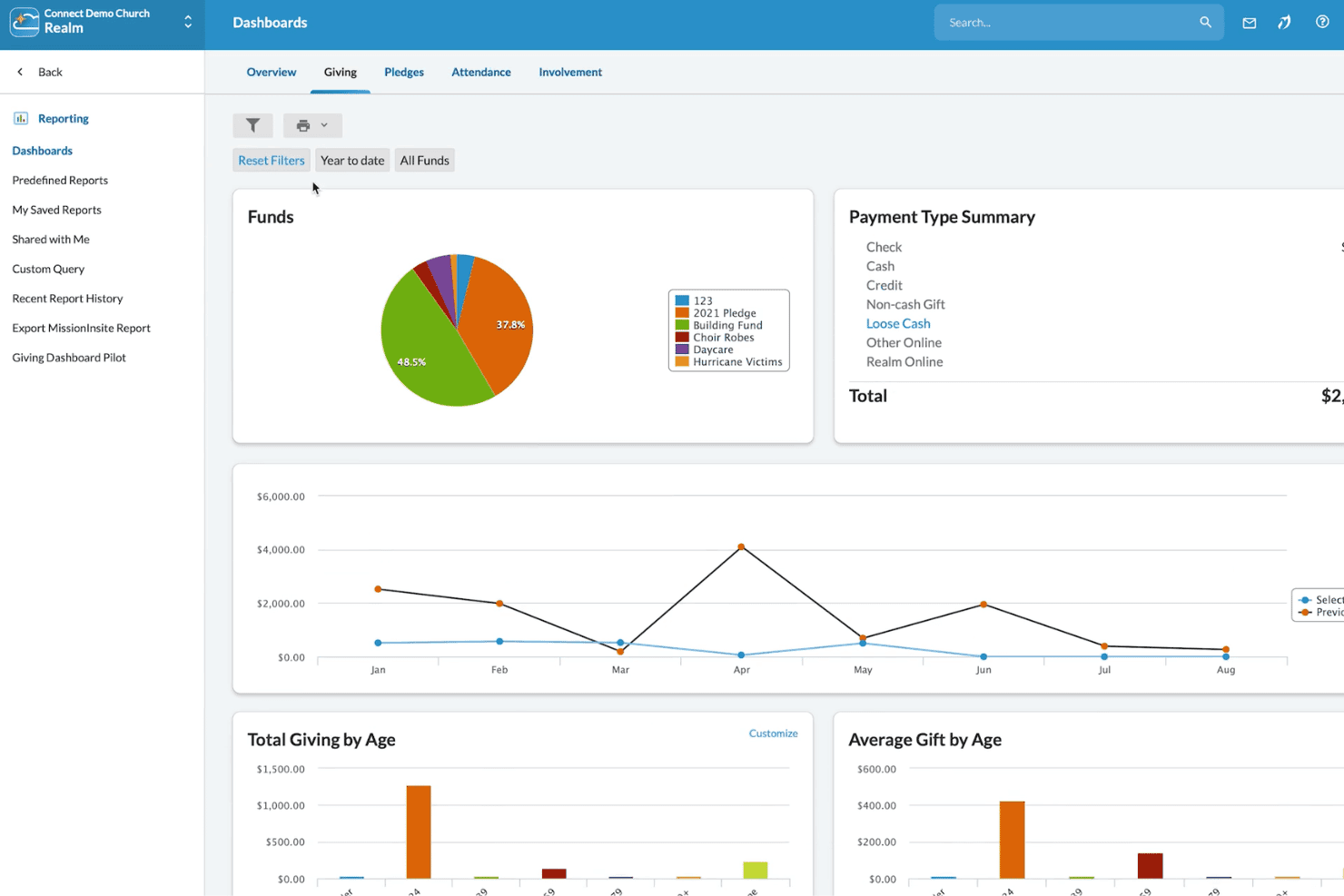
In my view, ACS Technologies stands out for its customizable modules and deep donor management, making it a strong pick if you need room to scale and specialize. While its interface can feel dated and onboarding takes time, support is responsive, and integrations are solid. Pricing skews higher, so you’ll want to compare it closely if budget is key.
For multi-campus churches or those with complex accounting and reporting needs, I think ACS Technologies deserves strong consideration. Smaller churches with simpler needs might find the depth—and cost—more than they want.
Pros
- Offers detailed fund accounting for complex church finances
- Includes robust donor tracking and contribution statements
- Scales well for multi-campus and large congregations
Cons
- Interface and design feel dated compared to competitors
- Custom reports require advanced setup and experience
- Mobile experience is limited for staff and volunteers
Is ACS Right For Your Needs?
Who Would be a Good Fit for ACS?
ACS Technologies is ideal for churches with complex administrative, finance, and communication needs that require detailed tracking across multiple ministries or campuses. Multi-campus congregations and organizations managing large databases will find its fund accounting, volunteer portals, and customizable reporting especially valuable.
ACS Technologies gives staff, finance teams, and administrators tools for deep donor insight, advanced financial controls, and targeted communication that smaller systems just can’t match.
- Multi-Campus ChurchesACS Technologies handles separate funds, campuses, and ministry groups through unified reporting and flexible workflows.
- Finance DepartmentsTeams benefit from dedicated church-oriented accounting, robust budgeting, and donation tracking built for ministry compliance.
- Large Staff TeamsACS Technologies supports multiple staff roles, granular permissions, and communication tools to keep large teams coordinated.
- Volunteer CoordinatorsSelf-service scheduling and team communication simplify volunteer management across events and service areas.
- Denominational HeadquartersCentral admin can oversee data, financials, and outreach for multiple churches from a single platform.
- Faith-Based SchoolsTrack student families, giving, and event participation alongside church administrative needs.
Who Would be a Bad Fit for ACS?
ACS Technologies isn’t built for small congregations, non-religious nonprofits, or those needing modern, mobile-first tools for a lightweight experience. Organizations with basic database or attendance needs will find its price and complexity excessive, while its dated interface and lengthy learning curve won’t fit users wanting simple setup or quick access on mobile. Teams with informal workflows or minimal tech support may struggle to take advantage of all ACS Technologies has to offer.
- Small ChurchesACS is often too complex and expensive for churches with fewer than 100 regular attendees.
- Solo PastorsManaging all features and administration solo is overwhelming and not resource-efficient.
- Youth MinistriesThe interface and limited mobile capabilities make it tough for fast-paced youth teams.
- Basic Event TrackingFor groups only needing simple attendance or calendar tools, ACS has more features than needed.
- Nonprofit OrganizationsACS Technologies is specialized for churches and ministries, so general nonprofits won’t get value from its church-oriented tools
- Volunteer-Only TeamsThose with no paid staff or dedicated admins may find learning and managing ACS Technologies unmanageable.
How We Test & Score Tools
We’ve spent years building, refining, and improving our software testing and scoring system. The rubric is designed to capture the nuances of software selection and what makes a tool effective, focusing on critical aspects of the decision-making process.
Below, you can see exactly how our testing and scoring works across seven criteria. It allows us to provide an unbiased evaluation of the software based on core functionality, standout features, ease of use, onboarding, customer support, integrations, customer reviews, and value for money.
Core Functionality (25% of final scoring)
The starting point of our evaluation is always the core functionality of the tool. Does it have the basic features and functions that a user would expect to see? Are any of those core features locked to higher-tiered pricing plans? At its core, we expect a tool to stand up against the baseline capabilities of its competitors.
Standout Features (25% of final scoring)
Next, we evaluate uncommon standout features that go above and beyond the core functionality typically found in tools of its kind. A high score reflects specialized or unique features that make the product faster, more efficient, or offer additional value to the user.
We also evaluate how easy it is to integrate with other tools typically found in the tech stack to expand the functionality and utility of the software. Tools offering plentiful native integrations, 3rd party connections, and API access to build custom integrations score best.
Ease of Use (10% of final scoring)
We consider how quick and easy it is to execute the tasks defined in the core functionality using the tool. High scoring software is well designed, intuitive to use, offers mobile apps, provides templates, and makes relatively complex tasks seem simple.
Onboarding (10% of final scoring)
We know how important rapid team adoption is for a new platform, so we evaluate how easy it is to learn and use a tool with minimal training. We evaluate how quickly a team member can get set up and start using the tool with no experience. High scoring solutions indicate little or no support is required.
Customer Support (10% of final scoring)
We review how quick and easy it is to get unstuck and find help by phone, live chat, or knowledge base. Tools and companies that provide real-time support score best, while chatbots score worst.
Customer Reviews (10% of final scoring)
Beyond our own testing and evaluation, we consider the net promoter score from current and past customers. We review their likelihood, given the option, to choose the tool again for the core functionality. A high scoring software reflects a high net promoter score from current or past customers.
Value for Money (10% of final scoring)
Lastly, in consideration of all the other criteria, we review the average price of entry level plans against the core features and consider the value of the other evaluation criteria. Software that delivers more, for less, will score higher.
Core Features
People Management
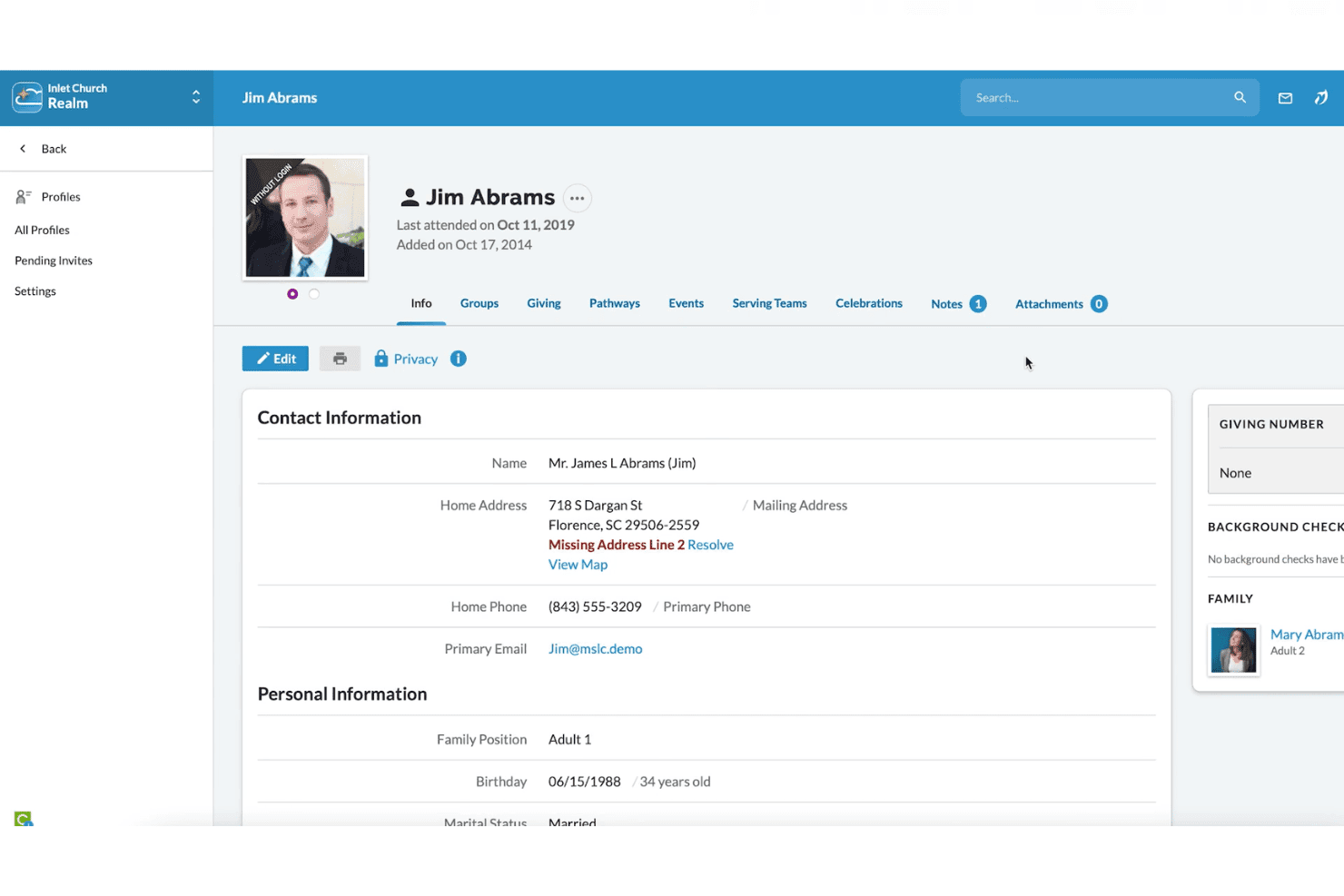
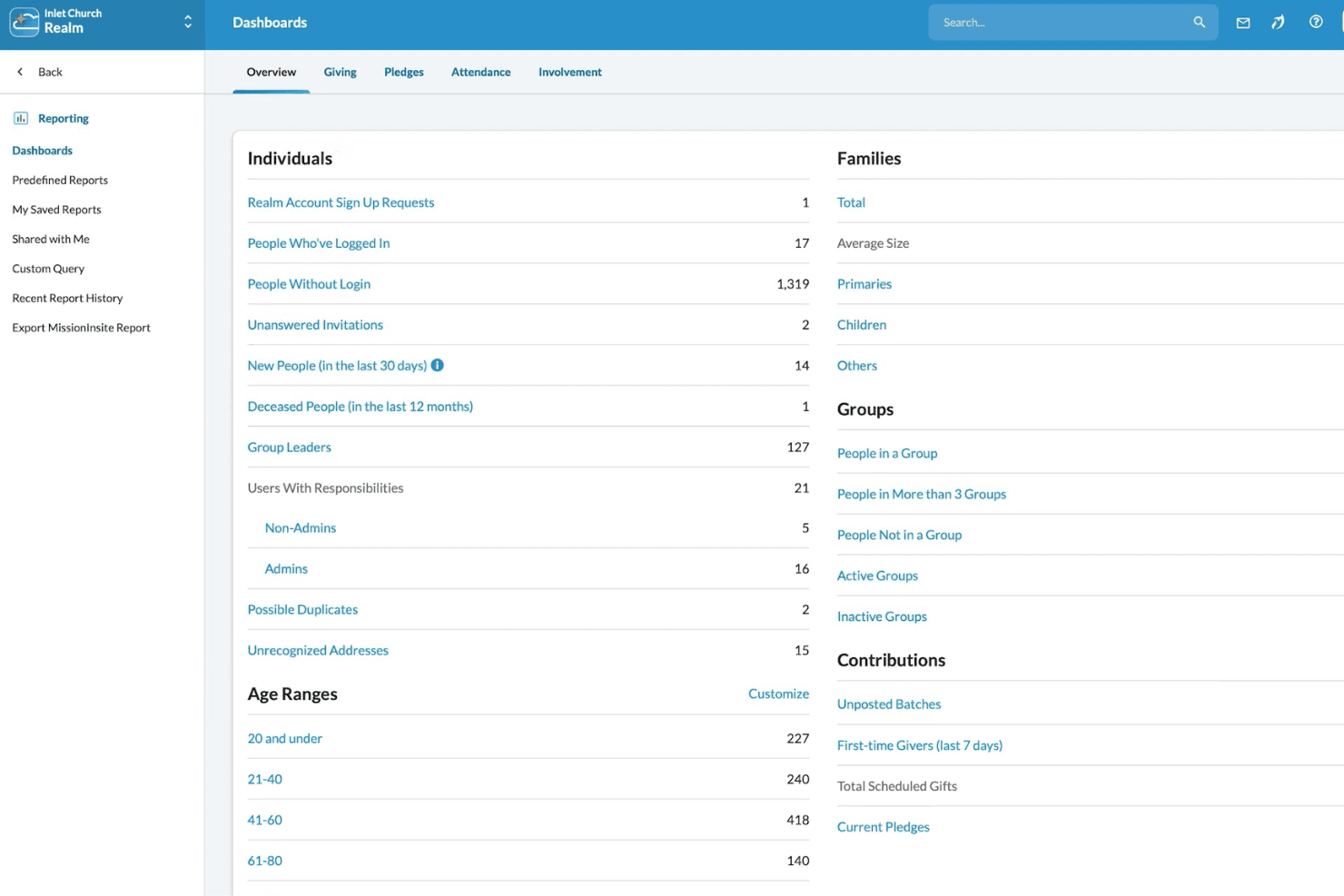
Track member data, family relationships, and attendance in customizable profiles. Use search and reporting to find groups, demographics, or individuals quickly.
Donor and Contribution Tracking
Record gifts, pledges, and contributions tied to donor profiles. Generate giving statements and detailed year-end reports for transparency.
Fund Accounting
Handle designated funds, accounts payable, and budgeting with tools built for church finance rules. Manage payroll, ledgers, and vendor payments in one place.
Event and Room Scheduling
Plan church events, reserve rooms, and manage resources in a shared calendar. Prevent double-booking and notify staff or volunteers automatically.
Check-In and Security
Use check-in stations for children’s ministry and events to boost safety. Print badges and automate notifications to parents or guardians as needed.
Communication Tools
Send group emails, texts, or printed mailings to targeted segments. Use built-in message history and list management to coordinate outreach or announcements.
Ease of Use
ACS Technologies’ rich feature set can be intimidating at first, especially for churches new to digital management. The interface is cluttered and feels outdated, but experienced users appreciate the customization options and depth.
Most reviewers find basic tasks like check-in or contribution entry straightforward, but advanced reporting and setup take time to master.
Integrations
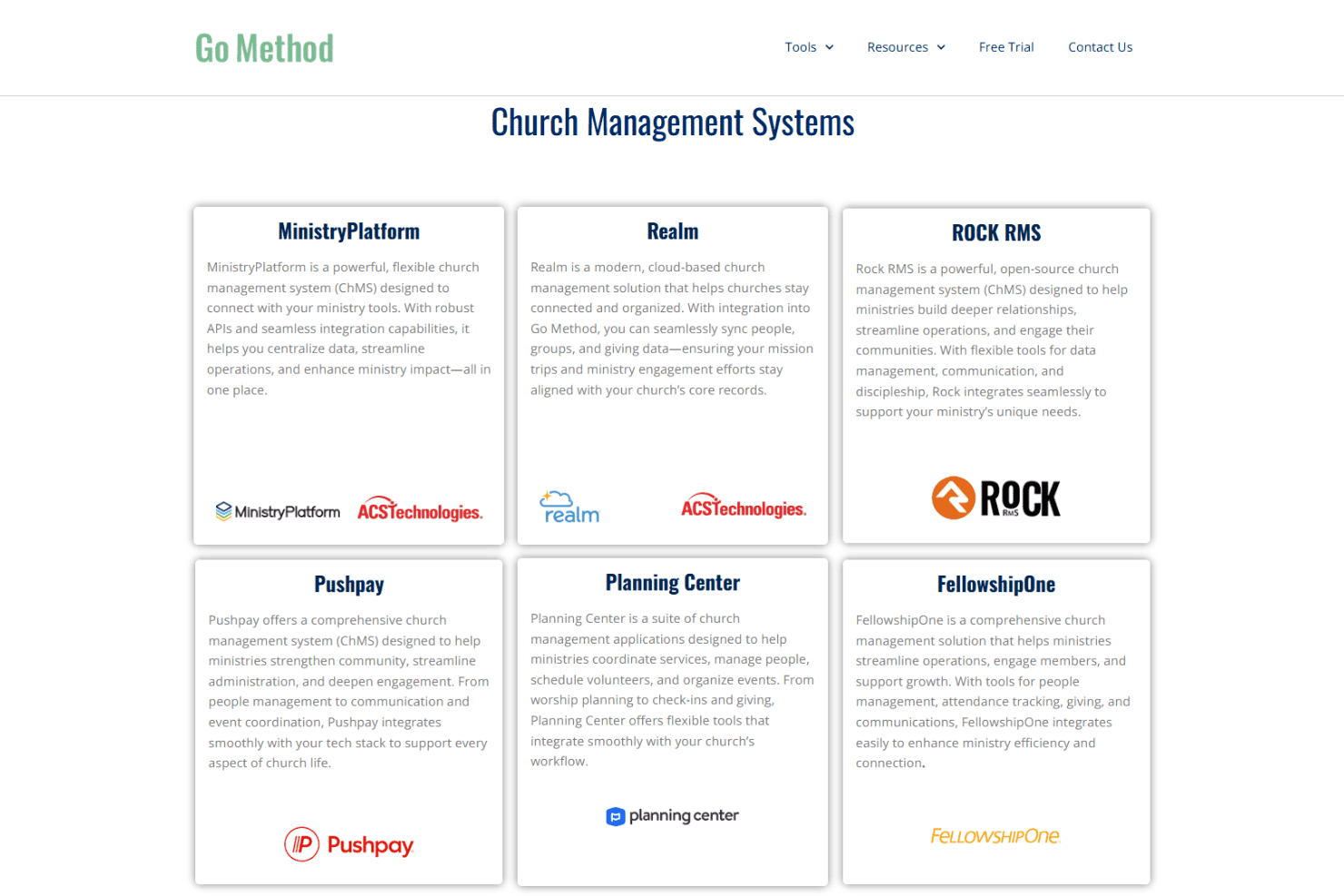
ACS Technologies integrates with BombBomb, eSPACE, Vanco, Shelby Systems, Realm, Go Method, MinistryPlatform, Growth Method, Paychex, and Sage, among others.
ACS Technologies also offers API options and can connect with select third-party integration tools.
ACS Specs
- API: No
- Calendar Management: No
- Contact Management: No
- Dashboards: No
- Data Export: No
- Data Import: No
- Document Management: No
- External Integrations: No
- Multi-User: No
- Notifications: No
- Payment Gateway Integration: No
- Scheduling: No
- Workflow Management: No