

Reseña de ShareFaith Presenter: Ventajas, Desventajas, Características y Precios
¿Qué sigue? Suscríbete a nuestro boletín para recibir los recursos más recientes, buenas prácticas e ideas sobre la gestión de iglesias de parte de pastores y líderes expertos.

Revisamos herramientas de manera independiente, y las comisiones ayudan a financiar nuestras pruebas. Consulta nuestra política de transparencia, nuestra metodología o sugiere una herramienta.
ShareFaith Presenter is a church presentation software designed for congregations that display worship lyrics, sermon slides, Bible verses, and video during services. I'd put it on your shortlist if you want a presentation tool with a large built-in media library already included. That's a meaningful advantage over ProPresenter, which requires you to source and manage your own media assets separately.
ShareFaith Presenter Evaluation Summary

0/5
- Pricing upon request
- Free trial available
Por qué confiar en nuestras recomendaciones de software
6,700+
Reviews
20
Industry experts
16+
Evaluation factors
14
Years
Nuestro equipo lleva probando y evaluando software desde 2012. Como líderes eclesiásticos, sabemos lo difícil —y lo importante— que es elegir el software adecuado.
Para esta guía, evaluamos las herramientas mediante pruebas prácticas e investigación independiente, puntuando las herramientas según nuestros criterios de selección.
Nuestras reseñas reflejan nuestro criterio editorial humano, no un discurso de ventas.
ShareFaith Presenter Overview
In my opinion, ShareFaith Presenter is a solid choice for churches seeking a reliable presentation software. It offers a range of features that cater well to church settings, including integration with tools like a website builder and church website support. While its standout features like multimedia integration are commendable, the onboarding process and customer support could use some improvement.
Compared to other tools, it provides good value for money, especially for churches looking to enhance their worship experience without breaking the bank. Based on various ShareFaith reviews, it’s best suited for churches that prioritize visual storytelling and need a straightforward, effective solution.
Pros
- You can easily create engaging worship presentations with its multimedia features.
- It offers a wide variety of templates tailored for church services.
- Your team can benefit from the intuitive interface, which simplifies the presentation process.
Cons
- You might find that the onboarding process requires more time than expected.
- Your team could experience delays with customer support response times.
- You may notice that some advanced features are less intuitive compared to other tools.
Is ShareFaith Presenter Right For Your Needs?
¿Para quién sería una buena opción ShareFaith Presenter?
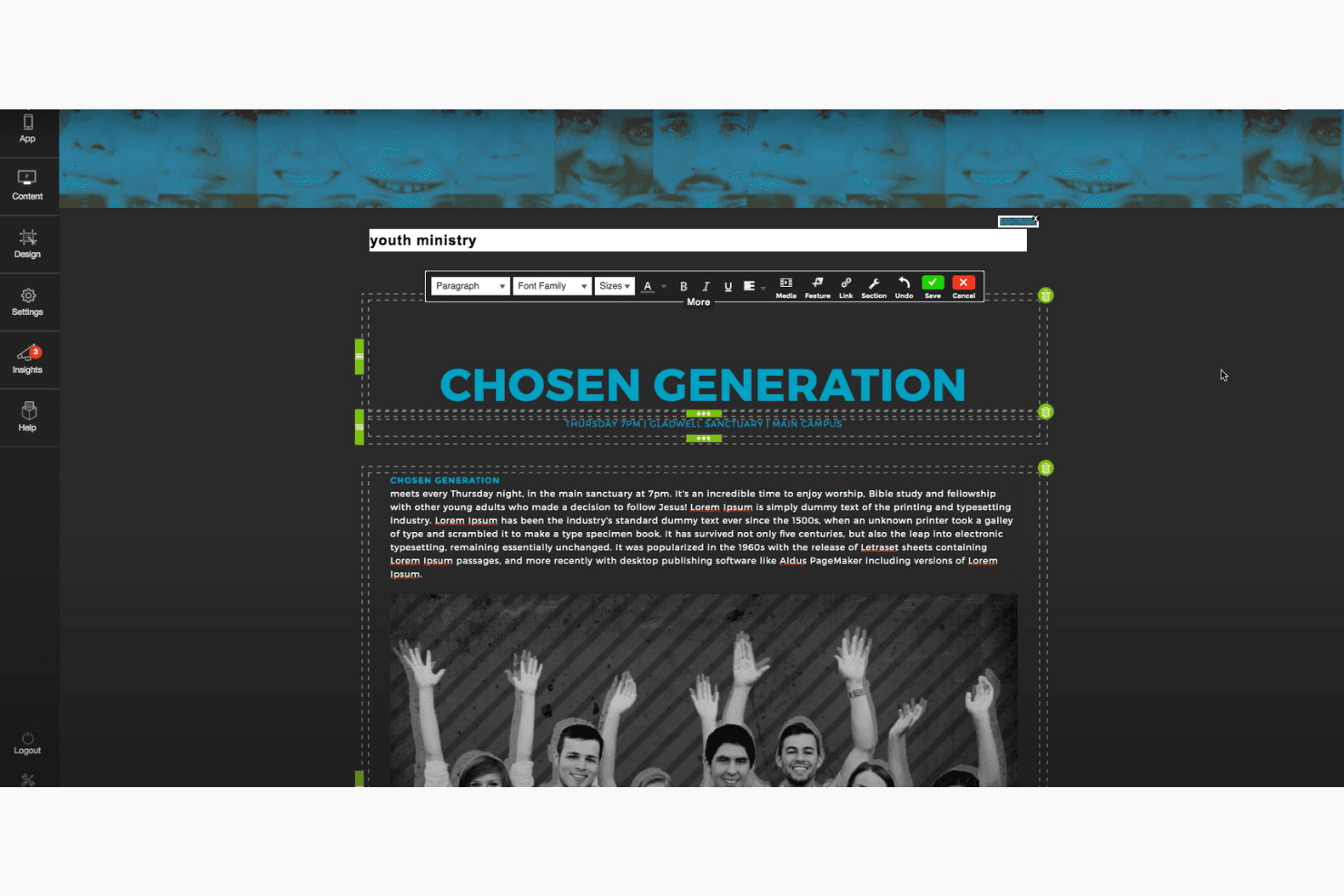
Churches of various sizes that aim to enhance their worship services with engaging visuals would benefit from ShareFaith Presenter. It’s ideal for pastors, worship leaders, and media teams who want an easy-to-use tool to create impactful presentations. With its extensive library of templates, church graphics, Bible videos, and PowerPoint integration, your team can craft meaningful and visually appealing services that resonate with your congregation.
- Small ChurchesYour small church can use ShareFaith Presenter to create professional presentations without needing a large tech team.
- Worship TeamsYour worship team will find its multimedia features helpful for integrating music and lyrics seamlessly.
- Youth MinistriesYour youth ministry can engage young audiences with dynamic and vibrant visual presentations.
- Media DepartmentsYour media department will appreciate the intuitive interface that simplifies complex presentation tasks.
- Community EventsFor community events, ShareFaith Presenter provides an easy way to create visually impactful presentations quickly.
- Volunteer TeamsVolunteer teams will find the user-friendly design easy to learn, reducing the time needed for training.
¿Para quién sería una mala opción ShareFaith Presenter?
Large corporations or businesses looking for a complex presentation tool with extensive data integration capabilities wouldn’t find ShareFaith Presenter suitable. It’s not designed for corporate environments that require advanced analytics, business slideshows, or integration with enterprise software. If your team needs a solution for detailed reporting, phone calls, or cross-platform integrations, this isn't the right fit. ShareFaith Presenter is tailored for church settings, focusing on worship videos and ministry needs rather than business applications.
- Corporate OfficesYour corporate office requires advanced data integration that ShareFaith Presenter doesn't offer.
- Educational InstitutionsEducational institutions needing robust data analytics would find ShareFaith Presenter lacking in necessary features.
- Marketing TeamsMarketing teams looking for sophisticated design tools will find ShareFaith Presenter too limited.
- Tech StartupsTech startups needing cutting-edge presentation features may find ShareFaith Presenter too basic.
- Event PlannersEvent planners who require extensive customization options might find ShareFaith Presenter restrictive.
- Financial ServicesFinancial services demanding detailed data visualization will not benefit from ShareFaith Presenter’s features.
Cómo Probamos y Puntuamos Herramientas
Hemos pasado años creando, refinando y mejorando nuestro sistema de prueba y puntuación de software. La rúbrica está diseñada para captar las particularidades de la selección de software y lo que hace que una herramienta sea efectiva, centrándose en los aspectos críticos del proceso de toma de decisiones. A continuación, puedes ver exactamente cómo funcionan nuestras pruebas y puntuaciones en siete criterios. Nos permite proporcionar una evaluación imparcial del software basada en la funcionalidad principal, características destacadas, facilidad de uso, incorporación, soporte al cliente, integraciones, reseñas de clientes y relación calidad-precio.
Funcionalidad principal (25% de la puntuación final)
El punto de partida de nuestra evaluación es siempre la funcionalidad principal de la herramienta. ¿Tiene las funciones y características básicas que un usuario esperaría ver? ¿Alguna de esas funciones principales está bloqueada en planes de precios superiores? En esencia, esperamos que una herramienta se mantenga frente a las capacidades mínimas de sus competidores.
Características destacadas (25% de la puntuación final)
A continuación, evaluamos características poco comunes que van más allá de la funcionalidad principal típicamente encontrada en herramientas de su tipo. Una puntuación alta refleja funciones especializadas o únicas que hacen que el producto sea más rápido, eficiente o que aporte valor adicional al usuario. También evaluamos lo fácil que es integrarse con otras herramientas habitualmente presentes en la infraestructura tecnológica, para ampliar la funcionalidad y utilidad del software. Las herramientas que ofrecen muchas integraciones nativas, conexiones con terceros y acceso API para crear integraciones personalizadas obtienen la mejor puntuación.
Facilidad de uso (10% de la puntuación final)
Consideramos qué tan rápido y fácil es ejecutar las tareas definidas en la funcionalidad principal utilizando la herramienta. El software con alta puntuación está bien diseñado, es intuitivo de usar, ofrece aplicaciones móviles, proporciona plantillas y hace que tareas relativamente complejas parezcan simples.
Incorporación (10% de la puntuación final)
Sabemos lo importante que es la rápida adopción por parte del equipo en una nueva plataforma, por lo que evaluamos lo fácil que es aprender y usar una herramienta con una formación mínima. Evaluamos lo rápido que un miembro del equipo puede configurarse y comenzar a usar la herramienta sin experiencia previa. Las soluciones mejor puntuadas indican que se requiere poco o ningún soporte.
Soporte al cliente (10% de la puntuación final)
Revisamos lo rápido y fácil que es obtener ayuda por teléfono, chat en vivo o base de conocimiento. Las herramientas y empresas que brindan soporte en tiempo real obtienen la mejor puntuación, mientras que los chatbots obtienen la peor.
Reseñas de clientes (10% de la puntuación final)
Más allá de nuestras propias pruebas y evaluaciones, consideramos la puntuación neta del promotor de clientes actuales y anteriores. Revisamos la probabilidad de que elegirían nuevamente la herramienta para la funcionalidad principal. Un software de alta puntuación refleja una puntuación neta del promotor elevada por parte de sus clientes actuales o pasados.
Relación calidad-precio (10% de la puntuación final)
Por último, en consideración del resto de los criterios, revisamos el precio promedio de los planes de nivel inicial frente a las funciones principales y consideramos el valor de los otros criterios de evaluación. El software que ofrece más, por menos, obtendrá una mejor puntuación.
Core Features
Slide Templates:
ShareFaith Presenter offers a wide range of templates designed specifically for church services. You can quickly create consistent and visually appealing presentations.
Multimedia Integration:
Easily incorporate audio, video, and images into your presentations. This feature helps you create dynamic and engaging worship experiences.
Lyric and Scripture Management:
Manage and display song lyrics and scripture passages seamlessly. This ensures your congregation can follow along without distraction.
Customizable Themes:
Adjust themes to fit your church's branding and service style. This allows you to maintain a cohesive look across all presentations.
Live Preview:
View how your presentation will appear before going live. This feature helps you catch any errors and make adjustments on the fly.
Ease of Use
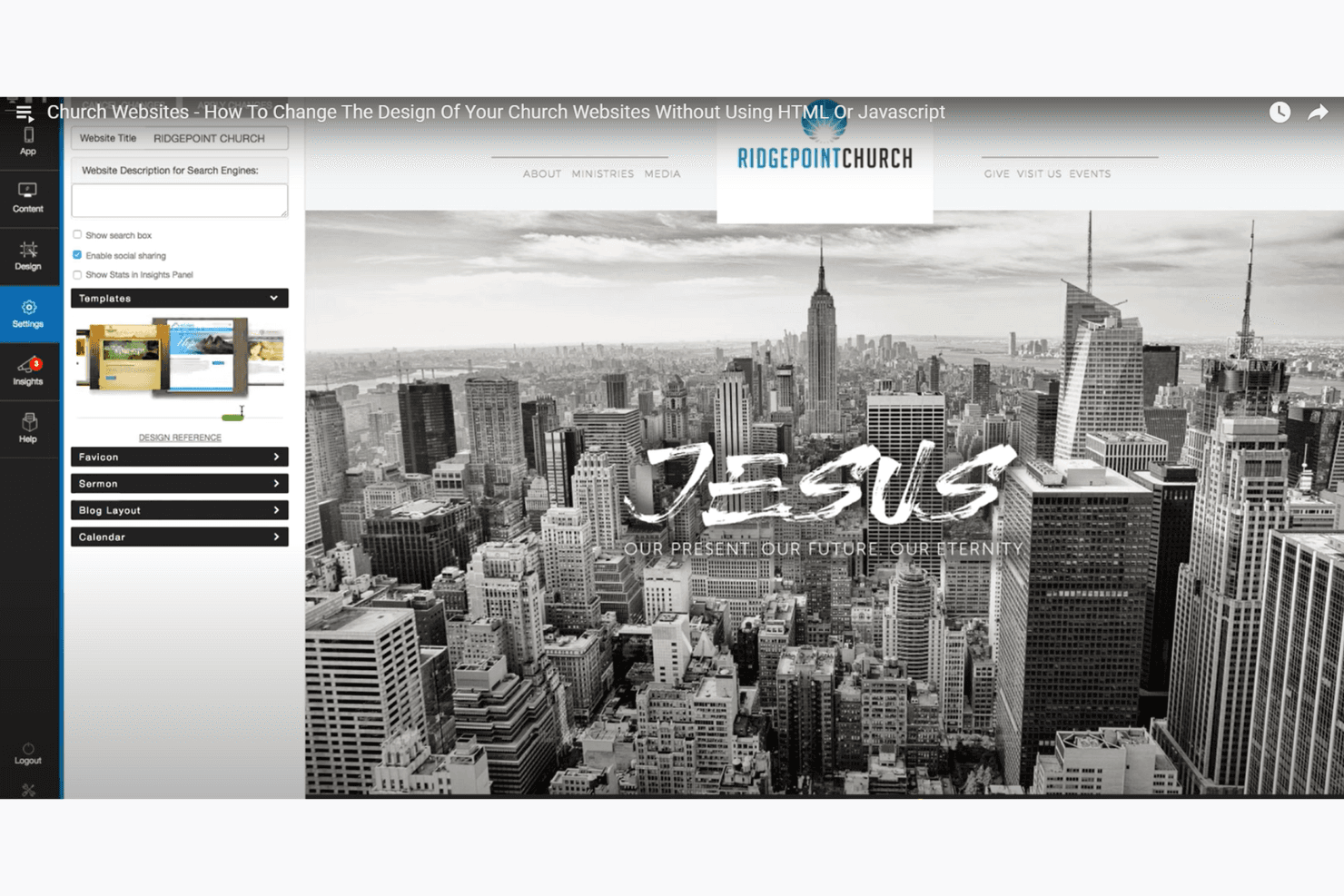
ShareFaith Presenter offers a user-friendly experience that’s easy to navigate, even for those new to presentation software. Its intuitive interface allows you to quickly access core features—like slide templates, live streaming integration, and multimedia tools—without much hassle. The remote control feature adds convenience, letting you manage presentations from anywhere in the room.
Though some users mention a learning curve with onboarding, most find it straightforward once familiar with its functionalities. Your team will also find value in features that support small groups and enhance social media engagement, adding to the overall efficiency of service preparations.
ShareFaith Presenter Specs
- API: No
- Calendar Management: No
- Contact Management: No
- Dashboards: No
- Data Export: No
- Data Import: No
- Document Management: No
- External Integrations: No
- Multi-User: No
- Notifications: No
- Payment Gateway Integration: No
- Scheduling: No
- Workflow Management: No
Alternatives to ShareFaith Presenter


ShareFaith Presenter FAQs
¿Qué sigue?
Suscríbete a nuestro boletín para recibir los recursos más recientes, mejores prácticas y perspectivas sobre la gestión de iglesias de parte de pastores expertos y líderes eclesiásticos.