

Gracely Review: Pros, Cons, Features & Pricing
Gracely excels in providing user-friendly church management solutions, making it a top choice for streamlining your church's operations.

We review tools independently, and commissions help fund our testing. See our transparency policy, our methodology, or suggest a tool.
Gracely is a church software for churches that need to manage people, giving, and communications without juggling multiple tools. I'd consider it most if you want something more accessible than Planning Center but still built around how ministry teams actually work. It's a natural fit for small to mid-sized congregations ready to bring their administration into one place.
Gracely Evaluation Summary
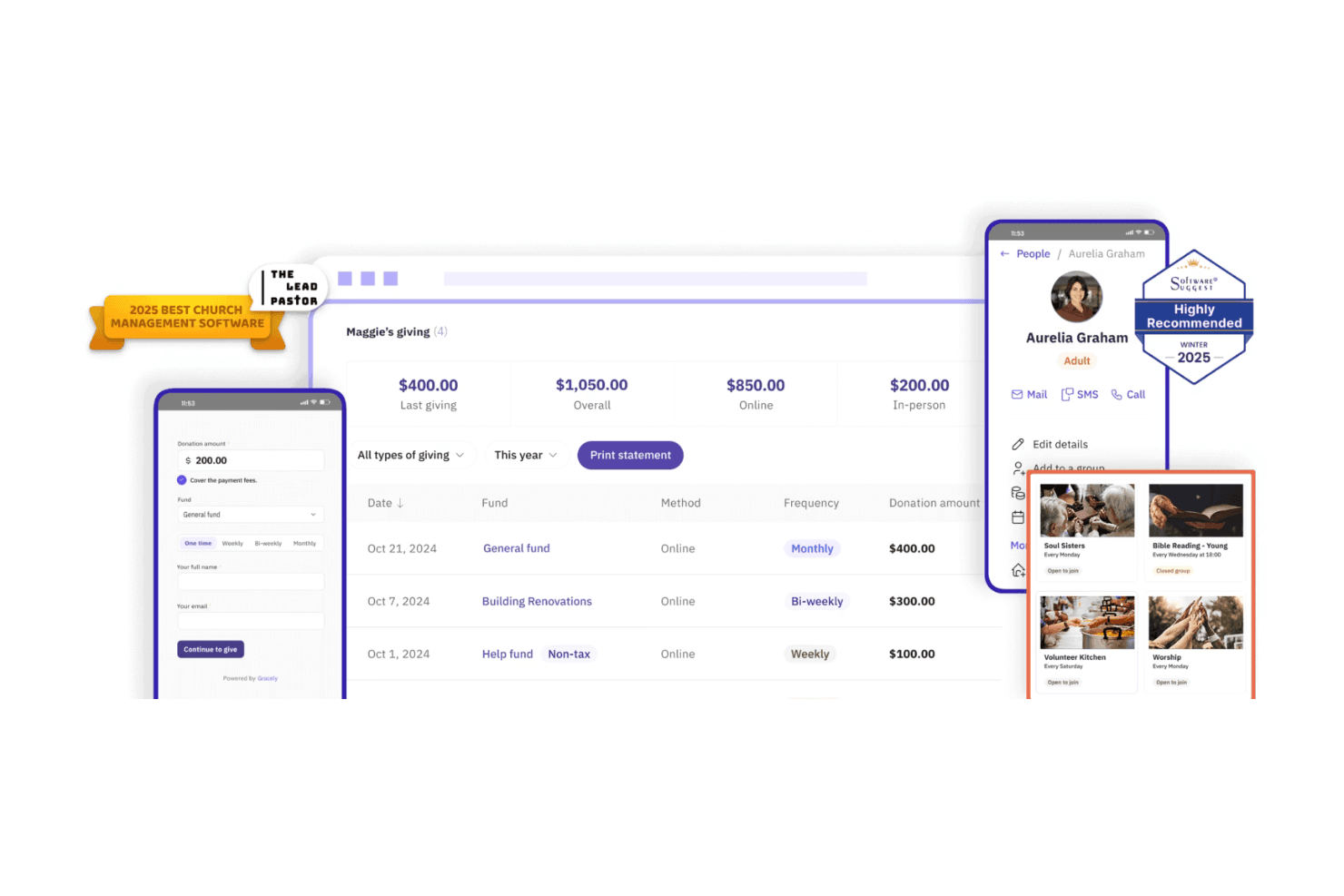
4.8/5
- From $19/month (billed annually)
- Free plan available
Why Trust Our Software Recommendations
6,700+
Reviews
20
Industry experts
16+
Evaluation factors
14
Years
Our team has been testing and reviewing software since 2012. As church leaders ourselves, we know how difficult—and important—it is to choose the right software.
For this guide, we evaluated tools using hands-on testing and independent research, scoring tools using our selection criteria.
Our reviews reflect our human editorial judgment, not a sales pitch.
Gracely Overview
In my opinion, Gracely stands out as a top-tier church management software, excelling in user-friendliness and customer support. It outperforms many competitors with its intuitive interface, making it ideal for churches that prioritize ease of use. However, it may fall short for those seeking extensive customization options. Gracely is best suited for small to mid-sized churches looking for a reliable, straightforward tool to enhance their community management.
Pros
- It offers an intuitive interface that's easy for your team to navigate.
- Customer support is responsive and helpful, ensuring smooth problem resolution.
- Onboarding is quick and straightforward, getting your team up to speed fast.
Cons
- Customization options are limited, which might not suit all your church's needs.
- Advanced reporting features may not be as robust as other solutions.
- Some users find the event management tools lack depth compared to competitors.


How We Test & Score Tools
We’ve spent years building, refining, and improving our software testing and scoring system. The rubric is designed to capture the nuances of software selection and what makes a tool effective, focusing on critical aspects of the decision-making process.
Below, you can see exactly how our testing and scoring works across seven criteria. It allows us to provide an unbiased evaluation of the software based on core functionality, standout features, ease of use, onboarding, customer support, integrations, customer reviews, and value for money.
Core Functionality (25% of final scoring)
The starting point of our evaluation is always the core functionality of the tool. Does it have the basic features and functions that a user would expect to see? Are any of those core features locked to higher-tiered pricing plans? At its core, we expect a tool to stand up against the baseline capabilities of its competitors.
Standout Features (25% of final scoring)
Next, we evaluate uncommon standout features that go above and beyond the core functionality typically found in tools of its kind. A high score reflects specialized or unique features that make the product faster, more efficient, or offer additional value to the user.
We also evaluate how easy it is to integrate with other tools typically found in the tech stack to expand the functionality and utility of the software. Tools offering plentiful native integrations, 3rd party connections, and API access to build custom integrations score best.
Ease of Use (10% of final scoring)
We consider how quick and easy it is to execute the tasks defined in the core functionality using the tool. High scoring software is well designed, intuitive to use, offers mobile apps, provides templates, and makes relatively complex tasks seem simple.
Onboarding (10% of final scoring)
We know how important rapid team adoption is for a new platform, so we evaluate how easy it is to learn and use a tool with minimal training. We evaluate how quickly a team member can get set up and start using the tool with no experience. High scoring solutions indicate little or no support is required.
Customer Support (10% of final scoring)
We review how quick and easy it is to get unstuck and find help by phone, live chat, or knowledge base. Tools and companies that provide real-time support score best, while chatbots score worst.
Customer Reviews (10% of final scoring)
Beyond our own testing and evaluation, we consider the net promoter score from current and past customers. We review their likelihood, given the option, to choose the tool again for the core functionality. A high scoring software reflects a high net promoter score from current or past customers.
Value for Money (10% of final scoring)
Lastly, in consideration of all the other criteria, we review the average price of entry level plans against the core features and consider the value of the other evaluation criteria. Software that delivers more, for less, will score higher.
Core Features
Member Management: Keep track of your congregation with easy-to-use member profiles that store contact details and engagement history. This helps you personalize your interactions and foster a stronger community.
Effortless Event and Check-In Management: Plan events and handle check-ins through one simple dashboard. You can track attendance, manage registrations, and ensure a smooth experience for members and volunteers.
Donation Tracking: Monitor and manage donations with a simple interface that records contributions and generates reports. This makes financial management transparent and accessible.
Form Builder: Create registration forms, surveys, or information requests without needing extra software. These forms can be shared online and connected to member profiles automatically.
Communication Tools: Connect with your congregation through built-in email, chat, and SMS features. You can send updates, share announcements, and keep everyone in the loop without switching platforms.
Group Management: Create and manage ministry groups, Bible studies, or volunteer teams in one place. You can assign leaders, track attendance, and send updates to keep everyone connected and active.
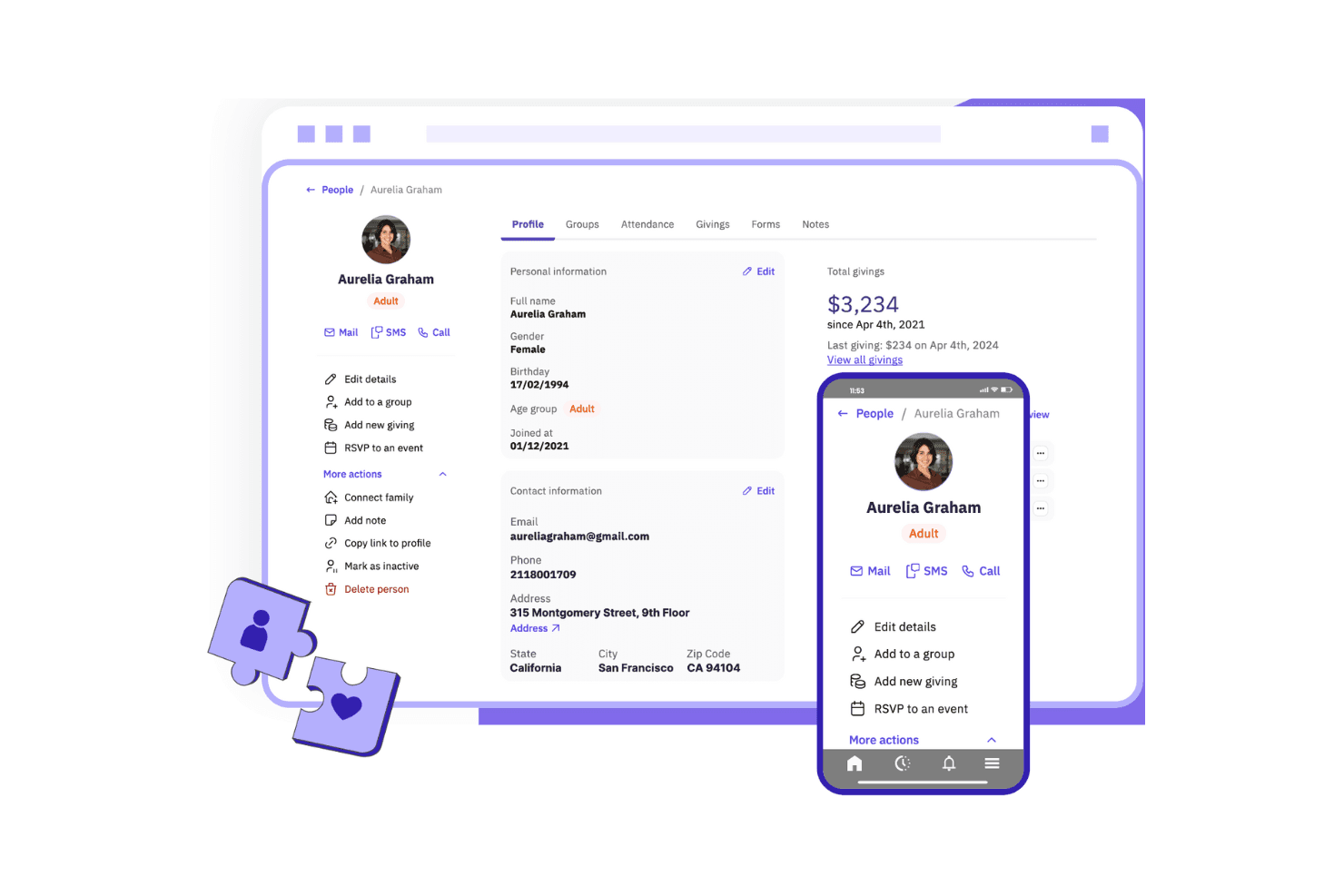
Ease of Use
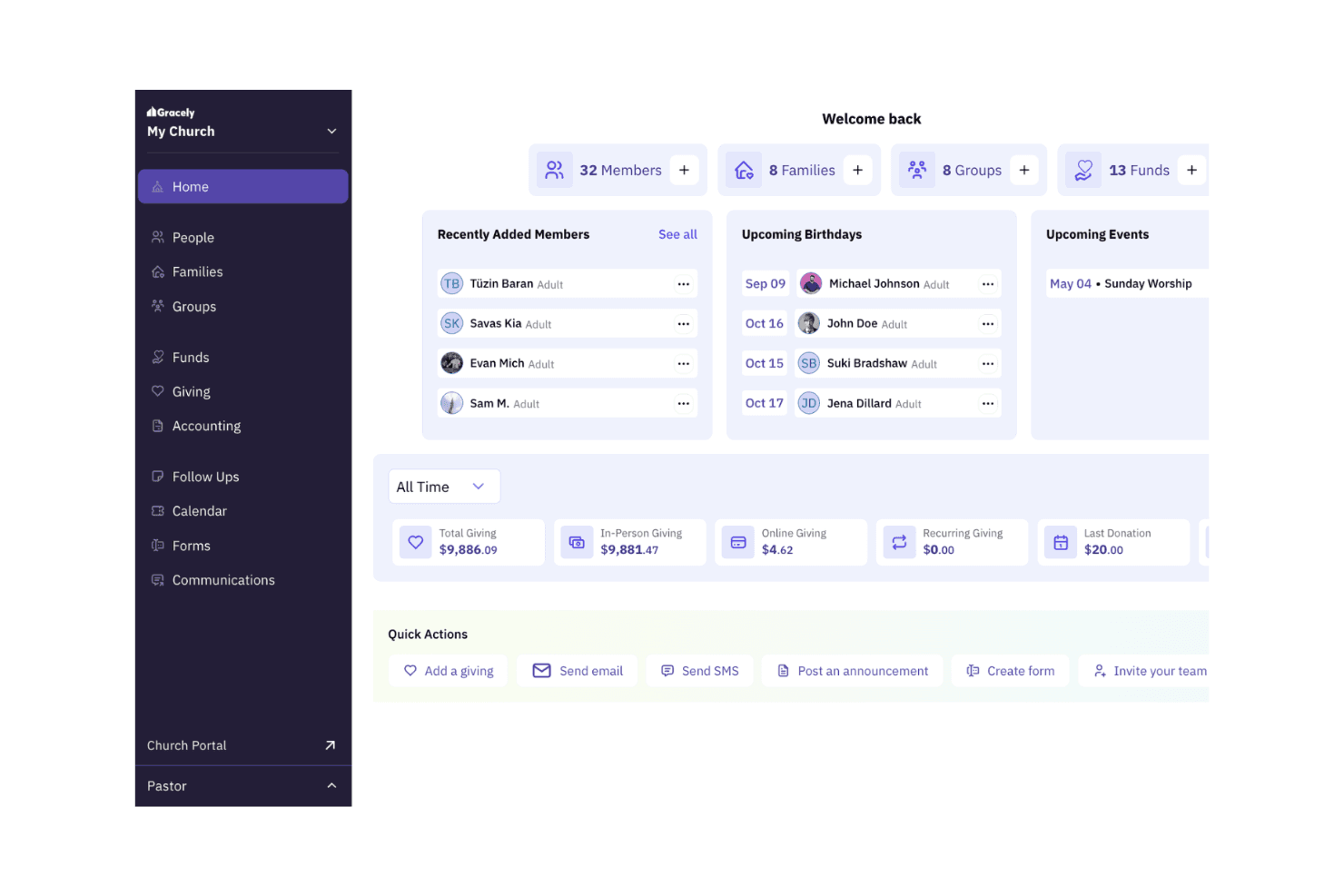
Gracely excels in user-friendliness, making it a top choice for those who value simplicity. Its intuitive interface allows your team to navigate tasks without hassle, which is a huge plus for churches with limited tech resources.
The straightforward design means you can focus more on your community and less on figuring out the software. Users often praise Gracely for its ease of use, highlighting the quick onboarding process and seamless daily operations.
New Product Updates from Gracely
 Opens new window
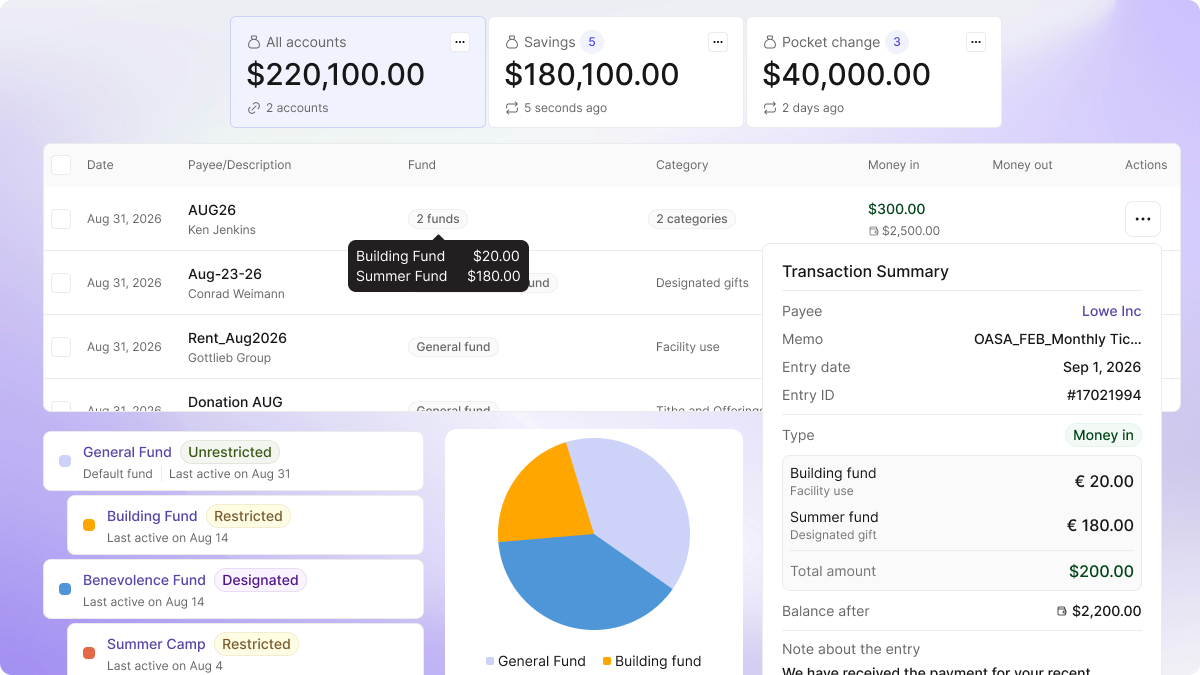
Gracely Rebuilds Accounting for Church Finance Management
Gracely rebuilds Accounting around church finance workflows with funds, transactions, transfers, payees, categories, and reporting. These updates help churches manage day-to-day finances and prepare clearer board and treasurer reports. Highlights include:
- Fund Tracking: Supports general, missions, building, and other church funds.
- Income and Expenses: Records offerings, bills, and other transactions in one place.
- Fund Transfers: Moves money between funds and accounts with live balance checks.
- Reports: Provides shareable financial reports for boards and treasurers.
- CSV and PDF Exports: Exports reports for meetings and external review.
- Payees and Categories: Organizes vendors and spending classifications within Accounting.
Visit Gracely’s official site for more details.
 Opens new window
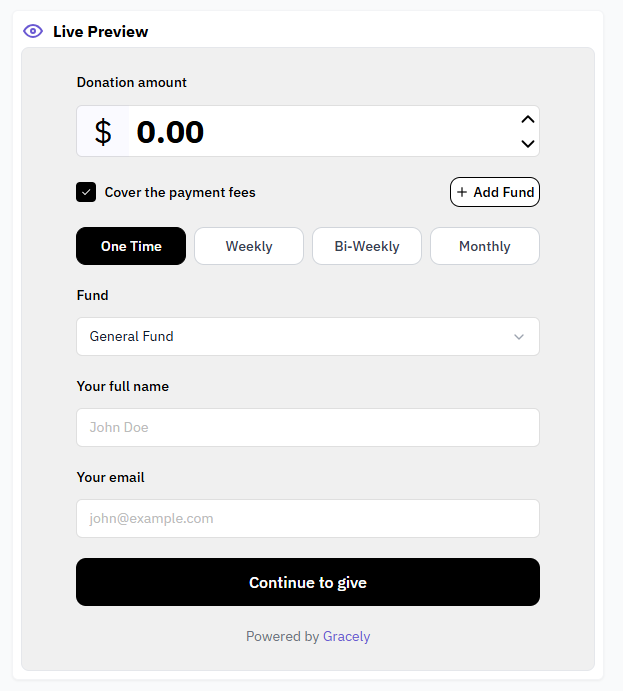
Gracely Adds a Customizable Giving Widget, Exports, Reports, and Accounting Views
Gracely adds new customization, reporting, export, and accounting capabilities to help churches manage giving, reporting, and financial data more efficiently. The updates provide greater flexibility for church administration while making financial and operational information easier to access and analyze. Highlights include:
- Customizable Giving Widget: Personalize the online giving experience with custom button text, colors, shapes, and messages.
- Expanded Excel and PDF Exports: Export data from People, Giving, Groups, Families, and other major pages with one click.
- People and Finance Reports: Access new reporting tools to monitor trends and gain operational insights.
- Balance Sheet and Income Statement: View financial statements directly within the Accounting section.
- Custom Account Defaults: Configure default gender options, pronouns, phone prefix codes, and currencies to match your organization's needs.
Visit Gracely's official site for more details.
 Opens new window
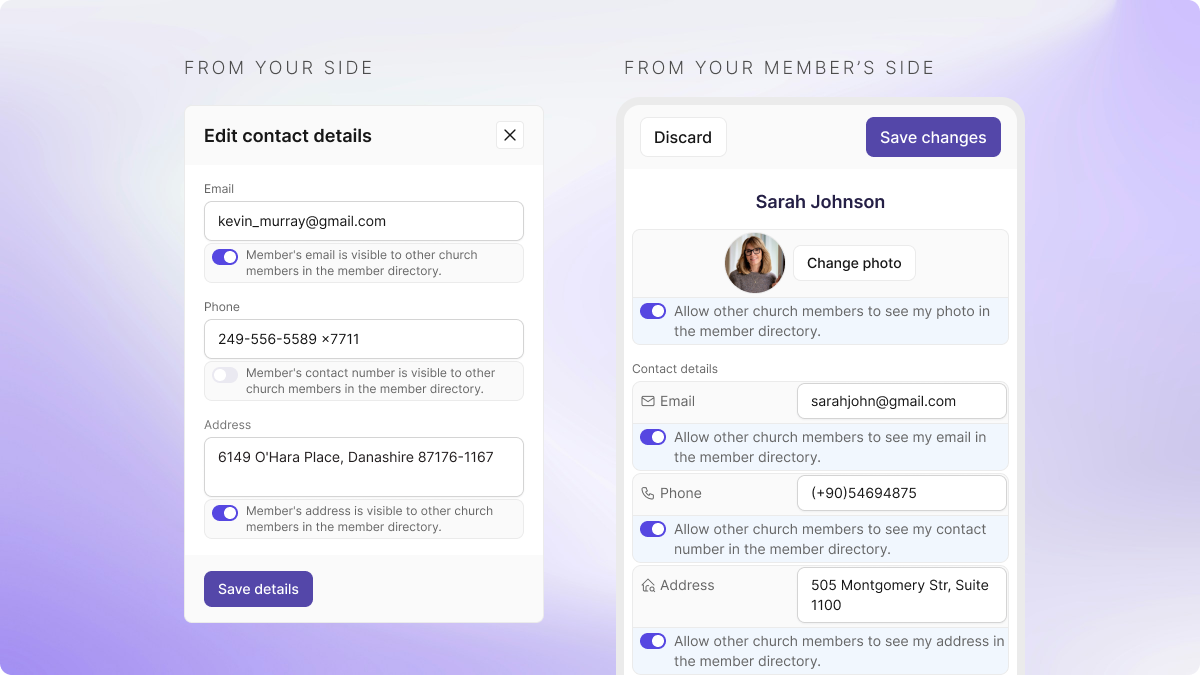
Gracely Adds Member Privacy Controls, Account Transfers, and Richer Messaging
Gracely introduces new privacy controls for the member directory, one-step account transfers, and richer mobile messaging. The update helps churches give members more control over their information, manage finances more efficiently, and share announcements more effectively. Highlights include:
- Member Directory Privacy: Let members choose whether to share their phone number, email, address, and photo.
- Account Transfers: Record transfers between accounting accounts in one step.
- Enhanced Mobile Messaging: Add tappable links plus bold, italic, and underline formatting to announcements and group chat.
Visit Gracely's official site for more details.
Gracely Improves Donation Entry and Payment Tracking
Gracely introduced auto-fill improvements for batch donation entry and added Zelle to its payment method options for gift tracking. These updates reduce repetitive manual entry and make it easier for teams to manage and record donations efficiently. Highlights include:
- Smarter Batch Entry: Automatically fills fund, date, and payment method fields from the previous donation entry row.
- Zelle Payment Tracking: Adds Zelle as a payment method option for recording and tracking donations inside Gracely.
- Faster Donation Processing: Helps teams process large donation batches with less repetitive data entry.
Visit Gracely’s official site for more details.
Gracely Adds Rooms and Pledge Management Tools
Gracely introduces Rooms & Resources management to handle spaces and equipment, along with a Pledge Management tool for tracking campaigns and commitments. These updates improve operations by reducing scheduling conflicts and giving better visibility into donations. Highlights include:
- Rooms & Resources Management: Assign and manage rooms, classrooms, and equipment to avoid conflicts.
- Pledge Management: Create campaigns and track member commitments with real-time progress visibility.
Visit Gracely’s official site for more details.
Gracely Adds Child Check-In, Events, and Appointments
Gracely introduces a child check-in system, paid event ticketing, and appointment scheduling for pastoral counseling. These updates make it easier to manage attendance, organize events, and support member needs in one place. Highlights include:
- Child Check-In: Check in children quickly and print secure QR-coded labels for safe pickup.
- Paid Events with Multi-Ticket Options: Create and manage ticket types, track registrations, and process payments.
- Pastoral Counseling Appointments: Let members schedule private sessions directly through the Church Portal.
Visit Gracely’s official site for more details.
Gracely Specs
- API: No
- Calendar Management: Yes
- Contact Management: Yes
- Dashboards: Yes
- Data Export: Yes
- Data Import: Yes
- Document Management: No
- External Integrations: Yes
- Multi-User: Yes
- Notifications: Yes
- Payment Gateway Integration: Yes
- Scheduling: Yes
- Workflow Management: Yes

