

Gestionarea operațiunilor zilnice ale unei biserici poate fi copleșitoare fără instrumentele potrivite, motiv pentru care este atât de important să găsești cel mai bun program online de gestionare a bisericii. Indiferent dacă jonglezi cu programul voluntarilor, urmărești donațiile sau încerci să îmbunătățești comunicarea cu membrii congregației, programul potrivit poate face o diferență uriașă.
Atunci când bisericile nu dispun de un program online eficient de gestionare a bisericii:
- Date vitale, precum evidențele prezenței și ale donațiilor, se pot pierde sau dezorganiza, ceea ce îngreunează planificarea și dezvoltarea.
- Coordonarea voluntarilor poate deveni haotică, ducând la epuizarea ta și a echipei tale.
- Menținerea legăturii cu membrii devine o luptă permanentă, mai ales atunci când nevoile lor rămân neobservate.
Aceste dificultăți apar deoarece încercarea de a gestiona totul manual sau cu sisteme învechite nu face decât să sporească stresul activității de slujire.
De aceea am alcătuit această listă cu cele mai bune opțiuni de programe online pentru gestionarea bisericii. Aceste instrumente te pot ajuta să economisești timp, să rămâi organizat și să îți conduci biserica cu încredere. Să începem!
Why Trust Our Software Recommendations
6,700+
Reviews
20
Industry experts
16+
Evaluation factors
14
Years
Our team has been testing and reviewing software since 2012. As church leaders ourselves, we know how difficult—and important—it is to choose the right software.
For this guide, we evaluated tools using hands-on testing and independent research, scoring tools using our selection criteria.
Our reviews reflect our human editorial judgment, not a sales pitch.
Tabel comparativ al soluțiilor de programe online pentru gestionarea bisericii
Sorted by: Default
| Tool | Starting Price | Website | |
|---|---|---|---|
Church management software for giving management | 4.8 out of 5 | $19/month Free plan + 30-day trial available | Website |
Best for AI-assisted church admin tasks | 5.0 out of 5 | $20/month Free plan + 2-month free trial available | Website |
Church management software with all-in-one capabilities | 4.6 out of 5 | $12/month Free plan available | Book Demo |
Church management software to help you organize and manage groups | 4.8 out of 5 | $72/month 30-day free trial + free demo available | Website |
Church management software with workflow automation feature for handling repetitive tasks | 4.7 out of 5 | $37/month 30-day free trial available | Website |
Church management software with consolidated communication | 4.8 out of 5 | $69.99/month Free plan + free demo available | Website |
Church management software for managing fundraising events | 3.5 out of 5 | Pricing upon request Free demo available | Website |
Church management software to help you improve engagement | 3.5 out of 5 | $19/month Not available | Website |
Church management software for managing membership information | Not rated | $15/month Free plan + free demo available | Website |
Church management software with a fully-integrated and customizable mobile app | Not rated | $6,000/year Free demo available | Website |


Recenzii ale celor mai bune soluții de programe online pentru gestionarea bisericii
Iată o scurtă descriere a fiecărui sistem online de gestionare a bisericii, pentru a evidenția cel mai potrivit caz de utilizare pentru fiecare instrument, câteva funcții importante și capturi de ecran care oferă o imagine de ansamblu asupra interfeței de utilizare.
 Church management software for giving management
- Free plan + 30-day trial available
- From $19/month (billed annually)
Visit WebsiteCustomer Rating:4.8/5
Gracely lets you track member details, communication history, and donation contributions, all in one organized dashboard. management for churches of all sizes.
Why I picked Gracely
Gracely shines in helping churches manage giving by providing user-friendly tools for online tithes, recurring donations, and financial tracking. Its simple interface ensures that both church members and administrators have a hassle-free experience. With detailed giving reports and the ability to track donor engagement, Gracely helps churches grow their generosity base.
Standout Features of Gracely
Gracely offers customizable online giving forms that integrate seamlessly into your church website, making it easy for members to give. Its recurring donation feature ensures steady financial support, and the robust reporting tools help churches analyze trends in giving and donor participation. Additionally, Gracely provides multi-channel giving options, from text-to-give to in-app donations.
Gracely’s Integrations
Integrations include QuickBooks, Stripe, and PayPal. It also supports Zapier for connecting with additional tools, but no open API is currently offered.
Pros and Cons
Pros:
- Simple setup for both admins and donors
- Robust giving trend analysis and reports
- Offers recurring donation options for steady support
Cons:
- Lacks tools for non-financial tracking
- Limited volunteer or event management tools
Learn more about Gracely: Best for AI-assisted church admin tasks
- Free plan + 2-month free trial available
- From $20/month
Visit WebsiteCustomer Rating:5/5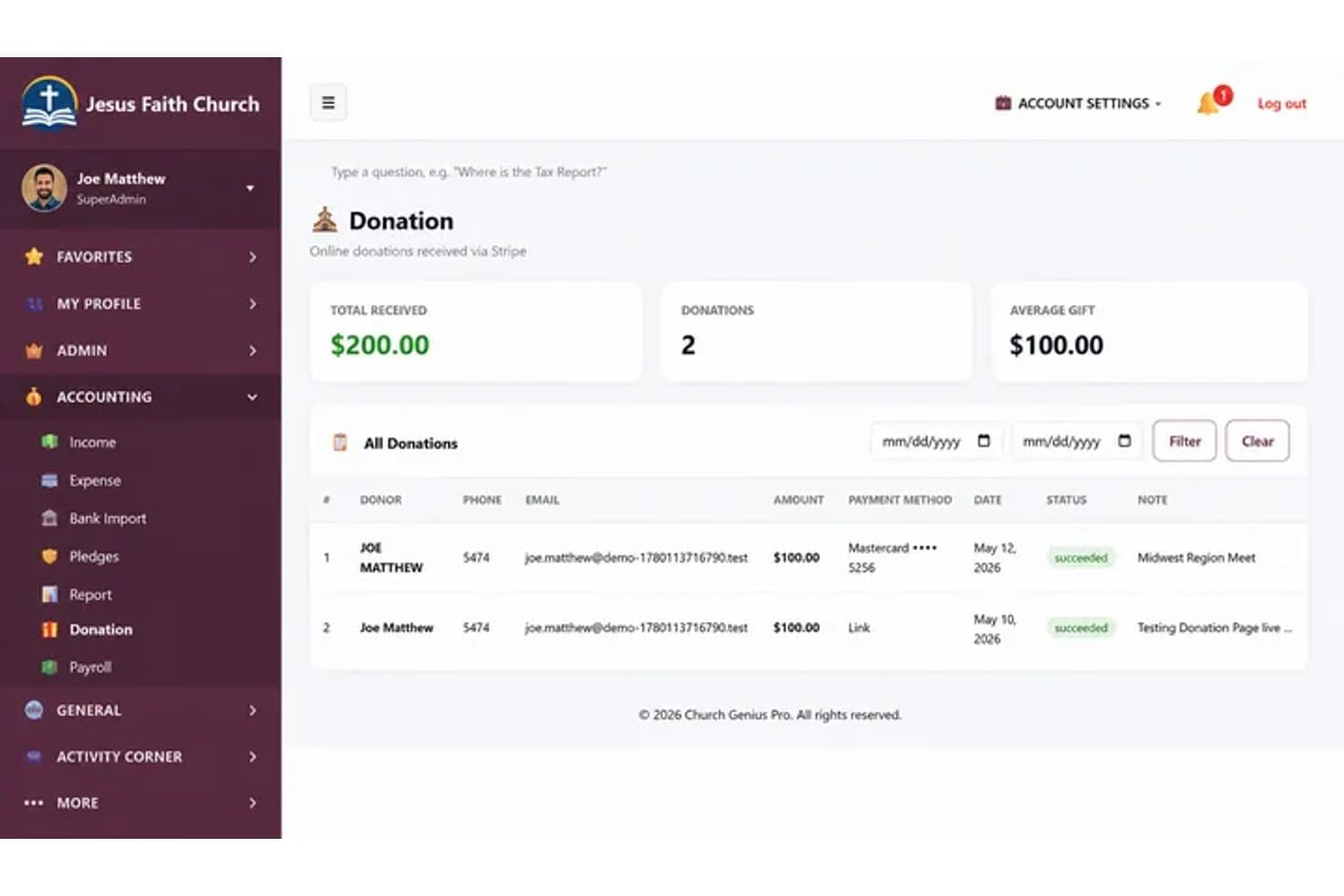
Church Genius tracks online donations and payment history via Stripe. Church Genius is an AI-forward church management platform that handles membership, giving, accounting, payroll, events, volunteer scheduling, and pastoral care in one browser-based system.
Who Is Church Genius Best For?
Church Genius is a strong fit for smaller and mid-size churches whose staff and pastors want AI to handle the busywork of data entry, accounting, and admin so they can focus on ministry.
Why I Picked Church Genius
Church Genius earns its spot on my shortlist because of how it uses AI to cut down the manual work that quietly consumes so much of a church admin's week. I particularly like the voice accounting entry, where you can speak an income or expense and the AI fills in the amount, date, and category without touching a keyboard. The membership form scanning is equally useful: photograph a paper form and Church Genius auto-fills a new member profile for you to review and save.
Church Genius Key Features
- Prayer request management: Collects prayer requests, assigns them to volunteers, tracks statuses, and stores timestamped notes for each request.
- Kids check-in with pickup codes: Checks children in via QR code or phone number and generates a unique security code for parent pickup.
- Volunteer availability and interest tracking: Lets volunteers set their ministry interests and availability directly in their profile for easy scheduling.
- Giving statement self-service: Lets members generate, print, or download a PDF contribution statement for any tax year from their member portal.
Church Genius Integrations
ChurchGeniusPro connects with Stripe for online giving and event payments, plus Claude and other MCP-compatible assistants through AI Connections. No general-purpose API or additional named third-party integrations are documented.
Pros and Cons
Pros:
- Prayer requests track owners, statuses, notes
- Voice entry captures accounting details
- AI scans paper forms into member profiles
Cons:
- Facility booking isn't documented
- No documented native iOS app
Learn more about Church Genius: Church management software with all-in-one capabilities
- Free plan available
- From $12/month
Visit WebsiteCustomer Rating:4.6/5
ChMeetings has a centralized dashboard with a quick overview of church activities, including contributions, attendance, events, and follow-up tasks. ChMeetings is a cloud-based Church Management Software (ChMS) designed to help churches in the US, Canada, UK, Australia, and South Africa streamline their operations. Trusted by over 7,000 churches across these regions, it offers an intuitive, multilingual platform that simplifies church administration while remaining budget-friendly.
Why I picked ChMeetings
As an all-in-one platform, ChMeetings streamlines member and group management, attendance tracking, and financial oversight. Churches can securely process online donations, track contributions, and manage ministries with ease. The software’s built-in accounting tools also simplify budgeting and reporting, ensuring financial transparency without added complexity. A standard mobile app is also available for all users, with an option to upgrade to a branded version for a more customized experience.
Standout Features of ChMeetings
Beyond core management tools, ChMeetings stands out with its event planning capabilities, allowing churches to schedule services, send automated reminders, and manage RSVPs. The software also includes communication tools such as mass messaging via email or SMS to keep members informed. Additionally, customizable forms and surveys enable churches to collect feedback, register attendees, and streamline volunteer sign-ups.
ChMeetings’ Integrations
Integrations include Google Calendar, Mailchimp, and Planning Center. It also supports APIs and third-party tools like Zapier for expanded functionality.
Pros and Cons
Pros:
- User-friendly interface for volunteers
- Easy-to-use check-in system
- Excellent event management tools
Cons:
- Customization options are limited
- Lacks detailed donor tracking tools
Learn more about ChMeetings: Church management software to help you organize and manage groups
- 30-day free trial + free demo available
- From $72/month
Visit WebsiteCustomer Rating:4.8/5
You can use Breeze to tag people on the groups they belong to for easier filtering of members. Breeze is a simple and effective church management software designed to help you organize and manage groups with ease.
Why I picked Breeze
Breeze earned its spot because it’s tailor-made for keeping groups organized and engaged. Whether you’re managing small groups, volunteer teams, or Bible study classes, Breeze offers tools to create and manage rosters, track attendance, and communicate efficiently. Its intuitive design ensures that even first-time users can quickly get up to speed.
Standout Features of Breeze
Breeze features built-in tools for creating custom group categories, allowing you to tailor group management to your church’s specific needs. Its attendance tracking integrates seamlessly with group rosters, and the automated reminders for events or meetings keep everyone in sync. Plus, the software’s cloud-based nature means you can manage groups from anywhere.
Breeze’s Integrations
Integrations include QuickBooks, Mailchimp, Google Calendar, and Planning Center. Breeze also supports exporting data for use with other tools, though it doesn’t currently offer an open API.
Pros and Cons
Pros:
- Seamless attendance tracking
- Custom group categories
- Automated reminders for group events
Cons:
- No built-in volunteer scheduling tools
- No built-in live streaming tools
Learn more about Breeze ChMS: Church management software with workflow automation feature for handling repetitive tasks
- 30-day free trial available
- From $37/month
Visit WebsiteCustomer Rating:4.7/5
ChurchTeams enables you to automate simple tasks so you can have more time to take care of your congregation. Gracely is a powerful church management tool that simplifies daily operations by automating repetitive tasks and workflows, saving churches valuable time and effort.
Why I picked Gracely
Gracely stands out for its workflow automation tools, designed to handle repetitive tasks like follow-up emails, volunteer scheduling, and membership updates. With these features, churches can streamline operations and focus more on ministry work. For example, it automatically triggers follow-up actions for new visitors or sends reminders to volunteers based on predefined workflows.
Standout Features of Gracely
Gracely offers drag-and-drop workflow automation tools that make it simple to customize repetitive processes. Its prebuilt templates for common church workflows, like visitor follow-ups or donation acknowledgments, speed up setup time. Additionally, automated notifications keep everyone in the loop without requiring manual oversight.
Gracely’s Integrations
Integrations include QuickBooks, Mailchimp, and Stripe, with support for additional connections through Zapier. While it lacks an open API, its integrations still cover many essential tools for churches.
Pros and Cons
Pros:
- Prebuilt templates for quick setup
- Automated notifications for better communication
- Drag-and-drop customization for workflows
Cons:
- Limited reporting customization options
- Limited tools for financial management
Learn more about Churchteams: Church management software with consolidated communication
- Free plan + free demo available
- From $69.99/month
Visit WebsiteCustomer Rating:4.8/5
SteepleMate lets you send personalized messages using emails or text. SteepleMate is an online church management software designed to help churches manage their operations and engage with their congregations. One feature that stands out is its advanced group management. You can automatically organize members into groups based on criteria like age, interests, or participation levels. As member information changes, these groups update in real time, ensuring your communications and activities are always relevant and targeted.
Another valuable aspect is the guest tracking tool. Welcoming newcomers is crucial for church growth, and SteepleMate makes this process seamless. You can capture guest information, follow up with personalized messages, and monitor their journey from their first visit to active participation. Additionally, the message inbox consolidates emails, texts, and app messages into one platform, making communication with your congregation more efficient.
Learn more about SteepleMate: Church management software for managing fundraising events
- Free demo available
- Pricing upon request
Visit WebsiteCustomer Rating:3.5/5
Blackbaud can help churches and nonprofit organizations raise funds to support their projects. Blackbaud is a specialized church management tool designed to help churches plan, manage, and maximize the success of their fundraising events.
Why I picked Blackbaud
Blackbaud stands out for its ability to handle the unique challenges of organizing and tracking fundraising events. It offers tools to manage event registrations, track donations in real time, and coordinate donor outreach campaigns. From large galas to small local fundraisers, Blackbaud ensures you have the tools to make every fundraising event a success.
Standout Features of Blackbaud
Blackbaud includes a built-in CRM (Customer Relationship Management) system to track donor engagement and history, allowing you to tailor follow-ups for better results. It also offers robust online donation pages, letting you collect and manage gifts seamlessly. Additionally, its event management tools integrate with financial tracking, ensuring all fundraising efforts are accounted for efficiently.
Blackbaud’s Integrations
Integrations include QuickBooks, Mailchimp, Salesforce, and Microsoft Dynamics. Blackbaud also supports third-party tools and offers an open API for more custom integration options.
Pros and Cons
Pros:
- Limited customization for event pages
- Integrates well with financial systems
- Seamless online donation management
- Comprehensive fundraising event management tools
Cons:
- Lacks built-in volunteer scheduling tools
 Church management software to help you improve engagement
- Not available
- From $19/month
Visit WebsiteCustomer Rating:3.5/5
Elvanto lets you track members’ journeys and send follow-up messages to guide them on their next steps. Elvanto is a versatile church management tool designed to enhance engagement by streamlining communication, involvement, and participation across your congregation.
Why I picked Elvanto
Elvanto stands out for its focus on improving engagement through tools like group management, volunteer scheduling, and targeted communication. It helps churches foster stronger connections by making it easy to track involvement, send personalized messages, and organize events that bring people together. These tools ensure everyone feels connected and engaged in church life.
Standout Features of Elvanto
Elvanto offers powerful volunteer scheduling features that ensure everyone has a role to play and stays informed. Its communication tools allow personalized messaging to specific groups or individuals, boosting participation. Additionally, the member portal lets individuals access their schedules, groups, and events, promoting active involvement.
Elvanto’s Integrations
Integrations include QuickBooks, Mailchimp, Planning Center, and Tithe.ly. Elvanto also supports an open API, allowing for custom integrations to meet unique needs.
Pros and Cons
Pros:
- Offers tools for building community involvement
- Personalized messaging for improved engagement
- Strong volunteer scheduling tools
Cons:
- Limited support for complex event planning
- Limited advanced reporting features
Learn more about Elvanto: Church management software for managing membership information
- Free plan + free demo available
- From $15/month

Planning Center lets you create a directory of members with critical information like contact details, personal information, and anniversaries. Planning Center is a comprehensive church management software designed to help you efficiently manage your congregation's membership information.
Why I picked Planning Center
Planning Center excels in organizing detailed member profiles, including contact details, group affiliations, and important dates like anniversaries. Its intuitive interface makes it easy to access and update member information, ensuring your records are always current. This centralized system enhances your ability to connect with and serve your congregation effectively.
Standout Features of Planning Center
Planning Center offers a robust volunteer scheduling feature, allowing you to assign roles based on individual skills and availability. Its communication tools enable seamless messaging with members through emails, texts, or push notifications, ensuring timely updates. Additionally, the software integrates a calendar for event planning and resource management, streamlining your administrative tasks.
Planning Center’s Integrations
Integrations include Mailchimp, QuickBooks, and WorshipPlanning. An open API is available for custom integrations, providing flexibility to connect with other tools your church utilizes.
Pros and Cons
Pros:
- Integrated communication features (email, text, notifications)
- Robust volunteer scheduling tools
- Comprehensive member profile management
Cons:
- Advanced reporting requires additional setup
- Limited financial management features
Learn more about Planning Center: Church management software with a fully-integrated and customizable mobile app
- Free demo available
- From $6,000/year (billed annually)

You can customize Touchpoint’s mobile app to make it easier for members to use while promoting your church’s brand. TouchPoint is a robust church management tool that offers a fully-integrated, customizable mobile app to enhance communication and engagement with your congregation.
Why I picked TouchPoint
TouchPoint stands out for its mobile-first approach, offering a fully-integrated app that’s customizable to match your church’s branding. The app allows members to give, register for events, access sermons, and communicate directly with leaders—all from their phones. It’s an excellent solution for keeping your congregation connected, especially in today’s mobile-driven world.
Standout Features of TouchPoint
The customizable mobile app is the centerpiece, offering features like push notifications, online giving, and group communication. It also includes member self-service tools, such as event registration and attendance tracking. With real-time updates and robust admin controls, it’s a game-changer for mobile engagement.
TouchPoint’s Integrations
Integrations include QuickBooks, Mailchimp, PayPal, and Twilio. It also supports an open API, allowing for additional customizations and connections to other tools.
Pros and Cons
Pros:
- Member self-service tools for convenience
- Real-time updates and push notifications
- Fully customizable mobile app
Cons:
- Lacks volunteer scheduling functionality
- Limited event planning tools
Learn more about Touchpoint:
Alte opțiuni
Iată câteva opțiuni suplimentare care nu au ajuns pe lista principală.
- 11Servant KeeperChurch management software with comprehensive reporting abilities
- 12ExcellerateChurch management software for attracting new church members
- 13Tithe.lyTithe.ly church giving integrates online and mobile giving so church members can choose how to contribute to your church.
- 14ChurchTracChurch management software for planning and executing worship services
- 15ChurchSuiteChurrchSuite lets you build a comprehensive membership database to understand your members and discover ways to serve them better.
- 16Fellowship OneChurch management software for creating and hosting church websites
- 17ShelbySystemsChurch management system to engage new and current church members.
- 18Wild ApricotSaaS to help you manage your members, events, and finances in one platform.
Articole asociate:
- Programe de administrare a bisericii pentru gestionarea bisericii
- Cele mai bune opțiuni de programe de gestionare a bisericii disponibile astăzi
How I Evaluate Online Church Management Software
I evaluate in two layers: the baseline capabilities every church needs—member records, giving, and check-in—and the differentiators that make one tool right for a specific ministry.
Core Functionality (Table Stakes For This List)
When I'm selecting tools for my list, I rank each one on a scale from 0 (does not offer the functionality) to 5 (excels in this area) for each core functionality listed below. Then, I calculate the tool's total score into a percentage. Each tool needs to achieve a minimum total score of 65% to be considered for inclusion.
- Member & Family Database: I look for platforms that link individuals into household records, track engagement history, and let staff add pastoral notes—so your team can quickly pull up a family's involvement before a home visit.
- Online Giving & Donation Tracking: The tool should handle recurring tithes, designated fund gifts, and pledge tracking, plus generate year-end giving statements your finance team can send to donors.
- Attendance & Child Check-In: I evaluate whether the platform supports secure child check-in with guardian matching and printed name tags, along with worship service attendance logs your pastors can review week over week.
- Groups & Volunteer Scheduling: Small group directories, ministry team rosters, and volunteer rotation scheduling all matter here—your coordinators should be able to assign roles, send reminders, and manage swaps in one place.
- Congregational Communication: I check for built-in email and SMS tools with member segmentation, so you can message just your youth parents or just your worship team without exporting lists to a separate platform.
- Event & Calendar Management: The platform should let ministry leaders create events with online registration, coordinate room and resource bookings, and avoid scheduling conflicts across multiple ministries sharing the same facilities.
Once I have a list of tools that meet the criteria, I consider what sets each platform apart.
Differentiating Factors (What Sets Vendors Apart)
Here's how I compare and contrast different vendors:
Standout Features
Pastoral care workflows are a big differentiator—I look for tools that automate follow-ups for first-time visitors, prayer requests, and hospital visits so nothing falls through during a busy ministry week. Multi-site support also matters for churches with multiple campuses that need unified reporting alongside location-specific data. A branded mobile app sets vendors apart too, giving members one place to access sermons, give, join groups, and check event details rather than juggling separate tools.
Beyond Features
Pricing structure matters a lot here—I check whether platforms charge per member, per feature tier, or flat rate, and whether giving transaction fees eat into your donation revenue. Onboarding is another factor I weigh, especially data migration from legacy systems like spreadsheets or older tools like ACS. Most church staff and volunteers aren't technical, so adoption hinges on accessible training resources. I also evaluate integrations with accounting software, background check providers, and streaming platforms your worship team likely already uses.
Cum să alegi un program online de gestionare a bisericii
Pe măsură ce tu și echipa ta de conducere parcurgeți cu rugăciune procesul de selectare a programului pentru biserica voastră, luați în considerare următoarele funcții:
- Interfață ușor de utilizat: Alege un program pe care toți membrii echipei tale să îl poată folosi cu ușurință. Un sistem complicat poate să îți frustreze voluntarii și angajații. De exemplu, un tablou de bord simplu, care îți permite să gestionezi membrii, să urmărești donațiile și să programezi evenimente, va economisi timp și va reduce erorile.
- Scalabilitate: Asigură-te că programul poate crește odată cu biserica ta. Poate că acum ai o congregație mică, dar nu vrei să schimbi programul pe măsură ce vă dezvoltați. Caută funcții care acceptă baze de date cu mai mulți membri, planificarea unor evenimente mai ample și urmărirea unor donații mai mari.
- Posibilități de integrare: Asigură-te că programul se integrează cu celelalte instrumente folosite de biserica ta, precum programele de contabilitate, instrumentele de marketing prin e-mail sau platformele de rețele sociale. Integrarea simplifică operațiunile și reduce nevoia de a introduce aceleași date de mai multe ori.
- Cost și buget: Ține cont de bugetul tău și de ceea ce primești pentru banii cheltuiți. Unele programe pot avea un cost inițial mai ridicat, dar pot economisi bani pe termen lung prin reducerea muncii administrative. Compară diferitele planuri tarifare pentru a găsi cea mai bună valoare pentru nevoile specifice ale bisericii tale.
- Asistență pentru clienți: O asistență de încredere pentru clienți este esențială, mai ales atunci când apar probleme tehnice. Verifică dacă firma oferă asistență non-stop, sesiuni de instruire și o bază solidă de cunoștințe. Soluțiile rapide mențin activitatea de slujire pe drumul cel bun.
Concentrându-te asupra acestor funcții esențiale, vei găsi un instrument care nu numai că răspunde nevoilor tale actuale, ci crește odată cu biserica ta și sprijină misiunea activității tale de slujire, fără să necesite prea mult efort în timpul implementării. Acordă-ți timp pentru a explora aceste opțiuni și pentru a găsi cea mai potrivită soluție pentru biserica ta.
Tendințe în programele online de gestionare a bisericii
Programele online de gestionare a bisericii se dezvoltă și se schimbă într-un ritm rapid. Am însărcinat o parte din echipa noastră să monitorizeze actualizările produselor, comunicatele de presă și jurnalele de lansări ale celor mai populari furnizori de instrumente, pentru a evidenția principalele tendințe care modelează industria. Iată ce observăm:
- Inteligență artificială și automatizare: Multe instrumente încorporează inteligența artificială pentru a automatiza sarcini de rutină, precum contactarea ulterioară a membrilor și urmărirea donațiilor, eficientizând operațiunile.
- Optimizare pentru dispozitive mobile: Aplicațiile mobile îmbunătățite le permit utilizatorilor să gestioneze activitățile bisericii din mers, asigurând accesibilitate și comoditate.
- Integrarea cu rețelele sociale: Funcțiile noi permit integrarea fără probleme cu platformele de rețele sociale, pentru o implicare și o comunicare mai bune cu congregația.
- Analiză avansată a datelor: Instrumentele oferă capacități mai avansate de analiză și raportare, furnizând informații mai detaliate despre implicarea membrilor și activitățile bisericii.
- Personalizarea de către utilizator: Opțiunile tot mai numeroase de personalizare a tablourilor de bord și a rapoartelor le permit utilizatorilor să adapteze software-ul la nevoile lor specifice.
- Gestionarea voluntarilor: Funcțiile îmbunătățite de gestionare a voluntarilor eficientizează procesul de planificare, comunicare și repartizare a sarcinilor.
- Donații online: Îmbunătățirile aduse instrumentelor pentru donații online le facilitează membrilor efectuarea donațiilor, prin funcții precum donațiile recurente și opțiunile de donație prin mesaj text.
- Îmbunătățirea securității: Măsurile de securitate îmbunătățite, precum autentificarea cu doi factori și stocarea criptată a datelor, asigură protecția informațiilor sensibile.
- Gestionarea evenimentelor: Instrumentele avansate de gestionare a evenimentelor permit planificarea unor evenimente mai complexe și desfășurarea unor procese de înscriere mai elaborate.
- Utilizarea tot mai redusă a instrumentelor pe suport de hârtie: Funcțiile axate pe administrarea fără hârtie, precum stocarea digitală a documentelor și semnăturile electronice, devin tot mai frecvente, reducând nevoia de documente fizice.
Per ansamblu, considerăm că aceste tendințe evidențiază eforturile continue de a face software-ul online de gestionare a bisericii mai eficient, mai ușor de utilizat și mai bine adaptat nevoilor operațiunilor bisericești moderne.
Ce este software-ul online de gestionare a bisericii?
Software-ul online de gestionare a bisericii este un instrument bazat pe web care ajută bisericile să își gestioneze operațiunile zilnice. Acesta ține evidența membrilor, programează evenimente, gestionează donațiile și comunică cu congregația. Gândiți-vă la el ca la un asistent digital care organizează totul, de la programul voluntarilor până la evidențele financiare, făcând gestionarea bisericii mai ușoară și mai eficientă.
Funcțiile software-ului online de gestionare a bisericii
Atunci când alegeți un software online de gestionare a bisericii, este important să căutați funcții care contribuie la reducerea timpului dedicat operațiunilor. Astfel, ne putem concentra mai mult asupra slujirii. Iată principalele funcții pe care trebuie să le căutați:
- Programare automatizată: Ajută la gestionarea evenimentelor și slujbelor fără introducere manuală, eliberând timp pentru sarcinile de slujire.
- Gestionarea membrilor: Păstrează toate informațiile despre membri într-un singur loc, facilitând urmărirea prezenței și implicării.
- Urmărirea donațiilor: Înregistrează automat donațiile, simplificând raportarea financiară și reducând munca administrativă.
- Mesagerie prin e-mail și mesaje text: Centralizează comunicarea, asigurându-se că toată lumea primește rapid și eficient actualizările importante.
- Gestionarea voluntarilor: Organizează programul și sarcinile voluntarilor, facilitând coordonarea și utilizarea eficientă a acestora.
- Raportare și analiză: Oferă informații despre prezență, donații și implicare, contribuind la luarea unor decizii informate.
- Înscrierea la evenimente: Simplifică planificarea și înscrierea la evenimente, reducând timpul dedicat organizării acestora.
- Acces mobil: Permite accesarea software-ului de oriunde, facilitând gestionarea operațiunilor bisericii din mers.
- Integrarea cu software-ul de contabilitate: Eficientizează gestionarea financiară prin sincronizarea cu instrumentele de contabilitate existente.
- Tablouri de bord personalizabile: Vă permite să personalizați tabloul de bord pentru a afișa dintr-o privire cele mai importante informații, economisind timp la navigare.
Utilizarea unui software cu aceste funcții înseamnă mai puțin timp dedicat gestionării operațiunilor și mai mult timp consacrat slujirii. Aceste funcții ne ajută să ne concentrăm asupra lucrurilor care contează cu adevărat – slujirea congregației și a comunității noastre.
Beneficiile software-ului online de gestionare a bisericii
Utilizarea software-ului online de gestionare a bisericii oferă mai multe beneficii importante utilizatorilor și organizațiilor. Aceste instrumente eficientizează operațiunile, îmbunătățesc comunicarea și sporesc eficiența generală. Iată cinci beneficii principale de luat în considerare:
- Eficientizarea sarcinilor administrative: Automatizează sarcini de rutină precum programarea, gestionarea membrilor și urmărirea donațiilor, eliberând timp pentru activități mai importante.
- Comunicare îmbunătățită: Centralizează comunicarea prin instrumente integrate de e-mail și mesagerie text, asigurându-se că toată lumea rămâne informată și conectată.
- Gestionarea îmbunătățită a datelor: Păstrează toate informațiile despre membri, evidențele donațiilor și detaliile evenimentelor într-un singur loc, facilitând accesarea și gestionarea eficientă a datelor.
- Planificarea mai bună a evenimentelor: Oferă instrumente pentru organizarea și gestionarea evenimentelor, de la înscriere până la urmărirea ulterioară, simplificând întregul proces de planificare a evenimentelor.
- Transparență financiară sporită: Urmărește cu exactitate donațiile și finanțele, oferind rapoarte clare și contribuind la menținerea transparenței financiare în cadrul organizației.
Aceste beneficii arată cum software-ul online de gestionare a bisericii poate eficientiza operațiunile zilnice, permițând utilizatorilor să se concentreze mai mult asupra misiunii lor principale. Prin eficientizarea sarcinilor, îmbunătățirea comunicării și optimizarea gestionării datelor, acest software sprijină dezvoltarea și eficiența organizațiilor bisericești.
Costuri și prețuri pentru software-ul online de gestionare a bisericii
Majoritatea furnizorilor de software oferă planuri tarifare adaptate diferitelor nevoi și bugete, cu o gamă de funcții care ajută la gestionarea eficientă a operațiunilor bisericii.
| Tipul planului | Preț mediu | Funcții comune | Ideal pentru... |
| Plan gratuit | $0 | Gestionarea de bază a membrilor, programarea evenimentelor, asistență prin e-mail | Biserici mici, biserici nou-înființate |
| Plan de bază | $30/lună | Gestionarea membrilor, urmărirea donațiilor, programarea evenimentelor, mesagerie prin e-mail și SMS | Biserici mici și medii |
| Plan standard | $60/lună | Toate funcțiile planului de bază, plus raportare avansată, gestionarea voluntarilor, donații online, acces mobil | Biserici în dezvoltare care au nevoie de mai multe funcții |
| Plan premium | $100/lună | Toate funcțiile planului standard, plus opțiuni de personalizare, integrare cu software de contabilitate, securitate îmbunătățită, asistență prioritară | Biserici mari cu nevoi complexe |
| Plan pentru întreprinderi | Preț personalizat | Toate funcțiile planului premium, plus manager de cont dedicat, dezvoltare personalizată, instruire completă | Biserici foarte mari, organizații cu mai multe locații |
Atunci când alegeți un plan, luați în considerare dimensiunea bisericii, bugetul și funcțiile specifice de care aveți nevoie pentru a vă eficientiza operațiunile și a vă concentra mai mult asupra slujirii.
Întrebări frecvente despre software-ul online de gestionare a bisericii
Software-ul online de gestionare a bisericii poate ajuta la urmărirea și gestionarea programelor de implicare comunitară ale bisericii noastre?
Da, majoritatea programelor software de gestionare a bisericii includ funcții pentru gestionarea programelor de implicare comunitară. Puteți urmări orele lucrate de voluntari, participarea la programe și comunicarea cu participanții. Acest lucru vă ajută să păstrați totul organizat și să vedeți impactul eforturilor de implicare comunitară.
Cum sprijină aceste instrumente bisericile cu mai multe locații sau rețelele de biserici?
Multe instrumente de gestionare a bisericii oferă suport pentru mai multe locații. Acestea vă permit să gestionați separat datele pentru fiecare locație, oferind în același timp o imagine de ansamblu asupra întregii rețele. Puteți programa evenimente, urmări participarea și gestiona finanțele pentru fiecare locație dintr-un singur tablou de bord central.
Există funcții care ajută la gestionarea spațiilor și echipamentelor bisericii?
Da, multe soluții software de gestionare a bisericii includ funcții de gestionare a spațiilor. Puteți programa utilizarea sălilor și a echipamentelor, urmări nevoile de întreținere și vă puteți asigura că totul este pregătit pentru slujbe și evenimente. Acest lucru ajută la evitarea conflictelor de programare și menține spațiile în stare bună.
Se poate integra acest software cu site-ul existent al bisericii noastre și cu alte platforme online?
Majoritatea programelor software de gestionare a bisericii se pot integra cu site-ul existent și cu alte platforme. Acestea includ rețelele de socializare, instrumentele de marketing prin e-mail și software-ul de contabilitate. Integrarea ajută la eficientizarea operațiunilor, facilitând gestionarea tuturor aspectelor dintr-un singur loc.