

Gestionarea unei comunități bisericești vine cu propriul set de provocări. Aveți nevoie de instrumente care să vă ajute la organizarea evenimentelor, gestionarea donațiilor și comunicarea cu membrii congregației. Este posibil ca Keap să nu răspundă întotdeauna nevoilor dumneavoastră specifice, iar aici intervin alternativele.
Din experiența mea, găsirea software-ului potrivit pentru gestionarea unei biserici poate face o diferență majoră pentru echipa dumneavoastră. Căutați ceva care simplifică sarcinile și se încadrează în bugetul dumneavoastră.
În acest articol, voi prezenta alegerile mele principale dintre alternativele la Keap. Aceste recomandări se bazează pe testare independentă și pe o înțelegere aprofundată a industriei software-ului pentru gestionarea bisericilor. Veți găsi soluții adaptate provocărilor dumneavoastră unice, care vă vor ajuta să luați o decizie informată.
Ce este Keap?
Keap este un instrument pentru baza de date a unei biserici, conceput pentru a vă ajuta să gestionați contactele, să automatizați marketingul și să eficientizați operațiunile. Este utilizat în general de proprietarii de mici afaceri, administratorii bisericilor și alți profesioniști care trebuie să țină evidența relațiilor cu clienții și să îmbunătățească eficiența. Funcții precum gestionarea contactelor, urmărirea automată și procesarea plăților ajută la organizarea sarcinilor și îmbunătățirea comunicării. În general, Keap oferă o modalitate practică de a gestiona operațiunile bisericii și de a spori productivitatea echipei dumneavoastră.
Why Trust Our Software Recommendations
6,700+
Reviews
20
Industry experts
16+
Evaluation factors
14
Years
Our team has been testing and reviewing software since 2012. As church leaders ourselves, we know how difficult—and important—it is to choose the right software.
For this guide, we evaluated tools using hands-on testing and independent research, scoring tools using our selection criteria.
Our reviews reflect our human editorial judgment, not a sales pitch.
Tabel comparativ al alternativelor la Keap
Acest tabel comparativ sintetizează detaliile privind prețurile pentru principalele mele alternative la Keap:
Score legend (out of 5)
- Excellent4.5–5
- Good4–4.4
- Average3–3.9
- Below average2–2.9
- Poor1–1.9
Sorted by: Default
| Tool | Starting Price | Website | |||||||
|---|---|---|---|---|---|---|---|---|---|
Best for ease of use | Not rated | 3 | 3 | 3 | Not rated | 2 | 3 | $72/month 30-day free trial + free demo available | Website |
Best for online and mobile giving | Not rated | 2 | 3 | 2 | Not rated | 2 | 3 | $72/month Free plan + 30-day trial + demo available | Website |
Best for personalized support | Not rated | 3 | 2 | 2 | Not rated | 2 | Not rated | Pricing upon request Free trial + free demo available | Website |
Best for customizable features | Not rated | 2 | 4 | 2 | Not rated | 3 | 4 | $69.99/month Free plan + free demo available | Website |
Best for nonprofits and education | 2.5 out of 5 | 2 | 4 | 3 | 2 | 2 | 2 | Pricing upon request Free demo available | Website |
Best for all-in-one church management | Not rated | 2 | 3 | 2 | Not rated | 1 | 3 | $19/month Not available | Website |
Best for affordability and simplicity | Not rated | 2 | 3 | 2 | Not rated | 2 | 3 | $29/month 30-day free trial + free demo available | Website |
Best for event management | Not rated | 3 | 4 | 2 | Not rated | 3 | 3 | $15.50/month Not available | Website |
Best for modular pricing | Not rated | 3 | 4 | 2 | Not rated | 3 | 1 | $15/month Free plan + free demo available | Website |
Best for cost-effective solutions | Not rated | 3 | 4 | 3 | Not rated | 3 | 3 | $75/month Free plan + 7-day free trial available | Website |


Recenzii ale celor mai bune alternative la Keap
Mai jos sunt rezumatele mele detaliate ale celor mai bune alternative la Keap care au ajuns pe lista mea scurtă. Recenziile mele oferă o privire detaliată asupra funcțiilor principale, avantajelor & dezavantajelor, integrărilor și cazurilor ideale de utilizare pentru fiecare instrument, pentru a vă ajuta să îl găsiți pe cel mai potrivit pentru dumneavoastră.
 Best for ease of use
- 30-day free trial + free demo available
- From $72/month
Visit WebsiteCustomer Rating:4.8/5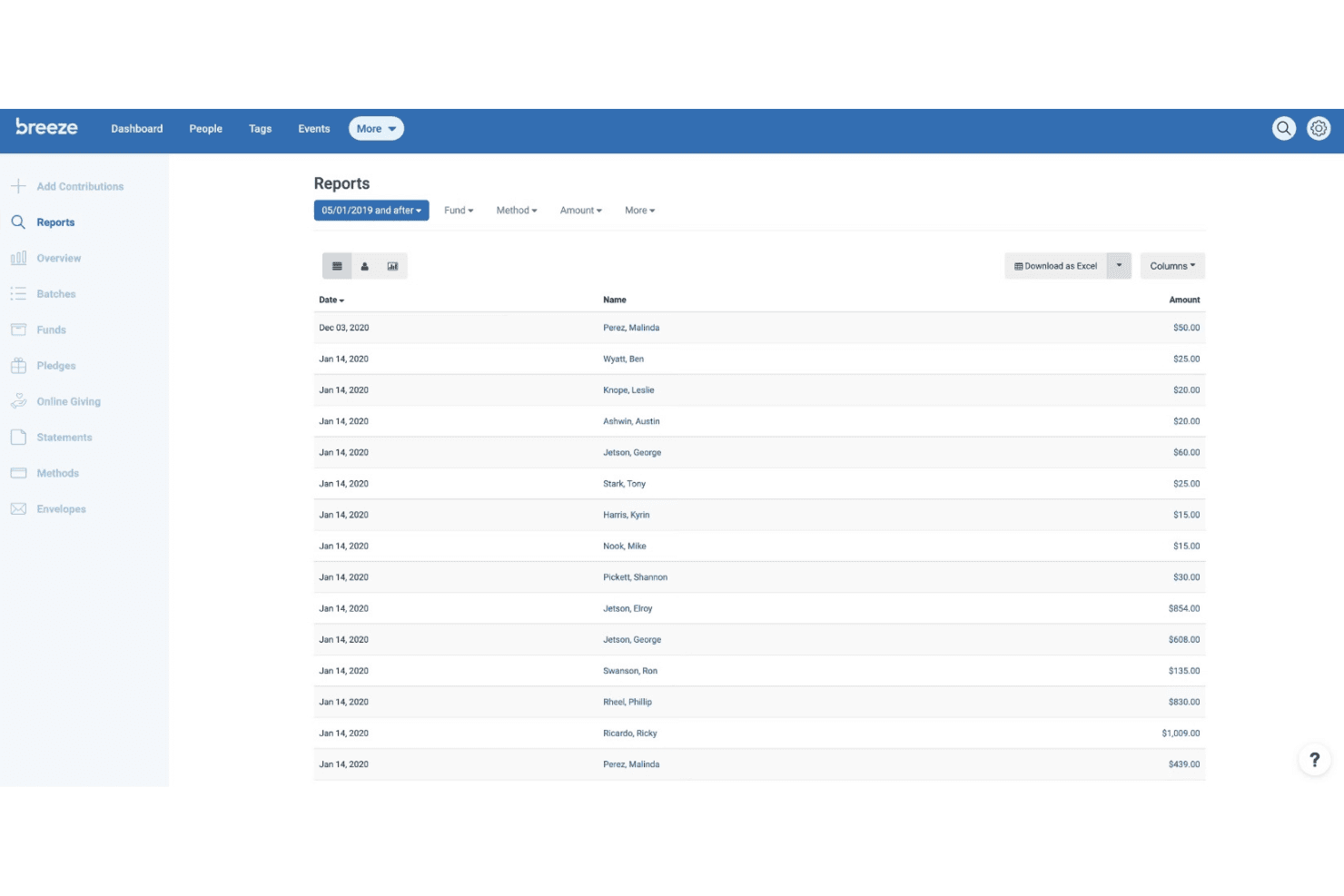
Breeze ChMS lets users view and filter contribution reports by date and donor. Breeze ChMS (now part of Tithely) is a church management platform built for congregations that need to organize members, track giving, coordinate volunteers, and communicate with their community in one place.
Who Is Breeze ChMS Best For?
Breeze ChMS is a natural fit for small and mid-sized congregations that want one place to manage members, giving, volunteers, and communications without a steep learning curve.
Why I Picked Breeze ChMS
I picked Breeze ChMS as one of the best because its people database genuinely lives up to the ease-of-use promise: staff can tag a first-time visitor, trigger a follow-up message sequence, and log their giving record without touching a single settings menu. I appreciate how attendance tracking connects directly to member profiles, so when someone misses a few Sundays, your team gets a clear signal without digging through reports. The drag-and-drop email editor and built-in forms round out a setup that most volunteer-run offices can run confidently from day one.
Breeze ChMS Key Features
- Giving records and contribution reports: Log cash, check, and online gifts against member profiles and generate tax receipts and contribution reports.
- Volunteer scheduling: Assign roles, schedule recurring service positions, and send shift reminders that volunteers can confirm or decline by email or in the app.
- Child check-in with security codes: Check in kids, print name tags, and issue unique security codes required at pickup.
- Tag-triggered follow-up progressions: Automatically start a sequence of tasks or messages when a tag is applied or someone is added to a group.
Breeze ChMS Integrations
Integrations include QuickBooks Online, Salesforce, Planning Center Online, Church Community Builder, MinistryPlatform, FellowshipOne, Shelby, Rock RMS, Engiven, Elvanto, and CCLI SongSelect. An API and total integration count aren’t stated.
Pros and Cons
Pros:
- Native forms capture registration details
- Tag-triggered follow-ups handle basic nurture
- Church member records link attendance and giving
Cons:
- Follow-ups lack documented conditional branching
- No sales pipeline for Keap workflows
Learn more about Breeze ChMS: Best for online and mobile giving
- Free plan + 30-day trial + demo available
- From $72/month
Visit WebsiteCustomer Rating:4.8/5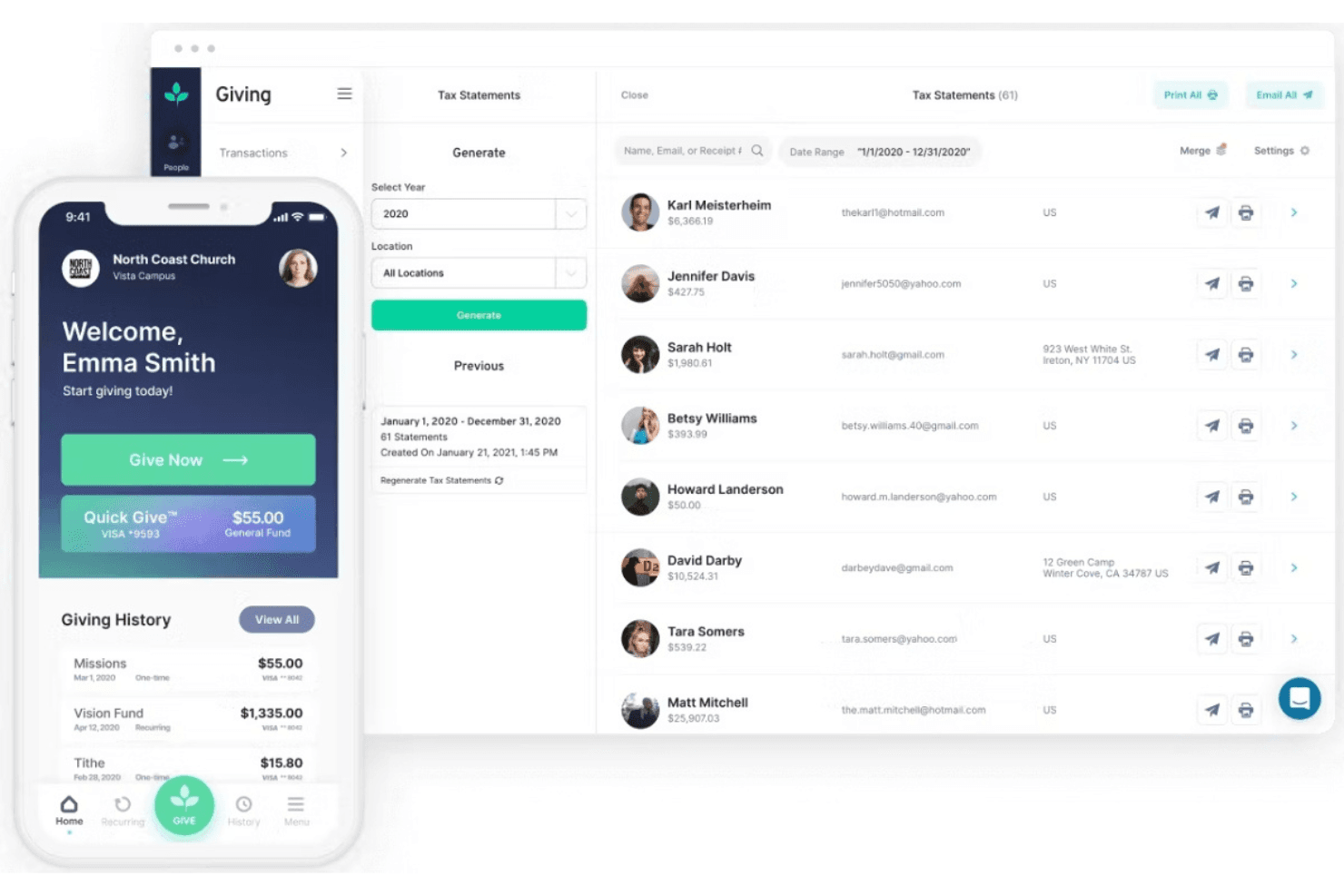
Tithe.ly lets users manage giving and generate donor tax statements. Tithe.ly is a church management platform built for congregations that want to handle giving, member records, volunteer scheduling, and communications without juggling multiple tools.
Who Is Tithe.ly Best For?
Tithe.ly is a strong fit for churches and ministries that want to manage giving, members, volunteers, and communications from one platform.
Why I Picked Tithe.ly
I've included Tithe.ly in my top picks because it's purpose-built for churches that want giving and member management working together in one place. I love how online and mobile giving connects directly to member profiles, so donation records, pledge campaigns, and contribution statements all live alongside congregation data. Text-to-give and ACH support mean members can give from anywhere, and the giving dashboard shows incoming gifts in real time.
Tithe.ly Key Features
- Member database: Stores contact details, custom fields, attendance records, and giving history in a single people database linked to member profiles.
- Volunteer scheduling: Assigns roles and recurring service positions, sends automated reminders, and lets volunteers confirm or decline shifts from their phones.
- Kids and event check-in: Runs self-service check-in with parent-guardian matching, unique security codes, and printable name tags that include allergy and special-needs alerts.
- Workflow automation: Triggers automated emails and texts based on group additions, giving behavior, or milestones like birthdays to keep follow-up moving without manual effort.
Tithe.ly Integrations
Tithe.ly lists integrations with QuickBooks Online, Planning Center Online, MinistrySafe, Salesforce, Elvanto, and Rock RMS, but it doesn’t state an integration count or public API availability.
Pros and Cons
Pros:
- Volunteer scheduling supports ministry teams
- Giving records support donor follow-up
- Member records connect attendance and giving
Cons:
- Automation lacks complex nurturing sequences
- No sales pipeline or deal tracking
 3Best for personalized support
ACS
- Free trial + free demo available
- Pricing upon request
Visit WebsiteCustomer Rating:3.8/5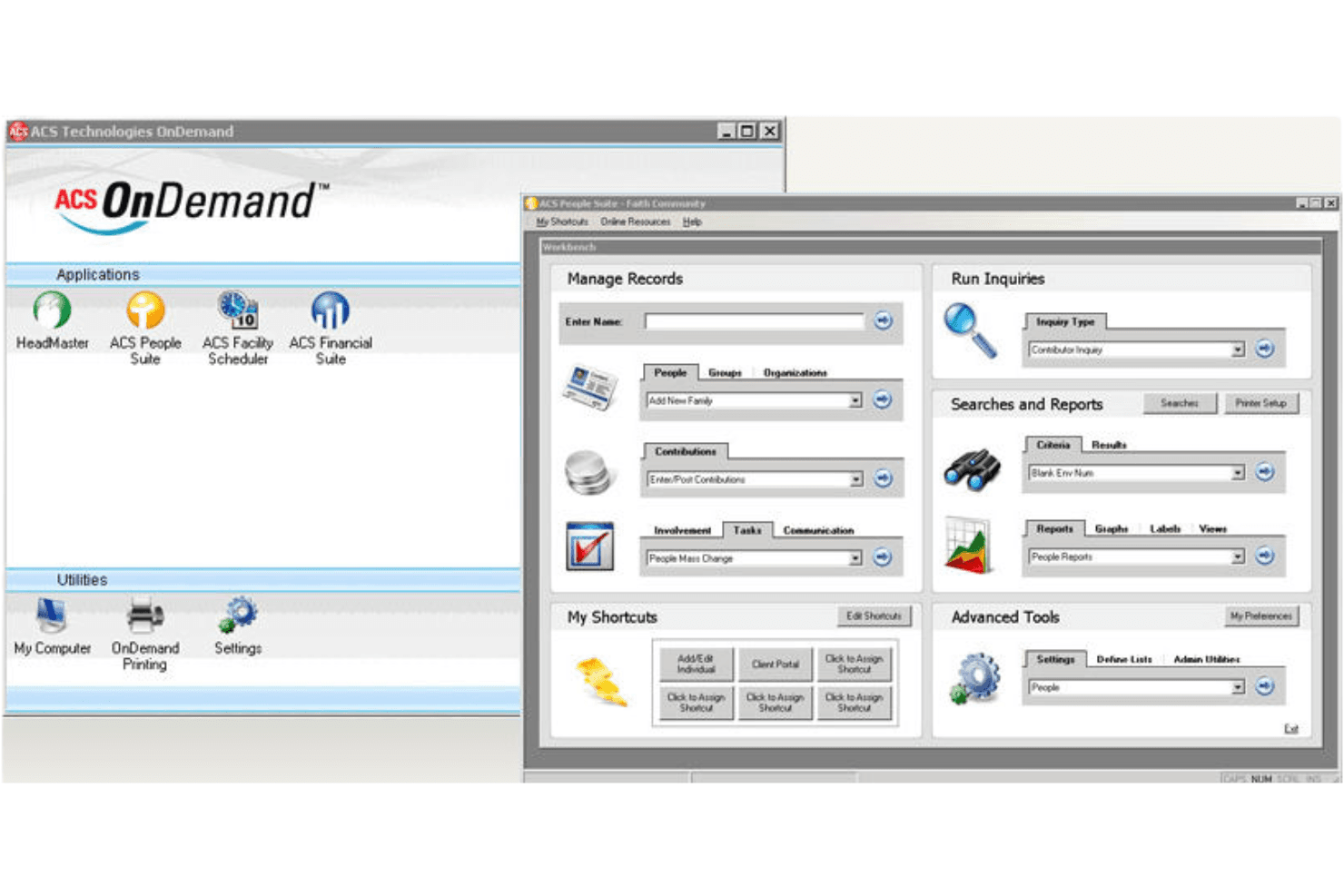
ACS centralizes church management tools in one dashboard. Growth Method by ACS Technologies is a ministry engagement platform that helps church staff automate visitor follow-up, track member outreach, and manage communication workflows alongside your existing church management system.
Who Is ACS Best For?
Growth Method by ACS Technologies is built for church staff who need a structured, guided approach to visitor follow-up and member engagement alongside their existing church management system.
Why I Picked ACS
I picked ACS as one of the best because the support behind Growth Method is genuinely hands-on. When my team is setting up visitor follow-up tracks or mapping form fields to our church management system, having access to guided onboarding, on-demand training, and ongoing guidance means we're never stuck figuring it out alone. I appreciate that Growth Method pairs that support with practical tools like automated tracks and OCR-powered visitor card scanning, so follow-up actually happens consistently after Sunday services.
ACS Key Features
- Visitor card scanning: Uses OCR technology to convert handwritten visitor cards into digital records ready for follow-up.
- Text keyword delivery: Lets visitors text a keyword to automatically receive a form and get placed into the right ministry track.
- ChMS field mapping: Connects form and card fields directly to your church management system's data structure for clean, consistent records.
- Campaign messaging: Sends emails or texts to your full congregation or specific segments to share news, volunteer openings, or giving opportunities.
ACS Integrations
ACS documents eight native integrations, including MinistryPlatform, ROCK RMS, Pushpay, Planning Center, FellowshipOne, Elvanto, Realm, and Twilio. Growth Method syncs ministry data with connected ChMS platforms, while SMS uses the customer’s Twilio account.
Pros and Cons
Pros:
- Tracks assign follow-up tasks and messages
- OCR converts handwritten visitor cards
- Guided onboarding and ongoing staff support
Cons:
- No sales pipeline or deal tracking
- Requires a separate church management system
Learn more about ACS: Best for customizable features
- Free plan + free demo available
- From $69.99/month
Visit WebsiteCustomer Rating:4.8/5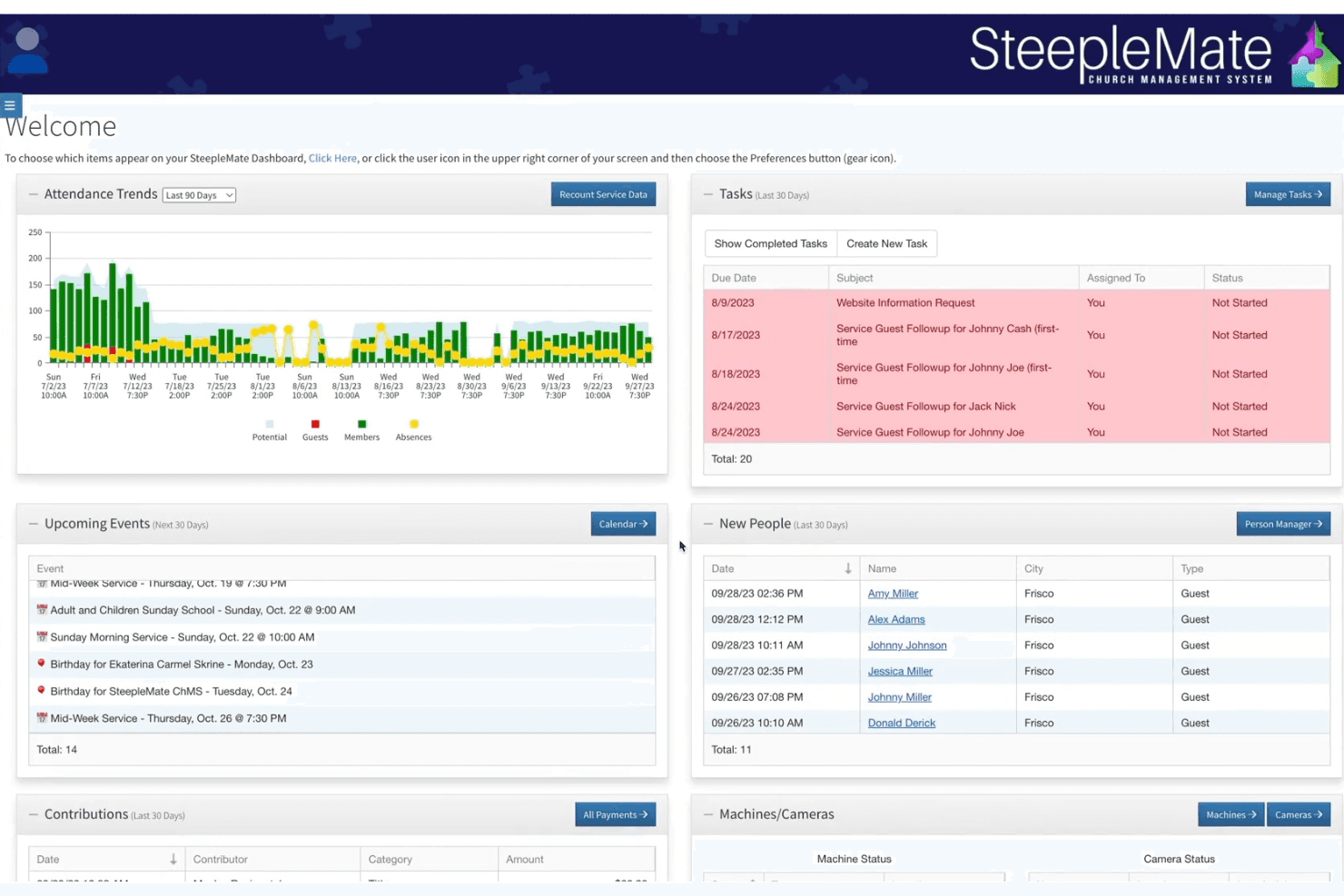
SteepleMate's dashboard centralizes attendance, tasks, and new guest tracking. SteepleMate is a church management system that brings together member records, communications, giving tools, and ministry planning in one place for churches looking to replace scattered tools with something built specifically for their needs.
Who Is SteepleMate Best For?
SteepleMate is a strong fit for churches and ministries that want to manage members, giving, and communications in one purpose-built system.
Why I Picked SteepleMate
I've included SteepleMate in my top picks because its customizable features let your church shape the system around how you actually operate, not the other way around. I particularly like CareTracks, which lets you build trigger-based follow-up sequences tied to real moments, like a guest submitting a connect card or attending an event, automating texts, tasks, and emails across weeks without manual follow-up. Dynamic groups are another standout: you define the rules once, and SteepleMate continuously re-evaluates who belongs based on live profile data like membership status, tags, or attendance history.
SteepleMate Key Features
- Church Directory: Maintains searchable member, guest, and family profiles with contact details, engagement history, custom fields, and tags.
- Attendance tracking: Records attendance for services, events, and groups, with built-in reporting and follow-up suggestions for absentees.
- Text-to-give: Lets donors give by texting a keyword, with first-time donors guided through a one-time payment setup and repeat donors using a saved method.
- QuickBooks Online integration: Automatically posts online and in-person gifts to QuickBooks accounts, maps giving categories, and supports corrections and resynchronization.
SteepleMate Integrations
SteepleMate has one documented marketplace integration: QuickBooks Online, which syncs online and in-person gifts with mapped giving categories and supports corrections and resynchronization. No API or additional integrations are documented.
Pros and Cons
Pros:
- Customizable features support ministry-specific workflows
- Automated guest follow-ups pair texts, tasks, and emails
- Church-specific contact records centralize member histories
Cons:
- Public form sharing requires QR-code workarounds
- No sales pipeline for tracking prospects
Learn more about SteepleMate: Best for nonprofits and education
- Free demo available
- Pricing upon request
Visit WebsiteCustomer Rating:3.5/5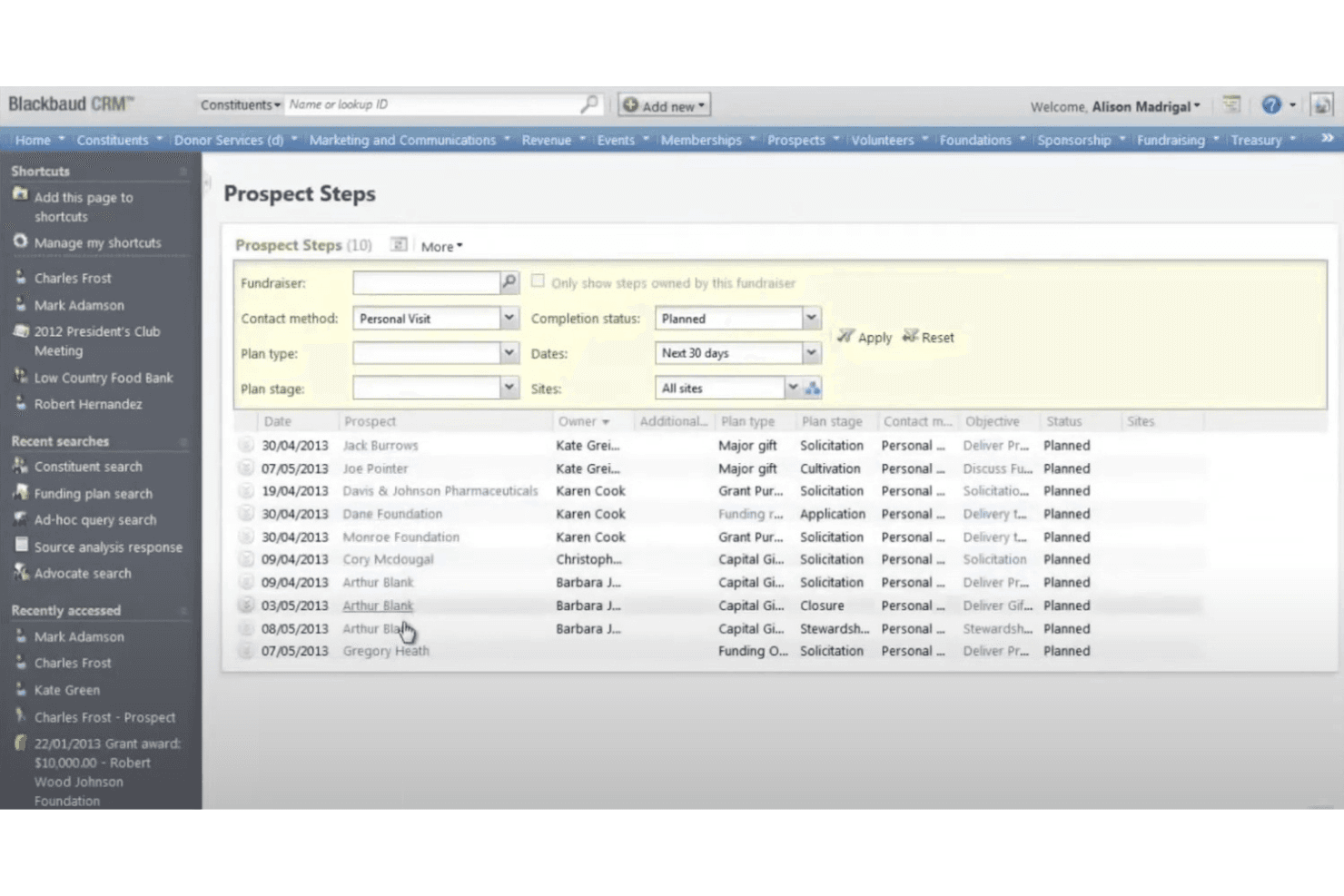
Blackbaud CRM helps fundraisers track and filter prospect steps by date. Blackbaud is an enterprise CRM built specifically for nonprofits and higher education institutions, helping large organizations manage constituent relationships, fundraising operations, and donor stewardship in one platform.
Who Is Blackbaud Best For?
Blackbaud is built for large nonprofits and higher education institutions that need enterprise-grade tools to manage donor relationships and fundraising operations at scale.
Why I Picked Blackbaud
I picked Blackbaud as one of the best Keap alternatives because it's purpose-built for nonprofits and higher education institutions that need enterprise-grade constituent management. I appreciate how it centralizes donor records across individuals, households, and organizations into one shared view, with relationship mapping that surfaces connections for coordinated outreach. Its major-gift pipelines give fundraising teams structured visibility into prospect progress, ask opportunities, and portfolio health in a way general-purpose CRMs simply don't offer.
Blackbaud Key Features
- Constituent segmentation: Query and filter constituent records by contact details, attributes, communications, and interactions to build targeted outreach lists.
- Dynamic recipient list refresh: Recipient lists built on dynamic queries automatically refresh at send time, so email messages go to current, up-to-date segments.
- Volunteer matching and scheduling: Match volunteers to job occurrences based on type, availability, location, and verified traits, then track schedules and generate volunteer reports.
- REST API and SDK access: Connect Blackbaud CRM to external systems, automate workflows, and pipe data into analytics environments using open REST APIs and SDKs.
Blackbaud Integrations
Blackbaud documents integrations with Microsoft 365, Microsoft Teams, Microsoft Power BI, Microsoft Dynamics 365, Google, and Salesforce. Marketplace integrations include GiveWP and JustGiving, while REST APIs and SDKs support custom connections.
Pros and Cons
Pros:
- Volunteer matching accounts for availability and qualifications
- Major-gift pipelines track prospect progress and portfolios
- Constituent records unite giving histories and interactions
Cons:
- Automated nurturing lacks behavior-triggered branching sequences
- Fundraising pipelines don’t replace commercial sales stages

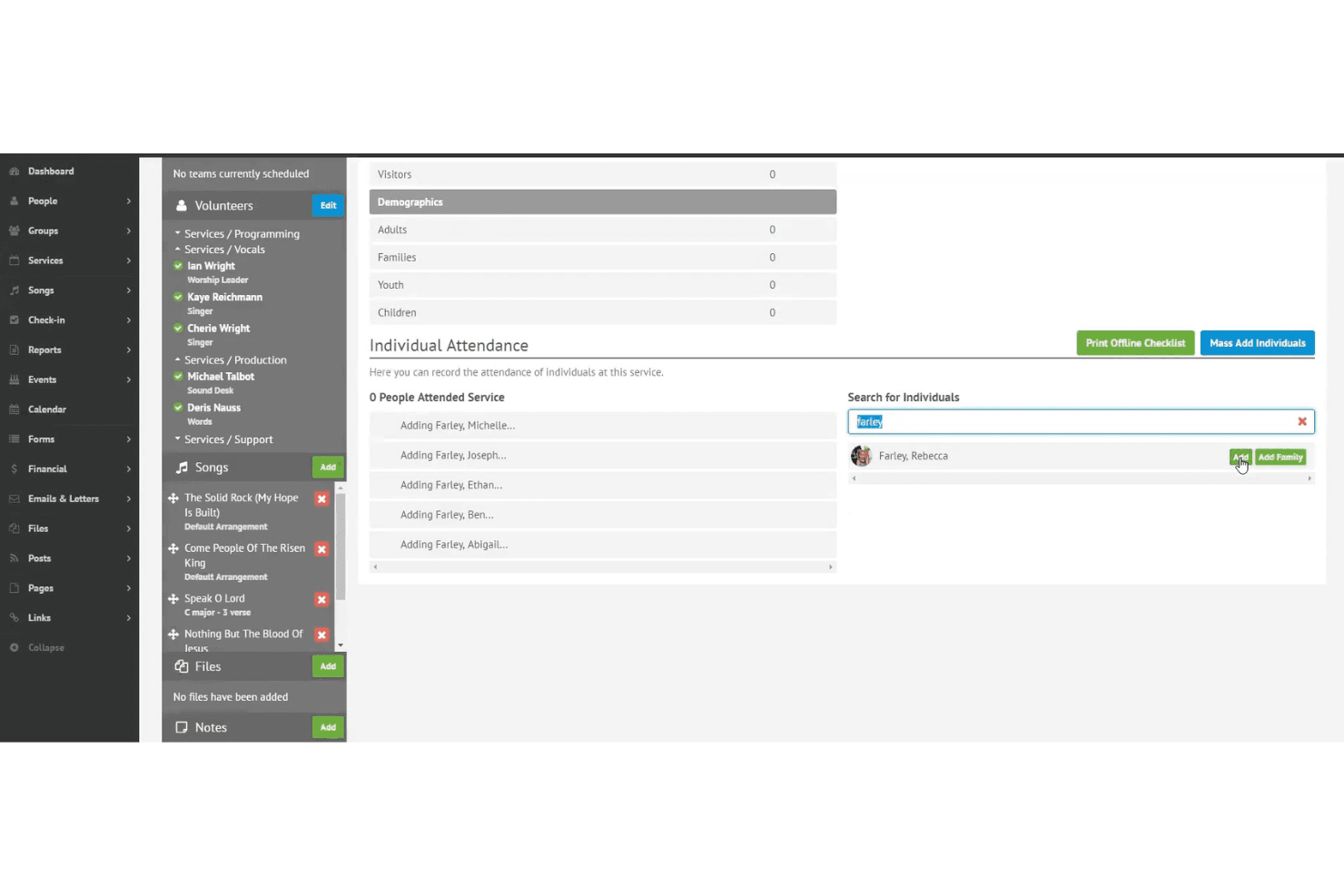
Elvanto lets users search and record individual service attendance. Elvanto is a cloud-based church management system built for churches that want to handle member records, volunteer scheduling, child check-in, giving tracking, and event management in one place.
Who Is Elvanto Best For?
Elvanto is a strong fit for churches and ministries that want to manage members, volunteers, giving, and child check-in from a single platform.
Why I Picked Elvanto
I picked Elvanto as one of the best because it brings every corner of church administration into a single platform in a way that genuinely replaces the need for multiple tools. I especially like how volunteer scheduling and child check-in work together with member records, so I can pull up a family profile and see attendance history, assigned volunteer roles, and giving records without switching screens. People Flows let me assign and track follow-up steps for newcomers or inactive members directly against their profiles.
Elvanto Key Features
- Child check-in system: Parents can self-check children in via kiosk, computer, or tablet using a phone number, last name, or barcode, with security codes generated for pickup.
- Online giving tracking: Records individual giving and pledges, generates giving statements, and connects to online giving providers including Tithe.ly, Stripe, and PayPal.
- Group management: Organizes members into groups with assigned leaders, attendance tracking, notes, event invitations, and a map view to locate groups by area.
- Custom forms: Builds embeddable or URL-shareable forms that collect contact information and automatically update existing member records in the database.
Elvanto Integrations
Elvanto offers native integrations with Tithe.ly, Google Calendar, and SongSelect. Event payments can connect with Stripe and PayPal, and an API supports custom integrations.
Pros and Cons
Pros:
- Coordinates volunteer teams and service schedules
- Assigns and tracks personal follow-up steps
- Centralizes member, family, attendance, and giving records
Cons:
- Follow-up flows lack behavior-based automation
- No sales pipeline or deal tracking
Learn more about Elvanto: Best for affordability and simplicity
- 30-day free trial + free demo available
- From $29/month
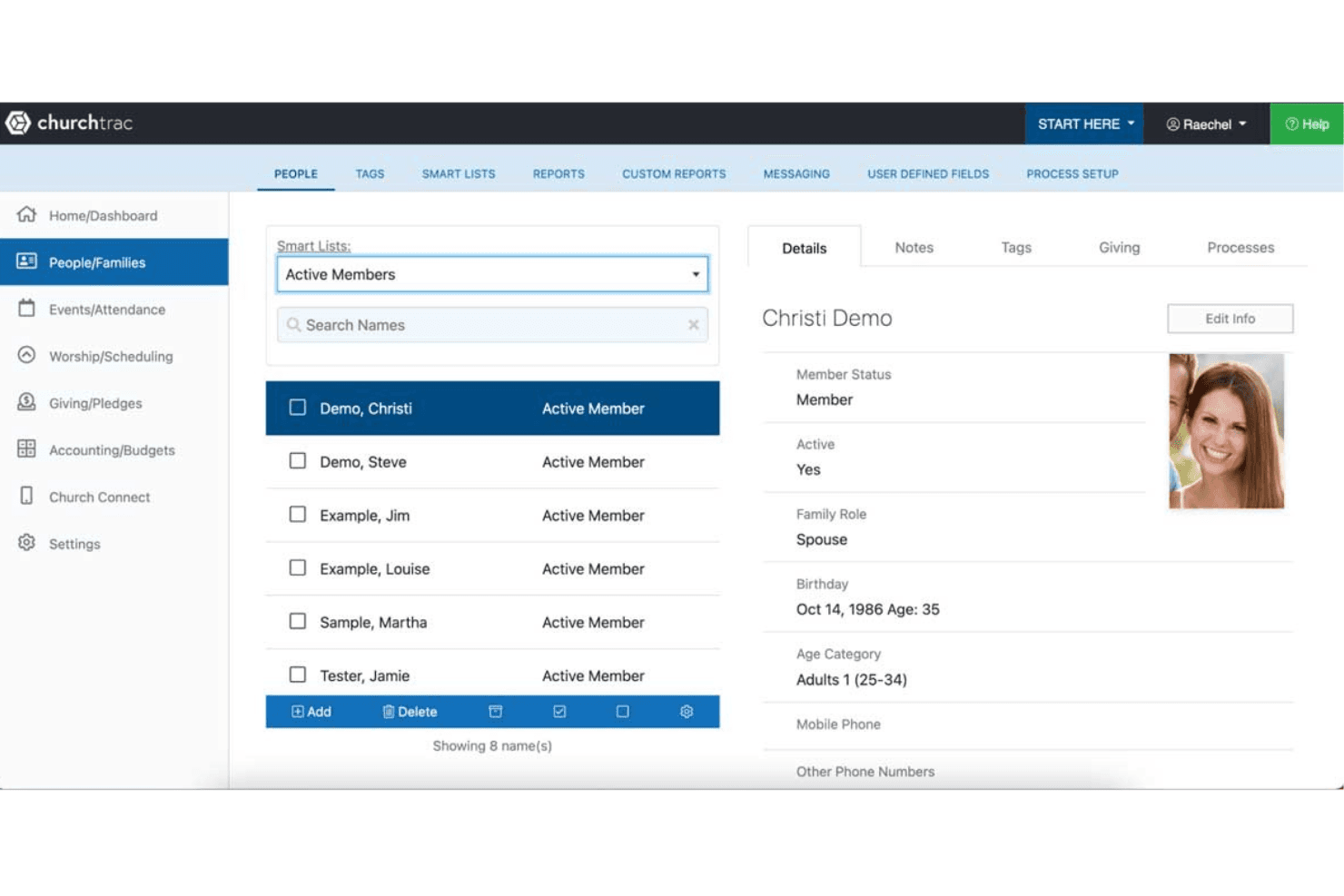
ChurchTrac lets users view and manage member profiles and details. ChurchTrac is an all-in-one church management platform built for small and mid-sized congregations that need to manage members, giving, events, and communications without juggling multiple tools.
Who Is ChurchTrac Best For?
ChurchTrac is a great fit for small and mid-sized congregations that want an affordable, all-in-one platform to manage members, giving, and communications without the complexity of enterprise church software.
Why I Picked ChurchTrac
I picked ChurchTrac as one of the best because it packs member records, giving, event registration, and automated follow-up sequences into a single platform starting at $29/month. I especially like how automations trigger on first gifts or status changes, so pastoral care workflows run without manual effort. The name-based pricing also means your costs stay predictable as your congregation grows.
ChurchTrac Key Features
- Member records with custom fields: Store individual and family profiles with custom field types, including yes/no, date, selection list, and text, to capture congregation-specific information.
- Fund accounting: Track designated and restricted funds across multiple bank accounts, with budgeting, bank reconciliation, and balance sheet reporting built in.
- Child check-in with security codes: Run staff or self check-in kiosks, print labels with family security codes, and log allergy notes and check-outs for children's ministry.
- Volunteer scheduling with availability tracking: Assign team roles to services, let volunteers set unavailable dates, and send SMS or email reminders up to three days before an event.
ChurchTrac Integrations
ChurchTrac offers native integrations with Stripe, SongSelect, PraiseCharts, and MinistrySafe. It also names Amazon SES and SendGrid as alternative email integrations for larger ministries, but doesn’t document an API or total integration count.
Pros and Cons
Pros:
- Combines volunteer scheduling with child check-in
- Triggers follow-ups from member and giving changes
- Centralizes household, giving, and member records
Cons:
- Email lacks engagement analytics and branching
- No deal stages or sales pipeline
Learn more about ChurchTrac:
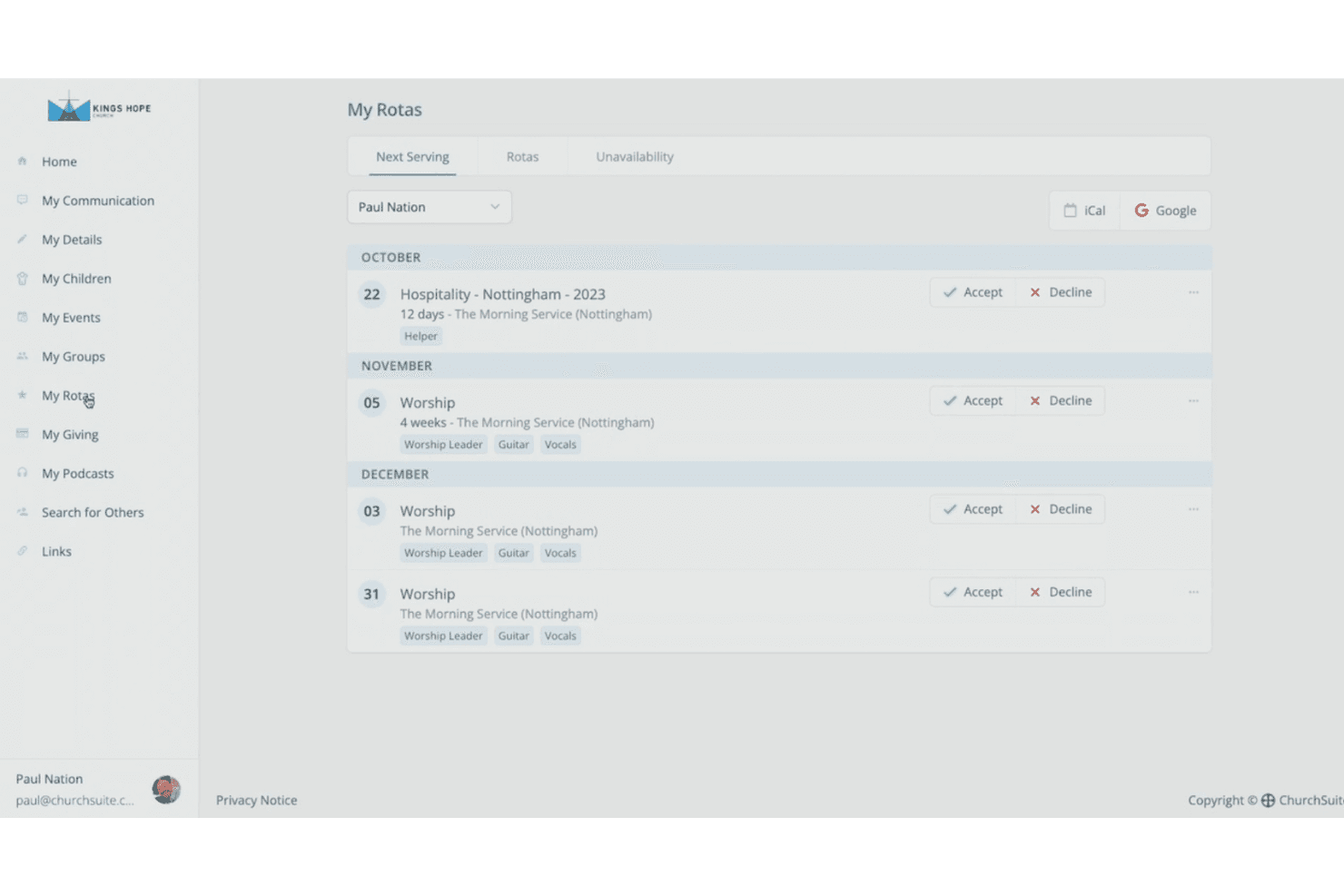
ChurchSuite lets users view and respond to upcoming rota assignments. ChurchSuite is a church management system built specifically for ministry teams that need to organize members, coordinate volunteers, manage events, and handle giving—all from one place.
Who Is ChurchSuite Best For?
ChurchSuite is built for church administrators and ministry teams that need to manage events, rotas, and congregation records in one place.
Why I Picked ChurchSuite
ChurchSuite earns its spot on my shortlist because of how well it handles event planning and coordination for ministry teams. I love that the Calendar module lets you create branded event pages, manage resource bookings with clash detection, and even handle staff leave alongside your event schedule. The Planning module adds another layer I appreciate: online scheduling for services and worship, including song planning and team schedules, all in one place.
ChurchSuite Key Features
- Address Book contact management: Stores member records with custom fields, Smart Tags, notes, key dates, and communication history all in one place.
- ChurchSuite Flows: Runs staged, timed sequences of automated or manual actions—including email, SMS, tagging, and notes—across multiple modules.
- Online giving forms: Accepts one-off and recurring donations via Stripe or GoCardless, with giving data tracked in reports and recurring donations recorded as pledges.
- Rota scheduling: Builds custom team rotations, tracks member unavailability, and alerts overseers to scheduling clashes when assigning or swapping volunteers.
ChurchSuite Integrations
ChurchSuite supports integrations with Stripe and GoCardless for online donations. It also offers Core and Embed APIs with OAuth 2.0 and OpenID Connect for custom integrations.
Pros and Cons
Pros:
- Volunteer rotas flag availability conflicts
- Congregation records keep notes and communications together
- Church event coordination outpaces generic CRMs
Cons:
- Email tools lack documented campaign testing
- No deal stages for sales pipelines
Learn more about ChurchSuite:
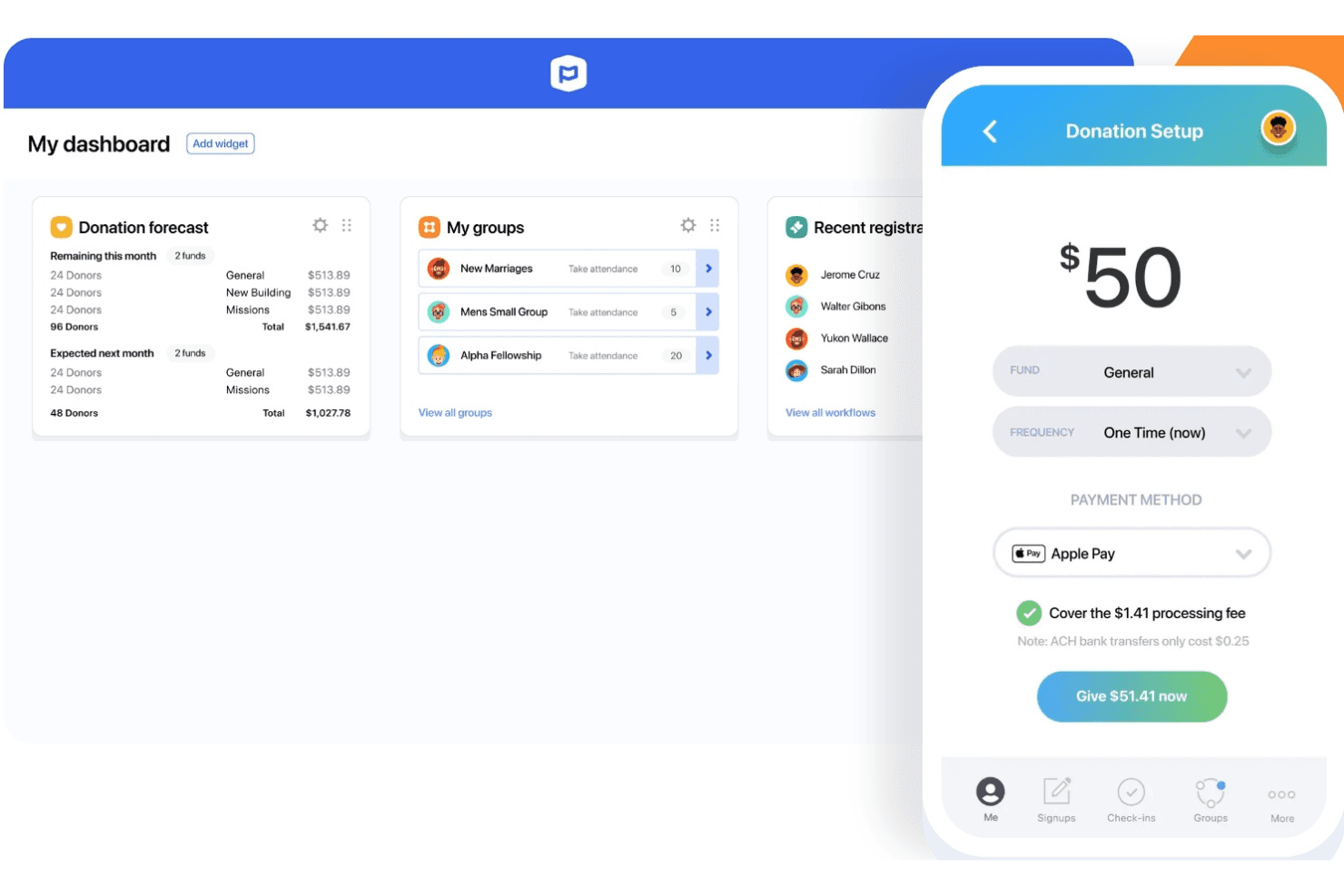
Planning Center lets users manage donations, groups, and giving setup. Planning Center People is a church membership database that centralizes congregation records, follow-up workflows, and ministry activity—making it a natural fit for church administrators who need to track member engagement without paying for tools built around sales pipelines they'll never use.
Who Is Planning Center Best For?
Planning Center People is a natural fit for church administrators and ministry staff who need a free, purpose-built database to manage congregation records and follow-up workflows.
Why I Picked Planning Center
I've included Planning Center in my top picks because its modular pricing model means you only pay for the tools your church actually needs. People, the core membership database, is free for every church with unlimited records, and you layer in paid modules like Giving, Groups, or Check-Ins only when your ministry is ready. I especially like how auto-refreshing lists tie directly into multi-step follow-up workflows, so when someone submits a connection card, they can be automatically enrolled in a first-time visitor sequence without any manual intervention.
Planning Center Key Features
- Custom profile fields: Create church-specific fields—such as baptism dates, spiritual gifts, or communication preferences—that appear in lists, forms, and member profiles.
- Conditional-logic forms: Build forms where fields appear or hide based on a respondent's previous answers, then share them via public URL, QR code, or website embed.
- Household grouping: Assign members to households with defined roles—primary contact, parent, guardian, child—so lists and reports surface the right person for each family.
- Permission-based note access: Store sensitive member notes, such as prayer requests or counseling records, and restrict access to specific collaborators by category.
Planning Center Integrations
Planning Center has native integrations with Mailchimp and Checkr, plus marketplace integrations including Pushpay, CareNote, and Clearstream. It offers a JSON API and Zapier support for custom connectivity.
Pros and Cons
Pros:
- Reviewers praise organized lists and member information
- Automates visitor follow-up through forms and workflows
- Centralizes congregation records and ministry activity
Cons:
- Built-in email tools offer basic formatting
- No sales pipelines for tracking deals
Learn more about Planning Center: Best for cost-effective solutions
- Free plan + 7-day free trial available
- From $75/month
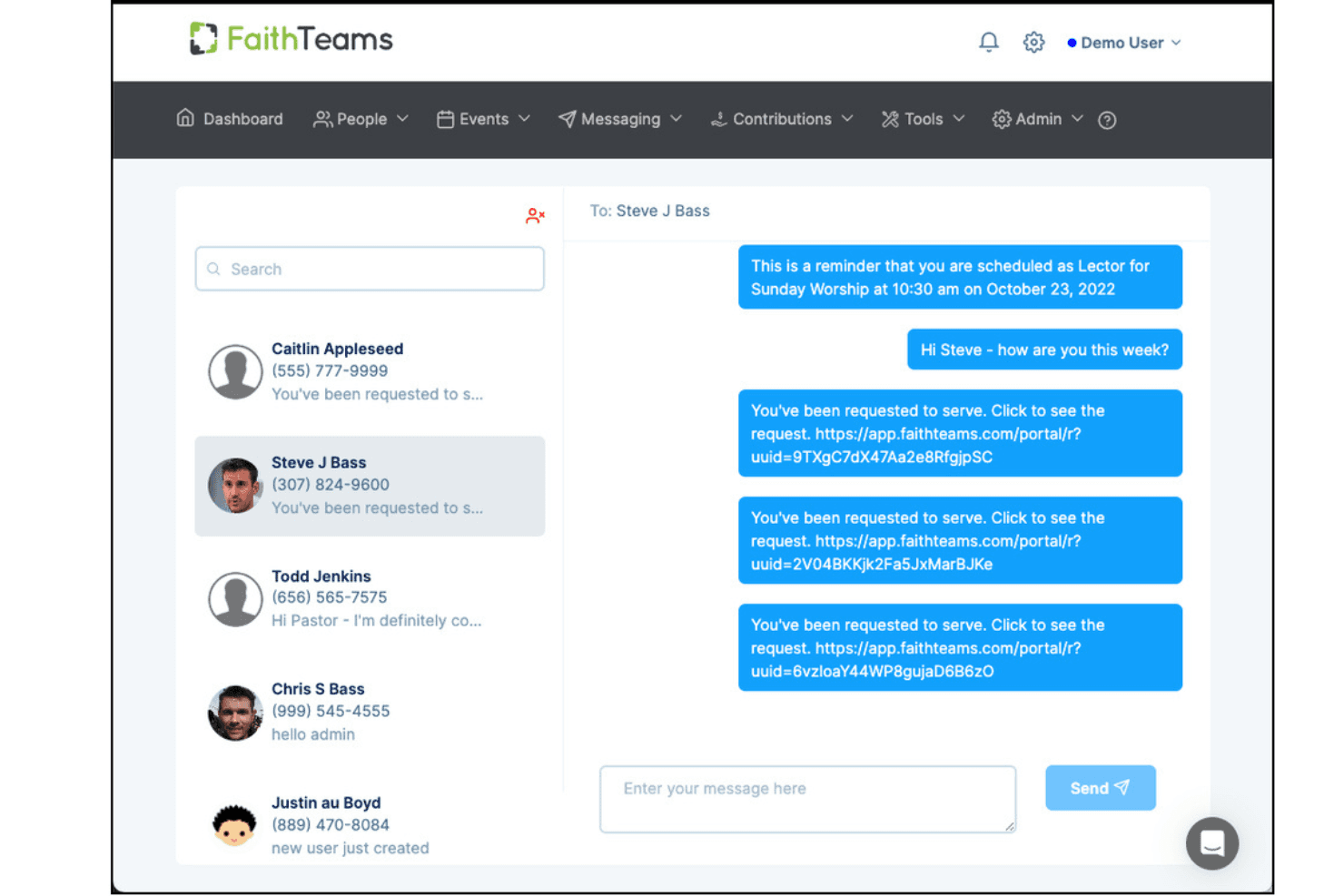
Faith Teams lets staff message members directly within the platform. Faith Teams is church management software built for congregations that need to manage people, giving, communications, and volunteer coordination without paying enterprise-level prices.
Who Is Faith Teams Best For?
Faith Teams is built for churches and ministries that want to manage people, giving, and communications without overpaying for features they'll never use.
Why I Picked Faith Teams
I picked Faith Teams as one of the best because it delivers genuine church management capability at a price that won't strain a ministry budget. Paid plans start at $75/month and scale by congregation size, so you're only paying for the people you actually have. I especially like that automated guest follow-up workflows handle multi-step outreach sequences, sending a welcome text, scheduling a staff call, and following up by email without manual effort. The free migration support means moving your existing member records in costs nothing extra.
Faith Teams Key Features
- Tag-based segmentation: Apply multiple tags to contacts to organize your congregation into targeted groups for communications.
- Two-way texting: Send text blasts and receive replies through a live chat screen, with message history logged to each person's profile.
- Child check-in: Print name tags for children and matching pickup tags for parents or guardians, with options to record allergies or special needs.
- Role-based user permissions: Assign staff and volunteers roles that limit their access to only the information relevant to their responsibilities.
Faith Teams Integrations
Native integrations are not clearly documented. Faith Teams provides a REST API using API keys and secrets with Basic Auth for custom integrations.
Pros and Cons
Pros:
- Household records link family members and roles
- Guest follow-up combines texts, emails, assignments
- Reviewers praise tag-based contact segmentation
Cons:
- Workflows lack branching and lead scoring
- No sales pipeline or deal tracking
Learn more about Faith Teams:
Alte alternative la Keap
Iată câteva alternative suplimentare la Keap care nu au ajuns pe lista mea scurtă, dar merită totuși analizate:
- 11ChMeetingsBest for multilingual support
- 12One Church SoftwareBest for centralized communication
- 13RealmBest for community engagement tools
- 14TouchpointBest for mobile app features
- 15Servant KeeperBest for detailed member records
- 16iChurchBest for online worship integration
- 17ExcellerateBest for customizable reporting
Related Reviews
How I Evaluate Keap Alternatives
I split my evaluation into two layers: core functionality every tool must cover, like CRM, automation, and giving—plus differentiators like nonprofit pricing and ministry integrations that separate good from great.
Core Functionality (Table Stakes For This List)
When I'm selecting tools for my list, I rank each one on a scale from 0 (does not offer the functionality) to 5 (excels in this area) for each core functionality listed below. I then calculate the tool's total score into a percentage, using 65% as a benchmark to help assess its overall fit for the list.
- CRM & Contact Management: I look for segmentation, custom fields, and tagging that let you group congregants by ministry involvement, giving history, or visitor status.
- Marketing Automation Workflows: Visual builders with branching logic matter here—like triggering a welcome sequence when someone fills out a visitor card, then splitting the path based on whether they attend again.
- Email & SMS Marketing: I evaluate whether a tool supports both channels natively with templates, tracking, and audience segmentation for things like sermon reminders or volunteer shift alerts.
- Landing Pages & Forms: The form and page builders need to sync directly with the CRM so event registrations and small group sign-ups flow into contact records without manual imports.
- Payments & Recurring Billing: Recurring giving is table stakes for churches, so I check for native payment processing that handles one-time donations, recurring tithes, and event fees in one place.
- Pipeline & Task Management: Automated task assignment is what I'm looking for—tools that can move a new visitor through a follow-up pipeline and remind staff to send a personal note after their second visit.
Once I have a list of tools that meet the criteria, I consider what sets each platform apart.
Differentiating Factors (What Sets Vendors Apart)
Here's how I compare and contrast different vendors:
Standout Features
I check whether a platform supports household or family grouping, since churches need giving history and communications to roll up across related members rather than treating each person as a separate contact. Recurring giving portals also matter—I look for self-service options where donors can update payment methods and download year-end tax receipts without calling the church office. Beyond that, a native mobile app for staff is a real differentiator because pastors log care visits and update follow-up pipelines from hospital rooms, not desks.
Beyond Features
I check whether a platform offers nonprofit or ministry-specific pricing tiers, since most churches budget annually and need predictable costs as their contact list grows. Integration depth matters just as much—I look for native connections to tools like Planning Center, Tithe.ly, or QuickBooks so giving data stays reconciled without manual exports. I also evaluate onboarding support, especially migration help from legacy systems like Breeze or ChurchTrac, because non-technical staff need a guided path to go live.
De ce să căutați o alternativă la Keap?
Deși Keap este o alegere bună pentru instrumentele de baze de date ale bisericilor, există mai multe motive pentru care unii utilizatori caută soluții alternative. Este posibil să căutați o alternativă la Keap deoarece…
- Aveți nevoie de funcții de raportare mai avansate
- Echipa dumneavoastră necesită un suport multilingv mai bun
- Căutați opțiuni de preț mai accesibile
- Aveți nevoie de un instrument cu o integrare mai bună a aplicației mobile
- Biserica dumneavoastră necesită mai multe posibilități de personalizare
Dacă vă regăsiți în oricare dintre aceste situații, ați ajuns în locul potrivit. Lista mea conține mai multe opțiuni de instrumente pentru baze de date ale bisericilor, mai potrivite pentru echipele care se confruntă cu aceste provocări legate de Keap și caută soluții alternative. Nu am putut accesa site-ul Keap pentru a prelua direct funcțiile principale. Totuși, pe baza cunoștințelor generale despre sistemele CRM și a informațiilor anterioare despre Keap, pot oferi o listă a funcțiilor principale asociate în mod obișnuit cu Keap. Dacă aveți nevoie de cele mai exacte și detaliate funcții, vă recomand să vizitați direct site-ul Keap.
Funcțiile principale ale Keap
Iată câteva dintre funcțiile principale ale Keap, pentru a vă ajuta să comparați ceea ce oferă soluțiile alternative:
- Gestionarea CRM: Ține evidența tuturor interacțiunilor și detaliilor despre clienți într-un singur loc, facilitând gestionarea relațiilor.
- Generator de automatizări: Vă permite să automatizați sarcini repetitive precum urmăririle, e-mailurile și mementourile, economisind timp pentru echipa dumneavoastră.
- Marketing prin e-mail și mesaje text: Vă permite să creați și să trimiteți campanii de marketing direct de pe platformă, pentru a interacționa cu publicul dumneavoastră.
- Gestionarea procesului de vânzări: Vă ajută să vizualizați și să gestionați procesul de vânzări, de la generarea potențialilor clienți până la încheierea contractelor.
- Pagini de destinație: Vă permite să creați pagini de destinație personalizate pentru a capta potențiali clienți și a crește conversiile, fără a avea nevoie de un instrument separat.
- Programarea întâlnirilor: Simplifică procesul de stabilire a întâlnirilor cu clienții, reducând comunicarea repetitivă.
- Procesarea plăților: Integrează soluții de plată pentru a gestiona tranzacțiile direct în cadrul platformei, facilitând gestionarea financiară.
- Raportare și analiză: Oferă informații despre eforturile de vânzări și marketing, ajutându-vă să luați decizii bazate pe date.